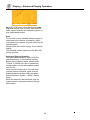
1
Media Player – Special operation of data discs and USB playing
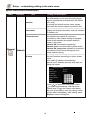
Note:
With media player, you can play the photos, music
and video saved in data discs and USB devices
(including HDD).
Item0/4
Media Center
USB1
=
Type: Folder
...
Photo
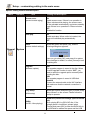
Compatible file format
Music
Movie
Audio
MP3,AAC,WMA
AVCHD
Video
MKV,TS,AVI,MPG,RMVB,DIVX,WMV
Photo
JPEG, PNG
=
File type
Popup Menu
Media Center
Edit Menu
Exit
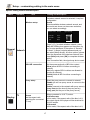
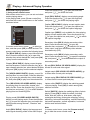
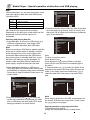
4.Press the direction key to select the type of the data
file to be played (e.g. picture, music or movie), and
then press OK to select the file directory of selected
type, as shown below:
Item0/7
Media Center
USB1/Movie
=
Selecting and playing data file
1.Insert data disc, or connect to USB device (e.g.
USB disk, digital camera, card reader, MP3
player or mobile hard disk) with USB cable.
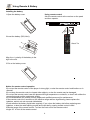
Note
Before connecting to USB device, please press the
power key to set the player to standby, and then
press the power key to turn on the player after
connected. Before disconnect the USB device,
also set the player to standby state first, or else
the files in the memory may be damaged. For
certain mobile hard disk without independent
power supply, maybe the data can’t be read.
...
Type: Folder
MP8550TOOL
UPG
BUDA
Pic
Mp3
Tools
=
MKV and AVI files support DIVX encoding.
Depending on the disc type, certain discs can’t be
played and certain functions may be not
compatible.
Popup Menu
Media Center
Edit Menu
Exit
Note
To return to previous menu:
Press direction key
Press direction key to select Return, and then
press [OK] to show the files of the selected type in
the menu.
2.After reading the data disc or USB device
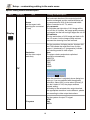
5. Press direction key [ ] to select the folder of the
(including HDD), the media center menu shows data files to be played, and then press OK open the
automatically. In stopped mode, press the Media folder; in the folder, press the direction key [ ] to
Center key to open the Media Center menu, as select the data files to be played, and press OK to
shown below.
play.
Item2/4
Media Center
!
Type: USB
Size: 1554.066M
FS: FAT32
Media Center
USB1/Movie/12345
=
=
BDMV
Item0/7
...
12
USB1
Playing list
=
Type: AVI
Total time: 01:43
Resolution: 624 X 352
Frame rate: 24fps
Popup Menu
=
Media Center
Edit Menu
Exit
Edit Menu
Media Center Exit
Popup Menu
3.Press the direction key [ ] [ ] to select the
media of the data files to be played (e.g. data
disc or USB disk), and then press OK to enter
data type selection, as shown below:
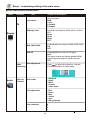
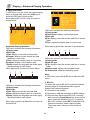
Note
When playing audio files, the OSD menu appears on
the screen. If the files are longer than 6 hours, press
the [
] key to turn pages.
Special operation in playing picture files
1.Operations while playing
[Stop]: stop playing and return to media center;
26