1
PROGRAMMING THE BREWER (cont.)
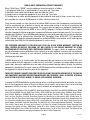
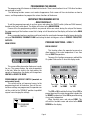
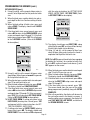
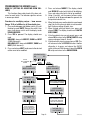
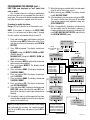
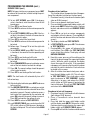
ASSIGN RECIPES
This function allows for assigning a coffee name
other than NO-NAME to the BREW switch.
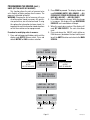
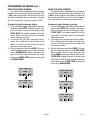
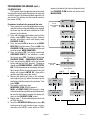
Procedure to assign recipes:
1. Press and hold the upper right hidden switch until
the display reads UNITS. Release the switch. Press
and release switch until the display reads ASSIGN
RECIPE ?.
2.Press YES to assign a recipe to the BREW switch
(left BREW switch on DUAL brewers).
3.Use (-) and (+) to select recipe which you want to
assign to the BREW switch.
4. For SINGLE brewers, press and release DONE
when selected to advance to next function screen,
ENABLE ADS. For DUAL brewers, repeat process
for right BREW switch recipe selection.
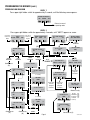
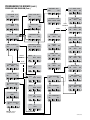
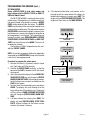
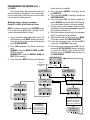
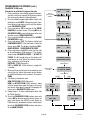
SINGLE
BREWERS
ASSIGN RECIPE?
NO
YES
SELECT RECIPE
5 SEC. DELAY
NO-NAME
(-)DONE(+)
EXIT TO
NEXT FUNCTION
SCREEN
DUAL
BREWERS
ASSIGN RECIPE?
NO
YES
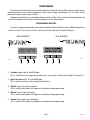
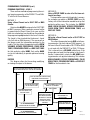
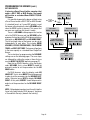
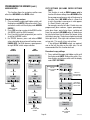
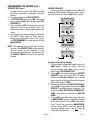
COPY SETTINGS (NO NAME COFFEE SETTINGS
ONLY)
This function is used on DUAL brewers only to
transfer all the brew settings from a NO NAME coffee
flavor programmed on one side of the brewer to
the other side. A NO NAME coffee is a flavor that
is not in the grinder's memory or is what appears
if a Smart Funnel is not used.
For example, once the left side's 3 batch sizes are
programmed (brew volumes, bypass percentages,
pulse brew times, pre-infusion times, and drip-out
times) for a particular NO NAME coffee, all the data can
be transferred from the left side of the brewer to the
right side in one step. The data can also be transferred
from right to left, if the right side had been the initial
set-up side. This results in less set-up time.
If two different NO NAME setups are required,
one on the left, the other on the right side, it is not
recommended that this function be used.
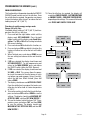
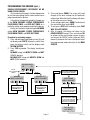
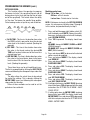
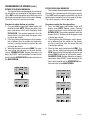
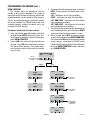
Procedure to copy settings:
1. Press and hold the upper right hidden switch until
the display reads UNITS. Release the switch. Continue to press and release switch until the display
reads COPY SETTINGS.
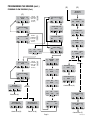
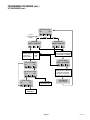
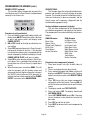
SELECT RECIPE
<-<-<-
EXIT TO
NEXT FUNCTION
SCREEN
5 SEC. DELAY
NO-NAME
(-)DONE(+)
SELECT RECIPE
->->->
5 SEC. DELAY
COPY SETTINGS?
NO
YES
LEFT ->->-> RIGHT
NO
YES
COPY LEFT
SIDE SETTINGS
TO RIGHT SIDE
LEFT <-<-<- RIGHT
NO
YES
COPY RIGHT
SIDE SETTINGS
TO LEFT SIDE
ARE YOU SURE?
NO
YES
NO-NAME
(-)DONE(+)
TRANSFER
COMPLETE
EXIT TO
NEXT FUNCTION
SCREEN
EXIT TO
NEXT FUNCTION
SCREEN
Page 26
41342 080108