1
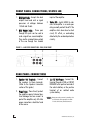
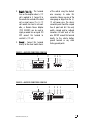
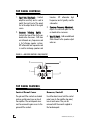
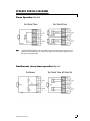
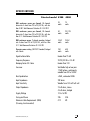
4200 models 4500 2 © 2002 Directed Electronics, Inc CONGRATULATIONS Congratulations for choosing a Directed Audio power amplifier from Directed Electronics, the industry leader in high quality automotive security and audio equipment since 1990. Directed Audio power amplifiers continue to set new standards of performance, reliability, and affordability in the mobile electronics industry. Featuring high-efficiency MOSFET power supplies, flexible on-board crossovers, and state of the art audio design, Directed Audio power amplifiers will excite and delight the mobile sound enthusiast with years of high-quality audio reproduction. Directed Audio power amplifiers come with a two-year limited warranty if installed by an authorized Directed dealer. If not installed by an authorized dealer, Directed Audio power amplifiers are covered by a one-year, parts-andlabor limited warranty. Be sure to retain your original sales receipt and refer to the warranty section of this guide for full details about your coverage. TABLE OF CONTENTS Limited Two-Year Consumer Warranty . . . . . . . . . . . . . . . . . . . . . . . . .4 Features . . . . . . . . . . . . . . . . . . . . . . . . . . . . . . . . . . . . . . . . . . . .5 Warning . . . . . . . . . . . . . . . . . . . . . . . . . . . . . . . . . . . . . . . . . . . . .5 Installation Guidelines . . . . . . . . . . . . . . . . . . . . . . . . . . . . . . . . . . .6 Front Panel Connections/Status LED . . . . . . . . . . . . . . . . . . . . . . . . . .8 Rear Panel Connections . . . . . . . . . . . . . . . . . . . . . . . . . . . . . . . . . .8 Top Panel Controls . . . . . . . . . . . . . . . . . . . . . . . . . . . . . . . . . . . . . .10 Top Panel Features . . . . . . . . . . . . . . . . . . . . . . . . . . . . . . . . . . . . .10 Speaker Wiring Diagrams . . . . . . . . . . . . . . . . . . . . . . . . . . . . . . . . .11 Crossover Settings and Gain Adjustment . . . . . . . . . . . . . . . . . . . . . . .12 Specifications . . . . . . . . . . . . . . . . . . . . . . . . . . . . . . . . . . . . . . . . .13 © 2002 Directed Electronics, Inc 3 LIMITED TWO-YEAR CONSUMER WARRANTY Directed Electronics, Inc. promises to the original purchaser, to replace this product should it prove to be defective in workmanship or material under normal use, for a period of two years from the date of purchase by the dealer as indicated by the date code marking of the product PROVIDED the product was installed by an authorized Directed dealer. During this twoyear period, there will be no charge for this replacement PROVIDED the unit is returned to Directed, shipping pre-paid. If the unit is installed by anyone other than an authorized Directed dealer, the warranty period will be one year from the date of purchase by the dealer as indicated by the date code marking of the product. During this one-year period there will be no charge for this replacement PROVIDED the unit is returned to Directed, shipping pre-paid. This warranty is non-transferable and does not apply to any unit that has been modified or used in a manner contrary to its intended purpose, and does not cover damage to the unit caused by installation or removal of the unit. This warranty is void if the product has been damaged by accident or unreasonable use, neglect, improper service or other causes not arising out of defects in materials or construction. ALL WARRANTIES INCLUDING BUT NOT LIMITED TO EXPRESS WARRANTY, IMPLIED WARRANTY, WARRANTY OF MERCHANTABILITY, FITNESS FOR PARTICULAR PURPOSE, AND 4 WARRANTY OF NON-INFRINGEMENT OF INTELLECTUAL PROPERTY ARE EXPRESSLY EXCLUDED TO THE MAXIMUM EXTENT ALLOWED BY LAW, AND DIRECTED NEITHER ASSUMES NOR AUTHORIZES ANY PERSON TO ASSUME FOR IT ANY LIABILITY IN CONNECTION WITH THE SALE OF THE PRODUCT. DIRECTED HAS ABSOLUTELY NO LIABILITY FOR ANY AND ALL ACTS OF THIRD PARTIES INCLUDING ITS AUTHORIZED DEALERS OR INSTALLERS. Unit must be returned to Directed, postage pre-paid, with: consumer’s name, telephone number, and address, authorized dealer’s name and address, and product description. IN ORDER FOR THIS WARRANTY TO BE VALID, YOUR UNIT MUST BE SHIPPED WITH PROOF OF INSTALLATION BY AN AUTHORIZED DIRECTED DEALER. ALL UNITS RECEIVED BY DIRECTED FOR WARRANTY REPAIR WITHOUT PROOF OF DIRECTED DEALER INSTALLATION WILL BE COVERED BY THE LIMITED ONE-YEAR PARTS AND LABOR WARRANTY. Note: This warranty does not cover labor costs for the removal and reinstallation of the unit. BY PURCHASING THIS PRODUCT, THE CONSUMER AGREES AND CONSENTS THAT ALL DISPUTES BETWEEN THE CONSUMER AND Directed SHALL BE RESOLVED IN ACCORDANCE WITH CALIFORNIA LAWS IN SAN DIEGO COUNTY, CALIFORNIA. © 2002 Directed Electronics, Inc FEATURES High-speed MOSFET switching power supply and complimentary bipolar outputs Four-channel architecture supports up to six channel use Thermal, DC offset, reverse polarity and short circuit protection Top-mounted controls easily accessed for system tuning Dual continuously variable 12 dB/ octave two-way active crossovers Dual switchable 8 dB bass EQ function Summed stereo full-range RCA output jacks Gold-plated wire terminals and RCA connectors ensure maximum signal transfer Rugged one-piece extruded heat sink finished with injection-molded mounting feet WARNING High-powered car audio systems may produce sound pressure levels that exceed the threshold at which hearing loss may result. © 2002 Directed Electronics, Inc They may also impair a driver’s ability to hear traffic sounds or emergency vehicles. Use common sense and practice safe listening habits when listening to or adjusting your audio system. 5 INSTALLATION GUIDELINES 1. Please read this owner’s manual carefully before installing this amplifier. 2. Disconnect the battery ground terminal prior to making any electrical connections. 3. Check for any hazards or obstructions such as gas tanks, fuel or brake lines, and wiring harnesses before mounting the amplifier. 4. Pick a mounting location that will provide adequate access and ventilation and protect the amplifier from heat, moisture, and dirt. 5. Avoid sharp metal areas when routing cables to the amplifier, and run RCA cables away from the power cables and other potentially noisy car harnesses. 6. The amplifier should be grounded with a short, heavy gauge wire connected directly to the car at a bare metal surface, preferably scraped body sheet metal. Do not use factory ground locations, seat bolts, or brackets that are spotwelded. 7. Always fuse your power connection within 8 to 10 inches of the battery 6 terminal. Use a fuse or circuit breaker rated slightly more than the on-board fuse(s) of the amplifier(s). The gauge of power wire used should take into account the total current draw of the system, and the length of wire used. IASCA and other auto sound competition organizations have charts available for this; you can also find a chart in the MECP study guide. Minimum wire gauge recommendations for the individual amplifiers are listed on the specification page. Always use the same gauge wire for the amplifier ground that you use for the power wire. Be sure to examine the battery ground cable of the vehicle, and if necessary, upgrade it by adding an additional ground wire that is the same gauge as the amplifier’s power wire. Remember, the amplifier can only deliver its rated output when it is not current limited by the power and ground supply wires. 8. This amplifier is designed to drive a speaker load that measures from 2 to 8 ohms. Keep in mind that heat is the long-term enemy of automotive electronics and the lower your © 2002 Directed Electronics, Inc speaker load, the more heat is generated. For low impedance speaker applications or restricted ventilation installations, an external cooling fan may be advisable. 9. Battery and ground connections to the vehicle should be made with crimped ring terminals of the appropriate size (surface area is what counts); soldering the terminals after crimping is also recommended. © 2002 Directed Electronics, Inc 10. Due to the high-frequency MOSFET switching power supply, filtering the power cable is not generally required (remember that the amp can’t deliver full output if the power supply is restricted). Proper grounding of the signal source is mandatory for the amplifier to reach its performance peak. If the RCA inputs are not grounded adequately via the signal source, electrical noise from the vehicle may be picked up in the system. 7 FRONT PANEL CONNECTIONS/STATUS LED 1. RCA Input Jacks - Accepts line level outputs from head units or signal processors at voltages between 150mV and 8 volts. 2. RCA Output Jacks - These pass through RCA jacks can be used to send a signal to a second amplifier. They are the summed stereo output of the one through four channel inputs of the amplifier. 3. Status LED - Lights GREEN to indicate the amplifier is on and operating normally and will be off if the amplifier shuts down due to short circuit, DC offset, or overheating detected by the on-board protection circuitry. FIGURE 1—AMPLIFIER CONNECTIONS 4200/4500 FRONT 1 FRONT 2 REAR 3 OUTPUT R R L L POWER REAR PANEL CONNECTIONS 1. Speaker Out Terminals - Connect the speakers to these terminals. (Refer to the Speaker Connection section of this guide.) 2. Power Fuses - These fuse(s) protect the amplifier against internal electrical damage and are meant to protect the amplifier only. All other power connections should be fused at the source. 8 3. (+) 12 Volt Power - Connect this terminal through a FUSE or CIRCUIT BREAKER to the positive terminal of the vehicle battery or the positive terminal of an isolated audio system battery. WARNING: Always protect this power wire by installing a fuse or circuit breaker of the appropriate size within 12 inches of the battery terminal connection. © 2002 Directed Electronics, Inc 4. Remote Turn On - This terminal turns on the amplifier when (+) 12 volt is applied to it. Connect it to the remote turn on lead of the head unit or signal source. If a (+) 12 volt remote turn lead is not available, a Remote Power Adapter (P/N #55000) can be used to supply a remote turn on signal. DO NOT connect this terminal to constant (+) 12 volt. of the vehicle using the shortest wire necessary to make this connection. Always use wire of the same gauge or larger than the (+) 12 volt power wire. The chassis connection point should be scraped free of paint and dirt. Use only quality crimped and/or soldered connectors at both ends of this wire. DO NOT connect this terminal directly to the vehicle battery ground terminal or any other factory ground points. 5. Ground - Connect this terminal directly to the sheet metal chassis FIGURE 2—AMPLIFIER CONNECTIONS 4200 REAR 1 L BRIDGED 3 4 5 2 FUSE 25A R FRONT BATT REM GND SPEAKER OUTPUT REAR FIGURE 3—AMPLIFIER CONNECTIONS 4500 REAR 1 L FRONT REAR © 2002 Directed Electronics, Inc BRIDGED 2 FUSE 25A x 2 R 3 4 5 BATT REM GND SPEAKER OUTPUT 9 TOP PANEL CONTROLS 1. Input Gain Adjustment - Controls amplifier sensitivity and is used to match the input level of the amplifier to the output level of the signal source. tweeters. LPF attenuates high frequencies and is typically used for subwoofers. 3. Crossover Frequency Adjustment Adjusts the crossover point for the on board active crossovers. 2. Crossover Selection Switch Controls the type of filter for the onboard active crossovers. FLAT does not attenuate any frequencies and is for full-range speaker systems. HPF attenuates low frequencies and is used for mid-range speakers and 4. Bass EQ Switch - Adds an additional 8 db of boost to the speaker output when on. FIGURE 4—AMPLIFIER CONTROLS 4200/4500 TOP 3 2 GAIN FREQ FRONT MIN 1 MAX GAIN 50Hz LPF HPF FLAT 500Hz OFF ON FREQ BASS EQ REAR MIN MAX 50Hz LPF HPF FLAT 4 500Hz OFF ON BASS EQ TOP PANEL FEATURES 10 Control Panel Cover Remove/Install The gain and filter controls are located under a control panel cover on top of the amplifier. The control panel cover must be removed to gain access to the gain and filter controls. Four Allen-head screws hold the control panel cover to the amplifier top panel, one at each corner. They can be removed with the wrench supplied in the hardware pack. © 2002 Directed Electronics, Inc SPEAKER WIRING DIAGRAMS Stereo Operation (top view) Two Channel Stereo NOTE: Four Channel Stereo For bridged two channel operation as shown in this diagram, connect right channel RCA cables to the front inputs of the amplifier, and left channel RCA cables to the rear inputs of the amplifier. For summed subwoofer applications, connect RCA cables per the input jack marking. Simultaneous stereo/mono operation (top view) Simultaneous © 2002 Directed Electronics, Inc Two Channel Stereo with Mono Sub 11 CROSSOVER SETTINGS AND GAIN ADJUSTMENT Your Directed Audio power amplifier needs to be adjusted carefully to achieve maximum performance. These are some guidelines to follow when fine-tuning the amplifier. 12 For full-range and simultaneous stereo/mono bass applications, the crossover selection switch should be set to FLAT. If the amplifier is driving your subwoofers, set the switch to LPF, and for mid-bass/midrange output, set to HPF. The crossover frequency control needs to be adjusted to suit your particular system. For subwoofer applications, try to keep the setting low enough to prevent the image smearing (you should not be able to hear male voices from the subwoofer) but not so low as to create a gap between the subwoofer and the midbass/midrange speakers. For mid-bass/midrange settings, try to keep the setting low enough to keep your sound stage in front of you, without overdriving the speaker. It will be to your advantage to spend some extra time with this adjustment, listening to familiar music or system set-up discs to achieve the kind of musical reproduction that you prefer. The gain adjustment allows you to set proper signal match for clean, quiet amplifier operation. For full-range and simultaneous stereo/mono bass applications, start by playing some music you are familiar with. With the gain adjustment on the amplifier in the middle of its rotation, bring up the volume on your head unit to the 3/4 volume setting or until you start to hear distortion or clipping. If you hear distortion before you reach the 3/4 volume setting of your head unit, reduce the gain setting on the amplifier and start to raise the head unit volume again. When you can listen to the music at or slightly above 3/4 on your head unit without audible distortion, slowly raise the gain of the amplifier until distortion is heard, then back off the gain until the distortion is not audible. This setting will allow you to reach full output with all but the quietest of source material, while avoiding excessive noise in the system. The same procedure should be used for adjusting the amplifier when the on-board crossover is set to LPF or HPF, but you will also have to take into consideration the effect that gain adjustment has on system frequency response and imaging. Again, plan on spending some time with music that you know, getting the gain and crossover settings the way you like. Test discs and analyzers may help with this process, but in the end it's your ears that count - listen to the music! © 2002 Directed Electronics, Inc SPECIFICATIONS Directed model 4200 4500 RMS continuous power per channel, All channels driven into 4 ohms from 20 to 20,000 Hz, with less than 0.08% Total Harmonic Distortion @ 14.4 VDCC 35 watts 75 watts RMS continuous power per channel, All channels driven into 2 ohms from 20 to 20,000 Hz, with less than 0.1% Total Harmonic Distortion @ 14.4 VDC 50 watts 20/125 watts RMS continuous power, 2-channel operation, bridged into 4 ohms from 20 to 20,000 Hz, with less than 0.1% Total Harmonic Distortion @ 14.4 VDC 100x2 watts 250x2 watts Dynamic power rating (IHF-202 Standard) bridged into 4 ohms 250 watts 600 watts Signal-to-Noise Ratio Greater than 95 dB Frequency Response 20-20,000 Hz ± 0.5 dB Damping Factor @ 4 ohm Greater than 100 Crossover Switchable high or low pass 12 dB/octave, continuously variable from 50 to 500Hz Bass Equalization +8 dB, centered at 40Hz Input Impedance 20K ohms Input Sensitivity Variable from 150 mV to 8 volt Output Impedance 2 to 8 ohms, stereo 4 to 8 ohms, bridged Supply Voltage 10 to 16 VDC Fusing and Power 25A 50A Minimum Cable Requirements (AWG) (Per amp, trunk mounted) #12 #8 © 2002 Directed Electronics, Inc 13 The company behind this system is Directed Electronics, Inc. Since its inception, Directed has had one purpose, to provide customers with the finest vehicle security, car stereo products, rear seat entertainment, and accessories available. The recipient of more than 20 patents in the field of advanced electronic Directed Electronics, Inc. Vista, California 92083 www.directed.com technology, Directed is ISO 9001 registered. Directed® is committed to delivering world-class quality products and services that excite and delight our customers. Directed is a proud member of Quality Directed products are sold and serviced throughout North America and around the world Call 800 274 0200 for more information about our products and services 16 © 2002 Directed Electronics, Inc. - All rights reserved - G45042/44 02/02 © 2002 Directed Electronics, Inc