1
Removing and Replacing Parts : Dell Inspiron 2100
Keyboard Bezel
NOTICE: Disconnect the computer and any attached devices from electrical outlets, and
remove any installed batteries.
NOTICE: To avoid ESD, ground yourself by using a wrist grounding strap or by touching
an unpainted metal surface on the computer.
NOTICE: Read "Preparing to Work Inside Your Computer" before performing the
following procedure.
NOTICE: To avoid damaging the microphone, do not put any objects into the
microphone hole.
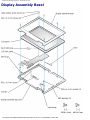
1. Place the point of a paper clip, a very small flat-blade screwdriver, or a tool of similar
size in the keyboard bezel release hole and carefully push down.
2. While pushing down, slide the keyboard bezel to the left until it releases.
3. Lift the keyboard bezel.
file:///F|/Service%20Manuals/Dell/Inspiron/2100/remove.htm (9 of 44) [2/28/2004 6:49:34 AM]