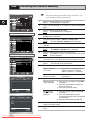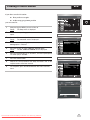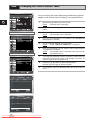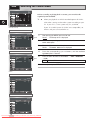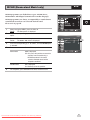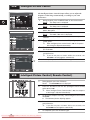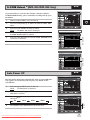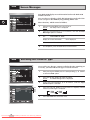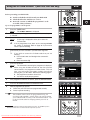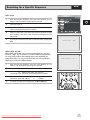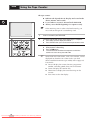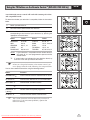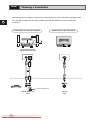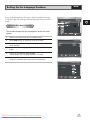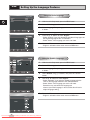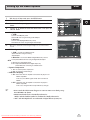
1
DVD-VCR DVD-V 70 DVD-V 80 DVD-V 85 Instruction Manual STANDBY/ON OPEN/CLOSE EJECT STANDBY/ON PROG DVD VCR LINE2 OK www.samsung.com.au PAL Downloaded From DvDPlayer-Manual.com Samsung Manuals Contents ◆ FOREWORD ■ ■ GB Safety Instructions ................................................................................................................... 5 Disc Type and Characteristics ................................................................................................. 6 ◆ DVD-VCR OVERVIEWS ■ ■ ■ ■ ■ Front View of the DVD-VCR .................................................................................................... Rear View of the DVD-VCR ..................................................................................................... Infrared Remote Control .......................................................................................................... Display Indicators..................................................................................................................... Accessories.............................................................................................................................. 7 8 9 11 11 ◆ CONNECTING YOUR DVD-VCR ■ ■ ■ ■ ■ ■ ■ ■ ■ ■ ■ Deciding How to Connect DVD-VCR ....................................................................................... Connecting DVD-VCR to the TV using the Coaxial Cable ....................................................... Connecting DVD-VCR to the TV using the RCA Cable ........................................................... Connecting DVD-VCR to a Satellite Receiber or Other Equipment ......................................... Plug & Auto Set Up .................................................................................................................. Tuning Your Television for the DVD-VCR................................................................................ Deck Control Keys ................................................................................................................... Basic TV Tuner Operations...................................................................................................... Inserting Batteries in the Remote Control ................................................................................ Setting the Date and Time ....................................................................................................... Setting the Menu Language ..................................................................................................... 12 13 13 14 15 16 17 18 19 19 20 ◆ SETTING UP YOUR DVD-VCR ■ ■ ■ ■ ■ ■ ■ ■ ■ ■ ■ ■ ■ ■ ■ ■ Presetting the Stations Automatically ...................................................................................... Presetting the Stations Manually ............................................................................................. Clearing a Preset Station ......................................................................................................... Changing the Preset Station Table .......................................................................................... Selecting the RF OUT Sound Mode (B/G-D/K) (Newzealand Model only).......................................... Setting the DVD-VCR Output Channel ................................................................................... Selecting the Colour Mode....................................................................................................... NICAM (Newzealand Model only) ................................................................................................ Intelligent Picture Control ......................................................................................................... Intelligent Picture Control (Remote Control) ............................................................................ G-CODE Extend ...................................................................................................................... Auto Power off ......................................................................................................................... Screen Message ...................................................................................................................... Selecting the Cassette Type .................................................................................................... Repeat Play ............................................................................................................................. S-VHS Play .............................................................................................................................. 2 Downloaded From DvDPlayer-Manual.com Samsung Manuals 21 22 23 24 25 25 26 27 28 28 29 29 30 30 31 31 Contents ◆ RECORDING TELEVISION BROADCASTS ■ ■ ■ ■ ■ ■ ■ ■ ■ Selecting the Recording Speed................................................................................................. Protecting a Recorded Cassette ............................................................................................... Recording a Programme Immediately....................................................................................... Recording a Programme with Automatic Stop .......................................................................... Using the G-CODE Feature ...................................................................................................... Modifying G-CODE Programming ............................................................................................. Using the Timer Programming Feature ..................................................................................... Checking a Preset Recording ................................................................................................... Cancelling a Preset Recording................................................................................................. 32 33 33 34 35 36 37 38 38 ◆ PLAYING BACK ■ ■ ■ ■ ■ ■ ■ ■ ■ ■ ■ ■ Playing a Cassette .................................................................................................................... Adjusting Picture Alignment Manually ....................................................................................... Selecting the Audio Output Mode ............................................................................................. Playing a Cassette in Slow Motion ............................................................................................ Playing a Sequence Frame by Frame....................................................................................... Playing a Sequence at Variable Speeds ................................................................................... Searching for a Specific Sequence ........................................................................................... Using the Tape Counter ............................................................................................................ Connecting an RCA Audio/Video Input Cable........................................................................... Using the Assemble Edit Function ............................................................................................ Recording from Another VCR or Camcorder ............................................................................ Using the TV Buttons on the Remote Control ........................................................................... 39 39 40 40 41 41 42 44 45 46 46 47 ◆ DVD FUNCTIONS ■ ■ ■ ■ ■ ■ ■ ■ ■ ■ ■ ■ ■ ■ ■ ■ ■ Choosing a Connection ............................................................................................................. Setting Up the Language Features................................................................................................. Setting Up the Audio Options......................................................................................................... Setting Up the Display Options ...................................................................................................... Setting Up the Parental Control ..................................................................................................... A/V Receiver Connections ............................................................................................................ Special Playback Features ............................................................................................................ Adjusting the Aspect Ratio (EZ View) ............................................................................................. Using the Display Function............................................................................................................ Changing the Camera Angle ......................................................................................................... Selecting the Subtitle Language..................................................................................................... Repeat Play................................................................................................................................. Selecting the Audio Language ....................................................................................................... Using the Mark Function ............................................................................................................... MP3/WMA Play............................................................................................................................ Program Play & Random Play ....................................................................................................... Picture CD Playback..................................................................................................................... Downloaded From DvDPlayer-Manual.com Samsung Manuals 48 49 51 52 53 54 55 56 58 59 59 60 61 62 63 65 66 3 GB Contents (cont.) ◆ SOLVING PROBLEMS ■ GB ■ ■ Technical Specifications ....................................................................................................... 68 Problems and Solutions (VCR) ............................................................................................. 69 Troubleshooting Guide (DVD) .............................................................................................. 70 This product incorporates copyright protection technology that is protected by method claims of certain U.S. patents and other intellectual property rights owned by Macrovision Corporation and other rights owners. Use of this copyright protection technology must by authorized by Macrovision Corporized by Macrovision Corporation, and is intended for home and other limited viewing uses only unless otherwise authorized by Macrovision Corporation. Reverse engineering or disassembly is prohibited. Symbols 1 1 Press/push Hold down 1 = Step number 4 Downloaded From DvDPlayer-Manual.com Samsung Manuals ☛ ➢ Important Note Safety Instructions The following illustrations represent precautions. GB The lightning bolt is a warning sign alerting you to dangerous voltage inside the product. DO NOT OPEN THE DVD-VCR. Refer to service personnel. 10% 75% 40°C H H 5°C Do NOT expose the DVD-VCR to extreme temperature conditions (below 5°C and above 40°C) or to extreme humidity conditions (less than 10% and more than 75%). Do NOT expose the DVD-VCR to direct sunlight. Do NOT expose the DVD-VCR to any liquids. Do NOT place any objects on the DVD-VCR or remote control. During a storm and/or lightning, unplug the DVD-VCR from the mains socket and aerial. If the remote control is not used for a long period of time, remove the batteries and store it in a cool, dry place. THIS DEVICE IS NOT FOR USE IN INDUSTRIAL ENVIRONMENTS Downloaded From DvDPlayer-Manual.com Samsung Manuals 5 Disc Type and Characteristics This DVD player is capable of playing the following types of discs with the corresponding logos : GB Disc Types (Logos) Recording Disc Size Types DVD 12 Cm Audio + Video 8 Cm VIDEO-CD 12 Cm Audio + Video AUDIO-CD Max. Playing Time Characteristics Single-sided 240 min. Double-sided 480 min. Single-sided 80 min. Double-sided 160 min. • DVD contains excellent sound and video due to Dolby Digital and MPEG-2 system. • Various screen and audio functions can be easily selected through the on-screen menu. 74 min. • Video with CD sound, VHS quality & MPEG-1 compression technology. 8 Cm 20 min. 12 Cm 74 min. 8 Cm 20 min. Audio • An LP is recorded as an analog signal with more distortion. CD is recorded as a Digital Signal with better audio quality, less distortion and less deterioration of audio quality over time. * DO NOT play CD-ROM, CD-I and DVD-ROM in this player! (CDGs play audio only, not graphics.) Disc Markings ~ • Playback Region Number PAL • PAL colour system in Australia, Newzealand, etc. NTSC STEREO • NTSC broadcast • Dolby • Stereo system in USA, Digital disc disc Canada, japan, South Korea, etc. DIGITAL SOUND • Digital Audio disc • DTS disc Playback Region Number Both the DVD player and the discs are coded by region. These regional codes must match in order for the disc to play. If the codes do not match, the disc will not play. The Region Number for this player is described on the rear panel of the player. 6 Downloaded From DvDPlayer-Manual.com Samsung Manuals Front View of the DVD-VCR ( DVD -V70 ) STANDBY/ON BUTTON DVD DECK REW /SKIP BACK BUTTON OPEN/CLOSE BUTTON VCR SELECT BUTTON VIDEO CASSETTE COMPARTMENT EJECT BUTTON RECORD BUTTON DVD SELECT BUTTON GB PROG STANDBY/ON STOP BUTTON PLAY/STILL F.F / SKIP NEXT EZ VIEW BUTTON BUTTON BUTTON DVD LINE2 VCR PROGRAMME SELECTION BUTTON LINE2 VIDEO INPUT JACK LINE2 AUDIO L, R INPUT JACK ( DVD -V80 ) STANDBY/ON BUTTON DVD DECK REW /SKIP BACK BUTTON OPEN/CLOSE BUTTON VCR SELECT BUTTON VIDEO CASSETTE COMPARTMENT EJECT BUTTON RECORD BUTTON DVD SELECT BUTTON EJECT PROG STANDBY/ON STOP BUTTON PLAY/STILL F.F / SKIP NEXT EZ VIEW BUTTON BUTTON BUTTON DVD LINE2 VCR PROGRAMME SELECTION BUTTON LINE2 VIDEO INPUT JACK LINE2 AUDIO L, R INPUT JACK ( DVD -V85 ) STANDBY/ON BUTTON DVD DECK REW /SKIP BACK BUTTON OPEN/CLOSE BUTTON RECORD BUTTON STANDBY/ON STOP BUTTON PLAY/STILL F.F / SKIP NEXT EZ VIEW BUTTON BUTTON BUTTON Downloaded From DvDPlayer-Manual.com Samsung Manuals VCR SELECT BUTTON VIDEO CASSETTE COMPARTMENT EJECT BUTTON DVD SELECT BUTTON PROG DVD PROGRAMME SELECTION BUTTON VCR LINE2 LINE2 VIDEO INPUT JACK LINE2 AUDIO L, R INPUT JACK 7 Rear View of the DVD-VCR ( DVD -V70 ) GB DIGITAL AUDIO OUT SOCKET (COAXIAL) LINE IN 1 RF ANTENNA INPUT COMPONENT VIDEO OUT S-VIDEO OUT JACK LINE OUT TO TV (COMPOSITE) RF OUT TO TV AUDIO LINE OUT TO TV (S-VIDEO OR COMPONENT) ( DVD -V80 / DVD -V85) DIGITAL AUDIO OUT SOCKET (COAXIAL) LINE IN 1 COMPONENT VIDEO OUT S-VIDEO OUT JACK RF ANTENNA INPUT LINE OUT TO TV (COMPOSITE) DIGITAL AUDIO OUT SOCKET (OPTICAL) AUDIO LINE OUT TO TV (S-VIDEO OR COMPONENT) 8 Downloaded From DvDPlayer-Manual.com Samsung Manuals RF OUT TO TV Infrared Remote Control ( DVD -V70 ) STANDBY/ON OPEN/CLOSE 1 18 1 2 3 4 5 6 7 2 19 20 3 21 4 5 22 6 23 7 24 25 8 9 26 10 11 12 OK 13 14 15 16 17 Downloaded From DvDPlayer-Manual.com Samsung Manuals 27 28 29 30 31 32 33 8 9 10 11 12 13 14 15 16 17 18 19 20 21 22 23 24 25 26 27 28 29 30 31 32 33 GB STANDBY/ON SHUTTLE << / >> CLEAR DVD, VCR SELECT AUDIO TRK TX REWIND SKIP BACK STOP SUBTITLE MENU UP LEFT DOWN SPEED SP/LP RECORD TIMER ANGLE IPC OPEN/CLOSE 0-9 TV/VCR INPUT SEL. F.ADV/STEP PROG FAST-FORWARD SKIP NEXT PLAY/STILL INFO. RETURN RIGHT OK EZ VIEW DISC MENU MARK SEARCH MODE REPEAT 9 Infrared Remote Control ( DVD -V80 / DVD -V85) GB STANDBY/ON OPEN/CLOSE 1 18 1 2 3 4 5 6 7 2 19 20 3 4 21 5 22 6 23 7 24 25 8 9 18 19 20 21 22 23 26 24 10 11 12 8 9 10 11 12 13 14 15 16 17 OK 13 14 15 16 17 10 Downloaded From DvDPlayer-Manual.com Samsung Manuals 27 28 29 30 31 32 33 25 26 27 28 29 30 31 32 33 STANDBY/ON SHUTTLE << / >> CLEAR DVD TV MUTE. AUDIO VOLUME +/– REWIND SKIP BACK STOP SUBTITLE MENU UP LEFT DOWN SPEED SP/LP RECORD TIMER ANGLE IPC OPEN/CLOSE 0-9 TV/VCR VCR, TV SELECT INPUT SEL. F.ADV/STEP PROG TRACKING FAST-FORWARD SKIP NEXT PLAY/STILL INFO. RETURN RIGHT OK EZ VIEW DISC MENU MARK SEARCH MODE REPEAT Display Indicators 1 2 3 4 5 GB STEREO 6 7 8 1 The DVD Deck is active 6 A DVD with a DTS soundtrack is loaded 2 A DVD, CD, VCD, or SVCD is loaded 7 The Hi-Fi track of a VHS tape is playing 3 The time, counter position, time remaining or (The current TV show or video is broadcast in current deck status is displayed Stereo) 4 VHS tape is inserted 5 The VCR Deck is active 8 A Timer Recording is programmed or in progress. Accessories You have just purchased a SAMSUNG Video Cassette Recorder (DVD-VCR). Together with your DVD-VCR, you will find the following accessories in the box. REMOTE CONTROL & BATTERIES AUDIO & VIDEO CABLE OWNER’S INSTRUCTIONS COAXIAL CABLE /ON DBY STAN E /CLOS OPEN Downloaded From DvDPlayer-Manual.com Samsung Manuals 11 Deciding How to Connect DVD-VCR You must take into account various factors when connecting audio or video systems: ◆ Types of connectors available on your systems ◆ Systems connected permanently to the DVD-VCR (satellite receiver for example) or temporarily (camcorder for example) GB Your DVD-VCR is equipped with the following connectors. Connector Location Type Direction LINE 1 Rear Audio/Video RCA Audio output Rear Audio RCA Out LINE 2 Front LINE 2 Audio/Video In In/Out Recommended Use ◆ Television ◆ Other VCR ◆ Audio out (DVD only) ◆ Audio in Video in COMPONENT Rear output RCA Out ◆ COMPONENT out (DVD only) S-VIDEO output Rear S-JACK Out ◆ S-Video out (DVD only) Digital AUDIO output Rear Optical★(DVD-V80/ DVD-V85) Out coaxial ◆ Digital Audio out (DVD only) OUT TO TV Rear 75 Ω ◆ Television Out coaxial IN FROM ANT. Rear 75 Ω coaxial In ◆ Aerial ◆ Cable television network ◆ Satellite receiver ☛ Whenever you connect an audio or video system to your DVD-VCR, ensure that all elements are switched off. Refer to the documentation supplied with your equipment for detailed connection instructions 12 Downloaded From DvDPlayer-Manual.com Samsung Manuals Connecting DVD-VCR to the TV using the Coaxial Cable To receive television programmes a signal must be received from one of the following sources: ◆ ◆ ◆ ◆ ☛ An outdoor aerial An indoor aerial A cable television network A satellite receiver GB Make sure that both the television and the DVD-VCR are switched off before connecting the cables. 2 1 Remove the aerial or network input cable from the television. 2 Connect this cable to the 75Ω coaxial socket marked rear of your DVD-VCR. 3 Plug the coaxial cable supplied into the DVD-VCR. 4 Plug the other end of the coaxial cable into the connector previously used for the aerial on the television. 5 TV on the socket on your TV 4 3 To obtain better quality pictures and sound on your television, you can also connect your DVD-VCR to the television via the RCA cable (see section below) if your television is equipped with this type of connection. Connecting DVD-VCR to the TV using the RCA Cable Aerial TV 3 2 RF coaxial cable You can connect your DVD-VCR to the television using the RCA cable if the appropriate input is available on the television. You thus: ◆ Obtain better quality sound and pictures ◆ Simplify the setting up procedure of your DVD-VCR ☛ ◆ Regardless of the type of connection chosen, you must always connect the coaxial cable supplied. Otherwise, no picture will be visible on the screen when the DVD-VCR is switched off. ◆ Make sure that both the television and the DVD-VCR are switched off before connecting the cables. 1 Connect the coaxial cable as indicated in the above section. 2 Connect one end of the RCA Audio/Video cable to the Video output and Audio L, R output socket on the rear of the DVD-VCR. 3 Plug the other end into the appropriate connector on the television. Downloaded From DvDPlayer-Manual.com Samsung Manuals 13 Connecting DVD-VCR to a Satellite Receiver or Other Equipment You can connect other audio and/or video equipment to your DVD-VCR in different ways. The following illustrations give a few examples of the connection possibilities. GB ➢ The RCA input/output connectors on the rear of the DVD-VCR are used for equipment, such as camcorders, VCRs or sound systems. Camcorder VCR REAR OF THE DVD-VCR 14 Downloaded From DvDPlayer-Manual.com Samsung Manuals Sound system Plug & Auto Set up Your DVD-VCR will automatically set itself up when it is plugged into the mains for the first time. TV stations will be stored in memory. The process takes a few minutes. Your DVD-VCR will then be ready for use. 1 Connect the coaxial cable as indicated on page 13. (Connecting Your DVD-VCR to the TV Using the Coaxial Cable) 2 Plug the DVD-VCR into the mains. Result: The Language Set menu is displayed. 3 Select the required language by pressing the or buttons. 4 Press OK to store the language selected. Result: A message appears. 5 Press OK button. 6 TV GB 2 Press OK to start the auto scanning. The number of stations automatically stored by the VCR depends on the number of stations that it has found. ◆ ➢ Auto preset can be performed by pressing ■ (STOP) on the VCR continuously for 5 seconds or more with no tape inserted. Auto setup Please wait 00 % Clock Set Downloaded From DvDPlayer-Manual.com Samsung Manuals Time Date 12 : 00 1/JAN Year 2003 WED 15 Tuning Your Television for the DVD-VCR You must tune your television for the DVD-VCR only if you are not using a RCA cable GB STANDBY/ON ➢ OPEN/CLOSE To view pictures from your DVD-VCR when a RCA cable is used, the television must be set to the audio/video mode (AV). 2 4 1 Switch on the television. 2 Switch on the DVD-VCR by pressing STANDBY/ON on the front of the DVD-VCR or STANDBY/ON on the remote control. 3 Select a programme position on the television to be reserved for use with your DVD-VCR. 4 Insert the video cassette in the DVD-VCR. Check that the DVD-VCR starts reading the cassette; if not, press II button. 5 Start a scan on your television or set the television to UHF channel 36 (Australia:UHF 38 CH). 6 Fine tune the television until the pictures and sound are obtained clearly. 7 If you cannot find the pictures and sound, or there is interference from nearby channels, it may be necessary to change the setting of the DVD-VCR output channel (see Setting the DVD-VCR Output Channel on page 25 and Problems and Solutions on page 69). 8 When the picture and sound are perfectly clear, store this channel at the desired programme position on the television. That programme is now reserved for use with your Result: DVD-VCR. 16 Downloaded From DvDPlayer-Manual.com Samsung Manuals Deck Control Keys The DVD-VCR uses one set of controls to operate both decks. The following keys are helpful in successfully controlling each deck. 1 2 3 4 STANDBY/ON Button Press the STANDBY/ON button on the remote control or front panel to turn on the DVD-VCR. DVD Button Press the DVD button on the remote control when you want to control the DVD deck. ◆ The DVD indicator will light on the Front Panel Display to show that the DVD deck is selected. VCR Button Press the VCR button on remote control when you want to control the VCR deck. ◆ The VCR indicator will light on the Front Panel Display to show that VHS deck is selected. INPUT SEL. BUTTON Press the INPUT SEL. button repeatedly to cycle through all of your input sources, including the Tuner (PR##), Line 1 (rear AV input), and Line 2 (front AV input). • Input select is only available when the VCR deck is selected. ➢ GB STANDBY/ON STANDBY/ON 1 1 2 3 4 Before using the VCR operation of 21~47 pages, press the VCR button on the remote control to select VCR mode. Before using the DVD operation of 48~67 pages, press the DVD button on the remote control to select and watch DVD. Downloaded From DvDPlayer-Manual.com Samsung Manuals 17 Basic TV Tuner Operations The following buttons are used when watching television via the DVD-VCR’s built-in TV tuner. GB 1 1 TV/VCR Button Press to switch between your TV’s tuner and the VCR’s internal tuner. 2 PROG Button Press to change to the next or previous channel. 3 0-9 Buttons Press to select channels directly. 4 INFO. Press to display the channel you are watching. ◆ Also works in DVD and VCR mode. 2 2 3 4 OK 18 Downloaded From DvDPlayer-Manual.com Samsung Manuals Inserting Batteries in the Remote Control You must insert or replace the batteries in the remote control when you: ◆ Purchase the DVD-VCR ◆ Find that the remote control is no longer working correctly 1 GB 1 Push the tab in the direction of the arrow to release the battery compartment cover on the rear of the remote control. 2 Insert two AAA, RO3 or equivalent batteries, taking care to respect the polarities: ◆ + on the battery with + on the remote control ◆ – on the battery with – on the remote control 3 Replace the cover by aligning it with the base of the remote control and pushing it back into place. ➢ Do not mix different battery types (manganese and alkaline for example). Setting the Date and Time Your DVD-VCR contains a 24-hour clock and calendar used to: ◆ Automatically stop programme recording ◆ Preset your DVD-VCR to record a programme automatically You must set the date and time when: ◆ You purchase the DVD-VCR ☛ ◆ Do not forget to reset the time when you change clocks from winter to summer time and vice versa. 1 After pressing the MENU, press the OK or . The Setup menu is displayed. Result: 2 Press the corresponding option. 3 Press the OK or to select this option. Result: The Clock Set menu is displayed. 4 Press ¥ or to select the hour, minutes, day, month and year. Result: The option selected highlight. 5 Press the or buttons to increase or decrease the value. Result: The day of the week is displayed automatically. ➢ 6 , buttons to select the Clock Clock Set Time 12 : 00 Date Year 1 / JAN / 2003 WED You can hold the or buttons down to scroll more quickly through the values. On completion, press RETURN to exit the menu. Downloaded From DvDPlayer-Manual.com Samsung Manuals 19 Setting the Menu Language 1 Open “MENU” After pressing the MENU, press the OK or . GB 1 OK 2 Select “Language” Use the or buttons to highlight “Language,” then press the OK or . 3 Set menu Language Place the selection arrow next to your desired Language, then press the OK button. 4 Press the or buttons to select language you want. Place the selection arrow next to your desired Language, then press the OK button. 5 On completion, press RETURN to exit the menu. Language Set English Français Deutsch Español Italiano Nederlands 20 Downloaded From DvDPlayer-Manual.com Samsung Manuals VCR Presetting the Stations Automatically ☛ You do not need to preset the stations if you have already set them automatically (see Plug & Auto Set Up on page 15). Your DVD-VCR contains a built-in tuner used to receive television broadcasts. You must preset the stations received through the tuner. This can be done: ◆ Plug & Auto Set up (see page 15) ◆ Automatically ◆ Manually (see page 22) You can store up to 80 stations. 1 After pressing the MENU, press the OK or . Result: The Setup menu is displayed. 2 Press the corresponding , buttons to select the Install option. 3 Press the OK or to select this option. Result: The Install menu is displayed. 4 Press the corresponding or buttons, until the Auto Setup is selected. And then press the OK or to select this option. A message appears, indicating that any channels Result: already preset on your DVD-VCR will be deleted. 5 6 Press OK button. A message appears, indicating that any channels Result: already preset on your VCR will be deleted. Press OK to start the auto scanning. Result: ◆ The Please Wait indication highlight on the television screen. ◆ The first frequency band is scanned and the first station found is displayed and stored. ◆ The DVD-VCR then searches for the second station and so on. ◆ When the automatic scanning procedure has finished, the DVD-VCR switches automatically to programme 1. ➢ 7 ➢ The number of stations automatically stored by the DVDVCR depends on the number of stations that it has found. GB Australia Model Install Auto Setup Manual Setup VCR Output CH : CH 38 Newzealand Model Install Auto Setup Manual Setup TV System VCR Output CH :G : CH 36 Auto Setup Your date will be lost Press OK to continue Menu to exit If you wish to cancel the auto scanning before the end, press the MENU button to exit the menu. ◆ Once the auto scanning procedure has finished, some stations may have been stored more than once; select the stations with the best reception and delete the ones no longer required (see page 23). Auto Setup Please Wait 15% Downloaded From DvDPlayer-Manual.com Samsung Manuals 21 VCR Presetting the Stations Manually ☛ GB You do not need to preset the stations manually if you have already set them automatically. 1 After pressing the MENU, press the OK or . Result: The Setup menu is displayed. 2 Press the corresponding option. 3 Press the OK or to select this option. The Install menu is displayed. Result: , buttons to select the Install Australia Model 4 Auto Setup Manual Setup VCR Output CH TV STATION TABLE PR CH buttons, until the Manual 6 Press the or buttons to select a programme number as required. 7 Press the button to preset the station. Result: The MANUAL TUNING menu is displayed. 8 Press the ¥ or buttons to start scanning channel. Result: The frequency band is scanned and the first station found is displayed. 9 Press the or buttons until the NAME is selected. The station name is set automatically from the broadcast signal. 10 To change the programme’s name, press the button. The first letter of the name flashes. Result: 11 To... Then... Select a character in the name Press the or button until the required character is displayed (letters, numbers or “-” character). Move to the next or previous character Press the or ¥ buttons respectively. Install :G : CH 36 or Press the OK or to select a Manual Setup option. Result: The TV STATION TABLE menu is displayed. Newzealand Model Manual Setup TV System VCR Output CH 5 : CH 38 Auto Setup Press the corresponding Setup option is selected. Install 12 If you... Then... Wish to store the station displayed ◆ NAME 1 2 ◆ 3 4 5 ◆ SWAPPING : OK RETURN DELETE : CLEAR Do not wish to store the station displayed ◆ ◆ MANUAL TUNING PR : CH : -- MFT : - NAME : ---- ◆ Press the or buttons until the MFT is selected. Press the ¥ or buttons to adjust the picture, if necessary. Press OK to store the station Press the or buttons until the CH is selected. Press the ¥ or buttons to go on scanning the frequency band and display the next station Go back to the beginning of Step 14 13 Repeat this procedure from Step 6 onwards, until all the required stations have been stored. 14 On completion, press the RETURN button three times to exit the menu. MEMORY : OK RETURN 22 Downloaded From DvDPlayer-Manual.com Samsung Manuals VCR Clearing a Preset Station If you have stored a TV station: ◆ That you do not require ◆ At the wrong programme position GB you can cancel it. 1 After pressing the MENU, press the OK or . Result: The Setup menu is displayed. 2 Press the corresponding , buttons to select the option. 3 Install Australia Model Press the OK or to select this option. Result: The Install menu is displayed. Install Auto Setup 4 Press the corresponding Setup option is selected. 5 Press the OK or to select a Manual Setup option. Result: The TV STATION TABLE menu is displayed. 6 Press the corresponding or buttons, until the required preset TV station (PR) is selected. 7 Press the CLEAR button. 8 Repeat the same procedure from Step 6 onwards until all the required stations have been cleared. 9 or Manual Setup VCR Output CH buttons, until the Manual : CH 38 Newzealand Model Install Auto Setup Manual Setup TV System VCR Output CH On completion, press the RETURN button four times to exit the menu. :G : CH 36 TV STATION TABLE PR CH 1 21 NAME 2 3 4 5 DELETE : CLEAR Downloaded From DvDPlayer-Manual.com Samsung Manuals SWAPPING : OK RETURN 23 VCR Changing the Preset Station Table You can rearrange the Station Table and give different programme numbers to the stations listed according to your own preferences. GB Australia Model 1 After pressing the MENU, press the OK or . Result: The Setup menu is displayed. 2 Press the corresponding option. 3 Press the OK or buttons to select this option. Result: The Install menu is displayed. 4 Press the corresponding Setup option is selected. 5 Press the OK or button to select this option. Result: The TV STATION TABLE menu is displayed. 6 Press the corresponding or buttons, until the required preset TV programme is selected. Result: The selected station is displayed at the same time on the television screen. 7 To change the programme number assigned to a station press the OK button on the remote control. (For example, To move a TV station in programme 1 to programme 3) 8 Press the or buttons to select required position. And then press OK again to swap the position. 9 On completion, press the RETURN button four times to exit the menu. , buttons to select the Install Install Auto Setup Manual Setup VCR Output CH Install Auto Setup Manual Setup TV System VCR Output CH :G : CH 36 TV STATION TABLE PR CH NAME 1 21 ---- 2 3 4 5 SWAPPING : OK RETURN TV STATION TABLE PR CH NAME 21 ---- 1 2 3 4 5 DELETE : CLEAR or buttons, until the Manual : CH 38 Newzealand Model DELETE : CLEAR SWAPPING : OK RETURN 24 Downloaded From DvDPlayer-Manual.com Samsung Manuals Selecting the RF OUT Sound Mode (B/G-D/K) (Newzealand Model only) VCR You can choose the sound mode (B/G or D/K) according to the TV set connected to your VCR. 1 After pressing the MENU, press the OK or . Result: The Setup menu is displayed. GB 2 Press the corresponding option. 3 Press the OK button to select this option. Result: The Install menu is displayed. 4 Press the or buttons, until the TV System option is selected. , buttons to select the Install Install 5 Press the ¥ or button to select G or K. 6 On completion, press RETURN to exit the menu. Auto Setup Manual Setup TV System VCR Output CH G :G : CH 36 K VCR Setting the DVD-VCR Output Channel Your DVD-VCR output channel may need to be changed if the pictures suffer from interference or if your TV cannot find the pictures. Also, you can change the DVD-VCR output channel to adjust the frequency in which information is displayed on the screen. 1 After pressing the MENU, press the OK or . Result: The Setup menu is displayed. 2 Press the corresponding option. 3 Press the OK or to select this option. Result: The Install menu is displayed. , buttons to select the Install Australia Model Install Auto Setup Manual Setup VCR Output CH 4 Press the or buttons, until the VCR Output CH option is selected. 5 Select the required output channel (CH21~CH69) by pressing the OK or buttons (Australia:CH28 ~ CH69). CH28 . . CH38 . . CH69 CH:28 : CH:38 : CH:69 : CH 38 Newzealand Model (Australia Model) Install CH21 6 . . CH36 . . CH69 Auto Setup (Newzealand Model) Manual Setup TV System VCR Output CH CH:21 : CH:36 : CH:69 :G : CH 36 On completion, press RETURN to exit the menu. Then tune your television again (see page 16). Downloaded From DvDPlayer-Manual.com Samsung Manuals 25 VCR Selecting the Colour Mode Before recording or playing back a cassette, you can select the required system standard. ➢ ◆ GB When you playback an NTSC-recorded tape on this DVDVCR make a setting on the colour system according to your TV. If your TV is a PAL system only TV, set NTPB. If your TV is Multi System TV (NTSC 4.43 compatible), set DVD-V80/ DVD-V85 NT4.43 and you can record NT4.43. Australia Model User Set Colour System : Auto IPC G-Code Extend : On : Off Auto PAL MESECAM B/W Newzealand Model User Set Colour System : Auto NICAM IPC G-Code Extend : On : On : Off Auto PAL MESECAM B/W 1 After pressing the MENU, press the OK or . Result: The Setup menu is displayed. 2 Press the corresponding , buttons to select the User Set option. 3 Press the OK or to select this option. Result: The User Set menu is displayed. 4 Press the corresponding or System option is selected. 5 Press the OK or button to select Auto ➝ PAL➝ MESECAM ➝ B/W. B/W 6 DVD-70 Australia Model User Set Colour System : Auto IPC : On Newzealand Model User Set Colour System : Auto NICAM IPC : On : On 26 Downloaded From DvDPlayer-Manual.com Samsung Manuals buttons, until the Colour Black and White On completion, press RETURN three time to exit the menu. VCR NICAM (Newzealand Model only) NICAM programmes are divided into 3 types. NICAM Stereo, NICAM Mono and Bilingual (transmission in another language). NICAM programmes are always accompanied by a standard mono sound broadcast and you can select the desired sound. GB Please refer to page 40. 1 After pressing the MENU, press the OK or . Result: The Setup menu is displayed. 2 Press the corresponding option. 3 Press the OK or to select this option. Result: The User Set menu is displayed. , buttons to select the User Set User Set 4 Press the corresponding or is selected. 5 To... Press OK or , until... Mono mode Off is displayed. buttons, until the NICAM option Colour System NICAM IPC G-Code Extend : Auto On Off : On : On : Off Off: Only set at this position to record the standard mono sound during a NICAM broadcast if the stereo sound is distorted due to inferior reception conditions. NICAM mode 6 On is displayed. On: Normally set at this position. On completion, press RETURN three times to exit the menu. Downloaded From DvDPlayer-Manual.com Samsung Manuals 27 VCR Intelligent Picture Control The Intelligent Picture Control Feature allows you to adjust the sharpness of the image automatically, according to your own preferences. GB Australia Model 1 During playback, press the MENU button on the remote control. The Setup menu is displayed. Result: 2 Press the OK or . Result: The Setup menu is displayed. 3 Press the corresponding , buttons to select the User Set option. 4 Press the OK or buttons to select this option. Result: The User Set menu is displayed. 5 Press the corresponding or buttons, until the IPC option is selected. 6 Press the OK or buttons to select the IPC (intelligent picture control) option. ➢ When intelligent picture control mode is ON, the sharpness of the image is adjusted automatically. 7 To adjust the sharpness manually, press the button to turn the IPC mode OFF. 8 Press the ¥ or buttons until the picture is displayed according to your preferences. User Set Colour System : Auto IPC G-Code Extend : On : Off On Off Newzealand Model ➢ User Set Colour System : Auto NICAM IPC G-Code Extend : On : On : Off VCR On Off 9 If you do not press a button within ten seconds, the PICTURE menu disappears automatically. On completion, press the RETURN button again. Intelligent Picture Control ( Remote Control ) 1 During playback, press the IPC button. The PICTURE menu is displayed. Result: 2 Press the button to turn the IPC (Intelligent Picture Control) option ON and OFF. OK ➢ 1 When Intelligent Picture Control mode is ON, the sharpness of the image is adjusted automatically. 3 To adjust the sharpness manually, select Intelligent Picture Control mode OFF. ◆ The horizontal picture adjusting appears. 4 Press the ¥ or buttons until the picture is displayed according to your preferences. ➢ 5 28 Downloaded From DvDPlayer-Manual.com Samsung Manuals If you do not press a button within ten seconds, the PICTURE menu disappears automatically. On completion, press the IPC button again. G-CODE Extend ★(DVD-V80/DVD-V85 Only) VCR To prevent delays or over-runs the VCR has a function called GCODE EXTEND allowing you to extend the recording time by up to 60 minutes. 1 After pressing the MENU, press the OK or . 2 Press the corresponding , buttons to select the User Set option. 3 Press the OK or buttons to select this option. Result: The User Set menu is displayed. 4 GB Australia Model Press the corresponding or buttons, until the G-Code Extend option is selected. User Set Colour System 5 Press the OK or buttons to set the G-Code Extend time by increments of 10 minutes. 6 To turn off, press OK or buttons repeatedly until Off shows. IPC G-Code Extend : Auto Off 10 20 30 40 50 60 : On : Off Newzealand Model User Set Colour System NICAM IPC G-Code Extend : Auto : On : On : Off Off 10 20 30 40 50 60 VCR Auto Power Off The Auto Power Off feature automatically turns off your DVD-VCR if no signal is received and you do not press any button for the selected time. 1 After pressing the MENU, press the OK or . Result: The Setup menu is displayed. 2 Press the corresponding or buttons, until the Auto Power Off option is selected. 3 Press the OK or buttons, until you select the time of Auto Power Off interval. Off 4 1Hour 2Hour 3Hour On completion, press RETURN twice to exit the menu. Downloaded From DvDPlayer-Manual.com Samsung Manuals Language : English Install User Set Auto Power Off Screen Messages Off 1Hour 2Hour 3Hour : Off : On 29 VCR Screen Messages Language Your DVD-VCR displays most information both on the DVD-VCR and the television. You can choose to display or hide this information on the television screen (except for the SEARCH, Programming MENU and Timer functions, which cannot be hidden). : English Install GB User Set Auto Power Off Screen Messages : Off : On On Off 1 After pressing the MENU, press the OK or . Result: The Setup menu is displayed. 2 Press the corresponding or buttons, until the Screen Messages option is selected. 3 To... 4 VCR Press OK or , until... Display on-screen information On is displayed. Hide on-screen information Off is displayed. On completion, press RETURN twice to exit the menu. Selecting the Cassette Type If you wish to use the tape counter to display the time remaining on a cassette, you must indicate the type of cassette inserted. VCR Setup Tape Select : E180 Repeat Play S-VHS : Off : Off E180 E240 E260 E300 1 After pressing the MENU press the corresponding to select the VCR option. 2 Press the OK or buttons to select this option. Result: The VCR Setup menu is displayed. 3 Press the corresponding Select option is selected. 4 Press the OK or buttons as many times as required, until the correct cassette length is displayed. E180 E 300 5 30 Downloaded From DvDPlayer-Manual.com Samsung Manuals or E240 E260 Press RETURN twice to exit the menu. , buttons buttons, until the Tape VCR Repeat Play You can set repeat play to repeat the tape continuously from beginning to end. 1 After pressing the MENU, press the corresponding to select the VCR option. 2 Press the OK or buttons to select this option. Result: The VCR Setup menu is displayed. 3 Press the corresponding Play option is selected. 4 To... 5 or , buttons GB buttons, until the Repeat Press OK or , until... Repeat play On is displayed. Do not wish to repeat play Off is displayed. VCR Setup Tape Select : E180 Repeat Play S-VHS : Off : Off Off On On completion, press RETURN twice to exit the menu. VCR S-VHS Play The DVD-VCR allows you to playback high quality S-VHS tapes. 1 During S-VHS play mode after pressing the MENU press the corresponding , buttons to select the VCR option. 2 Press the OK or button to select this option. Result: The VCR Setup menu is displayed. 3 Press the corresponding or buttons, until the S-VHS option is selected. 4 To... Press OK or , until... S-VHS play On is displayed. Tape Select : E180 Do not wish to S-VHS play Off is displayed. Repeat Play S-VHS : Off : Off VCR Setup 5 Off On On completion, press RETURN twice to exit the menu. To watch S-VHS tapes, set the S-VHS mode to On in the VCR Setup. Downloaded From DvDPlayer-Manual.com Samsung Manuals 31 VCR Selecting the Recording Speed You can record a cassette at two different speeds: GB Type Recording Time (in SP) E-180 180 mins. or 3 hours E-240 240 mins. or 4 hours E-260 260 mins. or 4 hours and 20 mins. E-300 300 mins. or 5 hours OK ◆ SP (Standard Play) ◆ LP (Long Play) In Long Play modes: ◆ Each cassette lasts twice as long ◆ The recording is of a slightly lower quality To record a cassette... Press the SPEED button on the remote control, until... In standard play mode In long play mode SP is displayed. LP is displayed. 32 Downloaded From DvDPlayer-Manual.com Samsung Manuals VCR Protecting a Recorded Cassette Video cassettes have a safety tab to prevent accidental erasure. When this tab has been removed, you cannot record on the tape. 1 2 If you wish to protect a cassette, break off the tab using a small screwdriver. GB To re-record over a protected cassette (safety tab broken), cover the hole with adhesive tape. 1 VCR Recording a Programme Immediately Before recording a programme, you must have preset the corresponding station (unless you are recording via an external video source). If you have not done so, refer to pages 21 and 22. 4 1 Switch on the television. 2 To monitor the programme being recorded, select the television channel reserved for use with your DVD-VCR (or the AV input if used). 3 Insert the cassette on which the programme is to be recorded, with the window visible and the safety tab intact or the opening covered with adhesive tape. Result: The DVD-VCR is switched on automatically. 4 Select: ◆ The station to be recorded using the PROG ( or ) buttons or 4 OK 6 ◆ The LINE1, LINE2 source using the INPUT SEL. button for a satellite tuner or external video source The station number is displayed and the programme Result: can be seen on the television. 5 Select the recording speed by pressing the SPEED button as many times as required (see page 32). 6 Hold REC ( ●) down for a while to start recording. The record indicator appears on the television and Result: DVD-VCR display. An index is recorded on the tape (see page 42). 7 ➢ To stop recording, press ■ once. 5 7 OK ◆ If your DVD-VCR ejects the cassette when you start recording, check to make sure that the cassette’s safety tab is intact or that the opening (created by a broken safety tab) is covered with adhesive tape. ◆ If you reach the end of the tape while recording, the cassette rewinds automatically. Downloaded From DvDPlayer-Manual.com Samsung Manuals 33 VCR Recording a Programme with Automatic Stop This function enables you to record up to nine hours (LP) of programmes. Your DVD-VCR stops automatically after the requested length of time. GB EJECT PROG STANDBY/ON DVD LINE2 VCR 1 Switch on the television. 2 To monitor the programme being recorded, select the television channel reserved for use with your DVD-VCR (or the AV input if used). 3 Insert the cassette on which the programme is to be recorded, with the window visible and the safety tab intact or the opening covered with adhesive tape. Result: The DVD-VCR is switched on automatically. 4 Select: ◆ The station to be recorded using the PROG ( or ) buttons or 3 4 4 ◆ The LINE1, LINE2 source using the INPUT SEL. button for a satellite tuner or external video source The channel number is displayed and the programme Result: can be seen on the television. 5 Select the recording speed by pressing the SPEED button as many times as required (see page 32). 6 Hold the REC button (●) down for a while to start recording. The record indicator appears on the television screen Result: and DVD-VCR display. An index is recorded on the tape (see page 42). 7 Press the REC button ( ●) several times to increase the recording time in: ◆ 30-minute intervals up to four hours ◆ 1-hour intervals up to nine hours The length is displayed on the television displays. The Result: selected programme is recorded for the length of time requested. At the end of that time, the DVD-VCR stops recording automatically and power off. 8 If you wish to cancel the recording before the end, press STANDBY/ON. OK 6 5 LENGTH 2:30 SET LENGTH : PRESS REC ● ☛ ☛ 34 Downloaded From DvDPlayer-Manual.com Samsung Manuals If the end of the tape is reached while recording: ◆ The recording stops and power off. This function is not available in DVD recording Using the G-CODE Feature ★ (DVD-V80/ VCR DVD-V85 Only) OK Before presetting your DVD-VCR: ◆ Switch on both the television and your DVD-VCR ◆ Check that the date and time are correct ◆ Insert the cassette on which the programme is to be recorded (safety tab intact) GB 1 Up to six programmes can be preset. 1 Timer Method Press the TIMER button. The TIMER METHOD is displayed. Result: 2 Press the corresponding or buttons, until the G-Code option is selected. 3 Press the button to select G-Code. A message is displayed to allow you to enter the Result: G-Code code. ☛ 4 G-Code ★ (DVD-V70) Timer Method Press the numeric buttons to enter the code opposite the pro gramme that you wish to record in your television magazine. ➢ 5 If all six programmes have been set, the message Timer is Full is displayed. Refer to page 38 if you wish to cancel a preset recording. Standard If you want to set the timer program, press the key. If you wish to correct the G-Code code that you are entering: ◆ Press the ¥ button until the digit to be corrected is cleared ◆ Enter the correct digit Press the OK button. The information concerning the programme is displayed. Result: ☛ When using the G-Code function for the first time with stored stations, the programme number flashes. This one time, you must enter the station number manually by pressing the or buttons. Refer to the following page if: ◆ The programme number or times flash ◆ You wish to modify the programme 6 If the programme and times are correct, press the RETURN button. 7 Press the STANDBY/ON button to activate the timer. 8 Refer to page 38 if you wish to: ◆ Check that your VCR has been programmed correctly ◆ Cancel a preset recording ☛ G-Code The numbers next to each TV programme listing are G-CODE code numbers, which allow you to programme your videorecorder instantly with the remote control. Tap in the G-CODE code for the programme you wish to record. ™ G-CODE is a trademark of Gemstar Development Corporation. The G-CODE system is manufactured under licence from Gemstar Development Corporation. Downloaded From DvDPlayer-Manual.com Samsung Manuals Code Code Correct STANDBY/ON : 0-9 : OPEN/CLOSE 7 35 VCR Modifying G-CODE Programming If you wish to correct the programme displayed or modify certain elements, such as the recording speed, you can do so before you press MENU a second time to confirm. GB If you wish to... Then... Select an input source other than the tuner (LINE IN 1 or LINE IN 2) ◆ Press the ¥ or buttons, until the PR selection flashes. ◆ Press the INPUT SEL. button one or more times to change the input source selection. The programme number is replaced by: Result: • The LINE IN 1 or LINE IN 2 source using the ➢ Record a programme every day (Monday to Sunday) at the same time INPUT SEL. button for a satellite tuner or external video source The input source must be selected before changing any other value. ◆ Press the ¥ or buttons, until the DAY selection flashes. ◆ Press the or buttons, until the DLY (Daily) value is displayed. Record a programme every week on the same day and at the same time ◆ Press the ¥ or buttons, until the DAY selection flashes. ◆ Press the or buttons, until the W- (Week) value is displayed, followed by the required day. Example: W-SA (Weekly Saturday) Extend the recording time ◆ Press the ¥ or buttons, until the STOP selection flashes. ◆ Press the or buttons to increase or decrease the stop time. Select the recording speed ◆ Press the ¥ or buttons, until the recording speed selection flashes. ◆ Press the or buttons until the correct indication is displayed: • AUTO (Auto Tape Speed Select) : see page 37 • SP (Standard Play) • LP (Long Play) 36 Downloaded From DvDPlayer-Manual.com Samsung Manuals VCR Using the Timer Programming Feature The Timer Programming feature allows you to preset the DVD-VCR to record a programme up to one month before that programme is to be broadcast. Up to six programmes can be preset. ☛ Timer Method Standard G-Code GB Before presetting a recording, check that the date and time are correct. 1 Insert the cassette and press TIMER on the remote control. The TIMER PROGRAMMING menu is displayed. Result: 2 Press to select the input source. 3 Select the required station by pressing the , buttons or INPUT SEL. to select the LINE1, LINE2 input sources. 4 Press to select the recording day. 5 Select the required day by pressing the or buttons. 6 Press to select the recording start time. 7 Select the required hour value by pressing the or buttons. 8 Press to select the minutes. 9 Select the required minute value by pressing the or buttons. 10 Press to select the recording stop time. 11 Select the required recording stop time by pressing the or buttons, following the same procedure as when selecting the recording start time. 12 Press to select the recording speed. 13 Press the or buttons to select the SP (Standard Play), LP (Long Play), Auto (Auto Tape Speed Select) recording speeds. 14 15 When you have finished, press the RETURN button. STANDBY/ON OPEN/CLOSE 15 Press the STANDBY/ON button to activate the timer. Result: Before starting recording, the DVD-VCR compares the timer duration with the remaining time on the cassette. ➢ Auto Tape Speed Select. The DVD-VCR’s “Auto Tape Speed Select” function compares the duration of the timer recording to the actual recording time remaining on the tape loaded. If there is insufficient tape to complete a timer recording in AUTO mode, the DVD-VCR automatically switches to LP mode to record the whole programme. Downloaded From DvDPlayer-Manual.com Samsung Manuals 37 VCR Checking a Preset Recording You can check your preset recordings: ◆ When you have finished presetting the DVD-VCR ◆ If you have forgotten which programmes will be recorded GB VCR 1 Press TIMER on the remote control. Result: The timer selection is displayed. 2 Press the OK button to select Standard option. Result: The TIMER PROGRAMMING menu is displayed. 3 Press the or buttons to select the required programme. 4 Press the ¥ or buttons to select and change any values as required. For more details, refer to the previous page. 5 On completion, press RETURN twice. Cancelling a Preset Recording You can cancel any programmes that are: ◆ Incorrect ◆ No longer required 4 1 Press TIMER on the remote control. Result: The timer selection is displayed. 2 Press the OK button to select Standard option. Result: The TIMER PROGRAMMING menu is displayed. 3 Select the programme to be cancelled by pressing the buttons. 4 Press the CLEAR button to cancel the selected programme. All the recording information is deleted and the broadResult: cast will not be recorded. 5 On completion, press RETURN twice. 38 Downloaded From DvDPlayer-Manual.com Samsung Manuals or VCR Playing a Cassette This function allows you to play back any pre-recorded cassette. 1 Switch on both the television and your DVD-VCR. 2 Insert the video cassette to be played. If the safety tab on the cassette is intact, press ll. Otherwise, the cassette is played automatically. ➢ 3 GB 2 3 When a cassette is loaded, the tape position is optimized automatically to reduce disturbance (Digital Auto Tracking). When playing a cassette, if the end of the tape is reached, the cassette is rewound automatically. NTSC tapes can be played back but cannot be recorded with this DVD-VCR. To... Then press... Stop the playback ■ (STOP). O EJECT Eject the cassette (EJECT). Adjusting Picture Alignment Manually 3 LINE2 VCR The Picture Adjustment feature allows you to adjust the alignment manually to obtain the best possible picture. When noise bars or streaks appear during playback, adjust alignment manually by pressing the TRK ( or ) buttons until the picture is clear and stable. Result: ◆ The tracking bar appears. ◆ The image is adjusted. ◆ The tracking bar disappears when you release the button. Downloaded From DvDPlayer-Manual.com Samsung Manuals 39 VCR Selecting the Audio Output Mode You can select the mode in which the sound is reproduced on the loudspeakers and AV outputs. The following options are available. GB Option L LR R MIX Description L Used to listen to the sound on the left Hi-Fi channel. R Used to listen to the sound on the right Hi-Fi channel. MIX Used to listen to the mixed sound of the Hi-Fi and normal channels. MONO Used to listen to the sound on the normal mono channel. LR Used to listen to Hi-Fi stereo sound on the left and right channels. ➢ MONO When playing back tapes recorded in Hi-Fi, the sound switches to Hi-Fi after five seconds of Mono. To select the sound mode, simply press the AUDIO button on the remote control until the required option is displayed. VCR Playing a Cassette in Slow Motion You can play a cassette in slow motion. ➢ 1 Press: ◆ 1 1 ◆ ◆ 2 No sound is heard when playing back a cassette in slow motion. 2 ll to start playing the cassette ll button one more time to make still mode. ◆ to start SLOW mode. or ¥¥ button as many times as required to decrease or ◆ increase the speed respectively To return to the normal speed, press the ll button twice. When playing back in slow motion, picture interference may occur. Press the TRK ( or ) buttons to minimize this effect. ☛ 2 When you have been using the Slow Motion function for more than about two minutes, the DVD-VCR will automatically play to protect the: ◆ Cassette ◆ Video heads 40 Downloaded From DvDPlayer-Manual.com Samsung Manuals VCR Playing a Sequence Frame by Frame You can: ◆ Stop the cassette at a given frame (image) ◆ Advance one frame at a time ➢ 1 GB No sound is heard when playing back frame by frame. Press: ◆ ll to start playing the cassette ll button one more time to make still mode. ◆ F.ADV/STEP ( ◆ 1 ) to advance frame by frame To return to normal playback, press ll. 2 ➢ Vertical stability: When playing back frame by frame, interference may be seen on the screen. Press the TRK ( , ) buttons to minimize this effect. VCR Playing a Sequence at Variable Speeds You can vary the playback speed using the Shuttle function (up to nine times the normal speed). You wish to analyze a sportsperson’s technique, Example: movement by movement. The Shuttle function is available on the Remote control ➢ 1 Press: ◆ ◆ ◆ 2 No sound is heard when playing a sequence at variable speeds. ll during playback 1 1 SHUTTLE (<<) to play the cassette backwards SHUTTLE (>>) to play the cassette forwards Each time you press a SHUTTLE button, the speed is changed as shown in the following illustration. REVERSE REVERSE REVERSE PLAY PLAY PLAY X9 X5 X3 STILL SLOW MOTION X1/10 SLOW MOTION X1/5 PLAY PLAY X3 Downloaded From DvDPlayer-Manual.com Samsung Manuals PLAY X5 PLAY X9 41 VCR Searching for a Specific Sequence Each time you record a cassette on this DVD-VCR, an “index” is automatically marked on the tape when recording starts. OK The Search function allows you to fast-forward or rewind to a specific index and start playback from that point. Depending on the direction selected, the indexes are numbered as follows: GB ➞ 1 etc. Prev Seq. being Next Seq. played Seq. 2 ➢ 1 1 etc. 2 This DVD-VCR uses a standard indexing system (VISS). As a result, it will recognize any indexes marked by other VCRs using the same system and vice versa. Go To 0:00:00 Stop Use this feature when you want to search for the 0:00:00 counter position on a cassette. Press the CLEAR button at the point on the tape where you want to set the counter to 0:00:00. The VCR will rewind or fast forward, searching for the 0:00:00 counter position, and then automatically stop at that position. 1 After pressing the SEARCH, press the corresponding or buttons, until the Go To (0:00:00) option is selected. 2 Press the OK or . End Search Use this feature when you want to search for a blank position to record a program on a cassette. The VCR will fast forward, searching for a blank position, and then automatically stop at that position.If the VCR reaches the end of the tape during end search, the tape will be ejected. 1 After pressing the SEARCH, press the corresponding buttons, until the End Search option is selected. 2 Press the OK or . 42 Downloaded From DvDPlayer-Manual.com Samsung Manuals or VCR Searching for a Specific Sequence Intro Scan 1 After pressing the SEARCH, press the corresponding buttons, until the Intro Scan option is selected. or GB 2 Press the OK or . 3 Press the ¥¥ or buttons depending on the direction where your desired programme is located. 4 When an Index mark is found the DVD-VCR will playback the tape for 5 seconds, after which it will continue searching for the next Index mark. 5 If you want to watch the tape from a particular Index, simply press II. INTRO SCAN: Index Skip Search: This feature will enable you to fast forward/rewind to a specific point on a tape: E.g. if you have recorded 3 different programmes on a tape and you have rewound the tape to the beginning, by using this feature you can go directly to the start of programme 2 simply by pressing the SEARCH button. 1 After pressing the SEARCH, press the corresponding buttons, until the Intro Scan option is selected. 2 Press the OK or . 3 Press the ¥¥ or buttons twice more. This will take you directly to the start of the desired programme is located. 4 These Index searches can be made forwards: (press ) or backwards: (press ¥¥ ). (¥¥ -20 0 +20 ● 5 ● ● INDEX SEARCH : ¥¥ ¥¥ - 6 or ● To cancel an Index search simply press the II or ■ button. 2 Downloaded From DvDPlayer-Manual.com Samsung Manuals 2 43 VCR Using the Tape Counter The tape counter: ◆ Indicates the elapsed time in the play and record modes (hours, minutes and seconds) ◆ Is reset when a cassette is inserted in the DVD-VCR GB ◆ Allows you to find the beginning of a sequence easily ☛ 0:00:00 2 If the remaining time is to be calculated correctly, you must indicate the type of cassette being used. 1 Insert a cassette in your DVD-VCR. 2 To set the tape counter to zero at the beginning of a sequence: ◆ Press INFO. twice to display the counter ◆ Press CLEAR when you want to set the tape counter to zero 3 When you are ready, ◆ Start playback or Recording. ◆ Press the ■ button. ◆ To fast-froward or rewind to the sequence at which the counter was set to zero, press ¥¥ or . ➢ Some DVD-VCR information, such as the counter, can be displayed on the television screen (unless you have deactivated the Screen messages mode; refer to page 30). Press INFO.: ◆ Once to display the current function, programme number, recording speed, date, time and counter ◆ Twice to display the counter only ◆ Three times to display the time remaining on the cassette ◆ Four times to clear the display 44 Downloaded From DvDPlayer-Manual.com Samsung Manuals VCR Connecting an RCA Audio/Video Input Cable You can connect other audio/video equipment to your DVD-VCR using audio/video cables if the appropriate outputs are available on the equipment chosen. Examples: ◆ You wish to copy a video cassette with the help of a second VCR. ◆ You wish to play back and/or copy pictures taken with a camcorder . ☛ GB DVD 1 ◆ Make sure that both the television and the DVD-VCR are switched off before connecting the cables. 1 Connect one end of the RCA audio/video cable into the VIDEO INPUT socket on the front of the DVD-VCR. 2 Plug the other end of the audio/video cable into the appropriate output connector on the other system (VCR or camcorder). 3 Connect one end of the RCA audio cable supplied into the AUDIO INPUT sockets on the front of the DVD-VCR. DVD LINE2 VCR 3 ➢ 4 LINE2 VCR 3 Take care to respect the colour coding of the left and right channels. Plug the other end of the audio cable into the appropriate output connectors on the other system (VCR, camcorder or Hi-Fi sound system). Downloaded From DvDPlayer-Manual.com Samsung Manuals 45 VCR Using the Assemble Edit Function This function allows you to start a new recording at a specific position on the cassette while maintaining a very smooth scene change. GB 4 2 1 Insert the cassette to be edited in your DVD-VCR. 2 Press the ll button to start playback. 3 When you reach the position from which you wish to start the new recording, press the ll button. 4 Press the F.ADV/STEP ( ) button again as often as necessary to advance frame by frame, until the exact recording position is located. 5 While the DVD-VCR is in still mode, hold the REC button (●) down for a while to activate the Assemble Edit function. 6 Select the source from which you wish to record by pressing: ◆ The PROG ( or ) buttons for television channels ◆ The INPUT SEL. button for the LINE input sources 7 Press the ll button to start recording. 8 When you have finished recording, press ■ . OK 5 VCR Recoding from Another VCR or Camcorder You can copy a cassette to your DVD-VCR from another video source, such as another VCR or a camcorder. ☛ EJECT PROG STANDBY/ON DVD VCR LINE2 1 Connect the DVD-VCR, from which the cassette is to be copied, to the appropriate RCA audio and video input connectors on the rear of your DVD-VCR, as indicated on page 14. 2 Insert a blank cassette in your DVD-VCR. 3 Insert the pre-recorded cassette in the other video source (VCR or camcorder). 4 Press the INPUT SEL. button to select the appropriate input on your DVD-VCR: LINE IN for the RCA input. 5 Start playing back the cassette to be copied. 6 Hold REC (●) down for a while to start recording on your DVD-VCR. 7 When you have finished recording, press ■ on both VCR and DVD-VCR. 2 7 OK 6 It is an infringement of copyright laws to copy prerecorded cassettes or to re-record them in any form without the permission of the owners of the corresponding copyright. ➢ 46 Downloaded From DvDPlayer-Manual.com Samsung Manuals If you wish to view the cassette being copied: ◆ Your DVD-VCR must be connected as usual to the television (see page 13 for further details) Using the TV Buttons on the Remote Control ★ (DVD-V80/ DVD-V85 Only) Your DVD-VCR remote control will work with Samsung televisions and compatible brands. STANDBY/ON OPEN/CLOSE To determine whether your television is compatible, follow the instructions below. 1 Switch your television on. 2 Point the remote control towards the television. 3 Hold down the TV button and enter the two-figure code corresponding to the brand of your television, by pressing the appropriate numeric buttons. Brand Codes SAMSUNG AKAI GRUNDIG LOEWE PANASONIC 01 to 06 09, 23 09, 17, 21 02 08, 23 to 27 PHILIPS SABA SONY THOMSON TOSHIBA 02, 20, 22 13, 14, 22 to 24 15, 16 13, 14, 24 07, 16 to 19, 21 ☛ GB 2 Codes ➢ 1 2 Brand Result: VCR 4 3 4 If your television is compatible with the remote control, it will switch off. It is now programmed to operate with the remote control. If several codes are indicated for your television brand, try each one in turn until you find one that works. 5 When you change the batteries in the remote control, you must reprogramme the code, following the same procedure. 5 You can then control the television using the following buttons. Button Function STANDBY/ON ➀ Used to switch the television and DVD-VCR on and off. TV or VCR ➁ Used to switch between the TV and VCR modes. INPUT SEL. ➂ Used to select an external source. 6 VOL + or – ➃ Used to adjust the volume of the television. PROG/TRK ( or ) ➄ Used to select the required programme. TV MUTE ➢ ➅ Used to mute the volume of the television. The various functions will not necessarily work on all televisions. If you encounter problems, operate the television directly. Downloaded From DvDPlayer-Manual.com Samsung Manuals 47 DVD GB Choosing a Connection The following show examples of connections commonly used to connect the DVD -VCR player with a TV and other components. It is only available for DVD. The VCR out can not watch by this connection. Connection to an Audio System Connection to an Television Television Dolby Digital Decoder Digital Audio Input Jack COAXIAL OPTICAL or DVD-VCR ★ (DVD-V 80/ DVD-V 85) Digital Audio out Jack 48 Downloaded From DvDPlayer-Manual.com Samsung Manuals S-Video Jack DVD Setting Up the Language Features If you set the player menu, disc menu, audio and subtitle language in advance, they will come up automatically every time you watch a movie. Setup Setup Display Setup Setup : Using the Disc Menu Language GB This function changes the text language only on the disc menu screens. 1 With the unit in Stop mode, press the MENU button. 2 Select DVD using , buttons, then OK or button 3 Select Language Setup using , buttons, then press the OK or button. 4 Select Disc Menu using , buttons, then press the OK or button. 5 Use the , buttons to select ‘English’. - Select “Others” if the language you want is not listed. 6 Press the OK button. - English is selected and the screen returns to DVD menu. Language Setup Disc Menu Audio Subtitle : English : English : Automatic Disc Menu Language Disc Menu Downloaded From DvDPlayer-Manual.com Samsung Manuals 49 DVD Setting Up the Language Features Using the Audio Language Language Setup GB Disc Menu Audio Subtitle : English : English : Automatic 1 With the unit in Stop mode, press the MENU button. 2 Select DVD using , buttons, then OK or button. 3 Select Language Setup using , buttons, then press the OK or button. 4 Select Audio using , buttons, then press the OK or button. 5 Press the , buttons to select ‘English’ . - Select “Original” if you want the default soundtrack language to be the original language the disc is recorded in. - Select “Others” if the language you want is not listed. 6 Press the OK button. - English is selected and the screen returns to DVD menu. Using the Subtitle Language Setup Setup Display Setup Setup : Language Setup Disc Menu Audio Subtitle : English : English : Automatic 1 With the unit in Stop mode, press the MENU button. 2 Select DVD using , buttons, then OK or button. 3 Select Language Setup using , buttons, then press the OK or button. 4 Select Subtitle using , buttons, then press the OK or button. 5 Use the , buttons to select ‘English’. - Select “Automatic” if you want the subtitle language to be the same as the language selected as the audio preference. - Select “Others” if the language you want is not listed. Some discs may not contain the language you select as your initial language; in that case the disc will use its original language setting. 6 Press the OK button. - English is selected and the screen returns to DVD menu. Subtitle Language Automatic Subtitle 50 Downloaded From DvDPlayer-Manual.com Samsung Manuals DVD Setting Up the Audio Options 1 With the unit in Stop mode, press the MENU button. 2 Select DVD using , buttons, then OK or button. 3 Select Audio Setup using , buttons, then press the OK or button. 4 Use the , buttons to select the desired item. Then press the OK or button. GB Setup Setup Display Setup Setup : • Dolby Digital Out 1. PCM: Converts to PCM(2CH) audio. Select PCM when using the Analog Audio Outputs. 2. Bitstream : Converts to Dolby Digital Bitstream (5.1CH). Select Bitstream when using the Digital Audio Output. ➢ •Be sure to select the correct Digital Output or no audio will be heard. • MPEG-2 Digital Out 1. PCM : Converts to PCM(2CH) audio. Dolby Digital Out MPEG-2 Digital Out DTS PCM Down Sampling Select PCM when using the Analog Audio Outputs. 2. Bitstream : Converts to MPEG-2 Digital Bitstream (5.1CH or 7.1CH).Select Bitstream when using the Digital Audio Output. • DTS 1. Off : Doesn’t output digital signal. 2. On : Outputs DTS Bitstream via digital output only. Select DTS when connecting to a DTS Decoder. • Dynamic Compression 1. On : To select dynamic compression. 2. Off : To select the standard range. • PCM Down Sampling 1. On : Select this when the amplifier connected to the player is not 96KHz compatible. In this case, the 96KHz signals will be down converted to 48KHZ. 2. Off : Select this when the amplifier connected to the player is 96KHz compatible. In this case, all signals will be output without any changes. ➢ • How to make the SETUP menu disappear or return to menu screen during set up; Press RETURN or ¥ button. • Manufactured under license from Dolby Laboratories. “Dolby” and the double-D symbol are trademarks of Dolby Laboratories. • “DTS” and “DTS Digital Out” are trademarks of Digital Theater Systems, Inc. Downloaded From DvDPlayer-Manual.com Samsung Manuals 51 DVD Setting Up the Display Options 1 GB Setup Setup Display Setup Setup : 2 Select DVD using , buttons, then OK or button. 3 Select Display Setup using , buttons, then press the OK or button. 4 Use the , buttons to select the desired item. Then press the OK or button. Display Setup TV Aspect Black Level NTSC Disc Output DVD Out With the unit in Stop mode, press the MENU button. : 4:3 L-Box : PAL 60 Hz : Component • TV Aspect Depending on the type of television you have, you may want to adjust the screen setting (aspect ratio). 1. 4:3 Letter Box : Select when you want to see the total 16:9 ratio screen DVD supplies, even though you have a TV with a 4:3 ratio screen. Black bars will appear at the top and bottom of the screen. 2. 4:3 Pan Scan : Select this for conventional size TVs when you want to see the central portion of the 16:9 screen. (Extreme left and right side of movie picture will be cut off.) 3. 16:9 Wide : You can view the full 16:9 picture on your widescreen TV. • Black Level Adjusts the brightness of the screen.(On/Off) • NTSC Disc Output “NTSC” if the screen only has one NTSC-video entrance. If this is not the case, you can choose to leave “ PAL 60Hz” as is. • DVD Output Component : Sends COMPONENT signal (Y, Pb, Pr) to the component video out JACK. S-Video : Sends S-VIDEO signal to the S-VIDEO OUT JACK. Video : Sends COMPOSITE VIDEO signal to the Scart JACK. 52 Downloaded From DvDPlayer-Manual.com Samsung Manuals DVD Setting Up the Parental Control The Parental Control function works in conjunction with DVDs that have been assigned a rating - which helps you control the types of DVDs that your family watches. There are up to 8 rating levels on a disc. Setup Setup Display Setup Setup : GB . 1 With the unit in Stop mode, press the MENU button. 2 Select DVD using , buttons, then OK or button. 3 Select Parental Setup using , buttons, then press the OK or button. 4 Use OK or to select Yes if you want to use a password. The Enter Password screen appears. 5 Enter your password. The Re-Enter Password screen appears to confirm the password. Ok your password again. The Parental Control screen appears. . Parental Setup Use Password No Yes : No • About the Rating Level ; The Rating Level will work only when Use Password is set to Yes. To unlock the player, use , to select No. Use or OK to select Rating Level. Press OK. - Use , to select the level(e.g. Level 6) and press OK. Discs that contain Level 7 will now not play. - To cancel the rating level, use or OK to select No in Use Password. • About the Change Password ; - Use , to select Change Password. Press OK. The Change Password screen appears. - OK your new password. Re-ok the new password again. ➢ ~ Yes • How to make the SETUP menu disappear or return to menu screen during set up; Press RETURN or ¥ button. • If you have forgotten your password, see Forget Password in the Troubleshooting Guide. Downloaded From DvDPlayer-Manual.com Samsung Manuals 53 DVD A/V Receiver Connections To take full advantage of the movie theater experience that DVD offers, you may want to connect your DVD-VCR to a complete Surround Sound system, including an A/V Receiver and six Surround Sound speakers. GB Before You Begin... OR To Digital Audio Input of an A/V Receiver with a Dolby Digital Decoder • If your A/V receiver is equipped with a Dolby Digital Decoder, you have the option to bypass the DVD-VCR’s built-in Dolby Digital Decoder. Use the DIGITAL AUDIO OUT connection below. 1 Digital Audio Out Connect EITHER an optical cable OR a digital coaxial cable from the DIGITAL AUDIO OUT jacks on the back panel of the DVD-VCR to their corresponding Digital Audio Input jacks on your A/V Receiver: • Optical ★ (DVD-V80/ DVD-V85) • Coaxial • Use whichever connection is available on your A/V Receiver. 54 Downloaded From DvDPlayer-Manual.com Samsung Manuals DVD Special Playback Features During DVD/CD playback you can select from the following special playback options. To resume normal playback, press the ll (Play/Still) button. 2 GB 1 Still Press the ll (Play/Still) button on the remote control during playback. 1 • The picture will still and the audio will mute. • To resume playback, press the ll (Play/Still) button. • If the player is left in Still mode for 5 minutes, it will stop automatically. 2 Frame Advance (Step) While in playback mode, press the F.ADV/STEP button on the remote control to advance one frame at a time. • Audio is muted during Frame Advance mode. • Press ll (Play/Still) to resume normal playback. NOTE: Frame Advance operates only in the forward direction. 3 Skip Forward/Back 3 3 OK While a CD or DVD disc is in Play mode, press the Skip Forward/Back (l / l¥¥) buttons on the remote control or front panel to jump forward and backward through disc chapters/tracks. • Skip Forward will jump to the next chapter/track. • Skip Back will jump to the beginning of the current chapter/track. • Press Skip Back again to jump to the beginning of the previous chapter/track. 5 Search Forward/Back While a disc is in Play mode, press and hold the Forward/Back ( /¥¥) buttons on the remote control or front panel to visually search forward/backward at 2X - 4X - 8X - 16X - 32X - 128X speed. Press ll (Play/Still) button to resume normal speed. 4 Slow Motion During playback, press the ll (Play/Still) button to Still the image. Then use the Search Forward ( ) to play in slow motion at variable speeds. • Each press increases the slow motion speed playback to 1/8, 1/4 or 1/2 normal speed. • Audio is muted during slow motion playback. 5 Stop/Resume • Press the Stop button once to stop playback. To resume the DVD/CD from the point where the disc stopped, press the ll (Play/Still) button. • Press the ■ (Stop) button twice to completely stop playback. The next time you press ll (Play/Still), the disc will start over from the beginning. Downloaded From DvDPlayer-Manual.com Samsung Manuals 55 DVD Adjusting the Aspect Ratio (EZ View) To play back using aspect ratio (DVD) GB 1 Press the EZ VIEW button. • The screen size changes when the button is pressed repeatedly. • The screen zoom mode operates differently depending on the screen setting in the initial DVD menu. • To ensure correct operation of the EZ VIEW button, you should set the correct aspect ratio in the initial setup (See page 52). If you are using a 16:9 TV For 16:9 aspect ratio discs • Wide Screen Displays the content of the DVD title in 16:9 aspect ratio. • Screen Fit The top and bottom of the screen are cut off. When playing a 2.35:1 aspect ratio disc, the black bars at the top and bottom of the screen will disappear. The picture will look vertically stretched. (Depending on the type of disc, the black bars may not disappear completely.) • Zoom Fit The top, bottom, left and right of the screen are cut off and the central portion of the screen is enlarged. For 4:3 aspect ratio discs • Normal Wide Displays the content of the DVD title in 16:9 aspect ratio. The picture will look horizontally stretched. • Screen Fit The top and bottom of the screen are cut off and the full screen appears. The picture will look vertically stretched. • Zoom Fit The top, bottom, left and right of the screen are cut off and the central portion of the screen is enlarged. • Vertical Fit When a 4:3 DVD is viewed on a 16:9 TV, black bars will appear at the left and right of the screen in order to prevent the picture from looking horizontally stretched. 56 Downloaded From DvDPlayer-Manual.com Samsung Manuals Adjusting the Aspect Ratio (EZ View) DVD If you are using a 4:3 TV GB For 16:9 aspect ratio discs • 4:3 Letter Box Displays the content of the DVD title in 16:9 aspect ratio. The black bars will appear at the top and bottom of the screen. • 4:3 Pan Scan The left and right of the screen are cut off and displays the central portion of the 16:9 screen. • Screen Fit The top and bottom of the screen are cut off and the full screen appears. The picture will look vertically stretched. • Zoom Fit When a 4:3 DVD is viewed on a 16:9 TV, black bars will appear at the left and right of the screen in order to prevent the picture from looking horizontally stretched. For 4:3 aspect ratio discs • Normal Screen Displays the content of the DVD title in 4:3 aspect ratio. • Screen Fit The top and bottom of the screen are cut off and the full screen appears. The picture would look vertically stretched. • Zoom Fit The top, bottom, left and right of the screen are cut off and the central portion of the screen is enlarged. ➢ • This function may behave differently depending on the type of disc. Downloaded From DvDPlayer-Manual.com Samsung Manuals 57 DVD Using the Display Function When Playing a DVD/VCD/CD 1 GB 1 During play, press the INFO. button on the remote. 2 Use the , buttons to select the desired item. 3 Use the ¥, buttons to make the desired setup. • You may use the number buttons of the remote control to directly access a title, chapter or to start the playback from the desired time. 4 To make the screen disappear, press the INFO. button again. OK ➢ • What is a Chapter? Each Title on a DVD is usually divided into chapters (similar to tracks on an audio CD). • What is a Title? A DVD may contain several different titles. For example, if a disc contains four different movies, each might be considered a title. ENG 5.1CH ENG TITLE Off CHAPTER TIME ENG 5.1CH AUDIO To access the desired title when there is more than one in the disc. For example, if there is more than one movie on a DVD, each movie will be identified. Most of DVD discs are recorded in chapters so that you can quickly find a specific passage. Allows playback of the film from a desired time. You must ok the starting time as a reference. Refers to the language of the film soundtrack. In the example, the soundtrack is played in English 5.1CH. A DVD disc can have up to eight different soundtracks. ENG Off Refers to the subtitle languages available in the disc. SUBTITLE You will be able to choose the subtitles language or, if you prefer, turn them off from the screen. A DVD disc can have up to 32 different subtitles. A surround sound effect is generated using only two front 3D SOUND speakers. * When in VCD 2.0 mode (MENU ON mode), this function does not work. ENG 5.1CH ENG Off ~ 58 Downloaded From DvDPlayer-Manual.com Samsung Manuals DVD Changing the Camera Angle Using the ANGLE button OK When a DVD contains multiple angles of a particular scene, you can select the Angle function. GB 2 Press the ANGLE button to see if an ANGLE ( ) mark is present at the upper Right hand corner of the screen. 1 When an ANGLE mark is shown, press the ANGLE button, then an ANGLE select icon will appear at the upper left hand corner of the screen. 2 Use the ¥, buttons to select the desired screen angle. 3 To turn off the display, press the ANGLE button again. DVD Selecting the Subtitle Language You can select a desired subtitle quickly and easily with the subtitle button. Using the SUBTITLE button 1 1 Press the SUBTITLE button. 2 Use the ¥, buttons to select the desired subtitle language. 3 Use the , buttons to determine whether or not the subtitle will be displayed. OK ENG On ENG Off • Initially, the subtitling will not appear on screen. • The subtitle languages are represented by abbreviations. ➢ • This function depends on what languages are encoded on the disc and may not work with all DVDs. • A DVD disc can contain up to 32 subtitle languages. • How to have the same subtitle language come up wheneveryou play a DVD; Refer to “Setting Up the Language Features” on page 50. Downloaded From DvDPlayer-Manual.com Samsung Manuals 59 DVD Repeat Play OK Repeat the current track, chapter, title, a chosen section (A-B), or all of the disc. GB When playing a DVD 1 1 Press the REPEAT button on the remote. Repeat screen appears. 2 Select Chapter, Title or A-B using the ¥, buttons. DVD Off Of • Press the REPEAT button. Select A-B on screen with the ¥, buttons. Chapter Title A - B • Press OK at the point where you want the repeat play to start (A). The B is automatically highlighted. • Press OK at the point where you want the repeat play to stop (B). • To terminate the function, press the 'CLEAR' button. • A-B REPEAT does not allow you to set point (B) until at least 5 seconds has elapsed after point (A) has been set. 3 Press OK. 4 To return to normal play, press REPEAT again, then press the ¥, buttons to select Off and press OK. • It is available to press CLEAR button on the remote controller in order to stop REPEAT play. VCD / CD Off Of Track Disc A - B ➢ • DVD repeats play by chapter or title, CD and VCD repeat play by disc or track. • Depending on the disc, the Repeat function may not work. • When in VCD 2.0 mode (MENU ON mode), this function does not work. 60 Downloaded From DvDPlayer-Manual.com Samsung Manuals DVD Selecting the Audio Language You can select a desired language quickly and easily with the AUDIO button. DVD GB Using the AUDIO button 1 Press the AUDIO button. 2 Use the ¥, buttons to select the desired language on a DVD. - The audio languages are represented by abbreviations. 3 Use the ¥, buttons to select Stereo, ¥ or (On VCD/CD) ➢ VCD/ CD • This function depends on what languages are encoded on the disc and may not work with all DVDs. • A DVD disc can contain up to 8 audio languages. • How to have the same audio language come up whenever you play a DVD ; Refer to “Setting Up the Language Features” on page 50. Downloaded From DvDPlayer-Manual.com Samsung Manuals 61 DVD Using the Mark Function This feature lets you mark sections of a DVD or VCD (MENU OFF mode) so you can quickly find them at a later time. OK GB Using the Mark Function (DVD/VCD) 1 1 During play, press the MARK button on the remote. The Mark icons will be displayed. 2 Use the ¥, buttons to move to the desired Mark icon. 3 When you reach the scene you want to mark, press the OK button. The icon will change to a number (1, 2, or 3). 4 Press the MARK button to turn off the display. Recalling a Marked Scene CLEAR 1 During play, press the MARK button on the remote. 2 Use the ¥, buttons to select a marked scene. 3 Press the PLAY/STILL (ll ) buttons to skip to the marked scene. Clearing a Mark 1 During play, press the MARK button on the remote. 2 Use the ¥, buttons to select the mark number you want to delete. 3 Press the CLEAR button to delete a mark number. Press the MARK button to turn off the display. ➢ • Up to three scenes may be marked at a time. • When in VCD 2.0 mode (MENU ON mode), this function does not work. • Depending on the disc, the mark function may not work. 62 Downloaded From DvDPlayer-Manual.com Samsung Manuals DVD MP3/WMA Play When an MP3/WMA Disc is inserted into the DVD player, the first song file of the first folder plays. • If more than two file extensions are present, select the media of your choice. • To change the currently playing media, press the STOP ( ■ ) button twice and then press the DISC MENU button. • If no button on the remote controller is pressed for 60 seconds, the menu will disappear and the selected item will be played. GB MP3/WMA Play Function 1 When the first song file is playing, the music folder menu will appear on the right side of the screen. Up to 8 music folders can be displayed at a time. If you have more than 8 folders on a disc, press the ¥, buttons to bring them up on the screen. 2 Use the , buttons to select the desired music folder, then press OK. Use the , buttons again to select a song file. Press OK to begin playback of the song file. PROGRAM RANDOM Program/Random playback 1. ➢ Press the MODE button in STOP mode to switch between the RANDOM and PROGRAM modes. • Press the REPEAT button in PLAY mode to hear only music continuously and press it once again to release. • PROGRAM/RANDOM playback cannot be used if the disc contains more than two types of file extensions. Downloaded From DvDPlayer-Manual.com Samsung Manuals 63 MP3/WMA Play CD-R MP3/WMA discs When playing CD-R/MP3 or WMA discs, please follow all the recommendations for CD-R above, plus the comments below: GB • Your MP3 or WMA files should be ISO 9660 or JOLIET format. ISO 9660 format and Joliet MP3 or WMA files are compatible with Microsoft's DOS and Windows, and with Apple's Mac. These two formats are the most widely used. • When naming your MP3 or WMA files do not exceed 8 characters, and place ".mp3, .wma" as the file extension. General name format of: Title.mp3. or Title.wma. When composing your title, make sure that you use 8 characters or less, have no spaces in the name, and avoid the use of special characters including: (.,/,\,=,+). • Use a decompression transfer rate of at least 128 Kbps when recording MP3 files. Sound quality with MP3 files basically depends on the rate of compression/decompression you choose. Getting audio CD quality sound requires an analog/digital sampling rate, that is conversion to MP3 format, of at least 128 Kbps and up to 160 Kbps. However, choosing higher rates, like 192 Kbps or more, only rarely give better sound quality. Conversely, files with decompression rates below 128 Kbps will not be played properly. • Use a decompression transfer rate of at least 64Kbps when recording WMA files. Sound quality with WMA files basically depends on the rate of compression/decompression you choose. Getting audio CD quality sound requires an analog/digital sampling rate, that is conversion to WMA format, of at least 64Kbps and up to 192Kbps. Conversely, files with decompression rates below 64Kbps or over 192Kbps will not be played properly. • Do not try recording copyright protected MP3 files. Certain "securized" files are encrypted and code protected to prevent illegal copying. These files are of the following types: Windows MediaTM (registered trade mark of Microsoft Inc) and SDMITM (registered trade mark of The SDMI Foundation). You cannot copy such files. • Important: The above recommendations cannot be taken as a guarantee that the DVD player will play MP3 recordings, or as an assurance of sound quality. You should note that certain technologies and methods for MP3 file recording on CD-Rs prevent optimal playback of these files on your DVD player (degraded sound quality and in some cases, inability of the player to read the files). • This unit can play a maximum of 500 files and 300 folders per disc. 64 Downloaded From DvDPlayer-Manual.com Samsung Manuals Program Play & Random Play Program Play (CD/MP3/WMA) PROGRAM 1. Press the MODE button. 2. Use the ¥, buttons to select PROGRAM. Press the OK button. 3. Use the , / ¥, buttons to select the first track to add to the program. Press the OK button. The selection numbers appear in the Program Order box. 4. Press the PLAY/STILL ( II ) button. The disc will be played in programmed order. RANDOM GB PROGRAM 01 Program order Track 01 05 09 13 02 06 10 14 03 07 11 15 04 08 12 16 Random Play (CD/MP3/WMA) ------ ------ ------ ------ CLEAR 1. Press the MODE button. 2. Use the ¥, buttons to select RANDOM. Press the OK button. The disc will be played in random order. ➢ • Depending on the disc, the Program and Random Play functions may not work. PROGRAM RANDOM • To resume normal play, press the CLEAR button. • PROGRAM/RANDOM playback cannot be used if the disc contains more than two types of file extensions. • This unit can support a maximum of 99 programmed order. Downloaded From DvDPlayer-Manual.com Samsung Manuals 65 Picture CD Playback • Select JPEG in the menu to view a Photo CD. • To change the currently playing media, press the STOP ( ■ ) button twice and then press the DISC MENU button. • If no button on the remote controller is pressed for 60 seconds, the menu will disappear and the selected item will be played. GB Album Photo : 1 /215 1. Open the disc tray. 2. Load the disc on the tray. Load the disc with the labeled side up. 3. Close the tray. - The tray closes and you should get a screen that looks like the one below. • Use the , or ¥, buttons on the remote controller to select the picture you want to view and then press the OK button. (Press the PLAY/STILL (II) button if you want to play it in the Slide Show mode.) • To see the next 6 pictures, press the l button. • To see the previous 6 pictures, press the l¥¥ button. • : Return to the Album Screen. • : Each time the OK button is pressed, the picture rotates 90 degrees clockwise. • : Each time the OK button is pressed, the picture is enlarged up to 2X. (Normal ➝ 2X ➝ Normal) • : The unit enters slide show mode. Photo : 1 /215 *Press the RETURN button to return to the album screen. *Before the Slide Show can begin, the picture interval must be set. Timer : • : When this icon is selected and OK is pressed, the pictures change automatically with about an 6 second interval. • : The pictures change automatically with about an 12 second interval. • : The pictures change automatically with about an 18 second interval. *Depending on the file size, each interval between images may take longer or shorter than the manual suggests. ➢ • When the banner is being appeared, press the RETURN button to return to the album screen. • If no buttons on the remote controller pressed for 10 seconds, the menu will disappear. Press the , or ¥ , buttons on the remote controller to display the menu again. 66 Downloaded From DvDPlayer-Manual.com Samsung Manuals Picture CD Playback DVD CD-R JPEG Discs GB • Only files with the ".jpg" and ".JPG" extensions can be played. • If the disc is not closed, it will take longer to start playing and not all of the recorded files may be played. • Only CD-R discs with JPEG files in ISO 9660 or Joliet format can be played. • The name of the JPEG file may not be longer than 8 characters and should contain no blank spaces or special characters (. / = +). • Only a consecutively written multisession disc can be played. If there is a blank segment in the multisession disc, the disc can be played only up to the blank segment. • A maximum of 500 images can be stored on a single CD. • Only Kodak Picture CDs can be played. • When playing a Kodak Picture CD, only the JPEG files in the pictures folder can be played. • Picture discs other than Kodak Picture CD may take longer to start playing or may not play at all. • If a number of files in 1 Disc is over 500, only 500 JPEG file can be played. • If a number of folders in 1 Disc is over 300, only JPEG files in 300 folders can be played. Downloaded From DvDPlayer-Manual.com Samsung Manuals 67 Technical Specifications GB General Rated voltage 220 - 240V~, 50Hz Power consumption 23 Watts Weight 4.5 Kg Size 430mm X 265mm X 94mm Operating ambient temperature +5°C ~ +35°C Installation conditions Operation position : Horizontal, Relative humidity : Below 75% Input Video input (Rear) RCA jack : 1.0Vp-p (unbalanced) 75Ω Audio input (Rear) RCA jack : -8dBm, 47Kohm unbalanced RF out UHF 21-69 (Initial CH36) : Newzealand model UHF 28-69 (Initial CH38) : Australia model Output Audio (DVD, VCR) RCA jack Audio (DVD only) Digital audio out (OPTICAL, COAXIAL) Video (DVD, VCR) RCA jack Video (DVD only) S-Video out COMPONENT out : RCA jack Tape format VHS type video tape, S-VHS type video tape (Playback only) VCR DVD Color system PAL, MESECAM, NTSC4.43, NTSC playback on PAL TV Tuning system B/G, D/K : Newzealand model B/B : Australia model Video S/N Above 43dB (standard recording) Resolution Above 240 lines (standard recording) Audio S/N Above 68dB (Hi-Fi), 39dB (Mono) Audio frequency characteristics 20Hz - 20KHz (Hi-Fi) Disc DVD, CD (12cm), CD (8cm), VIDEO-CD (12cm) Audio S/N 95dB Audio dynamic range 105dB 68 Downloaded From DvDPlayer-Manual.com Samsung Manuals Problems and Solutions (VCR) Before contacting the Samsung after-sales service, perform the following simple checks. Problem Explanation/Solution No power ◆ ◆ Check that the power plug is connected to a wall outlet. Have you pressed the STANDBY/ON button? You cannot insert a video cassette ◆ A video cassette can only be inserted with the window side up and the safety tab facing you. The television programme was not recorded ◆ ◆ ◆ Check the DVD-VCR aerial connections. Is the DVD-VCR tuner properly set? Check if the safety tab is intact on the cassette. Timer recording was unsuccessful ◆ ◆ ◆ Was the STANDBY/ON button pressed to activate the timer? Re-check the recording start/stop time settings. If there was a power failure or interruption during timer recording, the recording will have been cancelled. No playback picture or the picture is distorted ◆ Check to see if you are using a prerecorded tape. You cannot see normal broadcasts ◆ ◆ Check the TUNER/EXTERNAL setting. It should be on TUNER. Check the TV/VCR aerial connections. ◆ Press the TRK ( ◆ A still picture may have “noise bars”, depending on the condition of the tape. Press the TRK ( or ) buttons during SLOW motion to minimize this effect. Video Head Cleaning ◆ If poor pictures appear on a variety of cassettes, the video heads may need cleaning. This is not a common problem and unless it appears, the heads should not be cleaned. When cleaning the video heads, read all instructions provided with the head cleaning cassette. Incorrect head cleaning can permanently damage the video heads. If when tuning in your TV to the DVD-VCR TV does not find the Screen or the pattern when found suffers from interference, it may be due to the DVD-VCR output channel clashing with the normal TV transmissions in your area. To prevent this you will need to change the DVD-VCR output channel in the following way 1. Remove the aerial input plug from the socket marked (aerial symbol) on the rear of the DVD-VCR. 2. Carry out the instructions “Tuning Your Television for the DVDVCR” (see page 16). 3. Carry out the instructions “Setting the DVD-VCR output Channel” (see page 25), move the channel number several channels down from the original setting. (example: from 36 to 39). 4. Replace the aerial plug into the socket marked (aerial symbol) on the rear of the DVD-VCR. 5. Re-tune your TV to the DVD-VCR again by following instructions “Tuning Your Television for the DVD-VCR” (page 16). 6. If the problem still exists repeat steps 1 to 5 moving several more channels away from the original setting. Noise bars or streaks on playback When the II button is pressed during playback, the still picture has severe “noise bars” streaks or GB ) buttons to minimize this effect. If you are unable to solve the problem after reading the above instructions, note: ◆ The model and serial number on the rear of your DVD-VCR ◆ The warranty information ◆ A clear description of the problem Then contact your nearest SAMSUNG after-sales service. Downloaded From DvDPlayer-Manual.com Samsung Manuals 69 00169N DVD-V70/XSA-GB 4 11/14/05 10:57 AM Page 70 Troubleshooting Guide (DVD) Before requesting service (troubleshooting) GB Problem Disc does not play. 5.1 channel sound is not being reproduced. Action Page ◆ ◆ ◆ Ensure that the disc is installed with the label side facing up. Check the region number of the DVD. This player cannot play CD-ROMs, DVD-ROMs, etc. Insert a DVD, a VIDEO-CD or a CD. P6 ◆ 5.1 channel sound is reproduced only when the following conditions are met. : 1) The DVD-VCR player is connected with the proper amplifier 2) The disc is recorded with 5.1 channel sound. Check whether the disc being played has the “Dolby 5.1 ch” mark on the outside. Check if your audio system is connected and working properly. ◆ ◆ ◆ The icon appears on screen. The features or action cannot be completed at this time because: 1. The DVD’s software restricts it. 2. The DVD’s software doesn’t support the feature (e.g., angles). 3. The feature is not available at the moment. 4. You’ve requested a title or chapter number or search time that is out of range. Playback mode differs from the Setup Menu selection. ◆ Some of the functions selected in the Setup Menu may not work properly if the disc is not encoded with the corresponding function. The screen ratio cannot be changed. ◆ The Screen Ratio is fixed on your DVDs. No audio. ◆ Make sure you have selected the correct Digital Output in the Audio Options Menu. ◆ Press power on from a cold start with no disc in the unit. Press the and ¥¥ buttons simultaneously on the front panel for five seconds. Press the MENU button on the remote control to select the Parental Mode. The Parental Mode is now unlocked as indicated on the display. Press the DOWN button to select Parental. Press OK and the Create Password display will appear. You can now set your rating level and change your password to a new number. ◆ Go to the contents and find the section of the instruction book that contains the explanations regarding the current problem, and follow the procedure once again. If the problem still cannot be solved, please contact your nearest authorized service center. Forgot password If you experience other problems. ◆ 70 Downloaded From DvDPlayer-Manual.com Samsung Manuals P51 P55-67 P49-53 P52 P51 THIS APPLIANCE IS DISTRIBUTED BY ELECTRONICS www.samsung.com.au Downloaded From DvDPlayer-Manual.com Samsung Manuals AK68-00169N