1
Operating the tumble dryer
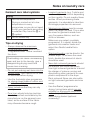
Control panel
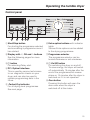
a Start/Stop button
For starting the programme selected
and cancelling a programme once it
has started.
f Extra option buttons with indicator
lights
Various Extra options can be added
to the drying programmes.
b Display with X, OK and Y buttons
See the following pages for more
information.
g Programme selector
The programme selector can be
turned clockwise or anti-clockwise.
c + button
For selecting Delay start.
h K On/Off button
For switching the dryer on and off.
To save energy, the dryer will switch
off automatically 15 minutes after the
end of the programme/Anti-crease
phase or 15 minutes after the dryer is
switched on if it is not operated.
d PC / Optical interface
This is used by service technicians
to run diagnostic checks on your
dryer and can also be used to
update programming data in the
future.
e Perfect Dry indicator
For all drying level programmes.
See next page.
i Door button
Pressing this button will open the
door even when the dryer is
switched off at the mains.
15