1
T
VIDEO CD CHANGER RECEIVER
INPUT SELECTOR
VOLUME
VCR/LD-TV/VCD-CD/TUNER/TAPE•MD/AUX
VIDEO CD CHANGER RECEIVER EM–202VCD
OPEN/
CLOSE
VIDEO CD
Version 2.0 / Playback Control
DISC
CHANGE
1
DISC
2
3
RANDOM
REPEAT
TIME
HOUR
MIN
MEMORY
AUTO/MAN'L
TIME ADJ
TIMER
PROGRAM
PRESET/TUNING/BAND
POWER
A/B/C/D/E
MUSIC
ECHO
ECHO
PHONES
MIC
USER
MEMORY
MIC MIXING
DISPLAY
MIN
OWNER’S MANUAL
MAX
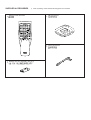
SUPPLIED ACCESSORIES
●
●
After unpacking, check that the following parts are contained.
Remote control transmitter
●
●
AM loop antenna
●
1
2
VCD/CD
3
4
1
2
3
4
6
7
8
6
7
8
9
A
B
C
D
TIME
PROG
MODE
PREV
NEXT
LEVEL
CENTER/REAR
/DELAY ECHO/ TEST
5
0
E
+I0
INDEX
DISC SKIP
5
PRESET
OPEN/CLOSE TUNER
RETURN
SELECT
INPUT
FLAT
TIME INDEX
KEY
MUSIC
PROGRAM
USER
INTRO
DIGEST
POWER
SLEEP
DISPLAY
VOLUME
●
●
●
Batteries (size AA, UM/SUM-3, R6, HP-7)
●
2
Indoor FM antenna
1
1
2
STEREO
TUNED MEMORY
AUTO
PROGRAM
USER NOR TEST
PRO LOGIC HALL ARENA 1 2 PHANTOM
3 STEREO KARAOKE L R 3 4 TIMER SLEEP
MUSIC
ROCK BLUES
RAP JAZZ
B
345 6 7 8 9 0 A
PRESET
100 350
VOLUME
MHz
1K 3.5K 10K
C
D
E
J
IH
GFE
INPUT SELECTOR
VOLUME
VCR/LD-TV/VCD-CD/TUNER/TAPE•MD/AUX
OPEN/
CLOSE
VIDEO CD
Version 2.0 / Playback Control
DISC
CHANGE
1
DISC
2
3
RANDOM
REPEAT
TIME
HOUR
MIN
MEMORY
AUTO/MAN'L
TIME ADJ
TIMER
PROGRAM
PRESET/TUNING/BAND
POWER
1
MUSIC
ECHO
2
A/B/C/D/E
D
C
B
A
ECHO
PHONES
MIC
USER
MEMORY
MIC MIXING
DISPLAY
MIN
3
4 5 67 8 9
3
MAX
0
2
F G
MUSIC
ROCK
PROGRAM
H
I
J
K
RANDOM 1 2 3 4 5 6
USER
ARENA
7 8 9 10 11 12
TOTAL REM 13 14 15 OVER 15
VIDEO CD PBC
TRACK
100 350
PROG
S F REP
1K 3.5K 10K
L
M
N
VOLUME
OP
T S
R
INPUT SELECTOR
VOLUME
VCR/LD-TV/VCD-CD/TUNER/TAPE•MD/AUX
K
OPEN/
CLOSE
VIDEO CD
Version 2.0 / Playback Control
DISC
CHANGE
1
DISC
2
3
RANDOM
REPEAT
TIME
MEMORY
AUTO/MAN'L
HOUR
MIN
TIME ADJ
TIMER
PROGRAM
PRESET/TUNING/BAND
POWER
A/B/C/D/E
MUSIC
ECHO
ECHO
PHONES
MIC MIXING
MIC
USER
MEMORY
DISPLAY
MIN
L
M
4
N
O
MAX
Q
P
1
3
1
2
VCD/CD
3
1
2
3
6
7
8
6
7
8
9
A
B
C
D
TIME
PROG
2
3
4
MODE
PREV
5
NEXT
LEVEL
CENTER/REAR
/DELAY ECHO/ TEST
4
H
5
5
PRESET
0
E
G
I
F
J
E
K
6
7
8
9
PROGRAM
VCD/CD
3
4
2
3
4
6
7
8
5
5
PRESET
6
7
8
9
A
B
C
D
TIME
PROG
MODE
OPEN/CLOSE TUNER
RETURN
0
E
+I0
OPEN/CLOSE TUNER
INDEX
INPUT
FLAT
USER
L
TIME INDEX
INTRO
DIGEST
POWER
SLEEP
DISC SKIP
PREV
NEXT
RETURN
Q
SELECT
SELECT
KEY
MUSIC
2
1
+I0
INDEX
DISC SKIP
4
1
DISPLAY
M N
O P
D
C
VOLUME
B
A
0
LEVEL
CENTER/REAR
/DELAY ECHO/ TEST
INPUT
FLAT
TIME INDEX
R
KEY
MUSIC
PROGRAM
USER
INTRO
DIGEST
S
POWER
SLEEP
DISPLAY
VOLUME
4
T
5
2
0.2 m – 6 m
(8” – 20’)
1
3
30°
5
30°
6
Center speaker
Rear speakers
R
L
SPEAKERS
CENTER/REAR
REAR R
CENTER
Front speakers
L REAR
R
L
REAR SINGLE
CENTER
:8Ω MIN./SPEAKER
REAR
:4Ω MIN./SPEAKER
REAR SINGLE :8Ω MIN./SPEAKER
SEE OWNER'S MANUAL FOR CONNECTION.
SPEAKERS
FRONT
R
L
6Ω MIN./SPEAKER
SEE OWNER'S MANUAL FOR CONNECTION.
VOLTAGE
SELECTOR
SPEAKERS
CENTER/REAR
REAR R
CENTER
L REAR
MAINS
ANTENNA
REAR SINGLE
CENTER
:8Ω MIN./SPEAKER
REAR
:4Ω MIN./SPEAKER
REAR SINGLE :8Ω MIN./SPEAKER
AM
SEE OWNER'S MANUAL FOR CONNECTION.
AC OUTLET
SPEAKERS
GND
FRONT
R
L
AUDIO SIGNAL
AUX
TAPE•MD
IN
OUT
LD•TV
VCR
IN
SUBWOOFER
75Ω
FM UNBAL.
OUT
VIDEO SIGNAL
UNSWITCHED
100W MAX.
LD•TV
L
6Ω MIN./SPEAKER
OUT
VCR
IN
MONITOR
OUT
OUT
TV
MODE
AUTO
R
CENTER
MODE
NORMAL
FREQUENCY
STEP
100kHz
50kHz
FM
PAL
PHANTOM 9kHz
AM
NTSC
10kHz
SEE OWNER'S MANUAL FOR CONNECTION.
AUDIO SIGNAL
VIDEO SIGNAL
SUBWOOFER
OUT
OUT
6
Subwoofer
7
LD player, etc.
VOLTAGE
SELECTOR
VIDEO IN
*
VIDEO OUT
AUDIO OUT
Monitor TV
(General model)
SPEAKERS
CENTER/REAR
REAR R
CENTER
L REAR
MAINS
ANTENNA
REAR SINGLE
CENTER
:8Ω MIN./SPEAKER
REAR
:4Ω MIN./SPEAKER
REAR SINGLE :8Ω MIN./SPEAKER
AM
SEE OWNER'S MANUAL FOR CONNECTION.
AC OUTLET
SPEAKERS
FRONT
R
GND
L
AUDIO SIGNAL
AUX
TAPE•MD
IN
OUT
LD•TV
VCR
IN
SUBWOOFER
OUT
75Ω
FM UNBAL.
VIDEO SIGNAL
UNSWITCHED
100W MAX.
6Ω MIN./SPEAKER
LD•TV
L
OUT
VCR
IN
MONITOR
OUT
OUT
TV
MODE
AUTO
R
CENTER
MODE
NORMAL
FREQUENCY
STEP
100kHz
50kHz
FM
PAL
PHANTOM 9kHz
AM
NTSC
10kHz
SEE OWNER'S MANUAL FOR CONNECTION.
AUDIO SIGNAL
VIDEO SIGNAL
Tape deck, etc.
Tape deck, MD recoder, etc.
7
VIDEO IN
VIDEO OUT
AUDIO IN
AUDIO OUT
LINE IN
LINE OUT
AUDIO OUT
To AC Outlet
Video cassette recorder
8
A
DISPLAY
1
VOLTAGE
SELECTOR
SPEAKERS
CENTER/REAR
REAR R
CENTER
L REAR
MAINS
2
ANTENNA
REAR SINGLE
CENTER
:8Ω MIN./SPEAKER
REAR
:4Ω MIN./SPEAKER
REAR SINGLE :8Ω MIN./SPEAKER
AM
SEE OWNER'S MANUAL FOR CONNECTION.
AC OUTLET
SPEAKERS
GND
FRONT
R
L
AUDIO SIGNAL
AUX
TAPE•MD
IN
OUT
LD•TV
VCR
IN
LD•TV
L
6Ω MIN./SPEAKER
REPEAT
TIME
MEMORY
HOUR
MIN
TIME ADJ
SUBWOOFER
75Ω
FM UNBAL.
OUT
VIDEO SIGNAL
UNSWITCHED
100W MAX.
VCR
IN
OUT
MONITOR
OUT
TV
MODE
OUT
CENTER
MODE
AUTO
R
NORMAL
FREQUENCY
STEP
100kHz
50kHz
FM
PAL
PHANTOM 9kHz
AM
NTSC
10kHz
SEE OWNER'S MANUAL FOR CONNECTION.
AUDIO SIGNAL
VIDEO SIGNAL
Changes.
To AC Outlet
3
9
REPEAT
TIME
MEMORY
HOUR
MIN
TIME ADJ
Changes.
TV
MODE
CENTER
MODE
AUTO
NORMAL
50kHz
PHANTOM 9kHz
PAL
NTSC
B
VOLUME
VOLUME
VOLTAGE
SELECTOR
SPEAKERS
CENTER/REAR
REAR R
CENTER
L REAR
MAINS
ANTENNA
REAR SINGLE
CENTER
:8Ω MIN./SPEAKER
REAR
:4Ω MIN./SPEAKER
REAR SINGLE :8Ω MIN./SPEAKER
AM
SEE OWNER'S MANUAL FOR CONNECTION.
AC OUTLET
SPEAKERS
GND
FRONT
R
L
AUDIO SIGNAL
AUX
TAPE•MD
IN
OUT
LD•TV
VCR
IN
SUBWOOFER
75Ω
FM UNBAL.
OUT
VIDEO SIGNAL
UNSWITCHED
100W MAX.
LD•TV
L
6Ω MIN./SPEAKER
VCR
IN
OUT
MONITOR
OUT
OUT
TV
MODE
AUTO
R
CENTER
MODE
NORMAL
FREQUENCY
STEP
100kHz
50kHz
FM
PAL
PHANTOM 9kHz
AM
NTSC
10kHz
SEE OWNER'S MANUAL FOR CONNECTION.
AUDIO SIGNAL
VIDEO SIGNAL
0
VOLUME
INPUT SELECTOR
VOLUME
VCR/LD-TV/VCD-CD/TUNER/TAPE•MD/AUX
OPEN/
CLOSE
VIDEO CD
Version 2.0 / Playback Control
DISC
CHANGE
DISC
2
1
3
RANDOM
REPEAT
TIME
HOUR
MIN
MEMORY
AUTO/MAN'L
TIME ADJ
TIMER
PROGRAM
PRESET/TUNING/BAND
POWER
A/B/C/D/E
C
MUSIC
ECHO
ECHO
PHONES
MIC
USER
MEMORY
MIC MIXING
DISPLAY
MIN
PREV
DISC SKIP
NEXT
LEVEL
CENTER/REAR
/DELAY ECHO/ TEST
RETURN
MAX
PHONES
SELECT
INPUT
FLAT
TIME INDEX
KEY
MUSIC
PROGRAM
USER
INTRO
INPUT SELECTOR
DIGEST
POWER
SLEEP
VOLUME
VCR/LD-TV/VCD-CD/TUNER/TAPE•MD/AUX
OPEN/
CLOSE
VIDEO CD
Version 2.0 / Playback Control
DISC
CHANGE
DISPLAY
1
DISC
2
3
RANDOM
VOLUME
REPEAT
TIME
HOUR
MIN
MEMORY
AUTO/MAN'L
TIME ADJ
TIMER
PROGRAM
PRESET/TUNING/BAND
POWER
A/B/C/D/E
MUSIC
ECHO
ECHO
PHONES
MIC
USER
MEMORY
MIC MIXING
DISPLAY
MIN
8
MAX
ENGLISH
Thank you for purchasing this YAMAHA product. We hope it will give you many years of trouble-free enjoyment. For the best
performance, read this manual carefully. It will guide you in operating your YAMAHA product.
CONTENTS
Page
Page
PRECAUTIONS.............................................2-3
CARE OF VIDEO CDS (CDS) ........................11
FEATURES .......................................................4
SPEAKER BALANCE ADJUSTMENT .....12-13
NAMES OF CONTROLS AND
INDICATORS ....................................................5
VIDEO CD PLAYER OPERATION ............14-21
REMOTE CONTROL TRANSMITTER .............6
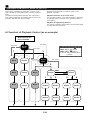
PLAYBACK CONTROL OF VIDEO CD
(Ver. 2.0) ....................................................22-24
SETTING UP THE SPEAKERS........................7
TUNING OPERATION ...............................25-27
CONNECTIONS ............................................8-9
OPERATING EXTERNAL UNITS
CONNECTED WITH THIS UNIT.....................28
SETTING THE VIDEO OUTPUT FORMAT
SELECTOR (TV MODE) SWITCH..................10
USING GRAPHIC EQUALIZER ................29-30
TURNING THE POWER TO THIS UNIT
ON OR IN THE STANDBY MODE..................10
USING SOUND FIELD PROCESSOR ......31-34
STORING YOUR OWN PROGRAMS ............35
SETTING THE CLOCK...................................10
KARAOKE OPERATION ..........................36-37
ADJUSTING BRIGHTNESS OF
THE DISPLAY.................................................11
HOW TO USE THE BUILT-IN TIMER .......38-40
TROUBLESHOOTING....................................41
VOLUME CONTROL ......................................11
SPECIFICATIONS ..........................................42
LISTENING WITH HEADPHONES.................11
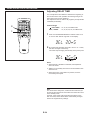
For basic source play, the following illustrations on top of
pages will help you to look for the section you need.
......Video CD (CD) playback
E-1
......Tuning
English
INTRODUCTION
PRECAUTIONS: READ THIS BEFORE OPERATING YOUR UNIT
■ To assure the finest performance, please read this manual
carefully. Keep it in a safe place for future reference.
■ The voltage to be used must be the same as that specified
on this unit. Using this unit with a higher voltage than that
which is specified is dangerous and may result in a fire or
other type of accident causing damage. YAMAHA will not
be held responsible for any damage resulting from use of
this unit with a voltage other than that which is specified.
■ Choose the installation location of this unit carefully. Avoid
placing it in direct sunlight or close to a source of heat.
Also avoid locations subject to vibration and excessive
dust, heat, cold or moisture. Keep it away from sources of
hum such as transformers and electric motors.
■ The sound level at a given volume setting depends on
speaker location and other factors. Care should be taken
to avoid exposure to sudden high levels of sound, which
may occur when turning on the unit with the volume control
setting at high, and to continuous high levels of sound.
■ Do not operate this unit upside-down. It may overheat,
possibly causing damage.
■ Never open the cabinet. If something drops into the set,
contact your dealer.
■ Sudden temperature changes and storage or operation in
an extremely humid environment may cause condensation
inside the cabinet.
Condensation can cause the unit to malfunction.
To eliminate condensation:
■ The openings on the cabinet assure proper ventilation of
the unit. If these openings are obstructed, the temperature
inside the cabinet will rise rapidly. Therefore, avoid
placing objects against these openings, and install the unit
in well-ventilated condition. Make sure to allow a space of
at least 20 cm behind, 20 cm on the both sides and 30 cm
above the top panel of the unit. Otherwise it may not only
damage the unit, but also cause fire.
•
•
■ Always set the VOLUME control to minimum before
starting an audio source play: increase the volume
gradually to an appropriate level after play has started.
Pickup
Leave the power on with no disc in the unit until normal
playback is possible (about 1 hour).
Remote control
Wipe off condensation on the transmitter window with a
soft cloth before operating the unit.
■ When not planning to use this unit for long periods of time
(ie., vacation, etc.), disconnect the AC power plug from the
wall outlet.
IMPORTANT
Please record the serial number of this unit in the space
below.
■ Grounding or polarization – Precautions should be taken
so that the grounding or polarization of the unit is not
defeated.
Serial No.:
The serial number is located on the rear of the unit.
Retain this Owner’s Manual in a safe place for future
reference.
■ Do not use force on switches, controls or connection wires.
When moving the unit, first disconnect the power plug and
the wires connected to other equipment. Never pull the
wire itself.
WARNING
TO REDUCE THE RISK OF FIRE OR ELECTRIC SHOCK,
DO NOT EXPOSE THIS APPLIANCE TO RAIN OR
MOISTURE.
■ Do not attempt to clean the unit with chemical solvents;
this might damage the finish. Use a clean, dry cloth.
■ Be sure to read the “TROUBLESHOOTING” section
regarding common operating errors before concluding that
the unit is faulty.
■ To prevent lightning damage, disconnect the AC power
plug and the antenna cable when there is an electrical
storm.
■ Do not plug the AC power plug to the wall socket before
you finish all connections.
E-2
WARNING
NOTE
Please check the copyright laws in your country to record
from records, compact discs, radio, etc. Recording of
copyright material may infringe copyright laws.
To reduce the risk of fire or electric shock, do not expose this
unit to rain or moisture.
To avoid electrical shock, do not open the cabinet. Refer
servicing to qualified personnel only.
CAUTION FOR CARRYING THIS UNIT
Be sure not to carry or tip this unit with discs remaining in
it.
CAUTION 1
Use of controls or adjustments or performance of
procedures other than those specified herein may result in
hazardous radiation exposure.
CAUTION FOR MOVING THIS UNIT
Before moving this unit, first remove all discs from the disc
table and close the table by pressing the OPEN/CLOSE
button. After you confirm that “NO DISC” lights up on the
display, switch off the power by pressing the POWER
switch, and then disconnect the power plug from the AC
outlet.
CAUTION 2
As the laser beam used in this unit is harmful to the eyes,
do not attempt to disassemble the cabinet. Refer servicing
to qualified personnel only.
This unit is not disconnected from the AC power source
as long as it is connected to the wall outlet, even if this
unit itself is turned off.
In this state, this unit is designed to consume a very small
quantity of power.
CLASS 1 LASER PRODUCT
This unit is classified as a CLASS 1
LASER product.
The CLASS 1 LASER PRODUCT
label is located on the rear exterior.
Laser component in this product is capable of emitting
radiation exceeding the limit for Class 1.
VOLTAGE SELECTOR (General model only)
The voltage selector on the rear panel of this unit must
be set for your local main voltage BEFORE plugging
into the AC main supply.
Voltages are 110/120/220/240V AC, 50/60 Hz.
Laser Diode Properties
Material: GaAlAs
Wavelength: 780nm
Emission Duration: continuous
Laser Output: max. 44.6µW*
* This output is the value measured at a distance of about
200mm from the objective lens surface on the Optical
Pick-up Block.
•
•
•
•
The Video CD player on this unit can play discs of the following types only.
Type of disc
Mark printed
on the disc
Sound
+
Picture (Movie)
Video CD
CD
(including CD-G)
Type of signal
recorded
Sound
only
GRAPHICS
Sound
+
Still picture
Size (Dimension)
Maximum possible
play time
12 cm
74 minutes
8 cm (Single type)
20 minutes
12 cm
74 minutes
8 cm (Single type)
20 minutes
Never attempt to load a disc other than above on this unit because it may cause a damage to this unit and/or other units
connected to this unit.
VIDEO CD
Video CDs are classified into two types, version 1.1 and 2.0. This unit can play not only discs of version 1.1, but also version
2.0 on which a Playback Control can be made.
Video CD, version 1.1: With the same operation as compact discs, you can enjoy sounds and pictures (movies).
Video CD, version 2.0: In addition to a normal play which is the same as discs of version 1.1, you can make a Playback
Control. (For details on Playback Control, refer to page 22.)
E-3
English
PRECAUTIONS: READ THIS BEFORE OPERATING YOUR UNIT
FEATURES
● Single Track/Entire Disc/All Disc Repeat Play
● Random-sequence Play
● Playback Control Function Available for
Video CDs, Version 2.0
● Quick Overview of a Track and a Disc with a
Touch of the DIGEST and INTRO Buttons
The System
● 5 speaker Configuration
Front L, R:
75W + 75W (6Ω) RMS Output
Power, 10% THD, 1 kHz
65W + 65W (6Ω) RMS Output
Power, 1% THD, 1 kHz
Center:
30W (8Ω) RMS Output Power,
10% THD, 1 kHz
20W (8Ω) RMS Output Power,
1% THD, 1 kHz
Rear
30W (8Ω) RMS Output Power,
10% THD, 1 kHz
20W (8Ω) RMS Output Power,
1% THD, 1 kHz
● Adjustable Display Brightness
● 2 Microphone Jacks and Mic Mixing Level
Control for Karaoke
● Echo Level and Key Level Control Capability
● Multi-Use Timer/Sleep Timer
● Automatic Power-Off Function
● 5 External Audio/Video Component
Connecting Capability
● SUBWOOFER Output Terminal Which
Passes Low Frequencies Only
● Video Output Format Selector (TV MODE)
Switch
● Remote Control Capability
Tuner
● 40 Station Random Access Preset Tuning
● 40 Station Automatic Preset Tuning
Sound Field Processor Including Dolby Pro
Logic Surround Decoder
● 2 Programs for Dolby Surround Decoding
(DOLBY PRO LOGIC and DOLBY 3 STEREO)
2 Programs for Sound Field Processing
(HALL and ARENA)
4 Programs for Singing Karaoke
● Automatic Input Balance Control for Dolby
Pro Logic Surround
● 2 Center Channel Modes
(NORMAL/PHANTOM)
● Test Tone Generator for Easier Speaker
Balance Adjustment
Graphic Equalizer
● 5-Band Adjustable Graphic Equalizer
● 4 Preset Graphic Equalizer Modes
Selectable According to the Music Source
(ROCK, BLUES, RAP and JAZZ)
● 4-Sound Field and 4-Equalizer Control Mode
Storing Capability
Video CD Player
● 3-Disc Carousel Auto-Changer (for Playing
Back Video CDs and Compact Discs)
● PLAYXCHANGE; Disc Changing Capability
while Playing Back Another
● 20-Track Random Access Programmable
Playback
Dolby Pro Logic Surround
Dolby Surround is encoded on the sound track of prerecorded video tapes, laser discs, and some TV/cable
broadcasts. When you play a source encoded with Dolby
Surround on this unit, the Dolby Pro Logic Surround decoder
decodes the signal and distributes the surround-sound
effects.
In addition, this unit features a built-in automatic input balance
control. This always assures you the best performance
without manual adjustment.
This unit employs a Dolby Pro Logic Surround decoder similar
to professional Dolby Stereo decoders used in many movie
theaters. By using the Dolby Pro Logic Surround decoder,
you can experience the dramatic realism and impact of Dolby
Surround movie theater sound in your own home. Dolby Pro
Logic employs a four channel five speaker system. The Pro
Logic Surround system divides the input signal into four
levels: the left and right main channels, the center channel
(used for dialog), and the rear surround sound channels
(used for sound effects, background noise, and other ambient
noises). The center channel allows listeners seated in even
less-than-ideal positions to hear the dialog originating from
the action on the screen while experiencing good stereo
imaging.
Manufactured under license from Dolby Laboratories
Licensing Corporation. “Dolby”, the double-D symbol and “Pro
Logic” are trademarks of Dolby Laboratories Licensing
Corporation.
E-4
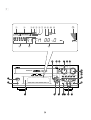
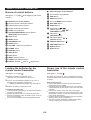
For amplifier/tuner
Display
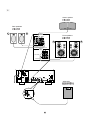
(See figure 1 on page 3 at the beginning part of this
manual.)
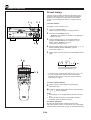
1
2
3
4
5
6
7
8
9
@
A
B
C
D
E
1
2
3
4
5
6
7
8
9
0
A
B
C
D
E
F
G
H
I
POWER Switch
J
PROGRAM Selector Button
PHONES Jack
Remote Control Sensor
USER Button
User Program MEMORY Button
DISPLAY Button
PRESET/TUNING/BAND Selector Button
MIC (Microphone) Jacks
A/B/C/D/E Button
MIC MIXING (Microphone Mixing) Level Control
(Down)/
(Up) Buttons
AUTO/MAN’L (TIMER) Button
Tuner MEMORY (TIME ADJUST) Button
VOLUME Control
Preset Equalizer Mode Indicator (MUSIC)
Sound Field Program Indicator (PROGRAM)
User Program Number Indicator
Center Channel Mode (NOR/PHANTOM) Indicator
TEST Indicator
TIMER Set Indicator
SLEEP Indicator
AUTO Tuning Indicator
TUNED Indicator
STEREO Indicator
MEMORY Indicator
Volume Level Meter
Graphic Equalizer Level Indicators
Preset Number Indicator
Multi Information Display
(Time, Station Frequency, Volume Level, etc.)
MIN Button
HOUR Button
INPUT SELECTOR
MUSIC Button
Equalizer Control Buttons
(ECHO Buttons)
(Key Level Control
/
Buttons)
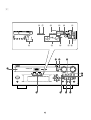
For Video CD player
Display
(See figure 2 on page 4 at the beginning part of this
manual.)
F
G
H
I
J
K
L
M
N
O
P
K
L
M
N
O
P
Q
R
S
T
Disc Table
DISC Selector Buttons
RANDOM Button
Stop Button:
Play/Pause Button:
/
Skip Buttons:
/
(Search Buttons:
/
)
TIME Button
REPEAT Button
OPEN/CLOSE Button:
DISC CHANGE Button
E-5
VIDEO CD Indicator
PBC Indicator
RANDOM Play Indicator
Music Calendar Indicator
Music Calendar OVER 15 Indicator
Disc Indicator
Track Number Indicator
Time Display
Play Indicator:
(S, F) REPEAT Indicator
Program (PROG) Play Indicator
English
NAMES OF CONTROLS AND INDICATORS
REMOTE CONTROL TRANSMITTER
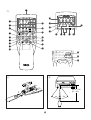
Names of control buttons
(See figure 3 on page 5 at the beginning part of this
manual.)
■ Amplifier/tuner control buttons
■
Video CD player control buttons
H
I
J
K
L
M
N
Track Number Input Buttons
TIME Button
PROGRAM Button
Disc Play MODE Selector Button
1
2
3
4
5
Remote Control Transmitter Window
CENTER/REAR/DELAY Selector Button
(ECHO/KEY Selector Button)
O
6
7
8
9
0
A
B
C
D
E
F
G
Stop Button:
(RETURN Button)
TEST Button
P
Play/Pause Button:
(SELECT Button)
Q
R
S
T
OPEN/CLOSE Button:
Preset Station Number Buttons
A, B, C, D, E Selector Buttons
LEVEL Control Buttons
MUSIC Button
PROGRAM Button
SLEEP Button
VOLUME – (Down)/+ (Up) Buttons
POWER Switch
DISC SKIP Button
INDEX Buttons
Skip Buttons:
/
(Search Buttons:
/
(PREV/NEXT Buttons)
)
/
TIME INDEX Buttons
DIGEST Button
INTRO Button
DISPLAY Button
USER Button
FLAT Button
INPUT Selector Buttons
TUNER Input Selector Button
PRESET Number
(Down)/
(Up) Buttons
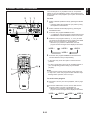
Loading the batteries for the
remote control transmitter
Proper use of the remote control
transmitter
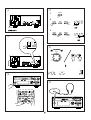
(See figure 4 on page 5.)
(See figure 5 on page 5.)
1
Remove the battery compartment cover.
(Slide the cover in the direction of the arrow.)
2
Aim (within the range of 60° with no obstacles) the remote
control transmitter at the remote control sensor and operate
as shown.
Insert 2 “AA” size batteries (UM/SUM-3, R6, HP-7 or
equivalent) into the battery compartment.
* Installing the batteries improperly may cause failure.
3
Notes concerning use
• Replace the batteries if control distance decreases or
operation becomes unstable.
• Periodically clean the transmitter window on the remote
control transmitter and the sensor on the main unit with a
soft cloth.
• Exposing the sensor on the main unit to strong light
(especially an inverter type of fluorescent lamp etc.) may
interfere with operation. In this case, reposition the main
unit to avoid direct lighting.
• Keep the remote control transmitter away from moisture,
excessive heat, shock and vibrations.
• The remote control transmitter’s usable range is within
0.2m (8”) and 6m (20’) away from the sensor.
Replace the battery compartment cover.
Precautions for battery use
Insert the batteries according to the direction indicated in
the battery compartment.
Replace all batteries with new ones at the same time.
Remove the batteries if they are weak or if the unit is not
in use for long periods.
Don’t mix normal batteries with rechargeable batteries.
•
•
•
•
E-6
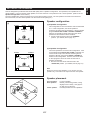
This unit designed to provide the best sound-field quality with a 5-speaker configuration: front speakers, rear speakers and a
center speaker. You may omit the center speaker, if for some reason it is not practical to use a center speaker. (Refer to the “4Speaker Configuration” shown below.)
The front speakers are used for the main source sound plus the effect sounds. The rear speakers are used for the effect and
surround sounds, and the center speaker is for the center sounds (dialog etc.).
Speaker configuration
(1)
Front L
Center
(1) 5-Speaker Configuration
Front R
This configuration is the most effective and recommended
one. In this configuration, the center speaker is
necessary as well as the rear speakers. If the sound field
program DOLBY PRO LOGIC or DOLBY 3 STEREO is
selected, conversations will be output from the center
speaker and the ambience will be excellent.
● Set the center channel mode to the “NORMAL”
position. (For details, refer to page 12.)
Dialogue
Surround sound
Rear R
Rear L
(2) 4-Speaker Configuration
(2)
Front L
The center speaker is not used in this configuration. If the
sound field program DOLBY PRO LOGIC is selected, the
center sound is output from the left and the right front
speakers, although the program DOLBY 3 STEREO is
useless in this configuration. However, the sound effect
of other programs can be the same as that of the 5speaker configuration.
● Be sure to set the center channel mode to the
“PHANTOM” position. (For details, refer to page 12.)
Front R
Dialogue
Surround sound
Rear L
Note
Be sure to use two rear speakers. If you connect one rear
speaker only, sound will not be output from the rear speaker.
Rear R
Speaker placement
Front speakers:
Rear speakers:
Front R
Center
Front L
Center speaker:
TV set
Rear R
Rear L
E-7
In normal position.
Behind your listening position, facing
slightly inward. Nearly 1.8 m (approx.
six feet) up from the floor.
Precisely between the front speakers.
English
SETTING UP THE SPEAKERS
CONNECTIONS
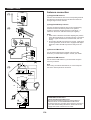
Antenna connection
ANTENNA
(1)
(1) Supplied FM antenna
AM
Connect the FM antenna wire to the corresponding terminal
and direct the FM antenna wire to the direction where the
strongest signal can be received.
GND
75Ω
UNBAL.
FM
(2) Supplied AM loop antenna
Connect the AM loop antenna wires to the corresponding
terminals. Position the AM loop antenna for optimum
reception. Place the AM loop antenna on a shelf etc., or
install it on the rack or wall with screws (not supplied).
(2)
Notes
• When static is still heard even after adjusting the position
of the AM loop antenna, try reversing the wire connections
(from the upper terminal to the lower terminal, and vice
versa).
• Do not place the AM loop antenna on the unit. It will result
in noise generation, since the unit is equipped with digital
electronics. Place the AM loop antenna away from the
unit.
ANTENNA
(3) External FM antenna
AM
Use an external FM antenna instead of an indoor FM
antenna if you need better reception. Consult your dealer.
GND
(4) External AM antenna
75Ω
UNBAL.
FM
15 m (49 feet)
Use an external AM antenna if you need better reception.
Consult your dealer.
(4)
Note
When using an external AM antenna, be sure to keep the
wire of the AM loop antenna connected.
(3)
7.5 m (25 feet)
Earth rod
ANTENNA
AM
GND
or
FM
75Ω
UNBAL.
ANTENNA
FREQUENCY STEP switch
(China and General models only)
Because the interstation frequency spacing differs in
different areas, set the FREQUENCY STEP switch
(located at the rear) according to the frequency spacing in
your area. Before setting this switch, disconnect the AC
supply lead of this unit from the AC outlet.
AM
GND
75Ω
FM UNBAL.
EO SIGNAL
VCR
N
MONITOR
OUT
OUT
TV
MODE
AUTO
CENTER
MODE
NORMAL
FREQUENCY
STEP
100kHz
50kHz
FM
PAL
PHANTOM 9kHz
AM
NTSC
10kHz
DEO SIGNAL
E-8
Never plug the AC supply lead of this unit into the AC outlet until all connections are
completed.
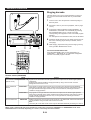
Connecting speakers
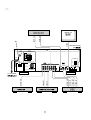
(See figure 6 on page 6.)
How to Connect:
Connect the front speakers to the FRONT SPEAKERS
terminals, the center speaker to the CENTER SPEAKERS
terminals and the rear speakers to the REAR SPEAKERS
terminals.
Connect the SPEAKERS terminals to your speakers with wire
of the proper gauge, cut as short as possible. If the
connections are faulty, no sound will be heard from the
speakers. Make sure that the polarity of the speaker wires is
correct, that is the + and – markings are observed. If these
wires are reversed, the sound will be unnatural and lack bass.
Note
Use speakers with the specified impedance shown on the
rear of this unit.
Caution
Do not let the bare speaker wires touch each other as
this could damage the amplifier and/or speakers.
Note on connecting a subwoofer (separate
purchase)
Red: positive (+)
Black: negative (–)
You may wish to add a subwoofer to reinforce the bass
frequencies.
Connect the SUBWOOFER OUT terminal on the rear of
this unit to the INPUT terminal of the subwoofer
amplifier, and connect the speaker terminals of the
subwoofer amplifier to the subwoofer.
With some subwoofers, including the Yamaha Active
Servo Processing Subwoofer System, the amplifier and
subwoofer are in the same unit.
* The SUBWOOFER OUT terminal is for output to a
monaural amplifier driving a subwoofer. Only frequencies
below 200 Hz from the front and center channels are
output.
➀ Press up the tab.
➁ Insert the bare wire.
➀
➂
➁
[Remove approx.
5mm (1/4”) insulation
from the speaker
wires.]
➂ Press down the tab
and secure the wire.
Connecting external components
Connecting the AC supply lead
(See figure 7 on page 7.)
(See figure 8 on page 8.)
This unit can be connected with external audio and video
components. Make connections between this unit and other
components using RCA pin plug connector cables correctly, that
is to say L (left) to L and R (right) to R. Also, refer to the owner’s
manual for each component to be connected to this unit.
•
•
*
AC OUTLET (UNSWITCHED)
The power cord of any audio/video unit can be connected to
this outlet.
The power to this outlet is not controlled by this unit’s
POWER switch. This outlet will supply power to the
connected unit even if this unit is in the standby mode.
The maximum power that can be connected to this outlet is
100 watts.
E-9
After completing all connections, plug the AC supply lead
into a convenient AC outlet.
Unplug the AC supply lead from the AC outlet if the unit is
not to be used for a long period of time.
English
CONNECTIONS
SETTING THE VIDEO OUTPUT FORMAT SELECTOR (TV MODE) SWITCH
(See figure 9 on page 8.)
NTSC: Outputs signals in the NTSC format no matter which
format (PAL or NTSC) the currently playing disc
employs.
Set to this position if your monitor TV employs the
NTSC format.
The Video CD player on this unit is designed for use with the
NTSC and PAL television formats. Set this switch to the
position for the format your monitor TV employs.
PAL:
Outputs signals in the PAL format no matter which
format (PAL or NTSC) the currently playing disc
employs.
Set to this position if your monitor TV employs the
PAL format.
Note
Make sure to play back a disc which employs the same
format that your monitor TV employs, otherwise a picture will
not be played back normally.
AUTO: Outputs signals in the same format as the currently
playing disc employs.
Set to this position if your monitor TV can be
switched in between the PAL and NTSC formats
automatically.
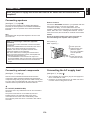
TURNING THE POWER TO THIS UNIT ON OR IN THE STANDBY MODE
(See figure 0 on page 8.)
If the AC supply lead is connected to the AC outlet, this unit
can be turned on and turned into the standby mode by
pressing the POWER switch on the front panel or the
POWER switch on the remote control transmitter.
• While the power is on, the display shows the name of
currently selected input source or other information.
In the standby mode, the display shows only the time.
Standby mode
While the power is on, pressing the POWER switch (or the
POWER switch on the remote control transmitter) switches
this unit to the Standby mode. (In this mode, the display
shows only the time.) In this mode, main voltage is still
present inside this unit. If you want to switch off this unit
completely, disconnect the AC power plug from the AC
outlet.
Automatic function to turn this unit into the standby
mode
The power of this unit will be automatically turned into the
standby mode if there is no operation on the control parts of this
unit, no illumination on the graphic equalizer level indicators and
no playback of Video CD (CD) for about 30 minutes.
* This function is not available unless time setting is made
on the built-in clock.
SETTING THE CLOCK
(See figure A on page 8.)
1
While the power is on, press the DISPLAY button to
display the time. If this unit is into the standby mode, you
can proceed to the next step.
2
While holding the TIME ADJ button pressed, press the
HOUR button and set the hour.
* Press the HOUR button once to advance the time by 1
hour. Press and hold to advance continuously.
3
Singapore model uses a 24-hour display. China and
General models use either a 24-hour display or a 12-hour
display [shown by “AM (PM) 12:00”] is selected
depending on the setting of the FREQUENCY STEP
switch on the rear panel, so you cannot select a desired
type freely.
In the event of a power failure or when the AC supply
lead is disconnected.
The time display will go out, however, the clock will function
for about 5 minutes without power supply. So you do not
have to reset the time if the AC power supply is resumed
within about 5 minutes.
When the AC power supply is resumed after more than 5
minutes pass without power supply, the time display will flash
on and off to indicate that the time must be reset.
While holding the TIME ADJ button pressed, press the
MIN button and set the minute.
* Press the MIN button once to advance the time by 1
minute. Press and hold to advance continuously.
E-10
This adjustment can be made even though this unit is in the
standby mode.
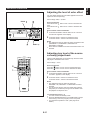
If desired, you can adjust brightness of the display.
1
Press and hold the DISPLAY button for more than 2
seconds so that “DIMMER±0” appears on the display.
2
Holding the DISPLAY button pressed, turn the VOLUME
control clockwise to increase or counterclockwise to
decrease brightness.
Control range
When the power is on: ±0 to –6 (Preset value: ±0)
In the standby mode: +3 to –3 (Preset value: ±0)
VOLUME CONTROL
(See figure B on page 8.)
Remote control operation
Press the VOLUME + button to increase the volume and the
VOLUME – button to decrease the volume.
Front panel operation
Rotate the VOLUME control clockwise to increase the
volume, and counterclockwise to decrease the volume.
* Adjusted volume level is shown by the volume level meter
and in figures on the display.
LISTENING WITH HEADPHONES
(See figure C on page 8.)
•
•
Be sure that your headphones have a 3.5 mm (1/8”)
diameter plug and are between 16 ohms and 50 ohms
impedance. Recommended impedance is 32 ohms.
When headphones are connected, the speakers are
defeated automatically and you can listen to the sound to
be output from the front speakers through headphones.
Adjust the VOLUME control for desired volume.
CARE OF VIDEO CDS (CDS)
Discs are fairly resistant to damage, however mistracking can
occur due to an accumulation of dirt on the disc surface.
Follow the guidelines below for maximum enjoyment from
your disc collection and player.
• Do not write on either side of the disc, particularly the nonlabel side. Signals are read from the non-label side. Do
not mark this surface.
• Keep your discs away from direct sunlight, heat and
excessive moisture.
• Always hold the discs by the edges. Fingerprints, dirt or
water on the discs can cause noise or mistracking. If a
disc is dirty or does not play properly, clean it with a soft,
dry cloth, wiping straight out from the center, along the
radius.
E-11
English
ADJUSTING BRIGHTNESS OF THE DISPLAY
SPEAKER BALANCE ADJUSTMENT
CENTER
MODE
TV
MODE
FREQU
100kHz
50kHz
NORMAL
AUTO
This procedure lets you adjust the sound output level balance
between the front, center, and rear speakers using the built-in
test tone generator. When this adjustment is performed, the
sound output level heard at the listening position will be the
same from each speaker. This is important for the best
performance of the built-in Dolby Pro Logic surround decoder.
The adjustment of each speaker output level should be
done at your listening position with the remote control
transmitter. Otherwise, the result may not be satisfactory.
FM
PHANTOM 9kHz
PAL
AM
NTSC
10kHz
Before operation
VOLTAGE
SELECTOR
Set the CENTER MODE switch on the rear panel of this unit
to the position suitable for your speaker system configuration.
(Refer to page 7 for details.)
SPEAKERS
CENTER/REAR
REAR R
CENTER
L REAR
MAINS
NORMAL (For 5 speaker configuration):
Select this position when you use the center speaker.
ANTENNA
REAR SINGLE
CENTER
:8Ω MIN./SPEAKER
REAR
:4Ω MIN./SPEAKER
REAR SINGLE :8Ω MIN./SPEAKER
AM
SEE OWNER'S MANUAL FOR CONNECTION.
AC OUTLET
SPEAKERS
GND
FRONT
R
L
AUDIO SIGNAL
AUX
TAPE•MD
IN
OUT
LD•TV
VCR
IN
LD•TV
L
6Ω MIN./SPEAKER
PHANTOM (For 4 speaker configuration):
Select this position when you do not use the center
speaker. The center sound will be output from the left
and right front speakers.
SUBWOOFER
75Ω
FM UNBAL.
OUT
VIDEO SIGNAL
UNSWITCHED
100W MAX.
VCR
IN
OUT
MONITOR
OUT
TV
MODE
OUT
AUTO
R
CENTER
MODE
NORMAL
FREQUENCY
STEP
100kHz
50kHz
FM
PAL
PHANTOM 9kHz
AM
NTSC
10kHz
SEE OWNER'S MANUAL FOR CONNECTION.
AUDIO SIGNAL
VIDEO SIGNAL
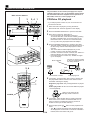
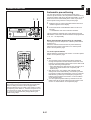
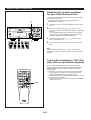
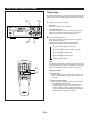
1 Press the POWER switch to turn the power on.
2 Turn the VOLUME control fully counterclockwise to
2, 5
decrease the volume to minimum.
INPUT SELECTOR
3 Press the PROGRAM button once or more so that “
VOLUME
VCR/LD-TV/VCD-CD/TUNER/TAPE•MD/AUX
OPEN/
CLOSE
VIDEO CD
PRO LOGIC” lights up on the sound field program
indicator.
Version 2.0 / Playback Control
DISC
CHANGE
1
DISC
2
3
RANDOM
REPEAT
TIME
HOUR
MIN
MEMORY
AUTO/MAN'L
TIME ADJ
TIMER
PROGRAM
PRESET/TUNING/BAND
POWER
4 Press the TEST button.
A/B/C/D/E
MUSIC
ECHO
ECHO
PHONES
MIC
USER
MEMORY
* “TEST” flashes on and off on the display.
MIC MIXING
DISPLAY
MIN
MAX
5 Press the VOLUME + (up) button to increase the volume.
1
3
1
2
VCD/CD
3
4
1
2
3
4
6
7
8
6
7
8
9
A
B
C
D
TIME
PROG
MODE
PREV
4
NEXT
LEVEL
CENTER/REAR
/DELAY ECHO/ TEST
5
5
PRESET
0
E
+I0
INDEX
DISC SKIP
OPEN/CLOSE TUNER
RETURN
SELECT
INPUT
FLAT
TIME INDEX
KEY
3
MUSIC
PROGRAM
USER
INTRO
(L and R)
1
DIGEST
POWER
SLEEP
DISPLAY
VOLUME
2
You will hear a test tone (like pink noise) from the left front
speaker, then the center speaker, then the right front
speaker, and then the rear speakers, for about two seconds
each. The display changes as shown below.
5
* The test tone from the left rear speaker and the right rear
speaker will be heard at the same time.
E-12
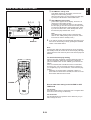
6 Adjust the sound output levels of the center speaker and
the rear speakers by using the LEVEL control buttons so
that they become almost as same as that of the front
speakers.
●
When the test tone is output from the center speaker,
pressing the LEVEL control buttons change the output
level of the center speaker.
MUSIC
1
2
VCD/CD
3
1
2
3
6
7
8
6
7
8
9
A
B
C
D
TIME
PROG
MODE
6
PREV
NEXT
LEVEL
7
CENTER/REAR
/DELAY ECHO/ TEST
4
5
5
0
E
100 350
PROGRAM
1K 3.5K 10K
OPEN/CLOSE TUNER
RETURN
SELECT
Adjustable
INPUT
FLAT
●
TIME INDEX
KEY
MUSIC
USER NOR TEST
PRESET
+I0
INDEX
DISC SKIP
4
PROGRAM
PRO LOGIC
USER
INTRO
DIGEST
POWER
SLEEP
DISPLAY
When the test tone is output from the rear speakers,
pressing the LEVEL control buttons changes the output
level of the rear speakers.
VOLUME
MUSIC
100 350
PROGRAM
PRO LOGIC
USER NOR TEST
1K 3.5K 10K
Adjustable
* Pressing the + button raises and the – button lowers the
level.
7 If the adjustments have finished, press the TEST button to
cancel the test tone.
* “TEST” disappears from the display.
Notes
● Once you have completed these adjustments, you can
adjust whole sound level on your audio system by using
the VOLUME control (or the VOLUME keys on the remote
control transmitter) only.
● In step 6, if the center channel mode is in the “PHANTOM”
position, the sound output level of the center speaker
cannot be adjusted. This is because in this mode, the
center sound is automatically output from the left and right
front speakers.
E-13
English
SPEAKER BALANCE ADJUSTMENT
VIDEO CD PLAYER OPERATION
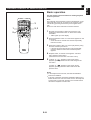
The procedures on this section (from page 14 to 21) are
ineffective when this unit is in the Playback Control mode.
For information about the Playback Control operation of
Video CDs, version 2.0, refer to pages 22–24.
DISC selector buttons
3
2, 4 1
INPUT SELECTOR
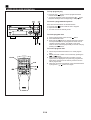
CD/Video CD playback
* If you will play back a Video CD, turn on the monitor TV
connected to this unit.
VOLUME
VCR/LD-TV/VCD-CD/TUNER/TAPE•MD/AUX
OPEN/
CLOSE
VIDEO CD
Version 2.0 / Playback Control
DISC
CHANGE
1
DISC
2
3
RANDOM
REPEAT
TIME
HOUR
MIN
MEMORY
AUTO/MAN'L
TIME ADJ
TIMER
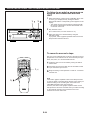
1
Select the Video CD player by turning the INPUT
SELECTOR until “VCD/CD” appears on the display.
2
3
Press the OPEN/CLOSE button to open the disc table.
4
Press the OPEN/CLOSE button to close the disc table.
* The total number of tracks and the total playing time of
the disc being selected will be displayed for several
seconds.
* The music calendar will be displayed only for the
number of tracks on the disc being selected.
* If the disc contains more than 15 tracks, the “OVER 15”
indicator will light up on the music calendar.
* If the selected disc is a Video CD, “VIDEO CD” lights
up on the display.
PROGRAM
PRESET/TUNING/BAND
POWER
A/B/C/D/E
MUSIC
ECHO
ECHO
PHONES
MIC MIXING
MIC
USER
MEMORY
DISPLAY
MIN
POWER
MAX
7
3
Place discs on the trays, label side up.
* Up to three discs can be loaded on the trays.
To load the third disc, rotate the disc table by pressing
the DISC CHANGE button on the front panel or the
DISC SKIP button on the remote control transmitter.
* 8 cm (3”) discs may be played without an adaptor.
The disc on the tray located
on the top of this indicator is
now being selected.
Music calendar
M
USER
TAPE 1
1 2 3 4 5 6
7 8 9 10 11 12
TOTAL
2, 4
TRACK
VOLUME
5
1
2
VCD/CD
3
4
1
2
3
4
6
7
8
6
7
8
9
A
B
C
D
TIME
PROG
MODE
3, 6
PREV
NEXT
LEVEL
CENTER/REAR
/DELAY ECHO/ TEST
5
0
E
OPEN/CLOSE TUNER
RETURN
SELECT
INPUT
FLAT
TIME INDEX
7
1
MUSIC
PROGRAM
USER
INTRO
If necessary, change the disc play mode by pressing the
disc play MODE selector button on the remote control
transmitter watching the display.
Single disc play mode: Only a designated disc is played
back.
All disc play mode: All discs on the disc table are played
back sequentially.
KEY
DIGEST
POWER
SLEEP
Total playing time
5
+I0
INDEX
DISC SKIP
Total number of tracks
5
PRESET
DISPLAY
VOLUME
Lights up only when the all
disc play mode is selected.
POWER
E-14
6
If necessary, select another disc by pressing the DISC
SKIP button on the remote control transmitter once or
more (so that the corresponding disc tray number is
located on the top of the disc indicator).
7
Press the play/pause / button to start playback from
track 1.
* The “ ” indicator will appear and playback will begin.
As the playback of each track on the music calendar is
finished, that track number will go out.
For easier operation
Direct operation
Pressing the DISC selector button (1, 2 or 3) will select the
disc directly, and playback will begin from track 1
automatically.
When this unit is in the standby mode, pressing the DISC
selector (1, 2 or 3) button will turn the power on and start disc
playback automatically.
When the power is on, even if an input source other than
Video CD player is selected, pressing a DISC selector button
or closing the disc table by pushing the front edge of the disc
table gently will start playback directly.
* These ways of playback can also be used to close the disc
table. If the table is closed in these ways, playback will
begin automatically, however, the display will not show the
total number of tracks and the total playing time of the disc
to be played back.
Note
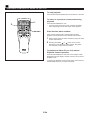
If a Video CD, version 2.0 is selected, “PBC” lights up on the
display, and the total number of tracks, the total playing time
of the disc and the music calendar will not be displayed. In
this mode, disc playback is controlled by the rule of Playback
Control. (For details of Playback Control, refer to page
22–24.)
To cancel this mode and restore the normal playback mode,
press the stop
(RETURN) button. “PBC” disappears from
the display.
To call the Playback Control mode again, press and hold the
stop
(RETURN) button for more than 2 seconds.
PLAYXCHANGE
During playback, you can open the disc table by pressing the
DISC CHANGE button without interrupting playback.
However, in this state, pressing the DISC SKIP button or a
DISC selector button has no effect.
To interrupt playback
1
Press the play/pause / button.
* The “ ” indicator will flash.
2
Press the play/pause
from the same point.
/
Precautions
• If TV or radio interference occurs during Video CD player
operation, move the unit away from the TV or radio.
• Subjecting the unit to shock or vibration can cause
mistracking.
• Playing back some discs at high volume can cause
mistracking. In this case, listen at lower volume.
• Do not pull open the disc table forcibly with your hands.
• Do not push the disc table while it is moving.
• If the power fails while the table is open, wait until the
power supply returns or gently push the table manually to
close it.
• The temperature range for playing back discs is
recommended to be 5°C (41°F) – 35°C (95°F).
button to resume playback
To stop playback
Press the stop
button.
To switch the unit in the standby mode after use
Turn the unit into the standby mode by pressing the POWER
switch. (The indicators will go off except for the current time
display.)
Direct-selection playback
1
2
VCD/CD
3
4
1
2
3
4
6
7
8
6
7
8
9
A
B
C
D
TIME
PROG
MODE
5
1
2
VCD/CD
3
4
1
2
3
4
6
7
8
6
7
8
5
5
PRESET
0
E
+I0
INDEX
By using the track number input buttons on the remote
control transmitter, any track you wish to listen to can be
played back directly.
5
Use the track number input buttons to select the desired
track number. Playback will begin automatically.
PRESET
9
0
OPEN/CLOSE TUNER
E
PREV
DISC SKIP
NEXT
LEVEL
CENTER/REAR
/DELAY ECHO/ TEST
RETURN
SELECT
+I0
A. For example, to choose selection 5
Press the “5” button.
INPUT
FLAT
TIME INDEX
KEY
MUSIC
PROGRAM
USER
INTRO
DIGEST
B. For example, to choose selection 12
(1) Press the “+10” button.
(2) Within 3 seconds, press “2” button.
POWER
SLEEP
DISPLAY
VOLUME
C. For example, to choose selection 20
(1) Press the “+10” button.
(2) Within 3 seconds, press the “+10” button again.
(3) Within 3 seconds, press the “0” button.
Note
If you select a track number higher than the number of tracks
on the disc, playback will begin from the last track on the
disc.
E-15
English
VIDEO CD PLAYER OPERATION
VIDEO CD PLAYER OPERATION
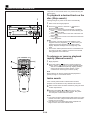
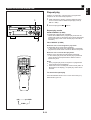
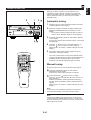
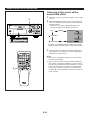
“Skip search” and “Manual search” are performed using the
same buttons.
To playback a desired track on the
disc (Skip search)
1
INPUT SELECTOR
The beginning of any track can be found automatically.
1
2
VOLUME
VCR/LD-TV/VCD-CD/TUNER/TAPE•MD/AUX
OPEN/
CLOSE
VIDEO CD
Version 2.0 / Playback Control
DISC
CHANGE
1
DISC
2
3
RANDOM
REPEAT
TIME
HOUR
MIN
MEMORY
AUTO/MAN'L
TIME ADJ
TIMER
PROGRAM
PRESET/TUNING/BAND
POWER
A/B/C/D/E
MUSIC
ECHO
ECHO
PHONES
MIC
USER
MEMORY
MIC MIXING
DISPLAY
MIN
MAX
Select a disc and begin playback.
Press the
button to advance or
button to
reverse through the disc.
Press once for each track to be advanced or reversed.
once to advance to the track following the
• Press
one now playing back.
once to return to the start of the track now
• Press
playing back.
twice to return to the track before the track
• Press
now playing back.
Notes
• This function can also be performed while the unit is
stopped. Press the play/pause / button when your
desired track number appears on the track number
display. Playback will begin from the beginning of the
track.
• This function will be performed forward or backward from
any point on the disc. However, it will not move forward
during playback of the final track.
2
To advance or reverse playback
rapidly (Manual search)
2
1
2
VCD/CD
3
4
1
2
3
4
6
7
8
6
7
8
9
0
A
B
C
D
E
TIME
PROG
MODE
2
PREV
NEXT
LEVEL
CENTER/REAR
/DELAY ECHO/ TEST
5
1
2
1
+I0
INDEX
DISC SKIP
5
PRESET
OPEN/CLOSE TUNER
RETURN
SELECT
INPUT
FLAT
1
TIME INDEX
KEY
MUSIC
PROGRAM
USER
INTRO
DIGEST
Press and hold the
button to advance playback
rapidly, and the
button to reverse playback rapidly.
* The sound can be heard (although slightly garbled)
during manual search in either direction. This is
convenient for reviewing the contents quickly.
Note
Manual search can also be performed while playback is
paused, though no sound will be heard.
POWER
SLEEP
Begin playback.
DISPLAY
VOLUME
Index search
If the currently selected disc includes index numbers,
playback can be started from any desired index number.
1
Select a track which has index numbers by using the track
number input buttons.
2
Pressing the INDEX
or
button once or more
searches for and select any index number. Play starts
from the point of selected index number.
Notes
If an index number is selected that is higher than any index
number on that disc, playback will start from the last index
number point on the disc.
● If the disc has no encoded index points, playback will
begin from the start of the selected track.
●
E-16
English
VIDEO CD PLAYER OPERATION
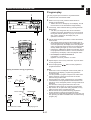
Program play
You can program up to 20 tracks in any desired order.
1
INPUT SELECTOR
VOLUME
VCR/LD-TV/VCD-CD/TUNER/TAPE•MD/AUX
OPEN/
CLOSE
VIDEO CD
1
2
Load discs and close the disc table.
3
If necessary, select a desired disc by pressing the DISC
SKIP button.
* Just after you change the disc, this unit reads the
contents of the newly selected disc for a few seconds.
During this internal operation, if you go on to the next
step, “WAIT” appears on the display and your
operation is canceled.
4
Use the track number input buttons to select the desired
track number.
* The selected track number and the total play time of
the programmed tracks will light up on the display, and
soon it is replaced by the display of the next playback
order. Programmed track numbers on the selected disc
will stop flashing and light up on the music calendar.
* Pressing the TIME button displays the total play time of
the programmed tracks for about 1 second, and then it
is replaced by the display of the next playback order.
Version 2.0 / Playback Control
DISC
CHANGE
1
DISC
2
3
RANDOM
REPEAT
TIME
HOUR
MIN
MEMORY
AUTO/MAN'L
TIME ADJ
TIMER
PROGRAM
PRESET/TUNING/BAND
POWER
A/B/C/D/E
When in the stop mode, press the PROG button to
prepare for programming.
* “PROG” and “P-01” will light up on the display, and all
track numbers on the selected disc begin flashing.
MUSIC
ECHO
ECHO
PHONES
MIC
USER
MEMORY
MIC MIXING
DISPLAY
MIN
MAX
6
TIME
2
1
2
VCD/CD
3
4
1
2
3
4
6
7
8
6
7
8
9
0
A
B
C
D
E
TIME
PROG
MODE
PREV
NEXT
LEVEL
3
5
4
+I0
INDEX
DISC SKIP
5
PRESET
OPEN/CLOSE TUNER
RETURN
SELECT
INPUT
CENTER/REAR
/DELAY ECHO/ TEST
FLAT
1
6
TIME INDEX
KEY
MUSIC
PROGRAM
USER
INTRO
* For example, to choose selection 12
(1) Press the “+10” button.
(2) Within 3 seconds, press the “2” button.
DIGEST
POWER
SLEEP
DISPLAY
VOLUME
USER
TAPE 1
1 2 3 4 5 6
7 8 9 10 11 12
TRACK
PROG
VOLUME
Playback order
PROGRAM
LOGIC HALL
USER
TAPE 1
Selected disc
1 2 3 4 5 6
7 8 9 10 11 12
TOTAL
13 14 15 OVER 15
TRACK
PROG
VOLUME
Selected track number
6
Press the play/pause
programmed tracks.
•
13 14 15 OVER 15
Music calendar
Repeat steps 3 and 4 for any other track. Up to 20 tracks
can be programmed.
/
button to start playback of
Notes
When this unit is in the Playback Control mode (“PBC” is
illuminated on the display), programming operations
cannot be made.
• It is also possible to program a sequence of tracks while
looking at the list of tracks on the surface of the disc
before closing the disc table.
• During playback or pause, programming is not possible.
• If the total time of the programmed tracks becomes 100
minutes or more, the highest position of a figure will not be
displayed.
• The total time of the programmed tracks will not be
displayed, if track number 16 or higher is programmed.
• Skip search can be performed during playback, but only
within the range of the programmed tracks.
• Manual search can be performed during playback to
search all tracks, including unprogrammed tracks.
• If programs are made selecting tracks from more than one
disc, pressing the DISC CHANGE button is useless during
program play.
Display information during programming
PROGRAM
LOGIC HALL
5
Total playing time
E-17
VIDEO CD PLAYER OPERATION
To stop program play
•
•
Press the stop
button. The first programmed track
number will be displayed.
To resume playback, press the play/pause
/ button.
Playback will begin from the beginning of the program.
To cancel a programmed sequence
INPUT SELECTOR
There are several methods as described below.
• Press the stop button while the unit is stopped.
• Open the disc table
• Turn this unit into the standby mode.
VOLUME
VCR/LD-TV/VCD-CD/TUNER/TAPE•MD/AUX
OPEN/
CLOSE
VIDEO CD
Version 2.0 / Playback Control
DISC
CHANGE
1
DISC
2
3
RANDOM
REPEAT
TIME
HOUR
MIN
MEMORY
AUTO/MAN'L
TIME ADJ
TIMER
PROGRAM
PRESET/TUNING/BAND
POWER
A/B/C/D/E
MUSIC
ECHO
ECHO
PHONES
MIC
USER
MEMORY
MIC MIXING
DISPLAY
MIN
To check program data
MAX
1. If during playing back, press the stop
button.
2. Press the PROG button.
3. Each time the
button is pressed, the track numbers
and sequential order of the programmed tracks can be
checked one after another. The display of the track
number can be returned (sequentially in reverse order) by
pressing the
button.
/
To correct program data
PROG
1
2
VCD/CD
3
4
1
2
3
4
6
7
8
6
7
8
9
A
B
C
D
TIME
PROG
MODE
PREV
NEXT
5
0
E
OPEN/CLOSE TUNER
RETURN
SELECT
/
LEVEL
CENTER/REAR
/DELAY ECHO/ TEST
5
PRESET
+I0
INDEX
DISC SKIP
1. Follow the procedure described in “To check program
data”.
2. Display the track number to be corrected by pressing the
or
button.
3. Press a track number input button to select a track to
replace the one displayed. The previously programmed
track will be cleared from the memory and the new one
will be programmed.
4. When the correction has finished, press the PROG button
or play/pause
/ button once again.
INPUT
FLAT
TIME INDEX
KEY
MUSIC
PROGRAM
USER
INTRO
DIGEST
POWER
SLEEP
DISPLAY
VOLUME
E-18
English
VIDEO CD PLAYER OPERATION
Repeat play
All discs, an entire disc, a single track or a programmed
sequence can be continuously repeated.
1
INPUT SELECTOR
VOLUME
VCR/LD-TV/VCD-CD/TUNER/TAPE•MD/AUX
1
While watching the display, press the REPEAT button
once or more to select a desired repeat play mode (S
REP or F REP).
2
Press the play/pause
/
button.
OPEN/
CLOSE
VIDEO CD
Version 2.0 / Playback Control
DISC
CHANGE
1
DISC
2
Repeat play modes
3
RANDOM
REPEAT
TIME
HOUR
MIN
MEMORY
AUTO/MAN'L
TIME ADJ
TIMER
PROGRAM
PRESET/TUNING/BAND
POWER
A/B/C/D/E
MUSIC
ECHO
MIC
USER
SINGLE REPEAT (S REP)
ECHO
PHONES
MEMORY
MIC MIXING
DISPLAY
MIN
A single track is played back repeatedly.
* This is also available in the program play mode and the
random play mode. (If the repeat play mode is switched off,
the program play mode or the random play mode will be
resumed.)
MAX
2
FULL REPEAT (F REP)
When the unit is in the single disc play mode:
A designated disc is played back repeatedly.
* In the random play mode, the selected disc is repeatedly
played back, but the order of tracks is different every time.
1
2
VCD/CD
3
4
1
2
3
4
6
7
8
6
7
8
9
A
B
C
D
TIME
PROG
MODE
PREV
NEXT
LEVEL
CENTER/REAR
/DELAY ECHO/ TEST
5
5
PRESET
0
Notes
• In the program play mode, a sequence of programmed
tracks is played back repeatedly.
• When this unit is in the Playback Control mode (“PBC” is
illuminated on the display), no repeat play mode can be
selected.
E
+I0
INDEX
DISC SKIP
When the unit is in the all disc play mode:
All discs on the disc table are played back repeatedly.
* In the random play mode, the random play is performed
among all discs and repeated with a different order of
tracks every time.
OPEN/CLOSE TUNER
RETURN
SELECT
INPUT
2
TIME INDEX
FLAT
KEY
MUSIC
PROGRAM
USER
INTRO
DIGEST
POWER
SLEEP
DISPLAY
To cancel the repeat play
VOLUME
Press the REPEAT button once or more so that the (S, F)
REP indicator goes out.
(off)
S REP
F REP
E-19
VIDEO CD PLAYER OPERATION
Random play
1
Tracks on a selected disc or all discs on the disc table can be
played back in a random order.
3
INPUT SELECTOR
VOLUME
VCR/LD-TV/VCD-CD/TUNER/TAPE•MD/AUX
OPEN/
CLOSE
VIDEO CD
Version 2.0 / Playback Control
DISC
CHANGE
DISC
2
1
1
2
Load discs and close the disc table.
3
Press the RANDOM button to begin random play.
* The “RANDOM” indicator will light up.
3
RANDOM
REPEAT
TIME
HOUR
MIN
MEMORY
AUTO/MAN'L
TIME ADJ
TIMER
PROGRAM
PRESET/TUNING/BAND
POWER
A/B/C/D/E
MUSIC
ECHO
ECHO
PHONES
MIC MIXING
MIC
MEMORY
USER
If necessary, switch the disc play mode by pressing the
disc play MODE selector button.
* If the single disc play mode is selected, select a desired
disc by pressing the DISC SKIP button.
DISPLAY
MIN
MAX
To cancel the random play
1
2
1
2
3
6
7
8
6
7
8
9
0
A
B
C
D
E
TIME
PROG
MODE
2
Press the stop
button, or press the RANDOM button
again. The “RANDOM” indicator will go out.
VCD/CD
3
PREV
4
5
5
Notes
● This feature will not function during programming, or during
program play.
● This feature will not function when this unit is in the
Playback Control mode (“PBC” is illuminated on the
display).
PRESET
+I0
INDEX
DISC SKIP
4
NEXT
LEVEL
OPEN/CLOSE TUNER
RETURN
1
SELECT
INPUT
CENTER/REAR
/DELAY ECHO/ TEST
FLAT
TIME INDEX
KEY
MUSIC
PROGRAM
USER
INTRO
DIGEST
POWER
SLEEP
DISPLAY
VOLUME
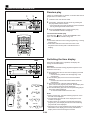
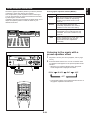
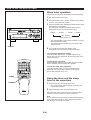
Switching the time display
TIME
Each time the TIME button is pressed, the display will
change as described below.
INPUT SELECTOR
VOLUME
VCR/LD-TV/VCD-CD/TUNER/TAPE•MD/AUX
[Example]
When the second track is being played back (Refer to the
illustration on the left.)
OPEN/
CLOSE
VIDEO CD
Version 2.0 / Playback Control
DISC
CHANGE
1
DISC
2
3
RANDOM
REPEAT
TIME
HOUR
MIN
MEMORY
AUTO/MAN'L
TIME ADJ
TIMER
PROGRAM
PRESET/TUNING/BAND
POWER
A/B/C/D/E
MUSIC
ECHO
PHONES
MIC
USER
➀ The elapsed play time for the track now playing back will
ECHO
MEMORY
MIC MIXING
DISPLAY
MIN
MAX
➁
TIME
➀
➂
TRACK
1
VCD/CD
3
2
1
2
6
3
7
6
4
4
8
9
B
C
D
PROG
PREV
NEXT
LEVEL
CENTER/REAR
/DELAY ECHO/ TEST
E
OPEN/CLOSE TUNER
RETURN
SELECT
➁
REM
TRACK
INPUT
FLAT
➃
0
+I0
INDEX
DISC SKIP
5
PRESET
8
7
A
TIME
MODE
5
be displayed.
* 8 seconds have passed since the beginning of the
second track.
The remaining play time for the current track will be
displayed.
* 2 minutes and 58 seconds remain till the end of the
second track.
The total play time of the disc will be displayed.
(If the unit is in the program play mode, the total play time
of the programmed tracks will be displayed.)
The total remaining play time from the point being played
at that time will be displayed.
* 41 minutes remain till the end of the disc.
TIME INDEX
KEY
MUSIC
PROGRAM
USER
INTRO
DIGEST
Notes
● During random play, the total remaining play time on the
disc will not be displayed.
● The remaining play time will not be displayed for track
number 16 or higher.
● If track number 16 or higher is programmed, during the
program play, the total play time and the total remaining
play time will not be displayed.
● When this unit is in the Playback Control mode (“PBC” is
illuminated on the display), the currently selected time
display mode cannot be changed to another.
POWER
SLEEP
DISPLAY
VOLUME
➂
TOTAL
TRACK
➃
TOTAL REM
TRACK
E-20
1
2
VCD/CD
3
4
1
2
3
4
6
7
8
6
7
8
9
A
B
C
D
TIME
PROG
MODE
5
5
PRESET
0
E
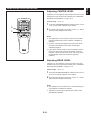
Pressing the TIME INDEX
or
button once allows you
to skip through the track backward or forward respectively by
the time shown on the display.
+I0
OPEN/CLOSE TUNER
INDEX
PREV
DISC SKIP
To skip through tracks or an
entire disc forward or backward
(for Video CDs only)
NEXT
LEVEL
RETURN
SELECT
TIME INDEX
INPUT
CENTER/REAR
/DELAY ECHO/ TEST
TIME INDEX
FLAT
KEY
MUSIC
PROGRAM
INTRO
USER
DIGEST
When you press a button several times in a short period of
time, the time to skip changes on the display. Releasing the
button moves the position by the displayed time before or
after. The skip operation varies as follows:
● While you are playing back a disc, you can skip forward or
backward through the entire disc.
● While you are playing back a Video CD, version 2.0 in the
Playback Control mode, you can skip forward or backward
through the selected track.
POWER
SLEEP
DISPLAY
VOLUME
To get a quick overview of a track
or a disc (for Video CDs only)
To watch scenes of a selected track on a
Video CD
Press the DIGEST button.
1
2
VCD/CD
3
4
5
1
2
3
4
5
6
7
7
8
9
B
C
D
TIME
PROG
MODE
NEXT
LEVEL
CENTER/REAR
/DELAY ECHO/ TEST
0
E
+I0
INDEX
PREV
DISC SKIP
To watch the beginning of all tracks on a
Video CD
PRESET
8
6
A
OPEN/CLOSE TUNER
RETURN
INPUT
FLAT
Press the INTRO button.
SELECT
* You can watch up to nine screens at a time on the video
monitor.
INTRO
TIME INDEX
KEY
MUSIC
PROGRAM
USER
INTRO
DIGEST
POWER
SLEEP
DISPLAY
DIGEST
VOLUME
Notes
● These buttons can work only for playing back a Video CD.
● These buttons cannot work when playing back a Video CD,
version 2.0 in the Playback Control mode. To make these
buttons work, press and hold the stop
button for more
than 2 seconds to stop this unit.
● These DIGEST and INTRO operations repeat endlessly
until you stop playback.
● The monitor can show up to nine screens at a time. The
number of screens varies from disc to disc. There may be
a case that the monitor can show one screen only as
follows:
● These button cannot work in the program play and random
play modes.
To cancel DIGEST and INTRO operations
Press the stop
button.
E-21
English
VIDEO CD PLAYER OPERATION
PLAYBACK CONTROL OF VIDEO CD (Ver. 2.0)
Playback Control provides you with two types of new
playback enjoyment.
This function is available for Video CDs, version 2.0 only.
“PBC” will light up on the display when a version 2.0 disc is
used.
The Playback Control differs with each disc. This section
gives a basic explanation of Playback Control. Refer to the
instruction manual for the disc for details.
Playback selection on a screen menu
You can select pictures, music and information to play back
by selecting items on a screen menu. (Similar to having a
conversation.)
Playback of high quality pictures
You can enjoy watching pictures which are four times higher
in quality than moving pictures.
A Flowchart of Playback Control (as an example)
Mode just after the
disc is selected
RETURN
1
Movie
Screen
menu
RETURN
2
Picture
RETURN: RETURN
button
NEXT: NEXT
button
PREV: PREV
button
1, 2, 3, 4: Track number input
buttons
RETURN
3
RETURN
RETURN
Screen
menu
2
1
NEXT
Movie
Movie
Picture
Picture
Movie
Movie
Picture
PREV
Picture
1
2
3
4
Picture
Picture
Picture
Picture
Picture
Picture
Picture
Picture
Playback ends.
E-22
Basic operation
Use the remote control transmitter for making Playback
Control operations.
1
2
VCD/CD
3
4
5
1
2
3
4
5
6
7
7
8
9
B
C
D
TIME
PROG
MODE
1
PRESET
8
6
A
NEXT
LEVEL
CENTER/REAR
/DELAY ECHO/ TEST
E
3
+I0
INDEX
PREV
DISC SKIP
0
Note
Disc playback in the Playback Control mode depends on the
data of the disc used. So, according to the contents of disc,
the following operating method may not be applied to the
disc.
Be sure to refer to the instruction manual for the disc.
OPEN/CLOSE TUNER
RETURN
SELECT
INPUT
FLAT
2, 3
TIME INDEX
KEY
5
MUSIC
PROGRAM
USER
INTRO
1
Stop this unit and select a Video CD (version 2.0) by
pressing the DISC SKIP button on the remote control
transmitter .
* “PBC” lights up on the display.
2
Press the SELECT button. A screen menu appears on the
TV monitor.
* Some discs show several short movies sequentially
instead of a menu.
3
Select the number of item you want to play back by using
the track number input buttons.
* If the disc shows several short movies sequentially,
press the SELECT button when a desired picture
appears.
4
Playback starts, or another menu appears. If another
menu appears, repeat step 3.
(Some discs have more than one screen menu.)
5
If “NEXT” or “
” appears on the screen during
playback, pressing the NEXT button will change to the
next menu.
DIGEST
POWER
SLEEP
DISPLAY
VOLUME
If “PREV” or “
” appears on the screen during
playback, pressing the PREV button will restore the
previous menu.
Notes
In the Playback Control mode, the TIME and REPEAT
buttons are disabled.
● If this unit is stopped, the PROG, RANDOM, DIGEST and
INTRO buttons can work even if this unit is in the Playback
Control mode. In this state, pressing one of these buttons
cancels the Playback Control mode.
●
E-23
English
PLAYBACK CONTROL OF VIDEO CD (Ver. 2.0)
PLAYBACK CONTROL OF VIDEO CD (Ver. 2.0)
To stop playback
Press and hold the RETURN button for more than 2 seconds.
1
2
VCD/CD
3
4
5
1
2
3
4
5
6
2
7
PRESET
8
6
7
8
9
0
A
B
C
D
E
TIME
PROG
MODE
PREV
NEXT
LEVEL
CENTER/REAR
/DELAY ECHO/ TEST
PROGRAM
Press the RETURN button once.
* To return to the first screen mode, press the RETURN
button repeatedly until the first screen mode appears.
OPEN/CLOSE TUNER
RETURN
SELECT
INPUT
FLAT
TIME INDEX
KEY
MUSIC
1
+I0
INDEX
DISC SKIP
To return to a previous screen mode during
playback
USER
INTRO
RETURN
If the disc has index numbers
DIGEST
POWER
SLEEP
If the currently selected disc includes index numbers,
playback can be started from any desired index number.
DISPLAY
VOLUME
1
Select a track which has index numbers by using the track
number input buttons.
2
Pressing the INDEX
or
button once or more
searches for and select any index number. Play starts
from the point of selected index number.
To playback a Video CD (ver. 2.0) without
Playback Control operation
Press the RETURN button when this unit is stopped. “PBC”
disappears from the display, and this unit turns into a normal
playback mode.
To restore the Playback Control mode again, press and hold
the RETURN button for more than 2 seconds.
E-24
Normally, if station signals are strong and there is no
interference, quick automatic-search tuning (Automatic
tuning) is possible. However, if signals of the station you
want to select are weak, you must tune to it manually
(Manual tuning).
1
2
3, 2
INPUT SELECTOR
Automatic tuning
1
Select the tuner by turning the INPUT SELECTOR until
“TUNER” appears on the display.
2
Select the reception band (FM or AM) by pressing the
PRESET/TUNING/BAND button confirming it on the
display.
* Do not select a preset tuning mode (Do not select a
mode in which “PRESET” lights up on the display.)
3
Press the AUTO/MAN’L button so that “AUTO” appears
on the display.
(In this mode, stations are received in stereo or monaural
automatically.)
4
Press the
button to tune to a higher frequency, or
press the
button to tune to a lower frequency.
(When tuned in to a station, “TUNED” will light up on the
display.)
5
If the station where tuning search stopped is not the
desired one, follow step 4 again.
*
If the tuning search does not stop at the desired station,
change to the Manual tuning method as described below.
STEREO indicator will light up when an FM stereo
broadcast with sufficient signal strength is received.
VOLUME
VCR/LD-TV/VCD-CD/TUNER/TAPE•MD/AUX
OPEN/
CLOSE
VIDEO CD
Version 2.0 / Playback Control
DISC
CHANGE
1
DISC
2
3
RANDOM
REPEAT
TIME
HOUR
MIN
MEMORY
AUTO/MAN'L
TIME ADJ
TIMER
PROGRAM
PRESET/TUNING/BAND
POWER
A/B/C/D/E
MUSIC
ECHO
ECHO
PHONES
MIC
USER
MEMORY
MIC MIXING
DISPLAY
MIN
MAX
4, 3
1
2
VCD/CD
3
4
1
2
3
4
6
7
8
6
7
8
A
B
TIME
PROG
MODE
C
PREV
NEXT
LEVEL
CENTER/REAR
/DELAY ECHO/ TEST
5
9
D
0
*
E
+I0
INDEX
DISC SKIP
5
PRESET
OPEN/CLOSE TUNER
RETURN
SELECT
1
Manual tuning
INPUT
FLAT
TIME INDEX
KEY
MUSIC
PROGRAM
USER
INTRO
DIGEST
POWER
SLEEP
DISPLAY
VOLUME
1
2
Follow steps 1 and 2 of the Automatic tuning method.
3
Press and hold the
button to tune to a higher
frequency, or press and hold the
button to tune to a
lower frequency.
Release it just before reaching the desired frequency,
and then press it repeatedly until the desired frequency
appears.
(When tuned in to a station, “TUNED” will light up on the
display.)
Press the AUTO/MAN’L button so that “AUTO”
disappears from the display.
(In this mode, stations are received in monaural.)
Note
If you tune in to an FM station manually, it is received in
monaural automatically to increase the signal quality.
Note
Pressing the TUNER input selector button on the remote
control transmitter switches the tuner from a normal tuning
mode to a preset tuning mode and vice versa, or from FM to
AM mode and vice versa.
E-25
English
TUNING OPERATION
TUNING OPERATION
Preset tuning
This unit can store station frequencies selected by tuning
operation. With this function, you can select any desired
station by only calling the corresponding preset station
number. Up to 40 stations (8 stations x 5 groups) can be
stored.
3, 1
2, 5
To store stations
(Example: To store a station to A1)
INPUT SELECTOR
VOLUME
VCR/LD-TV/VCD-CD/TUNER/TAPE•MD/AUX
OPEN/
CLOSE
VIDEO CD
Version 2.0 / Playback Control
DISC
CHANGE
1
DISC
2
1
Tune in to a desired station.
(Refer to the previous page for tuning procedure.)
2
Press the tuner MEMORY button.
* “MEMORY” and “PRESET” will flash on the display for
about 5 seconds.
3
Select a desired group (A – E) of preset stations by
pressing the A/B/C/D/E button confirming it on the
display, before “MEMORY” goes out.
(In this case, select group A.)
4
Select a preset station number by pressing the
button repeatedly before “MEMORY” goes out.
(In this case, select “1”.)
5
Within about 5 seconds, press the tuner MEMORY button
again.
3
RANDOM
REPEAT
TIME
HOUR
MIN
MEMORY
AUTO/MAN'L
TIME ADJ
TIMER
PROGRAM
PRESET/TUNING/BAND
POWER
A/B/C/D/E
MUSIC
ECHO
ECHO
PHONES
MIC
USER
MEMORY
MIC MIXING
DISPLAY
MIN
MAX
4, 2
or
TAPE 1
AUTO
4, 2
PRESET
MHz
1
2
VCD/CD
3
4
5
1
2
3
4
5
6
7
PRESET
8
6
7
8
9
A
B
C
D
TIME
PROG
MODE
PREV
DISC SKIP
NEXT
LEVEL
CENTER/REAR
/DELAY ECHO/ TEST
0
E
+I0
INDEX
The currently displayed station
has been programmed to A1.
OPEN/CLOSE TUNER
RETURN
3, 1
* In the same way, program other stations to A2, A3 ... A8.
* You can program more stations to the preset station
numbers of other groups in the same way by selecting
other groups in step 3.
SELECT
INPUT
FLAT
TIME INDEX
KEY
MUSIC
PROGRAM
USER
INTRO
DIGEST
POWER
SLEEP
DISPLAY
To recall a preset station
VOLUME
1
Select a group of preset stations by pressing the
A/B/C/D/E button.
2
Select the desired preset station number by pressing the
or
button repeatedly.
Notes
A new setting can be programmed in place of the former
one.
For presets the setting of the AUTO/MAN’L button is
stored along with the station frequency.
•
•
For easier operation
By using the preset station number buttons and the
A,B,C,D,E selector buttons on the remote control transmitter,
a preset station number and a group can be selected directly.
E-26
Automatic preset tuning
1
You can also make use of an automatic preset tuning
function. By this function, this unit performs automatic tuning
and stores stations with strong signals sequentially. Up to 40
stations are stored automatically in the same way as in the
manual preset tuning method on the previous page.
2
INPUT SELECTOR
VOLUME
VCR/LD-TV/VCD-CD/TUNER/TAPE•MD/AUX
OPEN/
CLOSE
VIDEO CD
Version 2.0 / Playback Control
DISC
CHANGE
1
DISC
2
3
RANDOM
REPEAT
TIME
HOUR
MIN
MEMORY
AUTO/MAN'L
TIME ADJ
TIMER
1
Select the tuner by turning the INPUT SELECTOR until
“TUNER” appears on the display.
2
Press and hold the tuner MEMORY button for about 2
seconds.
* The MEMORY and AUTO indicators will flash.
PROGRAM
PRESET/TUNING/BAND
POWER
A/B/C/D/E
This unit performs automatic tuning and searches FM and
AM stations in that order. Received stations are programmed
to A1, A2 ... A8 sequentially.
MUSIC
ECHO
ECHO
PHONES
MIC
USER
MEMORY
MIC MIXING
DISPLAY
MIN
MAX
When the automatic preset tuning is completed
The display shows the frequencies of the first preset station
(stored to A1).
Check the contents and the number of preset stations by
following the procedure of the section “To recall a preset
station” on the previous page.
To recall a preset station
1
2
VCD/CD
3
1
2
3
6
7
4
5
4
5
PRESET
8
6
7
8
9
A
B
C
D
TIME
PROG
MODE
PREV
NEXT
LEVEL
CENTER/REAR
/DELAY ECHO/ TEST
0
E
+I0
INDEX
DISC SKIP
Simply follow the procedure of the section “To recall a preset
station” on the previous page.
OPEN/CLOSE TUNER
RETURN
SELECT
Notes
• The automatic preset tuning search will be performed
through all frequencies until 40 stations are stored. If the
number of received stations is less than 40, the search will
stop after searching all frequencies.
* Since FM stations are searched for first, there may be a
case that 40 preset stations are occupied by FM
stations only.
• With this function, only stations with sufficient signal
strength are stored automatically. If the station you want
to program is weak in signal strength, tune in to it with the
Manual tuning method (in monaural) and program it by
following the procedure of the section “To store stations”
on the previous page.
• You can replace a preset station by another FM or AM
station manually by simply following the procedure of the
section “To store stations” on the previous page.
1
INPUT
FLAT
TIME INDEX
KEY
MUSIC
PROGRAM
USER
INTRO
DIGEST
POWER
SLEEP
DISPLAY
VOLUME
Memory back-up
The memory back-up circuit prevents the programmed
data from being lost even if the AC supply lead is
disconnected from the AC outlet or the power is cut due
to temporary power failure. If, however, the power is cut
for more than one week, the memory may be erased. If
so, it can be re-programmed by simply following the
Preset tuning steps.
E-27
English
TUNING OPERATION
OPERATING EXTERNAL UNITS CONNECTED WITH THIS UNIT
To listen to or watch a source on an
external unit connected with this
UNIT
1 Select the position of input source (TAPEzMD, AUX, VCR
1, 1
or LDzTV) you will play back by turning the INPUT
SELECTOR until the corresponding name appears on the
display.
* The names of input source positions correspond with
the names of terminals to connect with external units
on the rear of this unit.
3, 2
INPUT SELECTOR
VOLUME
VCR/LD-TV/VCD-CD/TUNER/TAPE•MD/AUX
OPEN/
CLOSE
VIDEO CD
2
Play back the source.
(For a video source, turn the monitor TV on.)
3
Adjust the volume to a desired level by using the
VOLUME control.
If you prefer, use the graphic equalizer and/or the sound
field processor built into this unit.
Version 2.0 / Playback Control
DISC
CHANGE
1
DISC
2
3
RANDOM
REPEAT
TIME
HOUR
MIN
MEMORY
AUTO/MAN'L
TIME ADJ
TIMER
PROGRAM
PRESET/TUNING/BAND
POWER
A/B/C/D/E
MUSIC
ECHO
ECHO
PHONES
MIC
USER
MEMORY
MIC MIXING
DISPLAY
MIN
MAX
To record a source to tape
Not only a source played back on this unit, but also a source
played back on an external unit can be recorded by the tape
deck, VCR, DAT, etc. connected with this unit.
1
2
VCD/CD
3
4
1
2
3
4
6
7
8
6
7
8
9
0
A
B
C
D
E
TIME
PROG
MODE
PREV
NEXT
LEVEL
CENTER/REAR
/DELAY ECHO/ TEST
5
PROGRAM
Select the source to be recorded by turning the INPUT
SELECTOR.
2
Play back the source and then turn the VOLUME control
up to confirm the input source.
3
Begin recording on the tape deck or VCR etc. connected
with this unit.
OPEN/CLOSE TUNER
RETURN
SELECT
INPUT
FLAT
TIME INDEX
1, 1
KEY
MUSIC
1
+I0
INDEX
DISC SKIP
5
PRESET
USER
INTRO
DIGEST
POWER
SLEEP
DISPLAY
VOLUME
Note
If the built-in graphic equalizer and/or sound field processor
is used, its effect is recorded along with the source when you
make recording on the recording unit connected to the
TAPEzMD terminals on the rear of this unit.
However, the effect of the graphic equalizer and/or sound
field processor cannot be recorded when you make recording
on the external recording unit connected to the VCR
terminals on the rear of this unit.
3, 2
E-28
The built-in graphic equalizer presents you with the pleasure
of listening to music with various sound effects.
This unit provides 4 preset equalizer modes as listed right.
You can enjoy listening to music with a desired sound effect
by selecting one of these modes.
In addition, the built-in 5 band graphic equalizer allows you to
adjust the equalizer pattern to create an effect for your
desired sound taste.
MUSIC
ROCK BLUES
RAP JAZZ
100 350
Preset graphic equalizer modes (MUSIC)
Mode
Feature
ROCK
High and low frequencies are emphasized.
This mode is suitable for reproducing
dynamic and powerful sounds of rock
music etc.
BLUES
Low and medium frequencies are
moderately emphasized. This mode is
suitable for music with a blue feeling.
RAP
Low and mid-high frequencies are
emphasized so that vocals become wellmodulated. This mode is suitable for rap
music etc.
JAZZ
Medium frequencies for vocals, piano, sax,
etc. are emphasized. High and low
frequencies are also emphasized
moderately.
PROGRAM
USER
PRO LOGIC HALL ARENA 1 2
3 STEREO KARAOKE L R 3 4
1K 3.5K 10K
INPUT SELECTOR
Listening to the music with a
preset equalizer effect
VOLUME
VCR/LD-TV/VCD-CD/TUNER/TAPE•MD/AUX
OPEN/
CLOSE
VIDEO CD
Version 2.0 / Playback Control
DISC
CHANGE
1
DISC
2
1
Play back a source. (For source playback, refer to page
14–27.)
2
Press the MUSIC button once or more so that the name
of a desired mode appears on the preset equalizer mode
indicator.
* Whenever you press the MUSIC button, the preset
mode changes and is displayed as follows.
3
RANDOM
REPEAT
TIME
HOUR
MIN
MEMORY
AUTO/MAN'L
TIME ADJ
TIMER
PROGRAM
PRESET/TUNING/BAND
POWER
A/B/C/D/E
MUSIC
ECHO
ECHO
PHONES
MIC
USER
MEMORY
MIC MIXING
DISPLAY
MIN
MUSIC
ROCK BLUES
RAP JAZZ
MAX
2
ROCK
BLUES
RAP
JAZZ
OFF
* The equalizer pattern of the selected mode is shown on
the graphic equalizer level indicators.
1
2
VCD/CD
3
4
1
2
3
4
6
7
8
6
7
8
9
A
B
C
D
TIME
PROG
MODE
PREV
NEXT
LEVEL
CENTER/REAR
/DELAY ECHO/ TEST
5
0
E
+I0
INDEX
DISC SKIP
5
PRESET
OPEN/CLOSE TUNER
RETURN
SELECT
INPUT
FLAT
TIME INDEX
KEY
2
MUSIC
PROGRAM
USER
INTRO
DIGEST
POWER
SLEEP
DISPLAY
VOLUME
E-29
English
USING GRAPHIC EQUALIZER
USING GRAPHIC EQUALIZER
Adjusting the graphic equalizer
for your desired sound taste
The 5 band graphic equalizer allows you to adjust the level
for each frequency band.
* Make adjustment by monitoring the equalizer level
indicators on the display.
3
INPUT SELECTOR
Play back a source. (For source playback, refer to page
14–27.)
2
Press the equalizer control
or
button once or
more to select the frequency band to which you will adjust
the level.
* The selected frequency band is shown on the display.
* The scale bar of the selected frequency band on the
graphic equalizer level indicators will flash.
3
Press the equalizer control
more to adjust the level.
4
In the same way, make adjustment for other frequency
band.
VOLUME
VCR/LD-TV/VCD-CD/TUNER/TAPE•MD/AUX
OPEN/
CLOSE
VIDEO CD
1
Version 2.0 / Playback Control
DISC
CHANGE
1
DISC
2
3
RANDOM
REPEAT
TIME
HOUR
MIN
MEMORY
AUTO/MAN'L
TIME ADJ
TIMER
PROGRAM
PRESET/TUNING/BAND
POWER
A/B/C/D/E
MUSIC
ECHO
ECHO
PHONES
MIC
USER
MEMORY
MIC MIXING
DISPLAY
MIN
MAX
2
100 350
1K 3.5K 10K
or
button once or
Note
If the KARAOKE (including L R, L ONLY and R ONLY)
program is selected, cancel it or select another sound field
program.
Turning the equalizer to “flat” (the
state with no equalization applied)
1
2
VCD/CD
3
4
1
2
3
4
6
7
8
6
7
8
9
A
B
C
D
TIME
PROG
MODE
PREV
NEXT
LEVEL
CENTER/REAR
/DELAY ECHO/ TEST
5
5
PRESET
0
E
+I0
INDEX
DISC SKIP
OPEN/CLOSE TUNER
RETURN
SELECT
INPUT
FLAT
TIME INDEX
KEY
MUSIC
PROGRAM
By one of the following methods, the settings of preset
graphic equalizer mode (MUSIC) and sound field program
(PROGRAM) are turned off and the equalizer pattern is
turned to “flat”.
• Press the FLAT button on the remote control transmitter.
* Pressing the FLAT button once more will restore the
state before the equalizer was turned to “flat”.
• Press the MUSIC button and the PROGRAM button on the
front panel at the same time.
* There is no way to restore the state before the equalizer
was turned to “flat”.
USER
INTRO
DIGEST
FLAT
POWER
SLEEP
DISPLAY
VOLUME
E-30
The Sound Field Processor built into this unit presents you with the ambience of an actual concert hall etc. by adding effects as
sonic reflections or reberverations that create the sound environment of a hall etc. This unit provides preset sound field programs
shown below. You can enjoy an excellent audio sound field by selecting one of them, and adding desired adjustments.
This unit incorporates a Dolby Pro Logic Surround decoder for multi-channel sound reproduction of Dolby Surround encoded video
sources. The operation of the Dolby Pro Logic Surround decoder can be controlled by selecting a corresponding sound field
program.
MUSIC
ROCK BLUES
RAP JAZZ
PROGRAM
USER
PRO LOGIC HALL ARENA 1 2
3 STEREO KARAOKE L R 3 4
Brief Overview of Sound Field Programs
PROGRAM
PRO LOGIC
3 STEREO
FEATURE
This program is used for playback of sources encoded with Dolby Surround.
Sounds are reproduced as movie creaters designed by using five speakers. You can experience the
dramatic realism and impact of a movie theater.
This program is effective not only for playback of sources encoded with Dolby Surround, but also for
sources not encoded with Dolby Surround or TV programs with 2-channel stereo sound. With this
program, 2-channel stereo sound is converted into 3-channels (left front, center and right front), so the
dialogs are emphasized on the center position by the use of the center speaker. As no sound is output
from the rear speakers, this program is also effective in a simple Audio/Video system without rear
speakers.
HALL
In this program, the center will appear to be deep behind the front speakers, creating an expansive
large hall ambience. Orchestra and opera music are suited for this sound field.
ARENA
This program simulates the sound environment of a big hall with long reverberation time and many
reflections of high frequencies.
KARAOKE L R
KARAOKE L
KARAOKE R
KARAOKE
These are audio output modes useful for singing Karaoke. (Refer to page 36 for details.)
E-31
English
USING SOUND FIELD PROCESSOR
USING SOUND FIELD PROCESSOR
Listening to the music with a
sound field effect
2
INPUT SELECTOR
1
Play back a source. (For source playback, refer to page
14–27.)
2
Press the PROGRAM button once or more so that the
name of a desired program appears on the sound field
program indicator.
* Whenever you press the PROGRAM button, the
program changes and is displayed as follows.
VOLUME
VCR/LD-TV/VCD-CD/TUNER/TAPE•MD/AUX
OPEN/
CLOSE
VIDEO CD
Version 2.0 / Playback Control
DISC
CHANGE
1
DISC
2
3
RANDOM
REPEAT
TIME
HOUR
MIN
MEMORY
AUTO/MAN'L
TIME ADJ
TIMER
PROGRAM
PRESET/TUNING/BAND
POWER
A/B/C/D/E
HALL
MUSIC
ECHO
ECHO
PHONES
MIC
USER
MEMORY
ARENA
KARAOKE LR
MIC MIXING
DISPLAY
MIN
KARAOKE L
(L ONLY)
MAX
3 STEREO
PROGRAM
PRO LOGIC HALL ARENA
3 STEREO KARAOKE L R
KARAOKE R
(R ONLY)
PRO LOGIC
OFF
KARAOKE
* Programs on the shaded areas are audio output modes
useful for singing Karaoke. (Refer to page 36 for details.)
3
1
2
VCD/CD
3
4
1
2
3
4
6
7
8
6
7
8
9
A
B
C
D
TIME
PROG
MODE
NEXT
LEVEL
CENTER/REAR
/DELAY ECHO/ TEST
5
5
PRESET
Notes
● When HALL or ARENA is selected, no sound is heard
from the center speaker.
0
E
+I0
INDEX
PREV
DISC SKIP
OPEN/CLOSE TUNER
RETURN
SELECT
● When a monaural sound source is played with DOLBY
PRO LOGIC or DOLBY 3 STEREO, no sound is heard
from the front speakers and the rear speakers. Sound is
heard only from the center speaker. For DOLBY PRO
LOGIC only, however, if the center channel mode is in
“PHANTOM”, the front speakers output the sound of the
center channel.
INPUT
FLAT
TIME INDEX
KEY
MUSIC
PROGRAM
USER
INTRO
DIGEST
POWER
SLEEP
2
If desired, adjust the delay time and the output level of
each speaker. (For details, refer to the corresponding
descriptions on page 33–34.)
DISPLAY
VOLUME
E-32
Adjusting CENTER LEVEL
If desired, you can adjust the sound output level of the center
speaker even if the output level is already set in “SPEAKER
BALANCE ADJUSTMENT” on page 12–13.
1
2
VCD/CD
3
4
1
2
3
4
6
7
8
6
7
8
9
A
B
C
D
TIME
PROG
MODE
2
PREV
NEXT
LEVEL
1
CENTER/REAR
/DELAY ECHO/ TEST
5
0
E
+I0
INDEX
DISC SKIP
Control range : +10 to –21
5
PRESET
RETURN
Press the CENTER/REAR/DELAY selector button once or
more so that “CENT” appears on the display.
2
By continuously pressing the LEVEL control + or – button,
the level value changes continuously.
SELECT
INPUT
FLAT
1
OPEN/CLOSE TUNER
TIME INDEX
KEY
MUSIC
PROGRAM
USER
INTRO
DIGEST
POWER
SLEEP
DISPLAY
VOLUME
Notes
● This adjustment can be made only when the sound field
program DOLBY PRO LOGIC or DOLBY 3 STEREO is
selected.
● Once the output level is adjusted, the level value will be
the same in the DOLBY PRO LOGIC and DOLBY 3
STEREO programs.
● If the center channel mode is in the “PHANTOM” position,
the sound output level of the center speaker cannot be
adjusted. This is because in this mode, the center sound
is automatically output from the left and right front
speakers.
Adjusting REAR LEVEL
If desired, you can adjust the sound output level of the rear
speakers even if the output level is already set in “SPEAKER
BALANCE ADJUSTMENT” on page 12–13.
Control range : +10 to –21
1
Press the CENTER/REAR/DELAY selector button once or
more so that “REAR” appears on the display.
2
By continuously pressing the LEVEL control + or – button,
the level value changes continuously.
Notes
● This adjustment can be made when a sound field program
except DOLBY 3 STEREO is selected.
● Adjustment can be made to DOLBY PRO LOGIC, HALL
and ARENA individually.
E-33
English
USING SOUND FIELD PROCESSOR
USING SOUND FIELD PROCESSOR
Adjusting DELAY TIME
2
1
2
VCD/CD
3
4
1
2
3
4
6
7
8
6
7
8
9
A
B
C
D
TIME
PROG
MODE
PREV
NEXT
LEVEL
1
CENTER/REAR
/DELAY ECHO/ TEST
5
5
PRESET
0
E
+I0
INDEX
DISC SKIP
You can adjust the time difference between the beginning of
the sound from the main speakers and the beginning of the
effect sound from the rear speakers.
This adjustment can be made to all programs (except DOLBY
3 STEREO) individually.
Control range
OPEN/CLOSE TUNER
RETURN
PRO LOGIC : 15, 20, 25, 30 milliseconds
HALL, ARENA : 15, 20, 25, 30, 40, 50 milliseconds
SELECT
INPUT
FLAT
TIME INDEX
KEY
MUSIC
PROGRAM
USER
INTRO
DIGEST
POWER
SLEEP
DISPLAY
1
Press the CENTER/REAR/DELAY selector button once
or more so that “DELAY” appears on the display.
2
By continuously pressing the LEVEL control + or – button,
the value changes continuously.
The value stops changing momentarily at the preset point.
VOLUME
Adjustable
Notes
● When DOLBY 3 STEREO is selected, this adjustment
cannot be made.
● Adding too much delay will cause an unnatural effect with
some sources.
● When the LEVEL control button is pressed, sound is
momentarily interrupted.
Note
The values of the delay time, center level and rear level you
set the last time will remain memorized even when this unit is
in the standby mode.
However, if the power cord is kept disconnected for more
than one week, these values will be automatically changed
back to the original factory settings.
E-34
Your favorite pair of any equalizer mode (or an equalizer
pattern of your own adjusting) and any sound field program
can be stored as a user program. Up to 4 pairs can be stored
as desired.
1
2
1
To store
INPUT SELECTOR
1
Select a desired equalizer mode by pressing the MUSIC
button.
* If desired, adjust the equalizer as you prefer by using
the equalizer control buttons.
2
Select a desired sound field program by pressing the
PROGRAM button.
3
Press the user program MEMORY button.
* “1” will flash on the user program number indicator and
the MEMORY indicator will flash for about 5 seconds.
4
Select the user program number (1, 2, 3 or 4) to which
you will store the selected modes by pressing the USER
button once or more before “1” stops flashing.
* Whenever you press the USER button, the user
program number changes and is displayed as follows.
VOLUME
VCR/LD-TV/VCD-CD/TUNER/TAPE•MD/AUX
OPEN/
CLOSE
VIDEO CD
Version 2.0 / Playback Control
DISC
CHANGE
1
DISC
2
3
RANDOM
REPEAT
TIME
HOUR
MIN
MEMORY
AUTO/MAN'L
TIME ADJ
TIMER
PROGRAM
PRESET/TUNING/BAND
POWER
A/B/C/D/E
MUSIC
ECHO
ECHO
PHONES
MIC
USER
MEMORY
MIC MIXING
DISPLAY
MIN
USER
12
34
4, 2
MAX
3, 5
USER 1
USER 2
USER 3
USER 4
5
1
2
VCD/CD
3
4
1
2
3
4
6
7
8
6
7
8
9
A
B
C
D
TIME
PROG
MODE
PREV
NEXT
LEVEL
CENTER/REAR
/DELAY ECHO/ TEST
5
0
* In the same way, store other pairs to other three user
positions.
E
OPEN/CLOSE TUNER
RETURN
SELECT
INPUT
FLAT
TIME INDEX
* It is also a good idea to store only an equalizer pattern of
your own adjusting (without storing any sound field
program).
4, 2
KEY
1
MUSIC
PROGRAM
USER
INTRO
DIGEST
Notes
• A new program can be stored in place of the former one.
• In step 4 or 5, if the user program number indicator stops
flashing before operation, return to step 3.
POWER
SLEEP
Press the user program MEMORY button before the
number selected in step 4 stops flashing.
PRESET
+I0
INDEX
DISC SKIP
5
DISPLAY
VOLUME
2
To recall a user program
1
Play back a source. (For source playback, refer to page
14–27.)
2
Press the USER button once or more so that the user
program number you want to recall lights up.
* Whenever you press the USER button, the user
program number changes and is displayed as follows.
USER 1
USER 2
USER 3
OFF
E-35
USER 4
English
STORING YOUR OWN PROGRAMS
KARAOKE OPERATION
Singing karaoke
1
MIC
This unit allows you to enjoy singing karaoke by using not
only a source for karaoke use but also any normal audio
source.
MIC MIXING
MIN
MAX
INPUT SELECTOR
1
Connect one or two microphones to the MIC jack(s) on
the front panel.
2
Play back a source. (For source playback, refer to page
14–27.)
3
If necessary, select a karaoke mode (KARAOKE L R,
KARAOKE L, KARAOKE R or KARAOKE) by pressing
the PROGRAM button once or more so that the
corresponding name appears on the sound field program
indicator.
For descriptions of the karaoke modes, see the list below.
4
If desired, adjust the level of echo effect and key level of
the source currently played back (For details, see the
next page.)
5
While singing, adjust the mixing level of singing voice by
turning the MIC MIXING level control.
VOLUME
VCR/LD-TV/VCD-CD/TUNER/TAPE•MD/AUX
OPEN/
CLOSE
VIDEO CD
Version 2.0 / Playback Control
DISC
CHANGE
DISC
2
1
3
RANDOM
REPEAT
TIME
HOUR
MIN
MEMORY
AUTO/MAN'L
TIME ADJ
TIMER
PROGRAM
PRESET/TUNING/BAND
POWER
A/B/C/D/E
MUSIC
ECHO
ECHO
PHONES
MIC
MEMORY
USER
MIC MIXING
DISPLAY
MIN
3
4
MAX
5
To cancel the karaoke mode
1
2
VCD/CD
3
4
5
1
2
3
4
5
6
7
7
8
9
B
C
D
TIME
PROG
PREV
NEXT
LEVEL
CENTER/REAR
/DELAY ECHO/ TEST
0
E
+I0
INDEX
DISC SKIP
3
PRESET
8
6
A
MODE
Press the PROGRAM button so that “KARAOKE L R”,
“KARAOKE L”, “KARAOKE R” or “KARAOKE” disappears
from the sound field program indicator.
OPEN/CLOSE TUNER
RETURN
SELECT
INPUT
FLAT
TIME INDEX
KEY
MUSIC
PROGRAM
USER
INTRO
DIGEST
POWER
SLEEP
DISPLAY
VOLUME
Karaoke modes (PROGRAM)
Mode
Feature
For a karaoke source KARAOKE L R Signals on the left channel and the right channel are output from the left and right speakers
(without vocals)
respectively.
Selecting this mode is suitable for singing karaoke by using a source which contains
background music and no vocal.
For a multisound
source
For a normal source
KARAOKE L
Only signals on the left channel of the source are output from the left and right speakers.
When using a karaoke source which contains both background music and original vocals on
the right channel and background music only on the left channel, selecting this mode is
suitable for singing karaoke.
KARAOKE R
Only signals on the right channel of the source are output from the left and right speakers.
When using a karaoke source which contains both background music and original vocals on
the left channel and background music only on the right channel, selecting this mode is
suitable for singing karaoke.
KARAOKE
Medium frequencies of the source sound (vocals etc.) are attenuated. Select this mode when
you sing karaoke using a normal audio source with vocals.
Note
There may be a case that vocals cannot only be attenuated effectively according to a source.
Note
When using a multisound source for Karaoke use, make sure to select the KARAOKE L or KARAOKE R mode. If the
KARAOKE mode is selected, depending on a source, sound may become unnatural.
E-36
Adjusting the level of echo effect
You can adjust the level of echo effect applied to the sound
input from the microphone(s).
Control range: MIN, 1–9, MAX
ECHO
INPUT SELECTOR
On the front panel:
Press the ECHO
button once or more to increase the
level.
Press the ECHO
button once or more to decrease the
level.
VOLUME
VCR/LD-TV/VCD-CD/TUNER/TAPE•MD/AUX
OPEN/
CLOSE
VIDEO CD
Version 2.0 / Playback Control
On the remote control transmitter:
1 Press the ECHO/KEY selector button once or more so
that “ECHO” appears on the display.
DISC
CHANGE
1
DISC
2
3
RANDOM
REPEAT
TIME
HOUR
MIN
MEMORY
AUTO/MAN'L
TIME ADJ
TIMER
PROGRAM
PRESET/TUNING/BAND
POWER
A/B/C/D/E
MUSIC
ECHO
ECHO
PHONES
MIC
USER
MEMORY
MIC MIXING
2
DISPLAY
MIN
MAX
Press the LEVEL + button to increase the level.
Press the LEVEL – button to decrease the level.
Notes
• This adjustment can be made only when a Karaoke mode
(KARAOKE L R, KARAOKE L, KARAOKE R or
KARAOKE) is selected.
• Echo effect is available even when a Karaoke mode is not
selected.
ECHO
Adjusting key level of the source
currently played back
1
2
VCD/CD
3
4
1
2
3
4
6
7
8
6
7
8
9
A
B
C
D
TIME
PROG
MODE
2
PREV
NEXT
LEVEL
1
CENTER/REAR
/DELAY ECHO/ TEST
5
PRESET
Control range: –6 to 6
0
E
+I0
INDEX
DISC SKIP
The key level adjustment can be made only when the Video
CD player is selected as the source.
5
OPEN/CLOSE TUNER
RETURN
On the front panel:
Press the
button once or more to increase the level.
Press the
button once or more to decrease the level.
SELECT
INPUT
FLAT
TIME INDEX
KEY
MUSIC
PROGRAM
USER
INTRO
DIGEST
On the remote control transmitter:
1 Press the ECHO/KEY selector button once or more so
that “KEY” appears on the display.
POWER
SLEEP
DISPLAY
VOLUME
2
Press the LEVEL + button to increase the level.
Press the LEVEL – button to decrease the level.
Notes
• This adjustment can be made only when the
KARAOKE L R, KARAOKE L or KARAOKE R mode is
selected.
• You can change the key level even while playing back a
still picture (on a Video CD) though it is not effective until
the playback of still picture end
To reset the key level to 50
• Turn this unit into the standby mode.
• Press the PROGRAM button or the USER button (except
when storing a new user program) on the front panel.
• Turn the built-in equalizer to “flat”. (See page 30 for
details.)
E-37
English
KARAOKE OPERATION
HOW TO USE THE BUILT-IN TIMER
Timer play
By using the built-in timer, you can set the time when the unit
turns on and a source begins playing automatically, and the
time when the unit turns into the standby mode automatically.
2-➁
2-➀
INPUT SELECTOR
1
Prepare the source to be played.
For tuner:
Tune in to the station you will listen to.
VOLUME
VCR/LD-TV/VCD-CD/TUNER/TAPE•MD/AUX
OPEN/
CLOSE
VIDEO CD
Version 2.0 / Playback Control
DISC
CHANGE
1
DISC
2
For Video CD player:
Load a disc on the disc table. If more than one disc are
loaded on the disc table, select the disc by using the
DISC selector buttons or the DISC SKIP button.
3
RANDOM
REPEAT
TIME
HOUR
MIN
MEMORY
AUTO/MAN'L
TIME ADJ
TIMER
PROGRAM
PRESET/TUNING/BAND
POWER
A/B/C/D/E
MUSIC
ECHO
ECHO
PHONES
MIC
USER
MEMORY
MIC MIXING
DISPLAY
MIN
MAX
2
2-➁*
2
Press the DISPLAY button.
Whenever the DISPLAY button is pressed, the display
mode changes as follows.
On each mode, make a setting for the timer play,
following the setting procedure described below.
1
2
VCD/CD
3
4
1
2
3
4
6
7
8
6
7
8
9
A
B
C
D
TIME
PROG
MODE
PREV
DISC SKIP
NEXT
LEVEL
CENTER/REAR
/DELAY ECHO/ TEST
5
PRESET
0
E
OPEN/CLOSE TUNER
RETURN
SELECT
INPUT
FLAT
TIME INDEX
2-➁
PROGRAM
USER
INTRO
2-➁
➂
ON TIME/Time setting mode
➃
OFF TIME/Time setting mode
➄
Normal display mode
➀
Current time
Check to be sure that the current time is correct, and
press the TIMER button so that “TIMER” lights up on
the display.
➁
Source selecting mode
Select the source (TUNER or VCDzCD) to be played
turning the INPUT SELECTOR.
* If “TUNER” is selected, soon it is changed to the
frequency display mode. In this mode, you can
select the station to listen to with the timer play by
using the PRESET/TUNING/BAND selector button,
A/B/C/D/E button and
/
buttons.
DIGEST
POWER
SLEEP
Source selecting mode (TUNER, VCDzCD)
Setting procedure:
KEY
MUSIC
➁
Note
The display mode will be changed to the next mode after
about 8 seconds elapse in turn automatically. If the mode
is changed before the setting is completed, call the mode
again by pressing the DISPLAY button once or more.
5
+I0
INDEX
Current time (TIMER on/off mode)
→ → → →
→ ➀
DISPLAY
VOLUME
E-38
2-➂, ➃
3
INPUT SELECTOR
VOLUME
VCR/LD-TV/VCD-CD/TUNER/TAPE•MD/AUX
OPEN/
CLOSE
VIDEO CD
Version 2.0 / Playback Control
DISC
CHANGE
1
DISC
2
3
RANDOM
REPEAT
TIME
HOUR
MIN
MEMORY
AUTO/MAN'L
TIME ADJ
TIMER
➂
ON TIME/time setting mode
[“ON TIME” appears on the display, and soon it is
changed to a time setting mode.]
Set to the time when you want to begin the timer play
by using the HOUR button and the MIN button.
➃
OFF TIME/time setting mode
[“OFF TIME” appears on the display, and soon it is
changed to a time setting mode.]
If necessary, set to the time when you want to finish
the timer play (to turn this unit into the standby mode)
by using the HOUR button and the MIN button. Even
if you do not set the time, it has already been set so
that the timer play finishes after 1 hour.
PROGRAM
PRESET/TUNING/BAND
POWER
A/B/C/D/E
Note
The TIMER button functions also in the time (ON
TIME or OFF TIME) setting mode. (However, it also
turns this unit into the standby mode.)
MUSIC
ECHO
ECHO
PHONES
MIC
USER
MEMORY
MIC MIXING
DISPLAY
MIN
MAX
3
DISPLAY
3
If you will not use this unit until the timer play begins, turn
this unit into the standby mode by pressing the POWER
switch or the TIMER button.
Note
If a timer play setting is made and this unit is not turned into
the standby mode, the source set for the timer play will begin
playing when the time comes in place of the source played at
that time.
To cancel the timer play setting
1
2
VCD/CD
3
4
1
2
3
4
6
7
8
6
7
8
9
A
B
C
D
TIME
PROG
MODE
PREV
NEXT
LEVEL
CENTER/REAR
/DELAY ECHO/ TEST
5
5
PRESET
0
E
+I0
INDEX
DISC SKIP
After the timer play is finished, press the DISPLAY button to
call the current time. While the current time is displayed,
press the TIMER button so that “TIMER” goes out from the
display.
If it is not canceled, this unit will be turned on at the same
time every day, so it can be used as an alarm. However, if
you are planning to go out at that time, cancel the timer play
setting.
* Unless the AC supply lead is unplugged or there is a
power failure for more than 5 minutes, the time set on the
timer will be retained until it is reset.
OPEN/CLOSE TUNER
RETURN
SELECT
INPUT
FLAT
TIME INDEX
KEY
MUSIC
PROGRAM
USER
INTRO
DIGEST
POWER
SLEEP
DISPLAY
VOLUME
POWER
How to make time setting in the ON TIME or OFF
TIME mode
For the hour:
Press the HOUR button to change the hour to a higher value.
Press and hold to change continuously.
For the minute:
Use the MIN button and operate it in the same way as you
did to change the hour.
E-39
English
HOW TO USE THE BUILT-IN TIMER
HOW TO USE THE BUILT-IN TIMER
Sleep timer operation
This unit can be turned into the standby mode automatically.
INPUT SELECTOR
1
2
Play the desired sound source.
3
Press the SLEEP button repeatedly until the desired sleep
time appears on the display.
The display will change as described below. [Time is
displayed by the hour (h) and the minute (m).]
VOLUME
VCR/LD-TV/VCD-CD/TUNER/TAPE•MD/AUX
Press the SLEEP button. “SLEEP” appears on the display,
and soon it is replaced by “2h00m”.
OPEN/
CLOSE
VIDEO CD
Version 2.0 / Playback Control
DISC
CHANGE
RANDOM
REPEAT
TIME
HOUR
MIN
MEMORY
AUTO/MAN'L
TIME ADJ
TIMER
PROGRAM
PRESET/TUNING/BAND
POWER
A/B/C/D/E
MIC
MEMORY
0h30m
↑
ECHO
PHONES
USER
1h00m
OFF SLEEP
(Sleep timer is off.)
MUSIC
ECHO
1h30m
↑
2h00m
↑
3
↑
DISC
2
↑
1
MIC MIXING
DISPLAY
MIN
MAX
* The original display mode will resume about 4 seconds
after the selection is made.
* The SLEEP indicator will light up to indicate that the
sleep timer is on.
POWER
4
The unit will be turned into the standby mode
automatically when the selected sleep time passes.
To confirm the sleep time setting
Press the SLEEP button once. “SLEEP” appears on the
display, and soon it is replaced by the remaining time of the
selected sleep time.
To change the sleep time
1
2
VCD/CD
3
4
1
2
3
4
6
7
8
6
7
8
9
A
B
C
D
PROG
PREV
NEXT
LEVEL
CENTER/REAR
/DELAY ECHO/ TEST
0
E
To stop the sleep timer operation
+I0
INDEX
DISC SKIP
5
PRESET
TIME
MODE
While the SLEEP indicator is illuminated, press the SLEEP
button repeatedly until the desired time appears.
5
OPEN/CLOSE TUNER
RETURN
Press the POWER switch, or press the SLEEP button
repeatedly until “OFF SLEEP” appears on the display.
(The SLEEP indicator will go out.)
SELECT
INPUT
FLAT
TIME INDEX
KEY
MUSIC
PROGRAM
USER
INTRO
DIGEST
POWER
SLEEP
SLEEP
DISPLAY
VOLUME
Using the timer and the sleep
timer at the same time
POWER
1
Prepare timer play. (See page 38 and 39.)
* Do not turn this unit into the standby mode after the
timer setting is finished.
2
Press the SLEEP button and set the sleep time.
When the sleep timer operation finishes, the timer begins
functioning to turn the source on at the preset time.
Note
Do not make the timer time setting so that the timer will start
during sleep timer operation. (Since sleep timer operation
has priority, the timer will not operate.)
E-40
If your unit fails to operate normally, check the following points to determine whether the fault can be corrected by the simple
measures suggested. If it cannot, or if the fault is not listed in the SYMPTOM column, disconnect the power cord and contact your
authorized YAMAHA dealer or service center for help.
CAUSE
SYMPTOM
AC supply lead is not plugged in.
Plug into the AC supply lead.
It happens that this unit does not work
normally.
There is an influence of strong external noise
(lightning, excessive static electricity, etc.) or a
misoperation on this unit while using this unit.
Turn this unit in the standby mode and disconnect the AC
power cord from the AC outlet. After about 30 seconds have
passed, connect the power and operate this unit again.
No sound from one speaker
Loose speaker connections.
Connect properly.
No sound from speakers.
Internal protection circuit is functioning.
Unplug the AC supply lead from the wall AC outlet, and then
plug in again.
No sound from the rear speakers.
One rear speaker connection is loose or bad.
Connect it properly.
The sound output level to the rear speakers is
set to minimum.
Raise the sound output level to the rear speakers.
No sound field program is selected.
Select the appropriate program.
The sound output level to the center speaker is
set to minimum.
Raise the sound output level to the center speaker.
The center channel mode is in PHANTOM
mode.
Select NORMAL mode.
Incorrect sound field program selection.
No sound field program is selected.
Select the appropriate program.
Incorrect cord connections.
Connect the cords properly. If the problem persists, the
cords may be defective.
No sound from the center speaker.
THE SYSTEM
REMEDY
No power even if the POWER switch is
pressed.
No sound (or no picture) from an external
unit connected with this unit.
Input source selection is not proper.
Make a proper input source selection.
Can’t set timer.
Current time is not set.
Set current time.
This unit will not operate properly.
The internal microcomputer has been frozen by
an external electric shock (lightning, excessive
static electricity, etc.) or power supply with low
voltage.
Unplug the AC supply lead from the wall AC outlet, and then
plug in again after about one minute.
Excessive static in FM broadcasts.
Interference from starting motor of nearby car.
Position the FM antenna as high and as far away from
nearby roads as possible. Connect using a coaxial cable.
Interference from thermostat of nearby electrical
appliance.
Noise increases during stereo broadcasts.
Antenna input is too weak due to obstructions or
excessive distance from broadcasting station.
Check antenna connections.
Stereo broadcasts are noisy and STEREO
indicator blinks on and off.
Insufficient antenna input.
Install an antenna appropriate for the electric field strength of
your area.
Cannot select preset stations.
Preset memory has been erased.
Reprogram memory presets.
Buzzing or static during AM broadcasts.
Interference from source such as lightning,
flourescent lights, electric motors or thermostat
of nearby electrical appliance.
Problem is difficult to eliminate but can be lessened by
grounding AM loop antenna.
TV or microprocessor is being used nearby.
Move away from TV or microprocessor.
Radio signal is weak or antenna is not properly
connected.
Properly connect AM loop antenna.
AM broadcast sensitivity is poor.
Install a multi-element type FM antenna if possible.
Change orientation of AM loop antenna.
REMOTE CONTROL
VIDEO CD PLAYER
Install an external AM antenna.
A disc cannot be played back normally, or
there is a noise during playback.
A nonstandardized disc is played back.
Play back another disc.
Playback will not begin even if disc is loaded.
Disc is upside down.
Load disc label side up.
Disc is dirty.
Clean disc.
No sound (or no picture).
Setting of the INPUT SELECTOR.
Select the CD player by turning the INPUT SELECTOR.
Sound stops suddenly (always at same spot).
Disc is dirty.
Clean disc.
Volume is set too high.
Lower volume.
A picture is disturbed or unstable.
Setting of the TV MODE switch on the rear panel
is improper.
Set the TV MODE switch to another proper position.
Remote control doesn’t work.
Batteries are dead.
Replace batteries.
Remote control is too far away or is being used
at incorrect angle.
Use within 6 m and 60° radius.
Direct sunlight or lighting (of an inverter type of
flourescent lamp etc.) is striking the remote
control sensor of the main unit.
Change position of the main unit.
Remote control is being used near TV set with a
remote control sensor.
Relocate this unit away from the TV or cover TV’s remote
control sensor.
TV functions strangely when the remote
control is used.
E-41
English
TROUBLESHOOTING
SPECIFICATIONS
As a part of policy of continuous improvement, YAMAHA reserves the right to make design and specification changes for
product improvement without prior notice. The performance specification figures indicated are nominal values of production
units.
■ Amplifier section
■ Tuner section
Minimum RMS Output Power per Channel
Front L, R
6 ohms, 1 kHz, 10% THD ................................ 75W+75W
6 ohms, 1 kHz, 1% THD .................................. 65W+65W
Center
8 ohms, 1 kHz, 10% THD ......................................... 30W
8 ohms, 1 kHz, 1% THD ........................................... 20W
Rear
8 ohms, 1 kHz, 10% THD ......................................... 30W
8 ohms, 1 kHz, 1% THD ........................................... 20W
Input Sensitivity/Impedance
AUX ..................................................... 170 mV/47 k-ohms
Mic Input Sensitivity/Impedance
MIC ...................................................... 0.5 mV/4.7 k-ohms
Headphone Output Impedance.............................. 68 ohms
Total Harmonic Distortion (1 kHz)
AUX (32.5W/6 ohms) ............................................... 0.08%
Signal-to-Noise Ratio (IHF-A Network)
AUX .......................................................................... 75 dB
Graphic Equalizer Characteristics
(100 Hz, 350 Hz, 1 kHz, 3.5 kHz, 10 kHz) .............. ±10 dB
Tuning Range
FM ......................................................... 87.5 to 108.0 MHz
AM
[Singapore model] ............................. 531 to 1,611 kHz
[China and General models] ............. 530 to 1,710 kHz
Usable Sensitivity
FM (75 ohms)
(30 dB S/N Quieting, 1 kHz, 100% mod.)
...............................................................1.5 µV (14.8 dBf)
AM ...................................................................... 280 µV/m
■ Video section
■ General
Video Signal Level ..................................... 1 Vp-p/75 ohms
Maximum Input Level ................................ 1.5 Vp-p or more
Signal-to-Noise Ratio ................................... 50 dB or more
Monitor Out Frequency Response
........................................................... 5 Hz to 10 MHz, –3 dB
Power Supply
[Singapore model] .................................. AC 230V, 50 Hz
[China and General models]
.........................................AC 110/120/220/240V, 60/50 Hz
Power consumption ................................................... 180W
AC Outlet
UNSWITCHED OUTLET ................................. 100W max.
Dimensions (W x H x D) ...................... 435 x 171 x 383 mm
Weight ....................................................................... 10.5 kg
■ Video CD player section
Type ..................................... 3 DISC Carousel Auto-changer
Signal Readout
............... Non-contact, 3-beam semi-conductor laser pick-up
D/A Converter ....................................................... 1-bit DAC
Filter ....................................8-time oversampling digital filter
Wow and Flutter .............................Below measurable limits
E-42
YAMAHA
YAMAHA
YAMAHA
YAMAHA
YAMAHA
YAMAHA
YAMAHA
ELECTRONICS CORPORATION, USA 6660 ORANGETHORPE AVE., BUENA PARK, CALIF. 90620, U.S.A.
CANADA MUSIC LTD. 135 MILNER AVE., SCARBOROUGH, ONTARIO M1S 3R1, CANADA
ELECTRONIK EUROPA G.m.b.H. SIEMENSSTR. 22-34, 25462 RELLINGEN BEI HAMBURG, F.R. OF GERMANY
ELECTRONIQUE FRANCE S.A. RUE AMBROISE CROIZAT BP70 CROISSY-BEAUBOURG 77312 MARNE-LA-VALLEE CEDEX02, FRANCE
ELECTRONICS (UK) LTD. YAMAHA HOUSE, 200 RICKMANSWORTH ROAD WATFORD, HERTS WD1 7JS, ENGLAND
SCANDINAVIA A.B. J A WETTERGRENS GATA 1, BOX 30053, 400 43 VÄSTRA FRÖLUNDA, SWEDEN
MUSIC AUSTRALIA PTY, LTD. 17-33 MARKET ST., SOUTH MELBOURNE, 3205 VIC., AUSTRALIA
VZ35830