1
Buttons
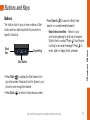
The bottom front of your phone contains a Start
button and two static keys that let you perform
specific functions.
Back
Key
Search Key
•Press Search ( ) to launch a Bing® web
search or a context-sensitive search.
•Search becomes find – Search is your
one-button gateway to all kinds of answers.
Want to find a contact? Press
from People.
Looking for an email message? Press
in
email. Use it in Maps, Email, wherever.
Start Button
•Press Start ( ) to display the Start screen from
any other screen. Press and hold for Speech, your
phone’s voice recognition feature.
•Press Back ( ) to return to the previous screen.
visit sprint.com/support for guides, tutorials and more
11
Windows Basics
Buttons and Keys