1
ENGLISH
SAFETY SYMBOLS
This manual uses the safety symbols below. They denote critical information. Please
read them carefully.
WARNING
Failure to abide by the information in a WARNING may result in serious
injury and can be life threatening.
CAUTION
Failure to abide by the information in a CAUTION may result in moderate
injury and/or property or product damage.
Indicates a prohibited action.
Indicates to ground for safety.
Copyright© 2000 by EIZO NANAO CORPORATION. All rights reserved. No part of
this manual may be reproduced, stored in a retrieval system, or transmitted, in any form
or by any means, electronic, mechanical, or otherwise, without the prior written
permission of Eizo Nanao Corporation.
Eizo Nanao Corporation is under no obligation to hold any submitted material or
information confidential unless prior arrangements are made pursuant to Eizo Nanao
Corporation's receipt of said information. Although every effort has been made to ensure
that this manual provides up-to-date information, please note that EIZO monitor
specifications are subject to change without notice.
ENERGY STAR is a U.S. registered mark.
VESA is a registered trademark of Video Electronics Standards Association.
VGA is a registered trademark of International Business Machines Corporation.
ScreenManager and PowerManager are trademarks of Eizo Nanao Corporation.
FlexScan and EIZO are registered trademarks of Eizo Nanao Corporation.
As an ENERGY STAR® Partner, Eizo Nanao Corporation has determined that
this product meets the ENERGY STAR guidelines for energy efficiency.
2
TABLE OF CONTENTS
PRECAUTIONS .............................................................................. 4
1.
INTRODUCTION .......................................................................... 10
2.
ENGLISH
1-1. Features ..................................................................................................... 10
1-2. Package Contents ...................................................................................... 10
1-3. Controls & Connectors ................................................................................ 11
CABLE CONNECTION ................................................................ 12
2-1. Before Connecting ...................................................................................... 12
2-2. Connecting the Signal Cable ....................................................................... 12
3.
ScreenManager ........................................................................... 14
3-1. How to use the ScreenManager .................................................................. 14
3-2. ScreenManager Adjustments and Settings ............................................... 15
3-3. Useful Functions ......................................................................................... 15
4.
ADJUSTMENT ............................................................................ 17
4-1. Screen Adjustment ..................................................................................... 17
4-2. Power-save Setup ....................................................................................... 19
5.
ATTACHING AN ARM STAND .................................................... 20
6.
TROUBLE SHOOTING ................................................................ 22
7.
CLEANING ................................................................................... 24
8.
SPECIFICATIONS ....................................................................... 25
9.
GLOSSARY.................................................................................. 27
10. INDEX .......................................................................................... 28
TABLE OF CONTENTS
3
PRECAUTIONS
IMPORTANT!
´ This product has been adjusted specifically for use in the region to which it was
originally shipped. If operated outside the region to which it was originally
shipped, the product may not perform as stated in the specifications.
´ To ensure personal safety and proper maintenance. Please read this section and the
caution statements on the monitor (refer to the figure below).
[Location of the Caution Statements]
Risk of electric shock. Do not open.
Risque de choc electrique. Ne pas ouvrir.
Gefahr des elektrischen schlages. Rückwand nicht entfernen.
The equipment must be connected to a grounded main outlet.
Jordet stikkontakt skal benyttes nár apparatet
tilkobles datanett.
Apparaten skall anslutas till jordat nätuttag.
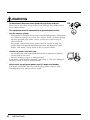
WARNING
´ If the monitor begins to emit smoke, smells like something is
burning, or makes strange noises, disconnect all power connections
immediately and contact your dealer for advice.
Attempting to use a malfunctioning monitor can be dangerous.
´ Do not dismantle the cabinet or modify the monitor.
Dismantling the cabinet or modifying the monitor may result in electric
shock or burn.
´ Refer all servicing to qualified service personnel.
Do not attempt to service this product yourself as opening or removing
covers may expose you to dangerous voltage or other hazards.
4
PRECAUTIONS
WARNING
ENGLISH
´ Keep small objects away from the monitor.
Small objects may accidentally fall through the ventilation slots into the
cabinet, leading to fire, shock, or equipment damage.
´ Keep liquids away from the monitor.
Spillage into the cabinet may result in fire, electric shock, or equipment
damage. If an object or liquid falls/spills into the cabinet, unplug the
monitor immediately. Have the monitor checked by a qualified service
engineer before using it again.
´ Place the monitor on a strong, stable surface.
A monitor placed on an inadequate surface may fall, resulting in injury or
equipment damage. If the monitor falls, disconnect the power immediately
and have the monitor checked by a qualified service engineer before using it
again. Using a monitor after it has been dropped may result in fire or
electric shock.
OK
´ Set the monitor in an appropriate location.
* Do not install in a dusty or humid environment.
* Do not place in a location where steam can have direct contact with
the screen.
* Do not place near heat generating devices or a humidifier.
´ Keep the plastic packing bags away from children and infants.
Plastic bags can be dangerous. To avoid danger of suffocation, keep the
bag away from babies and children.
• Use the enclosed power cord. If using the power cord other than the
enclosed one, follow these guidelines.
[USA and Canada]
Use a UL LISTED/CSA LABELED or CERTIFIED power cord set meeting
the following specifications.
* Rating:
min. 125 V, 10 A
*Length: max. 2.0 m
* Plug type:
NEMA 5-15P, Parallel blade, Grounding type, 125 V, 10 A
* Type:
SVT
[Europe]
Use a proper European standard approved power cord meeting the
following specifications.
* Rating:
min. 250 V, 10 A
*Length: max. 2.0 m
* Type:
H05VV-F 3G 1 mm2
Use a plug type approved by the country where you reside. Failure to do so
may cause fire or electric shock.
PRECAUTIONS
5
WARNING
´ To disconnect the power cord, grasp the plug firmly and pull.
Never tug on the cord, doing so may cause damage and could result in
fire or electric shock.
´ The equipment must be connected to a grounded main outlet.
´ Use the correct voltage.
* The monitor is designed for use with a specific voltage only. Connection
to a different voltage may cause fire, electric shock, or other damage.
* Do not overload your power circuit, as this may result in fire or
electric shock.
* For proper connections of the power cord, be certain to plug the
power cord to the provided monitor connector and directly to a wall
outlet. Not doing so may result in fire or electric shock.
´ Handle the power cord with care.
* Do not place the cord underneath the monitor or other heavy objects.
* Do not pull on the cord.
* Do not attempt to repair a damaged cord.
If the power cord becomes damaged, stop using it. Use of a damaged
cord may result in fire or electric shock.
´ Never touch the plug and power cord if it begins to thunder.
If it begins to thunder, do not touch the plug, power cord or cable.
Touching them may result in electric shock.
6
PRECAUTIONS
OK
WARNING
ENGLISH
´ Install the monitor securely when attaching to an arm stand.
When attaching an arm stand, please refer to the user’s manual of the arm
stand and install the monitor securely with the enclosed screws. Not doing
so may cause the monitor to come unattached, which may result in injury
or equipment damage. When the monitor is dropped, please ask your
dealer for advice. Do not continue using a damaged monitor. Using a
damaged monitor may result in fire or electric shock.
When reattaching the tilt stand, please use the same screws and tighten
them securely.
´ Do not touch a damaged LCD panel directly with bare hands.
Use protective gloves whenever handling a damaged panel. The liquid
crystal which leaks from the panel is poisonous if it enters the eyes or
mouth. If any part of the skin or body comes in direct contact with the
panel, please wash thoroughly. If some physical symptoms result, please
consult your doctor.
´ Take care when disposing of the monitor.
The backlight of the LCD panel contains mercury. Follow local
regulation or laws for safe disposal.
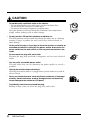
CAUTION
• Handle with care when carrying the monitor.
* Disconnect the power cord, signal cables. Moving the monitor with the
cord attached is dangerous. It may result in injury or equipment
damage.
* When handling the monitor, grip the bottom of the monitor firmly with
both hands ensuring the panel faces outward before lifting.
* Handle with care to avoid scratching or damaging the panel. If the
monitor becomes damaged, disconnect the power immediately and have
the monitor checked by a qualified service engineer before using it again.
Using a monitor after it has been dropped may result in fire or electric
shock.
OK
PRECAUTIONS
7
CAUTION
´ Do not block the ventilation slots on the cabinet.
* Do not place books or any other papers on the ventilation slots.
* Do not install the monitor in a closed space.
* Do not use the monitor lengthwise or upside down.
Using the monitor in this way blocks the ventilation slots and prevents
proper airflow, leading to fire or other damage.
• Do not use the LCD monitor outdoors or indide a car.
This LCD monitor has been made specifically for indoor use as a desktop
monitor. Using it anywhere else may result in fire, electrical shock, or
other damage.
´ At the end of the day or if you plan to leave the monitor unused for an
extended period after turning off the power switch, disconnect the
power cord from the wall socket so that no power connections are
made.
´ Do not touch the plug with wet hands.
Touching the plug with wet hands is dangerous and can cause electrical
shock.
´ Use an easily accessible power outlet.
This will ensure that you can disconnect the power quickly in case of a
problem.
´ Unplug the monitor before cleaning it.
Cleaning the monitor while it is plugged into a power outlet may result in
electric shock.
´ Never use thinner, benzene, alcohol (ethanol, methanol, or isopropyl
alcohol), abrasive cleaners, or other strong solvents, as these may
cause damage to the cabinet or LCD panel.
´ Periodically clean the area around the plug.
Buildup of dust, water, or oil on the plug may result in fire.
8
PRECAUTIONS
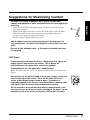
Suggestions for Maximizing Comfort
ENGLISH
´ To lessen the chance of possible injury and to increase your
comfort and productivity while you operate the unit, we suggest the
following:
* Avoid less favorable body positioning. Sit back on the chair with
your back straight.
* Adjust the height of the chair so that the both soles touch the floor.
* Adjust the height of your chair, monitor, or keyboard so that you
can keep your wrists straight while typing.
* Set the terminal slightly below eye level.
´ Adjust brightness of the screen depending on the brightness of
your environment. Too dark or too bright of a screen can cause eye
strain.
´ Be sure to take adequate rests. A 10-minute rest period each hour
is suggested.
LCD Panel
´ The screen may have defective pixels. These pixels may appear as
slightly light or dark area on the screen. This is due to the
characteristics of the panel itself, and not the product.
´ The backlight of the LCD panel has a fixed life span.
When the screen becomes dark or begins to flicker, please contact your
dealer.
´ Do not press on the panel or edge of the frame strongly, as this will
result in damage to the screen. There will be prints left on the
screen if the pressed image is dark or black. If pressure is
repeatedly applied to the screen, it may deteriorate or damage your
LCD panel. Leave the screen white to decrease the prints.
´ Do not scratch or press on the panel with any sharp objects, such
as a pencil or pen as this may result in damage to the panel. Do not
attempt to brush with tissues as this may scratch the LCD panel.
PRECAUTIONS
9
1. INTRODUCTION
Thank you very much for choosing an EIZO Color Monitor.
1-1. Features
•
•
•
•
•
DVI p.27) digital input (TMDS p.27)) compliant.
1024 x 768 resolution p.27) and automatic full screen support for lower resolutions.
Smoothing function incorporated for the adjustment of an enlarged image.
DVI DMPM p.27) power saving compliant, less than 3 W in power saving mode.
Two kinds of brightness adjustment accessible through the brightness selection button
on he front panel.
1-2. Package Contents
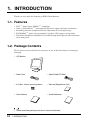
Please contact your local dealer for assistance if any of the listed items are missing or
damaged.
• LCD Monitor
• Power Cord
• Signal Cable (FD-C04)
• 4 of M4 x 16 mm mounting screws
• Warranty Registration Card
• User’s Manual
• Quick Reference
• Please retain the packing materials for future transference.
10
1. INTRODUCTION
1-3. Controls & Connectors
Front
(1)
ScreenManager™
Brightness Selection Button
Control Buttons
Enter Button
Power Indicator*1
Indicated color
Green
Yellow
Flashing Yellow
(2 times for each)
ENGLISH
(1)
(2)
(3)
(4)
(5)
Monitor’s status
Power -on
Power save mode
Power save mode
(6) Power Switch
(2)(3)(4)(5)(6)
Rear
(10)
(7)
(8)
(9)
(10)
(11)
Power Connector
Security Lock Slot*2
DVI-D Input Connector
4 Holes for Mounting an Arm-Stand*3
Stand (Detatchable)*3
(11)
(7)(8) (9)
*1
*2
*3
Regarding the power indicator for the “Off Timer”, see page 16.
Allows for connection of a security cable. This lock supports Kensington’s MicroSaver
security system. For further information, please consult:
Kensington Technology Group 2855 Campus Drive, San Mateo, CA 94403 USA
800-650-4242, x3348
Intl: 650-572-2700, x3348 / Fax: 650-572-9675
http://www.kensington.com
The L351 can be used with an optional arm stand by removing the stand
(see page 20).
1. INTRODUCTION
11
2. CABLE CONNECTION
2-1. Before Connecting
Following 4 resolutions p.27) with frequency can be displayed on this model. The lower
display modes like 640 x 480 or 720 x 400 mode, automatically enlarge to the maximum
display mode (1024 x 768). In this case, some lines of the characters may become fuzzy.
Use “Smoothing” function to make the lines clear (see page 18).
Resolution
Frequency
Remarks
640 x 480
60 Hz
VGA
720 x 400
70 Hz
VGA Text
800 x 600
60 Hz
VESA
1024 x 768
60 Hz
VESA
2-2. Connecting the Signal Cable
• Be sure that the power switches of both the PC and the monitor are OFF.
1.
Plug the signal cable into the DVI-D connector at the rear of the
monitor and the other end of the cable into the digital video connector
on the PC.
After connecting, secure the connection with the screw-in fasteners.
Video output connector
DVI-D
FD-C04 (attached)
2.
12
Digital
Graphics board
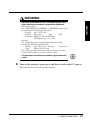
Plug the power cord into the power connector on the rear of the
monitor. Plug the other end of the power cord into a power outlet.
2. CABLE CONNECTION
WARNING
ENGLISH
• Use the enclosed power cord. If using the power cord
other than the enclosed one, follow these guidelines.
[USA and Canada]
Use a UL LISTED/CSA LABELED or CERTIFIED power cord
set meeting the following specifications:
* Rating:
min. 125 V, 10 A
* Length:
max.2.0 m
* Type:
SVT
* Plug type: NEMA 5-15P, Parallel blade,
Grounding type, 125 V, 10 A
[Europe]
Use a proper European standard approved power cord
meeting the following specifications:
* Rating:
min. 250 V, 10 A *Length:
max.2.0 m
* Type:
H05VV-F 3G 1 mm2
Use a plug type approved by the country where you reside.
Failure to do so may cause fire or electric shock.
• The equipment must be connected to a grounded main
outlet.
3.
Turn on the monitor’s main power and then switch on the PC’s power.
When finished, turn off the PC and the monitor.
2. CABLE CONNECTION
13
3. ScreenManager
3-1. How to use the ScreenManager
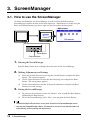
As shown on the display, the ScreenManager is used to adjust the LCD monitor.
ScreenManager consists of main menus and sub menus. Adjustments are made using the
Enter and Control buttons (up, down, right and left) located on the front panel.
< Main menu>
Enter Button
Control Buttons
1.
Entering the ScreenManager
Push the Enter button once to display the main menu of the ScreenManager.
2.
Making Adjustments and Settings
(1)
(2)
(3)
3.
Select the desired sub menu icon using the Control buttons and push the Enter
button. The sub menu appears.
Use the Control buttons to select the desired setting icon and push the Enter
button. The setting menu appears.
Use the Control buttons to make all required adjustments and push the Enter
button to save the settings.
Exiting the ScreenManager
(1)
(2)
To return to the main menu, select the “Return” icon or push the down button,
followed by the Enter button.
To exit the ScreenManager, select “Exit” icon and push the Enter button.
• Double clicking the Enter button at any time also exits the ScreenManager menu.
• Leaving the ScreenManager idle for 45 seconds or more will turn the adjustment off
automatically, without saving the adjustments.
14
3. ScreenManager
3-2. ScreenManager Adjustments and Settings.
The following table shows all the ScreenManager’s adjustment and setting menus.
PowerManager
Others
Information
Language
Sub menu
Position
Resolution
Smoothing
Brightness
DVI DMPM
Off timer
Menu Position
Reference
4-1. Screen Adjustment (p.17)
4-2. Power-save Setup (p.19)
Set the monitor’s timer to on or off (p.16).
Adjust the ScreenManager’s menu
position.
Reset
Return to the factory default settings.
(p. 25)
Information
Review the current ScreenManager’s
settings.
English, German, French, Select the ScreenManager’s language.
Spanish, Italian,
Swedish and Japanese
3-3. Useful Functions
Adjustment Lock
Use the “Adjustment Lock” function to prevent any accidental changes.
Locked function
Unlocked function
• Adjustments and settings in the ScreenManager.
• Brightness selection button
• Adjustment of brightness by the up and down buttons.
• To lock
Press on the brightness selection button while switching on the power.
• To unlock
Switch off the monitor’s power, then hold down the brightness selection button once
again and turn the power back on.
3. ScreenManager
15
ENGLISH
Main menu
Screen
Off Timer
The off timer function causes the monitor to automatically enter a power off state after a
predetermined amount of time has lapsed. This function was created to reduce
afterimage p.27) characteristics that are particular to LCD monitors when the monitor
screen is left on for a long period without use.
[Procedure]
(1) Select “Off Timer” in the ScreenManager “Others” menu.
(2) Select “Enable” and press the right and left buttons to adjust the “On Period” (1 to
23 hours).
[Off timer system]
*1
PC
Monitor
LED
On Period (1H~23H)
Operation
Green
Last 15 min. in "On period"
Advance Notice *1
Green Flashing
"On period" expired
"Power Off" Mode
Flashing yellow slowly
Advance notice (LED flashing green) will be given 15 minutes before the monitor
automatically enters the “Power Off” mode. To delay entering the “Power Off” mode,
press any button during the advance notice period. The monitor will continue to
operate for an additional 90 minutes.
Press any button to return to a normal screen.
• The off timer function works while the PowerManager is active, but there is no
advance notice before the monitor’s power is switched off.
16
3. ScreenManager
4. ADJUSTMENT
4-1. Screen Adjustment
• Allow the monitor to warm up for at least 20 minutes before making any adjustments.
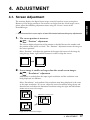
1.
The screen position is incorrect.
Æ
“Position” adjustment
The correct displayed position of the monitor is decided because the number and
the position of the pixels are fixed. The “Position” adjustment moves the image to
the correct position.
Select “Position” and adjust the position of the upper left corner of the image by
using the up, down, right and left buttons in order to align the screen.
2.
Screen image is smaller or larger than the actual screen images.
Æ
“Resolution” adjustment
Adjustment is needed when the input signal resolution and the resolution now
being displayed are different.
Select “Resolution” and confirm if the resolution now being displayed is the same
as the input resolution. If it is not, adjust the vertical resolution using the up and
down button and adjust the horizontal resolution using the right and left buttons.
Smaller than the actual screen images.
Adjusted to actual screen.
Larger than the actual screen images.
4. ADJUSTMENT
17
ENGLISH
The monitor displays the digital input image correctly based on its pre-setting data.
However, if the image position is not incorrect or larger than the actual image screen,
please adjust the following adjustment items using the “Screen” menu of the
ScreenManager.
3.
Smooth blurred texts.
Æ
Adjust the “ Smoothing”
Select a suitable level from 1~5 (soft ~ sharp).
Select “Smoothing” and adjust by using the right and left buttons.
4.
Set the Brightness of the screen
Æ
Adjust the “Brightness”
This controls the brightness of the screen. The brightness of the entire screen is
controlled by changing the brightness of the backlight.
[Brightness 1 & Brightness 2]
The L351 has two memories for the preferable brightness setting (Brightness 1 &
Brightness 2). The brightness selection button on the front panel can be used to
select Brightness 1 or Brightness 2.
There are two ways to access the brightness function.
1) Select “Brightness” in the “Screen” menu.
2) Press the brightness selection button on the front panel.
Use the up and down control buttons for adjustment.
18
4. ADJUSTMENT
4-2. Power-save Setup
This monitor complies with the DVI DMPM p.27).
ENGLISH
[Procedure]
(1) Set the PC’s power saving settings.
(2) Select “DVI DMPM” in the “PowerManager” menu.
[Power saving system]
PC
Monitor
LED
Power consumption
On
Operation
Green
35 W
Power saving
Power saving
Yellow
Less than 3 W
Off mode
Power saving
Flashing yellow
(2 times for each)
Less than 1 W
Operate the mouse or keyboard to return to a normal screen from the Power save mode
of the PC.
Power on the PC to return to a normal screen from the Off mode of the PC.
• Do your part to conserve energy, turn off the monitor when you are finished using it.
Disconnecting the monitor from the power supply is recommended to save energy
completely.
4. ADJUSTMENT
19
5. ATTACHING AN ARM STAND
The L351 can be used with an arm stand by removing the tilt stand and attaching the
arm stand to the terminal.
NOTE
´ Use an arm stand that satisfies the followings.
• When using the L351 with an arm stand,
the arm stand must be VESA approved :
* Use an arm stand with a 75 mm x 75 mm hole
spacing on the arm mounting pad.
* Use an arm stand that is able to support anobject
weighing 8.0 kg.
´ TÜV/GS approved arm stand.
´ Use an arm stand with sufficient stability
(mechanical firmness) to support the weight of the
monitor.
´ Use an arm stand remaining that position where it
is manually moved.
´ Use an arm stand with the ability to tilt the monitor
forward and backward.
´ Use an arm stand less than or equal to 500 mm in
relation to the desk surface when the arm stand is in its
lowest position.
´ Please connect cables after attaching an arm stand.
M4 x 16 mm
75 mm
75 mm
500 mm or
less
(Example)
Setup Procedure
1.
Lay the L351 down as shown below. Do not scratch the panel.
Soft Cloth or
Cushion
2.
20
Remove the tilt stand by loosening the screws (2 pcs of M4 x 10 mm).
5. ATTACHING AN ARM STAND
3.
Attach an arm stand to the L351 securely.
ENGLISH
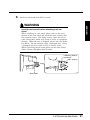
WARNING
´ Install the unit securely when attaching to an arm
stand.
When attaching an arm stand, please refer to the user’s
manual of the arm stand and install the unit securely with
the enclosed screws. Not doing so may cause the unit to
come unattached, which may result in injury or equipment
damage. When the unit is dropped, please ask your dealer
for advice. Do not continue using a damaged unit. Using
a damaged unit may result in fire or electric shock.
When reattaching the tilt stand, please use the same screws
(M4 x 10 mm) and tighten them securely.
4 Mounting Screws
(enclosed):
M4 x 16 (mm)
Arm-stand
5. ATTACHING AN ARM STAND
21
6. TROUBLESHOOTING
If a problem persists even after applying the suggested remedies, contact an EIZO
dealer.
Problems
1. No picture
• Indicator status: Off
• Indicator status: Green
• Indicator status
: Yellow
: Flashing Yellow
Points to check with possible solutions
Check that the power cord is correctly connected.
If the problem persists, turn off the monitor power for a
few minutes, then turn it back on and try again.
Check the “Brightness” settings. Minimum settings will
cause screen to be blank.
Try pressing a key on the keyboard, or clicking the
mouse. (p.19)
• Indicator status: Slowly
flashing Yellow
Try pressing any button on the front panel. (p.16)
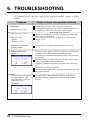
2. Following messages
appear.
These messages appear when the signal is not inputted
correctly, even if the monitor functions properly.
Error messages shown below will remain on the screen for
40 seconds.
When the image is displayed correctly after a short time,
there is no problem with the monitor.
(Some PC’s do not output the signal soon after powering
on.)
Check that the PC is turned ON.
Check that the signal cable is properly connected to the PC
or graphics board.
• Whenever an error signal
message appears, the
signal frequency will be
displayed in red.
(Example)
Use the graphics board’s utility software to change the
frequency setting. (Refer to the manual of the graphics
board.)
22
6. TROUBLESHOOTING
Points to check with possible solutions
3. Display position is
incorrect.
Adjust the image position using the “Position”. (p.17)
If the problem persists, use the graphics board’s utility
software to change the display position if available.
4. Screen image is smaller or
larger than the actual
screen images.
Adjust the resolution using the “Resolution”. (p.17)
5. Letters and lines appear
blurred.
Adjust the blurred lines using “Smoothing”. (p.18)
6. Afterimages appear.
When the screen image is changed after displaying the
same image for a long period, an afterimage may appear.
Use the “Off Timer” function and avoid keeping the screen
on all the time. (p.16)
7. The screen has defective
pixels (e.g. slightly light
or dark).
This is due to the characteristics of the panel itself, and not
the LCD product.
8. Fingerprints remain on
the screen.
Leaving the screen white may solve the problem.
9. The “Smoothing”
function does not select.
The “Smoothing” is disable when the screen resolution is
1024 x 768.
10. The Enter button does not
operate.
The adjustment lock is probably on. To unlock: switch
the LCD monitor off. Then, while pressing the Brightness
selection button on. (p.15)
6. TROUBLESHOOTING
ENGLISH
Problems
23
7. CLEANING
Periodic cleaning is recommended to keep the monitor looking new and to prolong its
operation lifetime.
WARNING
´ Keep liquids away from the unit.
Spillage into the cabinet may result in fire, electric shock, or
equipment damage.
If an object or liquid falls/spills into the cabinet, unplug the
monitor immediately. Have the unit checked by a qualified
service engineer before using it again.
CAUTION
´ Unplug the unit before cleaning it.
Cleaning the unit while it is plugged into a power outlet may
result in electric shock.
´ Never use thinner, benzene, alcohol (ethanol, methanol, or
isopropyl alcohol), abrasive cleaners, or other strong
solvents, as these may cause damage to the cabinet or LCD
panel.
´ Periodically clean the area around the plug.
Buildup of dust water, or oil on the plug may result in fire.
Cabinet
To remove stains, wipe the cabinet with a soft, lightly moistened cloth using a mild
detergent. Do not spray wax or cleaner directly onto the cabinet.
LCD Panel
The LCD surface can be cleaned with a soft cloth, such as cotton or lens paper.
If necessary, stubborn stains can be removed by moistening part of a cloth with water to
enhance its cleaning power.
24
7. CLEANING
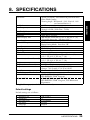
8. SPECIFICATIONS
LCD Panel
Dot Clock (Max.)
Display Colors
Resolution
Active Display Area
Power Supply
Power Consumption
Input Connector
Input Signal
Signal registration
Plug & Play
Dimensions
Dimensions (without tilt stand)
Weight
Weight (without tilt stand)
Temperature
Humidity
Certifications and Standards
100-120 VAC
*1
NRTL/C-TÜV, FCC-B, TCO’99*1,
EPA ENERGY STAR® Program
220-240 VAC
CE, CB, TÜV Rheinland/GS, TCO’99*1,
EPA ENRTGY STAR® Program, TÜV Rheinland/
Ergonomics
Applicable to gray (standard) color version only.
Default settings
Default settings are as follows:
Brightness 1/2
Smoothing
PowerManager
Off Timer
Language
100 %/30 %
3
DVI-DMPM
Disable
English
8. SPECIFICATIONS
25
ENGLISH
Dot Pitch
Scan Frequency
38 cm (15.0 inch), TFT color LCD panel with AntiGlare Hard Coating
Viewing Angle: Horizontal: 120º, Vertical: 140º
(at Contrast Ratio > 5)
0.297 mm
Horizontal: 31 kHz - 49 kHz (Automatic)
Vertical: 60 Hz, (VGA Text : 70 Hz)
65 MHz
16 milion colors (max)
1024 dots x 768 lines
304 mm (H) x 228 mm (V) (11.9” (H) x 8.9” (V))
(Viewable image size: 380 mm (14.9”))
100-120/220-240 VAC±10 %, 50/60 Hz, 0.6 A/0.3 A
35 W
Power Saving Mode: Less than 3 W
DVI-D
TMDS (Single Link)
5
VESA DDC 2B
384 mm (W) x 386.2 mm (H) x 171.4 mm (D)
(15.1” (W) x 15.2” (H) x 6.7” (D))
384 mm (W) x 325 mm (H) x 69 mm (D)
(15.1” (W) x 12.8” (H) x 2.7” (D))
5.4 kg (11.9 lbs.)
3.9 kg (8.6 lbs.)
operating: 0 °C to 35 °C (32 °F to 95 °F)
storage: -20 °C to 60 °C (-4 °F to 140 °F)
30 % to 80 % R.H. Non-condensing
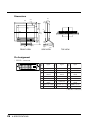
Dimensions
384
(15.1)
69
(2.7)
37.2
(1.5)
23
(0.9)
39
(1.5)
306
(12.0)
325
(12.8)
230
(9.1)
25
3
386.2
(15.2)
57.8
(2.3)
170
(6.7)
36.8
(1.4)
167
(6.6) 171.4
(6.7)
5
(0.2)
FRONT VIEW
TOP VIEW
SIDE VIEW
Pin Assignment
* DVI-D connector
1 2 3 4 5 6 7 8
9 10 11 12 13 14 15 16
17 18 19 20 21 22 23 24
Pin
No.
Signal
Pin
No.
Signal
1
TMDS Data2-
9
TMDS Data1-
Pin
No.
Signal
17 TMDS Data0-
2
TMDS Data2+ 10 TMDS Data1+ 18 TMDS Data0+
TMDS Data2/4
TMDS Data1/3
TMDS Data0/5
3
11
19
Shield
Shield
Sheild
4
NC*
12
NC
20
NC
5
NC
13
NC
21
NC
DDC Clock
TMDS Clock
6
14
+5V Power
22
(SCL)
Shield
7 DDC Data (SDA) 15 Ground (for +5V) 23 TMDS Clock+
8
NC
16 Hot Plug Detect 24
TMDS Clock-
(*NC: No Connection)
26
8. SPECIFICATIONS
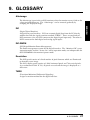
9. GLOSSARY
Afterimage
The Afterimage is particular to LCD monitors when the monitor screen is left on for
a long period without use. The “Afterimage” can be removed gradually by
changing the displayed image.
(Digital Visual Interface)
A digital flat panel interface. DVI can transmit digital data from the PC directly
without loss with the signal transition method “TMDS”. There are two kinds of
DVI connectors. One is DVI-D connector for digital signal input only. The other is
DVI-I connector for both digital and analog signal inputs.
DVI-DMPM
(DVI Digital Monitor Power Management)
The Power management system for the digital interface. The “Monitor ON” status
(operation mode) and the “Active On” status (operation mode) are indispensable for
the DVI-DMPM as the monitor’s power mode.
Resolution
The LCD panel consists of a fixed number of pixel elements which are illuminated
to form the screen image.
The L351 display panel consists of 1024 horizontal pixels and 768 vertical pixels.
At a resolution of 1024 X 768, all pixels are used and the image is displayed as a
full screen.
TMDS
(Transition Minimized Differential Signaling)
A signal transition method for the digital interface.
9. GLOSSARY
27
ENGLISH
DVI
10.INDEX
A
R
ADJUSTMENT --------------------------- 17
Adjustment Lock ------------------------- 15
Afterimage ----------------------- 16, 23, 27
ATTACHING AN ARM STAND -------- 20
Reset --------------------------------------- 15
Resolution -------- 10, 12, 15, 17, 25, 27
S
Save ---------------------------------------- 14
Screen --------------------------------- 15, 17
Screen Adjustment ---------------------- 17
ScreenManager --------------------------- 14
ScreenManager Adjustments
and Settings ----- 15
Security Lock Slot ----------------------- 11
Smoothing ---------------------------- 15, 18
SPECIFICATIONS ----------------------- 25
B
Brightness ---------------------------- 15, 18
C
CABLE CONNECTION ----------------- 12
CLEANING -------------------------------- 24
Controls & Connectors ------------------ 11
D
Default setting ---------------------------- 25
Dimensions -------------------------------- 26
Displaying the low resolutions -------- 12
DVI ------------------------------------- 10, 27
DVI DMPM ---------------------- 15, 19, 27
G
GLOSSARY ------------------------------- 27
H
How to use the ScreenManager ------ 14
I
Information -------------------------------- 15
L
Language ---------------------------------- 15
M
Menu Position ----------------------------- 15
O
Off Timer ------------------------------ 15, 16
Others -------------------------------------- 15
P
Package Contents ----------------------- 10
Pin Assignment -------------------------- 26
Position -------------------------------- 15, 17
Power consumption ----------------- 19, 25
Power Indicator --------------------------- 11
PowerManager ----------------------- 15, 19
Power-save Setup ----------------------- 19
PRECAUTIONS --------------------------- 4
28
10. INDEX
T
TMDS ---------------------------------- 10, 27
TROUBLE SHOOTING ----------------- 22
[Applicable to gray (standard color version only).]
Congratulations!
You have just purchased a TCO’99 approved and labelled
product! Your choice has provided you with a product developed
for professional use. Your purchase has also contributed to
reducing the burden on the environment and also to the further
development of environmentally adapted electronics products.
Why do we have environmentally labelled computers?
In many countries, environmental labelling has become an established method for
encouraging the adaptation of goods and services to the environment. The main problem, as
far as computers and other electronics equipment are concerned, is that environmentally
harmful substances are used both in the products and during their manufacture. Since it is not
so far possible to satisfactorily recycle the majority of electronics equipment, most of these
potentially damaging substances sooner or later enter nature.
There are also other characteristics of a computer, such as energy consumption levels, that
are important from the viewpoints of both the work (internal) and natural (external)
environments. Since all methods of electricity generation have a negative effect on the
environment (e.g. acidic and climate-influencing emissions, radioactive waste), it is vital to
save energy. Electronics equipment in offices is often left running continuously and thereby
consumes a lot of energy.
What does labelling involve?
This product meets the requirements for the TCO’99 scheme which provides for
international and environmental labelling of personal computers. The labelling scheme was
developed as a joint effort by the TCO (The Swedish Confederation of Professional
Employees), Svenska Naturskyddsforeningen (The Swedish Society for Nature Conservation)
and Statens Energimyndighet (The Swedish National Energy Administration).
Approval requirements cover a wide range of issues: environment, ergonomics, usability,
emission of electric and magnetic fields, energy consumption and electrical and fire safety.
The environmental demands impose restrictions on the presence and use of heavy metals,
brominated and chlorinated flame retardants, CFCs (freons) and chlorinated solvents, among
other things. The product must be prepared for recycling and the manufacturer is obliged to
have an environmental policy which must be adhered to in each country where the company
implements its operational policy.
The energy requirements include a demand that the computer and/or display, after a
certain period of inactivity, shall reduce its power consumption to a lower level in one or
more stages. The length of time to reactivate the computer shall be reasonable for the user.
Labelled products must meet strict environmental demands, for example, in respect of the
reduction of electric and magnetic fields, physical and visual ergonomics and good usability.
Below you will find a brief summary of the environmental requirements met by this
product.
The complete environmental criteria document may be ordered from:
TCO Development
SE-114 94 Stockholm, Sweden
Fax: +46 8 782 92 07
Email (Internet): [email protected]
Current information regarding TCO’99 approved and labelled products may also be
obtained via the Internet, using the address: http://www.tco-info.com/
[Applicable to gray (standard color version only).]
Environmental requirements
Flame retardants
Flame retardants are present in printed circuit boards, cables, wires, casings and
housings. Their purpose is to prevent, or at least to delay the spread of fire. Up to 30% of
the plastic in a computer casing can consist of flame retardant substances. Most flame
retardants contain bromine or chloride, and those flame retardants are chemically related to
another group of environmental toxins, PCBs. Both the flame retardants containing bromine
or chloride and the PCBs are suspected of giving rise to severe health effects, including
reproductive damage in fish-eating birds and mammals, due to the bio-accumulative*
processes. Flame retardants have been found in human blood and researchers fear that
disturbances in foetus development may occur.
The relevant TCO’99 demand requires that plastic components weighing more than 25
grams must not contain flame retardants with organically bound bromine or chlorine. Flame
retardants are allowed in the printed circuit boards since no substitutes are available.
Cadmium**
Cadmium is present in rechargeable batteries and in the colour-generating layers of
certain computer displays. Cadmium damages the nervous system and is toxic in high doses.
The relevant TCO’99 requirement states that batteries, the colour-generating layers of
display screens and the electrical or electronics components must not contain any cadmium.
Mercury**
Mercury is sometimes found in batteries, relays and switches. It damages the nervous
system and is toxic in high doses. The relevant TCO’99 requirement states that batteries
may not contain any mercury. It also demands that mercury is not present in any of the
electrical or electronics components associated with the labelled unit.
CFCs (freons)
The relevant TCO’99 requirement states that neither CFCs nor HCFCs may be used during
the manufacture and assembly of the product. CFCs (freons) are sometimes used for washing
printed circuit boards. CFCs break down ozone and thereby damage the ozone layer in the
stratosphere, causing increased reception on earth of ultraviolet light with e.g. increased
risks of skin cancer (malignant melanoma) as a consequence.
Lead**
Lead can be found in picture tubes, display screens, solders and capacitors. Lead damages
the nervous system and in higher doses, causes lead poisoning. The relevant TCO’99
requirement permits the inclusion of lead since no replacement has yet been developed.
* Bio-accumulative is defined as substances which accumulate within living organisms.
** Lead, Cadmium and Mercury are heavy metals which are Bio-accumulative.
For U.S.A, Canada, etc. (rated 100-120 Vac) Only
FCC Declaration of Conformity
We, the Responsible Party
EIZO NANAO TECHNOLOGIES INC.
5710 Warland Drive, Cypress, CA 90630
Phone: (562) 431-5011
declare that the product
Trade name: EIZO
Model: FlexScan L351
is in conformity with Part 15 of the FCC Rules. Operation of this product is subject to the
following two conditions: (1) this device may not cause harmful interference, and (2) this
device must accept any interference received, including interference that may cause undesired
operation.
This equipment has been tested and found to comply with the limits for a Class B digital
device, pursuant to Part 15 of the FCC Rules. These limits are designed to provid
reasonable protection against harmful interference in a residential installation. This
equipment generates, uses, and can radiate radio frequency energy and, if not installed
and used in accordance with the instructions, may cause harmful interference to radio
communications. However, there is no guarantee that interference will not occur in a
particular installation. If this equipment does cause harmful interference to radio or
television reception, which can be determined by turning the equipment off and on, the
user is encouraged to try to correct the interference by one or more of the following
measures.
*Reorient or relocate the receiving antenna.
*Increase the separation between the equipment and receiver.
*Connect the equipment into an outlet on a circuit different from that to which the
receiver is connected.
*Consult the dealer or an experienced radio/TV technician for help.
Changes or modifications not expressly approved by the party responsible for compliance
could void the user’s authority to operate the equipment.
Note
Use the attached specified cable below or EIZO signal cable with this monitor so as to
keep interference within the limits of a Class B digital device.
-AC Cord
-Shielded Signal Cable (DVI-D cable, the enclosed signal cable)
Canadian Notice
This Class B digital apparatus complies with Canadian ICES-003.
Cet appareil numérique de le classe B est comforme à la norme NMB-003 du Canada.
Hinweis zur Ergonomie :
Dieser Monitor erfüllt die Anforderungen an die Ergonomie nach EK1/59-98, EK1/6098 mit dem Videosignal, 1024 Punkte x 768 Zeilen, Digital Eingang und mindestens
60,0 Hz Bildwiederholfrequenz, non interlaced. Weiterhin wird aus ergonomischen
Gründen empfohlen, die Grundfarbe Blau nicht auf dunklem Untergrund zu
verwenden (schlechte Erkennbarkeit, Augenbelastung bei zu geringem
Zeichenkontrast.)
Recycle Auskunft
Die Rücknahme dieses Produktes nach Nutzungsende übernimmt EIZO in
Deutschland zusammen mit dem Partner von Roll MBB Recycling GmbH.
Dort werden die Geräte in ihre Bestandteile zerlegt, die dann der Wiederverwertung
zugeführt werden. Um einen Abholtermin zu vereinbaren und die aktuellen Kosten zu
erfahren, benutzen Sie bitte folgende Rufnummer: 02153-73 35 00. Weitere
Informationen finden Sie auch unter der Internet-Adresse: www.eizo.de.