1
14 AXIS 282/282A - Installation
AXIS Internet Dynamic DNS Service
The AXIS Internet Dynamic DNS Service is a free service provided by Axis. The service
allows you to quickly and simply install your video server, which then receives a static
name (DNS name) and a dynamic IP address. More information about the AXIS Internet
Dynamic DNS Service is available at www.axiscam.net
The video server can be unregistered from the service at any time.
Please visit www.axiscam.net for more details on the AXIS Internet Dynamic DNS Service.
Requirements
Using the AXIS Internet Dynamic DNS Service requires an Internet connection that does
not require a proxy server for HTTP access. A DHCP server in the network for assigning IP
addresses is recommended.
Installation Procedure
Please note that this procedure will send the AXIS 282/282A’s IP address, firmware version, product type
and serial number to the Axis Internet Dynamic DNS Service. No personal information will be transferred.
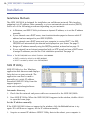
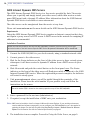
1. Connect the AXIS 282/282A to your local network, using a standard network cable.
2. Connect power to the video server.
3. Wait for the Status indicator on the front of the video server to show a steady green,
whereupon it will have received a dynamic IP address from a DHCP server on your
network.
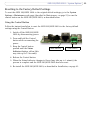
4. Wait 60 seconds and push the control button on the front panel once. The Status
indicator on the front of the video server will flash green while it connects to the AXIS
Internet Dynamic DNS service. When the registration process is complete, the indicator
will return to steady green.
5. Visit www.axiscam.net where you will be guided through the remainder of the
installation. Please have the serial number of your product ready and follow the
instructions on the screen.
The serial number (S/N) is located on the memory capsules on top off the AXIS 282/282A.
6. Enter a password for the root user (administrator).
7. If required, accept the installation of AMC onto your workstation.
Note: AMC must be installed to view live images in Microsoft Internet Explorer. If your working environment
restricts additional software components, you can configure your AXIS 282/282A to use a Java applet for
updating the images. See the help file under Live View Config > Layout > Default Viewer for Internet
Explorer for information. See also the Technical Specifications, on page 65.
8. The installation is now complete. Proceed to Using the Video Server, on page 9.