1
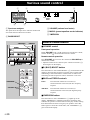
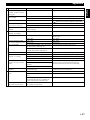
RLT
DISC 1
DISC 2
DISC 3
DISC CHANGE
VIDEO CD
Version 2.0 / Playback Control
3–DISC VCD CHANGER
STANDBY
/ON
DIGITAL VIDEO
YMERSION
STANDBY
OPEN/CLOSE
B.BOOST
TIMER
VOLUME
PRESET/TUNING/BAND
INPUT
A/B/C/D/E
/
UP
DOWN
MINI COMPONENT SYSTEM GX–505VCD
DIRECTION
KARAOKE
MIC MIXING
1
MIC
2
OPEN/CLOSE
AUTO REVERSE CASSETTE DECK
DOLBY B NR
MIN
MAX
MUSIC
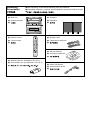
Unpacking
Desembalaje
● After unpacking, check that the following parts are contained.
● Desembale el aparato y verifique que los siguientes accesorios están en la caja.
●
DISC 1
DISC 2
DISC 3
OPEN/CLOSE
DISC CHANGE
● Main unit
● Aparato principal
●
● Speakers
VIDEO CD
3–DISC VCD CHANGER
YMERSION
STANDBY
STANDBY
/ON
DIGITAL VIDEO
Version 2.0 / Playback Control
B.BOOST
MUSIC
TIMER
● Delanteros
●
VOLUME
PRESET/TUNING/BAND
INPUT
A/B/C/D/E
/
UP
DOWN
MINI COMPONENT SYSTEM GX–505VCD
DIRECTION
KARAOKE
MIC MIXING
1
MIC
2
OPEN/CLOSE
AUTO REVERSE CASSETTE DECK
DOLBY B NR
MIN
MAX
POWER
● Remote control
● Control remoto
●
1
2
3
1
4
2
5
3
6
4
7
5
8
6
9
7
0
8
TUNER
+I0
PRESET
TIME
A
EDIT
PROG
PRESET
R.TIME
B
DISC SKIP
C
MODE
VCD/CD
/
SELECT
D
● Speaker cords
● Cables de los altavoces
●
E
RETURN
KARAOKE
INTRO
TIME INDEX
DIGEST
TIME INDEX
DIRECTION
TAPE
REC/ PAUSE
KEY/ECHO
YMERSION
SLEEP
MUSIC
INPUT
● AM loop antenna
VOLUME
● Antena de cuadro AM
●
● Batteries (size AA, UM/SUM-3, R6, HP-7)
● Pilas (tamaño AA, tipo UM/SUM-3, R6, HP-7)
●
● Indoor FM antenna
● Antena interior de FM
●
Setting this system
Instalación del sistema
20 cm
DISC 1
DISC 2
DISC 3
DISC CHANGE
VIDEO CD
3–DISC VCD CHANGER
DIGITAL VIDEO
Version 2.0 / Playback Control
YMERSION
STANDBY
STANDBY
/ON
20 cm
DISC 1
OPEN/CLOSE
B.BOOST
DISC 2
DISC 3
DISC CHANGE
VIDEO CD
3–DISC VCD CHANGER
MUSIC
YMERSION
PRESET/TUNING/BAND
INPUT
A/B/C/D/E
/
UP
UP
DOWN
DOWN
DOLBY SURROUND
P R O • L O G I C
MINI COMPONENT SYSTEM GX–505VCD
DOLBY SURROUND
P R O • L O G I C
MINI COMPONENT SYSTEM GX–505VCD
DIRECTION
DIRECTION
KARAOKE
KARAOKE
MIC MIXING
1
MIC
MIC MIXING
2
1
OPEN/CLOSE
20 cm
1 cm
DOLBY B NR
MUSIC
VOLUME
A/B/C/D/E
/
AUTO REVERSE CASSETTE DECK
B.BOOST
TIMER
VOLUME
PRESET/TUNING/BAND
DIGITAL VIDEO
Version 2.0 / Playback Control
STANDBY
STANDBY
/ON
TIMER
INPUT
20 cm
OPEN/CLOSE
MIC
2
OPEN/CLOSE
MIN
AUTO REVERSE CASSETTE DECK
MAX
1 cm
20 cm
20 cm
DOLBY B NR
MIN
MAX
20 cm
20 cm
English
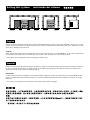
Set this system by allowing enough spaces around and behind the main unit to assure good ventilation. Be sure not to place
another unit or any object on top of the main unit to prevent the ventilation holes from being obstructed. Otherwise, it may
cause fire or damage to the main unit.
Caution
When placing the speakers apart from the main unit, be sure to allow spaces of at least 20 cm (3-15/16”) above, behind and
on both sides of the main unit. If the main unit is put inside a rack, the front of it must be fully opened.
* The values must be applied to China and Singapore models only.
Español
Instale el sistema dejando suficiente espacio alrededor y detrás de la unidad principal para garantizar una buena circulación
de aire. No instale otro aparato o un objeto encima de la unidad principal porque obstruirá los orificios de salida de aire.
Puede provocar un fuego o dañar la unidad principal.
Precaución
Cuando instale los altavoces alejados de la unidad principal, asegúrese de dejar un espacio de por lo menos 20 cm encima,
detrás y a ambos lados de la unidad principal. Si se coloca la unidad principal dentro de un mueble, no debe cerrar la tapa
delantera.
* Los valores corresponden exclusivamente a los modelos para China y Singapur.
*
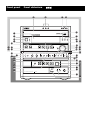
Front panel
Panel delantero
Front panel
O
P
DISC 1
DISC 2
Q R
DISC 3
DISC CHANGE
OPEN/CLOSE
6
1
VIDEO CD
3–DISC VCD CHANGER
4
M
3
YMERSION
STANDBY
STANDBY
/ON
DIGITAL VIDEO
Version 2.0 / Playback Control
B.BOOST
TIMER
H
MUSIC
5
G
C, S
VOLUME
PRESET/TUNING/BAND
INPUT
F
I, V
J, X
W
A/B/C/D/E
/
U, E
T, D
UP
DOWN
0
BASS
8
Z
TREBLE
PHONES
MODE
DOLBY NR
REC/
PAUSE
AUTO/
MANUAL
MEMORY
RANDOM
REPEAT
TIMER
TIME ADJ
HOUR
MIN
TIME
DISPLAY
K
L
B
N
c
b
DIRECTION
\
`
Y
2
]
a
KARAOKE
MIC MIXING
1
MIC
2
OPEN/CLOSE
AUTO REVERSE CASSETTE DECK
DOLBY B NR
MIN
7
A
MAX
9
[
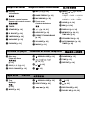
Amplifier/tuner
Amplificador/sintonizador
1 Display
Visualizador
2 Remote control sensor
Sensor del control remoto
9 MIC (1, 2) [p. 32]
0 BASS/TREBLE [p. 30]
A MIC MIXING [p. 32]
B Front cover
Cubierta delantera
3 TIMER
4 STANDBY [p. 10]
5 B. BOOST [p. 30]
6 YMERSION [p. 30]
7 KARAOKE [p. 32]
8 PHONES [p. 31]
CD/Video CD player
C / [p. 19, 21]
D A/B/C/D/E [p. 21]
E PRESET/TUNING/BAND
[p. 19]
F VOLUME [p. 30]
G MUSIC [p. 31]
R
S
Plato del disco
[p. 10]
P DISC (1, 2, 3) [p. 11]
Q DISC CHANGE [p. 12]
Y Tray
Bandeja
[p. 23]
Z MODE [p. 23]
/
) [p. 10, 19,
23, 25]
TUNER → TAPE → VCD/CD
↑
↓
AUX/MD ← VCR ← VIDEO
I HOUR [p. 8, 34]
J MIN [p. 8, 34]
K DISPLAY [p. 8, 34]
L MEMORY [p. 20, 21]
TIME ADJ [p. 8]
M STANDBY/ON [p. 10]
N AUTO/MANUAL [p. 19]
TIMER [p. 34]
Tocadiscos de discos compactos
O Disc tray
Tape deck
H INPUT(
T
U
OPEN/CLOSE [p. 10]
(
)/
[p. 12, 17]
/
(
)
V RANDOM [p. 15]
W TIME [p. 15]
X REPEAT [p. 14]
[p. 10]
[p. 10]
Platina
[ OPEN/CLOSE [p. 23]
\ DIRECTION [p. 23]
]
/
[p. 24]
` [p. 23]
a [p. 23]
b REC/PAUSE [p. 25]
c DOLBY NR [p. 22, 25]
Remote control
Control remoto
1
POWER
POWER
7
1
9
2
3
1
4
2
5
3
6
4
7
5
8
6
9
7
0
8
TUNER
+I0
PROG
PRESET
R.TIME
B
DISC SKIP
C
MODE
PRESET
TIME
A
EDIT
D
2
0
9
3
G
F
Q
1
2
3
1
4
2
5
3
6
4
7
5
8
6
9
7
0
8
TUNER
+I0
PROG
PRESET
R.TIME
B
DISC SKIP
C
MODE
PRESET
TIME
A
EDIT
D
E
4
KARAOKE
INTRO
TIME INDEX
N
SELECT
DIGEST
RETURN
VCD/CD
/
KARAOKE
INTRO
TIME INDEX
TIME INDEX
SELECT
DIGEST
TIME INDEX
L
DIRECTION
R
I
H
E
J
VCD/CD
RETURN
/
E
J
P
O
S
M
K
L
TAPE
REC/ PAUSE
6
V
KEY/ECHO
A
YMERSION
8
SLEEP
MUSIC
INPUT
5
B
D
C
DIRECTION
W
T
T
TAPE
U
REC/ PAUSE
X
KEY/ECHO
VOLUME
YMERSION
SLEEP
MUSIC
INPUT
VOLUME
Amplifier/tuner
Amplificador/sintonizador
1 Transmission window
7 POWER [p. 10]
8 SLEEP [p. 35]
9 PRESET ( / ) [p. 21]
0 TUNER [p. 19]
A YMERSION [p. 30]
B MUSIC [p. 31]
C VOLUME [p. 30]
D INPUT [p. 10, 19, 23, 25]
Ventanilla de transmisión
[p. 5]
2 Numeric buttons
Botones numéricos
[p. 21]
3 A, B, C, D, E [p. 21]
4 KARAOKE [p. 32]
5 KEY/ECHO [p. 33]
6 LEVEL (–/+) [p. 33]
LEVEL ( /
TUNER → TAPE → VCD/CD → AUX/MD
↑
) [p. 33]
CD/Video CD player
Tocadiscos de discos compactos
E Numeric buttons
I DISC SKIP
Botones numéricos
J
[p. 11]
F TIME [p. 15]
G PROG [p. 13]
H MODE [p. 11]
Tape deck
[p. 11]
(
)/
[p. 12, 13]
(
)
K INTRO [p. 16]
L TIME INDEX [p. 16]
M DIGEST [p. 16]
N RETURN [p. 17]
O SELECT [p. 17]
P [p. 10]
Q EDIT [p. 27, 28]
R R. TIME [p. 27, 28]
S / [p. 10]
Platina
T
/
[p. 24]
U REC/PAUSE [p. 25]
V DIRECTION [p. 25]
W [p. 23]
X TAPE
[p. 23]
English
Thank you for purchasing this YAMAHA product. We hope it will give you many years of trouble-free enjoyment.
For the best performance, read this manual carefully. It will guide you in operating your YAMAHA product.
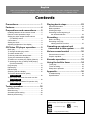
Contents
Precautions ....................................... 1
Features ............................................ 4
Preparations and connections ........ 5
Installing batteries in the remote control ............. 5
Remote control operation range ......................... 5
Setting the video output format selector
(TV MODE) switch ......................................... 5
Connections ........................................................ 6
Setting the clock ................................................. 8
Adjusting brightness of the display ..................... 8
CD/Video CD player operation ........ 9
Basic play ......................................................... 10
To change the disc play mode .......................... 11
To select another disc ....................................... 11
To directly select the desired track .................... 11
To play the desired track (Skip) ........................ 12
To advance or reverse play rapidly (Search) .... 12
To exchange a disc (or discs) while playing
(PLAYXCHANGE) ........................................ 12
Program play .................................................... 13
Repeat play ...................................................... 14
Random play .................................................... 15
Switching the time display ................................ 15
To find the desired scene quickly
for Video CDs .............................................. 16
To get a quick overview of a track or a disc
for Video CDs .............................................. 16
Playback Control of Video CD (version 2.0)
for Video CDs .............................................. 17
Playing back a tape ........................ 22
General information .......................................... 22
Basic operation ................................................. 23
Winding the tape ............................................... 24
Searching for the beginning of
the desired selection .................................... 24
Recording ....................................... 25
Basic recording ................................................. 25
Recording from CDs
utilizing the EDIT function ............................ 27
Operating an external unit
connected to this system ........... 29
Various sound control ................... 30
General sound control ...................................... 30
Graphic equalizer ............................................. 31
Karaoke operation .......................... 32
Using the built-in timer .................. 34
Timer play ......................................................... 34
Timer recording ................................................. 35
Sleep timer operation ....................................... 35
Appendix ......................................... 36
Troubleshooting ................................................ 36
Specifications ................................................... 38
Tuning operation ............................ 18
Automatic tuning ............................................... 19
Manual tuning ................................................... 19
Automatic preset tuning .................................... 20
Manual preset tuning ........................................ 21
For basic source play, the following illustrations on top of the
pages will help you look for the section you need.
...... CD/Video CD play
...... Tape playback/recording
....... Tuning
Precautions: Read this before operating your system
■ Choose the installation location of this system carefully. Avoid
placing it in direct sunlight or close to a source of heat. Also
avoid locations subject to vibration and excessive dust, heat,
cold or moisture. Keep it away from sources of hum such as
transformers and electric motors.
■ Do not operate this system upside-down. It may overheat,
possibly causing damage.
■ Never open the cabinet. If something drops into the set, contact
your dealer.
■ The openings on the main unit cover assure proper ventilation
of the main unit. If these openings are obstructed, the
temperature inside the main unit will rise rapidly. Avoid
placing objects against these openings, and install the main
unit in a well-ventilated area to prevent fire or damage.
■ Always set the VOLUME control to minimum before starting
an audio source play. Increase the volume gradually to an
appropriate level after play has started.
■ When not planning to use this system for a long period of time
(ie., vacation, etc.), disconnect the AC power plug from the
wall outlet.
■ Grounding or polarization – Precautions should be taken so
that the grounding or polarization of this system is not
defeated.
■ Do not use force on switches, controls or connection wires.
When moving the main unit, first disconnect the power plug
and the wires connected to other equipments. Never pull the
wire itself.
■ If an external appliance (TV, radio, etc.) interferes with the
operation of this system, move the main unit away from such
appliance.
■ The voltage to be used must be the same as that specified on
this system. Using this system with a higher voltage than
specified is dangerous and may result in a fire or other types of
accidents causing damage. YAMAHA will not be held
responsible for any damage resulting from use of this system
with a voltage other than specified.
■ The sound level at a given volume setting depends on speaker
location and other factors. Care should be taken to avoid
exposure to sudden high levels of sound, which may occur
when turning this system on with the volume control setting at
high. Also avoid exposure to continuous high levels of sound.
■ Sudden temperature changes and storage or operation in an
extremely humid environment may cause condensation inside
the cabinet. Condensation can cause this system to
malfunction.
To eliminate condensation:
• Pickup
Leave the power on with no disc loaded until normal play
becomes possible (about 1 hour).
• Tape head
Leave the power on with no tape loaded until normal
playback becomes possible (about 1 hour).
Note:
If condensation forms on the tape head, dirt or dust may
accumulate during use.
• Remote control
Wipe off condensation on the transmission window with a
soft cloth before operating this system.
■ The carousel will turn when you open the disc tray by pressing
OPEN/CLOSE; therefore, make sure the carousel stopped
moving completely before you perform further operations such
as placing or removing a disc from the disc tray. Otherwise,
you may cause damage to your discs, or you might injure
yourself.
■ Do not attempt to clean this system with chemical solvents as
this might damage the finish. Use a clean, dry cloth.
■ Be sure to read the “Troubleshooting” section regarding
common operating errors before concluding that this system is
faulty.
■ To prevent lightning damage, disconnect the AC power plug
and the antenna cable when there is an electric storm.
■ Do not plug the AC power plug to the wall socket before you
finish all connections.
■ Never allow metallic items (e.g. screwdrivers, tools, etc.) to
come near the tape deck’s record/playback head assembly.
Doing so may not only scratch or damage the head’s mirrorsmooth finish, it may change the magnetic characteristics of
the heads, causing a deterioration in reproduction performance
quality.
■ Although the tape deck’s record/playback heads are of high
quality with outstanding reproduction characteristics, they can
get dirty through the use of old tapes or from dust
accumulation over time. This can have a serious effect on
reproduction quality. Clean the heads regularly with
commonly available head cleaners or with cleaning solutions.
E-1
English
■ To assure the finest performance, please read this manual
carefully. Keep it in a safe place for future reference.
Precautions: Read this before operating your system
This system is not disconnected from the AC power source as
long as it is connected to the wall outlet, even if this system
itself is turned off. This state is called the standby mode.
In this state, this system is designed to consume a certain
amount of power.
Note
Please check the copyright laws in your country to record
from records, compact discs, radio, etc. Recording of
copyright materials may infringe copyright laws.
CAUTION FOR CARRYING THE MAIN UNIT
Be sure not to carry or tip the main unit with discs
in it.
CAUTION FOR MOVING THE MAIN UNIT
Before moving the main unit, first remove all discs from the
disc tray and close the tray by pressing the
OPEN/
CLOSE button. After you confirm that “NO DISC” lights up
on the display, turn this system into the standby mode by
pressing the STANDBY/ON switch, and then disconnect the
power plug from the AC outlet.
Voltage Selector (China and General models only)
The voltage selector on the rear panel of the main unit must
be set for your local main voltage BEFORE plugging into the
AC main supply.
Voltages are 110/120/220/240 V AC, 50/60 Hz.
FREQUENCY STEP switch
(China and General models only)
Because the interstation frequency spacing differs in different
areas, set the FREQUENCY STEP switch (located at the
rear) according to the frequency spacing in your area.
Be sure to change the setting of this switch with the AC
supply lead of this system disconnected from the AC outlet.
WARNING
To reduce the risk of fire or electric shock, do not expose this
system to rain or moisture.
To avoid electric shock, do not open the cabinet. Refer
servicing to qualified personnel only.
CAUTION
Use of controls or adjustments or performance of procedures
other than those specified herein may result in hazardous
radiation exposure.
As the laser beam used in this unit is harmful to the eyes, do not
attempt to disassemble the cabinet. Refer servicing to qualified
personnel only.
CLASS 1 LASER PRODUCT
LASER KLASSE 1 PRODUKT
LUOKAN 1 LASERLAITE
KLASS 1 LASER APPARAT
This system is classified as a
CLASS 1 LASER product.
The CLASS 1 LASER
PRODUCT label is located on
the rear exterior.
Laser component in this product is capable of emitting
radiation exceeding the limit for Class 1.
E-2
Precautions: Read this before operating your system
English
NOTES ABOUT DISCS
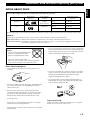
The CD/Video CD player in this system can play discs of the following types only.
Type of disc
Mark printed
on the disc
Video CD
DIGITAL VIDEO
Type of signal
recorded
Size (Dimension)
Maximum possible
play time
Sound
+
Picture (Movie)
12 cm
74 minutes
8 cm (Single type)
20 minutes
Sound only
12 cm
74 minutes
8 cm (Single type)
20 minutes
CD
Never attempt to play a disc other than specified above with the CD/Video CD player because it may cause a damage to this system.
VIDEO CD
Video CDs are classified into two types, version 1.1 and 2.0. The CD/Video CD player can play both types.
Video CD (version 1.1): With the same operation as compact discs, you can enjoy sounds and pictures (movies).
Video CD (version 2.0): In addition to a normal play which is the same as version 1.1, you can enjoy a Playback Control operation.
(For details on Playback Control, refer to page 17.)
To prevent a malfunction of this
system:
• Do not use any nonstandard shaped disc
(heart etc.) available on the market
because it might damage the system.
• Discs are not affected by small particles of dust or fingerprints
on their playing surface, but even so they should be kept clean.
Wipe by using a clean, dry cloth. Do not wipe with a circular
motion; wipe straight outward from the center.
• Do not use a disc with tape, seals, or
paste on it. If you use such a disc, a disc may get stuck
in the system, or damage to the system may result.
Notes about handling discs
• Always handle the disc with care so that its surface is not
scratched.
• Do not try to clean the disc’s surface by using any type of disc
cleaner, record spray, anti-static spray or liquid, or any other
chemical-based liquid because such substances might
irreparably damage the disc’s surface.
• Do not expose discs to direct sunlight, high temperature or
high humidity for a long period of time because these might
warp or otherwise damage the disc.
• Discs are not subjected to wear during play, but damage to the
disc surface when the disc is being handled can adversely
affect the disc’s play.
No!
• Be sure to use a felt-tip pen or similar writing tool when
writing on the label side of the disc. Do not use a ball-point
pen, pencil, or other hard-tipped writing tool, as these may
damage the disc and may adversely affect the disc’s play.
• Do not warp discs.
To play an 8-cm CD
• When a disc is not currently being used, remove it from the
system and store in an appropriate case.
Place it in the inner recessed area of the disc tray. Do not put a
normal (12-cm) CD on top of an 8-cm CD.
• When removing or storing a disc, be careful not to scratch the
playing surface.
E-3
Features
General
Tape Deck
•
High Power Output
100W + 100W (6Ω) RMS, 10% THD, 1 kHz
•
Automatic Synchronized Recording with CD or
Video CD
•
•
Multi-Use Timer/Sleep Timer
•
•
•
EDIT Function Useful for Recording CD(s)
•
•
•
•
•
Remote Control Capability
•
Video Output Format Selector (TV MODE)
Switch
SUBWOOFER Output for Low Frequency
Expansion
YMERSION
•
•
3 Preset Graphic Equalizer Modes (ROCK, POPS
and JAZZ)
CD/Video CD Player
•
3-Disc Carousel Auto-Changer for Video CDs and
Compact Discs
•
PLAYXCHANGE
Disc changing while playing
•
•
20-Track Random Access Programming
•
•
Random Sequence Play
•
Quick Overview of a Track and a Disc with a
Touch of the DIGEST and INTRO Buttons
•
Time Index Function
Repeat Play for Single Track/Entire Disc/All
Discs
Playback Control Function Available for Video
CD (version 2.0)
E-4
Dolby B Type Noise Reduction System
Tuner
BASS BOOST
5-Band Spectrum Analyzer
Automatic Reverse
40 Station Preset Tuning
Automatic Preset Tuning
Karaoke Functions
•
•
•
4 Modes for Singing Karaoke
•
Karaoke Sound Recording Capability (Recording
Your Singing Voice and Karaoke Effects with the
Music Source)
2 Microphone Connecting Capability
Mic Mixing, Echo Level and Key Control
Capability
Preparations and connections
1 Turn the remote control over and remove the battery
compartment cover by sliding it in the direction of the
mark.
2 Insert the batteries (AA, R6, UM-3 type) according to the
1
polarity markings on the inside of the battery compartment.
3 Attach the battery compartment cover.
3
Notes
2
• Be sure the polarities are correct. (see the illustration inside the battery
compartment.)
• Remove the batteries if the remote control is not used for an extended
period of time.
• If batteries leak, dispose of them immediately. Avoid touching the leaked
material or letting it come in contact with clothing, etc. Clean the battery
compartment thoroughly before installing new batteries.
• Be sure to use the same type of batteries.
• Do not use a new battery and an old battery together.
Remote control operation range
Notes
DISC 1
DISC 2
DISC 3
DISC CHANGE
VIDEO CD
3–DISC VCD CHANGER
DIGITAL VIDEO
Version 2.0 / Playback Control
YMERSION
STANDBY
STANDBY
/ON
• The area between the remote control and the main unit must be clear of
large obstacles.
• Do not expose the remote control sensor to strong lighting, in particular,
an inverter type fluorescent lamp. Otherwise, the remote control may not
work properly. If necessary, position the main unit away from direct
lighting.
OPEN/CLOSE
B.BOOST
MUSIC
TIMER
VOLUME
PRESET/TUNING/BAND
INPUT
A/B/C/D/E
/
UP
DOWN
MINI COMPONENT SYSTEM GX–505VCD
DIRECTION
KARAOKE
MIC MIXING
1
MIC
2
OPEN/CLOSE
DOLBY B NR
MIN
30°
MAX
0.2 m – 6 m
(8” – 20’)
AUTO REVERSE CASSETTE DECK
30°
Battery replacement
If you find that the remote control must be used closer to the main
unit, the batteries are weak. Replace both batteries with new ones.
Setting the video output format selector (TV MODE) switch
This system is designed for use with the NTSC and PAL television
formats. Set this switch to the position of the format your TV
monitor employs.
TV MODE
PAL
AUTO
NTSC
PAL:
ANTENNA
FM
GND
AM
VOLTAGE
SELECTOR
75
UNBAL.
FREQUENCY STEP
DIGITAL OUT
50 K H Z
9 KH Z
OPTICAL
FM
AM
Set to this position if your TV monitor employs the PAL
format.
AUTO: Set to this position if your TV monitor can be switched in
between the PAL and NTSC formats automatically
(originally set to this mode).
NTSC: Set to this position if your TV monitor employs the
NTSC format.
100 K H Z 10 K H Z
TV MODE
PAL
AUTO
NTSC
SUBWOOFER
VIDEO SIGNAL
OUT
MONITOR
OUT
E-5
English
Installing batteries in the remote control
Preparations and connections
Connections
Never plug the AC supply lead of this system into the AC outlet until all connections are
completed.
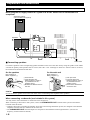
Subwoofer system
(not included in this system)
INPUT
TV MODE
PAL
AUTO
NTSC
VIDEO SIGNAL
SUBWOOFER
Speakers
OUT
MONITOR
OUT
L
R
AUX/MD
R
L
OUT
MAINS
IN
R
L
6
MIN./SPEAKER
SEE OWNER'S MANUAL
FOR CONNECTION.
SPEAKERS
To AC outlet
■ Connecting speakers
Connect the speakers to the corresponding speaker terminals on the rear of the main unit by using the speaker cords. Make
sure that the polarity of the speaker cords is correct, that is the + and – markings are observed. If these cords are reversed,
the sound will be unnatural and lack bass.
On the speakers
On the main unit
Red: positive (+)
Black: negative (–)
Red: positive (+)
Black: negative (–)
2
1 3
1Press the tab.
2Insert the bare wire.
[Remove approx. 5mm (1/
4”) insulation from the
speaker wires.]
3Release the tab and secure
the wire.
1
3
2
1Pull up the tab.
2Insert the bare wire.
[Remove approx. 5mm (1/
4”) insulation from the
speaker wires.]
3Press down the tab and
secure the wire.
Caution
Do not let the bare speaker wires touch each other as this could damage the amplifier and/or speakers.
When connecting a subwoofer (not included in this system)
You may wish to add a subwoofer to reinforce the bass frequencies.
When connecting a subwoofer to this system, connect the SUBWOOFER OUT terminal of this system to the INPUT
terminal of the subwoofer.
* Ordinary subwoofers, including the Yamaha Active Servo Processing Subwoofer System, are designed so that both the
amplifier and subwoofer are contained in the same unit.
* The SUBWOOFER OUT terminal outputs low frequencies from both the left and right channels. (The cut-off
frequency of this terminal is 200 Hz.)
E-6
Preparations and connections
■ Antenna connection
(1) Supplied FM antenna
ANTENNA
FM
75
GND
AM
Connect the FM antenna wire to the corresponding terminal and
direct it to the direction where the strongest signal can be received.
UNBAL.
(2) Supplied AM loop antenna
Connect the AM loop antenna wires to the corresponding
terminals. Position the AM loop antenna for optimum reception.
ANTENNA
FM
75
GND
Notes
AM
• When static is still heard even after adjusting the position of the AM loop
antenna, try reversing the wire connections (from the right terminal to
the left one, and vice versa).
• The AM loop antenna should be placed apart from the main unit. The
antenna may be hung on a wall.
UNBAL.
FREQUENCY STEP
DIGITAL OUT
50 K H Z
9 KHZ
OPTICAL
FM
AM
100 K H Z 10 K H Z
(2)
Using an external antenna
• If you need better reception, use an external FM antenna instead
of an indoor FM antenna. Consult your dealer.
• Use an external AM antenna if you need better reception.
Consult your dealer.
ANTENNA
FM
75
GND
AM
UNBAL.
■ Connecting external components
FREQUENCY STEP
DIGITAL OUT
50 K H Z
9 KHZ
OPTICAL
FM
AM
TV monitor
Connect a TV monitor to enjoy Video CDs on the built-in CD/
Video CD player. Connect a TV monitor to the MONITOR OUT
terminal using an RCA pin plug cable.
100 K H Z 10 K H Z
TV MODE
TV monitor
PAL
AUTO
NTSC
VIDEO SIGNAL
SUBWOOFER
OUT
MONITOR
OUT
External audio and video components
AUX/MD
R
L
OUT
IN
MD recorder, etc.
R
This system can be connected with external audio and video
components. Make connections between this system and the
components using RCA pin plug connector cables, by correctly
connecting L (left) to L and R (right) to R. Also, refer to the
owner’s manual for the component to be connected to this system.
* A digital-to-digital recording is possible from a CD played on
the built-in CD/Video CD player to an MD (or tape) on an
external MD recorder (or DAT) by connecting the DIGITAL
OUT (OPTICAL) terminal on the rear of the main unit to the
MD recorder (or DAT).
E-7
English
(1)
Preparations and connections
Setting the clock
DISC 1
DISC 2
DISC 3
OPEN/CLOSE
DISC CHANGE
1 While the power is on, press DISPLAY to display time.
2 While holding down TIME ADJ, press HOUR and set the hour.
VIDEO CD
YMERSION
STANDBY
STANDBY
/ON
DIGITAL VIDEO
Version 2.0 / Playback Control
3–DISC VCD CHANGER
B.BOOST
MUSIC
TIMER
3 While holding down TIME ADJ, press MIN and set the minute.
VOLUME
PRESET/TUNING/BAND
INPUT
A/B/C/D/E
* Press MIN once to advance the time by 1 minute. Press and
hold to advance continuously.
* The hour setting will not advance even if minute is advanced
from “59” to “00”.
/
UP
DOWN
BASS
TREBLE
PHONES
MODE
DOLBY NR
REC/
PAUSE
AUTO/
MANUAL
MEMORY
RANDOM
REPEAT
TIMER
TIME ADJ
HOUR
MIN
TIME
* Press HOUR once to advance the time by 1 hour. Press and
hold to advance continuously.
DISPLAY
DIRECTION
KARAOKE
MIC MIXING
1
MIC
2
OPEN/CLOSE
AUTO REVERSE CASSETTE DECK
DOLBY B NR
MIN
MAX
* Set this system into the standby mode and disconnect the AC supply
lead when switching the FREQUENCY STEP.
DISPLAY
1
2
MEMORY RANDOM
TIME ADJ
REPEAT
HOUR
Note
MIN
Changes.
3
MEMORY RANDOM
TIME ADJ
Singapore model uses a 24-hour display. For China and
General models, either the 24-hour display or the 12-hour
display [shown by “AM (PM) 12:00”] is selected depending on
the setting of the FREQUENCY STEP switch on the rear
panel.
REPEAT
HOUR
MIN
Changes.
In the event of a power failure or when the AC supply lead is disconnected,
the time display will go out; however, the clock will function for about 5
minutes without any power supply. Otherwise, the time display will flash
on and off to indicate that time must be reset.
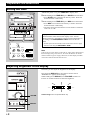
Adjusting brightness of the display
If desired, you can adjust the brightness of the display.
DISC CHANGE
OPEN/CLOSE
Press and hold DISPLAY for more than 2 seconds so that
“DIMMER ±0” appears on the display.
While holding down DISPLAY, turn VOLUME clockwise to
increase or counterclockwise to decrease brightness.
VIDEO CD
DIGITAL VIDEO
Version 2.0 / Playback Control
YMERSION
B.BOOST
MUSIC
VOLUME
UP
VOLUME
DOWN
Y
E-8
RANDOM
REPEAT
HOUR
MIN
TIME
DISPLAY
DISPLAY
Control range: ±0 to –6 (Preset value: ±0)
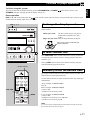
CD/Video CD player operation
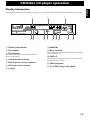
Each indicator mentioned with a number on pages 10–17 corresponds to the indicator with the same number on this page.
2
1
3
TRACK
100 350 1K 3.5K 10K
MUSIC
TOTAL REM VCD PBC
RANDOM
1 2 3 4 5 6
7 8 9 10 11 12
13 14 15 OVER 15
CD
PROGRAM
45
1 TRACK (track number)
2 Time display
3 Disc indicator
The number on the top of this indicator shows the
currently selected disc.
4 VCD (Video CD) indicator
5 PBC (Playback Control) indicator
6 CD (input source indicator)
7 (play)
6 7
8 9 0
S F REP
PROG VOLUME
A
B
8 RANDOM
9 Music calendar
Track numbers on the currently selected disc will light up
(up to the number 15).
0 OVER 15
This indicator will light up when the currently selected
disc has more than 15 tracks.
A PROG (program)
B (S, F) REP [(single, full) repeat]
E-9
English
Display information
CD/Video CD player operation
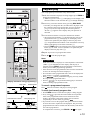
Basic play
4
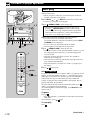
1 Turn on the power.
* When you play a Video CD, you must also turn on the TV
monitor connected to this system.
2 Press INPUT
or
(or INPUT on the remote control) until
“VCD/CD” (2) appears on the display.
DISC (1, 2, 3)
STANDBY
indicator
DISC 1
DISC 2
4
DISC 3
DISC CHANGE
VIDEO CD
3–DISC VCD CHANGER
OPEN/CLOSE
DIGITAL VIDEO
Version 2.0 / Playback Control
YMERSION
STANDBY
STANDBY
/ON
3, 5
B.BOOST
MUSIC
TIMER
A/B/C/D/E
/
UP
DOWN
BASS
PHONES
1
TREBLE
MODE
DOLBY NR
REC/
PAUSE
AUTO/
MANUAL
MEMORY
RANDOM
REPEAT
TIME
DISPLAY
/ (play/pause)
(stop)
2
OPEN/CLOSE to open the disc tray.
* The carousel will turn when you open the disc tray by
pressing
OPEN/CLOSE; therefore, make sure the
carousel stopped moving completely before you perform
further operations. Otherwise, you may cause damage to
your discs, or you might injure yourself.
4 Place discs on the table with label side facing upward.
VOLUME
PRESET/TUNING/BAND
INPUT
3 Press
* Up to three discs can be loaded on the table.
To load the third disc, rotate the disc table by pressing DISC
CHANGE on the front panel.
* 8 cm (3”) discs can be played without an adaptor.
* The disc placed on the right side is played first.
5 Press
POWER
1
1
2
3
1
4
2
5
3
6
4
7
5
8
6
9
7
0
8
TUNER
+I0
PROG
PRESET
R.TIME
B
DISC SKIP
C
MODE
PRESET
TIME
A
EDIT
D
(stop)
E
RETURN
VCD/CD
/
SELECT
KARAOKE
INTRO
DIGEST
TIME INDEX
TIME INDEX
DIRECTION
6 Press
SELECT
/
(play/pause)
TAPE
REC/ PAUSE
KEY/ECHO
YMERSION
SLEEP
MUSIC
INPUT
VOLUME
OPEN/CLOSE to close the disc tray.
* If the selected disc is a CD, the total number of tracks (1) and
the total playing time of the disc (2) will be displayed for
several seconds.
* If the disc contains more than 15 tracks, the “OVER 15”
indicator (0) will light up.
* If the disc tray is closed by pushing the front edge of the tray,
play will begin automatically.
* If the selected disc is a Video CD, “VCD” (4) lights up on
the display.
2
/ to begin play.
Note for Video CDs
If a Video CD (version 2.0) is selected, “PBC” (5) lights up on the
display, yet the total number of tracks (1), the total playing time
of the disc (2) and the music calendar (9) will not be displayed.
In this mode, disc play is controlled by the rule of Playback
Control. To play the disc in the Playback Control mode, skip to
page 20 and follow the procedure.
To cancel this mode and restore the normal play mode, press .
“PBC” (5) disappears from the display.
To call the Playback Control mode again, press SELECT on the
remote control.
To pause
Press / .
* The “ ” indicator (7) will flash for all modes except for the
PBC mode.
To resume play, press / again.
To stop play
Press
.
Continued →
E-10
CD/Video CD player operation
To finish using this system
English
Turn this system into the standby mode by pressing STANDBY/ON (or POWER
STANDBY indicator will light up and the display will go out.
on the remote control). The
Direct operation
DISC (1, 2 or 3) on the front panel and / on the remote control will work if they are pressed when this system is in the
standby mode or another input source is selected.
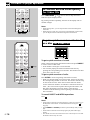
To change the disc play mode
DISC (1, 2, 3)
DISC 1
DISC 2
DISC 3
DISC CHANGE
OPEN/CLOSE
If necessary, change the disc play mode by pressing MODE on the
remote control.
All disc play mode:
VIDEO CD
DIGITAL VIDEO
Version 2.0 / Playback Control
YMERSION
B.BOOST
MUSIC
All discs on the disc tray are played
sequentially (originally set to this
mode).
Single disc play mode: Only the designated disc is played.
Lights up only when the all disc play
mode is selected.
VOLUME
PRESET/TUNING/BAND
A/B/C/D/E
/
UP
DOWN
To select another disc
ODE
DOLBY NR
REC/
PAUSE
AUTO/
MANUAL
MEMORY
RANDOM
REPEAT
TIMER
TIME ADJ
HOUR
MIN
TIME
DISPLAY
Press DISC SKIP on the remote control once or more (so that the
corresponding disc number comes to the top position of the disc
indicator (3)).
Pressing DISC (1, 2 or 3) will select the disc directly, and play
will automatically begin from track 1.
Numeric buttons
To directly select the desired track
POWER
By using the numeric buttons on the remote control, any track you
wish to listen to can be played directly.
DISC SKIP
1
2
3
1
4
2
5
3
6
4
7
5
8
6
9
7
0
8
TUNER
+I0
PROG
PRESET
R.TIME
B
DISC SKIP
C
MODE
PRESET
TIME
A
EDIT
Use the numeric buttons to select the desired track. Play will begin
automatically.
A. For example, to choose track 5
Press 5.
B. For example, to choose track 12
(1)Press +10.
(2)Within a few seconds, press 2.
MODE
D
RETURN
E
VCD/CD
/
SELECT
C. For example, to choose track 20
(1)Press +10.
(2)Within a few seconds, press +10 again.
(3)Within a few seconds, press 0.
Note
If you select a track number higher than the number of tracks on the disc,
the last track of the disc may be played.
E-11
CD/Video CD player operation
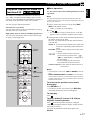
To play the desired track (Skip)
DISC (1, 2, 3)
DISC CHANGE
DISC 1
DISC 2
DISC 3
OPEN/CLOSE
DISC CHANGE
To advance to the next track
During play, press
(
advances to other tracks.
). Pressing
(
) repeatedly
To return to the beginning of current track
VIDEO CD
DIGITAL VIDEO
Version 2.0 / Playback Control
During play, press
YMERSION
B.BOOST
(
) once.
MUSIC
To return to previous track
VOLUME
PRESET/TUNING/BAND
A/B/C/D/E
/
UP
DOWN
S
During play, press
previous track.
Repeatedly press
(
(
) twice in succession to return to the
) to return to other previous tracks.
TREBLE
MODE
DOLBY NR
REC/
PAUSE
AUTO/
MANUAL
MEMORY
RANDOM
REPEAT
TIME
DISPLAY
Note
/
(play/pause)
(Skip forward)
(Search forward)
(Skip backward)
(Search backward)
This function can also be performed while the CD/Video CD player is
being stopped. Press
/ when the desired track number appears on the
track number display. Play will begin from the beginning of that track.
To advance or reverse play rapidly
(Search)
POWER
Press and hold
(
) to advance play rapidly, and
(
) to reverse play rapidly.
1
2
3
1
4
2
5
3
6
4
7
5
8
6
9
7
0
8
TUNER
+I0
PROG
PRESET
R.TIME
B
DISC SKIP
C
MODE
PRESET
TIME
A
EDIT
D
KARAOKE
INTRO
(Skip forward)
(Search forward)
SELECT
DIGEST
/
(play/pause)
TIME INDEX
(Skip backward)
(Search backward)
E-12
To exchange a disc (or discs) while
playing (PLAYXCHANGE)
E
VCD/CD
RETURN
/
TIME INDEX
DISC SKIP
During play, you can open the disc tray by pressing DISC
CHANGE without interrupting play. In this case, however,
pressing DISC SKIP or DISC (1, 2 or 3) is invalid.
CD/Video CD player operation
DISC 2
DISC 3
Program play
OPEN/CLOSE
DISC CHANGE
You can program up to 20 tracks in any desired order.
1 When the CD/Video CD player is being stopped, press PROG to
VIDEO CD
DIGITAL VIDEO
Version 2.0 / Playback Control
YMERSION
B.BOOST
MUSIC
5
2 If necessary, select the desired disc by pressing DISC SKIP.
VOLUME
ET/TUNING/BAND
A/B/C/D/E
/
UP
DOWN
TIME
REC/
PAUSE
DOLBY NR
AUTO/
MANUAL
MEMORY
RANDOM
REPEAT
TIMER
TIME ADJ
HOUR
MIN
TIME
DISPLAY
TIME
1
2
3
1
4
2
5
3
6
4
7
5
8
6
9
7
0
8
TUNER
+I0
PROG
PRESET
R.TIME
B
DISC SKIP
C
MODE
A
EDIT
* Just after you change the disc, the CD/Video CD player reads
the contents of the newly selected disc for a few seconds. If
you go on to the next step during this internal operation,
“WAIT” (2) appears on the display and your operation is
canceled.
3 Use the numeric buttons to select the desired track number.
* The selected track number (1) and the total play time of the
programmed tracks (2) will light up on the display, and it
will soon be replaced by the display of the next play order
(2). Programmed track numbers on the selected disc will stop
flashing and light up on the music calendar (9).
* Pressing TIME displays the total play time of the programmed
tracks (2) for about 1 second, and then it is replaced by the
display of the next play order (2).
POWER
PRESET
TIME
prepare for programming.
* “PROG” (A) and “P-01” (2) will light up on the display, and
all track numbers on the selected disc (9) will begin blinking.
D
3
4 Repeat steps 2 and 3 to program other tracks.
5 Press
1,
E
PROG
2
RETURN
VCD/CD
/
SELECT
KARAOKE
INTRO
DIGEST
5,
/
(play/pause)
Display information during programming
Play order
Selected disc
/ to start the program play.
Notes
• For Video CDs
When the CD/Video CD player is in the Playback Control mode
(“PBC” (5) is illuminated on the display) and the play is
stopped, pressing PROG cancels the Playback Control mode,
and so you can make programming operations.
• If the total time of the programmed tracks becomes 100 minutes
or more, the first digit will not be displayed.
• The total time of the programmed tracks will not be displayed if
track number 16 or higher is programmed.
/
) can be performed during play, but only within
• Skip (
the range of the programmed tracks.
/
) can be performed during play to search all
• Search (
tracks, including unprogrammed tracks.
To cancel a programmed sequence
Press
while the CD/Video CD player is being stopped.
TRACK
VCD PBC
TIMER
SLEEP
NOR TEST
PHANTOM
HALL
ERSION
TUNER
CD
MD
TAPE
RANDOM
1 2 3 4 5 6
7 8 9 10 11 12
13 14 15 OVER 15
EDIT
S F REP
A
B PROG V
Music calendar
Selected track number
Total playing time
TRACK
TOTAL
M
HALL
MERSION
VCD PBC
TIMER
SLEEP
NOR TEST
PHANTOM
TUNER
CD
MD
TAPE
RANDOM
1 2 3 4 5 6
7 8 9 10 11 12
13 14 15 OVER 15
EDIT
S F REP
A
B PROG V
To check (and correct) program data
1. Press PROG when the CD/Video CD player is being stopped.
2. Every time
is pressed, the track numbers and sequential
order of the programmed tracks can be checked one after
another. The display of the track number can be returned
.
(sequentially in reverse order) by pressing
3. If you want to correct the program data, press a numeric button
to select the track to replace the one displayed. The previously
programmed track will be cleared from the memory and the new
one will be programmed.
To complete the correction, press PROG or / once again.
E-13
English
DISC 1
CD/Video CD player operation
Repeat play
DISC CHANGE
OPEN/CLOSE
All discs, a disc, a single track or a programmed sequence can be
repeated continuously.
VIDEO CD
Press REPEAT once or more to select the desired repeat play
mode so that the S REP or F REP indicator (B) is illuminated.
DIGITAL VIDEO
Version 2.0 / Playback Control
(off)
YMERSION
B.BOOST
S REP
MUSIC
F REP
VOLUME
Repeat play modes
SINGLE REPEAT (S REP)
UP
DOWN
REPEAT
MEMORY
RANDOM
REPEAT
TIME ADJ
HOUR
MIN
TIME
DISPLAY
A single track is played repeatedly.
* This is also available in the program play mode and the random
play mode. (If the repeat play mode is switched off, the program
play mode or the random play mode will be resumed.)
FULL REPEAT (F REP)
When the CD/Video CD player is in the single disc play mode:
The designated disc is played repeatedly.
* In the random play mode, the selected disc is repeatedly played,
but the order of tracks is different each time.
AOKE
MIC MIXING
1
MIC
2
/CLOSE
MIN
MAX
When the CD/Video CD player is in the all disc play mode:
All discs on the disc tray are played repeatedly.
* In the random play mode, the random play is performed among
all discs and repeated with a different order of tracks each time.
Notes
• In the program play mode, a sequence of programmed tracks is played
repeatedly.
• For Video CDs
When the CD/Video CD player is in the Playback Control mode (“PBC”
(5) is illuminated on the display), repeat play mode cannot be selected.
To cancel the repeat play
Press REPEAT repeatedly until the (S, F) REP indicator (B) goes
out.
E-14
CD/Video CD player operation
Tracks on a selected disc or all discs on the disc tray can be played
randomly.
VIDEO CD
1 If necessary, switch the disc play mode by pressing MODE.
DIGITAL VIDEO
Version 2.0 / Playback Control
* If the single disc play mode is selected, select the desired disc
by pressing DISC SKIP.
YMERSION
B.BOOST
MUSIC
2 Press RANDOM to begin random play.
* The “RANDOM” indicator (8) will light up.
To cancel the random play
VOLUME
UP
RANDOM
DOWN
Press , or press RANDOM so that the “RANDOM” indicator
(8) will go out.
Notes
O/
UAL
MEMORY
RANDOM
REPEAT
R
TIME ADJ
HOUR
MIN
TIME
• This feature will not function during programming or program play.
• For Video CDs
RANDOM can be used when the Playback Control mode of the CD/
Video CD player is stopped. In this state, pressing RANDOM cancels
the Playback Control mode.
DISPLAY
DISC CHANGE
Switching the time display
OPEN/CLOSE
Every time TIME is pressed, the display will change as described
below.
VIDEO CD
[Example]
When the second track is being played:
DIGITAL VIDEO
Version 2.0 / Playback Control
YMERSION
B.BOOST
The elapsed play time for the current track will be
displayed.
MUSIC
TRACK
VOLUME
UP
DOWN
TIME
TO/
NUAL
MER
MEMORY
RANDOM
REPEAT
TIME ADJ
HOUR
MIN
TIME
DISPLAY
The remaining play time for the current track will be
displayed.
TRACK
REM
The total play time of the disc will be displayed.
POWER
1
2
3
1
4
2
5
3
6
4
7
5
8
6
9
7
0
8
TUNER
+I0
PROG
PRESET
R.TIME
B
DISC SKIP
C
MODE
TRACK
TOTAL
The total remaining play time of the disc will be displayed.
TRACK
PRESET
TIME
TIME
A
EDIT
D
TOTAL REM
E
E-15
English
Random play
OPEN/CLOSE
DISC CHANGE
CD/Video CD player operation
PRESET
TIME
A
EDIT
PROG
PRESET
R.TIME
B
DISC SKIP
C
MODE
D
To find the desired scene quickly
for Video CDs
Press TIME INDEX
or
once or more to skip forward or
backward by the displayed time.
E
RETURN
VCD/CD
/
SELECT
KARAOKE
INTRO
DIGEST
TIME INDEX
By pressing a button repeatedly, the time on the display and TV
monitor changes.
Notes
TIME INDEX
DIRECTION
• While playing a disc, you can skip forward or backward through the
entire disc.
• While playing a Video CD (version 2.0) in the Playback Control mode,
you can skip forward or backward through the selected track.
TIME INDEX
To get a quick overview of a track
or a disc for Video CDs
POWER
1
2
3
1
4
2
5
3
6
4
7
5
8
6
9
7
0
8
TUNER
+I0
PROG
PRESET
R.TIME
B
DISC SKIP
C
MODE
PRESET
TIME
A
EDIT
To get a quick overview of a track
(stop)
D
E
RETURN
VCD/CD
/
SELECT
KARAOKE
INTRO
DIGEST
To get a quick overview of a disc
DIGEST
TIME INDEX
TIME INDEX
DIRECTION
INTRO
Select a desired track using the numeric button and press DIGEST
to see the scenes of that track.
* Track number 1 through 15 can be selected.
* You can start playing the track from the desired scene by
pressing the corresponding scene number. The monitor can show
up to nine scenes at a time.
Press INTRO to see the beginning of all tracks on a disc.
* When you find the track you want to watch, select it by pressing
the corresponding number of the track. The monitor can show up
to nine tracks at a time. If the disc has more than nine tracks,
scenes of the track numbers 10 and above will also be shown in
order. (The screen clears up after showing all nine tracks, and
then starts showing the next nine tracks.) This function
continues until the showing of the beginning of all tracks on the
disc is finished.
To cancel DIGEST and INTRO operations
Press
.
Notes
E-16
• These buttons cannot be used when playing a Video CD (version 2.0) in
the Playback Control mode. To make these buttons work, press to
stop play.
• These DIGEST and INTRO operations repeat endlessly until you stop
play.
• These buttons cannot be used in the program play and random play
modes.
• The number of scenes varies from disc to disc. There may be a case that
the monitor shows only one scene.
CD/Video CD player operation
This function is available for Video CDs (version 2.0)
only. “PBC” will light up on the display when a version
2.0 disc is used. The Playback Control differs from disc to
disc. Refer to the instructions of the disc for details.
■ Basic operation
Use the remote control when making Playback Control
operations.
Note
Disc play in the Playback Control mode depends on the data
contained in the disc used. The operations and buttons to be used
may vary for each disc.
1 Select a Video CD (version 2.0) by pressing DISC
You can enjoy the following functions.
SKIP on the remote control.
* “PBC” (5) lights up on the display.
Selection on a screen menu
You can select pictures, music and information to play by
selecting items on a screen menu.
2 Press
High quality pictures (for discs including still pictures)
You can enjoy still pictures which are four times as high
in quality as moving pictures.
3 In the Playback Control mode, the following buttons on
POWER
1
1
2
3
1
4
2
5
3
6
4
7
5
8
6
9
7
0
8
TUNER
+I0
PROG
PRESET
R.TIME
B
DISC SKIP
C
MODE
PRESET
TIME
A
EDIT
D
Numeric
buttons
(stop)
/ .
* A screen menu, a series of short movies, or the like
appears on the TV monitor. It differs with each disc.
the remote control can be used.
However, the usable buttons and their functions differ
with each disc.
SELECT: Used to select the desired movie when short
movies are sequentially played instead of a
menu
RETURN: Used to return to the previous screen menu
or picture
/
: • Used to advance/return to the next/
/
previous menu or picture when “
” or “NEXT/PREV” is displayed on
the TV monitor.
• Used to change play direction from
reverse/advance to advance/reverse.
Numeric buttons:Used to select the desired item on a
screen menu.
E
Notes
(Skip backward)
RETURN
2
VCD/CD
RETURN
/
KARAOKE
INTRO
TIME INDEX
SELECT
DIGEST
TIME INDEX
DIRECTION
TAPE
KEY/ECHO
SLEEP
SELECT
• In the Playback Control mode, TIME and REPEAT cannot be
used.
• PROG, RANDOM, DIGEST and INTRO can be used when
the CD/Video CD player is in the Playback Control mode and
stopped. In this state, pressing one of these buttons cancels the
Playback Control mode.
To return to the previous screen mode
during play
REC/ PAUSE
YMERSION
(Skip forward)
MUSIC
INPUT
Press RETURN once.
* To return to the first screen mode, press RETURN
repeatedly until the first screen mode appears.
To stop play
Press
.
To play a Video CD (version 2.0) without
Playback Control operation
VOLUME
Press while the CD/Video CD player is stopped.
“PBC” (5) disappears from the display, and the normal
play mode is restored.
To restore the Playback Control mode again, press
SELECT.
E-17
English
Playback Control of Video CD
(version 2.0) for Video CDs
Tuning operation
Display information
Each indicator mentioned with a number on pages 19–21 corresponds to the indicator with the same number on this page.
1
2
PRESET
100 350 1K 3.5K 10K
MUSIC
STEREO
AUTO
TUNED
PROGRAM
TUNER
VOLUME
MEMORY
3 4 5 6
1 Preset station group and number
indicator
2 Multi-information display
3 STEREO
4 AUTO
E-18
7
5 TUNED
6 MEMORY
7 TUNER (input source indicator)
Tuning operation
DISC 1
DISC 2
DISC 3
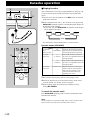
1 Turn on the power.
2 Press INPUT
or
until “TUNER” (2, 7) appears on the
display, or simply press TUNER on the remote control.
3–DISC VCD CHANGER
1
2
3 Select the reception band (FM or AM) by pressing PRESET/
STANDBY
STANDBY
/ON
TIMER
PRESET/TUNING/BAND
INPUT
A/B/C/D/E
/
3
BASS
TREBLE
PHONES
MODE
DOLBY NR
REC/
PAUSE
AUTO/
MANUAL
MEMORY
TIMER
TIME ADJ
RAN
TUNING/BAND (or TUNER on the remote control), and
confirm it on the display (2).
* Do not select the preset tuning mode (in which “PRESET”
(1) lights up on the display).
4 Press AUTO/MANUAL so that “AUTO” (4) lights up on the
display.
HO
5 Press
2, 4
6 If the station where tuning search stopped is not the desired one,
POWER
1
1
2
3
1
4
2
5
3
6
4
7
5
8
6
9
7
0
8
TUNER
+I0
PROG
PRESET
R.TIME
B
DISC SKIP
C
MODE
PRESET
TIME
A
EDIT
D
follow step 5 again.
* If the tuning search does not stop at the desired station, change
to the Manual tuning method as described below.
* “STEREO” (3) will light up when an FM stereo broadcast
with sufficient signal strength is received.
Direct operation
2
TUNER on the remote control will work if it is pressed when this
system is in the standby mode or another input source is selected.
Manual tuning
1 Follow steps 1–3 of the Automatic tuning method.
E
2 Press AUTO/MANUAL so that “AUTO” (4) disappears from
RETURN
VCD/CD
/
SELECT
KARAOKE
INTRO
DIGEST
TIME INDEX
to tune to a higher frequency, or press to tune to a
lower frequency.
(When tuned in to a station, “TUNED” (5) will light up on the
display.)
the display.
3 Press and hold
to tune to a higher frequency, or press and
hold to tune to a lower frequency.
Release the button just before reaching the desired frequency,
and then press it repeatedly until the desired frequency appears.
(When tuned in to a station, “TUNED” (5) will light up on the
display.)
TIME INDEX
DIRECTION
TAPE
REC/ PAUSE
Note
KEY/ECHO
YMERSION
SLEEP
If you tune in to an FM station manually, it is received in monaural to
increase the signal quality.
MUSIC
INPUT
2
VOLUME
E-19
English
Automatic tuning
5, 3
Tuning operation
Automatic preset tuning
DISC 1
DISC 2
DISC 3
VI
3–DISC VCD CHANGER
1
Versio
1 Turn on the power.
STANDBY
STANDBY
/ON
You can make use of an automatic preset tuning function. With this
function, the built-in tuner performs automatic tuning. Up to 40
stations [8 stations x 5 groups (A, B, C, D and E)] are stored
automatically.
TIMER
2 Press INPUT
PRESET/TUNING/BAND
INPUT
2
or
until “TUNER” (2, 7) appears on the
display, or simply press TUNER on the remote control.
A/B/C/D/E
/
UP
DOWN
3 Press and hold MEMORY for more than 2 seconds.
* The “MEMORY” (6) and “AUTO” (4) indicators flash.
BASS
TREBLE
PHONES
MODE
DOLBY NR
REC/
PAUSE
AUTO/
MANUAL
MEMORY
RANDOM
TIMER
TIME ADJ
HOUR
3
The tuner performs automatic tuning and searches for FM stations
first and then AM stations. Received stations are programmed
sequentially to A1, A2, A3 and so on.
When the automatic preset tuning is completed;
POWER
1
1
2
3
1
4
2
5
3
6
4
7
5
8
6
9
7
0
PRESET
TIME
A
EDIT
+I0
PROG
PRESET
R.TIME
B
DISC SKIP
C
MODE
D
To recall a preset station
2
8
TUNER
VCD/CD
/
SELECT
KARAOKE
INTRO
DIGEST
TIME INDEX
Simply follow the procedure in the section “To recall a preset
station” on page 21.
Notes
• The automatic preset tuning search will be performed through all
frequencies until 40 stations are stored. If the number of received stations
is less than 40, the search will stop after searching all frequencies.
* Since FM stations are searched for first, there may be a case that 40
preset stations are occupied by FM stations only.
• With this function, only stations with sufficient signal strength are stored
automatically. If the station you want to program is weak in signal
strength, tune in to it with the Manual tuning method (in monaural) and
program it by following the procedure in the section “To store stations”
on page 21.
• You can replace a preset station with another FM or AM station
manually by simply following the procedure in the section “To store
stations” on page 21.
E
RETURN
The display shows the frequencies of the first preset station (stored
to A1).
If you want to check the contents and the number of preset stations,
follow the procedure in the section “To recall a preset station” on
page 21.
TIME INDEX
DIRECTION
TAPE
REC/ PAUSE
KEY/ECHO
YMERSION
SLEEP
INPUT
VOLUME
E-20
MUSIC
2
Memory back-up
The memory back-up circuit prevents the programmed data
from being lost even if the AC supply lead is disconnected from
the AC outlet or the power is cut due to temporary power
failure. If, however, the power is cut for more than one week,
the memory may be erased. If so, it can be re-programmed by
simply following the Preset tuning steps.
Tuning operation
DISC 1
DISC 2
The built-in tuner can store station frequencies selected by tuning
operation. With this function, you can select any desired station
only by calling the corresponding preset station number. Up to 40
stations (8 stations x 5 groups) can be stored.
DISC 3
3–DISC VCD CHANGER
1
■ To store stations
STANDBY
STANDBY
/ON
TIMER
1 Turn on the power.
2
PRESET/TUNING/BAND
INPUT
A/B/C/D/E
2 Press INPUT
or
until “TUNER” (2, 7) appears on the
display, or simply press TUNER on the remote control.
/
BASS
TREBLE
PHONES
MODE
DOLBY NR
REC/
PAUSE
1, 5
AUTO/
MANUAL
MEMORY
TIMER
TIME ADJ
RANDO
HOUR
4, 7
3 Turn in to the desired station.
4 Press MEMORY.
* “MEMORY” (6) and “PRESET” (1) will flash on the
display for about 5 seconds.
5 Select the desired group (A – E) of preset stations by pressing A/
B/C/D/E before “MEMORY” (6) goes out. Confirm the
selection on the display.
POWER
1
6, 2
1
2
3
1
4
2
5
3
6
4
7
5
8
6
9
7
0
8
TUNER
+I0
PROG
PRESET
R.TIME
PRESET
TIME
A
EDIT
B
DISC SKIP
D
6, 2
or
repeatedly
or pressing a numeric button (1 to 8) before “MEMORY” (6)
goes out.
7 Within about 5 seconds, press MEMORY again.
2
C
MODE
6 Select a preset station number by pressing
6, 2
5, 1
■ To recall a preset station
1 Select a group of preset stations by pressing A/B/C/D/E.
2 Select the desired preset station number by pressing
or
repeatedly or pressing a numeric button (1 to 8).
E
Notes
VCD/CD
RETURN
/
KARAOKE
INTRO
TIME INDEX
• A new setting can be programmed in place of the former one.
• As for the preset stations, the setting of AUTO/MANUAL is stored
along with the station frequency.
SELECT
DIGEST
TIME INDEX
DIRECTION
TAPE
REC/ PAUSE
KEY/ECHO
YMERSION
SLEEP
MUSIC
INPUT
2
VOLUME
E-21
English
Manual preset tuning
6, 2
Playing back a tape
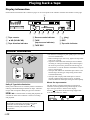
Display information
Each indicator mentioned with a number on pages 23–28 corresponds to the indicator with the same number on this page.
1
100 350 1K 3.5K 10K
MUSIC
NR
PROGRAM
TAPE
2
1 Tape counter
2 NR (DOLBY NR)
3 Tape direction indicator
3
4 5
TAPE
EDIT
A
B
REC
6
7
4 Reverse mode indicator
5 TAPE
(input source indicator)
8
VOLUME
9
7 (play)
8 EDIT
9 Tape side indicator
6 TAPE REC
General information
• Do not use C-120 tapes or poor quality tapes, since they
can cause malfunctions.
• Before loading a tape on the tray, tighten the tape slack
with a pen or pencil.
• Tapes have removable tabs which prevent accidental
recording or erasing from taking place. Removing the
tab on the top left corner protects the side facing you
from erasure. Cover the tab holes with adhesive tape to
erase or record again.
• The tape deck features an automatic tape selector. Just
load the tape, and the type of tape being used will be
sensed automatically.
• The tape deck can play back metal tapes as well as
normal or high position tapes; however, recording
cannot be done on metal tapes with good sound quality.
Dolby B Type Noise Reduction
Dolby noise reduction is an extremely effective method of
reducing undesirable background hiss on tapes. The builtin tape deck incorporates Dolby B type noise reduction
system.
DOLBY NR is useful for both recording and playback; be
sure that the same noise reduction is used on recording
and playback.
Dolby noise reduction is manufactured under license
from Dolby Laboratories Licensing Corporation.
are
“DOLBY” and the double-D symbol
trademarks of Dolby Laboratories Licensing
Corporation.
E-22
About the tape counter
The tape deck is equipped with a tape counter that is
useful for searching and locating a desired point on the
tape. The tape counter is shown on the display.
Pressing (stop) when the deck is being stopped will
reset the tape counter to “0000”.
100 350 1K 3.5K 10K
MUSIC
PROGRAM
PRO LOGIC HALL
3 STEREO YMERSION
TUNER
CD
MD
TAPE
RANDOM
EDIT
S F REP
A
B PROG VOLUME
Playing back a tape
1
YMERSION
STANDBY
STANDBY
/ON
2
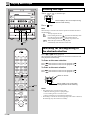
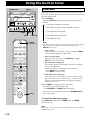
Basic operation
DIGITAL VIDEO
Version 2.0 / Playback Control
B.BOOST
MUSIC
1 Turn on the power.
TIMER
VOLUME
PRESET/TUNING/BAND
INPUT
2 Press INPUT
A/B/C/D/E
/
UP
or
until “TAPE” (1, 5) appears on the
DOWN
display.
5
BASS
TREBLE
PHONES
MODE
DOLBY NR
REC/
PAUSE
(stop)
5
6
3, 4
AUTO/
MANUAL
MEMORY
RANDOM
REPEAT
TIMER
TIME ADJ
HOUR
MIN
TIME
3 Open the tray by pressing
DISPLAY
OPEN/CLOSE.
4 Load the tape on the tray with side A facing upward, and close
DIRECTION
KARAOKE
MIC MIXING
1
MIC
2
the tray by pressing
OPEN/CLOSE or pushing the front
edge of the tray gently.
OPEN/CLOSE
AUTO REVERSE CASSETTE DECK
DOLBY B NR
MIN
MAX
5 Press MODE or DIRECTION to change the current setting if
necessary.
Reverse mode indicator (4)
4
Tape direction indicator (3)
Moves slowly in the current tape running
direction during playback.
MODE
DIRECTION
POWER
Side A only
2
3
1
4
2
5
3
6
4
7
5
8
6
9
7
0
8
TUNER
+I0
PROG
PRESET
R.TIME
B
DISC SKIP
C
MODE
PRESET
TIME
A
EDIT
D
(Repeats 8 times)
Starts from side A.
Side B only
Starts from side B.
(Side A is not played
the first time.)
6 Press
E
To stop playback
VCD/CD
/
SELECT
KARAOKE
INTRO
DIGEST
Press
TIME INDEX
TIME INDEX
Side B → Side A
(Repeats 8 times)
.
Playback begins.
RETURN
Side B only
→
1
Side A → Side B Side A → Side B
→
1
.
To remove the tape
5
DIRECTION
Open the tray by pressing
OPEN/CLOSE.
(stop)
6
TAPE
REC/ PAUSE
KEY/ECHO
YMERSION
MUSIC
Direct operation
SLEEP
INPUT
2
and
OPEN/CLOSE will work if they are pressed when this
system is in the standby mode or another input source is selected.
VOLUME
E-23
English
VIDEO CD
3–DISC VCD CHANGER
Playing back a tape
DISC 1
DISC 2
DISC 3
DISC CHANGE
VIDEO CD
3–DISC VCD CHANGER
YMERSION
B.BOOST
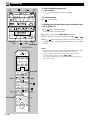
Winding the tape
1 Press
DIGITAL VIDEO
Version 2.0 / Playback Control
STANDBY
STANDBY
/ON
OPEN/CLOSE
or
to wind the tape.
MUSIC
TIMER
VOLUME
PRESET/TUNING/BAND
INPUT
A/B/C/D/E
Moves rapidly in the current tape running
direction while winding.
/
UP
DOWN
BASS
2 Press
TREBLE
PHONES
MODE
REC/
PAUSE
DOLBY NR
AUTO/
MANUAL
MEMORY
RANDOM
REPEAT
TIMER
TIME ADJ
HOUR
MIN
TIME
DISPLAY
Note
DIRECTION
When the tape is wound to the end, the tape deck will then function as
described below.
: The tape stops at the end.
: If the winding direction is , playback automatically starts
from the reverse side when the tape reaches the end.
, the tape stops at the end.
If the winding direction is
: When the tape reaches the end, playback
automatically starts from the reverse side.
KARAOKE
MIC MIXING
1
MIC
2
OPEN/CLOSE
AUTO REVERSE CASSETTE DECK
to stop.
DOLBY B NR
MIN
MAX
(stop)
Searching for the beginning of
the desired selection
POWER
Press
or
during playback.
The tape deck will find a blank interval between selections and
start playback automatically.
1
2
3
1
4
2
5
3
6
4
7
5
8
6
9
7
0
8
TUNER
+I0
PROG
PRESET
R.TIME
To listen to the next selection
B
DISC SKIP
C
MODE
Press
Press
PRESET
TIME
A
EDIT
D
To listen to the same selection
Press
Press
if the direction of the current playback is
if the direction of the current playback is
if the direction of the current playback is
if the direction of the current playback is
.
.
.
.
E
Blinks on and off.
RETURN
VCD/CD
/
SELECT
KARAOKE
INTRO
DIGEST
TIME INDEX
Moves rapidly in the current tape
running direction while searching.
TIME INDEX
(stop)
DIRECTION
Notes
TAPE
REC/ PAUSE
KEY/ECHO
YMERSION
SLEEP
INPUT
VOLUME
E-24
MUSIC
• This function may not work for tapes with
* Material with long pauses or quiet passages.
* Low recording levels or excessive noise.
* Pauses of less than 4 seconds between selections.
• If searching is carried out near the beginning or the end of a selection,
the searching may not be done successfully.
Recording
Notes
DISC 2
DISC 3
• Adjusting the VOLUME, BASS and TREBLE controls, and the use of
B. BOOST, MUSIC and YMERSION have no effect on the recorded
sound. The recording level is automatically adjusted.
• If you want to make a recording using Dolby NR, press DOLBY NR so
NR” (2) lights up on the display. If not, turn “
NR” (2)
that “
off.
* For details, refer to “Dolby B Type Noise Reduction” on page 22.
3–DISC VCD CHANGER
STANDBY
1
STANDBY
/ON
2
TIMER
PRESET/TUNING/BAND
INPUT
A/B/C/D/E
/
Basic recording
4
BASS
TREBLE
PHONES
MODE
DOLBY NR
REC/
PAUSE
AUTO/
MANUAL
MEMORY
TIMER
TIME ADJ
1 Turn on the power.
RAN
H
5
DIRECTION
4
2 Press INPUT
or
repeatedly to select the source you want
to record.
3 Load a tape on the tray with side A facing upward.
KARAOKE
OPEN/CLOSE
AUTO REVERSE CASSETTE DECK
4 Press DIRECTION or MODE to change the current setting, if
necessary.
DOLBY B NR
MODE
3
POWER
DIRECTION
Side A only
Side A → Side B
Side B only
Side B only
1
1
2
3
1
4
2
5
3
6
4
7
5
8
6
9
7
0
8
TUNER
+I0
PROG
PRESET
R.TIME
B
DISC SKIP
C
MODE
PRESET
TIME
A
EDIT
D
5 Press REC/PAUSE.
* “TAPE REC” (6) lights up on the display.
6 Begin playing the source to be recorded and press
on the tape
deck.
When you record from another component that is connected to
this system, start the recording on the tape deck first, and then
start playing the connected source.
* When playing a CD (or Video CD), the recording
automatically begins a few seconds before the disc play
begins.
E
RETURN
VCD/CD
/
KARAOKE
INTRO
SELECT
DIGEST
4
TIME INDEX
TIME INDEX
Displaying the tape counter
DIRECTION
During recording, the information of the playing source is
displayed in place of the tape counter (1). Press DISPLAY to
change the display to the tape counter. Pressing DISPLAY again
will restore the previous display mode.
TAPE
5
REC/ PAUSE
KEY/ECHO
YMERSION
SLEEP
MUSIC
INPUT
2
VOLUME
E-25
English
DISC 1
Recording
To stop recording temporarily
/
DISC 1
DISC 2
DISC 3
VIDEO CD
3–DISC VCD CHANGER
YMERSION
B.BOOST
Press REC/PAUSE.
* Press
on the tape deck to resume recording.
To stop recording
DIGITAL VIDEO
Version 2.0 / Playback Control
STANDBY
STANDBY
/ON
OPEN/CLOSE
DISC CHANGE
MUSIC
Press
TIMER
on the tape deck.
VOLUME
PRESET/TUNING/BAND
INPUT
A/B/C/D/E
/
To change the disc and track when recording from
a CD or Video CD
UP
DOWN
BASS
TREBLE
PHONES
MODE
DOLBY NR
REC/
PAUSE
AUTO/
MANUAL
MEMORY
RANDOM
REPEAT
TIMER
TIME ADJ
HOUR
MIN
TIME
DISPLAY
1 Press
on the CD/Video CD player.
* The recording stops temporarily.
DIRECTION
2 Select the disc by pressing DISC SKIP if necessary.
KARAOKE
MIC MIXING
1
MIC
2
OPEN/CLOSE
AUTO REVERSE CASSETTE DECK
DOLBY B NR
MIN
MAX
3 Choose the track you want to record next by using
or
4 Press
REC/PAUSE
Numeric buttons
1
2
3
1
4
2
5
3
6
4
7
5
8
6
9
7
0
8
TUNER
+I0
PROG
PRESET
R.TIME
B
DISC SKIP
C
MODE
PRESET
TIME
A
EDIT
D
• A sequence of tracks in the program play mode and random play mode
of the CD/Video CD player can be recorded in the same way.
• During recording, you can rewind the tape to the point where the
recording started by simply pressing
or
.
• Your singing karaoke can be recorded in the karaoke mode. (Refer to
page 33 for details.)
VCD/CD
/
SELECT
KARAOKE
INTRO
DIGEST
TIME INDEX
TIME INDEX
DIRECTION
TAPE
REC/ PAUSE
KEY/ECHO
REC/PAUSE
YMERSION
SLEEP
MUSIC
INPUT
VOLUME
E-26
DISC SKIP
E
RETURN
/ on the CD/Video CD player to resume recording (or
simply press the corresponding numeric button(s) on the remote
control).
Notes
POWER
/
.
Recording
DISC 2
Recording from CDs utilizing the
EDIT function
DISC 3
The EDIT function performs recording on both sides of the tape.
3–DISC VCD CHANGER
STANDBY
STANDBY
/ON
For Video CDs
Video CDs cannot be recorded with the EDIT function.
TIMER
PRESET/TUNING/BAND
INPUT
1
A/B/C/D/E
/
■ EDIT recording
BASS
TREBLE
PHONES
MODE
DOLBY NR
REC/
PAUSE
AUTO/
MANUAL
MEMORY
TIMER
TIME ADJ
RANDO
HOUR
1 Press INPUT
or
repeatedly until “VCD/CD” (1) appears
on the display, and load the disc to be recorded.
2 Select the disc by pressing DISC SKIP.
4
DIRECTION
3 Load a tape on the tray with side A facing upward.
KARAOKE
4 Select “
” (4) by pressing MODE.
OPEN/CLOSE
5 Press R. TIME on the remote control to select the length of the
DOLBY B NR
3
Numeric buttons
tape to be used. When pressed, the display changes as shown
below.
(off) → C-46 → C-54 → C-60 → C-90
→
AUTO REVERSE CASSETTE DECK
POWER
When using tapes other than C-46, C-54, C-60 or C-90
1
2
3
1
4
2
5
3
6
4
7
5
8
6
9
7
0
8
TUNER
+I0
PROG
PRESET
R.TIME
B
DISC SKIP
C
MODE
PRESET
TIME
6
A
EDIT
D
After pressing R. TIME, input the tape length by using the
numeric buttons on the remote control.
6 Press EDIT. (“EDIT” (8) lights up on the display.)
5
2
E
RETURN
VCD/CD
/
KARAOKE
INTRO
TIME INDEX
SELECT
The following operations are carried out automatically.
1) Tracks on the disc are automatically divided into side A and
side B. You can check the process by watching the display.
* The tape side indicator (9) shows the side currently
selected.
2) If the tape is not rewound to the end, it will rewind to the end
rapidly.
3) The end part of the tape on which recording cannot be done is
automatically wound.
4) Both disc play and recording starts. Recording is continuously
carried out on both sides of the tape.
Note
DIGEST
When the CD/Video CD player is in the all disc play mode, tracks on
another disc are recorded continuously if the tape’s total possible recording
time is longer than the total playing time of the selected disc.
In this case, as many as three discs can be recorded automatically.
TIME INDEX
DIRECTION
TAPE
REC/ PAUSE
KEY/ECHO
YMERSION
SLEEP
MUSIC
INPUT
1
VOLUME
E-27
English
DISC 1
Recording
■ Manual EDIT recording
YMERSION
STANDBY
STANDBY
/ON
B.BOOST
MUSIC
TIMER
You can program tracks manually while watching the remaining
time on both sides of the tape.
VOLUME
PRESET/TUNING/BAND
INPUT
A/B/C/D/E
/
UP
DOWN
1 Press INPUT
BASS
or
repeatedly until “VCD/CD” (1) appears
on the display, and load a disc (or discs) on the disc tray.
TREBLE
PHONES
MODE
DOLBY NR
REC/
PAUSE
AUTO/
MANUAL
MEMORY
RANDOM
REPEAT
TIMER
TIME ADJ
HOUR
MIN
TIME
DISPLAY
2 Follow steps 3–5 on page 27.
3 Press PROG.
DIRECTION
1
* “PROG” and “P-01” will light up on the display, and all track
numbers on the selected disc will begin blinking.
TIME
4 If necessary, select the desired disc by pressing DISC SKIP.
POWER
2
3
1
4
2
5
3
6
4
7
5
8
6
9
7
0
8
TUNER
+I0
PROG
PRESET
R.TIME
B
DISC SKIP
C
MODE
PRESET
TIME
9
D
the tape. You can select the same track again.
* Pressing TIME displays the total remaining time on side A of
the tape for about 1 second, and then it is replaced by the
display of the next play order.
* You can only select track numbers 1 through 15 for manual
EDIT recording. All track numbers higher than 15 i.e.16, 17,
18… cannot be selected for recording even if there is
recordable space available on the tape.
“TM OVER” will appear on the display.
At this time, however, if any other track number is flashing
continuously on the display, you can program it instead of the
unprogrammable one.
3
E
4
RETURN
VCD/CD
/
SELECT
KARAOKE
INTRO
DIGEST
TIME INDEX
6 Repeat steps 4 and 5 to program more selections for side A of
7
TIME
A
EDIT
5 Select the desired track number by pressing the numeric buttons.
5
1
TIME INDEX
DIRECTION
7 When the programming for side A is finished, press R. TIME.
* “Side–B” appears on the display. You can begin programming
for side B.
* After following this step, you can check the programmed
contents for side A and side B alternately by pressing R.
TIME at any time before you press EDIT in step 9.
* The tape side indicator (9) shows the programming side
currently selected.
TAPE
REC/ PAUSE
KEY/ECHO
YMERSION
MUSIC
SLEEP
INPUT
1
8 Repeat steps 4 and 5 to program selections for side B of the tape.
VOLUME
You can select the same track again.
Display information during programming
Next play order
9 Press EDIT. (“EDIT” (8) lights up on the display.)
The recording begins.
Selected disc
Note
To check, cancel or correct program data, refer to page 13.
TRACK
NR
CD
1 2 3 4 5 6
7 8 9 10 11 12
13 14 15 OVER 15
A
PROG V
Side of the tape
Total remaining time on
this side of the tape
Selected track
number
To cancel the EDIT function
Before recording, press
tape deck.
on the CD/Video CD player or the
To stop recording
Press on the tape deck.
(At this time, disc play automatically stops.)
TRACK
REM
Notes on recording with the EDIT function
NR
CD
1 2 3 4 5 6
7 8 9 10 11 12
13 14 15 OVER 15
A
PROG V
Programmed track numbers light up and
only programmable track numbers
among unprogrammed ones flash.
E-28
• The maximum number of tracks that can be programmed is 20.
• The track number 16 or higher cannot be programmed by this
function.
• The CD/Video CD player’s repeat play mode will be canceled during
the recording mode.
Operating an external unit connected to this system
DISC 2
DISC 3
DISC CHANGE
VIDEO CD
3–DISC VCD CHANGER
DIGITAL VIDEO
Version 2.0 / Playback Control
YMERSION
STANDBY
STANDBY
/ON
OPEN/CLOSE
B.BOOST
MUSIC
TIMER
VOLUME
PRESET/TUNING/BAND
INPUT
or
(or INPUT on the remote control) until
“AUX/MD” appears on the display.
UP
DOWN
BASS
2 Play the source.
TREBLE
MODE
DOLBY NR
REC/
PAUSE
■ To listen to or watch a source played on an
external unit connected to this system
1 Press INPUT
A/B/C/D/E
/
PHONES
Use an external unit connected to the AUX/MD terminals on the
rear of the main unit.
AUTO/
MANUAL
MEMORY
RANDOM
REPEAT
TIMER
TIME ADJ
HOUR
MIN
TIME
DISPLAY
3 Adjust the volume to the desired level by using VOLUME.
DIRECTION
KARAOKE
MIC MIXING
1
MIC
2
* If you prefer, you can control the sound quality (Refer to
pages 30–31) or enjoy singing karaoke (Refer to pages 32–
33).
OPEN/CLOSE
AUTO REVERSE CASSETTE DECK
DOLBY B NR
MIN
MAX
3, 2
1
TIME INDEX
TIME INDEX
DIRECTION
You can record a source or a program played on the built-in CD/
Video CD player, tape deck or tuner by the MD recorder, tape deck
(DAT), etc. that are connected to the AUX/MD terminals on the
rear of the main unit.
TAPE
REC/ PAUSE
1 Select the source (VCD/CD, TAPE or TUNER) you want to
KEY/ECHO
YMERSION
SLEEP
VOLUME
record by using INPUT
control) .
MUSIC
INPUT
3, 2
■ To record a source played on this system by
using the MD recorder, tape deck etc.
connected to this system
1, 1
or
(or INPUT on the remote
2 Play the source and then turn VOLUME up to confirm the input
source.
3 Begin recording on the MD recorder, tape deck (DAT) etc.
Note
• Your singing karaoke can be recorded in the karaoke mode. (Refer to
page 33 for details.)
• A digital-to-digital recording is possible from a CD played on the built-in
CD/Video CD player to an MD (or tape) on the MD recorder (or DAT)
by connecting the DIGITAL OUT (OPTICAL) terminal on the rear of
the main unit to the MD recorder (or DAT).
* For Video CDs
When a Video CD is played, no digital signal is outputted
from the DIGITAL OUT terminal.
E-29
English
DISC 1
Various sound control
1
2
3
BASS BOOST
100 350 1K 3.5K 10K
MUSIC
ROCK POPS
JAZZ
CD
PROGRAM
YMERSION
4
VOLUME
5
1 Spectrum analyzer
3 VOLUME (volume level meter)
4 MUSIC (preset equalizer mode indicator)
5 YMERSION
The spectrum of the input source which is divided into
five bands will be indicated in real time.
2 BASS BOOST
YMERSION
B.BOOST
VIDEO CD
3–DISC VCD CHANGER
STANDBY
/ON
■ VOLUME control
DIGITAL VIDEO
Version 2.0 / Playback Control
YMERSION
STANDBY
B.BOOST
MUSIC
TIMER
VOLUME
PRESET/TUNING/BAND
INPUT
A/B/C/D/E
/
UP
DOWN
BASS
Front panel operation
Rotate VOLUME in the “UP ” direction to increase the volume,
and the “DOWN ” direction to decrease the volume.
Remote control operation
TREBLE
PHONES
General sound control
MODE
DOLBY NR
REC/
PAUSE
AUTO/
MANUAL
MEMORY
RANDOM
REPEAT
TIMER
TIME ADJ
HOUR
MIN
TIME
DISPLAY
DIRECTION
TREBLE
VOLUME
BASS
Press VOLUME
to increase the volume and VOLUME
to
decrease the volume.
* Adjusted volume level is shown by the volume level meter (3)
and in figures on the display.
■ B. (BASS) BOOST button
TIME INDEX
TIME INDEX
DIRECTION
Press this button so that “BASS BOOST” (2) is illuminated on the
display to boost the bass frequency response of this system while
maintaining overall tonal balance. This function is effective for
reinforcing the bass frequencies when a subwoofer is not used.
TAPE
REC/ PAUSE
■ BASS and TREBLE controls
KEY/ECHO
YMERSION
YMERSION
VOLUME
SLEEP
BASS :
Turn this knob clockwise to increase (or
counterclockwise to decrease) the low frequency
response.
TREBLE :
Turn this knob clockwise to increase (or
counterclockwise to decrease) the high frequency
response.
MUSIC
INPUT
VOLUME
■ YMERSION button
Press this button so that “YMERSION” (5) lights up on the
display. YMERSION is Yamaha's proprietary technology that
enhances the spread of a normal stereo source play sound, creating
three-dimensional acoustics using only two speakers. Press this
button again to cancel this sound effect, and “YMERSION” (5)
goes out from the display.
E-30
Various sound control
■ Listening with headphones
DISC 1
DISC 2
DISC 3
DISC CHANGE
OPEN/CLOSE
Note
VIDEO CD
3–DISC VCD CHANGER
YMERSION
STANDBY
STANDBY
/ON
When you connect headphones, no signals are outputted to the speakers.
DIGITAL VIDEO
Version 2.0 / Playback Control
B.BOOST
MUSIC
TIMER
VOLUME
PRESET/TUNING/BAND
INPUT
A/B/C/D/E
/
UP
DOWN
BASS
TREBLE
PHONES
MODE
DOLBY NR
REC/
PAUSE
AUTO/
MANUAL
MEMORY
RANDOM
REPEAT
TIMER
TIME ADJ
HOUR
MIN
TIME
DISPLAY
Graphic equalizer
OPEN/CLOSE
DISC CHANGE
The built-in graphic equalizer provides 3 preset equalizer modes as
listed below.
VIDEO CD
Version 2.0 / Playback Control
Preset graphic equalizer modes
DIGITAL VIDEO
Mode
YMERSION
B.BOOST
MUSIC
ROCK
High and low frequencies are emphasized. This mode is
suitable for reproducing dynamic and powerful sounds of
rock music, etc.
POPS
Vocals are emphasized and whole sound is clear. This mode
is suitable for pops.
JAZZ
High frequencies for piano, sax, etc. are emphasized.
Medium frequencies for vocals are also moderately
emphasized.
MUSIC
VOLUME
TAPE
REC/ PAUSE
Listening to the music with a preset equalizer
effect
KEY/ECHO
YMERSION
MUSIC
MUSIC
SLEEP
INPUT
Feature
1 Play back a source.
2 Press MUSIC repeatedly until the name of the desired mode
lights up on the preset equalizer mode indicator (MUSIC) (4).
VOLUME
ROCK
POPS
JAZZ
(OFF)
E-31
English
PHONES
• Be sure that your headphones have a 3.5 mm (1/8”) diameter
plug and between 16 ohms and 50 ohms impedance.
Recommended impedance is 32 ohms.
• When you listen with headphones, connect the headphones to the
PHONES jack. You can listen to the sound that is normally
outputted from the speakers through headphones.
Adjust VOLUME to a comfortable listening level.
Karaoke operation
■ Singing karaoke
2
KARAOKE
MIC MIXING
1
MIC
2
5
OPEN/CLOSE
MIN
MAX
This system allows you to enjoy singing karaoke by using not only
a source exclusively for karaoke use but also any normal audio
source.
1 Connect one or two microphones to the MIC jack(s) on the front
panel of the main unit.
2 Select a karaoke mode (L R, L, R or VOCAL CUT) by pressing
1
1
MIC
2
KARAOKE repeatedly until the corresponding name appears on
the karaoke mode indicator.
* Every time you press KARAOKE, the karaoke mode changes
and is displayed as follows.
KARAOKE
L R
KARAOKE
L
KARAOKE
R
KARAOKE
VOCAL CUT
(off)
For descriptions of the karaoke modes, see the list below.
Karaoke modes (KARAOKE)
2
RETURN
VCD/CD
/
SELECT
KARAOKE
INTRO
DIGEST
TIME INDEX
For a karaoke
source
(without vocals)
For a multisound source
TIME INDEX
Mode
LR
(KARAOKE)
Feature
Signals on the left channel and the
right channel are outputted from the
left and right speakers respectively.
L
(L ONLY)
Only signals on the left channel of
the source are outputted from the left
and right speakers.
R
(R ONLY)
Only signals on the right channel of
the source are outputted from the left
and right speakers.
DIRECTION
TAPE
REC/ PAUSE
KEY/ECHO
YMERSION
SLEEP
4
For a normal
music source
VOCAL CUT
MUSIC
Medium frequencies of the source
sound (vocals etc.) are attenuated.
There may be a case that vocals
cannot be attenuated effectively
depending on a source.
INPUT
3 Play a source (For playing a source, refer to pages 9–24).
VOLUME
4 If desired, adjust the level of echo effect and key of the source
currently played. (For details, see the next page.)
5 While singing, adjust the mixing level of singing voice by
turning MIC MIXING.
To cancel the karaoke mode
Press KARAOKE repeatedly until no name is illuminated on the
karaoke mode indicator.
Note
The microphone(s) connected to the MIC jack(s) on the front panel of the
main unit can be used only when a karaoke mode is selected.
E-32
Karaoke operation
■ Adjusting the level of ECHO effect
1
2
3
1
4
2
5
3
6
4
7
5
8
6
9
7
0
8
TUNER
+I0
PROG
PRESET
R.TIME
B
DISC SKIP
C
MODE
PRESET
TIME
A
EDIT
D
English
You can adjust the level of echo effect applied to the sound
inputted from the microphone(s).
This adjustment can be made only in the karaoke mode.
POWER
Control range: Min, 1 to 6, Max
1 Press KEY/ECHO repeatedly until “ECHO” appears on the
display.
2 Press LEVEL + to increase or – to decrease the echo level.
■ Adjusting KEY of the source
The key adjustment can be made only when the CD/Video CD
player is selected in the karaoke mode.
E
RETURN
VCD/CD
/
SELECT
KARAOKE
INTRO
DIGEST
Control range: –6 to +6
1 Press KEY/ECHO repeatedly until “KEY” appears on the
TIME INDEX
display.
2 Press
TIME INDEX
DIRECTION
to heighten or
to lower the pitch.
To reset the key to ±0
TAPE
Press
REC/ PAUSE
2
KEY/ECHO
YMERSION
SLEEP
MUSIC
INPUT
VOLUME
1
to stop play.
■ Recording your vocal onto a tape
You can record your vocal input from the microphone(s) along
with the source sound onto a tape in the karaoke mode.
In addition, the effects gained from adjusting MIC MIXING,
ECHO and KEY can also be recorded with the vocal and the
source sound.
Recording sound will be monitored by the speakers. To record
them, follow the basic recording procedures.
Notes
• The sound effects using the BASS and TREBLE controls, and the B.
BOOST, MUSIC and YMERSION cannot be recorded.
• Signal which is inputted through the MIC jacks are not outputted to the
output terminals connected to an external component.
E-33
Using the built-in timer
STANDBY/ON
DISC 1
DISC 2
DISC 3
DISC CHANGE
VIDEO CD
3–DISC VCD CHANGER
OPEN/CLOSE
DIGITAL VIDEO
Version 2.0 / Playback Control
YMERSION
STANDBY
STANDBY
/ON
Timer play
INPUT
B.BOOST
MUSIC
TIMER
VOLUME
PRESET/TUNING/BAND
INPUT
A/B/C/D/E
/
UP
DOWN
BASS
TREBLE
PHONES
MODE
DOLBY NR
REC/
PAUSE
AUTO/
MANUAL
MEMORY
RANDOM
REPEAT
TIMER
TIME ADJ
HOUR
MIN
TIMER
TIME
DISPLAY
MIN
HOUR
DISPLAY
By using the built-in timer, you can set the time when this system
turns on and a source play begins, and the time when this system is
set to the standby mode.
1 Press DISPLAY.
Whenever DISPLAY is pressed, the display mode changes as
follows.
→ 1 Current time (TIMER on/off mode)
↓
2 Source selecting mode (TAPE, TUNER, VCD/CD)
↓
3 ON TIME/Time setting mode
↓
4 OFF TIME/Time setting mode
↓
5 Normal display mode
POWER
POWER
(standby/on)
1
2
3
1
4
2
5
3
6
4
7
5
8
6
9
7
0
8
TUNER
+I0
PROG
PRESET
R.TIME
B
DISC SKIP
C
MODE
PRESET
TIME
A
EDIT
D
VCD/CD
/
SELECT
KARAOKE
INTRO
DIGEST
TIME INDEX
The display mode will change in about 8 seconds. If the mode is changed
before the setting is completed, call the mode again by pressing
DISPLAY once or more.
1 Current time
Make sure that the current time is correct, and press TIMER
so that “TIMER” lights up on the display.
2 Source selecting mode
Select the source to be played with INPUT
INPUT on the remote control).
or
(or
3 ON TIME/time setting mode
[“ON TIME” appears on the display, and soon it is changed
to a time setting mode.]
Set the time when you want to begin the timer play.
• Press HOUR and set the hour.
• Press MIN and set the minute.
E
RETURN
Note
4 OFF TIME/time setting mode
If necessary, set the time when you want to finish the timer
play in the same way as you did in step 3. If you do not set
the time, it will be automatically set so that the timer play
finishes after 1 hour.
TIME INDEX
DIRECTION
TAPE
REC/ PAUSE
2 Press TIMER to complete the timer play setting.
KEY/ECHO
YMERSION
SLEEP
This system turns into the standby mode.
* The STANDBY and TIMER indicators light up.
MUSIC
INPUT
INPUT
VOLUME
If you will continue using this system, press STANDBY/ON to
turn on this system.
To cancel the timer play setting
Press DISPLAY, and then press TIMER so that the TIMER
indicator goes out.
Note
Unless there is a power failure for more than 5 minutes, the set time will be
retained until it is reset.
E-34
Using the built-in timer
DISC 1
DISC 2
DISC 3
DISC CHANGE
STANDBY
/ON
1 Follow steps 2–3 of “Basic recording” on page 25.
DIGITAL VIDEO
Version 2.0 / Playback Control
YMERSION
STANDBY
B.BOOST
MUSIC
TIMER
VOLUME
PRESET/TUNING/BAND
INPUT
A/B/C/D/E
/
UP
DOWN
BASS
TREBLE
PHONES
MODE
DOLBY NR
REC/PAUSE
REC/
PAUSE
AUTO/
MANUAL
MEMORY
RANDOM
REPEAT
TIMER
TIME ADJ
HOUR
MIN
TIMER
TIME
Timer recording
English
VIDEO CD
3–DISC VCD CHANGER
OPEN/CLOSE
DISPLAY
DISPLAY
2 Tune in to the station you want to record.
3 Follow step 1 of “Timer play” on page 34.
* In step 2, select “TUNER”, and then press REC/PAUSE.
(“REC >TAPE” and the frequency will flash alternately on the
display.)
* In step 3, set the time when you want to begin recording.
* In step 4, set the time when you want to finish recording.
4 Press TIMER.
This system will be set to the standby mode.
* The STANDBY and TIMER indicators light up.
To cancel the setting of timer recording
Press DISPLAY once or more so that “REC >TAPE” flashes on
the display. While “REC >TAPE” is flashing, press REC/
PAUSE.
TAPE
REC/ PAUSE
REC/PAUSE
YMERSION
SLEEP
KEY/ECHO
Note
MUSIC
When the timer recording is finished, the timer setting is automatically
canceled.
INPUT
SLEEP
VOLUME
Sleep timer operation
This system will automatically be set to the standby mode when the
selected sleep time passes.
1 Play the desired sound source.
2 Press SLEEP repeatedly until the desired sleep time appears on
the display. The display will change as described below.
2h00m
1h30m
1h00m
0h30m
OFF SLEEP
(Sleep timer is off.)
* The normal display mode will resume about 4 seconds after
the selection is made.
* “SLEEP” will light up on the display.
E-35
Appendix
Troubleshooting
Refer to the chart below when this system does not function properly. If the problem you are experiencing is not listed
below or if the instruction below does not help, disconnect the supply lead and contact your authorized YAMAHA dealer or
service center.
Problem
Cause
What to Do
This system does not work
normally.
There is an influence of strong external
noise (lightning, excessive static electricity,
etc.) or the system was operated incorrectly.
Set this system to the standby mode and disconnect the
AC supply lead from the AC outlet. After about 30
seconds, connect the power and operate this system
again.
General
The sound suddenly goes off. The protection circuit was activated because
of a short circuit, etc.
Set this system to the standby mode, then turn on to
reset the protection circuit.
The SLEEP timer was activated.
Cancel the SLEEP timer function.
No sound from speakers.
Speaker connections are not secure.
Secure the connections.
No sound from the external
unit connected with this
system.
Incorrect cord connections.
Connect the cords properly. If the problem persists, the
cords may be defective.
Input source selection is not correct.
Make a correct input source selection.
Timer cannot be set.
Current time is not set.
Set current time.
This system will not operate
properly.
The internal microcomputer has been frozen
by an external electric shock (lightning,
excessive static electricity, etc.) or power
supply with low voltage.
Unplug the AC supply lead from the wall AC outlet,
then plug in again after about one minute.
The volume level cannot be
increased, or sound is
distorted.
The component connected to the AUX/MD
terminals on the rear of the main unit is
turned off.
Turn on the power to the component.
Excessive static in FM
broadcasts.
Interference from starting motor of nearby
car.
Position the FM antenna as high and as far away from
nearby roads as possible. Use coaxial cable.
Interference from thermostat of nearby
electric appliance.
Tuner
Noise increases during stereo
broadcasts.
Antenna input is too weak due to
obstructions or excessive distance from
broadcasting station.
Check antenna connections.
Install a multi-element type FM antenna if possible.
Stereo broadcasts are noisy
Insufficient antenna input.
and STEREO indicator blinks
on and off.
Install an antenna suited for the electric field strength
of your area.
Preset stations cannot be
selected.
Preset memory has been erased.
Reprogram memory presettings.
Buzzing or static during AM
broadcasts.
Interference from sources such as lightning,
fluorescent lights, electric motors or
thermostat of nearby electric appliance.
Problem is difficult to eliminate but can be lessened by
grounding AM loop antenna.
TV or this system is being used nearby.
Move away from TV or this system.
Radio signal is weak or antenna is not
properly connected.
Properly connect AM loop antenna.
AM broadcast sensitivity is
poor.
Change orientation of AM loop antenna.
Install an external AM antenna.
E-36
Appendix
Cause
The disc is not a standard type.
Play another disc.
Play will not begin even if
disc is loaded.
Disc is upside down.
Load disc with label side facing upward.
Disc is dirty.
Clean disc.
No sound or no picture.
The input source selection is incorrect.
Select the CD/Video CD player by pressing INPUT
or
button until “VCD/CD” lights up on the display.
Sound stops suddenly
(always at the same spot).
Disc is dirty.
Clean disc.
Volume is set too high.
Lower volume.
A picture is disturbed or
unstable.
Setting of the TV MODE switch on the rear
panel is improper.
Set the TV MODE switch to proper position.
Tape will not move during
playback or recording.
Slack tape wrapped around pinch roller.
Tighten slack with a pencil (pen) before using.
Recording is not possible.
Erasure prevention tab is broken off.
Replace tape or cover erasure prevention hole with
adhesive tape.
Head is dirty.
Clean heads.
Sound is distorted or fades
Head is dirty.
out, or stereo balance is poor. Tape is worn.
Clean heads.
Poor sound quality.
Tape deck
What to Do
English
CD/Video CD player
Problem
A disc cannot be played
normally, or there is a noise
during play.
Excessive noise.
Tape not encoded with Dolby NR is played
back with this system’s Dolby NR on.
Press the DOLBY NR button to turn it off.
Head has become magnetized.
Demagnetize heads with head demagnetizer.
Tape travel stops in middle of Slack tape coming out of cassette shell.
playback or recording.
Tape is creased or torn.
The beginning of desired
selections on tape cannot be
found.
Replace tape.
Tape encoded with Dolby NR is played back Press the DOLBY NR button to turn it on.
with this system’s Dolby NR off.
Tighten slack with a pencil (pen) before using.
Replace tape.
Endless tape is being used.
Do not use endless tapes.
Silent gaps between selections are too short.
The function of searching for the beginning of desired
selections will not operate unless the silent gaps
between selections are at least four seconds long.
Excessively soft passages in middle of
selections.
Remote control
Conversation, etc. is recorded.
Beginning of the track isn’t
recorded.
There is an unrecordable part in the first few Wind the unrecordable part of the tape and start
seconds of the tape.
recording from the recordable part.
Remote control does not
work.
Batteries are dead.
Replace batteries.
Remote control is too far away or tilted too
much.
Use within 6 m and 60° radius.
Direct sunlight or lighting (of an inverter
type fluorescent lamp, etc.) is striking the
remote control sensor of the main unit.
Reposition the main unit.
Remote control is being used near TV set
with a remote control sensor.
Relocate the main unit away from the TV.
TV functions strangely when
the remote control is used.
E-37
Appendix
Specifications
■ Amplifier section
■ Tape deck section
Minimum RMS Output Power per Channel
6 ohm, 1 kHz, 0.9% THD ............................. 80W+80W
6 ohm, 1 kHz, 10% THD .......................... 100W+100W
Type .............................. Auto reverse stereo cassette deck
Input Sensitivity/Impedance
AUX/MD ........................................... 200 mV/47 k-ohm
Spectrum Analyzer Band ....................................... 5 bands
(100 Hz, 350 Hz, 1 kHz, 3.5 kHz, 10 kHz)
Frequency Response (–20 dB)
Type 1 (Normal) .................................... 50 to 15,000 Hz
Type 2 (High) ......................................... 50 to 16,000 Hz
Wow and Flutter ....................................... 0.09%, W.RMS
Signal-to-Noise Ratio .................. 58 dB (Dolby NR OFF)
66 dB (Dolby B NR ON)
■ Tuner section
Harmonic Distortion .................................................. 0.8%
Tuning Range
FM ................................................. 87.50 to 108.00 MHz
AM
[Singapore model] ............................. 531 to 1,611 kHz
[China and General models]
......................................... 530/531 to 1,710/1,611 kHz
■ Speaker section
Usable Sensitivity (FM)
DIN, Mono, S/N 26 dB ........................................ 1.8 µV
S/N 30 dB, 1 kHz, 100% Mod. ............................ 1.5 µV
Maximum input ........................................................ 220W
■ CD/Video CD player section
■ General
Discs Supported .............................. Audio CD, Video CD
D/A Converter .................................................. 1-bit DAC
Power Supply
[Singapore model] ................................ AC 230V, 50 Hz
[China and General models]
.................................... AC 110/120/220/240V, 50/60 Hz
Filter ............................. 8-time oversampling digital filter
Power consumption .................................................. 140W
Key Control Width ............................................... ±6 steps
Dimensions (W x H x D)
Main unit ........................................ 280 x 320 x 364 mm
Speaker ........................................... 200 x 320 x 208 mm
Type ...................................... 3 disc carousel auto-changer
Type (Magnetic shielding type)
Speaker ................ 3-way bass reflex: 13 cm (5”) woofer
5 cm (2”) tweeter
2 cm (3/4”) super tweeter
Impedance ................................................................ 6 ohm
Weight
Main unit ............................................................. 10.5 kg
Speaker ............................................................ 3.8 kg x 2
Accessories ................................................ Remote control
Batteries
Speaker cords
AM loop antenna
Indoor FM antenna
Specifications are subject to change without notice.
E-38
YAMAHA
YAMAHA
YAMAHA
YAMAHA
YAMAHA
YAMAHA
YAMAHA
ELECTRONICS CORPORATION, USA 6660 ORANGETHORPE AVE., BUENA PARK, CALIF. 90620, U.S.A.
CANADA MUSIC LTD. 135 MILNER AVE., SCARBOROUGH, ONTARIO M1S 3R1, CANADA
ELECTRONIK EUROPA G.m.b.H. SIEMENSSTR. 22-34, 25462 RELLINGEN BEI HAMBURG, F.R. OF GERMANY
ELECTRONIQUE FRANCE S.A. RUE AMBROISE CROIZAT BP70 CROISSY-BEAUBOURG 77312 MARNE-LA-VALLEE CEDEX02, FRANCE
ELECTRONICS (UK) LTD. YAMAHA HOUSE, 200 RICKMANSWORTH ROAD WATFORD, HERTS WD1 7JS, ENGLAND
SCANDINAVIA A.B. J A WETTERGRENS GATA 1, BOX 30053, 400 43 VÄSTRA FRÖLUNDA, SWEDEN
MUSIC AUSTRALIA PTY, LTD. 17-33 MARKET ST., SOUTH MELBOURNE, 3205 VIC., AUSTRALIA
V558800