1
SGH-D838
User’s Guide
Drive safely at all times
Do not use a hand-held phone while driving.
Park the vehicle first.
Switch off the phone when refuelling
Important
safety
precautions
Failure to comply with the following
precautions may be dangerous or illegal.
Do not use the phone at a refuelling point
(service station) or near fuels or chemicals.
Switch off in an aircraft
Wireless phones can cause interference.
Using them in an aircraft is both illegal and
dangerous.
Switch off the phone near all medical
equipment
Hospitals or health care facilities may be
using equipment that could be sensitive to
external radio frequency energy. Follow any
regulations or rules in force.
Interference
All wireless phones may be subject to
interference, which could affect their
performance.
Accessories and batteries
Meet any special regulations in force in any
area and always switch off your phone
whenever it is forbidden to use it, or when it
may cause interference or danger.
Use only Samsung-approved batteries and
accessories, such as headsets and PC data
cables. Use of any unauthorised accessories
could damage you or your phone and may
be dangerous.
Water resistance
Your phone is not water-resistant. Keep it
dry.
Sensible use
Use only in the normal position (held to the
ear). Avoid unnecessary contact with the
antenna when the phone is switched on.
• The phone could explode if the battery is
replaced with an incorrect type.
• Dispose of used batteries according to the
manufacturer’s instructions.
At very high volumes, prolonged
listening to a headset can damage your
hearing.
Emergency calls
Qualified service
Key in the emergency number for your
present location, then press
.
Only qualified service personnel may repair
your phone.
Keep your phone away from small
children
For more detailed safety information, see
"Health and safety information" on page
104.
Keep the phone and all its parts, including
accessories, out of the reach of small
children.
Important safety precautions
Be aware of special regulations
1
About this Guide
This User’s Guide provides you with
condensed information about how to use
your phone. To quickly learn the basics for
your phone, please refer to “Get started”
and “Step outside the phone.”
In this guide, the following instruction icons
appear:
Indicates that you need to pay
careful attention to the subsequent
information regarding safety or
phone features.
Indicates that you can get more
information on the referenced page.
→
[
]
Indicates a key on the phone. For
example, [ ]
Indicates a soft key, whose function
is displayed on the phone screen.
For example, <Menu>
Camera and camcorder
Use the camera module on
your phone to take a photo
or record a video.
Special features of your phone
•
Image editor
Crop, resize, rotate, and
decorate your photos.
•
Music player
Play music files using your
phone as a music player.
•
Photo printing
Print your photos to
preserve your best
moments forever.
Indicates that you need to press the
Navigation keys to scroll to the
specified option and then select it.
< >
2
•
Phone to TV
View photos and video clips
captured with the phone on
your TV screen.
•
File viewer
Open documents in various
formats on the phone
without corruption.
•
Bluetooth
Transfer media files and
personal data and connect
to other devices using free,
wireless Bluetooth
technology.
•
Web browser
Access the wireless web to
get up-to-the-minute
information and a wide
variety of media content.
•
Offline mode
Switch your phone to offline
to use its non-wireless
functions in an airplane.
•
E-mail
Send and receive e-mails
with image, video, and
audio attachments.
•
Multimedia Message
Service (MMS)
Send and receive MMS
messages with a
combination of text, image,
video, and audio.
•
Java
Enjoy Java™-based
embedded games and
download new games.
•
Voice recorder
Record memos or sounds.
Special features of your phone
•
3
6
Use Phonebook .......................................
Send messages.......................................
View messages .......................................
Use Bluetooth .........................................
Use a memory card .................................
Watch the phone display on a TV...............
19
21
22
23
25
27
6
Enter text
28
Contents
Unpack
Make sure you have each item
Your phone
Keys, features, and locations
Get started
7
Call functions
First steps to operating your phone
Install and charge the phone ...................... 7
Power on or off......................................... 8
Keys and display ...................................... 9
Access menu functions ............................ 12
Customise your phone............................. 13
Make/Answer calls .................................. 16
Advanced calling features
Step outside the phone
Help and personal needs
16
Begin with your camera, the music player, the
web, and other special features
Use the camera ...................................... 16
Play music ............................................. 17
Browse the web...................................... 19
4
Chinese Phrasal Pinyin, Chinese Stroke, English
word, ABC, Number, Symbol and Korean modes
Menu functions
34
38
All menu options listed
Solve problems
Health and safety information
102
104
Overview of menu functions
To access Menu mode, press <Menu> in Idle mode.
1 Call log
p. 38
3 Applications (continued)
1
2
3
4
5
6
7
p.
p.
p.
p.
p.
p.
p.
10
11
12
13
Recent contacts
Missed calls
Dialled calls
Received calls
Delete all
Call time
Call costs1
38
39
39
39
39
39
40
2 Phonebook
p. 40
1
2
3
4
5
6
7
8
9
p.
p.
p.
p.
p.
p.
p.
p.
p.
Contact list
Create contact
Group
Speed dial
My namecard
Own number
Management
Service number1
Information number1
40
41
42
43
43
44
44
44
44
3 Applications
p. 45
1
2
3
4
5
6
7
8
9
p.
p.
p.
p.
p.
p.
p.
p.
p.
Music player
Voice recorder
Image editor
Java world
World clock
Alarm
Calculator
Converter
Timer
45
47
48
50
51
51
52
52
53
Stopwatch
Key management
Memo
SIM AT1
p.
p.
p.
p.
6 My files (continued)
53
53
54
54
4 Browser
p. 54
1
2
3
4
5
6
7
8
p.
p.
p.
p.
p.
p.
p.
p.
Home
SFC home
Enter URL
Bookmarks
Saved pages
History
Clear cache
Browser settings
54
56
56
57
57
57
58
58
5 Messages
p. 58
1
2
3
4
5
6
p.
p.
p.
p.
p.
p.
Create message
My messages
Templates
Delete all
Settings
Memory status
58
62
67
68
68
74
6 My files
p. 74
1
2
3
4
p.
p.
p.
p.
Images
Videos
Music
Sounds
74
75
77
77
5 Other files
6 Memory card2
7 Memory status
p. 78
p. 79
p. 80
7 Calendar
p. 80
8 Camera
p. 83
9 Settings
p. 89
1 Time and date
2 Phone settings
3 Display settings
4 Sound settings
5 Light settings
6 Network services
7 Bluetooth
8 Security
9 Connection settings
10 Reset settings
p.
p.
p.
p.
p.
p.
p.
p.
p.
p.
89
89
91
92
93
94
96
99
100
101
1. Shows only if supported by your
SIM card.
2. Shows only if a memory card is
inserted.
5
Unpack
Your phone
Make sure you have each item
Keys, features, and locations
Camera
lens
External
display
Phone
Travel Adapter
Earpiece
Memory
card slot
Main display
Battery
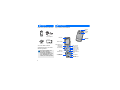
User’s Guide
You can obtain various
accessories from your local
Samsung dealer.
The items supplied with
your phone and the
accessories available at
your Samsung dealer may
vary, depending on your
country or service provider.
6
Navigation keys
(Up/Down/
Left/Right)
Left soft key
Dial key
Web access/
Confirm key
Right soft key
Power on/off/
Menu exit key
Volume keys
Delete key
Alphanumeric
keys
Headset/
Adapter jack
Microphone
Special
function keys
Get started
First steps to operating your phone
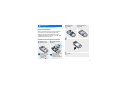
Install the
battery.
Reattach the
cover.
SIM card information
When you subscribe to a cellular network,
you receive a plug-in SIM (Subscriber
Identity Module) card loaded with your
subscription details, such as your PIN, and
available optional services.
Install and charge the phone
Remove the
battery cover.
If the phone is
already on, first
turn it off by
pressing and
holding [ ].
Plug the travel adapter into the phone.
Insert the SIM
card.
Make sure that the
gold-coloured
contacts on the
card are face down.
Plug the adapter into a standard AC wall
outlet.
7
Get started
When the phone is completely charged
(the battery icon becomes still), unplug
the adapter from the wall outlet.
Power on or off
Switch on
Remove the adapter from the phone.
Low battery indicator
When the battery is low:
• a warning tone sounds,
• the low battery message displays, and
• the empty battery icon
blinks.
If the battery level becomes too low, the
phone automatically turns off. Recharge
your battery.
8
1. Open the phone.
2. Press and hold [
Do not turn on
the phone when
mobile phone
use is
prohibited.
3. If necessary, enter
the PIN and press
<OK>.
Switch off
1. Open the phone.
2. Press and hold [
].
].
Offline mode
To switch to Offline mode, press <Menu>
and select Settings → Phone settings →
Offline mode → On.
In Offline mode, you can use non-wireless
functions, such as games, calendar, camera,
and music player.
Keys and display
Keys
Perform the function indicated
on the bottom line of the
display.
Get started
You can switch the phone to Offline mode, in
which the phone functions requiring network
connection are deactivated. This mode is
helpful when you want to use your phone in
a place where you are not allowed to use
mobile devices, such as in an airplane and at
a hospital.
In Idle mode, access your
favourite menus directly.
p. 90
In Menu mode, scroll through
menu options.
In Idle mode, launch the web
browser.
In Menu mode, select the
hightlighted menu option or
confirm input.
Make or answer a call.
In Idle mode, retrieve numbers
recently dialled, missed, or
received.
9
Get started
Delete characters from the
display, or items in an
application.
Press and hold to switch the
phone on or off.
End a call.
In Menu mode, cancel input and
return the phone to Idle mode.
Enter numbers, letters, and
some special characters.
In Idle mode, press and hold
[1] to access your voicemail
server. Press and hold [0] to
enter an international call
prefix.
10
Enter special characters.
In Idle mode, press and hold
[ ] to activate or deactivate
Silent mode. Press and hold
[ ] to enter a pause between
numbers.
Adjust the phone volume.
In Idle mode, with the phone
open, adjust the key tone
volume. With the phone closed,
press and hold to turn on the
external display. Press and hold
[ ] to have the phone state the
current time.
Display
Layout
Icons
display various
icons.
Menu
Icons1
Contacts
Soft key function
indicators
show the current
functions assigned
to the soft keys.
Received signal strength
GPRS network
Connecting to GPRS
network
Transferring data in GPRS
network
Call in progress
Out of your service area;
you cannot make or
receive calls
Home Zone, if registered
for the appropriate service
Get started
Text and graphics
display messages,
instructions, and
information you
enter.
Synchronised with PC
Call diverting feature
active
p. 94
Office Zone, if registered
for the appropriate service
Roaming network
New message
New e-mail
New voicemail
Bluetooth hands-free car
kit or headset connected
p. 96
Bluetooth active
p. 96
Music playback in progress
Music playback paused
Memory card inserted
p. 26
11
Get started
Alarm set
p. 51
Silent mode (Vibration)
Silent mode (Mute)
Call ringer set to vibration
Mute mode, during a call
Battery power level
Access menu functions
Use the
soft keys
The roles of the soft keys
vary depending on the
function you are using. The
bottom line of the display
indicates their current role.
Select
Back
1. Depending on your country or service provider,
the icons shown on the display may vary.
Press the left
soft key to select
the highlighted
option.
12
Press the right
soft key to
return to the
previous
menu level.
Select an
option
1. Press a desired soft key.
2. Press the Navigation
keys to move to the next
or previous option.
Customise your phone
Display
language
4. To exit, choose either of
the following methods.
• Press <Back> to
move up one level.
• Press [ ] to return
to Idle mode.
Get started
3. Press <Select> or [ ]
to confirm the function
displayed or option
highlighted.
1. In Idle mode, press
<Menu> and select
Settings → Phone
settings → Language →
Language.
2. Select a language.
Call ringer
melody
1. In Idle mode, press
<Menu> and select
Settings → Sound
settings → Incoming
call → Ringtone.
2. Select a ringtone
category.
3. Select a ringtone.
Use
shortcuts
Press the number key
corresponding to the option
you want. For the menu
numbers 10, 11, and 12,
press [0], [ ] and [ ]
respectively.
4. Press <Save>.
13
Get started
Idle mode
wallpaper
You can set wallpaper for the
idle screen on the main
display.
Menu mode
skin colour
1. In Idle mode, press
<Menu> and select
Settings → Display
settings → Wallpaper →
Main display.
1. In Idle mode, press
<Menu> and select
Settings → Display
settings → Skin.
2. Select a colour pattern.
2. Select an image or a
video category.
3. Select an image or a
video clip.
4. Press <Select>.
5. Press <Save>.
You can change the colour
for the display components,
such as title bars and
highlight bars.
Menu
shortcuts
You can set the Navigation
keys to function as shortcuts
to access your favourite
menus.
1. In Idle mode, press
<Menu> and select
Settings → Phone
settings → Shortcuts.
2. Select a key.
3. Select a menu to be
assigned to the key.
14
My Menu
You can set up a menu of
your own favourite menu
items.
To set a My menu item:
2. Select an item to be
changed.
3. Select the menu item you
want.
To access a My menu item:
1. In Idle mode, press [Up].
2. Scroll to an item.
3. Press [ ].
You can protect the phone
against unauthorised use
with a phone password. The
phone will require the
password on power-up.
Get started
1. In Idle mode, press
<Menu> and select
Settings → Phone
settings → My menu.
Phone lock
1. In Idle mode, press
<Menu> and select
Settings → Security →
Change password.
2. Enter the default
password, 00000000,
and press <OK>.
3. Enter a new 4- to 8-digit
password and press
<OK>.
4. Enter the new password
again and press <OK>.
5. Select Phone lock.
Silent
mode
You can switch the phone to
Silent mode to avoid
disturbing other people.
Press and hold [ ] in Idle
mode.
6. Select Enable.
7. Enter the password and
press <OK>.
15
Step outside the phone
Make/Answer calls
Make a call
Step outside the phone
1. In Idle mode, enter an
area code and phone
number.
2. Press [
].
3. To end the call, press
[ ].
Answer a
call
Adjust the
volume
during a call
16
1. When the phone rings,
press [ ].
Begin with your camera, the music player, the
web, and other special features
Use the camera
Take a
photo
1. Open the phone.
2. In Idle mode, press
<Menu> and select
Camera.
2. To end the call, press
[ ].
3. Aim the lens at the
subject and make any
desired adjustments.
Press [ / ].
4. Press [ ] to take a photo.
The photo is saved
automatically.
5. Press <Preview> to take
another photo.
View a
photo
1. In Idle mode, press
<Menu> and select My
files → Images → My
photos.
Play a
video
Record a
video
1. In Idle mode, press
<Menu> and select
Camera.
2. Press [1] to switch to
Record mode.
3. Press [ ] to start
recording.
4. Press [ ] or < > to
stop recording. The video
is saved automatically.
5. Press <Preview> to
record another video.
2. Select the video you
want.
Step outside the phone
2. Select the photo you
want.
1. In Idle mode, press
<Menu> and select My
files → Videos → My
video clips.
Play music
Copy music
files to the
phone
Use these methods:
• Download from the
wireless web
p. 54
• Download from a
computer using the
optional Samsung PC
Studio
Samsung PC
Studio User’s Guide
• Receive via
Bluetooth
p. 96
• Copy to a memory card
and insert the card into
p. 26
the phone
17
Step outside the phone
Create a
play list
1. In Idle mode, press
<Menu> and select
Applications → Music
player.
2. Press <Options> and
select Add music from
→ Phone or Memory
card.
3. Press [ ] to select the
files you want and press
<Select>.
4. Press <Back> to return
to the music player
screen.
18
Play music
files
1. From the music player
screen, press [ ].
2. During playback, use the
following keys:
•
: pauses or resumes
playback.
• Left: returns to the
previous file. Moves
backward in a file
when held down.
• Right: skips to the
next file. Skips
forward in a file when
held down.
• Up: opens the play
list.
•
/ : adjusts the
volume.
• Down: stops
playback.
Browse the web
Launch the
web
browser
Navigate
the web
In Idle mode, press [ ] and
select Home.
•
To scroll through
browser items, press
[Up] or [Down].
•
To select an item, press
[ ].
•
To return to the previous
page, press <Back>.
•
To move to the next
page, press <Options>
and select Go →
Forward.
•
To access browser
options, press
<Options>.
Use Phonebook
Add a
contact
To the phone’s memory:
1. In Idle mode, enter a
phone number and press
<Options>.
Step outside the phone
Using a built-in web browser, you can easily
access the wireless web to get a variety of
up-to-date services and information and to
download web content.
2. Select Save contact →
Phone → New or
Update → a number
type.
3. Specify contact
information: Last name,
First name, Mobile,
Home, Office, Fax,
Other, Email, Caller ID,
Ringtone, Group, and
Note.
4. Press <Save> to save
the contact.
19
Step outside the phone
Add a
contact
(continued)
To the SIM card:
1. In Idle mode, enter a
phone number and press
<Options>.
2. Select Save contact →
SIM → New or Update.
3. Enter a name.
4. Press <Save>to save the
contact.
Find a
contact
1. In Idle mode, press
<Contacts>.
2. Enter the first few letters
of the name you want.
3. Select a contact.
4. Scroll to a number and
press [ ] to dial, or
press [ ] to edit contact
information.
20
Create and
send a
name card
1. In Idle mode, press
<Menu> and select
Phonebook → My
namecard.
2. Specify your contact
information.
3. Press <Save> to save
the name card.
4. To send the name card,
press <Options> and
select Send via → a
sending method.
Send messages
2. Enter the message text.
3. Press <Options> and
select Save and send or
Send only.
Send a
multimedia
message
(MMS)
3. Enter the message
subject and press [ ].
4. Select Image and video
or Sound.
5. For Image and video,
select Add image or
Add video and add an
image or a video clip.
For Sound, select Add
sound and add a sound
clip.
4. Enter destination
numbers.
6. Select Message.
5. Press [ ] to send the
message.
7. Enter the message text
and press [ ].
1. In Idle mode, press
<Menu> and select
Messages → Create
message → Multimedia
message.
2. Select Subject.
Step outside the phone
Send a text
message
(SMS)
1. In Idle mode, press
<Menu> and select
Messages → Create
message → Text
message.
8. Press <Options> and
select Send.
9. Enter destination
numbers or addresses.
10. Press [ ] to send the
message.
21
Step outside the phone
Send an
e-mail
1. In Idle mode, press
<Menu> and select
Messages → Create
message → Email.
View messages
View a text
message
3. Enter the e-mail subject
and press [ ].
1. In Idle mode, press
<Menu> and select
Messages → My
messages → Inbox.
4. Select Message.
5. Enter the e-mail text and
press [ ].
6. Select File attached.
8. Press <Options> and
select Send.
22
1. Press <View>.
2. Select the message from
the Inbox.
From the Inbox:
2. Select Subject.
7. Add image, video, sound,
music files, or document
files.
When a notification appears:
2. Select an SMS message
( ).
View a
multimedia
message
When a notification appears:
1. Press <View>.
9. Enter e-mail addresses.
2. Press <Options> and
select Retrieve.
10. Press [ ] to send the
e-mail.
3. Select the message from
the Inbox.
From the Inbox:
2. Select an MMS message
( ).
View an
e-mail
1. In Idle mode, press
<Menu> and select
Messages → My
messages → Email
inbox.
2. Select an account.
Your phone is equipped with Bluetooth
technology, enabling you to connect the
phone wirelessly to other Bluetooth devices
and exchange data with them, talk handsfree, or control the phone remotely.
Turn on
Bluetooth
Step outside the phone
1. In Idle mode, press
<Menu> and select
Messages → My
messages → Inbox.
Use Bluetooth
1. In Idle mode, press
<Menu> and select
Settings → Bluetooth →
Activation → On.
2. Select My phone’s
visibility → On to allow
other devices to find your
phone.
3. Press <Yes> to
download new e-mails or
headers.
4. Select an e-mail or a
header.
5. If you selected a header,
press <Options> and
select Retrieve to
retrieve the body of the
e-mail.
23
Step outside the phone
Search for
and pair
with a
Bluetooth
device
1. In Idle mode, press
<Menu> and select
Settings → Bluetooth →
My devices → Search
for new devices.
4. Select a device.
5. For Phonebook, select
which data you want to
send.
6. If necessary, enter the
Bluetooth PIN and press
<OK>.
2. Select a device.
3. Enter a Bluetooth PIN or
the other device’s
Bluetooth PIN, if it has
one, and press <OK>.
When the owner of the
other device enters the
same code, pairing is
complete.
Send data
1. Access an application,
Phonebook, My files,
Memo, or Calendar.
2. Select an item.
3. Press <Options> and
select Send via →
Bluetooth.
24
Receive
data
To receive data via
Bluetooth, your phone’s
Bluetooth feature must be
active.
1. When a device attempts
to access your phone,
press <Yes> to permit
the connection.
2. If necessary, press
<Yes> to confirm that
you are willing to
receive.
Use a memory card
You can use an optional microSD memory
card to increase your phone’s memory
capacity.
•
•
•
Frequent erasing and
writing will shorten a
card’s lifespan.
Do not remove a card
from the phone or turn
off the phone while data
is being accessed or
transferred. This could
result in loss of data and/
or damage to the card or
phone.
Do not subject cards to
strong shocks.
•
•
Do not touch card
terminals with your
fingers or metal objects.
If dirty, wipe the card
with a soft cloth.
Keep cards away from
small children or pets.
Do not expose cards in a
place subject to electrostatic discharge and/or
electrical noise.
Step outside the phone
Important
memory
card
information
•
25
Step outside the phone
Insert a
memory
card
1. Slide the card into the
card slot, with the label
side face down.
Use a card
adapter
Using a card adapter and a
USB card reader/writer, you
can read the card on a PC.
1. Insert a memory card
into a card adapter, and
then the adapter into a
card reader/writer.
2. Plug the USB connector
of the card reader/writer
into the USB port on
your PC.
2. Press the card until it
locks into place.
Remove the
memory
card
1. Press the card so that it
is disengaged from the
phone.
2. Slide the card out of the
slot.
26
3. Access the appropriate
memory disk and copy
to and from the card.
Watch the phone display on a
TV
Important
TV
information
•
•
•
•
Depending on your
particular TV model, the
location and shape of the
video input and audio
output ports may vary.
Match cable connector
and TV port colours.
Depending on the video
system, the image may
vibrate or in some other
way be less than optimal.
Depending on the video
quality, some video clips
may not display.
You cannot use a
Bluetooth stereo headset
or the zooming feature in
TV Out mode.
1. With the TV switched on,
connect your phone to
the TV with a TV out
cable, as shown.
Step outside the phone
You can view the display of your phone on a
TV screen by connecting the phone and TV
with a TV out cable. This enables you to
enjoy the photos, videos and music stored in
the phone’s memory with your family or
friends on a larger screen.
Transfer
phone
display to a
TV
2. Switch the TV to External
Input mode.
The display switches to
TV Out mode and you can
view the phone’s display
on the TV screen.
3. If necessary, set the
video system for your TV
in the TV-out settings
menu.
p. 92
4. Access the application
you want and open files.
27
Enter text
Chinese Phrasal Pinyin, Chinese Stroke, English
word, ABC, Number, Symbol and Korean modes
You can enter text for some features, such
as Messages, Phonebook, or Calendar, by
using Phrasal Pinyin, and Stroke modes for
Chinese, and English word and ABC modes
for English. You can also enter numbers,
symbols and Korean words.
Press the right soft key and select the
text input mode you want.
Phrasal Pinyin
(
)
T Stroke (
Phrasal S Stroke
(
)
)
Number (
)
Symbol (No indicator) English word (
ABC (
•
28
)
Korean (
)
Press and hold [ ] to quickly switch to
Symbol mode.
Pinyin is a system to enter Chinese words by
spelling them phonetically (how they sound)
using the Latin alphabet. With the Pinyin
input method, you can enter Chinese
characters by entering the Pinyin string
using the phone’s keypad.
Your phone provides you with Phrasal Text
Input (PTI) mode, an advanced Pinyin mode
which predicts not only words, but phrases
for your key presses. Using PTI mode, you
can also add new words or phrases to the
PTI dictionary.
Changing the text input mode
•
Using Chinese Phrasal Pinyin
mode
)
Entering characters in Pinyin mode
1. Press the keys corresponding to the
phonetic spelling, referring to the letters
printed on the keys.
Example: To enter
, press [6] and
[4] to enter ni.
2. Press [Left] or [Right] to select
alternative pinyins for the keys you have
pressed.
Rapid character entry
To enter the word zhong guo (
), enter
the first character using the following
keystrokes; [9], [4], [6], [6], [1], and [1].
You do not have to complete the Pinyin
spelling to include guo ( ). The character
displays automatically.
Tips for using Pinyin mode
• Press [ ] to insert a space.
• Press and hold [ ] to start a new line.
• Press [Left] or [Right] to move the
cursor.
• Press [C] to delete letters one by one.
Press and hold [C] to clear the entire
display.
Adding words or phrases to the PTI
dictionary
Once you have assigned words or phrases to
the PTI dictionary, the words or phrases will
be the first choices for the corresponding
key presses.
1. Press <Options> and select Add new
phrases to add the word or the phrase
you want to the PTI dictionary.
2. Enter the word or the phrase you want.
3. Press <OK> to add the word or the
phrase to the PTI dictionary, and it is
inserted into your text automatically.
Enter text
3. If you cannot find the character you want
from the display, press [Up] or [Down] to
scroll through the word choices.
4. Press [1] to activate the character
selection field.
A number, from 1 to 5, is added to each
character.
5. Press the number key corresponding to
the character you want.
Using Chinese Stroke mode
This mode allows you to enter individual
Chinese strokes, in written order, from top to
bottom, and from left to right.
The Chinese strokes are classified into five
basic categories; heng, shu, pie, dian, and
zhe. The basic strokes are printed on keys
[1] to [5] on the keypad.
29
Enter text
Refer to the following table:
Category
Key
Strokes represented in each category
Entering strokes and characters in
Stroke mode
1. Press the keys that correspond to a
character’s component strokes. Press
keys in the order that you would write
the strokes, using one press per stroke.
Example: To enter
, press [5] to
enter
and [3] to enter
.
If you are uncertain of the stroke order,
press [6] in place of each questionable
stroke. Continue entering strokes until
the character displays or until you finish
the character.
30
2. Press [Up] or [Down] to scroll through
the choices.
3. To select a character and add it to your
message, press the corresponding key,
[7] to [0].
Rapid character entry
Try entering the characters
using the
following keystrokes: [2], [8], and [7]. Even
though
is a fifteen stroke character,
your phone allows you to enter the complete
pair in only three key presses.
Tips for Stroke mode
• Press [ ] to insert a space.
• Press and hold [ ] to start a new line.
• Press [Left] or [Right] to move the
cursor.
• Press [C] to delete letters one by one.
Press and hold [C] to clear the entire
display.
Using English word mode
Entering a word in English word mode
1. Press [2] to [9] to start entering a word.
Press each key once for each letter.
Example: Press [4], [3], [5], [5], and
[6] to enter Hello.
T9 predicts the word that you are typing,
and it may change with each key that
you press.
2. Enter the whole word before editing or
deleting the characters.
3. When the word displays correctly, go to
step 4. Otherwise, press [0] to display
alternative word choices for the keys
that you have pressed.
Example: Of and Me use [6] and [3].
4. Press [ ] to insert a space and enter the
next word.
Enter text
This mode allows you to enter English by
using T9 technology. T9 is a predictive text
input mode that allows you to enter any
character using single keystrokes.
Tips for using English word mode
• Press [1] to enter periods or apostrophes
automatically.
• Press [ ] to change case.
• Press and hold [ ] to start a new line.
• Press the Navigation keys to move the
cursor.
• Press [C] to delete characters one by
one. Press and hold [C] to clear the
entire display.
Adding a new word to the T9
dictionary
1. Enter the word that you want to add.
2. Press [0] to display alternative words for
your key presses. When there are no
more alternative words, Add appears on
the bottom line.
3. Press <Add>.
4. Enter the word you want using ABC
mode and press <OK>.
31
Enter text
Using ABC mode
•
Press the appropriate key until the character
you want appears on the display.
•
Characters in order displayed
Key
Upper case
, - ? !
Lower case
1
.
@ : ( ) /
2
A B C 2
a b c 2
3
D E F 3
d e f 3
4
G H I
g h i 4
5
J K L 5
j k l 5
6
M N O 6
m n o 6
7
P Q R S 7
p q r s 7
8
T U V 8
t u v 8
9
W X Y
w x y z 9
0
space + = < > C £ $ % & ¥ ¤ 0
4
Z 9
# _ ~ 1
Tips for using ABC mode
• To enter the same letter twice or to enter
a different letter on the same key, wait
for the cursor to move to the right
automatically or press [Right]. Then,
enter the next letter.
• Press [ ] to insert a space.
• Press and hold [ ] to start a new line.
32
Press the Navigation keys to move the
cursor.
Press [C] to delete characters one by
one. Press and hold [C] to clear the
display.
Using Number mode
Number mode enables you to enter
numbers.
Press the keys corresponding to the digits
you want.
Using Symbol mode
Symbol mode enables you to insert symbols.
To
Press
scroll to a symbol set
the Navigation keys
select a symbol
the corresponding
number key.
clear the entered
symbols
[C].
insert the symbols
<OK>.
Using Korean mode
Entering Korean vowels
You can enter Korean words by pressing the
associated keys repeatedly as you would in
English mode.
Korean vowels are entered by using
, ,
or
. " " is dependent and should be
added to " " or " " to complete a letter.
Entering Korean consonants
When entering Korean consonants, you
should press the corresponding keys
according to the character selection field
until the character you want appears.
Example:
Press [4] once for
.
Press [4] twice for
.
Example:
Press [2] and [1] for
.
Press [1], [2], [2], and [1] for
Press [3] and [2] for
.
.
Press [3], [2], and [2] for
.
Press [3], [2], [2], [1], and [1] for
.
Entering a Korean word
The double consonants ( ,
,
,
,
) do not display in the character selection
field. You can enter them in the following
way:
You can enter a Korean word using the
combination of consonants and vowels.
Example: Entering
Press [7], [1], [2], and [5] for
.
Press [4] three times for
.
Press [4], [1], [2], and [7] for
.
Press [6] three times for
.
Press [8], [3], and [7] for
Press [7] three times for
.
Press [5] and [1] for
Press [8] three times for
.
Press [6], [1], and [2] for
Press [9] three times for
.
.
.
.
33
Call functions
Other Korean mode operations
•
•
•
•
•
Press [ ] to insert a space between
characters.
Press and hold [ ] to start a new line.
Press the Navigation keys to move the
cursor.
Press [C] to delete characters one by
one.
Press and hold [C] to clear the entire
display.
Call functions
Advanced calling features
Making a call
1. In Idle mode, enter the area code and
phone number.
• Press [C] to clear the last digit or press
and hold [C] to clear the whole display.
• Press and hold [ ] to enter a pause
between numbers.
2. Press [ ].
3. When you want to end the call, press
[ ].
Making an international call
1. In Idle mode, press and hold [0]. The +
character appears.
2. Enter the country code, area code, and
phone number, then press [ ].
34
Redialling recent numbers
Answering a call
1. In Idle mode, press [ ] to display the
list of recent numbers.
2. Scroll to the number you want and press
[ ].
When you receive an incoming call, the
phone rings and displays the incoming call
image.
Once you have stored a number in
Phonebook, you can dial the number by
selecting it from Phonebook.
p. 40
You can also use the speed dial feature to
assign your most frequently dialled numbers
to specific number keys.
p. 43
You can quickly dial a number from the SIM
card using its location number assigned
when stored.
1. In Idle mode, enter a location number
and press [ ].
2. Press [Left] or [Right] to scroll through
other numbers.
3. Press <Dial> or [ ] to dial the number
you want.
Press <Accept> or [
] to answer the call.
Call functions
Making a call from Phonebook
Tips for answering a call
•
•
•
•
When Anykey answer is active, you can
press any key, except for <Reject>, [ ],
[ / ] and [ ].
p. 91
When Active flip is active, you can
simply open the phone.
p. 91
Press <Reject> or [ ] to reject a call.
Press and hold [ / ] to reject a call or
mute the ringer, depending on the
Volume key setting.
p. 91
Viewing missed calls
If you have missed calls, the screen displays
how many calls you have missed.
1. Press <View>.
2. If necessary, scroll through the missed
calls.
3. Press [ ] to dial the number you want.
35
Call functions
Using the headset
Placing a call on hold/Retrieving
Use the headset to make or answer calls
without holding the phone.
Press <Hold> to place a call on hold, or
press <Retrieve> to retrieve the call.
Connect the headset to the jack on the left
side of the phone. The button on the
headset works as follows:
Making a second call
To
Press
redial the last call
the button twice.
answer a call
the button.
end a call
the button.
Options during a call
You can access a number of functions during
a call.
Adjusting the volume during a call
Use [ / ] to adjust the earpiece volume
during a call.
Press [ ] to increase the volume level and
[ ] to decrease the volume level.
36
You can make another call if your network
supports this function.
1. Press <Hold> to put the call on hold.
2. Make the second call in the normal way.
3. Press <Swap> to switch between the
calls.
4. Press <Options> and select End held
call to end the call on hold.
5. To end the current call, press [ ].
Answering a second call
You can answer an incoming call while
already on the phone, if your network
supports this function and you have
activated the call waiting feature.
p. 95
1. Press [ ] to answer the call. The first
call is automatically put on hold.
2. Press <Swap> to switch between the
calls.
3. Press <Options> and select End held
call to end the call on hold.
4. To end the current call, press [ ].
•
Using the speakerphone feature
•
Use your phone as a speakerphone to talk
and listen with the phone a short distance
away.
Press [ ] and then <Yes> to activate the
speakerphone feature. Press [ ] again to
switch back to the earpiece.
To communicate with answering machines
or computerised telephone systems, Send
keys must be selected.
•
Using In-call options
Press <Options> to access the following
options during a call:
• Speaker on/Normal: turn on the
speakerphone feature or switch back to
Normal mode.
• Switch to headset/Switch to phone:
transfer the call to a Bluetooth headset
or hands-free car kit, or back to the
phone.
p. 97
• Menu: access the phone's menu
functions.
Voice off/Voice on: switch off the
phone's microphone so that the other
person on the phone cannot hear you, or
switch it back on.
Mute keys/Send keys: switch the key
tones off or on.
•
•
Send DTMF: send the DTMF (Dual tone
multi-frequency) tones as a group. The
DTMF tones are the tones used in phones
for tone dialling, sounding when you
press the number keys. This option is
helpful for entering a password or an
account number when you call an
automated system, like a banking
service.
Phonebook: access the contact list.
SIM service: access special services,
such as news, weather forecasts,
entertainment, and location services,
provided by your SIM card. This option is
available when you use a SIM card
supporting SIM Application Toolkit
menus.
37
Menu functions
•
•
•
•
38
Transfer: transfer the currently active
call to a caller on hold. The two callers
can talk to each other, but you are
disconnected from the call.
Join: set up a multi-party call by adding
a caller on hold to a currently active call.
You can include up to 5 people on a
multi-party call.
Select one: select one of multi-party
call participants. You can then use the
following options:
Private: have a private conversation
with one multi-party call participant. The
other participants can converse with
each other. After the private
conversation, select Join to return both
private participants to the multi-party
call.
Remove: disconnect one multi-party call
participant.
End held call: disconnect the call
currently on hold.
Menu functions
All menu options listed
Call log
(Menu 1)
Use this menu to view the calls you have
dialled, received, or missed, and the length
of the calls. You can also check the cost of
your calls, if your SIM card supports this
function.
To access this menu, press <Menu> in Idle
mode and select Call log.
Recent contacts (Menu 1.1)
This menu displays the most recent calls
dialled, received, or missed.
Accessing a call log
1. Press [Left] or [Right] to move to
another call type.
2. Press [Up] or [Down] to scroll through
the call list.
3. Press [ ] to view the details of a call, or
press [ ] to dial a number.
Using call log options
This menu displays the most recent calls you
did not answer.
Dialled calls (Menu 1.3)
This menu displays the most recent calls you
have dialled.
Received calls (Menu 1.4)
This menu displays the most recent calls you
have received.
Call time (Menu 1.6)
This menu displays the time log for calls
made and received. The actual time invoiced
by your service provider will vary.
• Last call time: check the length of your
last call.
• Total dialled calls: check the total
length of all the calls you have dialled.
• Total received calls: check the total
length of all the calls you have received.
Call log (Menu 1)
Missed calls (Menu 1.2)
Delete all (Menu 1.5)
Use this menu to delete all of the logs in
each call type.
1. Press [ ] to select the call types to be
cleared.
2. Press <Delete>.
3. Press <Yes> to confirm the deletion.
Menu functions
While viewing call details, press <Options>
to access the following options:
• Call: edit the number and dial it.
• Add to phonebook: save the number to
Phonebook.
• Send: send an SMS or MMS message to
the selected number.
• Delete: delete the selected call log or all
logs.
To reset the call timers, press <Options>
and select Reset selected or Reset all. You
need to enter the phone password.
The password is preset to 00000000. You
p. 99
can change this password.
39
Menu functions
40
Call costs (Menu 1.7)
Phonebook
This network feature displays the cost of
calls. This menu is available only if
supported by your SIM card. Note that this is
not intended to be used for billing purposes.
• Last call cost: check the cost of your
last call.
• Total cost: check the total cost of all of
your calls. If the total cost exceeds the
maximum cost set in Set max. cost,
you must reset the counter before you
can make another call.
• Max. cost: check the maximum cost
limit.
• Reset counters: reset the cost
counters.
• Set max. cost: set the maximum cost
authorised for your calls.
• Price/Unit: set the price per unit that is
applied when the cost of your calls is
calculated.
You can store phone numbers on your SIM
card and in your phone’s memory. The SIM
card and phone’s memory are physically
separate, but they are used as a single
entity called Phonebook.
(Menu 2)
To access this menu, press <Menu> in Idle
mode and select Phonebook.
Contact list (Menu 2.1)
Use this menu to search for contacts in
Phonebook.
You can quickly access this menu by
pressing <Contacts> in Idle mode.
Finding a contact
1. Enter the first few letters of the name
that you want to find.
2. Select a contact from the list.
3. Scroll to a number and press [ ] to
dial, or press [ ] to edit contact
information.
Finding a contact in Idle mode
While viewing contact details, press
<Options> to access the following options:
• Edit: edit contact information.
• Send message: send an SMS or MMS
message to the selected number, or an
MMS message or e-mail to the selected
address.
• Copy to: copy the contact to the phone’s
memory or to the SIM card.
• Send via: send the contact via SMS,
MMS, e-mail, or Bluetooth.
Delete: delete the selected contact.
Create contact (Menu 2.2)
Use this menu to add a new contact to
Phonebook.
Storing a contact in the phone’s
memory
1. Select Phone.
2. Change the settings or enter information
about the contact.
• Last name/First name: assign a
name.
• Mobile/Home/Office/Fax/Other:
add a number in any type.
• Email: assign an e-mail address.
• Caller ID: assign an image or a
video to alert you to a call from the
person.
• Ringtone: assign a ringtone to alert
you to a call from the person.
• Group: assign the number to a caller
group.
• Note: add a memo about the person.
3. Press <Save> to save the contact.
41
Phonebook (Menu 2)
Using Phonebook options
•
Menu functions
You can find contacts in Idle mode, by the
spelling of a contact name. The phone
searches for the contact names starting with
the letters labelled on any of the keys you
pressed.
1. In Idle mode, press the number keys
containing the letters you want.
2. Press <Options> and select Search as
spelling.
The phone searches Phonebook for the
matching contacts and shows results.
Menu functions
Storing a contact on the SIM card
Adding members to a caller group
1. Select SIM.
2. Enter information about the contact.
• Name: assign a name.
• Phone number: add a number.
• Location: assign a location number.
1. Select a group.
2. Press <Add>.
3. Press [ ] to select the contacts to be
added.
4. Press <Options> and select Select.
To assign a caller ID image or video,
ringtone, or group, the contact must be
saved to the phone’s memory.
3. Press <Save> to save the contact.
Group (Menu 2.3)
Use this menu to organise your contacts in
caller groups.
Creating a new caller group
1. Press <Options> and select Create
group.
2. Enter a name for the group.
3. Select the caller ID line and set an image
or a video clip.
4. Select the ringtone line and set a
ringtone.
5. Press <Save> to save the group.
42
Managing caller groups
While viewing the group list, press
<Options> to access the following options:
• View: display the members of the
selected group.
• Create group: add a new group.
• Edit: change the group properties.
• Send message: send an SMS, MMS, or
e-mail message to the group members
you want.
• Delete: delete the selected group or all
groups. Group members, however, will
not be deleted from Phonebook.
Speed dial (Menu 2.4)
Dialling speed dial numbers
Use this menu to assign a speed dial number
(2 to 9) for 8 of your most frequently dialled
numbers.
In Idle mode, press and hold the appropriate
key.
1. Select a key location from 2 to 9. Key 1
is reserved for your voicemail server.
2. Select a contact from the contact list.
3. Select a number, if the contact has more
than one number.
From the Speed dial screen, press
<Options> to access the following options:
• Add: assign a number to an unassigned
key.
• View: check the name and number
assigned to a key.
• Change: assign a different number to a
key.
• Remove: clear the speed dial setting for
a key.
Use this menu to create a name card and
send it to other people.
Saving your name card
The procedure for creating your name card
is the same as the one for saving a phone
number in the phone’s memory.
p. 41
Phonebook (Menu 2)
Managing speed dial entries
My namecard (Menu 2.5)
Menu functions
Assigning speed dial numbers
Using name card options
After saving your name card, press
<Options> to access the following options:
• Edit: edit the name card.
• Send via: send the name card via SMS,
MMS, e-mail, or Bluetooth.
• Exchange namecard: exchange name
cards with another person via Bluetooth.
• Delete: delete the name card.
43
Menu functions
Own number (Menu 2.6)
Service number (Menu 2.8)
Use this feature to check your phone
numbers, or to assign a name to each of the
numbers. Changes made here do not affect
the actual subscriber numbers on your SIM
card.
Use this menu to view the list of Service
Dialling Numbers (SDN) assigned by your
service provider, including emergency
numbers and numbers for directory
enquiries. This menu is available if your SIM
card supports SDN.
1. Scroll to the number you want and press
<View>.
2. Press <Dial> or [ ].
Management (Menu 2.7)
Use this menu to manage contacts in
Phonebook.
• Save new contact to: select a default
memory location for saving contacts. If
you select Always ask, the phone will
ask you to select a memory location each
time you save a number.
• Copy all to: copy all of the contacts
stored on the SIM card to the phone’s
memory, or vice versa.
• Delete all: delete all of the contacts
from your phone’s memory, your SIM
card, or both.
• Memory status: check the number of
contacts you have stored in the phone’s
memory and on the SIM card.
44
Information number (Menu 2.9)
Use this menu to access the number at
which you can get information about
transportation, weather, entertainment, etc.
This menu is available if supported by your
SIM card.
Select the service you want and press [
].
Applications
(Menu 3)
To access this menu, press <Menu> in Idle
mode and select Applications.
Music player (Menu 3.1)
To enjoy high quality music, you can use an
optional Bluetooth stereo headset.
S
Bluetooth mono headsets are not
compatible with the music player.
Downloading or receiving music files
You can play *.mp3, *.aac, *.aac+, *.m4a,
and *.wma files.
Use the following methods to save music
files to your phone’s memory:
p. 54
• Download from the wireless web
•
The downloaded or received files are stored
in the Music folder.
p. 77
Creating a play list
1. From the music player screen, press
<Options> and select Add music from
→ Phone or Memory card.
2. Press [ ] to select the files to be added
and press <Select>.
3. Press <Back> to return to the music
player screen.
Applications (Menu 3)
Use this menu to enjoy music. First, you
need to save music files into your phone’s
memory or on a memory card.
•
Download from a computer using the
optional Samsung PC Studio
Samsung
PC Studio User’s Guide
Receive via an active Bluetooth
connection
p. 96
Copy to a memory card and insert the
card into the phone
p. 25
Menu functions
Use this menu to play music files or play
Java games. You can also use convenient
features, such as voice recorder, alarm
clock, calculator, converter, and stopwatch.
•
Playing music files
1. From the music player screen, press
<Options> and select Play via.
2. Select Phone to use the phone speaker.
Select Bluetooth stereo headset to
use a Bluetooth stereo headset and then
search for and connect the phone to the
headset.
45
Menu functions
During playback, use the following keys:
Key
Function
Pauses or resumes playback.
Left
Returns to the previous file.
Moves backward in a file when
held down, if it is an mp3 file.
Right
Skips to the next file. Skips
forward in a file when held
down, if it is an mp3 file.
Up
Opens the play list.
Down
Stops playback.
1
Turns 3D sound on or off.
2
Changes the playback
animation.
3
Changes the repeat mode.
4
Changes the equaliser mode.
6
Turns Shuffle mode on or off.
/
46
Adjusts the volume level.
Using music player options
From the music player screen, press
<Options> to access the following options:
• Play/Pause: begin or pause playback.
• Transfer to Bluetooth stereo
headset/Transfer to phone: switch
the sound output to a Bluetooth stereo
headset or the phone speaker.
• Play via: play the music via the phone
speaker or a Bluetooth stereo headset.
• Open playlist: access the play list of the
current album or album list. On the
album list, you can set up multiple
albums.
• Activate key: get a licence key when
the key for the selected DRM files
expires.
• Go to Music: access the Music folder.
• Send via: send the currend file via email or Bluetooth.
• Set as: set the file as your ringtone or
as a ringtone for a phonebook entry.
• Remove from playlist: remove the
selected file from the play list.
•
•
•
•
•
•
•
•
Accessing the play list
Voice recorder (Menu 3.2)
From the music player screen, press [Up].
Use this menu to record voice memos. A
voice memo can be up to one hour long.
Press <Options> to access the following
options:
• Play via: play the selected file via the
phone speaker or a Bluetooth stereo
headset.
Recording a voice memo
1. Press [ ] to start recording.
2. Speak into the microphone.
Press [ ] to pause or resume recording.
47
Applications (Menu 3)
•
Add music from: add files to the play
list.
Move to: move the selected file to
another album.
Copy to: copy the selected file to
another album.
Move track in playlist: move the
selected file to the position you want
within the play list.
Activate key: get a licence key when
the key for the selected DRM file expires.
Remove: remove the selected file or all
files from the play list.
Details: access the file properties.
Key management: manage the licence
keys you have acquired.
Menu functions
•
•
Settings: change the default settings for
playing music files.
Repeat mode: select a repeat mode.
Shuffle: set the music player to play
music at random.
Music player overrides other sounds:
set the music player to continue
playback even if you exit it.
Equaliser: select an equaliser setting.
3D sound: turn 3D sound on or off.
Visualisation: change the playback
animation.
Volume: select a volume level.
Details: access the file properties.
Key management: manage the licence
keys you have acquired.
Menu functions
3. Press <Stop> or [Down] to end
recording. The voice memo is
automatically saved.
4. Press [ ] to review the voice memo, or
[Up] to record a new memo.
Function
You can change the recording mode of the
voice recorder. The maximum recording time
is determined by this setting. Before
recording a memo, press <Options> and
select Settings → a recording mode:
• Limit for multimedia message: You
can record a voice memo for adding to
an MMS message.
• Limit for email: You can record a voice
memo for adding to an e-mail.
• Maximum 1 hour: You can record a
voice memo of up to one hour.
Pauses or resumes playback.
Image editor (Menu 3.3)
Left
Returns to the previous
memo. Moves backward in a
memo when held down.
Use this menu to edit your photos using
various editing tools.
Right
Skips to the next memo.
Skips forward in a memo
when held down.
1. Press <Options> and select New
image → Open or Take photo.
2. Select a photo or take a new photo.
3. Press <Options> and select Effects →
an effect option.
Playing a voice memo
1. From the Voice recorder screen, press
<Options> and select Go to my voice
clips.
2. Select a voice memo.
During playback, use the following keys:
Key
/
Down
48
Changing the recording mode
Adjusts the volume.
Stops playback.
Applying an effect
4. Press <Done>.
5. Press <Options> and select Save as.
6. Enter a new file name and press [ ].
Transforming
1. Select a photo or take a new photo.
2. Press <Options> and select Crop.
3. Move the cropping frame to the area of
the image you want.
Press <Options> and select Resize to
change the frame size.
4. Press <Options> and select Done.
5. Press <Options> and select Save as.
6. Enter a new file name and press [ ].
Applications (Menu 3)
Cropping
You can decorate photos by adding a frame,
an image, or a note.
1. Select a photo or take a new photo.
2. Press <Options> and select Insert → a
feature type.
3. Select an item, or enter text to be
inserted and press [ ].
4. Adjust the position of the inserted item.
5. Press <Done>, or press <Options> and
select Done.
6. Press <Options> and select Save as.
7. Enter a new file name and press [ ].
Menu functions
1. Select a photo or take a new photo.
2. Press <Options> and select Transform
→ an option:
• Resize: change the photo size.
• Rotate: rotate the photo 90 degrees.
• Flip: flip the photo.
3. Press <Done>.
4. Press <Options> and select Save as.
5. Enter a new file name and press [ ].
Adding visual features
Merging a stamp effect
This editing tool allows you to make an
outline stamp of a photo and then merge it
with another photo. You can use this tool to
create your own photo postcard by taking a
photo of a handwritten message and
merging it with a photo.
1. Select a photo or take a new photo.
2. Press <Options> and select Merge
stamp. The background photo appears
in the image box next to
.
49
Menu functions
3. Press <Options> and select Add
image.
4. Add a photo by selecting or taking a
photo. The added photo appears in the
image box next to
. This will be the
stamp.
5. Press <Options> and select Merge. The
stamp photo is added to the background
photo as an outline.
6. Press <Options> to access the following
stamp edit options:
• Resize: change the stamp size.
• Move: change the position of the
stamp.
• Rotate: rotate the stamp.
• Stamp colour: change the stamp
colour.
• Shadow on: apply a shadow to the
stamp.
7. When you have finished, press
<Options> and select Done.
8. Press <Options> and select Save as.
9. Enter a new file name and press [ ].
50
Java world (Menu 3.4)
Use this menu to access the embedded Java
games and downloaded Java applications.
Accessing an embedded game
1. Select My games → a game.
2. If necessary, press [ ].
Using Java application options
From the application list, press <Options>
to access the following options:
• Start: launch the selected application.
• Move to: move the application to
another folder.
• Delete: delete the selected application
or all applications, except for the
embedded games.
• Protection: lock the application to
protect it from being deleted, or unlock
the application.
• Details: access the application
properties.
• Permissions: set permission settings
for services charging you additional
costs, such as network access and SMS.
•
•
•
Use this menu to set your local time zone
and find out the current time in another part
of the world.
Viewing world time
1. From the world map, press [Left] or
[Right] to scroll to the city you want. As
the time line moves, the time and date of
the given zone display.
2. Press [ ] to save the city as your local
time zone.
1. From the world map, press <Options>
and select Apply daylight saving time.
2. Press [ ] to select the time zones you
want.
3. Press <Save>.
Alarm (Menu 3.6)
Use this menu to set alarms. The alert type
for a normal alarm corresponds to the call
alert type settings. A wake-up alarm is not
affected by your sound settings.
Applications (Menu 3)
World clock (Menu 3.5)
Applying daylight saving time
Menu functions
•
Upgrade: upgrade the application to the
latest version.
Send information via Text message:
send the URL containing the application
via SMS.
Memory status: access memory
information for applications.
Settings: select a connection profile to
be used for applications requiring
network access. You can also create or
edit a profile.
p. 100
Setting an alarm
1. Select the type of alarm.
2. Set each alarm option:
• Alarm: activate the alarm.
• Alarm time: enter the time for the
alarm to ring.
• AM/PM: set AM or PM in 12-hour
format.
• Repeat: select a repeat option.
• Alarm tone: select an alarm tone.
3. Press <Save>.
51
Menu functions
Stopping an alarm
Calculator (Menu 3.7)
•
•
Use this menu to perform basic arithmetic
functions, such as addition, subtraction,
multiplication, and division.
1. Enter the first number.
• Press <.()> to insert a decimal point
or bracket.
• Press [ ] or [ ] to move the cursor.
2. Press one of the Navigation keys to
access the math function you want.
3. Enter the second number.
4. Press [ ] to view the result.
5. If necessary, repeat from step 2 to
continue the calculation.
For a non-wake-up alarm, press any key.
For a wake-up alarm, press <Confirm>
or [ ].
Press any key, except for <Confirm>
and [ ], to cause it to sound again after
5 minutes. You can do this a maximum
of 5 times.
Deactivating an alarm
1. Select the alarm you want to deactivate.
2. Select Off on the Alarm line.
3. Press <Save>.
Setting alarms to sound when the
phone is off
From the Alarm screen, select Auto power
→ On.
If the phone is off when it is time for the
alarm to sound, the phone switches on and
sounds the alarm.
52
Converter (Menu 3.8)
Use this menu for common conversions,
such as currency and temperature.
1. Select a converter.
2. Press [Left] or [Right] to select the
original unit and press [Down].
3. Enter the value to be converted and
press [Down].
• Press [ ] to insert a decimal point.
•
For the currency converter, you can view and
set currency rates by pressing <View rate>.
Timer (Menu 3.9)
Starting the timer
1. Press <Set>.
2. Enter the length of time you want to
count down and press <OK>.
3. Press [ ] to start counting down.
Stopping the timer
•
•
Press any key when the timer rings.
Press [ ] on the Timer screen to stop the
timer before it rings.
Use this menu to measure elapsed time. The
maximum time is 10 hours.
1. Press [ ] to start the stopwatch.
2. Press [ ] to check an interval. You can
repeat this step for a total of 4 intervals.
Key management (Menu 3.11)
Use this menu to manage the licence keys
you have acquired to activate media
contents locked by DRM systems.
Applications (Menu 3)
Use this menu to set a period of time for the
phone to count down. The phone sounds an
alarm when the specified period of time
expires.
Stopwatch (Menu 3.10)
Menu functions
Press [ ] to change the temperature
to above zero (+) or below zero (-).
4. Press [Left] or [Right] to select the unit
to which you want to convert.
The equivalent value for the amount you
entered displays.
Press <Options> to access the following
options:
• View/Play: open the corresponding
media content.
• Delete: delete the selected licence key
or all licence keys.
• Go to my items: access the
corresponding file folder.
•
Details: access the properties of the
licence key.
53
Menu functions
Memo (Menu 3.12)
Use this menu to make memos of important
things and manage them.
Available services may vary, depending on
your service provider’s plans. For details,
see your SIM card instructions or contact
your service provider.
Creating a memo
1. Press <Options> and select Create.
2. Enter the memo text and press [ ].
Viewing a memo
Select the memo you want to view.
While viewing memo details, press
<Options> to access the following options:
• Edit: change the memo text.
• Send via: send the selected memo via
SMS, MMS, e-mail, or Bluetooth.
• Delete: delete the memo.
• Memory status: check how many
memos you have created.
SIM AT (Menu 3.13)
This menu is available if you use a SIM AT
card that supports SIM Application Toolkit
menus and provides additional services,
such as news, weather, sports,
entertainment, and location services.
54
Browser
(Menu 4)
The Wireless Application Protocol (WAP)
browser on your phone allows you to access
the wireless web. From the wireless web,
you can access up-to-date information and a
wide variety of media content, such as
games, wallpapers, ringtones, and music
files.
To access this menu, press <Menu> in Idle
mode and select Browser.
Home (Menu 4.1)
Use this menu to connect your phone to the
network and load the homepage of the
wireless web service provider. You can also
press [ ] in Idle mode and select Home.
Navigating the web
[Up] or [Down].
select a browser
item
[ ], or <Options>
and select Go to.
return to the
previous page
<Back>, or
<Options> and
select Go → Back.
move to the next
page
<Options> and
select Go →
Forward.
•
•
Using page options
From any web page, press <Options> to
access the following options:
• Go to: access the linked web page.
• Go to homepage: return to the
homepage.
• Keys to buy: send a request for buying
a licence key for a DRM file. This option
will be available only when you access
the web browser from a message
containing a DRM file.
•
•
•
•
•
•
Browser (Menu 4)
Press
scroll through
browser items
Enter URL: enter a URL address
manually.
Go: move backward or forward through
pages in history.
Reload: reload the current page with
updated information.
Bookmarks: bookmark the current
page or access the bookmark list.
Send URL: send the URL of the current
page via SMS.
To SmartFit view/To Desktop view:
change the display mode of the browser.
Save: save the selected image or page.
Page details: access the page
properties.
Browser options: change the various
settings for the browser.
Cache: change the cache mode or clear
the cache. The cache is a temporary
memory site that stores recently
accessed web pages.
Cookies: change the cookie acceptance
mode or delete cookies. Cookies are
pieces of personal information sent to a
web server while navigating the web.
Menu functions
To
•
55
Menu functions
Preferences: change the browser
display and sound settings.
Certificates: access certificate
information.
About browser: access version and
copyright information about the browser.
Exiting the browser
Press [ ] to end the network connection
and close the browser.
SFC home (Menu 4.2)
Use this menu to access Samsung Fun Club,
the preset website providing Samsung
mobile phone users with attractive download
services of updated ringtones and
wallpapers.
You can download:
• colour images.
• polyphonic melodies.
• information and electronic catalogues for
Samsung Electronics products.
56
SFC home (Menu 4.2.1)
Selecting this menu loads the Samsung Fun
Club homepage. You can also press [ ] in
Idle mode and select SFC home.
When you access Samsung Fun Club for the
first time, please launch the web browser
first, then access Samsung Fun Club. This
service requires WAP subscription and may
be unavailable depending on your local
system and services.
Service area (Menu 4.2.2)
Each time you move to China or Hong Kong,
you need to change this setting to use the
SFC service, according to the area where
you are.
Enter URL (Menu 4.3)
Use this menu to manually enter a URL
address and access the associated web
page.
You can add the entered URL to the
bookmark list by selecting Add bookmark.
Bookmarks (Menu 4.4)
•
Use this menu to save URL addresses in
order to quickly access web pages.
•
Adding a bookmark
•
•
•
•
•
Selecting a bookmark item launches the web
browser and accesses the associated web
page.
Saved pages (Menu 4.5)
Using bookmark options
From the Bookmarks screen, press
<Options> to access the following options:
• Go to: access the bookmarked web
page.
• Go to homepage: access the
homepage.
Browser (Menu 4)
Accessing a bookmarked page
Menu functions
1. Press <Add>. If a bookmark has already
been saved, press <Options> and
select Add bookmark.
2. Enter a title for the bookmark and press
[Down].
3. Enter a URL address and press <Save>.
Enter URL: enter a URL address
manually.
Edit bookmark: edit the URL address
and title of the bookmark.
Add bookmark: add a new bookmark.
Send URL: send the URL address of the
bookmark via SMS.
Delete: delete the selected bookmark or
all bookmarks.
Add new phrases: add a word or
phrase in PTI mode.
Cancel: exit the Bookmarks menu.
You can access the list of pages you have
saved while online.
If you select a link on the page, the phone
switches to online to access the linked page.
History (Menu 4.6)
You can access the list of pages you have
accessed recently.
Select a URL from the list to access the
corresponding web page.
57
Menu functions
Clear cache (Menu 4.7)
Text message (Menu 5.1.1)
Use this menu to clear information stored in
the cache, a temporary memory site that
stores recently accessed web pages.
Short Message Service (SMS) allows you to
send or receive text messages that may
include simple pictures, animated images,
and melodies.
Browser settings (Menu 4.8)
Use this menu to select a connection profile
to be used for accessing the wireless web.
You can also create or edit a profile.
p. 100
Messages
(Menu 5)
Use the Messages menu to send and
receive text messages, multimedia
messages, and e-mails. You can also access
push messages and cell broadcast
messages.
To access this menu, press <Menu> in Idle
mode and select Messages.
Create message (Menu 5.1)
Use this menu to create and send messages.
58
Creating and sending an SMS message
1. Enter your message and press [ ].
• The maximum number of characters
allowed in a message varies by service
provider. If your message exceeds the
maximum number of characters, the
phone will split the message.
• You can use various options by pressing
next section
<Options>.
2. Enter a destination number.
To send the message to more than one
recipient, fill in additional destination
fields.
3. Press [ ] to send the message.
Using options while composing an SMS
message
While composing a message, press
<Options> to access the following options:
• Send only: just send the message.
•
•
•
•
•
•
•
Insert: add a template, Phonebook
entry, or bookmark.
Add image/Add animation/Add
melody: attach a simple image, an
animated image, or a melody.
Attach: attach a Phonebook entry as a
name card or a calendar data as a data
format attachment.
Save in: save the message in another
message folder.
Add new phrases: add a word or
phrase in PTI mode.
Cancel: exit the Text message menu.
Multimedia message (Menu 5.1.2)
Multimedia Message Service (MMS) delivers
messages containing a combination of text,
image, video, and audio, from phone to
phone or from phone to e-mail.
Creating and sending an MMS message
1. Select the Subject line.
You can use various options by pressing
<Options> in each field.
next section
Messages (Menu 5)
Text in the phone’s current language can
only be converted into graphics. For
example, if Chinese is the current
language, then only Chinese words can
be converted to the matching graphics.
•
Menu functions
Save and send: send the message and
then save it in the Sentbox folder.
Preview as vivid message: view the
message in 3D view mode. The phone
converts message text to 3D vivid
graphics. This option is available only
when the message consists of a single
page.
2. Enter the message subject and press
[ ].
3. Select the Image and video line.
4. Select Add image or Add video and
add an image or a video clip.
• The maximum size allowed for a
message can differ, depending on
your service provider.
• Depending on the file type or DRM
(Digital Rights Management) system,
some files may not be able to be
forwarded.
59
Menu functions
5.
6.
7.
8.
9.
Select the Sound line.
Select Add sound and add a sound clip.
Select the Message line.
Enter the message text and press [ ].
When you have finished, press
<Options> and select Send.
10. Enter a phone number or an e-mail
address.
To send the message to more than one
recipient, fill in additional destination
fields.
11. Press [ ] to send the message.
Using options while composing an MMS
message
While composing a message, press
<Options> to access the following options:
• Add: add the message subject or
message text.
• Add image/Add video/Add sound:
add a image, video clip, or sound clip.
• Change image/Change video/Change
sound: replace an added item.
60
•
•
•
•
•
•
•
•
•
•
•
Add memory card: add a file stored on
a memory card, if inserted.
Edit: edit the message subject or text.
Preview: view the message as it will be
shown on the recipient’s phone.
View: open the selected attachment.
Send: send the message.
Save in: save the message in another
message folder.
Add page: add pages. Move to each
page by pressing [Left] or [Right].
Delete page: delete an added page.
Edit page: change the duration of page
display or move the page forward among
the other pages.
Attach: attach a Phonebook entry as a
name card, a calender data as a data
format attachment, or a document file
stored in the Other files folder.
Remove subject/Remove message/
Remove media/Remove sound/
Remove: remove an added item.
Using options while composing an
e-mail
Creating and sending an e-mail
1. Select the Subject line.
While composing an e-mail, press
<Options> to access the following options:
• Add: add the subject of your e-mail or
e-mail text.
• Edit: edit the subject or text.
• Add image/Add video/Add sound/
Add music: add media files stored in
the phone’s memory.
• Add other files: add document files
stored in the Other files folder.
• Memory card: add files stored on a
memory card, if inserted.
• View/Play: open an attached file.
• Send: send the e-mail.
• Save in: save the e-mail in another
message folder.
• Attach: attach Phonebook entries as
name cards or calender data as data
format attachments.
You can use various options by pressing
<Options> in each field.
next section
2.
3.
4.
5.
6.
Enter the e-mail subject and press [ ].
Select the Message line.
Enter the e-mail text and press [ ].
Select the File attached line.
Add media files or document files stored
in the Other files folder.
Depending on the file type or DRM
(Digital Rights Management) system,
some files may not be able to be
forwarded.
7. When you have finished, press
<Options> and select Send.
8. Enter an e-mail address.
To send the e-mail to more than one
recipient, fill in additional destination
fields.
Messages (Menu 5)
9. Press [ ] to send the e-mail.
You can create and send e-mails that include
text, audio, and images.
Menu functions
Email (Menu 5.1.3)
61
Menu functions
•
•
Remove subject/Remove message/
Remove attachment: remove an
added item.
Remove all attachments: delete all
attached files.
My messages (Menu 5.2)
Use this menu to access messages you have
received, sent, or which have failed in
sending.
Inbox (Menu 5.2.1)
This folder stores all of the messages you
have received, except for e-mails.
62
•
•
network parameters from your
service provider
CB (Cell broadcast) message from
your service provider
Delivery report for your sent
messages
• Depending on the DRM (Digital Rights
Management) system, messages
having web content may not be able
to be forwarded.
• A ! icon next to a message means that
the message is of high priority. A
grey-coloured message icon indicates
low priority.
Viewing a message
Using message options
The following icons may appear on the
message list to show the message type:
•
SMS
•
MMS
•
MMS notification ( : Being
retrieved,
: Failed to be
retrieved)
•
Voicemail
•
Push message from web servers/
Configuration message, containing
SMS messages
• Reply via text message: reply to the
sender via SMS.
• Reply via multimedia message to:
reply to the sender via MMS.
• Forward: forward the message to other
people.
While viewing a message, press <Options>
to access the following options:
•
•
•
•
•
Messages (Menu 5)
•
MMS messages
• Retrieve: retrieve the MMS message
from the MMS server.
• Reply via text message: reply to the
sender via SMS.
• Reply via multimedia message to:
reply to the sender or all other recipients
of the message via MMS.
• Forward: forward the message to other
people.
• Delete: delete the message.
• Cut address: extract URL addresses,
e-mail addresses, or phone numbers
from the message.
• Attached items: save media content
from the message to your phone’s
memory.
• Lock/Unlock: lock the message to
protect it from being deleted, or unlock
the message.
• Details: access the message properties.
Menu functions
•
•
Zoom view: zoom in or out on the text
by pressing [ / ]. To switchback to
normal view, press <Back>.
View as vivid message/View as: view
the message in 3D view mode or switch
back to normal view mode. This option is
available only when the message
consists of a single page.
Delete: delete the message.
Move to phone/Move to SIM: move
the message between the SIM card and
the phone’s memory.
Cut address: extract URL addresses,
e-mail addresses, or phone numbers
from the message.
Cut media: save media content from
the message to your phone’s memory.
Lock/Unlock: lock the message to
protect it from being deleted, or unlock
the message. You can protect only those
messages stored in the phone’s memory.
Add to block list: add the sender’s
number to the block list to reject the
messages from the sender.
63
Menu functions
Configuration messages
• Install: apply the configuration specified
in the message to your phone.
• Delete: delete the message.
• Lock/Unlock: lock the message to
protect it from being deleted, or unlock
the message.
Push messages
• Go to URL: connect to the URL address
specified in the message.
• Cut address: extract URLs from the
message.
• Delete: delete the message.
• Lock/Unlock: lock the message to
protect it from being deleted, or unlock
the message.
Broadcast messages
• Save: save the message to the phone’s
memory.
• Cut address: extract URL addresses,
e-mail addresses, or phone numbers
from the message.
• Delete: delete the message.
64
Delivery reports
• Cut address: extract URL addresses,
e-mail addresses, or phone numbers
from the report.
• Delete: delete the report.
• Lock/Unlock: lock the report to protect
it from being deleted, or unlock the
message.
Drafts (Menu 5.2.2)
This folder stores messages you have saved
to send at a later time.
When you select a message, it opens in Edit
mode so that you can edit and send the
message.
Outbox (Menu 5.2.3)
This folder stores messages that the phone
is attempting to send or has failed to send.
The following icons are available to show the
message status:
•
Being sent
•
Failed to be sent
Sentbox (Menu 5.2.4)
This folder stores messages that you have
sent.
While viewing a message, press <Options>
to access the following options:
• Send: send the message.
• Forward: forward the message to other
people.
• Zoom view: zoom in or out on the text
by pressing [ / ]. To switchback to
normal view, press <Back>.
• Cut address: extract URLs, e-mail
addresses, or phone numbers from the
message.
• Delete: delete the message.
• Move to phone/Move to SIM: move
the message between the SIM card and
the phone’s memory.
• Lock/Unlock: lock the message to
protect it from being deleted, or unlock
the message.
• Details: access the message properties.
Menu functions
Messages (Menu 5)
While viewing a message, press <Options>
to access the following options:
• Send again: retry sending the message.
• Forward: forward the message to other
people.
• Zoom view: zoom in or out on the text
by pressing [ / ]. To switchback to
normal view, press <Back>.
• Cut address: extract URLs, e-mail
addresses, or phone numbers from the
message.
• Delete: delete the message.
• Move to phone/Move to SIM: move
the message between the SIM card and
the phone’s memory.
• Lock/Unlock: lock the message to
protect it from being deleted, or unlock
the message.
• Details: access the message properties.
65
Menu functions
Email inbox (Menu 5.2.5)
Using e-mail options
This folder stores e-mails that you have
received.
While viewing the e-mail or header, press
<Options> to access the following options:
• Retrieve: retrieve the body of the
e-mail from the e-mail server.
• Reply to sender: send a reply to the
sender.
• Reply to all: send a reply to the sender,
or to the sender and all of the other
recipients.
• Forward: forward the e-mail to other
people.
• Delete: delete the e-mail.
• Add to filtering list: add the sender’s
e-mail address or subject to the Block
list to reject e-mails from that address or
containing that subject.
• Cut address: extract URLs, e-mail
addresses, or phone numbers from the
e-mail.
• Attached items: save the attached files
from the e-mail to your phone’s memory.
Viewing an e-mail
1. Select an e-mail account.
2. Press <Yes> when Check for new
email displays. The phone checks the
e-mail server and downloads new
e-mails.
The following icons may appear on the
list to show the e-mail status:
•
Retrieved from the server
•
Being retrieved
•
Failed to be retrieved
A ! icon next to a message means that
the message is of high priority. A greycoloured message icon indicates low
priority.
3. Select an e-mail or a header.
4. Press [Left] or [Right] to view other
pages in the e-mail.
5. Press [ ] or [ ] to view the previous or
next e-mail.
66
•
•
Lock/Unlock: lock the e-mail to protect
it from being deleted, or unlock the
e-mail.
Details: access the e-mail properties.
Use this menu to create new folders and
organise your messages.
Using folder options
On the folder list, press <Options> to
access the following options:
• Open: open the selected folder.
• Create folder: add a new folder.
• Rename folder: change the folder
name.
• Delete: delete the selected folder.
Text message templates (Menu 5.3.1)
You can create SMS templates with the
sentences you use frequently so that you
can retrieve and insert them when
composing an SMS message.
Creating a template
1. Select an empty location.
2. Enter a message and press [ ].
Messages (Menu 5)
Creating a folder
1. Press <Yes>.
2. Enter a folder name and press [ ].
Use this menu to make and use templates of
frequently used messages or passages.
Menu functions
My folders (Menu 5.2.6)
Templates (Menu 5.3)
Using template options
From the template list, press <Options> to
access the following options:
• Edit: edit the selected template.
• Send message: create and send a new
message using the selected template.
• Delete: delete the selected template.
• Add new: add a new template.
67
Menu functions
Multimedia message templates
(Menu 5.3.2)
You can access embedded MMS templates or
ones you have saved so that you can use
them when composing an MMS message.
From the template list, press <Options> to
access the following options:
• View: open the selected template.
• Edit: create and send a new message
using the selected template.
• Send message: send the selected
template.
• Delete: delete the selected template or
all templates, except for the embedded
ones.
Delete all (Menu 5.4)
Use this menu to delete messages in each
message folder all at once.
1. Press [ ] to select the message folders
to be cleared.
Pressing the key twice displays the
message types so that you can specify
the ones to be cleared.
68
2. Press <Delete>.
3. Press [ ] to select the check box to
delete protected messages, and then
press <Yes>.
4. Press <Yes> to confirm the deletion.
Settings (Menu 5.5)
Use this menu to set up various options for
using the messaging service.
Text messages (Menu 5.5.1)
You can configure SMS settings.
• Sending options: set up the options for
sending SMS messages:
Reply path: allow recipients to reply to
you through your SMS server.
Delivery report: set the network to
inform you when your messages have
been delivered.
Bearer selection: select either GSM or
GPRS preferred, depending on your
network.
•
•
•
Multimedia messages (Menu 5.5.2)
You can configure MMS settings.
• Sending options: set up the options for
sending MMS messages:
Delivery report: set the network to
inform you when your messages have
been delivered.
Hide address: set your address to be
hidden from the recipient’s phone.
Read reply: send a read-reply request
along with your messages.
Priority: set the priority level of
messages.
Expiry date: set the length of time
messages are stored in the MMS server.
Delivery time: set a time delay before
messages are sent.
Outgoing message size: select a
maximum size allowed for composing
messages.
• Retrieving options: set up the options
for receiving MMS messages:
Reject unknown senders: reject
messages from unknown senders.
Menu functions
•
Messages (Menu 5)
Receiving options: activate 3D view
mode for displaying received messages.
The phone will convert message text to
3D vivid graphics. This option is available
only when the message consists of a
single page.
Block list: store the phone numbers
from which you want to reject messages.
Current profile: check or select an SMS
setting profile.
Profile settings: set the properties of
each profile.
Service centre: store or change the
number of your SMS server.
Default destination: enter the default
destination. It will be automatically
entered on the recipient list.
Default type: set the default message
type. The network can convert the
messages into the selected format.
Default validity: set the length of time
your messages are stored in the SMS
server.
Setting name: enter a profile name.
69
Menu functions
Allow adverts: accept advertisements.
Allow information: accept information
messages.
Allow report: set the network to inform
the sender when a message has been
delivered to you.
Recep. in home network: determine if
your phone retrieves new messages
automatically when you are in your
home service area.
Reception when abroad: determine if
your phone retrieves new messages
automatically when you are roaming on
another network.
Reception within home network or
abroad has the following options:
- Manual: the phone displays
notifications. Use the Retrieve option
to manually download new messages.
- Automatic: the phone automatically
retrieves messages from the server.
- Reject: the phone rejects all
messages.
70
•
•
Block list: store phone numbers and
e-mail addresses from which you want to
reject messages.
Multimedia message profiles: select a
connection profile to be used for MMS.
You can also create or edit a profile.
p. 100
Emails (Menu 5.5.3)
You can configure e-mail settings.
You cannot change e-mail profile and
account settings while an e-mail is being
sent or retrieved.
•
Sending options: set up the options for
sending e-mails:
Keep a copy: send a copy of your
e-mails to your e-mail account.
Send delivery receipt: set the network
to inform you when your e-mails have
been delivered.
Send read receipt: send a read-reply
request along with e-mails.
Reply-To address: set an e-mail
address to receive read-reply messages
from recipients.
•
Messages (Menu 5)
•
reminder, the phone asks you to send a
read-reply.
Download limit: determine the
maximum size for incoming e-mails. Your
phone will reject e-mails that exceed the
specified size.
Download method: set whether the
phone downloads e-mail headers only or
e-mail headers and bodies both.
Keep in server: leave copies of e-mails
on the e-mail server after retrieving.
Download Email most recent first:
set the phone to download the most
recent e-mails first.
Block list: specify e-mail addresses or
subjects you want to reject.
Email accounts: set up an e-mail
account and select an account to be
used.
Current account: check or select an
account.
Account settings: configure e-mail
accounts using different e-mail servers.
Set the options for each account:
Menu functions
•
Priority: select the priority level of
e-mails.
Attach your vCard: allow your contact
information to be attached to e-mails.
You must first create your name
card.
p. 43
Add signature: attach your name,
phone number, a simple memo, or a tag
line to your e-mails.
Edit name: edit the name in your
signature.
Edit number: edit the phone number in
your signature.
Edit note: edit the tag line in your
signature.
Receiving options: set up the options
for receiving e-mails:
Check interval: determine how often
the phone checks the server for incoming
e-mails. If you select Do not notify, use
the Check for new email option to
receive new e-mails manually.
Send read receipt: determine whether
or not the phone sends a read-reply for
incoming e-mails. If you select Reply
71
Menu functions
- Account name: enter a name for the
currently selected account.
- User name: enter a user name.
- Email address: enter your e-mail
address.
- SMTP server: enter the IP address or
host name of the outgoing e-mail
server.
- SMTP port: enter the SMTP port
number.
- Connect to POP3 server first/
Connect to IMAP4 server first:
connect to the POP3 or IMAP4 server
before connecting to the SMTP server
to send e-mails.
- Protocol type: select the protocol for
the incoming e-mail server. The
remaining options depend on the
protocol type setting.
When the protocol type is POP3:
- POP3 server: enter the IP address or
host name of the server that receives
your e-mail.
- POP3 port: enter the POP3 port
number.
72
- User ID: enter the POP3 user name.
- Password: enter the POP3 password.
- Use SMTP authentication: enable
SMTP authentication, which requires
the user to login before sending
e-mails.
- Same as POP3: select if you want the
SMTP server to have the same
parameters as the POP3 server.
- SMTP user ID: enter the SMTP user
name.
- SMTP password: enter the SMTP
password.
- APOP login: connect to the server by
using the APOP login scheme.
- Secure connection: use a secure
connection for the e-mail service.
When the protocol type is IMAP4:
- IMAP4 server: enter the IP address or
host name of the server that receives
your e-mail.
- IMAP4 port: enter the IMAP4 port
number.
- User ID: enter the IMAP4 user name.
Push messages (Menu 5.5.4)
You can change the settings for receiving
push messages from the wireless web
server.
• Receive: set how your phone receives
push messages. If you select Black list,
the phone will not accept messages from
the specified addresses on the Black list.
• Black list: manage blocked server
addresses.
Menu functions
Broadcast messages (Menu 5.5.5)
Messages (Menu 5)
•
- Password: enter the IMAP4 password.
- Use SMTP authentication: enable
SMTP authentication, which requires
the user to login before sending
e-mails.
- Same as IMAP4: select if you want
the SMTP server to have the same
parameters as the IMAP4 server.
- SMTP user ID: enter the SMTP user
name.
- SMTP password: enter the SMTP
password.
- Include attachments: select this
option to receive attachments with
e-mails.
- Email retrieval limit(1-100): set the
number of headers you will retrieve
from the server.
- Secure connection: use a secured
connection for e-mail service.
Email profile: select a connection
profile to be used for e-mail services. You
can also create or edit a profile.
p. 100
You can change the settings for receiving
broadcast messages.
• Receive: select to receive broadcast
messages, or not.
• Channel list: indicate the channels from
which you wish to receive broadcast
messages. Please contact your service
provider for further details.
• Language: select the preferred
languages in which broadcast messages
display.
73
Menu functions
Memory status (Menu 5.6)
Use this menu to view the amount of
memory currently in use in each message
folder.
The My files menu allows you to access
images, videos, music files, and sound files
stored in the phone’s memory or on a
memory card.
Note the following icons on the list:
•
: Forwardable item with a valid key.
•
: Forwardable item without a valid
key.
•
: Unforwardable item with a valid
key.
•
: Unforwardable item without a valid
key.
To access this menu, press <Menu> in Idle
mode and select My files.
Images (Menu 6.1)
My files (Menu 6)
Depending on the file format or properties,
your phone may not support some media
files.
74
You can acquire the key from the website
which owns the rights to the content; use
the Activate key option.
This menu displays photos you have taken
and images you have downloaded, received
in messages, or imported from a computer.
Tips for Digital Rights Management
Viewing an image
As a result of the Digital Rights Management
(DRM) system, some of the media items you
download from the Internet or receive by
MMS may require a licence key to access
them.
1. Select an image folder.
2. Select an image.
Viewing a slide show
You can view your photos as a slide show, a
sequential presentation of each photo in the
current folder.
•
Using image options
•
•
•
•
•
My files (Menu 6)
While viewing an image, press <Options>
to access the following options:
• List: return to the image list.
• Send via: send the file via MMS, e-mail,
or Bluetooth.
• Set as: set the image as wallpaper for
the main display or as a caller ID image
for a Phonebook entry.
• Activate key: get a licence key when
the key for the selected DRM file expires.
• Delete: delete the file.
• Edit: edit the image using the Image
editor if it is a photo taken by the camera
on the phone.
p. 48
• Rename: change the file name.
•
Move to: move the file to another folder
or to a memory card.
Copy to memory card: copy the file to
a memory card.
Visible to Bluetooth: share the file or
the files you want with other Bluetooth
devices.
Lock/Unlock: lock the file to protect it
from being deleted, or unlock the file.
Print via Bluetooth: print the image by
connecting the phone to a printer via
Bluetooth. Some printers may not be
compatible with the phone.
Details: access the file properties.
Key management: manage the licence
keys you have acquired.
Menu functions
1. Select My photos.
2. Press <Options> and select Slide
show.
3. Select an interval option.
The slide show begins.
4. Press <Stop> to stop the slide show.
Videos (Menu 6.2)
This menu displays video clips you have
recorded, downloaded, received in
messages, or imported from a computer.
Video clips recorded on other devices, such
as camcorders, may not play correctly.
75
Menu functions
Playing a video clip
•
1. Select a video folder.
2. Select a video clip.
During playback, use the following keys:
Key
Pauses or resumes
playback.
Left
Returns to the previous file.
Moves backward in a file
when held down.
Right
Skips to the next file. Moves
forward in a file when held
down.
/
Down
Adjusts the volume.
Stops playback.
Using video options
After playback, press <Options> to access
the following options:
• List: return to the video list.
• Send via: send the file via MMS, e-mail,
or Bluetooth.
76
•
Function
•
•
•
•
•
•
•
•
Set as: set the video clip, if saved as a
3gp file, as wallpaper for the main
display or caller ID image for a
Phonebook entry.
Activate key: get a new licence key
when the key for the selected DRM file
expires.
Delete: delete the file.
Rename: change the file name.
Move to: move the file to another folder
or to a memory card.
Copy to memory card: copy the file to
a memory card.
Visible to Bluetooth: share the
selected file or the files you want with
other Bluetooth devices.
Lock/Unlock: lock the file to protect it
from being deleted, or unlock the file.
Details: access the file properties.
Key management: manage the licence
keys you have acquired.
•
This menu displays music files you have
downloaded or imported from a computer.
•
Select a file. The music player opens.
p. 45
•
When you play a file from this menu,
without first adding it to the play list in the
music player, background play is not
supported.
This menu displays voice memos you have
recorded, and sound files you have
downloaded, received in messages, or
imported from a computer.
Playing a sound clip
1. Select a sound folder.
2. Select a sound clip. For a voice memo,
see Voice recorder.
p. 48
Using sound options
•
•
•
•
•
My files (Menu 6)
Sounds (Menu 6.4)
•
•
•
Send via: send the file via MMS, e-mail,
or Bluetooth.
Set as: set the file as your ringtone or
as a ringtone for a Phonebook entry.
Activate key: get a new licence key
when the key for the selected DRM file
expires.
Delete: delete the file.
Rename: change the file name.
Move to: move the file to another folder
or to a memory card.
Copy to memory card: copy the file to
a memory card.
Visible to Bluetooth: share the
selected file or the files you want with
other Bluetooth devices.
Lock/Unlock: lock the file to protect it
from being deleted, or unlock the file.
Details: access the file properties.
Key management: manage the licence
keys you have acquired.
Menu functions
Music (Menu 6.3)
While playing a sound clip, press
<Options> to access the following options:
• List: return to the sound list.
77
Menu functions
Other files (Menu 6.5)
Use this menu to view, without corruption,
various document files and files stored in the
phone’s memory. Available file formats are
*.doc, *.xls, *.ppt, *.pdf, and *.txt.
Key
/
2
Returns to the first page.
4
Returns to the previous
page.
5
Rotates the document.
6
Moves to the next page.
8
Moves to the last page.
9
Shows or hides the map of
the current page.
Viewing a document
Select a file. Picsel File Viewer runs to open
the document.
• Depending on the file size or memory
capacity of Picsel File Viewer, some files
may not open properly.
• If a document file contains languages
unsupported by Picsel File Viewer, the
content of the document will not display
correctly.
Use the following keys to view the
document:
Key
Function
Up/Down/
Left/Right
Pans around the page.
Fits the document to the
page size.
78
Function
Zooms in or out.
Changes the display to Full
screen view or Normal
screen view.
Using document options
While viewing a document, press
<Options> or < > to access the following
options:
• Full screen view/Normal view: view
the document on a full screen, or return
to Normal view mode.
•
•
•
•
•
•
•
•
•
•
•
•
Copy to memory card: copy the file to
a memory card.
Delete: delete the selected file.
Rename: change the file name.
Visible to Bluetooth: share the file or
the files you want with other Bluetooth
devices.
Lock/Unlock: lock the file to protect it
from being deleted, or unlock the file.
Details: access the file properties.
Shortcuts: view the functions of the
keys you can use in Picsel File Viewer.
My files (Menu 6)
•
•
•
Menu functions
•
•
Show thumbnail/Hide thumbnail:
display or hide the map of the current
page.
Zoom: zoom in or out.
Fit to: fit the document to the page size,
screen width, or screen height.
Go to: move to another page of the
document.
Rotate: rotate the document.
Screen panning/Normal panning:
change the panning mode to by screen
or by preset pixel.
Flow mode: switch the screen to Flow
mode. The text is rearranged for easy
viewing in a text file (*.txt). You can
scroll through the text only by pressing
[Up] or [Down].
Hide controller/Show controller: hide
or display the shortcut tool bar in Full
screen view.
Send via: send the file via MMS, e-mail,
or Bluetooth.
Move to memory card: move the file to
a memory card.
Memory card (Menu 6.6)
Use this menu to access the files stored on a
memory card. This menu is shown only
when a memory card is inserted into the
phone.
Your phone is preset to use FAT16-formatted
memory cards. If you insert a FAT32formatted memory card, the phone will ask
you to reformat the memory card. If you do
not, you will not be able to access the card
from the phone.
79
Menu functions
Memory status (Menu 6.7)
Creating an item
Use this menu to view memory information
for media items in the phone’s memory or
on a memory card. For the phone’s memory,
press [Left] or [Right] to view the memory
status by size or number of items.
You can store appointments, anniversaries,
and tasks on the calendar. More than one
item per day can be stored.
Calendar (Menu 7)
The Calendar menu enables you to keep
track of your schedule.
To access this menu, press <Menu> in Idle
mode and select Calendar.
Selecting a day on the calendar
When you enter the Calendar menu, the
calendar in Month view appears with today’s
date indicated by a grey box.
• Press [Left] or [Right] to move by day.
• Press [Up] or [Down] to move by week.
• Press [ / ] to move by month.
80
Entering an appointment
1. Select a date on the calendar.
2. Press <Options> and select Create →
Appointment.
3. Enter information or change the settings:
• Subject: enter a title for the
appointment.
• Details: enter the appointment
details.
• Start date and Start time: enter
the starting date and time for the
appointment.
• AM/PM: select AM or PM in 12-hour
time format.
• End date and End time: enter the
ending date and time for the
appointment.
• AM/PM: select AM or PM in 12-hour
time format.
•
1. Select a date on the calendar.
2. Press <Options> and select Create →
Anniversary.
3. Enter information or change the settings:
• Occasion: enter information about
the anniversary.
• Date: enter the date.
• Alarm: select to set an alarm for the
anniversary.
Entering a task
1. Select a date on the calendar.
2. Press <Options> and select Create →
Task.
3. Enter information or change the settings:
• Task: enter information about the
task.
• Start date: enter the starting date.
• Due date: enter the ending date.
• Select priority: select a priority
level.
4. Press <Save> to save the task.
81
Calendar (Menu 7)
Entering an anniversary
Before: set how long before the
anniversary the alarm is to alert you.
• Alarm time: enter the time for the
alarm to ring.
• AM/PM: select AM or PM in 12-hour
time format.
• Alarm tone: select an alarm tone.
• Repeat every year: set the phone
to remind you of the anniversary
every year.
4. Press <Save> to save the anniversary.
•
Menu functions
Location: enter information about
the appointed location.
• Alarm: set an alarm for the
appointment.
• Before: set how long before the
appointment the alarm is to alert
you.
• Alarm tone: select an alarm tone.
• Repeat: set the appointment to
recur and select a repeat unit.
• Until: set the ending date, if the
appointment will recur.
4. Press <Save> to save the appointment.
Menu functions
Consulting the calendar
Once you have created items, the type icons
and the number of items for a specific day
appear at the bottom of the calendar.
•
Appointment
•
Anniversary
•
Task
•
Festival
Viewing an item
1. Select a date on the calendar to display
the items for the day.
2. Select an item to view its details.
3. Press [Left] or [Right] to access the
other items scheduled for the selected
day.
While viewing an item, press <Options> to
access the following options:
• Edit: edit the item.
• Create: add a new item.
• Send via: send the item via SMS, MMS,
e-mail, or Bluetooth.
• View by: change the view mode of the
calendar.
p. 83
82
•
•
Delete: delete the item.
Memory status: access memory
information for the items stored on the
calendar.
Using calendar options
On the calendar, press <Options> to access
the following options:
• View by: change the view mode of the
calendar.
next section
• Create: add a new item.
• Go to: select today’s date or enter a
specific date.
• Event list: sort items by type of item.
• Delete: delete the items stored on the
calendar by using various deleting
options.
You can delete recurring items in Day
view only.
•
•
Missed alarm events: view items
whose alarms you have missed.
Memory status: access memory
information for the items stored on the
calendar.
Camera (Menu 8)
You can change the calendar display to Day
view or Week view. Press <Options> and
select View by → a view mode.
You can use the camera module embedded
in your phone to take photos and record
videos.
Day view
To access this menu, press <Menu> in Idle
mode and select Camera.
You can view items for the selected date.
Select an item to view its details.
Week view
You can view items for the selected week. A
cell on the timetable indicates the presence
of a schedule item. Select a cell in the day
you want.
• Do not take photos of people without their
permission.
• Do not take photos in a place where
cameras are not allowed.
• Do not take photos in a place where you
may interfere with another person’s
privacy.
Camera (Menu 8)
The following icons may display to indicate
the item status:
•
Alarm set
•
Recurring item
•
Task priority (Red: high, Blue:
normal, Grey: low)
•
Completed task
Menu functions
Viewing items in a different mode
Taking a photo
You can take photos in various modes. The
camera produces JPEG photos.
When you take a photo in direct sunlight or
in bright conditions, shadows may appear on
the photo.
Taking a photo
1. Access the Camera menu to turn on the
camera.
83
Menu functions
2. Make any desired adjustments.
• Press <
> to access camera
options.
next section
• Use the keypad to change the camera
settings or switch to other
modes.
p. 85
3. Press [ ] to take a photo. The photo is
saved in the My photos folder.
4. To
Press
access photo
options
<Options>.
p. 86
send the photo by
MMS
[ ].
delete the photo
[C] and then
<Yes>.
•
•
return to Capture
mode
<Preview> or
<Back>.
•
p. 59
Using camera options in Capture
mode
In Capture mode, press <
following options:
84
•
•
> to access the
•
•
Record video: switch to Record mode.
Shooting mode: take a photo in the
following modes:
Single shot: take a photo in Normal
mode. You can select whether or not the
camera automatically saves a photo.
Multi-shot: take a series of action stills.
You can select the number of photos the
camera will take and the shooting speed.
Mosaic shot: take several stills and
save them in one frame. You can select
the layout.
Effects: change the colour tone or apply
a special effect.
Frames: apply a decorative frame.
Timer: set a time delay before the
camera takes a photo.
Go to my photos: access the My
photos folder.
Camera settings: change the default
settings for taking a photo.
Size: select an image size.
Quality: select an image quality setting.
Viewfinder: select a preview screen.
Using the keypad in Capture mode
You can use the keypad to customise your
camera settings in Capture mode.
Key
Function
Left/Right
Adjusts the brightness.
Up/Down
Menu functions
Zooms in or out.
Flips the image vertically.
Shows the mirror image.
1
Switches to Record mode.
p. 86
2
Changes the image size.
3
Changes the image quality.
4
Changes the shooting mode.
5
Changes the colour tone or
applies a special effect.
6
Changes the white balance.
7
Selects a decorative frame.
8
Sets the timer.
Camera (Menu 8)
•
Scene programs: set whether or not to
use Night shot mode.
Shutter sound: select the sound that
you hear when you press the shutter
release key.
Zoom sound: turn the sound effect for
zooming on or off.
Brightness sound: turn the sound
effect for brightness adjustment on or
off.
White balance: adjust the colour
balance of the image. You can make your
photo appear warmer or cooler.
ISO: change the ISO setting, which
controls the sensitivity of your camera.
For low light situations, select a higher
ISO number. The higher the ISO number,
the faster the camera shutter functions
and the more sensitive the camera is to
light. Higher ISO settings may bring
some distortion to an image.
Camera shortcuts: view the functions
of the keys you can use in Capture
mode.
85
Menu functions
Key
Function
•
9
Changes the ISO settings.
•
Sets whether or not to use
Night shot mode.
•
0
Goes to the My photos folder.
Changes the preview screen.
Using photo options
After saving a photo, press <Options> to
access the following options:
• View: access one of the multi-shot
photos.
• Viewfinder: return to Capture mode.
• Send via: send the file via MMS, e-mail,
or Bluetooth.
• Set as: set the photo as wallpaper for
the main display or as a caller ID image
for a Phonebook entry.
• Delete: delete the file.
• Edit: edit the photo using the Image
editor.
p. 48
• Rename: change the file name.
86
•
Go to my photos: access the My
photos folder.
p. 74
Lock/Unlock: lock the file to protect it
from being deleted, or unlock the file.
Print via Bluetooth: print the image by
connecting the phone to a printer via
Bluetooth. Some printers may not be
compatible with the phone.
Details: access the file properties.
Recording a video
You can record a video of what is displayed
on the camera screen and save it.
Recording a video
1. In Capture mode, press [1].
2. Make any desired adjustments.
• Press <
> to access camera
options.
next section
• Use the keypad to change the camera
settings or switch to other
modes.
p. 88
3. Press [ ] to start recording.
4. Press [ ] or < > to stop recording.
The video is automatically saved in the
My video clips folder.
5. To
Press
access video options
<Options>.
p. 88
delete the video clip
[C] and then
<Yes>.
Using camera options in Record mode
In Record mode, press <
> to access the
following options:
• Take photo: switch to Capture mode.
• Effects: change the colour tone or apply
a special effect.
• Timer: set a time delay before the
camera starts recording.
• Go to my video clips: access the My
video clips folder.
Camera (Menu 8)
return to Record mode <Preview>.
Camcorder settings: change the
following settings for recording a video:
Recording mode: select a video
recording mode.
Select Normal to record a video within
the limit of the currently available
memory. The video clip is saved in mp4
format.
Select Limit for multimedia
messages/Wallpaper to record a video
suitable for messaging or for setting as
wallpaper or caller ID image. The video
clip is saved in 3gp format.
Size: select a frame size.
Quality: select an image quality setting.
Viewfinder: select a preview screen.
Audio record: record a video with
audio.
Zoom sound: turn the sound effect for
zooming on or off.
Brightness sound: turn the sound
effect for brightness adjustment on or
off.
Menu functions
play back the video clip [ ].
•
87
Menu functions
•
White balance: adjust the colour
balance of the image. You can make your
video appear warmer or cooler.
Camcorder shortcuts: view the
functions of the keys you can use in
Record mode.
Using the keypad in Record mode
You can use the keypad to customise your
camera settings in Record mode.
Key
Function
Left/Right
Adjusts the brightness.
Up/Down
Zooms in or out.
Flips the image vertically.
Shows the mirror image.
88
1
Switches to Capture
mode.
p. 83
2
Changes the frame size.
3
Changes the image quality.
4
Changes the video recording
mode.
Key
Function
5
Changes the colour tone or
applies a special effect.
6
Changes the white balance.
7
Mutes or unmutes audio.
8
Sets the timer.
0
Goes to the My video clips
folder.
Changes the preview screen.
Using video options
After saving a video clip, press <Options>
to access the following options:
• Viewfinder: return to Record mode.
• Send via: send the file via MMS, e-mail,
or Bluetooth.
• Set as: set the video clip, if saved as a
3gp file, as wallpaper for the main
display or a caller ID image for a
Phonebook entry.
• Delete: delete the file.
• Rename: change the file name.
•
•
•
Go to my video clips: access the My
video clips folder.
p. 75
Lock/Unlock: lock the file to protect it
from being deleted, or unlock the file.
Details: access the file properties.
•
•
•
•
To access this menu, press <Menu> in Idle
mode and select Settings.
Time and date (Menu 9.1)
Use this menu to change the time and date
displayed on your phone. Before setting the
time and date, specify your time zone in the
World clock menu.
p. 51
• Time: enter the current time.
• AM/PM: select AM or PM in 12-hour
time format.
Settings (Menu 9)
The Settings menu provides you with
various setting options to customise the
phone to your preferences and needs. You
can also reset the settings to their default
status.
Menu functions
•
Settings (Menu 9)
Time format: select a time format.
Date: enter the current date.
Date format: select a date format.
Calendar starting day: set which day
of the week the calendar starts with.
Auto update: activates the auto time
update feature. Your phone will read the
MCC (Mobile Country Code) from the
network and automatically update the
current time for the country that you are
in when you travel abroad.
Time information may not be
updated when you move to one time
zone to another within a country.
Phone settings (Menu 9.2)
Many different features of your phone’s
system can be customised to suit your
preferences.
Language (Menu 9.2.1)
Use this menu to change the settings for
text input mode.
89
Menu functions
•
•
Language: you can change the
language of the display.
Fuzzy pinyin pairs: you can select
Mohu pinyin pairs so that you can easily
enter characters that are similar in
phonetic spelling.
Greeting message (Menu 9.2.2)
Use this menu to enter the greeting that is
displayed briefly when the phone is switched
on.
Shortcuts (Menu 9.2.3)
You can use the Navigation keys as
shortcuts to access specific menus directly
from Idle mode. Use this menu to assign a
shortcut to a key. [Up] is fixed as a shortcut
to My menu mode.
Assigning a shortcut menu
1. Select a key to be used as a shortcut
key.
2. Select a menu to be assigned to the key.
Using shortcut options
Press <Options> to access the following
options:
90
•
•
•
•
Assign: assign a shortcut menu.
Change: change a shortcut menu.
Remove: deactivate the shortcut
assignment to the selected key.
Remove all: deactivate all shortcut
assignments.
My menu (Menu 9.2.4)
You can set up a menu of your own using
your favourite menu items, which can be
easily accessed by pressing [Up] in Idle
mode.
Setting up My menu item
1. Select an item to be changed.
2. Select the menu item you want.
Using item options
Press <Options> to access the following
options:
• Assign: assign an item.
• Change: change the selected item.
• Remove: remove the selected item.
• Remove all: remove all items.
You can set up the idle screen on the main
display.
• Main display: select an image or a
video clip to be displayed on the main
display.
• Calendar wallpaper: set the phone to
display the calendar.
• Text position: select a text position. If
you do not want to display text in Idle
mode, select Off.
• Text mode: select a font style.
• Text colour: select a font colour.
• Graphic logo: set the phone to display a
graphic icon instead of the service
provider’s logo on the idle screen. This is
only available if a graphic icon has been
received in a message.
Extra settings (Menu 9.2.6)
You can turn the automatic redialling or
answering feature on or off.
• Auto redial: set the phone to make up
to ten attempts to redial a phone number
after an unsuccessful call.
• Active flip: answer an incoming call by
opening the phone.
• Anykey answer: answer an incoming
call by pressing any key, except for [ ],
[ / ], [ ] and <Reject>.
Offline mode (Menu 9.2.7)
Use this menu to switch the phone to Offline
mode or back to Online mode.
Display settings (Menu 9.3)
Use this menu to change settings for the
display and backlight.
Settings (Menu 9)
Wallpaper (Menu 9.3.1)
Use this menu to set whether the phone
mutes the call ringer or rejects a call if you
press and hold [ / ] when a call comes in.
Menu functions
Volume key (Menu 9.2.5)
Main menu style (Menu 9.3.2)
You can select a display style for the main
menu screen.
Skin (Menu 9.3.3)
You can select a skin colour pattern for Menu
mode.
91
Menu functions
Brightness (Menu 9.3.4)
You can adjust the brightness of the display
for varying lighting conditions.
Dialling display (Menu 9.3.5)
Use this menu to select a font type, and
colour and size for the numbers, and
background colour of the display while
dialling.
Show caller information (Menu 9.3.6)
Use this menu to set the phone to display
missed call notifications with the most
recently missed caller’s information.
TV-out settings (Menu 9.3.7)
Use this menu to select a video system for a
TV.
Sound settings (Menu 9.4)
Use this menu to customise various sound
settings.
Incoming call (Menu 9.4.1)
Use this menu to change the sound settings
for incoming calls.
92
•
•
•
Ringtone: select a ringtone to be used
for the call ringer.
Volume: select a ringtone volume.
Alert type: specify how you are to be
informed of incoming calls.
Keypad tone (Menu 9.4.2)
Use this menu to select the tone that the
phone sounds when you press a key.
You can adjust the key tone volume using
[ / ] in Idle mode.
Message tone (Menu 9.4.3)
Use this menu to change the sound settings
for incoming SMS messages, MMS
messages, e-mails, and broadcast messages
individually.
• Tone: select one of several message
tones.
• Alert type: specify how you are to be
informed when a message comes in.
• Repetition: specify how often the phone
informs you of a new message.
Use this menu to customise additional tones
for the phone.
• Minute minder: set the phone to beep
every minute during an outgoing call to
keep you informed of the length of your
call.
• Connection tone: set the phone to
beep when an outgoing call connects to
the system.
• Alert on call: set the phone to beep
when you receive a new message or
when the time for an alarm comes during
a call.
• Indicative tone: set the phone to beep
when a pop-up window displays.
Power on/off (Menu 9.4.5)
Use this menu to select the melody that the
phone sounds when it is switched on or off.
Flip tone (Menu 9.4.6)
Use this menu to select the tone that the
phone sounds when you open or close the
phone.
Silent mode (Menu 9.4.7)
Use this menu to set how the phone acts to
alert you to a specific event while in Silent
mode.
Settings (Menu 9)
Extra tones (Menu 9.4.8)
Use this menu to set the phone to alert you
of the current time and set an hourly alert.
• Periodic: specify the time period that
the phone sounds an alert every hour on
the hour.
• Current: set the phone to verbally
inform you of the current time by
pressing and holding [ ] in Idle mode.
Menu functions
Time alert (Menu 9.4.4)
Light settings (Menu 9.5)
Use this menu to change the settings for the
light.
Backlight time (Menu 9.5.1)
You can select the length of time the
backlight or display stays on.
• Normal: select the length of time the
backlight stays on.
93
Menu functions
•
•
Dimmed: select the length of time the
display stays on in Dim mode after the
backlight turns off. After a specified time,
the display turns off.
Show cover indicators: use this menu
to set whether or not the icons are
shown on the external display after the
display turns off.
Keypad light (Menu 9.5.2)
Use this menu to set how the phone controls
the use of the keypad light. Select one of the
following options in the Use at line:
• Any time: the keypad light is always
used.
• Night time: the keypad light is used
only between 5:00 PM and 9:00 AM.
• Custom time: you can specify the time
period that the keypad light is used.
Network services (Menu 9.6)
Use this menu to access network services.
Please contact your service provider to
check their availability and subscribe to
them, if you wish.
94
Call diverting (Menu 9.6.1)
This network service reroutes incoming calls
to a phone number that you specify.
1. Select a call diverting option:
• Divert always: divert all calls.
• Busy: divert calls when you are on
another call.
• No reply: divert calls when you do
not answer the phone.
• Unreachable: divert calls when you
are not in your service area or when
your phone is switched off.
• Cancel all: cancel all call diverting
options.
2. Select the type of calls to be diverted.
3. Select Activate. To deactivate call
diverting, select Deactivate.
4. Move to the Divert to line.
5. Enter the number to which calls are to be
diverted.
6. If you selected No reply, move to the
Seconds line and select the length of
time the network delays before diverting
a call.
7. Press <Select>.
Call barring (Menu 9.6.2)
2. Select the type of calls to be barred.
3. Select Activate. To deactivate call
barring, select Deactivate.
4. Enter the call barring password supplied
by your service provider and press
<Select>.
Menu functions
Call waiting (Menu 9.6.3)
This network service informs you when
someone is trying to reach you while you are
on another call.
1. Select the type of calls to which call
waiting option will apply.
2. Select Activate. To deactivate call
waiting, select Deactivate.
Settings (Menu 9)
This network service allows you to restrict
your calls.
1. Select a call barring option:
• All outgoing calls: prohibit all
outgoing calls.
• International: prohibit international
calls.
• International except home: only
allow calls to numbers within the
current country when you are
abroad, and to your home service
area.
• All incoming calls: prohibit
incoming calls.
• Incoming while abroad: prohibit
incoming calls when you use your
phone outside of your home service
area.
• Cancel all: cancel all call barring
settings, allowing calls to be sent and
received normally.
• Change barring password: change
the call barring password obtained
from your service provider.
Network selection (Menu 9.6.4)
This network service allows you to manually
select the network to be used while roaming
outside of your home area, or to let the
network be chosen automatically.
You can select a network other than your
home network only if there is a valid
roaming agreement between the two.
95
Menu functions
Caller ID (Menu 9.6.5)
This network service allows you to hide your
phone number from the person you are
calling. If you select Default, the phone will
use the default setting provided by the
network.
Some networks may not allow you to
change this setting.
Voice mail server (Menu 9.6.6)
Use this menu to store the number of the
voicemail server and access your voicemails.
You must store the voicemail server number
before accessing the server. Your service
provider can give you the number.
•
•
Connect to voice server: connect to
the voicemail server to listen to your
messages.
Voice server number: enter the
voicemail server number.
Closed user group (Menu 9.6.7)
Use this menu to set incoming and outgoing
calls to be restricted to a selected user
group. For details about how to create a
96
closed user group (CUG), contact your
service provider.
• Index list: add, delete, or activate CUG
index numbers.
• Outside access: enable calls to
numbers other than those in the closed
user group. This feature depends on the
nature of your CUG subscription.
• Default group: enable the default CUG,
if you have set one with your service
provider. When making a call, you are
given the option of using your default
CUG, instead of selecting one from the
list.
Bluetooth (Menu 9.7)
Using the Bluetooth feature, you can
connect the phone wirelessly to other
Bluetooth devices and exchange data with
them, talk hands-free, or control the phone
remotely.
Bluetooth technology allows free wireless
connections between all Bluetooth-compliant
devices within a range of 10 metres. Since
the devices communicate using radio waves,
they do not need to be in line of sight to
each other.
Setting up the Bluetooth feature
Bluetooth services: display available
Bluetooth services.
Searching for and pairing with a
Bluetooth device
1. From the Bluetooth menu, select My
devices.
2. Select Search for new devices.
After searching, a list of devices to which
you can connect displays. The following
icons indicate the type of device:
•
Stereo headset
•
Mobile phone
•
Unknown device
•
Computer
•
Printer
•
PDA
•
Mono headset/hands-free car kit
The colour of the icon indicates the
status of the device:
• Grey for unpaired devices
• Blue for paired devices
• Orange for devices that are currently
connected to your phone
Settings (Menu 9)
The Bluetooth menu provides the following
options:
• Activation: activate or deactivate the
Bluetooth feature.
• My devices: search for connectable
Bluetooth devices.
• My phone’s visibility: allow other
Bluetooth devices to search for your
phone.
• My phone’s name: assign a Bluetooth
device name to your phone, which is
then displayed on other devices.
• Secure mode: determine if the phone
asks for your confirmation when other
devices access your data.
•
Menu functions
• If there are obstacles between the devices,
the operating distance may be reduced.
• It is recommended that you do not use the
Bluetooth feature while using multimedia
features, such as voice recorder, camera,
and music player, or vice versa, for better
performance.
• Some devices may not be compatible with
your phone.
97
Menu functions
3. Select a device.
4. Enter a Bluetooth PIN and press <OK>.
This code is used just once and you do
not need to memorise it.
When the owner of the other device
enters the same code, pairing is
complete.
Some devices, especially headsets or handsfree car kits, may have a fixed Bluetooth
PIN, such as 0000. If the other device has a
code, you must enter it.
Using device options
From the device list, press <Options> to
access the following options:
• Connect: connect to a headset or
hands-free car kit.
• Disconnect: end the connection with
the connected device.
• Browse files: search for data from the
device and import data directly to your
phone.
• Service list: access the Bluetooth
service list of the device.
98
•
•
•
Rename: rename the paired device.
Authorise device/Unauthorised
device: determine whether or not the
phone asks you to permit connection
when other devices try to connect to
your phone.
Delete: remove the selected device or
all devices from the list.
Sending data via Bluetooth
1. Activate the Bluetooth feature.
2. Select the application in which the item
you want to send is stored.
3. Select the item you want and press
<Options>.
4. Select Send via → Bluetooth.
5. Select a device.
6. For Phonebook, select which data you
want to send.
7. If necessary, enter the Bluetooth PIN
needed for pairing and press <OK>.
Receiving data via Bluetooth
Change PIN code (Menu 9.8.2)
To receive data via Bluetooth, your phone’s
Bluetooth feature must be active and its
visibility must be enabled.
1. If an unauthorised Bluetooth device
sends data to your phone, press <Yes>
to allow the device to access your phone.
2. Press <Yes> to receive data.
Use this menu to change your PIN. The PIN
check feature must be enabled to change
the PIN.
If you enter an incorrect PIN/PIN2 three
times, the SIM card is blocked. To unblock it,
you need to enter your PUK/PUK2 (Personal
Unblocking Key). The codes are supplied by
your service provider.
Use this menu to lock the phone from
unauthorised use.
When this feature is enabled, you must
enter a 4- to 8-digit phone password each
time the phone is switched on.
Settings (Menu 9)
Use this menu to protect the phone against
unauthorised use by managing the several
access codes of your phone and SIM card.
Menu functions
Security (Menu 9.8)
Phone lock (Menu 9.8.3)
The password is preset to 00000000. To
change the password, use the Change
password menu.
Change password (Menu 9.8.4)
Use this menu to change your phone
password.
PIN check (Menu 9.8.1)
Privacy (Menu 9.8.5)
The 4- to 8-digit PIN (Personal Identification
Number) protects your SIM card against
unauthorised use. When this feature is
enabled, the phone requires your PIN each
time it is switched on.
Use this menu to lock access to messages,
media files, all menu functions on the
phone, except for call functions.
When a privacy option is enabled, you must
enter the phone password to access the
locked items or functions.
99
Menu functions
SIM lock (Menu 9.8.6)
This menu allows your phone to work only
with the current SIM by assigning a SIM lock
password. You must enter the SIM lock
password to use a different SIM card.
Fixed dialling mode (Menu 9.8.7)
If supported by your SIM card, Fixed Dialling
Number (FDN) mode restricts your outgoing
calls to a limited set of phone numbers.
When this feature is enabled, you can make
calls only to phone numbers stored on the
SIM card.
Change PIN2 code (Menu 9.8.8)
If supported by your SIM card, use this
menu to change your current PIN2.
Connection settings (Menu 9.9)
Use this menu to create and customise the
profiles containing the settings for
connecting your phone to the network. You
need these settings to use the web browser
or send MMS messages or e-mails.
100
Your phone is set by default for connecting
to the network by default. If you change the
settings without first checking with your
service provider, the web browser, MMS, and
e-mail features may not work properly.
Creating a profile
1. Press <New>. If a profile has already
been saved, press <Options> and
select Add new connection.
2. Specify profile parameters:
• Profile name: enter a profile name.
• Homepage URL: enter the URL
address of the page to be used as
your homepage.
• Proxy: activate or deactivate the
proxy server.
• IP address: enter the IP address of
the proxy server.
• Port: enter the port number of the
proxy server.
• Linger time: set a time period after
which the network is disconnected if
there has been no new data traffic in
that time.
•
DNS: activate or deactivate the DNS
(Domain Name Server) addresses.
• DNS 1 and DNS 2: enter the primary
and secondary DNS addresses.
• Bearer: select the network bearer
type.
• Advanced settings: change the
advanced options. Depending on the
bearer setting, available options vary.
When the bearer is set to GPRS:
APN: enter the access point name.
Login ID: enter the login ID.
Password: enter the login
password.
When the bearer is set to GSM:
Dial number: enter the PPP phone
number.
Login ID: enter the login ID.
Password: enter the login
password.
Data call type: select a call type for
data transmission.
3. Press <Save> to save the profile.
Using profile options
Press <Options> to access the following
options:
• Edit: edit the selected profile.
• Delete: delete the profile.
• Add new connection: add a new
profile.
Reset settings (Menu 9.10)
Use this menu to reset the phone’s settings
you have changed.
1. Press [ ] to select the setting categories
to be reset.
2. Press <Reset>.
3. Press <OK> to confirm the reset.
4. Enter the phone password and press
<OK>.Solve problems
The password is preset to 00000000.
You can change this password.
p. 99
101
Solve problems
Help and personal needs
To save the time and expense of an
unnecessary service call, perform the simple
Solve problems
checks in this section before contacting a
service professional.
When you switch on your phone, the
following messages may appear:
“Insert SIM card”
• Be sure that the SIM card is correctly
installed.
“Enter password”
• The automatic locking function has been
enabled. You must enter the phone’s
password before you can use the phone.
102
“Enter PIN”
• You are using your phone for the first
time. You must enter the PIN supplied
with the SIM card.
• The PIN check feature is enabled. Every
time the phone is switched on, the PIN
has to be entered. To disable this
feature, use the PIN check menu.
“Enter PUK”
• The PIN has been entered incorrectly
three times, and the SIM card is now
blocked. Enter the PUK supplied by your
service provider.
“No service,” “Network failure,” or “Not
done” displays
• The network connection has been lost.
You may be in a weak signal area. Move
and try again.
• You are trying to access an option for
which you have no subscription with your
service provider. Contact the service
provider for further details.
You have entered a number but it was
not dialled
• Be sure that you have pressed [ ].
• Be sure that you have accessed the right
cellular network.
• Be sure that you have not set an
outgoing call barring option.
Your correspondent cannot reach you
• Be sure that your phone is switched on.
([ ] pressed for more than one
second.)
•
•
Be sure that you are accessing the
correct cellular network.
Be sure that you have not set an
incoming call barring option.
The phone starts beeping and
“Warning. Low battery” flashes on the
display
• Your battery is insufficiently charged.
Recharge the battery.
The audio quality of the call is poor
• Check the signal strength indicator on
the display (
). The number of bars
indicates the signal strength from strong
(
) to weak ( ).
Try moving the phone slightly or moving
closer to a window if you are in a
building.
No number is dialled when you re-call a
Phonebook entry
• Use the Contact list menu to ensure the
number has been stored correctly.
• Re-store the number, if necessary.
The battery does not charge properly or
the phone sometimes turns itself off
• Wipe the charging contacts both on the
phone and on the battery with a clean
soft cloth.
Solve problems
Your correspondent cannot hear you
speaking
• Be sure that you have switched on the
microphone.
• Be sure that you are holding the phone
close enough to your mouth. The
microphone is located at the bottom of
the phone.
•
If the above guidelines do not help you
to solve the problem, take note of:
• The model and serial numbers of your
phone
• Your warranty details
• A clear description of the problem
Then contact your local dealer or Samsung
after-sales service.
103
Health and safety
information
SAR certification information
This phone meets European Union (EU)
requirements concerning exposure to radio
waves.
Your mobile phone is a radio transmitter and
receiver. It is designed and manufactured to
not exceed the limits for exposure to radiofrequency (RF) energy, as recommended by
the EU Council. These limits are part of
comprehensive guidelines and establish
permitted levels of RF energy for the general
population. The guidelines were developed
by independent scientific organisations
through the periodic and thorough
evaluation of scientific studies. The limits
include a substantial safety margin designed
to ensure the safety of all persons,
regardless of age and health.
104
The exposure standard for mobile phones
employs a unit of measurement known as
Specific Absorption Rate (SAR). The SAR
limit recommended by the EU Council is
2.0W/kg.1
SAR tests are conducted using standard
operating positions with the phone
transmitting at its highest certified power
level in all tested frequency bands. Although
the SAR is determined at the highest
certified power level, the actual SAR level of
the phone while operating can be well below
the maximum value. This is because the
phone is designed to operate at multiple
power levels so as to use only the power
required to reach the network. In general,
the closer you are to a base station, the
lower the power output of the phone.
1. The SAR limit for mobile phones used by the public is
2.0 watts/kilogram (W/kg) averaged over ten grams of
body tissue. The limit incorporates a substantial margin
of safety to give additional protection for the public and
to account for any variations in measurements. The SAR
values may vary, depending on national reporting
requirements and the network band.
Precautions when using batteries
•
•
•
•
•
•
•
Use only Samsung-approved batteries,
and recharge your battery only with
Samsung-approved chargers. Disconnect
the charger from the power source when
it is not in use. Do not leave the battery
connected to a charger for more than a
week, since overcharging may shorten
its life.
Extreme temperatures will affect the
charging capacity of your battery: it may
require cooling or warming first.
Do not leave the battery in hot or cold
places because the capacity and lifetime
of the battery will be reduced. Try to
keep the battery at room temperature. A
phone with a hot or cold battery may not
work temporarily, even when the battery
is fully charged. Li-ion batteries are
particularly affected by temperatures
below 0°C (32°F).
Health and safety information
•
Never use a charger or battery that is
damaged in any way.
Use the battery only for its intended
purpose.
If you use the phone near the network’s
base station, it uses less power. Talk and
standby time are greatly affected by the
signal strength on the cellular network
and the parameters set by the network
operator.
Battery charging time depends on the
remaining battery charge, the type of
battery, and the charger used. The
battery can be charged and discharged
hundreds of times, but it will gradually
wear out. When the operation time is
noticeably shorter than normal, it is time
to buy a new battery.
If left unused, a fully charged battery will
discharge itself over time.
105
Health and safety information
•
•
Do not short-circuit the battery.
Accidental short-circuiting can occur
when a metallic object like a coin, clip or
pen causes a direct connection between
the + and – terminals of the battery
(metal strips on the battery). For
example, do not carry a spare battery in
a pocket or bag where the battery may
contact metal objects. Short-circuiting
the terminals may damage the battery or
the object causing the short-circuiting.
Dispose of used batteries in accordance
with local regulations. Always recycle. Do
not dispose of batteries in a fire.
Road safety
Your wireless phone gives you the powerful
ability to communicate by voice, almost
anywhere, anytime. But an important
responsibility accompanies the benefits of
wireless phones, one that every user must
uphold.
When you are driving a car, driving is your
first responsibility. When using your wireless
phone while driving, follow local regulations
in the country or region you are in.
106
Operating environment
Remember to follow any special regulations
in force in the area you are in, and always
switch off your phone whenever it is
forbidden to use it, or when it may cause
interference or danger.
When connecting the phone or any
accessory to another device, read its user’s
guide for detailed safety instructions. Do not
connect incompatible products.
As with other mobile radio transmitting
equipment, users are advised that for the
satisfactory operation of the equipment and
for the safety of personnel, it is
recommended that the equipment should
only be used in the normal operating
position (held to your ear with the antenna
pointing over your shoulder).
Electronic devices
Most modern electronic equipment is
shielded from radio frequency (RF) signals.
However, certain electronic equipment may
not be shielded against the RF signals from
your wireless phone. Consult the
manufacturer to discuss alternatives.
Pacemakers
Hearing aids
Some digital wireless phones may interfere
with some hearing aids. In the event of such
interference, you may wish to consult your
hearing aid manufacturer to discuss
alternatives.
Your physician may be able to assist you in
obtaining this information.
Switch off your phone in health care facilities
when regulations posted in these areas
instruct you to do so.
Vehicles
RF signals may affect improperly installed or
inadequately shielded electronic systems in
motor vehicles. Check with the
manufacturer or its representative regarding
your vehicle.
You should also consult the manufacturer of
any equipment that has been added to your
vehicle.
Health and safety information
Pacemaker manufacturers recommend that
a minimum distance of 15 cm (6 inches) be
maintained between a wireless phone and a
pacemaker to avoid potential interference
with the pacemaker. These
recommendations are consistent with the
independent research and recommendations
of Wireless Technology Research. If you
have any reason to suspect that interference
is taking place, switch off your phone
immediately.
Posted facilities
Switch off your phone in any facility where
posted notices require you to do so.
Other medical devices
If you use any other personal medical
devices, consult the manufacturer of your
device to determine if it is adequately
shielded from external RF energy.
107
Health and safety information
Potentially explosive environments
Emergency calls
Switch off your phone when in any area with
a potentially explosive atmosphere, and
obey all signs and instructions. Sparks in
such areas could cause an explosion or fire
resulting in bodily injury or even death.
This phone, like any wireless phone,
operates using radio signals, wireless, and
landline networks as well as userprogrammed functions, which cannot
guarantee connection in all conditions.
Therefore, you should never rely solely on
any wireless phone for essential
communications like medical emergencies.
Users are advised to switch off the phone
while at a refuelling point (service station).
Users are reminded of the need to observe
restrictions on the use of radio equipment in
fuel depots (fuel storage and distribution
areas), chemical plants, or where blasting
operations are in progress.
Areas with a potentially explosive
atmosphere are often but not always clearly
marked. They include the areas below decks
on boats, chemical transfer or storage
facilities, vehicles using liquefied petroleum
gas, such as propane or butane, areas
where the air contains chemicals or
particles, such as grain, dust or metal
powders, and any other area where you
would normally be advised to turn off your
vehicle engine.
108
To make or receive calls, the phone must be
switched on and in a service area with
adequate signal strength. Emergency calls
may not be possible on all wireless phone
networks or when certain network services
and/or phone features are in use. Check
with local service providers.
To make an emergency call:
1. Switch on the phone.
2. Key in the emergency number for your
present location. Emergency numbers
vary by location.
3. Press [ ].
Certain features like Call Barring may need
to be deactivated before you can make an
emergency call. Consult this document and
your local cellular service provider.
•
Other important safety information
•
•
•
•
Care and maintenance
Your phone is a product of superior design
and craftsmanship and should be treated
with care. The suggestions below will help
you fulfill any warranty obligations and allow
you to enjoy this product for many years.
• Keep your phone and all its parts and
accessories out of the reach of small
children and pets. They may accidentally
damage these things or choke on small
parts.
• Keep the phone dry. Precipitation,
humidity, and liquids contain minerals
that corrode electronic circuits.
Health and safety information
•
Only qualified personnel should service
the phone or install the phone in a
vehicle. Faulty installation or service may
be dangerous and may invalidate any
warranty applicable to the device.
Check regularly that all wireless phone
equipment in your vehicle is mounted
and operating properly.
Do not store or carry flammable liquids,
gases, or explosive materials in the same
compartment as the phone, its parts, or
accessories.
For vehicles equipped with an air bag,
remember that an air bag inflates with
great force. Do not place objects,
including installed or portable wireless
equipment, in the area over the air bag
or in the air bag deployment area.
Improperly installed wireless equipment
could result in serious injury if the air
bag inflates.
Switch off your phone before boarding an
aircraft. It is dangerous and illegal to use
wireless phones in an aircraft because
they can interfere with the operation of
the aircraft.
Failure to observe these instructions may
lead to the suspension or denial of
telephone services to the offender, or
legal action, or both.
109
Health and safety information
•
•
•
•
•
•
•
110
Do not use the phone with a wet hand.
Doing so may cause an electric shock to
you or damage to the phone.
Do not use or store the phone in dusty,
dirty areas, as its moving parts may be
damaged.
Do not store the phone in hot areas.
High temperatures can shorten the life of
electronic devices, damage batteries,
and warp or melt certain plastics.
Do not store the phone in cold areas.
When the phone warms up to its normal
operating temperature, moisture can
form inside the phone, which may
damage the phone’s electronic circuit
boards.
Do not drop, knock, or shake the phone.
Rough handling can break internal circuit
boards.
Do not use harsh chemicals, cleaning
solvents, or strong detergents to clean
the phone. Wipe it with a soft cloth
slightly dampened in a mild soap-andwater solution.
Do not paint the phone. Paint can clog
the device’s moving parts and prevent
proper operation.
•
•
•
•
•
Do not put the phone in or on heating
devices, such as a microwave oven,
stove, or radiator. The phone may
explode when overheated.
When the phone or battery gets wet, the
label indicating water damage inside the
phone changes colour. In this case,
phone repairs are no longer guaranteed
by the manufacturer's warranty, even if
the warranty for your phone has not
expired.
If your phone has a flash or light, do not
use it too close to the eyes of people or
animals. This may cause damage to their
eyes.
Use only the supplied or an approved
replacement antenna. Unauthorised
antennas or modified accessories may
damage the phone and violate
regulations governing radio devices.
If the phone, battery, charger, or any
accessory is not working properly, take it
to your nearest qualified service facility.
The personnel there will assist you, and
if necessary, arrange for service.
* Depending on the software installed or your service provider or country, some of the
descriptions in this guide may not match your phone exactly.
* Depending on your country, your phone and accessories may appear different from the
illustrations in this guide.
World Wide Web
http://www.samsungmobile.com
Printed in Korea
Code No.:GH68-12344A
English. 09/2006. Rev. 1.0