1
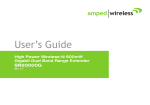
User’s Guide
High Power Wireless-N 600mW Gigabit
Dual Band Repeater
SR20000G
SR20000G USER’S GUIDE
CONTENTS
INTRODUCTION ..................................................................... 2
GETTING STARTED ................................................................. 3
Package Contents ...................................................................... 3
LED Indicators............................................................................ 4
Back Panel Description .............................................................. 5
SETUP GUIDE ......................................................................... 6
Welcome to the Smart Setup Wizard ........................................ 9
Scan for a Wireless Network ................................................... 10
Connecting to a Secure Network ............................................. 12
Extended Network Settings (SSID and Security) ...................... 13
Setup Summary ....................................................................... 15
5.0GHz WI-FI SETTINGS ........................................................ 18
Home Network Settings (5.0GHz)............................................ 18
Extended Network Settings (5.0GHz) ...................................... 19
Security (5.0GHz) ..................................................................... 21
Wi-Fi Protected Setup – WPS (5.0GHz).................................... 22
User Access (5.0GHz) ............................................................... 22
Access Schedule (5.0GHz)........................................................ 25
Advanced Settings (5.0GHz) .................................................... 26
2.4GHz WI-FI SETTINGS ........................................................ 28
Home Network Settings (2.4GHz)............................................ 28
Extended Network Settings (2.4GHz) ....................................... 29
Wi-Fi Protected Setup – WPS (2.4GHz) .................................... 32
User Access (2.4GHz) ............................................................... 32
Wireless Coverage Controls(2.4GHz) ....................................... 33
Access Schedule (2.4GHz) ........................................................ 35
Advanced Settings (2.4GHz) ..................................................... 36
USB STORAGE ...................................................................... 38
USB Storage: Local Sharing ...................................................... 38
NETWORK SETTINGS ............................................................ 42
IP Settings ................................................................................ 42
Wired Port Routing .................................................................. 44
MANAGEMENT FEATURES ................................................... 45
Repeater Status ....................................................................... 46
Network Statistics .................................................................... 48
System Clock ............................................................................ 49
System Logs ............................................................................. 50
Upgrade Firmware ................................................................... 51
Save/Reload Settings ............................................................... 52
TECHNICAL SPECIFICATIONS ................................................. 53
DEFAULT SETTINGS .............................................................. 55
TROUBLESHOOTING AND SUPPORT INFORMATION.............. 56
1
SR20000G USER’S GUIDE
INTRODUCTION
Thank you for purchasing this Amped Wireless product. At Amped Wireless we strive to provide you with the
highest quality products through innovation and advanced technology. We pride ourselves on delivering
products that outperform and go beyond your expectations. If you have any questions please feel free to
contact us. We’d love to hear from you and thank you for your support!
Email: [email protected]
Call: 888-573-8830
Web: www.ampedwireless.com
2
SR20000G USER’S GUIDE
GETTING STARTED
Package Contents
Check to make sure you have all the contents within your package:
•
•
•
•
•
•
High Power Wireless-N 600mW Gigabit Dual Band Repeater
Two Detachable 5dBi High Gain Antennas
Power Adapter (100-240v)
RJ-45 Ethernet Cable
Setup Guide
CD: User’s Guide, Installation Video
•
Stand for Vertical Mounting
3
SR20000G USER’S GUIDE
LED Indicators
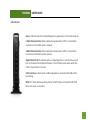
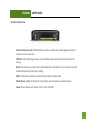
Power: Indicates when the Dual Band Repeater is powered on. The LED will remain on.
5.0GHz Wireless Activity: Blinks rapidly when wireless data traffic is transmitted or
received over the 5.0GHz wireless network.
2.4GHz Wireless Activity: Blinks rapidly when wireless data traffic is transmitted or
received over the2.4GHz wireless network.
Gigabit Wired Ports 1-5: Indicates when a networking device is connected to a wired
port on the back of the Dual Band Repeater. The LED blinks rapidly when wired data
traffic is transmitted or received.
USB Connection: Indicates when a USB storage device is connected to the USB port for
local sharing.
WPS: Wi-Fi Protected Setup activity. When the WPS mode is activated the WPS LED
blinks as it awaits a connection.
4
SR20000G USER’S GUIDE
Back Panel Description
Antenna Connectors (1-2): RJ-SMA antenna connectors. Attach the included high gain dual band
antennas to these connectors
USB Port: Attach USB storage devices, such as USB flash drives and external hard drives, for file
sharing.
Reset: Push down once to reboot the Dual Band Repeater. Hold down for 5-10 seconds to reset the
Dual Band Repeater back to factory settings.
WPS: Hold down for 3 seconds to enable WPS push button configuration.
Wired Devices: Gigabit RJ-45 ports for connecting to wired computers or network devices.
Power: Power adapter port. Output: 12V 1A, Input: 100-240v
5
SR20000G USER’S GUIDE
SETUP GUIDE
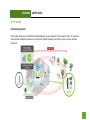
Find a Setup Location
The location of where you install the Dual Band Repeater is very important to how it will function. The optimal
setup location should be somewhere no more than halfway between your wireless router and your wireless
dead zone.
6
SR20000G USER’S GUIDE
Connect your PC to the Dual Band Repeater
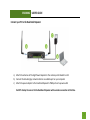
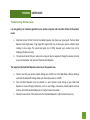
a) Attach the antennas of the High Power Repeater to the antenna ports labeled 1 and 2
b) Connect the included grey network cable to an available port on your computer
c) Attach the power adapter to the Dual Band Repeater’s PWR port and a power outlet
Do NOT attempt to connect to the Dual Band Repeater with a wireless connection at this time.
7
SR20000G USER’S GUIDE
Open your Web Browser to Access the Setup Wizard
a.
b.
c.
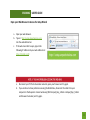
Open your web browser.
Type in: http://setup.ampedwireless.com
into the web address bar.
If the web menu fails to open, type in the
following IP address into your web address bar:
http://192.168.1.240
a.
b.
Disconnect your PC from all wireless networks, open your browser and try again.
If you continue to have problems accessing the Web Menu, disconnect the cable from your
computer to the Repeater. Connect wirelessly (SSID: Amped_Rep_2.4GHz or Amped_Rep_5.0GHz
and Password: wireless) and try again.
8
SR20000G USER’S GUIDE
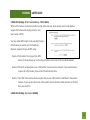
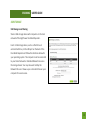
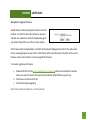
Welcome to the Smart Setup Wizard
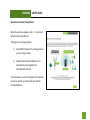
When the web menu appears, click Next to proceed
with the Smart Setup Wizard.
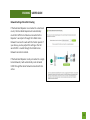
The diagram on this page displays:
1) Home/Office Network: The existing network
you are trying to repeat.
2) 2.4GHz/5.0GHz Extended Network: The
extended network (amplified and
rebroadcasted network).
The terms above are used throughout the installation
process to describe your Home Network and the
Extended Network.
9
SR20000G USER’S GUIDE
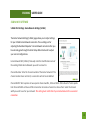
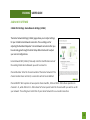
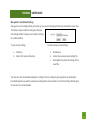
Scan for a Wireless Network
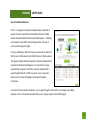
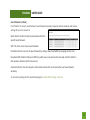
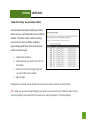
Click SCAN to begin searching for available wireless networks to
repeat. The Scan result will list all available 2.4GHz and 5.0GHz
wireless networks detected by the Dual Band Repeater – including
each network name (SSID), the operating channel, the type of
security and the signal strength.
If you are extending a dual band router, you will need to select the
SSID of your 2.4GHz network and the SSID of your 5.0GHz network.
The signal strength indicates the wireless connection between that
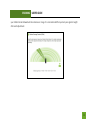
network and the Dual Band Repeater. It is important to choose
networks that are greater than 70%. A wireless network with a
signal strength of less than 70% may create a poor connection
which results in slower throughput and frequent dropped
connections.
If you fail to find any wireless networks, or your signal strength is below 70%, try moving the Dual Band
Repeater closer to the wireless network that you are trying to repeat and click SCAN again.
10
SR20000G USER’S GUIDE
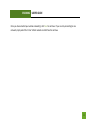
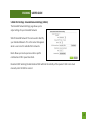
Once you have selected your wireless network(s), click Next to continue. If you are only connecting to one
network, simply select that 2.4 or 5.0GHz network and click Next to continue.
11
SR20000G USER’S GUIDE
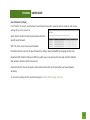
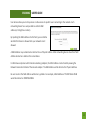
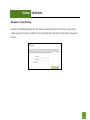
Connecting to a Secure Network
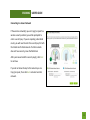
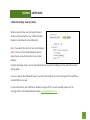
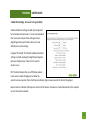
If the wireless network(s) you are trying to repeat has
wireless security enabled, you will be prompted to
enter a security key. If you are repeating a dual band
router, you will need to enter the security key for both
the 2.4GHz and 5.0GHz network. If either network
does not have security, leave the field blank.
After you have entered the security key(s), click Next
to continue.
If you do not know the key to the network you are
trying to repeat, then click Back and select another
network.
12
SR20000G USER’S GUIDE
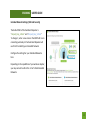
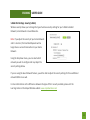
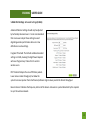
Extended Network Settings (SSID and Security)
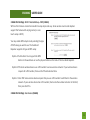
The default SSID of the Dual Band Repeater is
“Amped_Rep_2.4GHz” and “Amped_Rep_5.0GHz”
To change it, enter a new name in the SSID field. Users
connecting wirelessly to the Dual Band Repeater will
use this ID to identify your Extended Network.
Configure the settings for your Extended Networks
here.
Depending on the capabilities of your wireless adapter,
you may connect to either the 2.4 or 5.0GHz Extended
Networks.
13
SR20000G USER’S GUIDE
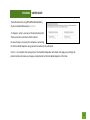
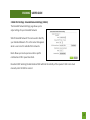
The default Security Key (WPA/WPA2 Mixed Mode)
of your Extended Network(s) is: wireless
To change it, enter a new key in the Security Key field.
The key must be a minimum of 8 characters.
No security key is necessary for computers connecting
to the Dual Band Repeater using a wired connection to the LAN ports.
Click Next to complete the setup process. The Dual Band Repeater will reboot and apply your settings. Be
patient and do not make any changes or adjustments to the Dual Band Repeater at this time.
14
SR20000G USER’S GUIDE
Setup Summary
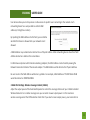
Once the Dual Band Repeater has rebooted, it will load the Setup Summary page and provide you with the
details of your setup.
Congratulations, the Dual Band Repeater is now successfully configured. Your
settings are now saved.
Print the Setup Summary details and save it for future reference.
At this time, you may disconnect from the Dual Band Repeater and start a
wireless connection.
If you have any wired devices that you would like to attach to the Dual Band
Repeater, you may do so now.
If you haven’t already positioned your Dual Band Repeater in an optimal
location, you may do so. All Repeater settings are saved and can be safely
powered off for relocation.
Enjoy your Extended network!
15
SR20000G USER’S GUIDE
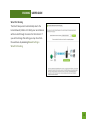
Wired Port Routing
The Smart Setup wizard automatically selects the
Home Network (2.4GHz or 5.0GHz) your wired devices
will be routed through to connect to the Internet. If
you wish to change this setting you may do so from
the web menu by accessing Network Settings >
Wired Port Routing
16
SR20000G USER’S GUIDE
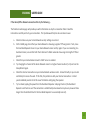
If the Home/Office Network connection fails try the following…
The failed connection page will provide you with information on why the connection failed. Read the
instructions carefully and retry your connection. The tips below will help to solve common issues:
a.
b.
c.
d.
e.
f.
Check to make sure your Home Network security settings are correct.
On the SCAN page, check that your Home Network is showing a signal of 70% or greater. If not, move
the Dual Band Repeater closer to your Home Network router and try again. If you are connecting to a
dual band router, ensure that both the 2.4GHz and 5.0GHz networks show a signal strength of 70% or
greater.
Check that your Home Network router’s DHCP server is enabled.
Try changing the channel of the Home Network router to a higher channel number (5-11) and run the
Setup Wizard again.
Check the internet connection on your Home Network wireless router. Connect directly to your router
and attempt to access the web. If this fails, the problem is with your internet connection. Contact
your broadband provider to fix this issue first before configuring the repeater.
Try to reboot (unplug the power from the Dual Band Repeater and plug it back in) the Dual Band
Repeater and check to see if the connection is established (some networks may be very slow and take
longer than the allotted time for the Dual Band Repeater to successfully connect).
17
SR20000G USER’S GUIDE
5.0GHz WI-FI SETTINGS
5.0GHz Wi-Fi Settings: Home Network Settings (5.0GHz)
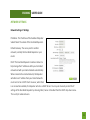
The Home Network Settings (5.0GHz) page allows you to adjust settings
for your 5.0GHz Home Network connection. These settings are for
adjusting the Dual Band Repeater’s Home Network connection after you
have already gone through the Smart Setup Wizard and wish to adjust
your current configurations.
Home Network SSID (5.0GHz): Manually enter the Identification name of
the existing 5.0GHz Home Network you wish to connect to.
Channel Number: Enter the channel number of the Home Network. If the
channel number does not match, a connection will not be established.
Channel Width: Wi-Fi operates in two separate channel widths, 20Hz and 40Hz. 40Hz allows for faster speeds.
Each Channel Width will have a different selection of wireless channels to choose from. Select the channel
width you wish to use for your network. This setting must match that of your Home Network for a successful
connection.
18
SR20000G USER’S GUIDE
5.0GHz Wi-Fi Settings: Extended Network Settings (5.0GHz)
The Extended Network Settings page allows you to
adjust settings for your Extended Network.
SSID of Extended Network: The name used to identify
your Extended Network. This is the name that appears
when a user scans for available Wi-Fi networks.
Band: Allows you to setup access under a specific
combination of Wi-Fi speed standards.
Broadcast SSID: Selecting Disable Broadcast SSID will hide the visibility of the repeater’s SSID. Users must
manually enter the SSID to connect.
19
SR20000G USER’S GUIDE
Guest Networks (5.0GHz)
Click “Enable” to create a Guest Network. Guest Networks provide a separate wireless network, with unique
settings for users to connect to.
Band: Restrict the Wi-Fi protocol and speed used for the
specific Guest Network.
SSID: This is the name of your Guest Network.
Data Rate: Restrict access to the Guest Network by setting a lower bandwidth by changing the data rate.
Broadcast SSID: Disable to hide your SSID from public view. Users will need to manually enter the SSID into
their wireless software interface to connect.
Associated Clients: View all computers and network devices that are connected to your Guest Network
wirelessly.
To set security settings for the Guest Network go to: 5.0GHz Wi-Fi Settings > Security.
20
SR20000G USER’S GUIDE
5.0GHz Wi-Fi Settings: Security (5.0GHz)
Wireless security allows you to change the type of wireless security settings for your 5.0GHz Extended
Network, Home Network or Guest Networks.
Note: If you adjust the security of your Home Network
and it is incorrect, the Dual Band Repeater will no
longer have a successful connection to your Home
Network.
Using the drop down menu, you can select which
network you wish to configure and may adjust the
security settings below.
If you are using the Guest Network feature, you will be able to adjust the security settings for those additional
network SSIDs here as well.
For more information on the differences between the types of Wi-Fi security available, please visit the
Learning Center on the Amped Wireless website: www.ampedwireless.com
21
SR20000G USER’S GUIDE
5.0GHz Wi-Fi Settings: Wi-Fi Protected Setup – WPS (5.0GHz)
WPS is a Wi-Fi feature created to make Wi-Fi setup simple and easy. Some wireless routers and adapters
support this feature with varying names (i.e. one
touch setup or WPS).
You may enable WPS setup here by selecting the type
of WPS setup you wish to use. The Dual Band
Repeater supports all types of WPS setup:
Option A: Push button: You may push the WPS
button on the web menu or use the physical button on the back of the Dual Band Repeater.
Option B: PIN: Some wireless devices use a PIN number to access wireless network. If your wireless device
requests for a PIN number, then use the PIN code located here.
Option C: Enter PIN: Some wireless devices require that you use a PIN number to add them to the wireless
network. If your wireless device has a PIN number, then locate the number and enter in the field,
then press Start Pin.
5.0GHz Wi-Fi Settings: User Access (5.0GHz)
22
SR20000G USER’S GUIDE
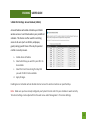
User Access allows you to deny access or allow access to specific users connecting to the network. Each
networking device has a unique address called a MAC
address (a 12 digit hex number).
By inputting the MAC address into the field, you can define
whether that device is allowed into your network or not
allowed.
A MAC Address may sometimes be referred to as a Physical Address. Most networking devices have their MAC
Address located on a label on the actual device.
For Windows computers with internal networking adapters, the MAC Address can be found by viewing the
Network Connection Details of the network adapter. The MAC Address will be listed as the Physical Address.
Be sure to enter the MAC Address without any symbols. For example, a MAC Address of 78-DD-78-AA-78-BB
would be entered as 78DD78AA78BB.
23
SR20000G USER’S GUIDE
5.0GHz Wi-Fi Settings: Wireless Coverage Controls (5.0GHz)
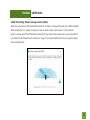
Adjust the output power of the Dual Band Repeater to control the coverage distance of your 5.0GHz Extended
Wireless Network. For a smaller coverage area you can select a lower output power. For the maximum
wireless coverage select the 100% selection. Note that if you select a lower output power, your connection to
your 5.0GHz Home Network will also decrease in range. It is recommended that you test your signal strength
after each adjustment.
24
SR20000G USER’S GUIDE
5.0GHz Wi-Fi Settings: Access Schedule (5.0GHz)
Access Schedules will enable or disable your 5.0GHz
wireless access at a set time based on your predefined
schedule. This feature is often used for restricting
access to all users (such as children, employees,
guests) during specific times of the day for parental
control or security reasons.
a.
b.
c.
d.
Enable Access Schedule.
Select which days you wish for your Wi-Fi to
be available.
Select the time frame during that day that
you wish for Wi-Fi to be available.
Apply Changes.
Enabling Access Schedule will also disable internet access for wired connections on specified days.
Note: Make sure you have already configured your System Clock in order for your schedule to work correctly.
Time Zone Settings can be adjusted from the web menu under Management > Time Zone Settings.
25
SR20000G USER’S GUIDE
5.0GHz Wi-Fi Settings: Advanced Settings (5.0GHz)
Advanced Wireless Settings should only be adjusted
by technically advanced users. It is not recommended
that novice users adjust these settings to avoid
degrading wireless performance.Here are a few
definitions on some settings.
Fragment Threshold: The Default and Recommended
setting is at 2346, meaning the High Power Repeater
will never fragment any frames that it sends to
wireless users.
RTS Threshold: Adjusts the size of RTS data packets.
Lower values reduce throughput, but allow the
system to recover quicker from interference/collisions. Higher values provide the fastest throughput.
Beacon Interval: Indicates the frequency interval of the beacon. A beacon is a packet broadcast by the repeater
to sync the wireless network.
26
SR20000G USER’S GUIDE
Preamble Type: Defines the length of the Cyclic Redundancy Check for communication between the repeater
and roaming wireless users.
IAPP: Inter-Access Point Protocol
STBC: Space Time Block Coding improves reception by coding the data stream in blocks.
27
SR20000G USER’S GUIDE
2.4GHz WI-FI SETTINGS
2.4GHz Wi-Fi Settings: Home Network Settings (2.4GHz)
The Home Network Settings (2.4GHz) page allows you to adjust settings
for your 2.4GHz Home Network connection. These settings are for
adjusting the Dual Band Repeater’s Home Network connection after you
have already gone through the Smart Setup Wizard and wish to adjust
your current configurations.
Home Network SSID (2.4GHz): Manually enter the Identification name of
the existing 2.4GHz Home Network you wish to connect to.
Channel Number: Enter the channel number of the Home Network. If the
channel number does not match, a connection will not be established.
Channel Width: Wi-Fi operates in two separate channel widths, 20Hz and 40Hz. 20Hz allows operation on
channels 1-11, while 40Hz is 5-11. 40Hz allows for faster speeds. Select the channel width you wish to use for
your network. This setting must match that of your Home Network for a successful connection.
28
SR20000G USER’S GUIDE
2.4GHz Wi-Fi Settings: Extended Network Settings (2.4GHz)
The Extended Network Settings page allows you to
adjust settings for your Extended Network.
SSID of Extended Network: The name used to identify
your Extended Network. This is the name that appears
when a user scans for available Wi-Fi networks.
Band: Allows you to setup access under a specific
combination of Wi-Fi speed standards.
Broadcast SSID: Selecting Disable Broadcast SSID will hide the visibility of the repeater’s SSID. Users must
manually enter the SSID to connect.
29
SR20000G USER’S GUIDE
Guest Networks (2.4GHz)
Click “Enable” to create a Guest Network. Guest Networks provide a separate wireless network, with unique
settings for users to connect to.
Band: Restrict the Wi-Fi protocol and speed used for the
specific Guest Network.
SSID: This is the name of your Guest Network.
Data Rate: Restrict access to the Guest Network by setting a lower bandwidth by changing the data rate.
Broadcast SSID: Disable to hide your SSID from public view. Users will need to manually enter the SSID into
their wireless software interface to connect.
Associated Clients: View all computers and network devices that are connected to your Guest Network
wirelessly.
To set security settings for the Guest Network go to: 2.4GHz Wi-Fi Settings > Security.
30
SR20000G USER’S GUIDE
2.4GHz Wi-Fi Settings: Security (2.4GHz)
Wireless security allows you to change the type of
wireless security settings for your 2.4GHz Extended
Network, Home Network or Guest Networks.
Note: If you adjust the security of your Home Network
and it is incorrect, the Dual Band Repeater will no
longer have a successful connection to your Home
Network.
Using the drop down menu, you can select which network you wish to configure and may adjust the security
settings below.
If you are using the Guest Network feature, you will be able to adjust the security settings for those additional
network SSIDs here as well.
For more information on the differences between the types of Wi-Fi security available, please visit the
Learning Center on the Amped Wireless website: www.ampedwireless.com
31
SR20000G USER’S GUIDE
2.4GHz Wi-Fi Settings: Wi-Fi Protected Setup – WPS (2.4GHz)
WPS is a Wi-Fi feature created to make Wi-Fi setup simple and easy. Some wireless routers and adapters
support this feature with varying names (i.e. one
touch setup or WPS).
You may enable WPS setup here by selecting the type
of WPS setup you wish to use. The Dual Band
Repeater supports all types of WPS setup:
Option A: Push button: You may push the WPS
button on the web menu or use the physical button on the back of the Dual Band Repeater.
Option B: PIN: Some wireless devices use a PIN number to access wireless network. If your wireless device
requests for a PIN number, then use the PIN code located here.
Option C: Enter PIN: Some wireless devices require that you use a PIN number to add them to the wireless
network. If your wireless device has a PIN number, then locate the number and enter in the field,
then press Start Pin.
2.4GHz Wi-Fi Settings: User Access (2.4GHz)
32
SR20000G USER’S GUIDE
User Access allows you to deny access or allow access to specific users connecting to the network. Each
networking device has a unique address called a MAC
address (a 12 digit hex number).
By inputting the MAC address into the field, you can define
whether that device is allowed into your network or not
allowed.
A MAC Address may sometimes be referred to as a Physical Address. Most networking devices have their MAC
Address located on a label on the actual device.
For Windows computers with internal networking adapters, the MAC Address can be found by viewing the
Network Connection Details of the network adapter. The MAC Address will be listed as the Physical Address.
Be sure to enter the MAC Address without any symbols. For example, a MAC Address of 78-DD-78-AA-78-BB
would be entered as 78DD78AA78BB.
2.4GHz Wi-Fi Settings: Wireless Coverage Controls (2.4GHz)
Adjust the output power of the Dual Band Repeater to control the coverage distance of your 2.4GHz Extended
Wireless Network. For a smaller coverage area you can select a lower output power. For the maximum
wireless coverage select the 100% selection. Note that if you select a lower output power, your connection to
33
SR20000G USER’S GUIDE
your 2.4GHz Home Network will also decrease in range. It is recommended that you test your signal strength
after each adjustment.
34
SR20000G USER’S GUIDE
2.4GHz Wi-Fi Settings: Access Schedule (2.4GHz)
Access Schedules will enable or disable your 2.4GHz
wireless access at a set time based on your predefined
schedule. This feature is often used for restricting
access to all users (such as children, employees,
guests) during specific times of the day for parental
control or security reasons.
a.
b.
c.
d.
Enable Access Schedule.
Select which days you wish for your Wi-Fi to
be available.
Select the time frame during that day that
you wish for Wi-Fi to be available.
Apply Changes.
Enabling Access Schedule will also disable internet access for wired connections on specified days.
Note: Make sure you have already configured your System Clock in order for your schedule to work correctly.
Time Zone Settings can be adjusted from the web menu under Management > Time Zone Settings.
35
SR20000G USER’S GUIDE
2.4GHz Wi-Fi Settings: Advanced Settings (2.4GHz)
Advanced Wireless Settings should only be adjusted
by technically advanced users. It is not recommended
that novice users adjust these settings to avoid
degrading wireless performance.Here are a few
definitions on some settings.
Fragment Threshold: The Default and Recommended
setting is at 2346, meaning the High Power Repeater
will never fragment any frames that it sends to
wireless users.
RTS Threshold: Adjusts the size of RTS data packets.
Lower values reduce throughput, but allow the
system to recover quicker from interference/collisions. Higher values provide the fastest throughput.
Beacon Interval: Indicates the frequency interval of the beacon. A beacon is a packet broadcast by the repeater
to sync the wireless network.
36
SR20000G USER’S GUIDE
Preamble Type: Defines the length of the Cyclic Redundancy Check for communication between the repeater
and roaming wireless users.
IAPP: Inter-Access Point Protocol
STBC: Space Time Block Coding improves reception by coding the data stream in blocks.
37
SR20000G USER’S GUIDE
USB STORAGE
USB Storage: Local Sharing
Share a USB storage device with computers on the local
network of the High Power Dual Band Repeater.
Insert a USB storage device, such as a flash drive or
external hard drive, to the USB port on the back of the
Dual Band Repeater and follow the directions below for
your operating system. The computer must be connected
to your Home Network or Extended Network to access
the storage device. You may also want to Map the
Network Drive so it shows up as a standard drive on your
computer for easier access.
38
SR20000G USER’S GUIDE
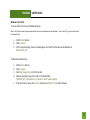
Windows 7 and Vista
To access the drive from your Windows desktop:
Note: If the USB drive does not appear automatically under your Networked devices (Windows 7, Vista or Mac OS X), you will need to Map
the Network Drive.
a.
b.
c.
Click the Start button
Click Computer
On the Computer page, the drive should appear on the left hand column under Network as
AMPED_REP_USB
To Map the Network Drive:
a.
b.
c.
d.
e.
Click the Start button
Click Computer
Click Map Network Drive from the top bar.
Select a drive letter (any), then enter in the folder field:
\\AMPED_REP_USB\public\ or \\repeater’s LAN IP address\public\
If the drive fails to open, click browse and locate AMPED_REP_USB under Network.
39
SR20000G USER’S GUIDE
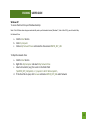
Windows XP
To access the drive from your Windows desktop:
Note: If the USB drive does not appear automatically under your Networked devices (Windows 7, Vista or Mac OS X), you will need to Map
the Network Drive.
a.
b.
c.
Click the Start button
Click My Computer
Click on My Network Places and locate the drive named AMPED_REP_USB
To Map the network drive:
a.
b.
c.
d.
Click the Start button
Right Click My Computer and select Map Network Drive
Select a drive letter (any), then enter in the folder field:
\\AMPED_REP_USB\public\ or \\repeater’s LAN IP address\public\
If the drive fails to open, click browse and locate AMPED_REP_USB under Network.
40
SR20000G USER’S GUIDE
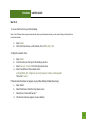
Mac OS X
To access the drive from your Mac desktop:
Note: If the USB drive does not appear automatically under your Networked devices, you will need to Map your Network Drive
(Instructions below).
a.
b.
Open Finder
On the left hand menu, under Shared, click AMPED_REP_USB
To Map the network drive:
a.
b.
c.
d.
Open Finder
From the menu on the top of the desktop, select Go
Select Connect To Server from the drop down menu
Enter the address of the network drive:
smb://AMPED_REP_USB/public or smb://repeater’s LAN ip address/public
Then click Connect
If the network drive does not appear on your Mac desktop, follow these steps:
a. Open Finder
b. Select Preferences from the drop down menu
c. Check show "Connected Servers"
d. The drive should now appear on your desktop
41
SR20000G USER’S GUIDE
NETWORK SETTINGS
Network Settings: IP Settings
IP Address: The IP address of the Dual Band Repeater.
Subnet Mask: The subnet of the Dual Band Repeater.
Default Gateway: The access point to another
network, normally the Dual Band Repeater or your
router.
DHCP: The Dual Band Repeater includes a feature to
help manage the IP addresses within your Extended
network and with your Home Network automatically.
When connected to a Home Network, the Repeater
will obtain an IP address from your Home Network’s
router and act as a DHCP Client. However, when there
is no connection available, the Repeater will act as a DHCP Server. You may also manually control the IP
settings of the Dual Band Repeater by choosing Client, Server or Disabled from the DHCP drop down menu.
This is only for advanced users.
42
SR20000G USER’S GUIDE
DHCP Client Range: The range of IP addresses the Dual Band Repeater’s DHCP server will assign to users and
devices connecting to the Dual Band Repeater.
Static DHCP: You may set a static IP address within your DHCP network. The Dual Band Repeater will track the
device via its MAC address and assign it a pre-defined IP address each time the device logs into the network.
Obtain IP settings from the Home router or manually enter your IP settings.
Auto-Load Menu (Auto-DNS): When the Dual Band Repeater loses connection to your Home Network it will
automatically redirect your web browser to the web menu. To turn this feature off, you can disable Auto-DNS.
Note: Disabling Auto-DNS will require that you access the web menu using the IP address of this device. It is
recommended that you note your IP address before changing this mode. If you are no longer able to access
the web menu, you will need to perform a hardware reset.
Domain Name: The Domain Name allows you to change the URL which is used to access the Setup Menu for
the Dual Band Repeater. For example, entering http://setup.ampedwireless.com into your web browser while
connected to the Dual Band Repeater, will guide you to the Web menu for the Dual Band Repeater. By
changing the Domain Name, you will change the URL entered to access the Web menu. If you forget the
Domain Name you entered and can no longer access the Web menu, then you will need to reset your Dual
Band Repeater to default settings by holding down the reset button on the back panel for 5-10 seconds.
43
SR20000G USER’S GUIDE
Network Settings: Wired Port Routing
If the Dual Band Repeater is connected to a dual band
router, the Dual Band Repeater will automatically
route the traffic from all devices connected to the
Repeater’s wired ports through the 5.0GHz Home
Network to access the web with the fastest speeds. If
you choose, you may adjust this setting so that all
wired traffic is routed through the 2.4GHz Home
Network connection instead.
If the Dual Band Repeater is only connected to a single
Home Network, it will automatically route all wired
traffic through the Home Network connection that is
active.
44
SR20000G USER’S GUIDE
MANAGEMENT FEATURES
The Management features on the Dual Band Repeater allow you to view the status of your Dual Band Repeater
and adjust other settings such as your System Clock, Passwords, and Firmware Upgrades among other
administrative functions.
45
SR20000G USER’S GUIDE
Management: Repeater Status
The System Status provides you with a snapshot of your Dual Band Repeater’s
current connections and settings.
System Information: This section provides you with information on the
version and build time of your firmware. This is used to help our support
department determine what firmware version your device is running.
The Current Date / Time will display the current clock settings of the Dual
Band Repeater. If this time is off, go to the System Clock section and
configure your system time.
The Wired Ports Routing shows the active Home Network used for
transferring data to and from the wired ports.
Home Wireless Network Settings: This section displays the current status of
the connection between the High Power Dual Band Repeater and your Home
Network (2.4GHz or 5.0GHz). When viewing this section it is important to
check that your Home Network SSID is correct, that the channel number
matches your Home Network's channel number settings.
46
SR20000G USER’S GUIDE
Connection State: The Connection State will say "Connected" when there are no problems with the connection
to your Home Network.
If the Connection State shows "Waiting for Keys" then the WPA/WPA2 security key you entered is incorrect.
If the Connection State shows "Scanning" the Dual Band Repeater may be too far away from your home/office
router.
The Signal Strength display can be updated by refreshing the page and is a good tool to use for finding the
optimal installation location. A signal strength of 70% or greater is recommended for stable operation of the
High Power Dual Band Repeater.
Extended Wireless Network Settings: Shows the current settings for your Extended Wireless Network (2.4GHz
or 5.0GHz).
IP Settings: The network IP settings for your High Power Dual Band Repeater will change as you connect and
disconnect from your 2.4 or 5.0GHz Home Network. When connected to your Home Network, the network IP
settings will be assigned by your Home Network. When not connected, the High Power Dual Band Repeater
will use its own default network IP settings. These IPs are assigned to the 2.4 and 5.0GHz networks
individually.
47
SR20000G USER’S GUIDE
Management: Network Statistics
These statistics show the data activity for each network
connection.
Connection to Home Network: This statistics shows the data
activity for all upload and download data between the Home
Network and the Dual Band Repeater.
Extended Wireless Network: These statistics shows all data
activity for all users connected wirelessly to the Dual Band
Repeater.
Extended Wired Network: The Wired Connection statistics
shows all data activity for all users physically connected to the
wired ports on the Dual Band Repeater.
48
SR20000G USER’S GUIDE
Management: System Clock
Maintain the internal clock for the Dual Band Repeater by syncing with your computer’s time. Your system
clock settings need to be accurate in order for logs and wireless access schedules to work correctly.
49
SR20000G USER’S GUIDE
Management: System Logs
System Logs are useful for viewing the activity and history of the repeater. The System Logs are also used by
Amped Wireless Elite Support Concierges to help troubleshoot your repeater when needed.
It is recommended that you enable all logs in the event that troubleshooting is required. All log entries are
deleted each time the repeater reboots or is powered off.
50
SR20000G USER’S GUIDE
Management: Upgrade Firmware
Amped Wireless continuously updates the firmware for all
products in an effort to constantly improve our products
and their user experiences. Check the Downloads page for
your product frequently to see if there are any updates.
The firmware update is downloaded as a zip file from the Support Webpage link on the left. You will need to
have an unzipping program to open the file. Inside the file will be a text document with details on the current
firmware release and instructions on how to upgrade the firmware.
To manually upgrade your firmware:
a.
b.
c.
Download the file from the www.ampedwireless.com/support website and remember the location
where you saved it. Firmware files may also be provided by Amped Wireless support reps.
Click Choose File and locate the file
Click Upload to begin upgrading.
Note: Firmware files normally have a .bin file extension.
51
SR20000G USER’S GUIDE
Management: Save/Reload Settings
Saving your current settings allows you to back-up your current settings which may be reloaded at a later time.
This feature may be useful for testing new features
and settings without having to worry about returning
to a stable platform.
To save current settings:
a.
b.
Click Save
Select a file name and location
To load previously saved settings:
a.
b.
c.
Click Browse
Locate the previously saved settings file
Click Upload to restore the settings to the
saved file.
You may also reset the Dual Band Repeater’s settings to factory settings by pressing Reset. By resetting the
Dual Band Repeater you will lose all previous configurations and will need to run the Smart Setup Wizard again
to reconnect to a Home Network.
52
SR20000G USER’S GUIDE
Management: Password Settings
By default, the Dual Band Repeater does not require a password to log on to the web menu. If you wish to
enable a password to protect unauthorized access to the web menu and Smart Setup Wizard, you may enter
one here.
53
SR20000G USER’S GUIDE
TECHNICAL SPECIFICATIONS
Wireless Standard: 802.11a/b/g/n
Frequency Band: 2.4GHz, 5.0GHz
Wireless Speed: 2.4GHz: 300Mbps (Tx/Rx)
5.0GHz: 300Mbps (Tx/Rx)
Amplifier: Dual 2.4GHz 600mW Amplifiers
Dual 5.0GHz Amplifiers
Dual Low Noise Amplifier
Wireless Sensitivity: -94dBm (Max)
Wireless Output Power: 29dBm (Max)
Wireless Security:
• WEP, WPA, WPA2, WPA Mixed, WPS
Processor Clock Speed: 620MHz
User Access Control:
• MAC address filtering
Wireless Access Scheduling:
• Specific day and time
(2.4GHz or 5.0GHz Separately)
Wireless Coverage Control:
• 15% - 100% Output Power
Antennas:
• 2 x Detachable High Gain
Dual Band 5dBi Antennas
• 2 x Reverse SMA Connector
Ports:
• 5 x RJ-45 10/100/1000M LAN ports (Local
Ports)
• USB 2.0 Port for Storage Devices
Mounting:
• Wall, Stand or Desktop
Warranty: 1 Year
Setup Requirements:
• Wired or wireless PC/Mac and an available
802.11a/b/g or n wireless network
• Google Chrome, Internet Explorer
(8.0 and up) or Safari web browser
(2.4GHz or 5.0GHz Separately)
54
SR20000G USER’S GUIDE
DEFAULT SETTINGS
The default settings for your Dual Band Repeater are listed here. If for some reason you need to return your
Dual Band Repeater back to default settings, hold down the Reset button on the back panel for 10 seconds.
The Dual Band Repeater will reset back to factory settings as listed below:
IP Address: 192.168.1.240
Web Menu Access: http://setup.ampedwireless.com
2.4GHz Extended Network SSID: Amped_Rep_2.4GHz
Wireless Security Key (WPA/WPA2 Mixed Mode): wireless
5.0GHz Extended Network SSID: Amped_ Rep_5.0GHz
Wireless Security Key (WPA/WPA2 Mixed Mode): wireless
55
SR20000G USER’S GUIDE
TROUBLESHOOTING AND SUPPORT INFORMATION
We are here to help. If you have any issues with your Dual Band Repeater, please contact us.
To contact Amped Wireless Elite Support use one of the following methods:
Phone: 888-573-8820
Email: [email protected]
Web: www.ampedwireless.com/support
56
SR20000G USER’S GUIDE
Troubleshooting
The tips in this guide are listed in order of relevance. Try solution (a) before trying solution (b), etc.
Troubleshooting: Web Menu Access Issues
I entered http://setup.ampedwireless.com and it failed to open the Web Menu.
a.
b.
c.
d.
e.
f.
Make sure your computer is connected to the Dual Band Repeater using the included Ethernet cable.
Do not try to connect with a wireless connection. Ensure that the power on the Dual Band Repeater is on.
Make sure your computer is NOT connected to any wireless networks. If it is, disconnect and try again.
Try to use a different web browser. We recommend the Google Chrome web browser.
Try to open your web browser to the default IP address by putting this number into your web browser
instead: 192.168.1.240
Power off (unplug the power adapter) the Dual Band Repeater and power it back on. Try again.
Reset your Dual Band Repeater to default settings by holding the Reset Button (located on the back
panel) for ten (10) seconds and try again.
57
SR20000G USER’S GUIDE
I could NEVER log on to the Dual Band Repeater wirelessly.
a.
b.
Check that your wireless adapter supports WPA2 or WPA wireless security. If it does not then you will
need to change the wireless security on the Dual Band Repeater. Go to the Web Menu, select
Wireless Settings and then Wireless Security. Select the Extended Network from the drop down menu
and either disable security or downgrade the security to WEP. Try connecting again.
The connection to the Home Network may be down. Use an Ethernet cable and connect directly to
the Dual Band Repeater. Access http://setup.ampedwireless.com and run through the Smart Setup
Wizard again. After you have successfully reset the Home Network connection, try connecting
wirelessly again.
I can no longer access the Web Menu or the Dual Band Repeater no longer responds.
a.
b.
Connect to your Dual Band Repeater and try to access http://setup.ampedwireless.com using your
web browser.
If you are advanced in networking troubleshooting, log onto your home router’s web interface. Look
for the DHCP client list and try to find the IP address of your Dual Band Repeater assigned by your
home router. Once you have it, connect to the Dual Band Repeater using an Ethernet cable. Open
your web browser and enter the IP address into the address bar.
58
SR20000G USER’S GUIDE
c.
Reset the Dual Band Repeater back to default settings and try the Smart Setup Wizard again. To reset
the Repeater back to default settings, push the Reset Button (on the back panel) down for five (5) to
ten (10) seconds then let go. After the Dual Band Repeater has fully reset, use an Ethernet cable and
connect to the Dual Band Repeater. Login to the Web Menu at http://setup.ampedwireless.com and
run through the Wizard.
59
SR20000G USER’S GUIDE
Troubleshooting: Home Network Connection Issues
I cannot connect to my Home Network. I received an error when running the Smart Setup Wizard.
a.
b.
c.
d.
Your Home Network may be secured. Double check that you have the correct security key to connect
to the Home Network.
Your Dual Band Repeater may be located too far from your Home Network. Run through the Setup
Wizard again. On the SCAN page, your Home Network should show a signal strength of 70% or
greater. If it does not, move the Dual Band Repeater closer to your Home Network and try again.
If you are connecting to a dual band router, both networks (2.4GHz and 5.0GHz) should have a signal
strength of 70% or greater.
Check to see that your Home Network router’s DHCP server is enabled. The Dual Band Repeater
needs to obtain an IP from your Home Network router.
I cannot find my Home Network when scanning for wireless networks in the Smart Setup Wizard.
a.
The Dual Band Repeater may be out of range. Move the Dual Band Repeater closer towards the
wireless router and try the Setup Wizard again from the Web Menu. It is recommended that your
Home Network shows a signal strength of 70% or greater in the Smart Setup Wizard SCAN results.
60
SR20000G USER’S GUIDE
b.
c.
Go to the Wireless Settings tab in the web menu and access the Wireless Coverage Controls for your
specific wireless network (2.4GHz or 5.0GHz). Make sure the setting is at 100% and try again.
Make sure that your Home Network’s wireless SSID is broadcasting and not hidden. If your Home
Network SSID is hidden, you will need to manually setup the Dual Band Repeater through the Wireless
Settings > Home Network Settings menu.
My Dual Band Repeater was working fine previously, but now I can no longer access the Internet through
the Dual Band Repeater. Or, I had a POWER OUTAGE and now the Dual Band Repeater no longer works.
The Dual Band Repeater should automatically heal itself and reconnect to your wireless network. However, in
the event that it does not and you are not able to access the Internet or your home network please try the
following options:
a.
b.
Reboot the Dual Band Repeater, wait 3 minutes for the Dual Band Repeater to reconnect to your
network and try to access the Internet.
The connection to your Home Network may have been dropped or the router settings may have
changed. Changes to the router could be a result of several events, such as a power outage. When
this occurs, connect to the Dual Band Repeater and access the setup menu using the web
address: http://setup.ampedwireless.com. Run the Smart Setup Wizard to reconnect the Repeater to
your network.
61
SR20000G USER’S GUIDE
c.
d.
e.
f.
g.
The Dual Band Repeater may be too far from your home router and not maintaining a signal strength
of above 70%. Check the signal strength between the router and the Dual Band Repeater through the
web menu (left side): More Settings > Management > Repeater Status. The Signal Strength readout
will be under the Home Wireless Network Settings section. This Signal Strength must be above 70%. If
it is below, move the Dual Band Repeater closer to your router, or reposition the Dual Band Repeater.
Rescan for another network by accessing http://setup.ampedwireless.comto connect to and repeat or
you may try to fix the issues with your Home Network and your home wireless router.
Check to see that your home wireless router settings have not changed. Any changes to the SSID,
security, or channel number from the original settings will disconnect the Dual Band Repeater’s
connection to the home network To solve this simply run the Smart Setup Wizard again from the web
menu and reconfigure your Home Network connection. You can also set a static channel number on
your router to prevent this from happening again in the future.
If you cannot access the setup menu, check to see that your Dual Band Repeater is still on. Reboot the
Dual Band Repeater by unplugging the power adapter and plugging it back in. Check to see if your
connection has been reestablished by viewing a website. If you do not have a connection, logon
to http://setup.ampedwireless.com and configure a new Home Network connection.
Check to see that your home wireless router is still on. If it has been turned off please turn it back on.
The Dual Band Repeater should automatically reconnect to your Home Network within 10 minutes.
62
SR20000G USER’S GUIDE
I have a dual-band router and I cannot repeat a network (or both networks).
a.
b.
c.
The Dual Band Repeater will repeat the 2.4GHz signal and the 5.0GHz signal from your router
simultaneously. Both wireless networks must have a signal strength of 70% or greater with the Dual
Band Repeater for a reliable connection. Make sure that your dual band router is close enough to the
Dual Band Repeater to receive a strong signal.
Check to make sure that you have the correct security key for both the 2.4GHz and 5.0GHz network of
your dual band router. These keys may sometimes be different from each other.
Ensure that your dual band router does not have any security features enabled, such as Mac address
filtering. If it does, disable it and try again.
I cannot find any wireless networks (Home Networks) to repeat.
a.
b.
c.
The Dual Band Repeater may be out of range. Move the Dual Band Repeater closer towards the
wireless router and try the Setup Wizard again from the Web Menu.
The antenna on your Dual Band Repeater may be loose. Tighten the antenna connection and try again.
The wireless Home Network may not be a compatible wireless network (802.11a/b/g/n).
63
SR20000G USER’S GUIDE
I am connected to a Home Network however I do not have Internet access.
a.
b.
c.
The Home Network itself may not have Internet access. Check to see that you have internet access by
connecting directly to the Home Network first. If you are able to go online then this is not a problem.
If you cannot go online, then the Home Network’s Internet connection must first be resolved.
You may have a DNS issue and the Dual Band Repeater is not obtaining the IP settings from your
Home Network. Try to reboot the Dual Band Repeater. If that fails, then reboot the Home Router to
see if that fixes it.
There may be an IP conflict with your Home Network and your Extended Network. Try to adjust the IP
Settings of your Extended Network using IP values that are different from your Home Network.
I can no longer connect to the Dual Band Repeater wirelessly.
a.
b.
Power on and off the Dual Band Repeater and try again.
The connection to the Home Network may be down. Use an Ethernet cable and connect directly to
the Dual Band Repeater. Access http://setup.ampedwireless.com and run through the Smart Setup
Wizard again. After you have successfully reset the Home Network connection, try connecting
wirelessly again.
64
SR20000G USER’S GUIDE
The connection to the Home Network seems slow. File transfers take a long time to transfer.
a.
b.
c.
You may be too far away from your Home Network. The closer the Dual Band Repeater is to your
Home Network, the better its connection will be. The Dual Band Repeater must have a strong signal in
order to repeat the signal with fast speeds and further range. Move the Dual Band Repeater closer to
your Home Network and try again.
You may be downloading from the Internet and not within your Home Network or Extended Network.
Files transferred through the Internet are limited by your ISP speed and the data download speeds
from the website that you are downloading from.
Your computer may be using an older Wi-Fi adapter with lower speed limits and range capabilities
(802.11b/g).
Network devices connected to the wired ports of the Repeater do not have Internet access.
a.
The Wired Port Routing on the Dual Band Repeater may not be defined correctly. While connected to
the Dual Band Repeater, open your web browser and access http://setup.ampedwireless.com. From
the web menu, go to More Settings > Network Settings > Wired Port Configuration. Check that your
wired ports are routed through an active Home Network connection. If the Dual Band Repeater is
connected to a 2.4GHz network only, adjust the routing so that all wired ports traffic routes through
the 2.4GHz Home Network.
65
SR20000G USER’S GUIDE
66
SR20000G USER’S GUIDE
Troubleshooting: Wireless Issues
I am only getting 3 or 4 wireless signal bars on my wireless computer and I am within 10 feet of the wireless
router.
a.
b.
Step back at least 10 feet from the Dual Band Repeater and check your signal again. The Dual Band
Repeater emits high power, long range Wi-Fi signals that may confuse your wireless adapter signal
reading at close range. The speed and signal are at 100%, however your readout may not be
displaying the data correctly.
The wireless channel that your network is running on may be congested. Change the wireless channel
on your home Router and reconnect the Dual Band Repeater.
The range from the Dual Band Repeater seems low or the speed is slow.
a.
b.
c.
Check to see that your wireless output settings are at 100%. Go to the Web Menu, Wireless Settings
and check the Advanced Settings. Make sure the output power is at 100%.
Your Dual Band Repeater may be installed in a poor location. Avoid setting up your Dual Band
Repeater in areas with high interference, such as, near fridges, microwaves, metallic objects and low
surfaces. Install the Dual Band Repeater in a higher location if possible.
Check the connections of the Antennas to the Dual Band Repeater. Tighten them if necessary.
67
SR20000G USER’S GUIDE
d.
e.
f.
Adjust the Antennas of the Dual Band Repeater in different angles.
The wireless channel that your network is using may be congested. Change the channel for your
router’s 2.4GHz network or 5.0GHz network. The Dual Band Repeater should automatically reconnect
to your networks new settings, however if it does not, simply reconfigure the Repeater to your
network.
The network adapter that you are using may have poor range, older technology with slower speeds or
may need a driver update.
68
SR20000G USER’S GUIDE
Troubleshooting: USB Storage and Web Menu Feature Issues
I cannot access my USB storage device after I plug it into the router.
Follow the instructions below for your operating system.
Windows 7 and Vista
To access the drive from your Windows desktop:
Note: If the USB drive does not appear automatically under your Networked devices (Windows 7, Vista or Mac OS X), you will need to
Map the Network Drive.
a.
b.
c.
Click the Start button.
Click Computer.
On the Computer page, the drive should appear on the left hand column under Network as
AMPED_REP_USB.
To Map the Network Drive:
a. Click the Start button.
b. Click Computer.
c. Click Map Network Drive from the top bar.
d. Select a drive letter (any), then enter in the folder field:
\\AMPED_REP_USB or \\shared disk IP address
e. If the drive fails to open, click browse and locate AMPED_REP_USB under Network.
69
SR20000G USER’S GUIDE
Windows XP
To access the drive from your Windows desktop:
Note: If the USB drive does not appear automatically under your Networked devices (Windows 7, Vista or Mac OS X), you will need to
Map the Network Drive.
a.
b.
c.
Click the Start button.
Click My Computer.
Click on My Network Places and locate the drive named AMPED_REP_USB.
To Map the network drive:
a. Click the Start button.
b. Right click My Computer and select Map Network Drive.
c. Select a drive letter (any), then enter in the folder field:
\\AMPED_REP_USB or \\shareddisk IP address
d. If the drive fails to open, click browse and locate AMPED_REP_USB under Network.
Mac OS X
To access the drive from your Mac desktop:
Note: If the USB drive does not appear automatically under your Networked devices (Windows 7, Vista or Mac OS X), you will need to
Map the Network Drive.
a.
b.
Open Finder.
On the left hand menu, under Shared, click Amped USB.
70
SR20000G USER’S GUIDE
To Map the network drive:
a. Open Finder.
b. From the menu on the top of the desktop, select Go.
c. Select Connect To Server from the drop down menu.
d. Enter the address of the network drive: AMPED_REP_USB or shared disk IP address, then click
Connect.
The Dual Band Repeater freezes or I cannot access the web when a USB storage device is connected.
a.
b.
Remove the USB storage device from the Dual Band Repeater and reboot it by unplugging the power
adapter. Once rebooted, try inserting the USB storage device again.
Make sure your USB storage device is not corrupted and is working properly and try again.
Additional USB Storage troubleshooting tips may be available online at the Amped Wireless Elite Support
Center. Please check the Elite Support Center for the latest updates and features for USB Storage support.
71
SR20000G USER’S GUIDE
My Wireless Access Schedule is being erratic and not working at the correct times.
a.
You need to adjust your Time Zone Settings from the Management Web Menu page.
Wi-Fi Protected Setup (WPS) is not working. Push button configuration does not detect the connection.
a.
The Dual Band Repeater supports WPS connections however some companies may use proprietary
code for their own push button configurations. Try connecting using the Windows wireless utility or
Mac wireless utility instead.
72
SR20000G USER’S GUIDE
WARRANTY AND REGULATORY INFORMATION
The Amped Wireless (A division of Newo Corporation, Inc.) Limited Warranty
Warranty Period: The Amped Wireless Limited Warranty is for one (1) year from the date of purchase for new
products. Refurbished products carry the Limited Warranty for thirty (30) days after the date of purchase.
Guarantee: Amped Wireless warrants to the original purchaser that the hardware of this Amped Wireless
product shall be free of defects in design, assembly, material, or workmanship.
Conditions: The Amped Wireless Limited Warranty is for repair or replacement only at the sole discretion of
Amped Wireless. Amped Wireless does not issue any refunds for purchased product. In the event that Amped
Wireless is unable to repair or replace a product (i.e. discontinued product), Amped Wireless will offer a credit
toward the purchase of a similar product of equal or lesser value direct from Amped Wireless. Any repaired or
replacement products will be warranted for the remainder of the original Warranty Period or thirty (30) days,
whichever is longer. Amped Wireless reserves the right to discontinue any of its products without notice, and
disclaims any limited warranty to repair or replace any such discontinued product. Amped Wireless reserves
the right to revise or make changes to this product, its documentation, packaging, specifications, hardware,
and software without notice. If any portion of the Amped Wireless Limited Warranty is found to be
73
SR20000G USER’S GUIDE
unenforceable, its remaining provisions shall remain in effect. All costs of shipping the product to Amped
Wireless shall be borne solely by the purchaser.
Limitations: IN NO EVENT SHALL AMPED WIRELESS’ (NEWO CORPORATION’S) LIABILITY EXCEED THE AMOUNT
PAID BY YOU FOR THE PRODUCT FROM DIRECT, INDIRECT, SPECIAL, INCIDENTAL OR CONSEQUENTIAL
DAMAGES RESULTING FROM THE USE OF THE PRODUCT, ITS ACCOMPANYING SOFTWARE, ACCESSORIES OR
ITS DOCUMENTATION. The Amped Wireless Limited Warranty does not apply if: (a) the product assembly has
been opened or damaged, (b) the product or its software or firmware has been altered or modified, (c) the
product has not been used and installed in accordance to Amped Wireless’ instructions, (d) the product has
been subjected to misuse, or negligence. Amped Wireless does not guarantee the continued availability of a
third party’s service for which this product’s use or operation may require. The Amped Wireless Limited
Warranty does not protect against acts of God, vandalism, theft, normal wear and tear, obsolescence and
environmental damages such as, but not limited to, weather and electrical disturbances. The Amped Wireless
Limited Warranty is the sole warranty for this product. There are no other warranties, expressed or, except
required by law, implied, including the implied warranty or condition of quality, performance merchantability,
or fitness for any particular purpose.
How to Claim Warranty: In the event that you have a problem with this product, please go
to www.ampedwireless.com/support to find help on solving your problem. In the event that you cannot and
need to file a warranty claim, please call Amped Wireless’ Customer Service or
74
SR20000G USER’S GUIDE
visit www.ampedwirleess.com/support to fill out a Return Authorization (RMA) form and obtain a Return
Authorization (RMA) number. A dated proof of original purchase and the RMA number is required to process
warranty claims. You are responsible for properly packaging and shipping the product at your cost and risk to
Amped Wireless. The bearer of cost related to shipping repaired or replaced product back to the purchaser will
be at the sole discretion of Amped Wireless and determined based on the details of each RMA case. Customers
outside of the United States of America are responsible for all shipping and handling costs including custom
duties, taxes and all other related charges.
Technical Support: The Amped Wireless Limited Warranty is not related to the terms, conditions and policies
of Amped Wireless Elite Support offerings. For questions regarding support, please
contact [email protected].
75
SR20000G USER’S GUIDE
Regulatory Information
FCC Statement and Declaration: Amped Wireless declares that this device complies with Part 15 of the FCC
Rules and Regulations. Operation of this device is subject to the following two (2) conditions:
(1) This device may not cause harmful interference
(2) This device must accept any interference received, including interference that may cause undesired
operation.
FCC Notice: This equipment has been tested and found to comply with the limits for a Class B digital device,
pursuant to Part 15 of the FCC Rules. These limits are designed to provide reasonable protection against
harmful interference in a residential installation. This equipment generates, uses and can radiate radio
frequency energy and, if not installed and used in accordance with the instructions, may cause harmful
interference to radio communications. However, there is no guarantee that interference will not occur in a
particular installation. If this equipment does cause harmful interference to radio or television reception,
which can be determined by turning the equipment off and on, the user is encouraged to try and correct the
interference by one or more of the following measures:
-
Reorient or relocate the receiving antenna.
Increase the distance between the equipment and the receiver.
76
SR20000G USER’S GUIDE
-
Connect the equipment to an outlet on a circuit different from that to which the receiver is
connected.
Consult the dealer or an experienced radio/TV technician for help.
FCC Caution and Safety Notices: Any changes or modifications (including the antennas) made to this device
that are not expressly approved by the manufacturer may void the user’s authority to operate the equipment.
This device and its antenna(s) must not be co-located or operating in conjunction with any other antenna or
transmitter. Avoid use of this product near water or during an electrical storm as there may be a remote risk of
electrical shock from lighting. This product may contain lead, known to the State of California to cause cancer,
and birth defects or other reproductive harm. Wash hands after handling. This device must always be used
with a Listed Computer or device.
77
SR20000G USER’S GUIDE
Industry Canada Statement: This Class B digital apparatus complies with RSS-210 and ICES-003 of the Industry
Canada Rules. Operation of this device is subject to the following two (2) conditions:
(1) This device may not cause harmful interference
(2) This device must accept any interference received, including interference that may cause undesired
operation.
Radiation Exposure Statement: This equipment complies with IC radiation exposure limits set forth for an
uncontrolled environment. This equipment should be installed and operated with minimum distance 20cm
between the radiator and your body.
The transmitter must not be co-located or operating in conjunction with any other antenna or transmitter.
Caution: The device for the band 5150-5250 is only for indoor usage to reduce potential for harmful
interference to co-channel mobile satellite systems.
Because high power radars are allocated as primary users (meaning they have priority) in 5250-5350 MHz and
5650-5850 MHz, these radars could cause interference and/or damage to license exempt LAN devices.
78
SR20000G USER’S GUIDE
Déclaration d’Industrie Canada : Cet appareil numérique de classe B est conforme aux réglementations RSS210 et ICES-003 d’Industrie Canada. Le fonctionnement de cet appareil est sujet aux deux conditions suivantes:
(1) Cet appareil ne peut pas causer de brouillage préjudiciable
(2) Cet appareil doit accepter toute interférence reçue, y compris les interférences pouvant provoquer un
dysfonctionnement.
Déclaration d’exposition à la radiation : Cet équipement respecte les limites d’exposition aux rayonnements
IC définies pour un environnement non contrôlé. Cet équipement doit être installé et mis en marche à une
distance minimale de 20 cm qui sépare l’élément rayonnant de votre corps.
L’émetteur ne doit ni être utilisé avec une autre antenne ou un autre émetteur ni se trouver à leur proximité.
Mise en garde : L’appareil conçu pour la bande 5150-5250 est utilisé seulement à l’intérieur afin de réduire le
danger des interférences préjudiciables et de porter les canaux des systèmes satellites mobiles.
Ces radars de haute puissance sont des utilisateurs principaux (ils ont la priorité) des bandes 5250-5350 MHz
et 5650-5850 MHz. Ils peuvent causer des interférences et/ou endommager des appareils réseau qui ne
possèdent pas de licence.
79
tech support
e-mail
web
888-573-8820
[email protected]
www.ampedwireless.com
Amped Wireless
A Division of Newo Corporation
Copyright © 2012 Amped Wireless / Newo Corporation. All rights reserved.
Amped Wireless, Newo Corporation, and the Amped Wireless Logo are registered trademarks or trademarks of Newo Corporation.