1
Use and Care Manual
®
Discovery iQ™
Wall Oven
Models: DYO130B, DYO130FS, DYO130S, DYOV130B
Ta b l e o f C o n t e n t s
Important Safety Instructions.........................................................1
Getting to Know Your Oven..............................................................3
Setting Up Your Oven...........................................................................6
Operating Your Oven - The Basics............................................ 11
Operating Your Oven - Deluxe Features............................... 19
Additional Features............................................................................ 35
Cooking Tips........................................................................................... 36
Parts and Accessories...................................................................... 37
Care and Cleaning............................................................................... 38
Before You Call for Service............................................................ 43
Warranty and Service........................................................................ 45
© Copyright 2013 Dacor Inc. All rights reserved.
Important Safety Instructions
Installer: Leave these instructions with the appliance.
Important Information About
Safety Instructions
Customer: Read this use and care manual completely
before using this appliance. Save it for future reference.
For service and warranty information see page 45.
The Important Safety Instructions and warnings in
this manual cannot cover all possible problems and conditions that can occur. Use common sense and caution when
installing, maintaining or operating this appliance.
If you have any questions, call:
Dacor Customer Service
(800) 793-0093 (U.S.A. and Canada)
Monday — Friday 6:00 a.m. to 5:00 p.m. Pacific Time
Always contact the Dacor Customer Service Team about
problems or conditions that you don’t understand.
Web site: www.dacor.com
Safety Symbols and Labels
Have the complete model and serial number for your
appliance available. The numbers are found on the appliance data plate, located inside the grill, below the control panel. Open the door to expose the grill. Write these
numbers below for future reference.
DANGER
Immediate hazards that WILL result in severe personal injury or
death.
View data plate
through grate
WARNING
Hazards or unsafe actions that COULD result in severe personal
injury or death.
CAUTION
Hazards or unsafe actions that COULD result in minor personal
injury or property damage.
DANGER
IMPORTANT: To avoid the possibility of explosion or fire, do not
store or use combustible, flammable or explosive vapors and
liquids (such as gasoline) inside or in the vicinity of this or any
other appliance. Keep items that could explode, such as aerosol
cans away from the oven. Do not store flammable or explosive
materials in adjacent cabinets or areas.
WARNING
Model number __________________________________
WARNING - NEVER use this appliance as a space heater to
heat or warm the room. Doing so may result in overheating of the
appliance.
Serial number __________________________________
Date of purchase ________________________________
Since Dacor continuously improves the quality and performance of our products, we may need to make changes to
the appliance without updating this manual.
WARNING
WARNING - NEVER cover any slots, holes or passages in the
oven bottom or cover an entire rack with materials such as
aluminum foil. Doing so blocks air flow through the oven causing
a fire hazard.
Visit www.dacor.com to download the latest version of this
manual.
State of California Proposition 65 Warnings:
WARNING: This product contains one or more chemicals known to the State of California to cause cancer.
WARNING: This product contains one or more chemicals known to the State of California to cause birth defects or other reproductive harm.
READ AND SAVE THESE INSTRUCTIONS
1
Important Safety Instructions
General Safety Precautions
To reduce the risk of fire, electric shock, serious injury or death when using your oven, follow basic safety precautions,
including the following:
WARNING
WARNING
• If you receive a damaged product, immediately contact your
dealer or builder. Do not install or use a damaged appliance.
• Make sure that the oven has been properly installed
and grounded by a qualified installer according to the
accompanying installation instructions. Have the installer
show you the location of the circuit breaker panel or fuse
box so that you know where and how to turn off power to the
oven.
• Do not install, repair or replace any part of the oven unless
specifically recommended in the literature accompanying it. A
qualified service technician should perform all other service.
• Before performing any type of service, make sure that
the electrical power to the oven is turned off at the circuit
breaker panel or fuse box.
• Only use the oven for cooking tasks expected of a home
appliance as outlined in this manual. This oven is not
intended for commercial use.
• DO NOT TOUCH THE SURFACES OF THE OVEN DURING
OR IMMEDIATELY AFTER USE.
• Make sure individuals who use the oven are able to operate
it properly.
• Never allow anyone, including children to sit, stand or climb
on any part of the oven including the door. Doing so may
cause tipping, damage, serious injury or death.
• Do not leave children alone or unattended in the area
around the oven. Do not allow children to play with the
controls, pull on the handle or touch other parts of the oven.
• Do not store items of interest to children above the oven.
Children could be burned or injured while climbing on the
appliance.
• Do not tamper with the controls.
• To prevent the unit from tipping forward and to provide
a stable installation, make sure the oven is secured to
the cabinet according to the accompanying installation
instructions.
• Do not heat unopened food containers such as baby food
jars and cans. Pressure build up may cause the container to
burst and cause injury.
• Do not use water on grease fires. A violent steam explosion
may result. Smother any flames with a lid, cookie sheet
or flat tray. Use baking soda or a foam extinguisher to
extinguish flaming grease. Be careful to avoid getting
burned.
• Keep flammable items, such as paper, cardboard, plastic
and cloth away from and out of the oven. Do not allow pot
holders to touch hot surfaces.
• Do not wear loose or hanging apparel while using the oven.
Do not allow clothing to come into contact with the interior
of the oven and surrounding areas during and immediately
after use.
• Do not use towels or bulky cloth as pot holders.
• Do not use the oven for storage.
• Clean and maintain the oven regularly as instructed in this
manual. Keep the entire oven free of grease that could catch
fire.
• Do not touch the outside surfaces of the oven during the Self
Clean cycle. They will be hot.
• Use cookware only for its intended purpose. Check the
manufacturer’s recommendations before use to determine
if a utensil is suitable for use in an oven. Certain types of
glass, ceramic and earthenware are not suitable for use in
an oven. Personal injury or damage may result from the
improper use of cookware.
• Exercise caution when opening the oven door. Let hot air or
steam escape before looking or reaching inside.
• Use extreme caution if adding water to food. Steam can
cause serious burns or scalds.
• Use only dry pot holders when removing food and cookware
from the oven. Wet pot holders can cause steam burns.
• For your safety, do not use the oven to cook without the
convection filter installed. When the filter is not installed, the
spinning fan blades at the back of the oven are exposed.
• Do not allow food to sit in the oven for more than one hour
before or after cooking. Eating spoiled food can result in
food poisoning.
• Do not leave objects, such as aluminum foil, the meat probe
or cookie sheets on the bottom of the oven. Do not allow
the broil elements on the ceiling of the oven chamber to be
covered up. Do not line the oven with aluminum foil or other
materials. Doing so may cause the oven or the items in it to
overheat, creating a fire hazard or causing property damage.
• Non-stick coatings, when heated, can be harmful to birds.
Remove birds to a separate, well-ventilated room during
cooking.
• Do not allow acids (citrus juices, tomato sauces, etc.) to
remain on the oven’s surfaces. The porcelain finish may
stain or pit.
2
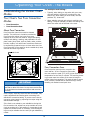
Getting to Know Your Oven
Control Panel Layout
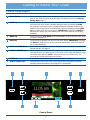
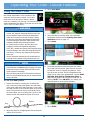
A
Touch display
The touch display allows you to navigate and select the various features and functions of your oven. It can be set to dim after 5 minutes of non-use (see Energy
Saving Mode, page 7).
B
HOME key
Touch this key to go back to the oven home screen on the touch display, except
when the oven home screen is already displayed. When you touch the HOME
key when the oven home screen is already displayed, the display jumps to the
Android home screen. When the Android home screen is displayed, touch HOME
again to return to the oven home screen. IMPORTANT: Touching the HOME key
does not turn off the oven once started, even if the oven status is not currently
displayed.
C
MENU key
Touch this key (or Oven Menu on the touch display) to go to the main oven cooking menu. See page 13.
D
BACK key
Touch this key to go back one menu on the touch display. IMPORTANT: Touching
the BACK key does not turn off the oven once started, even if the oven status is
not currently displayed.
E
START ● CONTINUE key
Touch this key (or Start on the touch display) to start the oven after selecting the
desired settings. See page 13.
F
CANCEL ● SECURE key
Use this key to turn off the oven. This key sets all temperature settings back to
zero and turns off any features that are currently in use. It also activates the lockout feature (see page 15). NOTE: This key does not turn off the timers. The
timers do not control the functions of the oven.
G
LIGHT key
If you need to turn the oven lights on or off, touch the light key.
H
Android system keys
Touching these keys on the touch screen allows you to navigate the Android
operating system and settings. See page 35 for more details.
B
D
A
C
11:05
G
H
H
Control Panel
3
E
F
Getting to Know Your Oven
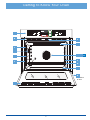
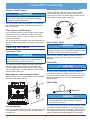
Parts of the Oven
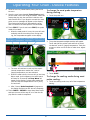
A
Control panel
Your oven’s control panel consists of touch keys and a touch display. Use the control
panel to control all the oven’s features (sometimes called modes).
B
Air intake/
exhaust slots
The oven draws air in through the intake slots to cool its internal parts. The air comes
out through the exhaust slot at the bottom of the oven. Do not block or cover the air
intake or exhaust slots.
C
Meat probe connector
When you use the meat probe, insert the skewer into the meat and plug the other
end into this connector. See the Using the Meat Probe section on page 26 for
proper operation.
D
Oven lights
There are two oven lights inside the oven chamber so that you can easily see the food
inside. Touch the light key on the control panel to turn them on. The bulbs are 12
volt, 20 Watt, halogen.
E
Rack supports
There are seven sets of rack supports inside each oven chamber. They support the
adjustable oven racks. They are numbered from the bottom up.
F
Door gasket
The door gasket prevents heat from escaping when the door is closed.
G
Self Clean latch
The Self Clean latch automatically locks the oven door during the Self Clean process.
The door latches for your safety. There are very high temperatures inside the oven
during the Self Clean process.
H
Broil elements
The broil elements are located on the ceiling of the oven chamber. They are the
source of top heat.
J
Convection fan
The convection fan circulates heated air through the oven chamber during the convection cooking process. The convection filter covers it.
K
Convection element
The convection element heats the air that is circulated through the oven chamber by
the convection fan during the convection cooking process. The convection filter covers
it.
L
Convection filter
The convection filter covers the convection fan. It helps prevent the transfer of taste
from one food to another when you are cooking a whole meal. It also keeps the oven
cleaner and covers the moving fan blades for safety purposes.
M
Oven rack
Your oven comes with a set of GlideRack™ oven racks and one standard rack.
N
Bake element
Hidden below the floor of the oven chamber is the bake element. It is the source of
bottom heat.
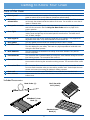
Included Accessories
Meat Probe (1)
Broil Pan with
Grill (1 Set)
GlideRack™ Oven
Rack (2)
Standard Oven
Rack (1)
4
Getting to Know Your Oven
A
12:15 pm
B
G
H
C
D
E
F
7
6
5
J
4
3
2
K
L
D
M
1
N
B
At bottom
of door
B
5
Setting Up Your Oven
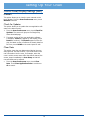
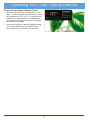
◊ Select date format - Touch to select the preferred date format shown on the display.
Control Panel/Display Settings
• Touch Oven Preferences on the oven home screen.
3. Touch BACK on the control panel to save.
• The Oven Preferences menu will be displayed. Use
the up (∧) and down (∨) arrows to view all of the various options.
4. Touch HOME to return to the oven home screen.
Date/Time Settings Menu
IMPORTANT: The above menu makes changes to
Android system operations, not just the oven cooking
operations.
1. From the Oven Preferences menu, touch Date/
Time Settings.
Wallpaper Settings (background)
You can select from several different patterns to customize the background of the touch display.
To change the wallpaper:
1. From the Oven Preferences menu, touch Wallpaper
Settings.
2. Touch one of the following selections:
◊ Automatic date & time - Touch to check or uncheck. This setting is preferred unless WiFi internet service is not available. If WiFi internet service
is not available, use the Set date and Set time
functions below to set the time and date manually.
◊ Set date (manual) - Use to manually set the date
only when Automatic date & time (above) is
unchecked. Touch the up (∧) and down (∨) arrows
to select the date, then touch Set.
2. Touch and “drag” up and down to see the entire selection. To select, touch the desired graphic. NOTE: The
available backgrounds vary with software version.
◊ Set time (manual)- Use to manually set the time
only when Automatic date & time (above) is
unchecked. Touch the up (∧) and down (∨) arrows
to select the date, then touch Set.
◊ Select time zone - Touch and “drag” to scroll up
or down to the various time zones. Tap to select.
◊ Use 24-hour format - Touch to check or uncheck. When checked, the oven is set to 24 hour
time, also known as military time. For example,
1:36 PM = 13:36 military time.
6
Setting Up Your Oven
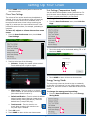
Unit Settings (Temperature Scale)
3. Touch HOME on the control panel to return to the
oven home screen.
You can select the temperature scale (Fahrenheit or Celsius) the oven uses to display the cooking temperature.
The oven is preset at the factory to Fahrenheit.
Oven Tone Settings
The volume of the various sounds may be adjusted or
silenced. A tone or click sounds any time you touch any
of the keys or when various error conditions exist. A
tone also sounds when a timer is done counting (see
page 20) or whenever the oven notifies the user it has
performed certain functions, for example, preheating is
complete.
To change the temperature scale:
1. From the Oven Preferences menu, touch Unit Settings.
To turn off, adjust or silence the various oven
tones:
1. From the Oven Preferences menu, touch Oven
Tone Settings.
2. Touch the check box for the desired setting, “F” or “C”
then touch SAVE.
Unit Settings
2. Touch to select one of the following:
F° Fahrenheit
◊ Volumes - Displays the master volume control.
Touch and drag left or right to adjust.
C° Celsius
Volumes
Music, video, games & other media
3. Touch HOME to return to the oven home screen.
Energy Saving Mode
OK
The oven home screen can be set to stay on constantly
or dim after 15 minutes of non-use. When energy saving
mode is on, touch the screen to reactivate the oven home
screen.
◊ Silent mode - Touch to check or un-check.
When checked, all oven sounds are silenced
(the volume control is set to 0).
To change the energy saving setting:
1. From the Oven Preferences menu, touch Energy
Saving Mode.
◊ Default notification - Touch to select the default
Android system tones (does not change tones
emitted during cooking operations). Touch the
desired tone (a sample will play).
◊ Touch sounds - Touch to check or uncheck. When checked, click sound on control panel keys is enabled.
3. Touch OK to exit.
4. Touch HOME to return to the oven home screen.
7
Setting Up Your Oven
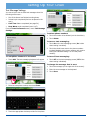
WiFi Settings
Control Panel/Display Settings (cont)
See page 35 for instructions on WiFi set up.
2. Touch the check box for NO Sleep, Light Sleep or
Deep Sleep, then touch Save.
Energy Saving Settings
NO Sleep
Display fully lit at all times
Light Sleep
Display lit 50% when idle for 15 min
Deep Sleep
Display all black when idle for 15 min
Save
Remote Settings
3. Touch HOME to return to the oven home screen.
Quick Start Settings
Future versions of the software will support remote operation of your oven. This feature is not currently available
on your oven.
The Quick Start mode, selected from the oven home
screen may be set to your own personal preferences.
Oven Setup
To change the Quick Start setting:
Select this option if the initial oven setup was skipped the
first time power to the oven was turned on.
1. From the Oven Preferences menu, touch Quick
Start Settings.
Tutorial
From the Oven Preferences menu, touch Tutorial to
access the oven tutorial. This is the same tutorial that
comes up on the touch display the first time power to the
oven is turned on.
2. Touch the down arrow (∨) under Cooking Mode to
select a cooking mode (see below). Touch and “drag”
up and down to see the entire selection of cooking
modes. To select, tap the desired mode.
3. Touch the up (∧) and down (∨) Temperature arrows
to select the cooking temperature, then touch Save.
• Touch BACK to exit to the Oven Preferences screen.
Quick Start Settings
Cooking Mode
• Touch HOME to return to the oven home screen.
About (System Information)
Temperature
325
From the Oven Preferences menu, touch About to
view:
temp
• The Android operating system revision
• The Dacor software version
• The oven serial number
• The oven model number
4. Touch HOME to return to the oven home screen.
8
Setting Up Your Oven
Text Message Settings
You can set your oven to send text messages when the
following events occur:
• One of the timers has finished counting down.
• Preheat cycle completed (food can be placed in the
oven).
• Cook Time feature completed (see page 24).
• Keep Warm mode completed (oven is off).
From the Oven Preferences menu, touch Text Message
Settings.
To delete phone numbers
1. Touch the number to be deleted (not the check box).
2. Touch Delete.
To turn on text messaging:
1. Touch On on the text messaging screen (On is blue
when texting is enabled).
2. Touch the check boxes next to the phone numbers
to select/deselect which phone numbers with receive
texts (blue indicates texting is on for that phone
number).
To add phone numbers to be texted:
To turn off text messaging:
1. Touch Add. The text messaging keyboard will appear.
1. Touch Off on the text messaging screen (Off is blue
when texting is disabled).
To change the message that is sent:
1. Touch the message (on the right side of the screen).
2. Enter the new message on the keyboard.
3. Touch Done.
2. Enter the new phone number, then touch Done.
3. Touch the appropriate wireless provider for the phone.
9
Setting Up Your Oven
Control Panel/Display Settings (cont)
Manuals
This option allows you to view the oven manuals on the
touch display. From the Oven Preferences menu, touch
Manuals to access.
Check for Updates
This option allows you to update the oven application software to the latest version.
1. From the Oven Preferences menu, touch Check for
Updates. The screen will jump to the Google Play
Store download page.
2. If a newer version of the oven application software
is available, Install will appear on the display (touch
Install to continue). If Uninstall appears on the display, the latest version of software is already install on
the oven, touch HOME on the control panel to exit.
Clear Data
This option clears the user data entered during the oven
setup process. Use this function if you need to enter new
user information into the oven, for example, when the
oven is sold to a new owner. After the data is cleared, the
screen jumps immediately to Oven Setup so that the
new user data can be entered.
• From the Oven Preferences menu, touch Clear
Data. Touch Clear Application Data to continue or
Ok to cancel.
10
Operating Your Oven - The Basics
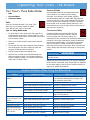
Preset Temperature Settings
Important Things to Know Before
Operation
Your oven has a suggested preset temperature setting for
each of the cooking modes to reduce the need to always
enter the temperature each time you cook. See the table
below. You have the choice (in most cooking modes) of
cooking at the preset cooking temperature or selecting a
different one. See Starting Your Oven.
• Dacor recommends turning the oven on for one hour
at 500°F (260°C) to burn off any residual oils used
during the manufacturing process. Any of these oils
left on the inner parts can cause an undesirable smell
the first few times the oven is used.
• When you use your oven in one of the convection,
bake or roast modes, it preheats automatically. The
preheat cycle rapidly brings the oven chamber up to
the proper cooking temperature. Wait for the oven
to finish preheating (Insert Food appears on the
display) before placing the food in the oven. Excessive
browning will occur if you put the food in the oven
while it is preheating.
• While the oven is preheating the actual oven temperature will appear on the display, next to the temperature setting. It takes several minutes to preheat the
oven. Preheat time depends on the temperature settings. The time may be longer depending on the type
of electrical supply in your community. There is no
preheat cycle for any of the broil modes.
Cooking Mode
Preset Temperature
Bake
350°F (176°C)
Broil
550°F (287°C)
• After you pull food out of the oven, it will continue to
cook. This process is called “carry-over.” The larger
the portion of food, the longer it will cook. It is best
to let meat rest for 10 to 15 minutes after it comes
out of the oven before carving. Doing so will allow the
meat to retain its juices and make it easier to carve.
Convection Bake
325°F (162°C)
Convection Broil
550°F (287°C)
Convection Roast
350°F (176°C)
Defrost
130°F (54°C)
Dehydrate
125°F (51°C)
• After you turn off the oven, the cooling fans may continue to run until the internal parts have cooled down.
Max Broil
550°F (287°C)
• Broil modes do not work with the meat probe connected.
Pure Convection
325°F (162°C)
Pure Convection Sear
350°F (176°C)
Proof
110°F (43°C)
Roast
375°F (190°C)
Surround Bake
350°F (176°C)
Warm/Hold
150°F (65°C)
• This unit has been tested and found to comply with
the limits for a class B digital device, pursuant to
Part 15 of the FCC rules. These limits are designed to
provide reasonable protection against harmful interference in a residential installation. This unit generates, uses and can radiate radio frequency energy
and, if not installed and used in accordance with the
instructions, may cause harmful interference to radio
communications. However there is no guarantee that
interference will not occur in a particular installation.
If this unit does cause harmful interference to radio
or television reception, which can be determined by
turning the unit off and on, the user is encouraged to
try to correct the interference by one or more of the
following measures:
◊ Reorient or relocate the receiving antenna.
◊ Increase the distance between the unit and
receiver.
◊ Connect the unit into an outlet or a circuit different from that to which the receiver is connected.
11
Operating Your Oven - The Basics
Oven Racks
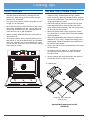
To insert a GlideRack oven rack...
You may use either rack type on any level inside the oven.
Your oven also comes with Dacor GlideRack oven racks.
You can pull a GlideRack oven rack out further than a
standard rack and still support heavy pots and pans full of
food. It is great for heavier foods and the optional Dacor
baking stone.
WARNING
To reduce the chance of burns, position the oven racks when the
oven is cool. If you must reposition a rack when the oven is hot,
use pot holders.
2. Attach both sides of the rack to the rack supports in
the oven as shown in the diagram below.
1. Align both sets of safety clips (right and left) on the
back of the rack guides with the oven rack supports as
shown below. NOTE: The diagram below shows installation with the rack guides extended but, the rack
may be installed with or without the guides extended,
whichever is easier.
3. Begin to slide the rack in, and then, lift up so that the
safety notches clear the ends of the rack supports.
2. Begin to slide the rack in, lifting the front safety clips
over the front of the oven rack supports.
4. Push the rack all the way in with both hands.
3. Push the rack all the way in.
To remove the standard oven rack...
4. Grasp the rack in the center of the front and pull. The
rack should come forward while the guides remain in
place.
To insert the standard oven rack...
1. Insert the end of the rack with the safety notches into
the oven first.
• Grasp it with both hands and pull gently straight out
toward you until it stops.
To remove a GlideRack oven rack...
• To remove the rack completely, lift the front of the
rack up about six inches and continue to pull it out.
Lifting the rack releases the safety notches. The
safety notches reduce the chances of a rack coming
out of the oven accidentally.
• Grasp the rack with both hands and pull it gently
straight out toward you until it stops.
• Lift up until the front safety clips just clear the front
of the rack supports on the oven. Continue to pull out.
Moving the end of the rack back and forth slightly, left
to right, as you pull, will make it easier to remove.
Back of rack
Rack
guides
Lift front safety
clips over rack
supports
Front of rack
Rack
support
Front of
rack
Standard
Rack
Back of
guide
GlideRack
Oven Rack
Safety
notch
Oven rack
support
Slide oven rack
supports into slots
on the rack
Slide oven rack supports
between back safety clips
12
Operating Your Oven - The Basics
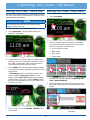
Starting Your Oven - Quick Start
Starting Your Oven - Main Menu
The quick start feature allows you to start cooking quickly.
Using the main menu (see next section), allows you more
cooking options and features.
1. Adjust the racks to the appropriate level.
2. Touch Oven Menu.
NOTE
You can change quick start mode to your favorite cooking
settings. See page 8 for set up.
1. Adjust the racks to the appropriate level.
2. Touch Quick Start. The quick start settings will
appear on the display.
3. The main cooking menu will appear on the display.
Touch the best type of cooking mode for the type of
food to be cooked on the main menu:
◊ Pure Convection modes
◊ Bake modes
◊ Broil modes
◊ Roast modes
3. If quick start is set to one of the broil modes, insert
the food in the oven. If quick start is set for a convection, bake or roast mode, wait to insert the food to
avoid excessive browning during preheat.
4. Touch START. The oven temperature setting appears
in white and the actual temperature appears in red, as
shown below.
If Preheating appears on the display, wait for preheat to complete (Insert Food appears on the
display). When Insert Food appears on the display,
place the food in the oven, or touch START to maintain the oven temperature until you are ready to put
the food in the oven.
For additional cooking features see Operating Your
Oven - Deluxe Features
4. Touch the desired sub-mode. When you touch each
sub-mode, a description of that mode appears on the
display.
Preheating...
5. To turn off the oven touch CANCEL · SECURE on the
control panel.
continued...
13
Operating Your Oven - The Basics
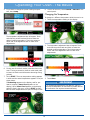
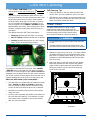
5. If you want to change the preset cooking temperature, touch temp.
8. To turn off the oven, touch CANCEL · SECURE on the
control panel.
Changing the Temperature
To change to a different temperature while the oven is on:
1. Touch the temperature setting on the display.
The temperature adjustment bar will appear. Touch
and slide the pointer back and forth to select the
desired cooking temperature. Touch the arrows on
either end of the adjustment bar to make minor
adjustments.
2. The temperature adjustment bar will appear. Touch
and slide the pointer back and forth to select the
desired cooking temperature. Touch the arrows on
either end of the adjustment bar to make minor
adjustments.
350°
100
150 200
250
300
350
400
450
6. If using one of the broil modes, insert the food in the
oven. If using a convection, bake or roast mode, wait
to insert the food to avoid excessive browning during
preheat.
7. Touch START. The oven temperature setting appears
in white and the actual temperature appears in red, as
shown below.
500
Cancel
550
Start
3. Touch Start.
IMPORTANT
If Preheating appears on the display, wait for preheat to complete (Insert Food appears on the
display). When Insert Food appears on the display,
place the food in the oven, or touch START to maintain the oven temperature until you are ready to cook.
If you increase the temperature by more than 50°F (28°C), to
reach the new temperature, the oven needs to preheat. Remove
the food from the oven to prevent excessive browning.
Preheating...
14
Operating Your Oven - The Basics
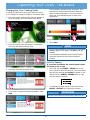
Changing the Oven Cooking Mode
The temperature adjustment bar will appear. Touch
and slide the pointer back and forth to select the
desired cooking temperature. Touch the arrows on
either end of the adjustment bar to make minor
adjustments.
To change to a different cooking mode while the oven is
on, for example to change from Bake to Convection Roast:
1. Touch the current cooking mode icon that appears on
the touch display, left of the temperature setting.
5. Touch Start.
2. The main cooking menu will appear on the display.
Touch the new desired cooking mode.
NOTE
• Since you have restarted the oven during this process, Insert
Food may appear on the display. Touch Start to clear the
message.
• If you increase the temperature by more than 50°F (28°C),
remove the food from the oven to prevent excessive
browning.
Lock-Out Feature
If you want to disable the control panel when
the oven is not in use:
• Touch and hold the CANCEL · SECURE key on the
control panel for about five seconds. The control panel
keys will stop working and Locked will appear on the
display. Only the CANCEL · SECURE and oven light
keys will remain functional.
3. Touch the sub-mode, as shown below.
• To reactivate the control panel, touch and hold the
CANCEL · SECURE key for about five seconds.
4. If you want to change the preset temperature, touch
temp.
IMPORTANT
Using the lock-out feature turns off the timers if they are in use.
15
Operating Your Oven - The Basics
For multiple rack baking...
Understanding the Various Oven
Modes
• Typically, when baking on two racks with your oven,
use rack positions #3 and #5 (counting from the
bottom up). When baking on three racks, use rack
positions #2, #4 and #6.
Your Oven's Two Pure Convection
Modes
• When adapting a single rack recipe to multiple rack
baking, it may be necessary to add to the baking time
due to the extra bulk of the food in the oven.
• Pure Convection
• Pure Convection Sear
About Pure Convection
12:15 pm
Pure Convection uses the convection element
and fan. The uniform air circulation provided by
Pure Convection allows you to use more oven
capacity at once. Use this mode for single rack baking,
multiple rack baking, roasting, and preparation of complete meals. Many foods, such as pizzas, cakes, cookies,
biscuits, muffins, rolls and frozen convenience foods can
be successfully prepared on two or three racks at a time.
Pure Convection is also good for whole roasted duck, lamb
shoulder and short leg of lamb.
7
6
5
4
3
2
1
AIR FLOW
Pure Convection Sear
Pure Convection sear uses the convection element and fan. In Pure Convection Sear mode,
the oven cooks the meat 75°F (42°C) higher than the set
temperature for the first 15 minutes. The resulting browning process sears the surface of the meat to keep the
natural juices from escaping. This mode is best for game
hens, chickens, stuffed and un-stuffed turkeys, turkey
breasts, pork tenderloin and pork loins.
IMPORTANT
As a general rule, modes that utilize convection have cooking
times that are about 25% shorter. You may want to set the timer
15 minutes before the shortest stated time and add more time if
necessary.
Some recipes, especially those that are homemade, may
require adjustment and testing when converting from
standard to convection baking. If you are unsure how to
convert a recipe, begin by preparing the recipe using the
standard bake settings.
If the food is not cooked to your satisfaction during this
first convection trial, adjust one recipe variable at a time
(such as cooking time, rack position or temperature) and
repeat the convection test. If necessary, continue adjusting one recipe variable at a time until you get satisfactory
results.
16
Operating Your Oven - The Basics
Surround Bake
Your Oven's Three Bake Modes
Surround Bake uses both the bake element and
a broil element. This mode is best for angelfood cake, fruit cobblers, quick breads, soufflés
and cheesecakes baked in a water bath. Egg-leavened
items turn out best in this mode because they still get a
nice rise without over-browning or curdling. Thick battered breads, such as banana bread, bake well in this
mode because they cook through while providing the correct amount of browning.
• Bake
• Surround Bake
• Convection Bake
Bake
Uses only the bake element. This mode is the
stand-by, non-convection mode. All baked
items will turn out nicely in this mode.
Convection Bake
Tips for Using Bake Mode
Convection Bake uses both the bake element
and the convection element and fan. Use this
mode for single rack convection baking. The
combination of the convection fan and bottom heat source
is best for fruit crisps, custard pies, double-crusted fruit
pies, quiches, yeast breads in a loaf pan and popovers.
Also, items baked in a deep ceramic dish or earthenware clay pots are best in this mode. Most of these items
cook in a deep pan and require browning on the top and
bottom.
• For best results, use a single rack. See page 36 for
suggested rack positions for various foods. For cooking on multiple racks, Dacor recommends using one of
the convection modes.
• Follow your recipe’s original cooking time and temperature.
• Do not open the oven door frequently during baking.
Look through the oven door window to check the
progress of baking whenever possible.
• Use the timers to determine baking time.
IMPORTANT
• Wait until the shortest recommended baking time
before checking the food. For most baked goods, a
wooden toothpick placed in the center should come
clean when the food is done.
Modes that utilize convection tend to have a cooking time that is
about 25% shorter.
Adjust and test cooking times for your recipes, especially
those that are homemade, when converting from standard
to convection baking. See the Pure Convection section on
page 16 for additional guidelines.
Common Problems When Using the Bake Mode
Problem
Cookies burn on the
bottom.
Cookies are too brown
on top.
May be caused by
What to do
Oven door opened too often.
Set timer to shortest recommended cooking
time and check food when timer beeps. Use
door window to check food.
Incorrect rack position used.
Change rack position.
Dark, heat absorbing cookie sheets used.
Use shiny, reflective cookie sheets.
Rack position being used is too high.
Change rack position.
Food placed in oven during preheat.
Wait until oven is preheated.
Incorrect baking mode being used.
See Starting Your Oven - Main Menu on
page 13 for guidelines.
Cakes burn on the sides Oven temperature too high.
or are not done in the
Dark, heat absorbing cake pans used.
center.
Reduce oven temperature.
Cakes crack on top.
Oven temperature too high.
Reduce oven temperature.
Cakes are not level.
Oven and/or oven rack not level.
Level oven and rack as needed.
Pies burn around the
edges or are not done
in the center.
Oven temperature too high.
Reduce oven temperature.
Dark, heat absorbing pans used.
Use shiny, reflective pans.
Oven and/or rack over-crowded.
Reduce number of pans.
17
Use shiny, reflective cake pans.
Operating Your Oven - The Basics
Understanding the Various Oven
Modes (cont.)
• Broil food on the first side for a little more than half of
the recommended time, then season and turn. Season
the second side just before removing the food from
the oven.
Your Oven's Three Broil Modes
• To prevent sticking, lightly grease the broiler grill.
Excess grease will result in heavy smoke. For easier
cleaning, remove the broiler pan and grill when
removing the food.
• Broil
• Max Broil
Your Oven's Two Roast Modes
• Convection Broil
WARNING
• Roast
• Convection Roast
• Do not attempt to use the broil modes without the oven door
completely closed.
• To avoid damage to the meat probe, remove it from the
oven when using any of the broil modes. If the meat probe is
connected the broil modes will not start (an error signal will
appear on the display).
Roast
Roast mode uses both the bake element and a
broil element. It is best for half and whole
cooked hams, rack of veal, and rack of lamb. When braising in the oven, cover foods with foil if necessary.
Broiling is a quick, flavorful way to prepare many foods,
including steaks, chicken, chops, hamburgers and fish.
Convection Roast
Convection Roast uses a combination of the convection element and fan, a broil element and the
bake element. It is best for rib roasts, turkeys, chickens,
etc.
Broil
Broil mode uses one of the broil elements. It is
best for broiling smaller amounts of food.
Max Broil
IMPORTANT
Max Broil uses both broil elements. It is best for
larger quantities of food to be broiled.
Modes that utilize convection tend to have cooking time
that is about 25% shorter.
Convection Broil
As with other convection modes, adjust and test cooking
times for your recipes, especially those that are homemade. See the Pure Convection section on page 16 for
additional guidelines.
Convection Broil uses a combination of the convection element and fan and a broil element. It
is best for items that do not need to be flipped
such as, thinner cuts of meat, fish and garlic bread.
Roasting Tips
Broiling Tips
• All baking modes can be used to roast in your oven.
However, the Convection Roast mode is recommended
to produce meats that are deliciously seared on the
outside and succulently juicy on the inside, more
quickly. Foods that are exceptional, when prepared in
the Convection Roast mode, include: beef, pork, ham,
lamb, turkey, chicken and cornish hens.
• To reduce the chance of overcooking, use rack positions 1 through 4. Results will vary based on the type
of food being broiled and the rack position used.
• It is normal and necessary for some smoke to be
present to give the food a broiled flavor.
• Setting the timer is recommended to time the broiling
process.
• Always roast meats fat side up in a shallow pan, using
a roasting rack. Always use a pan that fits the size of
the food being prepared. The broiler pan and grill that
come with the oven, can be used in most cases. No
basting is required when the fat side is up. Do not add
water to the pan. It will cause a steamed effect.
• Always use a broiler pan and grill to provide drainage
for excess fat and grease. Doing so will reduce spatter, smoke and flare-ups.
• Start with a room temperature broiler pan for even
cooking.
• Poultry should be placed breast side up on a rack in a
shallow pan that fits the size of the food. Again, the
broiler pan and grill that come with the oven can be
used. Brush poultry with melted butter, margarine or
oil before and during roasting.
• Use tongs or a spatula to turn and remove meats.
Never pierce meat with a fork because the natural
juices will escape.
18
Operating Your Oven - The Basics
• When using the roast mode, do not use pans with tall
sides. They interfere with the circulation of heated air
over the food.
• Remove meats from the oven when the thermometer
registers 5 to 10°F (3 to 6°C) below the desired temperature. The meat will continue to carry-over.
• If using a meat thermometer, insert the probe halfway
into the center of the thickest portion of the meat.
For poultry, insert the thermometer probe between
the body and leg into the thickest part of the inner
thigh. To ensure an accurate reading, the tip of the
probe should not touch bone, fat or gristle. Check
the meat temperature 2/3 of the way through the
recommended roasting time. After reading the meat
thermometer once, insert it 1/2 inch further into the
meat, then take a second reading. If the second temperature registers below the first, continue cooking
the meat.
• Allow roasts to stand 15 to 20 minutes after roasting
in order to make carving easier.
• Roasting times always vary according to the size,
shape and quality of meats and poultry. Less tender
cuts of meat are best prepared in Bake mode and may
require moist cooking techniques. Use your favorite
cookbook recipes.
• Reduce spatter by lining the bottom of the roasting
pan with lightly crushed aluminum foil.
Operating Your Oven - Deluxe Features
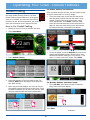
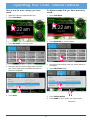
3. Touch Warm/Hold on the main menu.
Warm/Hold
This mode allows you to keep your food warm at
150°F (65°C) until you are ready to serve, after
the food is done cooking.
WARNING
To avoid potential sickness and the spoiling of food, do not allow
food temperature to drop below 140°F (60°C). Below 140°F
bacteria can develop.
1. When the food is done cooking, touch CANCEL ·
SECURE.
4. Touch Start.
2. Touch Oven Menu.
19
Operating Your Oven - Deluxe Features
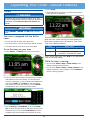
4.Touch START.
Timers
5.The display will return to the oven home screen and the
timer count will be displayed.
WARNING
The timers on your oven do not turn the oven on or off. They
are only for timing purposes. When you want to turn the oven off
automatically, use the Delay Start/Cook Time Features (see
page 24).
IMPORTANT
Touching CANCEL · SECURE does NOT reset or stop the
timers.
Your oven is equipped with two built-in
timers...
When the timer is done counting, the timer display will
flash and a tone will sound. The alarms for Timer 1 and
Timer 2 have different patterns.
• You can use both of them at the same time.
• You can time from 1 minute to 99 hours and 59 minutes.
• The timers can be set to count up or count down.
Timer
Alarm Pattern
To use the timers on your oven...
1
1 second on, 1 second off, repeat
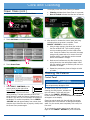
1.Touch Timer 1 or Timer 2 on the oven home screen.
2
1 second on, 1 second off,
1 second on, 2 seconds off, repeat
To turn off the alarm tone, touch stop for the appropriate
timer on the touch display.
While the timer is running...
• You can touch Timer 1 Stop or Timer 2 Stop on the
display to stop and clear the timer.
• You can touch Timer 1 Pause or Timer 2 Pause on the
display to pause the count up/down. Touch Continue to
resume counting up/down.
2.Enter the hours and minutes to be timed on the keypad
that appears on the touch display. You can also touch
the up (∧) and down (∨) keys to make small adjustments
to the time. NOTE: Touch Cancel to clear the display
and re-enter the hours and minutes, or touch Cancel a
second time to return to the oven home screen.
3.Touch Count Up or Count Down. If you touch Count
Up, the timer will start at 00:00 and count up to the time
entered in step 2. If you touch Count Down, the timer
will start at the time entered and count down to 00:00.
20
Operating Your Oven - Deluxe Features
The temperature adjustment bar will appear. Touch
and slide the pointer back and forth to select the
desired defrost temperature. Touch the arrows on
either end of the adjustment bar to make minor
adjustments.
Defrosting
The oven uses the convection element and fan for this
process.
WARNING
To avoid food poisoning, cook meats immediately after defrosting
them.
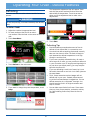
To defrost foods
1. Adjust the racks to the appropriate level.
2. For best results put the food on an aluminum surface. Place the food on the center of the oven
rack.
3. Touch Oven Menu.
6. Touch Start.
Defrosting Tips
• Food that takes an exceptional amount of time to
defrost will not defrost well in a convection oven.
• You should not defrost anything that would normally
take over two hours to thaw. The food will begin to
spoil because the defrost temperature is not high
enough to cook the food.
• If you have a partially defrosted turkey, rib roast or
other large cut of meat, you may continue to defrost it
in your convection oven. If wing tips and legs begin to
dry out when you defrost poultry, you may wrap the
tips with aluminum foil.
4. Touch Defrost on the main menu.
• If you are defrosting a small cut of meat, lay it on a
flat cookie sheet with a one inch rim to catch juices as
the meat thaws.
• Thick, frozen casseroles such as lasagna will not
defrost well in your oven. Instead, defrost according to the food manufacturer’s suggestions. You can
defrost casseroles in a refrigerator overnight. You
should leave the food in its original container and
keep it covered.
• You can bake some foods from frozen. Some examples are: pizza, frozen pastries, croissants, cookies,
etc. Before baking frozen food, allow the oven to
preheat.
5. If you want to change the preset temperature, touch
temp.
21
Operating Your Oven - Deluxe Features
The temperature adjustment bar will appear. Touch
and slide the pointer back and forth to select the
desired dehydrate temperature. Touch the arrows on
either end of the bar to make minor adjustments.
Dehydrating
The oven uses the convection element and fan for this
process.
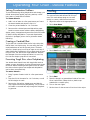
To dehydrate foods
1. Adjust the racks to the appropriate level.
2. Prepare the food as recommended, then
place it on a drying rack. Place the food on the center
of the oven rack.
3. Touch Oven Menu.
6. Touch Start.
Food Type
Dehydrating Temperature
Fruit
125°F (52°C)
Meat
150°F (65°C)
Vegetables
110°F (43°C)
Recommended Dehydrate Temperatures
4. Touch Dehydrate on the main menu.
Dehydrating Tips
Equipment Recommended:
• Half sheet pan or jelly roll pan with ½ inch rim all the
way around
• Baking rack that fits inside the half sheet pan
• Cheesecloth
• 4 quart sauce pot with lid
• Steamer basket that fits inside four quart saucepan.
One that is perforated and opens up will work well.
• Slotted spoon
5. If you want to change the preset temperature, touch
temp.
• Paper towels
• A sharp knife
When you dehydrate...
1. Wash and remove excess moisture from all fruits and
vegetables before dehydrating.
2. Cut fruits and vegetables into uniform pieces.
3. You can add honey, spices, lime juice or orange juice
to give the fruit a different flavor.
4. It is best to dehydrate on a baking rack with a pan
underneath to catch any juices. If the fruit is small,
use cheesecloth over the rack. If you use a rack, it
will allow for maximum air circulation around the fruit.
The cheesecloth will prevent the fruit from sticking to
the rack.
5. Place the food onto the center of the oven rack.
22
Operating Your Oven - Deluxe Features
Solving Discoloration Problems
Proofing
To prevent darkening during dehydration and storage, you
should steam blanch apples, apricots, peaches, nectarines, pears or foods that will oxidize.
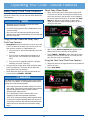
You can use your oven to proof yeasted doughs.
The oven uses the bake element for this process. This mode allows dough to rise more
quickly in a warm, draft-free environment.
To steam blanch:
1. Add 1 inch of water to a four quart sauce pot. Insert
the steam basket and place the fruit in it.
1. Adjust the racks to the appropriate level.
2. Touch Oven Menu.
2. Cover the pot and steam for 1 to 2 minutes.
3. Remove with a slotted spoon and dab with a paper
towel to remove excess moisture before dehydrating.
Apples, pears, pineapples and some other fruits will brown
or darken during dehydration. To prevent discoloration,
dip fruits in pineapple juice or lemon juice after steam
blanching.
Creating a Candied Effect
To give the fruit a candied effect and to help retain color,
blanch them in a simple syrup. You can candy the fruits
mentioned above as well as figs and plums. The basic
ratio for a simple syrup is one cup of sugar to one cup of
water. Add these ingredients to a four quart stock pot and
bring to a boil. Stir until all the sugar dissolves. Remove
the saucepan from the cooktop and allow it to cool. Dip
fruit into the simple syrup after it has cooled.
3. Touch Proof on the main menu.
Preventing Tough Skins when Dehydrating
You should water blanch items with tough skins such as
grapes, prunes, dark plums, cherries, figs and some types
of berries. Water blanching these types of fruit will crack
the skins so that moisture can escape and dehydration
can be done more effectively.
To water blanch...
1. Bring 2 quarts of water to boil in a four quart sauce
pot.
4. Touch Start.
5. Place the dough in a greased bowl inside of the oven.
Cover it with either a damp cloth or plastic wrap
coated with a nonstick spray.
2. Drop the fruit in the water for 1 to 2 minutes, or until
the skin begins to crack.
3. Remove the fruit with a slotted spoon and dab dry
with a paper towel before dehydrating. The pit can be
left inside or removed half way through the dehydrating process.
6. Turn on the oven lights.
7. Set the timer for the amount of rise time in the recipe.
23
Operating Your Oven - Deluxe Features
About Keep Warm Mode
Delay Start/Cook Time Features
• When you set the oven to stop cooking using Cook
Time, the oven will go into Keep Warm mode at the
end of the cook time you have set. As this happens,
the control panel will beep for 30 seconds and Keep
Warm will appear on the display. In keep warm
mode, the oven will keep the temperature at 150°F
(65°C) for two hours.
If you want to set the oven to automatically turn itself on
and off at a later time, you can use the Delay Start/Cook
Time features.
NOTE
• Delay Start cannot be used with any of the broil modes,
Warm/Hold mode or Proof mode.
• Cook Time cooking cannot be used in Sabbath mode or any
of the broil modes.
• Use of the Cook Time feature and the meat probe at the
same time is not recommended because one can conflict with
the timing of the other.
Keep Warm
Things to Know About the Delay Start/
Cook Time Features
• Delay Start determines when the oven turns on and
Cook Time determines when the oven turns off. You
and use them together or independently to:
• After 2 hours, Mode Completed will appear on the
display and the oven will shut off completely.
◊ Turn the oven on and off automatically (use both
features).
• Touch CANCEL · SECURE to clear Keep Warm mode
and turn the oven all the way off or to clear the display after the mode is completed.
◊ Turn the oven on automatically and leave it on
until you turn it off manually (use Delay Start
only).
Using the Start Time/Cook Time Features
◊ Turn the oven on manually and turn it off automatically (use Cook Time only).
1. Adjust the racks to the appropriate level and place the
food in the oven.
• You may use the timers while using the Delay Start/
Cook Time features. The timers do not effect the
Delay Start/Cook Time settings.
2. Touch Oven Menu.
• Delay Start and Cook Time can be canceled at any
time by touching CANCEL · SECURE.
WARNING
Food safety is an important consideration when using the Delay
Start/Cook Time features. To avoid potential sickness and the
spoiling of food, take the following steps:
• Avoid using foods that will spoil while waiting for the oven to
start cooking. Typical foods to avoid include: those containing
eggs and dairy products, cream soups and cooked or
uncooked meats, poultry and fish.
• Do not allow foods to remain in the oven after it turns
completely off. When the temperature drops below
140°F (60°C), bacteria can develop (after Keep Warm mode).
• If cooking will not begin immediately, place only very cold or
frozen food into the oven. Most unfrozen foods should never
stand in the oven for more than two hours before cooking
begins.
24
Operating Your Oven - Deluxe Features
3. Select the desired cooking mode, sub-mode and
temperature according to the Starting Your Oven Main Menu section on page 13, but before touching Start, perform steps 4 and/or 5 below.
5. Set the Cook Time:
◊ Touch cook time.
◊ Enter the Cook Time in hours and minutes on the
keypad that appears on the touch display. You can
also touch the up (∧) and down (∨) arrows to make
small adjustments to the time. NOTE: Touching
Clear once clears the display and allows you to
re-enter the time.
4. If you want to turn the oven on immediately skip to
step 5.
◊ Touch Delay Start.
◊ Touch Count Up or Count Down. If you touch
Count Up, the display will start at 00:00 and count
up to the time entered. If you touch Count Down,
the display will start at the time entered and count
down to 00:00.
The oven will cook for the amount of cook time set
wether it is turned on manually or automatically using
Delay Start.
◊ The time adjustment bar appears. Touch and slide
the pointer back and forth to select the desired
start time.
Start Time
12:26 pm
0
1
2
3
4
5
6
7
8
9
10
11
6. Touch Start.
12
IMPORTANT
Set Delay
The regular pre-heat feature (see page 11 for description) is
disabled when using Delay-Start. The additional time required to
reach the cooking temperature must be included in the amount
of cooking time. The amount of cooking time required increases
with the cooking temperature and the amount of food.
Cancel Delay
◊ Touch Set Delay.
◊ If you want the oven to run continuously until
you shut it off manually, go to step 6. Otherwise,
touch Start.
To cancel the Delay Start/Cook Time settings, touch
CANCEL · SECURE.
25
Operating Your Oven - Deluxe Features
3. Touch Oven Menu.
Using the Meat Probe
When you cook foods like roasts and poultry,
the internal temperature is the best way to tell
when the food is properly cooked. Your oven’s
meat probe is an easy way to take the guesswork out of roasting. You can use it to cook food to the
exact temperature you desire. The probe can be set from
125°F (51°C) to 185°F (85°C).
WARNING
• To avoid the possibility of burns, use hot pads to handle,
connect, and unplug the meat probe when the oven is hot.
• Use the handles to insert and remove the meat probe’s
skewer and to connect it to the oven. Pushing or pulling
on either end of the cable could damage the meat probe.
To avoid breaking the meat probe, make sure the food is
completely defrosted before inserting the skewer.
• Do not allow foods to remain in the oven after it turns
completely off. When the temperature drops below
140°F (60°C), bacteria can develop (after Keep Warm mode).
• To prevent damage, never leave the meat probe inside the
oven when it is not being used, especially during the Self
Clean cycle.
• Using a meat probe other than the one provided with your
oven may result in damage to the probe and/or the oven.
4. Select the desired cooking mode, sub-mode and
temperature according to the Starting Your Oven Main Menu section on page 13.
5. Touch probe.
NOTE
• The meat probe does not work with Broil, Max Broil,
Convection Broil and Sabbath modes. Plugging in the meat
probe when using one of these modes will cause an error
signal to appear on the display.
• Use of the meat probe and Cook Time feature at the same
time is not recommended because one can conflict with the
timing of the other.
6. The probe temperature adjustment bar will appear.
Touch and slide the pointer back and forth to select
the desired "cook to" (target) temperature. Touching the arrows on either end of the adjustment bar
allows you to make minor adjustments. Use the USDA
Minimum Safe Cooking Temperature Chart on
page 28 as a guideline for the type of meat you are
cooking. NOTE: Touch ON/OFF if you change your
mind and want to cancel probe operation.
To use the meat probe...
1. Prepare the meat for cooking prior to setting the
oven. Insert the meat probe skewer into the center
of the meat. Make sure that the skewer is not inside
any fatty portions of the meat and does not touch any
bones. The point should rest in the thickest part of
the meat. When you are cooking fowl, the tip of the
skewer should rest toward the center of the bird.
Skewer
Plug
7. Touch START.
2. Adjust the racks to the appropriate level to allow the
meat to fit in the oven.
26
Operating Your Oven - Deluxe Features
To change the meat probe temperature
during cooking...
8. Allow the oven to preheat before placing the food in
the oven.
9. Once the oven has preheated (Insert Food appears),
put the meat in the oven using pot holders. Insert the
meat probe plug into the connector inside the oven
and close the door. If you forget to connect the meat
probe, an error message will appear on the display.
The meat probe function will automatically cancel
after 2 minutes if the meat probe is not connected.
1. Touch the probe icon.
10.Touch START. If you do not touch START, the probe
mode will not start.
◊ When the meat probe is in use, the oven will automatically control the cooking time. During cooking, four temperatures appear on the display.
Set oven
Actual oven Probe actual Probe "cook to"
temperature temperature temperature temperature
2. The probe temperature adjustment bar will appear.
Touch and slide the pointer back and forth to select
the desired "cook to" (target) temperature. Touch the
arrows on either end of the bar to make minor adjustments.
125°
125
135
Disable
◊ The oven will continue to cook until the meat's
internal temperature reaches the "cook to"
(target) temperature you have selected.
145
155
165
175
185
Cancel
Start
3. Touch START.
◊ When the meat is done, the oven will go into Keep
Warm mode. As this happens, the control panel
will beep for 30 seconds and Keep Warm will
appear on the display. In keep warm mode, the
oven will keep the temperature at 150°F (65°C)
for two hours.
To change the cooking mode during meat
probe cooking...
1. Touch the cooking mode icon, left of the temperature
setting.
◊ After 2 hours, Mode Completed will appear on
the display and the oven will shut off completely.
11.Touch CANCEL · SECURE to clear Keep Warm mode
and turn the oven all the way off or to clear the display after the mode is completed.
continued...
27
Operating Your Oven - Deluxe Features
Changing the cooking mode during meat
probe cooking (cont.)
5. Touch and slide the pointer on the probe temperature
adjustment bar back and forth to select the desired
"cook to" (target) temperature.
2. The main cooking menu will appear. Touch the new
desired cooking mode (and sub-mode).
6. Touch Start.
3. If you want to cook at a temperature different from
the preset temperature, touch temp.
NOTE
• Since you have restarted the oven during this process, Insert
Food may appear on the display. Touch Start to clear the
message.
• If you increase the temperature by more than 50°F (28°C),
remove the food from the oven to avoid excessive browning.
USDA Minimum Safe Internal Cooking
Temperatures for Various Foods
Ground Meat and Meat Mixtures
Touch and slide the pointer back and forth to select
the desired cooking temperature. Touch the arrows on
either end of the bar to make minor adjustments.
Beef, pork, veal, lamb
160°F (71°C)
Turkey, chicken
165°F (76°C)
Fresh Beef, Veal and Lamb
Steaks, roasts, chops
145°F (65°C)
Poultry
Chicken and turkey, whole
(temperature taken in thigh)
165°F (76°C)
Poultry breasts, roast
165°F (76°C)
Poultry thighs, legs, wings
165°F (76°C)
Duck and goose
165°F (76°C)
Stuffing (cooked alone or in bird)
165°F (76°C)
Fresh Pork
4. Touch probe.
Fresh pork
160°F (71°C)
Ham
Fresh (raw)
160°F (71°C)
cooked (reheat)
140°F (60°C)
NOTE: The minimum safe internal cooking temperatures
are subject to change. There are changes in bacteria and
the temperatures required to eradicate them. For the
most current information, contact the USDA.
USDA Meat and Poultry Hot Line: Phone: (800) 535-4355
www.fsis.usda.gov
28
Operating Your Oven - Deluxe Features
For Meats, Poultry and Seafood:
Guided Cooking
After you select the type of meat, you can choose to cook
using the meat probe or to cook by weight.
Your oven is equipped with the convenience of
the Dacor Guided Cooking System. The Dacor
Guided Cooking System takes a lot of the guesswork out of cooking. You select the type of food,
and the oven will set the temperature, the mode and
show you the amount of time required to cook.
• To use the meat probe, touch and slide the pointer
back and forth to select how well the meat is to be
cooked. Touch the arrows on either end to make
minor adjustments. Touch Start. Insert the meat
probe into the meat according to the instructions on
page 26. Insert the meat into the oven and connect
the meat probe when instructed on the display.
How to Use Guided Cooking:
1. Before you turn on the oven, position the racks.
2. Touch Oven Menu.
• To cook by weight, touch the ON/OFF key next to the
meat probe temperature slider (shown above) after
selecting the specific meat type. Touch the up (∧) and
down (∨) arrows to select the weight. Touch Start.
3. Touch Guided Cooking.
4. Select the category of food you want to cook. For
example, Meat (touch and drag to view options further down the list).
For Breads, Deserts and Other items:
• Touch Pan Size, then touch the type of cookware
being used on the touch display.
5. When you select the category, the oven will list several specific types of food for you to pick from. Touch
to select the specific type of food. The oven will determine the optimal mode and cooking temperature.
Touch Start.
continued...
29
Operating Your Oven - Deluxe Features
Important Tips for Using Dacor Guide
4. Touch temp and select the cooking temperature if you
want. You may also set cook time, (meat) probe and
Delay Start.
• For best results, follow the helpful instructions on the
display.
5. Just before you touch Start, touch Save to My
Modes on the display.
• The oven will preheat when you touch Start and
instruct you to place the food in the oven when preheat is complete.
• When the oven is through cooking for the amount of
time indicated, the oven will reduce the temperature
to 150°F (65°C) to keep the food warm for two hours
(“Keep Warm” appears on the display).
• At the end of the keep warm cycle, the oven will turn
off and Mode Completed will appear on the display.
• As with all other cooking modes, to turn off your oven
touch CANCEL · SECURE.
My Modes
The My Modes feature allows you to save the
oven settings for dozens of your favorite recipes.
Once you save the settings, the oven remembers them and you can use them to automatically set the temperature, meat probe and cooking time
so that you don’t have to look them up.
6. Touch the white area labeled Type Your Mode's
Name Here on the touch display.
You save the settings after you select the feature you
want to use, but just before touching Start.
To save the oven settings for your favorite
recipe:
1. Touch Oven Menu.
7. The keyboard will appear on the display. Enter the
name you want to use to remember the cook settings
you are saving, then touch Done.
2. The main cooking menu will appear on the display.
Select the mode for the settings you want to save.
You may select from:
Convection Modes Bake Modes
Broil Modes
Roast Modes
Defrost
Warm/Hold
Dehydrate
Proof
8. Touch Save. NOTE: The saved settings will not be lost
in the event of a power outage.
3. If you select a Convection, Bake, Broil or Roast mode,
select the sub-mode (for example Convection Roast).
30
Operating Your Oven - Deluxe Features
How to use the oven settings you have
saved
To delete a mode that you have previously
saved:
1. Adjust the racks to the appropriate level.
1. Touch Oven Menu.
2. Touch Oven Menu.
2. Touch My Modes on the main menu.
3. Touch My Modes on the main menu.
3. Touch the stored cooking mode you want to delete on
the display.
4. Touch the desired, stored cooking mode on the display. Touch and drag to see additional entries not
shown on the display.
4. Touch Edit/Delete Mode.
5. Touch Start.
5. Touch Confirm Delete.
6. Touch HOME to return to the oven home screen.
continued...
31
Operating Your Oven - Deluxe Features
5. Touch Edit Mode.
My Modes (cont.)
To Change the name of a mode that you
have previously saved:
1. Touch Oven Menu.
Would you like to Delete this mode,
or Edit the mode name?
Confirm
Delete
Edit
Mode
Cancel
6. Touch the white area containing the current name.
2. Touch My Modes.
7. Use the keyboard to edit the name of the saved mode,
then touch Done.
3. Touch the stored cooking mode you want to edit the
name for on the display.
4. Touch Edit/Delete Mode.
8. Touch Save.
32
Operating Your Oven - Deluxe Features
Sabbath Mode
The Sabbath mode on your oven complies with
Jewish laws for use on the Sabbath and Holy
Days. This feature allows the oven to perform
two types of cooking, Pure Convection and
Bake.
3. Touch Sabbath Convection or Sabbath Bake.
4. If you want to change the preset cooking temperature, touch temp.
When the oven is set to Sabbath mode, it disables the following features:
• The oven lights
• All keys, except CANCEL · SECURE, START · CONTINUE and the temperature up and down arrows.
IMPORTANT
Touch and slide the pointer on the temperature
adjustment bar to select the desired cooking temperature.
• Sabbath Mode and the cooking temperature appear on the
display when Sabbath mode is in operation.Sabbath mode
will not work with the meat probe connected (the meat probe
symbol will flash).
• If one or both timers are running, the oven cancels timer
operation when Sabbath mode is selected.
• You may want to use a rack thermometer to keep track of the
oven temperature.
Using Sabbath Mode
1. Touch Oven Menu.
5. If you do not want to delay the starting of the oven
skip to step 6. If you want to delay the start of the
oven, touch Delay Start on the touch display.
Touch and slide the pointer on the Delay Start adjustment bar to select the start time. Touch Set Delay to
activate.
Start Time
2. Touch Sabbath on the main menu.
12:26 pm
0
1
2
3
4
5
6
7
8
9
10
11
Set Delay
6. Touch Start.
The CANCEL · SECURE key on your
oven remains active so that you can
turn off the oven.
33
continued...
12
Cancel Delay
Operating Your Oven - Deluxe Features
Things to Know about Sabbath Mode
Temperature +/- 25°
• When the oven is cooking, touching the up (∧) and
down (∨) arrows (see picture), tells the oven to raise
the temperature by 25°F (14°C). In compliance with
Jewish law, the bake elements will be adjusted randomly when these keys are touched and no changes
will be seen on the display.
Pure Convection
Oven
• You can store a variety of different Sabbath settings
using the My Modes feature (see page 30) and
then, select the one you want to use each time.
34
Temperature adjustment will
randomly take place within 2
minutes and will not display
on the screen.
Additional Features
Android Apps
Android Operating System
Your oven comes with the following applications preloaded. They appear on the Android home screen. Touch
the app icon to launch:
In addition to the Dacor Cooking App (application), you
can access the many features of the Android operating
system on your oven, including:
• Dacor IQ Cooking App - Takes you to the oven home
screen. This app starts automatically when the oven is
powered up, after a power failure or when you restart
the computer (touch and hold HOME and BACK keys
for 5 seconds).
• Accessing and browsing web sites on the internet.
• Downloading and running Android apps, in addition to
the standard apps that come with your oven.
• Downloading and playing music and videos.
Android Touch Keys/Icons
• Dacor.com - Starts the web browser and takes you
to the Dacor web site. Once started, you can use the
browser to access other web sites as well.
The Android touch keys and icons appear in the Android
navigation and status bar at the bottom of the touch display.
• Playstore - Starts the web browser and takes you to
the Google Play web site. From Google Play, you can
download apps, music, videos and more.
All this can be done while your oven continues to cook.
• Calender - A standard calender application that allows
you to schedule events, appointments and reminders.
• Gmail - Allows access to Googlemail email accounts.
WiFi Settings
The WiFi Settings can be accessed through the Oven
Preferences menu,
11:05
Listed below are the most often used keys and icons, and
what they mean:
or by using the Android status bar (see picture on left). If
using the time display on the status bar (bottom right),
touch the time display, touch the pop-up menu that
appears, then touch WiFi.
Back - Touch this key to go back one
screen on the Android operating system.
Home (Android) - Touch to go to the
Android operating system home screen.
• If WiFi is OFF, touch the ON/OFF key and slide to the
right to turn ON (see below).
Active Apps - Touch to show a list of all
active Android apps, including the Dacor
Cooking App. Touch the return (∨) icon to
return to the main navigation bar.
• To connect the oven's Android operating system to
your network, touch the network name and follow the
prompts to finish connecting.
WiFi - Indicates WiFi connection is active.
Using the Android Operating System
• To access the Android operating system, touch the
Android home icon on the bottom left of the touch display, or when the oven home screen appears on the
display, touch the HOME key on the control panel.
• To return to the oven home screen (Dacor IQ Cooking
App), touch the HOME key on the control panel.
• Touch the time display, on the bottom right, to access
the Android operating system setup menu.
• Touch BACK twice to return to the oven home screen.
35
Cooking Tips
Food Placement
The Best Use of Bake Ware
• Typically, when baking on two racks with your oven,
use rack positions #3 and #5 (counting from the
bottom up). When baking on three racks, use rack
positions #2, #4 and #6.
• You should bake cakes, quick breads, muffins and
cookies in shiny, reflective pans for light, golden
crusts. Avoid old, darkened, warped, dented, stainless
steel and tin-coated pans. They heat unevenly and will
not give good baking results.
• Turn pans on the racks so that the long sides run left
to right, as you face them.
• Use medium gauge aluminum sheets with low sides
when preparing cookies, biscuits and cream puffs.
Dacor cookie sheets (optional), with their low profiles,
will give you the best results.
• When you are cooking a food item that is very heavy,
use a Dacor GlideRack oven rack. You can pull it out
further than a conventional rack, making it easier to
check the food, stir or add ingredients.
• Bake most frozen foods in their original foil containers, placed flat on a cookie sheet. Follow the package
recommendations.
• Heavier roasting pans and dishes will cook better on
rack position #1.
• When using glass bake ware, reduce the recipe temperature by 25°F (14°C), except when baking pies or
yeast breads. Follow the standard recipe baking time
for pies and yeast breads.
• When using a baking stone, use rack position #3 for
best results. If you put a baking stone on a GlideRack
oven rack, instead of one of the standard oven racks,
you can pull the stone out of the oven further, making
pizza easier to remove.
• Use the pan size and type recommended by the recipe
for best results.
• For roasting, Dacor’s optional “V” shaped rack and
broil/roast pan works best to allow air circulation
around the food.
12:15 pm
• Dacor’s roasting pan works particularly well and two
of them will fit side by side in your oven.
7
6
“V” shaped rack
5
Grill
4
3
2
1
OR
Deep dish broil-roast ban
(one per kit)
Optional Broil and Roast Pan Kit
(AORPVR)
36
Cooking Tips
High Altitude Cooking
Due to the lower atmospheric pressure at higher altitudes, foods tend to take longer to cook. Therefore, recipe
adjustments should be made in some cases. In general,
no recipe adjustment is necessary for yeast-risen baked
goods, although allowing the dough or batter to rise twice
before the final pan rising develops a better flavor. Try
making the adjustments below for successful recipes. Take
note of the changes that work best and mark your recipes accordingly. You may also consult a cookbook on high
altitude cooking for specific recommendations.
Altitude
(feet)
Baking Powder
for each teaspoon, decrease
by:
Sugar for each
teaspoon,
decrease by:
Liquid, for
each cup add:
3000
5-10%
10 - 25%
5-10%
5000
10%
10%
20%
7000
25%
20%
20 - 25%
Parts and Accessories
Description
Dacor Part Number
Halogen light bulb (12 Volt, 20 Watt)
100429
Meat probe
72723
Standard broil pan
82107
Grill for standard broil pan
82108
30 Inch standard type oven rack
106992
30 Inch GlideRack type oven rack
701464*, ARGO30H**
Large capacity roast/broil pan with “V” shaped rack
AORPVR
Pizza baking stone
ABS16
Cookie sheets, 30 inch*** (3 per carton)
ACSRO303
* Use this number for ordering a replacement under warranty.
** Use this number for ordering additional racks, not covered under warranty.
*** Dacor full size cookie sheets maximize oven rack baking capabilities by utilizing the total usable rack space.
To order parts or accessories, contact your Dacor dealer or visit www.everythingdacor.com.
37
Care and Cleaning
How to Use the Self Clean Feature
WARNING
IMPORTANT
• Clean only the parts of the oven listed in this manual. Clean
them only in the manner specified.
• To avoid dangerous fumes or damage to your oven’s
surfaces and accessories, use only the types of cleaning
solutions specified in this manual.
• To avoid burns, turn off the oven and make sure that all parts
are cool before cleaning.
• To prevent damage, do not use abrasive or corrosive
cleaners or applicators such as steel wool or scouring pads,
on any part of the oven unless instructed to do so. Use only
a sponge, soft cloth, fibrous or plastic brush or nylon cleaning
pad for cleaning the surfaces of your oven.
• Do not use a steam cleaner to clean the oven. Steam could
penetrate the electrical components and cause a short circuit.
• Do not try to remove heavy spills with a sharp object such
as a knife or metal spatula. Sharp objects may scratch your
oven’s surfaces.
• The oven lights do not operate while the oven is in Self Clean
mode to protect them from damage.
• Attempting to use Self Clean with the meat probe connected
will cause an error signal to appear on the display.
1. Before self-cleaning the oven, remove the racks, the
convection filter, all cookware (pots, pans, forks, etc.),
the meat probe, foil and any other loose objects from
the oven chamber. See page 41 for filter cleaning
instructions.
2. Clean soil from the porcelain surfaces of the door
outside of the door gasket. Rinse surfaces well with
a solution of vinegar and water, then wipe dry. Heavily soiled areas may be cleaned with a non-scratching
scouring pad.
3. Clean the door gasket by dabbing it with a solution of
water and mild soap.
Your Oven’s Self Clean Feature
WARNING
About the Self Clean Cycle
• Take extreme caution when cleaning the door gasket.
Rubbing or displacing it may damage the tight door seal
required for proper cooking and self-cleaning.
• Do not try to force the door open after it is locked. Damage to
the door or latch may result.
• The oven will run better and produce better
baked goods when it is clean. During Self
Clean, the oven is heated to a very high temperature
which burns off any deposits on the surfaces of the
oven. Self-cleaning eliminates the need for manual
scrubbing of interior surfaces. The Self Clean process
takes about 3 hours total.
4. Turn on kitchen fans or vents to help remove odors
during the Self Clean cycle.
5. Make sure the oven door is shut.
• It is normal for the oven to emit smoke during the
first few Self Clean cycles. It is also normal for the
oven to emit popping sounds during self-cleaning.
These sounds are caused by the expansion and contraction of metal surfaces when the oven heats up and
cools down.
6. Touch Oven Menu.
• Self Clean mode will not function if the meat probe
is connected. Also Self Clean will not start when the
oven is already over 400°F (204°C). Wait for the oven
to cool below 400°F before starting the Self Clean
cycle.
WARNING
• Always wipe up excess grease and other food spills with a
damp cloth prior to using the Self Clean cycle. Doing so will
minimize smoke and increase efficiency. See proper cleaning
instructions on this page.
• Do not touch the outside surfaces of the oven during the Self
Clean cycle. They will be hot.
• CAUTION: DO NOT LEAVE FOOD, COOKING UTENSILS,
OVEN RACKS, THE CONVECTION FILTER, ETC., IN THE
OVEN DURING THE SELF-CLEAN CYCLE.
7. Touch Self Clean on the main menu.
38
Care and Cleaning
Self-cleaning Tips
8. Touch START · CONTINUE on the
control panel (to the right of the touch
display).
• If any soil remains in the oven after the Self Clean
cycle is done, you may repeat the cycle if you want.
The control panel automatically locks the oven door
during self-cleaning. The latch prevents the door from
being opened since the high interior oven temperatures can easily cause injury. If the door is not shut,
an error message will appear on the display. To correct the problem, touch CANCEL · SECURE and wait
approximately one minute, then close the door. When
the door is properly closed, start the Self Clean process again.
• Self clean the oven regularly to prevent excessive soil
build-up. Doing so will make the Self Clean cycle work
better and reduce smoke and odors.
Green Clean
The green clean feature is a quick, simple,
steam clean process used to clean light soil
inside the oven. Green Clean allows you to save
time and energy over the Self Clean process,
which should be used for heavier soil build up.
The display shows the Self Clean cycle status:
◊ Cleaning indicates that Self Clean is in process.
WARNING
◊ Door is Locked indicates that the door is latched.
◊ Cooling indicates that the oven is in the "cooling
down" portion of the Self Clean process.
• To avoid steam burns, do not pour water into the oven when
it is hot.
• The water remaining inside the oven will still be hot to the
touch when the door is opened after the process is complete.
1. Remove the oven racks and all utensils from the oven.
Door is Locked
2. Making sure the oven is cool, pour 1 1/2 cups of water
(preferably distilled) into the recessed portion of the
oven floor. For slightly heavier build up, you may mix
a teaspoon of hand dishwashing soap into the water
prior to pouring.
3. Fold a dish towel in half and insert the end (double
thickness) between the door and the door gasket
(right to left) to catch water that may dribble out
during the process. Lay the rest of the towel just
inside on the oven floor.
If you want to stop the Self Clean cycle, touch CANCEL
· SECURE. Keep in mind that the oven door will remain
locked until it is safe enough to open. Door is Locked will
disappear from the display when the door lock is released.
You will still need to exercise caution when the door lock is
released because the inside of the oven may still be hot.
After the Self Clean cycle is complete...
• The door latch will release when the inside has cooled
down. Cooling and Door is Locked will disappear
from the display. Exercise caution because the oven
will still be hot at the time the door lock is released.
Insert end of towel here
• Reinstall the convection filter and oven racks before
using your oven.
• You may notice a powder ash residue in the bottom of
the oven after self-cleaning. This condition is normal.
Use a damp cloth or sponge to wipe up the residue
after the oven cools down.
•
continued...
39
Care and Cleaning
The display shows the Green Clean cycle status:
Green Clean (cont.)
◊ Cleaning indicates that Green Clean is in process.
4. Close the oven door and touch Oven Menu.
◊ Door is Locked indicates that the door is latched.
Door is Locked
5. Touch Self Clean on the main menu.
8. After about 30 minutes the control panel will beep,
indicating that the process is complete. Touch
CANCEL · SECURE to clear the screen.
◊ Using a soapy sponge, wipe down the inside of
the door window first. Then carefully sponge
out the remaining water from the inside of the
oven. Scrub the inside of the oven with the soapy
sponge until grease and soil is remove from the
surfaces inside. Lime deposits can be removed
with a cloth soaked in vinegar.
◊ Make sure all surfaces are dry after cleaning by
wiping down the oven with paper towels. Leave
the door partially open to allow any left over condensation to escape.
6. Touch Green Clean.
◊ Repeat the process any time soil begins to build
up inside.
Cleaning the Exterior
Control Panel
CAUTION
7. Touch START · CONTINUE on the
control panel (to the right of the
touch display). The control panel
automatically locks the oven door
during cleaning. The latch prevents the door from
being opened to avoid the chance of steam burns. If
the door is not shut, an error message will appear on
the display. To correct the problem, touch CANCEL
· SECURE and wait approximately one minute, then
close the door. When the door is properly closed, start
the Green Clean process again.
Do not use abrasive cleaners or scrubbers on the control panel.
They will permanently damage the finish.
To avoid turning the oven on while
cleaning the control panel, activate the
lock-out feature. Touch and hold your
finger on the CANCEL · SECURE key
for five seconds. The keys will be disabled and Locked
will appear on the display.
Clean the control panel with the soft side of a sponge
dampened with a mild solution of detergent and warm
water. Dry the control panel completely with a soft, lintfree cloth.
To re-activate the control panel, touch and hold your
finger on the CANCEL · SECURE key for five seconds.
40
Care and Cleaning
Stainless Steel Surfaces
Installing your oven’s convection filter...
Carefully hook the metal clips on the back of the filter
over the metal bar across the fan hole. Make sure it is
centered over the hole. Be careful not to scratch the porcelain surfaces with the back of the filter.
CAUTION
Always wipe stainless steel (silver colored) surfaces with the
grain. To prevent scratching, do not use abrasive cleaners or
scrubbers on stainless steel surfaces.
Using a soft cloth, clean metal surfaces with a mild solution of detergent and warm water. Rinse and dry with a
soft, lint-free cloth.
Glass (Interior and Exterior)
Use a mild glass cleaner to remove finger prints on glass
surfaces. You can also clean glass surfaces with Dacor
Cooktop Cleaning Creme. Use it according to the directions on the package.
Clips
You may scrub the oven light lens with the rough side of a
sponge and warm, soapy water. Be careful not to scratch
the lens.
Door Gasket (Seal)
WARNING
Cleaning the Interior
Take extreme caution when cleaning the door gasket.
Rubbing or displacing it may damage the tight door seal
required for proper cooking and self-cleaning.
Convection Filter
WARNING
Clean the door gasket by dabbing it with a solution of
water and mild soap. Do not scrub it or it will become
damaged.
For your safety and proper oven performance, re-install the filter
before using the oven to cook. If you don’t, the spinning fan
blades at the back of the oven will be exposed.
Oven Racks
The convection filter is located in the back of the oven
chamber. Clean the filter regularly. If you allow it to
become clogged, the oven’s convection cooking modes
will not work properly. You also need to remove the filter
during the Self Clean cycle.
CAUTION
To prevent damage, do not Self Clean the oven racks.
To clean the oven racks, apply a solution of detergent
and hot water. When you need to clean heavy soil, use a
scouring pad such as steel wool with plenty of water. You
may also use a solution of one cup of ammonia to two
gallons of water.
Removing your oven’s convection filter...
When the oven is cool, put your fingers around the edges
of the filter and gently push up.
Meat Probe
12:15 pm
7
6
5
4
3
2
WARNING
1
• To prevent damage, do not immerse the meat probe in water.
• The meat probe will not function properly if the plug the
connects to the oven is wet.
The meat probe is constructed of silicone handles, a wire,
a plug and a stainless steel skewer. To clean the skewer,
use a scouring pad and hot, soapy water. When you clean
the handles, wipe them with a soft sponge soaked with a
solution of detergent and warm water. Dry thoroughly.
To clean the filter...
Soak it in hot, soapy water. Rinse well. You may also place
it in a dishwasher on the top rack. Dry the filter before
re-installing it.
41
Care and Cleaning
Broil Pan
Replacing the Light Bulbs
Your broil pan has a porcelain enamel finish. When you
clean it, use a solution of detergent and hot water. If your
broil pan is heavily soiled, use a scouring pad with plenty
of water. Rinse it well after cleaning.
WARNING
• To prevent electrical shock and/or personal injury, make
certain that the oven and light bulbs are cool and that power
to the oven has been turned off at the circuit breaker panel or
fuse box before replacing the light bulbs.
• Always make sure the lens covers are in place when using
the oven. The lens covers protect the light bulbs from
breakage caused by high oven temperatures or mechanical
shock.
• Replacing the lens cover without lining up the cutout with the
light socket will damage the light fixture.
• Do not use a screwdriver to remove the lens.
Optional Roast/Broil Pan with “V” Shaped
Rack
The roast/broil pan has a porcelain enamel finish. When
you clean it, use a solution of detergent and hot water. If
the roast/broil pan is heavily soiled, use a scouring pad
and plenty of water. Rinse it well after cleaning.
The optional “V” shaped rack and grill are finished with an
Excalibur nonstick coating. When you clean it, use a mild
solution of detergent and warm water. Use the soft side of
a sponge to scrub it and dry it with a lint-free cloth.
Light bulb replacement is considered to be a homeowner
maintenance operation. If the lights do not work, before
replacing them, please consult the Problem Solution
Guide on page 43.
IMPORTANT
Do not touch the replacement halogen light bulbs with
your fingers. Halogen bulbs are sensitive to the oils
from your hand. The oils from your hand will stick to
the bulb and cause it to burn out faster than normal.
To replace the light bulbs...
1. Replace the light bulb only with Dacor part number
100429. See page 37 for ordering information.
2. Turn off power to the oven at the circuit breaker panel
or fuse box.
Optional Baking Stone
3. Hold your hand under the lens for support and gently
pry it loose using a spatula or table knife. Pull the lens
cover straight out.
Wash the optional baking stone with hot water and scrub
it clean before you use it for the first time. Do not use any
soap or detergents to wash it. The stone is porous and
soap will get trapped inside. The trapped soap will affect
the flavor of the food cooked on it. Don’t be alarmed if the
stone gets stains on it after it is used for a while. Stains
do not affect the stone’s ability to bake properly.
Light
bulb
Light
socket
When you need to remove large food particles from the
baking stone, use warm water and a scrub brush. If there
is a lot of oil build-up, it may smoke and create odors. If
you need to remove the oily build up, use a scouring pad
or brush to remove it. You may also use a paste of baking
soda and water to scrub off small stains.
Cutout on inside
rim of lens
4. Grasp the old bulb and pull it straight out of the
socket.
Optional Cookie Sheets
Clean the optional aluminum cookie sheets with a solution of detergent and warm water. Since aluminum can
scratch, you need to use the soft side of a sponge. A way
for you to keep cookie sheets cleaner is to use parchment
paper over the cooking surface during baking. The parchment paper will also prevent food from sticking.
5. Using a glove, insert the new bulb into the socket.
6. As you reinstall the lens cover, line up the cutout on
the inside rim with the light socket. Gently press it
into its original position.
7. Turn the power to the oven back on at the circuit
breaker panel or fuse box.
42
Before You Call for Service
Problem Solution Guide
NOTE: See Common Problems When Using the Bake Mode on page 17 for problems with cooking food.
Problem
May Be Caused By
Nothing works. Control panel is Oven not connected to electrical
not lit.
power.
What to Do
Have a licensed electrician connect the oven to
properly wired electrical connection.
Power to oven is off.
Turn on power at circuit breaker or fuse box.
Check for tripped breaker or blown fuse.
Power outage.
Contact power company.
Nothing works/control panel
does not respond. Control
panel is lit.
Control panel locked (Locked
appears on display).
Touch CANCEL · SECURE key for 5 seconds to
reactivate control panel.
Oven's computer needs to be
restarted.
To restart computer, touch and hold BACK
key, continue to hold BACK as you touch and
hold the HOME key. Hold both keys for 5 seconds, until computer restarts.
Control panel, blank, dim or
only time and date is shown.
Oven in “sleep” mode.
Energy saving mode activated. See page 7
to change settings or touch display to reactivate.
Normal screen is missing from
display.
Android operating system is showing.
Touch Dacor Cooking or HOME to return to
oven home screen.
Oven will not heat.
Oven setting not correct.
Touch CANCEL · SECURE, then follow instructions in Operating Your Oven section.
Oven set for Delay Start.
Oven will turn on automatically at the preset
time. Touch CANCEL · SECURE to return to
normal operation.
Attempting to broil with the meat
probe connected.
Broil modes will not work when meat probe is
connected. Disconnect meat probe.
Door open during preheat or when
using one of the broil modes.
Oven will not heat with door open during preheat and Broil. Close door.
Oven door not shut tightly.
Check for obstructions. Shut door tightly.
Oven not set properly.
Follow instructions in Care and Cleaning section.
Meat probe connected.
Oven will not start Self Clean cycle when meat
probe is connected. Disconnect and remove
meat probe.
Oven temperature over 400°F
(204°C).
Control panel does not allow Self Clean to
start when oven is over 400°F (204°C). Wait
for oven to cool, then start Self Clean.
Oven door will not open.
Oven is set to Self Clean.
Check display. If Locked symbol appears on
display, oven door cannot be opened. Wait for
oven to complete Self Clean or touch CANCEL
· SECURE. Door will unlock once oven has
cooled.
Oven lights will not work.
Oven in Self Clean mode.
Lights do not work when oven is in Self Clean
mode. See page 38.
Oven in Sabbath mode.
Lights do not work when oven is in Sabbath
mode. See page 33.
Light bulbs burned out.
Replace light bulbs.
Oven does not Self Clean/
Green Clean.
43
Before You Call for Service
Problem Solution Guide - (cont.)
Problem
Oven lights will not turn off.
May Be Caused By
What to Do
Light key is set to on.
Touch light key to turn lights off.
Door ajar.
Make sure the door is completely shut.
Sabbath mode does not work.
Meat probe connected.
Oven will not start Sabbath mode when meat
probe is connected. Disconnect and remove
meat probe.
Oven goes into Keep Warm
mode too quickly after meat
probe is connected.
Meat probe connector is still wet
after cleaning.
Dry the metal portion of the plug that connects to the oven using a soft dry rag.
Cooling fan continues to run
after oven has been turned off.
Normal operation.
The cooling fan may run for a while after the
oven is turned off, until the internal parts have
cooled.
Time on display not correct.
Clock not set to automatic or WiFi
internet service not available.
See Clock/Date Settings on page 6.
Control panel does not “beep”
when touching the keys on the
control panel and when the
timer runs down to zero.
Control panel tones disabled.
Enable control panel tones. See Oven Tone
Settings on page 7.
No sound(s).
Volume turned down.
Adjust volume controls. See Oven Tone Settings on page 7.
Normal screen is missing from
display.
Android operating system is showing.
Touch Dacor Cooking or touch HOME key to
return to oven home screen.
Timers do not work.
Oven set to Sabbath mode
Normal operation. Timers are not operational
when oven is in Sabbath mode.
Timers will not stop.
Using CANCEL · SECURE to turn
off timers.
The timers cannot be canceled by using this
key. See page 20 for proper operation.
Foods over or under cook.
Incorrect cooking time or temperature.
Follow instructions in Operating Your Oven
section.
Cannot connect to WiFi, network.
WiFi network turned off.
Check to make sure you can connect to the
WiFi router with another wireless device at
close range. If you cannot connect, check to
make sure that the router is on and working
properly.
Weak signal.
Check to make sure WiFi network is within
range of oven. Access WiFi settings as
instructed on page 35. If the WiFi system
does not appear on the settings menu or has a
weak signal, move the WiFi router close to the
oven to see if the signal improves. If not, call
for service.
WiFi connection intermittent.
See weak signal, above.
44
Warranty and Service
Getting Help
Before you request service:
1. Review the Before You Call for Service section of this manual (see page 43).
2. Use the helpful tips found in our Problem Solution Guide.
3. Become familiar with the warranty terms and conditions of your product.
4. If none of these tips or suggestions resolves your problem, call our Customer Service Center
at the number below.
Dacor’s Customer Service Center is available 6:00 a.m. – 5:00 p.m. Pacific Time
For warranty repairs or questions and for Dacor Distinctive Service (DDS) in the US and Canada
Phone: (800) 793-0093, extension 2822
For non-warranty repairs or questions in the US and Canada
Phone: (800) 793-0093, extension 2813
Contact us through our web site at:
www.dacor.com/contact-us
Warranty
What Is Covered
Warranty will be null and void on product that has altered,
defaced, or missing serial numbers and tags.
CERTIFICATE OF WARRANTIES: DACOR OVENS
The owner must provide proof of purchase or closing statement
for new construction upon request. All Dacor products must be
accessible for service.
WITHIN THE FIFTY STATES OF THE U.S.A., THE DISTRICT OF COLUMBIA, AND CANADA:
Warranty is null and void if non-ETL or non-CUL approved product is transported from the U.S.A.
FULL ONE-YEAR WARRANTY
The warranty applies only to the Dacor appliance sold to the first
use purchaser, starting from the date of original retail purchase
or closing date for new construction, whichever period is longer.
Warranty is valid on products purchased brand new from a Dacor
Authorized Dealer, or other seller authorized by Dacor.
OUTSIDE THE FIFTY STATES OF THE U.S.A., THE
DISTRICT OF COLUMBIA, AND CANADA:
LIMITED FIRST YEAR WARRANTY
If your Dacor product fails to function within one year of the
original date of purchase due to a defect in material or workmanship, Dacor will furnish a new part, F.O.B. factory to replace
the defective part.
If your Dacor product fails to function within one year of the
original date of purchase, due to a defect in material or workmanship, Dacor will remedy it without charge to you.
All cosmetic damage (such as scratches on stainless steel, paint/
porcelain blemishes, etc.) to the product or included accessories must be reported to Dacor within 60 days of the original
purchase date to qualify for warranty coverage. Consumable
parts such as filters and light bulbs are not covered and are the
responsibility of the purchaser.
All delivery, installation, labor costs and other service fees are
the responsibility of the purchaser.
continued...
LIMITATIONS OF COVERAGE
Service will be provided by a Dacor designated service company
during regular business hours. Please note service providers are
independent entities and are not agents of Dacor.
Dealer display and model home display products with a production date greater than 5 years, products sold “As Is,” and
products installed for non-residential use, which include but are
not limited to religious organizations, fire stations, bed & breakfast, and spas carry a one year parts warranty only. All delivery,
installation, labor costs, and other service fees are the responsibility of the purchaser.
45
Warranty and Service
Warranty (cont.)
What Is Not Covered
Out of Warranty
•
Slight color variations may be noticed because of differences
in painted parts, kitchen lighting, product placement, and
other factors; this warranty does not apply to color variation.
Should you experience a service issue beyond the standard warranty period, please contact us. Dacor reviews each issue and
customer concern to provide the best possible solution based on
the circumstances.
•
Service calls to educate the customer on proper use and
care of the product.
•
Service fees for travel to islands and remote areas, which
include but are not limited to, ferries, toll roads or other
travel expenses.
•
Consequential or incidental damage, including but not
limited to food or medicine loss, time away from work or
restaurant meals.
•
Failure of the product when used for commercial, business,
rental or any application other than for residential consumer
use.
•
Failure of the product caused by improper product installation.
•
Replacement of house fuses, fuse boxes or resetting of
circuit breakers.
•
Damage to the product caused by accident, fire, flood,
power interruption, power surges or other acts of God.
•
Liability or responsibility for damage to surrounding property including cabinetry, floors, ceilings and other structures
or objects around the product.
•
Breakage, discoloration, or damage to glass, metal surfaces,
plastic components, trim, paint or other cosmetic finish
caused by improper usage, care, abuse or neglect.
THE REMEDIES PROVIDED IN THE ABOVE EXPRESS WARRANTIES ARE THE SOLE AND EXCLUSIVE REMEDIES. THEREFORE,
NO OTHER EXPRESS WARRANTIES ARE MADE, AND OUTSIDE
THE FIFTY STATES OF THE UNITED STATES, THE DISTRICT
OF COLUMBIA AND CANADA, ALL IMPLIED WARRANTIES,
INCLUDING BUT NOT LIMITED TO, ANY IMPLIED WARRANTY OF
MERCHANTABILITY OR FITNESS FOR A PARTICULAR USE OR
PURPOSE, ARE LIMITED IN DURATION TO ONE YEAR FROM THE
DATE OF ORIGINAL PURCHASE. IN NO EVENT SHALL DACOR
BE LIABLE FOR INCIDENTAL EXPENSE OR CONSEQUENTIAL
DAMAGES. IN THE EVENT DACOR PREVAILS IN ANY LAWSUIT,
DACOR SHALL BE ENTITLED TO REIMBURSEMENT OF ALL COSTS
AND EXPENSES, INCLUDING ATTORNEY’S FEES, FROM THE
DACOR CUSTOMER. NO WARRANTIES, EXPRESS OR IMPLIED,
ARE MADE TO ANY BUYER FOR RESALE.
Some states do not allow limitations on how long an implied
warranty lasts, or do not allow the exclusion or limitation of
inconsequential damages, therefore the above limitations or
exclusions may not apply to you. This warranty gives you specific legal rights, and you may also have other rights that vary
from state to state.
46
Notes
47
Notes
48
Part No. 107601 Rev. E
Dacor.com
Software Version 1.0.24
Dacor ● 14425 Clark Avenue, City of Industry, CA 91745 ● Phone: (800) 793-0093 ● Fax: (626) 403-3130 ● www.dacor.com