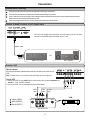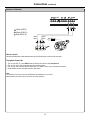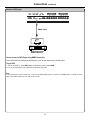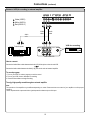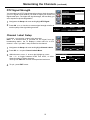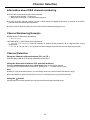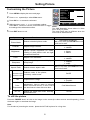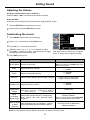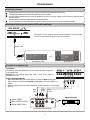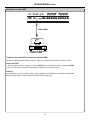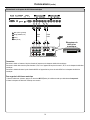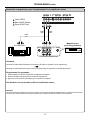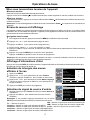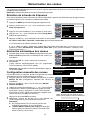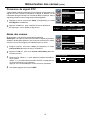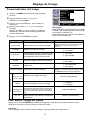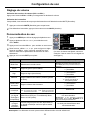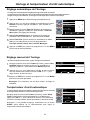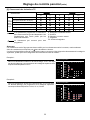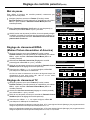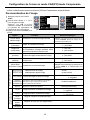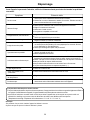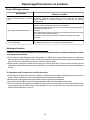
1
PDP TV Operating Manual FPE5016P Before connecting, operating or adjusting this product, please read the manual completely. Please keep this manual for future reference. FOR ASSISTANCE CALL 1-800-619-3848 OR VISIT US AT WWW.AUDIOVOX.COM 1287635 Table of Contents Important Information .......................................................................................................................................................1 Important Safety Precautions ...........................................................................................................................................2 Setup ................................................................................................................................................................................5 Identification of Controls ...................................................................................................................................................8 Connections ....................................................................................................................................................................11 Basic Operations ............................................................................................................................................................17 Memorizing the Channels...............................................................................................................................................18 Channel Selection ..........................................................................................................................................................20 Setting Picture ................................................................................................................................................................21 Setting Sound ................................................................................................................................................................22 Time Set and Sleep Timer .............................................................................................................................................23 Viewing Closed Captions ...............................................................................................................................................24 Setting Parental Control .................................................................................................................................................25 Screen Setup for VGA(PC) Mode/Component Mode ....................................................................................................28 Troubleshooting .............................................................................................................................................................29 Care and Maintenance...................................................................................................................................................30 Specifications.................................................................................................................................................................31 English Programming the Universal Remote Control .................................................................................................................32 Important Information WARNING: TO REDUCE THE RISK OF FIRE OR ELECTRIC SHOCK, DO NOT EXPOSE THIS APPARATUS TO RAIN OR MOISTURE. The lightning flash with arrowhead symbol, within an equilateral triangle is intended to alert the user to the presence of uninsulated dangerous voltage within the product's enclosure that may be of sufficient magnitude to constitute a risk of electric shock to persons. CAUTION RISK OF ELECTRIC SHOCK DO NOT OPEN CAUTION-To reduce the risk of electric shock, do not perform any servicing other than that contained in the operating instructions unless you are qualified to do so. The exclamation point within an equilateral triangle is intended to alert the user to the presence of important operating and maintenance (servicing) instructions in the literature accompanying the appliance. This product utilizes tin-lead solder, and fluorescent lamp containing a small amount of mercury. Disposal of these materials may be regulated due to environmental considerations. For disposal or recycling information, please contact your local authorities or the Electronic Industries Alliance: www.eia.org FCC STATEMENT FCC Notice PDP TV: A CLASS B digital device This equipment has been tested and found to comply with the limits for a Class B digital device, pursuant to part 15 of the FCC Rules. These limits are designed to provide reasonable protection against harmful interference when the equipment is operated in a commercial environment. This equipment generates, uses, and can radiate radio frequency energy and, if not installed and used in accordance with the instruction manual, may cause harmful interference to radio communications. Operation of this equipment in a residential area is likely to cause harmful interference in which case the user will be required to correct the interference at his own expense. Pursuant to 47CFR, Part 15.21 of the FCC rules, any changes or modifications to this monitor not expressly approved by the manufacturer could cause harmful interference and would void the user's authority to operate this device. WARNING: This is a CLASS B product. In a domestic environment this product may cause radio interference in which case the user may be required to take adequate measures to counter interference. 1 English FCC CAUTION: Important Safety Precautions Electrical energy can perform many useful functions, but it can also cause personal injuries and property damage if improperly handled. This product has been engineered and manufactured with the highest priority on safety. But IMPROPER USE CAN RESULT IN POTENTIAL ELECTRICAL SHOCK OR FIRE HAZARD. In order to prevent potential danger, please observe the following instructions when installing, operating and cleaning the product. To ensure your safety and prolong the service life of your PDP TV product, please read the following precautions carefully before using the product. 1. Read these instructions---All operating instructions must be read and understood before the product is operated. 2. Keep these instructions---These safety and operating instructions must be kept in a safe place for future reference. 3. Heed all warnings---All warnings on the product and in the instructions must be observed closely. 4. Follow all instructions---All operating instructions must be followed. 5. Do not use this apparatus near water---for example, near a bathtub, washbowl, kitchen sink, or laundry tub, in a wet basement, or near a swimming pool, and the like. Do not use immediately after moving from a low temperature to high temperature environment, as this causes condensation, which may result in fire, electric shock, or other hazards. 6. Clean only with dry cloth---Unplug this product from the wall outlet before cleaning. Do not use liquid cleaners or aerosol cleaners. Use a damp cloth for cleaning. 7. Ventilation---Do not block any ventilation openings. Install in accordance with the manufacturer instructions. The vents and other openings in the cabinet are designed for ventilation. Do not cover or block these vents and openings since insufficient ventilation can cause overheating and/or shorten the life of the product. Do not place the product on a bed, sofa, rug or other similar surface, since they can block ventilation openings. This product is not designed for built-in installation; do not place the product in an enclosed place such as a bookcase or rack, unless proper ventilation is provided or the manufacturer’s instructions are followed. 8.Heat sources---Do not install near any heat sources such as radiators, heat registers, stoves, or other apparatus (including amplifiers) that produce heat. 9.Grounding or Polarization---Do not defeat the safety purpose of the polarized or grounding-type plug. A polarized plug has two blades with one wider than the other. A grounding type plug has two blades and a third grounding prong. The wide blade or the third prong are provided for your safety. If the provided plug does not fit into your outlet, consult an electrician for replacement of the obsolete outlet. 10.Power cord protection---Protect the power cord from being walked on or pinched particularly at plugs, convenience receptacles, and the point where they exit from the apparatus. 11.Attachments---Only use attachments/accessories specified by the manufacturer. Do not use attachments not recommended by the manufacturer. Use of improper attachments can result in accidents. 2 Important Safety Precautions (continued) 12. Stand---Use only with the cart, stand, tripod, bracket, or table specified by the manufacturer, or sold with the apparatus. Do not place the product on an unstable trolley, stand, tripod or table. Placing the product on an unstable base can cause the product to fall, resulting inserious personal injuries as well as damage to the product. When mounting the product on a wall, be sure to follow the manufacturer’s instructions. Use only the mounting hardware recommended by the manufacturer. 13. Move carefully---When a cart is used, use caution when moving the cart/apparatus combination to avoid injury from tip-over. Sudden stops, excessive force and uneven floor surfaces can cause the product to fall from the trolley. 14. Lightning---Unplug this apparatus during lightning storms or when unused for long periods of time. For added protection for this television equipment during a lightning storm, or when it is left unattended and unused for long periods of time, unplug it from the wall outlet and disconnect the antenna. This will prevent damage to the equipment due to lightning and power-line surges. 15. Servicing---Refer all servicing to qualified service personnel. Servicing is required when the apparatus has been damaged in any way, such as power-supply cord or plug is damaged, liquid has been spilled or objects have fallen into the apparatus, the apparatus has been exposed to rain or moisture, does not operate normally, or has been dropped. 16. Replacement parts---In case the product needs replacement parts, make sure that the service person uses replacement parts specified by the manufacturer, or those with the same characteristics and performance as the original parts. Use of unauthorized parts can result in fire, electric shock and/or other danger. 17.Overloading---Do not overload wall outlets, extension cords, or convenience receptacles on other equipment as this can result in a risk of fire or electric shock. 18.Entering of objects and liquids---Never insert an object into the product through vents or openings. High voltage flows in the product, and inserting an object can cause electric shock and/or short internal parts. For the same reason, do not spill water or liquid on the product. 19.Damage requiring service---If any of the following conditions occurs, unplug the power cord from the AC outlet, and request a qualified service person to perform repairs. a. When the power cord or plug is damaged. b. When a liquid is spilled on the product or when objects have fallen into the product. c. When the product has been exposed to rain or water. d. When the product does not operate properly as described in the operating instructions. Do not touch the controls other than those described in the operating instructions. Improper adjustment of controls not described in the instructions can cause damage, which often requires extensive adjustment work by a qualified technician. e. If the product has been dropped or the cabinet has been damaged in any way. f. When the product displays an abnormal condition or exhibits a distinct change in performance. Any noticeable abnormality in the product indicates that the product needs servicing. 20.Safety checks---Upon completion of service or repair work, request the service technician to perform safety checks to ensure that the product is in proper operating condition. 21.Wall or ceiling mounting---When mounting the product on a wall or ceiling, be sure to install the product according to the method recommended by the manufacturer. This is a safety feature. 3 Important Safety Precautions (continued) 22. Power source---This product is intended to be supplied by a listed power supply indicated on the marking label. If you are not sure of the type of power supply to your home, consult your product dealer or local power company. For added protection for this product during a lightning storm, or when it is left unattended and unused for long periods of time, unplug it from the wall outlet and disconnect the cable system. This will prevent damage to the product due to lightning and power line surges. When the unit has to be used with another power supply voltage, the power cable must be changed. Consult your product dealer. The socket outlet should be installed near the equipment and easily accessible. Use only the power cord designated by our dealer to ensure safety and EMC. When connecting other products such as VCRs and personal computers, you should turn off the power of the unit for protection against electric shock. 23.Panel protection---The PDP panel used in this product is made of glass. Therefore, it can break when the product is dropped or impacted upon by other objects. Be careful not to be injured by broken glass pieces in case the PDP panel breaks. 24.Pixel defect---The PDP panel is a very high technology product, giving you finely detailed pictures. Occasionally, a few non-active pixels may appear on the screen as a fixed point of blue, green or red. Please note that this does not affect the performance of your product. 4 Setup Using the Remote Control <Use the remote control by pointing it towards the remote sensor window of the set. Objects between the remote control and sensor window may prevent proper operation. Note: This illustration is for reference only. The remote sensor may be in different locations on different models. 30 30 5m Cautions regarding use of remote control <Do not expose the remote control to shock. In addition, do not expose the remote control to liquids, and do not place in an area with high humidity. <Do not install or place the remote control under direct sunlight. The heat may cause deformation of the unit. <The remote control may not work properly if the remote sensor window of the main unit is under direct sunlight or strong lighting. In such a case, change the angle of the lighting or PDP TV set, or operate the remote control closer to the remote sensor window. Batteries for the Remote Control 1 Open the battery cover. 2 Insert two size-AA batteries. <(Place the batteries with their terminals corresponding to the (+) and (–) indications in the battery compartment.) - + + - 3 Replace the cover. Precaution on battery use Improper use of batteries can result in a leakage of chemicals and/or explosion. Be sure to follow the instructions below. <Place batteries with their terminals corresponding to the (+) and (–) indications. <Different types of batteries have different characteristics. Do not mix batteries of different types. <Do not mix old and new batteries. Mixing old and new batteries can shorten the life of new batteries and/or cause old batteries to leak chemicals. <Remove batteries as soon as they are non-operable. Chemicals that leak from batteries can cause a rash. If chemical leakage is found, wipe with a cloth. <The batteries supplied with the product may have a shorter life expectancy due to storage conditions. <If the remote control is not used for an extended period of time, remove the batteries from the remote control. 5 Setup Power connection Household power outlet Plug into AC outlet. AC cord S/PDI F SPEAKER R L COMPON ENT INP UT 1 R AUDIO L COMPON ENT INP UT 2 R AUDIO L AC - INPUT 1. Connecting the female plug to the AC socket on the unit. 2. Connecting the male plug to the wall outlet as illustrated. Note: <This product should be operated only from the type of power source indicated on the marking label. <Always unplug the AC cord from power outlet when not using for a long period of time. Speaker connection (Black) (Black) S/PDI F SPEAKER R L COMPON ENT INP UT 1 R AUDIO L COMPON ENT INP UT 2 R AUDIO L (Red) AC - INPUT (Red) Right Left speaker speaker Connect the speaker audio cable to the external speaker output jack on the unit matching the "+" and "-" ends of the cable with color. Note: 1.Unplug the plasma display and all connected components before connecting the speakers. 2.The illustration may be different depending on model. 6 Setup Antenna Connection CABLE TV (CATV) CONNECTION A 75-ohm coaxial cable connector is built into the set for easy hookup. When connecting the 75- ohm coaxial cable to the set, screw the 75ohm cable to the ANT. Terminal. Some cable TV companies offer “premium pay channels”. Since the signals of these premium pay channels are scrambled, a cable TV converter/descrambler is generally provided to the subscriber by the cable TV company. This converter/descrambler is necessary for normal viewing of the scrambled channels. For more specific instructions on installing cable TV, consult your cable TV company. One possible method of utilizing the converter/descrambler provided by your cable TV company is explained below. Please note: An RF switch provided with two inputs (A and B) is required (not supplied). RF switch (not supplied) Two-set signal splitter (not supplied) Cable TV Line IN OUT Cable TV converter/ descrambler (not supplied) “A” position on the RF switch (not supplied) : You can view all unscrambled channels by using the TV’s channel keys. “B” position on the RF switch (not supplied) : You can view the scrambled channels via the converter/descrambler by using the converter’s channel keys. Note: Consult your Dealer or Service Center for the type of splitter, RF switch or combiner that might be required. ANTENNAS The antenna requirements for good color television reception are more important than those for black & white television reception. For this reason, a good quality outdoor antenna is strongly recommended. The following is a brief explanation of the type of connections that are provided with the various antenna systems. 1. A 75-ohm system is generally a round cable with F-type connector that can easily be attached to a terminal without tools (not supplied). 2. A 300-ohm system is a flat “twin-lead” cable that can be attached to a 75-ohm terminal through a 300-75-ohm adapter (not supplied). OUTDOOR ANTENNA CONNECTION Use one of the following two diagrams if you connect an outdoor antenna. A: Using a VHF/UHF combination outdoor antenna. B: Using separate VHF and/or UHF outdoor antennas. Connect the outdoor antenna cable lead-in to the ANT. terminal on the rear of the TV set. F-type connector 75-ohm coaxial cable (round) 300-ohm twin-lead cable (flat) A. Combination VHF/UHF Antenna 300/75-ohm adapter (not supplied) VHF/UHF antenna VHF/UHF antenna or 300-ohm twin-lead 75-ohm coaxial cable S/PD IF SPEAKER R L COMPO NENT I NPUT 1 R AUDIO L B. Separ ate VHF And/or UHF Antennas COMPO NENT I NPUT 2 R AUDIO L AC - INPUT UHF antenna Antenna cable VHF antenna 300-ohm twin-lead Combiner (not supplied) OUT 300-ohm twin-lead IN 75-ohm coaxial cable 7 or Identification of Controls Main unit (front view) POWER INDICATOR REMOTE SENSOR MENU POWER ON/STANDBY CHANNEL DOWN/UP VOLUME DOWN/UP 1. POWER Press this button to turn the unit ON from STANDBY mode. Press it again to turn the set back to STANDBY. 2. MENU Press this button to access the MENU main page. 3. Volume 3/4 Press the VOL 4 or VOL3button to directly increase or decrease the sound volume level. In OSD Menu, press these buttons to adjust the value or setting of each item 4. Channel5/6 Channel Down or up. In OSD Menu, press these buttons to choose the OSD items. Note: POWER , VOL3/4, CH5/6 and MENU on the main unit have the same functions as the corresponding buttons on the remote control. This operation manual provides a description based on operating functions with the remote control. 8 Identification of Controls (continued) Main unit (rear view) AC power input socket Speaker output jacks SPEAKER L R AC - INPUT S/PD IF SPEAKER R S/PDIF L COMPONENT INPUT 1 COMP ONEN T INP UT 1 R AUDIO L COMP ONEN T INP UT 2 AC - INPUT R AUDIO L COMPONENT INPUT 2 R AUDIO L R AUDIO L 1. Speaker output jacks 2. RS232 control interface For service only. The user cannot operate the unit through the RS232 terminals. 3. S/PDIF digital audio out terminal(optical) 4. HDMI input To connect with those equipments with HDMI interface, for example, Set-top box or DVD player. 5. D-Sub interface/Audio in Connect with those equipments with D-Sub interface, for example, PC. Connect the audio jacks as well audio cable. 6. Component inputs 1 Connect to the audio and component output jacks of a DVD player or Set-Top Box. 7. Component inputs 2 Connect to the audio and component output jacks of a DVD player or Set-Top Box. 8. AV outputs Connect to the VCR input jacks to record programs. 9. Earphone jack 10. S-Video input Receive a S-Video signal from external source such as VCR or DVD player. 11. AV inputs 1 Receive a video/audio signals form external source such as VCR or DVD player. 12. AV inputs 2 Receive a video/audio signals form external source such as VCR or DVD player. 13. Antenna input Allow you to connect cable or outdoor antenna. 14. AC power input. 9 Identification of Controls Remote Control 1. POWER Turn the unit on or off 2. To select additional products to be controlled with remote control 1 2 Note: This remote control is an universal remote control. If your remote control does not work correctly when you operate the unit, please try to press TV button. 3 4 5 6 8 7 9 10 11 12 13 14 15 MTS/SAP ZOOM CCD SLEEP LIST FAVORITE AUDIO PICTURE PIP P.POSITION SWAP FREEZE 16 17 18 19 20 3. Direct channel selector/number buttons Use these number buttons to select channel or input password. 4. INPUT To quickly select input source 5. Dash(-) used to enter a program number for multiple program channels such as 21,2-2, etc. 6. RETURN To quickly return to the previous channel 7. CH+/To select channels upward or downward 8. VOL+/Used to adjust volume. 9. MUTE Sound mute 10. MENU To access the Menu main page 11. INFO To display channel status or signal information 12. Menu navigation button: 5634 56: To move upward or downward in menu operation; 34: To move left or right in menu operation; To adjust selected menu item in menu operation; OK button: To confirm or toggle between the settings of the selected menu item. 13. EXIT Used to exit the menu 14. ZOOM To select screen aspect ratio 15. MTS/SAP To select STEREO, SAP or MONO 16. CCD To select closed caption mode 17. SLEEP To set Sleep timer 18. PICTURE To select the picture mode 19. AUDIO To select the sound mode 20. FREEZE To freeze current picture 10 Connections Cautions before connecting Carefully check the terminals for position and type before making any connections. The illustration of the external equipment may be different depending on your model. Loose connectors can result in image or color problems. Make sure that all connectors are securely inserted into their terminals. Refer to the user manual of the external device as well. When connecting an external device, turn the power off on the panel to avoid any issues. Connect an Audio Processor or Hi-Fi (Digital Audio) For a full Home Theater sound experience, you must connect your Hi-Fi or Audio processor to the S/PDIF (Optical) terminal on the TV rear. Optical cable OR S/PDIF IN (Optical) Audio Processor HIFi System Connect a VCR How to connect: Connect the Audio/Video cables between the Audio (L/R)/Video jacks on the unit and VCR. Note: For better video, you can use the S-video terminal if your source supports it. To play VCR 1. Turn on your PDP TV, press INPUT button on the remote control to select Composite1 (or S-Video if using S-VIDEO terminal). 2. Turn on your VCR , insert a videotape and press the Play button. Y W or Video cable Audio cable Y W S-video cable R VCR Y W R Yellow (VIDEO) White (AUDIO L) Red (AUDIO R ) ANT OUT AV OUT VIDEO L AUDIO R S - VIDEO AV IN VIDEO L AUDIO R Rear of the VCR 11 ANT IN R Connections (continued) Connect a Camcorder Y Y W R Yellow (VIDEO) White (AUDIO L) Red (AUDIO R ) Video cable Y VIDEO Audio cable W OUT IN R L AUDIO R How to connect: Connect the Audio/Video cables between the Audio (L/R)/Video jacks on the unit and camcorder. To playback Camcorder 1. Turn on your PDP TV , press INPUT button on the remote control to select Composite 2. 2. Turn on your VCR , insert a videotape and press the Play button. 3. Turn on your camcorder and set it to output mode. (For details, refer to your camcorder user manual.) 4. Insert the tape into the camcorder and press Play button. Note: The operations of the camcorder may be different and is dependant on your model. Please read the user manual of your camcorder to confirm operation. 12 W R Connections (continued) Connect a DVD player HDMI cable DVD player with HDMI interface How to connect a DVD Player using HDMI Connection: Connect the HDMI cable between the HDMI interface on the unit and HDMI output on the DVD player. To play DVD 1. Turn on your PDP TV , press INPUT button on the remote control to select HDMI. 2. Turn on your DVD player, insert a DVD disc and press the Play button. Note: If the external device has DVI output only, use a DVI to HDMI adapter cable to connect to the HDMI terminal. Connect the audio cable to the AUDIO IN terminal of D-SUB on the TV rear. 13 Connections (continued) Connect a DTV receiver G W B R R W white (audio L) Video cable R red (audio R, P r /C r ) G Green (Y) Audio cable B Blue (P b /C b ) R B G R W COMPONENT AUDIO Pb L AUDIO R Pr Y AV OUT R AUDIO L VIDEO S - VIDEO ANT DVI Rear of the DTV receiver How to connect: Connect the cable or antenna to the antenna input jack on the DTV receiver. Connect the Video cable between the Y, Pb, Pr input jacks on the unit and Y, Pb, Pr output jacks on the DTV receiver . Connect the Audio cable between the AUDIO input jack on the unit and AUDIO output jacks on the DTV receiver. To Watch DTV 1. Turn on your PDP TV , press INPUT button on the remote control to select Component1. 2. Turn on your DTV receiver. 14 Connections (continued) Connect a PC D-sub cable Audio cable How to connect: Connect a D-sub cable between the D-sub jack on the PC and the D-sub input jack on the unit. Connect an Audio cable between the AUDIO output on the PC and AUDIO input jack on the unit. To Watch the PC screen 1. Turn on your PDP TV , press INPUT button on the remote control to select VGA. 2. Turn on your PC and check for PC system requirements. 3. Adjust the PC screen. 15 Connections (continued) Connect a VCR (for recording) or external amplifier Y W R Yellow (VIDEO) White (AUDIO L) Red (AUDIO R ) Y R W Video cable Audio cable Audio cable R Y W R W VCR for recording To Audio inputs ANT OUT AV OUT VIDEO L AUDIO R S - VIDEO ANT IN AV IN VIDEO External Amplifier L AUDIO R Rear of the VCR How to connect: Connect the Audio/Video cables between the Audio (L/R)/Video jacks on the unit and VCR. - or - Connect the Audio cables between the Audio (L/R) jacks on the unit and external amplifier. To record program 1. Turn on your PDP TV, select a program you wish to record. 2. Turn on your VCR, insert a videotape for recording. 3. Press the Record button to begin recording. To enjoy high-quality sound through an external amplifier Note: The operations of the amplifier may be different depending on model. Please read the user manual of your amplifier to confirm proper operation. The AV output terminals output audio/video signal inputted from Antenna input or AV inputs. 16 Basic Operations Turning the Unit On and Off Turning On Insert the power cord into the wall outlet. Press the Power button on the remote control, the unit will be turned on and you will be ready to use its features. Turning Off With the power on, press the Power Note: You can also use the Power button on the remote control to turn off. button on the control panel on the main unit. Viewing the Menus and Displays This unit has a simple, easy-to-use menu system that appears on the screen. This system makes it convenient and fast to use features on the unit. The unit also lets you display the status of many of your TV features. Menu navigation 1 2 3 4 With the power on, press the MENU button to display the main menu. Press 5or6 button to select menu page. Press OK or 4 button to enter the menu page. Within the menu, use 5,6,3or4to navigate or adjust. Press OK or4button to confirm, enter sub-menu or toggle the settings of the selected menu item. 5 Press MENU button to return to the previous level menu. Press EXIT button to exit the main menu and return to your program. Note: to clearly introduce the menu operations , this operation manual provides a description based on operation with the remote control. Displaying Status Information Press the INFO button on the remote control, the unit will display current status information such as channel number or signal source, etc. On-screen Menus Language Selection 1 2 3 4 Source TV Press MENU. Video Time Set Sleep Timer Off Press 5or6 to select Feature menu, press OK or4 to access the submenu. Press 5or6 to select Menu Language item, press OK or4 to select your desired language. Audio Parental Control Closed Caption Options Feature CC when Mute Off Menu Language English To Move OK To Select Exit To Exit Press EXIT button to return to TV viewing. Selecting Input Source Signal 1 2 Setup Navigate to the Feature menu and highlight Source. Press OK or4 to select your desired input source. Source TV Video Time Set Sleep Timer Off Audio Parental Control Closed Caption Options Setup Note: You may directly press INPUT button on the remote control to select input source. Feature CC when Mute Menu Language Off English To Move OK To Select Exit To Exit VGA-------Select signal from D-SUB input interface. TV --------Select TV signal. Composite1-------Select signal from AV INPUT1 terminals. HDMI-------Select signal from HDMI input interface. Composite2-------Select signal from AV INPUT2 terminals. S-Video-------Select signal from S-VIDEO input terminal. Component1------Select signal from COMPONENT INPUT1 terminals. Component2------Select signal from COMPONENT INPUT2 terminals. 17 Memorizing the Channels This unit can automatically find all channels available through antenna or cable inputs, and store them in memory. Note: Be sure to select the TV source before operation. Selecting the Tuning Band Before your TV can memorize the available channels, you must specify the type of signal source that is connected to the unit. (i.e., an antenna or cable system) 1 2 3 4 5 Press MENU to display the menu main page. Tuning Band Press 5or 6 repeatedly to select Setup menu. Press OK or4 to access the submenu. Air Video DTV Signal Audio Auto Ch Search Manual Ch Set Channel Labels Press 5or 6 to select Tuning Band item. Setup Press OK or 4 to select the Tuning Band. Feature To Move OK To Select Exit To Exit Air, Cable, Cable HRC, Cable IRC and Cable Auto can be selected. If using antenna, select Air; If using cable, select one of Cable/Cable HRC/Cable IRC/Cable Auto according to your local area’s cable system. Normally please select Cable Auto. (For further band information, contact your cable service provider.) Tuning Band Auto Channel Search Video 1 Navigate to the Setup sub-menu and highlight Auto Ch Search. Audio 2 Press OK or4 to begin the auto channel search. The unit will automatically search for all available TV/DTV (if using antenna), CATV/CADTV (if using cable) program. Setup Air DTV Signal Auto Ch Search Note: if you want to stop the auto-search, press EXIT button. Manual Ch Set Channel Labels To Move OK To Select Exit To Exit Feature Autoprogram Menu NTSC Channel 12 Found Channels Found Manual Channel Set 3 Progress (%) 7 After setting channels into memory, you can add or delete channels from the default channel list as follows: 1 2 3 4 Navigate to the Setup sub-menu and highlight Manual Ch Set. Press OK or 4 to open Manual Channel Set Menu sub-menu. Use navigation buttons (5,6,3or4) to navigate and select, use OK button to add (the added channel will have a mark) or delete the channel. (If you want to toggle between NTSC and ATSC, use navigation buttons to highlight it, and then use OK to toggle.) Tuning Band Video Auto Ch Search Audio Note: l For DTV program, you can only delete the programs from the list, you can not add it. l You can make use of Manual Channel Set Menu to know whether an ATSC channel exists as a sub channel. 18 Manual Ch Set Channel Labels Setup To Move OK To Select Exit To Exit Feature Use OK button to toggle between NTSC and ATSC after highlighted. Press EXIT button to exit. Now when you use CH+/- buttons to cycle among the channels, the deleted channels can not be selected. Air DTV Signal Manual Channel Set Menu Tuning Band NTSC 31 32 33 34 35 36 37 38 39 40 41 42 43 44 45 46 47 48 49 50 51 52 53 54 55 56 57 58 59 60 To Move OK To Select Exit To Exit Memorizing the Channels (continued) DTV Signal Strength Tuning Band You can make use of DTV signal strength monitor to check how strong your DTV signal is and whether you need to adjust your antenna or digital cable input. The higher the signal strength, the less likely you are to experience picture degradation. Air Video DTV Signal Audio Auto Ch Search Manual Ch Set Channel Labels Setup 1 2 Navigate to the Setup sub-menu and highlight DTV Signal. To Move OK To Select Exit To Exit Feature Press OK or4 to view the on-screen signal strength monitor to see the quality of the signal being received. Weak Good Normal 96 No Signal Channel Label Setup If required, you can give a name to the programs. Note: if a channel label is provided on the signal from the broadcasting station, the TV displays a short name for a DTV channel even if you didn't setup a label for the channel. Tuning Band Video DTV Signal Audio Auto Ch Search Manual Ch Set Air Channel Labels Setup 1 2 3 4 Navigate to the Setup sub-menu and highlight Channel Labels. To Move OK To Select Exit To Exit Feature Press OK or4 to open Channel Labels Menu. Within the menu, use 3/4 to move the highlight or cursor. Use 5/6 to toggle between NTSC and ATSC, or select channel number, or select character. You may use OK button to return to the previous level menu. To quit, press EXIT button. 19 Channel Labels Menu NTSC Ch005 - - - - To Move OK To Change Exit To Exit Channel Selection Information about USA channel numbering =ATSC PSIP channel has two part channel number: — Major channel number Þ Frequency — Minor channel number Þ Sub channel on frequency =In USA, the major channel number is same for both analog and digital frequencies. (It is equal to the NTSC channel number for existing broadcasters.) =In USA, a minor channel number of zero is used for a broadcaster’s analog channel. Channel Numbering Example =Original NTSC Channels for Des Moines: — 5, 8, 11, 13, 17 =Possible NTSC + ATSC Channels for Des Moines: — 5-0, 8-0, 11-0, 13-0, 17-0 (channel numbers for existing analog channels, all on original NTSC analog frequencies) — 5-1, 5-2, 8-1, 8-2, 8-3,8-4, 13-1 (channel numbers for digital channels on three new digital frequencies) Channel Selection Using the Channel up/down buttons (CH+ or CH-) Press the CH+ or CH- to cycle among available channels found. Using the direct select buttons (0-9 and dash buttons) Press the number buttons (0-9) and the dash button (-) to go directly to a channel. For example, if you want to select channel 8-3, just key in ‘8’, ‘-’, ‘3’ on the remote control. Note: =When you use the number buttons, you can directly select any channel within the channel range . =In some situations virtual channel numbers have no correspondence to physical frequencies. Using the button Press this button to switch between the current channel and the last viewed channel. 20 Setting Picture Customizing the Picture 1 Press MENU to display the menu main page. 2 3 4 Press 5or6 repeatedly to select Video menu. 5 Video Picture Mode Contrast 50 Brightness 50 Audio Color Sharpness Setup Press OK or4 to access the submenu. User 50 0 Aspect Ratio Wide Advanced Video Menu To Move OK To Select Exit To Exit Feature Within the menu, use 5,6,3or4 to navigate or adjust. Press OK or 4button to confirm, enter sub-menu or toggle Notes: the settings of the selected menu item. The OSD illustration shown above is Video menu in RF(TV) mode. Press EXIT button to exit. The menu items may be different when the unit works in different mode. Function Option Choice/remarks User/Nature/Soft/Bright Picture Mode Contrast Brightness Color Sharpness Selects a desired picture mode. Note: you may directly press PICTURE button on the remote control to select. Adjusts image contrast. 4: stronger 3: weaker Adjusts screen brightness for easier viewing of dark picture such as night scenes and black hair. 4: lighter 3: darker Adjusts color saturation. 4: stronger 3: weaker Adjusts image sharpness and displays a sharp image. 4: sharper 3: softer Wide/Cinema/Normal/Zoom Aspect Ratio Selects screen aspect ratio. Note: you may directly press ZOOM button on the remote control to select. Advanced Video Menu Noise Reduction--Spatial Noise Reduction--Speckle Noise Reduction--Temporal Tint Color Temperature 3D Y/C Reduces noise in the picture, commonly called snow. On/Off 4: greenish 3: purplish Adjusts tint for image. Selects one of three automatic color adjustments. Sets to warm to enhance hotter colors such as red, or set to cool to see less intense colors with more blue. Cool/Warm/Normal Selects 3D comb filter on/off, normally please select On. On/Off To still the picture Press the FREEZE button to hold on the image on the screen (the video sources are still operating). Press the button again to reactivate the image. Note: For the sake of protecting the screen, please do NOT still a picture for a long time. 21 Setting Sound Adjusting the Volume Using the volume buttons (VOL+ and VOL-) Press the VOL + or VOL- to increase or decrease the volume. Using the Mute At any time, you can temporarily cut off the sound using the MUTE button. 1 2 Press the MUTE button and the sound cuts off. To turn mute off, press the MUTE button again. Customizing the sound 1 Sound Mode Video Press MENU to display the menu main page. Audio 2 Press 5or6 repeatedly to select Audio menu. Press OK or4 to access the submenu. Feature 4 Within the menu, use 5,6,3or4 to navigate or adjust. Press OK or 4button to confirm, enter sub-menu or toggle the settings of the selected menu item. 5 Press EXIT button to exit. Option 30 Treble 30 Balance 30 Earphone Vol 30 Setup 3 User Bass Digital Audio Output RAW MTS Mono To Move OK To Select Exit To Exit (The above menu is shown as an example. It is in TV mode and the signal is analog) Function Choice/Range/Remarks User/News/Music/Movie Sound Mode Note: you may directly press AUDIO button on the remote control to select. Selects sound mode. Bass Adjusts Bass (low sounds) 4: stronger 3: weaker Treble Adjusts Treble (high sounds). 4: stronger 3: weaker Balance Adjusts volume balance (left and right volumes). 4:Higher volume from right speaker. 3:Higher volume from left speaker. 4: stronger 3: weaker Earphone Vol Adjusts earphone volume. Digital Audio Output Selects audio output mode from SPDIF. RAW:AC-3 in AC-3 out PCM:AC-3 in PCM out PCM in PCM out PCM in PCM out MTS (In analog signal only) Selects MTS (multi-channel TV sound) mode: Mono, Stereo and SAP (Second Audio Program). Audio Language Other languages may be available if a digital (In digital signal is provided by the broadcasting station. signal only) RAW/PCM The choice may be different in different situation Note: you may directly press MTS/SAP button on the remote control to select. The choice may be different in different situation Notes: the menu items may be different when the unit works in different mode. 22 Time Set and Sleep Timer Auto Clock Setup - The time is set automatically from a digital channel signal. - The digital channel signal includes information for the current time provided by the broadcasting station. - Set the clock manually, if the current time is set incorrectly by the auto clock function. 1 Press MENU to display the menu main page. Source 2 Press 5or6 repeatedly to select Feature menu, press OK or4 to access the submenu. 3 Highlight Time Set menu item, press OK or4 to access the Time Set Menu. 4 Highlight Time Set Mode and then use OK or4 to select Auto. 5 Highlight Time Zone and then use OK or4 to select your viewing area time zone: Pacific, Alaska, Hawaii, Eastern, Central, Mountain. Video TV Time Set Sleep Timer Audio Setup Off Parental Control Closed Caption Options CC when Mute Menu Language Off English To Move OK To Select Exit To Exit Feature Time Set Menu Time Set Mode Auto Time Zone Pacific Year 2004 Date Aug 22 Time 6 12:00 AM To Change OK To Move Exit To Exit Press EXIT button to return to TV viewing or press MENU button to return to the previous menu. Manual Clock Setup - If current time setting is wrong, reset the clock manually. 1 2 Navigate to the Feature sub-menu, highlight Time Set Mode and then use OK or 4 to select Manual. Time Set Menu Press 5or6 to select either the Year, Date, or Time option. Once selected, use OK or 3/ 4 to set the year, date, and time options. Time Set Mode Manual Time Zone Pacific Year 2004 Date Aug 22 Time 12:00 AM To Change OK To Move Exit To Exit Press EXIT button to return to TV viewing or press MENU button to 3 return to the previous menu. Note: if you power off the TV set, the clock setting will be cleared. Sleep timer Sleep timer lets you select the amount of time before your TV turns itself off automatically. Navigate to the Feature sub-menu, highlight Sleep Timer and then use OK or 4 to select the amount of time. To turn off sleep timer, select Off. Note: you may directly press SLEEP button on the remote control to set sleep timer. 23 Source Video Sleep Timer Audio Setup Feature TV Time Set Off Parental Control Closed Caption Options CC when Mute Menu Language Off English To Move OK To Select Exit To Exit Viewing Closed Captions The unit decodes and displays the closed captions that are broadcast with certain TV shows. These captions are usually subtitles for the hearing impaired or foreign language translations. All VCRs record the closed caption signal from television programs, so home-recorded video tapes also provide closed captions. Most prerecorded commercial video tapes provide closed captions as well. Check for the closed caption symbol in your television schedule and on the tape’s packaging: . Note: The Caption feature does not work with Component, VGA,HDMI. Not all the programs and videos will offer closed captioning. Please look for the symbol to ensure that captions will be shown. Analog Broadcasting System Captions - Select a caption mode for displaying captioning information if provided on a program. - Analog caption displays information on the screen usually the program’s dialog. Press CCD button on the remote control to select caption mode: CC1, CC2, CC3, CC4, TEXT1, TEXT2, TEXT3 orTEXT4. To turn off closed captioning, press CCD repeatedly to select Off. The Closed Caption broadcasts can be viewed in two modes: CAPTION and TEXT. For each mode, four channels are available. The [CAPTION] mode shows subscripts of dialogues and commentaries of TV dramas and news programs while allowing a clear view of the picture. The [TEXT] mode displays various information over the picture (such as TV program schedule, weather forecast, etc.) that is independent of the TV programs. Digital Broadcasting System Captions - You may use CCD button on the remote control to select caption mode. =You can customize the digital closed captions that appear on your screen. 1 Navigate to the Feature sub-menu, highlight Closed Caption Options and then use OK or 4 to open the Digital Closed Caption sub-menu. 2 Highlight Style and then use OK or 4 to select Custom. 3 Press 5or6 to select your desired item, and then use OK or 4 to customize the Size, Font, etc. to your preference. A preview sample is provided at the bottom of the menu screen for you to see the effect. ¨Size: Set the size the words will appear in. ¨Font: Select a typeface for the words. ¨Text Color: Choose a color for the text. ¨Text Opacity: Specify the opacity for the text color. ¨Background Color: Select a background color. ¨Background Opacity: Select the opacity for the background color. ¨Edge Effect: Select an edge effect. ¨Edge Color: Select a color for the edges. Source TV Video Time Set Sleep Timer Off Audio Parental Control Closed Caption Options Setup CC when Mute Menu Language Off English To Move OK To Select Exit To Exit Feature Digital Closed Caption Style Custom Size Normal Font Default Text Color White Text Opacity Solid Background Color Black Background Opacity Solid Edge Effect None Edge Color Red CLOSED CAPTION SAMPLE To Move OK To Select Exit To Exit Source TV Setting CC When Mute Video Time Set Sleep Timer Off 1 Navigate to the Feature sub-menu, highlight CC when Mute. Audio Parental Control Closed Caption Options 2 Press OK or 4to select On or Off. When On is selected, the unit will automatically display closed caption when you mute the sound. 24 Setup Feature CC when Mute On Menu Language English To Move OK To Select Exit To Exit Setting Parental Control Parental Control This function allows TV programs to be restricted and TV usage to be controlled based on FCC data. It prevents children from watching violent or sexual scenes that may be harmful. Restriction of TV programs includes two ratings that contain information about the program: the MPAA rating and the TV Parental Guidelines. The MPAA rating is restricted by age. TV Parental Guidelines are restricted by age and content. Since a TV program may use either the MPAA rating or the TV Guidelines, both should be adjusted for complete control. [1] Movie Rating (MPAA) Rating G GENERAL AUDIENCES. All ages admitted. PG PARENTAL GUIDANCE SUGGESTED. Some material may not be suitable for children. PG-13 age based R NC-17 PARENTAL STRONGLY CAUTIONED. Some material may be inappropriate for children under 13. RESTRICTED. Under 17 requires accompanying parent or adult guardian. NO ONE 17 AND UNDER ADMITTED. X X Rating is an older rating that is unified with NC-17 but may be encoded in the data of older movies. NONE NOT RATED. Note: The Movie rating is only age-based. Example 1: Parental Control Set Menu “PG-13” in the age-based rating is blocked, this will automatically block the higher ratings “R”, “NC-17”, “X” also. MPAA TV RATING ALL NONE FV L S V D V D NONE G TV-Y PG TV-Y7 PG-13 TV-G R TV-PG NC-17 TV-14 X TV-MA To Move OK To Select Exit To Exit Example 2: “R” in the age-based rating is blocked, this will automatically block the higher rating “NC-17”, “X” also. Parental Control Set Menu MPAA TV RATING ALL NONE FV L S NONE G TV-Y PG TV-Y7 PG-13 TV-G R TV-PG NC-17 TV-14 X TV-MA To Move OK To Select Exit To Exit 25 Setting Parental Control(continued) [2] TV Rating Rating content based V D FV L S TV-Y (All children) TV-Y7 (Direct to Older Children) age based TV-G (General Audience) TV-PG (Parental Guidance Suggested) TV-14 (Parents Strongly Cautioned) TV-MA (Mature Audience Only) Content Rating can be set but this Rating is not normally broadcast by TV Station. Content Rating can be set. D: Sexually Suggestive Dialog V: Violence S: Sexual Situation L: Adult Language FV: Fantasy Violence Note: Age-based ratings can be modified by the content-based ratings but only in the combinations indicated by an the table above. Choosing lower age-based rating blocks the higher age-based ratings regardless of content ratings settings. Example 1: Parental Control Set Menu When TV-Y in the age-based rating is set to BLOCK, this will automatically block the higher rating: TV-Y7. MPAA TV RATING ALL NONE FV L S V D V D NONE G TV-Y PG TV-Y7 PG-13 TV-G R TV-PG NC-17 TV-14 X TV-MA To Move OK To Select Exit To Exit Example 2: When TV-G in the age-based rating is set to BLOCK, this will automatically block the higher ratings: TV-PG,TV-14,TV-MA. Parental Control Set Menu MPAA TV RATING ALL NONE FV L S NONE G TV-Y PG TV-Y7 PG-13 TV-G R TV-PG NC-17 TV-14 X TV-MA To Move OK To Select Exit To Exit 26 in Setting Parental Control(continued) Password Setup To use the Parental Control function, you first need to set your password. Navigate to the Feature sub-menu, highlight Parental Control 1 and then use OK or 4to access Parental Control Menu. Source TV Video Time Set Sleep Timer Off Audio Parental Control Setup CC when Mute Menu Language Closed Caption Options English To Move OK To Select Exit To Exit Feature 2 Highlight Password Change and then use OK or4to access. Off Parental Control Menu Password Change Parental Control Set To Move OK To Select Exit To Exit 3 Input old password (4-digit, the preset password is 0000), then input a new password and then confirm again. Now your new password has been created successfully. Be sure to write down your password and retain it for future use. Enter Old Password Enter New Password MPAA Rating Setup Confirm New Password Navigate to the Feature sub-menu, highlight Parental Control and 1 then use OK or 4to access Parental Control Menu. 2 Highlight Parental Control Set and then use OK or 4to access. 3 Input your password correctly to access Parental Control Set Menu. 4 Parental Control Menu Password Change Parental Control Set To Move OK To Select Exit To Exit Within the menu, use 5,6,3or4to navigate, use OK to block or unblock the rating. Enter Password When “PG-13” in the age-based rating is blocked, this will automatically block the higher ratings “R”, “NC-17”, “X” also. Parental Control Set Menu TV Rating Setup MPAA Navigate to the Feature sub-menu, highlight Parental Control and 1 then use OK or 4to access Parental Control Menu. 2 Highlight Parental Control Set and then use OK or 4to access. 3 Input your password correctly to access Parental Control Set Menu. 4 Within the menu, use 5,6,3or4to navigate, use OK to block or unblock the rating. TV RATING ALL NONE FV L S V D NONE G TV-Y PG TV-Y7 PG-13 TV-G R TV-PG NC-17 TV-14 X TV-MA To Move OK To Select Exit To Exit When TV-Y in the age-based rating is set to BLOCK, this will automatically block the higher rating: TV-Y7. When TV-G in the age-based rating is set to BLOCK, this will automatically block the higher ratings: TV-PG,TV14,TV-MA. 27 Screen Setup for VGA(PC) Mode/Component Mode - Be sure to select the correct source (VGA or Component) before operation. Customizing the picture 1 Navigate to the Video sub-menu. Within the menu, use 5,6,3or4 to 2 navigate or adjust. Press OK or 4button to confirm, enter sub-menu or toggle the settings of the selected menu item. 3 Press EXIT button to exit. Option Video Picture Mode Contrast 50 Brightness 50 Audio Color Sharpness Feature Picture Mode Contrast 50 Brightness 50 Audio Color Sharpness 50 0 Aspect Ratio Setup Video User Advanced Video Menu VGA Set To Move OK To Select Exit To Exit (Video menu in VGA mode) Function 50 0 Aspect Ratio Wide Setup Feature User Wide Advanced Video Menu Component Set To Move OK To Select Exit To Exit (Video menu in Component mode) Choice/remarks User/Nature/Soft/Bright Picture Mode Selects a desired picture mode. Note: you may directly press PICTURE button on the remote control to select. Adjusts image contrast. 4: stronger 3: weaker Adjusts screen brightness for easier viewing of dark picture such as night scenes and black hair. 4: lighter 3: darker Adjusts color saturation. 4: stronger 3: weaker Sharpness Adjusts image sharpness and displays a sharp image. 4: sharper 3: softer Aspect Ratio Selects screen aspect ratio. Contrast Brightness Color Noise Reduction--Spatial VGA Set (for PC mode) Component Set (for Component mode) Advanced Video Menu Noise Reduction--Speckle Reduces noise in the picture, commonly called snow. Wide/Cinema/Normal/Zoom Note: you may directly press ZOOM button on the remote control to select. On/Off Noise Reduction--Temporal Tint 4: greenish 3: purplish Adjusts tint for image. Color Temperature Selects one of three automatic color adjustments. Sets to warm to enhance hotter colors such as red, or set to cool to see less intense colors with more blue. Cool/Warm/Normal 3D Y/C Selects 3D comb filter on/off, normally please select On. On/Off H-Pos Adjusts the horizontal position of the image. 4: rightward 3: leftward V-Pos Adjusts the vertical position of the image. 4: upward 3: downward Clock Adjusts the sample frequency. Phase Improves the focussing of stable image. Setting Selects and activates Preset to reset the adjusted values to original factory values. 28 Troubleshooting Before calling for repair service, check the following items for possible remedies to an encountered symptom. Symptoms Check item =Check that the No power AC power cord is plugged into the mains socket. =Unplug the power cord, wait for 60 seconds. Then re-insert plug into the mains socket and turn on the unit again. =Check video connections at the rear of the unit to see if it is properly connected to the unit. No picture =Adjust the contrast and brightness settings. =Select a correct input. =Is a non-compatible signal being input? Good picture but no sound Good sound but poor color =Increase the VOLUME. =Check that the unit is not muted. = Adjust the contrast, color and brightness settings. =Sometimes, Poor picture poor picture quality occurs when an activated S-VHS camera or camcorder is connected while another activated peripheral is connected. In this case, switch off one of the peripherals. =Check whether the room is too bright. =This may be caused by electrical interference (e.g. hairdryer, nearby neon lights, Horizontal dotted line etc.). =Turn off the equipment. =This remote control is a universal remote control. If the remote control does not work correctly when operating the monitor, try pressing the TV button. Remote operation fails. =Check whether the batteries are working. Replace if necessary. =Clean the remote control sensor lens on the unit. =Do not use the remote control under strong or fluorescent lighting. =The batteries should be inserted with polarity (+, -) aligned. Snowy picture and noise =Check the A/V connections. No stable or not synchronized VGA picture =Check if you have selected the correct VGA mode in your PC. No output from one of the speakers =Adjust Balance in the SOUND menu. Control buttons do not work. =Unplug the power cord, wait for a few seconds. Then re-plug the power cord and turn on the unit again. + Do not use in hot and cold rooms (locations) • When the unit is used in rooms (locations) with low temperature, the picture may leave trails or appear slightly delayed. This is not a malfunction, and the unit will recover when the temperature returns to normal. • Do not leave the unit in a hot or cold location. Also, do not leave the unit in a location exposed to direct sunlight or near a heater, as this may cause the cabinet to deform and the PDP panel to malfunction. (Storage temperature: 0°C to +50°C Working temperature: 5°C to +40°C ) Note: If your problem is not solved, turn your unit off and then on again. Never attempt to repair a PDP TV yourself. 29 Troubleshooting / Care and Maintenance Plasma Display panel Symptoms Some parts of the screen do not light up. After-images appear Check item The plasma display panel is manufactured using an extremely high level of precision technology, however, sometimes some parts of the screen may be missing picture elements or have luminous spots. This is not a malfunction. Do not allow a still picture to be displayed for an extended period, as this can cause a permanent after-image to remain on the Plasma Display. Examples of still pictures include logos, video games, computer images, teletext and images displayed in 4:3 mode. Note: The permanent after-image on the Plasma Display resulting from fixed image use is not an operating defect. This product is not designed to display fixed images for extended periods of time. Snapping sounds may be heard from the This sound is produced when the cabinet expands or contracts due to variations in display unit. temperature and is not a malfunction. Cleaning and Maintenance The front of the display panel has been specially treated. Wipe the panel surface gently using only a cleaning cloth or a soft, lint-free cloth. RIf the surface is particularly dirty, soak a soft, lint-free cloth in a weak detergent solution and then wring the cloth to remove excess liquid. Use this cloth to wipe the surface of the display panel, then wipe it evenly with a dry cloth, of the same type, until the surface is dry. RDo not scratch or hit the surface of the panel with fingernails or other hard objects. Furthermore, avoid contact with volatile substances such as insect sprays, solvents and thinner, otherwise the quality of the surface may be adversely affected. If the cabinet becomes dirty, wipe it with a soft, dry cloth. RIf the cabinet is particularly dirty, soak the cloth in a weak detergent solution and then wring the cloth dry. Use this cloth to wipe the cabinet, and then wipe it dry with a dry cloth. RDo not allow any detergent to come into direct contact with the surface of the Plasma Display. R If water droplets get inside the unit, operating problems may result. RAvoid contact with volatile substances such as insect sprays, solvents and thinner, otherwise the quality of the cabinet surface may be adversely affected or the coating may peel off. Furthermore, do not leave it for long periods in contact with articles made from rubber or PVC. 30 Specifications Power supply: AC 100-240V 50/60Hz Power consumption: 480W Screen: 50” Unit Dimensions (WxHxD) (inch) 56.3 x 32.7 x 12 Weight: 119 (lb) Channel coverage: VHF UHF CATV CADTV DTV 2-13 14-69 1-125 1-135 2-69 TV system: NTSC-M, ATSC Accessories: Operating manual X 1 Remote control X 1 1. Design and specifications are subject to change without notice. 2. Weight and dimensions shown are approximate. 3. Specifications and external appearance may be changed for the sake of improvement. 31 PRINTED ON RECYCLED PAPER 604-PHSFB187-00 Ver.1.0 Table des matières Renseignements importants.............................................................................................................................................1 Instructions de sécurité importantes.................................................................................................................................2 Configuration ....................................................................................................................................................................5 Identification des commandes ..........................................................................................................................................8 Connexions .....................................................................................................................................................................11 Opérations de base ........................................................................................................................................................17 Mémorisation des canaux...............................................................................................................................................18 Sélection du canal ..........................................................................................................................................................20 Réglage de l’image.........................................................................................................................................................21 Configuration du son......................................................................................................................................................22 Horloge et temporisateur d’arrêt automatique ...............................................................................................................23 Affichage des sous-titres................................................................................................................................................24 Réglage du contrôle parental .........................................................................................................................................25 Configuration de l’écran en mode VGA(PC)/mode Composante...................................................................................28 Dépannage ....................................................................................................................................................................29 Précautions et entretien .................................................................................................................................................30 Caractéristiques .............................................................................................................................................................31 Français Programmation de la télécommande .............................................................................................................................32 Renseignements importants AVERTISSEMENT: POUR RÉDUIRE LE RISQUE DE CHOC ÉLECTRIQUE OU D’INCENDIE, NE PAS EXPOSER CET APPAREIL À LA PLUIE NI À L’HUMIDITÉ. Le symbole de l’éclair avec pointe de flèche, dans un triangle équilatéral, a pour objet d’avertir l’utilisateur de la présence d’une «tension dangereuse» non isolée dans le boîtier de l’appareil dont la valeur peut être suffisante pour constituer un risque de choc électrique. PRUDENCE RISQUE DE CHOC ÉLECTRIQUE, NE PAS OUVRIR PRUDENCE -Pour réduire le risque de choc électrique, n’effectuer aucun entretien autre que celui décrit dans les instructions de fonctionnement, à moins d’être qualifié pour le faire. Le point d’exclamation au centre d’un triangle équilatéral prévient l’utilisateur de la présence d’instructions importantes dans le mode d’emploi concernant l’utilisation et l’entretien de l’appareil. Ce produit utilise de la brasure étain-plomb et un tube fluorescent contenant une petite quantité de mercure. La mise au rebut de ces matériaux est généralement réglementée dans le cadre de la protection de l’environnement. Pour des renseignements sur la mise au rebut ou le recyclage de ces matériaux, contacter les autorités locales ou l’Electronic Industries Association (EIA): www.eia.org. DÉCLARATION DE CONFORMITÉ FCC Avis de la FCC Télévision PDP: Appareil numérique de la classe B Cet équipement a été testé conforme aux limites relatives aux dispositifs numériques de classe B selon la section 15 du règlement de la FCC. Ces limites sont établies afin de garantir une protection suffisante contre des interférences nuisibles lorsque l’équipement est utilisé dans un environnement commercial. Cet équipement génère, utilise et peut émettre une énergie de radiofréquence et, s’il n’est pas installé et utilisé conformément aux instructions du manuel, peut causer des interférences nuisibles aux communications radio. Le fonctionnement de l’équipement en zone résidentielle est susceptible de causer des interférences nuisibles auquel cas l’utilisateur devra corriger les interférences à ses propres frais. MISE EN GARDE DE LA FCC: Aux termes de l’article 47CFR section 15.21 du règlement de la FCC, tout changement ou toute modification apportés à ce moniteur n’ayant pas été expressément approuvés par le fabricant peuvent causer des interférences nuisibles et annuler le droit de l’utilisateur à utiliser ce dispositif. Français AVERTISSEMENT: Ce produit relève de la CLASSE B. Dans un environnement domestique, ce produit peut causer des interférences radio, auquel cas l’utilisateur devra prendre les mesures adéquates pour contrer les interférences. 1 Instructions de sécurité importantes L’énergie électrique peut réaliser de nombreuses fonctions utiles; elle peut toutefois causer des blessures et des dégâts aux biens si elle n’est pas maîtrisée correctement. Ce produit a été conçu et fabriqué dans un souci de sécurité. Cependant UNE MAUVAISE UTILISATION PEUT PRÉSENTER DES RISQUES D’INCENDIE OU DE CHOC ÉLECTRIQUE. Afin d’éviter des dangers potentiels, observer les instructions suivantes lors de l’installation, le fonctionnement et le nettoyage de l’appareil. Pour assurer la sécurité de l’utilisateur et prolonger la durée de vie utile du téléviseur à écran plat à plasma, lire attentivement les consignes et suivre les précautions suivantes avant d’utiliser l’appareil. 1. Lire ces instructions---Lire et comprendre toutes les instructions de fonctionnement avant d’utiliser l’appareil. 2. Conserver ces instructions---Il est recommandé de conserver ces précautions de sécurité et les instructions de fonctionnement dans un lieu sûr pour référence ultérieure. 3. Respecter tous les avertissements---Respecter strictement tous les avertissements figurant sur le produit et toutes les instructions. 4. Suivre toutes les instructions---Toutes les instructions concernant le fonctionnement doivent être suivies. 5. Ne pas utiliser cet appareil à proximité d’eau---Par exemple: baignoire, bac à linge, évier, cuve à lessive, dans un sous-sol humide, ni à proximité d’une piscine, etc. Ne pas l’utiliser immédiatement après avoir l’avoir déplacé d’un endroit froid à un endroit chaud, en raison du risque de formation de condensation pouvant causer un incendie, un choc électrique ou autre accident. 6. Nettoyer uniquement avec un chiffon sec---Débrancher le produit de la prise murale avant de le nettoyer. Ne pas utiliser de nettoyant liquide ou en aérosol. Utiliser un chiffon humide pour le nettoyage. 7. Ventilation---Ne pas obstruer les ouvertures d’aération. L’installer conformément aux instructions du fabricant. Les évents et les autres ouvertures du boîtier sont conçus pour la ventilation. Ne pas les couvrir ni les bloquer car une ventilation insuffisante peut causer la surchauffe et/ou raccourcir la durée de vie du produit. Ne pas placer le produit sur un lit, un sofa, un tapis ou toute autre surface similaire qui pourrait bloquer la ventilation. Ce produit n’est pas conçu pour une installation fermée; ne pas placer le produit dans un endroit fermé tel qu’une bibliothèque ou une étagère sauf si une ventilation adéquate est fournie et si les instructions du fabricant sont respectées. 8. Sources de chaleur---Ne pas installer près de sources de chaleur telle que radiateurs, registres de chaleur, fours et autres appareils (y compris amplificateurs) produisant de la chaleur. 9. Mise à la terre et polarisation---Ne pas chercher à modifier le dispositif de sécurité de la prise polarisée ou de mise à la terre. Une prise polarisée comporte deux plots, un plus large que l’autre. Une prise de terre est composée de deux plots et d’un troisième de mise à la terre. Le plot le plus large ou la troisième broche sont fournis pour la sécurité de l’opérateur. Si la prise fournie ne rentre pas dans la prise secteur, faire appel à un électricien pour qu’il remplace cette dernière qui est obsolète. 10. Protection du cordon d’alimentation---Protéger le cordon d’alimentation pour qu’il ne soit pas piétiné ni pincé, en particulier au niveau des prises, de la plaque multiprises et du point de sortie de l’appareil. 11. Accessoires---N’utiliser que des périphériques et des accessoires spécifiés par le fabricant. Ne pas utiliser d’équipements non recommandés par le fabricant. L’utilisation d’un équipement inadéquat peut causer des accidents. 2 Instructions de sécurité importantes (suite) 12. Stand---N’utiliser qu’avec le meuble à roulettes, le stand, le trépied, le support ou la table spécifiés par le fabricant ou vendus avec l’appareil. Ne pas placer le produit sur un meuble à roulettes, un stand, un trépied ou une table instables. Le fait de placer l’appareil sur un support instable présente des risques de chute, de blessures et de dommages. Lors du montage de l’appareil sur un mur, s’assurer de suivre les instructions du fabricant. Utiliser uniquement la visserie de montage recommandée par le fabricant. 13. Déplacer l’appareil avec précaution---Lors de l’utilisation d’une table roulante, déplacer l’ensemble appareil/table roulante avec précaution pour éviter les blessures pouvant être causées par une éventuelle chute de l’appareil. Des arrêts rapides, une force excessive et des surfaces inégales peuvent causer le retournement de la table roulante. 14. Foudre---Débrancher l’appareil en cas d’orage ou quand il n’est pas utilisé pendant une période prolongée. Afin d’assurer une meilleure protection du téléviseur contre la foudre ou s’il est inutilisé pendant une longue période, le débrancher de la prise de courant et déconnecter l’antenne. Ceci évitera d’endommager l’équipement en cas de foudre ou de variation de tension du secteur. 15. Service---Toutes les réparations doivent être réalisées par un personnel qualifié. Un entretien est requis lorsque l’appareil a subi des dommages, tels que des dommages du cordon d’alimentation ou de la prise, lorsque du liquide a été renversé ou que des objets sont tombés dans l’appareil, en cas d’exposition aux intempéries et à l’humidité, en cas d’anomalie de fonctionnement ou de chute de l’appareil. 16. Pièces de rechange---Lorsque des pièces de rechange doivent être installées sur le produit, s’assurer que le technicien utilise des pièces conformes aux spécifications du fabricant ou des pièces dont les caractéristiques et les performances sont identiques à celles des pièces d’origine. L’utilisation de pièces de rechange non autorisées présente des risques d’incendie, de choc électrique et/ou d’autres dommages. 17. Surcharge---Ne pas surcharger les prises murales, les rallonges, ou plaques multiprises sur d’autres équipements pour éviter les risques d’incendie et de choc électrique. 18. Introduction d’objets et infiltration de liquides---Ne jamais introduire d’objet dans l’appareil par les fentes ou les ouvertures. L’appareil fonctionne à des tensions élevées et l’introduction d’un objet à l’intérieur risque de causer un choc électrique et/ou le courtcircuitage de composants internes. Pour les mêmes raisons, ne pas renverser d’eau ni de liquide quelconque sur l’appareil. 19. Dommages nécessitant réparation---Si l’une des conditions suivantes survient, débrancher le cordon d’alimentation de la prise de courant c.a. et demander à un technicien qualifié d’effectuer les réparations nécessaires. a. Lorsque le cordon d’alimentation ou la fiche sont endommagés. b. Lorsqu’un liquide a été renversé sur l’appareil ou lorsque des objets sont tombés dessus. c. Lorsque le produit a été exposé à la pluie ou à l’eau. d. Lorsque l’appareil ne fonctionne pas correctement, tel que décrit dans les instructions d’utilisation. Ne pas toucher les commandes autres que celles décrites dans les instructions d’utilisation. Un réglage incorrect des commandes non décrit dans les instructions risque de causer des dommages qui souvent requièrent un travail de réglage important par un technicien qualifié. e. Lorsque l’appareil est tombé ou le boîtier a été endommagé de quelque façon que ce soit. f. Lorsque l’appareil présente une condition anormale ou une détérioration marquée de ses performances. Toute anomalie perceptible de fonctionnement est le signe que le produit requiert un entretien. 20. Vérifications de sécurité---Une fois la réparation ou l’entretien terminé, demander au technicien d’effectuer des vérifications de sécurité pour s’assurer que le produit fonctionne correctement. 21. Montage mural ou au plafond---Lors du montage de l’appareil sur un mur ou au plafond, veiller à l’installer selon la méthode recommandée par le fabricant. Il s’agit d’une mesure de sécurité. 3 Instructions de sécurité importantes (suite) 22. Source d’alimentation---Cet appareil est conçu pour être alimenté à une source correspondant à celle indiquée sur la plaque signalétique de l’appareil. Consulter le vendeur ou la compagnie d’électricité locale en cas d’incertitude quant au type de courant qui alimente la résidence. Afin d’assurer une meilleure protection du téléviseur contre la foudre ou si le téléviseur est inutilisé pendant une longue période, le débrancher de la prise de courant et déconnecter l’antenne ou le câble. Ceci évite d’endommager l’appareil en cas de foudre ou de variation de tension du secteur. Si l’appareil a été utilisé sur une tension d’alimentation différente, le câble d’alimentation doit être remplacé. Consulter le vendeur de l’appareil. La prise de courant doit être installée à proximité de l’équipement et doit être facilement accessible. Pour des raisons de sécurité et de conformité aux directives de l’EMC, utiliser uniquement les cordons d’alimentation proposés par le revendeur. Lors de la connexion avec d’autres appareils: magnétoscopes et ordinateurs personnels, mettre l’appareil hors tension pour le protéger contre un choc électrique. 23. Protection du panneau---Le panneau à plasma de cet appareil est fabriqué en verre. Il peut donc se briser en cas de heurt ou de chute de l’appareil. En cas de bris de l’écran plasma, éviter de se blesser avec les morceaux de verre. 24. Défaut des pixels---Le panneau à plasma est un produit de haute technologie qui fournit des images extrêmement détaillées. Il peut arriver à l’occasion que quelques pixels non actifs apparaissent à l’écran comme des points fixes de couleur bleue, verte ou rouge. Noter que cela n’affecte pas la performance du produit. 4 Configuration Utilisation de la télécommande <Pour utiliser la télécommande, la pointer vers la fenêtre du capteur de télécommande du téléviseur. Des objets placés entre la télécommande et le capteur peuvent affecter le fonctionnement de ce dernier. Remarque: L’illustration n’est fournie qu’à titre de référence uniquement. L’emplacement du capteur de télécommande peut être différent selon les modèles. 30 30 5m Précautions relatives à la télécommande <Éviter les chocs. En outre, ne pas exposer la télécommande à des liquides, ni la placer dans un endroit très humide. <Ne pas laisser ou installer la télécommande à la lumière directe du soleil. La chaleur peut causer une déformation de l’unité. <La télécommande peut ne pas fonctionner normalement si la lentille du capteur de l’unité principale est exposée à la lumière directe du soleil ou à un fort éclairage. Si tel est le cas, modifier l’angle d’éclairage ou du téléviseur à plasma ou rapprocher la télécommande de la lentille du capteur. Piles de la télécommande 1 Ouvrir le couvercle du compartiment des piles. 2 Insérer deux piles de type «AA» <(Placer les piles en faisant correspondre les bornes (+) et (-) avec les indications du schéma du compartiment des piles). - + + - 3 Refermer le couvercle. Précautions d’utilisation des piles Une utilisation incorrecte risque de causer des fuites de produits chimiques et/ou une explosion. Veiller à bien suivre les instructions ciaprès. <Placer les piles en faisant correspondre les bornes (+) et (-) avec les indications du schéma. <Les piles ont des caractéristiques différentes selon leur type. Ne pas mélanger différents types de pile. <Ne pas mélanger des piles neuves et usagées. Le mélange de piles neuves avec des piles usagées risque d’épuiser plus rapidement les piles neuves et/ou causer la fuite des piles usagées. <Enlever les piles dès qu’elles ne sont plus utilisables. Les fuites de produits chimiques provenant des piles peuvent causer l’irritation de la peau. En cas de fuite, nettoyer avec un chiffon. <Les piles fournies avec l’appareil peuvent s’épuiser plus rapidement à cause des conditions de stockage. <Si la télécommande n’a pas été utilisée pendant une longue période, retirer les piles du compartiment de la télécommande. 5 Configuration (suite) Raccordement au secteur Prise de courant secteur Raccorder à une prise c.a. Cordon c. a. S/PDI F SPEAKER R L COMPON ENT INP UT 1 R AUDIO L COMPON ENT INP UT 2 R AUDIO L AC - INPUT 1. Raccordement de la prise femelle sur la prise c.a. de l’appareil. 2. Raccorder la prise mâle à la prise secteur, comme illustré. Remarque: <Ne brancher cet appareil qu’à une source d’alimentation correspondant à celle indiquée sur l’étiquette. <Toujours débrancher le cordon c.a. de la prise lorsque l’appareil n’est pas utilisé pendant une longue période. Connexion des haut-parleurs (Noir) (Noir) S/PDI F SPEAKER R L COMPON ENT INP UT 1 R AUDIO L COMPON ENT INP UT 2 R AUDIO L AC - INPUT (Rouge) (Rouge) Haut-parleur droit Haut-parleur gauche Brancher le câble audio à la sortie hautparleur externe sur l’appareil en faisant correspondre les extrémités «+» et «-» du câble avec les couleurs. Remarque: 1. Débrancher l’affichage plasma et tous les composants connectés avant de brancher les haut-parleurs. 2. L’illustration peut varier en fonction du modèle. 6 Configuration (suite) Prise d’antenne Prise d’antenne de télévision câblée (câblodistribution) Un connecteur de câble coaxial de 75 Ω est intégré à l’appareil pour faciliter le raccordement. Pour le raccordement du câble coaxial de 75 Ω à l’appareil, visser le câble sur la borne ANT. Certaines compagnies de TV câblée offrent des canaux par abonnement. Les signaux de ces canaux par abonnement étant cryptés, un convertisseur/désembrouilleur de télévision câblée est généralement fourni au souscripteur par la compagnie de TV câblée. Ce convertisseur/désembrouilleur est nécessaire à la visualisation des canaux cryptés. Pour des instructions détaillées sur la réception de la TV par câble, consulter la compagnie de TV par câble locale. L’une des méthodes possibles d’utilisation du convertisseur/débrouilleur fourni par la compagnie de TV câblée est expliquée ci-dessous. Remarque: Un interrupteur RF à deux entrées (A et B) est nécessaire (non fourni). Interrupteur RF (non fourni) Dispositif d’aiguillage de signaux deux récepteurs (non fourni) SORTIE Ligne de TV câblée ENTRÉE Convertisseur/débrouilleur de TV câblée (non fourni) Position «A» sur l’interrupteur RF (non fourni): La visualisation des canaux non brouillés s’effectue en utilisant les touches de canaux du téléviseur. Position «B» sur l’interrupteur RF (non fourni): La visualisation des canaux brouillés s’effectue via le convertisseur/débrouilleur en utilisant les touches de canaux du convertisseur. Remarque: Consulter le revendeur ou le Centre d’assistance sur le type de dispositif d’aiguillage des signaux, d’interrupteur RF ou de coupleur d’émission requis. Antennes L’importance de l’antenne pour une bonne réception de la télévision en couleurs est plus grande que pour la télévision en noir et blanc. Pour cette raison, il est recommandé de se procurer une antenne extérieure de bonne qualité. Voici un bref descriptif des types de connexion offerts par les différents systèmes d’antenne. Connecteur de type F 1. Un système à 75 Ω consiste généralement en un câble rond avec connecteur de type F qui peut être raccordé aisément à une borne sans nécessiter d’outils (non fournis). 2. Un système à 300 Ω est un câble plat à «deux conducteurs» qui peut être attaché à une borne de 75 Ω au moyen d’un adaptateur de 300-75 Ω (non fourni). Câble coaxial 75 Ω (rond) Câble à deux conducteurs 300 Ω (plat) Prise d’antenne externe Utiliser l’un des deux schémas suivants pour effectuer une connexion à une antenne extérieure. A: Utilisation d’une antenne extérieure mixte VHF/UHF. B: Utilisation d’antennes extérieures VHF séparée et/ou UHF. Raccorder le fil conducteur du câble de l’antenne externe à la borne ANT. sur la face arrière du téléviseur. A. Antenne mixte VHF/UHF Adaptateur 300/75 Ω (non fourni) Antenne VHF/UHF Antenne VHF/UHF Ou Deux conducteurs 300 Ω Câble coaxial 75 Ω S/PD IF SPEAKER R L COMPO NENT I NPUT 1 R AUDIO L COMPO NENT I NPUT 2 R AUDIO L AC - INPUT Câble d’antenne B. Antennes VHF séparées et/ou UHF Deux conducteurs 300 Ω Dispositif d’aiguillage des signaux (non fourni) SORTIE Antenne UHF Deux conducteurs 300 Ω ENTRÉE Câble coaxial 75 Ω 7 Antenne VHF Ou Identification des commandes Unité principale (face avant) TÉMOIN DE MISE SOUS TENSION CAPTEUR DE LA TÉLÉCOMMANDE CANAL BAS/HAUT MENU SOUS TENSION/ATTENTE VOLUME BAS/HAUT 1. ALIMENTATION Appuyer sur cette touche pour mettre l’unité sous tension à partir du mode STANDBY (Attente) Appuyer de nouveau sur la touche pour revenu en mode STANDBY (Attente). 2. MENU Appuyer sur cette touche pour accéder à la page principale du MENU. 3. Volume 3/4 Appuyer sur la touche VOL 4 ou VOL3pour augmenter ou diminuer directement le volume sonore. Appuyer sur ces touches dans le menu d’affichage à l’écran (OSD) pour régler la valeur ou configurer chacun des éléments. 4. CH5/6 Canal précédent ou suivant. Appuyer sur ces touches dans le menu OSD (affichage à l’écran) pour choisir des éléments affichés à l’écran. Remarque: POWER , VOL3/4, CH5/6 et MENU sur le téléviseur ont les mêmes fonctions que les touches correspondantes sur la télécommande. Le manuel de l’opérateur fournit une description fondée sur l’utilisation des fonctions à l’aide de la télécommande. 8 Identification des commandes (suite) Unité principale (face arrière) Entrée d’alimentation c.a. Sorties haut-parleurs SPEAKER L R AC - INPUT S/PD IF SPEAKER R S/PDIF L COMPONENT INPUT 1 COMP ONEN T INP UT 1 R AUDIO L COMP ONEN T INP UT 2 AC - INPUT R AUDIO L COMPONENT INPUT 2 R AUDIO L R AUDIO L 1. Sorties haut-parleurs 2. Interface de commande RS232 Pour entretien et réparations uniquement. L’utilisateur ne peut pas utiliser l’appareil en se servant des bornes RS232. 3. Sortie audio numérique S/PDIF (optique) 4. Entrée HDMI Pour la connexion à des équipements dotés d’une interface HDMI, par exemple: décodeur de TV câblée ou lecteur de DVD. 5. Interface D-Sub / Entrée audio Pour la connexion à des équipements dotés d’une interface D-Sub, par exemple: un PC. Pour le branchement également des prises audio sur le câble audio. 6. Entrées composante 1 Pour la connexion aux prises de sortie de composantes audio d’un lecteur de DVD ou à d’un décodeur. 7. Entrées composante 2 Pour la connexion aux prises de sortie de composantes audio d’un lecteur de DVD ou d’un décodeur. 8. Sorties AV Raccorder aux prises de sortie du magnétoscope pour enregistrer des programmes. 9. Prise du casque d’écoute 10. Entrée S-vidéo Permet de recevoir un signal S-vidéo d’une source externe telle qu’un magnétoscope ou un lecteur DVD. 11. Entrées audio-vidéo 1 Permet de recevoir un signal audio/vidéo à partir de sources externes telles qu’une magnétoscope ou un lecteur de DVD. 12. Entrées audio-vidéo 2 Permet de recevoir un signal audio/vidéo à partir de sources externes telles qu’une magnétoscope ou un lecteur de DVD. 13. Entrée de l’antenne Permet d’effectuer une connexion à un câble ou à une antenne extérieure. 14. Entrée d’alimentation c.a. 9 Identification des commandes (suite) Télécommande 1. ALIMENTATION Pour mettre l’appareil sous et hors tension. 2. Sélections de périphériques supplémentaires contrôlés par la télécommande 1 2 Remarque: Cette télécommande est une télécommande universelle. Si la télécommande n’active pas les fonctions de l’appareil, essayer d’appuyer la touche TV. 3 4 5 6 8 7 9 10 11 12 13 14 15 MTS/SAP ZOOM CCD SLEEP LIST FAVORITE AUDIO PICTURE PIP P.POSITION SWAP FREEZE 16 17 18 19 20 3. Touches de sélection directe d’un canal Utiliser ces touches pour sélectionner un canal ou saisir un mot de passe. 4. INPUT (ENTRÉE) Pour sélectionner rapidement une source d’entrée 5. Tiret(-) Utilisé pour saisir un numéro programmé pour canaux multiples tels que 21, 2-2, etc. 6. DERNIER Pour revenir rapidement au canal précédent 7. CH+/- (Canal suivant/précédent) Pour sélectionner les canaux suivants ou précédents 8. VOL+/Sert à régler le volume. 9. SOURDINE Mise en sourdine. 10. MENU Pour accéder à la page principale de MENU. 11. INFO Pour afficher l’état du canal ou les informations sur le signal 12. Touches de navigation du menu: 5634 56: Pour se déplacer verticalement dans le menu 34: Pour se déplacer latéralement dans le menu; Pour régler l’article sélectionné dans le menu; Touche OK: Pour confirmer ou basculer entre les paramètres de l’élément du menu sélectionné. 13. QUITTER Utiliser pour quitter le menu 14. ZOOM Pour sélectionner le format d’écran 15. STÉRÉO Pour sélectionner STEREO (Stéréo), SAP (mixte) ou MONO (Mono) 16. SOUS-TITRES Sélection du mode sous-titres 17. ARRÊT DIFFÉRÉ Pour régler le temporisateur d’arrêt automatique 18. MODE IMAGE Pour sélectionner le mode de l’image 19. MODE SON Pour sélectionner le mode son 20. FAIRE Pour faire un arrêt sur l’image affichée 10 Connexions Avant toute connexion Avant d’effectuer une connexion quelconque, vérifier avec précaution la position et le type de bornes. L’illustration de l’équipement externe peut être différente selon les modèles. Des connecteurs desserrés peuvent causer des problèmes de couleur ou d’image. Vérifier que les connecteurs sont bien insérés dans leurs bornes. Se reporter le cas échéant au manuel d’utilisation du dispositif externe. Lors du raccordement de dispositif externe, mettre hors tension le panneau pour éviter toute complication possible. Branchement d'un processeur audio ou Hi-Fi (audio numérique) Pour obtenir le son de cinéma à domicile complet, connecter le processeur audio ou Hi-Fi à la sortie S/PDIF (optique) à l'arrière de la télévision. Optical cable OU S/PDIF IN (optique) Processeur audio Système Hi-Fi Connexion à un magnétoscope Connexion: Connecter les câbles Audio/Vidéo entre les prises Audio (L/R)/Video de l’appareil et du magnétoscope. Remarque:Pour une meilleure image vidéo, utiliser la sortie S-vidéo si elle est acceptée par la source. Lecture de magnétoscope 1. Mettre le téléviseur plasma en marche, appuyer sur le bouton INPUT (Entrée) de la télécommande pour sélectionner Composite1 (ou S-Video si une sortie S-VIDÉO est utilisée). 2. Mettre le magnétoscope sous tension, introduire la cassette et appuyer sur la touche Play (Lecture). Câble audio Câble vidéo Y W Y W R ou Câble S-vidéo R Magnétoscope Y W R Jaune (VIDEO) Blanc (AUDIO Gauche)) Rouge (AUDIO Droit) ) ANT OUT AV OUT VIDEO L AUDIO R S - VIDEO ANT IN AV IN VIDEO L AUDIO R Face arrière du magnétoscope 11 Connexions (suite) Connexion à un caméscope Y Y W R W R Jaune (VIDEO) Blanc (AUDIO Gauche) Rouge (AUDIO Droit) Câble vidéo Y VIDEO Câble audio W OUT IN R L AUDIO R Connexion: Connecter les câbles Audio/Video entre les prises Audio (L/R)/Video sur l’appareil et sur le caméscope. Lecture sur le caméscope 1. Allumer le téléviseur à plasma, appuyer sur la touche INPUT (Entrée) de la télécommande pour sélectionner Composite 2. 2. Mettre le magnétoscope sous tension, introduire la cassette et appuyer sur la touche Play (Lecture). 3. Mettre le caméscope sous tension et le régler sur mode de sortie. (Pour plus de détails, se reporter au manuel de l’utilisateur du caméscope.) 4. Introduire la cassette dans le caméscope puis appuyer sur la touche Play (Lecture). Remarque: L’utilisation du caméscope peut être différente selon les modèles. Lire le manuel d’utilisation du caméscope pour en confirmer le fonctionnement. 12 Connexions (suite) Connexion à un lecteur DVD Câble HDMI Lecteur de DVD avec interface HDMI Connexion d’un lecteur DVD à l’aide d'une interface HDMI: Raccorder le câble HDMI entre l'interface HDMI sur l'appareil et les prises de sortie HDMI sur le lecteur de DVD. Lecture d’un DVD 1. Allumer le téléviseur à plasma, appuyer sur la touche INPUT (Entrée) de la télécommande pour sélectionner HDMI. 2. Allumer le lecteur DVD et y introduire un disque DVD, puis appuyer sur la touche Play (Lecture). Remarque: Si le périphérique n'a qu'une sortie DVI, utiliser un câble d'adaptateur DVI à HDMI pour la connexion à la sortie HDMI. Brancher le câble audio à la sortie AUDIO IN de D-SUB à l'arrière du téléviseur. 13 Connexions (suite) Connexion à un récepteur de télévision numérique G W B R Blanc (audio L) [audio-G] Câble vidéo R Rouge (AUDIO R, Pr /Cr) G Vert (Y) Câble audio B Bleu (Pb /Cb) R B G COMPONENT AUDIO Pb L AUDIO R Pr Y AV OUT R AUDIO L VIDEO Récepteur de télévision numérique R W S - VIDEO ANT DVI Face arrière du récepteur de télévision numérique Connexion: Raccorder le câble ou l’antenne à la prise d’entrée de l’antenne sur le récepteur de télévision numérique. Connecter le câble vidéo entre les prises d’entrées Y, Pb, Pr sur l’appareil et les prises de sortie Y, Pb, Pr sur le récepteur de télévision numérique. Connecter le câble Audio entre la prise d’entrée AUDIO sur l’appareil et les prises de sortie AUDIO sur le récepteur de télévision numérique. Pour regarder le téléviseur numérique 1. Allumer le téléviseur à plasma, appuyer sur la touche INPUT (Entrée) de la télécommande pour sélectionner Component1. 2. Mettre le récepteur de télévision numérique sous tension. 14 Connexions (suite) Connexion à un PC Câble D-sub Câble audio Connexion: Connecter un câble D-sub entre la prise D-sub du PC et la prise d’entrée D-sub de l’appareil. Connecter un câble Audio entre la sortie AUDIO sur le PC et la prise d’entrée AUDIO sur l’appareil. Pour regarder sur l’écran du PC 1. Allumer le téléviseur à plasma, appuyer sur la touche INPUT (Entrée) de la télécommande pour sélectionner VGA. 2. Mettre le PC sous tension et vérifier la configuration requise du PC. 3. Régler l’écran PC. 15 Connexions (suite) Connexion à un magnétoscope (pour l’enregistrement) ou à un amplificateur externe Y W R Jaune (VIDEO) Blanc (AUDIO Gauche) Rouge (AUDIO Droit) Y R W Câble vidéo Câble audio Câble audio R Y W R W Magnétoscope pour enregistrement Vers entrées audio ANT OUT AV OUT VIDEO L AUDIO R S - VIDEO ANT IN AV IN VIDEO Amplificateur externe L AUDIO R Face arrière du magnétoscope Connexion: Connecter les câbles Audio/Vidéo entre les prises Audio (L/R)/Vidéo sur l’appareil et sur le magnétoscope. - ou - Connecter les câbles Audio entre les prises Audio (L/R) [Audio (G/D)] sur l’appareil et sur l’amplificateur externe. Enregistrement d’un programme 1. Allumer le téléviseur à plasma, sélectionner un programme à enregistrer. 2. Allumer le magnétoscope et introduire la cassette d’enregistrement. 3. Appuyer sur la touche Record (Enregistrer) pour commencer à enregistrer. Pour bénéficier d’un son de haute qualité par l’amplificateur externe Remarque: Le fonctionnement de l’amplificateur varie selon le modèle. Lire le manuel d’utilisation de l’amplificateur pour confirmer le fonctionnement. Les bornes de sortie AV reproduisent le signal audio/vidéo reçu à partir de l’entrée de l’antenne ou des entrées AV. 16 Opérations de base Mise sous tension/hors tension de l’appareil Mise sous tension Brancher le cordon d’alimentation dans la prise secteur. Appuyer sur la touche Power de la télécommande pour mettre l’appareil en marche et utiliser ses fonctions. Mise hors tension L’appareil sous tension, appuyer sur la touche d’alimentation Power mettre hors tension. (Alimentation) de la télécommande pour le Remarque: Il est possible également d’utiliser la touche d’alimentation Power l’appareil. sur le panneau de commande de Écrans de menus et d’affichage Cet appareil est doté d’un système de menus simple et facile d’emploi qui s’affiche sur l’écran. Ce système facilite l’utilisation des fonctionnalités de l’appareil. L’appareil permet également d’afficher l’état de fonctionnement d’un grand nombre de fonctionnalités du téléviseur. Navigation dans le menu 1 2 3 4 5 Avec l’appareil en marche, appuyer sur la touche MENU pour afficher le menu principal. Appuyer sur 5ou 6 pour sélectionner la page de menu. Appuyer sur OK ou 4 pour entrer dans la page de menu. Dans le menu, utiliser 5,6,3ou4pour naviguer ou régler. Appuyer sur OK ou4pour confirmer, accéder au sous-menu ou basculer les paramètres de l’élément du menu sélectionné. Appuyer sur la touche MENU pour revenir au menu précédent. Appuyer sur EXIT pour quitter le menu et revenir au programme. Remarque: Afin de présenter clairement les opérations du menu, ce manuel d’utilisation fournit une description fondée sur l’utilisation des fonctions à l’aide de la télécommande. Affichage d’informations d’état Appuyer sur la touche INFO de la télécommande, l’appareil affichera les informations d’état actuelles telles que le numéro du canal, la source du signal, etc. Sélection de la langue des menus affichés à l’écran 1 2 3 4 Appuyer sur MENU. Appuyer sur 5ou6 pour sélectionner le menu Feature (Fonction), appuyer sur OK ou4 pour accéder au sous-menu. Appuyer sur 5ou6 pour sélectionner l’article Menu Language (Langue du menu), appuyer sur OK ou4 pour sélectionner la langue souhaitée. Source TV Video Time Set Sleep Timer Off Audio Parental Control Closed Caption Options Setup Feature CC when Mute Off Menu Language English To Move OK To Select Exit To Exit Appuyer sur EXIT pour revenir au programme. Sélection du signal de source d’entrée 1 2 Naviguer jusqu’au menu Feature (Fonction) et mettre Source en surbrillance. Appuyer sur OK ou4 pour sélectionner la source d’entrée souhaitée. Remarque: Il est possible d’appuyer directement sur la touche INPUT (Entrée) de la télécommande pour saisir la source d’entrée. Source TV Video Time Set Sleep Timer Off Audio Parental Control Closed Caption Options Setup Feature CC when Mute Menu Language Off English To Move OK To Select Exit To Exit VGA----Sélection du signal à partir de l’interface d’entrée D-SUB. TV-------Sélection du signal TV. Composite1----Sélection du signal à partir des entrées AV INPUT1. HDMI----Sélection du signal à partir de l’interface d’entrée HDMI. Composite2----Sélection du signal à partir des entrées AV INPUT2. S-Video----Sélection du signal à partir de l’entrée S-VIDEO. Component1----Sélection du signal à partir des entrées COMPONENT INPUT1. Component2----Sélection du signal à partir des entrées COMPONENT INPUT2. 17 Mémorisation des canaux Cet appareil peut automatiquement trouver tous les canaux disponibles par antenne ou entrées de câble et les enregistrer dans la mémoire. Remarque: Veiller à sélectionner la source TV avant de procéder. Sélection de la bande de fréquence Pour que le téléviseur puisse mémoriser les canaux disponibles, spécifier tout d’abord le type de signal source raccordé à l’appareil. (c-à-d. antenne ou télévision par câble) 1 2 3 4 5 Appuyer sur MENU pour afficher la page principale du menu. Appuyer plusieurs fois sur 5ou 6 pour sélectionner le menu Setup (Configuration). Tuning Band DTV Signal Audio Auto Ch Search Manual Ch Set Channel Labels Appuyer sur la touche OK ou4 pour accéder au sous-menu. Appuyer sur 5ou 6 pour sélectionner l’article Tuning Band (Bande de syntonisation). Air Video Setup To Move OK To Select Exit To Exit Feature Appuyer sur OK ou 4 pour sélectionner la bande de syntonisation. Air, Cable, Cable HRC, Cable IRC et Cable Auto peuvent être sélectionnés. ¨ Si une antenne est utilisée, sélectionner Air; ¨ Si un câble est utilisé, sélectionner Cable/Cable HRC/Cable IRC/Cable Auto en fonction de votre système de câble. Normalement, sélectionner Cable Auto. (Pour plus d’informations, contacter votre fournisseur de service.) Recherche automatique des canaux 1 2 Naviguer jusqu’au sous-menu Setup (Configuration) et mettre Auto Ch Search (Recherche automatique des canaux) en surbrillance. Appuyez sur OK ou4 pour commencer la recherché automatique. L’unité cherche automatiquement tous les programmes TV/DTV (antenne), CATV/CADTV (câble). Remarque: pour arrêter la recherche automatique, appuyer sur la touche EXIT. Configuration manuelle des canaux Une fois les canaux en mémoire, ajouter ou supprimer des canaux de la liste des canaux par défaut de la façon suivante: Naviguer jusqu’au sous-menu Setup (Configuration) et mettre Manual Ch Set (Configuration manuelle des canaux) en surbrillance. Appuyer sur OK ou 4pour ouvrir le sous-menu Manual Channel Set Menu. Utiliser les touches de navigation (5,6,3or4) pour naviguer et sélectionner, utiliser la touche OK pour ajouter (le canal ajouté sera coché) ou supprimer un canal. (Pour basculer entre NTSC et ATSC, utiliser les touches de navigation pour faire la sélection, puis OK pour basculer.) 1 2 Tuning Band Video Auto Ch Search Audio Manual Ch Set Channel Labels Setup To Move OK To Select Exit To Exit Feature Autoprogram Menu NTSC Channel 12 4 18 Found Channels Found 3 Progress (%) 7 Tuning Band Video Air DTV Signal Auto Ch Search Audio Manual Ch Set Channel Labels Setup 3 Appuyer sur la touche EXIT pour quitter. Maintenant, lorsque les touches CH+/- sont utilisées, les canaux supprimés ne pourront pas être sélectionnés. Remarque: l En programmation DTV, les canaux peuvent être supprimés uniquement, et non pas ajoutés. l Le Menu Manuel Channel Set (Réglage manuel des canaux) peut être utilisé pour savoir si un canal ATSC existe en tant que sous-canal. Air DTV Signal To Move OK To Select Exit To Exit Feature Utiliser la touche OK pour basculer entre NTSC et ATSC après la mise en surbrillance. Manual Channel Set Menu Tuning Band NTSC 31 32 33 34 35 36 37 38 39 40 41 42 43 44 45 46 47 48 49 50 51 52 53 54 55 56 57 58 59 60 To Move OK To Select Exit To Exit Mémorisation des canaux (suite) Puissance du signal DTV Tuning Band Il est possible d’utiliser le dispositif de surveillance de la puissance du signal DTV pour vérifier la puissance du signal et décider s’il est nécessaire de régler l’antenne ou l’entrée de câble numérique. Plus le signal est puissant, moins l’image risque d’être dégradée. Air Video DTV Signal Audio Auto Ch Search Manual Ch Set Channel Labels Setup 1 Naviguer jusqu’au sous-menu Setup (Configuration) et mettre DTV Signal en surbrillance. 2 Appuyer sur OK ou4 pour visualiser l’écran de puissance du signal pour voir la qualité du signal reçu. To Move OK To Select Exit To Exit Feature Weak Good Normal 96 No Signal Noms des canaux Si nécessaire, vous pouvez nommer les programmes. Remarque: si un nom de canal est fourni avec le signal de la station émettrice, la télévision affiche un nom court pour le canal DTV même si aucun nom n’a été configuré par l’utilisateur pour ce canal. Tuning Band Video DTV Signal Audio Auto Ch Search Manual Ch Set Air Channel Labels Setup 1 Naviguer jusqu’au sous-menu Setup (Configuration) et mettre Channel Labels (Noms de canaux) en surbrillance. 2 Appuyer sur OK ou4 pour ouvrir Channel Labels Menu (Menu de noms des canaux). To Move OK To Select Exit To Exit Feature Channel Labels Menu 3 4 Dans le menu, utiliser 3/4 pour déplacer l’outil de surbrillance ou le curseur. Utiliser 5/6 pour basculer entre NTSC et ATSC, ou sélectionner un numéro de canal, ou un caractère. Appuyer sur la touche OK pour revenir au menu précédent. Pour quitter, appuyer sur la touche EXIT. 19 NTSC Ch005 - - - - To Move OK To Change Exit To Exit Sélection du canal Informations concernant la numérotation des canaux américaine · Les canaux ATSC PSIP ont un numéro en deux parties: — Numéro de canal majeur Þ Fréquence — Numéro de canal mineur Þ Sous-canal de fréquence · Aux États-Unis, le numéro de canal majeur est le même pour les fréquences numériques et analogiques. (Il est identique au numéro de canal NTSC pour les émetteurs existants.) · Aux États-Unis, un numéro de canal mineur de zéro est utilisé pour le canal analogique de l’émetteur. Exemple de numérotation de canal · Canaux NTSC d’origine pour Des Moines: — 5, 8, 11, 13, 17 · Canaux NTSC + ATSC possibles pour Des Moines: — 5-0, 8-0, 11-0, 13-0, 17-0 (numéros de canaux pour canaux analogiques existants, tous sur fréquence NTSC d’origine) — 5-1, 5-2, 8-1, 8-2, 8-3, 8-4, 13-1 (numéros de canaux pour canaux numériques sur trois nouvelles fréquences numériques) Sélection du canal Utilisation des touches canal (CH+ ou CH-) Appuyer sur CH+ ou CH- pour naviguer parmi les canaux disponibles. Utilisation des touches de sélection directe (0-9 et les touche tiret) Appuyer sur les touches numérotées (0-9) et la touche tiret (-) pour aller directement à un canal. Par exemple, pour sélectionner le canal 8-3, appuyer sur 8,-, 3 sur la télécommande. Remarque: =Lorsque les touches numériques sont utilisées, il est possible de sélectionner directement des canaux dans la plage des canaux. =Dans certaines situations, les numéros de canaux virtuels ne correspondent à aucune fréquence physique. Utilisation de la touche Appuyer sur cette touche pour passer du canal actuel au canal précédemment syntonisé. 20 Réglage de l’image Personnalisation de l’image 2 3 4 5 Appuyer sur MENU pour afficher la page principale du menu. Appuyer plusieurs fois sur 5ou6 pour sélectionner le menu Video. Appuyer sur la touche EXIT pour quitter. Option Mode Image Picture Mode Contrast 50 Brightness 50 Audio Color Sharpness Setup Appuyer sur la touche OK ou4 pour accéder au sous-menu. Dans le menu, utiliser 5,6,3ou4pour naviguer ou régler. Appuyer sur OK ou 4pour confirmer, accéder au sous-menu ou basculer les paramètres de l’élément du menu sélectionné. Feature User 50 0 Aspect Ratio Wide Advanced Video Menu To Move OK To Select Exit To Exit Remarques: Dans l’illustration de l’affichage à l’écran (OSD) ci-dessus, les articles de menu sont ceux du menu Video en mode RF(TV). Les éléments de menu peuvent être différents selon le mode sélectionné. Fonction Sélection/remarques Utilisateur/Naturel/Doux/Lumineux Sélectionne le mode d’image souhaité. Remarque: Il est possible d’appuyer directement sur la touche PICTURE (Mode de l’image) de la télécommande pour sélectionner. Règle le contraste de l’image. 4: plus intense 3: plus faible Règle la luminosité de l’écran pour faciliter la visualisation d’images sombres telles que scènes de nuit ou cheveux noirs. 4: plus clair 3: plus sombre Couleur Permet de régler la saturation de l’image. 4: plus intense 3: plus faible Définition Règle la netteté de l’image et affiche une image nette. 4: plus accentuée 3: plus douce Contraste Luminosité Grand écran/Cinéma/Normal/Zoom Format de l’image Sélectionne un format d’image. Remarque: Il est possible d’appuyer directement sur la touche ZOOM de la télécommande pour sélectionner. Réduction sonore spatiale Réduction sonore tache Menu vidéo avancé 1 Video Réduit le bruit (neige) de l’image. ON/OFF (marche/arrêt) Réduction sonore temporelle Teinte Température de couleur 3D Y/C Permet de régler la teinte de l’image. Sélectionne un des trois réglages de couleur automatiques. Sélectionne Warm (chaud) pour les couleurs telles que le rouge, ou Cool (froid) pour les couleurs moins intenses avec plus de bleu. Sélectionne arrêt/marche du filtre-peigne tridimensionnel. Normalement, sélectionner On (Marche). 4: verdâtre 3: rougeâtre Froid/Chaud/Normal ON/OFF (marche/arrêt) Pour mettre l’image sur pause Appuyer sur la touche FREEZE pour maintenir l’image sur l’écran (la source vidéo est encore active). Appuyer de nouveau sur cette touche pour réactiver l’image. Remarque: Afin de protéger l’écran, NE PAS mettre l’image sur pause pendant une longue durée. 21 Configuration du son Réglage du volume Utilisation des touches de volume (VOL+ et VOL-) Appuyer sur la touche VOL+ ou VOL- pour augmenter ou abaisser le volume. Utilisation de la sourdine Il est possible, à tout moment de couper provisoirement le son à l’aide de la touche MUTE (Sourdine). 1 2 Appuyer sur la touche MUTE (Sourdine) pour couper le son. Pour désactiver la sourdine, appuyer à nouveau sur touche MUTE (Sourdine). Personnalisation du son Sound Mode 1 2 Appuyer sur MENU pour afficher la page principale du menu. Appuyer plusieurs fois sur 5ou6 pour sélectionner le menu Audio. Audio 3 Appuyer sur la touche OK ou4 pour accéder au sous-menu. Setup 4 Dans le menu, utiliser 5,6,3ou4 pour naviguer ou régler. Appuyer sur OK ou 4pour confirmer, accéder au sousmenu ou basculer les paramètres de l’élément du menu sélectionné. 5 Appuyer sur la touche EXIT pour quitter. Option Fonction Video User Bass 30 Treble 30 Balance 30 Earphone Vol 30 Feature Digital Audio Output RAW MTS Mono To Move OK To Select Exit To Exit (Le menu ci-dessus est illustré comme un exemple. Il est en mode TV et le signal est analogique.) Choix/plage/remarques Utilisateur/Nouvelles/Musique/Film Mode Son Grave Aigu Balance Remarque: il est possible d’appuyer directement sur la touche AUDIO (Mode sonore) de la télécommande pour sélectionner. Sélectionne le mode sonore. Règle les graves (sons faibles) 4: plus intense 3: plus faible Règle les aigus (sons hauts) 4: plus intense 3: plus faible Règle la balance du volume (volumes gauche et droite). 4: Volume plus élevé du haut-parleur droit. 3: Volume plus élevé du haut-parleur gauche. 4: plus intense 3: plus faible Volume des écouteurs Règle le volume des écouteurs. Sortie audio numérique Sélectionne le mode de sortie audio à partir de SPDIF. MTS (en signal analogique uniquement) Langue audio (en signal numérique uniquement) RAW: AC-3 entrée AC-3 sortie PCM entrée PCM sortie PCM: Entrée AC-3 sortie PCM PCM entrée PCM sortie Sélectionne MTS (son TV multicanal): Mono, Stereo et SAP (mixte). D’autres langues peuvent être disponibles si un signal numérique est fourni par la station émettrice. RAW/PCM Le choix peut être différent dans une autre situation. Remarque: il est possible d’appuyer directement sur la touche MTS/SAP de la télécommande pour sélectionner. Le choix peut être différent dans une autre situation Remarques: Les éléments de menu peuvent être différents selon le mode sélectionné. 22 Horloge et temporisateur d’arrêt automatique Réglage automatique de l’horloge - L’horloge est automatiquement réglée par le signal de canal numérique. - Le signal de canal numérique inclut les informations actuelles fournies par la station émettrice. - Régler l’horloge manuellement, si l’horloge est mal réglée par la fonction automatique. 1 Appuyer sur MENU pour afficher la page principale du menu. Source 2 3 Appuyer sur5ou6 de façon répétée pour sélectionner le menu Feature (Fonction), appuyer sur OK ou4 pour accéder au sous-menu. Video TV Time Set Sleep Timer Audio CC when Mute Menu Language Mettre l’article de menu Time Set (Réglage de l’horloge) en surbrillance, appuyer sur OK ou4 pour accéder à Time Set Menu (Menu de réglage de l’horloge). Feature 4 Mettre Time Set Mode (Mode de réglage de l’horloge) en surbrillance puis utiliser OK ou4 pour sélectionner Auto. Time Set Menu 5 Mettre Time Zone (Fuseau horaire) en surbrillance et utiliser OK ou4pour sélectionner la zone de programmation: Pacifique, Alaska, Hawaii, Est, Centrale, Montagne. Setup Off Parental Control Closed Caption Options Off English To Move OK To Select Exit To Exit Time Set Mode Auto Time Zone Pacific Year 2004 Date Aug 22 Time 6 12:00 AM To Change OK To Move Exit To Exit Appuyer sur EXIT pour revenir au programme TV ou sur MENU pour revenir au menu précédent. Réglage manuel de l’horloge - Si l’heure indiquée est incorrecte, régler l’horloge manuellement. 1 2 Time Set Menu Naviguer jusqu’au sous-menu Feature (Fonction), mettre Time Set Mode (Mode de réglage de l’heure) en surbrillance et appuyer sur OK ou 4 pour sélectionner Manual (Manuel). Appuyer sur5ou6 pour sélectionner l’année, la date ou l’heure. Une fois sélectionnés, utiliser les touches OK ou 3/ 4 pour régler l’année, la date et l’heure. Time Set Mode Manual Time Zone Pacific Year 2004 Date Aug 22 Time 12:00 AM To Change OK To Move Exit To Exit Appuyer sur EXIT pour revenir au programme TV ou sur MENU 3 pour revenir au menu précédent. Remarque: Si le téléviseur est mis hors tension, l’horloge se réinitialise. Temporisateur d’arrêt automatique Le temporisateur d’arrêt automatique permet de sélectionner la durée avant laquelle le téléviseur s’éteint automatiquement. Naviguer jusqu’au sous-menu Feature (Fonction), mettre Sleep Timer (Temporisateur d’arrêt automatique) en surbrillance et appuyer sur OK ou 4 pour sélectionner la durée. Pour désactiver la fonction de temporisation d’arrêt automatique, sélectionner Off. Source Video Sleep Timer Audio Setup Feature Remarque: il est possible d’appuyer directement sur la touche SLEEP (Arrêt différé) de la télécommande pour régler le temporisateur d’arrêt automatique. 23 TV Time Set Off Parental Control Closed Caption Options CC when Mute Menu Language Off English To Move OK To Select Exit To Exit Affichage des sous-titres L’appareil décode et affiche les sous-titres diffusés avec certaines émissions télévisées. Ces sous-titres sont habituellement des sous-titres pour les malentendants ou les traductions en langues étrangères. Tous les magnétoscopes enregistrent le signal des sous-titres des programmes télévisés de sorte que les cassettes vidéo enregistrées à domiciles présentent aussi des sous-titres. La plupart des cassettes vidéo commerciales préenregistrées fournissent aussi des sous-titres. Rechercher le pictogramme de sous-titrage dans le programme TV et sur l’emballage de la cassette vidéo . Remarque: Le sous-titrage ne fonctionne pas avec Component, VGA, HDMI. Le sous-titrage codé n’est pas disponible pour tous les programmes et pour toutes les vidéos. Le pictogramme est disponible. indique que le sous-titrage Sous-titrage du système analogique - Sélectionner un mode de sous-titrage pour l’affichage des informations de sous-titrage s’il est fourni pour le programme. - Le sous-titrage analogique affiche les informations sur l’écran, habituellement le dialogue du programme. Appuyer sur la touche CCD (Sous-titrage) de la télécommande pour sélectionner le mode de sous-titrage: CC1, CC2, CC3, CC4, TEXT1, TEXT2, TEXT3 ou TEXT4. Pour éteindre le sous-titrage, appuyer sur CCD (Sous-titrage) plusieurs fois pour sélectionner Off (Arrêt). Les sous-titres transmis peuvent être lus selon deux modes: SOUS-TITRAGE et TEXTE. Pour chaque mode, quatre canaux sont disponibles. Le mode SOUS-TITRAGE montre des sous-titres des dialogues et les commentaires d’émissions dramatiques et de programmes d’information tout en permettant une vue nette de l’image. Le mode TEXTE affiche diverses informations sur l’image (tel que le programme des émissions télévisées, les prévisions météorologiques, etc.) indépendamment des programmes télévisés. Sous-titrage du système numérique - Appuyer sur la touche CCD (Sous-titrage) de la télécommande pour sélectionner le mode de sous-titrage. u Il est possible de personnaliser les sous-titrages numériques apparaissant sur l’écran. Source TV Video Time Set Naviguer jusqu’au menu Feature (Fonction), mettre Closed Sleep Timer Off Caption Options (Options de sous-titrage) puis utiliser OK ou 4 Parental Control Audio pour ouvrir le sous-menu Digital Closed Caption (Sous-titrage Closed Caption Options numérique). CC when Mute Off Setup Mettre Style en surbrillance et utiliser OK ou 4 pour sélectionner Menu Language English Custom (Personnalisé). 1 2 3 Appuyer sur 5 ou 6pour sélectionner l’article souhaité, puis utiliser OK ou4pour sélectionner la taille, la police, etc. selon sa préférence. Un exemple est fourni au bas de l’écran pour visualiser l’effet choisi. ¨Size (Taille): Régler la taille des mots. ¨Font (Police): Sélectionner la police de caractères des mots. ¨Text Color (Couleur du texte): Sélectionner la couleur du texte. ¨Text Opacity (Opacité du texte): Spécifier l’opacité de la couleur du texte. ¨Background Color (Couleur d’arrière-plan): Sélectionner la couleur de l’arrière-plan. ¨Background Opacity (Opacité de l’arrière-plan): Spécifier l’opacité de la couleur de l’arrière-plan. ¨Edge Effect (Effet de bordure): Sélectionner un effet de bordure. ¨Edge Color (Couleur de bordure): Sélectionner la couleur des bordures. Réglage des sous-titres en mode sourdine 1 2 Naviguer jusqu’au menu Feature (Fonction), mettre CC when Mute (Sous-titrage en mode sourdine) en surbrillance. Appuyer sur OK ou 4pour sélectionner On (Marche) ou Off (Arrêt). Lorsque On (Marche) est sélectionné, l'appareil affiche automatiquement les sous-titrages lorsque le son est mis en sourdine. 24 To Move OK To Select Exit To Exit Feature Digital Closed Caption Style Custom Size Normal Font Default Text Color White Text Opacity Solid Background Color Black Background Opacity Solid Edge Effect None Edge Color Red CLOSED CAPTION SAMPLE To Move OK To Select Exit To Exit Source TV Video Time Set Sleep Timer Off Audio Parental Control Closed Caption Options Setup Feature CC when Mute On Menu Language English To Move OK To Select Exit To Exit Réglage du contrôle parental Contrôle parental Cette fonctionnalité permet d’imposer des restrictions sur des programmes de télévision et sur l’usage du téléviseur sur la base des données de la FCC. Elle empêche les enfants de regarder des scènes de violence ou pour adultes pouvant leur porter préjudice. Les restrictions imposées sur les programmes de télévision comportent deux classements comportant des informations sur les programmes: la classification MPAA relative aux films et les directives parentales relatives aux programmes de TV. La classification MPAA impose des restrictions en fonction de la tranche d’âge. Les directives parentales imposent des restrictions en fonction de l’âge et du contenu. Étant donné que les programmes de télévision utilisent soit la classification MPAA soit les directives parentales, les deux classifications doivent être adaptées afin d’établir un contrôle complet. [1] Classement des films (MPAA) Classification En fonction de la tranche d’âge G TOUS PUBLICS. Tous les groupes d'âge. PG PG-13 SURVEILLANCE PARENTALE SUGGÉRÉE. Certains éléments peuvent ne pas convenir aux enfants. PARENTS SÉRIEUSEMENT MIS EN GARDE. Certaines scènes peuvent être déconseillées pour les enfants de moins de 13 ans. R ACCÈS RESTREINT. Les mineurs de moins de 17 ans doivent être accompagnés d’un parent ou d’un tuteur adulte. NC-17 INTERDIT AUX MOINS DE 17 ANS. La classification X est une catégorie ancienne aujourd’hui comprise dans le classement NC-17; des films anciens peuvent porter la mention X. NON CLASSÉ. X NONE Remarque: Le classification des films est fondée uniquement sur l’âge. Exemple 1: Parental Control Set Menu Si «PG-13» dans une classification fondée sur la tranche d’âge, est réglé pour être bloqué, les programmes de la catégorie supérieure «R», «NC-17» et «X» sont automatiquement bloqués. MPAA TV RATING ALL NONE FV L S V D V D NONE G TV-Y PG TV-Y7 PG-13 TV-G R TV-PG NC-17 TV-14 X TV-MA To Move OK To Select Exit To Exit Exemple 2: Si «R» dans une classification basée sur la tranche d’âge, est réglé pour être bloqué, les programmes de la catégorie supérieure «NC-17» et «X» sont automatiquement bloqués. Parental Control Set Menu MPAA TV RATING ALL NONE FV L S NONE G TV-Y PG TV-Y7 PG-13 TV-G R TV-PG NC-17 TV-14 X TV-MA To Move OK To Select Exit To Exit 25 Réglage du contrôle parental (suite) [2] Classement des émissions TV Classification En fonction du contenu V D FV L S TV-Y (Tous âges) TV-Y7 (Pour enfants de 7 ans et plus) En fonction TV-G (Toutes audiences) de la tranche TV-PG (Surveillance parentale suggérée) d’âge TV-14 (pour enfants de 14 ans et plus) TV-MA (Audience adulte seulement) Il est possible de programmer un classement par contenu mais ce type de classement n’est généralement pas rendu public par les stations de télévision. Le classement par contenu peut être programmé. D: Dialogues à caractère sexuel V: Violence S: Situation à contenu sexuel L: Vulgarités FV: Violence imaginaire Remarque: Les classements selon l’âge peuvent être modifiés par les classements selon le contenu, mais seulement dans les combinaisons marquées par dans le tableau ci-dessus. Le choix d’un âge inférieur dans la classification fondée sur la tranche d’âge bloque les classements de la catégorie supérieure, quelle que soit la configuration des classements selon le contenu. Exemple 1: Parental Control Set Menu Dans une classification fondée sur la tranche d’âge, si TV-Y est réglé sur BLOCK (Blocage), les programmes de la catégorie supérieure sont bloqués automatiquement: TV-Y7. MPAA TV RATING ALL NONE FV L S V D V D NONE G TV-Y PG TV-Y7 PG-13 TV-G R TV-PG NC-17 TV-14 X TV-MA To Move OK To Select Exit To Exit Exemple 2: Dans une classification fondée sur la tranche d’âge, si TV-G est réglé sur BLOCK (Blocage), les programmes de la catégorie supérieure sont bloqués automatiquement: TV-PG, TV-14, TV-MA. Parental Control Set Menu MPAA TV RATING ALL NONE FV L S NONE G TV-Y PG TV-Y7 PG-13 TV-G R TV-PG NC-17 TV-14 X TV-MA To Move OK To Select Exit To Exit 26 Réglage du contrôle parental (suite) Mot de passe Pour utiliser la fonction de contrôle parental, commencer par configurer le mot de passe. Naviguer jusqu’au sous-menu Feature (Fonction) mettre 1 Parental Control (Contrôle parental) en surbrillance puis utiliser OK ou 4pour accéder à Parental Control Menu (Menu du contrôle parental). Source TV Video Time Set Sleep Timer Off Audio Parental Control Setup CC when Mute Menu Language Closed Caption Options Off English To Move OK To Select Exit To Exit Feature Parental Control Menu 2 Mettre Password Change (Modification du mot de passe) en Password Change Parental Control Set surbrillance puis utiliser OK ou4pour y accéder. 3 To Move OK To Select Exit To Exit Saisir l’ancien mot de passe (4 chiffres, le mot de passé préréglé est 0000), puis saisir un nouveau mot de passe et le confirmer. Le nouveau mot de passe a été créé. S’assurer d’inscrire le mot de passe et de le conserver. Enter Old Password Enter New Password Réglage du classement MPAA (Motion Picture Association of America) Confirm New Password Naviguer jusqu’au sous-menu Feature (Fonction) mettre 1 Parental Control (Contrôle parental) en surbrillance puis utiliser OK ou 4pour accéder à Parental Control Menu (Menu du contrôle parental). 2 Sélectionner Parental Control Set (Réglage du contrôle parental) puis utiliser OK ou4pour y accéder. 3 Saisir le mot de passe correct pour accéder à Parental Control Set Menu (Menu de réglage du contrôle parental). 4 Dans le menu, utiliser 5,6,3ou4pour naviguer, utiliser OK pour bloquer ou débloquer le classement. Parental Control Menu Password Change Parental Control Set To Move OK To Select Exit To Exit Enter Password Si «PG-13» dans le classement en fonction de l’âge est bloqué, les classements de plus haut niveau «R», «NC-17» et «X» seront également bloqués automatiquement. Parental Control Set Menu Réglage du classement TV 1 2 MPAA TV RATING ALL Naviguer jusqu’au sous-menu Feature (Fonction) mettre Parental Control (Contrôle parental) en surbrillance puis utiliser OK ou 4pour accéder à Parental Control Menu (Menu du contrôle parental). Sélectionner Parental Control Set (Réglage du contrôle parental) puis utiliser OK ou 4pour y accéder. 3 Saisir le mot de passe correct pour accéder à Parental Control Set Menu (Menu de réglage du contrôle parental). 4 Dans le menu, utiliser 5,6,3ou4pour naviguer, utiliser OK pour bloquer ou débloquer le classement. NONE FV L S V D NONE G TV-Y PG TV-Y7 PG-13 TV-G R TV-PG NC-17 TV-14 X TV-MA To Move OK To Select Exit To Exit Dans une classification fondée sur la tranche d’âge, si TV-Y est réglé sur BLOCK (Blocage), les programmes de la catégorie supérieure sont bloqués automatiquement: TV-Y7. Dans une classification fondée sur la tranche d’âge, si TV-G est réglé sur BLOCK (Blocage), les programmes de la catégorie supérieure sont bloqués automatiquement: TV-PG, TV-14, TV-MA. 27 Configuration de l’écran en mode VGA(PC)/mode Composante - Veiller à sélectionner la source correcte (VGA ou Composante) avant d’utiliser. Personnalisation de l’image 1 Naviguer jusqu’au sous-menu Video. Dans le menu, utiliser 5,6,3ou4 2 pour naviguer ou régler. Option Picture Mode (Mode Image) Contrast (Contraste) Picture Mode Contrast 50 Brightness 50 Audio Color Sharpness Feature Picture Mode Contrast 50 Brightness 50 Audio Color Sharpness 50 0 Aspect Ratio Setup Video User Setup Advanced Video Menu VGA Set To Move OK To Select Exit To Exit (Menu Vidéo en mode VGA) Fonction 0 Aspect Ratio Wide Feature Wide Advanced Video Menu Component Set To Move OK To Select Exit To Exit (Menu Vidéo en mode Composante) Sélection/remarques Utilisateur/Naturel/Doux/Lumineux Sélectionne le mode d’image souhaité. Remarque: Il est possible d’appuyer directement sur la touche PICTURE (Mode de l’image) de la télécommande pour sélectionner. 4: plus intense 3: plus faible Règle la luminosité de l’écran pour faciliter la visualisation d’images sombres telles que scènes de nuit ou cheveux noirs. 4: plus clair 3: plus sombre Color (Couleur) Permet de régler la saturation de l’image. 4: plus intense 3: plus faible Sharpness (Netteté) Règle la netteté de l’image et affiche une image nette. 4: plus accentuée 3: plus douce Brightness (Luminosité) User 50 Règle le contraste de l’image. Large/Cinéma/Normal/Zoom Menu Vidéo avancé Aspect Ratio Sélectionne un format d’image. (Format de l’image) Réglage VGA (pour mode PC) Réglage Composante (pour mode Composante) 3 Appuyer sur OK ou4pour confirmer, accéder au sous-menu ou basculer les paramètres de l’élément du menu sélectionné. Appuyer sur la touche EXIT pour quitter. Video Noise Reduction Spatial (Réduction du bruit Spatial) Noise Reduction Speckle (Réduction du bruit Tache) Noise Reduction Temporal (Réduction du bruit Temporel) Tint (Teinte) Color (Couleur) Temperature (Température) Réduit le bruit de l’image, habituellement appelé neige. Permet de régler la teinte de l’image. Remarque: il est possible d’appuyer directement sur la touche ZOOM de la télécommande pour sélectionner. On/Off (marche/arrêt) 4: verdâtre 3: rougeâtre Sélectionne un des trois réglages de couleur automatiques. Sélectionne Chaud pour les couleurs telles que le rouge, ou froid pour les couleurs moins intenses avec plus de bleu. Froid/Chaud/Normal 3D Y/C Sélectionne arrêt/marche du filtre-peigne tridimensionnel. Normalement, sélectionner On (Marche). On/Off (marche/arrêt) H-Pos Règle la position horizontale de l’image. V-Pos Règle la position verticale de l’image. Clock (Horloge) Phase Setting (Réglage) 4: à droite 3: à gauche 4: vers le haut 3: vers le bas Règle la fréquence d’échantillonnage. Améliore le focus sur une image stable. Sélectionne et active Preset (Préréglage) pour réinitialiser les valeurs aux valeurs d’usine. 28 Dépannage Avant d’appeler le personnel d’entretien, vérifier les éléments suivants pour tenter de résoudre les problèmes rencontrés. Symptômes Élément à vérifier =Vérifier que le cordon d’alimentation CA est branché sur secteur. Pas de courant. =Débrancher le cordon d’alimentation, attendre 60 secondes. Réinsérer ensuite la prise sur secteur et allumer de nouveau l’appareil. =Vérifier que les connexions vidéo à l’arrière de l’appareil sont correctes. Absence d’image. =Régler le contraste et la luminosité. =Sélectionner l’entrée correcte. =Un signal non compatible a-t-il été saisi? L’image est bonne, mais sans le son. Le son est bon mais l’image est médiocre. =Augmenter le VOLUME. =Vérifier que l’appareil n’est pas en sourdine. =Régler le contraste, la couleur et la luminosité. =Il arrive que parfois l’image soit de qualité médiocre lorsqu’une caméra S-VHS ou Image de mauvaise qualité. un caméscope est relié pendant qu’un autre périphérique est connecté. Si tel est le cas, débrancher l’un des périphériques. =Vérifier que l’éclairage de la pièce n’est pas excessif. =Des interférences électriques peuvent en être la cause (par exemple sèche- Ligne horizontale en pointillés. cheveux, proximité de néon, etc.). =Mettre l’équipement hors tension. =Cette télécommande est une télécommande universelle. Si la télécommande ne fonctionne pas correctement lorsque l’écran est utilisé, appuyer sur la touche TV. La télécommande ne fonctionne pas. =Vérifier si les piles sont en bon état de fonctionnement. Les remplacer si nécessaire. =Nettoyer la lentille du capteur de télécommande. =Ne pas utiliser la télécommande sous une lumière forte ou fluorescente. =Les piles doivent être placées en respectant la polarité (+, -). Image neigeuse et bruit. =Vérifier les connexions A/V. Image VGA instable ou non synchronisée. =Vérifier d’avoir sélectionné le mode VGA correct sur le PC. Pas de reproduction au niveau de l’un des haut-parleurs. =Régler la balance du menu son. Les touches de commande ne fonctionnent pas. =Débrancher le cordon d’alimentation et attendre quelques secondes. Puis, rebrancher le cordon d’alimentation et allumer de nouveau l’appareil. + Ne pas utiliser dans des pièces chaudes et froides • Lorsque l’unité est placée dans des pièces à basse température, l’image peut laisser des traînées ou apparaître légèrement différée. Il ne s’agit pas d’une défaillance de l’appareil, l’image est rétablie lorsque la température revient à la normale. • Ne pas laisser l’unité dans un endroit chaud ou froid. Ne pas laisser l’appareil dans un lieu exposé aux rayons du soleil ou à proximité d’un chauffage, ceci pouvant causer la déformation du boîtier et une défaillance de l’écran plasma. (Température de stockage: Température de fonctionnement 0 °C à +50 °C: 5 °C à +40 °C ) Remarque: Si le problème n’est pas résolu, éteindre l’appareil et l’allumer à nouveau. Ne jamais essayer de réparer soi-même le téléviseur à plasma. 29 Dépannage/Précautions et entretien Écran d’affichage à plasma Symptômes Élément à vérifier L’écran d’affichage plasma est fabriqué suivant une technologie de précision de très Certaines parties de l’écran ne s’allument haut niveau. Cependant, certaines parties de l’écran peuvent être des éléments d’image manquants ou des spots lumineux. Il ne s’agit pas d’un mauvais pas. fonctionnement. Des images postérieures apparaissent. Ne pas laisser une image fixe affichée durant une période prolongée: ceci peut causer la présence continue d’une image postérieure sur l’écran plasma. Les exemples d’images fixes incluent les logos, les jeux vidéo, les images d’ordinateur, le télétexte et les images en 4:3. Remarque: Une image postérieure continue sur l’écran plasma résultant de l’utilisation d’une image fixe n’est pas un défaut de fonctionnement. Ce produit n’est pas conçu pour afficher des images fixes pendant des périodes prolongées. Des sons de claquement se font entendre Ce son est produit lorsque lors de l’expansion ou de la contraction du logement dues de l’unité d’affichage. aux variations de température ; il ne s’agit pas d’un dysfonctionnement. Nettoyage et entretien L’avant de l’écran a été spécialement traité. Essuyer délicatement la surface en utilisant uniquement un chiffon doux et propre sans peluches. RSi la surface est particulièrement sale, faire tremper un chiffon doux et sans peluches dans une solution de détergent puis essorer le chiffon. Utiliser ce chiffon pour essuyer la surface de l’écran puis l’essuyer uniformément avec un chiffon sec ou de même type jusqu’à ce que la surface soit sèche. RNe pas gratter ou heurter la surface avec les ongles ou d’autres objets durs. En outre, éviter le contact avec des substances volatiles tels que les aérosols insecticides, les solvants et les diluants pour ne pas endommager la surface. Si le logement se salit, l’essuyer avec un chiffon doux et sec. RSi le logement est particulièrement sale, tremper un chiffon dans une solution de détergent doux et essorer le chiffon. Utiliser ce chiffon pour essuyer le logement puis l’essuyer avec un chiffon sec. RNe laisser aucun détergent entrer en contact direct avec la surface de l’écran plasma. R Si des gouttes d’eau pénètrent dans l’unité, des problèmes de fonctionnement peuvent survenir. RÉviter le contact avec des substances volatiles tels que les aérosols insecticides, les solvants et les diluants pour ne pas endommager la surface et pour l’éviter de peler. En outre, ne pas laisser en contact prolongé avec des articles faits en caoutchouc ou en PVC. 30 Caractéristiques Alimentation électrique: Consommation électrique: Écran: Taille (L x H x P) (pouces) Poids: 100-240 V c.a. 50/60 Hz 480 W 50 pouces 56.3 x 32.7 x 12 119 (lb) Compatibilité système et canaux de télévision: VHF UHF CATV CADTV DTV 2-13 14-69 1~125 1~135 2~69 Système TV: Accessoires NTSC-M, ATSC Manuel d’utilisation x 1 Télécommande x 1 1. La conception et les caractéristiques sont sujettes à modifications sans avis préalable. 2. Les dimensions et le poids indiqués sont approximatifs. 3. Les caractéristiques et l’apparence externe sont sujettes à améliorations sans préavis. 31 Programmation de votre télécommande Introduction Votre télécommande vous permet de contrôler quatre appareils à l'aide d'une unité compacte et simple d'utilisation. Après avoir installé les piles, vous pouvez programmer la télécommande de façon à contrôler votre téléviseur universel, votre magnétoscope ou lecteur DVD, vos récepteurs câble ou satellite, votre amplificateur ou syntoniseur et vos appareils auxiliaires. Pour cela, suivez les instructions de la section « Programmation d'un appareil ». Pour obtenir des résultats optimaux, veuillez lire et suivre le reste des instructions. Conserver ce guide pour une utilisation ultérieure. Présentation rapide de la programmation d'un appareil Pour contrôler votre magnétoscope ou votre lecteur DVD, vos récepteurs câble ou satellite, votre amplificateur ou votre syntoniseur et vos appareils auxiliaires, suivre les étapes ci-après. Avant de poursuivre, rechercher les codes des appareils à programmer dans la section « Codes de fabricant » à droite de cette page et les noter ou les mettre en évidence. REMARQUE : pour programmer un lecteur de DVD, un combiné téléviseur/DVD, un combiné téléviseur/magnétoscope/DVD, un lecteur de DVD portable ou un lecteur de DVD mobile, utiliser la touche DVD. 1. 2. 3. 4. 5. 6. Allumer l'appareil (par exemple, un lecteur de DVD) et, si nécessaire, charger un support (par exemple, un DVD). Appuyer sur une touche d'appareil (VCR/DVD, CBL/ SAT ou AUX). Appuyer sur la touche SET et la maintenir enfoncée jusqu'à ce que le voyant rouge clignote deux fois ; la relâcher ensuite. Entrer le premier code à cinq chiffres de votre appareil. Le voyant clignote une fois à chaque chiffre saisi. Si le code est correct, le voyant clignote deux fois. REMARQUE : s'il ne clignote pas deux fois, répéter les étapes 2 à 4 et réessayer d'entrer le code. Diriger la télécommande vers l'appareil et appuyer sur la touche Power. L'appareil doit alors s'éteindre. Si ce n'est pas le cas, répéter les étapes 3 à 5, en essayant chaque code de votre marque jusqu'à ce que vous trouviez celui qui fonctionne. Si ce code est introuvable, consulter la section « Recherche de votre code ». Répéter les étapes 1 à 5 pour les autres appareils que vous souhaitez contrôler. Inscrire chacun des codes d'appareil pris en charge ci-dessous pour référence ultérieure : Code AUX : Code CBL : Code CD : Code DVD : Code SAT : Code TNR : Code VCR : 7. Appuyer sur SET pour enregistrer et quitter. Recherche de votre code Si votre appareil ne répond pas à la télécommande après que vous avez essayé tous les codes répertoriés pour votre marque, ou si votre marque n'est pas répertoriée, essayer de rechercher votre code : 1. Appuyer une fois sur une touche d'appareil. 2. Appuyer sur la touche SET et la maintenir enfoncée jusqu'à ce que le voyant rouge clignote deux fois ; la relâcher ensuite. 3. Entrer 9-9-1, suivi du numéro de groupe (0= Câble, 1= Téléviseur, 2= Magnétoscope, 3= Audio). Le voyant clignote deux fois. 4. Diriger la télécommande vers l'appareil et appuyer sur la touche Power. La télécommande envoie les codes infrarouge à partir de sa bibliothèque vers l'appareil sélectionné, en commençant par le code le plus connu. Si l'appareil répond, passer à l'étape 7. 5. Sinon, appuyer sur CH+. La télécommande passe alors au code suivant. Continuer jusqu'à ce que l'appareil réponde. Remarque : appuyer sur CH- pour essayer le code précédent. 6. Pour rechercher d'autres codes d'appareil, répéter les étapes 1 à 5. 7. Appuyer sur SET pour enregistrer et quitter. 32 Vérification des codes Si vous avez configuré la télécommande à l'aide de la procédure décrite à la section « Recherche de votre code », il est possible que vous deviez rechercher le code à quatre chiffres qui commande votre équipement. Par exemple, pour savoir quel code est affecté à votre téléviseur : 1. Appuyer une fois sur TV. 2. Appuyer sur la touche SET et la maintenir enfoncée jusqu'à ce que le voyant rouge clignote deux fois ; la relâcher ensuite. 3. Entrer 9-9-0. Le voyant clignote deux fois. 4. Pour afficher le code du premier chiffre, appuyer sur 1. Compter le nombre de clignotements du voyant (par exemple, trois clignotements = 3) et écrire le nombre dans la liste des codes appropriée à l'étape 8, dans la section « Programmation d'un appareil ». REMARQUE : Si le chiffre d'un code est 0, le voyant ne clignote pas. 5. Répéter l'étape 4 pour les quatre chiffres restants, en utilisant 2 pour le deuxième chiffre, 3 pour le troisième, 4 pour le quatrième et 5 pour le cinquième. 6. Pour rechercher les autres codes d'appareil, répéter les étapes 1 à 5, en remplaçant la touche d'appareil pour TV. Modification du verrouillage du volume La télécommande est livrée avec une fonction permettant un contrôle indépendant du volume pour chaque appareil sélectionné (déverrouillage global du volume). Toutefois, vous pouvez définir le paramètre de verrouillage du volume à l'aide de la fonction de verrouillage global du volume afin que le volume d'un appareil contrôle le volume dans tous les autres modes. Par la suite, vous pouvez procéder au déverrouillage individuel du volume sur un appareil sélectionné pour que le contrôle du volume sur ce dernier soit indépendant des autres, ou choisir l'option de déverrouillage global du volume pour annuler globalement le verrouillage du volume. Verrouillage du contrôle du volume sur un mode (verrouillage global du volume) 1. 2. Appuyer sur la touche SET et la maintenir enfoncée jusqu'à ce que le voyant rouge clignote deux fois ; la relâcher ensuite. Entrer 9-9-3, puis appuyer sur la touche de mode correspondant à l'appareil dont vous souhaitez contrôler le volume (par exemple, TV). Le voyant clignote deux fois. Désormais, lorsque vous appuierez sur les touches VOL+, VOL- ou Mute, l'appareil sélectionné (par exemple, TV) contrôlera le volume indépendamment du mode en cours. Déverrouillage de tous les contrôles de volume (rétablissement du déverrouillage global) 1. Appuyer sur la touche SET et la maintenir enfoncée jusqu'à ce que le voyant rouge clignote deux fois ; la relâcher ensuite. 2. Entrer 9-9-3, puis appuyer sur la touche VOL+. Le voyant clignote quatre fois. Le volume est alors contrôlé indépendamment pour tous les appareils programmés. Déverrouillage du contrôle du volume d'un appareil donné 1. Appuyer sur une touche d'appareil (TV, VCR/DVD, CBL/SAT ou AUX). 2. Appuyer sur la touche SET et la maintenir enfoncée jusqu'à ce que le voyant rouge clignote deux fois ; la relâcher ensuite. 3. Entrer 9-9-3, puis appuyer sur la touche VOL-. Le voyant clignote quatre fois. Le volume est alors contrôlé indépendamment pour l'appareil sélectionné. Dépannage PROBLÈME : Le voyant ne clignote pas lorsque vous appuyez sur une touche. SOLUTION : Remplacer la pile par une nouvelle pile au Lithium 2032 3,3 V. PROBLÈME : Le voyant clignote lorsque vous appuyez sur une touche, mais l'appareil ne répond pas. SOLUTION : Vérifier que votre télécommande est dirigée vers l'appareil et qu'elle n'en est pas éloignée de plus de 4,50 m. PROBLÈME : Le voyant émet un clignotement prolongé. SOLUTION : Une erreur de saisie s'est produite (par exemple, une touche incorrecte). Réessayer d'entrer votre séquence de touches. PROBLÈME : La télécommande ne commande pas les appareils ou les commandes ne fonctionnent pas correctement. SOLUTION : Essayer tous les codes répertoriés pour l'appareil. Vérifier que l'appareil fonctionne avec une télécommande infrarouge. PROBLÈME : Les touches CH+, CH- et LAST ne fonctionnent pas pour votre téléviseur RCA. SOLUTION : Du fait que la conception de RCA a été réalisée entre 1983 et 1987, seules les télécommandes d'origine gèrent ces fonctions. PROBLÈME : Pas de volume sur un appareil. SOLUTION : Consulter la section « Modification du verrouillage du volume ». PROBLÈME : Il n'est pas possible de changer de chaînes correctement. SOLUTION : Si la télécommande d'origine requiert que vous appuyiez sur Enter pour changer de chaîne, vous devez appuyer également sur Enter avec cette télécommande après avoir entré le numéro de chaîne. 33 CODES DE FABRICANT Définition des codes pour les amplificateurs audio Bose GE JVC Marantz Nakamichi NEC Optimus Realistic Sansui Shure Sony Soundesign Victor Wards Yamaha 30674 30078 30331 30321 30321 30264 30395 30395 30321 30264 30689 30078 30331 30078 30354, 30133 Définition des codes pour les amplificateurs audio/syntoniseurs ADC Aiwa Anam Audiotronic Bose Capetronic Carver Coby Denon Fonmix Glory Horse Harman/Kardon Hitachi Inkel Integra JBL JVC Kenwood KLH Magnavox Marantz MCS Onkyo Optimus Panasonic Philips Pioneer Proscan Qisheng Quasar RadioShack RCA Sharper Image Silsonic Sony Soundesign Stereophonics Sunfire Teac Technics Thorens Victor Wards Yamaha 30531 31405, 31243, 30121 31609, 31074 31189 31229 30531 31189 31263 31360, 31142, 30904 31360 31263 30110 31273 30027 30135 30110 30074, 31263 31313, 31570, 30027 31428 31189, 31269, 30531 31189, 31269, 30039 30039 30842, 30135 31023, 30670, 30531, 31074 31518, 30039 31189, 31269 31023, 30150, 30014, 30630, 30531 31254 31609 30039 31263 31023, 31609, 31254, 30531, 31074 31263 30176 31258, 31759 30670 31023 31313 31074, 31267 31308, 31518, 30039 31189 30074 30014 30176, 31276, 31176 34 Définition des codes pour les décodeurs câble ABC Americast Bell & Howell Bell South Clearmaster ClearMax Coolmax Daeryung Digi Director Dumont Gehua General Instrument GoldStar Hamlin Hitachi Jerrold KNC LG Memorex Motorola MultiVision Pace Panasonic Panther Paragon Philips Pioneer Pulsar Quasar RadioShack Regal Runco Samsung Scientific Atlanta Sony Starcom Supercable Supermax Tocom Torx Toshiba Trans PX Tristar TS V2 Viewmaster Vision Vortex View Zenith 00003, 00008, 00014 00899 00014 00899 00883 00883 00883 01877, 00877, 00477, 00008 00637 00476 00637 00476 00476, 00810, 00276, 00003, 00014 00144 00009, 00273 00014 00476, 00810, 00276, 00003, 00012, 00014 00008 00144 00000 00476, 00810, 00276, 01254, 01376 00012 01877, 00237 00000, 00008, 00107 00637 00000 00317, 01305 01877, 00877, 00144, 00533 00000 00000 00883 00279, 00273 00000 00000, 00144 01877, 00877, 00477, 00008 01006 00003, 00014 00276 00883 00012 00003 00000 00276 00883 00003 00883 00883 00883 00883 00000, 00525, 00899 35 Définition des codes pour les lecteurs CD Aiwa Burmester California Audio Labs Carver Denon DKK DMX Electronics Dynamic Bass Fisher Garrard Genexxa Harman/Kardon Hitachi Integra JVC Kenwood Krell Linn Magnavox Marantz MCS Miro Mission MTC NSM Onkyo Optimus Panasonic Parasound Philips Pioneer Polk Audio Proton QED Quad Quasar RadioShack RCA Realistic Rotel SAE Sansui Sanyo SAST Sharp Silsonic Sonic Frontiers Sony Soundesign TAG McLaren Tascam Teac Technics Victor Wards Yamaha Zonda 30157 30420 30029 30157, 30179 30873 30000 30157 30179 30179 30420 30032 30157, 30173 30032 30101 30072 30826, 30626, 30028, 30037, 30036, 30190 30157 30157 30157 30626, 30029, 30157 30029 30000 30157 30420 30157 30868, 30101 31063, 30000, 30032, 30037, 30420, 30179, 31075, 30145 30029 30420 30626, 30157 31063, 31062, 30032 30157 30157 30157 30157 30029 31075 31062, 30032, 30420, 30179, 30053 30420, 30179 30157, 30420 30157 30157 30179 30157 30861, 30037 30888, 30036 30157 30490, 30000, 30100 30145 30157 30420 30420 30029 30072 30157, 30053 30888, 30036 30157 Définition des codes pour les lecteurs DVD Aiwa Akai Allegro Apex Digital Blaupunkt Blue Parade Broksonic Changhong CineVision Coby Curtis Mathes CyberHome Daewoo Denon DVD2000 20641, 21912 20770 20869 20672, 20717, 20797, 21061, 20796, 21056, 21937, 20794, 21020, 21915 20717 20571 20695 20627, 21061 20869 21086 21087 21024, 21023, 21129, 20816, 21117 20833, 21172, 20869 20490 20521 36 Emerson Enterprise Fisher Funai Gateway GE Go Video Greenhill Harman/Kardon Hitachi Hiteker Initial Integra JBL JVC Kenwood KLH Koss Lasonic LG Liquid Video Lite-On Loewe Magnavox Marantz Memorex Microsoft Mintek Mitsubishi Nesa Norcent Onkyo Oritron Panasonic Philips Pioneer Polaroid Polk Audio Portland Proscan Qwestar RCA Rio Rotel Sampo Samsung Sansui Sanyo Sharp Sharper Image Sherwood Shinco Shinsonic Sonic Blue Sony SVA Sylvania Symphonic Teac Technics Theta Digital Toshiba Urban Concepts Xbox Yamaha Zenith 20591, 20675 20591 21919 20675 21158, 21073 20522, 20717 20744, 20833, 21099, 20783, 21075, 20869, 21730 20717 20582, 20702 20573, 20664, 21919 20672 20717 20627, 21924 20702 20558, 20623, 20867 20490, 20534 20717, 21020, 21149 20651, 21980 20798 20591, 20869, 20801 21980 21158, 21058 20511 20503, 20539, 21976, 21914, 20675 20539 20695 20522 20717 21521, 20521 20717 21003 20503, 20627, 21924, 20792 20651, 21980 20490, 21762, 21990 20503, 20539, 20646, 21914 20525, 20571 21086, 21061 20539 20770 20522 20651 20522, 20571, 20717, 20822 20869 20623 20752, 20698 20490, 20573, 21932, 21075, 20820 20695 20695 20630, 20752 21117 20770 20717 20533 20869, 21099 20533, 20864, 21033, 21904, 21903 20717 20675 20675 20717, 21984, 20809 20490 20571 20503, 20695 20503 20522 20490, 20539, 20545 20503, 20591, 20869 37 Définition des codes pour les récepteurs satellite AlphaStar Chaparral Crossdigital DirecTV Dish Network System Dishpro Echostar Expressvu GE General Instrument GOI Goodmans Hisense Hitachi HTS Hughes Network Systems I-Lo JVC LG Magnavox Memorex Mitsubishi Motorola NEC Next Level Panasonic Paysat Philips Proscan Proton RadioShack RCA Samsung Sanyo SKY Sony Star Choice Tivo Toshiba UltimateTV Uniden US Digital USDTV Voom Zenith 00772 00216 01109 00392, 00566, 00639, 01142, 00247, 00749, 01749, 00724, 00819, 01856, 01076, 01109, 00099, 01392, 01640, 01442, 01414, 01108 01005, 00775, 01505 01005, 00775, 01505 01005, 00775, 01505 00775 00566 00869 00775 01246 01535 00819, 00222, 01250 00775 01142, 00749, 01749, 01442 01535 00775 01414, 01226 00724, 00722 00724 00749 00869 01270 00869 00247, 00701 00724 01142, 00749, 01749, 00724, 01076, 00722, 00099, 01442 00392, 00566 01535 00869 00392, 00566, 00855, 00143, 01392 01276, 01109, 01108 01219 00856 00639, 01640 00869 01142, 01442 00749, 01749, 00790, 01285 01640, 01392 00724, 00722 01535 01535 00869 00856, 01856 38 Définition des codes pour les magnétoscopes ABS Admiral Aiko Aiwa Alienware America Action American High Amoisonic Anam Anam National Asha Audiovox Beaumark Bell & Howell Broksonic Calix Canon Carver CCE Changhong Citizen Colt Craig Curtis Mathes Cybernex CyberPower Daewoo Dell Denon DirecTV Durabrand Electrohome Electrophonic Emerex Emerson Fisher Fuji Fujitsu Gateway GE General Go Video GoldStar Haojie Harman/Kardon Harwood Hewlett Packard HI-Q Hitachi Howard Computers HP Hughes Network Systems 21972 20048, 20209 20278 20037, 20479 21972 20278 20035 20479 20162, 20037, 20240, 20278 20162 20240 20037, 20278 20240 20104 20184, 20121, 20209, 20002, 20479 20037 20035 20081 20072, 20278 20048, 20081 20037, 20278 20072 20037, 20047, 20240, 20072 20060, 20035, 20162 20240 21972 20045, 20104, 20278 21972 20042 20739 20039, 20038 20037 20037 20032 20035, 20037, 20184, 20240, 20045, 20121, 20043, 20209, 20002, 20278, 20479 20047, 20104 20035, 20033 20045 21972 20060, 20035, 20240 20045 20432 20037, 20209, 20038, 20225 20240 20081, 20038 20072 21972 20047 20037, 20042, 20055 21972 21972 20042, 20739 39 iBUYPOWER JVC KEC Kenwood KLH Kodak Kolin LG Logik LXI Magnavox Magnin Marantz Marta Matsushita Media Center PC MEI Memorex MGA MGN Technology Microsoft Mind Minolta Mitsubishi Motorola MTC Multitech NEC Newave Nikko Noblex Northgate Olympus Optimus Orion Panasonic Penney Pentax Philco Philips Pilot Pioneer Polk Audio Profitronic Proscan Protec Pulsar Qisheng Quasar Radix Randex RCA Realistic ReplayTV Runco Sampo Samsung Sanky Sansui Sanyo Scott Sears Sharp Shintom Shogun Singer 21972 20045, 20067 20037, 20278 20067, 20038 20072 20035, 20037 20043 20037, 20045, 20042, 20209, 20038 20072 20037 20035, 20039, 20081 20240 20035, 20081 20037 20035, 20162 21972 20035 20035, 20162, 20037, 20048, 20039, 20047, 20240, 20104, 20209, 20479 20240, 20043 20240 21972 21972 20042 20067, 20043 20035, 20048 20240 20072 20035, 20037, 20048, 20104, 20067, 20038 20037 20037 20240 21972 20035 21062, 20162, 20037, 20048, 20104, 20432 20184, 20209, 20002, 20479 21062, 20035, 20162, 20616, 20225 20035, 20037, 20240, 20042, 20038 20042 20035, 20479 20035, 20081, 20739, 20618 20037 20042, 20067 20081 20240 20060 20072 20039 20060 20035, 20162 20037 20037 20060, 20035, 20240, 20042, 20880 20035, 20037, 20048, 20047, 20104 20616 20039 20037, 20048 20240, 20045, 20432 20048, 20039 20067, 20209, 20479 20047, 20240, 20104 20184, 20045, 20121, 20043 20035, 20037, 20047, 20042, 20104 20048, 20209 20072 20240 20072 40 Sonic Blue Sony STS Sylvania Systemax Tagar Systems Tashiko Tatung Technics Teco Teknika Tivo TMK Toshiba Totevision Touch Unitech Vector Vector Research Victor Video Concepts Videomagic Videosonic Viewsonic Wards White Westinghouse XR-1000 Yamaha Zenith ZT Group 20616 20035, 20032, 20033, 20636, 21972 20042 20035, 20081, 20043 21972 21972 20037 20045, 20067 20035, 20162 20035, 20037, 20048, 20038 20035, 20037 20636, 20618, 21503, 20739 20240 20045, 20042, 20067, 20043, 21503, 21008, 21972 20037, 20240 21972 20240 20045 20038 20067 20045 20037 20240 21972 20060, 20035, 20048, 20047, 20081, 20240, 20042, 20072 20209, 20072 20035, 20072 20038 20039, 20033, 20209, 20479 21972 MAINTENANCE Conserver la télécommande à l'abri de l'humidité. Si elle est mouillée, la sécher immédiatement. Utiliser et stocker l'unité dans des conditions de température normales exclusivement. Manipuler la télécommande avec précaution. Ne pas la laisser tomber. Nettoyer la télécommande avec un chiffon humide pour en conserver l'aspect neuf. 41