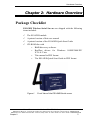
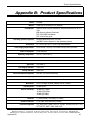
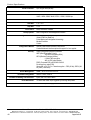
1
Model ES1AWB 802.11b Wireless Serial Server Manual Documentation Number: ES1AWB-5012m pn6908-rev003 B&B Electronics Mfg Co Inc – 707 Dayton Rd - PO Box 1040 - Ottawa IL 61350 - Ph 815-433-5100 - Fax 815-433-5104 – www.bb-elec.com B&B Electronics Ltd – Westlink Commercial Park – Oranmore, Galway, Ireland – Ph +353 91-792444 – Fax +353 91-792445 – www.bb-europe.com International Headquarters B&B Electronics Mfg. Co. Inc. 707 Dayton Road Ottawa, IL 61350 USA Phone (815) 433-5100 -- General Fax (815) 433-5105 Website: www.bb-elec.com Sales e-mail: [email protected] -- Fax (815) 433-5109 Technical Support e-mail: [email protected] -- Fax (815) 433-5104 European Headquarters B&B Electronics Ltd. Westlink Commercial Park Oranmore, Co. Galway, Ireland Phone +353 91-792444 -- Fax +353 91-792445 Website: www.bb-europe.com Sales e-mail: [email protected] Technical Support e-mail: [email protected] © B&B Electronics – November 2005 Manual Documentation Number: ES1AWB-5012m pn6908-rev003 B&B Electronics Mfg Co Inc – 707 Dayton Rd - PO Box 1040 - Ottawa IL 61350 - Ph 815-433-5100 - Fax 815-433-5104 – www.bb-elec.com B&B Electronics Ltd – Westlink Commercial Park – Oranmore, Galway, Ireland – Ph +353 91-792444 – Fax +353 91-792445 – www.bb-europe.com 2005 B&B Electronics. No part of this publication may be reproduced or transmitted in any form or by any means, electronic or mechanical, including photography, recording, or any information storage and retrieval system without written consent. Information in this manual is subject to change without notice, and does not represent a commitment on the part of B&B Electronics. B&B Electronics shall not be liable for incidental or consequential damages resulting from the furnishing, performance, or use of this manual. All brand names used in this manual are the registered trademarks of their respective owners. The use of trademarks or other designations in this publication is for reference purposes only and does not constitute an endorsement by the trademark holder. Manual Documentation Number: ES1AWB-5012m pn6908-rev003 B&B Electronics Mfg Co Inc – 707 Dayton Rd - PO Box 1040 - Ottawa IL 61350 - Ph 815-433-5100 - Fax 815-433-5104 – www.bb-elec.com B&B Electronics Ltd – Westlink Commercial Park – Oranmore, Galway, Ireland – Ph +353 91-792444 – Fax +353 91-792445 – www.bb-europe.com Table of Contents CHAPTER 1: INTRODUCTION ............................................................................. 1 ABOUT YOUR ES1AWB WIRELESS SERIAL SERVER ................................................. 1 FEATURES .................................................................................................................. 1 COMMUNICATION MODES ......................................................................................... 1 Direct IP ............................................................................................................... 1 Virtual COM Port ................................................................................................. 1 Paired Mode ......................................................................................................... 2 Other Communications Modes.............................................................................. 2 802.11 WIRELESS NETWORKING BASICS ................................................................... 2 802.11 Wireless Networking ................................................................................. 3 CHAPTER 2: HARDWARE OVERVIEW ............................................................. 5 PACKAGE CHECKLIST ................................................................................................ 5 INDICATORS, SWITCHES AND CONNECTORS............................................................... 6 Link Integrity LED ................................................................................................ 6 Network Activity LED ........................................................................................... 6 Reset Switch .......................................................................................................... 6 Antenna Connector ............................................................................................... 6 Power Connector .................................................................................................. 6 CONNECTING THE HARDWARE .................................................................................. 7 OTHER HARDWARE CONNECTIONS ............................................................................ 8 CHAPTER 3: GETTING STARTED ...................................................................... 9 1. 2. 3. 4. 5. 6. 7. 8. Check the contents of your ES1AWB package. It should contain… ............. 9 Set up the Hardware ..................................................................................... 9 Power it Up ................................................................................................... 9 Get the IP Address ...................................................................................... 10 Login ........................................................................................................... 10 Configure the ES1AWB ............................................................................... 10 Set up VCOM (if using the RealPort profile) .............................................. 10 Communicate .............................................................................................. 10 CHAPTER 4: CONFIGURING THE IP ADDRESS ............................................ 11 USING THE DISCOVERY SOFTWARE ......................................................................... 11 Documentation Number: ES1AWB-5012m pn6908-rev003 B&B Electronics Mfg Co Inc – 707 Dayton Rd - PO Box 1040 - Ottawa IL 61350 - Ph 815-433-5100 - Fax 815-433-5104 – www.bb-elec.com B&B Electronics Ltd – Westlink Commercial Park – Oranmore, Galway, Ireland – Ph +353 91-792444 – Fax +353 91-792445 – www.bb-europe.com Table of Contents i CHAPTER 5: USING THE WEB CONFIGURATION AND MANAGEMENT INTERFACE ............................................................................................................. 13 LOGGING IN ............................................................................................................. 13 LOGGING OUT ......................................................................................................... 13 USING TUTORIAL AND HELP .................................................................................... 14 CONFIGURING NETWORK SETTINGS ........................................................................ 14 IP Settings ........................................................................................................... 15 Wireless LAN Settings ......................................................................................... 15 Wireless Security Settings ................................................................................... 17 Wireless 802.1x Authentication Settings ............................................................. 17 Network Services Settings ................................................................................... 17 Advanced Network Settings ................................................................................. 17 CONFIGURING THE SERIAL PORT ............................................................................. 18 Port Profile Settings ............................................................................................ 18 Basic Serial Settings ........................................................................................... 23 Advanced Serial Settings..................................................................................... 23 CONFIGURING ALARMS AND NOTIFICATION ............................................................ 24 Alarm Notification Settings ................................................................................. 24 Alarm Conditions ................................................................................................ 24 Alarm Destinations ............................................................................................. 25 CHAPTER 6: MANAGING THE ES1AWB ......................................................... 27 SYSTEM SETTINGS ................................................................................................... 27 Device Identity Settings....................................................................................... 27 Simple Network Management Protocol (SNMP) Settings ................................... 27 USING REMOTE MANAGEMENT ............................................................................... 27 MANAGING USERS AND PERMISSIONS ..................................................................... 27 Changing the Root Username and Password ..................................................... 28 Adding New Users............................................................................................... 28 Configuring User Access and Permissions ......................................................... 28 MANAGING SERIAL PORTS AND CONNECTIONS ....................................................... 29 Serial Ports ......................................................................................................... 29 Connections ........................................................................................................ 29 CHAPTER 7: USING ADMINISTRATIVE FEATURES ................................... 31 FILE MANAGEMENT ................................................................................................. 31 BACKUP/RESTORE ................................................................................................... 31 UPDATE FIRMWARE ................................................................................................. 31 FACTORY DEFAULT SETTINGS ................................................................................. 31 SYSTEM INFORMATION ............................................................................................ 32 General ............................................................................................................... 32 GPIO ................................................................................................................... 32 Manual Documentation Number: ES1AWB-5012m pn6908-rev003 B&B Electronics Mfg Co Inc – 707 Dayton Rd - PO Box 1040 - Ottawa IL 61350 - Ph 815-433-5100 - Fax 815-433-5104 – www.bb-elec.com B&B Electronics Ltd – Westlink Commercial Park – Oranmore, Galway, Ireland – Ph +353 91-792444 – Fax +353 91-792445 – www.bb-europe.com ii Table of Contents Serial ................................................................................................................... 32 Network ............................................................................................................... 33 REBOOT ................................................................................................................... 34 CHAPTER 8: USING REALPORT ....................................................................... 35 Configuring the IP Address................................................................................. 35 Configuring the Serial Port for RealPort ............................................................ 35 Adding a Virtual COM Port using RealPort ....................................................... 36 Removing a Virtual COM Port using RealPort .................................................. 36 Updating RealPort .............................................................................................. 37 APPENDIX A: DEFAULT CONFIGURATION SETTINGS .............................. 39 APPENDIX B: PRODUCT SPECIFICATIONS .................................................. 41 APPENDIX C: ES1AWB DIMENSIONAL DIAGRAM...................................... 43 APPENDIX D: RS-232 CONNECTIONS .............................................................. 45 Documentation Number: ES1AWB-5012m pn6908-rev003 B&B Electronics Mfg Co Inc – 707 Dayton Rd - PO Box 1040 - Ottawa IL 61350 - Ph 815-433-5100 - Fax 815-433-5104 – www.bb-elec.com B&B Electronics Ltd – Westlink Commercial Park – Oranmore, Galway, Ireland – Ph +353 91-792444 – Fax +353 91-792445 – www.bb-europe.com Table of Contents iii Manual Documentation Number: ES1AWB-5012m pn6908-rev003 B&B Electronics Mfg Co Inc – 707 Dayton Rd - PO Box 1040 - Ottawa IL 61350 - Ph 815-433-5100 - Fax 815-433-5104 – www.bb-elec.com B&B Electronics Ltd – Westlink Commercial Park – Oranmore, Galway, Ireland – Ph +353 91-792444 – Fax +353 91-792445 – www.bb-europe.com iv Introduction Chapter 1: Introduction Thank you for purchasing an ES1AWB Wireless Serial Server. Like all B&B Electronics products, your serial server has been manufactured to high standards of quality and performance to ensure your complete satisfaction. Please read this manual and carefully follow the instructions to achieve best results. For additional information on this and other products and for technical support, contact B&B Electronics. About Your ES1AWB Wireless Serial Server ES1AWB Wireless Serial Servers are part of B&B Electronics‟ growing family of device servers, products that allow you to connect equipment with available serial connections into existing networks. ES1AWB wireless serial servers connect RS-232 devices to a wireless network via wireless access points, eliminating the need for network cabling. Based on the 802.11b wireless standard, ES1AWB servers operate at up to 11 Mbps over the 2.4 GHz band, which does not require licensing. A serial device connected to the serial port on your ES1AWB can be accessed from any node on the LAN using virtual COM port, console management, TCP and UDP socket, serial bridge, modem emulation and custom connections. Network addresses can be obtained dynamically or manually. Simple Network Management Protocol (SNMP) is supported. Configuration is accomplished through a web-based user interface. Features Wireless networking at up to 11 Mbps specified by the 802.11b standard Serial port supports RS-232 using a standard DB-M connector Supports TD, RD, TRS, CTS, DTR, DCD, DSR and GND RS-232 lines LAN and WAN Communications via wireless access point TCP or UDP Client or Server operation - configurable on the 2.4 GHz band, as Manual Documentation Number: ES1AWB-5012m pn6908-rev003 B&B Electronics Mfg Co Inc – 707 Dayton Rd - PO Box 1040 - Ottawa IL 61350 - Ph 815-433-5100 - Fax 815-433-5104 – www.bb-elec.com B&B Electronics Ltd – Westlink Commercial Park – Oranmore, Galway, Ireland – Ph +353 91-792444 – Fax +353 91-792445 – www.bb-europe.com Chapter 1 1 Introduction Software Support - Windows 98/ME/2000/XP/NT 4.0 or Vista Firmware upload for future revisions/upgrades Small compact case LEDs indicate link integrity and data transfer activity Web Configuration and Management user interface Email event notification Communication Modes ES1AWB Wireless Serial Servers allow you to connect serial devices over a wireless network. The connection can be configured in several modes. Direct IP Direct IP Mode allows applications using TCP/IP or UDP/IP socket programs to communicate with the asynchronous serial ports on the serial server. In this mode the ES1AWB is configured as a TCP or UDP server. The socket program running on the PC establishes a communication connection. The data is sent directly to and from the serial port on the server. TCP Server Mode allows network devices to initiate a TCP connection to the serial device connected to the serial port on the ES1AWB. This is also referred to as reverse telnet. UDP Server Mode allows network devices to initiate a UDP connection to the serial device attached to the serial port of the ES1AWB. When using UDP protocol the ES1AWB can be configured to broadcast data to and receive data from multiple IP addresses. Virtual COM Port Virtual COM Port mode (also called COM port redirection) allows you to map a COM port on your PC to the serial port on your ES1AWB. Using the RealPort software (included with the ES1AWB) you create virtual COM ports on your PC. When your application sends data to this port, RealPort redirects the data across the network to serial device connected to the ES1AWB serial port. The network is transparent to the user application and the serial device connected to the ES1AWB. Manual Documentation Number: ES1AWB-5012m pn6908-rev003 B&B Electronics Mfg Co Inc – 707 Dayton Rd - PO Box 1040 - Ottawa IL 61350 - Ph 815-433-5100 - Fax 815-433-5104 – www.bb-elec.com B&B Electronics Ltd – Westlink Commercial Park – Oranmore, Galway, Ireland – Ph +353 91-792444 – Fax +353 91-792445 – www.bb-europe.com Chapter 1 1 Introduction Paired Mode Paired Mode (also called Serial Tunneling or Serial Bridge mode) allows serial devices connected to two ES1AWB serial servers to communicate across a network. The two ES1AWB serial servers automatically connect to each other. In Paired Mode the heartbeat feature ensures reliable communications by restoring the connection if communications are temporarily lost at either end due to loss of power or Ethernet connection. Other Communications Modes ES1AWB Wireless Serial Servers also feature the following communications profiles: Modem Emulation Mode allows you to configure the serial port to operate as if it is a modem. For legacy applications where a serial device is set up to communicate through a modem, the serial device can now be connected to the ES1AWB and communication occurs over the network. The ES1AWB emulates modem responses to and from the serial device. In Console Management Mode the ES1AWB can be configured for connection to the management port typically found on network devices such as routers, switches and servers. This allows remote management of the network device. Communication can be accomplished using telnet to a specific port in the serial server. Custom Mode allows you to custom configure the ES1AWB serial port and is used if your application does not fit into any other predefined modes. 802.11 Wireless Networking Basics ES1AWB wireless serial servers allow you to connect non-network-enabled serial devices into a wireless network, giving you the capability to gather more data and implement remote programming and management. Serial devices no longer are limited to a physical connection to a PC. The serial device can be connected to an ES1AWB wireless serial server anywhere within range of an 802.11b-compatible wireless access point. Communication occurs transparently using TCP/IP or UDP/IP over a wireless link. This allows traditional Windows PC software access to serial devices anywhere on the wireless network. Manual Documentation Number: ES1AWB-5012m pn6908-rev003 B&B Electronics Mfg Co Inc – 707 Dayton Rd - PO Box 1040 - Ottawa IL 61350 - Ph 815-433-5100 - Fax 815-433-5104 – www.bb-elec.com B&B Electronics Ltd – Westlink Commercial Park – Oranmore, Galway, Ireland – Ph +353 91-792444 – Fax +353 91-792445 – www.bb-europe.com 2 Chapter 1 Introduction The enabling technology for ES1AWB wireless serial servers is based on the IEEE 802 standard. Some background on the standard follows. 802.11 Wireless Networking IEEE 802.11 is a set of standards that defines how multiple devices can communicate on a wireless network. The standard has grown into a set of several standards that define various features and functions. The 802.11b standard defines the physical and data link layers for a wireless network using the 2.4 GHz frequency band, a band that does not require licensing. As a part of the IEEE family of standards, 802.11 WLANs are easily connected to 802.3 (Ethernet) LANs. Higher layer LAN protocols, network operating systems and internetworking protocols such as TCP/IP integrate seamlessly. Under the IEEE 802.11 standard there can be two different types of devices on the wireless network: stations and access points (AP). A station may be a PC equipped with a wireless network adapter or it can be a wireless serial server such as the ES1AWB. An 802.11 access point is a radio with an interface that allows connection to a wired LAN. Access points run bridging software to facilitate the connection from wireless to wired network. The access point becomes the base station for the WLAN. It aggregates access to the wired network for multiple wireless stations. An access point may be a standalone device, such as a wireless router or switch, or a card in a PC. Wireless Network Configurations The 802.11 standard defines two modes of operation: infrastructure mode and ad hoc mode. Infrastructure mode makes use of one or more access points connected to a wired LAN. Wireless stations communicate with access points to gain access to each other and/or the LAN. In the Basic Service Set (BSS) several stations communicate with one access point, which is connected to a wired LAN. In the Extended Service Set (ESS) two or more access points connect to the LAN creating a sub network. In ad hoc mode, also called Independent Basic Service Set (IBSS), access points are not used. Wireless stations communicate directly with each other in a peer-to-peer fashion. This mode allows individual computers to set up a network where wireless infrastructure does not exist. ES1AWB wireless serial servers can be configured to operate in infrastructure or ad hoc mode. From the Web Configuration and Management Interface you can set up the type of network, naming the network (specifying the SSID, or service set identifier) and other parameters. Manual Documentation Number: ES1AWB-5012m pn6908-rev003 B&B Electronics Mfg Co Inc – 707 Dayton Rd - PO Box 1040 - Ottawa IL 61350 - Ph 815-433-5100 - Fax 815-433-5104 – www.bb-elec.com B&B Electronics Ltd – Westlink Commercial Park – Oranmore, Galway, Ireland – Ph +353 91-792444 – Fax +353 91-792445 – www.bb-europe.com Chapter 1 3 Introduction IEEE 802.11b IEEE 802.11b standard specifies a WLAN that operates on the 2.4 GHz band at data rates up to 11 Mbps. Equipment that conforms to the 802.11b standard can interoperate with equipment conforming to faster (up to 54 Mbps) 802.11g equipment and they will interoperate. However, when connected into the same network the 802.11g equipment will operate at the 11 Mbps limitation of the 802.11b equipment. For media access, 802.11 wireless networks use CSMA/CA, a scheme in which a station that intends to transmit „listens‟ for traffic on the radio carrier frequency and sends data packets if the frequency is clear. If the receiving station receives the packet intact it sends an acknowledgement (ACK) to confirm the packet has been received. If the transmitting station does not receive an ACK it assumes a collision occurred and transmits again after a random delay period. Communication distances vary depending on the type and thickness of material around a wireless node. The transmitter power output, the type of antenna used and the amount of attenuation through materials also affects the useable range. Electromagnetic noise, reflections, the amount of network traffic, other radio devices operating in the same frequency band also affect range and overall performance. In an infrastructure network the number of access points and their coverage pattern also affect how well the system operates. Typically an 802.11 device operating indoors will have a range from 100 feet minimum to about 500 feet maximum. Outdoors, some products, using high gain antennae may achieve line-of-sight ranges of five miles or more. Security is a significant concern for WLAN users. Whether security threats originate intentionally or unintentionally, wireless systems are more susceptible than wired systems. ES1AWB serial servers offer several security options including WEP (Wired Equivalent Privacy), WPA (Wi-Fi Protected Access), PEAP (Protected EAP) w/EAP-MS-CHAPv2 and others. Manual Documentation Number: ES1AWB-5012m pn6908-rev003 B&B Electronics Mfg Co Inc – 707 Dayton Rd - PO Box 1040 - Ottawa IL 61350 - Ph 815-433-5100 - Fax 815-433-5104 – www.bb-elec.com B&B Electronics Ltd – Westlink Commercial Park – Oranmore, Galway, Ireland – Ph +353 91-792444 – Fax +353 91-792445 – www.bb-europe.com 4 Chapter 1 Hardware Overview Chapter 2: Hardware Overview Package Checklist ES1AWB Wireless Serial Servers are shipped with the following items included: The ES1AWB module A printed version of this user manual A printed version of the ES1AWB Quick Start Guide CD-ROM disc with o B&B discovery software o RealPort drivers for Windows 98/ME/2000/XP/ NT 4.0 /Vista o This manual in PDF format o The ES1AWB Quick Start Guide in PDF format Figure 1. Front View of the ES1AWB Serial server Manual Documentation Number: ES1AWB-5012m pn6908-rev003 B&B Electronics Mfg Co Inc – 707 Dayton Rd - PO Box 1040 - Ottawa IL 61350 - Ph 815-433-5100 - Fax 815-433-5104 – www.bb-elec.com B&B Electronics Ltd – Westlink Commercial Park – Oranmore, Galway, Ireland – Ph +353 91-792444 – Fax +353 91-792445 – www.bb-europe.com Chapter 2 5 Hardware Overview Indicators, Switches and Connectors Link Integrity LED When the yellow LED is illuminated it indicates that a connection (link integrity) has been established between the serial server and an access point. If this LED is blinking slowly the ES1AWB is in ad hoc mode. If this LED is blinking quickly the ES1AWB is scanning for a network. Network Activity LED When the green LED is flashing it indicates data is being sent across the network. Reset Switch The Reset switch is a recessed switch located on the side of the ES1AWB. The Reset switch operates as follows: Press for at least 1 second, release in less than 10 seconds: reset serial server operating system Press and hold 10+ seconds(during power-up): reset serial server to factory default settings. Antenna Connector The antenna connector is a reverse SMA connector. An omni-directional antenna is supplied with ES1AWB wireless serial servers. All ES1AWB serial servers are FCC-certified when the supplied antenna is used. Power Connector The power connector is a 5.5mm by 2.1mm barrel jack the out side is negative (-) power supply. The tip or inside is positive (+) power supply. The power supply voltage range is 5 VDC. Manual Documentation Number: ES1AWB-5012m pn6908-rev003 B&B Electronics Mfg Co Inc – 707 Dayton Rd - PO Box 1040 - Ottawa IL 61350 - Ph 815-433-5100 - Fax 815-433-5104 – www.bb-elec.com B&B Electronics Ltd – Westlink Commercial Park – Oranmore, Galway, Ireland – Ph +353 91-792444 – Fax +353 91-792445 – www.bb-europe.com 6 Chapter 2 Hardware Overview Connecting the Hardware A typical connection for the ES1AWB Wireless Serial Server is infrastructure mode operation, in which the ES1AWB communicates with a PC on a wired network via an access point, which is often a wireless switch or router. Figure 2. Connection via the Wireless LAN Manual Documentation Number: ES1AWB-5012m pn6908-rev003 B&B Electronics Mfg Co Inc – 707 Dayton Rd - PO Box 1040 - Ottawa IL 61350 - Ph 815-433-5100 - Fax 815-433-5104 – www.bb-elec.com B&B Electronics Ltd – Westlink Commercial Park – Oranmore, Galway, Ireland – Ph +353 91-792444 – Fax +353 91-792445 – www.bb-europe.com Chapter 2 7 Hardware Overview Other Hardware Connections The ES1AWB Wireless Serial Server also can communicate directly with a PC equipped with a wireless card (in ad hoc mode). Figure 3. Wireless Ad Hoc Connection In Serial Tunneling mode two serial devices can communicate via two ES1AWB Wireless Serial Servers. Figure 4. Serial Tunneling Ad Hoc Connection Serial tunneling also can occur between two ES1AWB serial servers communicating with individual access points and across a wired network. Figure 5. Serial Tunneling via Infrastructure Manual Documentation Number: ES1AWB-5012m pn6908-rev003 B&B Electronics Mfg Co Inc – 707 Dayton Rd - PO Box 1040 - Ottawa IL 61350 - Ph 815-433-5100 - Fax 815-433-5104 – www.bb-elec.com B&B Electronics Ltd – Westlink Commercial Park – Oranmore, Galway, Ireland – Ph +353 91-792444 – Fax +353 91-792445 – www.bb-europe.com 8 Chapter 2 Getting Started Chapter 3: Getting Started 1. Check the contents of your ES1AWB package. It should contain… The ES1AWB module with SMA antenna A 5VDC power supply A printed version of this user manual A printed version of the ES1AWB Quick Start Guide CD-ROM disc with discovery software, RealPort software, this manual and Quick Start guide 2. Set up the Hardware Connect your PC to the network Connect the antenna to the ES1AWB Connect the ES1AWB serial port to the serial port on your serial device For RS-232 operation, your ES1AWB is configured as a DTE and uses a DB-9M connector. Use a straight through RS-232 cable if your serial device is configured as a DCE. If your serial device is configured as a DTE you will have to use a null modem (crossover) cable. 3. Power it Up Connect the 5VDC power supply to the ES1AWB The yellow LED will blink while looking for a wireless network. When a connection is established with the network the yellow LED will remain on steadily. The ES1AWB will automatically try to obtain an IP address (dynamically). If it cannot find a DHCP server, it will generate an IP address itself. It will look for a wireless network with the name (SSID) Connect first. If it dose not find the SSID it will connect to the first unsecured network it finds. Manual Documentation Number: ES1AWB-5012m pn6908-rev003 B&B Electronics Mfg Co Inc – 707 Dayton Rd - PO Box 1040 - Ottawa IL 61350 - Ph 815-433-5100 - Fax 815-433-5104 – www.bb-elec.com B&B Electronics Ltd – Westlink Commercial Park – Oranmore, Galway, Ireland – Ph +353 91-792444 – Fax +353 91-792445 – www.bb-europe.com Chapter 3 9 Getting Started If you are configuring your own access point (a wireless switch or router) ensure that it is configured as a DHCP server with the Wireless Network Name (SSID): Connect 4. Get the IP Address Use the discovery software on your CD (finder.exe) to get the IP address for your ES1AWB 5. Login In a web browser on your PC, type in the IP address and access the Web Configuration and Management Interface Login using the username „root‟ and password „dbps‟ 6. Configure the ES1AWB In the Configuration, Network page configure your Wireless LAN, Security and other settings required to work on the type of wireless network you will be connecting to. In the Configuration, Serial Ports page select the Port Profile you require for use with your application (E.g. RealPort for virtual COM port, TCP Server, UDP server, Serial Bridge, etc) Configure the serial port settings for the selected Port Profile (e.g. In TCP Sockets select client or server, TCP port numbers, etc. Also configure baud rate, data bits, etc in Basic Serial Settings. Configure any required alarms and notification If RealPort profile was selected (virtual COM port) do the next step (Set up VCOM) 7. Set up VCOM (if using the RealPort profile) Start the RealPort software wizard (located on the included CD) Select Add a New Device Select your ES1AWB from the list Select an unused COM port number Follow the wizard to set up a virtual COM port 8. Communicate Configure and then start your application Manual Documentation Number: ES1AWB-5012m pn6908-rev003 B&B Electronics Mfg Co Inc – 707 Dayton Rd - PO Box 1040 - Ottawa IL 61350 - Ph 815-433-5100 - Fax 815-433-5104 – www.bb-elec.com B&B Electronics Ltd – Westlink Commercial Park – Oranmore, Galway, Ireland – Ph +353 91-792444 – Fax +353 91-792445 – www.bb-europe.com 10 Chapter 3 Configuring the IP Address Chapter 4: Configuring the IP Address Before you can begin the configuration of your ES1AWB you must know its IP address to access it with a web browser. Once you have access to the Configuration and Management Interface via a web browser you can reset the IP address using static IP addressing, if necessary. Your ES1AWB comes from the factory configured to obtain an IP address dynamically, or failing that, to generate its own IP address using the APIPA protocol. You can determine the current IP address using the discovery software included on the CD with your ES1AWB. Using the Discovery Software 1. Power up the ES1AWB. The yellow LED will blink while looking for a wireless network. When a connection is established with the network the yellow LED will remain on steadily. The ES1AWB will then obtain or generate an IP address. 2. To determine the initial IP address of your ES1AWB, start the finder.exe utility included on the included CD. Figure 6. 3. Discovery Utility Dialog The finder.exe utility scans the network for devices and then lists each device‟s IP Address, MAC Address, Name and Product ID. Manual Documentation Number: ES1AWB-5012m pn6908-rev003 B&B Electronics Mfg Co Inc – 707 Dayton Rd - PO Box 1040 - Ottawa IL 61350 - Ph 815-433-5100 - Fax 815-433-5104 – www.bb-elec.com B&B Electronics Ltd – Westlink Commercial Park – Oranmore, Galway, Ireland – Ph +353 91-792444 – Fax +353 91-792445 – www.bb-europe.com Chapter 4 11 Configuring the ES1AWB Identify your ES1AWB by its MAC address (printed on a label on the ES1AWB). If you need to change the IP address of the ES1AWB, you can accomplish this using the Discovery software, or you can open the Web Configuration and Management Interface and do it there. (See Configuring Network Settings later in the next chapter.) 1. To change the IP address of the ES1AWB from the discovery software, click Configure IP Settings. 2. In the dialog that appears, select Manually configure network settings. 3. Type the new IP Address, Subnet Mask, Default Gateway and system password (initially dbps) in the appropriate boxes, then click Apply. 4. Click Reboot Device. This may take a minute or more to complete. 5. Click Refresh List to confirm the new IP address has been accepted. Manual Documentation Number: ES1AWB-5012m pn6908-rev003 B&B Electronics Mfg Co Inc – 707 Dayton Rd - PO Box 1040 - Ottawa IL 61350 - Ph 815-433-5100 - Fax 815-433-5104 – www.bb-elec.com B&B Electronics Ltd – Westlink Commercial Park – Oranmore, Galway, Ireland – Ph +353 91-792444 – Fax +353 91-792445 – www.bb-europe.com 12 Chapter 4 Using the Web Configuration and Management Interface Chapter 5: Using the Web Configuration and Management Interface The ES1AWB Serial Server can be configured using the Configuration and Management Interface via a standard web browser such as Internet Explorer or Firefox. Logging In 1. Before you can begin configuring your ES1AWB Serial server, you must login to the Configuration and Management Interface. To login, open your browser, type the IP address of your ES1AWB serial server into the address bar and press Enter. The Login page will appear. 2. Enter your Username and Password, then click Login. The first time you login, type the default (root) username and password. o o Username: root Password: dbps The default username and password are preconfigured to give you full administrator permissions, allowing you to add and configure permissions for additional users. For security purposes, you may want to change the username and password after you have accessed the interface for the first time. To change usernames and passwords, and to add and configure new users, see Managing Users and Permissions in Chapter 6. When the username and password are accepted the Configuration and Management Interface homepage will appear. Logging Out To log out of the Web Configuration and Management Interface, click Logout on the menu bar. To finish logging out of the web server, and prevent access by other users, you also must close the browser. Manual Documentation Number: ES1AWB-5012m pn6908-rev003 B&B Electronics Mfg Co Inc – 707 Dayton Rd - PO Box 1040 - Ottawa IL 61350 - Ph 815-433-5100 - Fax 815-433-5104 – www.bb-elec.com B&B Electronics Ltd – Westlink Commercial Park – Oranmore, Galway, Ireland – Ph +353 91-792444 – Fax +353 91-792445 – www.bb-europe.com Chapter 5 13 Using the Web Configuration and Management Interface Using Tutorial and Help You can access the ES1AWB Tutorial by clicking Tutorial on the Configuration and Management homepage. Clicking Help on any page of the Configuration and Management Interface opens topics specific to that page. After logging in, if there is no activity for a period of time your session may time out. Clicking on any link will return you to the Web Login page where you will have to log in again to continue your session. Figure 7. The ES1AWB Configuration and Management Homepage Configuring Network Settings The Network Configuration page contains six sections with hyperlinked menu bars. IP Settings Wireless LAN Settings Wireless Security Settings Wireless 802.1x Authentication Settings Network Services Settings Advanced Network Settings Manual Documentation Number: ES1AWB-5012m pn6908-rev003 B&B Electronics Mfg Co Inc – 707 Dayton Rd - PO Box 1040 - Ottawa IL 61350 - Ph 815-433-5100 - Fax 815-433-5104 – www.bb-elec.com B&B Electronics Ltd – Westlink Commercial Park – Oranmore, Galway, Ireland – Ph +353 91-792444 – Fax +353 91-792445 – www.bb-europe.com 14 Chapter 5 Using the Web Configuration and Management Interface Figure 8. Network Configuration, IP Settings Page IP Settings The IP Settings section allows you to select between dynamic or static IP addressing. The ES1AWB‟s default setting is Obtain an IP address automatically using DHCP, or dynamic IP addressing. When the ES1AWB is first connected it will try to obtain an IP address automatically. If it fails, it will assign an IP address to itself using the Automatic Private IP Addressing (APIPA) protocol. You can re-configure the ES1AWB for static IP address by selecting Use the following IP address and assign the IP address yourself. If Use the following IP address: is selected, you are choosing static IP addressing. When this option is selected the IP Address, Subnet Mask and Default Gateway text boxes become available. You must determine the appropriate parameters and enter them yourself. (If you do not know what to enter ask your network administrator for assistance.) To implement any changes in this section, click Apply. A page will appear asking you to Reboot the ES1AWB so that the changes can take effect. Wireless LAN Settings The Wireless LAN Settings section allows you to specify the Network Name or SSID (Service Set Identifier). Multiple wireless networks sometimes exist. Specifying the network name allows your ES1AWB serial Manual Documentation Number: ES1AWB-5012m pn6908-rev003 B&B Electronics Mfg Co Inc – 707 Dayton Rd - PO Box 1040 - Ottawa IL 61350 - Ph 815-433-5100 - Fax 815-433-5104 – www.bb-elec.com B&B Electronics Ltd – Westlink Commercial Park – Oranmore, Galway, Ireland – Ph +353 91-792444 – Fax +353 91-792445 – www.bb-europe.com Chapter 5 15 Using the Web Configuration and Management Interface server to connect to and associate with a specific network. If the network name is left blank the serial server will connect to the first available network. Figure 9. Network Configuration, Wireless LAN Settings By making the appropriate selection you can configure your serial server to Connect to any available wireless network Connect to access point (infrastructure) networks only Connect to peer-to-peer (ad-hoc) networks only Select a Country from the dropdown list to restrict the channel settings to the legal set for that country. Select a specific wireless Channel to restrict the serial server to a specific channel. Select Auto-Scan to allow the serial server to scan all frequencies until it finds an available access point to wireless network it can join. Select Enable Short Preamble if your wireless network supports this feature. Short preambles can boost throughput. Manual Documentation Number: ES1AWB-5012m pn6908-rev003 B&B Electronics Mfg Co Inc – 707 Dayton Rd - PO Box 1040 - Ottawa IL 61350 - Ph 815-433-5100 - Fax 815-433-5104 – www.bb-elec.com B&B Electronics Ltd – Westlink Commercial Park – Oranmore, Galway, Ireland – Ph +353 91-792444 – Fax +353 91-792445 – www.bb-europe.com 16 Chapter 5 Using the Web Configuration and Management Interface Wireless Security Settings The Wireless Security Settings section is divided into several subsections including: Network Authentication Data Encryption WEP Keys WPA PSK Username/Password Multiple options can be accessed under each security-related area. For Network Authentication and Data Encryption selecting Any enables all methods and the actual method used will depend on the capabilities of the wireless network. Access the online Help file for detailed descriptions of these settings. Wireless 802.1x Authentication Settings The Wireless 802.1x Authentication Settings section is available only if WEP with 802.1x authentication or WPA with 802.1x authentication have been selected in the Wireless Security Settings area. Access the online Help file for detailed descriptions of these settings. Network Services Settings The Network Services Settings section allows you to enable or disable several common network services and configure their associated ports. Typically you will not have to change these settings. Access the online Help file for detailed descriptions of these settings. Advanced Network Settings The Advanced Network Settings section allows you to fine tune the network connection. Typically these setting will not need to be changed. Access the online Help file for detailed descriptions of these settings. Manual Documentation Number: ES1AWB-5012m pn6908-rev003 B&B Electronics Mfg Co Inc – 707 Dayton Rd - PO Box 1040 - Ottawa IL 61350 - Ph 815-433-5100 - Fax 815-433-5104 – www.bb-elec.com B&B Electronics Ltd – Westlink Commercial Park – Oranmore, Galway, Ireland – Ph +353 91-792444 – Fax +353 91-792445 – www.bb-europe.com Chapter 5 17 Using the Web Configuration and Management Interface Configuring the Serial Port The Serial Port Configuration page displays information about the serial port on your ES1AWB, including its description, its profile (operating mode) and serial settings (baud rate, data bits, parity, stop bits). You will have to configure these parameters to set up your system for the type of operation required and to match the parameters of the serial device to which the ES1AWB is connected. To open the Serial Port Configuration page, under the Configuration menu click Serial Ports. When you first access this page a list of ports, their description, profile and serial configuration appears. (If the ES1AWB has not yet been configured for the first time the Profile column may indicate <Unassigned>.) To access detailed settings for the ES1AWB serial port, click Port 1. The Serial Port Configuration page that appears includes three sections with hyperlinked menu bars. Port Profile Settings Basic Serial Settings Advanced Serial Settings Port Profile Settings The Port Profile Settings section displays the current serial port mode of operation, a description of that profile and a hyperlink to Change Profile… Click the Change Profile… menu bar to open the Select Port Profile page. Any of eight possible serial port profiles can be selected. Manual Documentation Number: ES1AWB-5012m pn6908-rev003 B&B Electronics Mfg Co Inc – 707 Dayton Rd - PO Box 1040 - Ottawa IL 61350 - Ph 815-433-5100 - Fax 815-433-5104 – www.bb-elec.com B&B Electronics Ltd – Westlink Commercial Park – Oranmore, Galway, Ireland – Ph +353 91-792444 – Fax +353 91-792445 – www.bb-europe.com 18 Chapter 5 Using the Web Configuration and Management Interface Figure 10. Select Port Profile Page RealPort Select RealPort to implement the use of virtual COM ports. This allows you to map a COM port on a PC to the serial port on your ES1AWB. Using RealPort software (included with the ES1AWB) you create a virtual COM port on the PC. When your application sends data to this port, RealPort redirects the data across the network to the ES1AWB. The ES1AWB passes the data to the serial device connected to its serial port. The network is transparent to the user application and the serial device connected to the ES1AWB. For information on how to use RealPort to create virtual COM ports on your PC see Chapter 8 Console Management In Console Management the ES1AWB can be configured for connection to the management port typically found on network devices such as routers, switches and servers. This allows remote management of the network device. Communication can be accomplished using telnet to a specific port in the serial server. Manual Documentation Number: ES1AWB-5012m pn6908-rev003 B&B Electronics Mfg Co Inc – 707 Dayton Rd - PO Box 1040 - Ottawa IL 61350 - Ph 815-433-5100 - Fax 815-433-5104 – www.bb-elec.com B&B Electronics Ltd – Westlink Commercial Park – Oranmore, Galway, Ireland – Ph +353 91-792444 – Fax +353 91-792445 – www.bb-europe.com Chapter 5 19 Using the Web Configuration and Management Interface TCP Sockets Select TCP Sockets to implement Direct IP Mode using TCP. When using TCP Sockets your serial server can be configured as a TCP server or TCP client. TCP Server Settings If your ES1AWB is configured as a TCP server, other network devices can initiate a TCP connection with the serial device connected to the ES1AWB serial port. (This is also referred to as reverse telnet.) Network devices initiating connections must be configured with the IP address of the ES1AWB and the TCP port number associated with its serial port. After selecting TCP Sockets, click Apply to return to the Serial Port Configuration page. Select the TCP Server Settings as required by your application. Figure 11. TCP Server Settings For each option, the TCP port number is shown. You can also Enable TCP Keep Alive for each selection. (If Enable Keep Alive is selected the connections is maintained even if no data is being sent.) TCP Client Settings If your ES1AWB is configured as a TCP client it will automatically establish a bi-directional TCP connection between the serial device and a server or other networked device. Selecting Automatically establish TCP connections enables this feature and its configuration options become available. Manual Documentation Number: ES1AWB-5012m pn6908-rev003 B&B Electronics Mfg Co Inc – 707 Dayton Rd - PO Box 1040 - Ottawa IL 61350 - Ph 815-433-5100 - Fax 815-433-5104 – www.bb-elec.com B&B Electronics Ltd – Westlink Commercial Park – Oranmore, Galway, Ireland – Ph +353 91-792444 – Fax +353 91-792445 – www.bb-europe.com 20 Chapter 5 Using the Web Configuration and Management Interface Figure 12. TCP Client Settings Consult the Tutorial and online Help for more detail. UDP Sockets Select UDP Sockets to implement Direct IP Mode using UDP protocol. When using UDP Sockets your serial server can be configured as a UDP server or UDP client. UDP Server Settings If your ES1AWB is configured as a UDP server, other network devices can initiate a UDP connection with the serial device connected to the ES1AWB serial port. Network devices initiating connections must be configured with the IP address of the ES1AWB and the UDP port number associated with its serial port. After selecting UDP Sockets, click Apply to return to the Serial Port Configuration page. Select the TCP Server Settings as required by your application. Manual Documentation Number: ES1AWB-5012m pn6908-rev003 B&B Electronics Mfg Co Inc – 707 Dayton Rd - PO Box 1040 - Ottawa IL 61350 - Ph 815-433-5100 - Fax 815-433-5104 – www.bb-elec.com B&B Electronics Ltd – Westlink Commercial Park – Oranmore, Galway, Ireland – Ph +353 91-792444 – Fax +353 91-792445 – www.bb-europe.com Chapter 5 21 Using the Web Configuration and Management Interface Figure 13. UDP Server Settings UDP Client Settings If your ES1AWB is configured as a UDP client you can automatically distribute serial data from you ES1AWB to many devices at the same time. This is sometimes referred to as Data Distribution or UDP Multicast. Figure 14. UDP Client Settings You can configure multiple destinations. In the appropriate boxes, type the Description, Send To IP address or DNS name and UDP Port number, then click Add. You can also configure the conditions under which to send data. Consult the Tutorial and online Help for more detail. Manual Documentation Number: ES1AWB-5012m pn6908-rev003 B&B Electronics Mfg Co Inc – 707 Dayton Rd - PO Box 1040 - Ottawa IL 61350 - Ph 815-433-5100 - Fax 815-433-5104 – www.bb-elec.com B&B Electronics Ltd – Westlink Commercial Park – Oranmore, Galway, Ireland – Ph +353 91-792444 – Fax +353 91-792445 – www.bb-europe.com 22 Chapter 5 Using the Web Configuration and Management Interface Serial Bridge Select Serial Bridge to implement Paired Mode (also called serial tunneling). This allows serial devices connected to two ES1AWB serial servers to communicate across the network. The two ES1AWB serial servers automatically connect to each other. Modem Emulation Select Modem Emulation to configure the serial port to operate as if it is a modem. For legacy applications where a serial device is set up to communicate through a modem, the serial device can be connected to the ES1AWB and communication occurs over the network. The ES1AWB emulates modem responses to and from the serial device. Custom Select Custom to custom configure the ES1AWB serial port and is used if your application does not fit into any other predefined modes. This is an advanced option that allows full configuration of the serial port. Apply After you have selected a port profile, click the Apply button. The Serial Port Configuration page will re-appear and will contain additional configuration settings specific to the profile you have chosen. For more information on these configuration options see the web-based Tutorial and online Help. Basic Serial Settings Click the Basic Serial Settings menu bar on the Serial Port Configuration page to configure the ES1AWB‟s serial port Baud Rate, Data Bits, Parity, Stop Bits and Flow Control parameters. For all profiles except RealPort, the Basic Serial Settings configuration section allows you to set these parameters. When the RealPort profile is selected the serial port settings will be directed by the PC applications using the virtual COM port. Advanced Serial Settings Click the Advanced Serial Settings menu bar to access settings used to fine tune the serial port. Typically these setting will not need to be changed. Consult the web-based tutorial for more information if necessary. Manual Documentation Number: ES1AWB-5012m pn6908-rev003 B&B Electronics Mfg Co Inc – 707 Dayton Rd - PO Box 1040 - Ottawa IL 61350 - Ph 815-433-5100 - Fax 815-433-5104 – www.bb-elec.com B&B Electronics Ltd – Westlink Commercial Park – Oranmore, Galway, Ireland – Ph +353 91-792444 – Fax +353 91-792445 – www.bb-europe.com Chapter 5 23 Using the Web Configuration and Management Interface Configuring Alarms and Notification The ES1AWB can be configured to generate alarms and send notification emails based on the occurrence of specific events. Events include the states of some RS-232 handshake (GPIO) lines and the detection of specified character patterns within the serial data stream. The Alarms Configuration page displays the current alarm settings and allows you to configure them. It contains two sections: Alarm Notification Settings and Alarm Conditions. Note: In the ES1AWB GPIO lines are permanently configured as RS-232 hardware handshake lines to support the standard RS-232 interface. Do not attempt to re-configure the settings in the GPIO section of the Web Configuration and Management Interface. Alarm Notification Settings The Alarm Notification Settings page provides a checkbox to enable alarm notifications. Text boxes are provided to enter the IP address of your SMTP mail server and the email address that will be placed in the From field of the email. Alarm Conditions The Alarm Conditions page is a tabular listing of 32 alarms that can be configured. Table headings include Enable (a checkbox), Alarm name/number, Type of alarm, Trigger conditions, SNMP Trap, Send to address and Email Subject line. Clicking on the Alarm name opens an Alarm Configuration page for that specific alarm. The page contains two sections: Alarm Conditions and Alarm Destinations. Alarm Conditions allows you to select GPIO-based or serial data patternbased events. GPIO is not supported in the ES1AWB but it is possible to use the Send alarms based on GPIO pin states feature to generate alarms based on the condition of some RS-232 hardware handshake lines. For assistance in implementing this feature contact B&B Electronics Technical Support. To Send alarms based on serial data pattern matching, select that option and type a character string into the text box provided. Manual Documentation Number: ES1AWB-5012m pn6908-rev003 B&B Electronics Mfg Co Inc – 707 Dayton Rd - PO Box 1040 - Ottawa IL 61350 - Ph 815-433-5100 - Fax 815-433-5104 – www.bb-elec.com B&B Electronics Ltd – Westlink Commercial Park – Oranmore, Galway, Ireland – Ph +353 91-792444 – Fax +353 91-792445 – www.bb-europe.com 24 Chapter 5 Using the Web Configuration and Management Interface Alarm Destinations Alarm Destinations allows you to specify where to send alarm notification emails, their priority and subject title. Type the information into the Mail to email address, CC address, set the Priority and type in the Subject line. To send an SNMP trap, select Send SNMP trap to following destination when alarm occurs and type the destination IP address for the SNMP trap. Manual Documentation Number: ES1AWB-5012m pn6908-rev003 B&B Electronics Mfg Co Inc – 707 Dayton Rd - PO Box 1040 - Ottawa IL 61350 - Ph 815-433-5100 - Fax 815-433-5104 – www.bb-elec.com B&B Electronics Ltd – Westlink Commercial Park – Oranmore, Galway, Ireland – Ph +353 91-792444 – Fax +353 91-792445 – www.bb-europe.com Chapter 5 25 Using the Web Configuration and Management Interface Manual Documentation Number: ES1AWB-5012m pn6908-rev003 B&B Electronics Mfg Co Inc – 707 Dayton Rd - PO Box 1040 - Ottawa IL 61350 - Ph 815-433-5100 - Fax 815-433-5104 – www.bb-elec.com B&B Electronics Ltd – Westlink Commercial Park – Oranmore, Galway, Ireland – Ph +353 91-792444 – Fax +353 91-792445 – www.bb-europe.com 26 Chapter 5 Managing the ES1AWB Chapter 6: Managing the ES1AWB System Settings The System configuration page contains two sections: the Device Identity Settings and the Simple Network Management Protocol (SNMP) Settings. Device Identity Settings The Device Identity Settings page allows you to enter a Description such as the network name of the ES1AWB, the SNMP Contact person, a text description of the Location of the ES1AWB and the Device ID number. Simple Network Management Protocol (SNMP) Settings The SNMP Settings page allows you to enable and configure SNMP and SNMP traps. For more information on using SNMP access the Tutorial and Help files and/or request assistance from your network administrator. Using Remote Management The ES1AWB can be remotely managed using the Connectware Manager, a server installed on a separate computer. There are three sections to the Remote Management Configuration page: Connections, Security and Advanced settings. For more information on Remote Management Configuration click the Connectware Manager Tutorial link. Managing Users and Permissions The Users configuration page allows you to add, remove and edit Users information including passwords, access privileges and user permissions. Manual Documentation Number: ES1AWB-5012m pn6908-rev003 B&B Electronics Mfg Co Inc – 707 Dayton Rd - PO Box 1040 - Ottawa IL 61350 - Ph 815-433-5100 - Fax 815-433-5104 – www.bb-elec.com B&B Electronics Ltd – Westlink Commercial Park – Oranmore, Galway, Ireland – Ph +353 91-792444 – Fax +353 91-792445 – www.bb-europe.com Chapter 6 27 Managing the ES1AWB Changing the Root Username and Password You may want to change the Root username and password after you have gained access to the Web Configuration and Management Interface. To change your username and password click Users under the Configuration menu. Follow the prompts to enter a new username and password. Click Apply to complete the procedure. Adding New Users The root user of the ES1AWB (using the default username and password), has complete administrative rights, including access and control of all configuration parameters. As administrator you can add other users and configure the specific rights of each. Non-administrators can also set up new users, access and permissions (if they have permission) but a user cannot set another user‟s permission level higher than their own permission level, nor can a user raise their own permission level. 1. In the Configuration menu, click Users. The User Configuration page appears. 2. Click New. The Add New User page appears. 3. Type a new username in the New Username box. 4. Type a new password in the New Password box. The characters you type will be masked by asterisks. 5. Type the new password again in the Confirm Password box. The characters you type will be masked by asterisks. 6. Click Apply. After a short delay a message box appears at the top of the page announcing “Changes have been saved successfully.” Configuring User Access and Permissions 1. In the Configuration menu, click Users. The User Configuration page appears. 2. Click the username to be configured. The User Configuration – Username page appears. To change the username or password, make the changes under User Configuration and click Apply. Manual Documentation Number: ES1AWB-5012m pn6908-rev003 B&B Electronics Mfg Co Inc – 707 Dayton Rd - PO Box 1040 - Ottawa IL 61350 - Ph 815-433-5100 - Fax 815-433-5104 – www.bb-elec.com B&B Electronics Ltd – Westlink Commercial Park – Oranmore, Galway, Ireland – Ph +353 91-792444 – Fax +353 91-792445 – www.bb-europe.com 28 Chapter 6 Managing the ES1AWB 3. Click the User Access link. The User Access page opens. Select Allow command line access and/or Web Interface Access. Click Apply. (See the online help for more information on these choices.) 4. Click the User Permissions link. The User Permissions page appears containing a list of permissions and dropdown lists. For each item on the list select the level of permission to be granted to the user. (See the online help for more information on these choices.) Managing Serial Ports and Connections The Management section of the Web Configuration and Management Interface provides information about the current operational state of the ES1AWB. Serial Ports The Serial Port Management page displays information on: Port number, Description, Profile and Connections. If you click Connections the Port Connections Management page appears displaying information on where the port is Connected From, Connected To, the Protocol (or profile) being used and the number of Sessions. This information can be Refreshed and, if the Action box is selected the Disconnect button becomes available, allowing you to disconnect. Connections The Connections Management page displays network connections information including Connected From, Connected To, the Protocol in use and the number of Sessions. Manual Documentation Number: ES1AWB-5012m pn6908-rev003 B&B Electronics Mfg Co Inc – 707 Dayton Rd - PO Box 1040 - Ottawa IL 61350 - Ph 815-433-5100 - Fax 815-433-5104 – www.bb-elec.com B&B Electronics Ltd – Westlink Commercial Park – Oranmore, Galway, Ireland – Ph +353 91-792444 – Fax +353 91-792445 – www.bb-europe.com Chapter 6 29 Managing the ES1AWB Manual Documentation Number: ES1AWB-5012m pn6908-rev003 B&B Electronics Mfg Co Inc – 707 Dayton Rd - PO Box 1040 - Ottawa IL 61350 - Ph 815-433-5100 - Fax 815-433-5104 – www.bb-elec.com B&B Electronics Ltd – Westlink Commercial Park – Oranmore, Galway, Ireland – Ph +353 91-792444 – Fax +353 91-792445 – www.bb-europe.com 30 Chapter 6 Using Administrative Features Chapter 7: Using Administrative Features For additional information on each of the following features access the Tutorial and Help files. File Management The File Management page provides facilities to upload and/or manage custom web pages and files such as your applet and HTML files to the ES1AWB. Uploading an index.htm or index.html file will automatically load that page upon logging into the ES1AWB. Backup/Restore The Backup/Restore page allows you to back up the current configuration settings on your ES1AWB to a folder on your PC. You can also restore the configuration from a saved file. Update Firmware The Update Firmware page allows you to select firmware from a folder on your computer and upload it to the ES1AWB. Caution: When updating the firmware, check the support site and release notes for more information to determine if the ES1AWB must update the POST before updating the firmware. Factory Default Settings The Factory Default Settings page allows you to reset the ES1AWB to factory defaults (see Appendix A) with the option of keeping network settings as they are. Caution: Restoring the factory default settings will clear all current settings and automatically reboot the ES1AWB. Manual Documentation Number: ES1AWB-5012m pn6908-rev003 B&B Electronics Mfg Co Inc – 707 Dayton Rd - PO Box 1040 - Ottawa IL 61350 - Ph 815-433-5100 - Fax 815-433-5104 – www.bb-elec.com B&B Electronics Ltd – Westlink Commercial Park – Oranmore, Galway, Ireland – Ph +353 91-792444 – Fax +353 91-792445 – www.bb-europe.com Chapter 7 31 Using Administrative Features System Information The System Information page displays information about your ES1AWB: General Model MAC Address Firmware Version Boot Version POST Version CPU Utilization Up Time Total Memory Used Memory Free Memory GPIO Not applicable to the ES1AWB Serial The Serial page displays a table containing the following information: Port number Description Profile Serial Configuration (baud rate, data bits, parity, stop bits If you click Port 1 the Serial Port Diagnostics page appears: Manual Documentation Number: ES1AWB-5012m pn6908-rev003 B&B Electronics Mfg Co Inc – 707 Dayton Rd - PO Box 1040 - Ottawa IL 61350 - Ph 815-433-5100 - Fax 815-433-5104 – www.bb-elec.com B&B Electronics Ltd – Westlink Commercial Park – Oranmore, Galway, Ireland – Ph +353 91-792444 – Fax +353 91-792445 – www.bb-europe.com 32 Chapter 7 Using Administrative Features Figure 15. Serial Port Diagnostics Page Network The Network page displays statistics related to IP, TCP, UDP and ICMP protocol activities. Figure 16. Network Information Page Manual Documentation Number: ES1AWB-5012m pn6908-rev003 B&B Electronics Mfg Co Inc – 707 Dayton Rd - PO Box 1040 - Ottawa IL 61350 - Ph 815-433-5100 - Fax 815-433-5104 – www.bb-elec.com B&B Electronics Ltd – Westlink Commercial Park – Oranmore, Galway, Ireland – Ph +353 91-792444 – Fax +353 91-792445 – www.bb-europe.com Chapter 7 33 Using Administrative Features Reboot The Reboot page allows you to reboot the ES1AWB. If you click on Reboot the process will take approximately one minute to complete. Manual Documentation Number: ES1AWB-5012m pn6908-rev003 B&B Electronics Mfg Co Inc – 707 Dayton Rd - PO Box 1040 - Ottawa IL 61350 - Ph 815-433-5100 - Fax 815-433-5104 – www.bb-elec.com B&B Electronics Ltd – Westlink Commercial Park – Oranmore, Galway, Ireland – Ph +353 91-792444 – Fax +353 91-792445 – www.bb-europe.com 34 Chapter 7 Using RealPort Chapter 8: Using RealPort RealPort is a COM port redirector program that allows you to add and remove virtual COM ports on your PC and update the RealPort software. Virtual COM ports allow you to set up a connection between your PC and the device connected to the serial port on your ES1AWB via an Ethernet network connection using TCP/IP. If you will be using virtual COM ports (configuring your serial port with the RealPort profile) you must use RealPort to configure those ports on your PC. Once you have configured a new virtual COM (VCOM) port using RealPort, application software can communicate through that COM port as if it is located within the PC. There are three steps to setting up a virtual COM port with RealPort. 1. Configure the ES1AWB with an IP address 2. Configure the ES1AWB serial port for RealPort (VCOM) mode 3. Configure the port itself using RealPort Configuring the IP Address See Chapter 3, Configuring the IP Address Configuring the Serial Port for RealPort 1. Login to the Web Configuration and Management Interface. 2. Select Configuration, Serial Port. 3. On the Serial Port Configuration page, check the Profile for the port. If it is not RealPort, click Port 1. 4. On the page that appears click Change Profile. 5. On the Select Port Profile page, select RealPort, then click Apply. Manual Documentation Number: ES1AWB-5012m pn6908-rev003 B&B Electronics Mfg Co Inc – 707 Dayton Rd - PO Box 1040 - Ottawa IL 61350 - Ph 815-433-5100 - Fax 815-433-5104 – www.bb-elec.com B&B Electronics Ltd – Westlink Commercial Park – Oranmore, Galway, Ireland – Ph +353 91-792444 – Fax +353 91-792445 – www.bb-europe.com Chapter 8 35 Using RealPort Adding a Virtual COM Port using RealPort Windows 2000/XP/Vista: 1. Locate the RealPort driver software on the CD you received with your ES1AWB. 2. Find the RealPort setup.exe file for your PC‟s operating system. 3. Start the setup.exe file. The RealPort Setup Wizard Welcome dialog appears. 4. Select the Add a New Device, then click Next. The Select Device dialog appears listing the IP Address, MAC Address and Model of all devices on the network. To identify your ES1AWB compare the MAC address listed with the MAC address on the label on your ES1AWB. 5. Select the device to be configured as a virtual COM port and click Next. 6. In the Select COM Port dialog that appears, select the COM port number to be assigned to the ES1AWB. Click Next. A progress screen will appear. 7. When the process is complete click Finish. Windows 98, ME, NT 4.0: 1. Follow the readme.txt included with each O/S on the CD (no setup.exe available). Removing a Virtual COM Port using RealPort Windows 2000/XP/Vista: 1. Locate the RealPort driver software on the CD you received with your ES1AWB. 2. Find the RealPort setup.exe file for your operating system. 3. Start the setup.exe file. The RealPort Setup Wizard Welcome dialog appears. Manual Documentation Number: ES1AWB-5012m pn6908-rev003 B&B Electronics Mfg Co Inc – 707 Dayton Rd - PO Box 1040 - Ottawa IL 61350 - Ph 815-433-5100 - Fax 815-433-5104 – www.bb-elec.com B&B Electronics Ltd – Westlink Commercial Park – Oranmore, Galway, Ireland – Ph +353 91-792444 – Fax +353 91-792445 – www.bb-europe.com 36 Chapter 8 Using RealPort 4. Select the Remove an Existing Device, then click Next. The Select Device to Remove dialog appears listing the IP Address, MAC Address and Model of all devices on the network. To identify your ES1AWB compare the MAC address listed with the MAC address on the label on your ES1AWB. 5. Select the device to be removed and click Next. 6. In the Select COM Port dialog that appears, select the COM port number to be assigned to the ES1AWB. Click Next. A progress screen will appear. 7. When the process is complete click Finish. Windows 98, ME, NT 4.0: 1. Follow the readme.txt included with each O/S on the CD (no setup.exe available). Updating RealPort Windows 2000/XP/Vista: 1. Locate the RealPort driver software on the CD you received with your ES1AWB. 2. Find the RealPort setup.exe file for your operating system. 3. Start the setup.exe file. The RealPort Setup Wizard Welcome dialog appears. 4. Select the Update RealPort Software, then click Next. 5. A progress dialog will appear. 6. When the process is complete a dialog will indicate that you must restart your computer before the new settings will take effect. Click Yes to restart your computer now. Windows 98, ME, NT 4.0: 1. Follow the readme.txt included with each O/S on the CD (no setup.exe available). Manual Documentation Number: ES1AWB-5012m pn6908-rev003 B&B Electronics Mfg Co Inc – 707 Dayton Rd - PO Box 1040 - Ottawa IL 61350 - Ph 815-433-5100 - Fax 815-433-5104 – www.bb-elec.com B&B Electronics Ltd – Westlink Commercial Park – Oranmore, Galway, Ireland – Ph +353 91-792444 – Fax +353 91-792445 – www.bb-europe.com Chapter 8 37 Using RealPort Manual Documentation Number: ES1AWB-5012m pn6908-rev003 B&B Electronics Mfg Co Inc – 707 Dayton Rd - PO Box 1040 - Ottawa IL 61350 - Ph 815-433-5100 - Fax 815-433-5104 – www.bb-elec.com B&B Electronics Ltd – Westlink Commercial Park – Oranmore, Galway, Ireland – Ph +353 91-792444 – Fax +353 91-792445 – www.bb-europe.com 38 Chapter 8 Default Configuration Settings Appendix A: Default Configuration Settings Server Name ES1AWB Username: root Password: dbps DHCP: Enabled Baud Rate: 9600 Data//Stop: 8-1 Parity: None Flow Control: None TCP/UDP Protocol: TCP Connection Mode: TCP Socket TCP/UDP port: 2001 Manual Documentation Number: ES1AWB-5012m pn6908-rev003 B&B Electronics Mfg Co Inc – 707 Dayton Rd - PO Box 1040 - Ottawa IL 61350 - Ph 815-433-5100 - Fax 815-433-5104 – www.bb-elec.com B&B Electronics Ltd – Westlink Commercial Park – Oranmore, Galway, Ireland – Ph +353 91-792444 – Fax +353 91-792445 – www.bb-europe.com Appendix A 39 Default Configuration Settings Manual Documentation Number: ES1AWB-5012m pn6908-rev003 B&B Electronics Mfg Co Inc – 707 Dayton Rd - PO Box 1040 - Ottawa IL 61350 - Ph 815-433-5100 - Fax 815-433-5104 – www.bb-elec.com B&B Electronics Ltd – Westlink Commercial Park – Oranmore, Galway, Ireland – Ph +353 91-792444 – Fax +353 91-792445 – www.bb-europe.com 40 Appendix A Product Specifications Appendix B: Product Specifications Model: Manual: CD-ROM disk: Operating Systems Supported: Dimensions Power Supply Requirements: Power Consumption: Operating Temperature: Storage Temperature: ES1AWB Paper copy of this manual, PDF available RealPort virtual COM port software for Windows 98/ME/2000/XP/NT 4.0/ Vista B&B discovery software (finder.exe) PDF of ES1AWB User Manual PDF of Quick Start guide Windows 98/ME/2000/XP/NT 4.0/Vista (call B&B Technical Support for other operating systems) 2.1 x 3.0 x 3.34 in (5.3 x 7.6 x 8.5 cm) without antenna 5VDC 500mA 5.5mm by 2.1mm barrel jack tip positive (incuded) 2.5 W maximum 0 to 70 °C (32 to 158 °F) −40 to 85 °C (−40 to 185 °F) Humidity: 10% to 90% R.H. non-condensing Approvals: FCC Class A Link Integrity Indicator: Yellow LED Activity Indicator: Green LED Ethernet Standards Supported: Frequency: Data rate: Modulation: Transmit power: Receive sensitivity: Channels: Antenna connector: Protocols Supported: IEEE 802.11b wireless networking 2.4 GHz 11, 5.5, 2, 1 Mbps with automatic fallback CCK (11/5 Mbps), DQPSK (2 Mbps), DBPSK (1 Mbps) 16 dBm typical -82 dBm @ 11 Mbps -87 dBm @ 5.5 Mbps -89 dBm @ 2 Mbps -92 dBm @ 1 Mbps 11 (USA/Canada), 13 (Europe), 14 (Japan) 1 x RP-SMA, omni-directional (included) TCP, UDP, DHCP, SNMP, SSL/TLS, TELNET, RLOGIN, RFC 2217, LPD, HTTP/HTTPS, SMTP, ICMP, IGMP, ARP Manual Documentation Number: ES1AWB-5012m pn6908-rev003 B&B Electronics Mfg Co Inc – 707 Dayton Rd - PO Box 1040 - Ottawa IL 61350 - Ph 815-433-5100 - Fax 815-433-5104 – www.bb-elec.com B&B Electronics Ltd – Westlink Commercial Park – Oranmore, Galway, Ireland – Ph +353 91-792444 – Fax +353 91-792445 – www.bb-europe.com Appendix B 41 Product Specifications Serial Connector: RS-232 Interface Lines Supported: Serial Data Rates: Parity: 9 pin D-type male (DB-9M) TD, RD, RTS, CTS, DTR, DSR, DCD, DSR, GND 50, 75, 110, 134, 150, 200, 300, 600, 1200, 1800, 2400, 4800, 9600, 14400, 19200, 28800, 38400, 57600, 115200, 230400 bps None, Even, Odd, Mark, Space Data Bits: 5, 6, 7 or 8 Stop Bits: 1 or 2 Flow control: Set-up Options: Configuration Modes: Configuration Method: Security: Device Management: IP Address Assignment: TCP/UDP Forwarding Characteristics: Event Notification: Accessories: None, Hardware, Software Web Configuration and Management Interface Direct IP (TCP or UDP Sockets) Virtual COM Port (RealPort) Paired Mode (serial bridge/serial tunneling) Modem Emulation Custom Uses any web browser via built-in web server Customizable web interface option with support for Java applets Admin configuration password protection WEP (Wired Equivalent Privacy) - 64/128-bit encryption (RCA) WPA (Wireless Protected Access) – 128-bit TKIP encryption - 802.1x EAP authentication PEAP (Protected EAP) w/EAP-MS-CHAPv2 Pre-shared key mode (PSK) Strong SSL v3.0 / TLS v1.0 based encryption – DES (56 bit), 3DES (168 bit), AES (128/256 bit) SNMP – RFC 1213/1215/1316/131 Static IP, DHCP, Auto-IP Bytes, Idle Time, Data Pattern Via email with SNMP traps triggered by matching data pattern 5VDC 500mA power supply. Manual Documentation Number: ES1AWB-5012m pn6908-rev003 B&B Electronics Mfg Co Inc – 707 Dayton Rd - PO Box 1040 - Ottawa IL 61350 - Ph 815-433-5100 - Fax 815-433-5104 – www.bb-elec.com B&B Electronics Ltd – Westlink Commercial Park – Oranmore, Galway, Ireland – Ph +353 91-792444 – Fax +353 91-792445 – www.bb-europe.com 42 Appendix B Dimensional Diagrams Appendix C: ES1AWB Dimensional Diagram Figure 17. Dimensional Diagram of the ES1AWB Manual Documentation Number: ES1AWB-5012m pn6908-rev003 B&B Electronics Mfg Co Inc – 707 Dayton Rd - PO Box 1040 - Ottawa IL 61350 - Ph 815-433-5100 - Fax 815-433-5104 – www.bb-elec.com B&B Electronics Ltd – Westlink Commercial Park – Oranmore, Galway, Ireland – Ph +353 91-792444 – Fax +353 91-792445 – www.bb-europe.com Appendix C 43 Dimensional Diagrams Manual Documentation Number: ES1AWB-5012m pn6908-rev003 B&B Electronics Mfg Co Inc – 707 Dayton Rd - PO Box 1040 - Ottawa IL 61350 - Ph 815-433-5100 - Fax 815-433-5104 – www.bb-elec.com B&B Electronics Ltd – Westlink Commercial Park – Oranmore, Galway, Ireland – Ph +353 91-792444 – Fax +353 91-792445 – www.bb-europe.com 44 Appendix C Appendix D: RS-232 Connections DB-9M RS-232 RS-232 Pin Signal Designation DTE 1 Carrier Detect DCD 2 Receive Data RXD In 3 Transmit Data TXD Out 4 Data Terminal Ready DTR Out 5 Signal Ground GND --- 6 Data Set Ready DSR In 7 Request To Send RTS Out 8 Clear To Send CTS In 9 Not connected NA NA In Figure 18. RS-232 Connections in a DB-9 Connector DECLARATION OF CONFORMITY Manufacturer’s Name: Manufacturer’s Address: B&B Electronics Manufacturing Company P.O. Box 1040 707Dayton Road Ottawa, IL 61350 USA Model Numbers: Description: Type: Application of Council Directive: Standards: ES1AWB 802.11b Wireless Serial Server Light industrial ITE equipment 89/336-EEC EN 55022 EN 61000-6-1 EN 61000 (-4-2, -4-3, -4-4, -4-5, -4-6, -4-8, -4-11) Michael J. Fahrion, Director of Engineering Manual Documentation Number: ES1AWB-5012m pn6908-rev004 B&B Electronics Mfg Co Inc – 707 Dayton Rd - PO Box 1040 - Ottawa IL 61350 - Ph 815-433-5100 - Fax 815-433-5104 – www.bb-elec.com B&B Electronics Ltd – Westlink Commercial Park – Oranmore, Galway, Ireland – Ph +353 91-792444 – Fax +353 91-792445 – www.bb-europe.com