1
Getting Started
Spare Battery Charger/Power Backup Function
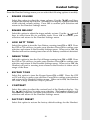
The GIGAPHONE uses the spare battery charger in the Base Unit. To provide
operational backup in the event of a power failure with the a fully charged battery
pack in the spare battery charger, you will still be able to place a receive calls
from the handset for up to 5 hours.
The spare battery pack can also be used to replace a drained handset battery,
ensuring uninterrupted use.
NOTE :
When using the GIGAPHONE during Power Backup mode, audio quality may
be compromised due to reduced Power availability.
1.
TONE
PULSE
2.
1
3.
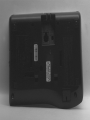
Open the spare battery charger
by pressing the release button,
located on the right-hand side of
the Base Unit. A drawer will
open to reveal the spare battery
compartment.
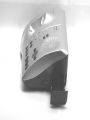
Place a battery pack in the drawer
with the charge contacts facing
up and to the left.
Push the drawer closed.
The spare battery takes 24 hours to
fully charge a drained battery.
BATTERY
INSTALL
THIS
SIDE UP
CAUTION: TO
REDUCE RISK OF FIRE,
USE ONLY VTECH
80-5017-00-00
2
10
3