1
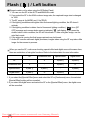
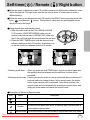
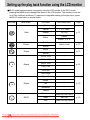
Flash (
) / Left button
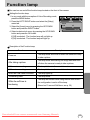
Flash mode indicator
Icon
Flash mode
Description
Auto flash
If the subject or background is dark, the camera flash will operate
automatically.
Auto &
Red eye
reduction
If a subject or background is dark, the camera flash will work
automatically and will reduce the red-eye effect by using the redeye reduction function.
Fill in flash
The flash fires regardless of available light.
The intensity of the flash will be controlled, according to the
prevailing conditions. The brighter the background or subject is,
the less intense the flash will be.
Slow synchro
The flash will operate in conjunction with a slow shutter speed in
order to obtain the correct exposure. We recommend using a
tripod for this function. When you take an image in a condition with
poor light, the camera shake warning indicator (
) will display
on the LCD monitor.
Flash off
The flash does not fire. Select this mode when capturing images in
a place or situation where flash photography is prohibited. When
you capture an image in a poorly lit condition, the camera shake
warning indicator (
) will display on the LCD monitor.
In poor light conditions, Safety Flash will help you get a good
image without the use of a flash.
SF
(Safety Flash)
Available flash mode, by recording mode
X
X
O
X
X
X
X
X
X
X
X
X
X
O
X
O
O
X
O
O
X
X
X
X
X
X
X
X
X
X
O
X
X
X
X
X
X
X
X
O
X
X
X
X
O
O
X
X
X
X
X
X
X
X
X
X
O
O
O
O
O
O
O
O
O
O
O
X
O
X
X
O
O
X
X
X
X
X
X
X
X
X
X
X
Downloaded From camera-usermanual.com Samsung Manuals
33