1
-.
Operating
Continued
Instructions
Starting your dishwasher
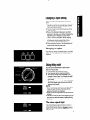
1. Push a Cycle Selector Button for the desired
cycle. Normal Wash and Light Wash Cycles
share the same button. The Cycle Control Knob
determines which cycle operates.
2. Push an Option Selector Button for each
desired option. The indicators above the buttons
will show which cycle and option(s) have been
selected.
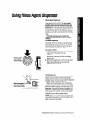
Option selector buttons
Cycle control knob
3. Turn Cycle Control Knob clockwise to point to
a desired cycle. Heavy Wash and Pots 8 Pans
Cycles share the same spot on the dial. The
Cycle Selector Buttons determine which cycle
operates.
You will feel a definite stop at each cycle
mark. The dishwasher will automatically start
the cycle you selected.
NOTE: If the door is latched, you will hear cycles
start and stop as the knob passes each cycle
mark. This is normal and will not hurt the dishwasher. If you prefer, you can set cycles with the
door unlatched.
Toadd a dish after starting
1. To be sure the added item is washed and
rinsed, make sure the Cycle Control Knob has
not passed LIGHT WASH.
2. Lift up on the door latch to unlatch door and
stop the cycle. Don’t open the door until the
spray arms stop spinning.
3. Open the door and add the dish.
4. Close the door. Do not latch it. Wait 30
seconds for air in the dishwasher to warm up.
This helps reduce the amount of moisture
that can come from the vent when restarting
the cycle.
5. Press door in to latch it. The dishwasher will
start where it stopped.