1
DISHWASHER: MDB/C-2
®
SAFETY INSTRUCTIONS
Page 1
Installer: Please leave this manual with
this appliance.
LOADING
Consumer: Please read and keep this
manual for future reference. Keep sales
receipt and/or cancelled check as proof of
purchase.
PORTABLE DISHWASHER
Page 4
DISHWASHING ESSENTIALS
Page 5
Model Number
Pages 2-3
_______________________________
CONTROLS AT A GLANCE
Serial Number
_______________________________
Pages 6-7
OPERATING TIPS
Page 7
_______________________________
SPECIAL CARE ITEMS
Page 8
In our continuing effort to improve the quality and performance of our appliances, it may
be necessary to make changes
to the appliance without revising
this guide.
CARE AND CLEANING
Page 8
Date of Purchase
Pages 9-10
If you have questions, call:
Page 11
1-800-688-9900 (USA)
1-800-688-2002 (CANADA)
1-800-688-2080 ( U.S. TTY for
hearing or speech impaired)
(Mon.-Fri., 8 am-8 pm Eastern Time)
Internet: http://www.maytag.com
Page 12
GUIá DEL USUARIO
Page 24
For service information, see page 11.
Part No. 6 917071 B
http://www.maytag.com
99002462
Litho U.S.A .
IMPORTANT SAFETY INSTRUCTIONS
Recognize Safety Symbols, Words, Labels
WHAT YOU NEED TO KNOW ABOUT SAFETY
INSTRUCTIONS
DANGER:
Warning and Important Safety Instructions appearing in this
manual are not meant to cover all possible conditions and situations that may occur. Common sense, caution, and care must be
exercised when installing, maintaining, or operating the dishwasher.
DANGER - Immediate hazards which WILL result in severe
personal injury or death.
Always contact your dealer, distributor, service agent, or manufacturer about problems or conditions you do not understand.
WARNING - Hazards or unsafe practices which COULD result
in severe personal injury or death.
WARNING:
CAUTION:
CAUTION - Hazards or unsafe practices which COULD result in
minor personal injury or product or property damage.
WARNING:
Check with the installer to make sure the appliance has
been properly grounded to avoid possible electrical
shock. Be sure you read the Important Personal Safety
Instructions before you use this dishwasher.
Products with a
label have been listed with Underwriter’s
Laboratories, Inc. – those with a CSA tag have been listed with
Canadian Standards Association. Nevertheless, as with any
other equipment using electricity and moving parts, there is a
potential hazard.
WARNING:
When using your dishwasher, follow basic precautions,
including the following:
1
1.
Read all instructions before using the dishwasher.
2.
Use the dishwasher only for its intended function.
3.
Disconnect electrical power to dishwasher before
attempting to service.
4.
To avoid electrical shock hazard, the sides and back must
be enclosed and the front panels must be attached before
electrical power is applied to the dishwasher. Refer to the
installation instructions for proper grounding procedures.
7.
To reduce the risk of injury when loading items to be
washed, sharp or pointed items should be located with the
handles up. Also, load sharp items so they are not likely to
damage the door seal.
8.
Do not touch the heating element on the bottom of the tub
during or at the completion of a cycle. It will be hot.
9.
Use only detergents and rinse additives designed for an
automatic dishwasher. Never use soap, laundry detergent,
or hand washing detergent in your dishwasher. Keep these
products out of reach of children.
10. Do not sit, stand on or abuse the door or dish racks of the
dishwasher.
11. Under certain conditions, hydrogen gas may be produced
in a hot water system that has not been used for two
weeks or more. Hydrogen gas is explosive. If the hot
water system has not been used for such a period, turn on
all hot water faucets and let the water flow from each for
several minutes. This will release any accumulated hydrogen gas. As the gas is flammable, do not smoke or use an
open flame during this process.
12. Do not wash plastic items unless marked “dishwasher
safe” or the equivalent. For plastic items not so marked,
check the manufacturer’s recommendations.
13. Do not tamper with controls.
5.
Connect to a properly rated, protected and sized power
supply circuit to avoid electrical overload.
14. To prevent accidental child entrapment and suffocation
risks, always remove the door to the washing compartment when removing an old dishwasher from service or
discarding it.
6.
Children should never be permitted to operate, or play in,
with, or around this dishwasher.
15. Use caution when unloading the dishwasher. Dishes will
be hot if unloaded shortly after a cycle has completed.
Save These Instructions for Future Reference
LOADING
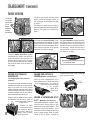
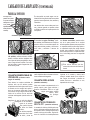
➢ Don’t prerinse. Simply scrape off any
bones or large food particles.
➢ If connected to a food waste disposer,
make certain the disposer is empty
before starting the dishwasher.
➢ Scrape off tomato-based food soils
(see page 8).
➢ Remove certain foods (such as mustard, mayonnaise, lemon juice, vinegar, salt or dressings) from stainless
steel flatware as soon as possible.
These foods may cause rusting and
pitting if allowed to remain in contact
with the surface for an extended period of time.
General
Recommendations
For best dishwashing results follow the
➢ Place all items in the racks so they guidelines below to determine the best
are separated and facing center.
arrangement for your items.
➢ Items can be centered behind a single
tine or loaded at an angle to maximize
space.
➢ Load items so they do not rest over the
top of the wash tower.
➢ Avoid blocking the upper and lower
spray arms by not allowing items to
extend beyond the racks.
against the outer rack or to the right to rest
on top of light items. Do not load items on
top of the wire.
Upper Rack
10 Place Settings
The Stack-Rack (select models) on the right
side of the upper rack folds up or down for
loading flexibility. Fold it down to hold longhandled knives, spatulas and spoons or
short items like cups or juice glasses. Fold it
up for taller items like glasses, bowls, plates,
etc.
Glasses, cups, stemware, light-weight
plastics, small plates, bowls, pans, longhandled utensils etc. can be loaded in this
rack. Do not load glasses over the tines.
The Vari-Lock™ Snugger (select models)
on the left secures lightweight items in
place. It can be adjusted by grasping the
wavy wire and rotating it left to snug items
ADJUSTABLE UPPER RACK
The Adjustable Upper Rack can be
raised to accommodate taller plates, platters, pans, etc. loaded in the lower rack.
(Select models)
Recommended Loading
(Rack features vary by model)
LOADING
Before You Start
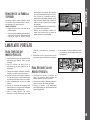
To raise the rack:
The wavy wire on the Vari-Lock™
Snugger (select models) and the StackRack (select models) is designed to hold
stemware in place. Taller stemware will fit
better on the right side as the upper rack is
deeper on this side.
To lower the rack:
➢ Pull the rack fully out.
➢ Grasp the handle on the rear right side
of the rack.
➢ Pull the rack fully out.
➢ Lift and push the rack slightly back to
lock back down into place.
➢ Grasp the handle on the rear right side
of the rack.
➢ Lift and pull the rack slightly forward to
lock up into place.
NOTE:
❚ Face soiled surfaces towards the
center of the dishwasher.
2
LOADING (Continued)
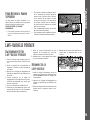
Lower Rack
A variety of large items such as dinner
plates, mixing bowls, pots and pans and
baking dishes can be loaded in this rack.
3 saucers are
loaded on the
rack under the
Stack-Rack Shelf
(select models)
Back
Tall items such as bakeware and large
platters can be placed on the left side or
across the back of this rack.
10 Place Settings
Positioning the Fold-Away™ Tines (select
models) flat in the back, left corner provides convenient loading space for large,
bulky items like pots and pans or mixing
bowls.
Convertible Tines (select models) in the
back, right corner can be adjusted to provide narrow spacing for loading plates or
wide spacing for loading deep bowls, pots
or pans. Flip tines up for narrow spacing or
down for wider spacing.
Back
NOTE:
With the Stack-Rack (select models) shelf
raised, thin items like cookie sheets or
pizza pans may be placed along the left
side. With the shelf down, two levels of
glasses and cups can be loaded.
REMOVABLE UTENSIL
BASKET (Design varies by model)
For best cleaning results, prevent items
from nesting together by placing some
items in the basket with handles up and
some with handles down. Load knives,
handles up, through the slots in the hinged
covered section(s) (when closed).
Be sure that thin, finely pointed items do
not extend through the basket.
This could block the lower
wash arm.
Small, lightweight items
like baby spoons and
plastic measuring spoons
should be placed in the
section(s) with the hinged
cover(s).
ODDS & ENDS BASKET
3
(Select models)
Use this supplemental basket in the upper
❚ Avoid resting items over the center wash tower.
rack for loading miscellaneous items and
utensils. This is also a safe place
to load sharp knives and
pointed items.
SPLIT & FIT UTENSIL
BASKET (Select models)
The split silverware basket can be separated and placed in several locations in the
bottom rack. Hold the basket firmly along
the sides. Follow the unlock direction
arrows imprinted on the basket and slide
the basket apart until it
splits into two.
Load flatware
and utensils into
both sections or just
one, depending upon
your load.
The upper rack can be removed when tall
or oversized items need to be loaded into
the lower rack.
TO REMOVE:
➢ Roll the upper rack 1/3 to 1/2 of the
way out.
➢ Remove the plastic rack stop from the
end of each track. To remove each
PORTABLE DISHWASHER
Removing the Upper
Rack
plastic rack stop, push inward
(towards the rack) on the ridged area
of the rack stop. The rack stop will
snap open and can be easily removed
by pulling straight out. Take care to
support the track while removing rack
stops.
➢ Roll the rack all the way out of the
track and remove from the dishwasher.
➢ Reverse the above procedure to
Rack
Stop
replace the upper rack into the dishwasher.
PORTABLE DISHWASHER
Connecting a portable
1. Turn on the faucet at the sink until the
water runs hot. Turn off the faucet.
7. Pull the electrical cord from the recess.
Plug it into a properly grounded outlet.
3. Push the connector and hoses back
into the cabinet recess.
2. Pull the connector from the recess in
the back of the dishwasher.
8. Select the proper cycle and options for
the load and start the dishwasher.
4. Unplug the electrical cord and push it
back into the cabinet recess.
3. Press down on the thumb release and
lift the connector onto the faucet.
Disconnecting a
Portable
4. Remove pressure from the thumb
release and tug slightly on the connector to be sure it is securely in place.
5. Turn the hot water on full force.
6. Check that the sink drain is open so
water from the dishwasher can drain
properly.
1. Be sure to turn the water supply off and
press the pressure release button
BEFORE removing the connector.
Thumb Release
Faucet
Connector
Pressure
Release
Button
2. Press down on the thumb release and
remove the connector from the faucet.
4
DISHWASHING ESSENTIALS
To check the incoming water temperature,
turn on the hot water faucet nearest the
dishwasher and let it run into a glass in the
sink. Place a candy thermometer in the
glass and check the temperature once it
has stopped rising. If the temperature is
below 120° F (49° C), have a qualified person raise the water heater thermostat setting.
Before starting the dishwasher, turn on the
hot water faucet and let it run until the
water is hot. This assures that the initial fill
of water is hot.
Detergent
ing. Too much detergent can cause permanent etching/cloudiness.
Use a detergent designed specifically for
use in an automatic dishwasher. Be sure it
is fresh and stored in a cool, dry place (not
under the sink).
The amount of detergent to use is determined by the hardness of the water and
soil level of the load. Refer to the following
chart for detergent usage recommendations.
In extremely hard water conditions (13
grains per gallon or more*), it is difficult to
achieve good results with any dishwasher.
A mechanical water softener may be necessary to improve water quality, detergent
effectiveness, and protect the dishwasher
parts from the damage that hard water can
cause.
Hot Water
For optimal cleaning and drying
results, hot water is necessary. The
incoming water temperature should be
120-140° F (49-60° C) to properly activate the detergent and melt greasy food
soils.
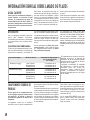
RECOMMENDED AMOUNT
Too little detergent results in poor cleaning,
hard water filming/spotting and poor dry-
Water Hardness*
Soil Level
Detergent Amount**
(per cup dosage)
Soft (0-4 gpg)
Light Soil
Normal Soil
Heavy Soil
Light Soil
Normal Soil
Heavy Soil
Light Soil
Normal Soil
Heavy Soil
5 teaspoons
6 teaspoons
8 teaspoons
7 teaspoons
8 teaspoons
10 teaspoons
9 teaspoons
10 teaspoons
12 teaspoons
Medium (5-9 gpg)
Hard (10-12 gpg)
Rinse Aid
Regular use of a rinse aid improves
drying, reduces spotting and filming,
and reduces moisture left on the dishwasher interior.
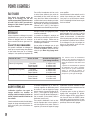
Your dishwasher features an automatic
rinse aid dispenser located near the detergent cups in the door.
5
Do not use detergent with Rinse Only.
Leave the detergent lid open when running
Rinse Only.
The clear window in the center of the dispenser cap allows you to see if there is
rinse aid in the reservoir. When the window
is colored, there is rinse aid in the dispenser. When the window becomes clear,
it is time to refill the dispenser. Check the
dispenser monthly.
To add rinse aid to the dispenser, turn the
cap counterclockwise to open. Remove
the cap and pour liquid rinse aid into the
*Your local water utility or state university extension service can tell you
the degree of water hardness in your
area.
** Add recommended amount of
detergent to both compartments for
AutoClean, Heavy or Normal wash
cycles, and to the main cup only for
the Light wash cycle.
opening. Replace the cap and turn it clockwise.
Use the LESS setting for soft water and
the MORE setting for hard water. Set the
cap anywhere between these amounts as
needed.
CONTROLS AT A GLANCE
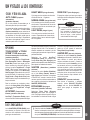
AUTO CLEAN
(Select models)
Manufacturer’s recommended cycle choice
for all day-to-day soil types.
Normal dishloads vary from day to day.
Auto Clean is recommended because it
selects the number of fills and wash time
best suited for the soil level of each load.
Depending on the number of fills required
water usage ranges from 4 to 10 gallons.
Options
TOUGH SCRUB™ or TOUGH
SCRUB™ PLUS (Select models)
Select Tough Scrub™ or Tough Scrub™
Plus when washing loads with hard-toremove food soils. Tough Scrub™ or
Tough Scrub™ Plus can be selected with
any cycle (except Rinse Only). Depending
on which cycle is being used, selecting this
option adds fills, heat and/or wash time to
the wash cycle.
HEAVY WASH
RINSE ONLY
Long cycle for heavy food soils. 10 gallons.
Rinses dishes being held until there is a
full load. Controls odors. 2 gallons.
NORMAL WASH
Medium cycle for average food soils.
Depending on the number of fills, water
usage ranges from 4 to 8 gallons.
LIGHT WASH
Short cycle for light food soils. Depending
on the number of fills, water usage ranges
from 4 to 6 gallons.
final rinse cycle. If necessary, the heating
element will turn on and the cycle will be
extended to heat water to the proper temperature.
Select AccuTemp™ with any cycle (except
Rinse Only) to assure proper hot water
temperature and to enhance drying results.
SANITIZE
(Select models)
For baked-on, dried-on soils, select Heavy
Wash along with the Tough Scrub™ or Tough
Scrub™ Plus option.
Select Sanitize with Auto Clean (select
models), Heavy, Normal, or Light Wash
to sanitize dishware. At the end of the
cycle, when the cycle monitor recognizes
that the proper conditions have been met,
the SANITIZED light illuminates.
ACCUTEMP
EXTRA RINSE (Select models)
(Select models)
AccuTemp™ provides a water temperature
check in the main wash and also in the
Select Extra Rinse to add a rinse to the
cycle. An extra rinse helps to improve
Indicator Lights
The CLEAN light illuminates at the end of
the cycle and remains lit until the door
has been open for 30 seconds continuously.
The SANITIZED (select models) light illuminates at the end of the cycle when conditions have been met to achieve sanitization.
NOTE:
❚ When Sanitize is selected, cycles
are monitored to assure sanitization. Unusually low water temperature will prevent the sanitization
protocol from being satisfied and
the SANITIZED light will not illuminate at the end of the cycle.
NOTE:
❚ Cycle times shown in the numerical
display (select models) increase or
decrease, based on each load’s
soil level, water temperature and
selected options.
CONTROLS AT A GLANCE
Cycles and Water Usage
results in hard water situations. The extra
rinse is already built into the cycle when
Heavy Wash is selected.
HEATED DRY
Select Heated Dry to turn on the heating
element during dry for enhanced drying
results. When Heated Dry is not selected,
towel drying of some items such as plastic
and teflon may be necessary and more
moisture may be noticed adhering to the
dishwasher interior. With either dry option,
it is normal to notice vapor escaping from
the door vent.
DRAIN/OFF
To drain the dishwasher and then turn it off,
press Drain/Off once. Press Drain/Off twice
to turn the dishwasher off without draining.
The CLEAN and SANITIZED (select models) indicator lights will not reilluminate
after a power failure until after the next
cycle is run.
The DRY light illuminates during the entire
dry period and goes out when the cycle is
completed.
The WASH light illuminates during all rinse
and wash portions of the cycle.
The HEATING DELAY light illuminates
when the cycle is being extended to heat
the water.
6
CONTROLS AT A GLANCE (Continued)
Delay/Resume
The Delay/Resume option can be used to
automatically start the cycle at a later time,
such as during off-peak hours for reduced
energy cost or to reduce daytime heat
buildup in the home.
TO SET UP A DELAY:
1. Select the appropriate cycle and
options for the load.
2. Press the Delay/Resume pad until the
desired amount of delay time (1 to 9
hours) is selected. The delay time will
begin counting down when the pad is
released.
3. The Delay/Resume indicator light will
remain lit until the delay time has
counted down.
4. The cycle will automatically start as
soon as the delay time expires.
NOTE:
NOTE:
❚ If Delay/Resume is chosen without selecting a cycle and/or
options, the dishwasher will
select the last cycle used. (It will
not remember the Rinse Only
cycle.)
❚ This option does not lock the
door, only the dishwasher controls.
TO CANCEL A DELAY:
Wait at least 2 seconds, then press the
Delay/Resume pad again. The indicator
light will go out and the cycle will start or
resume immediately.
Control Lock Option
(Select models)
The control touchpads can be locked to
prevent unwanted use. If this feature is
activated between cycles, the dishwasher
cannot be operated until the controls are
unlocked. If desired, the controls can be
locked after a cycle or delay has started.
SETTING THE CONTROL LOCK:
1. Press the
pad for three seconds.
2. An indicator light above the pad will
illuminate when the controls are
locked.
TO CANCEL:
1. Press the
pad for three seconds.
2. The indicator light will go off.
NOTE:
❚ If a cycle or option pad is pressed
after the controls have been
locked, the indicator light above
the Control Lock pad will flash
five times.
OPERATING TIPS
Starting the Dishwasher
1. After loading the dishwasher and
adding detergent, close the dishwasher by pressing the door until the latch
clicks.
2. To start the dishwasher, firmly press
the desired cycle and options pads.
After a pause, the fill will begin. To prevent unplanned cycle or option
changes, these selections are “locked
in” after 1 minute.
3. The indicator lights for the selected
cycle and options will glow.
4. To cancel an option, press the pad
again. To cancel a cycle, press the
Drain/Off pad.
7
4. Close and latch the door.
NOTE:
❚ Extended interruption of the wash
cycle is not recommended.
Adding a Forgotten Item
For best cleaning, the forgotten item
should be added early in the cycle.
1. Press the Delay/Resume pad or
unlatch the door.
2. Wait for the water circulation to stop.
3. Open the door and add the item.
❚ If Delay/Resume was pushed,
push it again to restart the dishwasher.
5. After five seconds, the cycle resumes
automatically at the point of interruption.
NOTE:
❚ If a cycle or option pad is pressed
after the controls have been
“locked in”, the indicator light
above the Control Lock pad will
flash five times.
SPECIAL CARE ITEMS
Material
Dishwasher Safe?
Special Informatiion
Aluminum
Yes, except anodized.
High water temperature and detergents may affect finish.
Cast Iron
No
Seasoning will be removed, and iron will rust.
China/
Stoneware
No, if antique or handpainted.
Always check manufacturer’s recommendation before washing. Antique, hand-painted or over-the-glaze patterns may fade. Gold leaf may discolor.
Crystal
Always check manufacturer’s recommendation before washing. Some types of leaded crystal may etch with repeated washings.
Furnace Filters
No, if antique or delicate
crystal.
Not recommended.
Glass
Yes
Milkglass can yellow with repeated dishwasher washing.
Gold-Plated
Flatware
No
Will discolor.
Pewter, Tin
Plastics
No
Yes, top rack.
Stainless Steel
Yes
Run a Rinse Only cycle if not washing immediately. Prolonged contact with foods containing salt, vinegar, milk products or juice could damage finish.
Sterling Silver or
Silverplate
No, if has commercial
“darkening”.
Always check manufacturer’s recommendation before washing. Run a Rinse Only
cycle if not washing immediately. Prolonged contact with food containing salt, acid or
sulfide (eggs, mayonnaise and seafood) could damage finish. Commercial “darkening” may be removed by detergent.
Wooden Items
No
Wood may warp, crack or discolor.
May leave a dingy deposit or stain on dishwasher interior.
Always check manufacturer’s recommendation before washing. Plastics vary in their
capacity to withstand high water temperatures and detergents. Disposable plastic
items are not dishwasher safe for this reason.
Interior
Exterior
The dishwasher interior is normally self-cleaning. Periodically check the bottom of the dishwasher tub to see if any large particles have
not gone through the strainer portion of the
module.
Wipe the edge of the inner door liner to remove
any food soil splashes which occurred during
loading.
The color from some tomato-based food soils
has been known to occasionally adhere to
today's dishwasher tubs, causing temporary discoloration.
When washing a load of dishes soiled with
tomato sauce:
➢ Scrape excess tomato-based food soils off of
dishes, prior to loading. Do not prewash the
dishes, however.
The front of the dishwasher can be cleaned
with a soft damp cloth and liquid spray cleaner. Do not use abrasive powders or cleaning
pads.
Stainless Steel Care and Cleaning (select
models)
➢ Do not use a cleaning product containing
chlorine bleach.
➢ Always wipe with the grain of the stainless steel.
For daily cleaning and light soil, use a soft
cloth or sponge and one of the following: Mild
detergent and water, a solution of white vinegar
and water, Formula 409 Glass and Surface
Cleaner* or a similar multi-surface cleaner.
Rinse and dry. To polish and to help prevent
fingerprints, follow with Stainless Steel Magic
Spray* (part No. 20000008)**.
For moderate to heavy soil, clean with Bon
Ami*, using a soft cloth or damp sponge.
Rinse and dry. To restore luster and to remove
streaks, follow with Stainless Steel Magic
Spray*.
For discoloration, wipe with Cameo
Stainless Steel Cleaner*, using a damp
sponge or soft cloth. Rinse immediately and
dry. To restore luster and to remove streaks,
follow with Stainless Steel Magic Spray*.
Storage/Moving
Fill both detergent cups with a fresh-scented
dishwasher detergent or baking soda and
select the Normal Wash cycle. Allow the dishwasher to complete the cycle. Then turn the
water supply off and drain the dishwasher. To
drain, press the Drain/Off pad once. Operate
the drain twice to ensure most of the water is
removed. Last, disconnect the electrical supply
and prop open the door. (See Important Safety
Instructions, #14, page 1).
*Brand names are the trademarks of the respective manufacturer.
** Call 1-800-688-8408 to order.
CARE AND CLEANING
➢ Run the Heavy Wash cycle.
SPECIAL CARE ITEMS
Most tableware, cookware and flatware can safely be washed in your dishwasher. If you have any doubts about an item, check
with the manufacturer.
8
BEFORE YOU CALL
CHECK THESE POINTS TO HELP SAVE YOU TIME AND MONEY.
Dishwasher Will Not Fill:
•
•
•
•
•
•
•
Be sure door is latched securely.
Be sure the water is turned on.
Check that the pad is properly selected for a cycle.
Allow time to pause before filling.
Check your home‘s circuit breaker or fuse box.
Check inlet hose for a kink.
Check water valve inlet for sediment and clean if necessary.
Dishwasher Will Not Drain/Water In Tub Bottom:
•
•
•
•
•
•
If hooked up to a food waste disposer, be sure the knock-out is removed from the disposer inlet.
Be sure the drain hose is elevated at least 32” so water cannot siphon back into the tub.
Check for food obstruction in the drain or disposer.
Check drain hose for a kink.
Check your home‘s circuit breaker or fuse box.
Check that the cycle is completed.
Dishwasher Adds Water at END of Cycle:
• This is normal. The Auto Clean (select models) sensor in the pump must stay submerged so a short fill of water is added after the cycle’s
last drain.
Detergent Cup Is Not Empty:
• Check that the cycle is completed.
• Be sure dispenser is not blocked by a dish or utensil.
• Use fresh detergent stored in a cool, dry place.
Dishwasher Seems Noisy:
•
•
•
•
•
•
•
A water valve hiss during fill is normal.
Water circulation sounds are normal.
A thumping sound may be a wash arm bumping an item that is extending beyond the racks.
Chopping or grinding sounds may be heard during drain as the internal food disposer chops hard items like fruit seeds, nuts, etc.
Humming during the drain is normal.
A snap noise is the detergent cup lid hitting the door liner when the dishwasher door is opened at the end of the cycle. This is normal.
Proper installation affects the noise level.
Cycle Takes Too Long (Heating Delay Light Stays On):
• Tough Scrub™ or Tough Scrub™ Plus (select models) or Sanitize (select models) has been selected and the cycle is extended to heat water.
• Check to see that the incoming water temperature is 120-140° F (49-60° C).
Dishwasher has an Odor:
•
•
•
•
Run dishes being held in the dishwasher through a Rinse Only cycle.
Many dishwashers have a “new” smell when first installed. This will dissipate with use.
Dishwasher may not be draining properly. (See “Dishwasher Will Not Drain” section.)
For a strong odor, place baking soda in both sides of the detergent cup. Select Light Wash and allow the water to circulate for about 10 minutes. Interrupt the cycle by unlatching the door and let it stand overnight. Restart the dishwasher by latching the door and allow it to complete the cycle. A commercial dishwasher cleaning product such as Jet-Dry Dishwasher Cleaner* can also be used.
Dishwasher Leaks:
• Check that the dishwasher is level. (Refer to the Installation Instructions.)
• Suds can cause the dishwasher to overflow. Measure the detergent carefully and use only detergents designed for use in a dishwasher. Less
detergent is needed in soft water. Try another brand if sudsing continues.
• Follow directions closely on how to add a forgotten item (pg. 7).
• Be sure the Rinse Aid lid is securely attached and not leaking.
Display Time Suddenly Drops or Increases by Several Minutes (select models):
• This is normal when the Auto Clean cycle (select models) is selected and the dishwasher decides to skip or add a drain and refill.
9
•
•
•
•
Food Soil Remains on Dishes:
•
•
•
•
•
•
•
•
•
•
Check water temperature (pg 5).
Run hot water at the sink before starting the dishwasher.
Select Tough Scrub™ or Tough Scrub™ Plus (select models).
Check water hardness and adjust detergent amount accordingly (pg. 5).
Use fresh detergent stored in a cool dry place.
Select proper cycle for the soil level.
Load items so they do not block the wash arms or center tower (pg. 2-3).
Load the utensil basket with some handles up and some down to prevent nesting.
Do not place glasses over tines.
Prior to loading, scrape off burnt on foods and wipe the starchy film from utensils used with pasta, rice and oatmeal. These soils require
more energy than the rest of the load to clean.
Items Washed In The Dishwasher Or The Dishwasher Tub Itself Are Stained/Discolored:
• Aluminum utensils or pans can leave marks when they rub against other items. Leave a slight space between items.
• Iron deposits in the water can leave a yellow, brown or orange film on dishes or the dishwasher tub. A filter may be needed, check with a
water treatment company. RoVer Rust Remover (part no. 057961)** can be used to remove rust. Do not use RoVer along with dishwasher
detergent. Fill both cups with RoVer and complete a Normal Wash cycle. Follow with a short wash cycle using dishwasher detergent.
• Color from tomato sauces may adhere to the tub (pg. 8). If light staining has occurred, leave the door open to oxidize the stain away. For
removal of heavier stains, try a citric acid containing dishwasher cleaning product such as Glisten (part no. 18001017)**. Change dishwasher
detergent and be sure to use a dishwasher detergent that contains chlorine to better fight staining.
*Brand names are the trademarks of the respective manufacturer.
** Call 1-800-688-8408 to order.
Select Extra Rinse (select models).
Check water temperature. Incoming water should be 120°-140° F (49-60° C).
Always use a rinse aid.
Confirm that the cloudiness is removable by soaking the item in white vinegar for approximately 5 minutes. If removed, the problem is due
to hard water. Adjust detergent amount being used to match water hardness (pg. 5). Be sure detergent is fresh, stored properly and is a
high quality brand.
• If cloudiness is not removable, it is etching. This is an erosion of the surface of the glassware and can be caused by water that is too hot,
from using too much detergent or by prewashing. Detergent needs food soil to act upon. If etching has occurred, the glassware is permanently damaged. To prevent further etching, adjust the detergent amount to match the water hardness, stop prewashing, and be sure incoming water temperature is not greater than 140° F (60° C). Use water heating options only when incoming water temperature is below
120° F (49° C).
BEFORE YOU CALL
Glasses Are Cloudy/Spotted:
Items Not Properly Dried/Moisture Is Present On The Dishwasher Interior After The Dry Cycle:
•
•
•
•
•
•
•
•
•
Be sure Heated Dry is selected.
Water droplets may form on the inner door as part of the drying process.
Always use a rinse aid like Jet Dry* or Cascade Rinse Aid*.
Check water temperature (pg. 5).
Select Tough Scrub™ or Tough Scrub™ Plus (select models).
Increase detergent amount to match water hardness (pg. 5).
Load properly (pg. 2-3)
Plastic and teflon items are difficult to dry because the porous surface tends to collect water droplets. Towel drying may be necessary.
Glasses and cups with concave bottoms hold water and require towel drying.
Dishware is Chipped:
•
•
•
•
Load dishes according to instructions so they do not strike each other (pg. 2-3).
Washing antique china/crystal in the dishwasher is not recommended.
Do not load glasses over the tines.
Do not overload.
Sanitized Light Does Not Illuminate at the End of the Cycle (select models):
• Sanitize was not selected.
• Sanitization can only be achieved with the Auto Clean (select models), Heavy, Light or Normal wash cycles.
• The incoming water temperature was too low, interfering with the dishwasher’s ability to achieve adequate water heating in the alloted amount
of time.
10
Dishwasher Warranty
Full One Year Warranty
For ONE (1) year from the date of original retail purchase, any part which fails in normal home use will
be repaired or replaced free of charge.
Limited Second Year Warranty
After the first year from the date of original retail purchase, through the second year, parts which fail in normal home use will be repaired or replaced free of
charge for the part itself, with the owner paying all other
costs, including labor, mileage and transportation.
Limited Third Through Fifth Year Warranty
After the second year from the date of original retail
purchase, through the fifth year, all of the following
components which fail in normal home use will be
repaired or replaced free of charge for the part itself,
with the owner paying all other costs, including labor,
mileage and transportation. These components
include:
Any parts of the Jetclean® system for all models,
including the complete power module assembly, soil
sensor, center spray nozzle, spray arms, top wash
arm hose, and motor.
Computer Touch Control models only – any microprocessor and touch pad assemblies.
All models against rust, including exterior cabinet
and front panels of portable models, the exterior front
panels and accessory side panels of built-in models,
and premium DuraGuard® coated racks (available on
select models).
Full Twenty-Year Warranty
From the date of original purchase through the twentieth year, should the tub develop a water leak in normal home use, the dishwasher itself will be replaced
FREE OF CHARGE.
From the date of original purchase through the twentieth year, should the door liner develop a water leak
in normal home use, repair or replacement of the
door liner will be made FREE OF CHARGE.
PLEASE NOTE: These full warranties apply only
when the dishwasher is located in the United States
or Canada. Dishwashers located elsewhere are covered by the limited warranties only, including a limited warranty for parts which fail during the first year.
Canadian Residents
These warranties cover only those dishwashers
installed in Canada that have been listed with
Canadian Standards Association unless the dishwashers are brought into Canada due to transfer of
residence from the United States to Canada.
The specific warranties expressed above are the
ONLY warranties provided by the manufacturer.
These warranties give you specific legal rights, and
you may also have other rights that vary from state
to state.
11
MAYTAG •
What is Not Covered By These Warranties:
1. Conditions and damages resulting from any of the following:
a. Improper installation, delivery, or maintenance.
b. Any repair, modification, alteration, or adjustment not authorized by the
manufacturer or an authorized servicer.
c. Misuse, abuse, accidents, or unreasonable use.
d. Incorrect electric current, voltage, or supply.
e. Improper setting of any control.
2. Warranties are void if the original serial numbers have been removed,
altered, or cannot be readily determined.
3. Products purchased for commercial or industrial use.
4. The cost of service or service call to:
a. Correct installation errors.
b. Instruct the user on the proper use of the product.
c. Transport the appliance to the servicer.
5. Consequential or incidental damages sustained by any person as a result of
any breach of these warranties. Some states do not allow the exclusion or
limitation of consequential or incidental damages, so the above exclusion
may not apply.
To Receive Warranty Service
❚ To locate an authorized service company in your area contact the Maytag
dealer from whom your appliance was purchased or call Maytag Appliances
Sales Company, Maytag Customer Assistance at the number listed below.
Should you not receive satisfactory warranty service, please call or write:
Maytag Appliances Sales Company
Attn: CAIR® Center
P.O. Box 2370
Cleveland, TN 37320–2370
U.S.
1-800-688-9900
CANADA
1-800-688-2002
U.S. customers using TTY for deaf, hearing impaired or speech
impaired, call 1-800-688-2080.
NOTE: When writing or calling about a service problem, please include the
following information:
a. Your name, address and telephone number;
b. Model number and serial number of your appliance ;
c. Name and address of your dealer or servicer and the date the appliance
was purchased;
d. A clear description of the problem you are having;
e. Water hardness, detergent brand and amount, water temperature and
cycle used;
f. Proof of purchase (sales receipt).
User’s guides, service manuals and parts information are available from Maytag
Appliances Sales Company, Maytag Customer Assistance.
403 West Fourth Street North • P.O. Box 39 • Newton, Iowa 50208
LAVE-VAISSELLE: MDB/C-2
®
MESURES DE SéCURITé
Installateur : Veuillez laisser le présent
guide avec l’appareil.
Client : Veuillez lire le présent guide et
le conserver pour référence future.
Conservez aussi les reçus de caisse et
les chèques oblitérés à titre de preuve
d’achat.
CHARGEMENT
Page 13
Pages 14 à 16
LAVE-VAISSELLE PORTATIF
Page 16
POINTS ESSENTIELS
Page 17
Numéro de modèle
_______________________________
LES CONTRôLES EN BREF
Pages 18 à 19
CONSEILS D'UTILISATION
Page 19
ARTICLES D'UN ENTRETIEN PARTICULIER
Page 20
NETTOYAGE ET ENTRETIEN
Page 20
Numéro de série
_______________________________
Date d’achat
_______________________________
Nous nous efforçons de toujours
améliorer la qualité et le rendement
de nos produits de cuisson. En conséquence, il se peut que nous modifiions l’appareil sans réviser le
présent guide.
Si vous avez des questions, téléphonez au :
1-800-688-2002 CANADA
(lundi au vendredi, de 8 h à 20 h HNE)
Internet: http://www.maytag.com
Pour obtenir des renseignements sur le
service, consultez la page 23
AVANT D'APPELER UN SERVICE DE DéPANNAGE
Pages 21 à 22
GARANTIE
Page 23
GUIá DEL USUARIO
Page 24
http://www.maytag.com
Litho U.S.A .
MESURES DE SÉCURITÉ
Il importe de reconnaître les symboles, les expressions et les étiquettes de sécurité
CE QU’IL FAUT SAVOIR À PROPOS DES CONSIGNES DE SÉCURITÉ
Les consignes de sécurité et les mises en garde présentées
dans ce manuel ne couvrent pas toutes les situations possibles.
Faire preuve de jugement, de prudence et d’attention lors de
l’installation, de l’entretien et de l’utilisation du lave-vaisselle.
Lorsque survient un problème ou une situation inhabituelle, toujours communiquer avec le détaillant, le distributeur, le technicien agréé ou le fabricant.
DANGER:
DANGER - Indique un danger immédiat qui RÉSULTERA en
une blessure ou un décès.
AVERTISSEMENT:
AVERTISSEMENT - Indique un danger ou une manœuvre non
sécuritaire qui RISQUE de causer une blessure ou un décès
ATTENTION:
ATTENTION - Indique un danger ou une manœuvre non sécuritaire qui RISQUE de causer une blessure mineure, des
dégâts matériels ou d’endommager le produit.
ATTENTION:
Vérifier, auprès de l’installateur, que l’appareil est bien
relié à la terre pour éviter toute possibilité d’électrocution.
Veiller également à lire les Mesures de Sécurité
Importantes, avant d’utiliser l’appareil.
6.
7.
8.
Les appareils portant le symbole
sont homologués par les
Laboratoires des Assureurs, Inc. Ceux portant le monogramme CSA
sont homologués par l’Association canadienne de normalisation.
Cependant, comme avec tout appareil utilisant de l’électricité et comportant des pièces mobiles, il existe toujours des possibilités de danger.
9.
10.
ATTENTION:
11.
Lors de l’utilisation du lave-vaisselle, suivre des précautions de base, dont les suivantes:
1.
2.
3.
4.
5.
13
Lire toutes les instructions avant d’utiliser le lave-vaisselle.
Utiliser le lave-vaisselle uniquement pour l’usage pour lequel
il est prévu.
Débrancher le lave-vaisselle ou en couper l’alimentation avant
toute réparation ou intervention de dépannage.
Pour éviter tout risque d’électrocution, les côtés et le dos de
l’appareil doivent être enclos et les panneaux avant en place
avant que le lave-vaisselle ne soit mis sous tension. Vous
référer au manuel de mise en service pour une mise à la
terre correcte.
Brancher l’appareil sur un circuit d’alimentation correctement
protégé et d’une puissance nominale suffisante pour éviter
une surcharge électrique.
12.
13.
14.
15.
Ne pas laisser les enfants utiliser le lave-vaisselle ni jouer
avec, dedans ou autour.
Pour réduire les risques de blessures lors du chargement du
lave-vaisselle, placer tout objet pointu ou coupant manche
vers le haut. Veiller également à le charger de façon à ce
qu’il ne puisse pas abîmer le joint de la porte.
Ne pas toucher l’élément chauffant situé au fond de la cuve
durant le lavage ou à la fin de ce dernier. Il est alors chaud.
Utiliser uniquement des détergents ou agents de rinçage spécialement conçus pour les lave-vaisselle. Ne jamais utiliser de
savon, de détergent pour la lessive ni de détergent pour la vaisselle à la main. Garder ces produits hors de portée des enfants.
Ne pas vous asseoir ni monter sur la porte ni les paniers, ni
autrement les abîmer.
Dans certaines conditions, il peut y avoir production d’hydrogène dans un système de chauffage d’eau qui n’est pas
utilisé pendant 2 semaines ou plus. L’hydrogène est un gaz
explosif. Si votre système de chauffage d’eau n’est pas utilisé
pendant une telle durée, ouvrir tous les robinets d’eau chaude
et laisser couler l’eau pendant plusieurs minutes. Ceci élimine
toute accumulation d’hydrogène. Ce gaz étant inflammable, ne
pas fumer ni utiliser de flamme vive pendant ce temps.
Ne pas laver d’articles en plastique dans le lave-vaisselle, sauf
s’ils sont indiqués comme pouvant aller au lave-vaisselle. Dans
le cas d’articles en plastique ne portant pas d’indications précises à cet effet, se référer aux recommandations du fabricant.
Ne pas modifier les mécanismes de commande.
Avant de mettre l’appareil hors service ou au rebut, retirer la
porte du compartiment de lavage.
Faire preuve de prudence lors du déchargement du lave-vaisselle. La vaisselle est brûlante lorsqu’elle est retirée peu de temps
après que le cycle se soit terminé.
Conserver ces Instructions
CHARGEMENT
➢ Ne pas prérincer. Il suffit de jeter os
et gros morceaux de nourriture.
➢ Si le lave-vaisselle s’évacue dans un
broyeur à déchets, veiller à ce que celuici soit totalement vide avant de mettre
le lave-vaisselle en marche.
➢ Gratter les taches tenaces laissées
par les aliments à base de tomates
(voir page 20).
➢ Éliminer certains aliments (tels que
moutarde, mayonnaise, jus de citron,
vinaigre, sel et vinaigrettes) des articles
en acier inoxydable aussi rapidement
que possible. Ils peuvent attaquer le
métal s’ils restent en contact prolongé
avec celui-ci.
Recommandations
d’Ordre Général
➢ Placer les articles dans les paniers de
façon à ce qu’ils ne soient pas collés
les uns aux autres et les tourner vers
le centre.
➢ Les articles peuvent être centrés sur une
tige de retenue ou chargés en biais pour
tirer le meilleur parti possible de l’espace.
➢ Charger la vaisselle de façon à ce
qu’aucun article ne repose sur le dessus
de la tourelle.
➢ Éviter de bloquer les bras gicleurs
inférieur et supérieur. Pour cela, ne rien
laisser dépasser des paniers.
Il peut recevoir verres, tasses, verres à pied,
articles en plastique léger, petites assiettes,
bols, casseroles, récipients à long manche,
etc. Ne pas placer les verres sur les tiges
de retenue.
PANIER SUPÉRIEUR RÉGLABLE
(Modèles sélectionnés)
(les caractéristiques des paniers
varient selon le modèle)
Pour obtenir de meilleurs résultats, observer
les présentes directives au-dessous pour
déterminer la disposition qui convient le
mieux à vos articles.
sur les articles et les stabilise contre le
panier, ou vers la droite, de façon à ce qu’il
repose sur des tasses ou des articles en
plastique légers. Ne pas placer d’articles
sur le fil.
Panier Supérieur
10 Couverts
Chargement Recommandé
CHARGEMENT
Avant de Commencer
La tablette Stack-Rack (modèles sélectionnés) à la droite du panier supérieur s’élève
ou s’abaisse selon les articles chargés.
L’abaisser pour retenir les couteaux, les
spatules et les cuillers à long manche ou les
articles courts, comme les tasses et les verres à jus. L’élever pour charger les grands
articles, comme les verres, les bols, les assiettes, etc.
Le stabilisateur Vari-Lock™ (modèles sélectionnés) qui se trouve sur la gauche retient
les articles légers en place. Il peut être ajusté
en faisant passer le fil courbé vers la gauche,
de façon à ce qu’il fasse légèrement pression
Le panier supérieur réglable peut être
relevé pour faire place aux grandes assiettes, aux plats de service, aux casseroles,
etc., chargés dans le panier inférieur.
Pour relever le panier:
➢ Retirer le panier complètement hors de
la cuve.
➢ Tenir la poignée à l’arrière sur le côté
droit du panier.
➢ Relever et tirer le panier un peu vers
l’avant pour le verrouiller.
La forme incurvée du fil du stabilisateur
Vari-Lock™ (modèles sélectionnés) et du
Stack-Rack (modèles sélectionnés) est
conçue pour maintenir le pied des verres en
place. Il est préférable de placer les verres
dont le pied est plus long à droite car le
panier est plus profond en ce point.
Pour abaisser le panier:
➢ Retirer le panier complètement hors de
la cuve.
➢ Tenir la poignée à l’arrière sur le côté
droit du panier.
➢ Relever et tirer le panier un peu vers l’avant pour le verrouiller.
REMARQUE:
❚ Orienter les surfaces sales vers le
centre du lave-vaisselle.
14
CHARGEMENT (Continuer)
Panier Inférieur
Ce panier peut accueillir plusieurs grands
articles, comme les assiettes à dîner, les
bols à mélanger, les casseroles et les plats
de cuisson.
3 soucoupes
sont placées
dans le panier
sous la
tablette
Stack-Rack
(modèles
sélectionnés)
Arrière
Des articles en hauteur tels que moules à
gâteaux et grands plats de service peuvent être
placés du côté gauche ou à l’arrière de ce
panier.
10 Couverts
Si les tiges de retenue Fold-Away™ (modèles sélectionnés) sont rabattues, à l’arrière
gauche du panier, elles laissent un espace
pratique pour les articles de grandes dimensions comme les marmites ou les grandes
casseroles ou les bols à mélanger.
Lorsque la tablette Stack-Rack (modèles
sélectionnés) est relevée, elle permet de
placer des articles peu épais tels que
plaques à biscuits, plats à pizza, etc. le long
du côté gauche. Lorsqu’elle est rabattue,
elle permet de placer verres et tasses sur
deux étages.
PANIER D’USTENSILES
AMOVIBLES
(la configuration varie selon le
modèle)
Pour obtenir de meilleurs résultats au lavage,
empêcher les articles de se placer directement l’un sur l’autre. En ce sens, disposer
certains ustensiles la poignée vers le bas et
d’autres la poignée vers le haut. Charger les
couteaux la poignée vers le haut dans les
fentes du couvercle articulé refermé.
S’assurer que les articles minces et effilés
ne dépassent pas du panier, sinon ils
risquent de bloquer le bras de
lavage inférieur.
15
Disposer les petits
articles légers, comme
les cuillers de bébé et
les cuillers à mesurer de
plastique, dans la section
du couvercle articulé.
Les tiges adaptables (modèles sélectionnés) situées dans le coin arrière droit sont
ajustables pour fournir un jeu étroit pour les
assiettes ou large pour les bols profonds ou
les casseroles. Orienter les tiges vers le
haut pour obtenir un jeu étroit ou vers le bas
pour obtenir un jeu large.
Arrière
REMARQUE:
❚ Ne pas disposer d’articles par-dessus la
tour centrale de lavage.
PANIER DES ARTICLES
DIVERS (Modèles sélectionnés)
Placer ce panier supplémentaire sur le
panier supérieur pour y charger des articles
et des ustensiles divers. Ce panier est
aussi un bon endroit pour charger les couteaux
affûtés et les
articles pointus.
PANIER À USTENSILES SPLIT
& FIT™ (Modèles sélectionnés)
Il est possible de séparer le panier à ustensiles pour placer chaque moitié en deux
endroits distincts du panier inférieur. Tenir
fermement le panier par les côtés. Suivre
les flèches de déverrouillage gravées sur le
panier et glisser chaque moitié du panier
jusqu’à ce qu’il se sépare. Charger les
ustensiles dans chaque moitié ou dans une
seule, selon leur nombre.
On peut retirer le panier supérieur si on
désire placer des articles de plus grandes
dimensions dans le panier du bas.
POUR RETIRER LE PANIER
SUPÉRIEUR:
➢ Faire rouler le panier vers soi jusqu’à ce
qu’il soit retiré environ du tiers ou de la
moitié.
➢ Pour retirer la butée en plastique installée à l’extrémité de chaque glissière,
pousser vers l’intérieur (vers le panier)
sur la moulure de la butée. La butée
s’ouvre d’un coup sec; il est alors facile
de l’enlever en tirant vers soi. S’assurer
de bien soutenir la glissière au moment
d’enlever les butées.
➢ Tirer complètement le panier vers soi afin
de le retirer du lave-vaisselle.
➢ Pour remettre le panier supérieur en place,
inverser l’ordre des instructions précitées.
LAVE-VAISSELLE PORTATIF
Pour Retirer le Panier
Supérieur
Butée
LAVE-VAISSELLE PORTATIF
7. Sortir le cordon d’alimentation de son 4. Débrancher le cordon d’alimentation et le
mettre dans le logement dans la carlogement et le brancher sur une prise
rosserie.
murale correctement reliée à la terre.
8. Sélectionner le cycle approprié et mettre
Bague de
le lave-vaisselle en marche.
dégagement
Ouvrir le robinet d’eau chaude jusqu’à ce
Dispositif de
que l’eau soit très chaude. Fermer le robiraccordement
net.
Sortir le dispositif de raccordement du
Bouton de
logement à l’arrière du lave-vaisselle tel
réduction de
la pression
qu’indiqué.
Appuyer sur la bague de dégagement et 1. Veiller à couper l’alimentation en eau et
emboîter le dispositif de raccordement sur
appuyer sur le bouton de réduction de la
le robinet.
pression AVANT d’enlever le dispositif de
Cesser d’appuyer sur la bague de
raccordement.
dégagement et tirer légèrement sur le dis- 2. Appuyer sur la bague de dégagement et
positif de raccordement pour vérifier qu’il
enlever le dispositif de raccordement du
est bien enclenché.
robinet.
Ouvrir le robinet d’eau chaude à fond.
3. Mettre le dispositif de raccordement et les
S’assurer que l’écoulement de l’évier n’est
boyaux dans le logement dans la carpas bouché de façon à ce que l’évacuation
rosserie.
de l’eau puisse se faire correctement.
Raccordement D’un
Lave-Vaiselle Portatif
1.
2.
3.
4.
5.
6.
Déconnecter le
lave-vaisselle
16
POINTS ESSENTIELS
Pour vérifier la température de l’eau, ouvrir
le robinet d’eau chaude le plus proche du
lave-vaisselle et faire couler l’eau dans un
verre, dans l’évier. Mettre un thermomètre à
confiserie dans le verre, attendre que la température cesse de monter et lire la température indiquée. Si l’eau est à une température
inférieure à 49° C (120° F), faire régler le
thermostat de votre chauffe-eau par une per-
sonne qualifiée.
Avant de démarrer le lave-vaisselle, ouvrir le
robinet d’eau chaude pour laisser couler
l’eau jusqu’à ce qu’elle devienne chaude.
Ainsi, le remplissage initial se fera au moyen
d’une eau chaude.
Détergent
détergent entraîne des égratignures permanentes et la nébulosité.
Utiliser uniquement un détergent en poudre
spécialement conçu pour les lave-vaisselle.
Utiliser du détergent frais et le conserver
dans un endroit frais et sec (pas sous l’évier).
La quantité de détergent à employer est
déterminée par la dureté du niveau de l’eau
et de sale de la charge. Référez-vous au
diagramme suivant pour des recommendations détergent d’utilisation.
QUANTITÉ RECOMMANDÉE
Ne pas utiliser de détergent avec le cycle
Rinse Only (rinçage seulement). Laisser le
couvercle du distributeur ouvert lors de l’exécution du cycle Rinse Only (rinçage seulement).
Lorsque l’eau est extrêmement dure (13
grains par gallon (4,4 l) ou plus*), il devient
difficile d’obtenir de bons résultats, peu
importe le lave-vaisselle. Un adoucisseur
d’eau mécanique peut se révéler nécessaire
pour améliorer la qualité de l’eau et l’efficacité du détergent en plus de protéger les
pièces du lave-vaisselle contre les dommages causés par l’eau dure.
Eau Chaude
Pour obtenir les résultats voulus au
lavage et au séchage, une eau très
chaude est essentielle. Elle doit être entre
49° et 60° C (120° et 140° F) pour activer le
détergent et faire fondre la graisse laissée par les aliments.
Une quantité insuffisante de détergent se
traduit par un mauvais lavage, des pellicules
ou des taches d’eau dure et un séchage
inadéquat. Une quantité trop importante de
Dureté de l’eau*
Niveau de Sale
Quantité de Détergent**
(par dosage de tasse)
Douce (0 à 4 grains)
Peu Sale
Tache Normal
Tache Rebelle
Peu Sale
Tache Normal
Tache Rebelle
Peu Sale
Tache Normal
Tache Rebelle
5 cuillère café
6 cuillère café
8 cuillère café
7 cuillère café
8 cuillère café
10 cuillère café
9 cuillère café
10 cuillère café
12 cuillère café
Moyenne (5 à 9 grains)
Dure (10 à 12 grains)
Agent de Rinçage
L’utilisation régulière d’un agent de
rinçage améliore les résultats au
séchage, réduit la formation de taches ou
de film, et réduit l’humidité à l’intérieur du
lave-vaiselle.
Votre lave-vaisselle est doté d’un distributeur
d’agent de rinçage automatique situé à l’intérieur de la porte, près du distributeur de
détergent.
17
La fenêtre transparente qui se trouve au
centre du capuchon du distributeur permet
de vérifier s’il reste de l’agent de rinçage
dans le réservoir. Lorsque la fenêtre est colorée, il y a de l’agent de rinçage dans le
réservoir. Lorsqu’elle devient transparente, il
faut en remettre. (À titre indicatif, vérifier le
distributeur tous les mois.)
Pour remplir le distributeur, l’ouvrir en tournant le capuchon dans le sens contraire à
celui des aiguilles d’une montre. Retirer le
capuchon, puis verser de l’agent de rinçage
*Le service local de distribution
d’eau ou les services connexes de
l’université peuvent vous indiquer le
degré de dureté de l’eau dans votre
région.
**Ajoutez a recommandé la quantité
de détergent aux deux compartiments pour les cycles d’AutoClean,
Heavy or Normal de lavage, et
seulement au compartiment principal pour le cycle Light de lavage.
liquide dans l’ouverture. Remettre le capuchon en place et le tour-ner dans le sens des
aiguilles d’une montre.
Le capuchon porte un point qui indique le
réglage initial recommandé. En général,
utiliser le réglage «LESS» (moins) dans le
cas d'une eau douce et «MORE» (davantage) dans le cas d'une eau dure. Le capuchon peut également être placé sur un point
quelconque entre ces deux réglages.
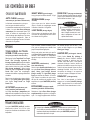
LES CONTRÔLES EN BREF
HEAVY WASH (gros lavage)
RINSE ONLY (rinçage seulement)
Long cycle pour les taches rebelles. 10 gal.
AUTO CLEAN
(nettoyage
automatique) (modèles sélectionnés)
NORMAL WASH (lavage
Rince la vaisselle conservée dans la machine
jusqu’à ce que cette dernière soit bien chargée.
Aide à éliminer les odeurs. 2 gal.
Le fabricant recommande ce cycle pour
tous les types de saletés ordinaire.
Cycle moyen pour les taches normales.
Selon le nombre de remplissages arrosez
l’utilisation s’étend de 4 à 8 gallons.
Les brassées normales varient d’une journée
à l’autre. Le cycle Auto Clean (nettoyage
automatique) est recommandé parce qu’il
choisit le nombre de remplissages et de
durée de lavage plus adaptés pour le niveau
de sol de chaque chargement. Selon le
nombre de remplissages arrosez l’utilisation
s’étend de 4 à 10 gallons.
Options
TOUGH SCRUB™ OU TOUCH
SCRUB™ PLUS (récurage vigoureux plus) (modèles sélectionnés)
Sélectionner l’option Tough Scrub ou Tough
Scrub™ Plus (récurage vigoureux ou
récurage vigoureux plus) lorsque la vaisselle
contient des taches difficiles à éliminer. Cette
option convient à tous les cycles, sauf Rinse
Only (rinçage seulement). Selon le cycle
sélectionné, l’option Tough Scrub™ ou Tough
Scrub™ Plus ajoute des remplissages,
rehausse de la chaleur ou prolonge la durée de
circulation.
™
normal)
LIGHT WASH (lavage léger)
Cycle court pour la vaisselle peu sale. Selon
le nombre de remplissages arrosez l’utilisation s’étend de 4 à 6 gallons.
cycle. Au besoin, l’élément chauffant s’allume
et le cycle se prolonge pour chauffer l’eau
jusqu’à la température appropriée.
Choisir cette option avec tout cycle sauf le
cycle Rinse Only (rinçage seulement) pour
maintenir l’eau chaude à la température
appropriée et pour améliorer les résultats du
séchage.
SANITIZE
(stérilisation)
èles sélectionnés)
(mod-
Dans le cas des taches de cuisson séchée,
choisir le cycle Heavy Wash (gros lavage)
avec l’option Tough Scrub™ ou Tough
Scrub™ Plus.
Choisir l’option Sanitize (stérilisation) avec
les cycles Auto Clean (nettoyage automatique), Heavy (gros lavage), Normal
(lavage normal) ou Light Wash (lavage
léger) pour stériliser la vaisselle. À la fin du
cycle, lorsque le contrôleur de cycle reconnaît que les conditions de propreté ont été
respectées, le voyant SANITIZED (stérilisé)
s’allume.
ACCUTEMP
EXTRA RINSE (rinçage supplé-
(température précise) (modèles sélectionnés)
La fonction AccuTemp™ (température précise) vérifie la température de l’eau au cours
du lavage principal et durant le rinçage final du
Voyants Indicateur
Le voyant SANITIZED (stérilisé) (modéles
sélectionnés) s’allume à la fin du cycle
lorsque les conditions de stérilisation ont été
respectées.
REMARQUE:
❚ Le nombre de cycles montré sur l’affichage numérique (modèles sélectionnés) augmente ou diminue,
selon le degré de saleté de la vaisselle, la température de l’eau et les
options sélectionnées.
LES CONTROLES EN BREF
Cycles et Eau Utilisée
les résultats lorsque l’eau est dure. Cette
option est déjà intégrée au cycle Heavy
Wash (gros lavage).
HEATED DRY (séchage á chaud)
Choisir l’option Heated Dry (séchage á
chaud) pour allumer l’élément chauffant
durant le séchage et améliorer ainsi les
résultats. Sans cette option, il sera parfois
nécessaire d’essuyer certains articles de
plastique et de téflon au moyen d’un linge et
l’intérieur du lave-vaisselle risque de retenir
davantage l’humidité. Avec l’une ou l’autre
des options de séchage, il est normal de
remarquer la vapeur s’échapper de l’évent.
DRAIN/OFF (vidange/arrêt)
Pour vider le lave-vaisselle et l’arrêter,
appuyer sur la touche Drain/Off (vidange/
arrêt). Appuyer deux fois sur cette touche
pour arrêter le lave-vaisselle sans le vider.
mentaire) (modèles sélectionnés)
Sélectionner l’option Extra Rinse (rinçage
supplémentaire) pour ajouter un rinçage au
cycle. Ce rinçage supplémentaire améliore
REMARQUE:
❚ Lorsque l’option Sanitize (stérilisation) est sélectionnée, les cycles font l’objet
d’un contrôle pour assurer la stérilisation. Une eau de température anormalement basse empêcheront la stérilisation et le voyant SANITIZED (stérilisé) ne
s’allume alors pas à la fin du cycle.
18
LES CONTRÔLES EN BREF (Continued)
Le voyant CLEAN (nettoyage) s’allume à la
fin du cycle de séchage et demeure allumé
jusqu’à ce que la porte ait été ouverte pendant au moins 30 secondes sans interruption.
Le voyant DRY (séchage) s’allume pendant
la durée entière du séchage et s’éteint
lorsque le cycle est terminé.
Le voyant WASH (lavage) s’allume durant
toutes les parties de rinçage et de lavage du
cycle.
Le voyant HEATING DELAY (délai de
chauffage) s’allume lorsque le cycle se pro-
longe pour chauffer l’eau jusqu’à la température appropriée.
REMARQUE:
REMARQUE:
❚ À l’enfoncement de la touche Delay/
Resume (délai/reprise) sans que
l’on sélectionne un cycle ou une
option, le lave-vaisselle reprend le
dernier cycle utilisé (il ne tient pas
compte du cycle Rinse Only
(rinçage seulement).
❚ Cette option ne verrouille pas la
porte, seulement les commandes
du lave-vaisselle.
Delay/Resume (délai/ reprise)
L’option Delay/Resume (délai/reprise) peut
servir à démarrer automatiquement le cycle
à un moment ultérieur, comme durant la nuit
pour profiter d’un coût d’électricité moindre
ou pour réduire l’accumulation de chaleur
diurne dans la maison.
POUR RÉGLER UN DÉLAI:
1. Sélectionner le cycle et les options en
fonction de la charge.
2. Presser la touche Delay/Resume
(délai/reprise) jusqu’à ce que l’appareil
indique le délai voulu (1-9 heures). Le
délai commence à s’écouler dès le
relâchement de la touche.
3. Le voyant Delay/Resume (délai/
reprise) demeure allumé jusqu’à l’expiration du délai.
4. Le cycle démarre automatiquement dès
l’expiration du délai.
ANNULATION D’UNE MISE EN MARCHE
DIFFÉRÉE:
Control Lock Option
(verrouillage des commandes)
(modèles sélectionnés)
Il est possible de verrouiller les touches de
commande pour en empêcher l’enfoncement
accidentel. Lorsque cette fonction est
activée entre les cycles, il devient impossible
de faire fonctionner le lave-vaisselle tant que
l’on ne déverrouille pas les commandes. Au
besoin, verrouiller les commandes après un
cycle ou après le début d’un délai.
Attendez au moins 2 secondes, appuyer à
nouveau sur la touche Delay/Resume. Le
voyant s’éteint et le cycle commence immédiatement.
CONSEILS D’UTILISATION
Mise En Marche du
Lave-vaisselle
19
1. Une fois le lave-vaisselle chargé et le
détergent ajouté, fermer le lave-vaisselle en appuyant sur la porte jusqu’à ce
que le verrou produise un « clic ».
2. Appuyer fermement sur les touches de
cycle et d’options désirées pour mettre
le lave-vaisselle en marche (le remplissage debutera après une pause). Pour
éviter les changements de cycle ou
d’option imprévus, ces sélections sont
«verrouillées» après une minute.
3. Le voyant du cycle sélectionné s’allume.
4. Pour annuler une option, appuyer de
nouveau sur la touche. Pour annuler un
cycle, appuyer sur la touche Drain/Off
(vidange/arrêt).
Ajout d’un Article Oublié
Pour de meilleurs résultats de nettoyage,
ajouter l’article tôt au cours du cycle.
1. Appuyer sur la touche Delay/Resume
(délai/reprise) ou déverrouiller la porte.
Les voyants CLEAN (propre) et SANITIZED
(stérilisé) (modéles sélectionnés) ne se rallument pas après une panne de courant. Ils
se rallument seulement à la fin d’un cycle
subséquent.
VERROUILLAGE DES COMMANDES:
1. Appuyer sur la touche
pendant trois
secondes.
2. Un voyant situé au-dessus de la touche
s’allume lorsque les commandes sont
verrouillées.
POUR DÉVERROUILLER:
1. Appuyer sur la touche
secondes.
2. Le voyant s’éteint.
pendant trois
REMARQUE:
❚ L’enfoncement d’une touche de
cycle ou d’option après le verrouillage des commandes fait clignoter
cinq fois le voyant situé au-dessus
de la touche Control Lock (verrouillage des commandes).
2. Attendre que cesse le jet d’eau.
3. Ouvrir la porte et ajouter l’article.
4. Fermer et verrouiller la porte.
➢ Si on avait enfoncé la touche
Delay/Resume (délai/reprise),
l’enfoncer de nouveau pour redémarrer le lave-vaisselle.
5. Après cinq secondes, le cycle se poursuit
automatiquement là où il s’était arrêté.
REMARQUE:
❚ Il n’est pas recommandé d’interrompre le cycle de lavage pendant
une période prolongée.
Articles d’un Entretien Particulier
Matériau
Convient au Lavevaisselle?
Renseignments Utiles
Oui, sauf l’aluminium
anodisé.
Non
L’eau à température élevée et le détergent peuvent en abîmer le fini.
Porcelaine/
Faïence
Non, s’il s’agit de porcelaine
ancienne ou peinte à la
main.
Toujours vérifier les recommandations du fabricant avant de laver. La porcelaine ancienne, peinte à la main et les motifs rapportés peuvent perdre de leur netteté. Les
dorures peuvent ternir.
Cristal
Non, s’il s’agit de cristal ancien
ou de cristal fin et fragile.
Toujours vérifier les recommandations du fabricant avant de laver. Un voile peut se
former sur certains types de cristal de plomb après des lavages répétés.
Filtres de
Fournaise
Non recommandés.
Peut laisser une tache ou un dépôt poisseux sur la paroi intérieure du lave-vaisselle.
Aluminium
Fonte
Le «culottage» de la fonte se trouve enlevé et le fer rouille.
L’opaline jaunit lorsqu’elle est lavée au lave-vaisselle de façon répétée.
Oui
Couverts Plaqués or Non
Verre
Ternit.
Etain, Bois
Non
Plastique
Oui, panier supérieur.
Acier Inoxydable
Oui
Argent ou
Plaqué Argent
Non, s’il a été « patiné » artificiellement.
Toujours vérifier les recommandations du fabricant avant de mettre au laver. Utiliser
le cycle «Rinse Only» (rinçage d’attente) si les articles ne vont pas être lavés immédiatement. Le contact prolongé avec les aliments acides ou contenant du sel ou du
soufre (oeufs, mayonnaise, fruits de mer) peuvent en abîmer le fini. La «patine» artificielle peut être éliminée par le détergent.
Non
Le bois peut gauchir, se fendre ou ternir.
Fer Blanc
ARTICLES D'UN ENTRETIEN PARTICULIER
La plupart des plats, assiettes, couverts et récipients servant à la cuisson et à la consommation d’aliments peuvent être lavés sans danger dans
votre lave-vaisselle. Néanmoins, en cas de doute sur un article, vérifier avec le fabricant.
Toujours vérifier les recommandations du fabricant avant le lavage. Les plastiques
résistent différemment aux températures élevées de l’eau et aux détergents. Les articles de plastique jetables ne conviennent pas au lave-vaisselle pour cette raison.
Utiliser le cycle «Rinse Only» (rinçage d’attente) si les articles ne vont pas être lavés
immédiatement. Le contact prolongé avec les aliments contenant du sel, du vinaigre,
des produits laitiers ou du jus de fruits peut en abîmer le fini.
NETTOYAGE ET ENTRETIEN
Extérieur
L’intérieur de la lave-vaisselle se nettoie normalement de lui-même. Il est cependant recommandé
de vérifier périodiquement, au fond de la cuve, la
présence éventuelle de grosses particules qui
pourraient ne pas être passées dans le filtre du
module.
Il est également recommandé d’essuyer le
rebord de l’habillage intérieur de la porte pour
enlever les liquides qui s’y sont écoulés au
cours du chargement du lave-vaisselle.
La couleur laissée par certains aliments à
base de tomates adhère parfois à la cuve
des lave-vaisselle modernes, causant ainsi
une décoloration. Pour aider à prévenir
ceci, procéder comme suit avant de laver
de la vaisselle tachée de sauce tomate:
• Gratter l’excédent de sauce tomate sur les
plats avant de les mettre dans le lave-vaisselle.
• Faire fonctionner sous le cycle Heavy
Wash (gros lavage).
L’avant du lave-vaisselle peut être nettoyé à
l’aide d’un linge doux humide et de produit
nettoyant liquide à vaporiser. Ne pas utiliser
de poudres ni de tampons à récurer.
Soin et Nettoyage de l’Acier Inoxydable
(modèles sélectionnés)
Ne pas utiliser de produit nettoyant à base
de javellisant au chlore. Toujours essuyer
dans le sens du grain de l’acier inoxydable.
Nettoyage quotidien et petite tache.
Utiliser un des produits suivants : utiliser un
linge doux ou une éponge, du détergent
doux et de l’eau, une solution de vinaigre
blanc et de l’eau, la Formula 409 Glass and
Surface Cleaner* ou un nettoyant toute surface semblable. Rincer et sécher. Pour polir
et prévenir les marques de doigts, appliquer
une couche de Stainless Steel Magic Spray*
(numéro de pièce 20000008)**.
Tache moyenne ou importante. Utiliser
du Bon Ami*, un linge doux ou une éponge
humide. Rincer et sécher. Pour restaurer le
lustre et enlever les marques, appliquer une
couche de Stainless Steel Magic Spray.
Décoloration. Essuyer avec du Cameo
Stainless Steel Cleaner* au moyen d’une
éponge humide ou d’un linge doux. Rincer
immédiatement et sécher. Pour restaurer le
lustre et enlever les marques, appliquer une
couche de Stainless Steel Magic Spray.
Remisage ou Déménagement
Remplir les deux distributeurs d’un détergent
à parfum de fraîcheur ou de bicarbonate de
soude et sélectionner le cycle Normal Wash
(lavage normal). Laisser le lave-vaisselle
terminer le cycle. Fermer le robinet d’alimentation en eau et vider le lave-vaisselle.
Pour le vider, appuyer sur la touche
Drain/Off (vidange/arrêt). Faire fonctionner
deux fois le cycle de vidange pour s’assurer
d’éliminer le plus d’eau possible. Enfin,
débrancher l’alimentation électrique et ouvrir
la porte. (Consulter l’importante consigne de
sécurité no. 14 à la page 13).
*Marques déposées du fabricant respectif.
** Pour commander, téléphoner au 1-800-688-2002.
Intérieur
20
AVANT D’APPELER UN SERVICE DE DÉPANNAGE
VÉRIFIER CES POINTS POUR ÉPARGNER TEMPS ET ARGENT SI:
Le lave-vaisselle ne se remplit pas:
• S’assurer que la porte est fermée à fond et verrouillée.
• Vérifier que l’arrivée d’eau est bien ouverte.
• Vérifier que la touche du cycle désiré est bien enfoncée est sur le cycle désiré.
• Allouer un délai avant le remplissage.
• Vérifier le disjoncteur ou la boîte à fusibles.
• Vérifier que le boyau d’arrivée d’eau n’est pas tordu.
• Vérifier si l’électrovanne est obstruée par des sédiments et nettoyer s’il y a lieu.
Le lave-vaisselle ne s’évacue pas/Eau au fond de la cuve:
• Si le lave-vaisselle est relié à un broyeur à déchets, vérifier que l’obturateur du broyeur a bien été enlevé.
• Veiller à ce que le boyau de vidange soit surélevé d’au moins 81,3 cm (32 po) de façon à ce que l’eau ne soit pas resyphonée dans la cuve.
• S’assurer qu’aucune nourriture ne vient obstruer le boyau ou le broyeur.
• Vérifier que le boyau de vidange n’est pas tordu.
• Vérifier le disjoncteur ou la boîte à fusibles.
• Vérifier que le cycle est bien terminé.
Le lave-vaisselle ajoute d’eau à la FIN du cycle:
• Ceci est normal. Le capteur Auto Clean (nettoyage automatique) (modèles sélectionnés) de la pompe doit rester immergé et un bref remplissage s’ajoute à la dernière vindange du cycle.
Le compartiment de détergent ne se vide pas:
• Vérifier que le cycle est bien terminé.
• Vérifier que l’ouverture du distributeur n’est pas bloquée.
• Utiliser du détergent frais et le ranger dans un endroit frais et sec.
Le lave-vaisselle semble bruyant:
• Le sifflement de l’électrovanne pendant le remplissage est normal.
• Les bruits de circulation d’eau sont normaux.
• Un cognement peut être dû au bras gicleur qui tappe dans un article qui dépasse des paniers.
• Un bruit de broyage ou de hachage peut se produire pendant l’évacuation de l’eau lorsque le broyeur à déchets intégré broie des articles durs
comme des pépins, des noix, etc.
• Il est normal qu’il se produise un bourdonnement pendant l’évacuation de l’eau.
• Un claquement provient du couvercle du compartiment du distributeur de détergent qui tappe dans l’habillage intérieur de la porte lorsque
la porte du lave-vaisselle est ouverte à la fin du cycle. Cela est normal.
• Le niveau de bruit dépend de la qualité de la mise en service.
Le cycle est trop long (le voyant «Heating Delay» reste allumé):
• Les options Tough Scrub™ ou Tough Scrub™ Plus (récurage vigoureux ou récurage vigoureux plus) (modèles sélectionnés) ou Sanitize (stérilisation) (modèles sélectionnés) ont été choisies et le cycle se prolonge.
• Vérifier si le chauffe-eau est réglé de façon à assurer une eau entre 49 et 60° C (120 et 140° F) au robinet.
Le lave-vaisselle a une odeur:
• Démarrer le cycle Rinse Only (rinçage seulement) lorsqu’on désire laisser la vaisselle dans le lave-vaisselle.
• Un lave-vaisselle nouvellement installé a une odeur de «neuf». Celle-ci disparaît à l’usage.
• Le lave-vaisselle ne s’évacue pas correctement. (Voir sous «Le lave-vaisselle ne s’évacue pas».)
• Si l’odeur est forte, verser du bicarbonate de soude de part et d’autre du distributeur de détergent. Sélectionner le cycle Light Wash (lavage
léger) pour faire circuler l’eau pendant environ 10 minutes. Interrompre le cycle en déverrouillant la porte et laisser tel quel pendant une nuit.
Redémarrer le lave-vaisselle en verrouillant la porte et laisser terminer le cycle. Il est aussi possible d’utiliser un nettoyeur de lave-vaisselle,
comme le produit Jet-Dry Dishwasher Cleaner*.
Fuites:
• Vérifier si le lave-vaisselle est de niveau. (Se référer aux consignes d’installation.)
• La mousse de savon peut faire déborder le lave-vaisselle. Mesurer soigneusement la quantité de détergent et utiliser uniquement des détergents conçus pour le lave-vaisselle. Dans l’eau douce, il faut moins de détergent. Essayer une autre marque si les débordements sont
fréquents.
• Suivre attentivement les consignes sur la façon d’ajouter un article oublié (voir page 19).
• Pour éviter que le produit de rinçage coule du distributeur, s’assurer que le couvercle est bien fermé.
21
Le temps affiché diminue ou augmente soudainement de plusieurs minutes (modèles sélectionnés):
• Cette situation est normale lorsque le cycle Auto Clean (nettoyage automatique) (modèles sélectionnés) est sélectionnée et que le lave-vaisselle décide de sauter ou d’ajouter un cycle de vidange et de remplissage.
Les articles lavés dans le lave-vaisselle ou la cuve du lave-vaisselle sont tachés/décolorés:
• Les plats ou ustensiles en aluminium peuvent laisser des marques lorsqu’ils entrent en contact avec d’autres articles. Laisser un petit espace
entre les articles.
• Le fer dans l’eau peut laisser une pellicule jaune, brune ou orange sur la vaisselle ou la cuve du lave-vaisselle. Un filtre peut être nécessaire,vérifier avec une compagnie spécialisée comme. RoVer Rust Remover* (numéro de pièce 057961)** peut être utilisé pour enlever la
rouille. Ne pas utiliser RoVer avec détergent. Remplir les deux compartiments à détergent de RoVer. Faire au lave-vaisselle un cycle Normal
complet. Faire suivre d’un cycle de lavage plus court.
• La couleur de la sauce tomate peut adhérer à la cuve (voir page 20). Si de petites taches sont présentes, laisser la porte ouverte pour les oxyder. Pour enlever les taches plus tenaces, essayer un produit nettoyant conçu pour les lave-vaisselle tel que Glisten* (numéro de pièce
18001017)** qui contient de l’acide citrique. Utiliser un autre détergent pour lave-vaisselle et s’assurer d’en utiliser un qui contient du chlore
pour mieux combattre les taches.
La vaisselle ne sèche pas correctement / on peut remarquer d’humidité à l’intérieur du lave-vaisselle
aprés le cycle:
• Vérifier que l’option Heated Dry (chauffage) a été sélectionnée.
• Des goutelettes peuvent se former à l’interieur de la porte; ceci est normal et fait partie du processus de séchage.
• Utiliser un produit de rinçage tel que Jet-Dry* ou Cascade Rinse Aid* régulièrement pour améliorer le séchage. Tourner le capuchon vers le
réglage MORE (davantage) si le modèle sont dotés d’un capuchon réglable.
• Vérifier la température de l’eau. (Voir page 17.)
• Sélectionner les option Tough Scrub™ ou Tough Scrub™ Plus (récurage vigoureux ou récurage vigoureux plus) (modèles sélectionnés).
• Augmenter la quantité de détergent utilisée en fonction de la dureté de l’eau.
• Charger correctement le lave-vaisselle. (Voir pages 14 à 15.)
• Les articles en plastique et en téflon sont plus difficiles à sécher en raison de leur surface poreuse et du fait que des goutelettes ont tendance
à se former dessus. Il peut être nécessaire de les essuyer à la main.
• L’eau a tendance à s’accumuler dans les verres, tasses, etc. dont le fond est concave. Il peut être nécessaire de les essuyer à la main.
*Les noms de produits sont des marques déposées de leurs fabricants.
**Pour commander, téléphoner au 1-800-688-2002.
Il reste des résidus de nourriture sur la vaisselle:
• Vérifier la température de l’eau. (Voir page 17)
• Faire couler le robinet d’eau chaude de l’évier avant de mettre le lave-vaisselle en marche.
• Utiliser les option Tough Scrub™ ou Tough Scrub™ Plus (récurage vigoureux ou récurage vigoureux plus) (modèles sélectionnés).
• Vérifier la dureté de l’eau et modifier la quantité de détergent en conséquence. (Voir page 17.)
• Utiliser du détergent frais, qui a été entreposé dans un endroit frais et sec.
• Sélectionner le cycle qui convient pour le degré de saleté.
• Charger la vaisselle de façon à ce que rien ne vienne bloquer les bras gicleurs ni la tourelle centrale. (Voir pages 14 à 15).
• Charger le panier à couverts en tournant certains manches vers le haut et d’autres vers le bas pour éviter qu’ils ne s’emboîtent les uns dans
les autres.
• Ne pas placer les verres sur les tiges de retenue.
• Avant de charger l’appareil, gratter les aliments brûlés et essuyer les ustensiles utilisés avec des pâtes alimentaires, du riz ou du gruau.
Ces aliments sont plus difficiles à nettoyer que les autres.
AVANT D'APPELER UN SERVICE DE DéPANNAGE
Les verres sont tachés:
• Sélectionner les option Extra Rinse (modèles sélectionnés).
• Vérifier la température de l’eau. L’eau du robinet doit être entre 49 et 60° C (120 et 140° F).
• Toujours utiliser un agent de rinçage.
• Confirmer qu’il est possible d’enlever la nébulosité de l’article en le trempant pendant environ 5 minutes dans du vinaigre blanc. Si cela réussit, le problème est causé par une eau dure. Ajuster la quantité de détergent utilisée pour l’adapter à la dureté de l’eau (page 17). S’assurer
que le détergent est frais, bien rangé et de haute qualité.
• Si la nébulosité persiste, il s’agit alors de gravure. Une telle érosion d’une surface vitrée peut être causée par une eau trop chaude, par une
utilisation d’une trop grande quantité de détergent ou par le prélavage (le détergent agit sur la saleté). S’il s’agit de gravure, le verre est
endommagé de manière permanente. Pour empêcher la progression de l’érosion, ajuster la quantité de détergent selon la dureté de l’eau,
ne plus prélaver et s’assurer que la température de l’eau chaude n’est pas supérieure à 140 °F (60 °C). Utiliser les options de chauffage de
l’eau seulement lorsque la température de l’eau est inférieure à 120 °F (49 °C).
La vaisselle se trouve ébréchée:
• Veiller à ce que la vaisselle soit chargée tel que recommandé, de façon à ce que les articles ne se cognent pas sous l’action du jet d’eau.
(Voir pages 14 à 15.)
• Il n’est pas recommandé de laver de la porcelaine ou du cristal ancienne dans le lave-vaisselle.
• Ne pas placer les verres sur les tiges de retenue.
• Ne pas trop charger le lave-vaisselle.
Le voyant Sanitized ne s’allume pas à la fin du cycle (modèles sélectionnés)
• L’option Sanitize (stérilisation) n’a pas été sélectionnée.
• La stérilisation n’est possible qu’avec les cycles Auto Clean (modèles sélectionnés), Heavy, Normal ou Light.
• La température de l’eau était trop basse, nuisant ainsi à la capacité du lave-vaisselle à chauffer l’eau dans le délai prévu.
22
GARANTIE DE LAVE-VAISSELLE
Garantie totale d’un an
Pendant la PREMIÈRE année suivant la date de l’achat
d’origine, toute pièce venant à être défectueuse dans des
conditions normales d’utilisation ménagère sera réparée
ou remplacée gratuitement.
Garantie limitée pour le deuxième année
Après la première année, toute pièce venant à être
défectueuse dans des conditions normales d’utilisation
ménagère au cours de la deuxième année suivant la date
d’acquisition d’origine sera réparée ou remplacée gratuitement en ce qui concerne la pièce elle-même, tous autres
frais, y compris le transport, le déplacement et la maind’oeuvre, étant à la charge du propriétaire.
Garantie limitée pour les troisième et cinquième
années
Après la deuxième année suivant la date de l’achat d’origine et jusqu’à la cinquième année incluse, tout composant,
parmi ceux indiqués ci-dessous, venant à être défectueux
sera réparé ou remplacé gratuitement en ce qui concerne
la pièce elle-même, le client prenant à sa charge les autres
frais, y compris les frais de main-d’oeuvre, de déplacement
et de transport.
Ces composants sont les suivants :
Toute pièce du système Jetclean®, y compris la totalité du
bloc de puissance, détecteur de saleté, le gicleur central,
les bras gicleurs, le boyau du bras gicleur supérieur et le
moteur.
Dans les modèles à commandes informatisées, tout clavier
à effleurement et microprocesseur.
Dans tous les modèles, toute pièce venant à rouiller, y
compris la carrosserie et les panneaux avant, dans le cas
des modèles conver-tibles, les panneaux avant extérieurs
et les panneaux latéraux accessoires, dans le cas des
modèles encastrables, ainsi que les paniers à DuraGuard®
(modèles sélectionnés).
Garantie complète de vingt ans
À partir de la date d’achat au détail d’origine et jusqu’à la
fin de la vingtième année, en cas de fuite au niveau de la
cuve dans des conditions normales d’utilisation à des fins
ménagères, le lave-vaisselle lui-même sera remplacé
SANS FRAIS.
À partir de la date d’achat au détail d’origine et jusqu’à la
fin de la vingtième année, en cas de fuite au niveau de
intérieur de la porte, dans des conditions normales d’utilisation à des fins ménagères, la réparation ou le remplacement de intérieur de porte sera pris en charge SANS
FRAIS.
À NOTER : Ces garanties totales s’appliquent uniquement
si le lave-vaisselle se trouve aux États-Unis ou au Canada.
Si l’appareil se trouve dans une autre partie du monde, il
n’est couvert que par les garanties limitées, y compris en
ce qui concerne les pièces se révélant défectueuses au
cours de la première année.
Résidents canadiens
Ces garanties couvre uniquement les appareils en service
au Canada et homologués par l’Association canadienne de
normalisation, sauf en ce qui concerne les appareils transférés au Canada à la suite d’un changement de résidence
à partir des États-Unis.
Les garanties spécifiques énoncées ci-dessus sont les
SEULES offertes par le fabricant. Ces garanties vous
donne des droits légaux spécifiques et vous pouvez aussi
jouir d’autres droits qui varient d’une province à l’autre.
23
MAYTAG •
Ne sont pas couverts par ces deux garanties:
1. Les problèmes et dommages résultant des situations suivantes:
a. Installation, livraison ou entretien défectueux.
b. Toute réparation, modification, altération ou ajustement non autorisé par le fabricant ou un prestataire de service après-vente agréé.
c. Usage inapproprié, abusif, dérasionnable ou accidents.
d. Alimentation électrique ou tension incorrectes.
e. Réglage inapproprié de toute commande.
2. Les garanties sont annulées si les numéros de série d’origine ont été enlevés,
modifiés ou ne peuvent être déterminés facilement.
3. Appareils achetés à des fins commerciales ou industrielles.
4. Les frais de dépannage ou de visite pour:
a. Corriger des erreurs d’installation.
b. Enseigner au consommateur comment utiliser son appareil correctment.
c. Assurer le transport de l’appareil jusqu’à l’enterprise de service après-vente.
5. Dommages indirects ou accessories supportés par toute personne à la suite d’une
quelconque violation de garantie. Certain éstas ne permettent pas l’exclusion ou
la limitation de responsablilté en ce qui concerne les dommages indirects, et l’exclusion ci-dessus peut ne pas s’appliquer à votre cas.
Pour Obtenir les Prestation de Garantie
❚
Pour localiser une entreprise de service après-vente agréée Maytag dans votre
région, contacter le concessionnaire MAYTAG où la machine a été achetée ou
appeler Maytag Appliances Sales Company le service-clients Maytag. Si les prestations de garantie obtenues ne vous donnent pas satisfaction, contacter ce service
par courrier ou par téléphone:
Maytag Appliances Sales Company
Attn: CAIR® Center
P.O. Box 2370
Cleveland, TN 37320–2370
CANADA
1-800-688-2002
REMARQUE : Quand vous écrivez au sujet d’un problème non résolu, veuillez
inclure les renseignements suivants :
(a) Vos nom, adresse et numéro de téléphone.
(b) Les numéros de modèle et de série de votre machine (qui se trouvent dans
le coin supérieur gauche de l’ouverture de la cuve)
(c) Les nom et adresse du concessionnaire ainsi que la date d’achat de l’appareil.
(d) Une description claire du problème rencontré.
(e) La dureté de l’eau, les marque et quantité de détergent, la température de
l’eau et le cycle utilisés.
(f) Date de la preuve d’achat (bon de caisse).
Guide de l’utilisateur, manuels de dépannage et catalogues de pièces détachées sont
disponibles auprès Maytag Appliances Sales Company, du service-clients Maytag.
403 West Fourth Street North • P.O. Box 39 • Newton, Iowa 50208
LAVAPLATOS: MDB/C-2
®
INSTRUCCIONES IMPORTANTES DE SEGURIDAD
CARGADO DE LAVAPLATOS
Instalador: Deje este manual con el
electrodoméstico.
Cliente: Lea y conserve este manual
para futuras referencias. Conserve el
recibo de compra y/o el cheque cancelado como comprobante de compra.
Número de modelo
_______________________________
_______________________________
Fecha de compra
_______________________________
En nuestro esfuerzo continuo para
mejorar la calidad y el rendimiento de
nuestros productos, puede ser necesario hacer cambios a este electrodoméstico sin necesidad de revisar
esta guía.
Páginas 26 à 28
LAVAPLATOS PORTàTIL
Página 28
INFORMACIóN ESENCIAL SOBRE
LAVADO DE PLATOS
Página 29
UN VISTAZO A LOS CONTROLES
Número de serie
Página 25
Páginas 30 à 31
CONSEJOS DE OPERACIóN
Página 31
ARTíCULOS QUE REQUIEREN
UN CUIDADO
Pagina 32
CUIDADO Y LIMPEIZA
Pagina 32
Si desea obtener más información llame a:
ANTES DE LLAMAR
1-800-688-9900
1-800-688-2002 Canada
(De lunes a viernes de 8:00 a.m. a
5:00 p.m. hora del Este)
Internet: http://www.maytag.com
GARANTíA
Páginas 33 à 34
Pagina 35
Si desea obtener más información
sobre el servicio, consulte la página 35.
http://www.maytag.com
Litho U.S.A .
INSTRUCCIONES IMPORTANTES DE SEGURIDAD
Recognize Safety Symbols, Words, Labels
AHORA DEBE CONOCER LAS INSTRUCCIONES DE SEGURIDAD
PELIGRO:
Las advertencias y las instrucciones importantes de seguridad
que aparecen en este manual no tienen el propósito de cubrir
todas las condiciones posibles que podrían ocurrir. Debe
usarse sentido común, precaución y cuidado cuando se instale,
se presente mantenimiento o se opere la lavaplatos.
PELIGRO—Riesgos inminentes que CAUSARÁN lesiones
personales graves o la muerte.
Siempre comuníquese con el distribuidor, concesionario, agente
de servicio o fabricante para los asuntos relacionados con problemas o condiciones que no entienda.
ADVERTENCIA—Riesgos o prácticas inseguras que
PODRÍAN causar lesiones personales graves o la muerte.
ADVERTENCIA:
PRECAUCION:
PRECAUCIÓN—Riesgos o prácticas inseguras que PODRÍAN
causar lesiones personales menores, o daños materiales o
daños al producto.
ADVERTENCIA:
Consulte con el instalador para asegurarse de que la unidad
esté conectada a tierra correctamente para evitar posibles
descargas elétricas. Asegúrese de leer las Instrucciones
Importantes de Seguridad personal antes de comenzar a usar
la lavaplatos.
Los productos con un sello
están clasificados por Underwriter’s
Laboratories, Inc., los que tienen una etiqueta CSA están clasificados por Canadian Standards Association. Sin embargo, al igual que
con cualquier otro equipo que usa electricidad y piezas movibles,
siempre existe un riesgo potencial.
ADVERTENCIA:
Cuando use la lavaplatos, siga las precauciones básicas,
incluyendo las siguientes:
1. Lea todas las instrucciones de seguridad antes de usar la
lavaplatos.
2. Use la lavaplatos sólo para lo que fue diseñada.
3. Desconecte la energía eléctrica antes de prestarle servicio.
4. Para evitar riesgos de descargas eléctricas, los lados y la parte
posterior deben estar encerradas y los paneles delanteros
deben estar sujetos antes de aplicar la energía eléctrica a la
lavaplatos. Consulte las instrucciones de instalación para ver
los procedimientos de conexión a tierra adecuados.
5. Conéctela a un circuito de suministro de energía con el régimen
correcto, debidamente protegido y del tamaño adecuado para
evitar sobrecargas eléctricas.
6. Nunca se debe permitir que los niños operen, o jueguen dentro,
con o alrededor de esta lavaplatos.
25
7. Para reducir el riesgo de lesiones cuando cargue artículos para
lavar, los artículos filosos o puntiagudos deben colocarse con los
mangos hacia arriba. También, cargue los artículos filosos de
modo que no dañen el sello de la puerta.
8. No toque el elemento calentador que se encuentra en la parte
inferior de la tina durante el ciclo ni cuando se termine, ya que
estará caliente.
9. Use solamente detergentes y aditivos de enjuague diseñados
para una lavaplatos automática. Nunca use jabón, detergente
de ropa o detergente para lavado a mano en la lavaplatos.
Mantenga estos productos fuera del alcance de los niños.
10. No se siente, se pare, ni maltrate la puerta ni las rejillas de la
lavaplatos.
11. Bajo ciertas condiciones, se puede producir gas hidrógeno en un
sistema de agua caliente que no se haya usado en dos semanas
o más. El gas hidrógeno es explosivo. Si el sistema de agua
caliente no se ha usado por un período de tiempo así de largo,
abra todas las llaves de agua caliente y deje que el agua fluya
por cada una por varios minutos. Esto liberará el gas hidrógeno
que se haya acumulado. Ya que el gas es inflamable no fume ni
use una llama abierta durante este proceso.
12. No lave artículos de plástico a menos que estén marcados
“seguro para lavar en lavaplatos” o un equivalente. Para los
artículos de plástico sin marcar, consulte las recomendaciones
del fabricante.
13. No altere los controles.
14. Siempre quite la puerta del compartimiento de lavado cuando
retire una lavaplatos vieja o la deseche.
15. Tenga cuidado cuando descargue la lavaplatos. Los platos estarán
calientes si se descarga un poco después de terminar el ciclo.
Conserve estas Instrucciones
CARGADO DE LAVAPLATOS
➢ No enjuague previamente. Sencilamente retire todos los huesos o
partículas de alimentos grandes.
➢ Si la lavaplatos está conectada a un triturador de desperdicios, asegúrese de
que el triturador esté vacío antes de
arrancar la lavaplatos.
➢ Limpie los residuos de alimentos con
página
base de jitomate (vea la
32).
➢ Elimine los alimentos (tales como
mostaza, mayonesa, jugo de limón,
vinagre, sal o aderezos) de los cubiertos de acero inoxidable tan pronto
como sea posible. Estos alimentos
pueden causar oxidación y picaduras si
se dejan que permanezcan en contacto
con la superficie durante un período de
tiempo prolongado.
Recomendaciones
Generales
➢ Coloque todos los artículos en las
parrillas de manera que queden separados y orientados hacia el centro.
➢ Puede centrar los artículos detrás de un
solo diente o cargarlos en ángulo para
maximizar el espacio.
➢ Cargue los artículos de manera que no
descansen sobre la parte superior de la
torre de lavado.
Los vasos, tazas, copas, artículos de plástico ligero, platos pequeños, tazones,
sartenes, utensilios con mango largo, etc.
pueden cargarse en esta parrilla. No cargue
vasos sobre los dientes.
PARRILLA SUPERIOR
AJUSTABLE (modelos selectos)
Cargas Recomendados
(las características de la parrilla
varían según el modelo)
Para obtener los mejores resultados de
limpieza, siga las pautas a continuación
abajo para determinar el mejor arreglo de
sus artículos.
sujetar los artículos contra la parte exterior de
la parrilla o hacia la derecha para colocarlo en
la parte superior de los artículos ligeros. No
cargue los artículos en la parte superior
del alambre.
Parrilla Superior
Cubiertos para 10 Personas
➢ Evite bloquear los brazos rociadores
inferiores y superiores no dejando que
los artículos se extiendan más allá de
las parrillas.
CARGADO DE LAVAPLATOS
Antes de Comenzar
La parrilla Stack-Rack (Parrilla Apilable)
(modelos selectos) que se encuentra en el
lado derecho de la parrilla superior se dobla
hacia arriba o hacia abajo para ofrecer flexibilidad a las cargas. Dóblela hacia abajo
para colocar cuchillos con mango largo,
espátulas y cucharas o artículos cortos
como tazas o vasos de jugo. Dóblela hacia
arriba para artículos largos como vasos,
tazones, platos, etc.
El sujetador Vari-Lock™ (modelos selectos)
que se encuentra ubicado en la parte izquierda sujeta los artículos ligeros en su lugar.
Puede ajustarse sosteniendo el alambre
ondulado y girándolo hacia la izquierda para
La Parrilla Superior Ajustable puede elevarse
para acomodar platos más altos, platones,
ollas, etc. cargados en la parrilla inferior.
Para elevar la parrilla:
➢ Saque completamente la parrilla.
➢ Sujete el asa del lado derecho posterior
de la parrilla.
➢ Levante y jale ligeramente la parrilla
hacia adelante para bloquearla en su
lugar.
El alambre ondulado del sujetador VariLoc™ (modelos selectos) y de la parrilla apilable (modelos selectos) está diseñado para
mantener las copas en su lugar. Las copas
más altas se acomodarán mejor en el lado
derecho puesto que la parrilla superior es
más profunda en este lado.
Para bajar la parrilla:
➢ Saque completamente la parrilla.
➢ Sujete el asa del lado derecho posterior
de la parrilla.
➢ Levante y empuje ligeramente la parrilla
hacia atrás para bloquearla en su lugar.
NOTA:
❚ Coloque las superficies sucias
hacia el centro de la lavaplatos.
26
CARGADO DE LAVAPLATOS (Continuarà)
Parrilla Inferior
Se cargan tres
platillos en la parrilla que se encuentra
debajo de la repisa
de la parrilla
apilable (StackRack) (modelos
selectos)
En esta parrilla se puede cargar una variedad de artículos grandes tales como platos
grandes, tazones para batir, ollas, sartenes y
refractarios.
Posterior
Los artículos altos como moldes para hornear y platones grandes se pueden colocar
en el lado izquierdo o en la parte posterior de
esta parrilla.
Cubiertos para 10 Personas
El acomodar las agujas Fold-Away™ (modelos selectos) horizontalmente en la esquina
posterior ofrece un conveniente espacio de
carga para artículos grandes y voluminosos
como ollas y cacerolas o tazones de
mezclar.
Posterior
Con la repisa de la parrilla Stack-Rack (parrilla apilable) (modelos selectos) elevada,
pueden colocarse artículos delgados tales
como hojas de lámina para galletas o de pizzas a lo largo del lado izquierdo. Con la parrilla hacia abajo, pueden cargarse dos niveles de vasos y tazas.
27
Los dientes convertibles (modelos selectos) de la parte posterior de la esquina
derecha pueden ajustarse para proporcionar
un espaciado estrecho para cargar platos o
un espaciado amplio para cargar tazones
hondos, ollas o sartenes. Voltee los dientes
hacia arriba para tener un espaciado estrecho o hacia abajo para tener un espaciado
amplio.
NOTA:
❚ Evite colocar artículos que descansen sobre el centro de la torre de
lavado.
CANASTA DESMONTABLE DE
UTENSILIOS (el diseño varía
medir de plástico deben colocarse en las secciones cubiertas embisagradas.
según el modelo)
CANASTA ODDS & ENDS
Para obtener los mejores resultados de
limpieza, evite que los artículos queden
empalmados colocando algunos artículos en
la canasta con los mangos hacia arriba y
otros con los mangos hacia abajo. Cargue
los cuchillos con los mangos hacia arriba a
través de los orificios de las secciones
cubiertas embisagradas (cuando estén cerradas).
Asegúrese de que los artículos delgados
puntiagudos no se extiendan a
través de la canasta.
Esto podría bloquear
el brazo de lavado
inferior.
Los artículos pequeños,
ligeros tales como cucharas de bebé y tazas de
(modelos selectos)
Utilice esta canasta complementaria en la
parrilla superior, para cargar artículos y
utensilios misceláneos. Éste es un lugar
seguro para cargar cuchillos
filosos y artículos puntiagudos.
CANASTA DE UTENSILIOS
SPLIT & FIT™ (modelos selectos)
La canasta de cubiertos dividida puede separarse y colocarse en diferentes ubicaciones
de la parrilla inferior. Sostenga firmemente la
canasta a lo largo de los lados. Siga las flechas de orientación de desbloqueamiento
impresas en la canasta y deslice hacia
afuera la canasta hasta que se divida en
dos. Cargue los cubiertos y utensilios en
ambas secciones o solamente en una,
dependiendo de la carga.
La parrilla superior puede quitarse cuando
se necesite cargar artículos altos o demasiado grandes en la parrilla inferior.
PARA QUITARLA:
➢ Saque la tercera parte o la mitad de la
parrilla superior.
➢ Quite el tope de plástico de la parrilla en
cada extremo del carril. Para quitar cada
uno de los topes de plástico, empuje
LAVAPLATOS PORTàTIL
hacia adentro (en dirección de la parrilla)
en el área acanalada del tope de la parrilla. El tope de la parrilla se abrirá y
podrá sacarlo fácilmente jalándolo hacia
afuera en forma recta. Tenga cuidado de
sostener el carril mientras saca los topes
de la parrilla.
Remoción de la Parrilla
Superior
➢ Saque completamente la parrilla del carril y retírela de la lavaplatos.
➢ Realice el procedimiento anterior en
orden inverso para volver a colocar la
parrilla superior en la lavaplatos.
Tope de Parrilla
LAVAPLATOS PORTÀTIL
Para Conectar un
Modelo Portàtil
1. Abra la llave del agua del fregadero hasta
que salga agua caliente. Cierre la llave
del agua.
2. Jale el conector del hueco que se
encuentra en la parte posterior de la
lavaplatos.
3. Oprima hacia abajo el liberador manual y
levante el conector a la llave del agua.
4. Elimine la presión del liberador manual y
tire ligeramente del conector para asegurarse de que esté bien puesto en su lugar.
5. Abra completamente la llave del agua
caliente.
6. Revise que el drenaje del fregadero esté
abierto para que el agua de la lavaplatos
pueda drenarse correctamente.
7. Jale el cordón eléctrico del hueco.
Enchufe el cordón eléctrico en un toma-
corriente correctamente conectado a
tierra.
8. Seleccione el ciclo y las opciones correctas de las cargas y arranque la lavaplatos.
4. Desconecte el cordón eléctrico y empújelo hasta que quede adentro del hueco
del gabinete.
Liberador
Manual
Conector de la
Llave de Agua
Para Desconectar un
Modelo Portàtil
Botón Liberador
de Presión
1. Cerciórese de cerrar el suministro de
agua y de oprimir el botón liberador de
presión antes de quitar el conector.
2. Oprima hacia abajo el liberador manual y
quite el conector de la llave del agua.
3. Empuje el conector y las mangueras
hacia atrás hasta que queden adentro del
hueco del gabinete.
28
INFORMACIÓN ESENCIAL SOBRE LAVADO DE PLATOS
Para revisar la temperatura del agua de
entrada, abra la llave del agua caliente que
esté más cercana a la lavaplatos y déjela
correr en un vaso en el fregadero. Coloque
un termómetro de dulces en el vaso y revise
la temperatura una vez que haya dejado de
subir. Si la temperatura es menor de 120° F
(49° C), pida a una persona calificada que
eleve el ajuste del termostato del calentador
de agua.
Antes de arrancar la lavaplatos, abra la llave
del agua caliente y déjela correr hasta que el
agua esté caliente. Esto garantizará que el
primer llenado de agua esté caliente.
Detergente
usar mucho detergente puede dar por resultado un manchado u opacado permanente.
Use un detergente diseñado específicamente para lavaplatos automáticas.
Cerciórese de que esté fresco y almacenado
en un lugar fresco y seco (no debajo del fregadero).
La cantidad de detergente a utilizar es determinada por la dureza del nivel del agua y del
sucio de la carga. Refiera a la carta siguiente para las recomendaciones detergentes
del uso.
CANTIDAD RECOMENDADA
No use detergente con Rinse Only (solamente enjuague). Deje la tapa de la taza
de detergente abierta cuando use Rinse
Only (solamente enjuague).
En condiciones en donde existe agua
extremadamente dura (13 granos por galón o
más dura*), es difícil obtener buenos resultados con cualquier lavaplatos. Podría ser
necesario usar un suavizante mecánico para
mejorar la calidad del agua, la efectividad del
detergente, y para proteger las piezas de la
lavaplatos del daño que el agua dura puede
causar.
Agua Caliente
Para lograr los resultados de limpieza y
secado óptimos, es necesaria el agua
caliente. La temperatura del agua de
entrada debe ser de 120-140° F (49-60° C)
para que el detergente se active correctamente y disuelva los residuos de alimentos grasosos.
El usar muy poco detergente dará por resultado una limpieza deficiente, una película de
agua dura o de manchas y mal secado. El
Dureza del Agua*
Blanda (0-3 gpg)
Mediana (4-9 gpg)
Dura (10-12 gpg)
Nivel de Sucio
Cantidad de Detergente **
(por la dosificación
de la taza)
Ligero Sucio
Normal Sucio
Pesada Sucio
Ligero Sucio
Normal Sucio
Pesada Sucio
Ligero Sucio
Normal Sucio
Pesada Sucio
5 cucharita de té
6 cucharita de té
8 cucharita de té
7 cucharita de té
8 cucharita de té
10 cucharita de té
9 cucharita de té
10 cucharita de té
12 cucharita de té
Complemento Líquido de
Enjuage
El uso regular de un complemento líquido de enjuague mejora el secado, reduce
las manchas y la película, y reduce la
humedad que queda en el interior de la
lavaplatos.
La lavaplatos cuenta con un vertedero
automático para el líquido complementario
29
del enjuague cerca de las tazas de detergente en la puerta.
La ventana transparente que se encuentra en
la parte central de la taza del surtidor permite
ver si hay aditivo de enjuague en el depósito.
Cuando la ventana aparece de color, significa
que hay aditivo de enjuague en el depósito.
Cuando la ventana está transparente, es hora
de volver a llenar el depósito. Revise el depósito mensualmente.
*El departamento local de servicios
públicos de agua o el servicio de
extensión de la universidad estatal
pueden decirle el grado de dureza
de agua en su región.
**Agregue recomendó la cantidad
de detergente a ambos compartimientos para los ciclos de
AutoClean, Heavy o Normal de la
colada, y solamente al compartimiento principal para el ciclo Light
de la colada.
Para añadir líquido de enjuague al vertedero, gire la tapa en contra de las manecillas del reloj para abrirlo. Quite la tapa y vierta el líquido de enjuague en el orificio.
Coloque la tapa y gírela en el sentido de las
manecillas del reloj.
Use el ajuste LESS (MENOS) para agua
suave y MORE (MÁS) para agua dura.
Coloque la tapa entre estas cantidades
según se necesite.
UN VISTAZO A LOS CONTROLES
AUTO CLEAN
(limpieza
automática)
(modelos selectos)
Es el ciclo preferido recomendado por el
fabricante para todo tipo de suciedad.
Las cargas de vasijas normales varían diariamente. Se recomienda la Auto Clean
(limpieza automática) porque selecciona el
número de los terraplenes y de la lavado tiempo satisfechos lo más mejor posible para el
nivel del suelo de cada carga. Dependiendo
del número de terraplenes riegue el uso se
extiende a partir del 4 a 10 galones.
Opciones
TOUGH SCRUB™ o TOUGH
SCRUB™ PLUS (Restregado
Fuerte 0 Restregado Fuerte Más)
(modelos selectos)
Seleccione Tough Scrub™ o Tough Scrub™
Plus (Restregado Fuerte o Restregado
Fuerte Más) cuando lave cargas que contienen manchas de alimentos difíciles de
eliminar. La opción Tough Scrub™ o Tough
Scrub™ Plus puede seleccionarse con
cualquier ciclo (excepto el ciclo Rinse Only,
Sólo Enjuague). Dependiendo de qué ciclo
se esté utilizando, el seleccionar la opción
Tough Scrub™ o Tough Scrub™ Plus puede
añadir llenados, tiempo de calentamiento y/o
tiempo de lavado.
Para los artículos con cochambre, seleccione el ciclo Heavy Wash (Ciclo Pesado)
junto con la opción Tough Scrub™ o Tough
Scrub™ Plus.
ACCUTEMP
(Temperatura
Exacta) (modelos selectos)
AccuTemp™ (Temperatura Exacta) proporciona una revisión de la temperatura del agua
Luces Indicadoras
La luz SANITIZED (ESTERILIZADA) (modelos selectos) se ilumina al final del ciclo
cuando se han satisfecho las condiciones
para lograr la esterilización.
HEAVY WASH (Carga Pesada)
RINSE ONLY (Sólo Enjuague)
Ciclo largo para los residuos de alimentos
difíciles de eliminar. 10 galones.
Enjuaga las vasijas que tienen que esperar
hasta que se llene la lavaplatos. Controla los
olores. 2 galones.
NORMAL WASH (Carga Normal)
Ciclo mediano para los residuos promedio
de alimentos. Dependiendo del número de
terraplenes riegue el uso se extiende a partir del 4 a 8 galones.
LIGHT WASH (Carga Ligera)
Ciclo corto para los residuos leves de alimentos. Dependiendo del número de terraplenes riegue el uso se extiende a partir
del 4 a 8 galones.
casi al final del lavado principal y también del
enjuague final del ciclo. Si es necesario el
elemento calentador se encenderá y el ciclo
se prolongará para calentar el agua a la temperatura adecuada.
Seleccione la opción AccuTemp™
(Temperatura Exacta) con cualquier ciclo
excepto Rinse Only (Sólo Enjuague) para
garantizar la temperatura adecuada del agua y
para mejorar los resultados de secado.
SANITIZE
(Esterilizar) (modeles
selectos)
Seleccione la opción Sanitize (Esterilizar)
con el ciclo Heavy (Pesado), Normal o
Light (Ligero) para esterilizar la lavaplatos
al final del ciclo, cuando el monitor de ciclo
reconoce que las condiciones adecuadas se
han cumplido, se ilumina la luz indicadora de
SANITIZE (ESTERILIZAR).
EXTRA RINSE (Enjuague
Adicional) (modeles selectos)
NOTA:
❚ Los tiempos de ciclo mostrados en la
pantalla numérica (modelos selectos) aumentan o disminuyen, en
base al nivel de suciedad, temperatura del agua y otras opciones
seleccionadas de cada carga.
UN VISTAZO A LOS CONTROLES
Ciclos y Uso del Agua
es dura. El enjuague adicional ya está integrado en el ciclo cuando se selecciona
Heavy Wash (Carga Pesada).
HEATED DRY (Secado Caliente)
Seleccione la opción Heated Dry (Secado
Caliente) para encender el elemento calentador durante el secado para obtener
mejores resultados de secado. Cuando no
se selecciona la opción Heated Dry, tal vez
sea necesario secar con una toalla algunos
artículos de plástico y teflón con esta selección y puede ser que se note más humedad
adherida en el interior de la lavaplatos. Con
cualquiera de las dos opciones de secado,
es normal observar vapor saliendo de la
ventila de la puerta.
DRAIN/OFF (Secado Caliente)
Para drenar la lavaplatos y apagarla
después, oprima Drain/Off (Drenado/
Apagar) una vez. Oprima Drain/Off dos
veces para apagar la lavaplatos sin
drenarla.
Seleccione Extra Rinse (Enjuague
Adicional) para añadir otro enjuague al
ciclo. El enjuague adicional ayuda a mejorar
los resultados en situaciones donde el agua
NOTA:
❚ Cuando se selecciona Sanitize (Esterilizar), se vigilan los ciclos para garantizar la esterilización. La interrupción de este ciclo, la interrupción de la energía eléctrica o la temperatura de agua anormalmente baja impedirá que el protocolo de esterilización sea satisfecho y la luz SANITIZED (ESTERILIZAR) no se iluminará al final del ciclo.
30
UN VISTAZO A LOS CONTROLES (Continuarà)
La luz CLEAN (LIMPIEZA) se ilumina al final
del ciclo y permanece iluminada hasta que la
puerta ha estado abierta continuamente
durante 30 segundos.
La luz DRY (SECADO) se ilumina durante
todo el ciclo de secado y se apaga al con-
Delay/Resume
(Diferir/Reanudar)
La opción Delay/Resume (Diferir/ Reanudar) puede utilizarse para iniciar automáticamente el ciclo más tarde, durante las horas en
que las tarifas de electricidad sean más
económicas o para reducir la acumulación de
calor en la casa durante el día.
NOTA:
❚ Si se elige la opción Delay/Resume
(Diferir/ Reanudar) sin seleccionar
un ciclo y/o una opción, la lava-platos
seleccionará el último ciclo que se utilizó (no recordará el ciclo Rinse Only,
Sólo Enjuague).
PARA PROGRAMAR LA FUNCIÓN DE
DIFERIDO:
1. Seleccione el ciclo y opciones adecuadas para la carga.
2. Oprima la tecla Delay/Resume (Diferir/
Reanudar) hasta que se seleccione la
cantidad de tiempo diferido deseada (1
a 9 horas). El tiempo diferido comenzará
cluir el ciclo.
La luz WASH (LAVADO) se ilumina durante
todas las porciones del lavado y enjuagado
del ciclo.
La luz HEATING DELAY (DIFERIR CALENTAMIENTO) se ilumina cuando el ciclo se
está prolongando para calentar el agua.
La luz indicadora CLEAN (LIMPIEZA) y
SANITIZED (ESTERILIZAR) (modelos selectos) no volverán a iluminarse después de una
interrupción de la energía eléctrica hasta
después de que se ejecute el siguiente ciclo.
a contar hacia atrás cuando se suelte la
tecla.
3. La luz indicadora Delay/ Resume
(Diferir/Reanudar) permanecerá iluminada hasta que se haya contado totalmente el tiempo diferido.
4. El ciclo comenzará automáticamente
tan pronto como concluya el tiempo
diferido.
NOTA:
PARA CANCELAR UNA DIFERIR:
Espere por lo menos 2 segundos y oprima el
botón Delay/Resume (Diferir/Reanudar)
nuevamente. La luz indicadora se apagará y
el ciclo comenzará inmediatamente.
Opción Control Lock
(Bloquear Control)
(modelos selectos)
Las teclas digitales de control pueden bloquearse para evitar un uso no deseado. Si
esta característica se activa entre ciclos, la
lavaplatos no podrá funcionar hasta que se
desbloqueen los controles. Si se desea,
puede bloquear los controles después de
que haya comenzado un ciclo o la función
diferida.
CONSEJOS DE OPERACIÓN
Para Arrancar la
Lavaplatos
31
1. Después de cargar la lavaplatos y de
añadir el detergente, cierre la lavaplatos
oprimiendo la puerta hasta que la traba
haga clic.
2. Para arrancar la lavaplatos, oprima
firmemente las teclas del ciclo y de las
opciones deseadas después de una
pausa, comenzará el llenado. Para evitar que haya cambios de ciclo o de
opciones no planeadas, estas selec
ciones se ''bloquean'' después de un
minuto.
3. Se iluminarán las luces indicadoras del
ciclo y opciones seleccionadas.
4. Para cancelar una opción, oprima la tecla
nuevamente. Para cancelar un ciclo, oprima la tecla Drain/Off (Drenado/Apagar).
Para Anadir un Artículo
Olvidado
Para obtener los mejores resultados de
limpieza, se recomienda añadir los artículos
olvidados al principio del ciclo.
1. Oprima la tecla Delay/Resume
(Diferir/Reanudar) o destrabe la puerta.
❚ Esta opción no bloquea la puerta,
solamente los controles de la
lavaplatos.
PARA AJUSTAR LA OPCIÓN CONTROL
LOCK (BLOQUEAR CONTROL):
1. Oprima la tecla
durante tres segundos.
2. Cuando se bloqueen los controles, se
iluminará una luz indicadora que se
encuentra ubicada sobre la tecla.
PARA CANCELAR LA OPCIÓN CONTROL LOCK (BLOQUEAR CONTROL):
1. Oprima la tecla
durante tres segundos.
2. La luz indicadora se apagará.
NOTA:
❚ Si se oprime la tecla de un ciclo o de
una opción después de que las selecciones se han "bloqueado", la luz indicadora que se encuentra ubicada
sobre la tecla Control Lock (Bloquear
Control) destellará cinco veces.
2. Espere a que el agua deje de circular.
3. Abra la puerta y añada el artículo.
4. Cierre y trabe la puerta.
➢ Si había oprimido la tecla
Delay/Resume (Diferir/Reanudar),
oprímala de nuevo para volver a
arrancar la lavaplatos.
5. Después de 5 segundos, el ciclo se
reanuda automáticamente en el punto
en el que se interrumpió.
NOTA:
❚ No se recomienda prolongar la
interrupción del ciclo de lavado.
ARTÍCULOS QUE REQUIEREN UN CUIDADO ESPECIAL
Material
Seguridad en lavaplatos Información Especial
Aluminio
Si, excepto el aluminio anodizado.
La alta temperatura y los detergentes pueden afectar el acabado.
Hierro Fundido
No
No, si la porcelana es antigua o
pintada a mano.
Se le caerá el curado y se oxidará.
Siempre revise las recomendaciones del fabricante antes de lavar. Los
patrones antiguos, pintados a mano o por encima del barniz pueden despintarse. La hoja de oro puede descolorarse.
Siempre revise las recomendaciones del fabricante antes de lavar. Algunos
tipos de cristal de plomo pueden grabarse después de lavadas repetidas.
Pueden dejar depósitos de color oscuro o manchas en el interior de la
lavaplatos.
El vidrio de criolita se volverá amarillo con lavadas en lavaplatos repetidamente.
Se descolorará.
Porcelana y
Barro
Cristal
Filtros para
Calentadora
Vidrio
Vajillas Enchapadas en oro
Peltre, Estaño
No, si es cristal antiguo o delicado
y ligero.
No se recomienda usar filtros para
calentador.
Sí
No
No
Si, en la parrilla superior.
Acero Inoxidable
Sí
Use un ciclo de Rinse Only (Sólo Enjuague) i no va a lavarse inmediatamente.
El contacto prolongado con alimentos que contienen sal, vinagre, productos
lácteos o jugos de frutas pueden dañar el acabado.
Plata de ley y
Acero Plateado
No, si tiene “manchador” comercial.
Siempre revise las recomendaciones del fabricante antes de lavar. Use el
ciclo Rinse Only (Sólo Enjuague) si no se lavará inmediatamente. El contacto
prolongado con alimentos que contienen sal, ácidos o sulfuro (huevos, mayonesa y mariscos) puede dañar el acabado. El manchador comercial puede
disolverse con el detergente.
Artículos de Madera No
Siempre consulte las recomendaciones del fabricante antes de lavar. Los plásticos
varían en la capacidad de resistencia a temperaturas altas de agua y a los detergentes. Los artículos de plástico desechables no son seguros para lavarse en la
lavaplatos por esta razón.
La madera se puede deformar, quebrar o descolorar.
CUIDADO Y LIMPIEZA
Interior
Exterior
El interior de la lavaplatos es normalmente
autolimpiable. Usted debería revisar periódicamente el fondo de la tina de la lavaplatos para ver
si las partículas grandes se atoraron en la porción
del colador del módulo.
Usted debería limpiar el borde del recubrimiento interior de la puerta para quitar
cualquier salpicadura que haya ocurrido
durante el cargado.
Se sabe que el color de las suciedades de
algunos alimentos con tomate algunas veces
se adhiere en las tinas de las lavaplatos
modernas y causa decoloración. Para ayudar a evitar que esto suceda, cuando lave
una carga con vasijas sucias con salsa
de tomate:
• Retire el exceso de los restos de alimentos
con tomate de las vasijas, antes de cargarlas.
Pero no preenjuage las vasijas.
• Arranque el ciclo Heavy Wash (Carga
Pesada).
No use productos limpiadores que contengan
blanqueador de cloro. Siempre limpie en el
sentido del grano del acero inoxidable. Para
la limpieza diaria y suciedades leves, use
un paño suave o una esponja y uno de los
siguientes: detergente suave y agua, una
solución de vinagre blanco y agua, limpiador
formula 409 Glass and Surface Cleaner* o un
limpiador para superficies múltiples similar.
Enjuáguelo y séquelo. Para pulirlo y evitar
huellas dactilares, enseguida use Stainless
Steel Magic Spray* (pieza no. 20000008)**.
Para suciedad moderada a suciedad pesada, limpie con BonAmi*, usando una esponja
o paño suave. Enjuáguela y séquela. Para
devolverle el brillo y quitarle las rayas, use a
continuación Stainless Steel Magic Spray.
El frente de la lavaplatos puede limpiarse con Para decoloraciones, limpie con Cameo
un paño húmedo suave y limpiador líquido de Stainless Steel Cleaner*, usando una esponja
rocío. No use polvos abrasivos o almohadillas húmeda o un paño suave. Enjuáguela inmediatamente y séquela. Para devolverle el brillo y
limpiadoras.
quitarle las rayas, use enseguida Stainless
Cuidado y limpieza del acero inoxidable
Steel Magic Spray*.
(modelos selectos)
Almacenaje/Mudanza
Llene ambas tazas de detergente con un
detergente de lavaplatos con fragancia fresca
o con bicarbonato de sodio y seleccione el
ciclo Normal Wash (Carga Normal). Permita
que la lavaplatos concluya el ciclo. A continuación cierre el suministro de agua y drene la
lavaplatos. Para drenarla, oprima la tecla
Drain/Off (Drenado/Apagar) una vez. Haga
que el drenado funcione dos veces para asegurarse de que se salga toda el agua.
Finalmente, desconecte el suministro eléctrico y abra la puerta (vea Instrucciones
Importantes de Seguridad, No.14, página 25).
*Los nombres de los productos son la marca comercial del fabricante respectivo.
** Llame al 1-800-688-8408 para hacer el pedido.
Plásticos
ARTíCULOS QUE REQUIEREN UN CUIDADO ESPECIAL
La mayoría de las vajillas, las baterías de cocina y de los cubiertos pueden lavarse de manera segura en su
lavaplatos. Si tiene dudas respecto a algún artículo, consulte al fabricante de dicho artículo.
32
ANTES DE LLAMAR
REVISE ESTAS PUNTOS POR AYUDA AHORRAR TIEMPO Y DINERO:
¿La lavaplatos no se llena?
•
•
•
•
•
•
•
Verifique que la puerta esté firmemente enganchada.
Verifique que el agua esté abierta.
Revise que la perilla o el botón estén seleccionados apropiadamente para un ciclo.
De tiempo a los modelos de selección para que drenen y hagan una pausa antes de llenarse.
Revise el interruptor automático o la caja de fusibles de su casa.
Revise que la manguera de entrada no esté torcida.
Revise la entrada de la válvula de agua por posibles sedimentos y límpiela si es necesario.
¿La lavadora no drena/Agua en el fondo de la pila?
•
•
•
•
•
•
Si está conectada a un triturador de basura, verifique que el expulsor se haya quitado de la entrada del triturador.
Verifique que la manguera de drenaje esté elevada cuando menos 32” (81 cm) de modo que el agua no se pueda devolver a la tina.
Revise posibles obstrucciones de alimentos en la alcantarilla o en el triturador.
Revise que la manguera de drenaje no esté torcida.
Revise el interruptor automático o la caja de fusibles de su casa.
Revise que el ciclo haya terminado.
¿La lavadora se llena de agua al FINAL del ciclo?
• Esto es normal. El sensor de Auto Clean (Limpieza Automático) (modelos selectos) en la bomba debe permanecer sumergido así que se añade un
corto llenado de agua después del último drenado del ciclo.
¿La taza de detergente no está vacía?
• Verifique que el ciclo terminó.
• Asegúrese de que el surtidor no esté bloqueado.
• Use detergente nuevo almacenado en un lugar seco y fresco.
¿La lavaplatos parece ruidosa?
•
•
•
•
Un silbido de la válvula de agua durante el llenado es normal.
Los ruidos de circulación de agua son normales.
Un ruido de trueno puede ser un brazo de lavado golpeando un artículo que se extiende fuera de las parrillas.
Los ruidos golpeando o moliendo se pueden escuchar durante el drenado ya que el triturador interno de alimentos corta los artículos duros como
semillas de frutas, nueces, etc.
• Un murmullo durante el drenado es normal.
• Un ruido de encajado a presión es la tapa de la taza de detergente pegándole al recubrimiento de la puerta cuando se abre la puerta de la lavaplatos
al final del ciclo. Esto es normal.
• La instalación apropiada tiene que ver con el nivel de ruido.
¿El ciclo se tarda mucho? (La luz de Heating Delay permanece encendida)
• Se ha seleccionado la opción Tough Scrub™ o Tough Scrub™ Plus (Restregado Fuerte o Restregado Fuerte Más) (modelos selectos) o Sanitize
(Esterilizar) (modelos selectos) y se ha prolongado el ciclo.
• Revise para ver si la temperatura del agua de entrada está entre 120-140° F (49-60° C).
¿La lavaplatos tiene mal olor?
•
•
•
•
Arranque el ciclo Rinse Only (Sólo Enjuague) para las vasijas que están adentro de la lavaplatos.
Muchas lavaplatos tienen un olor a "nuevo" al principio. Este olor se disipará con el uso.
Es posible que la lavaplatos no se esté drenando correctamente (vea la sección "No se drena").
Para eliminar los olores fuertes, utilice bicarbonato de sodio en ambos lados de la taza de detergente. Seleccione el ciclo Light Wash (Carga Ligera)
y deje que el agua circule durante más o menos 10 minutos. Interrumpa el ciclo destrabando la puerta y deje que el bicarbonato de sodio permanezca
toda la noche. Vuelva a arrancar la lavaplatos trabando la puerta y permitiendo que concluya el ciclo. Otra posible solución es utilizar un producto
limpiador de lavaplatos comercial tal como Jet-Dry Dishwasher Cleaner*.
¿La lavaplatos gotea?
• Compruebe que la lavaplatos esté nivelada (consulte las instrucciones de instalación).
• La espuma puede causar que la lavaplatos se desborde. Mida cuidadosamente la cantidad de detergente y utilice solamente detergentes diseñados
específicamente para usarse en lavaplatos. Se necesita menos detergente con el agua blanda. Utilice otra marca si se sigue formando mucha espuma.
• Siga al pie de la letra las instrucciones sobre cómo añadir un artículo olvidado (página 31).
• Cerciórese de que la tapa del aditivo de enjuague esté unida firmemente y que no esté goteando.
¿El tiempo mostrado repentinamente baja varios minutos? (modelos selectos)
• Esto es normal cuando se selecciona la ciclo Auto Clean (Limpieza Automático) (modelos selectos) y la lavaplatos decide saltarse o añadirse un
drenado y rellenada.
33
•
•
•
•
¿En las vasijas quedan restos de suciedad de alimentos?
•
•
•
•
•
•
•
•
•
•
Verifique la temperatura del agua (Vea la página 29).
Deje correr el agua caliente en el fregadero antes de encender la lavaplatos.
Seleccione Tough Scrub™ o Tough Scrub™ Plus (Restregado Fuerte o Restregado Fuerte Màs) (modelos selectos).
Revise la dureza del agua y ajuste la cantidad de detergente según sea necesario. (Vea la página 29).
Use detergente nuevo almacenado en un lugar seco y fresco.
Seleccione el ciclo apropiado para el nivel de suciedad.
Cargue los artículos de modo que no bloqueen los brazos de lavado o la torre del centro. (Vea las páginas 26 y 27).
Cargue la canasta de utensilios con algunos mangos hacia arriba y otros hacia abajo para evitar que se atoren.
No coloque los vasos sobre las agujas.
Antes de cargar la lavaplatos, elimine los alimentos quemados y los residuos de almidón de los utensilios que se utilizaron con pastas, arroz y avena.
Estos residuos requieren más energía que el resto de la carga para limpiarse.
¿Están los artículos lavados en la lavaplatos o la tina misma manchados o descolorados?
• Los utensilios o cacerolas de aluminio pueden dejar marcas cuando se talla contra otros artículos,
deje un pequeño espacio entre los artículos.
• El hierro en el agua puede dejar una película amarilla, café o anaranjada en las vasijas o en la tina de la lavaplatos. Puede necesitarse un filtro,
revise con una compañía de tratamiento de agua. El Ro Ver Rust Remover** (pieza no. 057961) puede usarse para quitar óxido. No use RoVer
con detergente de lavaplatos. Llene ambas tazas de detergente con RoVer. Disponga un ciclo de lavado Normal completo. Continúe con un ciclo
más corto usando detergente de lavaplatos.
• Es posible que el color proveniente de los productos con base de jitomate se adhiera a la tina (página 32). Si se mancha levemente, deje abierta la
puerta para que se oxide y pueda eliminarse la mancha. Para eliminar manchas más difíciles, utilice un ácido cítrico que contenga un producto de
limpieza de lavaplatos tal como Glisten**(pieza no. 18001017). Cambie el detergente de la lavaplatos y asegúrese de utilizar un detergente de
lavaplatos que contenga cloro para eliminar mejor las manchas.
¿Los artículos no están completamente secos? ¿Hay humedad en el interior de la lavaplatos después
del ciclo de secado?
• Asegúrese que seleccionó Heated Dry (secado caliente).
• Se pueden formar gotas de agua en la parte interior de la puerta como parte del proceso de secado.
• Siempre utilice un aditivo de enjuague tal como Jet Dry* o Cascade Rinse Aid*. Gire la tapa hacia la posición MORE (más).
• Revise la temperatura del agua. (Vea la página 29).
• Seleccione Tough Scrub™ o Tough Scrub™ Plus (Restregado Fuerte o Restregado Fuerte Màs) (modelos selectos).
• Aumente la cantidad de detergente para ajustar la dureza del agua. (Vea la página 29).
• Cárguela apropiadamente. (Vea las páginas 26 y 27).
• Los artículos de plástico y de teflón son difíciles de secar debido que la superficie porosa tiende a acumular gotas de agua. Puede ser necesario secar estos artículos con una toalla.
• Los vasos de vidrio y las tazas que tienen el fondo cóncavo pueden acumular agua ahí y tal vez sea necesario secarlos con una toalla.
* Los nombres de las marcas son las marcas registradas de los fabricantes respectivos.
**Llame al 1-800-688-8408 para hacer el pedido.
Seleccione Extra Rinse (enjuague adicional) (modelos selectos).
Revise la temperatura del agua, el agua de entrada debe estar a una temperatura de 120-140° F (49-60° C).
Siempre utilice un aditivo de enjugue.
Verifique que el empañamiento pueda eliminarse remojando el artículo en vinagre blanco durante aproximadamente 5 minutos. Si se elimina, el problema se debe a la dureza del agua. Ajuste la cantidad de detergente que se está utilizando para igualar la dureza del agua (página 29). Asegúrese
de que el detergente sea nuevo, haya estado almacenado correctamente y que sea de buena calidad.
• Si el empañamiento no puede eliminarse es debido a que hay corrosión de la superficie. Esto significa que hay una erosión de la superficie de la
cristalería lo que puede resultar del uso de agua demasiado caliente, demasiado detergente o por lavar previamente los artículos (el detergente necesita residuos de alimentos para poder activarse). Si ya hay corrosión de la superficie, significa que la cristalería ya está dañada permanentemente.
Para prevenir que haya más corrosión de la superficie, ajuste la cantidad de detergente para igualar la dureza del agua, no lave los artículos previamente y cerciórese de que la temperatura del agua de entrada no sea superior a 120-140° F (49-60° C). Use las opciones de calentamiento del agua
sólo cuando la temperatura del agua sea inferior a 120-140° F (49-60° C).
ANTES DE LLAMAR
¿Están los vasos nublados o machados?
¿Se despostillaron las vasijas?
• Cargue las vasijas de acuerdo a las instrucciones de modo que no se golpeen entre sí. (Vea las páginas 26 y 27).
• No se recomienda lavar en la lavaplatos vajillas antiguas de cristal ni de porcelana.
• No cargue los vasos sobre las agujas.
• No la cargue de más.
La luz de Sanitized (Esterilizar) no se ilumina al final del ciclo (modelos selectos).
• No se seleccionó Sanitize (Esterilizar).
• La esterilización sólo se puede lograr con los ciclos Auto Clean (Limpeiza Automático) (modelos selectos), Heavy (Carga Pesada), Light
(Ligero), o Normal.
• La temperatura del agua entrando está muy baja, e interfiere con la capacidad de la lavaplatos de lograr calentar el agua adecuadamente
en el período de tiempo establecido.
34
Garantía de la Lavaplatos Lo Que No Está cubierto por Estás garantías :
Garantía Completa de un Año
Durante UN (1) año a partir de la fecha original de compra al por menor, se reemplazarán o repararán sin cargo
alguno por las piezas que fallen debido al uso doméstico
normal.
Garantía Limitada del Segundo Año
Después del primer año a partir de la fecha original
de compra al por menor, se reemplazarán o
repararán sin cargo alguno las piezas que fallen
debido al uso doméstico normal por las piezas mismas. El propietario deberá pagar todos los demás
gastos inclusive la mano de obra, el millaje (kilometraje) y la transportación.
Garantía Limitada del Segundo al Quinto Año
Después del segundo año a partir de la fecha original
de compra al por menor, hasta el quinto año, todos los
siguientes componentes que fallen debido al uso
doméstico normal se repararán o reemplazarán sin
cargo alguno por las piezas mismas. El propietario
deberá pagar todos los demás gastos inclusive la
mano de obra, millaje (kilometraje) y transportación.
Estos componentes incluyen:
Las piezas del sistema Jetclean® de todos los modelos, incluso el conjunto completo del módulo de
potencia, el sensor de suciedad, la boquilla rociadora central, los brazos rociadores, la manguera del
brazo de lavado superior y el motor.
Para los modelos con Control Digital Ccomputarizado
solamente – el microprocesador y los conjuntos del
teclado digital.
Todos los modelos contra óxido, incluso el gabinete exterior y los paneles delanteros de los modelos convertibles,
los paneles delanteros exteriores y los paneles laterales de
accesorio de los modelos integrados, y las parrillas recubiertas DuraGuard® (disponibles en modelos selectos).
Garantía Completa de Veinte Años
A partir de la fecha original de compra hasta el
vigésimo año, si la tina llegara a desarrollar goteras
durante el uso doméstico normal, se reemplazará la
misma lavaplatos SIN CARGO ALGUNO.
A partir de la fecha original de compra hasta el
vigésimo año, si el revestimiento de la tina llegara a
desarrollar goteras durante el uso doméstico normal, se reparará o reemplazará el revestimiento de
la puerta SIN CARGO ALGUNO.
OBSERVACIÓN: Estas garantías completas corresponden sólo cuando la lavaplatos esté ubicada en
los EE.UU. o Canadá. Las lavaplatos ubicadas en
cualquier otro lugar estarán cubiertas por las garantías limitadas solamente, incluso las piezas que fallen
durante el primer año.
Residentes de Canadá
Estas garantías cubren solamente las lavaplatos instaladas en Canadá que han sido listadas con la
Asociación de Normas Canadienses (Canadian
Standards Association) a menos que las lavaplatos se
lleven a Canadá debido a una transferencia de residencia de EE.UU. a Canadá.
1. Las condiciones o daños que sean causados por uno de los puntos siguientes:
a. La instalación, el transporte o el mantenimiento incorrectos.
b. Las reparaciones, modificaciones, alteraciones o ajustes no autorizados por el fabricante o un
agente de servicio autorizado.
c. El mal uso, maltrato, accidentes o uso irresponsable.
d. Suministro, voltaje o corriente de energía eléctrica incorrectas.
e. El ajuste incorrecto de algún control.
2. Las garantías quedan anuladas si el número original de serie se quita, altera o no se puede
determinar leyéndolo.
3. Los productos adquiridos para uso comercial o industrial.
4. El costo del servicio o visita a domicilio para:
a. Corregir errores de instalación.
b. Instruir al usuario en la forma apropiada de usar el producto.
c. Transportar la unidad al agente de servicio.
5. Daños emergentes o incidentales causados por alguna persona como resultado de alguna
infracción a estas garantías. Algunos estados no permiten la exclusión o la limitación de los
daños emergentes o incidentales, de modo que la exclusión anterior puede no aplicarse.
Para Recibir servicio de Garantías
❚ Para localizar una compañía de servicio autorizada en su localidad comuníquese con el distribuidor Maytag en donde compró su aparato; o llame a Maytag Appliances Sales Company,
Ayuda al Cliente de Maytag al número listado más adelante. En caso de no recibir un servicio de garantía satisfactorio, sírvase llamas o escribir a:
Maytag Appliances Sales Company
Attn: CAIR® Center
P.O. Box 2370
Cleveland, TN 37320-2370
EE.UU 1-800-688-9900
Canadá 1-800-688-2002
NOTA: Cuando escriba acerca un problema de servicio no resuelto, sírvase incluir la siguiente
información:
(a) Su nombre, dirección y número telefónico;
(b) Número de modelo y número de serie (ubicados en la esquina superior izquierda
de la abertura de la tina) de su aparato;
(c) Nombre y dirección de su distribuidor y la fecha cuando compró el aparato;
(d) Una descripción clara del problema que tiene:
(e) Dureza del agua, marca de detergente y cantidad, temperatura del agua y el ciclo
usado.
(f) Prueba de compra (el recibio de compra).
Las Guías del usuario, manuales de servicio y catálogos de piezas están disponibles con: Maytag
Appliances Sales Company, Ayuda al Cliente de Maytag.
Las garantías específicas expresadas anteriormente
son las Únicas que ofrece el fabricante. Esta garantía le
otorga derechos legales específicos, y es posible que
también tenga otros derechos que varíen entre estados.
MAYTAG • 403 West Fourth Street North • P.O. Box 39 • Newton, Iowa 50208
Part No. 6 917071 B
http://www.maytag.com
99002462
Litho U.S.A .