1
LCD55O1Z
version 2.1
Installation Instructions
Instructions d’Installation
Instrucciones de Instalacion
WARNING: Please refer to the System Installation Manual for information on limitations
regarding product use and function and information on the limitations as to liability of the
manufacturer.
ATTENTION: Ce manuel contient des informations sur les restrictions concernant le
fonctionnement et l’utilisation du produit et des informations sur les restrictions en ce qui
concerne la responsabilité du fabricant. La totalité du manuel doit être lu attentivement.
ADVERTENCIA: Este manual, contiene información sobre restricciones acerca del
uso y funcionamiento del producto e información sobre las limitaciones, tal como, la responsabilidad del fabricante. Todo el manual se debe leer cuidadosamente.
Table of Contents / Table des Matieres / Contenido
(incendie, auxiliaire et panique).............. 14
Introduction
Specifications
1
Installation
1
Unpacking ................................................ 1
Mounting
1
Wiring ........................................................ 1
Applying Power......................................... 2
Enrolling the Keypad
2
Programming the Keypad
2
Function Key Options ............................... 3
Clock Options ........................................... 3
Alarms Displayed While Armed Option ....3
Emergency Key Options
(Fire, Auxiliary, Panic) ............................... 3
Door Chime Options
3
Door Chime on Zone Openings/Closings ..4
Door Chime Sounds...................................4
Zone Input/PGM Output Option
4
Programming the PGM Number ................4
Programming Worksheets
5
[✱] Door Chime Sound Programming 6
Introduction
Spécifications
11
Installation
11
Déballage ................................................11
Montage
11
Câblage ...................................................11
Mise sous tension ....................................12
Assignation du clavier
12
Programmation du clavier
13
Options pour les touches de fonction......13
Options pour l’horloge .............................13
Option d’affichage des alarmes
lorsque le système est armé....................14
Options pour les touches d’urgence
Options pour le carillon de porte
14
Carillon de porte lors de l’ouverture/la
fermeture des zones ............................... 14
Tonalités pour le carillon ......................... 15
Option pour la borne ‘Z/P’
(Entrée de zone/ sortie PGM)
15
Programmation du numéro de la PGM ... 15
Feuilles de programmation
16
[✱] Programmation de la tonalité
pour le carillon de porte
17
Introducción
22
Especificaciones
22
Instalación
Montaje
22
Conexión ................................................. 22
Aplicar Energía........................................ 23
Registrar el Teclado
23
Programar el Teclado
23
Opciones de las Teclas Funcionales ...... 24
Opciones del Reloj.................................. 24
Opción Alarmas Mostradas
Mientras Armado..................................... 24
Opciones de Teclas de Emergencia
(Fuego, Auxiliar, Pánico) ......................... 24
Opciones del Timbre de Puerta
25
Timbre de Puerta en Cierres/Aperturas
de Zonas ................................................ 25
Sonidos del Timbre de Puerta ................ 25
Opción de Entrada de
zona/Salida PGM
26
Programación del número de PGM ....... 26
Hojas de Programación
27
[✱] Programar el Sonido del
Timbre de Puerta
28
and exit. Once you have selected a dry
and secure location, perform the following steps to mount the keypad.
Introduction
AM
✔
F1
F2
F3
F4
F5
F1
F2
F3
F4
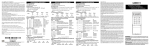
The LCD5501Z keypad presents system
status using an LCD display along with
fixed words/icons and numbers. The keypad can be used on security systems
with up to 64 zones. The LCD5501Z is
compatible with the following DSC security systems:
• PC580/PC585
• PC5008
• PC1555/PC1565 • PC50XX
• PC1555MX
F5
TEST SYSTEM WEEKLY
Refer to Instruction Manual for
testing instructions.
XXX
NOT IN USE
1.
2.
3.
Specifications
NOT IN USE
NOT IN USE
Remove the keypad backplate by
loosening the screw located at the
base of the unit.
Secure the keypad backplate to the
wall in the desired location. Use the
screws provided.
Before attaching the keypad to its
backplate, complete the keypad wiring as described in the next section.
Wiring
1.
• Connects to control panel via 4-wire
Keybus
• One keypad zone input/PGM output
• Current draw: 35mA (standby) /
125mA (maximum)
• Voltage rating: 12VDC nominal
• Optional tamper version
• Five programmable function keys
• Ready (green), Armed (red) and Trouble (yellow) status lights
2.
Installation
Before beginning to wire the unit, ensure that all power (AC transformer
and battery) is disconnected from the
control panel.
Connect the four Keybus wires from
the control panel (red, black, yellow
and green) to the keypad terminals (R
B Y G). Consult the diagram below:
R
B
Y
G Z/P
Unpacking
The LCD5501Z package includes the following parts:
• One LCD5501Z keypad
• Four mounting screws
• One keypad inner door label
• One set of Fire, Auxiliary and Panic
key labels
Red Blk Yel Grn To Zone Input /
PGM Output
3.
Mounting
You should mount the keypad where it is
accessible to designated points of entry
1
If programmed as an input, you can
connect a device - such as a door
contact - to the ‘Z/P’ terminal of the
LCD5501Z. This eliminates the need to
run wires back to the control panel for
the device. To connect the zone, run
one wire from the device to the ‘Z/P’
terminal and the other wire from the
device to the B (black) terminal. For
4.
powered devices, run the red wire to
the R (positive) terminal and the black
wire to the B (negative) terminal. When
using end of line supervision, connect
the zone according to one of the configurations outlined in your system’s
Installation Manual.
If the ‘Z/P’ terminal is programmed as
an output, the output follows the PGM
programmed in Section [8]. A small relay, buzzer or other DC operated device may be connected between the
positive supply voltage and the ‘Z/P’
terminal (maximum load is 50mA).
NOTE: If your system does not have partitions,
enter [1] for the first digit.
1st digit Enter [0] for Global Keypad
Enter [1] for Partition 1 Keypad
Enter [2] for Partition 2 Keypad
Enter [3] for Partition 3 Keypad
Enter [4] for Partition 4 Keypad
Enter [5] for Partition 5 Keypad
Enter [6] for Partition 6 Keypad
Enter [7] for Partition 7 Keypad
Enter [8] for Partition 8 Keypad
2nd digit Enter [1] to [8] for Slot Assignment
5. Press the [#] key twice to exit programming.
6. After assigning all keypads, perform a
supervisory reset by entering [*][8][Installer’s Code][902]. The panel will
now supervise all assigned keypads
and enrolled modules on the system.
Applying Power
Once all wiring is complete, apply power
to the control panel:
1. Connect the battery leads to the battery.
2. Connect the AC transformer.
For more information on control panel
power specifications, see the control
panel Installation Manual.
NOTE: Do not connect the power until all wiring is complete.
Programming the Keypad
There are several programming options
available for the LCD5501Z keypad.
These are described below. Record all
your programming choices in the programming worksheets included in this
manual.
Programming the LCD5501Z is similar to
programming the rest of the system.
When you are in the LCD5501Z programming sections, the keypad will display
which options are turned on along the top
of the display. To turn an option on or off,
press the number corresponding to the
option on the number pad. The numbers
of the options that are currently turned
ON will be displayed.
For example, if options 1 and 2 are on,
the display will look like:
Enrolling the Keypad
Once all wiring is complete, you will need
to enter a 2-digit number that tells the
system the partition and slot assignment
of the keypad.
If your system has partitions, you will
need to also assign the keypad to a partition (1st digit).
The slot assignment (2nd digit) tells the
panel which keypad slots are occupied.
The panel can then generate a fault when
a keypad supervisory signal is not
present. There are eight available slots
for keypads. LCD5501Z keypads are always assigned to slot 1 by default. You
will need to assign each keypad to its
own slot (1 to 8).
Enter the following at each keypad installed on the system:
1. Enter Installer Programming by pressing [*][8][Installer’s Code]
2. Press [000] for Keypad Programming
3. Press [0] for Partition and Slot Assignment
4. Enter a two digit number to specify the
partition and slot assignment.
For information on programming the rest
of your security system, please refer to
your system’s Installation Manual.
Function Key Options
The function keys are programed in sections [1] to [5]. By default, the 5 function
keys on the keypad are programmed as
Stay Arm (03), Away Arm (04), Chime
2
(06), Sensor Reset (14) and Quick Exit
(16). You can change the function of
each key on every keypad. Please see
your system’s Installation Manual for instructions on programming the keys, and
a complete list of all the function key options available for your system.
4.
Turn option [5] on or off:
[5]ON = Alarms not displayed while system is armed
OFF = Alarms are always displayed
while system is armed
5. When you are finished, press [#] to exit.
Emergency Key Options (Fire, Auxiliary,
Panic)
Clock Options
The LCD5501Z will display the current
time after 35 seconds of no key presses.
To set the correct time and date for the
system, please refer to your system’s Instruction Manual. You can change how
the keypad displays the time with the following options. To change the clock options:
1. Enter [*][8][Installer’s code]
2. Enter [000] to go to keypad programming
3. Enter section [6] to go to clock options.
4. To turn any of the options on or off,
press [1], [2], or [3]:
NOTE: If the Time does not display on keypad
option is selected, make sure that the Keypad
displays time when zones are open option is
also selected.
[1]ON =Time displays on keypad
OFF =Time does not display on keypad
[2]ON = Clock display is in AM/PM format
(e.g. 08:00 AM)
OFF =Clock display is in 24-hour format
(e.g. 20:00)
[3]ON =Keypad does not display time
when zones are open
OFF =Keypad displays time when zones
are open
5. When you are finished programming
the clock options, press [#] to exit.
You can enable or disable the Fire, Auxiliary and Panic keys at each keypad.
These keys are enabled by default.
Please see your system’s Installation
Manual for more information on these
keys and their options. To turn any of the
emergency keys on or off on the keypad:
1. Enter [*][8][Installer’s code]
2. Enter [000] to go to keypad programming
3. Enter section [7].
4. To turn the emergency key options on
or off, press [1], [2], or [3]:
[1]ON = Fire key enabled
OFF = Fire key disabled
[2]ON = Auxiliary key enabled
OFF = Auxiliary key disabled
[3]ON = Panic key enabled
OFF = Panic key disabled
5. When you are finished, press [#] to exit.
Door Chime Options
You can program the LCD5501Z keypad
to sound a tone when any zone is opened
or closed. There are two parts to the
LCD5501Z door chime programming:
• Program if the LCD5501Z will chime
when zones are opened and/or
closed.
• Program the type of sound the
LCD5501Z will make when an individual zone is opened or closed.
For the door chime feature to work, you
will also need to turn on the Door Chime
attribute for each zone that will trigger the
chime. This programming is done in the
control panel software. Refer to your control panel’s Installation Manual for more
information.
Alarms Displayed While Armed Option
You can disable the display of alarms on
the keypad when the system is armed.
The display of alarms is enabled by default. To disable the display of alarms
when the system is armed, turn off section [6], option [5]:
1. Enter [*][8][Installer’s code]
2. Enter [000] to go to keypad programming
3. To turn the display of alarms on or off,
enter section [6].
Door Chime on Zone Openings/Closings
You can program each LCD5501Z keypad to sound a door chime when zones
3
are opened and/or when they are closed.
By default, LCD5501Z keypads are programmed to sound door chimes on both
zone openings and closings.
To change the door chime opening/closing settings, at each LCD5501Z keypad:
1. Enter [*][8][Installer’s code]
2. Enter [000] to go to keypad programming
3. Enter section [6].
4. To turn the options on or off, press [6]
or [7]:
[6] ON =Door Chime Enabled for Zone
Openings
OFF =Door Chime Disabled for Zone
Openings
[7] ON =Door Chime Enabled for Zone
Closings
OFF =Door Chime Disabled for Zone
Closings
5. When you are finished, press [#] to exit.
NOTE: Make sure that only one of the above
options is turned on. If more than one is on,
the keypad will sound the first option that is
enabled. If none of the options are selected, the
keypad will not make any sound when the zone
is opened or closed.
5. To program the door chime sound for
another zone, repeat steps 3 and 4.
6. When you are finished programming
the door chime sounds, press [#] to
exit.
Zone Input/PGM Output Option
The LCD5501Z ‘Z/P’ terminal can be programmed to support one zone input (default) or one PGM output. To change this
option:
1. Enter [*][8] [Installer Code].
2. Enter [000] to go to Keypad Programming.
3. Enter section [6].
4. Turn the option on or off by pressing
[8].
If Option 8 is ON, the ‘Z/P’ terminal is an
output.
If Option 8 is OFF, the ‘Z/P’ terminal is an
input.
Door Chime Sounds
You can program the LCD5501Z keypad
to make different door chime sounds for
individual zones, or groups of zones.
Each LCD5501Z keypad can make any
of four door chime sounds for each zone
that triggers the door chime:
•4 quick beeps (default sound)
•‘Bing – Bing’ tone
•‘Ding – Dong’ tone
•‘Alarm’ tone
NOTE: For a zone to be able to trigger the
door chime sound, the Door Chime zone attribute must also be enabled in the control panel programming. Please see your control panel
Installation Manual.
To change the door chime sounds:
1. Enter [*][8][Installer’s code].
2. Enter [*] to go to door chime sound
programming.
3. Enter a 2-digit number for the zone
you want to program [01] - [64].
4. Turn one of the following options on by
pressing [1], [2], [3], or [4]:
[1]4 quick beeps (default sound)
[2]‘Bing – Bing’ tone
[3]‘Ding – Dong’ tone
[4]‘Alarm’ tone
Programming the PGM Number
In order to assign a PGM output to the “Z/
P” terminal, a PGM number must be entered. This number has to be one of the
PGM outputs that can be programmed in
the panel.
1. Enter [*][8] [Installer Code].
2. Enter [000] to go to Keypad Programming.
3. Enter Section [8].
4. Enter the 2-digit PGM number (Do Not
enter the PGM Output Option).
4
Enter [2] for Partition 2 Keypad
Enter [3] for Partition 3 Keypad
Enter [4] for Partition 4 Keypad
Enter [5] for Partition 5 Keypad
Enter [6] for Partition 6 Keypad
Enter [7] for Partition 7 Keypad
Enter [8] for Partition 8 Keypad
2nd digit Enter 1 to 8 for Slot Assignment
Slot: I________I________I
Programming Worksheets
[000] Keypad Programming
1.
2.
Enter [*][8][Installer’s code]
Enter [000] to go to keypad programming
[0] Keypad Enrollment
Valid entries are 01-18; e.g. enter [11] for
partition 1, slot 1. Default = 11
1st digit Enter 0 for Global Keypad
Enter [1] for Partition 1 Keypad
[1]-[5] Function Key Assignments
[1] Key 1
[2] Key 2
[3] Key 3
[4] Key 4
[5] Key 5
03
04
06
14
16
Stay
Away
Chime
Reset
Exit
I________I________I
I________I________I
I________I________I
I________I________I
I________I________I
Defaults:
[6] LCD5501Z Keypad Options
Default
Option
ON
I________I
1
ON= Local clock display enabled
OFF = Local clock display disabled
ON
I________I
2
ON= Local clock displays AM/PM
OFF = Local clock displays 24 hour time
OFF
I________I
3
ON= Open zones override clock display
OFF = Open zones do not override clock display
OFF
I________I
4
For Future Use
OFF
I________I
5
ON= Alarms not displayed while armed
OFF = Alarms always displayed while armed
ON
I________I
6
ON= Door chime enabled for zone openings
OFF = Door chime disabled for zone openings
ON
I________I
7
ON= Door chime enabled for zone closings
OFF = Door chime disabled for zone closings
OFF
I________I
8
ON= “Z/P” terminal is an output
OFF = “Z/P” terminal is an input
[7] Emergency Key Options
Default
Option
ON
OFF
ON
I________I
1
[F] key enabled
[F] key disabled
ON
I________I
2
[A] key enabled
[A] key disabled
ON
I________I
3
[P] key enabled
[P] key disabled
OFF
I________I
4-8
For Future Use
5
[8] PGM Terminal
Default
01
I_________I________|
PGM Number
[✱] Door Chime Sound Programming
1.
2.
Enter [*][8][Installer’s code][*]
Enter 2-digit zone number [01] - [64], then select door chime sound option [1] - [4].
Repeat for each zone that is to sound a chime.
[1]
[2]
[3]
[4]
4 beeps
(default)
“bingbing”
“dingding”
Alarm
Tone
|________________________|
I________I
I________I
I________I
I________I
[02]
|________________________|
I________I
I________I
I________I
I________I
[03]
|________________________|
I________I
I________I
I________I
I________I
[04]
|________________________|
I________I
I________I
I________I
I________I
[05]
|________________________|
I________I
I________I
I________I
I________I
[06]
|________________________|
I________I
I________I
I________I
I________I
[07]
|________________________|
I________I
I________I
I________I
I________I
[08]
|________________________|
I________I
I________I
I________I
I________I
[09]
|________________________|
I________I
I________I
I________I
I________I
[10]
|________________________|
I________I
I________I
I________I
I________I
[11]
|________________________|
I________I
I________I
I________I
I________I
[12]
|________________________|
I________I
I________I
I________I
I________I
[13]
|________________________|
I________I
I________I
I________I
I________I
[14]
|________________________|
I________I
I________I
I________I
I________I
[15]
|________________________|
I________I
I________I
I________I
I________I
[16]
|________________________|
I________I
I________I
I________I
I________I
[17]
|________________________|
I________I
I________I
I________I
I________I
[18]
|________________________|
I________I
I________I
I________I
I________I
Zone
Location
[01]
Options:
6
[19]
|________________________|
I________I
I________I
I________I
I________I
[20]
|________________________|
I________I
I________I
I________I
I________I
[21]
|________________________|
I________I
I________I
I________I
I________I
[22]
|________________________|
I________I
I________I
I________I
I________I
[23]
|________________________|
I________I
I________I
I________I
I________I
[24]
|________________________|
I________I
I________I
I________I
I________I
[25]
|________________________|
I________I
I________I
I________I
I________I
[26]
|________________________|
I________I
I________I
I________I
I________I
[27]
|________________________|
I________I
I________I
I________I
I________I
[28]
|________________________|
I________I
I________I
I________I
I________I
[29]
|________________________|
I________I
I________I
I________I
I________I
[30]
|________________________|
I________I
I________I
I________I
I________I
[31]
|________________________|
I________I
I________I
I________I
I________I
[32]
|________________________|
I________I
I________I
I________I
I________I
[33]
|________________________|
I________I
I________I
I________I
I________I
[34]
|________________________|
I________I
I________I
I________I
I________I
[35]
|________________________|
I________I
I________I
I________I
I________I
[36]
|________________________|
I________I
I________I
I________I
I________I
[37]
|________________________|
I________I
I________I
I________I
I________I
[38]
|________________________|
I________I
I________I
I________I
I________I
[39]
|________________________|
I________I
I________I
I________I
I________I
[40]
|________________________|
I________I
I________I
I________I
I________I
[41]
|________________________|
I________I
I________I
I________I
I________I
[42]
|________________________|
I________I
I________I
I________I
I________I
[43]
|________________________|
I________I
I________I
I________I
I________I
[44]
|________________________|
I________I
I________I
I________I
I________I
7
[45]
|________________________|
I________I
I________I
I________I
I________I
[46]
|________________________|
I________I
I________I
I________I
I________I
[47]
|________________________|
I________I
I________I
I________I
I________I
[48]
|________________________|
I________I
I________I
I________I
I________I
[49]
|________________________|
I________I
I________I
I________I
I________I
[50]
|________________________|
I________I
I________I
I________I
I________I
[51]
|________________________|
I________I
I________I
I________I
I________I
[52]
|________________________|
I________I
I________I
I________I
I________I
[53]
|________________________|
I________I
I________I
I________I
I________I
[54]
|________________________|
I________I
I________I
I________I
I________I
[55]
|________________________|
I________I
I________I
I________I
I________I
[56]
|________________________|
I________I
I________I
I________I
I________I
[57]
|________________________|
I________I
I________I
I________I
I________I
[58]
|________________________|
I________I
I________I
I________I
I________I
[59]
|________________________|
I________I
I________I
I________I
I________I
[60]
|________________________|
I________I
I________I
I________I
I________I
[61]
|________________________|
I________I
I________I
I________I
I________I
[62]
|________________________|
I________I
I________I
I________I
I________I
[63]
|________________________|
I________I
I________I
I________I
I________I
[64]
|________________________|
I________I
I________I
I________I
I________I
8
Limit ed Warrant y
The warranty for international customers is the same as for
any customer within Canada and the United States, with
the exception that Digital Security Controls Ltd. shall not
be responsible for any customs fees, taxes, or VAT that
may be due.
tags returned for replacement under warranty will be credited or replaced at DSC's option. Products not covered by
this warranty, or otherwise out of warranty due to age, misuse, or damage shall be evaluated, and a repair estimate shall
be provided. No repair work will be performed until a valid
purchase order is received from the Customer and a Return
Merchandise Authorisation number (RMA) is issued by
DSC's Customer Service.
Digital Security Controls Ltd.’s liability for failure to
repair the product under this warranty after a reasonable
number of attempts will be limited to a replacement of the
product, as the exclusive remedy for breach of warranty.
Under no circumstances shall Digital Security Controls
Ltd. be liable for any special, incidental, or consequential
damages based upon breach of warranty, breach of contract, negligence, strict liability, or any other legal theory.
Such damages include, but are not limited to, loss of profits, loss of the product or any associated equipment, cost
of capital, cost of substitute or replacement equipment,
facilities or services, down time, purchaser’s time, the
claims of third parties, including customers, and injury to
property. The laws of some jurisdictions limit or do not
allow the disclaimer of consequential damages. If the
laws of such a jurisdiction apply to any claim by or against
DSC, the limitations and disclaimers contained here shall
be to the greatest extent permitted by law. Some states do
not allow the exclusion or limitation of incidental or consequential damages, so that the above may not apply.
Warranty Procedure
Disclaimer of Warranties
To obtain service under this warranty, please return the
item(s) in question to the point of purchase. All authorized
distributors and dealers have a warranty program. Anyone
returning goods to Digital Security Controls Ltd. must first
obtain an authorization number. Digital Security Controls
Ltd. will not accept any shipment whatsoever for which
prior authorization has not been obtained.
This warranty contains the entire warranty and shall be in
lieu of any and all other warranties, whether expressed or
implied (including all implied warranties of merchantability or fitness for a particular purpose) and of all other obligations or liabilities on the part of Digital Security
Controls Ltd. Digital Security Controls Ltd. neither
assumes responsibility for nor authorizes any other person
purporting to act on its behalf to modify or to change this
warranty, nor to assume for it any other warranty or liability concerning this product.
This disclaimer of warranties and limited warranty are
governed by the laws of the province of Ontario, Canada.
WARNING: Digital Security Controls Ltd. recommends
that the entire system be completely tested on a regular
basis. However, despite frequent testing, and due to, but
not limited to, criminal tampering or electrical disruption, it is possible for this product to fail to perform as
expected.
Digital Security Controls Ltd. warrants the original purchaser that for a period of twelve months from the date of
purchase, the product shall be free of defects in materials
and workmanship under normal use. During the warranty
period, Digital Security Controls Ltd. shall, at its option,
repair or replace any defective product upon return of the
product to its factory, at no charge for labour and materials. Any replacement and/or repaired parts are warranted
for the remainder of the original warranty or ninety (90)
days, whichever is longer. The original purchaser must
promptly notify Digital Security Controls Ltd. in writing
that there is defect in material or workmanship, such written notice to be received in all events prior to expiration of
the warranty period. There is absolutely no warranty on
software and all software products are sold as a user
license under the terms of the software license agreement
included with the product. The Customer assumes all
responsibility for the proper selection, installation, operation and maintenance of any products purchased from
DSC. Custom products are only warranted to the extent
that they do not function upon delivery. In such cases,
DSC can replace or credit at its option.
International Warranty
Conditions to Void Warranty
This warranty applies only to defects in parts and workmanship relating to normal use. It does not cover:
• damage incurred in shipping or handling;
• damage caused by disaster such as fire, flood, wind,
earthquake or lightning;
• damage due to causes beyond the control of Digital
Security Controls Ltd. such as excessive voltage,
mechanical shock or water damage;
• damage caused by unauthorized attachment, alterations, modifications or foreign objects;
• damage caused by peripherals (unless such peripherals
were supplied by Digital Security Controls Ltd.);
• defects caused by failure to provide a suitable installation environment for the products;
• damage caused by use of the products for purposes
other than those for which it was designed;
• damage from improper maintenance;
• damage arising out of any other abuse, mishandling or
improper application of the products.
Items Not Covered by Warranty
In addition to the items which void the Warranty, the following items shall not be covered by Warranty: (i) freight cost
to the repair centre; (ii) products which are not identified
with DSC's product label and lot number or serial number;
(iii) products disassembled or repaired in such a manner as
to adversely affect performance or prevent adequate inspection or testing to verify any warranty claim. Access cards or
Out of Warranty Repairs
Digital Security Controls Ltd. will at its option repair or
replace out-of-warranty products which are returned to its
factory according to the following conditions. Anyone
returning goods to Digital Security Controls Ltd. must first
obtain an authorization number. Digital Security Controls
Ltd. will not accept any shipment whatsoever for which
prior authorization has not been obtained.
Products which Digital Security Controls Ltd. determines
to be repairable will be repaired and returned. A set fee
which Digital Security Controls Ltd. has predetermined
and which may be revised from time to time, will be
charged for each unit repaired.
WARNING
Please Read Carefully
N o te to I ns t a l l e rs
This warning contains vital information. As the only individual
in contact with system users, it is your responsibility to bring
each item in this warning to the attention of the users of this system.
System Failures
This system has been carefully designed to be as effective as
possible. There are circumstances, however, involving fire, burglary, or other types of emergencies where it may not provide
protection. Any alarm system of any type may be compromised
deliberately or may fail to operate as expected for a variety of
reasons. Some but not all of these reasons may be:
■ Inadequate Installation
A security system must be installed properly in order to provide
adequate protection. Every installation should be evaluated by a
security professional to ensure that all access points and areas
are covered. Locks and latches on windows and doors must be
secure and operate as intended. Windows, doors, walls, ceilings
and other building materials must be of sufficient strength and
construction to provide the level of protection expected. A
reevaluation must be done during and after any construction
activity. An evaluation by the fire and/or police department is
highly recommended if this service is available.
■ Criminal Knowledge
This system contains security features which were known to be
effective at the time of manufacture. It is possible for persons
with criminal intent to develop techniques which reduce the
effectiveness of these features. It is important that a security
system be reviewed periodically to ensure that its features
remain effective and that it be updated or replaced if it is found
that it does not provide the protection expected.
■ Access by Intruders
Intruders may enter through an unprotected access point, circumvent a sensing device, evade detection by moving through
an area of insufficient coverage, disconnect a warning device, or
interfere with or prevent the proper operation of the system.
■ Power Failure
Control units, intrusion detectors, smoke detectors and many
other security devices require an adequate power supply for
proper operation. If a device operates from batteries, it is possible for the batteries to fail. Even if the batteries have not failed,
they must be charged, in good condition and installed correctly.
If a device operates only by AC power, any interruption, however brief, will render that device inoperative while it does not
have power. Power interruptions of any length are often accompanied by voltage fluctuations which may damage electronic
equipment such as a security system. After a power interruption
has occurred, immediately conduct a complete system test to
ensure that the system operates as intended.
■ Failure of Replaceable Batteries
This system’s wireless transmitters have been designed to provide several years of battery life under normal conditions. The
expected battery life is a function of the device environment,
usage and type. Ambient conditions such as high humidity, high
or low temperatures, or large temperature fluctuations may
reduce the expected battery life. While each transmitting device
has a low battery monitor which identifies when the batteries
need to be replaced, this monitor may fail to operate as
expected. Regular testing and maintenance will keep the system
in good operating condition.
■ Compromise of Radio Frequency (Wireless) Devices
Signals may not reach the receiver under all circumstances
which could include metal objects placed on or near the radio
path or deliberate jamming or other inadvertent radio signal
interference.
■ System Users
A user may not be able to operate a panic or emergency switch
possibly due to permanent or temporary physical disability,
inability to reach the device in time, or unfamiliarity with the
correct operation. It is important that all system users be trained
in the correct operation of the alarm system and that they know
how to respond when the system indicates an alarm.
■ Smoke Detectors
Smoke detectors that are a part of this system may not properly
alert occupants of a fire for a number of reasons, some of which
follow. The smoke detectors may have been improperly
installed or positioned. Smoke may not be able to reach the
smoke detectors, such as when the fire is in a chimney, walls or
roofs, or on the other side of closed doors. Smoke detectors may
not detect smoke from fires on another level of the residence or
building.
Every fire is different in the amount of smoke produced and the
rate of burning. Smoke detectors cannot sense all types of fires
equally well. Smoke detectors may not provide timely warning
of fires caused by carelessness or safety hazards such as smoking in bed, violent explosions, escaping gas, improper storage of
flammable materials, overloaded electrical circuits, children
playing with matches or arson.
Even if the smoke detector operates as intended, there may be
circumstances when there is insufficient warning to allow all
occupants to escape in time to avoid injury or death.
■ Motion Detectors
Motion detectors can only detect motion within the designated
areas as shown in their respective installation instructions. They
cannot discriminate between intruders and intended occupants.
Motion detectors do not provide volumetric area protection.
They have multiple beams of detection and motion can only be
detected in unobstructed areas covered by these beams. They
cannot detect motion which occurs behind walls, ceilings, floor,
closed doors, glass partitions, glass doors or windows. Any type
of tampering whether intentional or unintentional such as masking, painting, or spraying of any material on the lenses, mirrors,
windows or any other part of the detection system will impair
its proper operation.
Passive infrared motion detectors operate by sensing changes in
temperature. However their effectiveness can be reduced when
the ambient temperature rises near or above body temperature
or if there are intentional or unintentional sources of heat in or
near the detection area. Some of these heat sources could be
heaters, radiators, stoves, barbeques, fireplaces, sunlight, steam
vents, lighting and so on.
■ Warning Devices
Warning devices such as sirens, bells, horns, or strobes may not
warn people or waken someone sleeping if there is an intervening wall or door. If warning devices are located on a different
level of the residence or premise, then it is less likely that the
occupants will be alerted or awakened. Audible warning
devices may be interfered with by other noise sources such as
stereos, radios, televisions, air conditioners or other appliances,
or passing traffic. Audible warning devices, however loud, may
not be heard by a hearing-impaired person.
■ Telephone Lines
If telephone lines are used to transmit alarms, they may be out
of service or busy for certain periods of time. Also an intruder
may cut the telephone line or defeat its operation by more
sophisticated means which may be difficult to detect.
■ Insufficient Time
There may be circumstances when the system will operate as
intended, yet the occupants will not be protected from the emergency due to their inability to respond to the warnings in a
timely manner. If the system is monitored, the response may not
occur in time to protect the occupants or their belongings.
■ Component Failure
Although every effort has been made to make this system as
reliable as possible, the system may fail to function as intended
due to the failure of a component.
■ Inadequate Testing
Most problems that would prevent an alarm system from operating as intended can be found by regular testing and maintenance. The complete system should be tested weekly and
immediately after a break-in, an attempted break-in, a fire, a
storm, an earthquake, an accident, or any kind of construction
activity inside or outside the premises. The testing should
include all sensing devices, keypads, consoles, alarm indicating
devices and any other operational devices that are part of the
system.
■ Security and Insurance
Regardless of its capabilities, an alarm system is not a substitute
for property or life insurance. An alarm system also is not a substitute for property owners, renters, or other occupants to act
prudently to prevent or minimize the harmful effects of an
emergency situation.


![LCD5501Z v2-1 im [all] en fr sp 29006002 r001.book](http://vs1.manualzilla.com/store/data/006343065_1-1a60305af960accbcf147395c4481cc7-150x150.png)