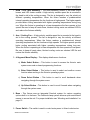
1
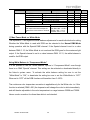
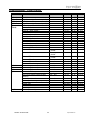
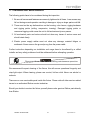
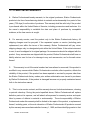
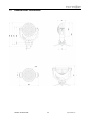
User Manual - RGB Elation Professional 6122 S Eastern Ave Los Angeles, Ca 90040 www.elationlighting.com Rev. 6/6/2008 Version 1.53/27 ©Elation Professional® 2 impression™ CONTENTS 1. General Information……………………………………………………………………… 4 a. Introduction………………………………………………………………………. 4 b. Unpacking………………………………………………………..…………..….. 4 c. Customer Support…………………………………………….………………… 4 d. Warranty Registration……………………………………………………..……. 5 e. Discharge Lamp Warning………………………………………………………. 5 2. Safety Guidelines………………………………………………………........……………6 3. Fixture Overview…………………………………………………………………………..7 4. Features…………………………………………………………………………………… 11 5. General Guidelines………………………………………………………………………. 10 6. Mounting and Installation………………………………………………………….…….. 12 a. Mounting Points…………………………………………………………………..13 b. Clamp Mounting ………………………………………………………………….14 c. Floor Mounting ……………………………………………………………………14 d. Side Mounting …………………………………………………………………… 15 e. Securing………………………………………………………………………….. 16 7. Understanding DMX……………………………………………………………………... 17 a. DMX Cable Requirements……..………………………………………………. 17 b. DMX Terminator…………………………………………………………………. 19 c. 3-Pin to 5-Pin Conversion………………………………………………………. 19 d. DMX Addressing………………………………………………………………… 19 8. Fixture Menu……………………………………………………………………………… 21 9. Operation..………………………………………………………………………………… 24 10. DMX Channel Traits…...….…………………………………………………………….. 25 a. 14 Channel Mode ………………………………………………………………. 25 b. 10 Channel Mode ………………………………………………………………. 28 c. 13 Channel Mode ………………………………………………………………. 29 11. Cleaning and Maintenance……………………………………………………………… 30 12. Warranty……………………………………………………………………………………31 13. Dimensional Drawings………………………………………………….……………….. 33 14. Technical Specifications…………………………………………...………….………… 34 ©Elation Professional® 3 impression™ 1. GENERAL INFORMATION INTRODUCTION: Congratulations, you have just purchased one of the most innovative and reliable lighting fixtures on the market today! The Impression,™ has been designed to perform reliably for years when the guidelines in this booklet are followed. Please read and understand the instructions in this manual carefully and thoroughly before attempting to operate this unit. These instructions contain important information regarding safety during use and maintenance. UNPACKING: Thank you for purchasing the Impression™ by Elation Professional®. Every Impression™ has been thoroughly tested and has been shipped in perfect operating condition. Carefully check the shipping carton for damage that may have occurred during shipping. If the carton appears to be damaged, carefully inspect your unit for damage and be sure all accessories necessary to operate the unit have arrived intact. In the event damage has been found or parts are missing, please contact our customer support team for further instructions. Please do not return this unit to your dealer without first contacting customer support at the number listed below. CUSTOMER SUPPORT: Elation Professional® provides a customer support line, to provide set up help and to answer any question should you encounter problems during your set up or initial operation. You may also visit us on the web at www.elationlighting.com for any comments or suggestions. For service related issue please contact Elation Professional®. Service Hours are Monday through Friday 8:00 a.m. to 5:00 p.m. Pacific Standard Time. Voice: (323) 582-3322 Fax: (323) 832-9142 E-mail: [email protected] Forum: www.ElationLighting.com/forum Warning! To prevent or reduce the risk of electrical shock or fire, do not expose this unit to rain or moisture. Caution! There are no user serviceable parts inside this unit. Do not attempt any repairs yourself, doing so will void your manufactures warranty. ©Elation Professional® 4 impression™ Please do not discard the shipping carton in the trash. Please recycle whenever possible. WARRANTY REGISTRATION: The Impression™ carries a two year (730 days) limited warranty. Please fill out the enclosed warranty card to validate your purchase. All returned service items whether under warranty or not, must be freight pre-paid and accompany a return authorization (R.A.) number. The R.A. number must be clearly written on the outside of the return package. A brief description of the problem as well as the R.A. number must also be written down on a piece of paper and included in the shipping container. If the unit is under warranty, you must provide a copy of your proof of purchase invoice. Items returned without a R.A. number clearly marked on the outside of the package will be refused and returned at customer’s expense. You may obtain a R.A. number by contacting customer support at (323) 582-3322. Never open this fixture while in use! This fixture operates with extremely high voltages. Shock may occur if this fixture is opened during use. This device falls under protection-class 1. Therefore it is essential that the device be grounded properly. All electrical connections must performed by qualified personal. Be sure to always use an approved “Power Con” connector. Never attempt to modify the power inlet. Be sure the power cord is never crimped or damaged. If the power cord is damaged, replace it immediately with a new one of similar power rating. Always disconnect from main power before performing any type of service or any cleaning procedure. Only handle the power cord by the plug. Never pull out the plug by tugging the wire portion of the cord. Please be aware that damages caused by user modifications to the device are not subject to warranty. ©Elation Professional® 5 impression™ 2. SAFETY GUIDLINES The Impression™ is an extremely sophisticated piece of electronic equipment. To guarantee a smooth operation, it is important to follow the guidelines in this manual. The manufacturer of this device will not accept responsibility for damages resulting from the misuse of this fixture due to the disregard of the information printed in this manual. 1. Always be sure that the fan and the air inlets remain clean and are never blocked. Allow about 6” (15cm) between this fixture and other devices or a wall to allow for proper cooling. 2. Never touch the fixture during normal operation. This can cause severe personal injuries and/or damage to the fixture. 3. Be sure to unplug the Impression™ and allow it to cool for at least 15 minutes before attempting to change the optical lens assembly. 4. Never look directly into the lamp beam. You risk injury to your retina, which may induce blindness. 5. For safe operation, follow the Installation guide described in chapter three of this manual. Operating the Impression™ without suited safety aids such as safety cables or clamps can increase the risk of damage and/or personal injury. 6. Installation should only be performed by qualified and certified personal. 7. When mounting this fixture, use only the original rigging parts included with this fixture. Any structural modification will void the original manufactures warranty and may increase the risk of damage and/or personal injury. 8. To reduce the risk of fire or shock, do not expose this fixture to rain or moisture. 9. Do not attempt to operate this fixture if the power cord is damaged in any way. 10. The impression is a completely self-contained fixture, there are no user serviceable parts or lamps to change. Please do not attempt to service this fixture. All service related issues should be referred to an authorized Elation service technician. Important Notice: Damages resulting from the disregard of safety and general user instructions found in this user manual are not subject to any warranty claims. ©Elation Professional® 6 impression™ 3. FIXTURE OVERVIEW 1. Head and Lens Assembly (actively and passively cooled) 2. Arm with various cooling vents 3. LCD-Full Text Display and Menu with Foil Key Pad (data entry) 4. Base with various connectors and Camlock mounting system 5. Power On/Off Switch 6. DMX- Output (3-pin XLR) 7. DMX- Input (3-pin XLR) 8. Fuse Holder and Fuse (GMA 5x20mm, 220V/4A) 9. Main Power Input (Powercon) 10. Safety Cable Slot ©Elation Professional® 7 impression™ 1. Head / LED Lens Assembly – The head assembly consist of the main output lenses, and LED cluster module. A high-velocity variable speed fan is mounted in the head to aid in the cooling process. The fan is designed to vary the velocity at different operating temperatures. When the fixture reaches a predetermined internal operating temperature the fan functions at high speeds. The higher speeds provide better cooling associated with higher operating temperatures during long use. When the fixture is operating at a lower temperature the fans operate at low speed. Be sure to keep all vents clean, blocked cooling vents can shorten LED life and reduce the fixtures reliability. 2. Arm / Cooling Fan – A high-velocity variable speed fan is mounted in the head to aid in the cooling process. The fan is designed to vary the velocity at different operating temperatures. When the fixture reaches a predetermined internal operating temperature the fan functions at high speeds. The higher speeds provide better cooling associated with higher operating temperatures during long use. When the fixture is operating at a lower temperature the fans operate at low speed. Be sure to keep all vents clean, blocked cooling vents can shorten LED life and reduce the fixtures reliability. 3. 4-Segment Menu Display – This display details menu functions. a) Mode Select Button – This button is used to access the fixture’s main system menu and on-board programming functions. b) Enter Select Button – This button is used to select and confirm a menu function when working in the fixture’s operating system. c) Down Select Button – This button is used to scroll backwards when navigating through the system menu. d) Up Select Button - This button is used to scroll forward when navigating through the system menu. 4. Base - This fixture uses an integrated Camlock system for various mounting options built in to the base. The Camlock clamp system allows a quick and efficient means to secure the unit. For proper installation see “Mounting and Installation” on page 12. 5. Power Switch – The switch is used to control main power to fixture’s electronics. ©Elation Professional® 8 impression™ 6. DMX Output Jack – This 3-Pin XLR jack is used to send an outgoing DMX signal. For best results this jack should be terminated if it is the last fixture in a DMX daisy-chain (see termination on page 19). 7. DMX Input Jack – This 3-Pin XLR jack is used to receive an incoming DMX signal. 8. Electronics Fuse Holder – This housing holds a 250v/4A GMA fuse (120v operation). Never defeat this fuse, this fuse is designed to protect the electronics in the event of severer power fluctuations. In the event of fuse failure, always be sure to replace this fuse with an exact match unless otherwise instructed by an authorized Elation technician. 9. Powercon Connector – This power jack is designed to be used only with the Neutrik Powercon adapter included with your fixture. This jack provides main power to your fixture. 10. Safety Cable Mounting Point Connection – The fixture includes two safety cable slots intergraded into the base. Be sure to use these slots as a secondary rigging point to secure the fixture in the event a clamp fails. ©Elation Professional® 9 impression™ 4. FEATURES • Pan 660° / Tilt 300° • LED White/Amber Additive Color Mixing • Strobe effect: 0~10 flashes per second or random strobe • 90 Bright Luxeon K2 High-Powered LEDs o 30 Red o 30 Green o 30 Blue • Dimmer intensity from 0%~100% • User Selectable Color Change Modes • Electronic Power Supply (100~240v / 50Hz~60Hz) • Control board with full LCD character display and foil-keyboard • Reversible Display Option (180˚ Flip) • Auto test for all functions • Automatic Pan/Tilt Correction • 10˚ Beam Angle • Optional Lens Replacement Kit (25˚) • Fully Functional in any Position • USITT DMX-512 Complaint (3-pin DMX Connections) • Value of each DMX-channel can be displayed • Extremely Light Weight 16.5lbs / 7.5kg ©Elation Professional® 10 impression™ 5. GENERAL GUIDELINES This fixture is a professional lighting effect designed for use on stage, in nightclubs, in theatres, etc. Do not attempt operation or installation without a proper knowledge on how to so. This fixture was designed for indoor use only. Consistent operational breaks may ensure that the fixture will function properly for may years to come. Do not shake the fixture around. Avoid brute force when installing or operating the device. While choosing an installation location, please be sure that the fixture will not be exposed to extreme heat, moisture or dust. The minimum distance between the fixture and a wall or flat surface should be at least .5 meter (about 1.5ft). Always install the fixture with an appropriate safety cable. When installing the fixture in a suspended environment always be to use mounting hardware no less than M10 x 25 mm, also be sure the hardware is insert in the pre-arranged screw holes in the base of the fixture. When using the quick release “Omega” cam-lock system, be sure the four quick lock fasteners are locked in the quick lock holes correctly. Do not attempt to operate this fixture until you have familiarized yourself with its functions. Do not permit operation by persons not qualified for operating this type of theatrical fixture; most damages are the result of operations by nonprofessionals. If service is ever required, please use the original packaging to transport the fixture in for service. ©Elation Professional® 11 impression™ 6. MOUNTING AND INSTALLATION Mounting The Impression™ is fully operational in any positions, hanging upside-down from a ceiling, mounted on its’ side or set on a flat level surface (see illustration below). The following section will detail the available mounting options. When determining a mounting point, be sure this fixture is kept at least 0.5m away from any flammable materials (decoration etc.). Always use and install a safety cable as an additional safety measure to prevent accidental damage and/or injury in the event the clamp fails. Mounting Cautions: For added protection mount the fixtures in areas outside walking paths, seating areas, or in areas were the fixture might be reached by unauthorized personal. Before mounting the fixture to any surface, make sure that the installation area can hold a minimum point load of 10 times the device’s weight. ©Elation Professional® 12 impression™ Never stand directly below the device when mounting, removing, or servicing the fixture. Overhead mounting requires extensive experience, including amongst others calculating working load limits, a fine knowledge of the installation material being used, and periodic safety inspection of all installation material and the fixture. If you lack these qualifications, do not attempt the installation yourself. Improper installation can result in bodily injury. Be sure to complete all rigging and installation procedures before connecting main power. Refer to regulations BGV C1 (formerly VBG 70) and DIN VDE0711-217 for proper installation in Europe. To ensure proper installation, only qualified staff should attempt installation. Mounting points Various mounting kits are available for the Impression™. These kits will provide a proper and secure means to install the fixture in different positions. The fixture was designed to accept the available mounting kits, please do not attempt to mount the fixture by any other means than those describe in the following sections of this manual. Please also note that the fixture is clearly marked with a “FRONT” orientation; this will ensure a universal orientation when mounting several fixtures. ©Elation Professional® 13 impression™ Clamp Mounting (Hanging) The Impression™ provides a unique mounting assembly that integrates the base as well as the safety cable rigging point in one unit (see the illustration below). When mounting this fixture to truss, be sure to secure an appropriately rated coupler directly to the base using a M10 x 16mm bolt fitted through the center hole of the base. As an added safety measure be sure to attach at least one properly rated safety cable to the fixture using the safety cable rigging point integrated in the base. Floor Mounting The Impression ships with a floor stand that will properly balance the fixture in an up-right position. For upright operation always use the dedicated floor stand mounted to the bottom of the fixture, this will allow for additional bracing during upright operation. The floor stand is kept securely attached with a Camlock quick-release system. To attach the floor stand properly, line up the Camlock fasteners with Camlock mounting points on the base and turn the two fasteners 90° to lock them in place. To release the Camlock repeat the same action in reverse. See the illustration on the next page for details on the floor stand. ©Elation Professional® 14 impression™ Side Mounting To properly operate the Impression in a sidewise position, it is necessary to use the optional side-mounting bracket assembly. This bracket assembly uses two half couplers and allows a concentric position between two truss bars. Never mount the fixture on its’ side using the single coupler method described in the “Clamp Mounting” section on the previous page as it may damage the base. The side-mounting assembly was specifically designed to cope with excessive torque that occurs when the fixture is mounted on its’ side. To attach the side-mounting bracket use the same Camlock mounting points that are available for the floor stand. Line up the Camlock fasteners with Camlock mounting points on the base and turn the two fasteners 90° to lock them in place. To release the Camlock repeat the same action in reverse. See the illustration on the next page for details on the floor stand. ©Elation Professional® 15 impression™ Securing the Impression™ Regardless of the rigging option you choose for your IMPRESSION™ always be sure to secure your fixture with a safety cable. The fixture provides a built-in rigging point for a safety cable on the hanging bracket as illustrated above. Be sure to only use the designated rigging point for the safety cable and never secure a safety cable to a carrying handle. ©Elation Professional® 16 impression™ 7. UNDERSTANDING DMX DMX-512: DMX is short for Digital Multiplex. This is a universal protocol used by most lighting and controller manufactures as a form of communication between intelligent fixtures and controllers. DMX allows all makes and models of different manufactures to be linked together and operate from a single controller. This is possible as long as all the fixtures and the controller are DMX compliant. A DMX controller sends the DMX data instructions to the fixture allowing the user to control the different aspects of an intelligent light. DMX data is sent out as serial data that travels from fixture to fixture via data “IN” and data “OUT” XLR terminals located on the fixtures (most controllers will only have output jacks). DMX Linking: To ensure proper DMX data transmission always use proper DMX cables and a terminator. When using several DMX fixtures try to use the shortest cable path possible. Never split a DMX line with a “Y” style connector. The order in which the fixtures are connected in a DMX line does not influence the DMX addressing. For example; a fixture assigned a DMX address of 1 may be placed anywhere in the DMX chain, at the beginning, at the end, or anywhere in the middle. The DMX controller knows to send data assigned to address 1 to that fixture no matter where it is located in the DMX chain. The Impression™ can be controlled via DMX-512 protocol. The Impression™ is a 14-channel DMX fixture. The DMX address is set electronically using the controls on the LCD menu. Data Cable (DMX Cable) Requirements (For DMX and Master/Slave Operation): Your fixture and your DMX controller require a standard 3-pin XLR connector for data input and data output. If you are making your own cables, be sure to use two conductor shielded digital DMX cable (not microphone cable) rated at 120 ohms; this cable is specifically designed for DMX transmission and may be purchased from your Elation dealer or at most professional lighting retailers. Your cables should be made with a male and female XLR connector on either end of the cable. Also, remember that a DMX line must be daisy chained and cannot be split, unless using an approved DMX splitter such as the Elation Opto Branch 4™ or DMX Branch/4™. ©Elation Professional® 17 impression™ Be sure to follow the above figure when making your own cables. Do not use the ground lug on the XLR connector. Do not connect the cable’s shield conductor to the ground lug or allow the shield conductor to come in contact with the XLR’s outer casing. Grounding the shield could cause a short circuit and erratic behavior. DMX-512 control connection Connect the provided XLR cable to the female 3-pin XLR output of your controller and the other side to the male 3-pin XLR input of the moving head (Please refer to the diagram below.). You can chain multiple moving heads together through serial linking. The cable needed should be two conductor, shielded cable with XLR input and output connectors. Always be sure daisy chain your in and out data connections, never split or “Y” your DMX connections unless you are using an approved DMX splitter such as the Elation Opto Branch 4™ or DMX Branch/4™. ©Elation Professional® 18 impression™ DMX-512 connection with DMX terminator A DMX terminator should be used in all DMX lines especially in longer runs. The use of a terminator may avoid erratic behavior in your DMX line. A terminator is a 120 ohm 1/4 watt resistor that is connected between pins 2 and 3 of a male XLR connector (DATA + and DATA -). This fixture is inserted in the female XLR connector of the last fixture in your daisy chain to terminate the line. Using a line terminator (Elation part: DMX T PACK) will decrease the possibilities of erratic behavior. 5-Pin XLR DMX Connectors. Some manufactures use 5-pin XLR connectors for DATA transmission in place of 3-pin. 5-pin XLR fixtures may be implemented in a 3-pin XLR DMX line. When inserting standard 5-pin XLR connectors in to a 3-pin XLR line a cable adaptor must be used, these adaptors are readily available at most professional lighting retail outlets. The following chart details a proper cable conversion. Fixture DMX addressing; All fixtures should be given a DMX starting address when using a DMX controller, so the correct fixture responds to the correct control signal. This digital starting address is the ©Elation Professional® 19 impression™ channel number from which the fixture starts to “listen” to the digital control information sent out from the DMX controller. The allocation of this starting DMX address is achieved by setting the correct DMX address on the digital display located on the head of the fixture. You can set the same starting address for all fixtures or a group of fixtures, or set different address for each individual fixture. Be advised that setting all you fixtures to the same DMX address will subsequently control all fixtures in the same fashion, in other words, changing the settings of one channel will affect all the fixtures simultaneously. If you set each fixture to a different DMX address, each unit will start to “listen” to the channel number you have set, based on the quantity of control channels (DMX channels) of each fixture. That means changing the settings of one channel will only affect the selected fixture. In the case of the Impression™, which is a 14 channel fixture, you should set the starting DMX address of the first unit to 1, the second unit to 15 (14 + 1), the third unit to 29 (14 + 15), and so on. Note: During start-up the Impression™ will automatically detect whether a DMX data signal is being received or not. If DMX data signal is being received, the display will show "A.XXX" (XXX representing the actual DMX address). If the fixture is not receiving a DMX signal the display will flash "A.XXX" (XXX representing the actual DMX address). If your fixture is connected to a DMX controller and the display is flashing (not receiving a DMX signal), please check the following: - The 3 PIN XLR plug (cable with DMX signal from controller) is not connected or is not inserted completely into the DMX input jack. - The DMX controller could be switched off or defective. - A DMX cable or connector is defective. - A DMX terminator has not been inserted into the last fixture in your DMX chain. ©Elation Professional® 20 impression™ 8. FIXTURE MENU On-Board System Menu: The Impression™ comes with an easy to navigate system menu. This next section will detail the functions of each command in the system menu. LCD Control Panel: The control panel located on the arm of the fixture allows you to access the main menu and make all necessary adjustments to the Impression™. During normal operation, tapping the “MODE” key once will access the fixture’s main menu. Once in the main menu you can navigate through the different functions and access the sub-menus with the Up and Down buttons. Once you reach a field that requires adjusting, tap the ENTER button to activate that field and use the UP and Down button to adjust the field. Tapping the Enter button once more will confirm your setting. Once a setting is saved the LED will briefly readout PASS to confirm a new setting has been made and locked into memory. You may exit the main menu at any time without making any adjustments by tapping the MODE button. MODE Button - To access the main menu locate the MODE button on the front of the unit. Press this button to activate the system menu. Tap the UP button until you reach the function you wish to change. When you reach the function you wish to change tap the ENTER button once to select that menu function. When a function is selected the menu will begin to flash, use the UP or DOWN button to change the function. Once your changes are made tap the ENTER button yet again to lock the change in the system menu. To exit without making any changes tap the MODE button. The control panel located on the side of the fixture allows you to access the main menu and make all necessary adjustments to the Impression. During normal operation, tapping the “MODE” key once will access the fixture’s main menu. Once in the main menu you can navigate through the different functions and access the sub-menus with the Up and Down buttons. Once you reach a field that requires adjusting, tap the ENTER button to activate that field and use the UP and Down button to adjust the field. Tapping the Enter button once more will confirm your setting. Once a setting is saved the LED will briefly readout OK to confirm a new setting has been made and locked into memory. You may exit the main menu at any time without making any adjustments by tapping the MODE button. ©Elation Professional® 21 impression™ MODE - ENTER Level1 Level 2 Level 3 Level 4 DMX Start Address 001 DOWN - UP Special Defines the starting DMX address Manual DMX Manual control of all system functions Pan Manual control of the Pan motor (X-movement) Pan/Tilt Movements Manual control of the Pan and Tilt movement Special Activate the White- or Full-Power Mode; see also DMX table Dimmer Manual control of the Dimmer Shutter Manual control of the Shutter Blue Manual control of the blue Green Manual control of the green Red Manual control of the red Color Wheel Manual control of the synthesized color wheel Tilt Manual control of the Tilt motor (Y-movement) Display Contrast Adjustment for the Display contrast Default Set Resets all functions to the factory values Adjust Key code xxxx Code protection for the calibration menu (for use by authorized technicians only) Pan Offset Calibration for Pan-Offset Tilt Offset Calibration for Tilt-Offset Clear EEPROM Erases the EEPROM flash memory Diagnose Diagnose functions - UP Pos Feed Pan Delta Anz Ti0-Int-Err PFC Voltage Pos Feed Tilt Delta DOWN Description of Function Temperature Arm Temperature Head Internal data and function diagnose Displays the present PFC voltage Internal data and function diagnose Indicates the arm temperature Indicates the head temperature Defines whether the last DMX signal is held or the LEDs are switched OFF in the event of DMX signal interruption Automatic position feedback (correction) for Pan/Tilt movement. Adjustments for a uniform white color (white balance); This function only works in 14-channels mode (white-mode) Lamp Off if DMX off Position Feedback White Adjust ©Elation Professional® Internal data and function diagnose 22 impression™ Red Input for red adjustments Blue Input for blue adjustments Green Input for green adjustments DMX input Monitor LCD will display the current DMX value for each channel Pan Instantaneous value for Pan Pan/Tilt Movements Instantaneous value for Pan/Tilt movements Special Instantaneous value for Special Dimmer Instantaneous value for Dimmer Shutter Instantaneous value for Shutter Blue Instantaneous value for Blue Green Instantaneous value for Green Red Instantaneous value for Red Color Wheel Instantaneous value for Color Wheel Tilt Instantaneous value for Tilt movement Live time Indicates the overall operation time of the system Display Adjust the display functionality Blackout Display Blackout ON/OFF Select DMX Mode User selectable DMX modes Compressed 10 DMX channels Normal 14 DMX channels High-Resolution 13 DMX channels - Dimmer operates at 16 bit. White Mode ON/OFF: Adjustments for white-balance are activated Reverse Pan ON/OFF: Inverts Pan movements Reverse Tilt ON/OFF: Inverts Tilt movements Reset Reset fixture to the home position Locking and unlocking the Control Panel: Please lock and unlock the control panel by pressing the menu keys MODE & ENTER & UP at the same time. Additional features during switching-ON the system: a) 1200Hz Mode (Hold down the UP- button during power ON) ©Elation Professional® 23 impression™ After switching ON the system the LEDs will be operated with a Pulse Width Modulation (PWM) of 1200Hz. In addition all standard setting will be loaded (DMX start address [001], Normal Mode with 14 DMX channels). b) 600Hz Mode (Hold down the DOWN- button during power ON) After switching ON the system the LEDs will be operated with a Pulse Width Modulation (PWM) of 600Hz. In addition all standard setting will be loaded (DMX start address [001], Normal Mode with 14 DMX channels). c) Standard Mode (Hold down the ENTER- button during power ON) After switching ON the system the DMX start address will be set to [001]. All other setting remain unchanged. Additional Display Indication: As a default you'll find the following additional information in the first row of the LCD display: XX/X/XX 06 = 600Hz / 12 = 1200Hz N = Normal Mode / C = Compressed Mode / H = High Res. Mode N = Tilt normal / I = Tilt inverted N = Pan normal / I = Pan inverted ©Elation Professional® 24 impression™ 9. OPERATION DMX ADDRESSING - After the fixture is turned “ON” it will immediately complete a reset process that test all the fixture’s functions. When the reset process concludes the LCD will display the fixture’s current DMX. If the fixture is not receiving a DMX signal, the display will flash continuously. To set or adjust a DMX address, please follow the procedure below: 1. While the current three-digit address is flashing use the “UP” and “DOWN” buttons to select a new address. Once the new address has been selected, lock the new address into the fixture’s memory by pressing the “ENTER” button. The DMX address is non-volatile and will remain in the fixture’s memory even when the power to the unit is switched off. Memory is backed-up and retain by an internal power source that should last about five years Universal DMX Control: This function allows you to use a universal DMX-512 controller such as the Elation® Show Designer 2™ or Elation® Show Designer 3™ to control head movement, the color wheel, the shutter (strobe), and all other DMX traits. A DMX controller allows you to create unique programs tailored to your individual needs. The Impression™ uses 14 DMX channels. See page 25 for detailed description of the DMX traits. To control your fixture in DMX mode, follow the set-up procedures below as well as the set-up specifications that are included with your DMX controller. Use the controller’s faders to control the various DMX fixture traits. This will allow you to create your own programs. 1. Follow the instruction on page above to set the DMX address. 2. Be sure to use a terminator on the last fixture, especially for longer cable runs (more than a 100 feet). 3. For help operating in DMX mode consult the manual included with your DMX controller. ©Elation Professional® 25 impression™ 10. DMX CHANNEL TRAITS: The chart below details the channel layout for 14 DMX channels (default). CHANNEL 1: Pan Movement (max. 630° or 540˚ User Selectable) CHANNEL 2: 16bit Pan Movement (pan fine) CHANNEL 3: Tilt Movement (max. 265°) CHANNEL 4: 16bit Tilt Movement (tilt fine) CHANNEL 5: Color (Fixed) CHANNEL 6: Red CHANNEL 7: Green CHANNEL 8: Blue CHANNEL 9: Shutter / Strobe (0-13Hz), and Shutter close/open function + random strobe CHANNEL 10: Dimmer (Intensity) Control CHANNEL 11: Color Temperature CHANNEL 12: Special / Reset CHANNEL 13: Movement Macros CHANNEL 14: Speed Control (Pan/Tilt movement) Normal Mode - 14 DMX Channels Channel Function 1) Pan Coarse 2) Pan Fine 3) Tilt Coarse 4) Tilt Fine 5) Color Wheel (Fixed) 0 .. 660° Min. 3.2 s High- Pos ... High- Pos + 2.6° (16 Bit) 0 .. 300° Min. 1.5 s High- Pos … High- Pos + 1.2° (16 Bit) Colors adjustable via RGB Color 01 – Red 1) Color 02 – Amber 1) Color 03 – Warm Yellow 1) Color 04 – Yellow 1) Color 05 – Green 1) Color 06 – Turquoise 1) Color 07 – Cyan 1) Color 08 – Blue 1) Color 09 – Lavender 1) Color 10 – Mauve 1) Color 11 – Magenta 1) Color 12 - Pink1) White – CTO Color temperature @ 3200K ©Elation Professional® Time and Value 26 DMX HEX % 0..255 0..255 0..255 0..255 0..7 8..15 16..23 24..31 32..39 40..47 48..55 56..63 64..71 72..79 80..87 88..95 96..103 104..111 00..FF 00..FF 00..FF 00..FF 00..07 08..0F 10..17 18..1F 20..27 28..2F 30..37 38..3F 40..47 48..4F 50..57 58..5F 60..67 68..6F 0..100 0..100 0..100 0..100 0..2.5 3..5.5 6..8.5 9..12.5 13..15.5 16..18.5 19..21.5 22..24.5 25..27.5 28..30.5 31..34.5 35..37.5 38..40.5 41..43.5 impression™ Channel Function Time and Value Color 14 - Blue Color temperature @ 5600K Color temperature @ 7200K White – CTB 6) Red 7) Green 8) Blue 9) Shutter 10) Dimmer 11) Color temperature 12) Special Rainbow Effect Stop 2) Rainbow Effect 3) Rainbow Effect, random colors Color mixing system - Red Color mixing system - Green Color mixing system - Blue Shutter closed Random Strobe (different pattern) Dim-in then shutter closing (random patterns) Shutter open then dim-out Dim-in then dim-out (random pattern) Strobe effect, slow – fast Shutter open Dimmer No color correction Continuous color temperature correction between 7200k – 3200k Max. Power-Mode (*) Slow – fast Slow - fast 0 - 100% 0 - 100% 0 - 100% Slow - fast Slow – fast Slow – fast Slow – fast 0.2Hz – 10Hz (0% - 100%) 27 HEX % 112..119 70..77 44..46.5 120..127 78..7F 47..49.5 128 129-223 224-255 0..255 0..255 0..255 0..15 16..47 48..79 80 81..DF E0..FF 00..FF 00..FF 00..FF 00..0F 10..2F 30..4F 50 51..88 89..100 0..100 0..100 0..100 0..5.5 6..18.5 19..31.5 80..111 112..143 144.239 240..255 0..255 0 50..6F 70..8F A0..EF F0..FF 0..FF 0 32..43 44..56 57..94 95..100 0..100 0 1..FF 1..100 0..0F 0..5.5 10..1F 70..7F 6..12.5 44..49.5 80..8F 50..56.5 E0..E5 FA..FF 00 88..89.5 98..100 0 01..01 02..03 04..05 06..07 08..09 0A..0B 0C..0D 0E..0F 11..11 12..13 14..15 16..17 18..19 1A..1B 1C..1D 1E..1F 20..3F 0.5 1.0 1.7 2.5 3.3 4.1 4.9 5.7 6.5 7.3 8.0 8.8 9.6 10.4 11.2 12 13..25 Applicable only when a 1..255 white color is selected Max. light output 0..15 without white balance White balance used 16..31 0.7 BPS ... 2.3 BPS 112..127 => 1.43 s ... 0.43 s 0.7 BPS ... 2.0 BPS 128..143 => 1.43 s ... 0.5 s 224..229 250..255 0 White-Mode (*) Color1-Chaser C / C+1 Slow – fast Color1-Chaser C / C+2 Slow – fast Fan min. as long as temp. < 60°C RESET (Normal Mode) 13) Movement No movement Moveme Size Phase nt PAN 1 0° 1 90° 1 180° 1 270° PAN 2 0° 2 90° 2 180° 2 270° PAN 3 0° 3 90° 3 180° 3 270° PAN 4 0° 4 90° 4 180° 4 270° TILT size / phase see also PAN ©Elation Professional® DMX 01..01 02..03 04..05 06..07 08..09 10..11 12..13 14..15 16..17 18..19 20..21 22..23 24..25 26..27 28..29 30..31 32..63 impression™ Channel 14) Speed Pan/Tilt Function Time and Value PAN / TILT size / phase see also PAN PAN / TILT (inverse) size / phase see also PAN Circle size / phase see also PAN Circle (inverse) size / phase see also PAN Figure eight size / phase see also PAN Random movement Size see also PAN Pan/Tilt relative movement Pan/Tilt slow – fast Pan Min. 660° = 200 s Also use this channel to adjust the Pan Max. 660° = 2.65 s speed of the movements on channel Tilt Min. 300° = 110 s 13 Tilt Max. 300° = 1.8 s DMX HEX % 64..95 96..127 128..159 160..191 192..223 224..255 0..15 16..255 40..5F 60..7F 80..9F A0..BF C0..DF E0..FF 00..0F 10..FF 26..37 38..50 51..62 63..75 76..87 88..100 0..6 7..100 (*) Max. Power-Mode vs. White-Mode The Impression™ can regard the white-balance adjustments for each individual color setting. Whether the White-Mode is used with RGB can be selected in the Normal DMX-Mode during operation with the Special DMX channel. If the Special channel is set to a value between DMX 0..15, the White-Mode is not used and the RGB goes for the maximum light output. If the Special channel is set to a value between DMX 16..31, the white balance is used for the RGB output. Using White Balance in “Compressed Mode:” It is still possible to use the “White Balance” options in “Compressed Mode” even though there is no DMX “Special” channel. This setting can be activated or deactivated directly in the fixture’s system menu. To activate the white balance setting be sure to set the “White-Mode” to “ON”, to deactivate the setting be sure to set the White-Mode to “OFF.” When set to “OFF” all the RGB functions will transition from 0~100%. The continuous color temperature correction is applicable only for the White color i.e. if this function is selected (DMX ≥ 001) the Impression will change the color to white immediately and will then be adjustable in the color temperature in a range between 3200K and 7200K. Hence a color correction for others than white is not intended. ©Elation Professional® 28 impression™ Compressed Mode - 10 DMX Channels Channel Function Time and Value 1) Pan Coarse 2) Pan Fine 3) Tilt Coarse 4) Tilt Fine 5) Color Wheel (Fixed) 0.. 660° High- Pos ... High- Pos + 2.6° (16 Bit) 0.. 300° High- Pos … High- Pos + 1.2° (16 Bit) Colors adjustable via RGB Color 01 – Red 1) Color 02 – Amber 1) Color 03 – Warm Yellow 1) Color 04 – Yellow 1) Color 05 – Green 1) Color 06 – Turquoise 1) Color 07 – Cyan 1) Color 08 – Blue 1) Color 09 – Lavender 1) Color 10 – Mauve 1) Color 11 – Magenta 1) Color 12 – Pink 1) White – CTO Min. 3.2 s Min. 1.5 s Color temperature @ 3200K Color temperature @ 5600K Color temperature @ 7200K Color 14 - Blue White – CTB 6) Red 7) Green 8) Blue 9) Shutter 10) Dimmer Rainbow Effect Stop 2) Rainbow Effect 3) Rainbow Effect, random colors Color mixing system - Red Color mixing system - Green Color mixing system - Blue Shutter closed Random Strobe (different pattern) Dim-in then shutter closing (random patterns) Shutter open then dim-out Dim-in then dim-out (random pattern) Strobe effect, slow – fast Shutter open RESET Shutter open Dimmer (0% - 100%) ©Elation Professional® Slow – fast Slow - fast 0 - 100% 0 - 100% 0 - 100% Slow - fast Slow – fast Slow – fast Slow – fast 0.2Hz – 10Hz Min. 3 Sec. 29 DMX HEX % 0..255 0..255 0..255 0..255 0..7 8..15 16..23 24..31 32..39 40..47 48..55 56..63 64..71 72..79 80..87 88..95 96..103 104..111 00..FF 00..FF 00..FF 00..FF 00..07 08..0F 10..17 18..1F 20..27 28..2F 30..37 38..3F 40..47 48..4F 50..57 58..5F 60..67 68..6F 0..100 0..100 0..100 0..100 0..2.5 3..5.5 6..8.5 9..12.5 13..15.5 16..18.5 19..21.5 22..24.5 25..27.5 28..30.5 31..34.5 35..37.5 38..40.5 41..43.5 112..119 70..77 44..46.5 120..127 78..7F 47..49.5 128 129-223 224-255 0..255 0..255 0..255 0..15 16..47 48..79 80 81..DF E0..FF 00..FF 00..FF 00..FF 00..0F 10..2F 30..4F 50 51..88 89..100 0..100 0..100 0..100 0..5.5 6..18.5 19..31.5 80..111 112..143 144.239 240..249 250 251..255 0..255 50..6F 70..8F A0..EF F0..F9 FA FB..FF 0..FF 32..43 44..56 57..94 95..97.5 98 99..100 0..100 impression™ High Resolution Mode - 13 DMX Channels Channel Function Time and Value DMX HEX % 1) Pan Course 2) Pan Fine 3) Tilt Course 4) Tilt Fine 5) Red Coarse 6) Red Fine 7) Green Coarse 8) Green Fine 9) Blue Coarse 10) Blue Fine 11) Shutter 0 .. 660° High- Pos ... High- Pos + 2.6° (16 Bit) 0 .. 300° High- Pos … High- Pos + 1.2° (16 Bit) Color Mix – Red Color Mix – Red-Low Color Mix – Green min. 3.2 s 0..255 0..255 0..255 0..255 0..255 0..255 0..255 00..FF 00..FF 00..FF 00..FF 00..FF 00..FF 00..FF 0..100 0..100 0..100 0..100 0..100 0..100 0..100 Color Mix – Green-Low Color Mix – Blue Color Mix – Blue-Low Shutter closed Random Strobe (different pattern) Dim-in then shutter closing (random patterns) Shutter open then dim-out Dim-in then dim-out (random pattern) 0 - 100% 0 - 100% 0 - 100% 0..255 0..255 0..255 0..15 16..47 48..79 00..FF 00..FF 00..FF 00..0F 10..2F 30..4F 0..100 0..100 0..100 0..5.5 6..18.5 19..31. 5 32..43 44..56 Strobe effect, slow – fast Shutter open 0.2Hz – 10Hz RESET Shutter open Min. 3 Sec. 12) Dimmer Course 13) Dimmer Fine min. 1.5 s 0 - 100% 0 - 100% 0 - 100% Slow - fast Slow – fast Slow – fast Slow – fast Dimmer (0% - 100%) Dimmer -Low 80..111 50..6F 112..14 70..8F 3 144.239 A0..EF 57..94 240..24 F0..F9 95..97. 9 5 250 FA 98 251..25 FB..FF 99..100 5 0..255 0..FF 0..100 0..255 0..FF 0..100 1) The predefined colors can be used as start-colors for the Rainbow effect. Please select first a desired start-color before you activate the rainbow effect. All Impression will afterwards start from that color and will execute the rainbow effect synchronously. Different Impression can certainly have different start-colors but will still execute the rainbow effect synchronously. If you choose a color different from the once marked with 1) in the tables above the rainbow start-color will be red. 2) Rainbow-effect Stop will pause this function. After resuming the rainbow-effect will be continued with the current color. 3) The Rainbow-effect will run synchronously only if it will be started going out from one of the predefined colors (see also 1) before). ©Elation Professional® 30 impression™ 11. CLEANING AND MAINTENANCE The following points have to be considered during the inspection: 1. Be sure all screws and fasteners are securely tightened at all times. Lose screws may fall out during normal operation resulting in damage or injury as larger parts could fall. 2. There must not be any deformations on the housing, color lenses, rigging hardware and rigging points (ceiling, suspension, trussing). Damaged rigging points or unsecured rigging could cause the unit to fall and serious injure a person. 3. All mechanical parts and motors should not show any traces of serious wear and should rotate freely. 4. Electric power supply cables must not show any damage, material fatigue or sediments. Never remove the ground prong from the power cable. Further instructions depending on installation and usage have to be adhered by a skilled installer and any safety problems should be addressed before attempting operation. Disconnect from mains before starting maintenance operation. We recommend frequent cleaning of the fixture, this will ensure operational longevity and crisp light output. When cleaning, please use a moist, lint-free cloth. Never use alcohol or solvents. There are no user serviceable parts inside this fixture. Please refer all other service related issues to an authorized Elation service technician. Should you decide to service the fixture yourself please order genuine Elation parts directly from Elation. ©Elation Professional® 31 impression™ 12. 2-YEAR LIMITED WARRANTY A. Elation Professional® hereby warrants, to the original purchaser, Elation Professional® products to be free of manufacturing defects in material and workmanship for a period of two years, (730 days) from the date of purchase. This warranty shall be valid only if the product is purchased within the United States of America, including possessions and territories. It is the owner’s responsibility to establish the date and place of purchase by acceptable evidence, at the time service is sought. B. For warranty service, send the product only to the Elation Professional® factory. All shipping charges must be pre-paid. If the requested repairs or service (including parts replacement) are within the terms of this warranty, Elation Professional® will pay return shipping charges only to a designated point within the United States. If the entire instrument is sent, it must be shipped in its original package. No accessories should be shipped with the product. If any accessories are shipped with the product, Elation Professional® shall have no liability what so ever for loss of or damage to any such accessories, nor for the safe return thereof. C. This warranty is void if the serial number has been altered or removed; if the product is modified in any manner which Elation Professional® concludes, after inspection, affects the reliability of the product; if the product has been repaired or serviced by anyone other than the Elation Professional® factory unless prior written authorization was issued to purchaser by Elation Professional®; if the product is damaged because not properly maintained as set forth in the instruction manual. D. This is not a service contract, and this warranty does not include maintenance, cleaning or periodic check-up. During the period specified above, Elation Professional® will replace defective parts at its expense, and will absorb all expenses for warranty service and repair labor by reason of defects in material or workmanship. The sole responsibility of Elation Professional® under this warranty shall be limited to the repair of the product, or replacement thereof, including parts, at the sole discretion of Elation Professional®. All products covered by this warranty were manufactured after January 1, 1990, and bare identifying marks to that ©Elation Professional® 32 impression™ effect. E. Elation Professional® reserves the right to make changes in design and/or improvements upon its products without any obligation to include these changes in any products theretofore manufactured. F. No warranty, whether expressed or implied, is given or made with respect to any accessory supplied with products described above. Except to the extent prohibited by applicable law, all implied warranties made by Elation Professional® in connection with this product, including warranties of merchantability or fitness, are limited in duration to the warranty period set forth above. And no warranties, whether expressed or implied, including warranties of merchantability or fitness, shall apply to this product after said period has expired. The consumer’s and or Dealer’s sole remedy shall be such repair or replacement as is expressly provided above; and under no circumstances shall Elation Professional® be liable for any loss or damage, direct or consequential, arising out of the use of, or inability to use, this product. G. This warranty is the only written warranty applicable to Elation Professional® Products and supersedes all prior warranties and written descriptions of warranty terms and conditions heretofore published. ©Elation Professional® 33 impression™ 13. DIMENSIONAL DRAWINGS: ©Elation Professional® 34 impression™ 14. TECHNICAL SPECIFICATIONS Power supply Power consumption 350 VA (Watt) Power Input 100-240 V AC, 50-60 Hz (wide range input) Fuse protection Micro-fuse 5x20 mm, GMA 220v/4A Operational Parameters Max. Ambient 45°C (integrated overheating switch) Temperature Mounting Position Any (see chapter mounting) Lighting System - Additive Color mixing LED Type 90x Luxeon K2 High-power- LEDs Lifetime 100.000 h 30 LEDs per color, wavelength optimized for maximum presentable color space Optical System High efficient Collimator cluster Exchangeable optical carrier with 10° light distribution angle (25° optional) Scattering light aperture Shutter / Dimmer (8 Bit) Strobe- Effect with variable speed between 1 - 10 flashes per second, Random-Strobe, Pulse-Effects Continuous Dimmer 0 - 100% DMX Control Standard USITT DMX-512, 3 pole XLR; [+] = Pin 3 [-] = Pin 2 [Ground] = Pin 1. Die DMX- Addressing starts at the DMX channel [001]. Pan / Tilt (8/16 Bit) Pan- movement 660° in min. 3.2 seconds (Position Feedback) Tilt- movement 300° in min. 1.5 seconds (Position Feedback) Weights and Measures Width of the base 340 mm / 13.4” Length of the base 145 mm / 5.7” height (head vertical) 370 mm / 14.6” Weight (net) 7.5 kg / 16.5 lbs Please Note: Specifications and improvements in the design of this unit and this manual are subject to change without any prior written notice. ©Elation Professional® 35 impression™ Elation Professional 6122 S. Eastern Ave. Los Angeles, CA. 90040 323-582-3322 / 323-832-9142 fax www.ElationLighting.com / [email protected] Rev. 6/6/2008 Version 1.53/27