1
Max
behind-the-ear (BTE)
hearing aid guide
™
Thank you
Your hearing aids
Thank you for choosing Unitron BTE hearing
aids.
Hearing healthcare professional:_ ________________
At Unitron, we care deeply about people with
hearing loss. We work closely with hearing
healthcare professionals to provide hearing
solutions that improve lives in meaningful ways.
Because hearing matters.
____________________________________________
Telephone:_ __________________________________
Model:_______________________________________
Serial number:________________________________
Replacement batteries:
Size 13
Size 675
Warranty:_ ___________________________________
Program 1 is for: _______________________________
Program 2 is for: _ _____________________________
Program 3 is for: _ _____________________________
Program 4 is for: _ _____________________________
Date of purchase:______________________________
Quick reference
Table of contents
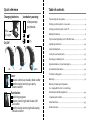
Changing batteries
Low battery warning
2 beeps every
30 minutes
Plus
(+) signs
Putting your hearing aids on your ears.............................................4
Turning your hearing aids on and off .............................................. 6
Battery information.......................................................................... 8
13
Tips for wearing hearing aids for the first time...............................12
675
On/Off
Your hearing aids at a glance............................................................2
Operating instructions....................................................................14
Using the telephone...................................................................... 22
Caring for your hearing aids............................................................25
Cleaning your hearing aids............................................................ 26
Signature features of your hearing aids........................................ 28
on
off
open
Lever
volume control; up=louder, down=softer
comfort-clarity control; up=clarity,
down=comfort
Push button
switching programs
volume control; right aid=louder, left
aid=softer
comfort-clarity control; right aid=clarity,
left aid=comfort
Assistive listening devices............................................................. 30
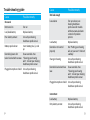
Troubleshooting guide................................................................... 32
Warnings........................................................................................ 36
Warning to hearing aid dispensers
(to comply with the U.S. Food and Drug
Administration (FDA) regulations) ................................................ 40
Compliance information................................................................ 43
Client feedback...............................................................................45
Additional notes............................................................................. 46
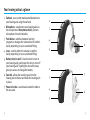
Your hearing aids at a glance
1 E
arhook - your custom made earmold attaches to
your hearing aids using the earhook
2 Microphone - sound enters your hearing aids via
the microphones. Microphone shield - protects
microphones from dirt & debris
3 Push button - switches between listening
programs or changes the volume level or comfortclarity, depending on your customized fitting
4 Lever - controls either the volume or comfortclarity, depending on your customized fitting
5 Battery door/on & off - close the door to turn on
your hearing aids, partly open the door to turn off
your hearing aids. Opening the door all the way
gives you access to change the battery
6 Earmold - allows the sound to pass from the
hearing aids to the ear and holds the hearing aids
in place
7 Power slim tube - sound travels down the tube to
the ear canal
2
1
3
4
6
5
2
3
4
7
6
5
2
3
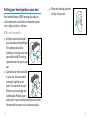
Putting your hearing aids on your ears
Your behind-the-ear (BTE) hearing aids may be
color-coded with a small dot on the battery door:
red = right ear; blue = left ear.
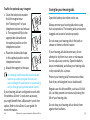
3.Place the hearing aid over
the top of your ear.
3.
BTEs with earmolds
1.Hold the earmold between 1.
your thumb and index finger.
The opening should be
pointing in towards your ear
canal with the BTE resting
upwards over the top of your
ear.
2.Carefully insert the earmold 2.
in your ear. You may need
to twist it slightly to the
back. The earmold should
fit into your ear snugly and
comfortably. Pulling down
and back on your earlobe may help you insert
the earmold into your ear canal more easily.
4
5
Turning your hearing aids on and off
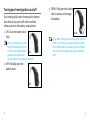
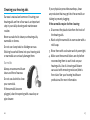
Your hearing aids have a three-position battery
door that acts as an on/off switch and that
allows access to the battery compartment.
1.ON: Close the battery door
fully.
1.
Note: It may take 5 seconds
before the hearing aid turns
on. Your hearing healthcare
on
provider can additionally
increase the start up delay if required.
2.OFF: Partially open the
battery door.
3.OPEN: Fully open the battery 3.
door to access and change
the battery.
open
ote: When turning your hearing aid on and off
N
while it is on the ear, grasp the top and bottom
of the device with your index finger and thumb.
Use your thumb to open and close the battery
door.
2.
off
6
7
Battery information
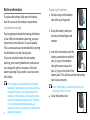
Replacing the battery
To replace the battery, fully open the battery
door for access to the battery compartment.
1.Gently swing out the battery
door with your fingernail.
Low battery warning
Two long beeps indicate the hearing aid battery
is low. After the low battery warning, you may
experience some reduction in sound quality.
This is normal and can be remedied by inserting
fresh batteries into the hearing aids.
If you are not able to hear the low battery
warning, your hearing healthcare professional
can change the pitch or loudness of the low
battery warning. If you prefer, it can be turned
off entirely.
8
our hearing aids are designed to generate a
Y
low battery warning every 30 minutes until you
change the batteries, but depending on the
condition of the batteries, they may die before
another low battery warning occurs. Therefore,
it is recommended that the batteries are
replaced as soon as possible once you hear the
low battery warning.
2.Grasp the battery with your
thumb and index finger and
remove.
1.
2.
3.Insert the new battery into the
3.
battery compartment with the
plus (+) sign on the battery
facing the same way as the
plus (+) sign on the side of the
battery door. This will ensure that the battery
door closes properly.
ote: If the battery is inserted incorrectly, the
N
hearing aid will not turn on.
4. Close the battery door.
4.
9
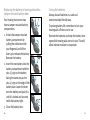
Replacing the battery in hearing aids with a
tamper-resistant battery door
Your hearing instrument may
have a tamper-resistant battery
compartment.
1. Unlock the tamper-resistant
battery compartment by
pulling the white lever with
your fingernail and lift the
lever up to release the battery.
Remove the battery.
Caring for batteries
Always discard batteries in a safe and
environmentally friendly way.
To prolong battery life, remember to turn your
hearing aids off when not in use.
Remove the batteries and keep the battery door
open while hearing aids are not in use. This will
allow internal moisture to evaporate.
2. Insert the new battery into the
battery compartment with the
plus (+) sign on the battery
facing the same way as the
plus (+) sign on the edge of the
battery door. Lower the lever
onto the battery and push it is
until it is locked and securely
holds the battery tight.
3. Close the battery door.
10
11
Tips for wearing hearing aids for the first
time
1.Start in a quiet room at home first to get
used to the new sound quality. Sounds like
the ticking of a clock, the humming of the
computer, the beep of the microwave or the
rustling of clothes or paper may seem loud
to you at first, because you have not been
hearing them properly for a long time.
2.Read aloud to yourself and learn to correct
the volume of your own voice when you are
wearing the hearing aids.
3.Talk to different people and learn how to
distinguish between different sound patterns
again.
4.It will take some time before you are
completely used to your hearing aids and can
fully enjoy the benefits.
5.Wear your hearing aids for as many hours a
day as you can, and for a little longer each
day.
12
6. Make notes at the back of this booklet,
write down difficult situations and describe
what any unpleasant noises were like. This
information will help your hearing healthcare
professional to fine-tune the devices better
for you.
7.Involve your family and friends in this
familiarization period. For example,
ask someone to set the television to a
comfortable volume.
8.When you are beginning to get used to
wearing the hearing aids, wear them in more
difficult listening environments such as the
office, at parties or in restaurants. This can
be difficult even for people who can hear
normally. Give yourself time to regain your
ability to hear in these difficult situations.
9.Make your hearing aids part of your everyday
life and be patient with yourself until you
have retrained yourself to interpret the
sounds correctly.
13
Operating instructions
Comfort-clarity control
Your BTE hearing aids come with two controls
that allow you to further adjust your hearing
aids – a lever and a push button.
Lever
The lever on your hearing aids can be
set up as either a volume control or a
comfort-clarity control.
Volume control
If the lever has been configured as a volume
control, you can adjust the volume of your
hearing aids. Press up to increase; press down
to decrease. As you change the volume level,
your hearing aids will beep.
Volume setting
Recommended volume level
Turning volume up
As you change the comfort-clarity level, your
hearing aids will beep.
Comfort-clarity control setting
Ideal comfort and clarity level
Beeps
1 beep
Increase sound clarity level
short beep
Increase listening comfort
short beep
1 beep
Maximum sound clarity level
2 beeps
short beep
Maximum listening comfort level
2 beeps
Beeps
Turning volume down
short beep
Maximum volume level
2 beeps
Minimum volume level
2 beeps
14
If the lever has been configured as a comfortclarity control – press up to increase clarity of
speech; press down to decrease overall noise or
improve listening comfort. Each step will change
the hearing aid performance. Sometimes
multiple steps are required to achieve the
desired listening results. After each press wait
for about 4-5 seconds to allow the hearing aid
to adjust to the new setting.
15
Tamper-resistant cover
Push button
Some hearing aids are fitted with
tamper-resistant covers instead of
levers to prevent someone from
accidentally adjusting the hearing aids.
The cover can still be used to make
adjustments but it requires using a
fingernail or a small tool to push up or down.
Your hearing aids are equipped with
a push button which can be set for
switching between programs, to adjust
your volume or adjust the comfort-clarity control.
Program control
If the push button has been configured as a
program control, each time you push the button,
you will move to a new hearing aid program.
Your hearing aids beep to indicate which
program you are in.
Program 1
(e.g. automatic program)
Program 2 (e.g. speech in noise)
1 beep
Program 3 (e.g. easy-t/telephone)
3 beeps
Program 4 (e.g. music)
4 beeps
Easy-t/telephone (see pg 22)
short melody
Easy-DAI (see pg 31)
short melody
DuoLink (if enabled) (see pg 20)
16
2 beeps
Opposite ear beeps
the same as side
being adjusted
17
Volume control
Comfort-clarity control
If the push button has been configured as a
volume control:
If the push button has been configured as a
comfort-clarity control:
• Push the button on your right hearing aid to
increase the volume in both hearing aids.
• Push the button on your right hearing aid to
increase clarity of speech.
• Push the button on your left hearing aid to
decrease the volume in both hearing aids.
• Push the button on your left hearing aid to
decrease overall noise or improve listening
comfort.
Volume setting
Recommended volume level
Turning volume up
Beeps
1 beep
short beep
Turning volume down
short beep
Maximum volume level
2 beeps
Minimum volume level
2 beeps
Each step will change the hearing aid
performance. Sometimes multiple steps are
required to achieve the desired listening results.
After each press wait for about 4-5 seconds
to allow the hearing aid to adjust to the new
setting.
As you change the comfort-clarity level, your
hearing aids will beep.
18
19
Comfort-clarity control setting
Ideal comfort and clarity level
Increase sound clarity level
Learning
Beeps
1 beep
short beep
Increase listening comfort
short beep
Maximum sound clarity level
2 beeps
Maximum listening comfort level
2 beeps
DuoLink
If DuoLink is enabled, then changing the volume,
program or comfort-clarity setting on one
hearing aid, will automatically make the change
to both hearing aids at the same time. DuoLink
works for both the push button and the lever.
For example, if your push button is configured
as a program control and DuoLink is enabled,
when you push the button on your right hearing
aid, the program will change in both hearing
aids.
20
Your hearing aids will learn your adjustments
in different environments, if this feature is
available and has been enabled by your hearing
healthcare professional. Over time, the hearing
aids will adjust the default volume and comfortclarity settings to the levels that you typically
use.
Remote control
Your hearing aids may also come with an
optional remote control which allows you to
switch between different listening programs,
and change your volume or comfort-clarity
settings.
21
Using the telephone
As telephones do not all work the same, you
may experience different results from different
phones. You can use many phones by simply
holding the receiver to your ear, without the
need to change to a dedicated telephone
program on your hearing aids. Remember to
move the handset slightly up or back to find the
position that sounds best to you.
Depending on the phone type you use, your
hearing healthcare professional might have
selected a dedicated phone program on your
hearing aids. Your hearing aids may have an
automatic telephone program (easy-t feature),
which automatically switches to a dedicated
telephone program when a telephone receiver
is brought close to one of your hearing aids. You
will hear a short melody to indicate you are in
the telephone (easy-t) program.
22
When the receiver is moved away from the
hearing aid it will automatically return to
the previous listening program. If DuoLink is
enabled on your hearing aids for the automatic
telephone program, both hearing aids are
synchronized and the listening program for
the opposite ear will also change when the
automatic telephone program is activated.
If the hearing aid does not switch to the
telephone program automatically when the
telephone receiver is placed in proximity, the
magnet for easy-t hearing aids should be
attached to the telephone receiver. The magnet
is designed to strengthen the magnetic field
at the ear piece of hearing aid compatible
telephones.
23
To affix the optional easy-t magnet:
Caring for your hearing aids
1. Clean the telephone receiver.
Hold the magnet near
the “listening end” of your
telephone receiver and release
it. The magnet will flip to the
appropriate side and seek
the optimal position on the
telephone receiver.
1.
2. Place the double-sided tape
in this optimal position on the
telephone receiver.
3.
2.
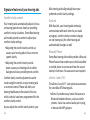
Always remove your hearing aids when using
hair care products. The hearing aids can become
clogged and cease to function properly.
Do not wear your hearing aids in the bath or
shower or immerse them in water.
3. Attach the magnet to the tape.
our hearing healthcare professional may also
Y
have set up a phone program that you can
access through the push button on your hearing
aids, or through your optional remote control.
If your hearing aids are configured to work with
the wireless uDirect 2 neck worn accessory,
you might benefit from a Bluetooth hands free
option. Refer to the uDirect 2 user guide for
more information.
™
®
24
Open the battery door when not in use.
® Bluetooth is a registered trademark of Bluetooth SIG Inc.
If your hearing aids do become wet, do not
attempt to dry them in an oven or microwave.
Do not adjust any controls. Open the battery
doors immediately, and allow your hearing aids
to dry naturally for 24 hours.
Protect your hearing aids from excessive heat
(hair dryer, vehicle glove box or dashboard).
Regular use of a dehumidifier, such as a Dri-Aid
kit, can help prevent corrosion and prolong the
life of your hearing aids.
Do not drop your hearing aids or knock them
against hard surfaces.
25
Cleaning your hearing aids
Ear wax is natural and common. Ensuring your
hearing aids are free of ear wax is an important
step in your daily cleaning and maintenance
routine.
Never use alcohol to clean your hearing aids,
earmolds or domes.
Do not use sharp tools to dislodge ear wax.
Sticking household items into your hearing aids
or earmolds can seriously damage them.
Earmolds
Always ensure earmolds are
clean and free of earwax.
Do not use alcohol to clean
your earmolds.
If your physician prescribes eardrops, clean
any moisture that may get into the earmolds or
tubing to prevent plugging.
If the earmolds require further cleaning:
1.Disconnect the plastic tube from the hook of
the hearing aids.
2.Wash only the earmolds in warm water with a
mild soap.
3.Rinse them with cool water and dry overnight.
4.Make sure the earmold tubes are dry before
reconnecting them to each hook on your
hearing aids. Use of a hearing aid blower
can assist with removing moisture/debris
from tube. See your hearing healthcare
professional for more information.
If the earmolds become
plugged, clear the opening with a wax loop or
pipe cleaner.
26
27
Signature features of your hearing aids
Comfort-clarity control
Your hearing aids automatically adjust to focus
on hearing speech more clearly or providing
comfort in noisy situations. Some Max hearing
aid models provide a control to adjust your
comfort-clarity settings.
• Adjusting the comfort-clarity control up
causes your hearing aids to focus more on
speech clarity.
• Adjusting the comfort-clarity control
down causes your hearing aids to soften
background noise, providing more comfort.
Comfort-clarity control adjustments can be
made using the controls on your hearing aids
or a remote control. Please talk with your
hearing healthcare professional to find out
which controls have been programmed for the
comfort-clarity control.
As you adjust the comfort-clarity control, your
28
Max hearing aids will gradually learn your
preferred comfort-clarity settings.
DuoLink
With DuoLink, your hearing aids wirelessly
communicate with each other. As you make
a program, comfort-clarity or volume change
on one hearing aid, the other hearing aid
automatically changes as well.
Binaural Phone
Some Max hearing aid models provide a Binaural
Phone feature that enables you to hold a landline
or mobile phone to one ear and hear the sound
clearly in both ears. No accessories are required.
uDirect 2 and uTV 2
The uDirect 2 and uTV 2 are optional accessories
for some Max BTE hearing aids.
™
• uDirect 2 provides easy, hands-free access to
Bluetooth enabled devices, such as mobile
phones. It also has a wired audio jack to plug
in devices like MP3 players.
29
• uTV 2 is used with the uDirect 2 to transmit
sound from your TV directly to your hearing
aids. The uTV 2 can also transmit sound from
stereo systems, computers and other audio
sources.
For more information on using the uDirect 2
or uTV 2, please see the user guide for that
accessory. For information on how to get a
uDirect 2 or uTV 2 accessory, please contact
your hearing healthcare professional.
Assistive listening devices
Listening in public places
Telecoils pick up electromagnetic energy
and convert it into sound. Your hearing aid’s
telecoil option can help you listen in public
places equipped with telecoil compatible
assistive listening devices such as
a loop system. When you see this
symbol, it means that there is loop
system installed; this loop system
30
is compatible with your hearing aid. Please
contact your hearing healthcare professional for
more information on loop systems.
Connecting to external audio sources
Your hearing aids may feature an
optional direct audio input (DAI) to
connect to other audio sources, such
as a stereo or television, using an FM
system or a cable. The uDirect 2, an
optional wireless accessory, also has a DAI jack.
Some Max hearing aids provide easy-DAI which
automatically selects your direct audio input
program when a DAI signal is detected by your
hearing aids. A short melody will play to confirm
that easy-DAI is activated. When you disconnect
the DAI input, your hearing aids will return to
the program you were in prior to switching.
Ask your hearing healthcare professional for
information about the direct audio input system
and a connector cord.
31
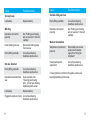
Troubleshooting guide
Cause
Possible remedy
No sound
Cause
Possible remedy
Not loud enough
Low volume
Turn up volume; see
hearing healthcare
professional for models
without a manual volume
control or if problem
persists
Not turned on
Turn on
Low/dead battery
Replace battery
Poor battery contact
Consult your hearing
healthcare professional
Low battery
Replace battery
Battery upside down
Insert battery plus (+) side
up
Earmolds not inserted
properly
See “Putting your hearing
aids on your ears”. Reinsert
carefully
Change in hearing
Consult your hearing
healthcare professional
Earmolds blocked with ear
wax
Clean earmolds. See
“Cleaning your hearing
aids”. Consult your hearing
healthcare professional
Earmolds/power slim
Clean earmolds. See
tubes blocked with ear wax “Cleaning your hearing
aids”. Consult your hearing
healthcare professional
Plugged microphone shield Consult your hearing
healthcare professional
Plugged microphone shield Consult your hearing
healthcare professional
Intermittent
32
Low battery
Replace battery
Dirty battery contact
Consult your hearing
healthcare professional
33
Cause
Possible remedy
Possible remedy
Earmolds falling out of ear
Two long beeps
Low battery
Cause
Replace battery
Whistling
Earmolds not inserted
properly
See “Putting your hearing
aids on your ears”. Reinsert
carefully
Hand/clothing near ear
Move hand/clothing away
from your ear
Poorly fitting earmolds
Consult your hearing
healthcare professional
Not clear, distorted
Poorly fitting earmolds
Consult your hearing
healthcare professional
Earmolds blocked with ear
wax
Clean earmolds. See
“Cleaning your hearing
aids”. Consult your hearing
healthcare professional
Low battery
Replace battery
Poorly fitting earmolds
Consult your hearing
healthcare professional
Earmolds not inserted
properly
See “Putting your hearing
aids on your ears”. Reinsert
carefully
Weak on the telephone
Telephone not positioned
properly
Move telephone receiver
around ear for clearer
signal. See “Using the
telephone”
Hearing aid requires
adjustment
Consult your hearing
healthcare professional
For any problems not listed in the guide, contact your
hearing healthcare professional.
Plugged microphone shield Consult your hearing
healthcare professional
34
35
Warnings
Hearing aids should only be used as directed
by your physician or hearing healthcare
professional.
Hearing aids will not restore normal hearing
and will not prevent or improve a hearing
impairment resulting from organic conditions.
Do not use your hearing aids in explosion
hazard areas.
Allergic reactions to hearing aids are
unlikely. However, if you experience itching,
redness, soreness, inflammation or a burning
sensation in or around your ears, inform your
hearing healthcare professional and contact
your physician.
In the unlikely case that any parts remain in
the ear canal after the removal of the hearing
aid, contact a physician immediately.
Remove your hearing aids for CT and
MRI scans or for other electromagnetic
procedures.
Special care should be exercised in wearing
hearing aids when maximum sound
pressure levels exceed 132 decibels. There
may be a risk of impairing your remaining
hearing. Speak with your hearing healthcare
professional to ensure the maximum output
of your hearing aids is suitable for your
particular hearing loss.
Easy-t magnet warnings
Be sure the magnet is securely affixed to the
telephone.
Keep loose magnets out of reach of children
and pets.
If the magnet falls into your ear, contact your
hearing healthcare professional.
If the magnet is swallowed, contact your
physician immediately.
36
37
The magnet may affect some medical devices
or electronic systems. Always keep the
magnet (or the telephone equipped with
the magnet) at least 30 cm (12”) away from
pacemakers, credit cards, floppy disks or
other magnetically sensitive devices.
Too high distortion during dialing or phoning
may mean that the phone handset is stressed
by the magnet. To avoid any damage, please
move the magnet to another place on the
telephone receiver.
Battery warnings
Never leave hearing aids or batteries where
small children and pets can reach them.
Never put hearing aids or batteries in
your mouth. If a hearing aid or battery is
swallowed, call a physician immediately.
Precautions
38
The use of hearing aids is only part of hearing
rehabilitation; auditory training and lip
reading instruction may be required as well.
In most cases, infrequent use of hearing aids
does not provide full benefit. Once you have
become accustomed to your hearing aids,
wear your hearing aids everyday all day.
Your hearing aids use the most modern
components to provide the best possible
sound quality in every listening situation.
However, communication devices such as
digital cell phones can create interference
(a buzzing sound) in hearing aids. If you
experience interference from a cell phone
being used close by, you can minimize this
interference in a number of ways. Switch your
hearing aids to another program, turn your
head in a different direction or locate the cell
phone and move away from it.
Labeling
The serial number and year of manufacture are
located inside the battery door.
39
Warning to hearing aid dispensers
(to comply with the U.S. Food and Drug
Administration (FDA) regulations)
A hearing aid dispenser should advise a prospective hearing aid
user to consult promptly with a licensed physician (preferably
an ear specialist) before dispensing a hearing aid if the hearing
aid dispenser determines through inquiry, actual observation,
or review of any other available information concerning the
prospective user, that the prospective user has any of the
following conditions: (i) Visible congenital or traumatic deformity
of the ear. (ii) History of active drainage from the ear within the
previous 90 days. (iii) History of sudden or rapidly progressive
hearing loss within the previous 90 days. (iv) Acute or chronic
dizziness. (v) Unilateral hearing loss of sudden or recent onset
within the previous 90 days. (vi) Audiometric air-bone gap equal to
or greater than 15 decibels at 500 hertz (Hz), 1,000 Hz, and 2,000
Hz. (vii) Visible evidence of significant cerumen accumulation or
a foreign body in the ear canal. (viii) Pain or discomfort in the ear.
Special care should be exercised in selecting and fitting a hearing
aid whose maximum sound pressure level exceeds 132 decibels
because there may be risk of impairing the remaining hearing
of the hearing aid user. [This provision is required only for those
hearing aids with a maximum sound pressure capability greater
than 132 decibels (dB).]
Important notice for prospective hearing aid users
Good health practice requires that a person with a hearing loss
have a medical evaluation by a licensed physician (preferably
40
a physician who specializes in diseases of the ear) before
purchasing a hearing aid.
Licensed physicians who specialize in diseases of the ear
are often referred to as otolaryngologists, otologists or
otorhinolaryngologists. The purpose of medical evaluation is
to assure that all medically treatable conditions that may affect
hearing are identified and treated before the hearing aid is
purchased. Following the medical evaluation, the physician will
give you a written statement that states that your hearing loss
has been medically evaluated and that you may be considered
a candidate for a hearing aid. The physician will refer you to
an audiologist or a hearing aid dispenser, as appropriate, for a
hearing aid evaluation. The audiologist or hearing aid dispenser
will conduct a hearing aid evaluation to assess your ability to
hear with and without a hearing aid. The hearing aid evaluation
will enable the audiologist or dispenser to select and fit a hearing
aid to your individual needs. If you have reservations about your
ability to adapt to amplification, you should inquire about the
availability of a trial-rental or purchase-option program. Many
hearing aid dispensers now offer programs that permit you to
wear a hearing aid for a period of time for a nominal fee after
which you may decide if you want to purchase the hearing aid.
Federal law restricts the sale of hearing aids to those individuals
who have obtained a medical evaluation from a licensed
physician. Federal law permits a fully informed adult to sign a
waiver statement declining the medical evaluation for religious or
personal beliefs that preclude consultation with a physician. The
exercise of such a waiver is not in your best health interest and its
use is strongly discouraged.
41
Children with hearing loss
In addition to seeing a physician for a medical evaluation, a
child with a hearing loss should be directed to an audiologist
for evaluation and rehabilitation since hearing loss may cause
problems in language development and the educational and social
growth of a child. An audiologist who is qualified by training and
experience to assist in the evaluation and rehabilitation of a child
with hearing loss is recommended.
Compliance information
Declaration of conformity
Hereby Unitron declares that this Unitron product meets the
requirements of the Medical Devices Directive 93/42/EEC as
well as the Radio and Telecommunications Terminal Equipment
Directive 1999/5/EC. The full text of the Declaration of Conformity
can be obtained from the manufacturer.
Cell phone
The hearing aid described in this user guide is certified under:
Some hearing aid users have reported a buzzing sound in their
hearing aids when they are using cell phones. According to the ANSI
C63.19 standard, the compatibility of a particular hearing aid and
cell phone can be predicted by adding the rating for the hearing aid
immunity to the rating for the cell phone emissions. The sum of the
hearing aid rating (e.g. M2/T2 = 2) and the telephone rating (e.g.
M3/T3 = 3) is 5, and any combination that equals 5 will provide
‘normal use’. A sum of 6 or greater indicates ‘excellent performance’.
The equipment performance, measurements, categories and system
classifications are based upon the best information available but
cannot guarantee that all users will be satisfied.
Standard hearing system
The rating of this hearing aid is at least M2/T2. Your hearing
healthcare professional can provide the actual rating for this
hearing aid.
Note: the performance of the individual hearing aids may vary with
individual cell phones. Therefore, please try the hearing aid with your
cell phone or, if you are purchasing a new phone, please be sure to
try it with your hearing aid prior to purchase. For additional guidance,
please ask your hearing healthcare professional for the booklet
entitled “Hearing aid compatibility with digital wireless cell phones”.
42
USA Canada FCC ID: VMY-UWBTE2
IC: 2756A-UWBTE2
Notice 1
This device complies with Part 15 of the FCC Rules and with RSS210 of Industry Canada. Operation is subject to the following two
conditions:
1) this device may not cause harmful interference, and
2) this device must accept any interference received, including
interference that may cause undesired operation.
Notice 2
Changes or modifications made to this device not expressly
approved by Unitron may void the FCC authorization to operate
this device.
43
Notice 3
This device has been tested and found to comply with the limits for
a Class B digital device, pursuant to Part 15 of the FCC Rules and
ICES-003 of Industry Canada. These limits are designed to provide
reasonable protection against harmful interference in a residential
installation. This device generates, uses and can radiate radio
frequency energy and, if not installed and used in accordance
with the instructions, may cause harmful interference to radio
communications. However, there is no guarantee that interference
will not occur in a particular installation. If this device does cause
harmful interference to radio or television reception, which can
be determined by turning the equipment off and on, the user is
encouraged to try to correct the interference by one or more of the
following measures:
• Reorient or relocate the receiving antenna
Client feedback
Record your specific needs or concerns and bring to
your first office visit after getting your hearing aids.
This will help your hearing healthcare professional to
address your needs.
__________________________________________
__________________________________________
__________________________________________
__________________________________________
• Increase the separation between the equipment and receiver
• Connect the device into an outlet on a circuit different from
that to which the receiver is connected
__________________________________________
• Consult the dealer or an experienced radio/TV technician for
help
__________________________________________
__________________________________________
__________________________________________
__________________________________________
__________________________________________
44
45
Additional notes
____________________________________________
____________________________________________
____________________________________________
____________________________________________
Unitron Hearing Ltd.
20 Beasley Drive, P.O. Box 9017,
Kitchener, ON N2G 4X1 Canada
____________________________________________
____________________________________________
____________________________________________
____________________________________________
46
European Representative
Max-Eyth-Straße 20, 70736
Fellbach-Oeffingen, Germany
For a listing of Unitron group
companies, please visit
www.unitron.com
Distributor
www.unitron.com
12-022 029-5907-02