1
O P E R AT I O N
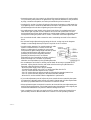
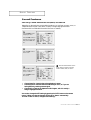
Setting the Clock
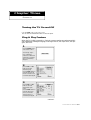
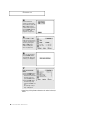
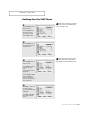
1
Press the MENU button to
display the on-screen
menu.
Press the CH ▼ button
three times to select
“Function”.
Press the VOL + button.
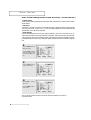
2
Press the CH ▼ button to
select “Time” menu.
Press the VOL + button:
The Time menu will
appear on the screen, and
“Clock” will be selected.
3
Press the VOL + button
again (the hours digits will
be selected). Press the CH
▲ or CH ▼ button repeatedly until the correct hour
appears.
When selecting the hours, be sure
to select the proper time of day (AM
or PM).
You can change the hours by pressing
CH ▲ or CH ▼ repeatedly (or by
holding down either of these buttons).
After the hour is entered,
press the VOL + button.
(at this point the minutes
digits will be selected.)
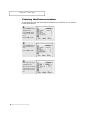
4
Press the CH ▲ or CH ▼
button to select the
correct minutes.
After selecting the correct
minutes, press the VOL +
button.
Press the MENU button
three times to exit.
3.10
C HAPTER T HREE: TV OPERATION
The time will appear every time
you press DISPLAY.