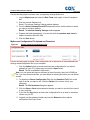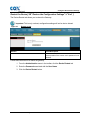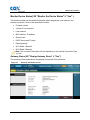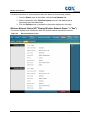
1
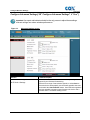
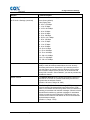
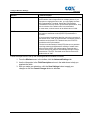
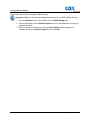
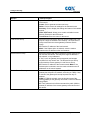
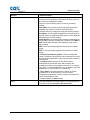
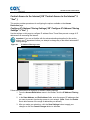
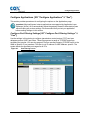
Cox Business Internet Gateway
and Guest WiFi
Administrator Guide
April, 2014
Introduction
This guide provides instructions for configuring your Wireless Gateway. The software’s
Graphical User Interface (GUI) gives you access to settings that were configured at the
factory or by Cox Business for the most common installation configurations. After you
access the GUI, you can customize these settings to meet your needs.
Important: If you are not familiar with the network configuration procedures
described in this guide, contact your information technology professional before
you change any of the settings.
© 2014 by Cox Communications.
All rights reserved. No part of this document may be reproduced or transmitted in any form or by any means,
electronic, mechanical, photocopying, recording, or otherwise, without prior written permission of Cox
Communications.
Table of Contents
Table of Contents
Cisco 3829AD Gateway Overview .................................................................................. 1
Cox Business Internet Gateway and Guest WiFi Services ........................................... 1
Internet Gateway Service ........................................................................................................ 1
Guest WiFi Service .................................................................................................................. 1
Log in to the Gateway ..................................................................................................... 3
Change Your Username .......................................................................................................... 4
Set Up Basics .................................................................................................................. 5
Quick Setup Tab ...................................................................................................................... 5
Changing Your Password ..................................................................................................5
Configure Wi-Fi Network ......................................................................................................... 6
Configure LAN Setup .............................................................................................................. 8
Configure Gateway IP ........................................................................................................8
Configure Network Address Server Settings .....................................................................9
Configure Time Settings ...................................................................................................11
Configure DDNS Settings ..................................................................................................... 12
Enable and Configure DDNS ...........................................................................................12
Disable DDNS ..................................................................................................................13
Configure Wireless Settings .......................................................................................... 15
Configure WPS....................................................................................................................... 15
Configure Radio Settings ..................................................................................................... 17
Configure Wireless Security Settings ................................................................................. 20
Configure Guest Network Settings ...................................................................................... 22
Configure MAC Filter Settings ............................................................................................. 26
Configure Advanced Settings .............................................................................................. 28
Configure WDS Settings ....................................................................................................... 31
Configure QoS Settings ........................................................................................................ 33
Configure Security .......................................................................................................... 35
Configure Firewall Settings .................................................................................................. 35
Configure VPN Pass-through Settings ................................................................................ 38
Configure VPN Settings ........................................................................................................ 39
Control Access to the Internet ....................................................................................... 43
Configure IP Address Filtering Settings ............................................................................. 43
Configure MAC Address Filtering Settings ........................................................................ 44
i
Table of Contents
Configure Applications ................................................................................................... 47
Configure Port Filtering Settings ......................................................................................... 47
Configure Port Range Forwarding Settings ....................................................................... 49
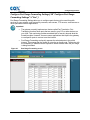
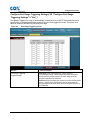
Configure Port Range Triggering Settings ......................................................................... 51
Configure DMZ Settings ........................................................................................................ 53
Administration Settings .................................................................................................. 55
Configure Management Settings ......................................................................................... 55
Configure Reporting Settings .............................................................................................. 58
Configure Back Up and Restore Settings ........................................................................... 59
Cox Business MyAccount Backup and Restore ...............................................................60
MyAccount Configuration File Upload and Download .....................................................62
Restart the Device ................................................................................................................. 63
Monitor Device Status .................................................................................................... 65
Gateway Status ...................................................................................................................... 65
Local Network Status ............................................................................................................ 67
Wireless Network Status ....................................................................................................... 68
Storage & Sharing ........................................................................................................... 71
USB Settings .......................................................................................................................... 71
Network Attached Storage (NAS)......................................................................................... 73
Media Server .......................................................................................................................... 75
Advanced Gateway Configurations ............................................................................... 77
Virtual Local Area Network ................................................................................................... 77
User Provisioning Details for VLAN Feature ....................................................................78
Bridge Mode ........................................................................................................................... 79
Mixed Mode ............................................................................................................................ 80
Troubleshooting and Frequently Asked Questions...................................................... 81
The wireless gateway does not register an Ethernet connection .................................... 81
The wireless gateway does not register an Ethernet connection after connecting to a hub
................................................................................................................................................. 81
The wireless gateway does not register a cable connection ............................................ 81
Frequently Asked Questions.......................................................................................... 82
I don't understand the front panel status indicators ......................................................... 82
How do I configure the TCP/IP? ........................................................................................... 84
Configure TCP/IP on Windows 7 Systems ......................................................................85
Configure TCP/IP on Windows XP Systems ....................................................................86
Configure TCP/IP on Macintosh Systems........................................................................86
ii
Table of Contents
How do I renew the IP address on my PC? ......................................................................... 87
Renew the IP Address on Windows 7 Systems ...............................................................87
Renew the IP Address on Windows XP Systems ............................................................87
Renew the IP Address on Macintosh Systems ................................................................87
How do I arrange for installation? ....................................................................................... 88
How does the wireless gateway connect to my computer? ............................................. 88
Tips for Improved Performance ..................................................................................... 89
Cox Business Remote Support ...................................................................................... 91
For More Information ............................................................................................................ 92
iii
Overview
Cisco 3829AD Gateway Overview
The Cox Business Internet Gateway and Guest WiFi service is based on the Cisco Wireless
Gateway Model DPC3829AD. It is a high-performance gateway that combines a cable modem,
router, and wireless access point(s) in a single device that provides a cost-effective networking
solution for small to medium businesses.
The gateway incorporates (8) bonded downstream channels along with four (4) bonded
upstream channels. These bonded channels can deliver downstream data rates in excess of
400 Mbps and upstream data rates in excess of 120 Mbps. It provides up to eight (8) times
faster download speeds than conventional single-channel DOCSIS® 2.0 cable modems.
The gateway supports up to 50 simultaneous users for the 2.4 GHz and another 50
simultaneous users for the 5.0 GHz radio for a total of 100 simultaneous users if both
radios are fully utilized. WiFi distance recommendations - 10,000 square feet for the 2.4
GHz radio and 7,500 square feet for the 5.0 GHz radio.
Note: All environments are different and impacted by several real world factors such as
steel walls, microwaves, and other RF interference
The gateway also offers:
Dual band simultaneous 2.4Ghz and 5.0Ghz radios with 3x3 MIMO high power antennas
that deliver 802.11ac with beamforming technology (up to 50 users per radio)
4 Gigabit Ethernet ports
Stateful Packet Inspection firewall technology
Static IP addressing (IPV4 and IPV6)
VPN point-to-point and pass-through
The integrated router features a Dynamic Host Configuration Protocol (DHCP) server, Network
Address Translation (NAT), Network Address Port Translation (NAPT), and a Stateful Packet
Inspection (SPI) firewall. These features allow you to share a single high-speed public Internet
connection and files between devices in the network by attaching multiple wired/wireless
devices to the wireless business gateway.
Cox Business Internet Gateway Admin Guide
1
CBIG and Guest WiFi Services
Cox Business Internet Gateway and Guest WiFi Services
The Cisco 3829AD Gateway delivers two distinct services; Internet Gateway and Guest WiFi.
Customers who purchase both services have two physical gateways deployed in their business
location.
Internet Gateway Service
Internet Gateway service is delivered via a Cisco 3829AD Gateway to provide both wired and
wireless networks. The customer administrator has full access to the gateway to configure up to
16 wireless networks and other available feature sets as described in this administrators guide.
All networks share bandwidth and priority of IP traffic to and from the various networks and are
equal. Customers may choose from any Cox Business Internet Access speed tiers available in
their market.
Guest WiFi Service
A second gateway, second HFC drop, and a guest WiFi option provide dedicated bandwidth to
customers so that their business’s internet access is not impacted by WiFi users.
This type of configuration ensures that Guest WiFi traffic, such as Netflix or gaming in the
waiting room/lobby, does not impact the core business internet needs. The Guest WiFi gateway
may also be useful when the geographic location of the Internet gateway and intended Guest
WiFi area are far enough apart that a single WiFi access point can’t cover both locations.
The customer has three speed tier options to accommodate anticipated peak simultaneous
users on the dedicated the Guest WiFi network. The options include:
Basic Guest WiFi (5Mbps x 1)
Plus Guest WiFi (15 x 3)
Premium Guest WiFi (28 x 4)
Customers must purchase CBI (Cox Business Internet) to add the Guest WiFi service. Guest
WiFi is delivered via a second cable modem/gateway. The Guest WiFi gateway can have one
(1) SSID per radio enabled. Many of the other Internet gateway features are removed from the
admin interface because this device is dedicated to Guest WiFi users only, and advanced
features are rarely needed.
The Guest WiFi is unmanaged by Cox. This means the device WiFi Capabilities are not actively
monitored for uptime or security events by Cox. Cox does not provide support or configuration
for WiFi end points (PC, MAC, Android, iOS, etc.) The customer admin determines if the WiFi
network is password-protected or open.
Cox is not responsible for customer impacting network or security issues.
Cox Business Internet Gateway Admin Guide
1
Login Instructions
Log in to the Gateway{ XE "Logging in to the Gateway" \t "See" }
This section provides instructions for logging in to the Wireless Business Gateway so that you
can customize the gateway to suit your needs rather than using the default (factory) settings.
Note: It is strongly recommended that you use an Ethernet connection versus Wi-Fi
when you first connect to the gateway. If you use Wi-Fi during initial configuration and
you alter the Service Set Identifier (SSID), you will be dropped from the network when
the change is submitted. You will then have to reconnect using the new SSID.
The same recommendation applies to changing the wireless passphrase. It is best to
make these changes over an Ethernet hard-wired connection..
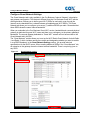
The gateway uses a default IP address of 192.168.0.1. If you have connected to the gateway
correctly and configured your computer properly, use the following procedures to log in to the
gateway as an administrator.
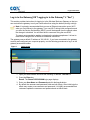
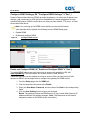
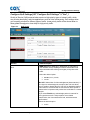
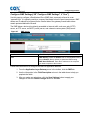
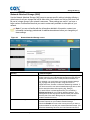
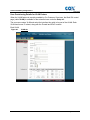
Figure 1.
Login screen
1. Open your web browser and enter the following IP address: 192.168.0.1.
2. Press the Enter key.
Result: The Status DOCSIS WAN login page displays.
3. Enter your User Name and Password and click the Log In button.
4. By default the username and password fields are both empty. After initial login the
admin may create a new username and password. It is highly recommended that
customers update the username and password and not leave blank.
Cox Business Internet Gateway Admin Guide
3
Login Instructions
Change Your Username
The Cisco application allows you to change your name when needed.
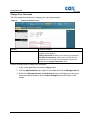
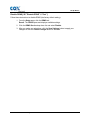
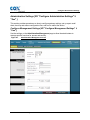
Figure 2.
Change Username screen
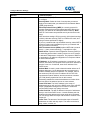
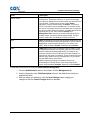
Section
Field Description
Change Password
User Name: Displays the user name for the operator User
currently
Name
logged in to the gateway.
Change Password to: Allows you to change your password.
Re-Enter New password: Allows you to re-enter the new
password. You must enter the same password as the one
entered in the Change Password to: field.
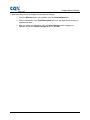
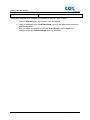
Use the following steps to change your username.
1. Log in to the application and click the Log In button.
2. Click the Administration menu option in the toolbar and click the Management tab.
3. Scroll to the Gateway Access / Local Access section and change your user name
and your password and then click the Save Settings button at the bottom of the
screen.
4
Cox Business Internet Gateway Admin Guide
Set Up Basics
Set Up Basics{ XE "Set Up Basic Functionality" \t "See" }
This section instructs you on how to configure basic functionality for your gateway settings.
Quick Setup Tab
Use the Quick Setup page to change your password and to configure the WLAN.
Important: The settings on this page are unique to your gateway. You may elect to
modify the setting values or keep the default values. These default settings are all that
you need to operate a secure wireless network. We recommend that you keep your
gateway in a physically secure location away from malicious users who might attempt to
factory reset your gateway.
Changing Your Password
Important: We recommend that you create a new password regularly to protect against
Internet attacks that specifically search for devices operating with well-known or factory
default user names and/or passwords.
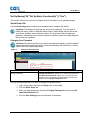
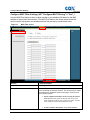
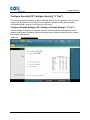
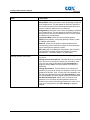
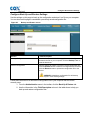
Figure 3.
Change Password screen
Section
Field Description
Change Password
Change Password to: Allows you to change your password.
User Name
Re-Enter New password: Allows you to re-enter the new
password. You must enter the same password as the one
entered in the Change Password to field.
Use the following steps when you want to change your password only.
1. Log in to the system and click the Setup menu in the toolbar.
2. Click the Quick Setup tab.
3. Enter your new password in the both the Change Password to: field and the Reenter New Password field.
4. Click the Save Settings button at the bottom of the screen.
Cox Business Internet Gateway Admin Guide
5
Set Up Basics
Configure Wi-Fi Network
The next two sections on the Quick Setup tab include how to configure the primary network for
the Wi-Fi Radio 1 and Wi-Fi Radio 2.
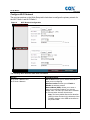
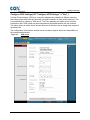
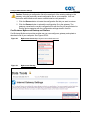
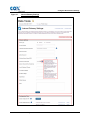
Figure 4.
Wi-Fi Network Configuration
The following table describes what each field means.
Section
Field Description
Wi-Fi Radio 1 Network and
Wi-Fi Radio 2 Network
802.11 Band: Allows you to choose which Wi-Fi
band you are configuring.
Wireless Interface: Allows you to Enable or
Disable the wireless network.
Network Name (SSID): Allows you to enter a
name for your wireless network or to use the
default value. The value you enter will be viewable
on PCs and other wireless client devices.
Note: The factory default Service Set Identifier
(SSID) is either the last six (6) characters of the
CM MAC Address or the SSID as identified on
the product label.
6
Cox Business Internet Gateway Admin Guide
Set Up Basics
Section
Field Description
Wi-Fi Radio 1 Network and
Wi-Fi Radio 2 Network (continued)
Security Mode: Allows you to select a wireless
security mode to help protect your network. If you
select Disable, your wireless network is not secure
and any wireless device within range may
connect to it.
Note: The factory default Wireless Security Mode
is WPA or WPA2-Personal.
Encryption: Allows you to select a level of
encryption based on the wireless security mode
you choose.
Passphrase: The passphrase key for the gateway.
The key can be from 8 to 63 characters. The
factory default passphrase is equal to the 9-digit
serial number of your gateway, which can be found
on the rating label attached to your wireless
gateway. The Show Key box toggles the
passphrase between hidden characters and clear
text.
Use the following steps to configure the Wi-Fi Radio 1 (2.4GHz) and 2 (5.0GHz) Networks.
1. Log in to the system and click the Setup menu in the toolbar.
2. Click the Quick Setup tab.
3. Scroll to the Wi-Fi Radio 1 Network section and use the information in the Field
Description column in the table above to help you populate the fields.
4. Repeat step 3 for the Wi-Fi Radio 2 Network section.
a. Note that the SSID network names can be configured the same for each
radio. Most devices (phones, tablets and computer) will auto select the best
available network based upon the hardware capabilities of the device. If the
admin wants uses to be aware of the network capabilities the SSIDs could
be labeled to include 2.4 or 5.0 as an example.
5. Click the Save Settings button.
Cox Business Internet Gateway Admin Guide
7
Set Up Basics
Configure LAN Setup { XE "Configure LAN Setup Settings" \t "See" }
The LAN Setup page allows you to configure the settings for the Local Area Network (LAN).
These settings include the range of IP addresses that define the LAN itself, as well as how the
addresses are assigned (automatically by DHCP or manually) as new devices are added to the
network.
Configure Gateway IP
Important: Unless you are knowledgeable about administering IP addresses, we
recommend that you do not change these settings. If you change these values
incorrectly, you can lose Internet access.
Figure 5.
Configure LAN Gateway IP screen
Section
Field Description
Network Setup (LAN) Gateway IP
Local IP Address. The base IP address of the private LAN. The
factory default LAN IP Address is 192.168.0.1
Subnet Mask. The subnet mask for your LAN.
Follow these instructions to apply settings to the Configure LAN Setup / Gateway IP:
1. The Setup LAN page appears whenever you log on to the gateway. However, if the
page does not display, click the LAN Setup tab and scroll to the Network Setup
(LAN) Gateway IP section.
2. Use the information in the Field Description column in the table above to help you
populate the fields.
3. After you make your selections, click the Save Settings button to apply your
changes or click the Cancel Changes button to withdraw.
8
Cox Business Internet Gateway Admin Guide
Set Up Basics
Configure Network Address Server Settings
Figure 6.
Network Address Server Settings
Section
Field Description
Network Address Server Settings (DHCP)
DHCP Server. Allows you to enable or disable the
DHCP server in the business gateway. The DHCP
server is used to automatically allocate IP
addresses to devices as they are attached to your
network.
Connected Devices Summary. Displays the MAC
Address and IP Address of the devices that are
connected to the gateway.
Pre-assigned DHCP IP Addresses. Click Preassigned DHCP IP Addresses to assign a
specific IP address to a PC or other device when
they request an IP address using DHCP.
Only addresses within the range of the gateway's
DHCP address pool can be reserved with this
feature.
Cox Business Internet Gateway Admin Guide
9
Set Up Basics
Section
Field Description
Network Address Server Settings
(DHCP) (continued)
Notes:
The Add Static IP button adds the Static IP address to the list
of factory assigned IP addresses.
The Remove Static IP button removes the Static IP address
from the list of assigned IP addresses
Starting IP Address. Displays the starting address used by the
built-in DHCP server to distribute Private LAN IP addresses.
Because the device default IP address is 192.168.0.1, the
starting IP address must be 192.168.0.2 or greater, but smaller
than 192.168.0.253.
Maximum Number of DHCP Users: Enter the maximum
number of users to which the DHCP server can assign IP
addresses for use in the LAN. This number cannot be greater
than 254 minus the starting IP address described above.
Client Lease Time: The amount of time an IP address is valid.
IP address leases are renewed automatically by your PC and
other devices that use DHCP to obtain IP addresses.
If a lease is allowed to expire, the IP address will be returned to
the pool of available IP addresses that can be assigned by the
DHCP server as new devices are added to your network. The
default is 60 minutes when the gateway is online.
LAN Static DNS (Domain Name Server) 1-3: DNS is used by a
PC or other client devices to locate the public IP address
associated with a URL or the name-based address of a website.
You can manually specify which DNS servers are to be used by
devices in your network by entering the servers’ IP addresses.
Otherwise, the gateway will forward the DNS server information
from the Cox Business Internet service automatically. The
default is to leave these fields blank.
Use the following steps to configure the Network Address Server (DHCP)
1. Log in to the system and click the Setup menu in the toolbar and the LAN Setup
tab.
2. Use the information in the Field Description column in the table above to help you
populate the fields.
3. After you make your selections, click the Save Settings button to apply your
changes or click the Cancel Changes button to withdraw.
10
Cox Business Internet Gateway Admin Guide
Set Up Basics
Configure Time Settings
The last section of the Quick Setup tab allows you to set up the correct time zone for the server
in your location.
Figure 7.
Time Settings screen
Section
Field Description
Time Settings
Time Zone: Select the time zone for your location. If your
location follows daylight saving time, select Automatically
adjust clock for daylight saving time.
Provide input/verify descriptions for the following settings:
Daylight Saving time <X> minutes
Time Server: Enter the name of a server to be used as the
Daylight Saving Time (DST) server and click Add Server to add
the server.
Remove Server: To eliminate a server from the list of available
DST servers, select the server and click Remove Server.
NTP. Select Enable or Disable to indicate whether or not a
Network Time Protocol (NTP) server will be used.
Use the following steps to configure Time Settings.
1. Log in to the system and click the Setup menu in the toolbar and the LAN Setup
tab.
2. Use the information in the Field Description column in the table above to help you
populate the fields.
3. When you are done, click the Save Settings button to apply your changes or click
the Cancel Changes button to withdraw.
Cox Business Internet Gateway Admin Guide
11
Set Up Basics
Configure DDNS Settings{ XE "Configure DDNS Settings" \t "See" }
Dynamic Domain Name Service (DDNS) provides the gateway—for which the IP address can
change—with a host name or URL that can be deciphered by network applications through
standard DNS queries. DDNS is useful when you host your own website, FTP server, or other
server behind the device.
Note: You must sign up for DDNS service before you can use this feature.
This section describes how to perform the following from the DDNS Setup page:
Disable DDNS
Enable and configure DDNS
Figure 8.
Configure DDNS screen
Enable and Configure DDNS{ XE "Enable and Configure DDNS" \t "See" }
To use the DDNS feature, you must first set up an account and establish a URL with
www.DynDNS.org. The DNS feature will not work without a valid account.
Follow the instructions on the website to set up an account. After you have set up a valid
account for DDNS, use the steps below to configure the gateway for DDNS service.
1. From the Setup page, click the DDNS tab.
2. Click the drop-down arrow and select Enable.
3. Enter your User Name, Password, and the name of the Host in the corresponding
fields.
4. Click the Save Settings button to save your changes.
Result: The gateway advises the DDNS service of your current WAN (Internet) IP
address whenever this address changes. (Note: The Status area of the window
displays the status of the DDNS service connection.)
12
Cox Business Internet Gateway Admin Guide
Set Up Basics
Disable DDNS{ XE "Disable DDNS" \t "See" }
Follow these instructions to disable DDNS (the factory default setting):
1. From the Setup page, click the DDNS tab.
Result: The DDNS opens and displays available settings.
2. Click the DDNS Service drop-down list and select Disable.
3. After you make your selections, click the Save Settings button to apply your
changes or click the Cancel Changes button to withdraw.
Cox Business Internet Gateway Admin Guide
13
Configure Wireless Settings
Configure Wireless Settings{ XE "Configure Wireless Settings" \t
"See" }
Setting up the gateway for wireless communication allows you to connect to the Internet from
any location within range of the wireless application protocol (WAP) without having to use wired
connections.
This section provides procedures for configuring the WAP to meet your needs. These options
are available as tabs on the Wireless.
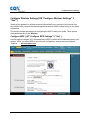
Configure WPS { XE "Configure WPS Settings" \t "See" }
Use this page to configure Wi-Fi Protected Setup (WPS) to attach WPS-enabled devices to your
network. When you select WPS as your wireless configuration, settings are pre-configured.
Figure 9.
Wireless WPS screen
Cox Business Internet Gateway Admin Guide
15
Configure Wireless Settings
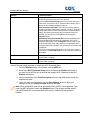
Section
Field Description
Wi-Fi Protected Setup
Enable / Disable. Select the radio button to activate or
deactivate wirless protection for your gateway.
Click the Wi-Fi Protected Setup icon on the client side at the
same time you press the Wi -Fi Protected Setup button on the
device to automatically establish protection.
Wi-Fi Protected Setup PIN. This is the most secure option to
register a wireless client with the gateway. The Wi-Fi Protected
Setup PIN number is found in the client Wi-Fi Protected Setup
utility. After entering the client's Wi-Fi Protected Setup PIN
number, you can connect to the gateway by clicking the
Register button.
WPS Setup Using the Gateway PIN. Note the gateway's Wi-Fi
Protected Setup PIN number that is displayed on the Wi-Fi
Protected Setup page. Click the Register button (using any WiFi Protected Setup client utility) and enter the gateway's Wi-Fi
Protected Setup PIN number in the client device to complete the
registration.
To create a new gateway PIN number for use in pairing with a
WPS client, click New PIN Code and a number will be randomly
generated.
Wi-Fi Radio 1 Network
Displays the name of the network and the security level chosen
for the Radio 1 network.
Wi-Fi Radio 2 Network
Displays the name of the network and the security level chosen
for the Radio 2 network.
Use the following steps to enable or disable the Wi-Fi Protected Setup.
1. From the Wireless menu in the toolbar, click the WPS tab.
2. Scroll to the Wi-Fi Protected Setup section and select the Enable radio button if
you want to use WPS to set up devices that support WPS. Otherwise, select the
Disable radio button.
3. Use the information in the Field Description column in the table above to help you
populate the fields.
4.
After you make your selections, click the Save Settings button to apply your
changes or click the Cancel Changes button to withdraw.
Note: When using WPS mode, wired equivalent privacy (WEP) is not supported. If you
must use WEP encryption, select the Disabled button. Cox strongly advises against
using WEP because it is a compromised WiFi security method and can easily be
hacked.
16
Cox Business Internet Gateway Admin Guide
Configure Wireless Settings
Configure Radio Settings{ XE "Radio Settings" \t "See" }
This section describes how to configure the interface on the Wi-Fi Networks for both Radio 1
and Radio 2.
Figure 10.
Radio Settings screen
Section
Wi-Fi Radio 1 Network
Field Description
Wireless Interface. Select Enable or Disable to enable or
disable the wireless network.
802.11 Band. Displays the radio band frequency currently in
operation
Network Mode. Choose one of these options:
B/G only
N Only
B/G/N Mixed
Scan 2.4GHz Aps. Click this button to look for a 2.4GHz
bandwidth access point.
Cox Business Internet Gateway Admin Guide
17
Configure Wireless Settings
Section
Field Description
Channel Width. Choose one of these options:
20 MHz Only
Auto (20 or 40 MHz)
Channel. Select one of the channels from the drop-down list to
correspond with your network settings. All devices in your
wireless network must broadcast on the same channel in order
to communicate. You can select Auto (factory default) for
automatic channel selection. Note: “Auto” is the preferred setting
and provides the best user experience.
Extended Channel. Select one of the extended channels from
the drop-down list to correspond with your network settings. All
devices in your wireless network must broadcast on the same
channel in order to communicate. You can select Auto (factory
default) for automatic channel selection. Note: “Auto” is the
preferred setting and provides the best user experience.
The following network information status is displayed:
Network Name (SSID). The name or service set identifier
(SSID) of your wireless access point
MAC Address (BSSID). The MAC Address of your gateway's
local wireless access point
SSID Broadcast. The status of the gateway's SSID Broadcast
feature.
Wi-Fi Radio 2 Network
Wireless Interface. Select Enable or Disable to enable or
disable the wireless network.
802.11 Band. Displays the radio band frequency currently in
operation
Network Mode. Choose one of these data transmission options:
A only
N Only
A/N Mixed
Channel Width. Choose one of these options:
20 MHz Only
Auto (20 or 40 MHz)
80 MHz for 802.11 AC (Note: To enable AC, the network
mode must be set to A/N)
Channel. Select one of the channels from the drop-down list to
correspond with your network settings. All devices in your
wireless network must broadcast on the same channel in order
to communicate. You can select Auto (factory default) for
automatic channel selection. Note: “Auto” is the preferred setting
18
Cox Business Internet Gateway Admin Guide
Configure Wireless Settings
Section
Field Description
and provides the best user experience.
Extended Channel. Select one of the extended channels from
the drop-down list to correspond with your network settings. All
devices in your wireless network must broadcast on the same
channel in order to communicate. You can select Auto (factory
default) for automatic channel selection. Note: “Auto” is the
preferred setting and provides the best user experience.
The following network information status is displayed:
Network Name (SSID). The name or service set identifier
(SSID) of your wireless access point
MAC Address (BSSID). The MAC Address of your gateway's
local wireless access point
SSID Broadcast. The status of the gateway's SSID Broadcast
feature.
Use the following steps to configure the wireless interface for the Wi-Fi Radio 1 and Radio 2
Networks.
1. From the Wireless menu in the toolbar, click the Radio Settings tab.
2. Use the information in the Field Description column in the table above to help you
populate the fields.
3. After you make your selections, click the Save Settings button to apply your
changes or click the Cancel Changes button to withdraw.
Cox Business Internet Gateway Admin Guide
19
Configure Wireless Settings
Configure Wireless Security Settings{ XE "Wireless Security Settings" \t
"See" }
The Wireless Security page allows you to configure protection settings for Wi-Fi Radio 1 and
Wi-Fi Radio 2.
Figure 11.
Wireless Security screen
Section
Field Description
Wi-Fi Radio 1 Security
Security Mode. Allows you to select a wireless security mode
to help protect your network. If you select Disable, then your
wireless network is not secure and any wireless device within
range may connect to it. Note: The factory default mode is WPA
or WPA2-Personal. Note: WEP is a well known compromised
security and should not be used.
Encryption. It allows you to select a level of encryption based
on the wireless security mode you choose.
Passphrase. The passphrase key for the gateway. The key can
be from 8 to 63 characters. The factory default passphrase is
equal to the 9-digit serial number of your gateway. The serial
number can be found on the rating label attached to your
wireless gateway. Selecting Show Key toggles the passphrase
between hidden characters and clear text.
Key Renewal. Enter a time period that instructs the device
about how often it should change encryption keys. The default is
3600 seconds.
20
Cox Business Internet Gateway Admin Guide
Configure Wireless Settings
Wi-Fi Radio 2 Security
Security Mode. Allows you to select a wireless security mode
to help protect your network. If you select Disable, then your
wireless network is not secure and any wireless device within
range may connect to it. Note: The factory default mode is WPA
or WPA2-Personal. Note: WEP is a well known compromised
security and should not be used.
Encryption. Allows you to select a level of encryption based on
the wireless security mode you choose.
Passphrase. The passphrase key for the gateway. The key can
be from 8 to 63 characters. The factory default passphrase is
equal to the 9-digit serial number of your gateway. The serial
number can be found on the rating label attached to your
wireless gateway. Selecting Show Key toggles the passphrase
between hidden characters and clear text.
Key Renewal. Enter a time period that instructs the device
about how often it should change encryption keys. The default is
3600 seconds.
Follow these instructions to configure Wireless Security settings:
1. From the Wireless menu in the toolbar, click the Wireless Security tab.
2. Use the information in the Field Description column in the table above to help you
populate the fields.
3. After you make your selections, click the Save Settings button to apply your
changes or click the Cancel Changes button to withdraw.
Cox Business Internet Gateway Admin Guide
21
Configure Wireless Settings
Configure Guest Network Settings
The Guest Networks tab is only available in the Cox Business “Internet Gateway” subscription
and gateway configuration. This feature is different from the Cox Business Guest Wi-Fi service
offering because it allows you to define guest Wi-Fi SSIDs for each radio, even though the
Internet service bandwidth tier is shared between all enabled guest Wi-Fi SSIDs. The Guest
Network tab allows you to configure up to seven (7) additional SSIDs per radio. Remember that
these SSIDs share the same Internet bandwidth.
When you subscribe to the Cox Business Guest Wi-Fi service, bandwidth and a second physical
gateway is dedicated for guest Wi-Fi users and there is no contingency to the primary gateway’s
bandwidth. The second gateway dedicated to “Guest WiFi” network will not have access to the
Guest Network tab in the GUI.
The “Guest Network” section allows you to set up the Wi-Fi Radio Guest Network for both Radio
1 and Radio 2, which includes naming the network and designating whether you want to enable
it as a SSID Broadcast. In the Guest Network Settings section, you provide technical
specifications for the DHCP server. When creating additional SSIDs in the “Guest Network” tab,
all networks on the gateway share the Internet access bandwidth. There is no priority given to
any SSID.
Figure 12.
22
Guest Network screen
Cox Business Internet Gateway Admin Guide
Configure Wireless Settings
Section
Field Description
Wi-Fi Radio Guest Network
Wireless Interface. Allows you to select the wireless interface
that you want to configure. The options are Radio 1 and Radio
2.
Network Name (SSID) The name that you want to assign to the
Service Set Identifier (SSID).
MAC Address (BSSID). Similar to the SSID, the Basic Service
Set Identifier (BSSID) is the 'name' of the wireless network that
shows up under network connections.
SSID Broadcast. An SSID is the name of a wireless local area
network (WLAN). All wireless devices on a WLAN must use the
same SSID in order to communicate with each other.
The SSID on wireless clients can be set manually, by entering
the SSID into the client network settings or automatically, by
leaving the SSID unspecified or blank. A network administrator
often uses a public SSID that is set on the access point and
broadcast to all wireless devices in range. Some wireless
access points disable the automatic SSID broadcast feature to
improve network security.
By disabling the broadcasting of the SSID, or even the beacon
signal itself, you can hide the presence of your wireless network
or at least obscure the SSID itself which is critical for a device to
connect to your network.
Enable. Check this box to allow the SSID broadcast.
Cox Business Internet Gateway Admin Guide
23
Configure Wireless Settings
Section
Field Description
Guest Network Settings
Network Name (SSID). The name of the network that you want
to configure
Security Mode. Select the level of security that you want to
apply to the network that you selected from the Network Name
(SSID) drop-down list.
Wired Equivalent Privacy (WEP) is a security protocol for
wireless networks that encrypts transmitted data. Without any
security your data can be intercepted without difficulty. Note:
WEP is a well known compromised security and should not be
used.
WEP has three settings: Off (no security), 64-bit (weak security),
128-bit (a bit better security). WEP is not difficult to crack, and
using it reduces performance slightly.
If you run a network with only the default security, where WEP is
turned off, others can immediately log on to your network and
use your Internet connection.
Wi-Fi Protected Access (WPA) replaces WEP with a protocol
that is — given current technology — impossible to crack.
DHCP Server. Dynamic Host Configuration Protocol (DHCP) is
a networking protocol that is used by servers on an IP network
to allocate IP addresses to computers. The purpose of DHCP is
to automate the IP address configuration of a computer without
a network administrator.
IP Address. An IP address is assigned to a computer for a set
interval, after which, the computer must renew the IP address or
acquire a new one. In this field, enter the IP address of the
DHCP server.
Subnet Mask. A mask is used to determine what subnet an IP
address belongs to. An IP address has two components, the
network address and the host address. For example, the first
two numbers (150.215) in the IP address 150.215.017.009
represent the network address, and the second two numbers
(017.009) identify a particular host on this network.
Subnetting enables the network administrator to further divide
the host part of the address into two or more subnets.
Lease Pool Start. The first IP address in the scope of
addresses that you will use for the DHCP server. After a DHCP
scope is established changes in the number of nodes that
require DHCP leases may change over time.
Lease Pool End. The last IP address in the pool of addresses
that you use for the DHCP server. a certain address pool and
determine that the address pool range needs to be increased,
you can simply delete the scope and recreate it. Deletion of the
scope will.
Lease Time. The amount of time that the scope of leased IP
addresses are valid until they expire. The value can be hours,
days, weeks, months, etc.
24
Cox Business Internet Gateway Admin Guide
Configure Wireless Settings
Follow these instructions to configure Guest Network settings:
1. From the Wireless menu in the toolbar, click the Guest Network tab.
2. Use the information in the Field Description column in the table above to help you
populate the fields.
3. After you make your selections, click the Save Settings button to apply your
changes or click the Cancel Changes button to withdraw.
Cox Business Internet Gateway Admin Guide
25
Configure Wireless Settings
Configure MAC Filter Settings{ XE "Configure MAC Filtering" \t "See" }
Use the MAC Filter feature to allow or block access to your wireless LAN based on the MAC
Address of the wireless client devices. The MAC Filter feature, also known as an access list,
can be used to help protect your wireless network from access by unauthorized users.
Figure 13.
MAC Filter screen
Section
Field Description
MAC Filter
Allows you to Enable or Disable MAC Filtering for the gateway.
Access Restriction
Access Restriction. Allows you to permit or block computers
from accessing the wireless network. The choice that you make
here affects the addresses listed on this page. Choose one of
the following options:
26
Block computers listed below from accessing the wireless
network. Select this option to deny Internet access to the
MAC addresses of the devices you list in the table. All other
MAC addresses will be allowed Internet access.
Permit computers listed below access to the wireless
Cox Business Internet Gateway Admin Guide
Configure Wireless Settings
Access Restriction (continued)
MAC Address Filter
List
network. Select this option to allow Internet access only to
the MAC addresses of the devices you list in the table. Any
MAC addresses not listed in the table will be denied Internet
access
MAC Address Filter List. The MAC Address Filter List displays
users whose wireless access you want to control. Click
Wireless Client List to display a list of network users by MAC
address. From the To Sort by drop-down menu, you can
categorize the table by IP Address, MAC Address, Status,
Interface, or Client Name. To view the most up-to-date
information, click Refresh.
Follow these instructions to configure MAC address filtering for your wireless network:
1. From the Wireless menu in the toolbar, click the MAC Filter tab.
2. Use the information in the Field Description column in the table above to help you
populate the fields.
3. After you make your selections, click the Save Settings button to apply your
changes or click the Cancel Changes button to withdraw.
Cox Business Internet Gateway Admin Guide
27
Configure Wireless Settings
Configure Advanced Settings{ XE "Configure Advanced Settings" \t "See" }
Important: An expert administrator should be the only person to adjust these settings.
Incorrect settings can reduce wireless performance.
Figure 14.
Advanced Settings screen
Section
Field Description
Wi-Fi Radio 1 Settings and
Wi-Fi Radio 2 Settings
The rate of data transmission should be set depending on the
speed of your Wireless-N networking.
Select from a range of transmission speeds, or select Auto to
have the device automatically use the fastest possible data rate
and enable the Auto-Fallback feature. Auto-Fallback negotiates
the best possible connection speed between the device and a
wireless client. The default setting is Auto.
28
Cox Business Internet Gateway Admin Guide
Configure Wireless Settings
Section
Field Description
Wi-Fi Radio 1 Settings and
Wi-Fi Radio 2 Settings (continued)
Choose one of the following options for transmission rate:
Auto (factory default)
Use Legacy Rate
0: 6.5 or 13.5 Mbps
1: 13 or 27 Mbps
2: 19.5 or 40.5 Mbps
3: 26 or 54 Mbps
4: 39 or 81 Mbps
5: 52 or 108 Mbps
6: 58.5 or 121.5 Mbps
7: 65 or 135 Mbps
8: 13 or 27 Mbps
8: 13 or 27 Mbps
9: 26 or 54 Mbps
10: 39 or 81 Mbps
11: 52 or 108 Mbps
12: 78 or 162 Mbps
13: 104 or 216 Mbps
14:117 or 243 Mbps
15: 130 or 270 Mbps
CTS Protection Mode
CTS (Clear-To-Send) Protection Mode boosts the device's
ability to catch all wireless transmissions, but can severely
decrease performance. Select Auto if you want the device to
use this feature as needed, when the Wireless- N/G products
are not able to transmit to the device in an environment with
heavy 802.11b traffic. Select Disable if you want to permanently
disable this feature.
Beacon Interval.
The Beacon Interval value indicates the frequency interval of
the beacon. A beacon is a packet broadcast by the device to
synchronize the wireless network.
(Default: 100 msec, Range: 20-1000)
DTIM Interval.
The Delivery Traffic Indication Message (DTIM) indicates the
interval between Broadcasts/Multi-cast transmissions. DTIM
field is a countdown field informing clients of the next window for
listening to broadcast and multicast messages. When the device
has buffered broadcast or multicast messages for associated
clients, it sends the next DTIM with a DTIM Interval value. Its
clients hear the beacons and awaken to receive the broadcast
and multicast messages.
(Default: 1, Range: 1-255)
Cox Business Internet Gateway Admin Guide
29
Configure Wireless Settings
Section
Field Description
Fragmentation Threshold
Fragmentation Threshold. Specifies the maximum size for a
packet before data is fragmented into multiple packets. If you
experience a high packet error rate, you may slightly increase
the Fragmentation Threshold. Setting the Fragmentation
Threshold too low may result in poor network performance. Only
minor reduction of the default value is recommended.
In most cases, it should remain at its default value of 2346.
RTS Threshold
RTS Threshold. Determines at what packet size beyond which
the ready to send/clear to send (RTS/CTS) mechanism is
invoked.
If you encounter inconsistent data flow, only minor reduction of
the default value, 2346, is recommended. If a network packet is
smaller than the preset RTS Threshold size, the RTS/CTS
mechanism will not be enabled.
The device sends Ready to Send (RTS) frames to a particular
receiving station and negotiates the sending of a data frame.
After receiving a RTS, the wireless station responds with a
Clear to Send (CTS) frame to acknowledge the right to begin
transmission. The RTS Threshold value should remain at its
default value of 2347.
Follow the steps below to set up the following advanced wireless functions:
1. From the Wireless menu in the toolbar, click the Advanced Settings tab.
2. Use the information in the Field Description column in the table above to help you
populate the fields.
3. After you make your selections, click the Save Settings button to apply your
changes or click the Cancel Changes button to withdraw.
30
Cox Business Internet Gateway Admin Guide
Configure Wireless Settings
Configure WDS Settings{ XE "Configure WDS Settings" \t "See" }
The Wireless Distribution System (WDS) Settings page allows you to expand the coverage
of your wireless network by deploying signal repeaters.
Figure 15.
WDS Settings screen
Section
Field Description
Wi-Fi Radio 1 WDS Settings
WDS MAC Address. Displays the WDS MAC Address (or
BSSID) of your gateway access point.
Allow Wireless Signal To Be Repeated by a Repeater. Select
this option to allow a wireless client to connect to a repeater and
route traffic between the wireless client and a repeater. A
maximum of three (3) repeaters is allowed.
Remote Access Point's MAC Address (MAC 1 through 3).
Use the three fields (MAC 1, 2, and 3) to enter the MAC address
of the repeaters.
Wi-Fi Radio 1 WDS Settings
WDS MAC Address. Displays the WDS MAC Address (or
BSSID) of your gateway access point.
Allow Wireless Signal To Be Repeated by a Repeater. Select
this option to allow a wireless client to connect to a repeater and
route traffic between the wireless client and a repeater. A
maximum of three (3) repeaters is allowed.
Remote Access Point's MAC Address (MAC 1 through 3).
Use the three fields (MAC 1, 2, and 3) to enter the MAC address
of the repeaters.
Cox Business Internet Gateway Admin Guide
31
Configure Wireless Settings
Follow these instructions to configure WDS Settings.
Important: Make sure the channel settings are the same for all WDS enabled devices.
1. From the Wireless menu in the toolbar, click the WDS Settings tab.
2. Use the information in the Field Description column in the table above to help you
populate the fields.
3. After you make your selections, click the Save Settings button to apply your
changes or click the Cancel Changes button to withdraw.
32
Cox Business Internet Gateway Admin Guide
Configure Wireless Settings
Configure QoS Settings{ XE "Configure QoS Settings" \t "See" }
Quality of Service (QoS) ensures better service to high-priority types of network traffic, which
may involve demanding, real-time applications, such as video conferencing. QoS settings allow
you to specify priorities for different types of traffic. Lower priority traffic will be slowed down to
allow greater throughput or less delay for high priority traffic.
Figure 16.
QoS screen
Section
Field Description
Wi-Fi Radio 1 QoS and Wi-Fi Radion 2
QoS
WMM Support. If WMM (Wi-Fi Multimedia) is supported by
your wireless clients, enabling this feature means that voice
and multimedia traffic will be given higher priority than other
traffic.
Select the desired option:
Enable (factory default)
Disable
No ACK. Abbreviation for Acknowledgement (data networks). It
is a signal to acknowledge the receipt of data. No Ack allows
you to enable or disable No ACK. No ACK is disabled by default.
This feature is recommended for data services where speed of
transmission is important and packet loss is tolerable to a certain
degree.
If you select Disable, an acknowledge packet is returned for
every packet received. This provides a more reliable
transmission, but it increases traffic load, which decreases
performance.
Select the desired option:
Cox Business Internet Gateway Admin Guide
Enable
33
Configure Wireless Settings
Disable (factory default)
Follow these instructions to configure QoS priorities for different types of traffic:
1. From the Wireless menu in the toolbar, click the QoS tab.
2. Use the information in the Field Description column in the table above to help you
populate the fields.
3. After you make your selections, click the Save Settings button to apply your
changes or click the Cancel Changes button to withdraw.
34
Cox Business Internet Gateway Admin Guide
Configure Security
Configure Security{ XE "Configure Security" \t "See" }
This section provides procedures on how to establish security for your gateway; such as how to
set the level of protection for the firewall, how to enable or disable a virtual private network
(VPN) pass-through, and how to configure the VPN tunnel.
Configure Firewall Settings{ XE "Configure Firewall Settings" \t "See" }
Use the settings on this page to configure a firewall and filter types of unwanted traffic on the
gateway local network. Advanced firewall technology deters hackers and protects your network
from unauthorized access.
Figure 17.
Firewall Settings screen
Cox Business Internet Gateway Admin Guide
35
Configure Security
Section
Field Description
Firewall
SPI Firewall Protection. Stateful firewall (which is any firewall
that performs stateful packet inspection (SPI) or stateful
inspection) is a firewall that tracks the state of network
connections; e.g., TCP streams, UDP communication that travel
across it. The firewall is programmed to distinguish legitimate
packets for different types of connections. Only packets that
match a known active connection are allowed by the firewall;
others are rejected.
Select the desired option:
Off (factory default). No ports are restricted and SPI is “off.”
Low. No ports are restricted and SPI is “on.”
Medium. The following ports are allowed and SPI is “on”:
5190, 546, 547, 53, 989, 990, 80, 8080, 443, 143, 993, 4500,
123, 110, 995, 1812, 25, 22, 465, 1725, 1200, 992, 3074,
3724, 5050
High. The following ports are allowed and SPI is “on.” 53,
80, 443, 993, 4500, 123, 995, 22, 25, 465
Cox Business VoiceManager Toolbar or Receptionist Console
application users must set the gateway firewall to “Low” to
achieve full functionality.
IPv6 Firewall Protection.
Off
On (factory default)
Filters
Block fragmented IP packets. Enables/disables filtering of
fragmented IP packets. This feature helps protect your private
local network from Internet based denial of service attacks.
Block Port Scan Detection. Enables/disables the gateway
from responding to Internet based port scans. This feature is
designed to protect your private local network from Internet
based hackers who attempt to gain unsolicited access your
network by detecting open IP ports.
Block IP Flood Detection. Blocks malicious devices that
attempt to flood devices or networks with illegal broadcast
packets. Also referred to as “broadcast storm.”
Note: This is the factory default option.
Block WAN Requests
Block Anonymous Internet Requests. Enable this feature to
keep your network from being “pinged” or detected by other
Internet users. It also hides your network ports. Both make it
more difficult for outside users to enter your network.
Note: This is the factory default option.
36
Cox Business Internet Gateway Admin Guide
Configure Security
Follow these instructions to configure Firewall settings:
1. From the Security menu in the toolbar, click the Firewall tab.
2. Use the information in the Field Description column in the table above to help you
populate the fields.
3. After you make your selections, click the Save Settings button to apply your
changes or click the Cancel Changes button to withdraw.
Cox Business Internet Gateway Admin Guide
37
Configure Security
Configure VPN Pass-through Settings{ XE "Configure VPN Pass-through
Settings" \t "See" }
Use this page to configure Virtual Private Network (VPN) support. Enabling the settings on this
page allows VPN tunnels using IPsec or PPTP protocols to pass through the gateway’s firewall.
Figure 18.
VPN Pass-through screen
Section
Field Description
VPN Passthrough
IPSec Pass-through. Enables/disables Internet Protocol
Security (IPsec). IPsec is a suite of protocols used to implement
secure exchange of packets at the IP layer. If you enable IPSec
Pass-through, applications that use IPsec (IP Security) can pass
through the firewall.
Select Disable to deactivate IPSec Pass-through.
Select the desired option:
Enable (factory default)
Disable
PPTP Pass-through. Enables/disables Point-to-Point Tunneling
Protocol (PPTP). PPTP allows the Point-to-Point Protocol (PPP)
to be tunneled through an IP network. If you enable PPTP passthrough, applications that use Point to Point Tunneling Protocol
(PPTP) can pass through the firewall.
Select Disable to deactivate PPTP Pass-through.
Select the desired option:
Enable (factory default)
Disable
Follow these instructions to configure VPN Pass-through settings:
1. From the Security menu in the toolbar, click the VPN Passthrough tab.
2. Use the information in the Field Description column in the table above to help you
populate the fields.
3. After you make your selections, click the Save Settings button to apply your
changes or click the Cancel Changes button to withdraw.
38
Cox Business Internet Gateway Admin Guide
Configure Security
Configure VPN Settings{ XE "Configure VPN Settings" \t "See" }
A Virtual Private Network (VPN) is a connection between two endpoints in different networks
that allows private data to be sent securely over public networks or other private networks. This
is accomplished by creating a “VPN tunnel.” The Cisco gateway can deploy at two customer
locations so that a VPN tunnel may be configured and connected between the two locations.
This allows clients on either side to access resources in the other site as though they are part of
the same LAN.
The configuration of this feature and the tunnel is customer-specific and is the responsibility of
the customer administrator.
Figure 19.
VPN screen
Cox Business Internet Gateway Admin Guide
39
Configure Security
Section
Field Description
VPN Tunnel
Select Tunnel Entry. Allows you to display a list of created
VPN tunnels.
Create. Click to generate a new tunnel entry.
Delete. Click to remove all settings for the selected tunnel
Summary. Click to display the settings and status of all enabled
tunnels.
IPSec VPN Tunnel. Allows you to enable or disable Internet
Security Protocol for the VPN tunnel.
Tunnel Name. Enter the name for this tunnel.
Local Secure Group
Select the local LAN user(s) that can use this VPN tunnel. This
may be a single IP address or sub-network. The Local Secure
Group must match the remote gateway’s Remote Secure
Group.
IP. Enter the IP address of the local network.
Mask. If the Subnet option is selected, enter the mask to
determine the IP address on the local network.
Remote Secure Group
Select the remote LAN user(s) behind the remote gateway who
can use this VPN tunnel. This may be a single IP address, a
sub-network, or any addresses.
If “Any” is set, the gateway acts as responder and accepts
requests from any remote user. The Remote Secure Group
must match the remote gateway’s Local Secure Group.
IP. Enter the IP address of the remote network Mask. If the
Subnet option is selected, enter the mask to determine the IP
addresses on the remote network.
Remote Secure Gateway
Select the desired option, IP Addr., Any, or FQDN. If the
gateway has a dynamic IP address, select Any or FQDN. If Any
is selected, the gateway will accept requests from any IP
address.
FQDN. If FQDN is selected, enter the domain name of the
remote gateway so the gateway can locate a current IP address
using DDNS.
IP. The IP address in this field must match the public (WAN or
Internet) IP address of the remote gateway at the other end of
this tunnel.
40
Cox Business Internet Gateway Admin Guide
Configure Security
Section
Field Description
Key Management
Key Exchange Method. The gateway supports both automatic
and manual key management. Note that both sides must use
the same key management method.
Select one of the following options for the key exchange
method:
Auto (IKE). Uses Internet Key Exchange (IKE) protocols to
negotiate key material for Security Association (SA).
Configure Auto key management using the following settings:
Encryption: The Encryption method determines the length of
the key used to encrypt/decrypt ESP packets. Notice that both
sides must use the same method.
Authentication: The Authentication method authenticates the
Encapsulating Security Payload (ESP) packets. Select MD5 or
SHA. Notice that both sides (VPN endpoints) must use the
same method.
MD5: A one-way hashing algorithm that produces a 128-bit
digest.
SHA: A one-way hashing algorithm that produces a 160-bit
digest.
– Perfect Forward Secrecy (PFS): If PFS is enabled, IKE
Phase 2 negotiation will generate new key material for IP traffic
encryption and authentication. Note that both sides must have
PFS enabled.
– Pre-Shared Key: IKE uses the Pre-Shared Key to
authenticate the remote IKE peer. Both character and
hexadecimal values are acceptable in this field. (For example,
"My_@123" or "0x4d795f40313233" are acceptable.) Note that
both sides must use the same Pre- Shared Key.
– Key Lifetime: This field specifies the lifetime of the IKE
generated key. If the time expires, a new key will be
renegotiated automatically. The Key Lifetime may range from
300 to 100,000,000 seconds.
The default lifetime is 3600 seconds.
Status
This field shows the connection status for the selected tunnel.
The state is either Connected or Not Connected.
Cox Business Internet Gateway Admin Guide
41
Configure Security
Section
Field Description
Buttons
Connect. Click to establish a connection for the current VPN
tunnel. If you have made any changes, click Save Settings to
first apply your changes.
Disconnect. Click to break a connection for the current VPN
tunnel.
View Log. Click to view the VPN log, which shows details of
each established tunnel.
Advanced Settings. If the Key Exchange Method is Auto (IKE),
this button provides access to additional settings relating to IKE.
Click this button if the gateway is unable to establish a VPN
tunnel to the remote gateway, and make sure the Advanced
Settings match those on the remote gateway.
Phase 1 - Operation Mode. Select the method appropriate for
the remote VPN endpoint.
Main: Main mode is slower but more secure.
Aggressive: Aggressive mode is faster but less secure.
Local Identity. Select the desired option to match the Remote
Identity setting at the other end of this tunnel.
Local IP Address: Your WAN ( Internet) IP address.
Name: Your domain name.
Remote Identity. Select the desired option to match the Local
Identity setting at the other end of this tunnel.
Local IP Address: WAN ( Internet) IP address of the remote
VPN endpoint.
Name: Domain name of the remote VPN endpoint.
Encryption. This is the encryption algorithm used for the IKE
SA. It must match the setting used at the other end of the
tunnel.
Follow these instructions to configure VPN settings.
1. From the Security menu in the toolbar, click the VPN tab.
2. Use the information in the Field Description column in the table above to help you
populate the fields.
3. After you make your selections, click the Save Settings button to apply your
changes or click the Cancel Changes button to withdraw.
42
Cox Business Internet Gateway Admin Guide
Control Access to the Internet
Control Access to the Internet{ XE "Control Access to the Internet" \t
"See" }
This section provides procedures for configuring the options available on the Access
Restriction page.
Configure IP Address Filtering Settings{ XE "Configure IP Address Filtering
Settings" \t "See" }
Use the settings on this page to configure IP address filters. These filters prevent a range of IP
addresses from accessing the Internet.
Important: If you are not familiar with the advanced settings described in this section,
contact your IT department before you attempt to change any of the default advanced IP
filtering settings.
Figure 20.
IP Address Filtering screen
Follow these instructions to configure IP Address Filtering settings.
1. From the Access Restrictions menu in the toolbar, click the IP Address Filtering
tab.
2. In the Start Address and End Address fields, enter the range of IP addresses that
you want to prevent from having access to your network. (Note: Check the Enable
box to allow access of the range of addresses you defined.)
3. After you make your selections, click the Save Settings button to apply your
changes or click the Cancel Changes button to withdraw.
Cox Business Internet Gateway Admin Guide
43
Control Access to the Internet
Configure MAC Address Filtering Settings{ XE "Configure MAC Address
Filtering Settings" \t "See" }
Use the settings on this page to configure MAC address filters. These filters permit you to allow
or block a range of MAC addresses from accessing the Internet based on MAC address.
Important: If you are not familiar with the advanced settings described in this section,
contact your IT department before you attempt to change any of the gateway default
advanced MAC address filtering settings.
Figure 21.
MAC Address Filtering screen
Field Name
Description
Access Restriction
Block devices listed below from accessing the Internet.
Select to deny Internet access to the MAC addresses listed in
the MAC Address Filter List fields. All other MAC addresses will
be allowed Internet access.
Permit devices listed below to access the Internet. Select to
allow Internet access only to the MAC addresses of the devices
you list in the MAC Address Filter fields. Any MAC addresses
not listed in the table will be denied Internet access.
MAC Address Filter List
In the available fields, enter the MAC addresses of the devices
whose Internet access you want to control.
44
Cox Business Internet Gateway Admin Guide
Control Access to the Internet
Follow these instructions to configure MAC Address Filtering settings:
1. From the Access Restrictions menu in the toolbar, click the MAC Address
Filtering tab.
2. Select the Enable or Disable radio button to turn on a filter for MAC IP addresses.
3. Select the Block devices… or Permit devices… radio button to prevent or allow
the MAC IP address(es) that you define. (Note: You can enter a maximum of 20
addresses.)
4. After you make your selections, click the Save Settings button to apply your
changes or click the Cancel Changes button to withdraw.
.
Cox Business Internet Gateway Admin Guide
45
Configure Applications
Configure Applications { XE "Configure Applications" \t "See" }
This section provides procedures for configuring the options on the Applications page.
Important: Most well-known Internet applications are supported by Application Layer
Gateways (ALGs). ALGs automatically adjust the gateway firewall to allow data to pass
without making any custom settings. We recommend that you test your application
before making changes in this section.
Configure Port Filtering Settings{ XE "Configure Port Filtering Settings" \t
"See" }
Use the settings in this window to configure transmission control protocol (TCP) and user
datagram protocol (UDP) port filters. These filters prevent a range of TCP/UDP ports from
accessing the Internet. You can also prevent PCs from sending outgoing TCP/UDP traffic to the
WAN on specific IP port numbers. This filter is not IP address- or MAC address- specific. The
system blocks the specified port ranges for all PCs.
Figure 22.
Port Filtering screen
Cox Business Internet Gateway
47
Configure Applications
Section
Field Description
Port Filtering
Start Port. Enter the starting port number in the range (external
ports) used by the server or Internet application. Check with the
software documentation of the Internet application for more
information if necessary.
End Port. Enter the final port number in the range (external
ports) used by the server or Internet application.
Protocol. Select one of the following protocols:
TCP
UDP
Both
Enable. Allows you to activate port filtering.
Follow these instructions to configure the port filtering for application features:
1. From the Application Layer Gateway menu in the toolbar, click the Port Filtering
tab.
2. Use the information in the Field Description column in the table above to help you
populate the fields.
3. After you make your selections, click the Save Settings button to apply your
changes or click the Cancel Changes button to withdraw.
48
Cox Business Internet Gateway Admin Guide
Configure Applications
Configure Port Range Forwarding Settings{ XE "Configure Port Range
Forwarding Settings" \t "See" }
Port Range Forwarding Settings allow you to configure ports that are to be used for public
services on your network, such as security cameras, web servers, FTP servers, email servers or
other specialized Internet applications.
Important:
Figure 23.
The gateway normally implements a feature called Port Translation. Port
Translation monitors those ports that are used by your PCs or other devices on
your LAN. This monitoring provides an added level of security beyond what the
firewall provides. However, there are some applications that require the gateway
to use specific ports to connect over the Internet.
Port Range Forwarding continually exposes the selected ports to the public
Internet. This means that the firewall is not active on these ports. The device with
the forwarding IP address can be exposed to hacker attacks while the port range
is being forwarded.
Port Range Forwarding screen
Cox Business Internet Gateway Admin Guide
49
Configure Applications
Section
Field Description
Port Range Forwarding
External Start. Select the first port number from the
recommended 49152 - 65535 range. Keep in mind that ports
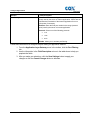
being used are program-specific so check which ones the
program requires to be forwarded.
External End Select the last port number from the
recommended 49152 - 65535 range. Keep in mind that ports
being used are program-specific so check which ones the
program requires to be forwarded.
Internal IP Address. Enter the computer’s IP address to which
this is to apply.
Internal Start Port. Enter the beginning of the range of port
numbers (internal ports) used by the server or Internet
application.
Internal End Port. Enter the end of the range of port numbers
(internal ports) used by the server or Internet application.
Protocol. Select one of the following network protocols:
TCP
UDP
Both
Enable. Check this box to activate port forwarding for the
specified ports and IP addresses.
Follow these instructions to configure the port range forwarding for application features:
1. From the Application Layer Gateway menu in the toolbar, click the Port Range
Forwarding tab.
2. Use the information in the Field Description column in the table above to help you
populate the fields.
3. After you make your selections, click the Save Settings button to apply your
changes or click the Cancel Changes button to withdraw.
50
Cox Business Internet Gateway Admin Guide
Configure Applications
Configure Port Range Triggering Settings{ XE "Configure Port Range
Triggering Settings" \t "See" }
Port Range Triggering is a way to automatically forward ports to a LAN PC that needs them at a
specific time. A software application performs an event that triggers the router. The event must
have an outbound access of a particular port range.
Figure 24.
Port Range Triggering screen
Section
Field Description
Port Range Triggering
Triggered Range
Start Port. Enter a beginning port number from the
recommended 49152 - 65535 range. Remember that ports
being used are program-specific so check which ones the
program requires to be forwarded.
End Port. Enter an ending port number from the recommended
49152 - 65535 range. Remember that ports being used are
program-specific so check which ones the program requires to
be forwarded.
Cox Business Internet Gateway Admin Guide
51
Configure Applications
Forwarded Range
Start Port. For the Start port, select a value from the
recommended 49152 - 65535 range. Remember that ports being
used are program-specific so check which ones the program
requires to be forwarded.
End Port. For the End port, select a value from the
recommended 49152 - 65535 range. Remember that ports being
used are program-specific so check which ones the program
requires to be forwarded.
Protocol. Select one of the following protocols:
TCP
UDP
Both
Enable. Click the Enable checkbox to enable port range
triggering for the relevant application.
Follow these instructions to configure the port triggering for application features:
1. From the Application Layer Gateway menu in the toolbar, click the Port Range
Triggering tab.
2. Use the information in the Field Description column in the table above to help you
populate the fields.
3. After you make your selections, click the Save Settings button to apply your
changes or click the Cancel Changes button to withdraw.
52
Cox Business Internet Gateway Admin Guide
Configure Applications
Configure DMZ Settings{ XE "Configure DMZ Settings" \t "See" }
Use this page to configure a Demilitarized Zone (DMZ) host, commonly referred to as an
“exposed host.” It is typically used by a company that wants to host its own Internet server. DMZ
allows one IP address to be placed on the Internet side of the gateway firewall while others
remain protected behind the firewall.
The DMZ allows a device to be directly accessible to Internet traffic, such as a web (HTTP)
server, an FTP server, an SMTP (e-mail) server, and a domain name system (DNS) server.
Figure 25.
DMZ screen
Section
Field Description
DMZ
DMZ Hosting. Select the Enable radio to activate DMZ hosting.
Select Disable (factory default) to deactivate DMZ hosting.
DMZ Host IP Address. Enter the IP address of the computer
you want to expose to the Internet.
Follow these instructions to configure the DMZ for Application features:
1. From the Application Layer Gateway menu in the toolbar, click the DMZ tab.
2. Use the information in the Field Description column in the table above to help you
populate the fields.
3. After you make your selections, click the Save Settings button to apply your
changes or click the Cancel Changes button to withdraw.
Cox Business Internet Gateway Admin Guide
53
Configure Administration Settings
Administration Settings{ XE "Configure Administration Settings" \t
"See" }
This section provides procedures on how to configure gateway settings, set up report email
alerts, back up and restore configuration files, and how to reboot the device.
Configure Management Settings{ XE "Configure Management Settings" \t
"See" }
Use the settings on the Administration Management page to allow the administrator to
manage specific functions for access and security.
Figure 26.
Administration Management screen
Cox Business Internet Gateway Admin Guide
55
Configure Administration Settings
Field
Description
Internet Connection Type
Working Mode. Select one of the following options:
Router Mode. Select this mode to have the gateway configured
as a bridged device. This will disable all router/NAT features in
the device and require all connected Administration Devices to
receive a public IP address from Cox Business.
Bridged Only. Select this mode to have the gateway configured
as a bridged device. This will disable all router/NAT features in
the device and require all connected devices to receive a public
IP address from Cox Business.
Connection Mode. Select one of the following options:
DHCP (factory default) - Allows the gateway to obtain a public
IP address automatically
Static IP - Allows you to specify the WAN IP address and
corresponding server information as static or fixed values that
will be used when the gateway is online.
MTU size. MTU is the Maximum Transmission Unit. The MTU
size specifies the largest packet size permitted for Internet
transmission. . The factory default = 0 (1500 bytes)
Gateway Access Local Access
Current User Name. Identifies the user currently logged in to
the device.
Change Current User Name to. This field allows you to change
your user name. If you want to change your user name, enter
your new user name in this field and click Save Settings to
apply the change. Note: The factory default user name is a
blank field.
Change Password to. This field allows you to change your
password. If you want to change your password, enter your new
password in this field. Then, re-enter your new password in the
Re-Enter New Password field and click Save Settings to apply
the change. Note: The factory default password is a blank field.
Re-Enter New Password. Allows you to re-enter the new
password. You must enter the same password as the one
entered in the previous field Change Password to. After you reenter your new password, click Save Settings to apply the
change.
56
Cox Business Internet Gateway Admin Guide
Configure Administration Settings
Field
Description
Remote Access
Remote Management. Allows you to enable to disable remote
management. This feature allows you to access and manage
your gateway settings from the Internet when you are away from
your business. To allow remote access, select Enable.
Otherwise, keep the default setting, as Disable. The protocol
HTTP is required for remote management. To remotely access
the device, enter https://xxx.xxx.xxx.xxx:808 0 (the x's represent
the device's public Internet IP address, and 8080 represents the
specified port) in your web browser's Address field.
Management Port. Enter the port number that will be open to
outside access. The factory default setting is 8080. This port
must be used when you establish a remote connection.
UpnP
UPnP. Universal Plug and Play (UPnP) allows Windows XP and
Vista to automatically configure the gateway for various Internet
applications, such as videoconferencing. If you want to use
UPnP, keep the default, Enable. Otherwise, select Disable.
IGMP
IGMP Proxy. Internet Group Multicast Protocol (IGMP) is used
to establish membership in a multicast group and is commonly
used for multicast streaming applications. For example, you
may have Internet Protocol Television (IPTV) with multiple settop boxes on the same local network. These set-top boxes have
different video streams running simultaneously, so you should
use the IGMP feature of the Router.
IGMP forwarding (proxying) is a system that improves
multicasting for LAN-side clients. If the clients support this
option, keep the default, Enabled. Otherwise, select Disabled.
Follow these instructions to configure Administration Management:
1. From the Administration menu in the toolbar, click the Management tab.
2. Use the information in the Field Description column in the table above to help you
populate the fields.
3. After you make your selections, click the Save Settings button to apply your
changes or click the Cancel Changes button to withdraw.
Cox Business Internet Gateway Admin Guide
57
Configure Administration Settings
Configure Reporting Settings
Use the settings in the Reporting tab to establish whether or not you want and email alert sent
to you if a Denial of Service is identified. If you select the Enable option, you will need to
populate the corresponding fields.
The table below instructs you on how to enter values in each field.
Figure 27.
Section
Reporting screen
Field Description
Reporting
E-Mail Alerts. If enabled, an email will be sent
immediately if a Denial of Service (DoS) attack is
detected. To use this feature, provide the
necessary email address information.
SMTP Mail Server. Enter the address (domain
name) or IP address of the Simple Mail Transport
Protocol (SMTP) server you use for outgoing email.
E-Mail Address for Alert Logs. Enter the email
address that should receive the logs.
SMTP Username. Enter the username for the
SMTP server.
SMTP Password. Enter the password for the
SMTP server.
View Log. Click to display log data.
Follow these instructions to configure Reporting settings:
1. From the Administration menu option, click the Reporting tab.
2. Use the information in the table shown above to explain the settings and modify
them as required. When you complete your edits, click the Save Settings button to
apply your changes or click the Cancel Changes button to prevent the changes
from being saved.
58
Cox Business Internet Gateway Admin Guide
Configure Administration Settings
Configure Back Up and Restore Settings
Use the settings on this page to back up the configuration and store it in a file on your computer.
You can also use this page to reestablish a previously saved configuration file.
Figure 28.
Backup and Restore screen
Section
Field Description
Back Up Configuration
Use this feature to download a copy of the current configuration,
and store the file on your computer. Click the Backup button to
start the download.
Restore Configuration
Use this feature to restore a previously saved configuration file.
Click the Browse button to select the configuration file, and then
click the Restore button to upload the configuration file to the
device.
WARNING! Uploading a configuration file will destroy
(overwrite) ALL of the existing settings.
Follow these instructions to download a configuration file to your computer that the device
currently uses.
1. From the Administration menu in the toolbar, click the Back Up & Restore tab.
2. Use the information in the Field Description column in the table above to help you
back up and restore configuration files.
Cox Business Internet Gateway Admin Guide
59
Configure Administration Settings
Caution: Restoring a configuration file will overwrite all of the existing settings in the
gateway, using the previously saved configuration file on your computer. It will not
restore the administrative user name or administrative user password.
1. Click the Browse button to locate the configuration file that you want to restore.
2. Click the Restore button to upload the configuration file to the gateway. The
gateway overwrites the current configuration file with the file you have selected so
that the device operates with the configuration settings stored in that file.
Cox Business MyAccount Backup and Restore
Cox Business MyAccount provides another way you can configure a gateway and upload or
download a file to your computer. See Figures 33-36.
Figure 29.
MyAccount Access https://myaccount.coxbusiness.com/
Figure 30.
MyAccount Gateway
60
Cox Business Internet Gateway Admin Guide
Configure Administration Settings
Figure 31.
Internet Gateway Settings
Cox Business Internet Gateway Admin Guide
61
Configure Administration Settings
Use the following steps to securely save your gateway settings MyAccount.
1. Log into MyAccount and select the Data Tools menu option in the left navigation
bar.
2. Click the Internet Gateway link.
Result: The Internet Gateway Settings window displays.
3. From the Select Gateway/Guest Wi-Fi drop-down menu, click the device to which
you want to configure settings.
Result: The Internet Gateway Settings window appears.
4. Populate the fields appropriately. You can also click the question mark icons for
helpful information about the field.
5. Click the Save button.
MyAccount Configuration File Upload and Download
Figure 32.
Upload / Download Configuration File
Use the following steps to upload a new configuration file to MyAccount or download/delete an
existing stored configuration file to your computer.
1. Click the Upload button to browse and locate the configuration file you want to
upload from your PC to MyAccount and click the Open button.
Result: The file is uploaded to MyAccount.
Note: You can upload and store a maximum of three files with a size limit of 50KB per
file. If you have three stored files, you must delete an existing file before you can upload
another.
2. To download a Stored Configuration File, click the Download To PC link to the
right of the file you want to use. (Click the Delete link to remove it from your
computer.)
Result: The File Download dialog box appears.
3. Click the Open or Save button based on whether you want to view the file or save it
to your computer.
4. If you click the Save button and save the configuration file to an easy to remember
location on your PC.
5. Log back into the gateway interface and use the Restore function add the
configuration file to your router.
62
Cox Business Internet Gateway Admin Guide
Configure Administration Settings
Restart the Device{ XE "Restore the Configuration Settings" \t "See" }
The Device Restart tab allows you to reboot the Gateway.
Important: This is only a reboot; configuration settings will not be lost or altered.
Figure 33.
Restart screen
Section
Field Description
Restore Device Restart
Click this button to reboot the DUT. Restart MUST
not be possible if the correct user's password is not
entered.
Follow these instructions to reboot the gateway.
1. From the Administration menu in the toolbar, click the Device Restart tab.
2. Enter the Password associated with the User Name.
3. Click the Device Restart button.
Cox Business Internet Gateway Admin Guide
63
Monitor Device Status
Monitor Device Status{ XE "Monitor the Device Status" \t "See" }
This section provides current detailed information about the gateway, local network, and
wireless connection. Some of the data shown incudes:
Firmware version
Internet IPv4 connection
Local network
MAC address / IP address
Subnet mask
DHCP Server and IP range
Default gateway
Wi-Fi Radio 1 Network
Wi-Fi Radio 2 Network
Note: The on-screen information will vary depending on the Internet Connection Type
you use.
Gateway Status{ XE "Display Gateway Status" \t "See" }
This screen provides details about the gateway and Internet IPv4 connection.
Figure 34.
Gateway Information screen
Cox Business Internet Gateway Admin Guide
65
Monitor Device Status
Section
Field Description
Gateway Information
Firmware Version. The version number of the firmware. It is a
unique alphanumeric address for the cable modem coaxial
interface, which is used to connect to the cable modem
termination system (CMTS) at the headend. A media access
control (MAC) address is a hardware address that uniquely
identifies each node of a network.
Current Time. The time, based on the time zone selected on
the Basic Setup page.
Router Mode. The Internet Protocol version in use by the
gateway.
IP Address. The IP address of the WAN interface. This address
is assigned to the gateway when it goes online.
Subnet Mask. The subnet mask for your WAN port. This
address is automatically assigned to your WAN port by your ISP
except when a static IP address is set up.
Default Gateway. The IP address of the ISP’s default gateway.
DNS IPv4 1-3. The DNS IP addresses currently used by the
gateway.
Internet IPv4 Connection
The DNS IP addresses currently used by the gateway.
Use these steps to view specifics about the gateway and its current settings.
1. From the Status menu in the toolbar, click the Gateway tab.
2. Use the information in the Field Description column in the table above for
information about the data shown
3. Click the Refresh button to update the information displayed on the page.
66
Cox Business Internet Gateway Admin Guide
Monitor Device Status
Local Network Status{ XE "Display Local Network Status" \t "See" }
The Local Network tab provides information about the status of the local area network.
Figure 35.
Local Network screen
Section
Field Description
Local Network
MAC Address. A unique alphanumeric address for the cable
modem coaxial interface, which is used to connect to the CMTS
at the headend. A MAC address is a hardware address that
uniquely identifies each node of a network
IP Address. The IP Address as it appears on your local
Ethernet network
Subnet Mask. Displays the subnet mask for your LAN. DHCP
Server . The status of the DHCP server function (Enabled or
Disabled)
Starting IP Address. The beginning of the range of IP
addresses used by the DHCP server
End IP Address. The end of the range of IP addresses used by
the DHCP server
DHCP Client Table. Click DHCP Client Table to show which
devices are attached to your LAN that have been issued IP
addresses by the DHCP server in the gateway. On the DHCP
Client Table page, a list of DHCP clients (computers and other
network devices) displays with the following information: Client
Host Names, IP Addresses, MAC Addresses, and the length of
time before their assigned IP addresses expire.
To retrieve the most up-to-date information, click Refresh. To
exit this page and return to the Local Network page, click Close.
ARP/RARP Table. Click the ARP/RARP Table button to see a
complete list of all devices that are connected to your network.
To retrieve the most up-to-date information, click Refresh. To
exit this page and return to the Local Network page, click Close.
Cox Business Internet Gateway Admin Guide
67
Monitor Device Status
Use these instructions to view information about the status of the local area network.
1. From the Status menu in the toolbar, click the Local Network tab.
2. Use the information in the Field Description column in the table above for
information about the data shown.
3. Click the Refresh button to update the information displayed on the page.
Wireless Network Status{ XE "Display Wireless Network Status" \t "See" }
This section displays basic information about the wireless network used with the device.
Figure 36.
68
Wireless Network screen
Cox Business Internet Gateway Admin Guide
Monitor Device Status
Section
Field Description
Wi-Fi Radio 1 Network
Current. Displays one of the following radio band frequencies
currently in operation:
2.4 GHz
5 GHz
2.4 and 5 GHz
Note: Not all products support the 5 GHz radio band.
Network Name (SSID). The name or service set identifier
(SSID) of your wireless access point.
Radio MAC Address. The MAC Address of your gateway’s
local wireless access point.
Network Mode. The wireless standard used by the wireless
access point.
Channel Width. The Channel Width setting as shown on the
Wireless Radio Settings page for the Wi-Fi Radio 1 Network.
Channel. The Channel setting as shown on the Wireless Radio
Settings page for the Wi-Fi Radio 1 Network.
Extended Channel. The Extended Channel setting as shown
on the Wireless Radio Settings page for the Wi -Fi Radio 1
Network.
Security. The security method used by your wireless network.
SSID Broadcast. The status of the gateway's SSID Broadcast
feature.
Wi-Fi Radio 2 Network
Current. Displays one of the following radio band frequencies
currently in operation:
2.4 GHz
5 GHz
2.4 and 5 GHz
Note: Not all products support the 5 GHz radio band.
Network Name (SSID). The name or service set identifier
(SSID) of your wireless access point.
Radio MAC Address. The MAC Address of your gateway's
local wireless access point. Network Mode. The wireless
standard used by the wireless access point. Channel Width.
The Channel Width setting as shown on the Wireless Radio
Settings page for the Wi-Fi Radio 2 Network.
Channel. The Channel setting as shown on the Wireless Radio
Settings page for the Wi-Fi Radio 2 Network.
Extended Channel. The Extended Channel setting as shown
on the Wireless Radio Settings page for the Wi -Fi Radio 2
Network.
Security. The security method used by your wireless network.
SSID Broadcast. The status of the gateway's SSID Broadcast
feature.
Cox Business Internet Gateway Admin Guide
69
Monitor Device Status
Follow these steps to view information about the wireless network used for Radio 1 and Radio
2.
1. From the Status menu in the toolbar, click the Wireless tab.
2. Use the information in the Field Description column in the table above for
information about the data shown.
3. Click the Refresh button to update the information displayed on the page.
70
Cox Business Internet Gateway Admin Guide
Storage & Sharing
Storage & Sharing{ XE "Storage & Sharing" \t "See" }
The Storage & Sharing section allows you to configure settings for the router’s USB ports,
manage network storage, and control how the media server performs.
USB Settings
You can use the USB Settings page to manage your attached network storage for sharing audio
files or video content files over your network. These settings control your advanced router's USB
port(s). The built-in media server locates USB devices for usage.
Note: If you are not familiar with the information contained in this section, contact your
information technology professional for additional assistance before you change any of
these settings.
Figure 37.
USB Connected Device screen
Section
Field Description
Basic Settings
The Enable USB Devices Connected to the USB port setting
allows you to control whether All attached USB devices are
active, None of the attached devices are active, or only the
Approved devices you select are active. If you have more than
one device attached to your advanced router’s USB port(s), you
can define which devices are approved for use within the
Available Devices section. This setting allows you to check that
only the USB devices you connect and want are used within
your network).
Cox Business Internet Gateway Admin Guide
71
Storage & Sharing
Section
Field Description
Basic Settings (continued)
The Enable USB Devices To Be Shared setting controls
whether any attached storage devices you have activated can
be used by other connected devices within your network for
storage and retrieval of files or other content.
The DNLA Media Server option allows you to enable your
advanced router’s media server for use in streaming any stored
media content (such as audio and video files) from attached,
active, and shared USB devices.
Enable this option if you want to stream and share media from
your attached network storage with other devices within your
network that are DLNA compatible (for example, phones,
tablets, or other viewing/listening devices).
After making any changes click the Apply button to save any
specific settings for future use.
Approved Devices
The Available USB Devices section lists all of the connected
USB devices attached to and located by your advanced router.
It includes information about the device type, available memory,
and current status information collected if the device supports
monitoring (SMART Status).
The Approved Devices category within the list indicates the
attached network storage devices you have manually defined
for approved use within your network for sharing files and other
content. (This setting is used if the Approved option within the
Basic Settings section is enabled.)
You can select the check box from the available devices list and
click the Add to Approved Devices button to mark it as an
approved USB storage device. Alternatively, you can click the
Remove from Approved Devices button to deactivate the
approved device for use within your network.
Click the Refresh List button to immediately update the list of
available devices after you have attached a new device to your
advanced router’s USB ports
After you select an available device, click the Safely Remove
Device button to ensure it is properly deleted from use by your
advanced router and your network. (Note: This option is
recommended rather than disconnecting the device from the
USB port.)
Use the following steps to configure basic USB settings.
1. From the Storage & Sharing menu in the toolbar, click the USB Settings tab.
2. Use the information in the Field Description column in the table above to help you
populate the fields.
3. Click the Refresh List button to update the settings.
72
Cox Business Internet Gateway Admin Guide
Storage & Sharing
Network Attached Storage (NAS)
Use the Network Attached Storage (NAS) page to manage specific settings including defining a
global name for all your storage that will be seen within your network, as well as if the device will
be part of a larger group of your network's resources. These settings are useful if you have a
large number of network devices that you want to make easily available to other parts of your
network.
Note: If you are not familiar with the information detailed in this section, contact your
information technology professional for additional assistance before you change any of
these settings.
Figure 38.
Network Attached Storage screen
Section
Field Description
Basic Settings
The Network Device Name field allows you to assign a globally
unique name for your USB attached storage that other devices
within your network will use to easily access and attach to it.
For example, you could name your network attached storage
My_Storage and directly access it using this name via
AppleTalk Zones, Samba, or Windows Networking methods. If
you have more than one network attached storage device, each
device would be shown after opening My_Storage.)
For small offices or related applications, you can define a
Workgroup Name for your network attached storage. This
setting ensures that only specific devices within your network
that are part of the same Workgroup can use the specific
network attached resource.
Advanced NAS Settings
Use these advanced configuration options to enable specific
Access Protocols on your network attached storage.
Check the Enable box next to the access protocol you want to
make available for use with your network attached storage. (For
Windows Networking Services, the Link information shown is
Cox Business Internet Gateway Admin Guide
73
Storage & Sharing
Section
Advanced NAS Settings (continued)
Field Description
based on the Network Device Name you have defined. The FTP
Link information defaults to the first available IP address on your
advanced router.)
Note: For security purposes, these options should only be
enabled if you have other devices in your network that will
use these protocols to communicate with your network
attached storage.
Use the following steps to configure Network Attached Storage (NAS) basic and advanced
settings.
1. From the Storage & Sharing menu in the toolbar, click the NAS tab.
2. Use the information in the Field Description column in the table above to help you
populate the fields.
3. After you make your selections, click the Save Settings button to apply your
changes or click the Cancel Changes button to withdraw.
74
Cox Business Internet Gateway Admin Guide
Storage & Sharing
Media Server
Your advanced router has a built-in media server that can be used for sharing audio, video,
pictures, and related content from attached USB storage devices with other devices connected
to your network. Use this configuration page to control how the media server operates.
Note: If you are not familiar with the information detailed in this section, contact your
service provider for additional assistance before you change any of these settings.
Figure 39.
Media Server screen
Cox Business Internet Gateway Admin Guide
75
Storage & Sharing
Section
Field Description
Media Server Basic Settings
This section shows the basic status of your advanced router’s
DLNA media server including whether or not it is enabled, the
status of any files being located, and the default name that will
be seen by and used by other DLNA-capable devices within
your network.
Use the Enable and Disable option to control the status of your
advanced router’s media server.
The Media Server Name option allows you to define a custom
name that will be advertised to and located by any other DLNAcapable devices you use within your network for sharing files.
Click the Apply Settings button to save your changes.
Media Server Scan Settings
This section allows you to control how your advanced router’s
DLNA media server locates audio, video, pictures, and other
files to make them available for sharing within your network.
You can choose to discover all supported media files from the
list below or individually select specific file types for sharing.
If you choose to Scan All Files, all supported file types
available will be discovered by the media server from your
attached network storage. Alternatively, you can choose to
Scan By File Type. This allows you to select specific audio,
video, image, and/or related content types you want to have
discovered and shared by your media server.
When the Scan By File Type option is used, select the specific
audio, video, image, or other supported content types from each
shown column you want to be discovered and shared by your
media server.
Click the Selected button for each category to choose only
those types to be discovered and made available for sharing.
Check the Schedule Scanning box and enter a desired time in
minutes. This allows you to control how frequently your
advanced router’s media server scans for new content to share
from your attached network storage devices.
Click the Apply Scan Settings button to save any specific
settings for future use.
Click the Scan Now button to immediately have your media
server scan for new file types for sharing from your attached
USB network storage device(s).
Use the following steps to activate, deactivate, and configure the media server.
1. From the Storage & Sharing menu in the toolbar, click the Media Server tab.
2. Use the information in the Field Description column in the table above to help you
populate the fields.
3. After you make your selections, click the Save Settings button to apply your
changes or click the Cancel Changes button to withdraw.
76
Cox Business Internet Gateway Admin Guide
Advanced Gateway Configurations
Advanced Gateway Configurations
The Cisco 3829AD gateway is capable of supporting VLANs (Virtual Local Area Networks)
configured to any of the 4 wired interfaces or wireless SSIDs. The gateway is also capable of
supporting bridged mode for the entire gateway or individual wired interfaces (referred to as
Mixed Mode). The VLAN, Bridge Mode and Mixed Modes can only be enabled by Cox
Communications; these are not advised for majority of business use cases where these
configurations are needed will be extremely rare. If you required these configurations please
contact Cox Business customer care. Cox can remotely enable these capabilities however it is
the responsibility of the customer administrator to configure and manage the settings to meet
their business needs. Cox will only enable the features.
Virtual Local Area Network
The Virtual Local Area Network (VLAN) feature set is used to logically group LAN side network
interfaces to create a VLAN. Each VLAN creates a network broadcast domain and provides
traffic isolation between other VLANs configured.
Customers have requested this type of LAN side port isolation for additional security
(Ethernet/Wi-Fi) as well as the ability to forward or route traffic from specific ports back to Layer
3 routers and switches on the network side.
Note: In the current architecture, VLAN tags cannot be added or stripped for packets
traversing the Wi-Fi interfaces due to performance concerns. However, if the Wi-Ficonnected CPE adds a VLAN tag, it can be prioritized into an upstream service flow. The
current software implementation does not support VLAN double tagging (Q-in-Q
tagging).
The current VLAN implementation only supports IPv4 subnets and addresses. The VLANs are
interface-based. Each interface on the router can be assigned a unique VLAN ID—or multiple
interfaces can be grouped and assigned to the same VLAN ID. However, a specific interface
cannot be a member of more than one VLAN.
VLAN IDs in the range of 2 to 1005 are possible. By default, all interfaces are a member of the
default VLAN ID = 1. Firewall and UpNP are configurable per VLAN via the GUI settings.
Cox Business Internet Gateway Admin Guide
77
Advanced Gateway Configurations
User Provisioning Details for VLAN Feature
When the VLAN feature is remotely enabled by Cox Customer Care team, the Web GUI control
page (called VLAN) is available for the advanced user under the Setup tab.
The user can create a VLAN and select the interface they wish to be part of that VLAN. Each
VLAN has its own IP subnet, along with the Firewall and UPnP controls.
Each VLAN
Figure 40.
78
VLAN tab
Cox Business Internet Gateway Admin Guide
Advanced Gateway Configurations
Bridge Mode
The Bridge Mode—which operates at the Data Link Layer (level 2) and does not understand
communications protocol other than the physical medium (MAC), typically an Ethernet—allows
the gateway to run in that mode instead of a router mode.
NAT will be disabled and the gateway will operate exactly as a traditional DOCSIS 3.0. The WiFi capability will be disabled. The Cox Business Customer Care team is the only entity that can
enable this mode.
Note: Customers will rarely prefer this configuration
Figure 41.
Bridged Mode Gateway Setting
Cox Business Internet Gateway Admin Guide
79
Advanced Gateway Configurations
Mixed Mode
Each of the 4 Gigabit Ethernet ports available is primarily used in conjunction with Radio 1’s
primary SSID. In case of router or bridge modes, all of these ports will be set to modes with
independent control over ports.
This feature provides the customer with the flexibility to control and configure individual Gigabit
Ethernet ports in either the Bridge or Router mode independently. For example, a customer can
have port 1 and port 2 in Bridge Mode while port 3 and port 4 is in Router Mode.
This is an extremely advanced configuration that the majority of customers will not require. If
you believe Mixed Mode is necessary, or you have technical questions, contact the Cox
Business Technical Support team at 1-877-935-7038.
Note: In case of a Mixed Mode setting, the primary Wi-Fi interface can only be in Router
Mode.
80
Cox Business Internet Gateway Admin Guide
Troubleshooting and FAQs
Troubleshooting and Frequently Asked Questions
This section describes the most common issues that may occur after the gateway is installed
and provides possible solutions and tips for improved performance of the gateway.
The wireless gateway does not register an Ethernet connection
Try one of the following solutions:
Verify that your computer has an Ethernet card and that the Ethernet driver software is
properly installed. If you purchase and install an Ethernet card, follow the installation
instructions very carefully.
Verify the status of the front panel status indicator lights.
The wireless gateway does not register an Ethernet connection after
connecting to a hub
If you are connecting multiple PCs to the gateway, you should first connect the gateway to the
uplink port of the hub using the correct crossover cable. The LINK LED of the hub will illuminate
continuously.
The wireless gateway does not register a cable connection
The gateway works with a standard 75-ohm RF coaxial cable. If you are using a different cable,
your gateway will not function properly. Contact your service provider to determine whether you
are using the correct cable.
Cox Business Internet Gateway Admin Guide
81
Troubleshooting and FAQs
Frequently Asked Questions
This section provides answers to common questions about the gateway.
I don't understand the front panel status indicators
Front Panel Description
The front panel of your gateway provides LED status indicators that indicate how well and at
what state your gateway is operating.
Figure 42.
Cox Business Internet Wireless Gateway – Front Image
1
2
3
4
5
6
7
8
Number
Button Description
Function
1
POWER—ON
Power is applied to the gateway.
2
DS—ON
The gateway is receiving data from the cable network.
3
US—ON
The gateway is sending data to the cable network.
4
ONLINE—ON
The gateway is registered on the network and fully operational.
5
LINK—ON
The Ethernet connection is operational. BLINKING indicates that
data is being transferred over the Ethernet connection. OFF
indicates that the Ethernet connection is not connected or has
been disabled by the user.
82
Cox Business Internet Gateway Admin Guide
Troubleshooting and FAQs
6
USB—ON
A device is connected to the USB port. BLINKING indicates that
data is being transferred over the USB connection.
7
WIRELESS ON/OFF
(Optional)
Press this button to activate and turn on the Wireless feature.
This feature allows users to transfer data over the wireless
connection. When the WIRELESS indicator is ON, it indicates
that the Wireless Access Point is operational. BLINKING
indicates that data is being transferred over the wireless
connection. OFF indicates that the Wireless feature has been
disabled.
8
WIRELESS SETUP
Press this button to activate the Wireless Setup feature. This
feature allows users to add new Wireless Protected Setup
(WPS) compliant wireless clients to the wireless network.
When the SETUP indicator is OFF (normal condition), it
indicates that the wireless setup is not active. BLINKING
indicates the user has activated wireless setup to add new
wireless clients on the wireless network.
Back Panel Description
The following illustration identifies the back panel components for the DPC3829 gateway.
Descriptions for each component follow the illustration.
Figure 43.
Cox Business Internet Wireless Gateway – Back Panel
3
4
4
4
4
6&7
5
1 &2
Cox Business Internet Gateway Admin Guide
83
Troubleshooting and FAQs
Important: Do not connect your PC to both the Ethernet and USB ports at the
same time. Your gateway will not function properly if that connection exists.
Number
Button Description
Function
1
ON/OFF SWITCH (Provided only
on products that carry the CE
mark)
Allows you to turn off the gateway without removing the
power cord. Turning the gateway off using this switch
ensures that the unit is consuming no energy.
2
POW ER
Connects the gateway to the AC power adapter that is
provided with your gateway.
Important: Use only the power supply provided with
your gateway.
3
USB (Optional for some models)
Connects to selected devices. For models that support
USB, the default is one USB port.
4
ETHERNET
Four RJ-45 Ethernet ports connect to the Ethernet port on
your PC or your network.
5
CABLE – F connector
Connects to an active cable signal from your service
provider.
6
RESET
A momentary pressing (1 -2 seconds) of this switch restarts
(power cycles) the device. Pressing and holding the switch
for more than ten seconds first causes a reset-to-factorydefault of all settings and then restarts (power cycles) the
device.
Caution:
The RESET button is for maintenance purposes only. Do
not use unless instructed to do so by your service provider.
Doing so may cause you to lose any settings you have
selected.
7
MAC ADDRESS LABEL
Displays the CM and W AN MAC addresses for the gateway
How do I configure the TCP/IP?
To configure TCP/IP protocol, you need to have an Ethernet Network Interface Card (NIC) with
TCP/IP communications protocol installed on your system. TCP/IP is a communications protocol
used to access the Internet.
This section contains instructions for configuring TCP/IP on your Internet devices to operate
with the gateway in Microsoft Windows or Macintosh environments.
TCP/IP protocol in a Microsoft Windows environment is different for each operating system.
Follow the appropriate instructions in this section for your operating system.
84
Cox Business Internet Gateway Admin Guide
Troubleshooting and FAQs
Configure TCP/IP on Windows 7 Systems
1. Open Network Connections by clicking the Start button, and then clicking Control
Panel.
2. In the Search box, type adapter, and then under Network and Sharing Center,
click View network connections.
3. Right-click the connection that you want to change, and then click Properties. If you
are prompted for an administrator password or confirmation, type the password or
provide confirmation. The Local Area Connection Properties window displays.
4. Click the Networking tab.
5. Under This connection uses the following items, click either Internet Protocol
Version 4 (TCP/IPv4) or Internet Protocol Version 6 (TCP/IPv6), and then click
Properties.
6. To specify IPv4 IP address settings, do one of the following:
To get IP settings automatically using DHCP, click Obtain an IP address
automatically, and then click OK.
To specify an IP address, click Use the following IP address and enter the IP
address settings in the IP address, Subnet mask, and Default gateway fields.
7. To specify IPv6 IP address settings, do one of the following:
To get IP settings automatically using DHCP, click Obtain an IPv6 address
automatically, and then click OK.
To specify an IP address, click Use the following IPv6 address and enter the
IP address settings in the IPv6 address, Subnet prefix length, and the Default
gateway fields.
8. To specify DNS server address settings, do one of the following:
To get a DNS server address automatically using DHCP, click Obtain DNS
server address automatically, and then click OK.
To specify a DNS server address, click Use the following DNS server
addresses, and enter the addresses of the primary and secondary DNS servers,
in the Preferred DNS server and Alternate DNS server fields.
9. To change advanced DNS, WINS, and IP settings, click Advanced.
10.
11.
When you are finished, click OK.
Try to access the Internet. If you cannot access the Internet, contact your service
provider for further assistance.
Cox Business Internet Gateway Admin Guide
85
Troubleshooting and FAQs
Configure TCP/IP on Windows XP Systems
1. Click Start, and depending on your Start menu setup, choose one of the following
options:
If you are using the Windows XP Default Start Menu, select Connect to,
choose Show all connections, and proceed to step 2.
If you are using the Windows XP Classic Start Menu, select Settings, choose
Network Connections, click Local Area Connection, and proceed to step 3.
2. Double-click the Local Area Connection icon in the LAN or High-Speed Internet
section of the Network Connections window.
3. Click Properties in the Local Area Connection Status window.
4. Click Internet Protocol (TCP/IP), and then click Properties in the Local Area
Connection Properties window.
5. Select both Obtain an IP address automatically and Obtain DNS server address
automatically in the Internet Protocol (TCP/IP) Properties window, and then click
OK.
6. Click Yes to restart your computer when the Local Network window displays. The
computer restarts. The TCP/IP protocol is now configured on your PC and your
Ethernet devices are ready to use.
7. Try to access the Internet. If you cannot access the Internet, contact your service
provider for further assistance.
Configure TCP/IP on Macintosh Systems
1. Click the Apple icon in the upper-left corner of the Finder. Scroll down to Control
Panels and click TCP/IP.
2. Click Edit on the Finder at the top of the screen. Scroll down to the bottom of the
menu and click User Mode.
3. Click Advanced in the User Mode window and click OK.
4. Click the Up/Down selector arrows located to the right of the Connect Via section
of the TCP/IP window and click Using DHCP Server.
5. Click Options in the TCP/IP window and click Active in the TCP/IP Options
window.
Note: Make sure that the Load only when needed option is unchecked.
6. Verify that the Use 802.3 option located in the upper-right corner of the TCP/IP
window is unchecked. If there is a check mark in the option, uncheck the option,
and click Info in the lower-left corner.
7. Is there a Hardware Address listed in this window?
86
If yes, click OK. To close the TCP/IP Control Panel window, click File, and then
scroll down to click Close. You have completed this procedure.
If no, you must power off your Macintosh.
Cox Business Internet Gateway Admin Guide
Troubleshooting and FAQs
8. With the power off, simultaneously press and hold down the Command (Apple),
Option, P, and R keys on your keyboard. Keeping those keys pressed down, power
on your Macintosh but do not release these keys until you hear the Apple chime at
least three times, then release the keys and let the computer restart.
9. When your computer fully reboots, repeat steps 1 through 7 to verify that all TCP/IP
settings are correct. If your computer continues to be without a Hardware Address,
contact your authorized Apple dealer or Apple technical support center for further
assistance.
How do I renew the IP address on my PC?
If your PC cannot access the Internet after the gateway is online, it is possible that your PC did
not renew its IP address. Follow the appropriate instructions in this section for your operating
system to renew the IP address on your PC.
Renew the IP Address on Windows 7 Systems
1. Click the Windows Start button.
2. Type cmd in the Search box. The cmd window displays.
3. Type ipconfig/renew and press Enter to renew the IP address of the computer.
Renew the IP Address on Windows XP Systems
1. Click Start, and then click Run. The Run window opens.
2. Type cmd in the Open field and click OK. A window with a command prompt
displays.
3. Type ipconfig/release at the C:/ prompt and press Enter. The system releases the
IP address.
4. Type ipconfig/renew at the C:/ prompt and press Enter. The system displays a
new IP address.
5. Click the X in the upper-right corner of the window to close the Command Prompt
window. You have completed this procedure.
Note: If you cannot access the Internet, contact your service provider for further
assistance.
Renew the IP Address on Macintosh Systems
1. Close all open programs.
2. Open your Preferences folder.
3. Drag the TCP/IP Preferences file to the Trash.
4. Close all open windows and empty the Trash.
5. Restart your computer.
6. As your computer starts, simultaneously press and hold down the Command
(Apple), Option, P, and R keys on your keyboard. Keeping those keys pressed
down, power on your Macintosh, but do not release these keys until you hear the
Apple chime at least three times. Release the keys and allow the computer to
restart.
Cox Business Internet Gateway Admin Guide
87
Troubleshooting and FAQs
7. When your computer fully reboots, click the Apple icon in the upper-left corner of
the Finder. Scroll down to Control Panels, and then click TCP/IP.
8. Click Edit on the Finder at the top of the screen. Scroll to the bottom of the menu
and click User Mode.
9. Click Advanced in the User Mode window, and then click OK.
10.
Click the Up/Down selector arrows located to the right of the Connect Via section
of the TCP/IP window, and then click Using DHCP Server.
11.
Click Options in the TCP/IP window, and then click Active in the TCP/IP Options
window.
Note: In some cases, the Load only when needed option does not appear. If it
appears, select the option. A check mark appears in the option.
12.
Verify that the Use 802.3 option located in the upper-right corner of the TCP/IP
window is not selected. If there is a check mark in the option, select the option to
clear the check mark, and then click Info in the lower-left corner.
13.
14.
Is there a Hardware Address listed in this window?
If yes, click OK. To close the TCP/IP Control Panel window, click File, and then
scroll down to click Close.
If no, repeat these instructions from step 6.
Reboot your computer.
How do I arrange for installation?
Call Cox Business Technical Support to inquire about professional installation. A professional
installation ensures proper cable connection to the gateway and to your PC, and it ensures the
proper configuration of all hardware and software settings.
How does the wireless gateway connect to my computer?
The gateway connects to the 10/100/1000BASE-T Ethernet port on your PC. To use the
Ethernet interface, Ethernet cards available from your local PC or office supply retailer. For best
performance over an Ethernet connection, your PC should be equipped with a Gigabit Ethernet
card.
88
Cox Business Internet Gateway Admin Guide
Tips for Improved Performance
Tips for Improved Performance
If your gateway does not perform as expected, the following tips may help. If you need further
assistance, contact Cox Business Technical Support at 1-877-935-7038.
Verify that the plug to your gateway AC power is properly inserted into an electrical
outlet.
Verify that your gateway AC power cord is not plugged into an electrical outlet that is
controlled by a wall switch. If a wall switch controls the electrical outlet, make sure the
switch is in the ON position.
Verify that the ONLINE LED status indicator on the front panel of your gateway is
illuminated.
Verify that your cable service is active and that it supports two-way service.
Verify that all cables are properly connected, and that you are using the correct cables.
If you are using the Ethernet connection, verify that your TCP/IP is properly installed and
configured.
Verify that you have called your service provider and given them the serial number and
MAC address of your gateway.
If you are using a cable signal splitter so that you can connect the gateway to other
devices, remove the splitter and reconnect the cables so that the gateway is connected
directly to the cable input. If the gateway now functions properly, the cable signal splitter
may be defective and may need to be replaced.
If you are connected to your PC with an Ethernet connection, your PC should be
equipped with a Gigabit Ethernet card for best performance.
If your gateway has a USB port and you are connected to that port, verify that you have
followed the procedures in Install USB Drivers on Your PC (Optional).
Cox Business Internet Gateway Admin Guide
89
Cox Business Remote Support
Cox Business Remote Support
Cox Customer Support provides basic remote support for many of the common features
available in the Cisco gateway and can remotely access your gateway when it is online.
However, Cox does not support the more advanced features specific to your network. The table
below lists in- and out-of-scope features that Cox supports.
The Basic list of features mostly pertains to WiFi enablement of the gateway and other common
settings that the majority of customers will use. The Advanced lists of features pertain to specific
customer network requirements that impact LAN integration and specific client applications. The
advanced settings are much more unique to customers and would be too difficult for Cox to
properly configure and test remotely with a customer.
Remote Support: In Scope
WiFi Security Selection – WPA , WPA2
Remote Access
Primary SSID and password resets
Guest Network configuration
Backup and restore of gateway configuration in My Account
Static IP configurations
Static IP provisioning in the case of a factory reset
Wi-Fi Enabled/Disabled
Bridge Mode or Router mode enablement
Time Zone/Daylight Savings
Firewall Enabled (Medium or Low)
VPN Pass-through Configuration
Remote Support: Out of Scope
Local Area Network IP Address Changes
VPN Point to Point Gateway Configuration
Mac and IP filtering
Cox Business Internet Gateway Admin Guide
91
Cox Business Remote Support
DDNS
UPNP
Port forwarding
Pop up blocking
DHCP customizations
VLAN configurations
Wireless QoS
Wireless radio power and transmission rates
MTU changes
IGMP
DMZ
Firewall logs
USB Storage and Sharing Settings
For More Information
If you have technical questions, contact Cox Business Technical Support at 1-877-935-7038 for
assistance.
92
Cox Business Internet Gateway Admin Guide