1
The correct temperature
§ 5 is the default setting for the
PerfectFresh zone. If a setting of § 1
to § 4 is selected, the temperature
can fall below 0°C. Food could
freeze!
^ Leave your finger on the X sensor for
another 5 seconds until c appears in
the display.
^ Touch the X sensor repeatedly until d
appears in the display.
^ Touch the On/Off sensor again.
Temperature display
During normal operation, the
temperature display on the control
panel shows the average temperature
in the refrigerator.
The temperature display will flash if
– the temperature is not within the
possible temperature range (0 °C to
19 °C),
– a different temperature is being set.
Changing the temperature display
brightness
The temperature display brightness can
be adjusted to suit the lighting
conditions of the room.
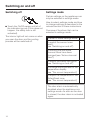
^ The temperature display brightness
can now be changed by touching the
X sensor:
d 0: Maximum brightness
d 1: Reduced brightness
d –: Return to menu.
The old setting lights up, and your
newly selected setting flashes.
^ Touch the On/Off sensor to confirm a
new setting.
^ Touch the X sensor repeatedly until c
appears in the display.
^ Touch the On/Off sensor.
You have now left settings mode.
^ Touch and leave your finger on the X
sensor.
^ At the same time, briefly touch the
On/Off sensor (without letting go of
the X sensor).
19