1
E
DATA PROJECTOR
XJ-M140/XJ-M145*
XJ-M150/XJ-M155*
XJ-M240/XJ-M245*
XJ-M250/XJ-M255*
* USB Port Models
User’s Guide
z Be sure to read the precautions in the separate Setup Guide. For
details about setting up the projector, see the Setup Guide.
z Be sure to keep all user documentation handy for future
reference.
z DLP is a registered trademark of Texas Instruments of the United States.
z Microsoft, Windows, and Windows Vista are registered trademarks or trademarks of Microsoft
Corporation in the United States and other countries.
z HDMI, the HDMI Logo and High-Definition Multimedia Interface are trademarks or registered
trademarks of HDMI Licensing, LLC.
z XGA is a registered trademark of IBM Corporation of the United States.
z PJLink is a trademark applied for registration or is already registered in Japan, the United States
of America and other countries and areas.
z Crestron is a registered trademark of Crestron Electronics, Inc. of the United States.
z AMX is a registered trademark of AMX LLC of the United States.
z Other company and product names may be registered product names or trademarks of their
respective owners.
z Portions of this product are based in part on the work of the Independent JPEG Group.
z The contents of this User’s Guide are subject to change without notice.
z Copying of this manual, either in part or its entirety is forbidden. You are allowed to use this
manual for your own personal use. Any other use is forbidden without the permission of CASIO
COMPUTER CO., LTD.
z CASIO COMPUTER CO., LTD. shall not be held liable for any lost profits or claims from third
parties arising out of the use of this product or this manual.
z CASIO COMPUTER CO., LTD. shall not be held liable for any loss or lost profits due to loss of
data due to malfunction or maintenance of this product, or any other reason.
z The sample screens shown in this manual are for illustrative purposes only, and may not be
exactly the same as the screens actually produced by the product.
B
2
Contents
About this manual... ...............................................................................5
Projector Overview ......................................................... 6
Projector Features and Main Functions .................................................6
Remote Controller and Projector Keys...................................................8
Back Terminals.......................................................................................9
Operation During Projection ........................................ 10
Selecting the Input Source ...................................................................10
To select a different input source .............................................................................. 10
3D Input Mode ........................................................................................................... 10
Horizontal Flipping in the 3D Input Mode .................................................................. 11
Image Operations During Projection ....................................................12
Adjusting Image Brightness ....................................................................................... 12
Selecting the Color Mode .......................................................................................... 13
Zooming an Image ..................................................................................................... 13
Momentarily Cutting Off the Input Source Image ...................................................... 14
Freezing an Image...................................................................................................... 14
Displaying a Pointer in the Projected Image.............................................................. 15
Changing the aspect ratio of the projected image .................................................... 16
Adjusting the Volume Level ..................................................................17
To adjust the volume level ......................................................................................... 17
To mute the audio...................................................................................................... 17
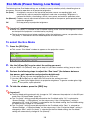
Eco Mode (Power Saving, Low Noise) .................................................18
To select the Eco Mode ............................................................................................. 18
Using the [FUNC] Key ..........................................................................19
3
Configuring Advanced Projector Settings .................. 20
Basic Setup Menu Operations .............................................................20
Displaying the Setup Menu........................................................................................ 20
Configuring Setup Menu Settings.............................................................................. 20
Basic Setup Menu Example....................................................................................... 21
Direct Power On......................................................................................................... 22
Password Protecting the Projector ......................................................23
Inputting a Password ................................................................................................. 23
Using the Password Feature...................................................................................... 23
Entering the Password when Turning On the Projector ............................................ 25
Restoring Projector Settings to Their Initial Factory Defaults ..............26
Setup Menu Contents ..........................................................................28
Image Adjustment 1 Main Menu ................................................................................ 28
Image Adjustment 2 Main Menu ................................................................................ 30
Volume Adjustment Main Menu................................................................................. 30
Screen Settings Main Menu....................................................................................... 31
Input Settings Main Menu.......................................................................................... 33
Option Settings 1 Main Menu .................................................................................... 34
Option Settings 2 Main Menu .................................................................................... 35
Wired LAN Settings Main Menu (USB Port Models Only) ......................................... 37
USB Settings Main Menu (USB Port Models Only) ................................................... 37
Operational Info Main Menu ...................................................................................... 38
Restore All Defaults Main Menu................................................................................. 38
Cleaning the Projector.................................................. 39
Cleaning the Projector Exterior ............................................................39
Cleaning the Lens.................................................................................39
Cleaning Intake, Exhaust and Airflow Vents.........................................39
Error Indicators and Warning Messages .................... 40
4
Appendix ........................................................................ 43
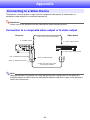
Connecting to a Video Device ..............................................................43
Connection to a composite video output or S-video output ..................................... 43
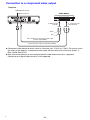
Connection to a component video output ................................................................. 44
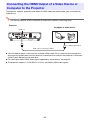
Connecting the HDMI Output of a Video Device or
Computer to the Projector....................................................................45
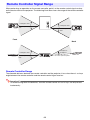
Remote Controller Signal Range ..........................................................46
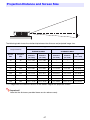
Projection Distance and Screen Size ...................................................47
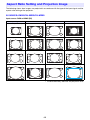
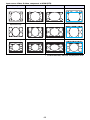
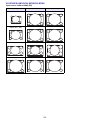
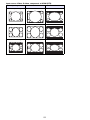
Aspect Ratio Setting and Projection Image .........................................48
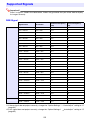
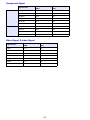
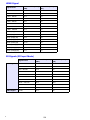
Supported Signals................................................................................52
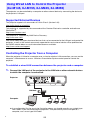
Using Wired LAN to Control the Projector
(XJ-M145, XJ-M155, XJ-M245, XJ-M255) ...........................................55
Supported External Devices ...................................................................................... 55
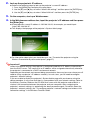
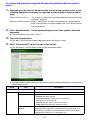
Controlling the Projector from a Computer ............................................................... 55
Projector RS-232C Control ..................................................................60
Connecting the Projector to a Computer................................................................... 60
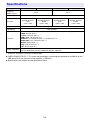
Specifications .......................................................................................62
About this manual...
All of the operations in this manual are explained using the remote controller that comes with the
projector.
5
Projector Overview
This section describes the features of the projector, and explains the functions of the projector and
remote controller keys.
Projector Features and Main Functions
XJ-M140/XJ-M145/XJ-M150/XJ-M155/XJ-M240/XJ-M245/XJ-M250/XJ-M255
z A laser and LED hybrid light source provides high brightness of 2,500 to 3,000 lumens along with
low power consumption and low heat generation.
z A wide selection of input sources:
Analog RGB, composite video, S-video, component video (Y·Cb·Cr, Y·Pb·Pr), and HDMI input
sources are supported.
z Intelligent Brightness Control function (Eco Mode):
The projector senses surrounding light levels and adjusts projection brightness automatically as
required for efficient low-power operation. (Requires “Eco Mode” setting to be set to “On (Auto)”.)
z 3D image projection support:
Projection of a 3D image signal (60Hz/120Hz field sequential protocol) via one of three input
sources (analog RGB, composite video, S-video) is supported.
* Separately available 3D glasses (YA-G30) are required in order to view a projected 3D image in
3D. Also, separately available special software (CASIO 3D Converter) is required to project a 3D
image with the projector when a computer (analog RGB) is the input source.
z Pointer:
The remote controller can be used to select one of a variety of different pointers for use during
projection.
z Direct Power On:
The projector can be configured to turn on automatically and start projecting as soon as it is
plugged into a power outlet.
XJ-M240/XJ-M245/XJ-M250/XJ-M255
z WXGA Resolution:
The XJ-M240/XJ-M245/XJ-M250/XJ-M255 models support WXGA (1280 × 800) resolution for
optimal viewing of content formatted for today’s widescreen displays. This makes it perfect for
projecting images from widescreen notebook PCs and HD video input sources.
6
XJ-M145/XJ-M155/XJ-M245/XJ-M255
z Projection of Data from USB Memory or a Memory Card without a Computer:
USB memory or a memory card (using a commercially available USB card reader) can be connected
directly to the projector’s USB port. The projector comes with special software for converting
PowerPoint presentation data to a format that can be stored to USB memory or a memory card and
projected without using a computer. Images and movies also can be projected directly from USB
memory or a memory card.
z Multi Projection Camera (YC-400, YC-430) Connection:
A CASIO Multi Projection Camera can be connected directly to the projector’s USB port for fine
resolution projection of documents and other images. Document camera capabilities allow
projection of data without going through a computer.
z Graphic Scientific Function Calculator Connection:
Certain CASIO graphic scientific calculator models can be connected directly to the projector’s
USB port for projection of the calculator screen contents.
z Projection of Computer Screen Contents via Wireless LAN:
The projector comes with a wireless LAN adapter. After a wireless LAN connection is established,
the contents of the computer screen can be sent to the projector for projection.
z Support for Wireless projection from MobiShow:
You can install AWIND’s MobiShow (client software for wireless connection to a projector) on a
smartphone or mobile terminal, and then use the projector to project photographs and presentation
files stored in the smartphone or terminal memory.
* Note that the type of terminal and the MobiShow version can limit certain functions or can even
make projection impossible.
z Projector operation via wired or wireless LAN:
Remote control of the projector is supported via a wired connection to the LAN port on the back or
the projector or via wireless LAN.
7
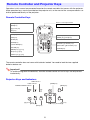
Remote Controller and Projector Keys
Operations in this manual are presented based on the remote controller that comes with the projector.
Major operation keys are also provided on the projector unit, so the most of the same procedures can
also be performed directly on the projector.
Remote Controller Keys
Remote control signal emitter
[INPUT] key
CLASS 1 LED PRODUCT
[MENU] key
[P] (Power) key
[ESC] key
[FUNC] key
Cursor keys (S/T/W/X)
[AUTO] key
[ENTER] key ([STYLE] key)
[BLANK] key
[FREEZE] key
[D-ZOOM +] [D-ZOOM –] keys
[COLOR MODE] key
[KEYSTONE +] [KEYSTONE –] keys
[VOLUME] key
[POINTER] key
[BRIGHT] key ([O] key)
[ECO] key ([f] key)
[ASPECT] key ([Z] key)
The remote controller does not come with batteries loaded. You need to load the two supplied
batteries before use.
Important!
To avoid running down the batteries, store the remote control unit so its keys are not pressed
inadvertently.
Projector Keys and Indicators
TEMP indicator
[ENTER] key
LIGHT indicator
POWER/STANDBY indicator
[MENU] key
[ESC] key
Cursor keys (q/w/U/I)
[P] (Power) key
[INPUT] key
[AUTO] key
8
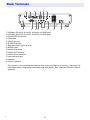
Back Terminals
1
7
2
3
8
9 bk
4
5
bl
6
bm
bn
bo
1 USB port (XJ-M145, XJ-M155, XJ-M245, XJ-M255 only)
2 LAN port (XJ-M145, XJ-M155, XJ-M245, XJ-M255 only)
3 COMPUTER IN terminal
4 HDMI port
5 VIDEO terminal
6 S-VIDEO terminal
7 Remote control signal receiver
8 SERIAL port*
9 AUDIO IN terminal
bk AUDIO OUT terminal
bl AUDIO IN L/R terminals
bm Anti-theft lock hole
bn Speaker
bo Power connector
* This terminal is for controlling the projector from an external device. It normally is not used. For
information about using control commands and other details, See “Projector RS-232C Control”
(page 60).
B
9
Operation During Projection
Selecting the Input Source
Turning on the projector initially causes the same input source that was selected the last time it was
turned off to be selected.
To select a different input source
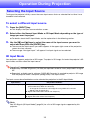
1.
Press the [INPUT] key.
z This displays the input source selection screen.
2.
Select either the Normal Input Mode or 3D Input Mode depending on the type of
image you want to project.
z For details about the 3D Input Mode, see the explanation in the following section.
3.
Use the [T] and [S] keys to select the name of the input source you want to
select and then press the [ENTER] key.
z The name of the input source you select appears in the upper right corner of the projection
screen for a few seconds.
z The message “No signal input.” will appear if no input signal can be selected.
3D Input Mode
Your projector supports projection of 3D images. To project a 3D image, first enter the projector’s 3D
input mode, and then select the input source.
Important!
z Separately available 3D glasses (YA-G30) are required in order to view a projected 3D image in
3D.
z Separately available special software (CASIO 3D Converter) is required to project a 3D image
with the projector when a computer (analog RGB) is the input source.
The input sources described below can be selected for projection in the 3D Input Mode.
Input Source
Projection Conditions
Computer (Analog RGB)
z Any of the following types of 3D image data played back using separately available
special software (CASIO 3D Converter).
– 2D image file converted to a 3D image file using CASIO 3D Converter
– Side-by-side 3D format files
z Signal with 60Hz/120Hz vertical scan frequency
Composite Video, S-video
z Field sequential 3D format files recorded with field sequential DVD software, etc.
z Signal with 60Hz vertical scan frequency
Note
See “3D Signals (3D Input Mode)” (page 54) for a list of 3D image signals supported by this
projector.
10
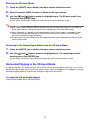
Entering the 3D Input Mode
1.
Press the [INPUT] key to display the input source selection screen.
2.
Select Computer (RGB), S-video, or Video as the input source.
3.
Use the [T] and [S] keys to move the highlighting to “To 3D input mode” and
then press the [ENTER] key.
z This enters the 3D input mode and closes the input source selection screen.
Important!
z You cannot select HDMI or USB as the input source in the 3D input mode. To use either of
these input sources, change the input source setting back to normal input mode.
z When Computer is selected as the input source in the 3D input mode, a component video
signal input through the projector’s COMPUTER IN terminal is treated as an RGB signal
resulting in abnormal image projection.
z Except when using the projector for 3D image projection, you should normally leave it in the
normal input mode.
Returning to the Normal Input Mode from the 3D Input Mode
1.
Press the [INPUT] key to display the input source selection screen.
2.
Use the [T] and [S] keys to move the highlighting to “To normal input mode”
and then press the [ENTER] key.
z This enters the normal input mode and closes the input source selection screen.
Horizontal Flipping in the 3D Input Mode
In side-by-side 3D, a full frame consists of two halves on the left and right for each eye. In rare cases,
the left and right images may be reversed, which causes a loss of 3D depth. If this happens, try using
the following procedure to swap the left and right images with each other.
To swap the left and right images
In the 3D input mode, press the [ENTER] key.
11
Image Operations During Projection
You can perform the following operations while projecting an image.
z Image brightness adjustment
z Color mode selection
z Image zooming
z Momentary cut off of the input source image and projection of a black or blue screen, or a logo
z Image freeze
z Pointer display in the projected image
z Aspect ratio switching
Adjusting Image Brightness
Note
(for USB port model users)
Use the setup menu (page 20) to adjust image brightness when the input source is an external
device connected to the USB port.
To adjust image brightness
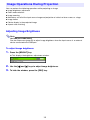
1.
Press the [BRIGHT] key.
z This displays the brightness adjustment window.
2.
Use the [W] and [X] keys to adjust image brightness.
3.
To hide the window, press the [ESC] key.
12
Selecting the Color Mode
You can select from among various different color mode settings in accordance with image contents
and projection conditions.
Important!
The color mode cannot be selected in the following cases.
z When “Off” is selected for the Eco Mode setting (page 18)
z When the projector is in the 3D input mode. See “3D Input Mode” (page 10).
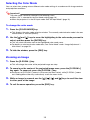
To change the color mode
1.
Press the [COLOR MODE] key.
z This displays the color mode selection window. The currently selected color mode is the one
whose button is selected (filled in).
2.
Use the [T] and [S] keys to move the highlighting to the color mode you want to
select, and then press the [ENTER] key.
z This will select the button next to the highlighted color mode name.
z For details on what each color mode does, see “Color Mode” under “Image Adjustment 1
Main Menu” on page 29.
3.
To hide the window, press the [ESC] key.
Zooming an Image
1.
Press the [D-ZOOM +] key.
z This will enlarge the center of the projected image one step.
2.
To zoom in on the center of the projected image more, press the [D-ZOOM +]
key again. To zoom out, press the [D-ZOOM –] key.
z Each press of [D-ZOOM +] zooms in (increases the zoom factor), while [D-ZOOM –] zooms
out. Holding down either key continuously scrolls the zoom factor.
3.
While an image is zoomed, use the [S], [T], [W], and [X] keys to scroll the view
to other parts of the image.
4.
To exit the zoom operation, press the [ESC] key.
13
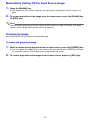
Momentarily Cutting Off the Input Source Image
1.
Press the [BLANK] key.
z This temporarily cuts off the image from the input source and projects a black screen in its
place.
2.
To resume projection of the image from the input source, press the [BLANK] key
(or [ESC] key).
Note
You can specify projection of a black screen or blue screen, or a logo. For details, see “Blank
Screen” under “Screen Settings Main Menu” on page 32.
Freezing an Image
Pressing the [FREEZE] key freezes the projected image.
To freeze the projected image
1.
While an image is being projected from an input source, press the [FREEZE] key.
z This will capture the image that is on the screen at the moment you press [FREEZE] and stores
it in projector memory. That image remains projected on the screen.
2.
To restore projection of the image from an input source, press the [ESC] key.
14
Displaying a Pointer in the Projected Image
You can select from among different pointer styles, including various arrow styles, for display in the
projected image. Pointers can be used during a presentation to indicate or highlight a specific part of
the image.
Note
Depending on the pointer style you are using, the pointer may not display properly when you are
using keystone correction. If this happens, use the [KEYSTONE +] and [KEYSTONE –] keys to
change the keystone correction value to zero.
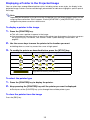
To display a pointer in the image
1.
Press the [POINTER] key.
z This will cause a pointer to appear in the image.
z You also can use the setup menu to specify the pointer type that appears first when you press
the [POINTER] key. For details, see “Pointer” under “Option Settings 2 Main Menu” on
page 35.
2.
Use the cursor keys to move the pointer to the location you want.
z Holding down a cursor key moves the cursor at high speed.
3.
To modify the pointer as described below, press the [STYLE] key.
For this pointer type:
Pressing [STYLE] will change it like this:
J
J
J
J
J
J
J
J
J
J
J
J
Toggle between flashing and not flashing
To select the pointer type
1.
Press the [POINTER] key to display the pointer.
2.
Keep pressing the [POINTER] key until the pointer you want is displayed.
z Each press of the [POINTER] key cycles through the available pointer types.
To clear the pointer from the image
Press the [ESC] key.
15
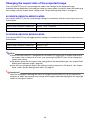
Changing the aspect ratio of the projected image
Press the [ASPECT] key to cycle through the aspect ratio settings for the projected image.
Available settings depend on your projector model as shown below. For details about the meaning of
each setting, see the “Aspect Ratio” setting under “Screen Settings Main Menu” on page 31.
XJ-M240/XJ-M245/XJ-M250/XJ-M255
Pressing the [ASPECT] key will cycle through settings in accordance with the current input source as
shown below.
Input Source
Pressing [ASPECT] will cycle through these settings:
Video, S-video, Component, HDMI (DTV)
Normal J 16:9 J Letter Box
RGB, HDMI (PC)
Normal J Full J True
XJ-M140/XJ-M145/XJ-M150/XJ-M155
Pressing the [ASPECT] key will toggle between settings in accordance with the current input source as
shown below.
Input Source
Pressing [ASPECT] will toggle between these settings:
Video, S-video, Component, HDMI (DTV)
Normal 16:9
RGB, HDMI (PC)
Normal Full
Note
z When the input source is a component or an HDMI (DTV) signal with an aspect ratio of 16:9,
the aspect ratio is fixed at 16:9. In this case, pressing the [ASPECT] key will not change the
aspect ratio setting.
z For details about how the aspect ratio setting affects the projected image, see “Aspect Ratio
Setting and Projection Image” (page 48).
z You also can change the aspect ratio setting using the setup menu. For details, see “Aspect
Ratio” under “Screen Settings Main Menu” on page 31.
Important!
Note that enlarging or reducing the size of an image using the [ASPECT] key for commercial
purposes or public presentation may infringe on the legally protected copyright of the copyright
holder of the original material.
16
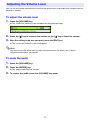
Adjusting the Volume Level
You can use the remote controller keys to adjust the volume level of the audio that is output from the
projector’s speaker.
To adjust the volume level
1.
Press the [VOLUME] key.
z This causes the [Volume] screen to appear on the projected image.
2.
Press the [X] key to increase the volume, or the [W] key to lower the volume.
3.
After the setting is the way you want, press the [ESC] key.
z This causes the [Volume] screen to disappear.
Note
You also can use the setup menu to adjust the volume level. For details, see “Volume
Adjustment Main Menu” on page 30.
To mute the audio
1.
Press the [VOLUME] key.
2.
Press the [ENTER] key.
z This stops output from the speaker.
3.
To restore the audio, press the [VOLUME] key again.
17
Eco Mode (Power Saving, Low Noise)
The following three Eco Mode settings are available to specify whether priority should be given to
low-power, low-noise operation or to projection brightness.
On (Auto) : A brightness sensor on the top of the projector senses surrounding light, and
automatically adjusts projection brightness and color accordingly. Brightness is
reduced for darker surroundings, which saves power and reduces operation noise.
On (Manual): Enables manual adjustment to balance the needs of low-power, quiet operation and
projection brightness.
Off
: Give top priority to projection brightness.
Important!
z While “On (Auto)” is selected as the Eco Mode setting, make sure that the brightness sensor
on the top of the projector is not blocked by anything.
z The local environment and setup conditions affect the brightness sensor, so operation when
“On (Auto)” is selected for the Eco Mode depends on these factors.
To select the Eco Mode
1.
Press the [ECO] key.
z This causes “Eco Mode” window to appear on the projection screen.
2.
Use the [W] and [X] keys to select the setting you want.
z If you select “On (Manual)” here, go to step 3. If you select another setting, jump to step 4.
3.
Perform the following steps to adjust the “Eco Level” (the balance between
low-power, quiet operation and projection brightness).
1 Press the [T] key to move the highlighting to the Eco Level.
2 Use the [W] and [X] keys to adjust the Eco Level to the setting you want.
Fewer
marks gives higher priority to projection brightness. A greater number gives high
priority to low-power, quiet operation.
4.
To hide the window, press the [ESC] key.
Important!
z The Eco Mode setting automatically changes to “Off” whenever the projector is in the 3D input
mode. See “3D Input Mode” (page 10).
z The “On (Auto)” setting cannot be selected for the Eco Mode while “On” is selected for
“Screen Settings J Ceiling Mount” on the setup menu. If the “Ceiling Mount” setting is
changed to “On” while “On (Auto)” is selected for the Eco Mode setting, the Eco Mode setting
will automatically change to “On (Manual)”.
z The “On (Auto)” setting cannot be selected for the Eco Mode while “Rear” is selected for
“Screen Settings J Projection Mode” on the setup menu. If the “Projection Mode” setting is
changed to “Rear” while “On (Auto)” is selected for the Eco Mode setting, the Eco Mode
setting will automatically change to “On (Manual)”.
18
Note
z While “Off” is selected for the Eco Mode setting, you also can specify whether brightness or
color should be given emphasis. For details, see “Eco Off Mode” under “Image Adjustment 1
Main Menu” (page 29).
z (for USB port model users)
Use the setup menu (page 20) to select the Eco Mode when the input source is an external
device connected to the USB port.
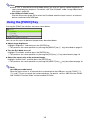
Using the [FUNC] Key
Pressing the [FUNC] key displays the menu shown below.
You can use this menu to perform the operations described below.
z Adjust image brightness
Highlight “Brightness” and then press the [ENTER] key.
J This performs the same operation as pressing the [BRIGHT] key (O key) described on page 12.
z Turn the Eco Mode on or off
Highlight “Eco Mode” and then press the [ENTER] key.
J This performs the same operation as pressing the [ECO] key (f key) described on page 18.
z Select the aspect ratio of the projected image
Highlight “Aspect Ratio” and then press the [ENTER] key.
J This performs the same operation as pressing the [ASPECT] key (Z key) described on page 16.
Note
(for USB port model users)
When the input source is an external device connected to the USB port, use the [FUNC], [O],
[f], and [Z] keys to control the connected device. For details, see the “USB Function Guide”
and “Wireless Function Guide” on the bundled CD-ROM.
19
Configuring Advanced Projector Settings
Your projector has a setup menu that you can use to configure advanced settings.
Basic Setup Menu Operations
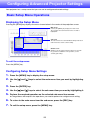
Displaying the Setup Menu
Pressing the [MENU] key displays the menu shown below in the center of the projection screen.
Main menu
Pressing the [MENU] key displays the main menu.
The currently selected menu item is the one that is
highlighted.
Sub-menu
The sub-menu shows each individual setting under each
main menu item, and its current setting.
Guidance text
Guidance text provides a brief description of the main
key operations available for the operation you are
currently performing.
To exit the setup menu
Press the [MENU] key.
Configuring Setup Menu Settings
1.
Press the [MENU] key to display the setup menu.
2.
Use the [T] and [S] keys to select the main menu item you want by highlighting
it.
3.
Press the [ENTER] key.
4.
Use the [T] and [S] keys to select the sub-menu item you want by highlighting it.
5.
Perform the required operation on the selected sub-menu item screen.
z The guidance text explains the operations you need to perform to configure each setting.
6.
To return to the main menu from the sub-menu, press the [ESC] key.
7.
To exit the setup menu, press the [MENU] key.
20
Basic Setup Menu Example
The procedure below shows how to configure the following three settings:
z Image Adjustment 1 J Contrast
z Image Adjustment 1 J Color Mode
z Input Settings J Signal Name Indicator
Note
z The setup menu items that you can change depend on whether or not an image signal is being
input to the projector, and on the currently selected input source. Perform the procedure
below after starting projection of an image from an input source in the normal input mode. See
“3D Input Mode” on page 10 for information about how to do this.
z This example covers basic steps only. For more detailed information, see “Setup Menu
Contents” on page 28.
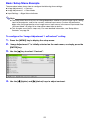
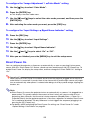
To configure the “Image Adjustment 1 J Contrast” setting
1.
Press the [MENU] key to display the setup menu.
2.
“Image Adjustment 1” is initially selected on the main menu, so simply press the
[ENTER] key.
3.
Use the [T] key to select “Contrast”.
4.
Use the [W] (lighter) and [X] (darker) keys to adjust contrast.
21
To configure the “Image Adjustment 1 J Color Mode” setting
5.
Use the [T] key to select “Color Mode”.
6.
Press the [ENTER] key.
z This displays the color mode menu.
7.
Use the [T] and [S] keys to select the color mode you want, and then press the
[ENTER] key.
8.
After selecting the color mode you want, press the [ESC] key.
To configure the “Input Settings J Signal Name Indicator” setting
9.
Press the [ESC] key.
10.
Use the [T] key to select “Input Settings”.
11.
Press the [ENTER] key.
12.
Use the [T] key to select “Signal Name Indicator”.
13.
Use the [W] and [X] keys to select “On” or “Off”.
14.
After you are finished, press the [MENU] key to exit the setup menu.
Direct Power On
You can configure the projector so it powers up automatically as soon as you plug it into a power
source. With this “Direct Power On” feature, you do not even need to press the [P] (Power) key. To
enable Direct Power On, display the setup menu, and then change the “Direct Power On” setting to
“On”.
Important!
When you have Direct Power On enabled, do not leave the projector plugged into an electrical
outlet while it is turned off. If you do, there is the chance that it (and the light source unit) might
turn on automatically when power is restored after being cut off by a power outage, tripping of a
breaker, etc.
Note
z Direct Power On causes the projector to turn on automatically as soon as it is plugged into a
power outlet. This greatly reduces the amount of time it takes until you are ready to start
projecting. Note, however, that the actual startup sequence (Standby State J Power On J
Projection Starts) that the projector performs is the same, regardless of whether Direct Power
On is enabled or disabled. The only difference is what triggers the sequence (plugging in or
pressing the [P] (Power) key).
z For details about configuring the Direct Power On setting, see “Direct Power On” under
“Option Settings 1 Main Menu” on page 34.
22
Password Protecting the Projector
The password feature lets you keep unauthorized individuals from using the projector. You can specify
whether password input is required whenever you turn on the projector, and you can specify and
change the password as required. Use the setup menu “Option Settings 1 J Power On Password”
setting to configure power on password settings.
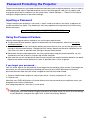
Inputting a Password
The password of your projector is not really a “word” made up of letters, but rather a sequence of
remote controller key inputs. The following is the 8-key sequence that represents the initial factory
default password.
[INPUT] [AUTO] [BLANK] [FREEZE] [S] [T] [W] [X]
Using the Password Feature
Note the following precautions whenever you use the password feature.
z The password feature protects against unauthorized use of the projector. Note that it is not an
anti-theft measure.
z You will need to enter the initial factory default password the first time you use the projector after
turning on the password feature. Change the initial factory default password to a different one of
your choice as soon as possible after turning on the password feature.
z Remember that password operations are always performed using the remote controller, so you
should take care not to lose or misplace the remote controller.
z Also note that you will not be able to input the password if the remote controller batteries are dead.
Replace the remote control batteries as soon as possible after it starts to go low.
If you forget your password...
You will not be able to use the projector if you forget the password for some reason. If you forget the
password, you will need to bring the following two items to your CASIO distributor to have the
password cleared. Note that you will be charged to have the password cleared.
1. Personal identification (original or copy of your driver’s license, employee I.D., etc.)
2. Projector unit
Note that your CASIO distributor will not be able to clear the password of your projector unless you
bring both of the items listed above.
Also, keep the projector’s warranty in a safe place.
Important!
Having your password cleared using the procedure described above will return all of the settings
of your projector, except for the Light Time, to their initial factory defaults.
23
Keep a written record of your password!
You will not be able to use the projector if you forget its password. We strongly suggest that you keep
a written or other type of record of the password so you can look it up when necessary.
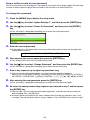
To change the password
1.
Press the [MENU] key to display the setup menu.
2.
Use the [T] key to select “Option Settings 1”, and then press the [ENTER] key.
3.
Use the [T] key to select “Power On Password”, and then press the [ENTER]
key.
z This will display a dialog box prompting you to enter the current password.
4.
Enter the current password.
z If the projector is still protected by the factory default password, perform the key operation
shown below to enter it.
[INPUT] [AUTO] [BLANK] [FREEZE] [S] [T] [W] [X]
5.
After entering the current password, press the [ENTER] key.
z This displays the Power On Password setting screen.
6.
Use the [T] key to select “Change Password”, and then press the [ENTER] key.
z This will display a dialog box prompting you to enter the new password.
7.
Enter a key sequence up to eight key operations long.
z You can use any of the following keys as part of your password key sequence.
[INPUT], [AUTO], [BLANK], [FREEZE], [VOLUME], [COLOR MODE], [D-ZOOM +], [D-ZOOM –],
[KEYSTONE +], [KEYSTONE –], [MENU], [POINTER], [O], [f], [Z], [S], [T], [W], [X], [FUNC]
8.
After entering the new password, press the [ENTER] key.
z This will display a dialog box prompting you to enter the same password again.
9.
Re-enter the same password key sequence you entered in step 7 and then press
the [ENTER] key.
z The message “Your new password has been registered.” indicates that the password has
been changed. Press the [ESC] key.
z If the password you entered in this step is different from the one you entered in step 7, the
message “The password you input is wrong.” appears. Press the [ESC] key to return to step 7.
24
To turn password protection on and off
1.
Display the Power On Password setting screen by performing steps 1 through 5
of the procedure under “To change the password” on page 24.
z At this time, make sure that “Power On Password” is selected on the Power On Password
setting screen.
2.
Use the [W] and [X] keys to select “On” or “Off”.
z Changing the power on password setting from “Off” to “On” causes the confirmation dialog
box shown below to appear.
Press the [ENTER] key to confirm that you want to turn on power on password protection, or
[ESC] to exit the dialog box without doing anything.
3.
After you are finished, press the [MENU] key to exit the setup menu.
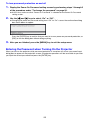
Entering the Password when Turning On the Projector
When you turn on the projector while password protection is turned on will cause a password input
dialog box to appear on the projection screen. All projector operations will be accessible to you after
you input the correct password and press the [ENTER] key.
25
Restoring Projector Settings to Their Initial Factory
Defaults
You can use the procedures in this section to restore all of the settings on a particular main menu or all
of the settings on the setup menu to their initial factory defaults.
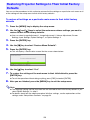
To restore all settings on a particular main menu to their initial factory
defaults
1.
Press the [MENU] key to display the setup menu.
2.
Use the [T] and [S] keys to select the main menu whose settings you want to
restore to their initial factory defaults.
z You can select Image Adjustment 1, Image Adjustment 2, Volume Adjustment, Screen
Settings, Input Settings, Option Settings 1, or Option Settings 2.
3.
Press the [ENTER] key.
4.
Use the [T] key to select “Restore Menu Defaults”.
5.
Press the [ENTER] key.
z This will display a confirmation screen like the screen shown below.
6.
Use the [S] key to select “Yes”.
7.
To restore the settings of the main menu to their initial defaults, press the
[ENTER] key.
z To exit the operation without doing anything, press [ESC] instead of [ENTER].
8.
After you are finished, press the [MENU] key to exit the setup menu.
Note
z The language setting and the password are not returned to their initial factory defaults if you
select Option Settings 1 in step 2.
z For details about how the above procedure initializes settings, see the explanations of the
settings under “Setup Menu Contents” on page 28.
26
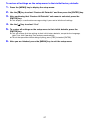
To restore all settings on the setup menu to their initial factory defaults
1.
Press the [MENU] key to display the setup menu.
2.
Use the [T] key to select “Restore All Defaults” and then press the [ENTER] key.
3.
After confirming that “Restore All Defaults” sub-menu is selected, press the
[ENTER] key.
z This displays a confirmation message asking if you want to initialize all settings.
4.
Use the [S] key to select “Yes”.
5.
To restore all settings on the setup menu to their initial defaults, press the
[ENTER] key.
z This will restore all of the settings to their initial factory defaults, except for the Language,
Light Time, Unit Operating Time and password settings.
z To exit the operation without doing anything, press [ESC] instead of [ENTER].
6.
After you are finished, press the [MENU] key to exit the setup menu.
27
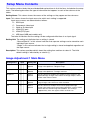
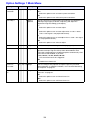
Setup Menu Contents
This section contains tables that provide detailed explanations of all of the items included on the setup
menu. The following describes the type of information that appears in each of the columns of the
tables.
Setting Name: This column shows the names of the settings as they appear on the sub-menu.
Input: This column shows the input source for which each setting is supported.
Input source names are abbreviated as follows:
R : RGB input
C : Component video input
V : Video or S-video input
H : HDMI (PC) input
D : HDMI (DTV) input
U : USB input (USB port models only)
The letter N indicates that the setting can be configured while there is no input signal.
Setting Unit: The setting unit indicates how a setting is stored.
“Source Specific” in this column indicates that separate settings can be stored for each
individual input source.
“Single” in this column indicates that a single setting is stored and applied, regardless of
the input source.
Description: This column provides details about the setting item and how to select it. The initial
default setting is indicated by an asterisk (*).
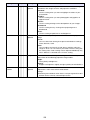
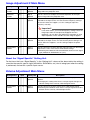
Image Adjustment 1 Main Menu
Setting Name
Input
Setting Unit
Description
Brightness
RCV HDU
Source
Specific
Use this sub-menu to adjust the brightness of the projected image.
A larger value produces a brighter image.
Contrast
RCV HDU
Source
Specific
Use this sub-menu to adjust the contrast of the projected image.
A larger value produces a stronger contrast.
Sharpness
V
Source
Specific
Use this sub-menu to adjust the sharpness of the outlines in the
projected image. A larger value makes the image sharper, while a
smaller value makes it softer.
Saturation
V
Source
Specific
Use this sub-menu to adjust the color saturation of the projected
image. A larger value increases color saturation.
Tint
V
Source
Specific
Use this sub-menu to adjust the tint of the projected image.
A larger value makes the overall image more bluish, while a smaller
value makes the overall image more reddish. This setting is
supported only when the signal is NTSC or NTSC4.43.
28
Setting Name
Input
Setting Unit
Description
Color Mode
RCV HDU
Source
Specific
You can select from among various different color mode settings in
accordance with image contents and projection conditions.
Standard:
Use this setting when you want to highlight the colors of your
presentation.
Graphics:
Use this setting when you want photographs and graphics to
appear natural.
Theater:
Use this setting to bring out the dark portions of your images.
Blackboard:
Use this setting for easy viewing when projecting onto a
blackboard.
Game:
Use this setting to optimize hue and brightness.
Color Balance
RCV HDU
Source
Specific
This sub-menu lets you adjust the color balance of the projected
image.
Preset:
You can select from among three preset color balance settings:
Warm, Normal,* Cold.
Color:
You can adjust the intensity of red, green, and blue within the
range of –50 to +50. The intensity of a color increases along with
the setting value. Color settings can be adjusted individually only
when “Normal” is selected as the “Preset” setting.
Eco Off Mode
RCV HDU
Single
When “Off” is selected for “Option Settings 1 J Eco Mode”, you can
select either of the following projection image modes.
Bright:
Gives priority to brightness.
Normal:
Suppresses brightness slightly and gives priority to color balance.
Restore Menu
Defaults
RCV HDU
Source
Specific
Use this sub-menu to return all of the sub-menu items on the Image
Adjustment 1 main menu to their initial default
settings.
z Restoring menu defaults when there is no input signal will restore
defaults for the currently selected input source.
29
Image Adjustment 2 Main Menu
Setting Name
Input
Setting Unit
Description
Vertical
Position
RCV
Signal
Specific
Use this sub-menu to adjust the vertical position of the input source
image within the projection area.
Horizontal
Position
RCV
Signal
Specific
Use this sub-menu to adjust the horizontal position of the input
source image within the projection area.
Frequency
R
Signal
Specific
When vertical bands appear in the projected image while RGB is
selected as the input source, it means that the frequency setting is
not correct. When this happens, use this setting to adjust the
frequency manually.
Important!
If, for some reason, your manual frequency settings cause the
image input from the computer to disappear from the
projection, you can press the [AUTO] key to perform an auto
adjust operation, which should cause the image to appear.
Phase
R
Signal
Specific
When there is flickering in the projected image while RGB is
selected as the input source, it means that the phase setting is not
correct. When this happens, use this setting to adjust the phase
manually.
Restore Menu
Defaults
RCV
Source
Specific
Use this sub-menu to return all of the sub-menu items on the Image
Adjustment 2 main menu to their initial default settings.
z Restoring menu defaults will restore defaults for the current signal
type (XGA/60Hz, SXGA/60Hz, etc.) only.
About the “Signal Specific” Setting Unit
For the items that have “Signal Specific” in the “Setting Unit” column of the above table, the setting is
saved for the specific type of signal (XGA/60Hz, SXGA/60Hz, etc.) that is being input when the setting
is performed, and not for a specific input source.
Volume Adjustment Main Menu
Setting Name
Input
Setting Unit
Description
Volume
R C V H D U N Source
Specific
Use this sub-menu to adjust the volume level of the projector’s
speaker.
z Changing this setting when there is no input signal changes the
volume setting of the currently selected signal source.
Restore Menu
Defaults
R C V H D U N Source
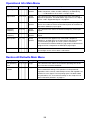
Specific
Use this sub-menu to return Volume to its initial default setting.
z Restoring menu defaults when there is no input signal will restore
defaults for the currently selected input source.
30
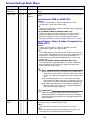
Screen Settings Main Menu
Setting Name
Input
Setting Unit
Description
Keystone
Correction
R C V H D U N Single
Use this sub-menu to correct vertical keystoning of the projected
image.
Aspect Ratio
RCV HD
Use this sub-menu to select an aspect ratio setting for the projected
image.
Source
Specific
Input Source: RGB or HDMI (PC)
Normal*:
Projects at the projector’s maximum possible size while
maintaining the input signal aspect ratio.
Full:
Projects at the projector’s maximum possible size by enlarging or
reducing the input signal.
True (XJ-M240/XJ-M245/XJ-M250/XJ-M255 only):
Projects the input signal at its actual size (1 input source dot
equal to one projector output pixel dot) in the center of the
projector’s projection screen. If the input signal resolution
exceeds the projector’s output resolution, the excess is cut off.
Input Source: Video, S-video, Component or
HDMI (DTV)
Normal*:
Projects at the projector’s maximum possible size while
maintaining the input signal aspect ratio.
16:9 :
This setting specifies a 16:9 aspect ratio, which is the same as a
movie screen, high-definition TV, etc. Using this setting when the
input signal is a 16:9 image that has been squeezed to a 4:3
image causes the image to be displayed with its normal 16:9
aspect ratio.
Letter Box (XJ-M240/XJ-M245/XJ-M250/XJ-M255 only):
This will resize the image horizontally to 1280 dots and project
800 vertical dots of the center of the image, maintaining the
aspect ratio of the input signal.
Note
z When the input source is a component or an HDMI (DTV)
signal with an aspect ratio of 16:9, the aspect ratio is fixed
at 16:9. The aspect ratio setting cannot be changed in this
case.
z When projecting while “True” is selected as the aspect
ratio setting for an RGB signal with a resolution that is less
than SVGA, the image is enlarged to SVGA and projected.
z For details about projection screen display conditions for
different aspect ratio settings, see “Aspect Ratio Setting
and Projection Image” (page 48).
Important!
Note that enlarging or reducing the size of an image for
commercial purposes or public presentation may infringe on
the legally protected copyright of the copyright holder of the
original material.
Projection
Mode
R C V H D U N Single
Use this sub-menu to specify whether projection will be from the
front of the screen or the back of the screen.
Front*:
Select this option to project from the front of the screen.
Rear:
Select this option to project from the back of the screen. This
setting flips the front projected image horizontally.
31
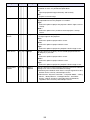
Setting Name
Ceiling Mount
Input
Setting Unit
R C V H D U N Single
Description
Use this sub-menu to configure the projector for use in an
installation in which it is positioned upside down.
On:
Flips the projected image horizontally and vertically.
Off*:
Projects a normal image.
Startup Screen R C V H D U N Single
Use this sub-menu to specify whether or not a startup screen should
be projected whenever the projector is turned on.
Logo:
Select this option to project the projector’s built-in logo screen at
startup.
None*:
Select this option when you do not want to project a startup
screen.
No Signal
Screen
R C V H D U N Single
Use this sub-menu to specify what should be projected when there
is no input signal to the projector.
Blue*:
Select this option to project a blue screen.
Black:
Select this option to project a black screen.
Logo:
Select this option to project the projector’s built-in logo screen.
Blank Screen
R C V H D U N Single
Use this sub-menu to specify what should be projected after the
[BLANK] key is pressed.
Blue:
Select this option to project a blue screen.
Black*:
Select this option to project a black screen.
Logo:
Select this option to project the projector’s built-in logo screen.
Restore Menu
Defaults
R C V H D U N Source
Specific
Use this sub-menu to return all of the sub-menu items on the Screen
Settings main menu to their initial default settings.
z Restoring menu defaults when there is no input signal will restore
defaults for the currently selected input source.
z Note that the “Keystone Correction”, “Projection Mode”, “Ceiling
Mount”, “Startup Screen”, “No Signal Screen”, and “Blank
Screen” settings are always returned to their initial defaults,
regardless of the currently selected input source.
32
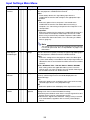
Input Settings Main Menu
Setting Name
COMPUTER
Terminal
Input
RC
Setting Unit
N Single
Description
Use this sub-menu to specify manually the type of signal being input
from the projector’s COMPUTER IN terminal.
Auto*:
Automatically detects the signal being input from the
COMPUTER IN terminal and configures the appropriate input
protocol.
RGB:
Select this option when a computer is connected to the
COMPUTER IN terminal. For details about connecting a
computer, see “Connecting a Computer to the Projector” in the
“Setup Guide”.
Component:
Select this setting when the projector’s COMPUTER IN terminal is
connected to the component video output terminal of a video
device using a commercially available component video cable.
For information about connection, see “Connecting to a Video
Device” (page 43).
Note
The setting of this item cannot be changed while the projector
is in the 3D input mode. See “3D Input Mode” on page 10 for
information.
Video Signal /
S-Video Signal
V
N Single
Use this sub-menu to specify manually the type of signal being input
from the projector’s VIDEO terminal or S-VIDEO terminal.
Auto*:
Select this setting to have the projector switch the video signal
system automatically in accordance with the input signal from the
video device that is connected to the VIDEO terminal or S-VIDEO
terminal.
NTSC / NTSC4.43 / PAL / PAL-M / PAL-N / PAL60 / SECAM:
Each setting selects the applicable video system. Use these
settings when you want to specify only one specific video signal
for the VIDEO terminal or S-VIDEO terminal.
Signal Name
Indicator
R C V H D U N Single
Use this sub-menu to specify whether or not the name of the
currently selected signal source should be displayed in the
projected image.
On*:
Select this option to turn on display of the name of the currently
selected signal source in the projected image.
Off:
Select this option to turn off display of the signal source name.
Restore Menu
Defaults
R C V H D U N Source
Specific
Use this sub-menu to return all of the sub-menu items on the Input
Settings main menu to their initial default settings.
z Restoring menu defaults when there is no input signal will restore
defaults for the currently selected input source.
z Note that the “Signal Name Indicator” setting is always returned
to its initial default, regardless of the currently selected input
source.
33
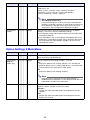
Option Settings 1 Main Menu
Setting Name
Input
Setting Unit
Auto Keystone R C V H D U N Single
Correction
Auto Adjust
R
N Source
Specific
Eco Mode
R C V H D U N Single
Auto Power Off R C V H D U N Single
Description
Use this sub-menu to turn auto keystone correction on or off.
On*:
Select this option to turn on auto keystone correction.
Off:
Select this option to turn off auto keystone correction.
Use this sub-menu to select whether the projector should detect the
RGB input signal type (resolution, frequency) and adjust the
projection image accordingly (auto adjust).
1*:
Select this option to turn on auto adjust.
2:
Select this option to turn on auto adjust when a 1360 × 768 or
1400 × 1050 signal is not projected correctly.
3:
Select this option to turn on auto adjust when a 1366 × 768 signal
is not projected correctly.
Off:
Select this option to turn off auto adjust.
See “Eco Mode (Power Saving, Low Noise)” (page 18).
Auto Power Off lets you specify the amount of time of projector
operation and input signal inactivity to be allowed before Auto
Power Off is triggered to turn off projector power automatically. Auto
Power Off can be disabled, if you want.
5 min, 10 min*, 15 min, 20 min, 30 min:
Time until Auto Power off is triggered.
Off:
Disables Auto Power Off.
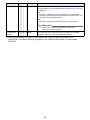
Power On
Password
R C V H D U N Single
You can configure the projector to require input of a password
before operation is enabled. For details, see “Password Protecting
the Projector” on page 23.
Direct Power
On
R C V H D U N Single
Use this sub-menu to turn Direct Power On on or off. See “Direct
Power On” on page 22.
On:
Select this option to turn on Direct Power On.
Off*:
Select this option to turn off Direct Power On.
34
Setting Name
Language
Input
Setting Unit
R C V H D U N Single
Description
Use this sub-menu to specify the language to use for messages,
setup menus, etc.
English / French / German / Italian / Spanish / Swedish /
Portuguese / Turkish / Russian / Chinese (Simplified) /
Chinese (Traditional) / Korean / Japanese
Note
(for USB port model users)
If you have Portuguese, Turkish, or Russian selected as the
projector’s language, selecting an external device connected
to the projector’s USB port as the input source will cause
some menus and messages to be displayed in English.
Restore Menu
Defaults
R C V H D U N Single
This sub-menu returns all of the sub-menu items on the Option
Settings 1 main menu to their initial default settings.
z The language setting and the password are not returned to their
initial factory defaults.
z The “Auto Adjust” item is returned to its initial default only when
RGB input is selected for the input source. All of the other items
are returned to their initial defaults regardless of the currently
selected input source.
Option Settings 2 Main Menu
Setting Name
Input
Setting Unit
Description
Pointer
R C V H D U N Single
Use this sub-menu to specify the type of pointer that appears first
when you press the [POINTER] key.
Plug and Play
(USB port
models only)
R C V H D U N Single
Use this sub-menu to turn plug-and-play*1 on or off.
On*:
Select this option to turn on plug-and-play. This will allow the
projector detect when an external USB device is connected and
make that device the input source automatically.
Off:
Select this option to turn off plug-and-play.
Note
Regardless of the setting of this item, plug-and-play is
disabled while the projector is in the 3D input mode. See “3D
Input Mode” on page 10 for information.
Audio Out
R C V H D U N Single
Specifies whether the input audio signal should be output from the
projector’s built-in speaker or to the line output.
Speaker*:
Outputs the audio signal being input to the projector from the
speaker.
Line:
Outputs the audio signal being input to the projector from the
AUDIO OUT terminal.
35
Setting Name
High Altitude
Input
Setting Unit
R C V H D U N Single
Description
Use this sub-menu to turn the high-altitude fan speed setting on or
off in accordance with the altitude of the area where you are using
the projector.
On:
Select this setting when using the projector in a high altitude
(1,500 to 3,000 meters above sea level) area where air is thin. This
setting increases cooling efficiency.
Off*:
Select this setting at normal altitudes (up to 1,500 meters).
Important!
Do not use this projector at altitudes greater than
3,000 meters above sea level.
Restore Menu
Defaults
R C V H D U N Single
This sub-menu returns all of the sub-menu items on the Option
Settings 2 main menu to their initial default settings.
*1 When plug-and-play is turned on, the projector will make that device the input source
automatically. For details about plug-and-play, see “USB Function Guide” on the bundled
CD-ROM.
36
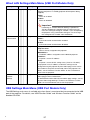
Wired LAN Settings Main Menu (USB Port Models Only)
Setting Name
Remote on
Input
Setting Unit
R C V H D U N Single
Description
Specifies whether the projector can be turned on via wired LAN
while the projector is in standby (projector off with power being
supplied).
Enable:
Power on enabled.
Disable*:
Power on disabled.
Important!
Performing an “Initialize Network Settings” operation or
“Restore All Defaults” operation with the setup menu will
cause this setting to change to “Disable”. If you are operating
the projector using a wired LAN setting, be sure to change
this setting back to “Enable” after initialization.
PJLink
authentication
R C V H D U N Single
Wired LAN info R C V H D U N Single
Enables and disables PJLink connection authentication.
Enable*:
PJLink connection authentication enabled.
Disable:
PJLink connection authentication disabled.
Displays the following information.
Projector name:
Name currently assigned to the projector.
MAC Address:
Fixed MAC address assigned to each individual projector.
IP Address:
Projector’s current IP address.
DHCP:
Projector’s current DHCP setting status (“Auto” or “Disable”).
The projector name, IP address, and DHCP settings can be
configured using the projector System Admin page, which can be
accessed on a computer connected by LAN to the projector. For
details, see the “Wireless Function Guide” on the CD-ROM that
comes with the projector.
Initialize
Network
Settings
R C V H D U N Single
Returns all projector network settings (all settings on the System
Admin page) to their initial defaults.
For detailed information about System Admin page settings, see the
“System Admin Page Settings” section in the “Wireless Function
Guide” on the CD-ROM that comes with the projector.
USB Settings Main Menu (USB Port Models Only)
The USB Settings main menu is available only when there is an external device connected to the USB
port of the projector. For details, see “USB Function Guide” and “Wireless Function Guide” on the
bundled CD-ROM.
B
37
Operational Info Main Menu
Setting Name
Input
Setting Unit
Description
Input Signal
R C V H D U N Source
Specific
This sub-menu item shows the currently selected input signal
(RGB, Component, Video, S-video, HDMI (PC), or HDMI (DTV)).
“- - - -” is indicated here when there is no input signal.
Signal Name
RCV HDU
Source
Specific
This sub-menu item shows the signal name of the signal being
input to the projector. For details about signal names, see “Signal
Name” under “Supported Signals” on page 52.
Resolution
R
Source
Specific
This sub-menu item appears only when RGB is the input signal. It
shows the number of vertical and horizontal pixels of resolution of
the RGB or HDMI (PC) input signal.
Horizontal
Frequency
RCV HD
Source
Specific
This sub-menu item shows the horizontal frequency of the input
signal.
Vertical
Frequency
RCV HD
Source
Specific
This sub-menu item shows the vertical frequency of the input
signal.
Scan System
RC
Source
Specific
This sub-menu item appears only when RGB, Component,
HDMI (PC), or HDMI (DTV) is the input signal, and shows the scan
system of the input signal. The scan system is interlace or
non-interlace for an RGB or HDMI (PC) signal input, and interlace or
progressive for a component or HDMI (DTV) signal input.
Light Time
R C V H D U N Single
H
HD
This sub-menu item shows the cumulative number of hours the
current light source unit has been used to date.
Restore All Defaults Main Menu
Setting Name
Input
Setting Unit
Description
Unit Operating
Time
R C V H D U N Single
This sub-menu item shows the cumulative operating time of this
unit. This time cannot be initialized.
Restore All
Defaults
R C V H D U N Single
This sub-menu returns all sub-menu items on all main menus to
their initial default settings. This operation can be performed
regardless of the currently selected input source and regardless of
whether or not a signal is currently being input. For details about
this procedure, see “To restore all settings on the setup menu to
their initial factory defaults” on page 27.
38
Cleaning the Projector
Periodically clean the projector exterior, lens, intake vents, exhaust vents, and airflow vents on a
regular basis.
Important!
Before cleaning the projector, be sure to unplug it from the power outlet and make sure it is
cooled down completely.
Cleaning the Projector Exterior
Wipe the exterior of the projector with a soft cloth that has been moistened in a weak solution of water
and a mild neutral detergent. Be sure to wring all excess moisture from the cloth before wiping.
Never use benzene, alcohol, thinner, or any other volatile agent for cleaning.
Cleaning the Lens
Carefully wipe the lens with a commercially available lens cloth or optical lens paper, like those for
eyeglasses or camera lenses. When cleaning the lens, do not apply undue force and take care to avoid
damaging the lens.
Cleaning Intake, Exhaust and Airflow Vents
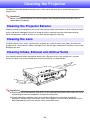
Dust and dirt tend to collect around the intake vents. Because of this, you should use a vacuum
cleaner to clean away accumulated dust and dirt periodically as shown below.
Important!
z Continued use of the projector after dust has accumulated around the intake vents can cause
overheating of internal components and lead to malfunction.
z Certain operating conditions also can cause dirt and dust to accumulate around the
projector’s exhaust vents and airflow vents. If this happens, use the same procedure as that
described above to clean the exhaust vents and airflow vents.
39
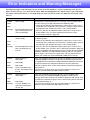
Error Indicators and Warning Messages
Warning messages and indicators let you know what the problem is when a projector error occurs.
When an error occurs, wait until the fan stops before unplugging the AC power cord. If you unplug the
AC power cord while the fan is still operating, an error may occur when you plug the AC power cord
back in.
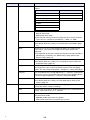
Indicator/Error Message
POWER
: Green steady
LIGHT
: –
TEMP
: –
Message
: Internal temperature is too
high. Check projector air
vents for blockage.
POWER
: Amber flashing J
Amber steady
LIGHT
: –
TEMP
: –
Message
: Internal temperature is too
high. The projector will
turn off.
POWER
: Amber flashing J
Red steady
LIGHT
: Red steady
TEMP
: Red steady
Message
: There is a problem with
the fan. The projector will
turn off.
POWER
: Amber flashing J
Red steady
LIGHT
: –
TEMP
: Red steady
Message
: A system problem has
occurred. The projector
will turn off.
Description and Required Action
The projector’s internal temperature is very high. Press the [ESC] key to
clear the warning message and perform the following steps.
1 Check for any blocking of the projector’s intake vents, exhaust vents
and airflow vents, and make sure that there is sufficient space around
the projector. See “Setup Precautions” in the “Setup Guide”.
2 If there is dust accumulated around the intake vents, exhaust vents
and/or airflow vents, turn off the projector and remove it. See
“Cleaning the Projector” (page 39).
Power has turned off automatically due to internal overheating. Perform
the following steps.
1 Check for any blocking of the projector’s intake vents, exhaust vents
and airflow vents, and make sure that there is sufficient space around
the projector. See “Setup Precautions” in the “Setup Guide”.
2 If there is dust accumulated around the intake vents, exhaust vents
and/or airflow vents, remove it. See “Cleaning the Projector” (page 39).
If there is no problem with the projector’s vents, confirm that the POWER/
STANDBY indicator is lit amber (without flashing), and then turn power
back on again. If the error occurs again when you turn power back on,
contact your retailer or nearest authorized CASIO Service Center.
Power has turned off automatically due to a fan problem. Confirm that the
POWER/STANDBY indicator is lit red (without flashing) and that the fan
has stopped. After checking the POWER/STANDBY indicator, disconnect
the power cord from the projector and wait for all of the projector’s
indicators to go out. Next, reconnect the power cord and turn projector
power back on.
If the error occurs again when you turn power back on, contact your
retailer or nearest authorized CASIO Service Center.
Power has turned off automatically due to a system problem. After
confirming that the POWER/STANDBY indicator is lit red (without
flashing), disconnect the power cord from the projector and wait for all of
the projector’s indicators to go out. Next, reconnect the power cord and
turn the projector back on.
If the error occurs again when you turn power back on, contact your
retailer or nearest authorized CASIO Service Center.
40
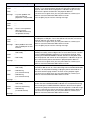
Indicator/Error Message
POWER
: Green steady
LIGHT
: –
TEMP
: –
Message
: A system problem has
occurred. Normal
projection is not possible.
POWER
: Green steady
LIGHT
: –
TEMP
: –
Message
: There is some problem
with the system.
The audio function may
not operate correctly.
POWER
: Green steady
LIGHT
: –
TEMP
: –
Message
: Some problem occurred
with the USB port or LAN
terminal.
POWER
: Amber flashing J
Red steady
LIGHT
: –
TEMP
: Red steady
Message
: –
POWER
: Amber flashing J
Red steady
LIGHT
: Red flashing
(0.5-second interval)
TEMP
: Red flashing
(0.5-second interval)
Message
: –
POWER
: Amber flashing J
Red steady
LIGHT
: Not lit or red flashing
TEMP
: Red flashing
(2-second interval)
Message
: –
Description and Required Action
A system problem has occurred, which may cause problems with some
functions. Turn off the projector, disconnect the power cord from the
projector and wait for all of the projector’s indicators to go out. Next,
reconnect the power cord and turn the projector back on.
If the error occurs again when you turn power back on, contact your
retailer or nearest authorized CASIO Service Center.
Press the [ESC] key to clear the warning message.
The USB or LAN connection was terminated because of a problem with
the USB port or LAN port. To use the USB or LAN function, turn off the
projector and then turn it back on again.
If the error occurs again when you turn power back on, contact your
retailer or nearest authorized CASIO Service Center.
Press the [ESC] key to clear the warning message.
The projector was turned off automatically due to some problem that was
probably caused by external digital noise or some other reason. Confirm
that the POWER/STANDBY indicator is lit red (without flashing). After
checking the POWER/STANDBY indicator, disconnect the power cord
from the projector and wait for all of the projector’s indicators to go out.
Next, reconnect the power cord and turn projector power back on.
If the error occurs again when you turn power back on, contact your
retailer or nearest authorized CASIO Service Center.
The projector was turned off automatically because the light source unit
turned off or did not turn on. After confirming that the POWER/STANDBY
indicator is lit red (without flashing), unplug the power cord. Wait for a
short while and then plug it back in and turn on the projector again.
If the error occurs again when you turn power back on, contact your
retailer or nearest authorized CASIO Service Center.
Power has turned off automatically due to a projector memory error.
Confirm that the POWER/STANDBY indicator is lit red (without flashing).
After checking the POWER/STANDBY indicator, disconnect the power
cord from the projector and wait for all of the projector’s indicators to go
out. Next, reconnect the power cord and turn projector power back on.
If the error occurs again when you turn power back on, contact your
retailer or nearest authorized CASIO Service Center.
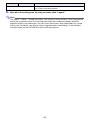
41
Indicator/Error Message
POWER
: Amber flashing J
Red steady
LIGHT
: –
TEMP
: Amber flashing
(1-second interval)
Message
: –
Description and Required Action
Power has turned off automatically because the light source unit cover is
open. Perform the following steps.
1 After confirming that the POWER/STANDBY indicator is lit red (without
flashing), disconnect the power cord from the projector.
2 Check to make sure that the light source unit cover is closed.
3 Plug the power cord back in and turn the projector back on again.
If the error occurs again when you turn power back on, contact your
retailer or nearest authorized CASIO Service Center.
42
Appendix
Connecting to a Video Device
The projector is able to project images from the composite video output, S-video output, or
component video output of a connected video device.
Important!
Always turn off the projector and the video device before connecting them.
Connection to a composite video output or S-video output
Projector
S-video cable (commercially available)
To S-VIDEO terminal
Video device
To S-video output terminal
To video/audio output terminal
Red: To AUDIO IN R terminal
Yellow: To VIDEO terminal
White: To AUDIO IN L terminal
Pin plug type video/audio cable
(commercially available)
Note
Note that regardless of whether the image being projected is being input via the projector’s
S-VIDEO terminal or VIDEO terminal, the projector outputs audio that is input via the projector’s
AUDIO IN L/R terminals.
43
Connection to a component video output
Projector
COMPUTER IN terminal
AUDIO IN terminal
Video device
To AUDIO output
terminals
To component video
output terminals
White
Red
Stereo mini plug Ù Pin plug type audio cable
(commercially available)
Component video cable (commercially available)
z Component video output terminals come in 3-terminal sets: Y·Cb·Cr or Y·Pb·Pr. Be sure to match
the colors of the plugs on a component video cable with the colors of the terminals (Green: Y;
Blue: Cb/Pb; Red: Cr/Pr).
z Note that connection only to an analog component video output terminal is supported.
Connection to a digital output terminal is not supported.
B
44
Connecting the HDMI Output of a Video Device or
Computer to the Projector
The projector supports projection and output of HDMI video and audio output from a computer or
video device.
Important!
Turn off the projector and the computer or video device before connecting them.
Projector
Computer or video device
HDMI port
To HDMI output terminal
HDMI cable (commercially available)
z You will need to obtain a commercially available HDMI cable with a connector that matches the
terminal of the output device on one end and a connector that matches the projector’s HDMI port
(HDMI Type A Socket) on the other end.
z For information about HDMI video signal supported by the projector, see page 54.
z The projector supports L-PCM 32kHz, 44.1kHz, and 48kHz HDMI audio signals.
45
Remote Controller Signal Range
When performing an operation on the remote controller, point it at the remote control signal receiver
on the back or front of the projector. The following illustration shows the range of the remote controller
signal.
±30 degrees max.
±30 degrees max.
5 meters (16.4 feet)
max.
5 meters (16.4 feet)
max.
Front
Back
5 degrees to
30 degrees
±30 degrees max.
5 meters (16.4 feet) max.
5 meters (16.4 feet)
max.
Remote Controller Range
The allowable distance between the remote controller and the projector is less when there is a sharp
angle between the remote controller and the remote control signal receiver.
Important!
To avoid running down the batteries, store the remote control unit so its keys are not pressed
inadvertently.
46
Projection Distance and Screen Size
h*
The following table shows the relationship between the distance and projected image size.
Approximate Projection Distance
Projection Size
XJ-M140/XJ-M145/
XJ-M150/XJ-M155
XJ-M240/XJ-M245/
XJ-M250/XJ-M255
Screen
Size
Diagonal
(cm)
Minimum
Distance
(m / feet)
Maximum
Distance
(m / feet)
h*
Minimum
Distance
(m / feet)
Maximum
Distance
(m / feet)
h*
(cm / inch)
30
76
1.0 / 3.28
1.5 / 4.92
0
–
–
–
35
89
–
–
–
1.0 / 3.28
1.5 / 4.92
8 / 3.15
40
102
1.3 / 4.27
2.0 / 6.56
0
1.1 / 3.61
1.7 / 5.58
9 / 3.54
60
152
2.0 / 6.56
3.0 / 9.84
0
1.7 / 5.58
2.5 / 8.2
13 / 5.12
80
203
2.7 / 8.86
4.0 / 13.12
0
2.3 / 7.55
3.4 / 11.15
18 / 7.09
100
254
3.4 / 11.15
5.0 / 16.4
0
2.9 / 9.51
4.2 / 13.78
23 / 9.06
150
381
5.0 / 16.4
7.4 / 24.28
0
4.3 / 14.11
6.3 / 20.67
34 / 13.39
200
508
6.8 / 22.31
9.9 / 32.48
0
5.8 / 19.03
8.4 / 27.56
45 / 17.72
300
762
10.2 / 33.46
14.9 / 48.88
0
8.7 / 28.54
12.6 / 41.34
67 / 26.38
* h = Height from the center of the lens to the bottom edge of the projection screen.
Important!
Note that the distances provided above are for reference only.
47
Aspect Ratio Setting and Projection Image
The following shows how images are projected in accordance with the type of the input signal and the
aspect ratio setting of the projector.
XJ-M240/XJ-M245/XJ-M250/XJ-M255
Input source: RGB or HDMI (PC)
Input Signal
Normal
Full
True
SVGA (800 × 600)
XGA (1024 × 768)
WXGA (1280 × 800)
SXGA (1280 × 1024)
*
* The blue boundary indicates the projection area.
48
Input source: Video, S-video, component or HDMI (DTV)
Input Signal
Normal
16:9
Letter Box
4:3 Aspect Image
*
Squeezed Image
*
Letter Box Image
*
* The blue boundary indicates the projection area.
49
XJ-M140/XJ-M145/XJ-M150/XJ-M155
Input source: RGB or HDMI (PC)
Input Signal
Normal
Full
SVGA (800 × 600)
XGA (1024 × 768)
WXGA (1280 × 800)
SXGA (1280 × 1024)
50
Input source: Video, S-video, component or HDMI (DTV)
Input Signal
Normal
16:9
4:3 Aspect Image
Squeezed Image
Letter Box Image
51
Supported Signals
Important!
Even if a signal is listed in the table below, it does not guarantee that you will be able to display
its images correctly.
RGB Signal
VESA
Signal Name
Resolution
Horizontal Frequency
(kHz)
Vertical Frequency
(Hz)
640 × 480/60
640 × 480
31.5
60
640 × 480/72
640 × 480
37.9
73
640 × 480/75
640 × 480
37.5
75
640 × 480/85
640 × 480
43.3
85
800 × 600/56
800 × 600
35.2
56
800 × 600/60
800 × 600
37.9
60
800 × 600/72
800 × 600
48.1
72
800 × 600/75
800 × 600
46.9
75
800 × 600/85
800 × 600
53.7
85
1024 × 768/60
1024 × 768
48.4
60
1024 × 768/70
1024 × 768
56.5
70
1024 × 768/75
1024 × 768
60.0
75
1024 × 768/85
1024 × 768
68.7
85
1152 × 864/75
1152 × 864
67.5
75
1280 × 768/60
1280 × 768
47.8
60
1280 × 800/60
1280 × 800
49.7
60
1280 × 960/60
1280 × 960
60.0
60
1280 × 960/85
1280 × 960
85.9
85
1280 × 1024/60
1280 × 1024
64.0
60
1280 × 1024/75
1280 × 1024
80.0
75
1280 × 1024/85
1280 × 1024
91.1
85
1360 × 768/60*1
1360 × 768
47.7
60
768/60*2
60
1366 × 768
47.7
1400 × 1050/A*1
1400 × 1050
65.3
60
1440 × 900/60
1440 × 900
55.9
60
1600 × 1200/60
1600 × 1200
75.0
60
1366 ×
Other
1680 × 1050/60
1680 × 1050
65.3
60
1152 × 864/70
1152 × 864
64.0
70
1400 × 1050/B*1
1400 × 1050
64.0
60
*1 If these signals do not project correctly, change the “Option Settings 1 J Auto Adjust” setting to “2”
(page 34).
*2 If this signal does not project correctly, change the “Option Settings 1 J Auto Adjust” setting to “3”
(page 34).
52
Component Signal
HDTV
SDTV
Signal Name
Horizontal Frequency
(kHz)
Vertical Frequency
(Hz)
1080p/50
56.3
50
1080p/60
67.5
60
720p/50
37.5
50
720p/60
45.0
60
1080i/50
28.1
50
1080i/60
33.7
60
576p/50
31.3
50
576i/50
16.6
50
480p/60
31.5
60
480i/60
15.7
60
Video Signal, S-video Signal
Signal Name
Horizontal Frequency
(kHz)
Vertical Frequency
(Hz)
NTSC
15.7
60
NTSC4.43
15.7
60
PAL
15.6
50
PAL-M
15.7
60
PAL-N
15.6
50
PAL60
15.7
60
SECAM
15.6
50
53
HDMI Signal
Signal Name
Horizontal Frequency
(kHz)
Vertical Frequency
(Hz)
640 × 480/60
31.5
60
800 × 600/60
37.9
60
1024 × 768/60
48.4
60
1280 × 768/60
47.8
60
1280 × 800/60
49.7
60
1280 × 960/60
60
60
1280 × 1024/60
64
60
1400 × 1050/60
65.3
60
SDTV (480p)
31.5
60
SDTV (576p)
31.25
50
HDTV (720p) (50)
37.5
50
HDTV (720p) (60)
45
60
HDTV (1080i) (50)
28.13
50
HDTV (1080i) (60)
33.75
60
HDTV (1080p) (50)
56.25
50
HDTV (1080p) (60)
67.5
60
3D Signals (3D Input Mode)
RGB Signal
Video Signal
B
Signal Name
Horizontal Frequency
(kHz)
Vertical Frequency
(Hz)
640 × 480/60
31.5
60
640 × 480/120
61.7
120
800 × 600/60
37.9
60
800 × 600/120
77.2
120
1024 × 768/60
48.4
60
1024 × 768/120
98.8
120
1280 × 768/60
47.8
60
1280 × 768/120
97.4
120
1280 × 800/60
49.7
60
1280 × 800/120
101.6
120
NTSC
15.7
60
54
Using Wired LAN to Control the Projector
(XJ-M145, XJ-M155, XJ-M245, XJ-M255)
The projector can be controlled by a computer or other external device by connecting the device to
the projector’s LAN port.
Supported External Devices
This projector supports all commands of PJLink Class1 (Version 1.00).
http://pjlink.jbmia.or.jp/english/
This projector is supported by the commands of the Crestron Electronics controller and software
(RoomView®).
http://www.crestron.com/
This projector is supported by AMX Device Discovery.
http://www.amx.com/
Information about the types of external devices that can be connected to the LAN port and control the
projector, as well as the control commands supported for each external device will be published on
the CASIO website below as such information becomes available.
http://www.casio.com/support/
Controlling the Projector from a Computer
When the projector is linked to a computer over a wired or wireless LAN connection, you can use the
computer’s Web browser to access a Wireless Presentation System control panel to control the
projector.
To establish a wired LAN connection between the projector and a computer
1.
Connect the LAN port of the projector to the LAN hub or other network devices
to which the computer is connected.
Projector
LAN hub
Computer
z In a configuration like the one in the illustration above, you should normally use straight type
LAN cables. If you are connecting the projector’s LAN port directly to the LAN port of a
computer, use a cross type LAN cable.
B
55
2.
Look up the projector’s IP address.
z Perform the following steps to look up the projector’s current IP address.
1. Press the [MENU] key to display the setup menu.
2. Use the [T] and [S] keys to select “Wired LAN settings” and then press the [ENTER] key.
3. Use the [T] and [S] keys to select “Wired LAN info” and then press the [ENTER] key.
3.
On the computer, start up a Web browser.
4.
In the Web browser address bar, input the projector’s IP address and then press
the [Enter] key.
z If the projectors current IP address is 192.168.100.10, for example, you would input:
“http://192.168.100.10”.
z This displays the top page of the projector’s System Admin page.
z For information about what you should do next, see “To control the projector using the
Wireless Presentation System control panel” (page 57).
Important!
Under initial default settings, the projector is configured to obtain its IP address automatically
from the DHCP server. This means that an IP address will be assigned automatically whenever
the projector is connected to a DHCP environment network.
Depending on the network environment being connected to, there may be cases where you will
need to assign a projector’s IP address manually. In such cases, you will need to configure
projector’s network settings.
If you are unable to display the projector’s System Admin page with your browser using the
above procedure, it may mean that there is some problem with your network settings. Refer to
the Wireless Function Guide on the CD-ROM that comes with the projector and establish a
wireless LAN connection between the projector and your computer. After configuring the
projector’s network settings, try performing the above procedure again. For details about the
projector’s network settings, see “To configure projector’s network settings and wireless LAN
connection settings” in the Wireless Function Guide.
56
To control the projector using the Wireless Presentation System control
panel
1.
Depending on the type of LAN connection you are using, perform either of the
following operations to display the top page of the projector’s System Admin
page.
: “To establish a wired LAN connection between the projector and a
computer” (page 55)
Wireless LAN Connection : Steps 1 and 2 under “To log in to the projector’s System Admin
page” of the Wireless Function Guide on the CD-ROM that comes
with the projector
Wired LAN Connection
2.
Click “System Admin”. On the password input screen that appears, enter the
password.
z The initial default password is “admin”.
3.
Click the [Login] button.
z This logs in to the System Admin page and displays the Status screen.
4.
Click “Control panel” on the left side of the screen.
z This will display a control panel screen like the one shown below.
z The table below explains the status information and the projector operations included on the
control panel screen.
Group
Item
Refresh (Button)
Status
Description
Click to refresh the screen with the latest information.
Projector status
Shows the projector’s current status as either “On” or “Standby”.
Error info
Shows one of the following.
Normal: Operating normally.
Temperature error: Temperature error occurred.
Fan error: Fan error occurred.
Light error: Light source unit error occurred.
Other error: Error other than above occurred.
Power On/Power Off
(Buttons)
Turn the projector on/off.
[Power On] button operation is supported only when the projector is
connected to a computer of a wired LAN connection, and “Enable” is
selected for the “Remote on” setting (page 37).
57
Group
Image
Item
Input
Description
Specifies the input source. The following are the available input source
options.
3D Off
Computer (Auto)
3D On
Computer (RGB)
Computer (RGB)
Video
Computer (Component)
S-video
Video
S-video
HDMI
USB
Audio
B
3D
Puts the projector into the 3D input mode or normal input mode.
On: 3D input mode
Off: Normal input mode
z Note that this setting cannot be change while the currently selected
input source is “Computer (Component)”, “HDMI”, or “USB”.
Color mode
Specifies the color mode.
z For details about this setting, see “Selecting the Color Mode” (page
13).
Blank
Selecting “On” for this setting temporarily blocks the image from the
input source. “Off” causes the image from the input source to be
projected.
z The operation of this item is identical to that of the remote controller’s
[BLANK] key. For details, see “Momentarily Cutting Off the Input
Source Image” (page 14).
Aspect ratio
Changes the aspect ratio of the projected image.
z For details about this setting, see “Changing the aspect ratio of the
projected image” (page 16).
Brightness
This corresponds to the “Image Adjustment 1 J Brightness” setting of
the setup menu. Input a value into the box and then click the [Apply]
button. This will change the projector’s “Brightness” setting accordingly.
Contrast
This corresponds to the “Image Adjustment 1 J Contrast” setting of the
setup menu. Input a value into the box and then click the [Apply] button.
This will change the projector’s “Contrast” setting accordingly.
Eco Mode
Switches the Eco mode.
z For details about this setting, see “Eco Mode (Power Saving, Low
Noise)” (page 18).
Volume
Input a value into the box and then click the [Apply] button. This will
change the volume setting accordingly.
Mute
Specifies the mute setting. Audio is output while “Off” is selected for this
setting, and muted when “On” is selected.
Audio Out
Specifies either output from the projector’s speaker output or AUDIO
OUT terminal for audio.
Speaker: Audio output from the speaker
Line: Audio output from the AUDIO OUT terminal
58
Group
Factory Defaults (Button)
5.
Item
Description
Clicking to return all control panel items, except for the “Projector status”
item, to their initial factory defaults.
After all of the settings are the way you want, click “Logout”.
Note
The “Status”, “Setup”, “Change Password”, and “Restore Factory Defaults” items along the left
side of the screen are mainly for accessing information and configuring settings related to
projector wireless LAN connection. You can access these items when connected over a wired
LAN as well. For details, see “System Admin Page Operations and Settings” in the “Wireless
Function Guide” on the CD-ROM that comes with the projector.
59
Projector RS-232C Control
You can use a commercially available serial cable (cross) to connect the projector to a computer and
control the projector from the computer.
Connecting the Projector to a Computer
Connect the projector to the computer as shown in the illustration below.
Projector
Computer
Serial port (RS-232C)
D-Sub 9-pin (female)
D-Sub 9-pin (female)
Commercially available serial cable (cross)
Serial port*
* A D-Sub 9-pin (male) type connector is standard for computer serial ports, but there may be cases
where the shape of a particular computer’s connector is different. For details about connecting a
commercially available serial cable to your computer, see the user documentation that comes with
it.
Using Control Commands
This section explains the commands that are used to control the projector from a computer.
Command Send Format
Configure your computer’s serial port with the following settings.
Communication
Protocol
Data Rate
19200bps
Data Bit
8bit
Parity
None
Stop Bit
1bit
Flow Control
None
Send this command when you want information about the current setup of the data
projector.
Read Command
Send Format
(<command name>?)
Receive Format
(<applicable command setting range>,<current setting>)
Command Send
Example
( VOL ? )
sent from the computer to the projector.
4
( 0 - 50 , 35 )
returned from the projector to the computer.
Send this command to control the data projector (power on/off, etc.) and to write data to it.
Send Format
Write Command
Command Send
Example
(<command name><setting value>)
( VOL 0 )
sent from the computer to the projector.
4
Projector volume setting becomes 0 (mute).
60
z See the “Command List” for details about command names and settings.
z All commands use ASCII characters and decimal format integers.
z The projector will return a question mark (?) when it is sent a command it cannot recognize. Also,
any command that attempts to set a value that is outside the applicable allowable range will be
ignored.
z If the projector is performing a process initiated by a previously sent command, a projector key
operation, or a remote controller key operation, send of the next command must wait until the
projector completes the previous process.
Command List
z Only the following functions are supported while the projector is turned off. Do not try to send any
other command to the projector.
z Power on/off: Read
z Power on: Write
z Get light time: Read
z Input of a valid signal must be in progress in order to use a command to turn on blank screen or
change the aspect ratio.
R: Read enabled W: Write enabled
Command
Name
RW
Power On/Off:
PWR
RW
0: Off, 1: On
Input Switching: 0: Switches the input source to the
COMPUTER terminal and changes the
COMPUTER terminal setting to RGB.
1: Switches the input source to COMPUTER
terminal and changes the COMPUTER
terminal setting to component.
2: Switches the input source to Video.
5: Switches the input source to USB. This
setting is supported only when the
projector is equipped with a USB function
and the USB application is running.
6: Switches the input source to COMPUTER
terminal and changes the COMPUTER
terminal setting to Auto.
7: Switches the input source to HDMI.
9: Switches the input source to S-video.
SRC
RW
0: RGB, 1: Component,
2: Video, 5: USB,
6: Auto (RGB/Component),
7: HDMI, 9: S-video
Function
Setting Range
Blank Screen: Switches the blank screen on or off.
BLK
RW
0: Off, 1: On
Volume: Specifies a value to adjust the volume level. This
setting is applied to the input source signal that is
currently being projected by the projector.
VOL
RW
0-30
Color Mode: Selects the color mode.
PST
RW
1: Graphics, 2: Theater,
3: Standard, 4: Blackboard,
5: Game
Aspect Ratio: Specifies the aspect ratio.
ARZ
RW
0: Normal*1, 1: 16:9,
2: Normal*2, 3: Letter Box,
4: Full, 5: True
Get Light Time: Gets the light time from the projector.
LMP
R
*1 Input source: RGB or HDMI (PC)
*2 Input source: Video, S-video, component or HDMI (DTV)
61
0- Unit: Hours
Specifications
Model Name
XJ-M140/XJ-M145
Brightness
(ANSI Lumens)
XJ-M240/XJ-M245
2500
Projection Lens
XJ-M250/XJ-M255
3000
Projection System
DLP chip
XJ-M150/XJ-M155
DLP
Size: 0.55 inch,
Number of Pixels:
XGA
(1024 × 768)
Size: 0.65 inch,
Number of Pixels:
WXGA
(1280 × 800)
Size: 0.55 inch,
Number of Pixels:
XGA
(1024 × 768)
Size: 0.65 inch,
Number of Pixels:
WXGA
(1280 × 800)
1.5X manual optical zoom, manual focus
Light Source
Laser and LED
Terminals
COMPUTER IN: RGB 15-pin mini D-Sub × 1 (Also used as component signal input terminal.)
VIDEO: RCA pin jack × 1
S-video: 4-pin mini DIN × 1
HDMI: HDMI type A terminal × 1
AUDIO IN: 3.5 φ stereo mini jack × 1, RCA pin jack × 2
AUDIO OUT: 3.5 φ stereo mini jack × 1
SERIAL: 9-pin D-Sub × 1
USB*: TYPE A terminal × 1
LAN*: RJ-45 terminal × 1
Display Languages
English, French, German, Italian, Spanish, Swedish, Portuguese, Turkish, Russian,
Chinese (Simplified), Chinese (Traditional), Korean, Japanese
* XJ-M145, XJ-M245, XJ-M155, XJ-M255 only
z CASIO COMPUTER CO., LTD. makes no guarantees concerning the operation or suitability of any
USB device that you connect to the projector’s USB port.
z Specifications are subject to change without notice.
62
MA1106-B