1
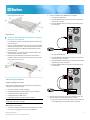
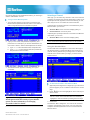
5. Repeat Steps 1 to 4 to change the programming of more
MCCAT switches.
Note: To programme a second-tier device back as the base
switch, follow the same procedure but press the channel
number 1 button instead. When the TIER LED's light is off, the
device is programmed as a base switch.
STEP (B): Connect the Second-Tier MCCAT Switch
to the Base Switch
•
•
Directly connect them to the PS/2 or USB ports and VGA
port of the base switch, or
Connect them to the user station, which is connected to the
base switch
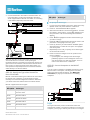
To connect input/output devices directly to the base
switch
Connect a PS/2 or USB keyboard, mouse, and a VGA monitor
to the base switch. See Steps 5 to 6 in the section Making the
Connection (on page 2) for more information.
Now connect the second-tier MCCAT switches to the MCCAT
base switch. You can mix different MCCAT models in the
system. For example, you may connect the MCCAT28 switch
to the MCCAT216 switch.
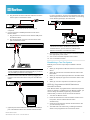
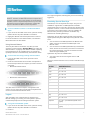
1. Turn OFF all of the MCCAT switches.
2. Connect the second-tier MCCAT switch to the base switch
via a Cat5 UTP cable.
a. Plug one end of the Cat5 UTP cable into the User 2 port
of the second-tier MCCAT switch.
b. Plug the other end of the Cat5 UTP cable into one of the
channel ports of the base switch.
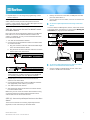
To connect input/output devices to the user station,
which is connected to the base switch
1. Connect a PS/2 or USB keyboard, mouse, and a VGA
monitor to the MCCAT user station.
Note: Unlike "one-user" MCCAT switches
(MCCAT18/116), it is NOT necessary to use MCIM-PS2
for cascading multiple "two-user" MCCAT switches.
3. Repeat Step 2 to connect more second-tier MCCAT
switches to the base switch.
4. Connect appropriate power cords to all MCCAT switches
and appropriate power outlets if you haven't.
5. Turn ON all second-tier devices.
6. After hearing the beep sounds of the second-tier devices,
turn ON the base switch.
Make sure you turn on the second-tier devices before turning
on the base switch so the base switch downloads correct
channel data from the second-tier devices.
STEP (C): Connect Input/Output Devices to the Base
Switch
There are two methods of connecting input/output devices
(keyboard, mouse and monitor) to the base switch:
MCCAT28/216 QSG
QSG-MCCAT2-0A-v2.0-E y 255-20-0004-00
4