1
USER GUIDE
Cisco Small Business
SPA525G and SPA525G2 SPCP IP Phones
Contents
Chapter 1: Getting Started
4
Overview
4
Caring for Your Phone
Understanding Your Phone Lines and Buttons
6
7
Phone Components
7
Softkey Buttons
9
Using the Keypad and Buttons with Menus
12
Using Keypad Shortcuts
12
Using the Navigation Button
13
Entering Numbers and Text in Fields
13
Using Phone Hardware and Accessories
15
Using the Speakerphone
15
Using Wired and Wireless Headsets
15
Switching Between the Handset, Headset, and Speakerphone
18
Using the Cisco Attendant Console
Chapter 2: Installing Your Phone
19
20
Before You Begin
20
Connecting the Handset
21
(Optional) Attaching the Desk Stand
23
(Optional) Mounting the Phone to the Wall
23
Connecting Your Phone Power
24
Connecting Your Phone to the Network
24
Connecting Your Phone to the Wired Network
24
Connecting Your Phone to the Wireless Network
25
Setting the Phone Wireless Connection
27
Verifying Phone Startup
32
Updating Your Phone Firmware
32
Cisco Small Business SPA525G and SPA525G2 SPCP IP Phone User Guide
1
Contents
Chapter 3: Using Basic Phone Functions
34
Placing or Answering a Call
35
Adjusting Call Volume and Muting
35
Using Mute
36
Putting a Call on Hold
36
Resuming a Call
36
Ending a Call
36
Transferring Calls
37
Managing Call Waiting
37
Recording a Live Call
38
Viewing and Returning Calls
38
Forwarding Calls
39
Setting Do Not Disturb
39
Configuring Call Waiting
40
Picking Up a Call
41
Placing a Three-Way Conference Call
41
Using the Phone Directories
42
Using Your Personal Address Book
42
Using the Corporate Directory
44
Using the Call History Lists
45
Viewing the Call History Lists
45
Deleting a Call History List
45
Calling from the Call History Lists
45
Deleting an Entry from the Call History Lists
46
Saving a Call History List Number to Your Directory
46
Accessing Voicemail
Cisco Small Business SPA525G and SPA525G2 SPCP IP Phone User Guide
46
2
Contents
Chapter 4: Using Advanced Phone Functions
Using Your Bluetooth-Enabled Mobile Phone
47
47
Enabling Bluetooth
48
Pairing Your Cisco SPA525G2 with a Bluetooth-Enabled Mobile Phone
48
Verifying that the Cisco SPA525G2 is Paired
50
Importing Your Mobile Phone Address Book into the Cisco SPA525G2
51
Making a Mobile Phone Call through the Cisco SPA525G2
52
Receiving Mobile Phone Calls by using the Cisco SPA525G2
53
Switching Audio from Your Cisco SPA525G2 to Your Mobile Phone
53
Viewing Mobile Phone Battery and Signal Information on Your
Cisco SPA525G2
53
Charging Your Mobile Phone Using Your Cisco SPA525G2
54
Playing MP3 Files on Your Phone
55
Creating the Playlist
55
Playing Songs
56
Customizing Your IP Phone Screen
57
Changing the Screen Contrast
57
Setting the Screen Backlight Timer
57
Configuring the Phone Screen Saver
58
Changing the Phone Wallpaper
59
Restarting Your Phone
59
Viewing Phone, Network, and Call Information
60
Viewing Product Information
60
Viewing Network Information
60
Viewing Peripheral Status
61
Viewing the Wireless Connection Status
61
Advanced Menus for Technical Support Personnel
62
Cisco Small Business SPA525G and SPA525G2 SPCP IP Phone User Guide
3
Contents
Appendix A: Where to Go From Here
63
Power Adapter Statement
65
FCC and IC Statement
65
Federal Communication Commission Interference Statement
65
IMPORTANT NOTE
66
Industry Canada Statement
66
Cisco Small Business SPA525G and SPA525G2 SPCP IP Phone User Guide
4
1
Getting Started
This chapter provides an overview of your Cisco Attendant Console IP phone.
contains the following sections:
•
Overview, page 4
•
Understanding Your Phone Lines and Buttons, page 7
•
Using the Keypad and Buttons with Menus, page 12
•
Entering Numbers and Text in Fields, page 13
•
Using Phone Hardware and Accessories, page 15
•
Using the Cisco Attendant Console, page 19
Overview
The Cisco Attendant Console IP phone is a full-featured VoIP (Voice over Internet
Protocol) phone that provide voice communication over an IP network. It provides
traditional features, such as call forwarding, redialing, speed dialing, transferring
calls, conference calling, and accessing voice mail. Calls can be made or received
with a handset, headset or speaker.
The Cisco Attendant Console features vary, depending on the type of call control
system that you are using and the limitations set by the phone system
administrator. This document describes using the Cisco SPA525G and SPA525G2
with a Smart Phone Control Protocol (SPCP) phone system, such as the Cisco
Unified Communications 500 Series, with no limitations.
If you are using the Cisco Attendant Console IP phone with a BroadSoft or an
Asterisk system, see the Cisco Small Business SPA525G and SPA525G2 SIP IP
Phone User Guide.
Cisco Small Business SPA525G and SPA525G2 SPCP IP Phones User Guide
4
1
Getting Started
Overview
Setup of the phone network is typically performed by using Cisco Configuration
Assistant (CCA) software. This software is available on Cisco.com.
The phone can be powered by connecting your phone to an Ethernet switch that
provides Power over Ethernet (PoE) or you can use an optional Cisco PA100 power
adapter.
A phone is connected to the network through an Ethernet connection or the built-in
Wireless-G radio. If you are using the Wireless-G connection, a Cisco PA100
power adapter is required. The phone provides an additional Ethernet port that
allows a computer to be connected to the network through the phone. (We
recommend that if a PC is connected to the network through the phone, that the
phone be connected to the network only by using the wired Ethernet connection).
The Cisco Attendant Console has a 320 x 240 color, 3.2" inch screen and can
manage up to five telephone extensions. They also provide the following hardware
features:
•
Two Ethernet 10/100 Mbps ports
•
802.3af Power over Ethernet support
•
USB 2.0 host port
•
AUX port (to attach a Cisco Attendant Console)
•
Bluetooth capability for headset support
•
Bluetooth capability for mobile phone pairing (Cisco SPA525G2 only)
Cisco Small Business SPA525G and SPA525G2 SPCP IP Phones User Guide
5
1
Getting Started
Overview
•
2.5mm stereo earphone jack
•
Wireless-G client support
•
Kensington security slot
The functionality of the phones can be modified by your phone system
administrator. Not all of the functional features described in this document are
available or they might function slightly differently on your phone. This document
describes the features as they function in factory default mode.
Caring for Your Phone
The Cisco Small Business IP phones are electronic devices that should not be
exposed to excessive heat, sun, cold, or water. To clean the equipment, use a
slightly moistened paper or cloth towel. Do not spray or pour cleaning solution
directly onto the hardware unit.
Cisco Small Business SPA525G and SPA525G2 SPCP IP Phones User Guide
6
1
Getting Started
Understanding Your Phone Lines and Buttons
Understanding Your Phone Lines and Buttons
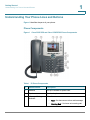
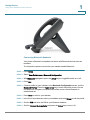
Figure 1 identifies the parts of your phone.
Phone Components
Figure 1
Cisco SPA525G and Cisco SPA525G2 Phone Components
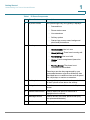
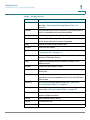
Table 1 IP Phone Components
#
Phone Feature
Description
1
Handset
Pick up to answer or place calls.
2
Speaker
Speaker for phone.
3
Message Waiting
Indicator
When lit:
•
Red—You have a new voice mail message.
•
Flashing Red—You have an incoming call.
Cisco Small Business SPA525G and SPA525G2 SPCP IP Phones User Guide
7
1
Getting Started
Understanding Your Phone Lines and Buttons
Table 1 IP Phone Components
#
Phone Feature
Description
4
IP phone screen
Your phone might vary, but typically it displays:
5
Line keys
•
Date and time
•
Phone station name
•
Line extensions
•
Softkey options
•
Startup logo, screen saver, background
photo, and photo album
Phone line status:
•
Green (steady): Line is in use.
•
Green (blinking): There is an incoming call.
•
Red (blinking): Line is on hold.
•
Orange: Line is unregistered (cannot be
used).
•
Flashing Orange: The phone is not
connected to the network.
These keys can also be programmed by your
system administrator to perform differently than
described here or to add functions such as speed
dial, call pickup, or monitor an extension.
6
Softkey buttons
Press a softkey to perform the action on the label
on the IP phone screen above the softkey.
7
Navigation button
Press the arrows to scroll items on the IP phone
screen.
8
Center Select button
Press to select the option or menu that is
highlighted on the screen.
9
Messages button
Press to access voice mail. (Must be set up by
your phone administrator.)
10
Hold button
Press to place a call on hold.
Cisco Small Business SPA525G and SPA525G2 SPCP IP Phones User Guide
8
1
Getting Started
Understanding Your Phone Lines and Buttons
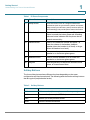
Table 1 IP Phone Components
#
Phone Feature
Description
11
Setup button
Press to access a menu to configure features and
preferences (such as your directory, status, and speed
dials), access your call history, set up functions (such as
call forwarding), and provide phone status information.
12
Mute button
Press to mute or unmute the phone. When the
phone is muted, the button glows red. A flashing
red mute button indicates that the phone has no
network connectivity.
13
Volume button
Press + to increase the volume and press - to
lower the volume of the handset, headset,
speaker (when the handset is off hook), or ringer
(when the handset is on hook).
14
Speaker button
Press to turn the speaker on or off. When the
speaker is on, the button glows green.
15
Headset button
Press to turn the headset on or off. When the
headset is on, the button glows green.
16
Keypad
Press keypad keys to dial phone numbers, enter
letters, or choose menu items.
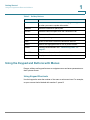
Softkey Buttons
The four softkey buttons have different functions depending on the menu
configuration and function selected. The following table shows the softkey buttons
that are typical (in alphabetical order).
Table 2
Softkey Buttons
Button
Function
Add
Adds a new item (for example, a new directory entry).
AddList
Creates a list (for example, MP3 files).
Back
Returns you to the previous screen.
BXfer
Performs a blind call transfer.
Cisco Small Business SPA525G and SPA525G2 SPCP IP Phones User Guide
9
1
Getting Started
Understanding Your Phone Lines and Buttons
Table 2
Softkey Buttons
Button
Function
Call Rtn
Returns the last missed call by dialing the number that called
you. See “Viewing and Returning Missed Calls,” on
page 38.
Callback
Plays an audio and visual notification on your phone when a
busy or unavailable party becomes available.
cbarge
Allows callers to join a shared-line call.
CFwdAll
Forwards all calls to a specified number. When forwarding is
active, press this button to cancel forwarding.
Clear
Deletes an entire text or number field.
Clr DND
Clears Do Not Disturb.
Confrn
Initiates a conference call. See “Placing a Three-Way
Conference Call,” on page 41.
Connect
Connects to the selected item (for example, to the wireless
network or Bluetooth device).
Copy
Copies the selected item (for example, a contact in the
Address Book).
delChar
Deletes the last number or letter.
Delete
Deletes an entire item (for example, a number from the Call
History list).
Dial
Dials the string of numbers that you have entered, or the
number that you have highlighted in a list such as the Missed
Calls screen.
Directory
Access your personal address book. See “Using Your
Personal Address Book,” on page 42.
DnD
Do Not Disturb; prevents incoming calls from ringing your
phone. See “Setting Do Not Disturb,” on page 39.
Edit
Opens an item so that you can edit numbers or letters, or
enable or disable a feature.
EditDial
Edits a number before dialing.
EndCall
Disconnects a call.
Exit
Closes the current menu
Cisco Small Business SPA525G and SPA525G2 SPCP IP Phones User Guide
10
1
Getting Started
Understanding Your Phone Lines and Buttons
Table 2
Softkey Buttons
Button
Function
Flash
Provides hookflash functionality for three-way calling and
call waiting services provided by the PSTN or Centrex
service.
Forward
Forwards calls coming to your phone. See “Forwarding
Calls,” on page 39.
GPickup
Allows you to pick up (answer) a call at that is ringing at
another extension in your group. See “Picking Up a Call,” on
page 41.
Handset
Switches audio from the Cisco SPA525G2 to your Bluetoothenabled mobile phone. See Using Your Bluetooth-Enabled
Mobile Phone, page 47.
Handsfree
Switches audio from your Bluetooth-enabled mobile phone
to the Cisco SPA525G2. See Using Your Bluetooth-Enabled
Mobile Phone, page 47.
Hold
Places a call on hold.
List
In some menus, shows a list of configured items (for
example, a list of locations for weather or news).
LiveRcd
Record a phone conversation.
More
View additional softkeys.
NewCall
Opens new line on speakerphone to place call.
Next
Moves to the next item in a list (for example, a song in the
MP3 Playlist).
OK
Confirms a selection.
Option
Displays a sub-menu of tasks for the current screen.
Paste
Pastes the item you copied into a list or field.
PickUp
Allows you to pick up (answer) a call that is ringing at another
extension. See “Picking Up a Call,” on page 41.
Play
Plays a selected item such as a song or a ringtone.
Previous
Moves to a previous item in a list (for example, a song in the
MP3 Playlist).
Redial
Redials the last number that was called. Brings up the list of
recently dialed numbers.
Cisco Small Business SPA525G and SPA525G2 SPCP IP Phones User Guide
11
1
Getting Started
Using the Keypad and Buttons with Menus
Table 2
Softkey Buttons
Button
Function
Refresh
Refreshes the screen. Useful after changing a configuration
or when you want to update information.
Remove
Removes conference participant.
RmLstC
Removes Last Participant from the Conference Call
Resume
Resumes a call that is on hold.
Save
Saves your changes.
Scan
Scans for wireless networks or Bluetooth devices.
Select
Selects the highlighted item on the IP phone screen.
Trnsfer
Performs a call transfer. See “Transferring Calls,” on
page 37.
TrnsfVM
Transfers a call to voice mail.
View
Displays more information about a selected item.
Using the Keypad and Buttons with Menus
Press a softkey and keypad buttons to navigate menus and enter parameters on
the IP phone screen.
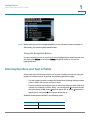
Using Keypad Shortcuts
Use the keypad to enter the number of the menu or sub-menu item. For example,
to open a menu that is labeled with number 2, press 2.
Cisco Small Business SPA525G and SPA525G2 SPCP IP Phones User Guide
12
1
Getting Started
Entering Numbers and Text in Fields
NOTE Menus and options can change depending on the software release and what is
allowed by your phone system administrator.
Using the Navigation Button
Use the navigation button to scroll up or down highlighting the desired menu item,
and then press Select or the center Select navigation button to choose the
highlighted item.
Entering Numbers and Text in Fields
Some fields on the IP phones require you to enter numbers and text by using the
keypad or softkey buttons. In general, the following guidelines apply:
•
Use the keypad to enter numbers and characters, pressing the key multiple
times to select the correct number or letter.
•
Press the number key multiple times to move to a different letter under that
number. (For example, to enter “Mary,” you would press 6 five times rapidly
and then pause (for M); press 2 and then pause (for a), press 7 three times
rapidly (for r), then press 9 three times rapidly (for y).
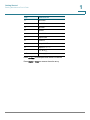
Available characters are shown in the following table:
Key
Character Set
1
1/:\,!;$^|
Cisco Small Business SPA525G and SPA525G2 SPCP IP Phones User Guide
13
1
Getting Started
Entering Numbers and Text in Fields
Key
Character Set
2
abc2ABC
3
def3DEF
4
ghi4GHI
5
jkl5JKL
6
mno6MNO
7
pqrs7PQRS
8
tuv8TUV
9
wxyz9WXYZ
0
Space 0 ~ ? > ‘ < “
*
.@*&%[]_
#/P
#+-=(){}
Press delChar to backspace and delete a character.
Press Option > Clear to remove the entire entry.
Cisco Small Business SPA525G and SPA525G2 SPCP IP Phones User Guide
14
Getting Started
Using Phone Hardware and Accessories
1
Using Phone Hardware and Accessories
Using the Speakerphone
The IP phones provide a speakerphone. To use the speakerphone, press Speaker
(the handset can be either on or off hook).
Using Wired and Wireless Headsets
The SPA IP phones support headsets from different manufacturers. For the latest
supported models, contact your reseller. Additional information can be found at
the manufacturer websites.
Connecting the Headset
Each brand and type of headset might require different steps to establish a
connection. Consult the documentation for your particular headset for more
information:
•
Bluetooth headsets—See the “Connecting Bluetooth Headsets” section
on page 16.
•
Wireless (non-Bluetooth) headsets (such as Plantronics or Jabra)—Follow
the instructions for your product to connect the phone to the wireless
headset base.
•
Wired headsets—Connect the 2.5mm connector from the headset into the
headset port on the right side of the IP phone.
•
Electronic Hookswitch (EHS)—Some headsets enable you to answer and
end phone calls by using controls located on the headset.
Cisco Small Business SPA525G and SPA525G2 SPCP IP Phones User Guide
15
Getting Started
Using Phone Hardware and Accessories
1
Connecting Bluetooth Headsets
Your phone is Bluetooth compatible and works with Bluetooth devices such as
headsets.
To configure the phone to work with your headset, enable Bluetooth:
STEP 1 Press Setup.
STEP 2 Select User Preferences > Bluetooth Configuration.
STEP 3 With Bluetooth highlighted, press the Arrow keys to toggle Bluetooth on or off.
STEP 4 Press Set.
STEP 5 Create a profile for your headset. In the Bluetooth Configuration screen, scroll to
Bluetooth Profiles. Press the Right Arrow key to enter the profile screen. You are
not allowed to navigate to the Bluetooth profiles screen, unless Bluetooth is
enabled and set.
STEP 6 Press Scan to scan for your headset.
STEP 7 In the list of found devices, select your headset and press Select to edit the profile.
STEP 8 Scroll to PIN and enter the PIN for your Bluetooth headset.
STEP 9 Scroll to Connect Automatically and press the Arrow key to turn to On.
Cisco Small Business SPA525G and SPA525G2 SPCP IP Phones User Guide
16
Getting Started
Using Phone Hardware and Accessories
1
STEP 10 Press Connect. The profile screen displays and a check mark appears next to the
headset if the connection was successful.
After enabling Bluetooth, set the Bluetooth mode:
STEP 1 Press Setup.
STEP 2 Scroll to User Preferences > Bluetooth Configuration.
STEP 3 Scroll to Bluetooth Mode and press the Right Arrow key to choose one of the
following:
•
Phone—Your IP phone pairs with a Bluetooth headset. Choose this option if
you will not use the Cisco IP phone with a Bluetooth-enabled mobile phone.
•
Handsfree—Your IP phone will operate as a handsfree device with a
Bluetooth-enabled mobile phone.
•
Both—Your Cisco IP phone uses a Bluetooth headset or operates with a
Bluetooth-enabled mobile phone. Your IP phone will connect to only one
device at a time (either the Bluetooth headset or the Bluetooth-enabled
mobile phone. See Using Your Bluetooth-Enabled Mobile Phone, page 47
for more information.
If multiple Bluetooth devices are in range of the Cisco SPA525G or SPA525G2, the
order of devices in the Bluetooth Configuration > Bluetooth Profiles list is used, and
the device with a higher priority is activated first.
Cisco Small Business SPA525G and SPA525G2 SPCP IP Phones User Guide
17
Getting Started
Using Phone Hardware and Accessories
1
STEP 4 Scroll to Bluetooth Profiles and press the Right Arrow key to enter the profile
screen.
STEP 5 Press Scan to scan for your headset. Depending on the network environment (for
example, the number of Bluetooth devices and noise level), your Bluetooth
headset might not appear on the found devices list. Ensure the headset is
powered on and has Bluetooth activated, and retry the scan.
STEP 6 In the list of found devices, select your headset and press Select to edit the profile.
STEP 7 Scroll to PIN and enter the PIN for your Bluetooth headset.
STEP 8 Scroll to Connect Automatically and press the Right Arrow key to turn to On.
STEP 9 Press Connect. The profile screen displays and a check mark appears next to the
headset if the connection was successful.
Using a Headset with Your IP Phone
Steps to use your headset with the IP phone might vary. Consult the user
documentation for your headset for more information.
•
To use a wired headset, press Headset and dial the number to place a call,
or press the headset button to answer a ringing call.
•
To use a non-Bluetooth wireless headset (such as Jabra or Plantronics), lift
the receiver off hook before speaking or listening through the headset.
•
To use a Bluetooth headset, make sure your headset is powered on. Press
Headset on your phone (or, if supported, press Answer on your Bluetooth
headset twice) and dial the number to place a call. Press Answer on your
Bluetooth headset to answer a ringing call. See the user documentation for
your Bluetooth headset for more information.
Switching Between the Handset, Headset, and
Speakerphone
Any of these audio devices can be used during a call. Only one device can be
used at a time. The handset can be on the hook when using the speaker or
headset function.
To switch from the handset to the speaker, press Speaker and place the handset
back on the hook.
To switch from the speakerphone to a headset, press Headset.
Cisco Small Business SPA525G and SPA525G2 SPCP IP Phones User Guide
18
Getting Started
Using the Cisco Attendant Console
1
To switch from the speaker to the handset, pick up the handset.
To switch from the headset to the speakerphone, press Speaker.
Using the Cisco Attendant Console
The Cisco Attendant Console is an accessory console for the Cisco SPA500
Series IP phones, providing 32 three-color (red, green, and orange) programmable
line buttons. The Cisco Attendant Console attaches to the IP phone with the
attachment arm provided. It obtains power directly from the IP phone; it does not
require a separate power supply. Two Cisco Attendant Console units can be
attached to a single IP phone to monitor a total of 64 separate lines.
Detailed information on the installation of the Cisco Attendant Console are
provided in the Cisco Small Business Attendant Console Quick Start Guide.
Configuration of the Cisco Attendant Console and assignment of the line buttons is
typically performed by the phone system administrator and are not described in
this document. The Cisco Attendant Console can can be configured by using the
same phone web user interface for the IP phone to which the Cisco Attendant
Console is attached. See the Cisco SPA300 Series, SPA500 Series, and WIP310
Administration Guide on Cisco.com for more information.
Cisco Small Business SPA525G and SPA525G2 SPCP IP Phones User Guide
19
2
Installing Your Phone
This chapter describes how to install and connect your IP phone. It contains the
following sections:
•
Before You Begin, page 20
•
Connecting the Handset, page 21
•
(Optional) Attaching the Desk Stand, page 23
•
(Optional) Mounting the Phone to the Wall, page 23
•
Connecting Your Phone Power, page 25
•
Connecting Your Phone to the Network, page 26
•
Verifying Phone Startup, page 34
•
Updating Your Phone Firmware, page 34
Before You Begin
Before you install and connect your phone, verify with your phone system
administrator (if applicable) that the network is ready for the phone, read the
safety notices, and make sure you have all the phone parts and documentation
available.
!
CAUTION Do not plug a telephone line cord into the port marked AUX. The RJ-11 port marked
AUX is reserved for connection with the Cisco Attendant Console. It is not for use
as a telephone line port or IP device connection.
Cisco Small Business SPA525G and SPA525G2 SPCP IP Phones User Guide
20
2
Installing Your Phone
Connecting the Handset
Connecting the Handset
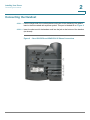
STEP 1 Find the longer end of the coiled phone cord. Insert it into the back of the phone
base in the slot marked with a phone symbol. This port is labeled #5 on Figure 2.
STEP 2 Insert the short end of the handset cord into the jack at the bottom of the handset
(not shown).
Figure 2
Cisco SPA525G and SPA525G2 IP Phone Connections
Cisco Small Business SPA525G and SPA525G2 SPCP IP Phones User Guide
21
2
Installing Your Phone
Connecting the Handset
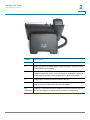
Number
Component
1
Auxiliary port. Only for use with the Cisco Attendant Console.
2
Power port. Insert the power adapter plug into this port. (Use only with a
Cisco PA100 power adapter.)
3
Additional Ethernet port. Connect an Ethernet cable to this port to provide
network connectivity to a PC. (This port cannot be used when the phone
is connected to the network by using the built-in Wireless-G client.)
4
Ethernet port. Connect the network cable to this port.
5
Phone cord slot. Insert one end of the phone cord into this slot and the
other into the jack at the bottom of the phone handset.
not
numbered
USB port. For use with an external USB memory device (optional). You can
also use the USB port to charge a device such as a mobile phone.
Cisco Small Business SPA525G and SPA525G2 SPCP IP Phones User Guide
22
2
Installing Your Phone
(Optional) Attaching the Desk Stand
(Optional) Attaching the Desk Stand
Do not attach the desk stand if you want to mount the phone to the wall. If you are
attaching a Cisco Attendant Console attach the console before attaching the desk
stand.
STEP 1 Line up the tabs on the desk stand with the slots on the back of the phone.
STEP 2 Slide the bottom tabs into the slots.
STEP 3 Lightly press down on the top of the desk stand. It should easily slide into the top
slots. Do not force it.
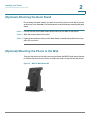
(Optional) Mounting the Phone to the Wall
To mount the phone to the wall, you must purchase the MB100 wall mount bracket
kit. Follow the instructions in the kit to attach the mount to the wall and the phone.
Figure 3
MB100 Wall Mount Kit
Cisco Small Business SPA525G and SPA525G2 SPCP IP Phones User Guide
23
Installing Your Phone
Connecting Your Phone Power
2
Connecting Your Phone Power
The Cisco SPA525G and Cisco SPA525G2 do not ship with power supplies. If you
are not using Power over Ethernet (PoE), you must order a Cisco PA100 power
adapter for each phone.
If you are using Power over Ethernet (PoE) to power the phone, the phone receives
power when you connect an Ethernet cable from the phone SW port to a switch
that provides PoE. See the “Connecting Your Phone to the Wired Network”
section on page 26. If you are using a Cisco PA100 power adapter, insert one end
of the power adapter into an outlet and insert the other end into the power port on
the phone body.
Connecting Your Phone to the Network
The phone can be connected to a wired or wireless network by using a Cat5
(Cat5e or higher for the Cisco SPA512G and Cisco SPA514G) Ethernet cable, or
through a wireless network connection.
Connecting Your Phone to the Wired Network
Connect your phone to a wired network by using an Ethernet cable:
STEP 1 Plug the Ethernet cable into the back of the base station into the slot marked “SW.”
This port is labeled #4 on Figure 2 on page 21.
STEP 2 Plug the other end of the Ethernet cable into the appropriate device on your
network, such as a network switch.
NOTE The Cisco SPA525G and Cisco SPA525G2 provides a second Ethernet port. You
can connect a PC to this port to provide network access to the PC. This port is
labeled #4 in the Figure 2. This port cannot be used when the phone is connected
to the network by using the built-in Wireless-G client.
Cisco Small Business SPA525G and SPA525G2 SPCP IP Phones User Guide
24
Installing Your Phone
Connecting Your Phone to the Network
2
Connecting Your Phone to the Wireless Network
The Cisco SPA525G and Cisco SPA525G2 phone supports connections to a
wireless network. Before setting up the wireless network, you must know the
wireless security type for your router. The phone works with the following security
types:
•
Wired Equivalent Privacy (WEP)—With this type of security, you must enter
a 64– or 128–bit key on the phone (or a more easily remembered
passphrase to generate the key). The phone then authenticates with your
router to provide a secure connection.
•
Wi-Fi Protected Access (WPA)—The phone supports WPA PSK, WPA2
PSK, WPA Enterprise, and WPA2 Enterprise. With this type of security, you
will at the minimum be required to enter a password on the phone. The
phone then authenticates with your router to provide a secure connection.
NOTE The PC port is not supported in wireless operation; the PC port is only supported
in a wired environment.
Determine Your Wireless Router Security Type
If you do not know your wireless router security type, log in to the router interface
to get this information. The steps below are written for a Cisco Small Business
router, but procedures for other routers should be similar.
STEP 1 Log in to your wireless router web interface. Your computer must be connected to
same subnetwork as the router. Enter the IP address of the wireless router in the
browser toolbar.
STEP 2 If required, enter the user name and password. (By default, Linksys routers
typically use “admin” for the user name and “admin” for the password. Cisco
routers typically use cisco for the username and cisco for the password.)
STEP 3 View the Wireless tab or screen. Note the network name (SSID) and the type of
security (WEP, WPA Personal, or WPA2 Personal).
If your router is using WEP, note the following information:
•
WEP encryption: 64 bit or 128 bit. You need to choose this later.
•
Default transmit key, or TX key: The default key (of the 4) that the router
transmits to authenticate. This value will be 1, 2, 3, or 4.
•
Passphrase and keys: You choose one of two methods to enter the WEP
key. You either directly enter the WEP key, or enter a more simple
passphrase to generate the WEP key.
Cisco Small Business SPA525G and SPA525G2 SPCP IP Phones User Guide
25
Installing Your Phone
Connecting Your Phone to the Network
2
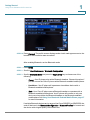
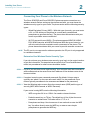
The following example shows WEP information for a Linksys WRV200 router:
If your router is using WPA, note the WPA shared key, or passphrase that you shall
enter when configuring the phone.
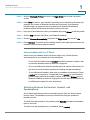
The following example shows WPA information for a Linksys WRT160N router:
Cisco Small Business SPA525G and SPA525G2 SPCP IP Phones User Guide
26
Installing Your Phone
Connecting Your Phone to the Network
2
Setting the Phone Wireless Connection
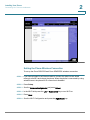
To set up the Cisco SPA525G and Cisco SPA525G2 wireless connection:
STEP 1 If you have plugged in an Ethernet cable to connect the phone to the wired
network, remove it and reboot the phone. When the phone is connected by using
wired Ethernet, the phone Wi-Fi connection is disabled.
STEP 2 Press Setup.
STEP 3 Scroll to Network Configuration and press Select.
STEP 4 In the Wi-Fi field, press the Left or Right Arrow key to turn Wi-Fi on.
STEP 5 Press Save.
STEP 6 Scroll to Wi-Fi Configuration and press the Right Arrow key.
Cisco Small Business SPA525G and SPA525G2 SPCP IP Phones User Guide
27
Installing Your Phone
Connecting Your Phone to the Network
2
STEP 7 Choose one of the following options:
•
Wireless Profile—Use this option to add a new wireless profile (either
manually or by scanning for available networks), editing an existing wireless
profile, or connecting to a previously configured network. See Manually
Adding a Wireless Profile, page 31.
•
Wi-Fi Protected Setup—If your wireless router supports Wi-Fi Protected
Setup, use this method to set up your wireless connection. See Using Wi-Fi
Protected Setup, page 30.
Using Wi-Fi Protected Setup
If your router has a WPS button, you can use Wi-Fi Protected
Setup to add a new wireless network profile.
STEP 1 In the Wireless Configuration screen, select Wi-Fi Protected Setup.
STEP 2 Choose one of the following options:
Push Button Configuration:
a. Press the WPS button on your router.
b. On your phone, highlight Push Button Configuration and press Select. Your
phone might reboot before the Wi-Fi connection is established.
PIN Configuration:
a. After selecting PIN Configuration on your phone, note the PIN displayed.
b. Connect to your router interface by using a PC by following the instructions
provided with your router.
c. If required, enter the user name and password. (By default, Linksys routers
typically use admin for the user name and admin for the password. Cisco
routers typically use cisco for the username and cisco for the password.)
d. Locate the Wireless Protected Setup configuration menu.
e. Enter the PIN into the field that allows you to setup wireless devices by using a
PIN.
Cisco Small Business SPA525G and SPA525G2 SPCP IP Phones User Guide
28
Installing Your Phone
Connecting Your Phone to the Network
f.
2
Save your changes.
g. On the Cisco SPA525G and Cisco SPA525G2, with PIN Configuration
highlighted, press Select. To add the connection as a profile, press OK. Your
phone might reboot before the Wi-Fi connection is established.
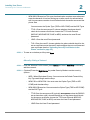
Manually Adding a Wireless Profile
To add a new wireless network profile:
STEP 1 In the Network Configuration screen, ensure Wi-Fi is enabled.
STEP 2 Scroll to Wi-Fi Configuration and press the Right Arrow key to enter the Wi-Fi
Configuration screen.
STEP 3 Select Wireless Profile. Current wireless profiles are displayed.
STEP 4 Do one of the following tasks:
•
Scan for available networks. See Scanning for Available Networks,
page 31.
•
Manually add the network. See Manually Adding a Network, page 32.
Scanning for Available Networks
NOTE If your router has SSID (router name) broadcast disabled, it might not appear in the
list of networks. In that case, you must manually add the SSID (see Manually
Adding a Network, page 32).
STEP 1 In the Wireless Profile screen, press Scan.
STEP 2 In the list of available networks, scroll to the desired network and click Add to
select the highlighted network.
STEP 3 (Optional) Press the Right Arrow key under Security Mode to set the security
options:
•
WEP—Wired Equivalent Privacy: You must enter the Default Transmit Key,
Key Type and Length, and the keys.
•
WPA PSK or WPA2 PSK: You must enter the Cipher Type (TKIP or AES
CCMP) and the shared key.
Cisco Small Business SPA525G and SPA525G2 SPCP IP Phones User Guide
29
2
Installing Your Phone
Connecting Your Phone to the Network
•
WPA/WPA2 Enterprise: This type of authentication requires some advanced
expertise because it involves setting up a radius server for authentication
and, in some cases, creation of certificates for both the radius server and the
phone. See
You must enter the Cipher Type (TKIP or AES CCMP) and the EAP Type:
-
TTLS—Enter the anonymous ID, choose whether the phone should
check for the server certificate, choose the TTLS Inner Protocol
(MSCHV2, MSCHAP, PAP, CHAP, or MD5), and enter the user ID and
password.
-
LEAP—Enter the user ID and password.
-
TLS—Enter the user ID, choose whether the phone should check for the
server certificate, enter the user ID, and configure the root certificate and
user certificate (see the “Uploading Security Certificates to the
Phone” section on page 33).
STEP 4 To save as a wireless profile, press Save.
Manually Adding a Network
STEP 1 From the Wireless Profile screen, press Option and select Add New to manually
add the network.
STEP 2 (Optional) Press the Right Arrow key under Security Mode to set the security
options:
•
WEP—Wired Equivalent Privacy: You must enter the Default Transmit Key,
Key Type and Length, and the keys.
•
WPA PSK or WPA2 PSK: You must enter the Cipher Type (TKIP or AES
CCMP) and the shared key.
•
WPA/WPA2 Enterprise: You must enter the Cipher Type (TKIP or AES CCMP)
and the EAP Type:
-
TTLS: Enter the anonymous ID (typically, anonymous unless the RADIUS
server has other rules), choose whether or not the phone should check
for the server certificate, choose the TTLS Inner Protocol (MSCHV2,
MSCHAP, PAP, CHAP, or MD5), and enter the User ID and password.
-
LEAP: Enter the User ID and password.
Cisco Small Business SPA525G and SPA525G2 SPCP IP Phones User Guide
30
2
Installing Your Phone
Connecting Your Phone to the Network
-
TLS: Enter the User ID, choose whether the phone should check for the
server certificate, enter the User ID, and configure the Root certificate
and User certificate (see the “Uploading Security Certificates to the
Phone” section on page 33).
STEP 3 To save as a wireless profile, press Save.
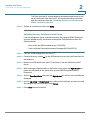
Uploading Security Certificates to the Phone
If you are using some types of wireless security (for example, WPA2 Enterprise),
you must upload security certificates to the phone. Certificates must be in the
following format:
•
Root certificate: DER encoded binary x.509 (CER)
•
User certificate: Personal Information Exchange (PKCS#12(.PFX))
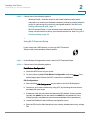
STEP 1 Connect a USB storage device to your PC.
STEP 2 Create a directory named ca on the USB device and copy the certificate files into
that directory.
STEP 3 Remove the USB device from your PC and insert it into the USB slot on the IP
phone.
STEP 4 After creating a wireless profile, in the Profile screen, press the Right Arrow key
under Security Mode to set the security options (WPA Enterprise or WPA2
Enterprise).
STEP 5 Scroll to Root Certificate and press the Right Arrow key. All files in the ca folder are
displayed.
STEP 6 Use the Up Arrow or Down Arrow key to choose the certificate you want to install
(for example, the root certificate). press Select.
STEP 7 Press Save to save the profile.
Cisco Small Business SPA525G and SPA525G2 SPCP IP Phones User Guide
31
2
Installing Your Phone
Verifying Phone Startup
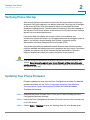
Verifying Phone Startup
After receiving power and network connectivity, the phone executes a boot-up
sequence. During this sequence, the display shows the Cisco logo. All of the lights
on the phone will flash. After this sequence (about five seconds) the phone
displays the standard menu. The date, name and number of the phone appear on
the top line of the IP phone screen. At the bottom of the IP phone screen, softkeys
appear over their associated buttons.
If the phone does not display this screen, confirm your installation and
connections. If these are correct, try unplugging the phone and plugging it back in
again. If you still don’t see the display, then contact your phone system
administrator or Internet Telephony Service Provider (ITSP).
Your phone ships with pre-installed firmware. However, later firmware versions
might be available that add features and fix problems with your phone. You should
upgrade your phone to the latest firmware for ideal performance. Often this
happens automatically when you connect the phone to the network.
!
CAUTION If you are using your phone with an Internet Telephony Service Provider (ITSP)
system, do not manually upgrade your phone firmware without consulting your
service provider. Your provider might automatically upgrade your phones without
any action on your part.
Updating Your Phone Firmware
Firmware updates are done from the Cisco Configuration Assistant. For detailed
update instructions, see the Cisco Configuration Assistant Smart Business
Communications System Administrator Guide for your software release.
To update the firmware:
STEP 1 Download the phone firmware from CCO to your PC that is running the Cisco
Configuration Assistant software.
STEP 2 Launch the Cisco Configuration Assistant (CCA) and connect to the customer site
or UC 500 device.
STEP 3 Choose Home > Topology to open the Topology View if it is not already open.
Cisco Small Business SPA525G and SPA525G2 SPCP IP Phones User Guide
32
Installing Your Phone
Updating Your Phone Firmware
2
STEP 4 Locate the phone firmware file that you downloaded from Cisco.com (for example:
spa525g2-7-4-4.bin).
STEP 5 In the Topology View, use the mouse to drag the phone load file from the folder on
your PC to the UC 500 icon.
If CCA recognizes the file as a valid phone load, a popup dialog displays and you
are prompted to upload the file.
STEP 6 Select the file and click Upload. The dialog displays the upload and updatee
progress.
STEP 7 Right-click the phone icon in the CCA topology view and restart the phone.
Cisco Small Business SPA525G and SPA525G2 SPCP IP Phones User Guide
33
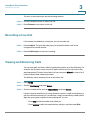
3
Using Basic Phone Functions
This chapter describes how to use the basic functions of your Cisco SPA525G
and SPA525G2 IP phone. It includes the following sections:
•
Placing or Answering a Call, page 35
•
Adjusting Call Volume and Muting, page 35
•
Using Mute, page 36
•
Putting a Call on Hold, page 36
•
Resuming a Call, page 36
•
Ending a Call, page 36
•
Transferring Calls, page 37
•
Managing Call Waiting, on page 37
•
Recording a Live Call, on page 38
•
Viewing and Returning Calls, page 38
•
Forwarding Calls, page 39
•
Setting Do Not Disturb, page 39
•
Picking Up a Call, page 41
•
Placing a Three-Way Conference Call, page 41
•
Using the Phone Directories, page 42
•
Using the Call History Lists, page 45
•
Accessing Voicemail, page 46
Cisco Small Business SPA525G and SPA525G2 SPCP IP Phones User Guide
34
3
Using Basic Phone Functions
Placing or Answering a Call
Placing or Answering a Call
You might have to dial a number or numbers to reach an outside line. Ask your
system administrator.
Depending on the phone system setup, you might be able to place or answer calls
by using various methods.
To place or answer a call:
•
Pick up the handset.
•
Press the Speaker button.
•
Press the Headset button.
•
Press a line button to place a call or a blinking line button to answer a call.
•
Dial the number, and then lift the handset.
•
Dial the number and press Dial.
•
Press New Call and dial the number.
•
Select a number from the directory and press Dial.
•
Press Redial to dial the last number that you called.
•
If you are on a call and another call comes in, press Answer to place the
current call on hold and answer the incoming call. To return to the first call,
select it by using the Up Arrow key or the Down Arrow key and then press
Resume.
•
To place a new call while another call is active on the same line, press Hold,
press New Call, and enter the number.
Adjusting Call Volume and Muting
To adjust the volume while you are on a call, press + on the Volume button to
increase the volume, or press - to decrease the volume. Press Save.
Pressing the Volume button while not on a call adjusts the volume of the phone
ringer.
Cisco Small Business SPA525G and SPA525G2 SPCP IP Phones User Guide
35
Using Basic Phone Functions
Putting a Call on Hold
3
Using Mute
To mute the phone microphone, speaker, or headset microphone, press Mute. The
button lights red. Press Mute again to unmute.
Putting a Call on Hold
To put an active call on hold, press Hold. A series of beeps (default) or (optional)
music-on-hold plays for the caller to indicate that the call is on hold.
Resuming a Call
To resume the call, press the (optionally configured) flashing–red line button for the
call. If you have multiple calls, all calls are put on hold except the active call.
Ending a Call
To end a call:
•
If you are using the handset, hang up.
•
If you are using the speakerphone, press Speaker.
•
If you are using the headset, either press the Headset button (wired) or replace
the receiver (wireless).
•
Press EndCall to hang up one call, and preserve another call. If necessary,
remove the call from hold by pressing the line button.
Cisco Small Business SPA525G and SPA525G2 SPCP IP Phones User Guide
36
3
Using Basic Phone Functions
Transferring Calls
Transferring Calls
You can transfer a call to another extension.
STEP 1 During an active call, or with a call on hold, press Trnsfer.
STEP 2 Do one of the following:
•
Enter the number to where you want to transfer the call; or
•
Use the directory to choose a number from the personal directory.
STEP 3 Press Dial or wait a few seconds. The call is placed on hold and a new line is
opened to dial the number.
STEP 4 Do one of the following:
•
To transfer the call without waiting for the other person to answer, press
Trnsfer after the call begins to ring and hang up. If you hang up before the
second call rings, the transfer fails and the first call is disconnected. If you
misdial, press the second line button again to receive a dial tone.
•
To transfer after speaking privately to the other person, press Trnsfer at any
time during the conversation.
Managing Call Waiting
If you are on a call when a second call comes in, you will hear a call-waiting tone
and, or, see a flashing indicator light on the handset rest, depending on the
configuration of your phone.
To answer the new call on the same line:
STEP 1 Use the navigation button to select the call.
STEP 2 Press Answer to answer the call. The call on the other line is automatically put on
hold.
Cisco Small Business SPA525G and SPA525G2 SPCP IP Phones User Guide
37
3
Using Basic Phone Functions
Recording a Live Call
To return to the original call, use the following method:
STEP 1 Use the navigation button to select the call.
STEP 2 Press Resume to reconnect to the call.
Recording a Live Call
If this feature is available on your phone, you can record a call.
STEP 1 Press LiveRcd. This puts the other party on hold and initiates a call to the
configured live record number.
STEP 2 Press LiveRcd again to stop the recording.
Viewing and Returning Calls
You can view, edit, and return calls by looking the number up in the call history. For
example, the IP phone screen on your IP phone notifies you if a call came in that
was unanswered. To return the missed call, you can press Missed to view a list of
missed calls and dial a selected number.
To redial any call by selecting it from a call history list:
STEP 1 Press Setup.
STEP 2 Scroll to Call History and press Select.
STEP 3 Scroll to the desired list, such as Missed Calls, and press Select.
If a call is from an outside line or a long distance number, it might be necessary to
edit the call before returning it. For example, it might be necessary to add a prefix
digit that your system requires for an outgoing call. You can:
•
Press Dial to dial the number that called you.
•
Press EditDial to edit the number before calling it, and then press Dial.
Cisco Small Business SPA525G and SPA525G2 SPCP IP Phones User Guide
38
3
Using Basic Phone Functions
Forwarding Calls
•
Press Option to modify the list and choose:
-
Delete Entry to remove the entry from the list.
-
Delete List to delete all entries from the list.
-
Add to Address Book to add the entry to your personal address book.
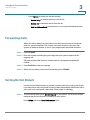
Forwarding Calls
When you will be away from your phone, you can press a button to forward all
calls to a specified number. The number can be an extension, the voice mail
system, an external number, or one of your programmed speed dial numbers.
STEP 1 Press CFwdAll.
STEP 2 Enter the number, including any prefix digit that your system requires for an
outgoing call.
OR press a speed dial button to forward calls to a programmed speed dial
number.
STEP 3 Press EndCall to save your settings.
STEP 4 When you are ready to cancel call forwarding, press CFwdAll.
Setting Do Not Disturb
Use the Do Not Disturb feature to prevent incoming calls from ringing your phone.
If you have voice mail configured, incoming callers immediately reach voice mail. If
voice mail is not configured, callers hear a busy signal or message.
STEP 1 To set Do Not Disturb, press Do Not Disturb on your phone. The IP phone screen
indicates that Do Not Disturb is turned on for your phone.
Press Setup and select User Preferences. Then:
Cisco Small Business SPA525G and SPA525G2 SPCP IP Phones User Guide
39
Using Basic Phone Functions
Configuring Call Waiting
3
STEP 1 Choose Call Preferences.
STEP 2 Scroll to Do Not Disturb.
STEP 3 Press the Right Arrow key to turn Do Not Disturb on.
STEP 4 Press Save.
STEP 5 To turn off Do Not Disturb, press DnD.
Press Setup and select User Preferences. Then:
STEP 1 Choose Call Preferences.
STEP 2 Scroll to Do Not Disturb.
STEP 3 Press the Right Arrow key to turn Do Not Disturb off.
STEP 4 Press Save.
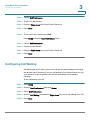
Configuring Call Waiting
Call waiting alerts you when you are on a call with a status message and ringing
that another call is incoming. If you turn call waiting off, incoming calls do not ring
your phone if you are on another call, and the caller hears a busy signal or
message.
To turn call waiting on or off:
STEP 1 Press Setup.
STEP 2 Scroll to User Preferences and press Select.
STEP 3 Select Call Preferences.
STEP 4 Scroll to Call Waiting and press the Right Arrow key to turn call waiting On or Off.
STEP 5 Press Save.
Cisco Small Business SPA525G and SPA525G2 SPCP IP Phones User Guide
40
Using Basic Phone Functions
Picking Up a Call
3
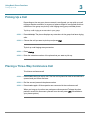
Picking Up a Call
Depending on the way your phone network is configured, you can pick up a call
ringing at another extension, or a group of phones might be configured such that
members of the group can pick up a call ringing at any group member phone.
To pick up a call ringing at an extension in your group:
STEP 1 Press GPickUp. The phone displays any extensions in the group that have ringing
calls.
STEP 2 Choose the call you want to pick up and press Dial.
To pick up a call ringing at any extension:
STEP 1 Press PickUp.
STEP 2 Enter the extension number of the phone that you want to pick up.
Placing a Three-Way Conference Call
To initiate a conference call:
STEP 1 Press Confrn during an active call. The first call is placed on hold, a second line is
opened, and you hear a dial tone.
STEP 2 Dial the second person’s telephone number.
STEP 3 Press Confrn again. All three parties are connected in the conference call.
When you hang up, the other two parties are disconnected. To keep the other
parties in a call, but disconnect yourself from the call, press Join (if available on
your phone system).
Cisco Small Business SPA525G and SPA525G2 SPCP IP Phones User Guide
41
3
Using Basic Phone Functions
Using the Phone Directories
Using the Phone Directories
The Cisco SPA525G and SPA525G2 IP phones provide several different types of
phone directories, depending on the phone model and what the system
administrator has set up for the company.
In general, the phones provide the following types of directories:
•
Personal Address Book—The personal directory provides a place for you to
store and view frequently dialed numbers. You can also dial numbers from
the directory.
•
Corporate Directories—Depending on your phone network configuration,
you might have a Corporate Directory (XML) and a Corporate Directory
(LDAP) available.
Using Your Personal Address Book
To access the Phone Directory, press Setup , select Directories, and select
Personal Address Book.
You have the following options in the Address Book:
•
Options—Press Options and choose one of the following options:
-
Search—Search for a name.
-
Delete—Delete a contact.
-
Copy—Copy a contact.
-
Paste—Paste a contact.
-
Edit Dial—Edit a contact’s number before dialing.
•
Dial—Press to dial a highlighted contact.
•
Add—Choose to add a new contact.
Use the Down Arrow key to scroll through entries in the address book. Use the
Right Arrow key to scroll through the phone numbers available for the highlighted
contact.
Adding a New Contact
To add a new entry to the directory:
Cisco Small Business SPA525G and SPA525G2 SPCP IP Phones User Guide
42
Using Basic Phone Functions
Using the Phone Directories
3
STEP 1 In the Personal Address Book screen, press Add.
STEP 2 Use the keypad to enter the name of the directory entry. When finished with the
name, use the Down Arrow to navigate to the other fields.
TIP
To enter numbers and letters, press Option and select Input All. To enter only
numbers, press Option and select Input Num. To clear all characters from an entry,
press Option and select Clear.
STEP 3 Enter the office, mobile, or home phone number, including any digits you must dial
to access an outside line and the appropriate area code, if necessary. You must
enter at least one phone number for a contact.
TIP
To enter numbers and letters, press Option and choose Input All. To enter only
numbers, press Option and select Input Num. To enter an IP address, press Option
and select Input IP. To clear all characters from an entry, press Option and select
Clear.
STEP 4 Press Save to save the entry.
Copying a Contact
You can copy a contact to create a new contact, changing information as
necessary on the second contact. To copy a contact:
STEP 1 In the Personal Address Book screen, scroll to highlight a contact.
STEP 2 Press Option and select Copy.
STEP 3 Press Option again and select Paste.
STEP 4 Edit any necessary fields and press Save.
Searching for a Contact
To search for a contact:
STEP 1 In the Personal Address Book screen, press Option and select Search.
STEP 2 Begin to enter the person’s name. The list below displays entries as you type in
characters. Scroll to highlight the entry you want.
Cisco Small Business SPA525G and SPA525G2 SPCP IP Phones User Guide
43
Using Basic Phone Functions
Using the Phone Directories
3
You can press Dial to call the contact, or Option to delete, copy, or edit the contact.
Deleting a Contact
To delete a contact:
STEP 1 In the Personal Address Book screen, highlight the contact you want to delete.
STEP 2 Press Option and select Delete.
STEP 3 Press OK to delete the contact.
Editing a Contact
To edit a contact’s phone information:
STEP 1 In the Personal Address Book screen, highlight the contact you want to edit.
STEP 2 Choose one of the following options:
•
Press the center Select navigation button to choose the contact and edit the
numbers in the entry. Use delChar to delete numbers individually, or press
Option and choose Clear to delete all of the numbers.
•
Press Save when finished.
Using the Corporate Directory
NOTE Depending on your Internet Telephony Service Provider or corporate network
setup, you may not have a corporate directory available to you.
To use the corporate directory:
STEP 1 Press Setup and select Directories.
STEP 2 Scroll to the Corporate Directory you want to view and press Select.
Cisco Small Business SPA525G and SPA525G2 SPCP IP Phones User Guide
44
3
Using Basic Phone Functions
Using the Call History Lists
Using the Call History Lists
Viewing the Call History Lists
To view the Call History lists:
STEP 1 Press Setup.
STEP 2 Scroll to Call History and press Select.
STEP 3 Select the Call History list you want to view. Available Call History lists are:
•
All Calls—Shows all calls placed, received, or missed.
•
Missed Calls—Shows the last 60 missed calls.
•
Received Calls—Shows the caller ID of the last 60 answered calls.
•
Placed Calls—Shows all calls placed from the phone.
STEP 4 Press Select to view the list.
Deleting a Call History List
STEP 1 Press Setup.
STEP 2 Scroll to Call History and press Select.
STEP 3 Scroll to the Call History list you want to delete.
STEP 4 Press Option and select Delete List.
STEP 5 Press OK to delete the list.
Calling from the Call History Lists
To dial a number from one of the Call History lists:
STEP 1 Choose the call.
STEP 2 Press Dial.
Cisco Small Business SPA525G and SPA525G2 SPCP IP Phones User Guide
45
Using Basic Phone Functions
Accessing Voicemail
3
NOTE If the call was from a long distance number, you may have to edit the call before
dialing it. Press EditDial and use the softkeys and keypad to edit the number.
Deleting an Entry from the Call History Lists
STEP 1 In the call history list, choose the call.
STEP 2 Press Option and select Delete Entry.
STEP 3 Press OK.
Saving a Call History List Number to Your Directory
STEP 1 In the call history list, choose the call.
STEP 2 Press Option and select Add to Address Book.
STEP 3 Press Select. The Address Book entry screen appears.
STEP 4 Edit the information (if desired) and press Save again. The entry is added to your
directory.
Accessing Voicemail
To access voicemail, press Messages on your phone. Your system administrator
must configure your phone with the correct voicemail number so that pressing the
Messages button automatically dials your voicemail system.
Cisco Small Business SPA525G and SPA525G2 SPCP IP Phones User Guide
46
4
Using Advanced Phone Functions
This chapter describes how to configure advanced features on your
Cisco SPA525G and SPA525G2 IP phone. It contains the following sections:
•
Using Your Bluetooth-Enabled Mobile Phone, page 47
•
Playing MP3 Files on Your Phone, page 60
•
Customizing Your IP Phone Screen, page 62
•
Restarting Your Phone, page 64
•
Viewing Phone, Network, and Call Information, page 65
•
Viewing the Wireless Connection Status, page 66
•
Advanced Menus for Technical Support Personnel, page 67
Using Your Bluetooth-Enabled Mobile Phone
The Cisco SPA525G or SPA525G2 support Bluetooth to allow use of the phone
with a wireless Bluetooth-enabled headset. The Cisco SPA525G2 also supports
the use of your IP phone in conjunction with Bluetooth-enabled mobile phone. You
can do the following:
•
Pair your Bluetooth-enabled mobile phone and the IP phone. Your mobile
phone is assigned a line button on the Cisco SPA525G2.
•
Switch audio for in-progress calls between your mobile phone and the
Cisco SPA525G2.
•
Import your mobile phone address book to your Cisco SPA525G2 personal
address book.
•
Use your Cisco SPA525G2 as a handsfree device for your mobile phone.
Cisco Small Business SPA525G and SPA525G2 SPCP IP Phones User Guide
47
Using Advanced Phone Functions
Using Your Bluetooth-Enabled Mobile Phone
4
Not all mobile phones support this function. See the list of Bluetooth-enabled
mobile phones supported with the Cisco SPA525G2 that is posted at the Cisco
support community at http://www.cisco.com/go/smallbizsupport. Also consult the
latest Cisco SPA525G2 release notes available at cisco.com.
NOTE The layout and options shown on the phone screens might differ slightly,
depending on the type of phone system to which your Cisco SPA525G2 is
connected.
Enabling Bluetooth
STEP 1 Press the Setup button.
STEP 2 Scroll to User Preferences and press Select.
STEP 3 Scroll to Bluetooth Configuration and press Select.
STEP 4 With Bluetooth selected, press the Right Arrow key repeatedly until the screen
displays a blue checkmark in the field.
STEP 5 Press Save.
Pairing Your Cisco SPA525G2 with a Bluetooth-Enabled
Mobile Phone
To pair your Cisco SPA525G2 with your Bluetooth-enabled mobile phone, you can
initiate pairing from the Cisco SPA525G2 or from your mobile phone.
This feature is based on the following standard Bluetooth profiles:
•
Phone Book Access Profile 1.0
•
Handsfree Profile 1.5
•
Handset Profile 1.1
Cisco Small Business SPA525G and SPA525G2 SPCP IP Phones User Guide
48
Using Advanced Phone Functions
Using Your Bluetooth-Enabled Mobile Phone
4
Initiating Pairing from the Cisco SPA525G2
The Cisco SPA525G2 connects to one Bluetooth device at a time. If multiple
Bluetooth devices are in range of the Cisco SPA525G2, the order of devices in the
Bluetooth Configuration > Bluetooth Profiles list is used, and the device with a
higher priority is activated first.
To pair a Bluetooth device with the IP phone:
STEP 1 Enable Bluetooth on the IP phone as described in the “Enabling Bluetooth”
section on page 48.
STEP 2 Press the Setup button.
STEP 3 Scroll to User Preferences and press Select.
STEP 4 Scroll to Bluetooth Configuration and press Select.
STEP 5 Scroll to Bluetooth Mode and press the Right Arrow key to choose one of the
following:
•
Handsfree—Your Cisco SPA525G2 will operate as a handsfree device with
a Bluetooth-enabled mobile phone.
•
Phone—Your Cisco SPA525G2 pairs with a Bluetooth headset only. Choose
this option if you do not use the IP phone with a Bluetooth–enabled mobile
phone.
•
Both—Your Cisco SPA525G2 will operate with your Bluetooth-enabled
mobile phone or a Bluetooth headset.
STEP 6 Scroll to Bluetooth Profiles and press the Right Arrow key to enter the profile
screen.
STEP 7 Press Scan to scan for the Bluetooth device.
Depending on the network environment (for example, the number of Bluetooth
devices and noise level), your Bluetooth headset might not appear on the found
devices list. Ensure the headset is powered on and has Bluetooth activated, and
retry the scan.
STEP 8 In the Select a Bluetooth Device to Pair list, select the device that you want to pair
and press Connect.
Cisco Small Business SPA525G and SPA525G2 SPCP IP Phones User Guide
49
Using Advanced Phone Functions
Using Your Bluetooth-Enabled Mobile Phone
4
Initiating Pairing from Your Bluetooth-Enabled Mobile Phone
The procedure varies depending on your phone model. You must turn Bluetooth
on, and it might be necessary to configure a separate setting to make your mobile
phone discoverable by other devices.
Before starting, it is helpful to find the MAC address of your Cisco SPA525G2 IP
phone. Go to the Setup menu and select Status > Product Information. The MAC
address is listed.
The following procedure uses an Apple iPhone as an example:
STEP 1 On your iPhone, click Settings.
STEP 2 Under General, choose Bluetooth. Verify that Bluetooth is turned on.
STEP 3 In the Bluetooth Window, under Devices, find the MAC address of your
Cisco SPA525G2 IP phone.
STEP 4 Select the MAC address of the Cisco SPA525G2.
STEP 5 Enter the PIN (the default is 0000) and press Connect.
When paired with your mobile phone, the Cisco SPA525G2 display screen
assigns one of your line buttons to the mobile phone. A mobile phone icon with a
flashing lightning bolt icon is displayed next to the mobile phone name, number, or
other identifier (such as the phone model) for your phone.
The name, number, or other identifier shown depends on what is configured on
your mobile phone. If you have not configured a name on your paired phone, the
phone might display your phone number or some other identifier (such as the
phone model). The display name can vary, depending on your phone model and
configuration.
Verifying that the Cisco SPA525G2 is Paired
The Bluetooth phone icon colors show the status of your mobile phone and/or the
Cisco SPA525G2:
•
No icon—Bluetooth is disabled
•
Gray icon— Bluetooth is enabled, but the phones are not connected.
•
Blue icon—Bluetooth is enabled and the Cisco SPA525G2 is connected to a
headset.
Cisco Small Business SPA525G and SPA525G2 SPCP IP Phones User Guide
50
Using Advanced Phone Functions
Using Your Bluetooth-Enabled Mobile Phone
•
4
Green icon—Bluetooth is enabled and the Cisco SPA525G2 is connected
to a mobile phone.
To verify the mobile phone configuration:
STEP 1 On the Cisco SPA525G2, press the Setup button.
STEP 2 Scroll to User Preferences and press Select.
STEP 3 Scroll to Bluetooth and press Select.
STEP 4 Scroll to Bluetooth Profiles and press the Right Arrow key.
The mobile phone appears in the list of Bluetooth devices.
Importing Your Mobile Phone Address Book into the
Cisco SPA525G2
Not all mobile phones support importing your address book.
To import your mobile phone book into the personal address book on the
Cisco SPA525G2:
STEP 1 Press the Setup button and select Directories.
STEP 2 Select Personal Address Book.
STEP 3 Press Import.
Depending on your mobile phone, it might be necessary to authorize the Bluetooth
connection, even if the phone is already paired with the Cisco SPA525G2.
The phone displays a status message about the import.
If the import is successful, your imported contacts are shown in the directory.
Cisco Small Business SPA525G and SPA525G2 SPCP IP Phones User Guide
51
Using Advanced Phone Functions
Using Your Bluetooth-Enabled Mobile Phone
4
Making a Mobile Phone Call through the Cisco SPA525G2
When you make a mobile phone call by using your Cisco SPA525G2, your
Cisco SPA525G2 acts as a handsfree device for your phone. The call is made
through your mobile phone, but the audio is present on and the call control is done
by using the Cisco SPA525G2. (See “Switching Audio from Your
Cisco SPA525G2 to Your Mobile Phone” section on page 58.)
To make a call through a mobile phone:
STEP 1 Press the line button associated with your mobile phone (the line button is marked
with a mobile phone icon with a flashing lightning bolt).
STEP 2 Do one of the following:
•
Enter a number on the dial pad and press Dial.
•
Press the Setup button and select Directories. Choose a number and press
Dial.
•
Scroll to recently-called number and press Select.
NOTE You probably do not dial a digit to reach an outside line on your mobile phone. If you
usually enter a digit before dialing (such as 9) to reach an outside line from the
Cisco SPA525G2 when it is not paired with a mobile phone, it might not be
necessary to do so when calling through your mobile phone; follow the usual
process for making calls on your mobile phone.
The outgoing call appears on both your Cisco SPA525G2 and your mobile phone
display. The Cisco SPA525G2 displays an off-hook icon next to the mobile phone
display name.
After the call is connected, the icon next to the mobile phone display shows that
the call is established. The audio goes through the Cisco SPA525G2, although the
mobile phone display also shows a connected call.
The layout and options shown on your phone screen might differ slightly,
depending on the type of phone system to which your Cisco SPA525G2 is
connected.
Cisco Small Business SPA525G and SPA525G2 SPCP IP Phones User Guide
52
Using Advanced Phone Functions
Using Your Bluetooth-Enabled Mobile Phone
4
Receiving Mobile Phone Calls by using the Cisco SPA525G2
If your mobile phone is paired with the Cisco SPA525G2, an incoming call to your
mobile phone is also shown on the Cisco SPA525G22.
Do one of the following:
•
Press Answer to connect to the call.
•
Press the red flashing line button associated with your mobile phone.
•
Pick up the Cisco SPA525G2 handset.
•
Press Ignore to ignore the call.
Switching Audio from Your Cisco SPA525G2 to Your Mobile
Phone
You can only switch audio back and forth between the Cisco SPA525G2 and your
mobile phone if the call is connected by using the Cisco SPA525G2-to-mobile
phone feature. You cannot switch a call on your Cisco SPA525G2 that is not
associated with your mobile phone.
To switch audio from your Cisco SPA525G2 to your mobile phone during a call,
press Handset.
To switch audio back to the Cisco SPA525G2 from your mobile phone, on a
connected call, press Handsfree.
Viewing Mobile Phone Battery and Signal Information on Your
Cisco SPA525G2
When a mobile phone call is incoming, outgoing, or connected on your
Cisco SPA525G2, the phone display shows information about your mobile phone.
Not all mobile phones support this function.
The layout and options shown on your phone screen might differ slightly
depending on the type of phone system to which your Cisco SPA525G2 is
connected.
Cisco Small Business SPA525G and SPA525G2 SPCP IP Phones User Guide
53
Using Advanced Phone Functions
Charging Your Mobile Phone Using Your Cisco SPA525G2
4
The display bubble shows the following information if it is supported by the mobile
phone:
•
Battery indicator—Shows the battery life left on your mobile phone.
•
Signal strength—Shows the signal strength for your mobile phone.
•
Network—The phone network for your mobile phone.
Charging Your Mobile Phone Using Your Cisco SPA525G2
You can use the USB port on the Cisco SPA525G2 to charge your mobile phone if
your phone has a USB connection.
Cisco Small Business SPA525G and SPA525G2 SPCP IP Phones User Guide
54
Using Advanced Phone Functions
Playing MP3 Files on Your Phone
4
Playing MP3 Files on Your Phone
Your IP phone contains an audio player that can play .mp3 files. To play music on
your IP phone, you must load the audio files onto a USB memory device (not
provided with the phone). The phone reads the content of the files from the device,
so the device must remain inserted while playing the files.
Only MP3 music without Digital Media Rights protection can be played on the IP
phone.
Creating the Playlist
The MP3 playlist on the phone is limited to 48 songs.
To create a playlist:
STEP 1 Connect a USB storage device to your PC.
STEP 2 Create a directory named mp3 on the USB device and copy the audio files into
that directory.
STEP 3 Remove the USB device from your PC and insert it into the USB slot on the phone.
STEP 4 Press the Setup button.
STEP 5 Scroll to MP3 Player and press Select.
STEP 6 Press Add List to create a playlist from the songs on the USB device.
STEP 7 Choose songs by using one of the following methods:
•
Choose individual songs by scrolling to the song you want and pressing the
Right Arrow key or Select.
•
Choose all songs on the USB device by pressing SelectAll.
You can clear all songs by pressing ClearAll.
STEP 8 After choosing songs, the songs are marked with a check next to the song. Press
Add to add the selected songs to the playlist.
Cisco Small Business SPA525G and SPA525G2 SPCP IP Phones User Guide
55
Using Advanced Phone Functions
Playing MP3 Files on Your Phone
4
Playing Songs
In the Playlist, scroll to the song you want to begin playing and press Play.
You can control the play by using the following controls:
•
Stop—Stop the song. Pressing play restarts the song.
•
Previous—Move to the previous song in the playlist.
•
Next—Move to the next song in the playlist.
•
Back—Move back one screen to the playlist.
Controlling the Audio
Use the Volume button to turn the sound up or down.
To switch the audio destination between the speaker, headset, and handset, press
the Up Arrow or Down Arrow key. The icon on the left above the song length
display shows the audio destination of speaker, handset, or headset.
Cisco Small Business SPA525G and SPA525G2 SPCP IP Phones User Guide
56
Using Advanced Phone Functions
Customizing Your IP Phone Screen
4
Customizing Your IP Phone Screen
You can customize your IP phone screen.
Changing the Screen Contrast
To adjust the contrast of the IP phone screen:
STEP 1 Press the Setup button.
STEP 2 Scroll to User Preferences and press Select.
STEP 3 Scroll to Screen Preferences and press Select.
STEP 4 Scroll to Display Brightness. The default contrast is 15. Enter a number between 1
(lowest) and 15 (greatest) to change the contrast.
STEP 5 Press Save.
Setting the Screen Backlight Timer
You can set a timer for your screen so that your IP phone screen becomes dark
after a specified time when the phone is idle.
STEP 1 Press the Setup button.
STEP 2 Scroll to User Preferences and press Select.
STEP 3 Scroll to Screen Preferences and press Select.
STEP 4 Scroll to Backlight. Press the Right Arrow key to choose On, which means that the
darkening feature is enabled.
STEP 5 Scroll to Backlight Timer. Enter the number of seconds before the display should
shut off after the phone is idle.
STEP 6 Press Save.
Cisco Small Business SPA525G and SPA525G2 SPCP IP Phones User Guide
57
Using Advanced Phone Functions
Customizing Your IP Phone Screen
4
Configuring the Phone Screen Saver
You can enable your phone screen saver and specify its appearance and the
amount of time for the phone to be idle before it begins.
To configure your screen saver:
STEP 1 Press the Setup button.
STEP 2 Scroll to User Preferences and press Select.
STEP 3 Scroll to Screen Preferences and press Select.
STEP 4 With Screen Saver highlighted, press the Right Arrow key to toggle the feature on
(checked) or off (unchecked).
STEP 5 Scroll to Screen Saver Settings and press the Right Arrow key to choose the
settings:
•
Screen Saver Type—Choose from:
-
Black Background—Displays a black screen.
-
Gray Background—Displays a gray screen.
-
Black/Gray Rotation—The screen cycles from black to gray.
-
Picture Rotation—The screen rotates through a series of pictures that
your system administrator has made available on the phone.
-
Digital Frame—Displays the background picture.
•
Trigger Interval—Enter the number of seconds that the phone remains idle
before the screen saver displays.
•
Refresh Interval—Enter the number of seconds to elapse before the screen
saver refreshes (if, for example, you chose a rotation of pictures).
STEP 6 Press Save.
Cisco Small Business SPA525G and SPA525G2 SPCP IP Phones User Guide
58
Using Advanced Phone Functions
Restarting Your Phone
4
Changing the Phone Wallpaper
To change the background picture on your phone:
STEP 1 Press the Setup button.
STEP 2 Scroll to User Preferences and press Select.
STEP 3 Scroll to Screen Preferences and press Select.
STEP 4 Scroll to Wallpaper. Press the arrow keys to select an image to use as the
wallpaper.
STEP 5 Use the navigation arrows to highlight an image. To preview how the image will
look on your phone, highlight the image and press View.
STEP 6 Press Select to choose the image.
STEP 7 Press Save.
Restarting Your Phone
It might be necessary to restart your phone. For example, if the screen locks up. To
restart your phone:
STEP 1 Press Setup.
STEP 2 Scroll to Device Administration and press Select.
STEP 3 Scroll to Restart and press Select.
Cisco Small Business SPA525G and SPA525G2 SPCP IP Phones User Guide
59
Using Advanced Phone Functions
Viewing Phone, Network, and Call Information
4
Viewing Phone, Network, and Call Information
The Cisco SPA525G and SPA525G2 provide menus to view status and network
information about your phone.
Viewing Product Information
To view product information about your phone:
STEP 1 Press the Setup button.
STEP 2 Scroll to Status and press Select.
STEP 3 Select Product Information. You can view the following information:
•
Product Name
•
Serial Number
•
MAC (Hardware) Address
•
Software Version
•
Hardware Version
•
Certificate
•
Customization
Viewing Network Information
To view network information for your phone:
STEP 1 Press Setup.
STEP 2 Scroll to Status and press Select.
STEP 3 Scroll to Network Status and press Select. You can view the following information:
•
Network Type
•
Network Status
•
Addressing Type
Cisco Small Business SPA525G and SPA525G2 SPCP IP Phones User Guide
60
Using Advanced Phone Functions
Viewing the Wireless Connection Status
•
IP Address
•
Subnet Mask
•
Default Router
•
Primary DNS
•
Secondary DNS
•
MAC (Hardware) Address
4
Viewing Peripheral Status
To view information about phone peripherals, such as a USB memory stick or a
Cisco Attendant Console:
STEP 1 Press Setup.
STEP 2 Scroll to Status and press Select.
STEP 3 Scroll to Peripheral Status and press Select. You can view the following
information:
•
USB Status
•
Attendant Console (Attn Cons) Status
Viewing the Wireless Connection Status
If you have set up your wireless connection (described in “Connecting Your
Phone to the Wireless Network” section on page 26), you can view the status of
your wireless connection.
STEP 1 Press the Setup button.
STEP 2 Scroll to Network Configuration and press Select.
STEP 3 Select Wi-Fi Configuration and press the Right Arrow key.
Cisco Small Business SPA525G and SPA525G2 SPCP IP Phones User Guide
61
Using Advanced Phone Functions
Advanced Menus for Technical Support Personnel
4
STEP 4 Scroll to Wireless Status and press Select. The status, SSID name, and signal
strength are displayed. Press Detail for more information.
Advanced Menus for Technical Support Personnel
These Network Configuration menus are used to configure and troubleshoot your
phone and the phone network. You should not change these settings or perform
these actions unless directed to do so by your phone system administrator:
•
Connection Type
•
Static IP Address Settings
•
CDP
•
VLAN
•
VLAN ID
•
Multicast Address
•
Alternate TFTP ON>OFF
•
TFTP Server 1
•
DHCP Address Released ON>OFF
•
Erase Configuration ON>OFF
Cisco Small Business SPA525G and SPA525G2 SPCP IP Phones User Guide
62
A
Where to Go From Here
Cisco provides a wide range of resources to help you and your customer obtain
the full benefits of the Cisco SPA525G or Cisco SPA525G2.
Support
Cisco Small Business Support www.cisco.com/go/smallbizsupport
Community
Cisco Small Business Support www.cisco.com/go/smallbizhelp
and Resources
Phone Support Contacts
www.cisco.com/en/US/support/
tsd_cisco_small_business
_support_center_contacts.html
Cisco Small Business
Firmware Downloads
www.cisco.com/go/smallbizfirmware
Select a link to download firmware for Cisco
Small Business Products. No login is required.
Downloads for all other Cisco Small Business
products, including Network Storage Systems,
are available in the Download area on Cisco.com
at www.cisco.com/go/software (registration/
login required).
Product Documentation
IP Phone
www.cisco.com/go/spa500phones
Cisco Small Business IP
Phone Accessories
www.cisco.com/en/US/products/ps10042/
tsd_products_support_series_home.html
Cisco Small Business
Communications Systems
www.cisco.com/go/sbcsresources
Cisco Unified
Communications 500 Series
www.cisco.com/go/uc500resources
Cisco Small Business IP Phone SPA 525G/SPA 525G2 User Guide (SPCP)
63
A
Where to Go From Here
Regulatory Compliance and
Safety Information for the
Cisco SPA300 Series and
Cisco SPA500 Series IP
Phone
www.cisco.com/en/US/docs/voice_ip_comm/
csbpipp/ip_phones/regulatory_compliance/
guide/rcsi_500_series.pdf
Cisco Small Business
Cisco Partner Central for
www.cisco.com/web/partners/sell/smb
Small Business (Partner Login
Required)
Cisco Small Business Home
www.cisco.com/smb
Cisco Small Business IP Phone SPA 525G/SPA 525G2 User Guide (SPCP)
64
Power Adapter Statement
This product is intended to be supplied by a Listed Direct Plug-In Power Unit
marked “Class 2" or Listed Adapter marked “L.P.S.” (or “Limited Power Source”)
and rated from +5Vdc, 2A minimum.
FCC and IC Statement
Federal Communication Commission Interference Statement
This equipment has been tested and found to comply with the limits for a Class B
digital device, pursuant to Part 15 of the FCC Rules. These limits are designed to
provide reasonable protection against harmful interference in a residential
installation. This equipment generates, uses and can radiate radio frequency
energy and, if not installed and used in accordance with the instructions, may
cause harmful interference to radio communications. However, there is no
guarantee that interference will not occur in a particular installation. If this
equipment does cause harmful interference to radio or television reception, which
can be determined by turning the equipment off and on, the user is encouraged to
try to correct the interference by one of the following measures:
•
Reorient or relocate the receiving antenna.
•
Increase the separation between the equipment and receiver.
•
Connect the equipment into an outlet on a circuit different from that to which
the receiver is connected.
•
Consult the dealer or an experienced radio/TV technician for help.
FCC Caution: Any changes or modifications not expressly approved by the party
responsible for compliance could void the user's authority to operate this
equipment.
This device complies with Part 15 of the FCC Rules. Operation is subject to the
following two conditions:
1. This device may not cause harmful interference, and
2. This device must accept any interference received, including interference that
may cause undesired operation.
© 2010 – 2012 Cisco Systems, Inc. All rights reserved.
OL-18195-05
IMPORTANT NOTE
FCC Radiation Exposure Statement:
This equipment complies with FCC radiation exposure limits set forth for an
uncontrolled environment. This equipment should be installed and operated with
minimum distance 20cm between the radiator & your body.
This transmitter must not be co-located or operating in conjunction with any other
antenna or transmitter.
Industry Canada Statement
This device complies with RSS-210 of the Industry Canada Rules. Operation is
subject to the following two conditions:
1. This device may not cause harmful interference, and
2. This device must accept any interference received, including interference that
may cause undesired operation.
Revised April 2012
Cisco and the Cisco logo are trademarks or registered trademarks of Cisco and/or its affiliates in the U.S. and other countries. To view a list of Cisco trademarks,
go to this URL: www.cisco.com/go/trademarks. Third-party trademarks mentioned are the property of their respective owners. The use of the word partner
does not imply a partnership relationship between Cisco and any other company. (1110R)
© 2010 – 2012 Cisco Systems, Inc. All rights reserved.
OL-18195-05