1
Version 2.0 | 07/11/2012
User Manual
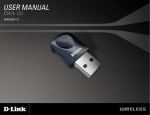
Wireless N Nano USB Adapter
DWA-131
Table of Contents
Table of Contents
Using Windows Vista®.................................................................30
Product Overview............................................................... 3
Package Contents.......................................................................... 3
Using Windows® XP.....................................................................31
System Requirements.................................................................. 3
Wireless Security..............................................................32
Introduction.................................................................................... 4
What is WPA?.................................................................................32
Features............................................................................................. 5
Configure WPA/WPA2 Passphrase.........................................33
Hardware Overview...................................................................... 6
Using the D-Link Wireless Connection Manager......33
Using Windows® 7................................................................35
Installation.......................................................................... 7
Using Windows® Vista.........................................................38
Getting Started............................................................................... 7
Using the Windows® XP Utility.........................................40
Remove Existing Installations........................................... 7
Configure WPA/WPA2-Enterprise..........................................42
Disable Other Wireless Adapters...................................... 8
Using the D-Link Wireless Connection Manager.............42
Wireless Installation Considerations.....................................10
Adapter Installation....................................................................11
Troubleshooting...............................................................43
Wireless Connection Wizard............................................14
Push Button Configuration (PBC)...................................16 Wireless Basics..................................................................47
Wireless Modes.............................................................................51
Configuration....................................................................18
D-Link Wireless Connection Manager..................................18 Networking Basics............................................................52
Wireless Networks...............................................................19
Check your IP address................................................................52
Wi-Fi Protected Setup (WPS)...........................................20
Windows® XP Users..............................................................52
My Wireless Networks........................................................24
Windows® 7/Windows Vista® Users.................................52
Support...................................................................................27
Statically Assign an IP address................................................53
About.......................................................................................28
Windows® XP Users..............................................................53
Windows® 7/Windows Vista® Users.................................54
Connect to a Wireless Network........................................29
Using Windows® 7........................................................................29 Technical Specifications...................................................55
Connect to a Wireless Network........................................30
D-Link DWA-131 User Manual
2
Section 1 - Product Overview
Product
PackageOverview
Contents
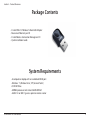
• D-Link DWA-131 Wireless N Nano USB Adapter
• Manual and Warranty on CD
• D-Link Wireless Connection Manager on CD
• Quick Installation Guide
System Requirements
• A computer or laptop with an available USB 2.0 port
• Windows® 7, Windows Vista® , XP (Service Pack 3)
• CD-ROM Drive
• 300MHz processor and at least 64MB of RAM
• A 802.11n or 802.11g access point or wireless router
D-Link DWA-131 User Manual
3
Section 1 - Product Overview
Introduction
The DWA-131 Wireless N Nano USB Adapter is a convenient wireless connectivity solution for desktop or notebook PCs. Instead
of stringing Ethernet cables to your PC or dismantling your desktop computer case, the DWA-131 can enable 802.11n wireless
connectivity by simply utilizing your desktop or notebook PC’s USB port.
Powered by Wireless N technology, the DWA-131 provides a faster wireless connection and superior reception than 802.11g*.
The DWA-131 is designed for use in bigger homes and for those that demand higher bandwidth networking. Maximize wireless
performance by connecting this USB Adapter to a Wireless N router and stay connected from virtually anywhere in the home.
This USB Adapter supports WPA and WPA2 encryption to prevent outside intrusion and protect your personal information
from being exposed.
D-Link’s Quick Setup Wizard guides you step-by-step through the installation process. You’ll be able to configure this USB
Adapter without having to call the teenager from down the street to help you. The D-Link Wireless Manager is included with
this product to keep track of all your most frequently accessed networks.
Compact in size, robust in speed the DWA-131 Wireless N Nano USB Adapter is great for travel and a convenient solution
for providing high performance wireless connectivity to your desktop or notebook PC. Enjoy the many benefits of wireless
connectivity today!
* Maximum wireless signal rate derived from IEEE Standard 802.11g and 802.11n specifications. Actual data throughput will vary. Network conditions and
environmental factors, including volume of network traffic, building materials and construction, and network overhead, lower actual data throughput
rate. Environmental conditions will adversely affect wireless signal range.
D-Link DWA-131 User Manual
4
Section 1 - Product Overview
Features
• Compact size for placement anywhere
• Convenience of Plug & Play installation
• Fully 802.11g compatible
• 802.11n compliant
• Powered by the USB port; no external power source required
• USB 2.0 standard*
• You can securely connect to a wireless network using WPA/WPA2 (Wi-Fi Protected Access) providing you a much
higher level of security for your data and communication than has previously been available.
• Position the DWA-131 almost anywhere in your workspace to achieve the best reception possible
• Supports Infrastructure networks via an access point
• User-friendly configuration and diagnostic utilities
* Using a USB 1.1 port will adversely affect throughput.
D-Link DWA-131 User Manual
5
Section 1 - Product Overview
Hardware Overview
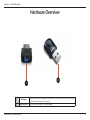
2
1
1
WPS Button
2
USB Connector
D-Link DWA-131 User Manual
Press the WPS button to automatically connect to a WPS-enabled wireless router or access point
and establish connectivity. Refer to page 20.
Used to connect the DWA-131 to your computer.
6
Section 2 - Installation
Installation
This section will walk you through the installation process. If you have a built-in wireless adapter, please disable it in device
manager before installing your D-Link adapter. Also, if you have previously installed another wireless adapter, please make
sure any software is uninstalled.
Getting Started
Before installing your new D-Link wireless adapter, please verify the following:
• Remove any previous installations of wireless adapters
• Disable any built-in wireless adapters
• Verify the settings such as the SSID and security settings of the network(s) you want to connect to
Remove Existing Installations
If you’ve installed a different manufacture’s adapter or a different model D-Link adapter, make sure the software is uninstalled
before installing the new software. Some utilities may cause a conflict with the new software. If you plan to use multiple
adapters at different times, make sure the utilities are not set to load when your computer boots up. Windows® 7, Vista® and
XP users may use the built-in wireless utility for all adapters.
To remove any old software:
Windows® 7 users: Click Start > Control Panel > Programs and Features.
Windows XP/Vista® users: Click Start > Control Panel > Programs and Features.
D-Link DWA-131 User Manual
7
Section 2 - Installation
Disable Other Wireless Adapters
Most newer laptops may include a built-in wireless adapter. To prevent any conflicts with the D-Link wireless adapter, it is
recommended to disable the wireless adapter (as well as any unused Ethernet adapters).
From the desktop, right-click on the My Computer icon and select Properties.
Click the Hardware tab and then click Device Manager. Scroll down the list and click the + sign
to the left of Network Adapters.
Right-click the adapter you would like to disable and select Disable.
D-Link DWA-131 User Manual
8
Section 2 - Installation
Click Yes to disable the adapter.
The adapter is now disabled. When disabled, a red X will be displayed.
Disabling the adapter will not remove the drivers. If you would like to use
the adapter, simply right-click it and select Enable.
D-Link DWA-131 User Manual
9
Section 2 - Installation
Wireless Installation Considerations
The D-Link wireless adapter lets you access your network using a wireless connection from virtually anywhere within the
operating range of your wireless network. Keep in mind that the number, thickness and location of walls, ceilings, or other
objects that the wireless signals must pass through, may limit the range. Typical ranges vary depending on the types of materials
and background RF (radio frequency) noise in your home or business. The key to maximizing wireless range is to follow these
basic guidelines:
1.Keep the number of walls and ceilings between the D-Link adapter and other network devices to a minimum
- each wall or ceiling can reduce your adapter’s range from 3-90 feet (1-30 meters.) Position your devices so
that the number of walls or ceilings is minimized.
2.Be aware of the direct line between network devices. A wall that is 1.5 feet thick (.5 meters), at a
45-degree angle appears to be almost 3 feet (1 meter) thick. At a 2-degree angle it looks over 42 feet (14 meters)
thick! Position devices so that the signal will travel straight through a wall or ceiling (instead of at an angle) for
better reception.
3.Building Materials make a difference. A solid metal door or aluminum studs may have a negative effect on
range. Try to position access points, wireless routers, and computers so that the signal passes through drywall
or open doorways. Materials and objects such as glass, steel, metal, walls with insulation, water (fish tanks),
mirrors, file cabinets, brick, and concrete will degrade your wireless signal.
4.Keep your product away (at least 3-6 feet or 1-2 meters) from electrical devices or appliances that generate RF
noise.
5.If you are using 2.4GHz cordless phones or X-10 (wireless products such as ceiling fans, lights, and home security
systems), your wireless connection may degrade dramatically or drop completely. Make sure your 2.4GHz phone
base is as far away from your wireless devices as possible. The base transmits a signal even if the phone in not
in use.
D-Link DWA-131 User Manual
10
Section 2 - Installation
Adapter Installation
Warning: Do NOT install the DWA-131 Nano USB Adapter into your computer before installing the driver software from the
D-Link CD.
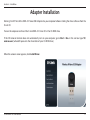
Turn on the computer and Insert the D-Link DWA-131 Driver CD in the CD-ROM drive.
If the CD Autorun function does not automatically start on your computer, go to Start > Run. In the run box type “D:\
autorun.exe” (where D: represents the drive letter of your CD-ROM drive).
When the autorun screen appears, click Install Driver.
D-Link DWA-131 User Manual
11
Section 2 - Installation
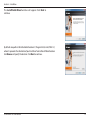
The InstallShield Wizard window will appear. Click Next to
continue.
By default setup will install to the default location: C:\Program Files\D-Link\DWA-131,
where C: represents the drive letter of your hard drive. To install to a different location
click Browse and specify the location. Click Next to continue.
D-Link DWA-131 User Manual
12
Section 2 - Installation
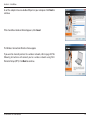
Insert the adapter into an available USB port on your computer. Click Next to
continue.
If the Found New Hardware Wizard appears, click Cancel.
The Wireless Connection Wizard will now appear.
If you want to manually connect to a wireless network, refer to page 20. The
following instructions will connect you to a wireless network using Wi-Fi
Protected Setup (WPS). Click Next to continue.
D-Link DWA-131 User Manual
13
Section 2 - Installation
Wireless Connection Wizard
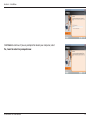
Connect to your network by selecting to Manually type your Network Name
or using the Wifi protected Setup (WPS). Click Next to continue.
Enter the network name (SSID) manually. If you enter the SSID incorrectly, you
will automatically be brought to the site survey page. Click Scan to display the
site survey page. Click Next to continue.
Click the Scan button to display a list of wireless networks (site survey). Select
the network name (SSID) and click Next.
D-Link DWA-131 User Manual
14
Section 2 - Installation
Click Finish to continue. If you are prompted to reboot your computer, select
Yes, I want to restart my computer now.
D-Link DWA-131 User Manual
15
Section 2 - Installation
Push Button Configuration (PBC)
Select “Use the WiFi Proctected Setup (WPS)” to initiate the configuration and
click Next.
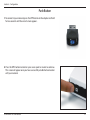
To connect to your network using the WPS push button configuration method,
click the virtual button as shown in the screenshot.
Note: You may also connect to your network by pressing the WPS button on the
adapter and holding for two seconds until the wizard screen comes up. Then, press
the WPS button on the router/access point to continue.
Press the WPS button on your access point or wireless router within 2 minutes
to establish connectivity.
D-Link DWA-131 User Manual
16
Section 2 - Installation
Click Finish to continue.
D-Link DWA-131 User Manual
17
Section 3 - Configuration
Configuration
This section will show you how to configure your new D-Link wireless adapter using the D-Link Utility as well as the Windows®
XP Zero Configuration Utility and Vista WLAN Autoconfiguration.
D-Link Wireless Connection Manager
The D-Link DWA-131 uses the Wireless Connection Manager as the management software. The manager provides the user an
easy interface to change any settings related to the wireless adapter. Clicking on the Wireless Connection Manager icon on
the desktop will start the Configuration.
If you are using Windows® 7, Vista®, or XP, please skip to pages 29, 30 or 31 respectively.
Double-click the Wireless Connection Manager icon on your desktop.
D-Link DWA-131 User Manual
18
Section 3 - Configuration
Wireless Networks
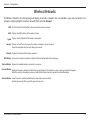
The Wireless Networks (Site Survey) page will display all wireless networks that are available in your area. To connect to a
network, simply highlight the wireless network (SSID) and click Connect.
SSID: The SSID (Service Set Identifier) is the name of the wireless network.
MAC: Displays the MAC address of the wireless device.
Signal: Displays the Link Quality of the wireless connection.
Security: If there is a “lock” icon, this means the wireless network is secure. You must
know the encryption key/security settings to connect.
Channel: Displays the channel of the wireless network.
WPS Button: Connect to a wireless network using Wi-Fi Protected Setup. Refer to the next page.
Refresh Button: Rescans for available wireless networks in your area.
Connect Button: Highlight a wireless network and click the Connect button. If the network is secure, a pop-up window will appear.
Enter the security information to connect (refer to the Wireless Security section for more information).
Activate Button: Select a wireless network profile from the drop-down menu and click
Activate to connect. Allow up to 30 seconds to connect.
D-Link DWA-131 User Manual
19
Section 3 - Configuration
Wi-Fi Protected Setup (WPS)
Wi-Fi Protected Setup (WPS) System is designed for easy setup of securityenabled Wi-Fi networks. It is recommended to have the access point or wireless
router nearby during setup.
For more information on WPS, visit the Wi-Fi Alliance website at www.wi-fi.org.
“Push Button Configuration” (PBC) is a virtual button in the utility that
connects you to other WPS-enabled devices. A connection can be established
by clicking on the virtual button, then pushing the physical button on the
access point or wireless router within 120 seconds. Refer to page 16.
“Personal Identification Number” (PIN) is a unique number generated
randomly by the wireless adapter’s utility. Entering this number in the utility of
the WPS-enabled wireless router or access point connects you with the intended
wireless network. Refer to the next page for more information.
D-Link DWA-131 User Manual
20
Section 3 - Configuration
Push Button
1.To connect to your network, press the WPS button on the adapter and hold
for two seconds until the wizard screen appears.
2.Press the WPS button located on your access point or router to continue.
This screen will appear once you have successfully established connection
with your network.
D-Link DWA-131 User Manual
21
Section 3 - Configuration
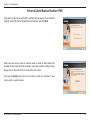
Personal Identification Number (PIN)
If you want to connect using the PBC method, refer to page 21. To use the PIN
method, select PIN (Personal Identification Number) and click Next.
Make sure your access point or wireless router is close by. Write down the
number on the screen. Enter this number in your access point or wireless router.
Please refer to the manufacture’s manual for instructions.
Once you click Next, you will have 2 minutes to enter this number in your
access point or wireless router.
D-Link DWA-131 User Manual
22
Section 3 - Configuration
The adapter will try to establish connectivity to your access point or wireless
router.
When this screen appears, you have successfully established connectivity. Click
Finish to complete your setup.
D-Link DWA-131 User Manual
23
Section 3 - Configuration
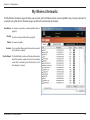
My Wireless Networks
The My Wireless Networks page will allow you to create, edit, and delete wireless network profiles. Every time you connect to
a network using the Wireless Networks page, a profile will automatically be created.
New Button: To create a new wireless network profile (refer to
page 25).
Modify: To edit a current profile (refer to page 26).
Delete: To remove a profile.
Activate: To use a profile. Allow up to 30 seconds to connect
to the wireless network.
Profile Details: The Profile Details section will display information
about the wireless network such as the network
name (SSID), network type (Infrastructure), and if
the network is secured.
D-Link DWA-131 User Manual
24
Section 3 - Configuration
Add Profile
You may add a new network by clicking the New button from the My Wireless Networks page.
Profile Name: Enter a name for your profile (e.g. Home, Office,
Coffee Shop).
SSID: Enter the SSID of the wireless network.
Network Type: Select the network type. If you are connecting to a
wireless router or access point, select Infrastructure.
(Ad-hoc mode is not supported)
Security Type: Select the type of security used. Please refer to the
Wireless Security section for more information.
OK: Click OK to save your settings.
D-Link DWA-131 User Manual
25
Section 3 - Configuration
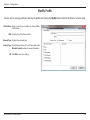
Modify Profile
You may edit an existing profile by selecting the profile and clicking the Modify button from the My Wireless Networks page.
Profile Name: Enter a name for your profile (e.g. Home, Office,
Coffee Shop).
SSID: Displays the SSID of the network.
Network Type: Displays the network type.
Security Type: Select the type of security used. Please refer to the
Wireless Security section for more information.
OK: Click OK to save your settings.
D-Link DWA-131 User Manual
26
Section 3 - Configuration
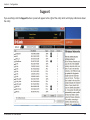
Support
If you need help, click the Support button. A panel will appear to the right of the utility which will display information about
the utility.
D-Link DWA-131 User Manual
27
Section 3 - Configuration
About
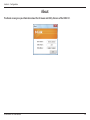
The About screen gives you information about the Firmware and Utility Versions of the DWA-131.
D-Link DWA-131 User Manual
28
Section 3 - Configuration
Connect to a Wireless Network
Using Windows® 7
Windows® 7 users may use the built-in wireless utility. If you are using another company’s utility, please refer to the user manual
of your wireless adapter for help with connecting to a wireless network. Most utilities will have a “site survey” option similar to
the Windows® 7 utility as seen below.
If you receive the Wireless Networks Detected bubble, click on
the center of the bubble to access the utility.
or
Left-click the wireless icon in your system tray (lower-right corner
next to the time).
The utility will display any available wireless networks in your area.
Click on a network (displayed using the SSID) and click the Connect
button.
If you get a good signal but cannot access the Internet, check your
TCP/IP settings for your wireless adapter. Refer to the Networking
Basics section in this manual for more information.
D-Link DWA-131 User Manual
29
Section 3 - Configuration
Connect to a Wireless Network
Using Windows Vista®
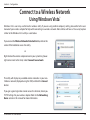
Windows Vista® users may use the built-in wireless utility. If you are using another company’s utility, please refer to the user
manual of your wireless adapter for help with connecting to a wireless network. Most utilities will have a “site survey” option
similar to the Windows Vista® utility as seen below.
If you receive the Wireless Networks Detected bubble, click on the
center of the bubble to access the utility.
or
Right-click on the wireless computer icon in your system tray (lowerright corner next to the time). Select Connect to a network.
The utility will display any available wireless networks in your area.
Click on a network (displayed using the SSID) and click the Connect
button.
If you get a good signal but cannot access the Internet, check you
TCP/IP settings for your wireless adapter. Refer to the Networking
Basics section in this manual for more information.
D-Link DWA-131 User Manual
30
Section 3 - Configuration
Connect to a Wireless Network
Using Windows® XP
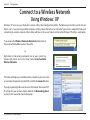
Windows® XP users may use the built-in wireless utility (Zero Configuration Utility). The following instructions are for Service
Pack 2 users. If you are using another company’s utility, please refer to the user manual of your wireless adapter for help with
connecting to a wireless network. Most utilities will have a “site survey” option similar to the Windows® XP utility as seen below.
If you receive the Wireless Networks Detected bubble, click on
the center of the bubble to access the utility.
or
Right-click on the wireless computer icon in your system tray
(lower-right corner next to the time). Select View Available
Wireless Networks.
The utility will display any available wireless networks in your area. Click
on a network (displayed using the SSID) and click the Connect button.
If you get a good signal but cannot access the Internet, check your TCP/
IP settings for your wireless adapter. Refer to the Networking Basics
section in this manual for more information.
D-Link DWA-131 User Manual
31
Section 4 - Wireless Security
Wireless Security
This section will show you the different levels of security you can use to protect your data from intruders. The
DWA-131 offers the following types of security:
• WPA2 (Wi-Fi Protected Access 2) • WPA (Wi-Fi Protected Access)
• WPA2-PSK (Pre-Shared Key)
• WPA-PSK (Pre-Shared Key)
What is WPA?
WPA, or Wi-Fi Protected Access, is a Wi-Fi standard that was designed to improve the security features of WEP (Wired Equivalent
Privacy).
The 2 major improvements over WEP:
• Improved data encryption through the Temporal Key Integrity Protocol (TKIP). TKIP scrambles the keys using a
hashing algorithm and, by adding an integrity-checking feature, ensures that the keys haven’t been tampered
with. WPA2 is based on 802.11i and uses Advanced Encryption Standard instead of TKIP.
• User authentication, which is generally missing in WEP, through the extensible authentication protocol (EAP).
WEP regulates access to a wireless network based on a computer’s hardware-specific MAC address, which is
relatively simple to be sniffed out and stolen. EAP is built on a more secure public-key encryption system to
ensure that only authorized network users can access the network.
WPA-PSK/WPA2-PSK uses a passphrase or key to authenticate your wireless connection. The key is an alpha-numeric password
between 8 and 63 characters long. The password can include symbols (!?*&_) and spaces. This key must be the exact same key
entered on your wireless router or access point.
WPA/WPA2 incorporates user authentication through the Extensible Authentication Protocol (EAP). EAP is built on a more
secure public key encryption system to ensure that only authorized network users can access the network.
D-Link DWA-131 User Manual
32
Section 4 - Wireless Security
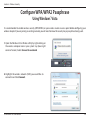
Configure WPA/WPA2 Passphrase
Using the D-Link Wireless Connection Manager
It is recommended to enable WPA-PSK on your wireless router or access point before configuring your wireless adapter. If you
are joining an existing network, you will need to know the WPA-PSK passphrase being used.
1. Open the Wireless Connection Manager by double-clicking on the D-Link
icon on your desktop.
2. Highlight the wireless network (SSID) you would like to connect to and
click Connect. If the network is using WPA-PSK, the screen (as shown to the
bottom-right) will appear.
3. Enter the WPA-PSK passphrase exactly as it is on your wireless router or access
point. Click the Show text in the password field box to see the passphrase.
Unchecking it will hide it.
4. Click OK to connect to the network. Allow up to 30 seconds to connect.
If you would like to create a new network and enter the WPA-PSK settings, refer
to the next page.
D-Link DWA-131 User Manual
33
Section 4 - Wireless Security
It is recommended to enable WPA-PSK on your wireless router or access point before configuring your wireless adapter. Make
sure you enter the passphrase exactly the same on all wireless devices.
1. Open the Wireless Connection Manager by double-clicking on the D-Link icon on your desktop. Click on New to create a
new profile or highlight an existing profile and click Modify.
2. Select WPA/WPA2-Personal under Set Security Option.
3. Select TKIP or AES.
4. Enter the passphrase exactly as it is on your wireless router or
access point.
5. Click OK to connect to the network. Allow up to 30 seconds to
connect.
D-Link DWA-131 User Manual
34
Section 4 - Wireless Security
Configure WPA/WPA2 Passphrase
Using Windows® 7
It is recommended to enable wireless security (WPA/WPA2) on your wireless router or access point before configuring your
wireless adapter. If you are joining an existing network, you will need to know the security key or passphrase being used.
1.Click on the wireless icon in your system tray (lower-right
corner).
2.The utility will display any available wireless networks in
your area.
D-Link DWA-131 User Manual
35
Section 4 - Wireless Security
3. Highlight the wireless network (SSID) you would like to connect
to and click the Connect button.
If you get a good signal but cannot access the Internet, check your
TCP/IP settings for your wireless adapter. Refer to the Networking
Basics section in this manual for more information.
4. The following window appears while your computer tries to
connect to the router.
D-Link DWA-131 User Manual
36
Section 4 - Wireless Security
5. Enter the same security key or passphrase that is on your router
and click Connect. You can also connect by pushing the WPS
button on the router.
It may take 20-30 seconds to connect to the wireless network. If the
connection fails, please verify that the security settings are correct.
The key or passphrase must be exactly the same as on the wireless
router.
D-Link DWA-131 User Manual
37
Section 4 - Wireless Security
Configure WPA/WPA2 Passphrase
Using Windows® Vista
It is recommended to enable wireless security (WPA/WPA2) on your wireless router or access point before configuring your
wireless adapter. If you are joining an existing network, you will need to know the security key or passphrase being used.
1.Open the Windows Vista® Wireless Utility by right-clicking on
the wireless computer icon in your system tray (lower right
corner of screen). Select Connect to a network.
2.Highlight the wireless network (SSID) you would like to
connect to and click Connect.
D-Link DWA-131 User Manual
38
Section 4 - Wireless Security
3.Enter the same security key or passphrase that is on your router and
click Connect.
It may take 20-30 seconds to connect to the wireless network. If the
connection fails, please verify that the security settings are correct. The
key or passphrase must be exactly the same as on the wireless router.
D-Link DWA-131 User Manual
39
Section 4 - Wireless Security
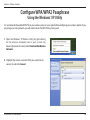
Configure WPA/WPA2 Passphrase
Using the Windows® XP Utility
It is recommended to enable WPA-PSK on your wireless router or access point before configuring your wireless adapter. If you
are joining an existing network, you will need to know the WPA-PSK key being used.
1. Open the Windows® XP Wireless Utility by right-clicking
on the wireless computer icon in your system tray
(lower-right corner of screen). Select View Available Wireless
Networks.
2. Highlight the wireless network (SSID) you would like to
connect to and click Connect.
D-Link DWA-131 User Manual
40
Section 4 - Wireless Security
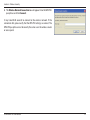
3. The Wireless Network Connection box will appear. Enter the WPA-PSK
passphrase and click Connect.
It may take 20-30 seconds to connect to the wireless network. If the
connection fails, please verify that the WPA-PSK settings are correct. The
WPA-PSK passphrase must be exactly the same as on the wireless router
or access point.
D-Link DWA-131 User Manual
41
Section 4 - Wireless Security
Configure WPA/WPA2-Enterprise
Using the D-Link Wireless Connection Manager
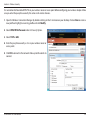
WPA and WPA2 are for advanced users who are familiar with using a RADIUS server and setting up certificates.
1.Open the Wireless Connection Manager by double-clicking on the D-Link icon
on your desktop. Click on New to create a new profile or highlight an existing
profile and click Modify.
2.Select WPA/WPA2-Enterprise under Set Security Option and then select TKIP or
AES.
3. Click on Advanced Config to continue.
4.Next to EAP Type, select EAP-TLS. Extensible Authentication Protocols allow
devices on the network to request authentication from the RADIUS server
in the network. All the devices on the network must use the same EAP type
when using a RADIUS server for authentication. Some RADIUS servers require
that the Validate Server field be selected. Check this field if your RADIUS server
requires validation.
5. Select a User Certificate from the drop-down menu.
6. Enter the login information required to authenticate.
7. Click Add to enter the IP address(es) of your RADIUS servers.
8. Click OK to save your settings.
D-Link DWA-131 User Manual
42
Section 5 - Troubleshooting
Troubleshooting
This chapter provides solutions to problems that can occur during the installation and operation of the DWA-131. Read the
following descriptions if you are having problems. The examples below are illustrated in Windows® XP. If you have a different
operating system, the screenshots on your computer will look similar to the following examples.
1. How do I know if my adapter is installed properly?
Go to Start > My Computer > Properties.
Select the Hardware Tab.
D-Link DWA-131 User Manual
43
Section 5 - Troubleshooting
Click the + sign next to Network Adapters.
Right-click on D-Link DWA-131 USB Adapter.
Select Properties to check that the drivers are installed properly.
D-Link DWA-131 USB Adapter
Look under Device Status to check that the device is working properly. Click
OK to continue.
D-Link DWA-131
Wireless USB Adapter
D-Link DWA-131 User Manual
44
Section 5 - Troubleshooting
2. The computer does not recognize the DWA-131 Wireless USB Adapter.
Make sure that the DWA-131 Wireless USB Adapter is properly seated in the computer’s USB port.
If Windows does not detect the hardware upon insertion of the adapter, make sure to completely remove drivers that were
previously loaded.
3. The computer with the DWA-131 installed is unable to connect to the wireless network and/or the Internet.
• Check that the LED indicators for the broadband modem are indicating normal activity. If not, there may be a
problem with the broadband connection.
• Check that the LED indicators on the wireless router are functioning properly. If not, check that the AC power
and Ethernet cables are firmly connected.
• Check that the IP Address, subnet mask, gateway, and DNS settings are correctly entered for the network
• In Infrastructure mode, make sure the same Service Set Identifier (SSID) is specified on the settings for the
wireless clients and access points. The SSID factory default setting for D-Link products is default. (Double-click
on the WLAN icon in the taskbar. The Link Info screen will display the SSID setting.)
D-Link DWA-131 User Manual
45
Section 5 - Troubleshooting
Check that the Network Connection for the wireless client is configured properly. Select AP (Infrastructure) when connecting
to an access point. Double-click on the WLAN icon in the taskbar > click on Configuration to change the settings for the
wireless adapter.
If Security is enabled, make sure that the correct encryption keys are entered on both the DWA-131 and the access point.
Double-click on the WLAN icon in the taskbar > click Encryption. Check to see that the key selected is set to the same key as
other devices on the network.
D-Link DWA-131 User Manual
46
Appendix A - Wireless Basics
Wireless Basics
D-Link wireless products are based on industry standards to provide easy-to-use and compatible high-speed wireless
connectivity within your home, business or public access wireless networks. Strictly adhering to the IEEE standard, the D-Link
wireless family of products will allow you to securely access the data you want, when and where you want it. You will be able
to enjoy the freedom that wireless networking delivers.
A wireless local area network (WLAN) is a cellular computer network that transmits and receives data with radio signals instead of
wires. Wireless LANs are used increasingly in both home and office environments, and public areas such as airports, coffee shops
and universities. Innovative ways to utilize WLAN technology are helping people to work and communicate more efficiently.
Increased mobility and the absence of cabling and other fixed infrastructure have proven to be beneficial for many users.
Wireless users can use the same applications they use on a wired network. Wireless adapter cards used on laptop and desktop
systems support the same protocols as Ethernet adapter cards.
Under many circumstances, it may be desirable for mobile network devices to link to a conventional Ethernet LAN in order to
use servers, printers or an Internet connection supplied through the wired LAN. A Wireless Router is a device used to provide
this link.
D-Link DWA-131 User Manual
47
Appendix A - Wireless Basics
What is Wireless?
Wireless or Wi-Fi technology is another way of connecting your computer to the network without using wires.
Wi-Fi uses radio frequency to connect wirelessly, so you have the freedom to connect computers anywhere in
your home or office network.
Why D-Link Wireless?
D-Link is the worldwide leader and award winning designer, developer, and manufacturer of networking
products. D-Link delivers the performance you need at a price you can afford. D-Link has all the products you
need to build your network.
How does wireless work?
Wireless works similar to how cordless phone work, through radio signals to transmit data from one point A
to point B. But wireless technology has restrictions as to how you can access the network. You must be within
the wireless network range area to be able to connect your computer. There are two different types of wireless
networks Wireless Local Area Network (WLAN), and Wireless Personal Area Network (WPAN).
Wireless Local Area Network (WLAN)
In a wireless local area network, a device called an Access Point (AP) connects computers to the network. The
access point has a small antenna attached to it, which allows it to transmit data back and forth over radio signals.
With an indoor access point as seen in the picture, the signal can travel up to 300 feet. With an outdoor access
point the signal can reach out up to 30 miles to serve places like manufacturing plants, industrial locations,
college and high school campuses, airports, golf courses, and many other outdoor venues.
Wireless Personal Area Network (WPAN)
D-Link DWA-131 User Manual
48
Appendix A - Wireless Basics
Bluetooth is the industry standard wireless technology used for WPAN. Bluetooth devices in WPAN operate in
a range up to 30 feet away.
Compared to WLAN, the speed and wireless operation range are both less than WLAN, but in return it doesn’t
use nearly as much power which makes it ideal for personal devices, such as mobile phones, PDAs, headphones,
laptops, speakers, and other devices that operate on batteries.
Who uses wireless?
Wireless technology as become so popular in recent years that almost everyone is using it, whether it’s for home,
office, business, D-Link has a wireless solution for it.
Home
• Gives everyone at home broadband access
• Surf the web, check email, instant message, and etc.
• Gets rid of the cables around the house
• Simple and easy to use
Small Office and Home Office
• Stay on top of everything at home as you would at office
• Remotely access your office network from home
• Share Internet connection and printer with multiple computers
• No need to dedicate office space
D-Link DWA-131 User Manual
49
Appendix A - Wireless Basics
Where is wireless used?
Wireless technology is expanding everywhere not just at home or office. People like the freedom of mobility and it’s becoming
so popular that more and more public facilities now provide wireless access to attract people. The wireless connection in public
places is usually called “hotspots”.
Using a D-Link USB Adapter with your laptop, you can access the hotspot to connect to Internet from remote
locations like: Airports, Hotels, Coffee Shops, Libraries, Restaurants, and Convention Centers.
Wireless network is easy to setup, but if you’re installing it for the first time it could be quite a task not knowing
where to start. That’s why we’ve put together a few setup steps and tips to help you through the process of
setting up a wireless network.
Tips
Here are a few things to keep in mind, when you install a wireless network.
Centralize your router or Access Point
Make sure you place the router/access point in a centralized location within your network for the best performance.
Try to place the router/access point as high as possible in the room, so the signal gets dispersed throughout
your home. If you have a two-story home, you may need a repeater to boost the signal to extend the range.
Eliminate Interference
Place home appliances such as cordless telephones, Nanowaves, and televisions as far away as possible from
the router/access point. This would significantly reduce any interference that the appliances might cause since
they operate on same frequency.
Security
Don’t let your next-door neighbors or intruders connect to your wireless network. Secure your wireless network by turning on
the WPA or WEP security feature on the router. Refer to product manual for detail information on how to set it up.
D-Link DWA-131 User Manual
50
Appendix A - Wireless Basics
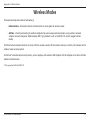
Wireless Modes
There are basically two modes of networking:
• Infrastructure – All wireless clients will connect to an access point or wireless router.
• Ad-Hoc – Directly connecting to another computer, for peer-to-peer communication, using wireless network
adapters on each computer. Unfortunately 802.11g/n products such as the DWA-131 do not support ad-hoc
mode.
An Infrastructure network contains an Access Point or wireless router. All the wireless devices, or clients, will connect to the
wireless router or access point.
An Ad-Hoc* network contains only clients, such as laptops with wireless USB Adapters. All the adapters must be in Ad-Hoc
mode to communicate.
* Not supported with the DWA-131.
D-Link DWA-131 User Manual
51
Appendix B - Networking Basics
Networking Basics
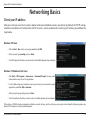
Check your IP address
After you install your new D-Link wireless adapter and have established a wireless connection, by default, the TCP/IP settings
should be set to obtain an IP address from a DHCP server (i.e. router) automatically. To verify your IP address, please follow the
steps below.
Windows® XP Users
• Click on Start > Run. In the run box type cmd and click OK.
• At the prompt, type ipconfig and press Enter.
• This will display the IP address, subnet mask, and the default gateway of your adapter.
Windows® 7/Windows Vista® Users
• Click Start > All Programs > Accessories > Command Prompt. You may need
administrative access to run this application.
• For all additional prompt windows inquiring of running the command prompt
application, select Yes, OK, or Continue.
• At the prompt, type ipconfig and press Enter.
• This will display the IP address, subnet mask, and default gateway of your adapter.
If the address is 0.0.0.0, check your adapter installation, security settings, and the settings on your router. Some firewall software programs may
block a DHCP request on newly installed adapters.
D-Link DWA-131 User Manual
52
Appendix B - Networking Basics
Statically Assign an IP address
If you are not using a DHCP capable gateway/router, or you need to assign a static IP address, please follow the steps below:
Windows® XP Users
• Windows® XP - Click on Start > Control Panel. Make sure you are in Classic View. Double-click on the Network Connections icon.
• Right-click on the Local Area Connection which represents your D-Link wireless network adapter (or other adapter) which will be connected
to your router.
• Highlight Internet Protocol (TCP/IP) and click Properties.
• Click Use the following IP address and enter an IP address that is on the same subnet as your network or LAN IP address on your router.
Example: If the router’s LAN IP address is 192.168.0.1, make your IP address 192.168.0.X where
X is a number between 2 and 99. Make sure that the number you choose is not in use on the
network.
• Set Default Gateway the same as the LAN IP address of your router or gateway.
• Set Primary DNS the same as the LAN IP address of your router or gateway.
• The Secondary DNS is optional (you may enter a DNS server from your ISP).
• Click OK to save your settings.
D-Link DWA-131 User Manual
53
Appendix B - Networking Basics
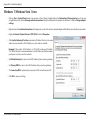
Windows® 7/Windows Vista® Users
• Click on Start > Control Panel (make sure you are in Classic View). Double-click on the Network and Sharing Center icon. If you are
using Windows Vista, click on Manage network connections along the left panel in the window. For Windows 7, click on Change adapter
settings.
• Right-click on the Local Area Connection which represents your D-Link wireless network adapter which will be connected to your network.
• Highlight Internet Protocol Version 4 (TCP /IPv4) and click Properties.
• Click Use the following IP address and enter an IP address that is on the same
subnet as your network or LAN IP address on your router or network.
Example: If the router’s LAN IP address is 192.168.0.1, make your IP address
192.168.0.X where X is a number between 2 and 99. Make sure that the number
you choose is not in use on the network.
• Set Default Gateway the same as the LAN IP address of your router or gateway.
• Set Primary DNS the same as the LAN IP address of your router or gateway.
• The Secondary DNS is optional (you may enter a DNS server from your ISP).
• Click OK to save your settings.
D-Link DWA-131 User Manual
54
Appendix C - Technical Specifications
Technical Specifications
Standards
• IEEE 802.11n
• IEEE 802.11g
Bus Type
• USB 2.0 (1.1 compatible)
Security
• WPA/WPA2 - Wi-Fi Protected Access (TKIP, MIC, AES,
IV Expansion, Shared Key Authentication)
• WPS (PIN and PBC)
Media Access Control
• CSMA/CA with ACK
Frequency Range
• 2.4GHz to 2.4835GHz
Operating Temperature
• 32°F to 104°F ( 0°C to 40°C)
Operating Humidity
• 10% to 90% maximum (non-condensing)
Dimensions
• 1.1” x 3.4” x 0.5”
Weight
• 0.06 lbs (27.22g)
Certifications
• FCC Class B
• IC
• CE, C-Tick and Wi-Fi
Modulation Technology
• Orthogonal Frequency
Division Multiplexing (OFDM)
• Complementary Code Keying (CCK)
Operating Voltage
• 5 VDC +/- 10%
* Maximum wireless signal rate derived from IEEE Standard 802.11n and 802.11g specifications. Actual data throughput will vary. Network conditions and
environmental factors, including volume of network traffic, building materials and construction, and network overhead, lower actual data throughput
rate. Environmental factors will adversely affect wireless signal range.
D-Link DWA-131 User Manual
55