1
®
A Division of Cisco Systems, Inc.
PrintServer for USB
with 4-Port Switch
WIRED
Model No.
PSUS4
User Guide
PrintServer for USB with 4-Port Switch
Copyright and Trademarks
Specifications are subject to change without notice. Linksys is a registered trademark or trademark of Cisco
Systems, Inc. and/or its affiliates in the U.S. and certain other countries. Copyright © 2003 Cisco Systems, Inc. All
rights reserved. Other brands and product names are trademarks or registered trademarks of their respective
holders.
How to Use this User Guide
This User Guide has been designed to make understanding networking with the PrintServer easier than ever.
Look for the following items when reading this User Guide:
This checkmark means there is a note of interest and
is something you should pay special attention to
while using the PrintServer.
This exclamation point means there is a caution or
warning and is something that could damage your
property or the PrintServer.
This question mark provides you with a reminder
about something you might need to do while using
the PrintServer.
In addition to these symbols, there are definitions for technical terms that are presented like this:
word: definition.
Also, each figure (diagram, screenshot, or other image) is provided with a figure number and description, like
this:
Figure 0-1: Sample Figure Description
Figure numbers and descriptions can also be found in the "List of Figures" section in the “Table of Contents”.
PSUS4-UG-30811NC BW
PrintServer for USB with 4-Port Switch
Table of Contents
Chapter 1: Introduction
1
Welcome
What’s in this Guide?
1
1
Chapter 2: Getting to Know the USB PrintServer
The Back Panel
The Front Panel
Chapter 3: Connecting the PrintServer
Overview
Connecting the USB PrintServer to your Network
Chapter 4: Installing the PrintServer using the Setup Wizard
Installation
Chapter 5: Windows Driver Installation
Overview
Installation
4
4
5
6
6
6
7
7
11
11
11
Chapter 6: Configuring the PrintServer
16
Overview
The Setup Tab
The Protocol Tab - TCP/IP
The Printer Tab - Internet Printing
16
6
17
19
Chapter 7: Internet Printing Protocol
Overview
Windows IPP Client Setup
Chapter 8: Internet Printing Protocol
Overview
Windows IPP Client Setup
Chapter 9: Bi-Admin Management
Overview
Bi-Admin Installation
Starting the Bi-Admin Management Utility
The Bi-Admin Management Utility
Appendix A:Troubleshooting
23
23
23
23
23
23
27
27
27
29
30
37
PrintServer for USB with 4-Port Switch
Common Problems and Solutions
Appendix B: About Bi-Directional Printing
Appendix C: Upgrading Firmware
Appendix D: Windows Help
Appendix E: Glossary
Appendix F: Specifications
Appendix G: Warranty Information
Appendix H: Regulatory Information
Appendix I: Contact Information
37
39
40
41
42
48
49
50
51
PrintServer for USB with 4-Port Switch
List of Figures
Figure 2-1: USB PrintServer’s Back Panel
Figure 2-2: The USB PrintServer’s Front Panel
Figure 2-3: The USB PrintServer’s Side Panel
Figure 2-13: The Broadband Router’s Front Panel
Figure 3-1: Connecting to the LAN Port
Figure 3-2: Connecting to the USB Port
Figure 3-3: Connecting to the Power Port
Figure 4-1: Welcome
Figure 4-2: Searching for the USB PrintServer
Figure 4-3: USB PrintServer Setup
Figure 4-4: Password
Figure 4-5: Basic Settings
Figure 4-6: IP Settings
Figure 4-7: Set PrintServer’s Password
Figure 4-8: Confirmation
Figure 4-9: Congratulations
Figure 4-20: Properties
Figure 4-21: TCP/IP
Figure 4-22: IP Address
igure 4-34: Properties
Figure 4-35: TCP/IP
Figure 4-36: IP Address
Figure 4-48: Confirmation
Figure 4-60: Properties
Figure 4-61: TCP/IP
Figure 4-62: IP Address
Figure 4-74: Properties
Figure 4-75: TCP/IP
Figure 4-76: IP Address
Figure 5-1: Welcome
4
5
5
5
6
6
6
7
7
7
8
8
9
9
10
10
10
10
10
10
10
10
10
10
10
10
10
10
10
11
PrintServer for USB with 4-Port Switch
Figure 5-2: Driver’s Welcome
Figure 5-3: Choose Destination Location
Figure 5-4: Select Program Folder
Figure 5-5: Copy Folder
Figure 5-6: Setup Complete
Figure 5-7: TCP/IP
Figure 5-8: IP Address
Figure 5-9: Added Successfully
Figure 5-10: Configure Printer Port
Figure 5-20: IP Address
Figure 5-32: IP Address
Figure 6-1: Setup
Figure 6-2: TCP/IP
Figure 6-3: Apple Talk
Figure 6-4: NetBEUI
Figure 6-5: Internet Printing
Figure 6-6: Logical Port
Figure 6-7: Device Status
Figure 6-8: Router IP
Figure 6-9: Exit
Figure 6-10: Time Setting
Figure 6-11: Setup Tab - DDNS
Figure 6-12: Setup Tab - MAC Address Clone
Figure 7-1: Configure IPP Port
Figure 7-2: AddPort
Figure 7-3: Configure IPP Port
Figure 7-4: Locate Your Printer
Figure 7-5: Connect to Printer
Figure 8-1: Welcome
Figure 8-2: Bi-Admin Setup Welcome
Figure 8-3: Choose Destination Location
Figure 8-4: Select Program Folder
Figure 8-5: Setup Complete
12
12
13
13
13
14
14
14
15
15
15
16
17
17
18
19
20
21
21
22
22
22
22
23
24
24
25
25
27
27
28
28
28
PrintServer for USB with 4-Port Switch
Figure 8-6: Connected Protocol
Figure 8-7: Searching for Device
Figure 8-8: Setup Complete
Figure 8-9: Bi-Admin Management Utility
Figure 8-10: Device Information
Figure 8-11: Verify Password
Figure 8-12: Printer Status
Figure 8-13: Printer Configuration
Figure 8-14: Verify Password
Figure 8-15: Configuration - System
Figure 8-16: Dynamic IP Address (DHCP)
Figure 8-17: Fixed IP Address
Figure 8-23: Setup Complete
Figure 8-18: Apple Talk
Figure 8-19: NetBEUI
Figure 8-20: Internet Printing
Figure 8-21: Port
Figure 8-22: Attached Remote
Figure C-1: Upgrade Firmware
29
29
29
30
30
30
31
31
32
32
33
33
33
34
34
35
35
36
40
PrintServer for USB with 4-Port Switch
Chapter 1: Introduction
Welcome
Thank you for choosing the Linksys PrintServer for USB with 4-Port Switch (PrintServer). The PrintServer will
allow you to network your printers.
The Linksys PrintServer for USB with 4-Port Switch is a double upgrade for your network. First, it lets you connect
a USB printer directly to your network, eliminating the need to dedicate a PC to print serving chores. Using a
PrintServer frees up your "print share PC" so you don't have to leave it on all the time. It also removes the printing
bottleneck, and sets your PC free to do more useful work.
In addition, the PrintServer includes a 4-port 10/100 switch, so you can easily add more devices to your network.
All four ports are auto speed negotiating, and have automatic MDI/MDI-X crossover detection, so you don't have
to worry about the cable type. Each port independently negotiates the best speed and half- or full-duplex mode,
for up to 200Mbps of bandwidth per port. Fast store-and-forward switching prevents damaged packets from
being passed on into the network.
A user-friendly Setup Wizard makes installation easy, the compact case fits anywhere, and the one megabyte
print buffer size handles even large graphics-intensive print jobs. Let the Linksys PrintServer for USB with 4-Port
Switch bring efficiency to your printing tasks and expand your network, in one cost-effective device.
What’s in this Guide?
This user guide covers the steps for setting up and using the PrintServer.
• Chapter 1: Introduction
This chapter describes the PrintServerr’s applications and this User Guide.
• Chapter 2: Getting to Know the PrintServer
This chapter describes the physical features of the PrintServer.
• Chapter 3: Connecting the PrintServer
This chapter instructs you on how to connect the PrintServer to your network.
Chapter 1: Introduction
Welcome
1
PrintServer for USB with 4-Port Switch
• Chapter 4: Installing the PrintServer using the Setup Wizard
This chapter instructs you on how to use the Setup Wizard to install your PrintServer.
• Chapter 5: Windows Driver Installation
This chapter explains how to install the Windows driver for the PrintServer.
• Chapter 6: Configuring the PrintServer
This chapter explains how to configure the PrintServer using the web-based utility.
• Chapter 7: Internet Printing Protocol
This chapter instruct you on how to use the PrintServer as an IPP server so you can remotely print.
• Chapter 8: Bi-Admin Management
This chapter explains how to configure the PrintServer using the Bi-Admin Management utility.
• Appendix A: Troubleshooting
This appendix describes some problems and solutions, as well as frequently asked questions, regarding
installation and use of the PrintServer.
• Appendix B: About Bi-Directional Printing
This appendix describes bi-directional printing.
• Appendix C: Upgrading Firmware
This appendix instructs you on how to upgrade the firmware on your PrintServer if you should need to do so.
• Appendix D: Windows Help
This appendix describes how you can use Windows Help for instructions about networking, such as installing
the TCP/IP protocol.
• Appendix E: Finding the MAC Address and IP Address for your Ethernet Adapter.
This appendix describes how to find the MAC address for your computer’s Ethenet adapter so you can use the
MAC filtering and/or MAC address cloning feature of the PrintServer.
• Appendix F: Glossary
This appendix gives a brief glossary of terms frequently used in networking.
• Appendix G: Specifications
This appendix provides the technical specifications for the PrintServer.
• Appendix H: Warranty Information
This appendix supplies the warranty information for the PrintServer..
Chapter 1: Introduction
What’s in this Guide?
2
PrintServer for USB with 4-Port Switch
• Appendix I: Regulatory Information
This appendix supplies the regulatory information regarding the PrintServer..
• Appendix J: Contact Information
This appendix provides contact information for a variety of Linksys resources, including Technical Support.
Chapter 1: Introduction
What’s in this Guide?
3
PrintServer for USB with 4-Port Switch
Chapter 2: Getting to Know the USB PrintServer
The Back Panel
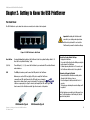
The USB PrintServer's ports, where the cables are connected, are located on the back panel.
Important: Resetting the PrintServer will
erase all of your settings and replace them
with the factory defaults. Do not reset the
PrintServer if you want to retain the settings.
Figure 2-1: USB PrintServer’s Back Panel
Reset Button
Pressing the Reset button will reset the PrintServer to the factory default settings. Refer to “To
Reset the Factory Default Settings”, right.
1, 2, 3, 4
These LAN ports (1, 2, 3, 4) connect the PrintServer to your networked PCs and other Ethernet
network devices.
USB
The USB port is where you will connect the USB printer to the PrintServer.
Whenever you see the USB Icon (right), a USB port is nearby.The PrintServer
comes with one USB cable. One end of the USB cable has a rectangular
plug, which is called a Type A connector (below left). The other end of the
cable has a square plug, or a Type B connector (below right).The USB cable’s Type
A end connects to the PrintServer and the Type B end connects to the printer.
To Reset the Factory Default Settings
1. Unplug the PrintServer.
2. Press and hold the Reset button. While pressing the
button, plug in the PrintServer.
3. Continue pressing the button for 10 seconds, and
the PrintServer will be reset to factory defaults.
To Generate a Diagnostic Printout
1. Ensure that both the PrintServer and the printer
attached to the Printer port are on.
2. Press the diagnostic button, and hold it in for 2
seconds.
3. The test page, containing the current settings, will
be printed.
PostScript printers are unable to print this page. If you
have a PostScript printer on the Printer port, the test
page will not be printed.
USB Connector-Type A
Chapter 2: Getting to Know the USB PrintServer
The Back Panel
USB Connector-Type B
4
PrintServer for USB with 4-Port Switch
The Front Panel
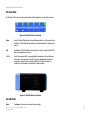
The PrintServer's LEDs, where information about network activity is displayed, are located on the front panel.
Figure 2-2: The USB PrintServer’s Front Panel
Status
Green. The Status LED will remain continuously lit when a printer is correctly connected to the
PrintServer. The LED will flicker when print jobs are being transmitted to the printer over the
network.
USB
Green/Orange. The USB LED lights up green when there is a printer connected. The USB LED
lights up orange when there is an error.
1, 2, 3, 4
Green. These numbered LEDs, corresponding with the numbered ports on the PrintServer’s
back panel, serve two purposes. If the LED is continuously illuminated, the PrintServer is
successfully connected to a device through the LAN port. If the LED is flickering, the
PrintServer is actively sending or receiving data to the wired network.
Figure 2-3: The USB PrintServer’s Side Panel
The Side Panel
Power
The Power port is where you will connect the power adapter.
Chapter 2: Getting to Know the USB PrintServer
The Front Panel
5
PrintServer for USB with 4-Port Switch
Chapter 3: Connecting the PrintServer
Overview
Before starting the physical installation, make a note of the PrintServer’s Default Name that is located on the
bottom of the PrintServer. There is a bar code sticker with an SC number printed on it (for example, SCA71107).
This number is used in the PrintServer driver installation.
NOTE: The PrintServer does not have an on/off
power switch. Whenever its power adapter is
plugged into a power supply, the PrintServer is
powered on. The PrintServer can be powered on
before, during, or after your network is powered on.
Connecting the USB PrintServer to your Network
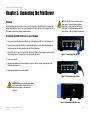
1. Plug one end of the Ethernet network cable into one of the PrintServer’s LAN Ports (1-4). (See Figure 3-1.)
2. Connect the other end of the cable into your networked hub, switch, or router. The distance between the
PrintServer and the other device should not exceed 328 feet (100 meters).
3. Use the USB cable to connect your printer to the PrintServer’s USB port. Plug the Type A connector end into
the PrintServer (Figure 3-2) and the Type B connector end into the printer.
Figure 3-1: Connecting to the LAN Port
4. Power on your printer.
5. Plug the power adapter cord into the PrintServer’s Power port, which is located on the right side of the
PrintServer. (See Figure 3-3.)
6. Plug the power adapter into an electrical outlet.
Figure 3-2: Connecting to the USB Port
IMPORTANT: Make sure to use the power adapter
that is supplied with the PrintServer. Use of a
different power adapter could damage the
PrintServer.
Figure 3-3: Connecting to the Power Port
Chapter 3: Connecting the PrintServer
Overview
6
PrintServer for USB with 4-Port Switch
Chapter 4: Installing the PrintServer using the Setup Wizard
Installation
1. To begin installation of the PrintServer, you will use the Setup CD-ROM to run the Setup Wizard.
2. Insert the Setup CD-ROM into the computer’s CD-ROM drive. The Setup CD-ROM should run automatically. If it
does not, click the Start button and choose Run. In the box that appears, enter D:\setupWizard.exe (if “D” is
the letter of your CD-ROM drive).
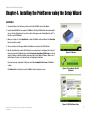
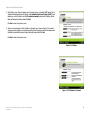
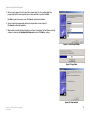
3. When you see Figure 4-1, click Setup Wizard to continue. Click Exit to end the installation. Click User Guide
button to view the User Guide.
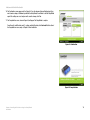
4. The screen in Figure 4-2 will appear while the Setup Wizard is searching for the USB PrintServer.
5. After the Setup Wizard has found the USB PrintServer, the screen in Figure 4-3 will appear. If this is the first
time you have run the Setup Wizard, make sure that List only new (unconfigured) Print Servers is selected
and your PrintServer is listed by its default server name. Next to Server Name is IP Address. Make a note of
the PrintServer’s IP address to use later in Chapter 6: Configuring the PrintServer.
Figure 4-1: Welcome
If you have previously configured the Print Server, select List all compatible Print Servers. Click Next to
continue.
Click Refresh button to refresh the screen. Click Back to return to the previous screen.
Figure 4-2: Searching for the USB
PrintServer
Figure 4-3: USB PrintServer Setup
Chapter 4: Installing the PrintServer using the Setup Wizard
Installation
7
PrintServer for USB with 4-Port Switch
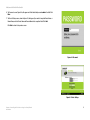
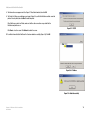
6. The Password screen, Figure 4-4, will appear next. Enter the default password admin in the field. Click
Enter.
7. The Basic Settings screen, shown in Figure 4-5, will appear. If you want to change the Device Name or
Domain Name, enter the Device Name and Domain Name in the respective fields. Click Next.
Click Back to return to the previous screen.
Figure 4-4: Password
Figure 4-5: Basic Settings
Chapter 4: Installing the PrintServer using the Setup Wizard
Installation
8
PrintServer for USB with 4-Port Switch
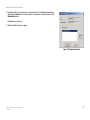
8. The IP Settings screen, Figure 4-6, appears next. If your network uses a router with a DHCP Internet Protocol
setting that automatically assigns an IP address, select Automatically obtain an IP address (DHCP). If your
network uses a static IP address, select Set IP configuration manually, and enter the IP Address, Subnet
Mask, and Gateway in the fields provided. Click Next.
Click Back to return to the previous screen.
9. The next screen that appears is the Set PrintServer’s Password screen, shown in Figure 4-7. If you want to
change your password, enter your current password in the Current Password screen. Enter the new password
in the New Password field, then enter it again in the Verify Password field. Click Next.
Click Back to return to the previous screen.
Figure 4-6: IP Settings
Figure 4-7: Set PrintServer’s Password
Chapter 4: Installing the PrintServer using the Setup Wizard
Installation
9
PrintServer for USB with 4-Port Switch
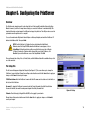
10. The Confirmation screen appears next. See Figure 4-8. Your old and new settings will be displayed. If you
want to make a change, click No and you will exit the Setup Wizard; You will have to start the Setup Wizard
again. If the settings are correct and you want to save the changes, click Yes.
11. The Congratulations screen, shown in Figure 4-9, will appear. The Setup Wizard is complete.
You will need to install the driver next. To continue and install the driver, click User Install at the bottom of
the Congratulations screen, and go to Chapter 5: Driver Installation.
Figure 4-8: Confirmation
Figure 4-9: Congratulations
Chapter 4: Installing the PrintServer using the Setup Wizard
Installation
10
PrintServer for USB with 4-Port Switch
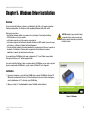
Chapter 5: Windows Driver Installation
Overview
This section installs the PrintServer’s software on your Windows 98, Me, 2000, or XP computers to give them
PrintServer printing abilities. The PrintServer is fully compatible with Windows 98, Me, 2000, and XP.
At this point, you must have:
• the PrintServer hardware installed on your network. If not, see Chapter 3: Connecting the PrintServer.
• TCP/IP installed on each of your computers.
• an IP address assigned to each of the computers on your network..
• an IP address assigned to the PrintServer. By default the PrintServer has DHCP enabled. If you need to assign
an IP address, go to Chapter 8: Bi-Admin: PrintServer Management.
• This setup should be completed on the network administrator’s computer before all other users’ computers on
the network. The PrintServer’s IP address will be assigned in this first installation on the network
administrator’s computer only, which takes three extra steps.
HAVE YOU: already set up your printer? Linksys
recommends that you set up your printer and
install your printer’s driver before you install the
PrintServer’s driver.
It is assumed that your CD-ROM drive’s letter name is designated as “D”. If your CD drive is named another
letter, replace all instances of “D” with the appropriate letter.
If you need to install the PrintServer’s driver on computers without a CD-ROM drive, you can create a setup disk
by using a computer with a CD-ROM drive to copy the contents of D:\Driver\PTP onto a floppy disk.
Installation
1. If you haven’t already done so, insert the Setup CD-ROM into the computer’s CD-ROM drive. The Setup CDROM should run automatically. If it does not, click the Start button and choose Run. In the box that appears,
enter D:\setupWizard.exe (if “D” is the letter of your CD-ROM drive).
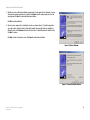
2. When you see Figure 5-1, click User Install to continue. Click Exit to end the installation.
Figure 5-1: Welcome
Chapter 5: Windows Driver Installation
Overview
11
PrintServer for USB with 4-Port Switch
3. The Welcome screen of the driver installation program, Figure 5-2, will appear first. You will need to close any
other programs you have open before you continue. Click Cancel to quit the setup program, then close the
open programs. Click Next to continue with the driver installation.
Click Exit to end the installation.
4. The next screen to appear is Choose Destination Location, as shown in Figure 5-3. You will be requested to
choose the location of where the driver’s folder will be installed. If you want the folder to be installed in a
different location, click the Browse button and select the location. To install the driver in the default location,
click Next to continue.
Click Back to return to the previous screen. Click Cancel to end the driver installation.
Figure 5-2: Driver’s Welcome
Figure 5-3: Choose Destination Location
Chapter 5: Windows Driver Installation
Installation
12
PrintServer for USB with 4-Port Switch
5. The next screen to appear is Select Program Folder, shown in Figure 5-4. An icon will be added to the
program folder listed. You may change the name for the program folder, if you wish. Click Next.
Click Back to return to the previous screen. Click Cancel to end the driver installation.
6. The next screen that may appear while the driver is being installed, is shown in Figure 5-5.
Click Cancel to end the driver installation.
7. When the driver is installed, the Setup Complete screen, Figure 5-6, will appear. The Print Driver must still be
configured, so make sure that Configure Print Driver now is selected. Click Finish to continue.
Figure 5-4: Select Program Folder
Figure 5-5: Copy Folder
Figure 5-6: Setup Complete
Chapter 5: Windows Driver Installation
Installation
13
PrintServer for USB with 4-Port Switch
8. The Information screen appears next. See Figure 5-7. Read the information, then click OK.
9. The Printer Port Setup screen will appear, as shown in Figure 5-8, and list the PrintServer and the connected
printers. Select a printer, then click Next to install the printer.
If the PrintServer or printer isn’t listed, make sure that the cable connections are good and that the
PrintServer and printer are on.
Figure 5-7: TCP/IP
Click Close to close the screen. Click Refresh to refresh the screen.
10. You will be informed that the PrintServer Port has been added successfully. (Figure 5-9.) Click OK.
Figure 5-8: IP Address
Figure 5-9: Added Successfully
Chapter 5: Windows Driver Installation
Installation
14
PrintServer for USB with 4-Port Switch
11. The Configure Printer Port screen will appear, as shown in Figure 5-10. Your installed printer will appear in
the field. Click the Connect button to connect the printer for configuration. To add another printer, click the
Add New Printer button.
Click Cancel to cancel the setup.
12. The driver installation and setup is complete.
Figure 5-10: Configure Printer Port
Chapter 5: Windows Driver Installation
Installation
15
PrintServer for USB with 4-Port Switch
Chapter 6: Configuring the PrintServer
Overview
The PrintServer has been designed to be functional right out of the box with the default settings in the Setup
Wizard. However, if you’d like to change these settings, you can use the PrintServer ’s web-based utility. This
chapter will describe each web page in the utility and each page’s key functions. The utility can be accessed via
your web browser through the use of a computer.
To access the web-based utility, launch Internet Explorer or Netscape Navigator, and enter the PrintServer ’s IP
address in the Address field. Then press Enter.
NOTE: Use the PrintServer’s IP address that you noted during the Setup Wizard.
Otherwise, insert the Setup CD-ROM, and when the Welcome screen appears, click on
Setup Wizard. Follow the instructions until you reach the third screen, (refer to Chapter
4, Figure 4-3) where the IP address will be shown. After you note the IP address, click
Back until you reach the Welcome screen of the Setup Wizard. Click Exit.
There are five main tabs: Setup, Protocol, Printer, Status, and Exit. Additional tabs will be available after you click
one of the main tabs.
The Setup Tab
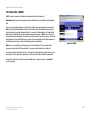
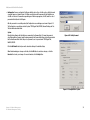
The first screen that appears displays the Setup tab. (See Figure 6-1.) This screen allows you to change the
PrintServer 's general settings. Change these settings as described here and click the Save button to apply your
changes or click Cancel to cancel your changes.
PSUS4 Device Name. Enter the PrintServer’s name in the field. The name can be located on a sticker that is on
the bottom of the PrintServer.
Password. To change the PrintServer’s password, enter the Current Password in the field. Enter the New
Password in the field, then enter the new password again in the Verify Password field.
Figure 6-1: Setup
Protocols. Check the box(es) for AppleTalk or NetBEUI, as they apply to your network.
Change these settings as described here and click the Save button to apply your changes or click Cancel to
cancel your changes.
Chapter 6: Configuring the PrintServer
Overview
16
PrintServer for USB with 4-Port Switch
The Protocol Tab - TCP/IP
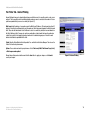
Click the TCP/IP tab to view or change the TCP/IP values of the PrintServer. (See Figure 6-2.)
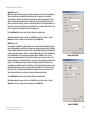
IP Address. If you are using DHCP to assign IP addresses, select Obtain an IP Address Automatically. By
default, Obtain an IP Address Automatically is enabled. If you need to assign the PrintServer a Fixed IP Address
(also known as Static IP Address), select Use the Following IP Address, and enter the appropriate values under
IP Address, Subnet Mask, and Gateway. To find your router’s IP address, consult your router’s documentation.
The Device IP Address and Subnet Mask are the same as those of any PC connected to the network. If you
change the PrintServer’s IP address, make sure you that you reconnect to the PrintServer using that new IP
address. Otherwise, you will not be communicating with the PrintServer. The Gateway IP Address is not
necessary for using the PrintServer.
Connection. You can set how long you want the PrintServer to delay between attempting connections to the
network. You can also specify the number of times that the PrintServer will attempt to make a connection. Enter
your chosen values in the fields provided.
Change these settings as described here and click the Save button to apply your changes or click Cancel to
cancel your changes.
Figure 6-2: TCP/IP
The Protocol Tab - Apple Talk
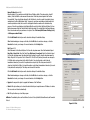
AppleTalk is a network communications protocol that allows computers to talk to each other using Ethernet.
Typically only Macintoshes use AppleTalk, although other platforms can be made to use it with extra software.
(See Figure 6-3.)
Communication. The Printer Object type can be obtained from the manufacturer of the printer. Enter the type of
printer in the field. For each printer connected to the PrintServer, you will choose the Communications Protocol
that allows the devices on the network to communicate. Select the type of Communication Protocol you will use,
ASCII or Binary for each printer, according to the recommendation of the printer’s manufacturer.
Change these settings as described here and click the Save button to apply your changes or click Cancel to
cancel your changes.
Figure 6-3: Apple Talk
Chapter 6: Configuring the PrintServer
The Protocol Tab - TCP/IP
17
PrintServer for USB with 4-Port Switch
The Protocol Tab - NetBEUI
NetBEUI connection settings of the PrintServer are available on this tab. (See Figure 6-4.)
Domain Name. Enter the name of the domain that you want the PrintServer associated with in the Domain Name
field.
If you are unsure of the Domain Name, you can find it out by looking on any computer already on the network. In
Windows 98, right click Network Neighborhood and select Properties. Under the Identification tab, there will be
listed that computer’s name, and the Domain to which it is connected. For Windows Me and 2000, right click My
Network Places. In Windows Me, choose Properties from the menu that appears. In Windows 2000 or XP, choose
Properties from the menu that appears. Then, right click Local Area Connection and choose Properties. The Domain
name will appear. If you want the PrintServer to be connected to that same Domain, enter that Domain name here.
If no Domain name exists there, you will use the Workgroup name from that window.
Figure 6-4: NetBEUI
Options. You can specify the Response Time that you prefer for the PrintServer. This is the amount of time
(measured in seconds) that the PrintServer will wait for a response from the network before “timing out.”
You also have the option to Abort Print Job if Error. Selecting Yes here will terminate the printing if there is an error
of any kind. If you select No, print jobs that have errors will be sent to the printer, but might not print properly.
Change these settings as described here and click the Save button to apply your changes or click Cancel to
cancel your changes.
Chapter 6: Configuring the PrintServer
The Protocol Tab - TCP/IP
18
PrintServer for USB with 4-Port Switch
The Printer Tab - Internet Printing
Internet Printing allows you to automatically print any e-mails that are sent to a specific e-mail account on your
network. This is especially useful for printing information when you are not connected to the network. You can
print from anywhere that you can access e-mail. (See Figure 6-5.)
Mail Server. Enter the address of your mail server in the Mail Server IP Address. (This value must be a fixed IP
address.) Enter the Account Name and Account Password next. Enter the password again in the Verify Password
field. Then, enter the time interval for the PrintServer to check for e-mail to be printed, in hours and minutes in
the Check Mail every: field. You may also specify an e-mail address to which mails that cannot be printed are
routed; this is useful for both graphic-intensive e-mails and for troubleshooting purposes. Enter this e-mail
address in the Redirect unprintable Mail to: field.
Printer. Enter the Printer Model in the field provided. You can find this in the Device Manager. Then choose the
Printer Port from the drop down menu.
Options. Place a check mark next to your preferences. Select Print every E-Mail, Print Banner Page (default),
or Mail response when printed.
Change these settings as described here and click the Save button to apply your changes or click Cancel to
cancel your changes.
Chapter 6: Configuring the PrintServer
The Printer Tab - Internet Printing
Figure 6-5: Internet Printing
19
PrintServer for USB with 4-Port Switch
The Printer Tab - Logical Port
The Logical Printers tab contains the logical printer settings of the PrintServer. Select from the following fields for
each Logical Printer. (See Figure 6-6.)
Select Printer. Select the number (1-3) from the drop-down menu of Logical Printer Port No: you wish to
configure. Click the Get Data button to update the display with the current data for the selected logical printer.
Details
• Pre-string (Hex). Enter the printer control string (in hexadecimal characters) to be sent to the printer before
each print job. This string cannot exceed 30 characters.
• Post String (Hex). Enter the printer control string (in hexadecimal characters) to be sent to the printer after
each print job. This string cannot exceed 30 characters.
Figure 6-6: Logical Port
• Convert LF to CR+LF. If checked, LF (line feed) characters are changed to CR+LF (carriage return + line
feed).
Change these settings as described here and click the Save button to apply your changes or click Cancel to
cancel your changes.
Chapter 6: Configuring the PrintServer
The Printer Tab - Internet Printing
20
PrintServer for USB with 4-Port Switch
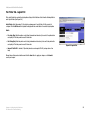
The Status Tab - Device
The Device tab allows you to view information about the PrintServer. No values can be changed on this screen.
This screen is for information only. (See Figure 6-7.)
Clicking the Refresh button causes the PrintServer to retrieve this information again.
Figure 6-7: Device Status
The Status Tab - Printer
The Printer tab allows you to view information about the Printer. No values can be changed on this screen. This
screen is for information only. (See Figure 6-8.)
Click the Print Test Page button to print a test page.
Clicking the Refresh button causes the PrintServer to retrieve this information again.
Figure 6-8: Router IP
Chapter 6: Configuring the PrintServer
The Printer Tab - Internet Printing
21
PrintServer for USB with 4-Port Switch
The Exit Tab
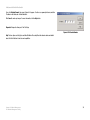
This tab is used exclusively for exiting the Web-based Utility. (See Figure 6-9.)
Select the Exit tab and the screen in Figure 6-9 will appear. Click the Yes button if you want to exit the Utility.
Click No if you don’t want to exit the Utility.
Figure 6-9: Exit
Chapter 6: Configuring the PrintServer
The Printer Tab - Internet Printing
22
PrintServer for USB with 4-Port Switch
Chapter 7: Internet Printing Protocol
Overview
Internet Printing Protocol (IPP) is a new standards-based system to allow remote printing from a PC to any
accessible printer. Normally, the printer will be attached to a computer or other device that functions as an IPP
Server. For client PCs, it is necessary to install a compatible IPP Client program. The Client must also know the IP
Address or URL of the IPP Server.
The PrintServer contains the necessary firmware to act as an IPP Server. No additional configuration is
necessary. However, the following requirements must be met:
• The PrintServer must have a valid IP Address. For printing via the Internet, the PrintServer’s IP Address must
be external (allocated by your ISP), rather than an IP Address on your local LAN.
• Any Router, Gateway, or Firewall linking your LAN to the Internet must NOT block the IPP protocol. (IPP
Protocol uses Port Services 631/TCP.)
• You must advise clients of the correct URL or IP Address of the IPP Server. To use a URL rather than an IP
Address, you need to register the domain name for the URL.
• Unless clients are using Windows 2000, you must provide your clients with the supplied IPP Client software. If
it is not convenient to provide the CD-ROM, supply the setup.exe file, located in the IPP folder.
Windows IPP Client Setup
Installing using setup.exe
1. Run this program, located at d:\driver\ipp\setup.exe, to unzip the included files.
2. The IPP Setup program will then run.
3. Follow the prompts to complete the installation.
IPP Client Configuration for Windows 98, Me, 2000, and XP
1. Run the Add IPP Port program entry created by the installation. A screen like the one shown in Figure 8-1 will
be displayed.
Chapter 7: Internet Printing Protocol
Overview
Figure 7-1: Configure IPP Port
23
PrintServer for USB with 4-Port Switch
2. If Internet access from your location is via a Proxy Server, check Access IPP Server via Proxy Server, and
enter details of your Proxy Server. (This will be the same as your Browser configuration.)
3. Enter the IP Address or URL of the IPP Server.
NOTE: Verify that USB 1 appears in the field
beside the Select Device Port button. If it does
not, click the Select Device Port button, and select
USB 1.
4. Click Select Device Port to view the available ports on the IPP Server, and select the appropriate port. A
connection to the IPP Server will be established at this time.
NOTE: Verify that USB 1 appears in the field beside the Select
Device Port button. If it does not, click the Select Device Port
button, and select USB 1.
5. Click Save to create the IPP port on your system. You will see a message confirming that the port has been
created and then Figure 7-2.
6. Perform one of these steps. Select an existing printer to use the new port, and click OK.
OR
Click the Add New Printer button to create a new printer to use the IPP port. This will start the Add Printer Wizard.
Follow the prompts to complete the process. Make sure that the new printer uses the IPP port.
Installation is now complete.
Figure 7-2: AddPort
• To create additional IPP ports, repeat the entire procedure.
• The Proxy Server and other options are set individually for each IPP Port.
Changing the IPP Port Settings
After the IPP port is created, you can reach the Configure IPP Port screen by performing these steps:
1. Open the Printers folder (Start => Settings => Printers).
2. Right-click the IPP Printer and select Properties.
3. Click the Port Settings or Configure Port button (Details or Port tab, depending on your version of Windows).
The Configure IPP Port screen (shown in Figure 7-3) will appear.
There are two settings—Retry Interval and Retry Count—that can be adjusted if you have problems connecting to
the IPP Server.
Chapter 7: Internet Printing Protocol
Windows IPP Client Setup
Figure 7-3: Configure IPP Port
24
PrintServer for USB with 4-Port Switch
• Retry Interval sets the time interval (in seconds) between connection attempts. Increase this number if you
have a poor connection, or the remote server is very busy.
• Retry Count sets how many connection attempts will be made. Increase this number if you have a poor
connection, or the remote server is very busy.
IPP Client Setup for Windows 2000 and XP
Windows 2000 and XP have their own IPP Client, and there is no need to install the supplied IPP Client Software.
To use this IPP Client with the PrintServer, follow this procedure:
1. Start the Add Printer Wizard.
2. Select Network Printer and click Next to see the Locate your Printer screen, as shown in Figure 7-4.
3. Select Connect to a printer on the Internet or on your intranet, and enter the URL of the IPP Server as follows,
where ip_address represents the IP Address of the IPP Server, and 631 represents the port number.
Port 1
Figure 7-4: Locate Your Printer
ip_address:631/ipp/P1
NOTE: These entries are case sensitive. They must be entered as shown,
with “ipp” in lowercas, and P1 in UPPERcase.
4. If the connection can be established, and the printer on that port is online, the dialog box shown in Figure 75 will be displayed. This screen notifies you that the printer driver is not installed. Click the OK button.
5. Select the printer manufacturer and model to match the printer connected to the port on the IPP Server.
Figure 7-5: Connect to Printer
6. Click Next and complete the Wizard.
The IPP printer is now ready for use.
Using IPP Printers
The IPP Printer can be selected and used like any other Windows printer. If the IPP Server is not on your network,
your Internet connection needs to be active.
If you wish to check the availability of the remote IPP Server, you can use the Query IPP Printer program installed
with Add IPP Port.
An IPP Server may be unavailable for any of the following reasons:
Chapter 7: Internet Printing Protocol
Windows IPP Client Setup
25
PrintServer for USB with 4-Port Switch
• It is powered off.
• A printer problem has caused the IPP Server to cease responding, and a restart (reboot) is required.
• The Server’s IP Address has changed.
• The Internet connection for the IPP Server is down.
• Network congestion causes the connection attempt to time out.
If using the supplied IPP Client software, there are two settings—Retry Interval and Retry Count—that can be
adjusted if you have problems connecting to the IPP Server.
See the previous section, Changing the IPP Port Settings, for details.
Chapter 7: Internet Printing Protocol
Windows IPP Client Setup
26
PrintServer for USB with 4-Port Switch
Chapter 8: Bi-Admin Management
Overview
The PrintServer is managed by a utility program called Bi-Admin on the PrintServer’s Setup CD. Fully compatible
with Windows 98, Me, 2000, and XP, Bi-Admin allows you to change the PrintServer’s internal settings, check on
the unit’s status, and perform basic diagnostic tests. Note that the Bi-Admin program must be installed only on
the network administrator’s computer. First, you will install Bi-Admin on your computer. Then, you will be able to
use the management utility.
Bi-Admin Installation
1. If you haven’t already done so, insert the Setup CD-ROM into the computer’s CD-ROM drive. The Setup CDROM should run automatically. If it does not, click the Start button and choose Run. In the box that appears,
enter D:\setupWizard.exe (if “D” is the letter of your CD-ROM drive).
2. When you see Figure 8-1, click Bi-Admin Install to continue. Click Exit to end the installation.
3. The Welcome screen of the Bi-Admin Setup program, Figure 8-2, will appear first. You will need to close any
other programs you have open before you continue. Click Cancel to quit the setup program, then close the
open programs. Click Next to continue with the Bi-Admin installation.
Figure 8-1: Welcome
Figure 8-2: Bi-Admin Setup Welcome
Chapter 8: Bi-Admin Management
Overview
27
PrintServer for USB with 4-Port Switch
4. The next screen to appear is Choose Destination Location, as shown in Figure 8-3. You will be requested to
choose the location of where the Bi-Admin folder will be installed. If you want the folder to be installed in a
different location, click the Browse button and select the location. To install the Bi-Admin folder in the default
location, click Next to continue.
Click Back to return to the previous screen. Click Cancel to end the Bi-Admin installation.
5. The next screen to appear is Select Program Folder, shown in Figure 8-4. An icon will be added to the
program folder listed. You may change the name for the program folder, if you wish. Click Next.
Click Back to return to the previous screen. Click Cancel to end the Bi-Admin installation.
6. When the Bi-Admin is installed, the Setup Complete screen, Figure 8-5, will appear. Click Finish to continue.
Figure 8-3: Choose Destination Location
Figure 8-4: Select Program Folder
Figure 8-5: Setup Complete
Chapter 8: Bi-Admin Management
Bi-Admin Installation
28
PrintServer for USB with 4-Port Switch
Starting the Bi-Admin Management Utility
1. To start the Bi-Admin program, click on Start, Programs, Print Server Utility, and then Bi-Admin
Management Utility, as shown in Figure 8-6. If the Bi-Admin Management Utility icon has been created, you
can just double-click on it instead. You can drag the shortcut icon onto your Desktop for easy access to the
Bi-Admin Management Utility.
2. When the Bi-Admin Management Utility appears, it will ask for the Connected Protocol. (See Figure 8-7.)
Make sure the box next to TCP/IP is checked. Click the OK button.
3. Then the Bi-Admin Management Utility will automatically scan the network for the USB PrintServer. (See
Figure 8-8.)
Figure 8-6: Connected Protocol
Figure 8-7: Searching for Device
Figure 8-8: Setup Complete
Chapter 8: Bi-Admin Management
Starting the Bi-Admin Management Utility
29
PrintServer for USB with 4-Port Switch
The Bi-Admin Management Utility
The Bi-Admin Management Utility screen will appear next. Any hardware found on the network will appear on the
left-hand side of the screen, as shown in Figure 8-9. The Utility can be managed from this screen. The menu and
Icon options will be explained below:
Menu Options
Main. The options are Device Status, Printer Status, Configuration, Upgrade, Refresh, and Exit. These options are
also the same as the Icons that are displayed below the menu options (viewed from left to right), and are
described below.
• Device Status. This option allows you to view all of the device settings, and optionally save the device
settings to a file, or restore a previously saved file to the device.
If you click Device Status, the screen in Figure 8-10 appears. A list of the PrintServer’s device settings is
displayed that contains the Hardware ID, Firmware version, Protocol ID, Default Name, and Server Name. To
save the information in a txt. file, click the Save to file button.
Figure 8-9: Bi-Admin Management Utility
To choose a different device that you configured, click the Open button. You may then browse for your file,
select it, then click Open. The contents of the file will display on the right-hand side of the screen. To save the
file to the PrintServer, click Restore to Device.
Figure 8-10: Device Information
Figure 8-11: Verify Password
Chapter 8: Bi-Admin Management
The Bi-Admin Management Utility
30
PrintServer for USB with 4-Port Switch
• Printer Status. This option allows you to view the printer status, and set port and printer parameters.
If you click this option, a Verify Password screen will appear, as shown in Figure 8-11. Make sure that you
enter the password in the field before you click OK or an Incorrect Password message will appear. If the
message appears, then click OK, enter the correct password in the field, and click OK again.
After the password is successfully entered, the Printer Status screen will appear, as shown in Figure 8-12.
The Device Name will be displayed and USB Printer Port will be highlighted. The status information for the
port will be displayed.
Click the Back button to return to the Bi-Admin Management Utility screen. Click Refresh to refresh the
screen.
If the printer is Bi-directional, and is not busy, the Printer Configuration button will appear, as shown in
Figure 8-13. If the items are not read only, you can change the Environmental Variable and Variable Value
items based on the options of your printer.
For more information, click the Help button.
Figure 8-12: Printer Status
Figure 8-13: Printer Configuration
Chapter 8: Bi-Admin Management
The Bi-Admin Management Utility
31
PrintServer for USB with 4-Port Switch
• Configuration. You may configure the PrintServer with this option. If you click this option, a Verify Password
screen will appear, as shown in Figure 8-14. Make sure that you enter the password in the field before you
click OK or an Incorrect Password message will appear. If the message appears, click OK, enter the correct
password in the field, and click OK again.
After the password is successfully entered, the Configuration screen will appear, as shown in Figure 8-15.
The Configuration screen displays six tabs: System, TCP/IP, Apple Talk, NETBEUI, Internet Printing, and Port.
The tabs will be described below.
System
Enter the Device Name in the field. Enter any comments in the Comment field. To change the password,
select Change Device Password, enter the new password in the Password field, then re-enter the password in
the Confirm Password field. Select the protocol you want to use for your network: TCP/IP, Apple Talk,
NetBEUI, IPX/SPX.
Figure 8-14: Verify Password
Click the Get Defaults button if you want to return the settings to the default settings.
When finished making your changes on this tab, click the OK button to save these changes, or click the
Cancel button to undo your changes. For more information, click the Help button.
Figure 8-15: Configuration - System
Chapter 8: Bi-Admin Management
The Bi-Admin Management Utility
32
PrintServer for USB with 4-Port Switch
TCP/IP
If you are using DHCP to assign IP addresses, select Dynamic IP Address (DHCP) . (See Figure 8-16.) By
default, Dynamic IP Address (DHCP) is enabled. If you need to assign the PrintServer a Fixed IP Address (also
known as Static IP Address), select Fixed IP Address, (Figure 8-17) and enter the appropriate values under IP
Address, Subnet Mask, and Gateway. To find your router’s IP address, consult your router’s documentation.
The IP Address and Subnet Mask are the same as those of any PC connected to the network. If you change
the PrintServer’s IP address, make sure you that you reconnect to the PrintServer using that new IP address.
Otherwise, you will not be communicating with the PrintServer. The Gateway IP Address is not necessary for
using the PrintServer.
Click the Get Defaults button if you want to return the settings to the default settings.
When finished making your changes on this tab, click the OK button to save these changes, or click the
Cancel button to undo your changes. For more information, click the Help button.
Figure 8-16: Dynamic IP Address (DHCP)
Figure 8-17: Fixed IP Address
Chapter 8: Bi-Admin Management
The Bi-Admin Management Utility
33
PrintServer for USB with 4-Port Switch
Apple Talk (Figure 8-18)
AppleTalk is a network communications protocol that allows computers to talk to each other using Ethernet.
Typically only Macintoshes use AppleTalk, although other platforms can be made to use it with extra
software. Enter the Zone Name in the field. Select the port number from the drop-down menu. The Printer
Type can be obtained from the manufacturer of the printer. Enter the type of printer in the field. For each
printer connected to the PrintServer, you will choose the Communications Protocol that allows the devices on
the network to communicate. Select the type of Communication Protocol you will use, ASCII or Binary for each
printer, according to the recommendation of the printer’s manufacturer.
Click the Get Defaults button if you want to return the settings to the default settings.
When finished making your changes on this tab, click the OK button to save these changes, or click the
Cancel button to undo your changes. For more information, click the Help button.
NetBEUI (Figure 8-19)
Enter the name of the domain that you want the PrintServer associated with in the Domain Name field. If you are
unsure of the Domain Name, you can find it out by looking on any computer already on the network. In Windows
98, right click Network Neighborhood and select Properties. Under the Identification tab, there will be listed that
computer’s name, and the Domain to which it is connected. For Windows Me and 2000, right click My Network
Places. In Windows Me, choose Properties from the menu that appears. In Windows 2000 or XP, choose
Properties from the menu that appears. Then, right click Local Area Connection and choose Properties. The
Domain name will appear. If you want the PrintServer to be connected to that same Domain, enter that Domain
name here. If no Domain name exists there, you will use the Workgroup name from that window. You can
specify the Response Time that you prefer for the PrintServer. This is the amount of time (measured in seconds)
that the PrintServer will wait for a response from the network before “timing out.” You also have the option to
Abort Print Job if Error. Selecting Yes here will terminate the printing if there is an error of any kind. If you
select No, print jobs that have errors will be sent to the printer, but might not print properly.
Figure 8-18: Apple Talk
Click the Get Defaults button if you want to return the settings to the default settings.
When finished making your changes on this tab, click the OK button to save these changes, or click the
Cancel button to undo your changes. For more information, click the Help button.
Figure 8-19: NetBEUI
Chapter 8: Bi-Admin Management
The Bi-Admin Management Utility
34
PrintServer for USB with 4-Port Switch
Internet Printing (Figure 8-20)
Enter the address of your mail server in the Mail Server IP Address fields. (This value must be a fixed IP
address.) Enter the Mail Account name and Password next. Enter the password again in the Confirm
Password field. Then, enter the time interval for the PrintServer to check for e-mail to be printed, in hours
and minutes in the Check Mail Interval: field. You may also specify an e-mail address to which mails that
cannot be printed are routed; this is useful for both graphic-intensive e-mails and for troubleshooting
purposes. Enter this e-mail address in the Redirect Mail Account: field. Select the Default Printer Port from
the drop down menu. Enter the Printer Model in the field provided. You can find this in the Device Manager.
Place a check mark next to your preferences for options. Select Print every Mail, Banner Printing (default),
or Mail response when Printed.
Click the Get Defaults button if you want to return the settings to the default settings.
When finished making your changes on this tab, click the OK button to save these changes, or click the
Cancel button to undo your changes. For more information, click the Help button.
Port (Figure 8-21)
Select the number of the Selected Physical Port from the drop-down menu. Select the Handshake Signal:
Busy Only or Busy & Ack. Select the Printer Type: High Speed or Low Speed. Select the Selected Logical
Port from the drop-down menu, then the physical port you want to map it to from the drop-down menu for
Map to Physical Port. If you select Yes for Convert LF to LF+CR, the LF (line feed) characters are changed to
LF+CR (line feed +carriage return). In the field for Prefix of Job, enter the printer control string (in
hexadecimal characters) to be sent to the printer before each print job. This string cannot exceed 30
characters. In the field for Suffix of Job, enter the printer control string (in hexadecimal characters) to be sent
to the printer after each print job. This string cannot exceed 30 characters.
Figure 8-20: Internet Printing
Click the Get Defaults button if you want to return the settings to the default settings.
When finished making your changes on this tab, click the OK button to save these changes, or click the
Cancel button to undo your changes. For more information, click the Help button.
• Upgrade. You may use this option to upgrade the firmware of the PrintServer.
• Refresh. This option allows you to refresh the device list after you change the name or IP Address of a device.
The screen does not refresh automatically.
• Exit. This option allows you to exit the program.
InitDevice. The available options are Reset Device, Restore to Factory Default, Attached Remote, and Connected
Protocol.
Figure 8-21: Port
Chapter 8: Bi-Admin Management
The Bi-Admin Management Utility
35
PrintServer for USB with 4-Port Switch
If you click Attached Remote, the screen in Figure 8-22 appears. To add a cross segment print server, enter the
IP address in the fields, and click the Set button.
Click Cancel to undo any changes. For more information, click the Help button.
Diagnostic. Diagnostic allows you to Print Test Page.
Figure 8-22: Attached Remote
Help. The two options are Help Topics and About Bi-Admin. These help files offer extensive advice and details
about all of the PrintServer’s functions and capabilities.
Chapter 8: Bi-Admin Management
The Bi-Admin Management Utility
36
PrintServer for USB with 4-Port Switch
Appendix A: Troubleshooting
This appendix consists of “Common Problems and Solutions”. Provided are possible solutions to problems that
may occur during the installation and operation of the PrintServer. Read the descriptions below to help you solve
your problems. If you can’t find an answer here, check the Linksys website at www.linksys.com.
Common Problems and Solutions
If the PrintServer is not working correctly, follow the advice in this chapter. If you have trouble printing, see
Chapter 3 first, and then go to Chapter 8. If this Troubleshooting section does not resolve your problem, please
see Appendix I to contact Technical Support.
1. All the LEDs on the front of the PrintServer are off.
Check the power supply and the power connection.
2. The PrintServer’s Status LED stays lit continuously.
Reset the Wireless-Ready PrintServer by unplugging the power supply and plugging it back in or pressing the
Reset button on the back of the PrintServer.
3. I am using DHCP, and the PrintServer gets an IP Address conflict involving the PrintServer.
If the PrintServer is left on when the DHCP server is turned off, the PrintServer will retain its IP Address
without informing the DHCP server. Reset the PrintServer so it will obtain a new IP Address. This problem also
arises if you assigned a static IP Address within the range used by the DHCP server. If so, use another
address NOT within the range used by the DHCP server.
4. The PrintServer’s LAN LED is not lighting up.
Check your cabling and make sure that the Link LED on your hub or switch is lit up.
5. A printer connected to the PrintServer cannot print or prints garbage.
Check the following:
1. Cable connection between the PrintServer and printer.
2. The printer driver in the application program or Windows matches the printer.
3. Cabling distance is too long if it exceeds 10 feet.
Appendix A:
Common Problems and Solutions
37
PrintServer for USB with 4-Port Switch
6. The Configuration button on the Printer Status screen in Bi-Admin is grayed out, even though my
printer is bi-directional.
The button is unavailable until the printer has finished its print jobs and sits idle.
7. To start over, I need to set the PrintServer to factory default.
Unplug the power to the PrintServer. Press in the Reset button and plug in the power and continue to hold for
10 seconds. This will return the password and other settings on the PrintServer to the factory default settings.
In other words, the PrintServer will revert to its original factory configuration.
8. I need to upgrade the firmware.
In order to upgrade the firmware with the latest features, you need to go to the Linksys website and download
the latest firmware at www.linksys.com.
• Follow these steps:
1. Go to the Linksys website at http://www.linksys.com and download the latest firmware.
2. To upgrade the firmware, follow the steps in “Appendix C: Upgrading Firmware.”
Appendix A:
Common Problems and Solutions
38
PrintServer for USB with 4-Port Switch
Appendix B: About Bi-Directional Printing
Normal printing only sends print signals from a PC to a printer. Bi-directional printing, also called bitronic printing,
refers to a printer’s ability to do just the opposite—talk back to a PC to notify it of a print job status, paper jams, etc.
This two-way communication technology can be found in HP, IBM, Panasonic, and other laser or color printers where
close contact between the PC and printer is key. In color printing, for example, the printer “informs” the PC of its
constant status in order to mix color inks correctly for optimal quality output.
Bi-directional communication, communication from a printer to a PC, is normally handled by a combination of the
printer hardware and special software on your computer. Bi-directional printers generally have highly advanced
parallel interfaces. These printers often require special parallel ports in order to take full advantage of their features.
Using a bi-directional printer on a network poses unique challenges. Unlike a direct PC-to-printer connection in which
a bi-directional printer can easily send its signals back to the host PC through the computer’s parallel port (which is
normally located only a few feet away from the printer), a networked printer faces the problem of having to route
messages bound for a particular PC through a large array of hubs, switches, file servers, and computers.
Unfortunately, most printers are not equipped to handle the complexities of printer-to-PC communication across a
network. That does not mean that they can’t be used on a network, however.
Linksys designed the PrintServers to function with both regular as well as bi-directional printers. Standard print
servers cannot work with bi-directional printers, but the PrintServer features a custom design to support both parallel
as well as bi-directional parallel interfaces. However, the PrintServer cannot pass messages from the printer back to
the printing PC—this limitation is simply an industry standard, and not one of the PrintServer itself.
However, the PrintServer can check any printer’s online and printing status on the network using the Bi-Admin
management utility software packaged with the PrintServer. The status-checking feature built into the management
software does not require a bi-directional printer to function. If your printer came with special bi-directional software
allowing you to monitor printer status, do not use it with the PrintServer—the software is most likely not networkcapable. For best results, turn off the printer’s bi-directional function either by (1) removing any bi-directional printing
software from your network computers, and/or (2) turning off the printer’s bi-directional print feature inside of the
printer’s on-board menus (if it has menus). Your printer’s user guide should be able to provide specific instructions for
doing this.
39
Appendix B: About Bi-Directional Printing
PrintServer for USB with 4-Port Switch
Appendix C: Upgrading Firmware
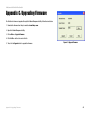
The PrintServer's firmware is upgraded through the Bi-Admin Management utility. Follow these instructions:
1. Download the firmware from Linksys's website at www.linksys.com.
2. Open the Bi-Admin Management utility.
3. Click on Main => Upgrade Firmware.
4. Click the Files... button to browse for the file.
5. Then, click the Upgrade button to upgrade the firmware.
Appendix C: Upgrading Firmware
Figure C-1: Upgrade Firmware
40
PrintServer for USB with 4-Port Switch
Appendix D: Windows Help
All wireless products require Microsoft Windows. Windows is the most used operating system in the world and
comes with many features that help make networking easier. These features can be accessed through Windows
Help and are described in this appendix.
TCP/IP
Before a computer can communicate with the PrintServer, TCP/IP must be enabled. TCP/IP is a set of instructions,
or protocol, all PCs follow to communicate over a network. This is true for wireless networks as well. Your PCs
will not be able to utilize wireless networking without having TCP/IP enabled. Windows Help provides complete
instructions on enabling TCP/IP.
Shared Resources
If you wish to share printers, folder, or files over your network, Windows Help provides complete instructions on
utilizing shared resources.
Network Neighborhood/My Network Places
Other PCs on your network will appear under Network Neighborhood or My Network Places (depending upon the
version of Windows you're running). Windows Help provides complete instructions on adding PCs to your
network.
Appendix D: Windows Help
41
PrintServer for USB with 4-Port Switch
Appendix E: Glossary
802.11a - An IEEE wireless networking standard that specifies a maximum data transfer rate of 54Mbps and an
operating frequency of 5GHz.
802.11b - An IEEE wireless networking standard that specifies a maximum data transfer rate of 11Mbps and an
operating frequency of 2.4GHz.
802.11g - An IEEE wireless networking standard that specifies a maximum data transfer rate of 54Mbps, an
operating frequency of 2.4GHz, and backward compatibility with 802.11b devices.
Access Point - Device that allows wireless-equipped computers and other devices to communicate with a wired
network. Also used to expand the range of a wireless network.
Adapter - This is a device that adds network functionality to your PC.
Ad-hoc - A group of wireless devices communicating directly with each other (peer-to-peer) without the use of
an access point.
Backbone - The part of a network that connects most of the systems and networks together, and handles the
most data.
Bandwidth - The transmission capacity of a given device or network.
Beacon Interval - The frequency interval of the beacon, which is a packet broadcast by a router to synchronize a
wireless network.
Bit - A binary digit.
Boot - To start a device and cause it to start executing instructions.
Bridge - A device that connects two different kinds of local networks, such as a wireless network to a wired
Ethernet network.
Broadband - An always-on, fast Internet connection.
Browser - A browser is an application program that provides a way to look at and interact with all the
information on the World Wide Web.
Appendix E: Glossary
42
PrintServer for USB with 4-Port Switch
Buffer - A block of memory that temporarily holds data to be worked on later when a device is currently too busy
to accept the data.
Cable Modem - A device that connects a computer to the cable television network, which in turn connects to the
Internet.
CSMA/CA (Carrier Sense Multiple Access/Collision Avoidance) - A method of data transfer that is used to prevent
data loss in a network.
CTS (Clear To Send) - A signal sent by a device to indicate that it is ready to receive data.
Daisy Chain - A method used to connect devices in a series, one after the other.
Database - A collection of data that is organized so that its contents can easily be accessed, managed, and
updated.
DDNS (Dynamic Domain Name System) - The capability of having a website, FTP, or e-mail server-with a dynamic
IP address-use a fixed domain name.
Default Gateway - A device that forwards Internet traffic from your local area network.
DHCP (Dynamic Host Configuration Protocol) - A protocol that lets one device on a local network, known as a
DHCP server, assign temporary IP addresses to the other network devices, typically computers.
DMZ (Demilitarized Zone) - Removes the Router's firewall protection from one PC, allowing it to be "seen" from
the Internet.
DNS (Domain Name Server) - The IP address of your ISP's server, which translates the names of websites into IP
addresses.
Domain - A specific name for a network of computers.
Download - To receive a file transmitted over a network.
DSL (Digital Subscriber Line) - An always-on broadband connection over traditional phone lines.
DSSS (Direct-Sequence Spread-Spectrum) - A type of radio transmission technology that includes a redundant
bit pattern to lessen the probability of data lost during transmission. Used in 802.11b networking.
DTIM (Delivery Traffic Indication Message) - A message included in data packets that can increase wireless
efficiency.
Appendix E: Glossary
43
PrintServer for USB with 4-Port Switch
Dynamic IP Address - A temporary IP address assigned by a DHCP server.
Encryption - Encoding data to prevent it from being read by unauthorized people.
Ethernet - An IEEE standard network protocol that specifies how data is placed on and retrieved from a common
transmission medium.
Finger - A program that tells you the name associated with an e-mail address.
Firewall - Security measures that protect the resources of a local network from intruders.
Firmware - 1. In network devices, the programming that runs the device. 2. Programming loaded into read-only
memory (ROM) or programmable read-only memory (PROM) that cannot be altered by end-users.
Fragmentation - Breaking a packet into smaller units when transmitting over a network medium that cannot
support the original size of the packet.
FTP (File Transfer Protocol) - A standard protocol for sending files between computers over a TCP/IP network and
the Internet.
Full Duplex - The ability of a networking device to receive and transmit data simultaneously.
Gateway - A system that interconnects networks.
Half Duplex - Data transmission that can occur in two directions over a single line, but only one direction at a
time.
Hardware - The physical aspect of computers, telecommunications, and other information technology devices.
HTTP (HyperText Transport Protocol) - The communications protocol used to connect to servers on the World
Wide Web.
IEEE (The Institute of Electrical and Electronics Engineers) - An independent institute that develops networking
standards.
Infrastructure - Currently installed computing and networking equipment.
Infrastructure Mode - Configuration in which a wireless network is bridged to a wired network via an access
point.
IP (Internet Protocol) - A protocol used to send data over a network.
IP Address - The address used to identify a computer or device on a network.
Appendix E: Glossary
44
PrintServer for USB with 4-Port Switch
IPCONFIG - A Windows 2000 and XP utility that displays the IP address for a particular networking device.
IPSec (Internet Protocol Security) - A VPN protocol used to implement secure exchange of packets at the IP layer.
ISM band - Radio band used in wireless networking transmissions.
ISP (Internet Service Provider) - A company that provides access to the Internet.
LAN (Local Area Network) - The computers and networking products that make up the network in your home or
office.
MAC (Media Access Control) Address - The unique address that a manufacturer assigns to each networking
device.
Mbps (Megabits Per Second) - One million bits per second; a unit of measurement for data transmission.
Multicasting - Sending data to a group of destinations at once.
NAT (Network Address Translation) - NAT technology translates IP addresses of a local area network to a different
IP address for the Internet.
Network - A series of computers or devices connected for the purpose of data sharing, storage, and/or
transmission between users.
NNTP (Network News Transfer Protocol) - The protocol used to connect to Usenet groups on the Internet.
Node - A network junction or connection point, typically a computer or work station.
OFDM (Orthogonal Frequency Division Multiplexing) - A type of modulation technology that separates the data
stream into a number of lower-speed data streams, which are then transmitted in parallel. Used in 802.11a,
802.11g, and powerline networking.
Packet - A unit of data sent over a network.
Passphrase - Used much like a password, a passphrase simplifies the WEP encryption process by automatically
generating the WEP encryption keys for Linksys products.
Ping (Packet INternet Groper) - An Internet utility used to determine whether a particular IP address is online.
POP3 (Post Office Protocol 3) - A standard protocol used to retrieve e-mail stored on a mail server.
Port - 1. The connection point on a computer or networking device used for plugging in a cable or an adapter. 2.
The virtual connection point through which a computer uses a specific application on a server.
Appendix E: Glossary
45
PrintServer for USB with 4-Port Switch
PPPoE (Point to Point Protocol over Ethernet) - A type of broadband connection that provides authentication
(username and password) in addition to data transport.
PPTP (Point-to-Point Tunneling Protocol) - A VPN protocol that allows the Point to Point Protocol (PPP) to be
tunneled through an IP network. This protocol is also used as a type of broadband connection in Europe.
Preamble - Part of the wireless signal that synchronizes network traffic.
RJ-45 (Registered Jack-45) - An Ethernet connector that holds up to eight wires.
Roaming - The ability to take a wireless device from one access point's range to another without losing the
connection.
Router - A networking device that connects multiple networks together, such as a local network and the Internet.
RTS (Request To Send) - A packet sent when a computer has data to transmit. The computer will wait for a CTS
(Clear To Send) message before sending data.
Server - Any computer whose function in a network is to provide user access to files, printing, communications,
and other services.
SMTP (Simple Mail Transfer Protocol) - The standard e-mail protocol on the Internet.
SNMP (Simple Network Management Protocol) - A widely used network monitoring and control protocol.
Software - Instructions for the computer. A series of instructions that performs a particular task is called a
"program".
Spread Spectrum - Wideband radio frequency technique used for more reliable and secure data transmission.
SSID (Service Set IDentifier) - Your wireless network's name.
Static IP Address - A fixed address assigned to a computer or device that is connected to a network.
Static Routing - Forwarding data in a network via a fixed path.
Subnet Mask - An address code that determines the size of the network.
Switch - 1. Device that is the central point of connection for computers and other devices in a network, so data
can be shared at full transmission speeds. 2. A device for making, breaking, or changing the connections in an
electrical circuit.
Appendix E: Glossary
46
PrintServer for USB with 4-Port Switch
TCP/IP (Transmission Control Protocol/Internet Protocol) - A network protocol for transmitting data that requires
acknowledgement from the recipient of data sent.
Telnet - A user command and TCP/IP protocol used for accessing remote PCs.
TFTP (Trivial File Transfer Protocol) - A version of the TCP/IP FTP protocol that uses UDP and has no directory or
password capability.
Throughput - The amount of data moved successfully from one node to another in a given time period.
Topology - The physical layout of a network.
TX Rate - Transmission Rate.
UDP (User Datagram Protocol) - A network protocol for transmitting data that does not require acknowledgement
from the recipient of the data that is sent.
Upgrade - To replace existing software or firmware with a newer version.
Upload - To transmit a file over a network.
URL (Uniform Resource Locator) - The address of a file located on the Internet.
VPN (Virtual Private Network) - A security measure to protect data as it leaves one network and goes to another
over the Internet.
WAN (Wide Area Network) - The Internet.
WEP (Wired Equivalent Privacy) - A method of encrypting data transmitted on a wireless network for greater
security.
WINIPCFG - A Windows 98 and Millennium utility that displays the IP address for a particular networking device.
WLAN (Wireless Local Area Network) - A group of computers and associated devices that communicate with each
other wirelessly.
Appendix E: Glossary
47
PrintServer for USB with 4-Port Switch
Appendix F: Specifications
Standards
IEEE 802.3, 802.3u, USB 1.0/1.1
Ports/Buttons
4 10/100 RJ-45 Ports Auto MDI/MDI-X, Reset
Cabling Type
male connectors
Category 5 or better, and USB1.1 cable with Type-B female and Type-A
LEDs
Status, USB, 1-4
Dimensions
(W x H x D)
3.66" x 1.18" x 3.54"
(93 mm x 30 mm x 90 mm)
Unit Weight
7.8 oz. (0.221 kg)
Power
External, 5V DC, 2.5A
Certifications
FCC, CE Class B
Operating Temp.
0ºC to 40ºC (32ºF to 104ºF)
Storage Temp.
-20ºC to 70ºC (-4ºF to 158ºF)
Operating Humidity
10% to 85% Non-Condensing
Storage Humidity
5% to 90% Non-Condensing
Appendix F: Specifications
48
PrintServer for USB with 4-Port Switch
Appendix G: Warranty Information
LIMITED WARRANTY
Linksys warrants to the original end user purchaser ("You") that, for a period of three years, (the "Warranty Period") Your
Linksys product will be free of defects in materials and workmanship under normal use. Your exclusive remedy and
Linksys's entire liability under this warranty will be for Linksys at its option to repair or replace the product or refund Your
purchase price less any rebates.
If the product proves defective during the Warranty Period call Linksys Technical Support in order to obtain a Return
Authorization Number. BE SURE TO HAVE YOUR PROOF OF PURCHASE ON HAND WHEN CALLING. When returning a product,
mark the Return Authorization Number clearly on the outside of the package and include a copy of your original proof of
purchase. RETURN REQUESTS CANNOT BE PROCESSED WITHOUT PROOF OF PURCHASE. You are responsible for shipping
defective products to Linksys. Linksys pays for UPS Ground shipping from Linksys back to You only. Customers located
outside of the United States of America and Canada are responsible for all shipping and handling charges.
ALL IMPLIED WARRANTIES AND CONDITIONS OF MERCHANTABILITY OR FITNESS FOR A PARTICULAR PURPOSE ARE LIMITED
TO THE DURATION OF THE WARRANTY PERIOD. ALL OTHER EXPRESS OR IMPLIED CONDITIONS, REPRESENTATIONS AND
WARRANTIES, INCLUDING ANY IMPLIED WARRANTY OF NON-INFRINGEMENT, ARE DISCLAIMED. Some jurisdictions do not
allow limitations on how long an implied warranty lasts, so the above limitation may not apply to You. This warranty gives
You specific legal rights, and You may also have other rights which vary by jurisdiction.
TO THE EXTENT NOT PROHIBITED BY LAW, IN NO EVENT WILL LINKSYS BE LIABLE FOR ANY LOST DATA, REVENUE OR PROFIT,
OR FOR SPECIAL, INDIRECT, CONSEQUENTIAL, INCIDENTAL OR PUNITIVE DAMAGES, HOWEVER CAUSED REGARDLESS OF
THE THEORY OF LIABILITY, ARISING OUT OF OR RELATED TO THE USE OF OR INABILITY TO USE THE PRODUCT, EVEN IF
LINKSYS HAS BEEN ADVISED OF THE POSSIBILITY OF SUCH DAMAGES. IN NO EVENT WILL LINKSYS' LIABILITY EXCEED THE
AMOUNT PAID BY YOU FOR THE PRODUCT.
The foregoing limitations will apply even if any warranty or remedy provided under this Section fails of its essential
purpose. Some jurisdictions do not allow the exclusion or limitation of incidental or consequential damages, so the above
limitation or exclusion may not apply to You.
Please direct all inquiries to: Linksys, P.O. Box 18558, Irvine, CA 92623 USA.
49
Appendix G: Warranty Information
PrintServer for USB with 4-Port Switch
Appendix H: Regulatory Information
FCC STATEMENT
This PrintServer for USB with 4-Port Switch has been tested and complies with the specifications for a Class B
digital device, pursuant to Part 15 of the FCC Rules. These limits are designed to provide reasonable protection
against harmful interference in a residential installation. This equipment generates, uses, and can radiate radio
frequency energy and, if not installed and used according to the instructions, may cause harmful interference to
radio communications. However, there is no guarantee that interference will not occur in a particular installation.
If this equipment does cause harmful interference to radio or television reception, which is found by turning the
equipment off and on, the user is encouraged to try to correct the interference by one or more of the following
measures:
• Reorient or relocate the receiving antenna
• Increase the separation between the equipment or device
• Connect the equipment to an outlet other than the receiver’s
• Consult a dealer or an experienced radio/TV technician for assistance
EC Declaration of Conformity (Europe)
In compliance with the EMC Directive 89/336/EEC, Low Voltage Directive 73/23/EEC, and Amendment Directive 93/
68/EEC, this product meets the requirements of the following standards:
• EN55022 Emission
• EN55024 Immunity
Industry Canada (Canada)
This Class B digital apparatus complies with Canadian ICES-003.
Cet appareil numérique de la classe (B) est conforme à la norme NMB-003 du Canada.
Appendix H: Regulatory Information
50
PrintServer for USB with 4-Port Switch
Appendix I: Contact Information
Need to contact Linksys?
Visit us online for information on the latest products and updates
to your existing products at:
http://www.linksys.com or
ftp.linksys.com
Can't find information about a product you want to buy
on the web? Do you want to know more about networking
with Linksys products? Give our advice line a call at:
Or fax your request in to:
800-546-5797 (LINKSYS)
949-261-8868
If you experience problems with any Linksys product,
you can call us at:
Don't wish to call? You can e-mail us at:
800-326-7114
[email protected]
If any Linksys product proves defective during its warranty period,
you can call the Linksys Return Merchandise Authorization
department for obtaining a Return Authorization Number at:
(Details on Warranty and RMA issues can be found in the Warranty
Information section in this Guide.)
949-261-1288
51
Appendix I: Contact Information