1
Operating Instructions
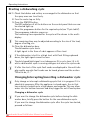
4. Press the button for the desired dishwashing cycle.
The length of the selected dishwashing cycle will flash for a moment in
the multi-display, and then the selected starting time will be displayed
again.
5. Close the door.
The dishwashing cycle will start automatically following a countdown
of the hours set.
Changing the start delay:
As long as the dishwashing cycle has not started, you can still change
the start delay set by pressing the DELAY TIMER button.
Cancelling the start delay:
As long as the dishwashing cycle has not started you are still able to
cancel the start delay. Continue pressing the START DELAY button
until the length of the selected cycle appears in the multi-display. The
selected dishwashing cycle will begin immediately after the dishwasher
door has been closed.
Changing the dishwashing cycle after the start delay has been set:
As long as the dishwashing cycle has not started, you are still able to
change the start delay set by pressing a cycle button.
0 1. Press the button for the new dishwashing cycle and hold it down.
First, the indicator for the dishwashing cycle that has just been selected
will flash.
After several seconds only the indicator for the new dishwashing cycle
will be flashing.
2. Release the cycle button.
3. Close the door.
The dishwashing cycle will start automatically following a countdown
of the hours set.
Load Sensing – Sensor Logic
If a wash programme is started even though there are only a few dishes
in the upper and/or lower rack, an intelligent electronic system adjusts
the amount of water and the duration of the wash programme to the
number of dishes. By this means it is possible to wash only a few dishes
quickly and economically. At half load (6 place settings), up to 2 litres
of water and 0.2 kWh of electricity are saved.
Downloaded
from DishWasher-Manual.com Manuals
30