1
Builder’s Guide for AMD Opteron™ Processor-Based
Servers and Workstations
30925 Rev. 3.04
February 2004
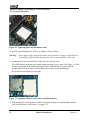
Figure 10. Tightening Down the Retention Frame
10. Lift the socket locking-lever. (Pull it out slightly, and then lift up.)
Warning:
Do not apply voltage until the heatsink is fully installed. If voltage is applied before
the heatsink is fully installed, the processor will overheat and failure will result.
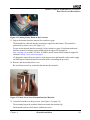
11. Gently place the zero insertion force (ZIF) processor into the socket.
The AMD Opteron processor has a small triangle marking on one corner. (See Figure 11.) This
triangle corresponds to the alignment marking on the motherboard. The corner with the
triangle must be located at the corresponding corner marked on the motherboard.
Be careful not to bend the processor pins.
Figure 11. Alignment Markers on Processor and Motherboard
12. Push down gently on the processor while lowering the locking lever and latching it into the
fully locked position. (See Figure 12 on page 23.)
22
Heatsink Installation
Chapter 4