1
MGH20 OPERATION
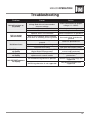
Troubleshooting
Problem
Unit will not turn on (no power)
Unit has power (but no sound)
Cause
Action
Yellow wire not connected or incorrect
voltage Red wire not connected or
incorrect voltage
Black wire not connected
Fuse blown
Speaker wires not connected
Check connections for proper
voltage (11~16VDC)
One or more speaker wires touching
each other or touching chassis ground
Check connection to ground
Replace fuse
Check connections at speakers
Insulate all bare speaker wires
from each other and chassis
ground
PROTECT appears on display
Yellow or red wire touching chassis
ground
Speaker wires touching chassis ground
Incorrect fuse rating
The WMA file is copy-protected by DRM
(Digital Rights Management)
Check for pinched wire
Use fuse with correct rating
Write files using WMA files that
are not copy-protected
NO FILE appears on display
Selected file is not available in direct or
alphanumeric search modes
Repeat search using valid
parameters
An invalid ID3 tag version is present
Version 1.0 to 2.4 ID3 tags are
supported.
An ID3 tag character is not supported
Only ASCII characters are
supported.
Unit blows fuses
NO SUPPORT appears
on display
Check for pinched wire
19