1
Appendix
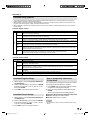
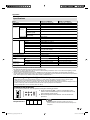
Troubleshooting
Problem
• No power
• Unit cannot be operated.
• Remote control unit does not
operate.
Possible Solution
• Check if you pressed POWER on the TV, or on the remote control unit.
(See page 18.)
• Is the AC cord disconnected? (See page 7.)
• Has the power been turned on? (See page 18.)
• External influences such as lightning, static electricity, may cause improper
operation. In this case, operate the unit after first turning off the power of the TV or
unplugging the AC cord and replugging it in after 1 or 2 minutes.
•
•
•
•
•
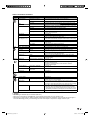
• Picture is cut off/with sidebar
screen.
• Strange color, light color, or color •
misalignment
•
• Power is suddenly turned off.
•
•
•
• No picture
• No sound
•
•
•
•
•
•
•
•
•
• The TV sometimes makes a
cracking sound.
Are batteries inserted with polarity (+, –) aligned? (See page 8.)
Are batteries worn out? (Replace with new batteries.)
Are you using it under strong or fluorescent lighting?
Is a fluorescent light illuminated near the remote control sensor?
Are screen mode adjustments such as view mode choose made correctly? (See
page 20.)
Adjust the picture tone. (See page 27.)
Is the room too bright? The picture may look dark in a room that is too bright.
Is the sleep timer set? (See page 11.)
Check the Auto Shut Off settings. (See page 27.)
The unit’s internal temperature has increased.
Remove any objects blocking vent or clean.
Is connection to other components correct? (See page 13.)
Is correct input signal source selected after connection? (See page 13.)
Is the correct input selected? (See page 13.)
Is picture adjustment correct? (See page 27.)
Is the volume too low?
Have you pressed MUTE on the remote control unit? (See page 11.)
Is connection to other components correct? (See pages 13-17.)
Check the audio output of the connected external equipment. Is the volume too low
or mufed?
When external equiprnent is connected via an HDMI cable, you may need to
configure the audio to be output through the HDMI cable.
• This is not a malfunction. This happens when the cabinet slightly expands and
contracts according to change in temperature. This does not affect the TV’s
performance.
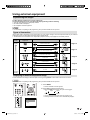
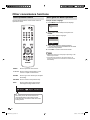
Troubleshooting-Error Message
The example of an error
Possible Solution
message displayed on a screen
• Digital channel signal strength is • Check the antenna cable. Check that the antenna is correctly setup.
low
• Digital channel is scrambled
• It is subscription channel. Contact the service provider.
• Audio only
• The channel has audio contents only.
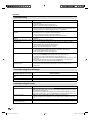
Troubleshooting-PC mode
Problem
• There is no image.
Possible Solution
• Make sure the RGB cable is properly connected. (See page 17.)
• Make sure the output signal of the PC and the input signal setting of the LCD TV set
are matched. (See page 17.)
• Some software prohibit video playback on an external display when playing back a
video with a notebook PC. This is not attributable to a problem with the LCD TV set.
• There is no sound.
• Make sure the PC audio cable is properly connected. (See page 17.)
• Check if the mute function activates, or if the volume is set to minimum. (See page
11.)
• The text is blurred.
• Adjust “Clock” and “Phase” using the PC Setting menu. (See page 27.)
• The image is not displayed in the • Adjust “Hor Position” and “Ver Position” using the PC Setting menu. (See page 27.)
center of the screen.
28
39X0131B_eng.indb 28
5/18/10 11:40:50 AM