1
810 Reference Video System
User Guide
ii
Preface
Important safety instructions – 810 Projector
Important information
About the installation location
WARNING: TO PREVENT FIRE OR SHOCK
HAZARDS, DO NOT EXPOSE THIS APPLIANCE TO
RAIN OR MOISTURE.
Do not install the projector in a place that cannot
support its weight securely.
WARNING: THIS APPARATUS MUST BE EARTHED.
CAUTION: To reduce the risk of electric shock, do
not remove cover. Refer servicing to qualified service
personnel.
This projector is equipped with a 3-pin grounding type
plug to satisfy FCC regulations. If you are unable to
insert the plug into the outlet, contact your electrician.
FCC information (USA only)
CAUTION: Unapproved changes or modifications
could void the user’s authority to operate the
equipment.
NOTE: This equipment has been tested and found
to comply with the limits for a Class A digital device,
pursuant to Part 15 of the FCC Rules. These limits
are designed to provide reasonable protection against
harmful interference when the equipment is operated in
a commercial environment. This equipment generates,
uses, and can radiate radio frequency energy and,
if not installed and used in accordance with the
instruction manual, may cause harmful interference to
radio communications. Operation of this equipment in
a residential area is likely to cause harmful interference
in which case the user will be required to correct the
interference at his own expense. Unapproved changes
or modification could
Machine noise information (Germany
only)
Changes Machine Noise Information Ordinance 3.
GSGV, January 18, 1991: The sound pressure level
at the operator position is equal or less than 70 dB (A)
according to ISO 7779.
If the mounting is not sturdy enough, the projector
could fall or overturn, possibly causing personal injury.
Important safeguards
Electrical energy can perform many useful functions.
This unit has been engineered and manufactured to
assure your personal safety. But IMPROPER USE CAN
RESULT IN POTENTIAL ELECTRICAL SHOCK OR
FIRE HAZARD. In order not to defeat the safeguards
incorporated into this product, observe the following
basic rules for its installation, use and service. Please
read these Important Safeguards carefully before use.
• All the safety and operating instructions should be
read before the product is operated.
• The safety and operating instructions should be
retained for future reference.
• All warnings on the product and in the operating
instructions should be adhered to.
• All operating instructions should be followed.
• Place the projector near a wall outlet where the plug
can be easily unplugged.
• Unplug this product from the wall outlet before
cleaning. Do not use liquid cleaners or aerosol
cleaners. Use a damp cloth for cleaning.
• Do not use attachments not recommended by the
product manufacturer as they may be hazardous.
• Do not use this product near water. Do not use
immediately after moving from a low temperature to
high temperature, as this causes condensation, which
may result in fire, electric shock, or other hazards.
• Do not place this product on an unstable cart, stand,
or table. The product may fall, causing serious
injury to a child or adult, and serious damage to the
product. The product should be mounted according
to the manufacturer’s instructions, and should use a
mount recommended by the manufacturer.
iii
Preface
• When the product is used on a
cart, care should be taken to avoid
quick stops, excessive force, and
uneven surfaces which may cause
the product and cart to overturn,
damaging equipment or causing
possible injury to the operator.
• Slots and openings in the cabinet
are provided for ventilation. These ensure reliable
operation of the product and protect it from
overheating. These openings must not be blocked
or covered. (The openings should never be blocked
by placing the product on bed, sofa, rug, or
similar surface. It should not be placed in a builtin installation such as a bookcase or rack unless
proper ventilation is provided and the manufacturer’s
instructions have been adhered to.) For proper
ventilation, separate the product from other
equipment, which may prevent proper ventilation (see
Positioning, page 13).
• This product should be operated only with the type
of power source indicated on the label. If you are
not sure of the type of power supply to your home,
consult your product retailer or local power company.
• This product is equipped with a three-wire plug. This
plug will fit only into a grounded power outlet. If you
are unable to insert the plug into the outlet, contact
your electrician to install the proper outlet. Do not
defeat the safety purpose of the grounded plug.
• Power-supply cords should be routed so that they are
not likely to be walked on or pinched by items placed
upon or against them. Pay particular attention to
cords at doors, plugs, sockets, and the point where
they exit from the product.
• For added protection of this product during a
lightning storm, or when it is left unattended and
unused for long periods of time, unplug it from the
wall socket and disconnect the cable system. This
will prevent damage to the product due to lightning
and power line surges.
• Do not overload wall sockets, extension cords, or
•
•
•
•
•
•
convenience receptacles on other equipment as this
can result in a risk of fire or electric shock.
Never push objects of any kind into this product
through openings as they may touch dangerous
voltage points or short out parts that could result in a
fire or electric shock. Never spill liquid of any kind on
the product.
Do not attempt to service this product yourself as
opening or removing covers may expose you to
dangerous voltages and other hazards. Refer all
service to qualified service personnel.
Unplug this product from the wall outlet and refer
service to qualified service personnel under the
following conditions:
a) When the power supply cord or plug is damaged.
b) If liquid has been spilled, or objects have fallen on
the product.
c) If the product has been exposed to rain or water.
d) If the product does not operate normally by
following the operating instructions. Adjust only those
controls that are covered by the Operation Manual,
as an improper adjustment of controls may result in
damage and will often require extensive work by a
qualified technician to restore the product to normal
operation.
e) If the product has been dropped or damaged in
any way.
f) When the product exhibits a distinct change in
performance - this indicates a need for service.
When replacement parts are required, be sure
the service technician has used replacement parts
specified by the manufacturer or with the same
characteristics as the original part. Unauthorised
substitutions may result in fire, electric shock, or
other hazards.
Upon completion of any service or repairs to this
product, ask the service technician to perform safety
checks to determine that the product is in proper
operating condition.
The product should be placed more than 300mm
away from heat sources such as radiators, heat
iv
Preface
•
•
•
•
•
•
•
•
registers, stoves, and other products (including
amplifiers) that produce heat.
When connecting other products such as VCRs, and
DVD players, you should turn off the power of this
product for protection against electric shock.
Do not place combustibles behind the cooling fan.
For example, cloth, paper, matches, aerosol cans or
gas lighters that present special hazards when over
heated.
Do not look into the projection lens while the
illumination lamp is turned on. Exposure of your eyes
to the strong light can result in impaired eyesight.
Do not look into the inside of this unit through
vents (ventilation holes), etc. Do not look at the
illumination lamp directly by opening the cabinet while
the illumination lamp is turned on. The illumination
lamp also contains ultraviolet rays and the light is so
powerful that your eyesight can be impaired.
Do not drop, hit, or damage the light-source lamp
(lamp unit) in any way. It may cause the light-source
lamp to break and lead to injuries. Do not use a
damaged light source lamp. If the light-source lamp
is broken, ask your retailer to repair it. Fragments
from a broken light-source lamp may cause injuries.
The light-source lamp used in this projector is a
high pressure lamp. Be careful when disposing of
the lightsource lamp. If anything is unclear, please
consult your retailer.
Do not ceiling-mount the projector to a place which
tends to vibrate; otherwise, the attaching fixture
of the projector could be broken by the vibration,
possibly causing it to fall or overturn, which could
lead to personal injury.
Use only the accessory cord designed for this
product to prevent shock.
*DO NOT allow any unqualified person to install the unit.
Be sure to ask your retailer to install the unit (eg
attaching it to the ceiling) since special technical
knowledge and skills are required for installation. If
installation is performed by an unqualified person, it
may cause personal injury or electrical shock.
Power connection
The power supply voltage rating of this product is AC
110V – 120 V, AC 200V – 240V. The power cord
used must conform to the power supply voltage. Use
only the power cord designated by your retailer to
ensure Safety and EMC. Ensure that the power cable
used for the projector is the correct type for the AC
outlet in your country. Consult your Meridian retailer for
more details.
WARNING: Do not cut off the main plug from this
equipment. If the plug fitted is not suitable for the
power points in your home or the cable is too short
to reach a power point, then obtain an appropriate
safety approved extension lead or adapter or consult
your retailer. If nonetheless the mains plug is cut off,
dispose of the plug immediately, to avoid a possible
shock hazard by inadvertent connection to the main
supply. If a new main plug has to be fitted, then follow
the instruction given below.
WARNING: THIS APPARATUS MUST BE EARTHED.
IMPORTANT:
The wires in the mains lead on this product are
coloured in accordance with the following code:
Green-and-yellow : Earth
Blue : Neutral
Brown : Live
As these colours may not correspond with the colored
marking identifying the terminals in your plug, proceed
as follows: The wire which is coloured green-and-yellow
must be connected to the terminal which is marked
with the letter E or the safety earth or coloured green
or green-and-yellow. The wire which is coloured blue
must be connected to the terminal which is marked
with the letter N or coloured black. The wire which
is coloured brown must be connected to the terminal
which is marked with the letter L or coloured red.
Preface
EMC supplement
• This equipment is in conformity with the provisions
and protection requirements of the corresponding
European Directives. This equipment is designed for
professional projector applications and can be used in
the following environments.
Controlled EMC environment (for example purpose
built broadcasting or recording studio), and the
rural outdoors environment (far away from railways,
transmitters, overhead power lines, etc).
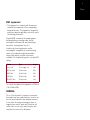
In order to get the best performance and for
electromagnetic compatibility we recommend using
cables not exceeding the length indicated below.
Longer cables may be used with clip-on ferrite
assemblies. For exceptionally long runs, use optical DVI
cabling.
Cables
Type
Length
Power cord
Power supply cord
3.0m
DVI (X4) Cable
Shielded cable
5.0m
USB Cable
Shielded cable
2.0m
LAN Cable
Shielded cable
2.0m
RS-232C Cable
Shielded cable
1.6m
The current consumption of this apparatus is 9.705A at
115v; 4.35A at 230v.
WARNING
This is a Class A product. In a domestic environment
this product may cause radio interference in which case
the user may be required to take adequate measures.
In case where the strong electromagnetic waves or
magnetism are near the signal cable, the picture will
contain noise. In such cases, please keep the cable
away from the sources of the disturbance.
vi
Preface
Important safety instructions – 810 Scaler
•
•
•
•
•
•
Read the instructions.
Keep these instructions.
Follow all instructions.
Do not use this apparatus near water.
Clean only with a dry cloth.
Install only in accordance with the manufacturer’s
instructions.
• Refer all servicing to approved service personnel.
• Do not disassemble – no user-servicable parts inside.
This apparatus has been designed with Class 1
construction and must be connected to a mains socket
outlet with a protective earthing connection (the third
grounding pin).
The apparatus may be isolated from mains power either
by unplugging the power connector from the rear of the
unit, or by unplugging the connector at the opposing
end of the power cord or cable from its supply outlet.
As a result, either or both of these connectors should
remain accessible.
Safety warnings
WARNING: TO REDUCE THE RISK OF FIRE OR
ELECTRIC SHOCK, DO NOT EXPOSE THIS
APPARATUS TO RAIN OR MOISTURE.
• Do not expose the unit to dripping or splashing.
• Do not place any object filled with liquid, such as a
vase, on the unit.
• Do not place naked flame sources, such as lighted
candles, on the unit.
To avoid overheating
• Leave at least 10cm around the equipment to ensure
sufficient ventilation.
Do not position the unit:
• In direct sunlight.
• Near heat sources, such as a radiator.
• Directly on top of heat producing equipment, such as
a power amplifier.
• On a soft surface, such as a carpet, which would
obstruct the ventilation holes in the base.
To avoid interference
Do not position the unit:
• Near strong electrical or magnetic radiation, such as
near a power amplifier.
Radio interference
FCC Warning: This equipment generates and can
radiate radio frequency energy and if not installed and
used correctly in accordance with our instructions may
cause interference to radio communications or radio
and television reception. It has been type-tested and
complies with the limits set out in Subpart J, Part 15 of
FCC rules for a Class B computing device. These limits
are intended to provide reasonable protection against
such interference in home installations.
EEC: This product has been designed and type-tested
to comply with the limits set out in EN55013 and
EN55020.
vii
Contents
Contents
Introduction
1
Stage 3: Scaler settings
32
810 Reference Video System
2
Stage 4: Other settings
33
Specifications – Projector
4
Configuring the sources
34
Specifications – Scaler
5
Adjusting the projector
36
Installing the 810 Projector
7
Operating the 810 System
39
Unpacking
8
Remote control
40
Precautions during use
9
Operating the 810 Scaler
41
Names and functions of parts
10
Using presets
42
Positioning
13
Operating the 810 Scaler from the front panel
45
Installing the projector and screen
15
Maintenance
47
Overlaying projected images 17
Cleaning and replacing the filters 48
Anamorphic lens and actuator assembly
18
Routine servicing 50
Installing the 810 Scaler
21
Troubleshooting
51
Unpacking
22
Troubleshooting – 810 Projector
52
Connections
23
Operational problems
53
Connecting up
25
Image problems
54
Setting up the 810 System
27
On-screen display messages
55
Configuration Wizard
28
Warnings using indicator lights
56
Stage 1: Resetting the product
29
Service and guarantee
57
Stage 2: Projector settings
30
Index
59
viii
Preface
Copyright and acknowledgements
Sales and service in the UK
Meridian Audio Ltd
Latham Road
Huntingdon
Cambridgeshire
PE29 6YE
England
Tel (01480) 445678
Fax (01480) 445686
Sales and service in the USA
Meridian America Inc
8055 Troon Circle
Suite C
Austell
GA30168-7849
USA
Tel (404) 344 7111
Fax (404) 346 7111
http://www.meridian-audio.com
Designed and manufactured in the UK
Meridian Audio Ltd
Latham Road
Huntingdon
Cambridgeshire
PE29 6YE
England
Copyright © 2009 Meridian Audio Ltd.
Part no: 810U/1 (P86502)
Meridian and Meridian Digital Theatre are registered
trademarks of Meridian Audio Ltd.
Marvell is a registered trademark of Marvell or its
affiliates. Qdeo is a trademark of Marvell or its affiliates.
This guide was produced by:
Human-Computer Interface Ltd,
http://www.interface.co.uk
Introduction
Introduction
This guide provides full information about unpacking the 810 Scaler and
connecting it to the 810 D-ILA Projector and the other equipment in the
system.
Introduction
810 Reference Video System
The 810 Reference Video System consists of two
parts: a powerful 10 megapixel (4096 x 2400) Ultra
High Definition projector, unique in the home theatre
industry, and an advanced scaler featuring Marvell
Qdeo™ technology that upscales SD and HD sources
to this stunning level of resolution for a smooth, flickerfree, cinematic experience. Indeed, the 810 system
surpasses even industry Digital Cinema specifications,
delivering a level of picture quality that is virtually never
experienced outside a film-studio’s preview theatre.
lens). It operates extremely efficiently to keep power
consumption under 1.5 kW.
In the 810 Reference Video System the projector
and scaler are operated as a single system. Serial
data commands flow between the two units to select
the appropriate projection and image processing
parameters at both ends of the chain, so that the
image will always be at its best, whether it is receiving
it from DVD, HDTV, Blu-ray Disc or alternative sources.
The projector is also configured from the scaler
interface, which includes a built-in configuration web
server, accessed via the scaler’s Ethernet connection.
Where some scaling technologies still rely on copying
adjacent pixels to handle upconversion, the 810 scaler
is fully interpolative, and offers a significantly higher
level of processing. A brand new design, featuring
Marvell’s powerful Qdeo™ processing technology, the
scaler converts any digital source (480i to 1080p) up to
full 10 megapixel resolution. Its quiet and natural video
processing produces images that are free from noise
and devoid of artefacts whether operating in 4:3, 16:9
or 2.35:1 modes.
The 810 Projector
The 810 scaler includes a new class of adaptive
video format conversion technologies, accepting video
resolutions from 480i to 1080p, 24 to 60 frames per
second.
The 810 Projector comes with a newly developed
1.27", 4096 x 2400 pixel D-ILA (Direct-drive Image
Light Amplifier) device, and achieves an ultra-high
resolution of 9.83 million pixels – five times that of full
HD.
It achieves a high contrast ratio of 10,000:1 (native) by
combining the D-ILA device with WireGrid (an inorganic
reflective polarising plate) that is employed in the new
optical engine.
The 810 projector enables vertical and horizontal lens
shift (dependent on lens assembly), which enables a
larger degree of flexibility in the layout. It can also be
installed at a tilt angle of up to ±90°, which provides
greater flexibility in the location of the projection screen.
The design is compact and light, and enables
stacking – the projector weighs 55kg (excluding
Each 810 Projector is individually calibrated with unique
procedures developed by William Phelps.
It is supplied with the 810 Scaler, offering upscaling
and rendering of HD and SD sources to incredible 10
megapixel resolution
The 810 Scaler
Incorporated in the technology is a complete set of
noise and artefact reduction technologies. Per-pixel
noise and compression artefact reduction removes
noise typically inherent in digital video, while per-pixel
motion-adaptive 3-D de-interlacing removes jaggies
and eliminates feathering. Marvell’s Adaptive Contrast
Enhancement (ACE) and Intelligent Color Remapping
(ICR) render rich and vivid images, optimising texture,
detail, edges, contrast and colour, providing a
consistent, immersive viewing experience for all types
of content.
The scaler accepts both HDMI and DVI inputs and
delivers a quad DVI path to the projector. In addition
the unit features Meridian comms for full integration
with a Meridian Digital Theatre system, RS232 and
Introduction
USB maintenance ports for firmware upgrades (the
latter allowing an update to be loaded via a memory
stick) and an RS232 connection to the projector.
The scaler is a rack-mounting unit in the same style as
Meridian’s existing C Series of installation products and
includes a vacuum fluorescent front-panel display with
soft buttons that can be used to operate and configure
the unit. Modelled on Meridian’s successful G Series
user interface, the display labels the buttons according
to context.
Introduction
Specifications – Projector
General
Optical system
• Power supply: AC 110V – 120V,
AC 200V – 240V 50/60Hz
• Power consumption: 1230W (Standby mode: 2.7W)
• Current consumption: Max 10.9A (AC 110V – 120V)
Max 6A (AC 200V – 240V)
• Calorific power 4428kJ/h (1058kcal/h)
• Air capacity - Intake: Approx. 3m3 (106ft3)/min
• Air capacity - Discharge: Approx. 3m3 (106ft3)/min
• Allowable operating temperature range: 10°C to
35°C (50 – 95°F)
• Allowable operating humidity range: Less than 80%
(no condensation)
• Allowable storage temperature range: -5°C to 60°C
(23 – 140°F)
• Installation altitude: Operation guarantee: 2000m
(6560ft) and below
Performance guarantee: 1500m (4920ft) and below
• Dimensions: 663 x 827 x 342mm
(26.1 x 32.6 x 13.5in) (W x D x H)
• Mass: 55kg (121lb)
• Dimensions with anamorphic lens: 675 x 977 x
342mm (26.6 x 38.5 x 13.5in) (W x D x H)
• Projection method: D-ILA analogue drive system x 3
• D-ILA element *†: 1.27" (4096x2400 pixels) x 3 pcs
(total no. of pixels: 29,491,200 pixels)
• Projection lens: See lens data sheets for options
• Light-source lamp: 825W xenon lamp
• Screen size: 2 – 7.6m (80 – 300in) approx (see lens
data)
• Projection distance: Approx. 2.5 – 12m
(8.2 – 39.4ft)
Inputs
Notes
• Video input: DVI-D (dual link) 24 pins (supports 12bit extended input) x 4 (supports HDCP*)
• LAN: RJ45 x 1
• USB: Type B (Slave) x 1
• RS-232C: D-sub 9 pins (male) x 1 (to scaler)
• Some open source software is embedded in this
product. For more information, please contact
Meridian’s service dept.
• Specifications and appearance of this product may
be subject to change for improvement without prior
notice.
• Please note that some of the pictures and
illustrations may have been abridged, enlarged or
contextualised in order to aid comprehension. Images
may differ from the actual product.
* HDCP is the abbreviation for High-bandwidth Digital
Content Protection system. Images from the DVI
input terminal may not be displayed due to HDCP
specification changes.
* D-ILA is the abbreviation for Direct drive Image Light
Amplifier
† D-ILA devices are manufactured using extremely
high-precision technology. Pixel effectiveness is
99.99%. Only 0.01% or less of the pixels would either
not light up or remain permanently lit up.
Signal system
•
•
•
•
Input format: From 810 scaler
DVI clock: to 165MHz (Single)
(Rx clock): to 330MHz (Dual)
Display resolution: 4096x2400
Introduction
Specifications – Scaler
Supported formats
Enclosure
• Input formats: 480i, 576i, 720p, 1080i,1080p;
24/50/60fps
• Colour formats: RGB, YCbCr444, and YCbCr422.
• Output formats: 4096x2400 to drive projector inputs
• Supported PC resolutions: VGA (640x480), SVGA
(800x600), XGA (1024x768), WXGA (1280x768),
SXGA (1280x1024), UXGA (1600x1200), all 60Hz.
• 2U, 19in rack mounting, uniform with C Series
• 437 x 343 x 87mm (17.25 x 13.5 x 3.5in)
(W x D x H) approx, not including protuberances
Processor technology
• Multiple Marvell Qdeo™ video processors under
microprocessor control
Connections
•
•
•
•
•
•
•
•
•
•
•
HDMI In
DVI in
Quad DVI Out
RS232 Projector socket
RS232 Control socket
Maintenance RS232 socket for firmware upgrades
USB port for firmware upgrades via memory stick
Meridian Comms BNC
Ethernet port (RJ45) – for future use
IR sensor port for connection of G12 remote sensor
Trigger output x 3: two are used to control the
anamorphic lens slide; one trigger is spare and user
configurable
Controls
• Soft Buttons x 5: take on different functions
according to context, eg Setup, Projector Settings,
Scaler Settings etc.
• Power, Display, Reset, Home and More front panel
buttons
Meridian Audio reserves the right to amend product
specifications at any time.
Introduction
Installing the 810
Projector
Installing the 810 Projector
This chapter explains how to install the 810 Projector. Please read the
following carefully when installing this unit.
The 810 Projector is designed to be controlled and operated solely by
the 810 Scaler. As a result it is not necessary to access the projector
setup features directly. Refer to the subsequent chapters for set-up and
operation instructions including calibration and installation.
Installing the 810
Projector
Unpacking
The 810 Projector is supplied with the following
accessories:
• 3m power cord for the US, UK and EU markets.
• Warranty.
• This manual.
If any of these items are missing please contact your
Meridian retailer.
Note: You should retain the packaging in case you
need to transport the unit.
Optional accessories
• 810 service kit: SP7015AA
• Replacement lamp: SP7009AA
Installing the 810
Projector
Precautions during use
Burning-in of D-ILA device
Maintenance procedures
Do not allow the same still picture to be projected for
a long time or an abnormally bright video image to be
projected.
Clean dirt on the cabinet with a soft cloth. In case of
heavy soiling, soak a cloth in neutral detergent diluted
with water, wring dry and wipe, followed by wiping
again using a dry cloth.
Do not project still images with a high brightness or
high contrast on the screen for a long time. This video
image could be burnt into the D-ILA device.
Pay special attention when projecting video games and
computer program images.
Motion images such as normal video playback images
do not pose the burning-in problem.
Viewing conditions – brightness of
room
Shield the screen from direct sunlight or bright lights,
such as by using a curtain. Images are best projected
in a darkened room.
Do not view the screen for prolonged hours. Looking at
a screen continually for a prolonged time is tiring to the
eyes. Allow your eyes to rest at intervals.
Do not use this unit if the image is flickering due to the
installation conditions or environment.
Operational environment
Do not use this projector in rooms with cigarette smoke
or oily smoke. This may cause the unit to malfunction.
When mounting this projector to the ceiling check the
temperature around the projector unit. When a heater is
in use, the ceiling may reach a temperature higher than
anticipated, leading to malfunction of the unit.
Pay attention to the following to prevent the cabinet
from deteriorating in condition, getting damaged, or the
paint from coming off.
•
•
•
•
•
Do not wipe with a stiff cloth
Do not wipe with force
Do not wipe with thinner or benzene
Do not spray with volatile chemicals like insecticide
Do not allow prolonged contact with rubber or plastic
products
Removing dirt from the lens
Use commercial blowers or lens cleaning papers (for
cleaning glasses and cameras).
IMPORTANT: Do not use fluid-type cleaning agents.
This may lead to peeling of the surface coating film.
Lens surface is fragile. Avoid rubbing it hard or
knocking it.
Gauging replacement time of
components
This product contains consumable components,
such as optical components and filters, required for
maintaining the function of the product. The timing
for replacing these components varies considerably
according to the frequency and environment of use. For
details on replacement of components please consult
your authorised Meridian retailer.
10
Installing the 810
Projector
Names and functions of parts
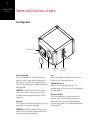
Front/Right Side
Front air inlet/filter
Intake air
Intake air
Lens cap
Lens
Front air inlet/filter
The air inlets absorb air to cool the interior of the
projector. A filter is mounted inside the projector to
remove dirt in the air that enters through the inlets.
Clean the filter regularly (see Cleaning and replacing the
filters, page 48).
CAUTION: Do not block the air inlets with papers,
cloth, or soft cushions. Doing so may cause heat
to build up inside the projector and result in fire or
malfunction.
Lens cap
Fit the cap on the lens when this projector is not in use
to prevent the lens from becoming dirty.
CAUTION: Do not project images with the lens cap
attached. The lens cap may be deformed due to the
heat, or the projector may malfunction.
Adjustable
feet
Side air
inlet/filter
Lens
(Several lens options are available for this projector.)
Remove the lens cap before projection.
Adjustable feet (x 4)
Adjust the feet until the projector is level. The
adjustable range is 20 mm for each. See Adjusting the
inclination, page 14.
Side air inlet/filter
The air inlets absorb air to cool the interior of the
projector. A filter is mounted inside the projector to
remove dirt in the air that enters through the inlets.
Clean the filter regularly (see Cleaning and replacing the
filters, page 48).
11
Installing the 810
Projector
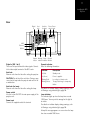
Rear
Digital
in
Vent
hole
Vent hole
(for lamp)
Power Power
switch input
DVI 1
DVI 2
USB
Ethernet
CONTROL
USB
Exhaust air
DVI 3
LAN
OPERATE I/B
STANDBY/ON
LAMP
RS232
RS-232C
DVI 4
WARNING
Operate Warning Lamp Operate
button indicator indicator indicator
Digital in [DVI 1 to 4]
These are the input terminal for video signals. Connect
to the video output terminals of the 810 scaler.
Vent hole
Warm air exits from the hole after cooling the projector.
CAUTION: Do not block the vent holes. Doing so may
cause heat to trap inside the projector and result in fire
or malfunction.
Vent hole (for lamp)
Warm air exits from the hole after cooling the lamp.
Power switch
Use this to turn ON/OFF the main power supply of the
projector unit.
Power input
Connect the supplied cord to this terminal.
Operate indicator
Gives the following information:
Indicator
Description
Lit (Red)
Standby mode.
Lit (Green)
Power is supplied.
Blinking (Red)
In cooling (cool down) mode.
Blinking (Green)
The projected image is temporarily
hidden.
For details on indicator displays during warnings, refer
to Warnings using indicator lights, page 56.
Lamp indicator
This indicator lights up when the lamp time exceeds
1400 hours. You may wish to arrange for this light to
be visible.
For details on indicator displays during warnings, refer
to Warnings using indicator lights, page 56.
A lamp life message appears on screen when the lamp
time has exceeded 1500 hours.
12
Installing the 810
Projector
Warning indicator
This indicator lights up when abnormality occurs on this
projector. For details, refer to Warnings using indicator
lights, page 56.
Operate button
Pressing this button for one second or longer when
in the standby mode (main power supply is ON) turns
on the power of the projector unit. Pressing it for one
second or longer when the power is ON switches the
projector to the standby mode.
RS232
This interface is for connection to the 810 Scaler.
Ethernet
This port should be led out to an accessible point for
service access.
USB
This port should be led out to an accessible point for
service access.
13
Installing the 810
Projector
Positioning
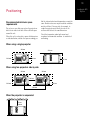
Recommended minimum space
requirements
Do not use a cover that may enclose the projector or
block the air inlets/vent holes. Allow sufficient space
around the unit.
When this unit is enclosed in a space with dimensions
as indicated below, ventilate the space accordingly so
that the internal and external temperatures remain the
same. Smaller enclosures may be used but ventilation
must be sufficient. You may wish, for example, to
couple the projector vents directly to vents in the
enclosure with at least the same dimensions.
Check the temperature under both normal and
exceptional environmental conditions to avoid risk of
overheating.
When using a single projector
300 mm
600 mm
300 mm
600 mm
600 mm
When using two projectors side by side
300 mm
300 mm
640 mm
600 mm
600 mm
1,300 mm
When the projector is suspended
300 mm
minimum
14
Installing the 810
Projector
To mount the projector to the ceiling, mount a suitable
shelf to the ceiling, then install the unit on the shelf.
For safety, any maintenance work should be carried
out on an adjustable platform that can be raised to a
suitable height for access.
CAUTION: Special expertise and techniques are
required for mounting this unit. Be sure to ask your
retailer or a specialist to perform the installation.
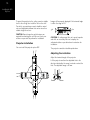
Projector installation
You can install this projector up to ±90°.
Images will be properly displayed if the horizontal angle
is within the range of ±5°.
5
5
CAUTION: To ceiling-mount this unit, special expertise
and skills are necessary. Be sure to employ the
authorized retailer or specialized work contractors for
installation.
The projector cannot be installed upside down.
Adjusting the inclination
Adjust the horizontal angle of the projector.
90°
90°
Lift the projector and turn the adjustable foot in the
direction indicated by the arrow to extend or retract the
foot. The adjustable range is 20 mm.
Extend
Retract
15
Installing the 810
Projector
Installing the projector and screen
It is recommended that this projector be installed at
right angles to the screen. You can shift the projection
screen position vertically and horizontally with some
optional lenses available for this projector as shown
below. (See lens documentation)
When upward shift amount is up to
50% (Lens S only)
Install the projector so that the lower end of the
projection screen is at the same height as the centre of
the lens.
When downward shift amount is up to
50% (Lens S only)
Install the projector such that the upper end of the
projection screen is at the same height as the centre of
the lens.
Centre line of lens
Screen
90
90
90
Screen
90
90
90
Centre line of lens
When there is no upward/downward
shift
Install the projector such that the center of the
projection screen is at the same height as the centre of
the lens.
Screen
90
90
90
Centre line of lens
When shift amount to the right is up to
25% (Lens S only)
Install the projector such that the centre of the lens is
aligned with the Qr position from the left edge of the
screen.
16
Installing the 810
Projector
When there is no shift to the left or
right
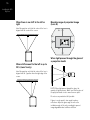
Movable range of projected image
(Lens S)
Install the projector such that the centre of the lens is
aligned with the centre of the screen.
50%
25%
25%
50%
When light passes through the glass of
a projection booth
When shift amount to the left is up to
25% (Lens S only)
Install the projector such that the centre of the lens is
aligned with the Qr position from the right edge of the
screen.
NOTE: When light passes through the glass, the
quantity of light decreases. Make sure that the glass of
the projection booth is not in more than one piece.
Do not use any material at all if possible.
If glass is used, mount it at an angle to reduce
reflections. Adjust the glass angle as well as the
installation angle of this unit accordingly to prevent
image degradation due to diffuse reflection.
17
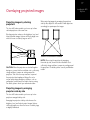
Overlaying projected images
Projecting images by stacking
projectors
The lens shift feature enables you to use up to three
stacked projectors at the same time.
When projecting images by arranging the projectors
side by side, adjust the shift amount of both projectors
accordingly to superimpose the images.
Stacking projectors enhances the brightness level, and
helps to provide images that are sufficiently bright even
when the venue is relatively large or well-lit.
CAUTION: When the projectors are stacked together
during use, ensure that the installation site is sufficiently
strong and there is proper air cooling around the
projectors. Take the necessary measures to prevent
the projectors from toppling or falling off so as to
ensure safety during emergency situations, such as
earthquakes, and to prevent accidents from occurring.
For details, please consult your authorised retailer.
Projecting images by arranging
projectors side by side
The lens shift feature enables you to use up to two
projectors arranged side by side.
Arranging two projectors side by side enhances the
brightness level, and helps to project images that are
sufficiently bright even when the venue is relatively large
or brightly illuminated.
NOTE: When using the projectors by arranging
them side by side, ensure that the installation site is
sufficiently strong and there is proper air cooling around
the projectors. For details, please consult your Meridian
retailer.
Installing the 810
Projector
18
Installing the 810
Projector
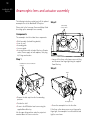
Anamorphic lens and actuator assembly
The following instructions explain how to fit the optional
anamorphic lens to the Meridian 810 Projector.
Step 2
Collar Clamp
Screw positions
Please refer to the Iscoscope Owner and Setup Guide
for setting up the anamorphic lens assembly.
Components
The anamorphic lens kit includes these components:
•
•
•
•
•
Shelf assembly (sled and fixing bracket)
Lens (in case)
Assembly guide
Isco user guide
Accessories box which includes: Allen keys, Remote
control, Power supply unit with adapters, Jack plug
kit, Fixings and washers
Step 1
M10 Button Head Screw & Washer
(4 places)
• Loosen off the three collar clamp screws until they
are little more than finger tight using the supplied
2mm Allen key.
Step 3
Collar
• Remove the dust caps from the four mounting
positions.
• Position the shelf.
• Screw in the M10 button head screws using the
supplied 6mm Allen key.
Use the upper fixing positions when the projector is
mounted above the screen centre line.
Anamorphic Lens
• Screw the anamorphic lens into the collar.
If the three collar clamp screws are not loosened to
finger tight, the anamorphic lens will be difficult and
tight to screw home.
19
Installing the 810
Projector
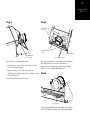
Step 4
Step 5
Anamorphic Lens
Assembly
M6 Adjustment
screws
4th Single Clamp
Screw Position
Once the lens is screwed firmly home:
• Undo the three collar clamp screws fully and rotate
lens until correctly aligned.
• Tighten all three collar clamp screws and the
additional fourth single clamp screw located at rear of
the mounting collar.
‘In’ & ‘Out’ direction
‘Left’ & ‘Right’ direction
The entire anamorphic lens assembly can be adjusted
out (away from the projector), in (towards the
projector), and left and right, by loosening the M6
screws with the supplied 4mm Allen key.
Step 6
Use the 2mm Allen key for all screws.
Connector box
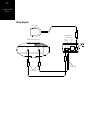
Connect the anamorphic lens assembly connector box
to the 810 Scaler, as shown in the following diagram.
20
Installing the 810
Projector
Wiring diagram
Power Supply
Anamorphic Lens
Connector box
Trigger Inputs
Lens/PWR
810 Reference Video Scaler
COMM
1.25A
24V
Trigger 2
Trigger 1
Sled Actuate
Sled Power
DVI Output 2
DVI Output 1
Ethernet
2.5mm Jack
3.5mm Jack
21
Installing the 810
Scaler
Installing the 810 Scaler
This chapter explains how to install the 810 Scaler. It describes what you
should find when you unpack the product, and how you should connect it
to the other equipment in the system.
You should not make any connections to the product or to any other
component in the system while the AC power supply is connected and
switched on.
22
Installing the 810
Scaler
Unpacking
The 810 Scaler is supplied with the following
accessories:
• 810 remote control with batteries.
• Power cord.
• This manual.
If any of these items are missing please contact your
Meridian retailer.
Note: You should retain the packaging in case you
need to transport the unit.
Mounting
The 810 Scaler is designed to be mounted in a
standard 2U, 19in rack, uniform with Meridian C Series
products.
Note that for adequate cooling, ensure that you do not
obstruct the fan on the left-hand side of the unit, or the
vent on the right-hand side of the unit.
23
Installing the 810
Scaler
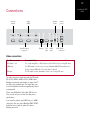
Connections
Infra-red
repeater
IR
IN
Trigger
outputs
Trigger
Output
DVI Output 4
Trigger 3
DVI Output 3
Meridian
Comms
Trigger 2
Trigger 1
Sled Actuate
Sled Power
DVI Output 2
DVI Output 1
Ethernet
DVI Input
HDMI
Input
Meridian
Comms
RS232
control
USB
Host
RS232
Control
RS232
Projector
Quad DVI outputs
to projector
Ethernet
DVI
input
HDMI
input
USB RS232
to projector
Video connections
Use this connection
To connect to this
DVI Outputs 1 to 4
The corresponding DVI 1 to DVI 4 inputs on the 810 D-ILA Projector, using DVI cables.
HDMI Input
The HDMI output of a video source, such as a Meridian G95 DVD Surround Receiver
System, using an HDMI cable. The sound channel is ignored.
DVI Input
The DVI output of a video preamplifier or video source, using a DVI cable.
The video connections should be made with HD-quality
DVI to DVI, HDMI to HDMI, or DVI to HDMI cables.
Meridian recommends cable lengths no longer than 27
feet (8m) using standard cable. For longer cable runs,
an external equalizer/extender and good quality cable is
recommended.
Please consult Meridian if optical fibre DVI links are
to be used to verify we can meet the cable power
specifications.
if you need the audio on your HDMI source, ie HDMI
carries both, then you need a Meridian HD621 HDMI
Audio Processor to split the audio off to drive a
Meridian processor?
24
Installing the 810
Scaler
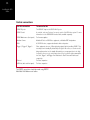
Control connections
Use this connection
To connect to this
RS232 Projector
The RS232-C input on the 810 D-ILA Projector.
RS232 Control
A controller, such as a Crestron, for remote control of the 810 video system. For more
information see the 810 RS232 Interface Guide, available separately.
RS232 Maintenance (front panel)
For firmware updates.
Meridian Comms
Meridian G Series or 800 Series equipment, or Meridian DSP loudspeakers.
IR IN
A G12 IR Receiver, or approved alternative infra-red repeater.
Trigger 1, Trigger 2, Trigger 3
Other equipment, via mono 3.5mm jack plug outputs (tip hot) providing 12VDC. They
are always low in standby. By default they are high for all sources, so can be used to
bring another product out of standby. Alternatively you can program them to be high
for specific sources; eg to control a projection screen. In systems with an anamorphic
lens sled, Trigger 1 and Trigger 2 are dedicated to Sled Power and Sled Actuate
respectively.
Ethernet
For future expansion.
USB Host (back and front panel)
For future expansion.
The RS232 connections should be made using RS232
Male-Male Null Modem serial cables.
25
Installing the 810
Scaler
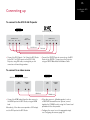
Connecting up
To connect to the 810 D-ILA Projector
810 Scaler
VIDEO OUTPUTS
DVI 4 DVI 3 DVI 2 DVI 1
810 D-ILA Projector
RS232
PROJECTOR
VIDEO INPUTS
DVI 4 DVI 3 DVI 2 DVI 1
RS232-C
RS232 lead
DVI leads
• Connect the DVI Outputs 1 to 4 from the 810 Scaler
to the DVI 1 to DVI 4 inputs on the 810 D-ILA
Projector, using DVI leads, ensuring that you link
connectors with matching numbers.
• Connect the RS232 Projector connector on the 810
Scaler to the RS232-C connector on the Projector,
using an RS232 Male-Male Null Modem Cable.
To connect to a video source
G95 DVD Surround Receiver System
810 Scaler
HDMI
OUTPUT
HDMI
INPUT
MERIDIAN
COMMS
HDMI lead
• Connect the HDMI output from the video source to
the HDMI input on the 810 Scaler, using an HDMI
lead.
Alternatively, if the video source provides a DVI output,
use the DVI input on the 810 Scaler.
MERIDIAN
COMMS
COMMS lead
• If the video source is a Meridian product, such as
a G95 DVD Surround Receiver System, connect
together the COMMS sockets using the Comms lead
provided with the other product.
• Configure the source to use the appropriate input;
see Configuring the sources, page 34.
26
Installing the 810
Scaler
To connect to other Meridian G Series or 800 Series equipment
810 Scaler
G Series, 500 Series, or 800 Series unit
MERIDIAN
COMMS
MERIDIAN
COMMS
COMMS lead
In a system of Meridian products the products should
be linked together in a chain, via the COMMS sockets,
using the Comms leads supplied with each product.
The sequence in which you connect the units is not
important.
Note: Do not, under any circumstances, connect any
equipment other than Meridian G Series or 800 Series
to the socket marked COMMS on the back of the
product.
27
Setting up the 810
System
Setting up the 810 System
This chapter explains how to configure the 810 Scaler using the
Configuration Wizard from the front panel.
It then explains how to set up the 810 Reference Video System using
the remote control in conjunction with the on-screen display.
28
Setting up the 810
System
Configuration Wizard
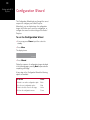
The Configuration Wizard leads you through the correct
sequence to configure your Scaler/Projector.
Alternatively, you can skip between the configuration
stages, which allow you to reset the configuration, or
configure the sources or other settings of the Scaler/
Projector.
To run the Configuration Wizard
• If necessary press Power to put the scaler into
standby.
• Press More.
The display shows:
7IZARD
• Press Wizard.
Follow the sequence of configuration stages described
in the following pages, pressing Next to proceed after
completing each stage.
At any stage in the Configuration Wizard the following
options are available:
To do this
Press
Go back to an earlier configuration option
Back
Go to the next configuration option
Skip
Return to the title screen for the stage
Home
Exit from the configuration menus
Power
29
Stage 1: Resetting the product
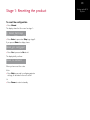
To reset the configuration
• Press Wizard.
The display shows the title screen for stage 1:
2ESET3ETTINGS
%XIT
%NTER
3KIP
• Press Enter to proceed or Skip to go stage 2.
If you pressed Enter the display shows:
2ESETALLSETTINGS
.O
9ES
• Press Yes to proceed or No to exit.
The display briefly confirms:
2ESETTODEFAULT
When you have reset the scaler:
Either:
• Press Skip to proceed to configuring projector
settings, as described in the next section.
Or:
• Press Power to return to standby.
Setting up the 810
System
30
Setting up the 810
System
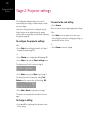
Stage 2: Projector settings
The Configuration Wizard provides access to the
essential projector settings, needed to obtain a visible
on-screen display.
To move to the next setting
Once these settings have been configured correctly,
further settings can be adjusted using the remote
control and on-screen display, as described in Adjusting
the projector, page 36.
When you have finished configuring projector settings:
To configure the projector settings
Either:
• Press Next on the last option of the last source
(Force Signal) to proceed to configuring settings, as
described in the next section.
Or:
Either:
• Press Skip after resetting the product; see Stage 1:
Resetting the product, page 29.
Or:
• Press Wizard; see Configuration Wizard, page 28.
• Press Skip to skip past the Reset settings menu.
The display shows the title screen for stage 2:
0ROJSETTINGS
"ACK
%NTER
3KIP
• Press Enter to proceed or Skip to go to stage 3.
The display shows the first projector setting, Test
Pattern, and the current value of that setting, Off:
4EST0ATTERN
/FF
3ET
• Press Source.
"ACK
.EXT
wxy z{|
• Press Next or Back to step between settings.
The options are summarised in the table on the next
page.
To change a setting
• Press A or V to step through the alternative values
for the setting.
• Press Power to return to standby.
31
Setting up the 810
System
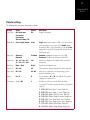
Projector settings
The following table summarises the projector settings:
Setting
Values
Default
Description
Test Pattern
Off, Colour bars,
Crosshatch 1,
Crosshatch 2,
Staircase, Ramp, Flat.
Off
Displays a test pattern.
Display Mode
Cross, Single, Double.
Cross
Single displays just the input from DVI 1 ; this option is useful
when connecting a source such as a PCs. Double displays
the input from DVI 1 on the left and DVI 3 on the right. Cross
displays DVI 1 top left, DVI 2 top right, DVI 3 bottom left, and
DVI 4 bottom right.
Input Levels
Standard or
Enhanced.
Standard
Standard is appropriate for input levels of 0 to 255.
Enhanced is for input levels of between 16 and 235.
Lamp Power
80%, 83%, 86%, 89%,
91%, 94%, 97%, 100%.
80%
Specifies the lamp power. The lamp life will be extended at
lower powers.
Back Colour
Black or Blue.
Black
Specifies the background colour.
Frame Lock
Off or On.
Off
This synchronizes all video input signals for picture projection.
Flip H, Flip V
Off or On.
Off, Off
Allows you to compensate for an inverted image; eg if the
projector is behind the screen.
Gamma
B, C, A.
B
Sets the Gamma to A: 2.2, B: 1.8, or C: 2.6. The system is
calibrated for a Gamma of 1.8.
Force Signal
1 to 6 or Off.
6
Should be set to 6 for use with the 810 scaler. When
connecting a PC directly to the projector another setting may be
required:
1:
2:
3:
4:
5:
6:
7:
8:
4096x2400,
4096x2400,
2048x2400,
2048x2400,
2048x1200,
2048x1200,
1024x2400,
1024x2400,
None, Dual: 1 screen, Dual Link
None, Single: 1 screen, Single Link
2Stripe, Dual: 2 screens, Dual Link
2Stripe, Single: 2 screens, Single Link
Cross, Dual: Centre cross, Dual Link
Cross, Single: Centre cross, Single Link
4Stripe, Dual: Stripes, Dual Link
4Stripe, Single: Stripes, Single Link
32
Setting up the 810
System
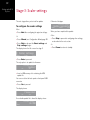
Stage 3: Scaler settings
The next stage allows you to install an update.
To configure the scaler settings
Either:
• Press Next after configuring the projector settings.
&IRMWAREUPDATE
5PDATESUCCESSFUL
"ACK
%NTER
3KIP
When you have completed the update:
Either:
Or:
• Press Wizard; see Configuration Wizard, page 28.
• Press Skip to skip past the Reset settings and
Proj. settings stages.
The display shows the title screen for stage 3:
3CALERSETTINGS
"ACK
%NTER
3KIP
• Press Enter to proceed.
The only option is to update the firmware:
&IRMWAREUPDATE
5PDATE
.O
9ES
• Insert a USB memory stick containing the MFU
update file.
You can use either the back panel or front panel USB
connector.
• Press Yes to proceed.
The display shows:
&IRMWAREUPDATE
0LEASE7AIT
.O
9ES
If no suitable update file is found the display shows:
&IRMWAREUPDATE
.O-3$
"ACK
Otherwise it displays:
• Press Skip to proceed to configuring other settings,
as described in the next section.
Or:
• Press Power to return to standby.
33
Setting up the 810
System
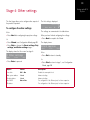
Stage 4: Other settings
The final stage allows you to configure other aspects of
the product’s operation.
The first setting is displayed:
,ENSSLIDE
/N
To configure the other settings
"ACK
.EXT
wxy z{|
Either:
The settings are summarised in the table below.
• Press Next after configuring the projector settings.
When you have finished configuring the settings:
Or:
• Press Next to complete the Wizard.
• Press Wizard; see Configuration Wizard, page 28.
The display shows:
• Press Skip to skip past the Reset settings, Proj.
settings, and Scaler settings stages.
7IZARDCOMPLETE
The display shows the title screen for stage 4:
/THERSETTINGS
"ACK
%NTER
3KIP
• Press Enter to proceed.
"ACK
%XIT
3TART
Either:
• Press Exit to return to standby.
Or:
• Press Start to return to stage 1; see Configuration
Wizard, page 28.
Option
Values
Description
Lens slide
Off or On.
Enables the anamorphic sled.
Main system address
1 to 8.
Advanced setting.
Product address
1 to 8.
Advanced setting.
Use DHCP
No or Yes.
For configuration of the Ethernet port; for future expansion.
IP address
For configuration of the Ethernet port; for future expansion.
34
Setting up the 810
System
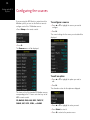
Configuring the sources
If you are using the 810 Scaler in conjunction with a
Meridian system, you can use the Sources menu to
configure each of the 12 Meridian sources.
•Press Setup on the remote control.
To configure a source
• Press A or V to highlight the source you want to
configure.
• Press >.
The current settings for the source you selected will be
displayed:
• Press >.
The Sources menu will be displayed:
To edit an option
• Press A or V to highlight the option you want to
edit.
• Press >.
The alternative values for the option are displayed:
This shows a list of the standard 12 Meridian sources,
corresponding to the 12 source selection keys on the
MSR+ remote control:
CD, RADIO, DVD, AUX, DISC, TAPE, TV,
CABLE, SAT, VCR1, VCR2, and GAME.
• Press A or V to highlight the value you want.
• Press Select to select it.
• Press < to return to the previous menu.
35
Setting up the 810
System
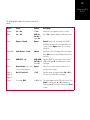
The following table explains the function of each of the
options:
Option
Values
Default
Description
Enabled
Yes or No.
All Yes.
Whether the source appears in the list of sources.
Blank
Yes or No.
DVD=No,
Sat=No, all
others Yes.
Set to Yes to blank the display for audio-only sources.
Colour
Bypass or Expand.
Bypass
Expand increases the colour range from 16-235 to
0-255 and can improve the colour depth/black level
on some sources. Bypass leaves the colour range
untouched.
Aspect Ratio
Auto, Manual, or Fixed.
Manual
Specifies the effect of changing source on the Aspect
Ratio. Auto selects the last valid aspect ratio used on
that source.
Input
HDMI, DVI, or LV.
DVD=HDMI,
SAT=DVI, all
others LV.
Specifies whether the source takes its video from the
HDMI or DVI input. LV (Last Valid) leaves the input
unchanged.
Preset
Bypass, Qdeo, or one of the
seven user-defined presets.
Bypass
Allows you to associate a preset with the source to
specify the video settings.
Trigger 1,
Trigger 2,
Trigger 3
On, Off, Last Valid.
All Off
Specifies whether the trigger should be On or Off for
the source. Last valid leaves it unchanged.
Legend
For example DVD.
As MSR+ key.
The legend displayed on the OSD for the source. Press
Select to edit the name, > or < to step between
characters, A or V to change a character, then Select
to finish
36
Setting up the 810
System
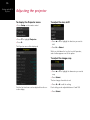
Adjusting the projector
To display the Projector menu
To adjust the lens shift
• Press Setup on the remote control.
• Press V to highlight Projector.
• Press >.
The Projector menu will be displayed:
• Press A or V to highlight the direction you want to
shift.
• Press > or Select.
While you hold down the key the lens shift operates,
and a red bar appears next to the option.
To adjust the image crop
• Press A or V to highlight the dimension you want to
crop.
• Press Select.
The bar changes from blue to red.
• Press < or > to edit the setting.
Only the first two items can be adjusted from the onscreen display.
Each setting can be adjusted between 0 and 100.
• Press Select.
37
Setting up the 810
System
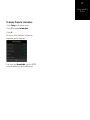
To display Projector information
• Press Setup on the remote control.
• Press V to highlight Information.
• Press >.
This shows service information, the Projector
temperature, and the lamp time:
If the items show Unavailable check the RS232
connection between the Scaler and Projector.
38
Setting up the 810
System
39
Operating the 810
System
Operating the 810 System
This chapter explains how to operate the 810 Reference Video System
using the remote control in conjunction with the on-screen display.
40
Operating the 810
System
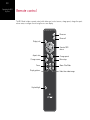
Remote control
The 810 Scaler includes a remote control, which allows you to select sources, change preset, change the aspect
ratio or zoom, or configure the unit using the on-screen display:
8 10 R EFERENCE V IDEO S YSTEM
On
Power on
Off
Power off
Display info
Info
Operate OSD
menus
Enter
Aspect ratio
Aspect
Preset
Change source
Main setup
Source
Focus
Hide
+
Focus
Display patterns
Setup
T
Pattern
–
Key backlight
Change preset
Zoom
W
Zoom: Tele-Wide
Hide/show video image
Light
41
Operating the 810
System
Operating the 810 Scaler
Changing the aspect ratio
Selecting a source
• Press Aspect on the remote control.
• Press Source on the remote control.
The Aspect menu will be displayed:
The Source menu shows a list of enabled sources:
• Press A or V to highlight the source you want to
select.
• Press A or V to highlight the aspect ratio you want
to select.
• Press Enter.
The current aspect ratio will be indicated by a red bar.
The options are explained in the following table:
Option
Description
Full
Uses all pixels of the projector by converting
the 16:9 aspect ratio to 17:10, resulting
in a 5% horizontal stretch which is usually
unnoticeable.
16:9
Displays a 16:9 image. There will be black
bars above and below the image.
4:3
Displays a 4:3 image. There will be black
bars each side of the image.
2.35:1
Anamorphic widescreen; only available with
an anamorphic lens.
Changing the focus
• Press Focus + or - on the remote control.
Hiding the video image
• Press Hide on the remote control.
• Press Hide again to reveal the image.
• Press Enter.
The current source will be indicated by a red bar.
Displaying a test pattern
• Press Pattern on the remote control.
This steps through the available patterns.
Zooming the image
• Press Zoom T or W on the remote control.
T (Tele) zooms in. W (Wide) zooms out.
Displaying information
• Press Info on the remote control.
Displays the input rate, input source, preset mode, and
aspect ratio on the on-screen display.
42
Operating the 810
System
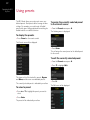
Using presets
The 810 Scaler allows you create up to seven userdefined presets. Each preset defines a range of video
settings. For example, you could create a Football
preset which gives settings optimised for watching live
football matches on satellite television.
To assign the currently selected preset
to the current source
• From the Presets menu press >.
The following menu is displayed:
To display the presets
• Press Preset on the remote control.
The Presets menu will be displayed:
• Press Enter.
This will assign the current preset as the default preset
for the source.
To edit the currently selected preset
• From the Presets menu press >.
• Press V to highlight Edit:
This shows a list of the two built-in presets, Bypass
and Qdeo, and the seven user-definable presets.
The currently selected preset is indicated by a red bar.
To select a preset
• Press A or V to highlight the preset you want to
select.
• Press Enter.
The preset will be indicated by a red bar.
• Press >.
The Edit menu will be displayed:
43
Operating the 810
System
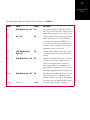
The following table explains the function of each of the options on the Edit menu:
Option
Values
Default
Description
NR
High, Medium, Low, or Off.
Off
Noise Reducer. Reduces the Additive White Gaussian
Noise present in the incoming video. A per pixel motion
adaptive filtering technique is used to reduce the noise.
CAR
On or Off.
Off
Compression Artefact Reducer. Helps reduce blocking
arfifacts and mosquito noise caused by DCT-based
video compression techniques like MPEG. For this
mode to be most effective the source material should
be unprocessed when it reaches the 810, as any prior
upsampling will reduce its effectiveness.
ICR
Vivid, Sky+Grass, Sky,
Grass, Off.
Off
Intelligent Colour Remapper. Identifies specific colours
of the image and makes them more vivid and visually
pleasing.
ACE
High, Medium, Low, or Off.
Off
Adaptive Contrast Enhancement. Improves the contrast
of a video stream on a frame by frame basis using
statistics from the previous frame. It functions in
different ways for different scenes (adaptive). It can
bring out details from darker portions of a scene while
preserving the brighter parts without washing them out.
EDGE
High, Medium, Low, or Off.
Off
Edge Enhancement. Sharpens the transients in a video
signal. This has the effect of emphasizing the details,
transitions and edges of the image. It can help improve
soft images such as from Standard Definition material.
Colour
See below.
All 50%
Allows you to adjust the image colour balance.
44
Operating the 810
System
To show the image colour settings
• Press A or V to highlight Colour on the Edit menu
and press >.
The Colour menu is displayed:
To rename the currently selected
preset
• From the Presets menu press >.
• Press V to highlight Rename.
• Press >.
• Press Enter to edit the name, > or < to step
between characters, A or V to change a character,
then Enter to finish
This shows the numeric setting of each of the ten
image colour parameters, together with a graphical
indication of the value as a blue bar under the name.
To edit the image colour settings
• Press A or V to highlight the setting you want to
adjust.
• Press Enter.
The bar changes from blue to red.
• Press < or > to edit the setting.
Each setting can be adjusted between 0 and 100.
• Press Enter.
45
Operating the 810 Scaler from the front panel
The 810 Scaler can also be operated from the front
panel using the soft keys below the display:
Current
preset
Source
Input
$6$
($-)
Current
aspect ratio
"YPASS
0
3OURCE
0RESET
!SPECT
Step through
sources
Step through
presets
Step through
aspect ratios
Input format:
resolution and
frame rate
Operating the 810
System
46
Operating the 810
System
47
Maintenance
Maintenance
48
Maintenance
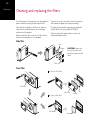
Cleaning and replacing the filters
Turn off the power of the projector unit, and unplug the
power cord when cleaning or replacing the filters.
Failure to do so may cause dust to enter the projector
and shadows to appear on the projected image.
Clean the filters regularly. If the filters are soiled, air
intake efficiency may deteriorate, thus resulting in
malfunction of the product.
The filters and associated components are supplied in
the 810 Service Kit, part number SP7015AA.
Replace each filter with a new one if the filter fails to
remove dust thoroughly or if it is damaged.
If dirt has entered this product please consult your
authorised Meridian retailer.
Side filter
Filter
Sponge
CAUTION: Remove the
four screws on the inner
side (these fasten the filter
cover).
Filter cover
Front filter
Front View of Filter Panel
Filter Panel
Filter Cover
Rear View of Filter Panel
Filter Bracket
Honeycomb
Filter
Sponge
49
Maintenance
Procedure
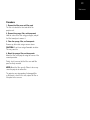
1. Remove the filter cover and filter panel
The filter is located at the front and side of the
projector unit.
2. Remove the sponge, filter, and honeycomb
Hold the centre of the filter using your fingers, and pull
the filter toward you to remove it.
3. Clean the sponge, filter, and honeycomb
Remove any dirt or dust using a vacuum cleaner.
CAUTION: Do not clean using a flammable air duster.
This may cause fire.
4. Mount the sponge, filter, and honeycomb
Mount the filter to the projector using the reverse of the
removal procedure.
Finally, check to ensure that the filter cover and filter
panel are firmly mounted.
NOTE: Mount the filter correctly. Failure to do so may
cause the projector to malfunction.
The projector may stop operating if a damaged filter
or filter panel is used. In this case, replace the filter or
filter panel with a new one.
50
Maintenance
Routine servicing
Clean dirt from the cabinet
Use a soft cloth. In case of heavy soiling, soak a cloth
in neutral detergent diluted with water, wring dry and
wipe, followed by wiping again using a dry cloth.
Pay attention to the following to prevent the cabinet
from deteriorating, getting damaged, or the paint from
coming off.
•
•
•
•
•
Do not wipe with a stiff cloth
Do not wipe with force
Do not wipe with thinner or benzene
Do not spray volatile chemicals like insecticide
Do not allow prolonged contact with rubber or plastic
products
Remove dirt that is attached to the vent
holes
Use a vacuum cleaner. Wipe using a cloth if a vacuum
cleaner cannot be used. Leaving dust attached may
prevent adjustment of the internal temperature and
result in malfunction of the projector.
Clean dirt on the lens
Use commercial blowers or lens cleaning papers (for
cleaning glasses and cameras).
Do not use fluid-type cleaning agents. This may lead to
peeling of the surface coating film.
The lens surface is fragile. Avoid rubbing or knocking it.
Replacement of light source lamp
The light source lamp is a consumable item. Replace
with a new lamp unit if the image appears dull or if the
lamp burns out.
• When the lamp needs to be replaced soon, users will
be notified through a message on the screen and the
indicator. See Warnings using indicator lights, page
56.
• The life of the lamp used for this projector is about
1500 hours. This is the average life of lamps, and
not a guaranteed value.
• The lamp life may not reach 1500 hours depending
on the operating conditions.
• Deterioration progresses rapidly when the remaining
lamp usable time is short.
• If the image is dark or colour tone abnormal, replace
the lamp unit as soon as possible.
• For details on replacement of the lamp unit, please
consult your Meridian retailer.
51
Troubleshooting
Troubleshooting
We expect you to achieve superb results with the 810 Reference Video
System. If, however, you encounter any problems, either when installing
it, or during operation, please check the following pages for suggested
solutions.
If these suggestions fail to cure the problem, please contact your
Meridian retailer for further assistance.
52
Troubleshooting
Troubleshooting – 810 Projector
Check the following points before sending this product
for repair.
The following phenomena are not malfunctions.
If there is no abnormality on the screen
when the phenomena below appear,
they are not malfunctions
• The top or front part as well as the rear of the
projector unit is hot
• A creaking sound is heard from the projector
• Device noise is heard from the interior of the
projector
• There is colour bleeding on the screen
When the projector fails to run properly
due to external interference, perform
the following operations.
• Check to ensure that the power is shut down. Unplug
the power cord, and insert again.
• Turn on the power again.
A sound may be heard when the
lamp burns out. However, this is not a
hazard.
D-ILA devices are manufactured using
extremely high-precision technology.
However, some of the pixels may not
light up or remain permanently lit up.
53
Troubleshooting
Operational problems
There is no power
Is the power cord disconnected?
• Insert the power cord (plug) properly.
Is the main power supply switch turned on?
• Turn on the main power supply switch of the projector
unit.
Is the lamp in the cool down mode?
• Turn on the power again after the cool down mode
ends.
Is the lamp protection function triggered? (This function
is triggered when the power shuts down such as during
power failures.)
• Wait till the temperature of the lamp has gone down.
(Turn on the main power supply switch to run the fan
and cool down the lamp.) Turn on the power after
about 3 minutes.
Projector works when the power is
turned on, but stops abruptly after a
few minutes
Are the air inlets and vent holes blocked?
• Turn off the main power supply switch, and remove
the blockage. After removing, turn on the power
again.
Is the temperature of the room high?
• Set the temperature of the room or the surrounding
temperature of this projector to an appropriate level.
Are the filters dirty?
• Clean the filters; see Cleaning and replacing the
filters, page 48.
The remote control does not change
the image settings
• Check that the RS232 projector control connection
has been made between the Scaler and Projector.
• Check that the Information menu on the OSD
Setup contains valid data. If the RS232 cable
between the Scaler and Projector is not connected
correctly the Information menu will display
Unavailable on items that require a response from
the Projector.
54
Troubleshooting
Image problems
Image is dark
Is the lamp near exhaustion?
• Check the Lamp Time indicator (see Warnings
using indicator lights, page 56) or displayed screen
message (see On-screen display messages, page
55). Obtain a replacement lamp from your Meridian
retailer or contact Meridian’s service department.
• Set it to a correct distance. See the lens
documentation.
Colouring of the image is poor or
distorted
Are the signals of the connected devices valid input
signals?
Video image does not appear
• Check to ensure that they are valid input signals, and
input compatible signals accordingly.
Is the lens cap removed?
Is the input cable correctly connected?
• Remove the lens cap.
• Connect the input cable correctly.
Is the scaler properly connected?
• Connect the scaler correctly.
Projection position on the screen has
shifted
Is the power to the connected devices turned on?
Has the setup position of the projector been shifted?
• Turn on the power to the connected devices.
• Check the setup position of the projector.
Are correct signals being output from the connected
devices?
Image disappears suddenly
• Check that the source you are using has the correct
video input selected; DVI or HDMI.
• Configure the connected devices correctly.
Are the signals of the connected devices within
operating range?
• Check to ensure that they are valid input signals, and
input compatible signals accordingly.
Is the video image hidden?
• Press the Hide button on the remote control.
Video image is blurred
Is the projector out of focus?
• Adjust the focus using the Focus Lens setting on the
810 Scaler.
Is the projection distance too short or too long?
Are the video signals correctly input?
• Check the signals and connection.
The screen does not darken
immediately when the projection has
ended
The shutdown process is in progress
• Please wait for an addition 10 seconds for the
shutdown process to complete
The quadrants of the image are in the
wrong positions
• Check that the Quad DVI cables between the Scaler
and Projector and connected correctly.
55
On-screen display messages
The following on-screen display messages are
displayed when the lamp life has expired or when the
input signal is invalid.
Lamp Time Over
Displayed when the lamp time has exceeded 1500
hours. The message is displayed for a period of 3
minutes during each projection.
• Replace with a new lamp unit.
For details on replacement of the lamp unit, please
consult your Meridian retailer.
Out of Range
Displayed when there is input of video signals that
cannot be used with this unit.
• Input video signals that can be used.
No Input
Displayed when the 810 Scaler is not connected to the
DVI input ports, or when the scaler is connected but
not powered on.
• Connect and power up the scaler.
Troubleshooting
56
Troubleshooting
Warnings using indicator lights
The lamp time and warning mode are indicated using the indicator light.
For details on indicator displays during normal operation, refer to Names and functions of parts, page 10.
No
Standby
Lamp
Warning
Description
1
*
On
-
About time to replace lamp (Lamp time has exceeded 1400 hours)
2
*
On
-
When the lamp life has expired (Lamp time has exceeded 1500
3
*
On
-
When lamp does not light up and projection fails
4
†
Blinking
On
When the lamp goes off during projection
5
†
Blinking
On
Temperature around the lamp is high
6
†
Blinking
On
When the internal temperature is unusually high
7
†
-
On
When the external temperature is unusually high
8
†
-
On
When the cooling fan stops running
9
†
-
On
When error occurs in the circuit operation
* The indicator lights up in red when the in standby mode, and in green when in the operating mode.
† The indicator lights up in red when in the warning mode, and blinks in red when in the cool down mode.
Measures when the warning mode appears
When the projector switches to the warning mode (Nos. 3 - 9), projection stops automatically, and the cooling fan
runs for about 3 minutes.
After the cooling fan stops running, turn off the main power supply switch, and remove the power plug from the
outlet.
Perform the following checks and take the corresponding measures.
No
Check
Measure
3–4
Check whether the projector has been
subject to shock during operation.
Turn on the power again.
4–9
Check whether the air inlets are
blocked by objects.
Allow some time for the projector to cool down.
Check to ensure that the external
temperature of the projector is normal.
If the warning indication is displayed again, turn off the main power supply switch after the cooling fan stops
running. Then remove the power plug from the power socket. Call your Meridian retailer for repair.
57
Troubleshooting
Service and guarantee
Service
The Meridian components have been carefully designed
to give years of untroubled service. There are no userserviceable parts inside the case, nor do the units
require any form of maintenance.
In the unlikely event that your 810 Projector or Scaler
fails to function correctly, it should be returned, in its
original packaging, to your Meridian retailer.
In case of difficulty within the UK or USA please
contact the appropriate sales and service address
shown on page viii.
In case of difficulty outside the UK or USA, please
contact your nearest Meridian retailer; see:
http://www.meridian-audio.com/find-a-retailer.aspx
No responsibility can be accepted for the 810 Projector
or Scaler whilst in transit to the factory or an agent,
and customers are therefore advised to insure the unit.
When seeking service under guarantee, proof of the
date of purchase will be required.
Guarantee
The 810 Projector and Scaler are guaranteed against
defects in material and workmanship for two years from
the date of purchase.
The guarantee is void if the 810 Projector or Scaler
have been subject to misuse, accident, or negligence,
or have been tampered with or modified in any way
without the written authorisation of Meridian Audio
Limited.
Note: Connecting anything other than the correct
network lead to the Comms socket may cause damage
to the 810 Scaler which will not be covered by this
guarantee. Attempted servicing by unauthorised people
may also invalidate this guarantee. Labour and carriage
charges are not covered unless by local agreement.
Outside the UK, local warranty liability is restricted to
equipment purchased within the territory. Our agents
abroad are only under contractual obligation to service,
under guarantee, equipment sold through them. They
are entitled to make a non-refundable charge for any
service carried out on other equipment.
This guarantee does not limit your statutory rights
within the United Kingdom.
58
Troubleshooting
59
Index
A
Index
connections
anamorphic lens 20
accessories 8, 22
between the projector and scaler
projector 8
25
ACE (Adaptive Contrast
control 24
Enhancement) 43
projector 11
adjusting the inclination 14
anamorphic lens
assembly 18
connections 20
aspect ratio
16:9 41
2.35:1 41
4:3 41
Full 41
to a video source 25
HDMI output, connecting 25
video 23
hiding the video image 41
Display Mode 31
image crop, adjusting 36
DVI
image problems 54
connecting 25
indicator light warnings 56
input 23
information 41
outputs 23
infra-red repeater 24
E
F
COMMS, connecting 26
configuration, resetting 29
Configuration Wizard 28
configuring
other settings 33
projector settings 30
scaler settings 32
Input Levels 31
inputs
DVI 23
EDGE (Edge Enhancement) 43
CAR (Compression Artefact Reducer)
colour preset options 43
I
ICR (Intelligent Colour Remapper) 43
Ethernet connection 24
43
H
HDMI input 23
C
cleaning the filter 48
guarantee 57
D
B
back panel connections 23
Gamma 31
scaler 23
control connections 24
aspect ratio, changing 41
Back Colour 31
G
HDMI 23
installation
projector 7
scaler 21
filter, cleaning and replacing 48
firmware update 32
Flip H, Flip V 31
focus, changing 41
Force Signal 31
Frame Lock 31
front panel, operation from 45
front panel display 45
L
Lamp Power 31
lamp time, displaying 37
Lamp Time Over message 55
lens shift, adjusting 36
60
Index
M
preset options (continued)
Meridian Comms 24, 26
messages 55
Lamp Time Over 55
No Input 55
Out of Range 55
mounting 22
projector 13
scaler 22
N
No Input message 55
projector settings (continued)
colour 43
Gamma 31
EDGE (Edge Enhancement) 43
Input Levels 31
ICR (Intelligent Colour Remapper)
Lamp Power 31
43
NR (Noise Reducer) 43
presets 42
Test Pattern 31
R
assigning to a source 42
remote control 40
displaying 42
replacing the filter 48
editing 42
resetting the product 29
renaming 44
routine servicing 50
selecting 42
RS232 connections 24
projector 2
NR (Noise Reducer) 43
adjusting 36
S
O
adjusting the inclination 14
safety warnings vi
components 10
on-screen display messages 55
scaler 2
connections 11
operating the scaler 41
connections 23
information 37
installation 21
installation 7
other settings 33
mounting 22
mounting 13
Out of Range message 55
operating 41
optional accessories 8
outputs
settings 32
positioning 13
DVI 23
specifications 5
precautions 9
trigger 24
unpacking 22
settings 30, 31
from the front panel 45
screen
overlaying projected images 17
specifications 4
P
troubleshooting 52
selecting a source 41
unpacking 8
service 57
installing projector with 15
positioning, projector 13
Projector menu 36
servicing 50
precautions 9
projector settings 30
settings
preset options
Back Colour 31
projector 30
ACE (Adaptive Contrast
Display Mode 31
scaler 32
Enhancement) 43
Flip H, Flip V 31
setting up 27
CAR (Compression Artefact
Reducer) 43
Force Signal 31
Frame Lock 31
61
Index
sources
assigning preset to 42
configuring 34
selecting 41
specifications
projector 4
scaler 5
T
Test Pattern 31
test patterns, displaying 41
trigger outputs 24
troubleshooting 51
image problems 54
operational problems 53
projector 52
U
unpacking
projector 8
scaler 22
updating the firmware 32
USB Host connection 24
V
video connections 23
video image, hiding 41
video source, connecting to 25
W
warnings 56
Z
zooming the image 41
62
Index