1
5.17.
Windows button
Press this button to Cancel any changes (adjustments, reset champion table, and calibration data) and exit the
game to go to Windows DOS.
5.18.
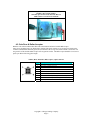
The Diagnostics Dialog Box
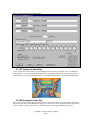
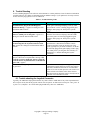
This is started by the Diagnostic button from the Adjustment Dialog Box. Major problems, like connectors
disconnected, are prompted to be connected when the game starts.
Figure 1, Diagnostic Dialog Box
The Boxes for the Switches turn green when the switch is closed, and go back to gray when the switch is
opened. A sound is made when the switch opened and closed. The Rectangles for the 100K potentiometers fill
up green when the potentiometer reaches its CALIBRATED full value (not necessarily 100K). And are empty
(gray) when they are at 0 ohms. The Gas and Brake pedals typically use about 1/3 to 1/2 a full turn of the
potentiometer and will never reach their full 100K ohm value. Note, the displayed value in the dialog box (after
calibration) implies the calibrated full range. Sounds are made when the potentiometer reaches Maximum and
Minimum calibrated values. The steering wheel also has a center position sound and bar graph pauses in the
center position; this is normal.
The status line(s) print OK or a typical corrective action, like plug in the connector. In extreme cases, a
Windows OS error number is displayed .
5.18.1. Pulse Meter Button
Press this button to advance the coin meter by 1 count per press.
Copyright © Chicago Gaming Company
Page 14