1
SRP-500 Command Manual
Rev. 1.00
http://www.bixolon.com
SRP-500 Command Manual
■ Contents
1. Notice...................................................................................................................................................................................................... 3
2. SRP-500 Supported Commands ........................................................................................................................................................... 4
2-1 Command Description Items .............................................................................................................................................................. 5
2-2 Details of Control Commands ............................................................................................................................................................. 6
Rev. 1.00
BIXOLON
-2-
SRP-500 Command Manual
1. Notice
This document contains proprietary information of BIXOLON Corporation and its affiliates. You may utilize the information solely for the
purpose of facilitating authorized sales and service of, or developing software and similar products for authorized use with, BIXOLON
products, provided that such proprietary information may not be used, reproduced, or disclosed to any other parties for any other purpose
without the prior written permission of BIXOLON Corporation. BIXOLON has no liability for loss or damage arising from or relating to your
use of or reliance on the information in the document.
We at BIXOLON maintain ongoing efforts to enhance and upgrade the functions and quality of all our products.
specifications and/or user manual content may be changed without prior notice.
Rev. 1.00
BIXOLON
In following, product
-3-
SRP-500 Command Manual
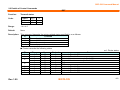
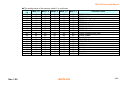
2. SRP-500 Supported Commands
No.
1
2
3
4
5
6
7
8
9
10
11
12
13
14
15
16
17
18
19
20
21
Command
EOT
ENQ
BS ^ E
HT
LF
CR
DLE
ESC SP
ESC !
ESC %
ESC &
ESC *
ESC ESC 2
ESC 3
ESC <
ESC =
ESC ?
ESC @
ESC D
ESC E
Rev. 1.00
Function
Transmit status
Request to printer
Set NV user memory area
Horizontal tab
Print and line feed
Print and carriage return
Set real-time command mode
Set the character right space
Set print mode
Select/cancel user-defined character set
Define user-defined character set
Specify bit image mode
Turn underline mode on/off
Select default line spacing
Set line spacing
Return home
Select peripheral device
Cancel user-defined characters
Initialize printer
Set horizontal tab positions
Turn emphasized mode on/off
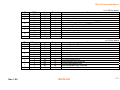
No.
22
23
24
25
26
27
28
29
30
31
32
33
34
35
36
37
38
39
40
41
BIXOLON
Command
ESC G
ESC J
ESC R
ESC U
ESC a
ESC d
ESC g 0
ESC g n
ESC m
ESC p
ESC r
ESC t
ESC u
ESC v
ESC {
GS ( A
GS I
GS V
GS a
GS r
Function
Turn double-strike mode on/off
Print and feed paper
Specify an international character set
Specify unidirectional print mode
Set position alignment
Print and feed n lines
Define macro (For logo)
Execute macro (For logo)
Partial cut (one point left uncut)
Generate pulse
Select print color
Select character code table
Transmit peripheral device status
Transmit paper sensor status
Turn upside-down print mode on/off
Execute test print
Transmit printer ID
Select cut mode and cut paper
Enable/disable Automatic Status Back (ASB)
Transmit status
-4-
SRP-500 Command Manual
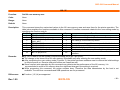
2-1 Command Description Items
Command
Function:
Command function outline
Code:
Command format expressed in ASCII, hexadecimal, and decimal codes
Range:
Argument value (Setting range) for the command
Default:
Initial argument value for the command
Description:
Detailed command function description
Remarks:
Additional information about using the command
Differences:
Variations depending on the printer model
Rev. 1.00
BIXOLON
-5-
SRP-500 Command Manual
2-2 Details of Control Commands
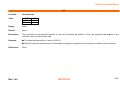
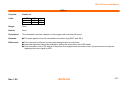
EOT
Function:
Code:
Transmit status
ASCII
Hex
Decimal
Range:
1≤n≤4
Default:
None
EOT
04
4
n
n
n
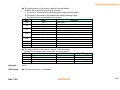
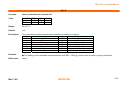
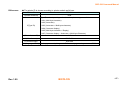
Description: This command transmits the printer-related status specified by n as follows:
n
Function
1
Transmit printer status
2
Transmit off-line status
3
Transmit error status
4
Transmit paper roll sensor status
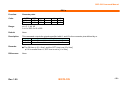
■ Printer transmits the following status
n=1: Printer status
Bit
0
1
2
3
4
5
6
7
Rev. 1.00
Binary
0
1
0
1
0
1
1
0
0
0
Hex
00
02
00
04
00
08
10
00
00
00
Decimal
0
2
0
4
0
8
16
0
0
0
Status
Not used. Fixed to Off
Not used. Fixed to On
Drawer kick-out connector pin 3 is LOW
Drawer kick-out connector pin 3 is HIGH
Online
Offline
Not used. Fixed to On
Not used. Fixed to Off
Not used. Fixed to Off
Not used. Fixed to Off
BIXOLON
-6-
SRP-500 Command Manual
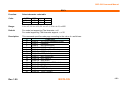
n=2: Off-line status
Bit
0
1
2
3
4
5
6
7
Off/On
Off
On
Off
On
Off
On
On
Off
On
Off
On
Off
Hex
00
02
00
04
00
08
10
00
20
00
40
00
Decimal
0
2
0
4
0
8
16
0
32
0
64
0
Binary
0
1
0
1
0
1
1
0
1
0
1
0
Hex
00
02
00
04
00
08
10
00
20
00
40
00
Decimal
0
2
0
4
0
8
16
0
32
0
64
0
Status
Fixed
Fixed
Cover is closed
Cover is open
Paper is not being fed by using the paper FEED button
Paper is being fed by the paper FEED button
Fixed
No paper-end stop
Printing is being stopped
No error
Error has occurred
Fixed
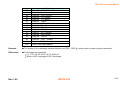
n=3: Error status
Bit
0
1
2
3
4
5
6
7
Rev. 1.00
Status
Not used. Fixed to Off
Not used. Fixed to On
No mechanical error
Mechanical error occurred
No autocutter error
Autocutter error occurred
Not used. Fixed to On
No unrecoverable error
Unrecoverable error occurred
No auto-recoverable error
Auto-recoverable error occurred
Not used. Fixed to Off
BIXOLON
-7-
SRP-500 Command Manual
n=4: paper sensor status
Bit
0
1
2,3
4
5,6
7
Remarks:
Binary
0
1
00
11
1
00
11
0
Hex
00
02
00
0C
10
00
60
00
Decimal
0
2
0
12
16
0
96
0
Status
Not used. Fixed to Off
Not used. Fixed to On
Paper near end sensor: paper adequate
Paper near end sensor: paper near end
Not used. Fixed to On
Paper end sensor: paper present
Paper end sensor: paper not present
Not used. Fixed to Off
■ This command can be executed in a real time mode using DLE.
■ In a real time mode, the status is transmitted to the host upon being requested that can check the printer operational
condition with it and takes appropriate measures accordingly.
Differences: None
Rev. 1.00
BIXOLON
-8-
SRP-500 Command Manual
ENQ
Function:
Code:
Request to printer
ASCII
Hex
Decimal
ENQ
05
5
n
n
n
Range:
n=2
Default:
None
Description:
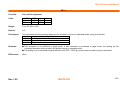
This command enables the printer to restore from an error state after clearing the receive and print buffers.
Remarks:
■ This command can be executed in a real time mode with DLE preceding it.
■ In a real time mode, upon receiving this command, the printer carries out the resume operation to get back normal by
clearing error conditions.
■ With a serial interface, the error state of the printer, limited to recoverable errors, can be removed by sending this
command even if the printer is in offline or busy condition.
■ With a parallel interface, this command is not performed in a busy condition because the printer can not receive the
data from the host.
Differences:
Rev. 1.00
None
BIXOLON
-9-
SRP-500 Command Manual
BS ^ E
Function:
Set NV user memory area
Code:
None
Range:
None
Default:
None
Description:
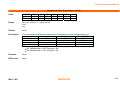
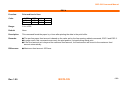
This command stores the customized values to the NV user memory area and uses them for the printer operation. The
table below explains the functions available in this command. Executes commands related to the user setting mode by
specifying the function code fn.
fn
Format
No.
Function
1
BS ^ E pL pH fn
1
Start the user setting mode
2
BS ^ E pL pH fn
2
End the user setting mode (Performs a soft reset)
BS ^ E pL pH fn [b18...b11]...
3
3
Set value(s) for the memory switch
[bk8...bk1]
4
BS ^ E pL pH fn a
4
Transmit the settings of the memory switch to the host
5
BS ^ E pL pH fn
5
Specify the paper width
6
BS ^ E pL pH fn
6
Transmit the paper width
11
BS ^ E pL pH fn d1...dk
11
Set the communication conditions for the serial interface
Transmit the communication conditions for the serial
12
BS ^ E pL pH fn a
12
interface
Remarks:
■ pL, pH is used to set the number of bytes following pH to (pL + pH x 256).
■ The change in the items of the NV user memory is available only after entering the user setting mode.
■ After completing the user setting mode (Function 2), the printer performs software reset to restore the initial settings
in effect at power on. Receive and print buffers are cleared as well.
■ Since frequent write operation by this command may deteriorate the performance of the NV memory, it is
recommended to write to NV memory when the significant change in the setting is required.
■ While processing this command, the printer remains busy. Therefore the data transmission by the host is not
available. The real time commands and ASB operations are not processed.
Differences:
Rev. 1.00
■ Function (1,2,3,4) are supported
BIXOLON
- 10 -
SRP-500 Command Manual
<Function 1> BS ^ E pL pH fn (fn=1)
Code:
ASCII
Hex
Decimal
BS
08
8
^
5E
94
E
45
69
pL
pL
pL
pH
pH
pH
fn
fn
fn
Range:
(pL + pH x 256) = 1
fn=1
(pL=1, pH=0)
Default:
None
Description:
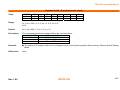
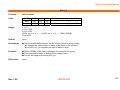
This command starts the user setting mode, enabling the printer to notify that the mode has changed as follows:
[Mode change feedback]
Hexadecimal
Decimal
Number of Data
Header
37H
55
1 byte
Flag
20H
32
1 byte
NUL
00H
0
1 byte
Remarks:
■ This command is effective only in standard mode, not in page mode.
■ Upon entering the user mode setting mode by this command, the printer transmits “mode change feedback” to the
host.
■ The user setting mode should be enabled prior to processing <Function 2> through 12. Otherwise, those functions
are ignored.
■ After confirming “mode change feedback”, it is recommended to send the command to reconfigure the NV user
memory.
Differences:
Rev. 1.00
None
BIXOLON
- 11 -
SRP-500 Command Manual
<Function 2> BS ^ E pL pH fn d1 d2 d3 (fn=2)
Code:
ASCII
Hex
Decimal
BS
08
8
^
5E
94
E
45
69
pL
pL
pL
pH
pH
pH
fn
fn
fn
Range:
(pL + pH x 256) = 1
fn=2
Default:
None
Description:
This command terminates the user setting mode and performs a software reset.
Remarks:
■ This command activates setting items set in the user setting mode.
■ All the setting items will be effective only after performing this command.
■ After executing a software reset, the printer resumes the setting in effect at power on.
Differences:
None
Rev. 1.00
(pL=1, pH=0)
BIXOLON
- 12 -
SRP-500 Command Manual
<Function 3> BS ^ E pL pH fn [b18...b11]...[ bk8...bk1] (fn=3)
Code:
ASCII
Hex
Decimal
BS
08
8
^
5E
94
E
45
69
pL
pL
pL
fn
fn
fn
[b18...b11]... [bk8...bk1]
[b18...b11]... [bk8...bk1]
[b18...b11]... [bk8...bk1]
Range:
9≤ (pL + pH x 256) ≤ 65535
fn=3
b=48, 49, 50
1 ≤ k ≤ 10
Default:
It varies depending on the printer model
Description:
■ This command changes all the Memory Switch(Msw) 1 through 8 to the value specified by b simultaneously as
follows:
• When b=48, 49, the corresponding bit is set to Off and On respectively.
• When b=50, there is no change in the memory switch.
■ The setting items of the memory switch 1 are as follows:
Msw
1-1~3
Rev. 1.00
3
48
48
48
48
49
49
49
49
Value
2
48
48
49
49
48
48
49
49
1
48
49
48
49
48
49
48
49
Function
Print density 130%
Print density 120%
Print density 110%
Print density 150%
Print density 100%
Print density 140%
Print density 90%
Print density 80%
BIXOLON
- 13 -
SRP-500 Command Manual
Msw
Value
Function
48
2 byte character mode not selected
1-4
49
2 byte character mode selected
48
Print speed 80mm/s
1-5
49
Print speed 50mm/s
1-6
48
Reserved
• The print density adjusts the darkness of characters to be printed.
• 2-byte character mode is selected to support for Chinese, Japanese, and Korean model.
• The printer supports 2 different printing speeds, 80 and 50mm/sec.
Please be sure that the printing quality at higher speed may be worse than at the lower.
■ The setting items of the memory switch 2 are as follows:
Msw
Value
48
49
48
49
2-1
2-2
Function
Font selection: Font A
Font selection: Font B
Autocutter Function: Partial Cutting
Autocutter Function: Full Cutting
■ Code page selection using the memory switch 2-3 through 2-8.
Msw2-8
48
48
48
48
48
48
48
Rev. 1.00
Msw2-7
48
48
48
48
48
48
48
Msw2-6
48
48
48
48
49
49
49
Msw2-5
48
48
49
49
48
48
49
Msw2-4
48
49
48
49
48
49
48
Msw2-3
48
48
48
48
48
48
48
BIXOLON
Character Table
PC437
Katakana
PC850
PC860
PC863
PC865
WPC1252
- 14 -
SRP-500 Command Manual
Msw2-8
48
48
48
48
48
48
48
48
48
49
49
49
49
49
49
49
49
49
49
49
49
49
49
49
49
Rev. 1.00
Msw2-7
48
49
49
49
49
49
49
49
49
48
48
48
48
48
48
48
48
49
49
49
49
49
49
49
49
Msw2-6
49
48
48
48
48
49
49
49
49
48
48
48
48
49
49
49
49
48
48
48
48
49
49
49
49
Msw2-5
49
48
48
49
49
48
48
49
49
48
48
49
49
48
48
49
49
48
48
49
49
48
48
49
49
Msw2-4
49
48
49
48
49
48
49
48
49
48
49
48
49
48
49
48
49
48
49
48
49
48
49
48
49
Msw2-3
48
48
48
48
48
48
48
48
48
48
49
48
49
48
48
48
48
48
48
48
48
48
48
48
48
BIXOLON
Character Table
PC866
PC852
PC858
PC862
PC864
Thai42
WPC1253
WPC1254
WPC1257
Farsi
WPC1251
PC737
PC775
Thai 14
Hebrew old code
WPC1255
Thai 11
Thai 18
PC855
PC857
PC928
Thai 16
WPC1256
WPC1258
Not used
- 15 -
SRP-500 Command Manual
■ The setting items of the memory switch 3 are as follows:
Specify the 2 dimensional bar codes to be enabled using the memory switch 3-1 through 3-4.
Msw
3-1
3-2
3-3
3-4
Value
Function
48
PDF417 not selected
49
48
49
48
49
48
PDF417 selected
DATAMATRIX not selected
DATAMATRIX selected
MAXI CODE not selected
MAXI CODE selected
QR CODE not selected
49
QR CODE selected
• The printer supports 4 kinds of 2 dimensional bard codes such as PDF417, DATAMATRIX, MAXI code and QR
code.
• The 2-D barcode to be used is activated by specifying the corresponding memory switch.
• The number of enabled 2D barcodes adversely affects the boot time of the printer. Therefore, it is strongly
recommended to enable only the bard codes to be used.
Rev. 1.00
BIXOLON
- 16 -
SRP-500 Command Manual
■ The setting items of the memory switch 5 are as follows:
Specify the length of idle time before the printer enters the power-down mode.
• Range of idle time: 0 sec ≤ idle time ≤ 90 sec
When memory switch value is 0, the power-down mode is not active
Rev. 1.00
MSW5-8
MSW5-7
MSW5-6
MSW5-5
MSW5-4
MSW5-3
MSW5-2
MSW5-1
Value(Sec)
48
48
48
48
48
48
48
48
0
48
48
48
48
48
48
48
49
1
48
48
48
48
48
48
49
48
2
48
48
48
48
48
48
49
49
3
48
48
48
48
48
49
48
48
4
.
.
.
.
.
.
.
.
.
.
.
.
.
.
.
.
.
.
.
.
.
.
.
.
48
49
48
49
49
48
49
48
BIXOLON
90
- 17 -
SRP-500 Command Manual
■ The setting items of the memory switch 6 are as follows:
Set the standby time before the printer enters the power saving mode.
• Range of standby time: 10 sec ≤ standby time ≤ 255 sec
When memory switch value is 0, the power saving mode does not work.
MSW6-8
MSW6-7
MSW6-6
MSW6-5
MSW6-4
MSW6-3
MSW6-2
MSW6-1
Value
48
48
48
48
49
48
49
48
10
48
48
48
48
49
48
49
49
11
48
48
48
48
49
49
48
48
12
48
48
48
48
49
49
48
49
13
48
48
48
48
49
49
49
48
14
.
.
.
.
.
.
.
.
.
.
.
.
.
.
.
.
.
.
.
.
.
.
.
.
49
49
49
49
49
49
49
49
255
■ The setting items of the memory switch 7 are as follows:
Specify the magnetic card read mode using the memory switch 7-5 through 7-8.
MSW
7-5~8
Rev. 1.00
8
7
6
5
Function
48
48
48
49
Track 1/2/3 read mode command
48
48
49
48
Track 1 read mode AUTO trigger
48
48
49
49
Track 2 read mode AUTO trigger
48
49
48
48
Track 3 read mode AUTO trigger
48
49
48
49
Track 1/2 read mode AUTO trigger
48
49
49
48
Track 2/3 read mode AUTO trigger
48
49
49
49
Track 1/2/3 read mode AUTO trigger
49
48
48
48
MSR not used
BIXOLON
- 18 -
SRP-500 Command Manual
■ The setting items of the memory switch 8 are as follows:
• Either the character font A or B is selected.
• The beep is activated for the audible paper empty warning signal.
• The beep is activated for the audible low battery warning signal.
• The label printing is available by the setting.
Msw
8-1
8-2
8-3
8-4
8-5
8-6
8-7
8-8
Value
48
48
49
48
49
48
49
48
49
48
48
48
Function
Reserved
Font A
Font B
Beep disabled for paper end
Beep enabled for paper end
Beep enabled for low battery status
Beep disabled for low battery status
Label mode disabled
Label mode enabled
Reserved
Reserved
Reserved
■ The setting items of the memory switch 10 are as follows:
Specify the roll paper width to be used and color printing
Switch
Function
ON
1~4
Reserved
-5
Printing width
2 inch
6
2Color support
Enable
7~8
Reserved
-Remarks:
None
Differences:
■ The memory switch 1 is available.
Rev. 1.00
BIXOLON
OFF
Fixed to OFF
3 inch
Disable
Fixed to OFF
- 19 -
SRP-500 Command Manual
■ The setting items of the memory switch 1 is as follows:
Msw
1-6
48
48
48
48
48
48
48
48
48
48
48
48
48
48
48
48
48
49
49
49
Rev. 1.00
Msw 1-5
Msw 1-4
Msw1-3
Msw 1-2
Msw 1-1
48
48
48
48
48
49
49
49
49
49
49
49
49
49
49
49
49
48
48
48
48
48
48
48
48
48
48
48
48
48
48
48
49
49
49
49
49
48
48
48
48
48
48
49
49
48
48
48
48
48
48
49
48
48
48
48
49
48
48
49
48
49
49
48
48
48
48
49
49
48
48
49
48
49
49
48
49
49
49
49
48
48
49
48
49
48
49
48
48
49
49
49
48
48
49
49
49
48
49
48
BIXOLON
Character Table
PC437: U.S.A
PC850: Multilingual
PC860: Portuguese
PC863: Canadian-French
PC865: Nordic
WPC1252: Latin I
PC866: Cyrillic #2
PC852: Latin II)
PC858: Euro
PC862: Hebrew DOS code
PC864: Arabic
Thai 42
WPC1253: Greek
WPC1257: Baltic
Farsi
PC737: Greek
Thai 14
Thai 11
Thai 18
PC928: Greek
- 20 -
SRP-500 Command Manual
<Function 4> BS ^ E pL pH fn a (fn=4)
Code:
ASCII
Hex
Decimal
BS
08
8
^
5E
94
E
45
69
pL
02
2
pH
00
0
fn
04
4
a
a
a
Range:
(pL + pH x 256) = 2
fn=4
a=1
Default:
None
Description:
This command transmits the setting value of the memory switch corresponding to a.
Hexadecimal
Decimal
Amount of Data
Header
37H
55
1 byte
Identifier
21H
33
1 byte
Setting value
30H or 31H
48 or 49
8 bytes
NUL
00H
0
1 byte
■ The setting value is sent from bit 8 to bit 1, consisting of 8 bytes in total.
• Off: Hexadecimal = 30H / Decimal = 48
• On: Hexadecimal = 31H / Decimal = 49
Remarks:
None
Differences:
None
Rev. 1.00
(pL=2, pH=0)
BIXOLON
- 21 -
SRP-500 Command Manual
<Function 5> BS ^ E pL pH fn nL nH (fn=5)
Code:
ASCII
Hex
Decimal
BS
08
8
^
5E
94
E
45
69
pL
03
3
pH
00
0
fn
05
5
nL
nL
nL
nH
nH
nH
Range:
nL + nH × 256 = 2, 4, 5 (nL = 2, 4, 5, nH = 0)
fn=5
Default:
(nL + nH x 256) = 5 (nL = 5, nH = 0)
Description:
This command specifies the paper width to be used as follows:
(nL + nH x 256)
Paper width
2
57.5mm (2.26 inch)
4
69.5 mm (2.74 inch)
5
76 mm (3.00 inch)
Remarks:
■ The setting of the paper width can be changed by the control panell operation after entering “Memory Switch Setting
Mode”.
Differences:
Rev. 1.00
None
BIXOLON
- 22 -
SRP-500 Command Manual
<Function 6> BS ^ E pL pH fn a (fn=6)
Code:
ASCII
Hex
Decimal
BS
08
8
^
5E
94
E
45
69
pL
02
2
pH
00
0
fn
06
6
a
a
a
Range:
(pL + pH x 256) = 2 (pL = 2, pH = 0)
fn = 6
a=3
(nL + nH x 256) = 5 (nL = 5, nH = 0)
Default:
None
Description:
The printer transmits to the host the setting value of the paper width.
[Data format to be sent]
Transmit data
Header
Identifier
a(=3)
Separation code
Paper width data
NUL
Remarks:
Hex
37H
27H
33H
1FH
32H - 35H
00H
Decimal
55
39
51
31
50 - 53
0
Amount of Data
1 byte
1 byte
1 byte
1 byte
1 byte
1 byte
■ When the value of the paper width is set to 2 for accommodation of 57.5mm roll paper, the paper width data is
converted to ASCII character data, 0x32 and transmitted to the host.
■ The setting of the paper width can be changed by the control panel operation after entering “Memory Switch Setting
Mode”.
Differences:
Rev. 1.00
None
BIXOLON
- 23 -
SRP-500 Command Manual
<Function 11>BS ^ E pL pH fn a d1….dk (fn=11)
Code:
ASCII
Hex
Decimal
BS
08
8
^
5E
94
E
45
69
pL
pL
pL
pH
pH
pH
fn
0B
11
[d11...d16][d12][d13][d14]
[d11...d16][d12][d13][d14]
[d11...d16][d12][d13][d14]
Range:
8 ≤ (pL + pH x 256) ≤ 10
fn=11
48 ≤ d ≤ 57
(8 ≤ pL ≤ 10, 0 ≤ pH ≤ 255)
Default:
Parity: no parity, Flow control: DTR/DSR, Data length: 8 bits
Description:
This command specifies the configuration items of the serial interface such as the baud rate, parity, flow control, data
length, collectively.
Setting Order
Configuration item
1
Transmission speed
2
Parity
3
Flow control
4
Data length
The array of parameters change according to pL, pH as follows:
When (pL+pH x256) =10:
d11~d61: Baud rate value
d12: Parity setting value
d13: Flow control setting value
d14: Data length setting value
When (pL+pH x256) =9:
d11~d51: Baud rate value
d12: Parity setting value
d13: Flow control setting value
d14: Data length setting value
Rev. 1.00
BIXOLON
- 24 -
SRP-500 Command Manual
When (pL+pH x256) =8:
d11~d41: Baud rate value
d12: Parity setting value
d13: Flow control setting value
d14: Data length setting value
For instance, when defining 19200 bps, (pL = 9, pH=0) and ASCII converted character data(Hexadecimal =
31H,39H,320H,30H,30H//Decimal= 49, 57, 50, 48, 48) of 19200 should be sent.
Baud rate is specified as follows: (4 ≤ k ≤ 6)
d11~dk1
Function
“115200”
Baud rate 115200
“57600”
Baud rate 57600
“38400”
Baud rate 38400
“19200”
Baud rate 19200
“9600”
Baud rate 9600
“4800”
Baud rate 4800
“2400”
Baud rate 2400
Parity is specified by d12 as follows:
d12
Function
48
Select no parity
49
Select odd parity
50
Select even parity
Flow control is specified by d13 as follows:
d13
Function
48
Select flow control DTR/DSR
49
Select flow control XON/XOFF
Data Length(a=4) is specified by d14 as follows:
d14
Function
55
Select 7bits length
56
Select 8bits length
Rev. 1.00
BIXOLON
- 25 -
SRP-500 Command Manual
Remarks:
■ The change of settings of serial interface is available by adjusting the corresponding DIP switch that is recommended
for setting of serial interface.
■ To enable the settings by this command, it is first required to adjust the DIP switch that activates the serial interface
configuration set by the memory switch.
Differences:
Rev. 1.00
■ Buad rate range available: 2400 – 19200 bps
BIXOLON
- 26 -
SRP-500 Command Manual
<Function 12> BS ^ E pL pH fn a (fn=12)
Code:
ASCII
Hex
Decimal
BS
08
8
^
5E
94
E
45
69
pL
pL
pL
pH
pH
pH
fn
fn
fn
a
a
a
Range:
(pL + pH x 256) = 2 (pL=2, pH=0)
fn=12, 1 ≤ a ≤ 4
Default:
None
Description:
■ This command transmits the communication conditions of the serial interface according to a as follows:
a
1
2
3
4
Communication Condition
Baud rate
Parity
Flow control
Data length
■ The data format to be transmitted is as follows:
Hexadecimal
Decimal
Header
37H
55
Identifier
33H
39
Communication condition(a)
31H - 34H
49 - 52
Separator
1FH
31
Setting value
30H - 39H
48 - 57
NUL
00H
0
Communication condition is define by “a” and setting value defined as shown in the following.
Rev. 1.00
BIXOLON
Amount of Data
1 byte
1 byte
1 byte
1 byte
1 - 6 bytes
1 byte
- 27 -
SRP-500 Command Manual
■ Configuration of the setting value
• When the baud rate (a=1) is specified:
Baud rate (bps)
2400
4800
9600
19200
38400
57600
115200
d1
50
52
57
49
51
53
49
d2
52
56
54
57
56
55
49
d3
48
48
48
50
52
54
53
d4
48
48
48
48
48
48
50
d5
---48
48
48
48
d6
------48
• When the parity setting (a=2) is specified:
d1
48
49
50
Parity
No parity
Odd parity
Even parity
• When the flow control setting (a=3) is specified:
d1
48
49
Flow control
DTR / DSR (Fixed)
XON / XOFF
• When the data length setting (a=4) is specified:
d1
55
56
Remarks:
None
Differences:
None
Rev. 1.00
Data length
7 bits
8 bits
BIXOLON
- 28 -
SRP-500 Command Manual
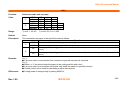
HT
Function:
Code:
Horizontal tab
ASCII
Hex
Decimal
HT
09
9
Range:
None
Default:
None
Description:
This command moves the print position to the next horizontal tab position. If the next horizontal tab position is not
specified, this command will be void.
Remarks:
■ The horizontal tab position is set by <ESC> D.
■ With the underline mode turned on, the underline printing is not applied to the tab space created by this command.
Differences:
Rev. 1.00
None
BIXOLON
- 29 -
SRP-500 Command Manual
LF
Function:
Code:
Print and line feed
ASCII
Hex
Decimal
LF
0A
10
Range:
None
Default:
None
Description:
This command prints the data in the print buffer and feeds one line based on the current set line spacing in standard
mode.
Remarks:
■ In page mode, the printer does not perform actual printing, but moving only the print position to the next line.
Differences:
None
Rev. 1.00
BIXOLON
- 30 -
SRP-500 Command Manual
CR
Function:
Code:
Print and carriage return
ASCII
Hex
Decimal
CR
0D
13
Range:
None
Default:
None
Description:
This command prints the data. With auto line feed enabled, it performs printing and one line feeding same as LF.
Remarks:
■ Auto line feed is only enabled with a parallel interface using the DIP switch.
Differences:
None
Rev. 1.00
BIXOLON
- 31 -
SRP-500 Command Manual
DLE
Function:
Code:
Set real-time command mode
ASCII
Hex
Decimal
DLE
10
16
Range:
None
Default:
None
Description:
This command enables commands to be operable in real-time.
Remarks:
■ A single command following this command is regarded as a real time command.
■ The real time command is stored into the receive buffer and executed with higher priority than other commands.
■ If this command is processed as a parameter of the other command, the data following this command might bring
about the unwanted result.
■ The commands that are allowed to be executed in real time mode vary depending on the printer model.
Differences:
Rev. 1.00
■ Commands that can be executed in real time mode: EOT, ENQ, GS I , GS a, GS r,
BIXOLON
- 32 -
SRP-500 Command Manual
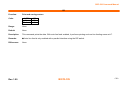
ESC SP
Function:
Set the character right space
Code:
ASCII
Hex
Decimal
Range:
0 ≤ n ≤ 255
Default:
n=0
Description:
■ This command sets the size of space to right of character.
• Right space = n × [horizontal motion units].
Remarks:
■ In a double width mode, the right space will be doubled.
■ Horizontal motion unit varies depending the printer model.
Differences:
■ Horizontal motion unit: 0.122mm(1/208 inch)
Rev. 1.00
ESC
1B
27
SP
20
32
n
n
n
BIXOLON
- 33 -
SRP-500 Command Manual
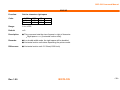
ESC !
Function:
Set print mode
Code:
ASCII
Hex
Decimal
Range:
0 ≤ n ≤ 255
Default:
n=0
Description:
This command selects print mode(s) with bits having following meanings.
Bit
Off/On
Hex
Decimal
Function
Off
00
0
Character font A selected
0
On
01
1
Character font B selected
1,2
Off
00
0
Reserved
Off
00
0
Emphasized mode not selected
3
On
08
8
Emphasized mode selected
Off
00
0
Double-height mode not selected
4
On
10
16
Double-height mode selected
Off
00
0
Double-width mode not selected
5
On
20
32
Double-width mode selected
6
Off
00
0
Reserved
7
Off
00
0
Underline mode not selected
Remarks:
■ As alternative to this command, ESC M, ESC E and ESC – can be used for the selection for character font,
ESC
1B
27
!
21
33
n
n
n
emphasized mode and underline mode respectively.
■ The entire character print width is underlined, but the space skipped by HT is not.
■ If both double width and double height are selected, the characters will be quadrupled.
Differences:
Rev. 1.00
■ Character configuration(Font A, Font B): Font A(14 × 12), Font B(12 x 12)
BIXOLON
- 34 -
SRP-500 Command Manual
ESC %
Function:
Select/cancel user-defined character set
Code:
ASCII
Hex
Decimal
Range:
0 ≤ n ≤ 255
Default:
n=0
Description:
■ This command selects/deselects user-defined character set that is downloaded by user. To make it valid, the least
ESC
1B
27
%
25
37
n
n
n
significant bit should be defined like following.
• When n=0, the user-defined character set is deselected.
• When n=1, the user-defined character set is selected.
Remarks:
■ The resident character set is enabled and used right after canceling the user defined character set.
Differences:
None
Rev. 1.00
BIXOLON
- 35 -
SRP-500 Command Manual
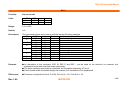
ESC &
Function:
Code:
Define user-defined character set
ASCII
Hex
Decimal
ESC
1B
27
&
26
38
y
y
y
c1
c1
c1
c2 [x1
c2 [x1
c2 [x1
d1 ... d(yⅹx1)]... [xk
d1 ... d(yⅹx1)]... [xk
d1 ... d(yⅹx1)]... [xk
d1 ... d(yⅹxk)]
d1 ... d(yⅹxk)]
d1 ... d(yⅹxk)]
Range:
y=2
32 ≤ c1 ≤ c2 ≤ 126
0 ≤ x ≤ 14 (Font A)
0 ≤ x ≤ 12 (Font B)
0 ≤ d ≤ 255
k = c2 – c1 + 1
Default:
None
Description:
■ This command defines user-defined characters for character codes in a designated range from the start character
code, c1 to the end character code, c2.
• y denotes the number of bytes in the vertical direction, x the number of dots in the horizontal direction, and d the
dot data for the user-defined characters.
Remarks:
■ Alphanumeric characters (20H (decimal 32) to 7EH (decimal 126)) are definable.
■ Once user defined characters are defined, they remain available until they are redefined; ESC ? or ESC @ is
executed; the printer is reset.
■ The following shows the relationship between the definition data and printing result with downloaded character
consisting of 9x7 dots.
Rev. 1.00
d1
d3
d5
d7
d9
d11
d13
d2
d4
d6
d8
d10
d12
d14
MSB
LSB
MSB
LSB
BIXOLON
- 36 -
SRP-500 Command Manual
Differences:
Rev. 1.00
■ Character configuration(Font A, Font B): Font A(14 × 12), Font B(12 x 12)
BIXOLON
- 37 -
SRP-500 Command Manual
ESC *
Function:
Code:
Specify bit image mode
ASCII
Hex
Decimal
ESC
1B
27
Range:
m = 0, 1
0 ≤ nL ≤ 255
0 ≤ nH ≤ 3
0 ≤ d ≤ 255
k = nL + nH x 255
Default:
None
*
2A
42
m
m
m
nL
nL
nL
nH
nH
nH
d1...dk
d1...dk
d1...dk
Description: ■ This command specifies the bit image for the mode m as to the number of dots specified by nL and nH.
• d specifies the bit image data with 1 for printed data and 0 for not printed.
• k denotes the number of horizontal dots.
DPI : Dots per Inch (25.4mm)
Number of dots in
Vertical dot
Horizontal dot
m
Mode
Number of bytes (k)
vertical direction
density (DPI)
density (DPI)
0
8-dot single-density
8
203/3
203/2
nL + nH x 256
1
8-dot double-density
8
203/3
203
nL + nH x 256
32
24-dot single-density
24
203
203/2
(nL + nH x 256) x 3
33
24-dot double-density
24
203
203
(nL + nH x 256) x 3
Remarks:
Rev. 1.00
■ If the bit image data being entered is beyond the number of dots to be printed, the surplus will be discarded.
■ If the value of m is beyond the conditions, the subsequent data after m will be treated as normal data.
BIXOLON
- 38 -
SRP-500 Command Manual
DPI : Dots per Inch (25.4mm)
Differences:
Rev. 1.00
m
Mode
0
1
8-dot single-density
8-dot double-density
Number of dots in
vertical direction
8
8
Vertical dot
density(DPI)
96
96
BIXOLON
Horizontal dot
density (DPI)
104
208
Number of bytes (k)
nL + nH x 256
nL + nH x 256
- 39 -
SRP-500 Command Manual
ESC –
Function:
Code:
Turn underline mode on/off
ASCII
Hex
Decimal
ESC
1B
27
2D
45
n
n
n
Range:
0 ≤ n ≤ 2, 48 ≤ n ≤ 50
Default:
n=0
Description:
■ This command enables the print data following it to be printer out underlined.
• The underline mode varied depending on the following values of n:
n
0,48
1,49
2,50
Remarks:
Function
Turns off underline mode
Turns on underline mode, set at 1-dot thick
Turns on underline mode, set at 2-dot thick
■ The spaces generated by horizontal tab are not underlined.
■ Using bit 7 of ESC !, the underline mode can be activated/deactivated as well.
Differences:
Rev. 1.00
None
BIXOLON
- 40 -
SRP-500 Command Manual
ESC 2
Function:
Code:
Select default line spacing
ASCII
Hex
Decimal
ESC
1B
27
2
32
50
Range:
None
Default:
None
Description:
This command sets the default line spacing The default line spacing is approximately 3.75 mm, which is equivalent to 30
dots.
Remarks:
■ The line spacing can be set independently in standard mode and in page mode.
■ The setting of this command remains effective until ESC !, ESC @, printer reset or power cycling is executed.
Differences:
Rev. 1.00
■ Default line spacing: 4.23 mm(16 dots)
BIXOLON
- 41 -
SRP-500 Command Manual
ESC 3
Function:
Set line spacing
Code:
ASCII
Hex
Decimal
Range:
0 ≤ n ≤ 255
Default:
Corresponding to the default line spacing defined by ESC 2
Description:
■ This command sets the line spacing using a following rule.
• Line spacing = n x (vertical or horizontal motion units)
Remarks:
■ With standard mode selected, the vertical motion unit is used.
■ In page mode, the horizontal motion unit is applied when printing start poison is defined to the upper right or lower
ESC
1B
27
3
33
51
n
n
n
right of print area using ESC T, otherwise, the vertical motion unit is used.
■ The line spacing is settable independently for each of standard and page modes.
Differences:
■ Vertical or horizontal motion unit and maximum line spacing settable:
Model
SRP-500
Rev. 1.00
Vertical unit
0.132 mm (1/192 inches)
Horizontal unit
0.122mm (1/208 inches)
BIXOLON
Max line spacing
33.66mm
- 42 -
SRP-500 Command Manual
ESC <
Function:
Code:
Return home
ASCII
Hex
Decimal
ESC
1B
27
<
3C
60
Range:
None
Default:
None
Description:
This command moves the print head to the standby position.
Remarks:
■ The standard position is on the left.
■ After processing this command, the print position may be readjusted.
Differences:
None
Rev. 1.00
BIXOLON
- 43 -
SRP-500 Command Manual
ESC =
Function:
Code:
Select peripheral device
ASCII
Hex
Decimal
ESC
1B
27
=
3D
61
n
n
n
Range:
1≤n≤3
Default:
None
Description:
This command selects the device to which the host computer communicates according to n as follows:
n
Function
1
Enables the printer
2
Disables the printer
3
Enables the printer
Remarks:
■ The printer discards all of the received data commands with the exception of ESC = and real-time commands while
being disabled.
■ The normal operation will be resumed by ESC @, power cycling or printer reset.
■ If ASB is activated when the printer is disabled by this command, the status is transmitted to the host at a preset
interval.
Differences:
Rev. 1.00
None
BIXOLON
- 44 -
SRP-500 Command Manual
ESC ?
Function:
Cancel user-defined characters.
Code:
ASCII
Hex
Decimal
Range:
32 ≤ n ≤ 126
Default:
None
Description:
This command removes user-defined character specified by character code n.
Remarks:
■ In place of the deleted user-defined character, the cooresponding resident character is printed.
■ The user-defined characters for each font can be deleted independently.
Differences:
None
Rev. 1.00
ESC
1B
27
?
3F
63
n
n
n
BIXOLON
- 45 -
SRP-500 Command Manual
ESC @
Function:
Code:
Initialize printer
ASCII
Hex
Decimal
ESC
1B
27
@
40
64
Range:
None
Default:
None
Description:
This command cancels conditions previously set and initializes the printer to the conditions having existed at power on.
Remarks:
■
■
■
■
■
The data in the printer buffer is cleared.
The settings of DIP switch are not re-read.
The data in the receive buffer is not discarded.
All of the settings such as print mode and line feed are cleared.
NV graphics and NV user memory are not cleared.
■ In page mode, this command removes the data in print areas, restores the initial settings and returns to standard
mode.
Differences:
Rev. 1.00
None
BIXOLON
- 46 -
SRP-500 Command Manual
ESC D
Function:
Code:
Set horizontal tab position
ASCII
Hex
Decimal
ESC
1B
27
D
44
68
n1...nk
n1...nk
n1...nk
NUL
00
0
Range:
1 ≤ n ≤ 255 , 0 ≤ k ≤ 32
Default:
n=8, 16, 24, 32, 40,....., 232, 240, 248
Description:
■ This command sets the horizontal tab position.
• n defines the number of columns from the beginning of the line to the horizontal tab setting.
• k denotes the number of horizontal tab positions to be set.
• The horizontal tab position is stored as a value of [character width x n] measured form the beginning of the line.
Remarks:
■
■
■
■
Differences:
None
Rev. 1.00
The data [n]k signifying the set position is transmitted in the ascending order and ends with a NUL code.
ESC D NUL cancels all horizontal tab positions.
Tab position is set at the value of [character width x n] from the beginning of the line.
The character width includes the space to the right of the character, and it will be twice the normal character when the
double width characters are selected.
■ If the data [n]k is equal to or smaller than the preceding data [n]k-1, the horizontal tab setting has been completed.
■ Up to 32 horizontal tabs can be set, the data exceeding this limit is processed as normal ones.
■ Even if the character width is changed after setting the horizontal tab positions, the horizontal tab positions remain
unchanged.
BIXOLON
- 47 -
SRP-500 Command Manual
ESC E
Function:
Turn emphasized mode on / off
Code:
ASCII
Hex
Decimal
Range:
0 ≤ n ≤ 255
Default:
n=0
Description:
■ This command turns emphasized mode on or off by toggling the least significant bit of n like following.
• When the LSB of n is 0, emphasized mode is turned off.
• When the LSB of n is 1, emphasized mode is turned on.
Remarks:
■ The setting of this command remains effective until ESC !, ESC @, printer reset or power cycling is executed.
Differences:
None
Rev. 1.00
ESC
1B
27
E
45
69
n
n
n
BIXOLON
- 48 -
SRP-500 Command Manual
ESC G
Function:
Turn double-strike mode on/off
Code:
ASCII
Hex
Decimal
Range:
0 ≤ n ≤ 255
Default:
n=0
Description:
■ This command turns double-strike mode on or off by toggling the least significant bit of n like following.
• When the LSB of n is 0, emphasized mode is turned off.
• When the LSB of n is 1, emphasized mode is turned on.
Remarks:
■ The setting of this command remains effective until ESC !, ESC @, printer reset or power cycling is executed.
Differences:
None
Rev. 1.00
ESC
1B
27
G
47
71
n
n
n
BIXOLON
- 49 -
SRP-500 Command Manual
ESC J
Function:
Print and feed paper
Code:
ASCII
Hex
Decimal
Range:
0 ≤ n ≤ 255
Default:
None
Description:
This command prints the data in the print buffer and feeds the paper [n X vertical motion unit].
Remarks:
■ The maximum feed amount available varies depending on the printer model.
■ With standard mode selected, the vertical motion unit is used.
■ In page mode, the horizontal motion unit is applied when printing start poison is defined to the upper right or lower
ESC
1B
27
J
4A
74
n
n
n
right of print area using ESC T, otherwise, the vertical motion unit is used.
■ When used in page mode, this command moves only the print position, not executing actual printing.
Differences:
■ Vertical motion unit and maximum feed amount:
Model
SRP-500
Rev. 1.00
Vertical unit
0.132 mm (1/192 inches)
BIXOLON
Max feed amount
33.66mm
- 50 -
SRP-500 Command Manual
ESC R
Function:
Code:
Specify international character set
ASCII
Hex
Decimal
ESC
1B
27
R
52
82
n
n
n
Range:
0≤ n≤7, 9
Default:
n=0
Description:
This command specifies international characters according to n values.
n
Character set
n
Character set
0
U.S.A
7
Spain I
1
France
9
Norway
2
Germany
10
Denmark II
3
U.K
11
Spain II
4
Denmark I
12
Latin America
5
Sweden
13
Korea
6
Italy
Remarks:
■ The setting of this command remains effective until ESC !, ESC @, printer reset or power cycling is executed.
Differences:
None
Rev. 1.00
BIXOLON
- 51 -
SRP-500 Command Manual
ESC U
Function:
Specify unidirectional print mode
Code:
ASCII
Hex
Decimal
Range:
0 ≤ n ≤ 255
Default:
n=0
Description:
■ This command selects/deselects the unidirectional print according to the value of n that is valid only for the least
ESC
1B
27
U
55
85
n
n
n
significant bit.
• Unidirectional print mode is turned on with n=0, and turned off with n=1
Remarks:
■ In this mode, the printer will print from the left to the right, preventing horizontal shear in printing, in particular, for
double height print.
■ The setting of this command remains effective until ESC !, ESC @, printer reset or power cycling is executed.
Differences:
Rev. 1.00
None
BIXOLON
- 52 -
SRP-500 Command Manual
ESC a
Function:
Code:
Set position alignment
ASCII
Hex
Decimal
ESC
1B
27
a
61
97
n
n
n
Range:
0 ≤ n ≤2, 48 ≤ n ≤50
Default:
n=0
Description:
This command specifies position alignment for all data in one line in standard mode, using n as follows:
n
Alignment
0, 48
Left alignment
1, 49
Center alignment
2, 50
Right alignment
Remarks:
■ This command is not effective in page mode. If this command is processed in page mode, the setting by this
command becomes effective when the printer returns to standard mode.
■ The setting of this command remains effective until ESC !, ESC @, printer reset or power cycling is executed.
Differences:
Rev. 1.00
None
BIXOLON
- 53 -
SRP-500 Command Manual
ESC d
Function:
Print and feed n lines.
Code:
ASCII
Hex
Decimal
Range:
0 ≤ n ≤ 255
Default:
None
Description:
This command feeds the paper by n lines after printing the data in the print buffer.
Remarks:
■ The per-line paper feed amount is based on the value set by the line spacing related commands, ESC 2 and ESC 3.
■ In page mode, this command moves only the print position, not performing actual print.
■ If the feed amount set is beyond the maximum feed amount, the feed amount will be set to the maximum feed
ESC
1B
27
d
64
100
n
n
n
amount automatically.
Differences:
Rev. 1.00
■ Maximum feed amount: 255 lines.
BIXOLON
- 54 -
SRP-500 Command Manual
ESC g 0
Function:
Code:
Range:
Define macro
ASCII
Hex
Decimal
ESC
1B
27
g
67
103
0
00
0
<k> [<nH > <nL> ]k [d1…dm]k
<k> [<nH > <nL> ]k [d1…dm]k
<k> [<nH > <nL> ]k [d1…dm]k
k ≤ 10
0 ≤ nL ≤ 255
0 ≤ nH ≤ 255
[(256× nH) + nL ]1 + …..+ [(256× nH) + nL ]k <
0 ≤ d ≤ 255
2Mbit (256KB)
Default:
None
Description:
■ This command defines macro into NV memory such as a logo image.
• k denotes the total number of macro to be stored in NV memory.
• m=(256× nH) + nL specifies the size of macro in byte
Remarks:
■ 2M bit (256KB) of the flash is allocated for saving NV bit image.
■ This command is useful to define NV bit image (Logo).
■ The NV bit image is printed by ESC g n.
Differences:
None
Rev. 1.00
BIXOLON
- 55 -
SRP-500 Command Manual
ESC g n
Function:
Execute macro
Code:
ASCII
Hex
Decimal
Range:
1 ≤ n ≤ 10
Default:
None
Description:
■ This command executes macro using the value of n.
• n denotes the macro index number that is automatically given to the macro in a downloading order while being
ESC
1B
27
g
67
103
n
n
n
defined by ESC g.
Remarks:
■ The NV bit image should be defined by ESC g preceding this command. When executing the macro not being
defined, this command is ignored.
Differences:
Rev. 1.00
None
BIXOLON
- 56 -
SRP-500 Command Manual
ESC m
Function:
Code:
Partial cut
ASCII
Hex
Decimal
ESC
1B
27
m
6D
109
Range:
None
Default:
None
Description:
This command executes a partial cut of the paper with one point left uncut.
Remarks:
■ The same partial cut as this command is executed using ESC i and GS V.
Differences:
■ This command is effective for the printer equipped with an autocutter.
■ Autocutter operation should be enabled by setting the autocutter control DIP switch.
■ If the autocutter control DIP switch of the printer not equipped with autocutter is set, the printer does not operate,
displaying the error signal by LED.
Rev. 1.00
BIXOLON
- 57 -
SRP-500 Command Manual
ESC p
Function:
Code:
Generate pulse
ASCII
Hex
Decimal
ESC
1B
27
p
70
112
m
m
m
t1
t1
t1
t2
t2
t2
Range:
m = 0, 1, 48, 49
0 ≤ t1 ≤ 255, 0 ≤ t2 ≤ 255
Default:
None
Description:
This command outputs the signals specified with t1 and t2 to the connector pins defined by m.
m
Connector pin
0, 48
Drawer kick-out connector pin 2
1, 49
Drawer kick-out connector pin 5
Remarks:
■ The ON time is [t1 x 2ms], and the OFF time is as [t2 x 2ms].
• If t2 is smaller than t1, OFF time is set to [t1 x 2ms].
Differences:
Rev. 1.00
None
BIXOLON
- 58 -
SRP-500 Command Manual
ESC r
Function:
Code:
Select print color
ASCII
Hex
Decimal
ESC
1B
27
r
72
114
n
n
n
Range:
n = 0, 1, 48, 49
Default:
n=0
Description:
■ This command selects a print color for each line, using n as follows.
• When n = 0 or 48, black is selected.
• When n=1 or 49, red is selected.
Remarks:
■ In standard mode, this command is valid only when processed at the beginning of the line.
■ In page mode, the color selected by this command is applied to all data collectively printed by FF.
■ GS ( N and GS ( L can be used to specify two-color printing.
■ The setting of this command remains effective until ESC !, ESC @, printer reset or power cycling is executed.
Differences:
Rev. 1.00
None
BIXOLON
- 59 -
SRP-500 Command Manual
ESC t
Function:
Code:
Select character code table
ASCII
Hex
Decimal
ESC
1B
27
t
74
116
n
n
n
Range:
0 ≤ n ≤ 5, 16 ≤ n ≤ 19, 21 ≤ n ≤ 31, 33 ≤ n ≤ 41, n=255
Default:
For model not supporting Thai character: n=0
For model supporting Thai character support : n = 20
Description:
This command specifies code page according to the value of n as follows:
n
Code page
0
Page 0
437 (USA, Standard Europe)
1
Page 1
Katakana
2
Page 2
850 (Multilingual)
3
Page 3
860 (Portuguese)
4
Page 4
863 (Canadian-French)
5
Page 5
865 (Nordic)
16
Page 16 1252 (Latin I)
17
Page 17 866 (Cyrillic #2)
18
Page 18 852 (Latin 2)
19
Page 19 858 (Euro)
21
Page 21 862 (Hebrew DOS code)
22
Page 22 864 (Arabic)
23
Page 23 Thai42
24
Page 24 1253 (Greek)
25
Page 25 1254 (Turkish)
Rev. 1.00
BIXOLON
- 60 -
SRP-500 Command Manual
n
26
27
28
29
30
31
33
34
35
36
37
38
39
Page 26
Page 27
Page 28
Page 29
Page 30
Page 31
Page 33
Page 34
Page 35
Page 36
Page 37
Page 38
Page 39
Code page
1257 (Baltic)
Farsi
1251 (Cyrillic)
737 (Greek)
775 (Baltic)
Thai14
1255 (Hebrew New code)
Thai 11
Thai 18
855 (Cyrillic)
857 (Turkish)
928 (Greek)
Thai 16
40
Page 40
1256
41
Page 41 1258 (Vietnam)
255
User Code Page (Space)
(Arabic)
Remarks:
■ The setting of this command remains effective until ESC !, ESC @, printer reset or power cycling is executed.
Differences:
■ Code pages not supported:
• n = 1, 25, 28, 30, 32,33, 36,37, 39,40,41
• When n=255, code page 0(437) is selected.
Rev. 1.00
BIXOLON
- 61 -
SRP-500 Command Manual
ESC u
Function:
Code:
Transmit peripheral device status
ASCII
Hex
Decimal
ESC
1B
27
u
75
117
n
n
n
Range:
n = 0, 48
Default:
None
Description:
This command transmits a byte of data with the least significant bit(LSB) specifying the peripheral device status as
follows:
LSB
0
1
Status of drawer kick-out connector pin 3
Low
High
Remarks:
■ The peripheral device status can be transmitted using GS r.
Differences:
None
Rev. 1.00
BIXOLON
- 62 -
SRP-500 Command Manual
ESC v
Function:
Code:
Transmit paper sensor status
ASCII
Hex
Decimal
ESC
1B
27
v
76
118
Range:
None
Default:
None
Description:
■ This command transmits a byte of data specifying the paper sensor status.
■ The status of paper near end and paper end sensors is sent to the host as follows:
• When paper near end is detected, 0x03 is transmitted.
• When paper end is detected, 0xC is transmitted.
Remarks:
■ The paper sensor status can be transmitted using GS r.
■ The near end senor is optional while paper end sensor required.
■ If the printer is not equipped with a near end sensor, the paper near end sensor is considered as normal condition.
Differences:
None
Rev. 1.00
BIXOLON
- 63 -
SRP-500 Command Manual
ESC {
Function:
Turns upside-down printing mode on/off
Code:
ASCII
Hex
Decimal
Range:
0 ≤ n ≤ 255
Default:
n=0
Description:
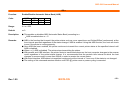
This command selects/deselects upside-down printing mode according to the least significant bit as follows.
LSB
Upside-down mode
0
Turned off
1
Turned on
Remarks:
■ This command is valid only when entered at the beginning of the line.
ESC
1B
27
{
7B
123
n
n
n
■ The upside-down print mode has no effect in page mode. If this command is processed in page mode, upside-down
printing mode is enabled when the printer returns to standard mode.
■ 180 rotated characters are printed from right to left in upside-down print mode.
■ The setting of this command remains effective until ESC !, ESC @, printer reset or power cycling is executed.
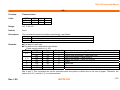
Example
Normal
Differences:
Rev. 1.00
Upside- down Mode
None
BIXOLON
- 64 -
SRP-500 Command Manual
GS ( A
Function:
Code:
Execute test print
ASCII
Hex
Decimal
GS
1D
29
(
28
40
A
41
65
pL
pL
pL
pH
pH
pH
n
n
n
m
m
m
Range:
(pL + pH x 256) = 2 (pL=2, pH=0)
0 ≤ n ≤ 2, 48 ≤ n ≤ 50
1 ≤ m ≤ 3, 49 ≤ m ≤ 51
Default:
None
Description:
■ This command prints a specified pattern for testing on a roll paper.
• Roll paper is selected with n specified as follows:
n
Paper type
0, 48
1, 49
Roll paper
2, 50
• Different kinds of test patterns are selected according to m as follows:
m
Test pattern
1, 49
Hexadecimal dump mode
2, 50
Printer configuration printing
3, 51
Rolling pattern printing
Remarks:
■ The printer cancels a macro definition in progress If this command is processed. The macro becomes invalid.
■ After completion of this command, a software reset is executed automatically to restore the printer status set during
power cycling.
■ All of the data transmitted from the host to the printer is printed and identified in hexadecimal dump mode.
■ The real time command and ASB operations are not executed during the printing of printer configuration (m=2, 50)
and rolling pattern (m=3, 51).
Differences:
Rev. 1.00
None
BIXOLON
- 65 -
SRP-500 Command Manual
GS I
Function:
Transmits printer ID
Code:
ASCII
Hex
Decimal
Range:
1 ≤ n ≤ 69
Default:
None
Description:
■ This command transmits the printer ID or information.
• Transmits 1 byte of printer ID, using n as follows:
GS
1D
29
I
49
73
n
n
n
n
Printer ID
Specification
1,49
Printer model ID
Printer model
2,50
Type ID
Printer type
3,51
Printer feature ID
Printing method and Printer size
• Transmits specified printer information, using n as follows:
n
Printer ID type
Specification
65
Firmware version
Firmware version
66
Manufacturer
BIXOLON
67
Printer model
Printer model
69
Code page
Currently enabled code page
Remarks:
■ Printer information (When n = 65, 66, 67, 69) consist of [Header ~ NULL] data as shown below:
Transmitted data
Hex
Decimal
Header
5FH
95
Printer information
Depends on the model
Depends on the model
NUL
00H
0
■ The firmware version can be confirmed by self test printing.
■ This command can be executed in real-time command mode using DLE.
Rev. 1.00
BIXOLON
Amount of data
1byte
0-15 bytes
1byte
- 66 -
SRP-500 Command Manual
Differences:
■ The printer ID is shown according to printer models as follows:
Printer ID
SRP-500
1(Printer model ID)
0x0d
Type ID varies depending on functions the printer supports as follows:
- 0x01 (Multi-byte character)
- 0x02 (Autocutter)
2(Type ID)
- 0x03 (Autocutter + Multi-byte character)
- 0x04 (Customer display)
- 0x05 (Multi-byte character + Display)
- 0x07 (Customer display + Autocutter + Multi-byte Character)
3(Printer feature ID)
0x65
66(Manufacturer)
BIXOLON
67(Printer model)
SRP-500
69(Language of Font) Code page currently being used. Refer to cod page setting command, ESC t.
Rev. 1.00
BIXOLON
- 67 -
SRP-500 Command Manual
GS V
Function:
Select cut mode and cut paper
Code:
①
②
ASCII
Hex
Decimal
ASCII
Hex
Decimal
GS
1D
29
GS
1D
29
V
56
86
V
56
86
m
m
m
m
m
m
n
n
n
Range:
① m=0, 1, 48, 49
Default:
None
Description:
This command cuts paper in the specified mode as follows.
m
Function
0,48
Executes a full cut (cuts the paper completely)
①
1,49
Executes a partial cut (one point left uncut)
Feeds paper to (cutting position + n × vertical motion unit) and executes a partial cut(one point left
65
uncut)
②
Feeds paper to (cutting position + n × vertical motion unit) and executes a partial cut(one point left
66
uncut)
Remarks:
For ①
■ If an auto cutter is not provided, this command is ignored command is executed.
For ②
■ When n = 0, the printer feeds the paper to the cutting position and cuts it.
■ If an auto cutter is not provided, the printer only feeds the paper for specified amount.
■ Vertical motion unit is used for calculating a paper feed amount.
Differences:
■ Cutting mode is changed only by setting MSW2-2.
Rev. 1.00
② m=65, 66, 0 ≤ n ≤ 255
BIXOLON
- 68 -
SRP-500 Command Manual
GS a
Function:
Enable/Disable Automatic Status Back (ASB)
Code:
ASCII
Hex
Decimal
Range:
0 ≤ n ≤ 255
Default:
n=0
Description:
■ This enables or disables ASB (Automatic Status Back) according to n.
• ASB is enabled when n > 0.
Remarks:
■ ASB is the function that transmit the printer status such as cover open/close and Online/Offline] continuously at the
■
■
■
■
■
Rev. 1.00
GS
1D
29
a
61
97
n
n
n
time interval specified regardless of the status change if ASB is enabled. Using this ASB function, the host can check
to see if the printer is running properly.
Once ASB has been enabled, the printer continues to transmit the current printer status at the specified interval until
ASB is disabled.
When n = 0, ASB is disabled. The printer stops transmitting the status.
With parallel and USB interface, the printer status is transmitted whenever the host computer changes to the reverse
mode regardless of the printer status change. It is recommended that the periodic time interval at which the host
changes to reverse mode is more than 500ms in order to receive the correct status.
With serial interface, ASB status is transmitted continuously at the interval of 1 sec even if the status is not changed.
The setting of this command remains effective until ESC @, printer reset or power cycling is executed.
BIXOLON
- 69 -
SRP-500 Command Manual
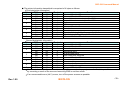
■ The printer information transmitted is comprised of 4 bytes as follows:
• First byte(printer information)
Bit
0
1
2
3
4
5
6
7
Off/On
Off
Off
Off
On
Off
On
On
Off
On
Off
On
Off
Hex
00
00
00
04
00
08
10
00
20
00
40
00
Decimal
0
0
0
4
0
8
16
0
32
0
64
0
Function
Not used. Fixed to Off
Not used. Fixed to Off
Drawer kick-out connector pin 3 is LOW
Drawer kick-out connector pin 3 is HIGH
On-line
Off-line
Not used. Fixed to On
Cover is close
Cover is open
Paper is not being fed by the paper feed button
Paper is being fed by the paper feed butto
Not used. Fixed to Off
• Second byte(printer information)
Bit
0
1
2
3
4
5
6
7
Off/On
Off
Off
Off
On
Off
On
Off
Off
On
Off
On
Off
Hex
00
00
00
04
00
08
00
00
20
00
40
00
Decimal
0
0
0
4
0
8
0
0
32
0
64
0
Function
Not used. Fixed to Off
Not used. Fixed to Off
No mechanical error
Mechanical error
No auto cutter error
Auto cutter error occurred
Not used. Fixed to Off
No unrecoverable error
Unrecoverable error
No automatically recoverable error
Automatically recoverable error occurred
Not used. Fixed to Off
- If mechanical error (bit 2) or auto-cutter error (bit 3) occurs due to paper jams or the like, it is possible to recover
by correcting a cause of the error and executing ENQ in real time mode.
- If an unrecoverable error (bit 5) occurs, turn off the power as soon as possible.
Rev. 1.00
BIXOLON
- 70 -
SRP-500 Command Manual
• Third byte (paper sensor information)
Bit
0,1
2,3
4
5
6
7
Off/On
Off
On
Off
On
Off
Off
Off
Off
Hex
00
03
00
0C
00
00
00
00
Decimal
0
3
0
12
0
0
0
0
Function
Paper near end sensor: paper adequate
Paper near end sensor: paper near end
Paper end sensor: paper present
Paper end sensor: no paper present
Not used. Fixed to Off
Not used. Fixed to Off
Not used. Fixed to Off
Not used. Fixed to Off
• Fourth byte (paper sensor information)
Bit
0
1
2
3
4
5
6
7
Differences:
Rev. 1.00
Off/On
On
On
On
On
Off
Off
Off
Off
Hex
01
02
04
08
00
00
00
00
Decimal
1
2
4
8
0
0
0
0
Function
Not used. Fixed to On
Not used. Fixed to On
Not used. Fixed to On
Not used. Fixed to On
Not used. Fixed to Off
Not used. Fixed to Off
Not used. Fixed to Off
Not used. Fixed to Off
None
BIXOLON
- 71 -
SRP-500 Command Manual
GS r
Function:
Code:
Transmit status
ASCII
Hex
Decimal
GS
1D
29
r
72
114
n
n
n
Range:
n=1, 2, 49, 50
Default:
None
Description:
The command transmits the status specified by n as follows:
n
Function
1, 49
Transmits paper sensor status
2, 50
Transmits drawer kick-out connector status
Remarks:
■ The status is one byte.
■ The status to be transmitted is as follows:
• Paper sensor status (n=1, 49):
Bit
0, 1
2, 3
4
5
6
7
Off/On
Off
On
Off
On
Off
Off
Off
Off
Hex
00
03
00
0C
00
00
00
00
Decimal
0
3
0
12
0
0
0
0
Function
Paper near-end sensor: Paper adequate
Paper near-end sensor: Paper near end
Paper end sensor: Paper present
Paper end sensor: Paper not present
Fixed
Reserved
Reserved
Fixed
Bits 2 and 3: This command can not be executed when the printer is offline due to the lack of paper. Therefore, the
status of bit 2 (1) and bit 3 (1) is not transmitted.
Rev. 1.00
BIXOLON
- 72 -
SRP-500 Command Manual
• Drawer kick-out connector status (n=2, 50):
Bit
0
1
2
3
4
5
6
7
Off/On
Off
On
Off
Off
Off
Off
Off
Off
Off
Hex
00
01
00
00
00
00
00
00
00
Decimal
0
1
0
0
0
0
0
0
0
Function
Drawer kick-out connector pin 3 is LOW
Drawer kick-out connector pin 3 is HIGH
Reserved
Reserved
Reserved
Fixed
Reserved
Reserved
Fixed
■ This command can be executed in real-time mode using DLE.
Differences:
Rev. 1.00
None
BIXOLON
- 73 -
SRP-500 Command Manual
BIXOLON Corporation
Address: 980-3, Digital Empire Building A, 5F, Yeongtong-dong,
Yeongtong-gu, Suwon city, Gyeonggi-do, Korea 443-813
Tel +82 (0) 31 218 5500
Fax +82 (0) 31 218 5589
BIXOLON America Inc.
Address: 3171 Fujita St, Torrance, CA 90505
Tel +1 858 764 4580
Fax +1 310 257 6869
BIXOLON Germany GmbH
Address: Tiefenbroicher Weg 35 40472 Düsseldorf
Tel +49-(0)211-68 78 54-0
Fax +49-(0)211-68 78 54-20
Rev. 1.00
BIXOLON
- 74 -