1
For fast help, call us first!
1-800-531-0039
Thank you for making Philips a part of your home!
Downloaded From Disc-Player.com Philips Manuals
RTAN
PO
Return
your Warranty
Registration Card
within 10 days
EE
E
S
Congratulations on purchasing this Philips product.
We’ve included everything you need to get started.
If you have any problems, Philips Representatives can
help you get the most from your new product by explaining:
• Hookups,
• First Time Setup, and
• Feature Operation.
Do not attempt to return this product to the store.
4000
T!
Read this manual first!
AZ
IM
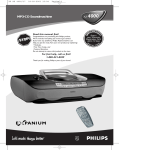
MP3-CD Soundmachine
WH
Y INS
ID
Return your Warranty Registration card today to
ensure you receive all the benefits you’re entitled to.
• Once your Philips purchase is registered,
you’re eligible to receive all the privileges
of owning a Philips product.
• So complete and return the Warranty
Registration Card enclosed with your
purchase at once.And take advantage of
these important benefits.
Warranty
Verification
Owner
Confirmation
Model
Registration
Registering your product
within 10 days confirms
your right to maximum
protection under the
terms and conditions of
your Philips warranty.
Your completed Warranty
Registration Card serves as
verification of ownership in
the event of product theft
or loss.
Returning your Warranty
Registration Card right away
guarantees you’ll receive all
the information and special
offers which you qualify for
as the owner of your model.
Know these
safety symbols
For Customer Use
Enter below the Serial No. which is located
on the bottom of the set. Retain this
information for future reference.
CAUTION
RISK OF ELECTRIC SHOCK
DO NOT OPEN
CAUTION: TO REDUCE THE RISK OF ELECTRIC SHOCK, DO NOT
REMOVE COVER (OR BACK). NO USER-SERVICEABLE PARTS
INSIDE. REFER SERVICING TO QUALIFIED SERVICE PERSONNEL.
This “bolt of lightning” indicates
uninsulated material within
your unit may cause an
electrical shock. For the safety of
everyone in your household, please do
not remove product covering.
The “exclamation point” calls
attention to features for which
you should read the enclosed
literature closely to prevent operating
and maintenance problems.
2
Downloaded From Disc-Player.com Philips Manuals
Model No. _________________________
Serial No. __________________________
WARNING: TO PREVENT FIRE
OR SHOCK HAZARD, DO NOT
EXPOSE THIS EQUIPMENT TO RAIN
OR MOISTURE.
CAUTION: To prevent electric
shock, match wide blade of plug to wide
slot, and fully insert.
2
3 4
5
6
7 8 9
0
! @#
$
% ^ & *
English
1
MP3-CD PLAYBACK
Français
ULTRABASS
IR SENSOR
FM/AM
all
PRESET/ ALBUM
SEARCH
SLEEP
DISPLAY
Español
CD MODE PROGRAM
1
%
$
#
CD
B
REPEAT
3
VOLUME
MUTE
BASS
@
SEARCH
!
0
@
SHUFFLE
4
TUNER
PRESET
BAND
TUNING
DIGIT
AL REM
OTE
2
3
4
5
6
7
8
9
CONTROL
(
4
)
¡
3
Downloaded From Disc-Player.com Philips Manuals
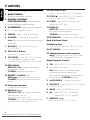
Contents
English
General information
Maintenance
Warranty . . . . . . . . . . . . . . . . . . . . . . . . . . 2, 7
Maintenance . . . . . . . . . . . . . . . . . . . . . . . . 13
Safety . . . . . . . . . . . . . . . . . . . . . . . . . . . . . 4, 6
MP3-CD/ CD Playback
Environmental . . . . . . . . . . . . . . . . . . . . . . . . 5
Controls
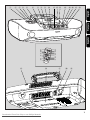
Overview illustration . . . . . . . . . . . . . . . . . . 3
Top and front panels . . . . . . . . . . . . . . . . . . 8
Important specifications . . . . . . . . . . . . . . 14
Display indication for
MP3-CD/ CD functions. . . . . . . . . . . . . . . 15
Playing MP3-CD & CD . . . . . . . . . . . . . . . 15
MP3-CD/ CD text display. . . . . . . . . . . . . 16
Power Supply
Power supply. . . . . . . . . . . . . . . . . . . . . . . . . 9
Using AC Power . . . . . . . . . . . . . . . . . . . . . 10
Selecting a different title/ track . . . . . . . . . 16
Different play modes . . . . . . . . . . . . . . . . . 17
Programming track numbers . . . . . . . . . . 17
Switching POWER on/off . . . . . . . . . . . . . 10
Sleep
Adjusting the sound
About Sleep . . . . . . . . . . . . . . . . . . . . . . . . 18
Adjusting the sound . . . . . . . . . . . . . . . . . . 11
Troubleshooting
Digital Tuner
Troubleshooting . . . . . . . . . . . . . . . . . . . . . 19
Tuning to stations . . . . . . . . . . . . . . . . . . . . 12
CAUTION
Use of controls or adjustments or performance of procedures other than herein may
result in hazardous radiation exposure or other unsafe operation.
The set complies with the FCC-Rules, Part 15 and with 21 CFR 1040.10. Operation is
subject to the following two conditions:
1. This device may not cause harmful interference, and
2. This device must accept any interference received, including interference that
may cause undesired operation.
Canada
English:
This digital apparatus does not exceed the Class B limits for noise emissions from digital
apparatus as set out in the Radio Interference Regulations of the Canadian Department of
Communications.
4
Downloaded From Disc-Player.com Philips Manuals
Français______________________________________________25
Français
Español ______________________________________________42
Español
English ________________________________________________8
English
Index
Environmental information
All unnecessary packaging material has been omitted.The packaging can be easily
separated into three materials: cardboard, polystyrene and plastic.
Your set consists of materials which can be recycled if disassembled by a specialized
company. Please observe the local regulations regarding the disposal of packing
materials, dead batteries and old equipment.
Informations relatives à l’environnement
Nous n’avons pas utilisé de matériaux d’emballage non nécessaires.Vous pouvez
facilement séparer les matériaux d’emballage en trois éléments principaux: carton,
polystyrène extensible et polyéthylène.
L’appareil est constitué de matériaux qu’il est possible de recycler, s’il est démonté
par une société spécialisée.Veuillez avoir l’obligeance de respecter les
réglementations locales concernant la manière de se débarrasser des matériaux
d’emballage, piles épuisées et matériel usé.
Información ambiental
Se ha omitido todo el material de embalaje innecesario. Los materiales de embalaje
se pueden separar fácilmente entre tres tipos: cartón, poliestireno y polietileno.
Su aparato está formado por materiales que pueden reciclarse si pueden ser
desmantelados por una compañía especializada. Observe las normas locales
relacionadas con la eliminación de materiales de embalaje, pilas gastadas y equipo
desechado.
5
Downloaded From Disc-Player.com Philips Manuals
IMPORTANT SAFETY INSTRUCTIONS
– Read before operating equipment
1. Read these instructions.
2. Keep these instructions.
3. Heed all warnings.
12.
4. Follow all instructions.
5. Do not use this apparatus near
water.
13. Unplug this apparatus during lightning
6. Clean only with dry cloth.
7. Do not block any ventilation
openings. Install in accordance with
the manufacturer´s instructions.
storms or when unused for long periods of
time.
14. Refer all servicing to qualified service
personnel. Servicing is required when the
apparatus has been damaged in any way,
such as power-supply cord or plug is
damaged, liquid has been spilled or objects
have fallen into the apparatus, the apparatus
has been exposed to rain or moisture, does
not operate normally, or has been dropped.
8. Do not install near any heat sources
such as radiators, heat registers, stoves, or
other apparatus (including amplifiers) that
produce heat.
9. Do not defeat the
safety purpose of the
polarized or groundingAC
Polarized Plug
type plug. A polarized
plug has two blades with one wider than
the other. A grounding type plug has two
blades and a third grounding prong.The
wide blade or the third prong are provided
for your safety. If the provided plug does
not fit into your outlet, consult an
electrician for replacement of the obsolete
outlet.
10. Protect the power cord from being
walked on or pinched, particularly at plugs,
convenience receptacles, and the point
where they exit from the apparatus.
11.Only use attachments/accessories
specified by the manufacturer.
6
Downloaded From Disc-Player.com Philips Manuals
Use only with the cart, stand,
tripod, bracket, or table specified
by the manufacturer or sold with
the apparatus.When a cart is
used, use caution when moving
the cart/apparatus combination
to avoid injury from tip-over.
15.Battery usage CAUTION –
To prevent battery leakage which may
result in bodily injury or damage to the unit:
●
Install all batteries correctly, + and - as
marked on the unit.
●
Do not mix batteries (old and new or
carbon and alkaline, etc.).
●
Remove batteries when the unit is not used
for a long time.
EL 6475-E003: 01/6
LIMITED WARRANTY
PORTABLE AUDIO
One Year Free Exchange
This product must be carried in for an exchange.
WHO IS COVERED?
You must have proof of purchase to exchange the product.
A sales receipt or other document showing that you
purchased the product is considered proof of purchase.
Attach it to this owner’s manual and keep both nearby.
WHAT IS COVERED?
Warranty coverage begins the day you buy your product.
For one year thereafter, a defective or inoperative product
will be replaced with a new, renewed or comparable
product at no charge to you.A replacement product is
covered only for the original warranty period.When the
warranty on the original product expires, the warranty on
the replacement product also expires.
WHAT IS EXCLUDED?
Your warranty does not cover:
• labor charges for installation or setup of the product,
adjustment of customer controls on the product, and
installation or repair of antenna systems outside of the
product.
• product repair and/or part replacement because of
misuse, accident, unauthorized repair or other cause
not within the control of Philips Consumer Electronics
Company.
• reception problems caused by signal conditions or
cable or antenna systems outside the unit.
• a product that requires modification or adaptation to
enable it to operate in any country other than the
country for which it was designed, manufactured,
approved and/or authorized, or repair of products
damaged by these modifications.
• incidental or consequential damages resulting from the
product. (Some states do not allow the exclusion of
incidental or consequential damages, so the above
exclusion may not apply to you.This includes, but is not
limited to, prerecorded material, whether copyrighted
or not copyrighted.)
• a product used for commercial or institutional
purposes.
WHERE IS EXCHANGE AVAILABLE?
You may exchange the product in all countries where the
product is officially distributed by Philips Consumer
Electronics Company. In countries where Philips Consumer
Electronics Company does not distribute the product, the
local Philips service organization will attempt to provide a
replacement product (although there may be a delay if the
appropriate product is not readily available).
EXCHANGING A PRODUCT IN U.S.A.,
PUERTO RICO OR U.S.VIRGIN ISLANDS...
Contact your dealer to arrange an exchange. Or, ship the
product, insured and freight prepaid, and with proof of
purchase enclosed, to the address listed below.
Small Product Service Center
Philips Service Company
907 Snapps Ferry Road, Plant 2, Building 6
Greeneville,TN 37743
(In U.S.A., Puerto Rico and U.S.Virgin Islands, all implied
warranties, including implied warranties of merchantability and
fitness for a particular purpose, are limited in duration to the
duration of this express warranty. But, because some states do
not allow limitations on how long an implied warranty may
last, this limitation may not apply to you.)
EXCHANGING A PRODUCT IN CANADA...
Please contact Philips at:
1-800-661-6162 (French Speaking)
1-800-363-7278 (English Speaking)
(In Canada, this warranty is given in lieu of all other
warranties. No other warranties are expressed or implied,
including any implied warranties of merchantability or
fitness for a particular purpose. Philips is not liable under
any circumstances for any direct, indirect, special, incidental
or consequential damages, howsoever incurred, even if
notified of the possibility of such damages.)
TO GET OUT-OF-WARRANTY EXCHANGE...
In U.S.A., Puerto Rico or U.S.Virgin Islands, contact Philips
Service Company at (800) 531-0039 to obtain the cost of outof-warranty exchange.Then carefully pack the product and
ship it to the Small Product Service Center (address listed
above). In Canada, call the phone number listed above under
“Exchanging a Product in Canada” to obtain the cost of outof-warranty exchange.
REMEMBER...
Please record the model and serial numbers found on the
product below.Also, please fill out and mail your warranty
registration card promptly. It will be easier for us to notify
you if necessary.
MODEL #
__________________________________
SERIAL #
__________________________________
BEFORE REQUESTING EXCHANGE...
Please check your owner’s manual before requesting an
exchange.Adjustments of the controls discussed there may
save you a trip.
This warranty gives you specific legal rights.You may have other rights which vary from state/province to state/province.
Philips Service Solutions Group, P.O. Box 2976, Longview,Texas 75606, (903) 242-4800
EL6095T002 / MAC5433 / 1-97
7
Downloaded From Disc-Player.com Philips Manuals
Controls
English
Top and front panels
1 BASS/ TREBLE –
enhances bass/treble response
2 SOUND CONTROL
CENTRE/VOLUME – adjusts volume
level and digital equalizer settings
14 PLAY•PAUSE 2; –
starts or pauses MP3-CD/ CD playback
15 STOP 9 – stops MP3-CD/ CD playback;
erases a MP3-CD/ CD program
16 SLEEP – selects SLEEP function and
adjusts the SLEEP time
5 FM/AM – selects FM/ AM waveband
17 DISPLAY
MP3-CD: shows various text and time
information during playback;
TUNER: displays tuner information
6 POWER y – switches the set on/off
18 IR SENSOR – infrared for remote control
3 ULTRABASS – enhances bass response
4 p – 3.5 mm headphone jack
Note: The set can only be switched on using
this button.
7 SOURCE – selects sound source for
CD or TUNER
8 MP3-CD/ CD door –
press door to open/ close
9 CD MODE – plays MP3-CD/ CD tracks/
CD/ a program in random order;
– repeats a track/ MP3-CD/ CD/ program
10 PROGRAM
MP3-CD/ CD: programs and reviews
programmed tracks;
TUNER: programs tuner stations
11 PRESET / ALBUM -, +
MP3 only: selects previous/next album;
TUNER: selects a previous/next preset
station
12 Telescopic antenna –
to improve FM reception
13 SEARCH ∞, §
MP3-CD/ CD: fast searches backwards,
forwards within a track;
skips to previous/ next track
TUNER: tunes radio (manually: down, up);
automatic search tuning (down, up)
8
Downloaded From Disc-Player.com Philips Manuals
Back & Bottom Panel
19 Battery door –
open to insert 8 x R-20, UM-1 or D-cells
20 AC MAINS – inlet for power cord
21 Voltage selector (some versions
only) – adjust to match the local voltage
110/220V before plugging in the set
Digital Remote Control
1 CD – selects MP3-CD/ CD sound source
2 y – switches the set off
Note: When the set is switched off, the
remote control cannot operate any
commands.The set needs to be switched on
first via the set’s POWER y button.
3 3 VOLUME 4 – adjusts volume level
4 SHUFFLE – plays all MP3-CD/ CD tracks
in random order
5 BASS – selects ULTRABASS on/off
6 2; – starts MP3-CD/ CD playback;
– pauses MP3-CD/ CD playback
7 SEARCH 5, 6 –
search within MP3-CD/ CD track
Power Supply
8 BAND – selects FM/ AM waveband
English
Controls
Remote control
9 PRESET +, - (up, down)
MP3-CD: selects an album;
TUNER: selects a preset radio station
10 TUNING ∞, § (down, up)– tunes to
tuner stations
11 TUNER – selects tuner sound source
12 9 – stops MP3-CD/ CD playback;
– erases a MP3-CD/ CD program
13 ¡, ™ – skips to the beginning of a current
track previous/ subsequent track
14 MUTE – interrupts/ resumes sound
15 REPEAT – repeats a track/ program/
entire MP3-CD/ CD
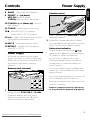
Power Supply
Whenever convenient, use the power
supply if you want to conserve battery life.
Make sure you remove the plug from the
set and wall outlet before inserting
batteries.
Insert 2 batteries, type AAA, R03 or UM4
(preferably alkaline).
2 Replace the compartment door, making
sure the batteries are firmly and correctly in
place.The set is now ready to operate.
Battery low indication
If battery power is running low,
appears in the display.You should change to
AC power or replace the batteries.
Incorrect use of batteries can cause
electrolyte leakage and will corrode the
compartment or cause the batteries to
burst.Therefore:
• Do not mix battery types: e.g. alkaline with
carbon zinc. Only use batteries of the same
type for the set.
Batteries (not included)
8 x R20/ UM1/ D CELL
• When inserting new batteries, do not try to
mix old batteries with the new ones.
• Remove the batteries if the set is not to be
used for a long time.
1 Open the battery compartment and insert
8 batteries, type R-20, UM-1 or D-cells,
(preferably alkaline) with the correct
polarity as indicated by the "+" and "–"
symbols inside the compartment.
Batteries contain chemical substances,
so they should be disposed of properly.
9
Downloaded From Disc-Player.com Philips Manuals
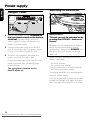
Power supply
English
Switching POWER on/off
Using AC Power
AC MAINS
MP3-CD PLAYB
ULTRABASS
FM/AM
all
CD MODE PROGRAM
1 Check if the power voltage, as shown on
the type plate located on the bottom
of the set, corresponds to your local
power supply. If it does not, consult your
dealer or service center.
2 Connect the power cord to the MAINS
inlet and the wall outlet.The power supply
is now connected and ready for use.
3 To switch off completely, withdraw the
power cord from the wall outlet.
• Disconnect the power cord from the wall
outlet to protect your set during heavy
thunderstorms.
The type plate is located on the
bottom of the set.
IMPORTANT!
1 This set can only be switched on by
pressing the POWER y button on
the set.
2 Whether you are using mains or battery
supply, to avoid unnecessary energy
consumption always press POWER y on
the set or y on the remote control to
switch off.
When the set is switched off, the set's
memory will retain:
– the tuner presets;
– the volume level setting
(level 20 maximum), and sound settings;
– the last sound source played.
• The display backlight only operates when
using AC power supply.
• If the set is operated on batteries, to save
energy the backlight only lights up briefly
when you adjust the controls on the set.
10
Downloaded From Disc-Player.com Philips Manuals
PR
Adjusting the Sound
English
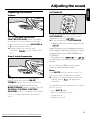
Adjusting the sound
ULTRABASS
Volume
CD
B
REPEAT
3
VOLUM
E
4
MUTE
SHUFFL
E
BASS
ULTRABASS
Turn the SOUND CONTROL
CENTRE/ VOLUME control clockwise
to increase or anti-clockwise to decrease
volume on the set (or press VOLUME 3
or 4 on the remote control).
➜ Display shows the volume level
indication,
and a number from
0-32.
Bass & treble frequencies
This is another bass sound option. Press
ULTRABASS once or more to select
Ultrabass on or off (
).
➜ When activated, the ULTRABASS
indicator lights up and the display shows
.
Notes:To prevent sound interference the bass
control options operate exclusively.You cannot
combine the bass from BASS/TREBLE with
ULTRABASS.
– The display shows
or
to remind you if you attempt to use both bass
settings.
You can also press BASS on the remote
control to select Ultrabass on/off.
ULTRABASS
To adjust the bass and treble frequency
levels, on the set press the BASS/
TREBLE button once or more until the
desired option is displayed.While the
BASS/ TREBLE option is shown, turn the
SOUND CONTROL CENTRE/
VOLUME control to increase or decrease
(-5 to + 5 steps maximum) the desired
tone.
Mute
• Press MUTE on the remote control to
interrupt sound reproduction instantly.
➜ Playback continues without sound and
display shows
blinking when
activated.
• To reactivate sound reproduction or cancel
MUTE you can:
– press MUTE again;
– adjust the volume controls;
– change source;
– switch the set off.
11
Downloaded From Disc-Player.com Philips Manuals
Digital Tuner
English
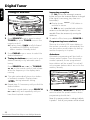
Tuning to Stations
Improving reception
– For FM, pull out the telescopic antenna.
Incline and turn the antenna. Reduce its length
if the signal is too strong (very close to a
transmitter).
➜ Display shows stereo if FM station is
received in stereo.
MP3-CD PLAYBACK
FM/AM
stereo
CD MODE PROGRAM
PRESET/ ALBUM
SEARCH
SLEE
1 Press the POWER y button.
2 Press SOURCE once or more to select
TUNER (or press TUNER once on the
remote control).
➜ Display: shows
briefly followed
by waveband, frequency and preset
station number if already stored.
3 Press FM/AM once or more to select the
desired waveband.
4 Tuning to stations: you can tune to your
stations manually or by automatic search
tuning:
Press SEARCH ∞ or § (or TUNING
5 , 6 on the remote control) and release
when the frequency in the display starts
running.
➜ The radio automatically tunes to a station
of sufficient reception. Display shows
during automatic tuning.
– For AM the set is provided with a built-in
antenna so the telescopic antenna is not
needed. Direct the antenna by turning the
whole set.
5 To switch off the tuner, press POWER y.
Programming tuner stations
Store up to a total of 30 tuner stations in
the memory, manually or automatically.You
can also erase a preset station by storing
another frequency in its place.
Autostore
Automatic programming will start with a
chosen preset number. From this preset
number upwards, former programmed
tuner stations will be erased.The unit will
only program stations which are not in the
memory already.
MP3-CD PLAYBACK
FM/AM
stereo
CD MODE PROGRAM
PRESET/ ALBUM
SEARCH
SLEEP
DISPLAY
➜ Repeat step 3 if necessary until you find the
desired station.
To tune to a weak station, press SEARCH
∞ or § briefly and repeatedly until you
have found optimal reception.
1 Press PRESET / ALBUM - or + once or
more to select the preset number where
programming should start.
Note: If no preset number is selected, default
is preset 1 and all your presets will be erased.
12
Downloaded From Disc-Player.com Philips Manuals
Maintenance
2 Press PROGRAM for more than
2 seconds to activate programming.
➜ Display:
appears. Stations
available are programmed in order of
waveband reception strength: FM,
followed by AM.The last preset
automatically stored will then be played.
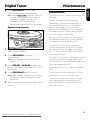
Maintenance
• The lens of the CD player should never be
touched!
• Sudden changes in the surrounding
temperature can cause condensation to
form and the lens of your CD player to
cloud over. Playing a CD is then not
possible. Do not attempt to clean the lens
but leave the set in a warm environment
until the moisture evaporates.
Manual programming
MP3-CD PLAYBACK
FM/AM
stereo
CD MODE PROGRAM
PRESET/ ALBUM
SEARCH
1 Tune to your desired station
(see Tuning to stations).
2 Press PROGRAM to activate
programming.
➜ Display: program and a preset number
flashes.
3 Press PRESET / ALBUM - or + once or
more to allocate a number from 1 to 30 to
this station.
4 Press PROGRAM again to confirm.
➜ Display: program disappears, and shows
the preset number, waveband and the
frequency.
5 Repeat the above four steps to store other
stations.
S
• Always shut the CD door to keep the CD
compartment dust-free.To clean, dust the
compartment with a soft dry cloth.
• To take a CD out of its box, press the
center spindle while lifting the CD. Always
pick up the CD by the edge and replace
the CD back in its box after use to avoid
scratching and dust.
• To clean the CD, wipe in a straight line from
the center towards the edge using a soft,
lint-free cloth. Do not use cleaning agents as
they may damage the disc.
• Never write on a CD or attach any stickers
to it.
• Don’t expose the set, batteries or CDs to
humidity, rain, sand or excessive heat.
• Clean the set with a dry cloth. Don’t use
any cleaning agents containing alcohol,
ammonia, benzene or abrasives as these
may harm the set.
13
Downloaded From Disc-Player.com Philips Manuals
English
Digital Tuner
MP3-CD/ CD Playback
English
Important Specifications
Supported formats:
• Disc format ISO9660, Joliet and multisession CDs. Use ISO9660 disc format
when burning CD-ROM.
• MP3 music formats.
• MP3 bit rate (data rate): 32-320 Kbps and
variable bit rate.
• 650Mb and 700Mb CD-R and CD-RWs.
• Directory nesting up to a maximum of
8 levels (max. 64 characters).
General information
The music compression technology MP3
(MPEG Audio Layer 3) reduces the original
digital audio data by a factor up to
10 without losing significant sound quality.
This allows you to record up to 10 hours of
CD-like quality music on a single CD-ROM.
How to get MP3 music
Either download legal MP3 music from the
internet or convert your audio CD into MP3
format with any MP3 encoder software, and
then record onto a CD-R(W).
• To achieve a good sound quality a bit rate
of 128kbps is recommended for MP3 files.
Some encoder software offers an option to
protect music files, i.e. the files can only be
played on the computer which created
them. If you burn such files on a CD-ROM,
you cannot play them on this set. Make sure
to deactivate the protection option in the
encoder software before creating the music
files. In this case you are responsible for the
adherence to all local or international
copyrights.
14
Downloaded From Disc-Player.com Philips Manuals
When burning the MP3-CD
• To avoid problems with playback or missing
files, make sure the file names are typed in
English text characters and that the
MP3 files end with .mp3
• Use a writing software capable of recording
MP3 track titles (files) in numerical and
alphabetical order. For details on using the
software, refer to the operating instructions
of the software.
• When recording on a CD-RW, make sure
that you close (finalize) all sessions in order
for the set to read and play your tracks.
How to organize MP3 files
You can store up to a maximum number of
35 albums and 350 titles on one MP3-CD.
Albums and titles are alphabetically sorted.
• There may be an album 00 which will be
played before all other albums. Album 00
contains all the tracks which you did not
put into an album.
• MP3-CD/ CD albums and titles are shown
as numbers in the display.
IMPORTANT
This set does not play/support the
following:
• UDF disc format.
• Mixed format CD recordings e.g. CD audio
and MP3 tracks combined within a disc, as
you will only be able to playback the CD
audio tracks.
• Empty albums: an empty album is an album
that does not contain MP3 files, and will not
be shown in the display.
• Non-supported file formats are skipped.
This means that e.g.:Word documents .doc
or MP3 files with extension .dlf are ignored
and will not be played.
• Playlist Files e.g. .m3u, .pls of WMA, AAC,
Winamp, Sonic, RealJukebox,
MS Mediaplayer 7.0, MusicMatch.
Playing MP3-CD & CD
This CD player plays Audio Discs including
CD-R(W)s, and MP3 CD-ROMs.
• CD-I, CDV,VCD, DVD or computer CDs,
are not possible.
MP3-CD PLAYBACK
• Recordings created on e.g. DirectCD,
PacketWriting and Package Writing.
Display indication for
MP3-CD/ CD functions:
–
–
–
–
–
–
–
–
–
–
–
–
–
–
: CD door open
: when reading disc contents
MP3CD : when a MP3-CD is inserted:
total album number and total track
number
CD : when a CD is inserted: total track
number and total playback time
During MP3-CD/ CD playback:
elapsed playback time of current album
and title / current track number
Pause: when in pause mode
appears
shuffle , repeat a, etc.: when the respective
mode is activated
program: when MP3-CD/ CD program
is active
: program activated but
no title/ track selected
: program memory full
: error in CD operation or
with the CD/ CD-R(W) is blank or the
disc is not finalised (see Troubleshooting)
: program cancelled
: scrolls across when
PRESET/ ALBUM - or + pressed
during playback of normal CDs or an
MP3-CD with no album arrangement.
: no disc inserted
English
MP3-CD/ CD Playback
FM/AM
all
CD MODE PROGRAM
PRESET/ ALBUM
SEARCH
SLEEP
DISPL
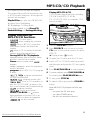
1 Press the POWER y button.
2 Press SOURCE once or more (or press
CD once on the remote control) to select
MP3-CD.
➜ Display: shows
briefly.
3 To open the CD door, push the CD door.
4 Insert a CD or CD-R(W) with the printed
side facing up and press the CD door gently
close.
5 Press PLAY/PAUSE 2; to start playback.
6 To pause playback press PLAY/PAUSE 2;.
To resume, press PLAY/PAUSE 2; again.
7 To stop, press STOP 9.
8 To switch off the set, press the POWER y
button.
Note: MP3-CD/ CD playback will also stop
when:
– you press the CD door open;
– you select TUNER source;
– the disc has reached to the end.
15
Downloaded From Disc-Player.com Philips Manuals
MP3-CD/ CD Playback
English
MP3-CD/ CD text display
MP3-CDs only:
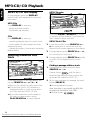
During playback, press the DISPLAY
button briefly and repeatedly to view text
information:
MP3-CD PLAYBACK
IR SENSOR
all
MP3-CDs
Press DISPLAY to view e.g.
CD MODE PROGRAM
PRESET/ ALBUM
SEARCH
SLEEP
DISPLAY
– album and track number;
– text details e.g. filename.
First press PRESET/ ALBUM + or - once
or more to find your album.Then follow the
next 3 steps to select your title.
CDs
Press DISPLAY to view e.g.
– remaining playback time of current track;
– total number of tracks played and total
elapsed play time;
– remaining number of tracks and remaining
playback time.
Selecting a different title/
track
IR SENSOR
/AM
all
PRESET/ ALBUM
SEARCH
SLEEP
2 During playback, press SEARCH ∞ or §
for a previous or next track.
3 During playback, press SEARCH ∞ briefly
to return to the beginning of a current
track.
MP3-CD PLAYBACK
CD MODE PROGRAM
MP3-CDs & CDs:
1 In the stop position, press SEARCH ∞ or
§ for a previous or next track until the
desired track number appears in the display.
Finding a passage within a track
1 During playback, press and hold down
SEARCH ∞ or §.
DISPLAY
In the stop position or during playback, you
can use SEARCH ∞ or §, (¡ or ™
buttons on the remote) to select your track.
➜ The text title (up to 10 characters) is
displayed briefly, or scrolls across when
you have selected a MP3-CD title.
➜ If you have selected a track number in
the stop or pause position, press
PLAY/PAUSE 2; to start playback.
16
Downloaded From Disc-Player.com Philips Manuals
• Display shows
and the disc is
played at high speed and low volume, but
sound will be muted for MP3-CDs.
2 When you recognize the passage you want
release SEARCH.
➜ Normal playback resumes.
Note: Searching is not possible for MP3 files
encoded with variable bit rate (VBR).
➜ Display shows
.
Different play modes: SHUFFLE and
REPEAT
CD MODE allows you to select various
play modes.The modes can be selected or
changed during playback:
shuffle
– all tracks are played in random
• You can also press STOP 9 to quit the
play mode.
Programming track numbers
You may store up to 30 tracks in the
desired sequence. If you like, store any track
more than once.
MP3-CD PLAYBACK
order
shuffle repeat all – repeats the entire
MP3-CD/ CD in random order
IR SENSOR
M/AM
all
repeat a– plays the current track
continuously
CD MODE PROGRAM
PRESET/ ALBUM
SEARCH
SLEEP
DISPLAY
repeat all – plays the whole MP3-CD/ CD
continuously
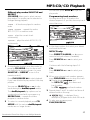
1 In the stop position, first select your album/
and tracks as follows:
MP3-CD PLAYBACK
IR SENSOR
M/AM
all
CD MODE PROGRAM
PRESET/ ALBUM
SEARCH
SLEEP
DISPLAY
MP3-CD only:
• Press PRESET/ ALBUM - or + once or
more to find your album (if available).
• Press SEARCH ∞ or § to select your
track.
1 During playback, select your play mode by
pressing CD MODE once or more until
the desired play mode is shown (or press
SHUFFLE or REPEAT once on the
remote control).
• Press PLAY/PAUSE 2; to start playback
if you have selected a play mode in the stop
position.
• You can use SEARCH ∞ or § to skip
tracks during the shuffle/repeat modes.
• The shuffle/repeat play options can be
combined and used with a program: e.g.
REPEAT ALL – repeats the entire
program in random order.
2 To return to normal playback press CD
MODE until the various shuffle/repeat
modes are no longer shown.
• Continue with the following, steps 2-4.
CD:
• Press SEARCH ∞ or § to select your
track.
2 When your chosen track number appears,
press PROGRAM once to store the track.
➜ Display shows program and:
for MP3-CD:
, the album and
track number;
for CD:
and track number.
3 Repeat steps 1 and 2 to select and store all
desired tracks in this way.
➜
is displayed if you
attempt to program more than 30 tracks.
4 To play your program, press
PLAY/PAUSE 2;.
17
Downloaded From Disc-Player.com Philips Manuals
English
MP3-CD/ CD Playback
MP3-CD Playback
English
To review a program
You may store up to 30 tracks in the
desired sequence. If you like, store any track
more than once.
• In the stop position, press and hold down
PROGRAM for more than 2 seconds.
➜ Display shows all your stored track
numbers in sequence, or the
MP3-CD/ CD track and album number.
Erasing a program
You can erase the contents of the memory
by:
– opening the CD door;
– pressing STOP 9: twice during playback/
once in the stop position;
– switching the set off or to TUNER
source.
➜ Display: shows '
' briefly when the
program is cancelled.
Sleep
About Sleep
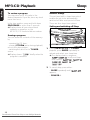
This set has a built-in sleep timer, which
enables the set to be automatically
switched off after a set period of time.
There are four sleep time options.
Setting and switching off Sleep
MP3-CD PLAYBACK
FM/AM
all
CD MODE PROGRAM
PRESET/ ALBUM
1 During MP3-CD/ CD or TUNER
playback, press SLEEP repeatedly to
activate and select your sleep time.
➜ The display shows in sequence
briefly and sleep
time options:
,
,
,
and
.
2 To cancel sleep, press either:
– SLEEP repeatedly until
appears;
– POWER y.
18
Downloaded From Disc-Player.com Philips Manuals
SEARCH
SLEE
If a fault occurs, first check the points listed below before taking the set for repair. Do
not open the set as there is a risk of electric shock.
If you are unable to remedy a problem by following these hints, consult your dealer or
service center.
WARNING: Under no circumstances should you try to repair the set yourself, as this
will invalidate the warranty.
Problem
Solution
No sound/power
– Volume not adjusted. Adjust the VOLUME.
– Power cord not securely connected.
Connect AC power cord properly.
– Batteries dead /incorrectly inserted.
Insert (fresh) batteries correctly.
Display does not function
properly/ No reaction to
operation of any of the
controls
– Electrostatic discharge.
Switch off and unplug the set.
Reconnect after a few seconds.
INSERT CD or CHECK DISC
indication
– No CD inserted, insert a CD.
– CD badly scratched or dirty.
Replace/ clean CD (see Maintenance).
– Laser lens steamed up.Wait until lens has cleared.
– CD-R(W) is blank or the disc is not finalized.
Use a finalized CD-R(W).
CD playback does not work
– CD badly scratched/ dirty.
Replace/ clean CD (see Maintenance).
– Laser lens steamed up.
Wait until lens has acclimatized.
The CD skips tracks
– Disc damaged or dirty. Replace or clean disc.
– SHUFFLE or a program is active.
Quit SHUFFLE / program mode(s).
19
Downloaded From Disc-Player.com Philips Manuals
English
Troubleshooting
Troubleshooting
English
Sound skips during MP3
playback
– MP3 file made at compression level exceeding
320kbps. Use a lower compression level to record
CD tracks into MP3 format.
– Disc damaged or dirty. Replace or clean disc.
MP3 tracks and albums are
not played in the order
they have been recorded
– This is not a fault. Playback of all MP3-CDs on this set
is sorted into alpabetical order.
Remote control does not
function properly/ cannot
turn on the set
– Set is switched off. Press POWER y button on the set
to switch on (See Switching POWER on/off).
– Batteries dead /incorrectly inserted.
Insert (fresh) batteries correctly.
– Distance/ angle between the set too large.
Reduce the distance/ angle.
Cannot play/ find desired
MP3 titles
– Wrong file extension used and/ or filename unsuitable
text characters used. Make sure the file names are typed
in English text characters and that the MP3 files end with
.mp3 (See When burning the MP3-CD).
20
Downloaded From Disc-Player.com Philips Manuals