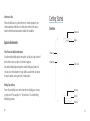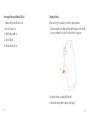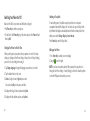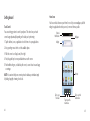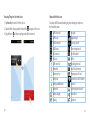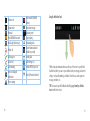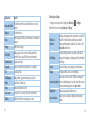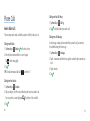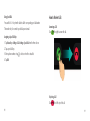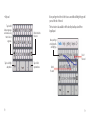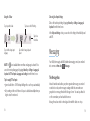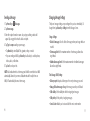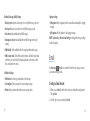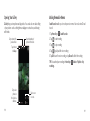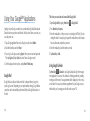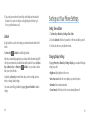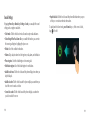
1
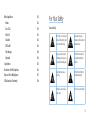
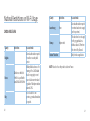
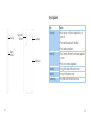
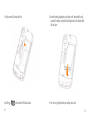
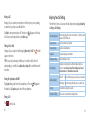
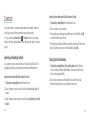
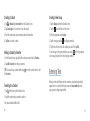
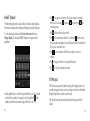
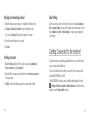
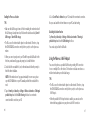
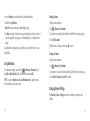
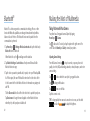
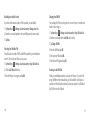
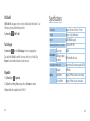
BASE Lutea 2 User Manual WCDMA/GSM Mobile Phone Legal Information Contents Copyright © 2011 ZTE CORPORATION. For Your Safety All rights reserved. No part of this publication may be quoted, reproduced, translated or used in any form or by any means, electronic or mechanical, including photocopying and microfilm, without the prior written permission of ZTE Corporation. The manual is published by ZTE Corporation. We reserve the right to make modifications on print errors or update specifications without prior notice. Every effort has been made in the preparation of this manual to ensure accuracy of the contents, but all statements, information, and recommendations in this manual do not constitute a warranty of any kind, expressed or implied. Version No.: R1.0 Edition Time: 20110602 General Safety Radio Frequency (RF) Exposure 15 15 17 General Statement on RF Energy 17 Specific Absorption Rate (SAR) 17 Body-worn Operation 18 Limiting Exposure to Radio Frequency (RF) Fields 19 Regulatory Information 19 National Restrictions on Wi-Fi Usage 20 Distraction 22 Driving 22 Operating Machinery 22 Product Handling 22 Faulty and Damaged Products 29 General Statement on Handling and Use 22 Small Children 24 Demagnetization 24 General Statement on Interference 30 Electrostatic Discharge (ESD) 24 Pacemakers 30 Antenna 25 Hearing Aids 30 Normal Use Position 26 Medical Devices 31 Air Bags 27 Hospitals 31 Seizures/Blackouts 27 Aircraft 31 Repetitive Motion Injuries 27 Interference in Cars 32 Emergency Calls 28 Explosive Environments 32 Loud Noise 28 Petrol Stations and Explosive Atmospheres 32 Phone Heating 28 Blasting Caps and Areas 32 Interference 30 Electrical Safety 29 Getting Started 33 Accessories 29 Overview 33 Connection to a Car 29 Keys Explained 35 Starting Up 36 How to Make Calls 58 Installing the SIM/microSD Card and Battery 36 Calling from the Dialer 58 Removing the Battery and SIM/microSD Card 40 Calling from Your Contacts 58 Charging the Battery 41 Calling from Your Call History 59 42 Calling from a Text Message 59 Setting Up Your Phone for the First Time 42 Using Speed Dial 60 Switching to Sleep Mode 43 How to Receive Calls 61 Waking up Your Phone 43 Answering a Call 61 44 Rejecting a Call 61 Touch Control 44 Muting a Call 62 Home Screen 45 Putting a Call on Hold 62 Status and Notification Icons 49 Turning the Speakerphone On/Off 62 Using the Notification Panel 51 Ending a Call 62 Applications and Settings Preview 52 Switching Your Phone On/Off Getting Around Phone Calls 58 Adjusting Your Call Settings Contacts 63 64 Importing and Exporting Contacts 64 Changing Message Settings 77 Import Contacts from the SIM Card or Export to the Card 64 Import Contacts from the microSD Card or Export to the Card 65 Creating an Email Account 79 Sharing Contacts Information 65 Receiving Emails 81 Creating a Contact 66 Composing and Sending an Email 81 Adding a Contact to Favorites 66 Replying to or Forwarding an Email 82 Searching for a Contact 66 Deleting an Account 82 Creating a New Group 67 Email Settings 83 Entering Text 67 Email Getting Connected to the Internet 79 83 Android™ Keyboard 68 Adding a New GPRS/EDGE/3G Connection 84 XT9 Text Input 69 Turning on Wi-Fi 84 Choosing Touch Input Settings 75 Connecting to a Wi-Fi Network 85 75 Checking the Wi-Fi Network Status 85 The Message Box 75 Using the Phone as a Modem 85 Sending a Message 76 Messaging Enabling the Phone as a Modem 86 Adjusting Your Video Settings 94 Disabling the Modem Function 87 Using the Phone as a Wi-Fi Hotspot 87 Listening to Your FM Radio 95 Enabling the Wi-Fi Hotspot 88 Playing Your Music 97 Disabling the Wi-Fi Hotspot 88 Creating Playlists 98 89 Managing Playlists 98 Browsing Options 89 Setting a Song as Ringtone 99 Using Bookmarks 90 Playing Your Videos Editing a Bookmark 91 Opening Your Gallery 100 Deleting a Bookmark 91 Making Memorable Memos 101 91 Using Your Google™ Applications 102 Browsing the Internet Changing Browser Settings 99 Bluetooth® 92 Google Mail 102 Making the Most of Multimedia 93 Using Google Calendar 103 93 Using Google Talk 104 Taking Pictures with Your Camera Adjusting Camera Settings Shooting Video with Your Camcorder 93 Opening Google Talk 104 94 Adding a New Friend 104 Changing Your Online Status 104 Starting a Chat 105 Setting Access Point Names Security Settings 112 113 Places 105 Protecting Your Phone with a Screen Unlock Pattern 113 Latitude 106 Protecting Your Phone with a PIN or Password 115 107 Disabling Screen Unlock Security 116 Setting Time and Date 107 Protecting Your SIM with a PIN 116 Changing Display Settings 107 Setting up Credential Storage 118 Sound Settings 108 Managing Your Device Memory 119 Language Settings 110 Privacy: Reset to Factory Settings 119 Mobile Network Services 110 Managing Applications 120 Getting Data Services while Abroad 110 Installing an Application 120 Disabling Data Services 111 Managing Other Settings 121 Enabling Always-on Data Services 111 Search Settings 121 Switching Network Modes 111 Voice Interaction 122 Switching Networks 112 Accessibility 122 Sorting out Your Phone Settings Other Applications Alarms 122 122 Docs To Go 123 Note Pad 123 Calculator 123 SIM Toolkit 124 Task Manager 124 Stopwatch 124 Specifications 125 Declaration of RoHS Compliance 126 Disposal of Your Old Appliance 127 EC Declaration of Conformity 128 For Your Safety General Safety Don’t make or receive handheld calls while driving. And never text while driving. Keep away from pace makers and other electronic medical devices. Keep your phone at least 15 mm away from your ear or body while making calls. Switch off when asked to in hospitals and medical facilities. Small parts may cause a choking. Switch off when told to in aircrafts and airports. Your phone can produce a loud sound. Don’t use at petrol stations. 15 Your phone may produce a bright or flashing light. Avoid contact with liquids. Keep your phone dry. Don’t dispose of your phone in fire. Don’t take your phone apart. Avoid contact with anything magnetic. Switch off when near explosive materials or liquids. Avoid extreme temperatures. Only use approved accessories. Radio Frequency (RF) Exposure General Statement on RF Energy Your phone contains a transmitter and a receiver. When it is ON, it receives and transmits RF energy. When you communicate with your phone, the system handling your call controls the power level at which your phone transmits. Specific Absorption Rate (SAR) Don’t rely on your phone for emergency communications. 16 Your mobile device is a radio transmitter and receiver. It is designed not to exceed the limits for exposure to radio waves recommended by international guidelines. These guidelines were developed by the independent scientific organization ICNIRP and include safety margins designed to assure the protection of all persons, regardless of age and health. The guidelines use a unit of measurement known as Specific Absorption Rate, or SAR. The SAR limit for mobile devices is 2 W/kg and the highest SAR value for this device when tested at the ear was 1.1 W/kg.* As mobile devices offer a range of functions, they can be used in other positions, such as on the body as described in this user guide.** 17 As SAR is measured utilizing the device’s highest transmitting power, the actual SAR of this device while operating is typically below that indicated above. This is due to automatic changes to the power level of the device to ensure it only uses the minimum power required to communicate with the network. * The tests are carried out in accordance with EN 50360, EN 62209-1, EN 62209-2. ** Please see Body-worn Operation. Body-worn Operation Important safety information regarding radio frequency radiation (RF) exposure: To ensure compliance with RF exposure guidelines the phone must be used with a minimum of 15 mm separation from the body. Failure to observe these instructions could result in your RF exposure exceeding the relevant guideline limits. 18 Limiting Exposure to Radio Frequency (RF) Fields For individuals concerned about limiting their exposure to RF fields, the World Health Organization (WHO) provides the following advice: Precautionary measures: Present scientific information does not indicate the need for any special precautions for the use of mobile phones. If individuals are concerned, they might choose to limit their own or their children’s RF exposure by limiting the length of calls, or using “hands-free” devices to keep mobile phones away from the head and body. Further information on this subject can be obtained from the WHO home page http://www.who.int/peh-emf (WHO fact sheet 193: June 2000). Regulatory Information The following approvals and notices apply in specific regions as noted. Please find the section Declaration of RoHS Compliance and CE DOC in the end of this manual. 19 National Restrictions on Wi-Fi Usage 2400.0-2483.5 MHz Country Restrictions Bulgaria France Italy 20 Outdoor use limited to 10mW e.i.r.p. within the band 2454-2483.5 MHz Reason/remark General authorization required for outdoor use and public service Military Radiolocation use. Refarming of the 2.4 GHz band has been ongoing in recent years to allow current relaxed regulation. Full implementation planned 2012. If used outside of own premises, general authorization is required. Country Restrictions Luxembourg None Norway Implemented Russian Federation Reason/remark General authorization required for network and service supply (not for spectrum). This subsection does not apply for the geographical area within a radius of 20 km from the centre of Ny-Ålesund. Only for indoor applications. NOTE: Please don’t use the product outdoors in France. 21 Distraction Use of your phone is subject to safety measures designed to protect users and their environment. Driving • Always treat your phone and its accessories with care and keep it in a clean and dust-free place. Full attention must be given to driving at all times in order to reduce the risk of an accident. Using a phone while driving (even with a hands-free kit) can cause distraction and lead to an accident. You must comply with local laws and regulations restricting the use of wireless devices while driving. Operating Machinery Full attention must be given to operating the machinery in order to reduce the risk of an accident. Product Handling •D o not expose your phone or its accessories to open flames or lit tobacco products. • Do not expose your phone or its accessories to liquid, moisture or high humidity. • Do not drop, throw or try to bend your phone or its accessories. • Do not use harsh chemicals, cleaning solvents, or aerosols to clean the device or its accessories. • Do not paint your phone or its accessories. • Do not attempt to disassemble your phone or its accessories, only authorized personnel can do so. General Statement on Handling and Use • Do not expose your phone or its accessories to extreme temperatures, minimum –5 and maximum +50 degrees Celsius. You alone are responsible for how you use your phone and any consequences of its use. •D o not carry your phone in your back pocket as it could break when you sit down. • Please check local regulations for disposal of electronic products. You must always switch off your phone wherever the use of a phone is prohibited. 22 23 Small Children Antenna Do not leave your phone and its accessories within the reach of small children or allow them to play with it. Do not touch the antenna unnecessarily. They could hurt themselves or others, or could accidentally damage the phone. Your phone contains small parts with sharp edges that may cause an injury or may become detached and create a choking hazard. GPS antenna Bluetooth & Wi-Fi antenna Demagnetization To avoid the risk of demagnetization, do not allow electronic devices or magnetic media close to your phone for a long time. Electrostatic Discharge (ESD) Do not touch the SIM card’s metal connectors. Antenna 24 25 Normal Use Position Air Bags When placing or receiving a phone call, hold your phone to your ear, with the Do not place a phone in the area over an air bag or in the air bag deployment area. bottom towards your mouth. Store the phone safely before driving your vehicle. Seizures/Blackouts The device can produce a bright or flashing light. Repetitive Motion Injuries To minimize the risk of RSI when texting or playing games with your phone: Antenna • Do not grip the phone too tightly. • Press the buttons lightly. Antenna • Use the special features which are designed to minimize the times of pressing buttons, such as Message Templates and Predictive Text. • Take lots of breaks to stretch and relax. 26 27 Emergency Calls Electrical Safety This phone, like any wireless phone, operates using radio signals, which cannot guarantee connection in all conditions. Therefore, you must never rely solely on any wireless phone for emergency communications. Accessories Loud Noise This phone is capable of producing loud noises, which may damage your hearing. Turn down the volume before using headphones, Bluetooth stereo headsets or other audio devices. Phone Heating Your phone may become warm during charging and during normal use. Use only approved accessories. Do not connect with incompatible products or accessories. Take care not to touch or allow metal objects, such as coins or key rings, to contact or short-circuit in the battery terminals. Connection to a Car Seek professional advice when connecting a phone interface to the vehicle electrical system. Faulty and Damaged Products Do not attempt to disassemble the phone or its accessory. Only qualified personnel can service or repair the phone or its accessory. If your phone or its accessory has been submerged in water, punctured, or subjected to a severe fall, do not use it until you have taken it to be checked at an authorized service center. 28 29 Interference Medical Devices General Statement on Interface Please consult your doctor and the device manufacturer to determine if operation of your phone may interfere with the operation of your medical device. Care must be taken when using the phone in close proximity to personal medical devices, such as pacemakers and hearing aids. Hospitals Pacemakers Switch off your wireless device when requested to do so in hospitals, clinics or health care facilities. These requests are designed to prevent possible interference with sensitive medical equipment. Pacemaker manufacturers recommend that a minimum separation of 15 cm be maintained between a mobile phone and a pacemaker to avoid potential interference with the pacemaker. To achieve this, use the phone on the opposite ear to your pacemaker and do not carry it in a breast pocket. Hearing Aids People with hearing aids or other cochlear implants may experience interfering noises when using wireless devices or when one is nearby. Aircraft Switch off your wireless device whenever you are instructed to do so by airport or airline staff. Consult the airline staff about the use of wireless devices on board the aircraft. If your device offers a “flight mode”, this must be enabled prior to boarding an aircraft. The level of interference will depend on the type of hearing device and the distance from the interference source, increasing the separation between them may reduce the interference. You may also consult your hearing aid manufacturer to discuss alternatives. 30 31 Interference in Cars Please note that because of possible interference to electronic equipment, some vehicle manufacturers forbid the use of mobile phones in their vehicles unless a hands-free kit with an external antenna is included in the installation. Getting Started Overview Earpiece Explosive Environments Petrol Stations and Explosive Atmospheres In locations with potentially explosive atmospheres, obey all posted signs to turn off wireless devices such as your phone or other radio equipment. Areas with potentially explosive atmospheres include fuelling areas, below decks on boats, fuel or chemical transfer or storage facilities, areas where the air contains chemicals or particles, such as grain, dust, or metal powders. Headset Jack Volume Up Volume Down Touch Screen Blasting Caps and Areas Power off your mobile phone or wireless device when in a blasting area or in areas posted power off “two-way radios” or “electronic devices” to avoid interfering with blasting operations. 32 Menu Key Back Key Home Key 33 Keys Explained Power Key Camera with LED Flash Key Power Key Loudspeaker Charger/ USB Jack • Press to switch your phone to Sleep Mode. Home Key Battery Cover Menu Key Back Key Volume Keys 34 Function • Hold to turn on or off Silent or Airplane Mode, or to power off. • Press to wake up your phone. • Press to return to the Home Screen from any application or screen. • Hold to see recently used applications. Press to get the options for the current screen. Press to go to the previous screen. Press or hold to turn the volume up or down. 35 Starting Up 2.Hold the SIM with the cut corner oriented as shown and slip it into the card holder. Installing the SIM/microSD Card and Battery Switch off your phone before installing or replacing the battery, SIM, or memory card. 1.Remove the back cover. 36 37 3.Hold your microSD card and slide it in. 4.Insert the battery by aligning the gold contacts on the battery with the gold contacts in the battery compartment. Gently push down on the battery until it clicks into place. microSD logo ( 5.Press the cover gently back into place until you hear a click. 38 ) is a trade mark of SD Card Association. 39 Removing the Battery and SIM/microSD Card Charging the Battery 1.Make sure that your mobile phone is off. When you first get your new phone, you’ll need to charge the battery. 2.Remove the back cover. 1.Connect the adapter to the charger jack. Ensure that the adapter is inserted with the correct orientation. Do not force the connector into the charger jack. 3.Lift the battery up and out. 4.Slide the SIM out. 5.Slide the microSD card out. 2.Connect the charger to a standard AC wall outlet. 3.Disconnect the charger when the battery is fully charged. 40 41 Switching Your Phone On/Off Switching to Sleep Mode Make sure the SIM is in your device and the battery is charged. To save battery power, Sleep Mode suspends your device to a low-powerconsumption state while the display is off. Your device also goes into Sleep Mode by itself when the display is automatically turned off after a certain period of time, which you can set in Settings > Display > Screen timeout. • Hold Power Key to switch on your phone. • To switch it off, hold Power Key to get the phone options. Select Power off, and then tap OK. Setting Up Your Phone for the First Time When you first power on your phone after you purchase it or reset it to factory settings (see Sorting out Your Phone Settings – Privacy: Reset to Factory Settings), you need to do some settings before using it. 1.Tap Change language to change the language you want to use, if needed. 2.Tap the Android robot on the screen. 3.Create a Google Account or Sign in your account. Press Power Key to switch to Sleep Mode. Waking up Your Phone 1.Press Power Key to activate your screen display. 2.Drag the icon to the right. NOTE: If you have set an unlock pattern, PIN or password for your phone (see Sorting out Your Phone Settings – Security Settings) you’ll need to draw the pattern or enter the PIN/password to unlock your screen. You can also tap Skip to set up an account later. 4.Configure the Google location options and tap Next. 5.Configure the date and time options, and tap Next. 42 43 Getting Around Home Screen Touch Control You choose what is shown on your Home Screen. Set your own wallpaper, add the widgets or application shortcuts you need, or remove them as you like. You can use finger gestures to control your phone. The controls on your touch screen change dynamically depending on the tasks you’re performing. 1. Tap the buttons, icons, or applications to select items or to open applications. Status & Notifications Wallpaper Widgets 2. Keep your finger on an item to see the available options. 3. Flick the screen to scroll up, down, left or right. 4. Point, drag and drop to move particular items across the screen. 5. Pinch with two fingers, or double-tap the screen, to zoom in/out on a web page or an image. Shortcut NOTE: You can view the phone screen in portrait or landscape orientation simply by holding it upright or turning it on its side. Tap to open the dialer. 44 Tap to open the main menu. Tap to open the web browser. 45 Extended Home Screen Adding Things to Your Home Screen The Home Screen extends beyond the screen width, giving you loads more space to add more stuff. Simply slide your finger to the left or right, or tap the dots on the bottom corners of the screen, to see the extended Home Screen. 1.Tap Home Key to return to the Home Screen. Choosing Your Wallpaper You can also tap and hold the blank area of the Home Screen to get the Add to Home Screen menu. 1.Tap Home Key to return to the Home Screen. 2.Tap Menu Key and select Wallpaper. 3.Tap Gallery, Live wallpapers, or Wallpapers and choose the image or animation you want to use as the wallpaper. Some cropping may be needed for Gallery images. 2.Slide left or right to find a part of the Home Screen with free space. 3.Tap Menu Key and select Add. 4.Select a category, either shortcuts, widgets, or folders. 5.Choose the item you want to add to the Home Screen. 4.Tap Save or Set wallpaper. 46 47 Removing Things from Your Home Screen Status and Notification Icons 1.Tap Home Key to return to the Home Screen. 2.Tap and hold the item you want to delete until the 3.Drag the item to 48 icon appears on the screen. and release your finger when the item turns red. Your phone will tell you exactly what’s going on by showing you simple icons. Here’s what they mean. GPRS connected GPRS in use EDGE connected EDGE in use 3G connected 3G in use USB connected Battery flat Battery very low Battery low Battery partially drained Battery full Battery charging Syncing No signal Signal strength Phone speaker off Phone microphone off No SIM installed GPS on Recording phone call microSD card removed Preparing microSD card Connected to a Wi-Fi network Alarm set Wired microphone headset Bluetooth on Speaker on 49 Vibrate mode Airplane mode New mail New SMS/MMS/voicemail New Google Mail message Missed call Call in progress Call on hold Call forwarding More (not displayed) notifications Error or warning 50 Problem with SMS/MMS delivery New instant message Upcoming event Song is playing Downloading data Content downloaded and installed successfully Sending data USB tethering is on Portable Wi-Fi hotspot is on New Wi-Fi network detected Using the Notification Panel Flick the status bar downwards from across the top of the screen to open the Notification Panel, where you can see your calendar events, new messages, and current settings – such as call forwarding or call status. From here you can also open new messages, reminders, etc. TIPS: You can also open the Notification Panel by tapping Menu Key > Notifications from the Home Screen. 51 Applications and Settings Preview Programs Preview Your device has lots of functions. Tap may not be identical to your phone. Applications Alarm Browser Calculator Calendar Call log Camcorder Camera Contacts Dialer Docs To Go Downloads 52 to see the following. Please note they Benefit Set alarms. Browse the Internet. Do basic calculation. Schedule appointments and events. View the calls you made, received, and missed. Shoot video clips. Take some great pictures. Keep contact details of friends and colleagues. Dial a number. View your documents. Access your downloaded files. Applications Email Filer FM Radio Gallery Google Mail Google Search Latitude Maps Market Messages Music Navigation Benefit Send and receive emails. Manage files on your microSD card. Search, listen to and save radio channels. Manage multimedia files. Access your Google Mail account and check your Google Mail on your mobile phone. Search for information online or on your phone. See your friends’ locations and share yours with them via Google Maps Latitude. Track your current location, view real-time traffic, and receive detailed directions to your destination. Access useful applications and fun games to download. Open the Messages Screen, where you can send and receive SMS and MMS messages. Browse your audio files and listen to them. Find your way with Google Maps Navigation. 53 Applications News and Weather Notepad Places Settings SIM Toolkit Sound Recorder Stopwatch Talk Task Manager Twitter Videos Voice Search YouTube 54 Benefit Check the weather forecast and the latest news of your interest. Create text notes. Find restaurants, ATMs, and other businesses or attractions near you. Adjust phone settings. Only appears on the screen if your SIM provides this function. Please contact E-Plus for more information. Capture audio clips. Measure exactly how long it takes to do something. Use Google Talk. Manage all the programs running on your phone. Send tweet to Twitter.com Browse and watch video files. Use your voice to search, control, and communicate. Watch YouTube videos and upload your own. Checking Your Settings To change or view your phone’s settings, tap Home Key > Or from the Home Screen tap Menu Key > Settings. > Settings. Configure and manage wireless connections, such as Wi-Fi, Bluetooth®, mobile networks, mobile data connection sharing, and virtual private networks. You can also select Airplane Mode from here. Set up fixed dialing numbers, voicemail, speed dial, call barring, call forwarding, call waiting, caller ID, and Internet Call settings call settings. Set sound settings, such as ringtones and notifications. Sound Set display settings, such as screen brightness. Display Create your screen locks, set the SIM lock, or manage the Location & security phone’s credential storage. You can also select the sources to use when determining locations from My Location. Manage your apps and install new ones. Applications Manage your accounts and configure synchronization Accounts & sync settings. Wireless & networks 55 Privacy Storage Language & keyboard Voice input & output Accessibility Date & time About phone Configure privacy settings, such as back-up and restoration, and personal data. Check available memory on the external card and the internal phone storage. Set operating system language and region, plus text input options. Re-opening Recently-used Applications 1. Hold Home Key from any screen. The phone will display icons of applications you used recently. Set up voice recognition and text-to-speech options. Choose accessibility options after you have installed accessibility-related applications. Set the date, time, time zone, and date/time format. View phone status, battery use, and legal information. You can also check for system updates. 2.Tap the application you want to open. 56 57 Phone Calls Calling from Your Call History How to Make Calls 2.Tap 1.Tap Home Key > There are many ways to make a call with your phone. And they’re all easy to do. Calling from the Dialer 1.Tap Home Key > > Dialer or on the Home Screen. 2.Enter the phone number with the on-screen keypad. Tap to delete wrong digits. 3. Tap . TIPS: To make international calls, hold to enter the “+”. > Call log. next to the number you want to call. Calling from a Text Message If a text message contains a phone number that you want to call, you can make the call while viewing the text message. 1.Tap Home Key > > Messages. 2.Tap the conversation and then the message that contains the phone number you need. 3.Tap the number. 4.Tap . Calling from Your Contacts 1.Tap Home Key > > Contacts. 2.Slide your finger to scroll the contacts list and tap the contact you want to call. You can search for a contact by tapping 3.Tap 58 at the bottom of the contact list. . 59 How to Receive Calls Using Speed Dial Press and hold 1 ~ 9 key from the dialer to call the corresponding speed dial number. The number key 1 is reserved to speed dial your voicemail. Answering a Call Drag to the right to answer the call. Assigning a Speed Dial Key: 1.Tap Menu Key > Settings > Call settings > Speed dial from the Home Screen. 2.Tap a speed dial key. 3.Enter a phone number or tap to select one from the contact list. 4.Tap OK. Rejecting a Call Drag 60 to the left to reject the call. 61 Muting a Call Adjusting Your Call Settings During a call, you can mute your microphone so that the person you are speaking to cannot hear you, but you can still hear them: From the Home Screen, you can open the call settings menu by tapping Menu Key > Settings > Call settings. Tap Mute to turn your microphone off. The mute icon bar. To turn your microphone back on, tap Mute again. will appear on the status Putting a Call on Hold During a call, you can put it on hold by tapping Menu Key > Hold. The appear on the screen. icon will TIPS: If you accept an incoming call while you’re on another call, the first call automatically goes on hold. Just tap Menu Key > Swap calls to switch between the two callers. Turning the Speakerphone On/Off Tap Speaker during a call to turn the speakerphone on. This icon the status bar. Tap Speaker again to turn off the speakerphone. Ending a Call Tap 62 Fixed dialing numbers Restrict outgoing calls to a fixed set of numbers. To do this you must know your SIM’s PIN2 code. Voicemail service Select a voicemail service provider. Voicemail settings Specify a voicemail number. Speed dial Set speed dialing keys and numbers. Call barring settings Forbid certain types of calls. Call forwarding Forward your incoming calls to a different number. And choose when to forward: Always forward, Forward when busy, Forward when unanswered, or Forward when unreachable. Additional settings will appear in Caller ID Choose whether people you call can see your number. Call waiting See new incoming calls while you’re on another call. Accounts Set up Internet calling (SIP) accounts. Use Internet calling Choose when to use the Internet calling function. to finish a call. 63 Contacts Import Contacts from the microSD Card or Export to the Card You can add contacts on your phone and synchronize them with the contacts in your Google account or other accounts that support contact syncing. 2.Choose to import or export contacts. > Contacts. From there, you can tap To see your contacts, tap Home Key > the tabs on the top to quickly switch to dialer, call log, favorite contacts, or contact groups. Importing and Exporting Contacts You can import or export contacts from/to your SIM card or microSD card. This is especially useful when you need to transfer contacts between different devices. Import Contacts from the SIM Card or Export to the Card 1.Tap Menu Key > Import/Export from the Contacts Screen. 2.Choose to import or export contacts. Your phone will automatically display the contacts. 1.Tap Menu Key > Import/Export from the Contacts Screen. • For export, the phone will prompt you with the name of the vCard file. Tap OK to create the file in the microSD card. • For import, you should have vCard files saved in the microSD card. If there’s more than one vCard file, you need to select the vCard file and tap OK. Sharing Contacts Information 1. Tap Menu Key > Import/Export > Share visible contacts from the Contacts Screen. Your phone will export all information of the contacts in the Contact Screen to a temporary vCard file. 2. Choose how you want to send the vCard file. You can either send it via Bluetooth to another device, or as an attachment in an email. 3.Tap the contacts you want to import or export. Or, just tap Menu Key > Select all. 4.Tap OK. 64 65 Creating a Contact Creating a New Group 1.Tap 1.Tap the Groups tab from the Contacts Screen. or Menu Key > New contact from the Contacts Screen. 2.Tap Contact type to choose where to save the contact. 2.Tap the 3.Enter the contact name, phone numbers, and other information. 3.Enter the group name and tap Done. icon at the bottom of the screen. 4.Tap the new group and tap 4.Tap Done to save the contact. to add group members. 5.Tick the check boxes next to the contacts you want. Then tap OK. Adding a Contact to Favorites 1.In the Contacts Screen, tap and hold the contact you want to add to Favorites. next to the group and To send messages to the group members, you can tap select message recipients from the listed group members. 2.Tap Add to favorites from the pop-up menu. TIPS: You can also tap a contact and then tap it to Favorites. next to the contact’s name to add Searching for a Contact 1.Tap at the bottom of the Contacts Screen. Entering Text When you enter a field that needs text or numbers, a keyboard automatically appears on the screen. Hold the input box and select Input method from the pop-up menu to change input method. 2.Input the contact name you want to search for. The contacts matched will be listed. 66 67 Android™ Keyboard The Android Keyboard provides a layout similar to a desktop computer keyboard. Turn the phone sideways and the keyboard will change from portrait to landscape. To use the landscape keyboard, just tick the Auto-rotate screen check box in Settings > Display. (The landscape QWERTY keyboard is not supported in all applications.) to use uppercase or lowercase. This key also changes to indicate the • Tap for lowercase, for uppercase, and when current case you are using: locked in uppercase. • Tap to delete any text you have entered. to select numbers and symbols. You can then tap to find more. Also, • Tap often used symbols are displayed on top of the keyboard. Flick left or right to find the one you need and tap to enter. • Tap to enter a smiley face; hold the key and swipe to choose more emoticons. • Tap to change input method or set up Android keyboard. • Tap to use Google’s networked voice input. XT9 Text Input • Tap the alphabetic keys to enter letters. Tap and hold the keys to enter associated accented letters or numbers. For example, to enter È, tap and hold and the available accented letters and number 3 appear. Then slide to choose È. 68 XT9 Text Input can speed up text input by replacing the key tapping motion of input with a tracing gesture where you move your finger from letter to letter without lifting the finger until you reach the end of the word. XT9 offers three keyboard layouts, Keyboard, Reduced keyboard, and Phone keypad. 69 • Keyboard Tap to switch between uppercase and lowercase. Tap twice to lock on uppercase. Move your finger from letter to letter to trace a word without lifting the finger until you reach the end of the word. Delete text before the cursor. The trace feature is also available in the Reduced keyboard layout and Phone keypad layout. Move your finger on the letters without lifting it up. End of the word Tap to select digits and symbols. 70 Tap or hold to input emoticons. Start of the word 71 • Reduced keyboard • Phone keypad Hold to switch between multi-tap and predictive text input. 72 Hold to switch between multi-tap and predictive text input. 73 Using the Toolbar Tap to open the toolbar. Choosing Touch Input Settings Tap to access the XT9 settings. Tap to close the toolbar. Tap or hold to change input language. Tap or hold to change keyboard layout. NOTE: The icon is available when more than one language is activated. You can select more input languages by tapping Menu Key > Settings > Language & keyboard > XT9 Text Input > Languages and settings from the Home Screen. Tips for using XT9 Text Input: • Ignore double letters – XT9 Text Input will figure those out for you automatically. • Lift your finger at the end of the word. A space is added automatically when you begin to trace the next word. Choose the touch input settings by tapping Menu Key > Settings > Language & keyboard from the Home Screen. In the Keyboard settings section, you can choose the settings for Android keyboard and XT9. Messaging Your SMS (text message) and MMS (multimedia messaging service) are combined > Messages. into one menu in Home Key > The Message Box Instead of an inbox and outbox, your phone organizes all messages you sent and received into one box, where messages exchanged with the same number are grouped into one message thread in the Messages Screen. You can tap a thread to see the conversation you have had with someone. Message threads are sorted in chronological order with the latest one on top. 74 75 Sending a Message Changing Message Settings 1.Tap Home Key > The phone’s message settings are pre-configured for you to use immediately. To change them, tap Menu Key > Settings from the Messages Screen. > Messages. 2.Tap New message. 3.Enter the recipient’s number or name. As you type, matching contacts will appear. Tap a suggested contact to add as a recipient. 4.Tap Type to compose and type your message. • Tap Menu Key to insert Quick Text, signature, smiley, or contact. • If you are sending an MMS, tap Menu Key to add a subject, or attach pictures, videos, audio, or slideshows. 5.Tap Send to send your text. NOTE: Add an attachment to a text message and it will be converted into an MMS automatically. Likewise if you remove all attachments and the subject from an MMS, it’ll automatically become a text message. Storage Settings: • Delete old messages: Select to delete old messages when your storage limits are reached. • Text message limit: Set the maximum number of text messages allowed in a single thread. • Multimedia message limit: Set the maximum number of multimedia messages allowed in a single thread. Text Message (SMS) Settings: • Delivery reports: Request a delivery report for every text message you send. • Manage SIM card messages: Manage the messages saved in your SIM card. • SMS validity: Set the validity time limit for outgoing text messages. • SMS priority: Set the priority of outgoing messages. • Service Center: Enables you to view and edit the service center number. 76 77 Multimedia Message (MMS) Settings: Signature settings: • Delivery reports: Request a delivery report for every MMS message you send. • Edit signature: Edit your signature, which can be added automatically to outgoing messages. • Read reports: Request a read report for each MMS message you send. • Auto-retrieve: Automatically retrieve MMS messages. • Roaming auto-retrieve: Automatically retrieve MMS messages when you’re roaming. • Add signature: Add the signature to all outgoing messages. NOTE: Tap Menu Key > Restore default settings to change all the message settings back to the original. • MMS validity: Set the validity time limit for outgoing multimedia messages. • MMS creation mode: Select MMS creation restrictions. An MMS created under restricted mode is more likely to be displayed properly on other devices than those created under free mode. Notification Settings: • Notifications: Show message notifications in the status bar. Email Tap Home Key > > Email. You can enter the Email Screen to setup your email account and exchange emails. • Select ringtone: Choose a ringtone for your incoming messages. Creating an Email Account • Vibrate: Make your phone vibrate when a new message arrives. 1.When you open Email for the first time, enter your email address and password. Then tap Next. 2.Select the type of your account and tap Next. 78 79 3.Edit the settings for incoming server and outgoing server. Then tap Next or Next [Check]. Press Next [Check], and your phone will connect to the Internet and verify the settings before proceeding to the next step. Please contact your mobile service provider and email service provider for more help. NOTE: Your phone knows the client settings for lots of email service providers. If the email you use is from those providers, the phone will automatically configure the incoming and outgoing settings after you enter your email address and password. 4.Set the email checking frequency, download options, account name and other settings. Tap Done when you finish. Your phone will show the inbox of the email account and start to download email messages. TIPS: To add more email accounts, open Email to get the Inbox Screen. Then tap Menu Key > More > Accounts > Menu Key > Add account. Receiving Emails Press Menu Key > Refresh to download recent emails. You can select Load more messages at the bottom of the email list to download earlier messages. Composing and Sending an Email After creating an email account, you can compose and send email messages. 1.Tap Menu Key > Compose from the Inbox Screen. 2.Tap To field if needed, and enter the recipient’s address. When you enter the address, matching contacts on the phone will be displayed. Separate each recipient with a comma. TIPS: You can also tap Menu Key > Add Cc/Bcc to add more recipients. 3.Enter the subject and the content of your email. If necessary, change the email priority. Tap Menu Key > Add attachment to add files to the email. 4.Tap Send. 80 81 Replying to or Forwarding an Email Email Settings 1.Open the Email you want to reply to or forward from the Inbox Screen. Tap the account you want to set from the Accounts Screen and tap Menu Key > More > Account settings. You can get the settings for the email account. You can also tap Menu Key > More > System settings to set up storage, exchange and other settings. 2.Tap Reply or Menu Key > Forward to reply to/forward the email. You can also tap Reply all to reply to all recipients of the email. 3.Enter the contents/recipients of your email. 4.Tap Send. Deleting an Account 1.Open the Email application. If there is only one account, tap Menu Key > More > Accounts to get the Accounts list. 2.Tap and hold the account you want to delete and select Remove account from the pop-up menu. 3.Tap OK to confirm. All email messages in the account will be deleted. 82 Getting Connected to the Internet Your phone’s impressive networking capabilities allow you to access the Internet or your corporate network with ease. You can use default connection settings to connect to the web via your mobile network (GPRS/EDGE/3G), or Wi-Fi. The GPRS/EDGE/3G connection can be enabled/disabled manually. Just select > Settings > Wireless & networks > Mobile networks from the Home Screen and tick or clear the Data enabled check box. 83 Adding a New GPRS/EDGE/3G Connection Connecting to a Wi-Fi Network To get connected via GPRS/EDGE/3G you need a data plan with your service provider. Also if the GPRS/EDGE/3G settings are not pre-configured on your phone, please contact your provider to get the necessary information. The Wi-Fi access points, or “hotspots”, that your phone has detected are displayed with their names and security settings. > Settings > Wireless & networks > Mobile networks > 1.Tap Home Key > Access Point Names. 2.Tap Menu Key > New APN. 3.Tap each item to enter the information you get from your provider. 4.Tap Menu Key > Save to complete. TIPS: To set the APN to default settings, tap Menu Key > Reset to default. Turning on Wi-Fi Wi-Fi provides wireless Internet access over distances of up to 300 feet (100 meters). 1.Tap Home Key > > Settings > Wireless & networks. 2.Tick the Wi-Fi box to turn it on. 84 1.Tap Home Key > > Settings > Wireless & networks > Wi-Fi settings. 2.Tap an access point to connect to it. If security features are implemented, you’ll need to enter a password. Checking the Wi-Fi Network Status You can check the Wi-Fi network by looking at the icon in the status bar. Or tap the access point that the phone is currently connected to in Wi-Fi settings. You can then check the network status from the pop-up window. Using the Phone as a Modem You can access the Internet on your PC via your phone as a modem. Note the function may result in data charges from your mobile phone carrier. Please contact them for detail. 85 Enabling the Phone as a Modem 4.Go to Control Panel > Network on your PC to enable the new network connection. TIPS: Now you can launch the Internet browser on your PC and start surfing. • Make sure that USB storage is turned off before enabling the modem function. If the USB storage is already turned on, flick down the status bar and tap Turn off USB storage > Turn off USB storage. Disabling the Modem Function • The PC accesses the Internet via the phone’s mobile network. Therefore, set up the GPRS/EDGE/3G connection correctly before you try to use the phone as a modem. You can also just pull out the USB cable. 1.When you connect your phone to your PC with the provided USB cable for the first time, a window will pop up and prompt you to install the driver. 2.Double click the executable file (.exe) in the window and follow the prompt to finish the driver installation. NOTES: If the window doesn’t pop up automatically for some reason, please open the CD-ROM drive on your PC manually and find the executable file to run it. 3.Tap on Home Key > Menu Key > Settings > Wireless & networks > Tethering & portable hotspot and tick the USB tethering check box. A new network connection will be created on your PC. 86 Tap Home Key > Menu Key > Settings > Wireless & networks > Tethering & portable hotspot and clear the USB tethering check box. Using the Phone as a Wi-Fi Hotspot You can use the phone as a portable WLAN router, providing Wi-Fi connection for one or multiple PC or other devices. The function needs data connection on a mobile network and may result in data charges. TIPS: • The PC accesses the Internet via the phone’s mobile network. Therefore, set up the GPRS/EDGE/3G connection correctly before you try to use the phone as a Wi-Fi hotspot. • When the portable Wi-Fi hotspot function is enabled, you cannot access the Internet with any application on your phone via its Wi-Fi connection. 87 Enabling the Wi-Fi Hotspot 1.Tap Home Key > Menu Key > Settings > Wireless & networks > Tethering & portable hotspot and tick the Portable Wi-Fi hotspot check box. Browsing the Internet 2.Tap Portable Wi-Fi hotspot settings > Configure Wi-Fi hotspot. You can use your phone to get on the Internet via a GPRS, EDGE, 3G, or Wi-Fi connection. 3.Change the name of the hotspot and its security setting, if necessary. Tap Home Key > The default hotspot is set as an open one. You can tap Open and choose WPA2 PSK to set up a password. The password must have at least 8 characters. There are different ways to open web pages: 4.Tap Save. Now you can find the hotspot on other devices and connect to it. Tap the address bar to enter the website you want to browse. Then tap Go. Disabling the Wi-Fi Hotspot beside the address bar or tap Menu Key > Bookmarks. Select a bookmark Tap to open. Tap Home Key > Menu Key > Settings > Wireless & networks > Tethering & portable hotspot and clear the Portable Wi-Fi hotspot check box. beside the address bar or tap Menu Key > Bookmarks. Choose an item Tap from the Most visited tab or History tab. > Browser. Browsing Options Press the Menu Key to access the following options when browsing web pages. • Open a New window for web browsing. • Exit the browser application. 88 89 • Access Bookmarks, most visited web sites, and browsing history. Editing a Bookmark • Switch browsing Windows. 1. Open a browser window. • Refresh the current web page, or Stop loading the page. 2. Tap • Tap More to forward to the next web page, add bookmarks, search for and select text, share page URL, check page info or download history, or configure browser settings. 3. Select an item you want to edit and hold on it until the shortcut menu pops up. Tap a URL link in a web page to open, bookmark, save, share the link, or to copy the link URL. Using Bookmarks To bookmark a web page, open it and tap or Menu Key > Bookmarks. Then tap Add or Add bookmark. Give the bookmark a name and tap OK. TIPS: You can press Menu Key > List view/Thumbnail view to change how you view bookmarks on your phone screen. or Menu Key > Bookmarks. 4. Select Edit bookmark. 5. Edit the name or location, and then tap OK to save it. Deleting a Bookmark 1. Open a browser window. 2. Tap or Menu Key > Bookmarks. 3. Select an item you want to delete and hold on it until the shortcut menu pops up. 4. Select Delete bookmark and tap OK to confirm. Changing Browser Settings Tap Menu Key > More > Settings from a browser window to change browser settings. 90 91 Bluetooth® Making the Most of Multimedia Bluetooth is a short-range wireless communication technology. Phones or other devices with Bluetooth capabilities can exchange information wirelessly within a distance of about 10 meters. The Bluetooth devices must be paired before the communication is performed. Taking Pictures with Your Camera ® > Settings > Wireless & networks and tap the check box by 1.Tap Home Key > Bluetooth to turn on Bluetooth. When Bluetooth is on, the icon will appear in the status bar. 2.Tap Bluetooth settings > Scan for devices. Your phone will show all visible Bluetooth devices in range. 3.Tap the device you want to pair with and, if required, enter your PIN and tap OK. Your phone has a 5-megapixel camera. Open it by tapping > Camera. Home Key > to take a shot. To view it, just tap the picture in the right corner of the Tap screen. Or select Menu Key > Gallery to view all your pictures. Adjusting Camera Settings to set up focus mode, exposure, picture size/ From the Camera Screen tap quality, color effect, ISO, anti-banding, saturation, contrast, sharpness, and restore camera settings. Tap or to choose whether to save photo’s geographic location. If a PIN is required, the same PIN should be entered on the other device. Refer to the document for the other Bluetooth device for information on pairing mode and PIN. Tap Tick the Discoverable check box if the other device tries to pair with your phone. Tap 1x to zoom in or out. Tap Device name to change the name displayed on other Bluetooth devices when they try to find your phone via Bluetooth. 92 Tap to change white balance. or to turn on or off flash. TIP: To change quickly from camera to camcorder or vice versa, use the switch icon. Use the bar to adjust the brightness. 93 Shooting Video with Your Camcorder Listening to Your FM Radio Open the camcorder by tapping Home Key > > Camcorder. Then select to to stop. Select the picture in the right corner of the screen to start shooting, and view the video you’ve just shot. Or tap Menu Key > Gallery to see all your video clips. Adjusting Your Video Settings With the FM Radio, you can search for radio channels, listen to them, and save them on your phone. Note that the quality of the radio broadcast depends on the coverage of the radio station in your area. The wired headset that comes with your phone works as an antenna, so always connect the headset when using the radio. When you receive an incoming call while listening to the radio, the radio will be turned off. to adjust color effect, video quality, video/ From the Camcorder Screen, tap audio encoder, video duration, and restore camera settings. To tune in, plug your headset into your phone. Tap Home Key > icon will pop up in the status bar. The Tap to change white balance setting. to change video quality, video/audio encoder, and video duration together, Tap including High, Low, MMS, YouTube and custom. 94 > FM Radio. or to scan for available FM channels. If you need to fine-tune the Tap / to change the frequency by radio’s reception, tap Menu Key > Adjust. Tap +/– 0.1 MHz. Once you get the best reception of a channel, hold the frequency shown until a red box appears on the screen, and then drag it into the box to save, as shown in the next diagram. 95 Playing Your Music You can play digital audio files from your phone’s memory card in Music. 1.Tap Home Key > > Music to open the Music Screen. 2.Select Artists/Albums/Songs/Playlists to find the songs you want to play. 3.Tap an item from the list to start playing. 4.Adjust the volume with the Volume Keys. Tap to view the Now playing list. Shuffle • Press the Volume Keys to adjust the volume. Track information; tap and hold to search. Repeat (repeat current track, repeat all) • Tap Menu Key > Sleep to set the FM radio sleep timer. • Tap to turn off the FM radio. Tap for back; hold to rewind. Drag or tap to jump within the track. 96 Tap to skip; hold to fast forward. Play/Pause 97 Creating Playlists Adding a Song to a Playlist Playlists help you organize your music files: 1.Open Music and find the song you need under Artists, Albums, Songs, or Playlists. 1.Select a music file you want to add to a new playlist. 2.Tap and hold on the file until a shortcut menu pops up. 3.Tap Add to playlist. 2.Hold on the song until a shortcut menu pops up. 3.Select Add to playlist. 4.Tap New. 4.Select a playlist. 5.Type the playlist name and tap Save. Setting a Song as Ringtone Managing Playlists 1.Find the music file under Artists, Albums, Songs, or Playlists. 1.From the Music Screen tap Playlists to see them all. 2.Hold on the playlist you want to play or edit until a shortcut menu pops up. 3.Tap Play, Delete or Rename. 2.Hold on the song until a shortcut menu pops up. 3.Select Use as phone ringtone. Playing Your Videos To play a video file, tap Home Key > > Videos. This will open the Videos Screen and show the video files saved in your memory card. Tap a video file to start playing. 98 99 Opening Your Gallery Making Memorable Memos Gallery helps you view pictures and play videos. You can also do some basic editing of your pictures – such as setting them as wallpaper or contact icons, and sharing with friends. Sound Recorder enables you to record your voice memos. You need a microSD card to use it. Tap to return to the previous folder. Show the number of pictures in the folder. Tap to return to Gallery. 1.Tap Home Key > > Sound Recorder. 2.Tap to start recording. 3.Tap to stop recording. 4.Tap to play back the voice recording. 5.Tap OK to save the voice recording, or tap Discard to delete the recording. TIPS: You can find your recordings in Home Key > recordings. Tap to view pictures in the folder in a slideshow. 100 > Music > Playlists > My Tap to zoom in or out. 101 Using Your Google™ Applications This is how you create and send an email with Google Mail: Signing in to your Google account lets you synchronize Google Mail, Calendar, and Contacts between your phone and the web. And if you don’t have an account, you can easily create one. 2.Press Menu Key > Compose. 1.Open Google Mail by tapping Home Key > > Google Mail. 1.Tap a Google application that needs a Google account, such as Market. 3.Enter the email address of the person you’re contacting in the To field. If you’re sending the email to several people, separate the email addresses with commas. You can add as many recipients as you want. 2.Read the instructions and select Next. 4.Enter the email subject, and then write your email. 3.If you’ve got a Google account, tap Sign in. Enter your user name and password. Then tap Sign in. (Or tap Create if you don’t have a Google account.) 5.Tap Menu Key > Send. 4.Set the backup and restore option, and tap Next > Finish setup. Using Google Calendar Google Mail Google Mail is a web-based email service that’s configured when you sign in to your Google account. Depending on your synchronization settings, Google Mail on your phone can be automatically synchronized with your Google Mail account on the web. 102 Tap Home Key > > Calendar to use Google Calendar, Google’s time management application. You can use the calendar to schedule appointments, including meetings and other events. Your appointments will be displayed on the screen as are scheduled. You can also synchronize appointments to your Google account, which enables you to manage your schedule online on your PC. 103 Using Google Talk Starting a Chat Google Talk is Google’s instant messaging program, which enables you to communicate with other people who also use it. 1.Tap a friend in the Friends list. Opening Google Talk Tap Home Key > > Talk. 2.Chat with your friend by entering text in the message box. 3.Tap Send. Places Adding a New Friend Google Places helps you find all kinds of businesses near you. You can only add people who have a Google Account. 1.Tap Home Key > > Settings > Location & security and tick the Use GPS satellites or Use wireless networks check box. 1.In the Friends list, press Menu Key > Add friend. 2.Enter the Google account of the friend you want to add. Your friend will receive an invitation from Google. Press Menu Key > More > Invites to see pending invitation. Changing Your Online Status 1.Tap the Talk status bar above the Friends list. 2.Tap 104 to change status and then enter your status message in the text box. > Places. Wait while you are being located. Your location, 2.Tap Home Key > when found, is shown at the bottom of the screen. 3.Select a business category and the information of that type of business near you will be displayed. You can also use the Find places search box on the top to find the business you need. NOTES: Tap Add to add new business categories. 105 4.Tap a result you are interested in and check out the details and reviews about that place. You can also see the place on Google Maps, find out how to get there, or give that business a call. Google Latitude is a social tool for sharing your location information with selected friends. > Latitude to enable Google Latitude. Each time you launch Maps application, your location will be determined using GPS or the phone network, and your Latitude status will be updated. You can tap Menu > Latitude to see your status as well as Key > Latitude in Maps or Home Key > that of your selected friends. In Latitude, tap Menu Key to refresh friends status, see them on Maps, add new friends, or change Latitude settings. You can also turn off Google Latitude by tapping Sign out of Latitude in Latitude settings. 106 Setting Time and Date 1.Tap Home Key > Menu Key > Settings > Date & time. Latitude Tap Home Key > Sorting out Your Phone Settings 2.Clear the Automatic check box if you want to set the time and date by yourself. 3.Set date, time, time zone, and date/time format. Changing Display Settings By tapping Home Key > Menu Key > Settings > Display, you can adjust the display settings as you like: • Brightness: Adjust brightness of the screen. • Auto-rotate screen: Rotate the screen display as you rotate the phone. • Animation: Choose window animation. • Screen timeout: Set the delay for the screen to automatically turn off. 107 Sound Settings By tapping Home Key > Menu Key > Settings > Sound, you can adjust the sound settings, such as ringtones and alerts. • Silent mode: Tick the check box to mute all sounds except media and alarms. • Haptic feedback: Tick the check box and the phone will vibrate when you press soft keys or on certain user interface interactions. To quickly switch to silent mode, press Volume Key – or, if the screen is locked, to the left. drag • Silence Ringer When Face Down: Once you enable this function, you can mute the incoming call ringtone by flipping the phone over. • Vibrate: Select the condition for vibration. • Volume: Tap to adjust volume levels for ringtone, media, alarm, and notification. • Phone ringtone: Select the default ringtone for incoming calls. • Notification ringtone: Select the default ringtone for notifications. • Audible touch tones: Tick the check box and the phone will play tones when you tap the dial pad. • Audible selection: Tick the check box and the phone will play a sound when you touch the screen to make a selection. • Screen lock sounds: Tick the check box and the phone will play a sound when you lock or unlock the screen. 108 109 Language Settings Disabling Data Services You can change the language of your phone system in two simple steps. 1.Tap Home Key > Menu Key > Settings > Wireless & networks > Mobile networks. 1.Tap Home Key > 2.Clear the Data enabled check box. > Settings > Language & keyboard > Select language. 2.Select a language from the list given. Mobile Network Services Tap Home Key > > Settings > Wireless & networks > Mobile networks to enable or disable data service, allow data services when roaming, or set access point names for data access. Getting Data Services while Abroad 1.Tap Home Key > Menu Key > Settings > Wireless & networks > Mobile networks. Enabling Always-on Data Services 1.Tap Home Key > Menu Key > Settings > Wireless & networks > Mobile networks. 2.Tick the Enable always-on mobile data box to allow applications to update data automatically. IMPORTANT: When you enable this option, more data traffic will be generated for automatic updates of applications data. And your phone will consume more power. Switching Network Modes 2.Tick the Data roaming box. 1.Tap Home Key > Menu Key > Settings > Wireless & networks > Mobile networks > Network Mode. IMPORTANT: Data roaming may incur significant roaming charges. 2.Select one of the following: GSM/WCDMA auto, WCDMA only, or GSM only. 110 111 Switching Networks Security Settings 1.Tap Home Key > Menu Key > Settings > Wireless & networks > Mobile Networks > Network operators. The phone automatically searches for all available networks. Here’s how to protect your phone and SIM from unauthorized use. 2.Tap a network to register manually, or tap Select automatically. Setting Access Point Names To connect to the Internet you can use the default Access Point Names (APN). And if you want to add a new APN, please contact E-Plus to find out more. 1.Tap Home Key > Menu Key > Settings > Wireless & networks > Mobile networks > Access Point Names. 2.Tap Menu Key > New APN. 3.Set the necessary parameters. (See how to add a GPRS/EDGE/3G connection in Getting Connected to the Internet in this guide.) 4.Tap Menu Key > Save. 112 Protecting Your Phone with a Screen Unlock Pattern Creating Your Screen Unlock Pattern 1.Tap Home Key > Pattern. > Settings > Location & security > Set up screen lock > 2.Read the instructions and tap Next. 3.Watch the example pattern and tap Next. 4.With a finger, draw your own pattern and tap Continue. 5.Draw the pattern again and tap Confirm. 6.Press Power Key to lock the screen. TIPS: Clear the Use visible pattern box if you want to hide the pattern as you draw it on the screen. 113 Unlocking the Screen with Your Pattern 1.Press Power Key to wake up the screen. 2.Draw the pattern you set to unlock the screen. If you make a mistake, your phone will ask you to try again. Protecting Your Phone with a PIN or Password Creating a PIN or Password 1.Tap Home Key > > Settings > Location & security > Set up screen lock. 2.Tap PIN or Password. Cannot recall your screen unlock pattern? 3.Enter the numeric PIN or any password you like, and tap Continue. You have up to five attempts to unlock your phone. If you still cannot recall the screen unlock pattern, you can tap Forgot pattern? and enter your Google account user name and password to reset the screen unlock pattern. 4.Enter it again and tap OK to confirm. IMPORTANT: You must sign in or create a Google account on your phone before using the above method to reset the pattern. 1.Press Power Key to wake up the phone. Unlocking the Screen with Your PIN or Password 2.Drag the icon to the right. 3.Enter the PIN or password you set. 4.Tap OK. 114 115 Disabling Screen Unlock Security Changing Your SIM PIN If you have created an unlock pattern, PIN or password, you can disable it. You can change the PIN you’ve been given to one easier for you to remember and harder for others to guess. 1.Tap Home Key > > Settings > Location & security > Change screen lock. 2.Draw the screen unlock pattern or enter your PIN/password you have created. 1.Tap Home Key > > Settings > Location & security > Set up SIM card lock. 3.Tap None. 2.Make sure you already tick the Lock SIM card check box. Protecting Your SIM with a PIN 4.Enter the old PIN and tap OK. Every SIM card comes with a PIN. The initial PIN is provided by your mobile phone carrier. It’s best to lock your SIM as soon as you can. 5.Enter your new PIN and tap OK. 1.Tap Home Key > 3.Tap Change SIM PIN. > Settings > Location & security > Set up SIM card lock. 6.Enter the new PIN again and tap OK. 2.Tick the Lock SIM card check box. Restoring a Locked SIM Card 3.Enter the PIN you’ve been given and tap OK. Put all your confidential passwords in a safe place for future use. If you enter the wrong SIM PIN more times than allowed, your SIM card will be locked and you cannot access the mobile phone network. Contact your operator for a PIN Unlock Key (PUK) to restore the SIM card. 116 117 Setting up Credential Storage Managing Your Device Memory This lets you select applications to access secure certificates and other credentials. Tap Home Key > Enabling Secure Credentials You can view the space information of the microSD card as well as the phone storage. 1.Tap Home Key > > Settings > Location & security. > Settings > Storage. 2.Tap Set password and create a password for the credential storage. • Unmount SD card: You can unmount the card to safely remove it without switching the phone off. 3.Tick the Use secure credentials box. • Erase SD card: Erase all data on the memory card. TIPS: You can also install encrypted certificates from your microSD card by tapping Install from SD card. Deleting Secure Credentials 1.Tap Home Key > > Settings > Location & security. 2.Tap Clear storage to clear credentials. 118 Privacy: Reset to Factory Settings Tap Home Key > Erase everything. > Settings > Privacy > Factory data reset > Reset phone > WARNING: All your personal information and downloaded applications on your phone will be erased after the resetting. 119 Managing Applications Tap Home Key > 1.Copy the application file to the microSD memory card and install the card on your phone. > Settings > Applications. 2.Tap Home Key > • Manage applications: Manage or remove installed applications. • Running services: Check currently running services and stop them if needed. • Storage use: View storage used by applications. • Battery use: See what has been using the battery. • Development: Set options for application development. Tick the Unknown sources check box if you want to install applications from sources other than the Android Market. Note that you may risk your phone and personal data by installing such applications. Installing an Application You can install an application from the Android Market (Home Key > by selecting the item you want to download and tapping Install. 4.Read the installation instructions that come with the application and follow it to complete the setup. Managing Other Settings Search Settings You can manage search settings and search history by opening the Google Search application and tapping Menu Key > Search settings. • Google Search: Adjust Google Search settings. > Market) You can also install a non-Market application if you have allowed the installation of it. Make sure that you select an application developed for your device and processor type before installing it. 120 > Filer, and open the folder where the application file is. 3.Tap the file to start installation. • Searchable items: Adjust searching. You can also clear shortcuts to recently chosen search suggestions. 121 Voice Interaction Docs To Go You can set the text-to-speech and voice recognition options by tapping > Settings > Voice input & output. Home Key > A handy application suite that’ll open Word, Excel, PowerPoint, or PDF files. NOTE: You need to download voice data in order to use the text-to-speech function. Just tap Install voice data in Text-to-speech settings. Accessibility Read the on-screen instructions for detailed information. Note Pad Configure accessibility options for accessibility-related applications. Note pad is for your memos. Tap Menu Key to add or delete them, or to export the text to a txt file in the microSD memory card. Hold an existing note to edit, delete, share or export, or to change its title. Other Applications Calculator Alarms TIPS: Tap Menu Key > Advanced panel to use scientific calculation. 1.Tap Home Key > > Alarm. Tap Home Key > > Calculator. 2.Tap the default alarm to configure it. Or, to create a new alarm, tap Menu Key > Add alarm. 3.Tick the Turn on alarm box and set up Name, Time, Repeat, Snooze, Duration, Vibrate, Ringtone, Volume, Volume crescendo, and Delay. 122 123 SIM Toolkit SIM Toolkit will only appear on the screen if your SIM provides this function. To use SIM services, insert your SIM in the phone first. Tap Home Key > > SIM Toolkit. Task Manager Tap Home Key > and select Task Manager to view or stop applications. Tap a task in the Task tab to switch to its screen, abort it, or see its detail. Tap Resource to view real-time allocation of system resources. Stopwatch 1.Tap Home Key > > Stopwatch. 2.Tap Start to start timing, Pause to pause time, and Resume to continue. Specifications Dimensions Weight Bearer Main display dimension, resolution Sensor type Back camera Still image capture resolution Removable memory card Capacity Standby time Battery Voice talk time Approx. 126 mm × 68 mm × 11.3 mm Approx. 140 g (with battery) GSM/WCDMA support 4.3 inches 800*480 CMOS 5M Pixels with auto focus Support microSD card, max. capacity 32 GB 1400 mAh Approx. 200 hours (subject to network status) Approx. 240 min (subject to network status) 3.Reset will take the stopwatch back to 00:00.0. 124 125 Declaration of RoHS Compliance To minimize the environmental impacts and take more responsibilities to the earth we live on, this document shall serve as a formal declaration that the BASE Lutea 2 manufactured by ZTE CORPORATION is in compliance with the Directive 2002/95 EC of the European Parliament RoHS (Restriction of Hazardous Substances) with respect to the following substances: 1.Lead (Pb) 2.Mercury (Hg) 3.Cadmium (Cd) 4.Hexavalent Chromium (Cr (VI)) 5.Polybrominated biphenyls (PBBs) 6.Polybrominated diphenyl ethers (PBDEs) The BASE Lutea 2, manufactured by ZTE CORPORATION, meets the requirements of EU 2002/95/EC. 126 Disposal of Your Old Appliance 1. When this crossed-out wheeled bin symbol is attached to a product, it means the product is covered by the European Directive 2002/96/EC. 2. All electrical and electronic products should be disposed of separately from the municipal waste stream via designated collection facilities appointed by the government or the local authorities. 3. The correct disposal of your old appliance will help prevent potential negative consequences for the environment and human health. For this product’s recycling information based on WEEE directive, please send an e-mail to [email protected] 127 EC Declaration of Conformity It is hereby declared that following designated product: Product Type: WCDMA/GSM (GPRS) Dual-Mode Digital Mobile Phone Model No.: BASE Lutea 2 complies with the essential protection requirements of the Radio and Telecommunication Terminal Equipment Directive (EC Directive 1999/5/EC) and the Electromagnetic Compatibility Directive (2004/108/EC). This declaration applies to all specimens manufactured identical to the samples submitted for testing/evaluation. Assessment of compliance of the product with the requirements relating to the Radio and Telecommunication Terminal Equipment Directive (EC Directive 1999/5/EC) was performed by American TCB (Notified Body No.1588), based on the following standards: Safety EMC EN 60950-1:2006/A11:2009 EN 301 489-1 V1.8.1; EN 301 489-7 V1.3.1; EN 301 489-17 V2.1.1; EN 301 489-24 V1.5.1; EN 55013:2001+A2:2006; EN 55020:2007; EN 301 511 V9.0.2; EN 301 908-1 V4.2.1; EN 301 908-2 V4.2.1; EN 300 328 V1.7.1; EN 50360:2001; EN 62209-1:2006; EN 62209-2:2010; EN 50332-1:2000; EN 50332-2:2003 Radio Health This declaration is the responsibility of the manufacturer: ZTE Corporation ZTE Plaza, Keji Road South, Hi-Tech Industrial Park, Nanshan District, Shenzhen, Guangdong, 518057, P. R. China Authorized person signing for the company: Xu Feng Quality Director of ZTE Corporation Name in block letters & position in the company Shenzhen, 6 July 2011 th Place & date Legally valid signature 128 129