1
USER’S GUIDE
DCP-8060
DCP-8065DN
If you need to call Customer Service
Please complete the following information for future
reference:
Model Number: DCP-8060 and DCP-8065DN
(Circle your model number)
Serial Number: 1
Date of Purchase:
Place of Purchase:
1
The serial number is on the back of the unit. Retain
this User’s Guide with your sales receipt as a
permanent record of your purchase, in the event of
theft, fire or warranty service.
Register your product on-line at
http://www.brother.com/registration
By registering your product with Brother, you will be recorded as the
original owner of the product. Your registration with Brother:
may serve as confirmation of the purchase date of your product
should you lose your receipt;
may support an insurance claim by you in the event of product loss
covered by insurance; and,
will help us notify you of enhancements to your product and special
offers.
The most convenient and efficient way to register your new product is
online at http://www.brother.com/registration
© 2006 Brother Industries, Ltd.
Brother numbers
IMPORTANT
For technical help, you must call the country where you bought the machine. Calls must be
made from within that country.
Register your product
By registering your product with Brother International Corporation, you will be recorded as the
original owner of the product. Your registration with Brother:
may serve as confirmation of the purchase date of your product should you lose your receipt;
may support an insurance claim by you in the event of product loss covered by insurance; and,
will help us notify you of enhancements to your product and special offers.
Please complete and fax the Brother Warranty Registration And Test Sheet or, for your
convenience and most efficient way to register your new product, register on-line at
http://www.brother.com/registration
FAQs (frequently asked questions)
The Brother Solutions Center is our one-stop resource for all your Fax Machine/Multi-Function
Center needs. You can download the latest software and utilities and read FAQs and
troubleshooting tips to learn how to get the most from your Brother product.
http://solutions.brother.com
Note
You can check here for Brother driver updates.
For Customer Service
In USA:
1-800-284-4329 (voice)
1-901-379-1215 (fax)
1-800-284-3238 (TTY service for the hearing-impaired)
In Canada: 1-877-BROTHER (voice)
(514) 685-4898 (fax)
Service Center Locator (USA only)
For the location of a Brother authorized service center, call 1-800-284-4357.
Service Center Locations (Canada only)
For the location of a Brother authorized service center, call 1-877-BROTHER.
i
Brother fax back system (USA only)
Brother has installed an easy-to-use fax back system, so you can get instant answers to common
technical questions and product information for all Brother products. This system is available 24
hours a day, 7 days a week. You can use the system to receive faxed instructions and an Index
of fax back subjects.
In USA only: 1-800-521-2846
Ordering accessories and supplies
For best quality results use only genuine Brother accessories, which are available at most Brother
retailers. If you cannot find the accessory you need and you have a Visa, MasterCard, Discover,
or American Express credit card, you can order accessories directly from Brother. (In the USA,
you can visit us online for a complete selection of the Brother accessories and supplies that are
available for purchase.)
In USA:
1-888-879-3232 (voice)
1-800-947-1445 (fax)
http://www.brothermall.com
In Canada:
1–877–BROTHER (voice)
Description
Item
Toner Cartridge
TN-550 (Standard, Prints approx. 3,500 pages)
TN-580 (High yield, Prints approx. 7,000 pages)
Drum Unit
DR-520
IEEE-1284 Bi-directional Cable
F2A046-10
Paper Tray #2 (Option)
LT-5300
User’s Guide
LP2049001 (English for USA and Canada)
LP2049002 (French for Canada)
Quick Setup Guide
LP2053001 (English for USA and Canada)
LP2053002 (French for Canada)
ii
Notice - Disclaimer of Warranties
(USA and Canada)
BROTHER’S LICENSOR(S), AND THEIR DIRECTORS, OFFICERS, EMPLOYEES OR
AGENTS (COLLECTIVELY BROTHER’S LICENSOR) MAKE NO WARRANTIES, EXPRESS OR
IMPLIED, INCLUDING WITHOUT LIMITATION THE IMPLIED WARRANTIES OF
MERCHANTABILITY AND FITNESS FOR A PARTICULAR PURPOSE, REGARDING THE
SOFTWARE. BROTHER’S LICENSOR(S) DOES NOT WARRANT, GUARANTEE OR MAKE
ANY REPRESENTATIONS REGARDING THE USE OR THE RESULTS OF THE USE OF THE
SOFTWARE IN TERMS OF ITS CORRECTNESS, ACCURACY, RELIABILITY, CURRENTNESS
OR OTHERWISE. THE ENTIRE RISK AS TO THE RESULTS AND PERFORMANCE OF THE
SOFTWARE IS ASSUMED BY YOU. THE EXCLUSION OF IMPLIED WARRANTIES IS NOT
PERMITTED BY SOME STATES IN THE USA AND SOME PROVINCES IN CANADA. THE
ABOVE EXCLUSION MAY NOT APPLY TO YOU.
IN NO EVENT WILL BROTHER’S LICENSOR(S) BE LIABLE TO YOU FOR ANY
CONSEQUENTIAL, INCIDENTAL OR INDIRECT DAMAGES (INCLUDING DAMAGES FOR
LOSS OF BUSINESS PROFITS, BUSINESS INTERRUPTION, LOSS OF BUSINESS
INFORMATION, AND THE LIKE) ARISING OUT OF THE USE OR INABILITY TO USE THE
SOFTWARE EVEN IF BROTHER’S LICENSOR HAS BEEN ADVISED OF THE POSSIBILITY OF
SUCH DAMAGES. BECAUSE SOME STATES IN THE USA AND SOME PROVINCES IN
CANADA DO NOT ALLOW THE EXCLUSION OR LIMITATION OF LIABILITY FOR
CONSEQUENTIAL OR INCIDENTAL DAMAGES, THE ABOVE LIMITATIONS MAY NOT APPLY
TO YOU. IN ANY EVENT BROTHER’S LICENSOR’S LIABILITY TO YOU FOR ACTUAL
DAMAGES FROM ANY CAUSE WHATSOEVER, AND REGARDLESS OF THE FORM OF THE
ACTION (WHETHER IN CONTRACT, TORT (INCLUDING NEGLIGENCE), PRODUCT
LIABILITY OR OTHERWISE), WILL BE LIMITED TO $50.
Compilation and Publication Notice
Under the supervision of Brother Industries Ltd., this manual has been compiled and published,
covering the latest product descriptions and specifications.
The contents of this manual and the specifications of this product are subject to change without
notice.
Brother reserves the right to make changes without notice in the specifications and materials
contained herein and shall not be responsible for any damages (including consequential) caused
by reliance on the materials presented, including but not limited to typographical and other errors
relating to the publication.
iii
Brother® Three-Year Limited Warranty and Exchange Service
For DCP-8060 and DCP-8065DN
(USA only)
Who is covered:
This limited warranty ("warranty") is given
only to the original end-use/retail purchaser
(referred to in this warranty as "Original
Purchaser") of the accompanying product,
consumables and accessories (collectively
referred to in this warranty as "this
Product").
If you purchased a product from someone
other than an authorized Brother reseller in
the United States or if the product was used
(including but not limited to floor models or
refurbished product), prior to your
purchase you are not the Original
Purchaser and the product that you
purchased is not covered by this warranty.
What is covered:
This Product includes a Machine and
Consumable and Accessory Items.
Consumable and Accessory Items include
but are not limited to toner, drums, print
heads and ink cartridges.
Except as otherwise provided herein,
Brother warrants that the Machine and the
accompanying
Consumable
and
Accessory Items will be free from defects in
materials and workmanship, when used
under normal conditions.
This warranty applies only to products
purchased and used in the United States.
For products purchased in, but used
outside, the United States, this warranty
covers only warranty service within the
United States (and does not include
shipping outside the United States).
What is the length of the Warranty
Period(s):
Machines have a two-stage warranty: 2
years from the original purchase date and
an additional warranty up to 3 years from
the original purchase date.
Accompanying
Consumable
and
Accessories Items have a one-stage
warranty: 90 days from the original
purchase date or the rated life of the
Consumable Item, whichever occurs first.
iv
What is NOT covered:
This warranty does not cover:
1 Physical damage to this Product;
2 Damage caused by improper installation,
improper or abnormal use, misuse, neglect
or accident (including but not limited to
transporting this Product without the proper
preparation and/or packaging);
3 Damage caused by another device or
software used with this Product (including
but not limited to damage resulting from
use of non Brother®-brand parts and
Consumable and Accessory Items);
4 Consumable and Accessory Items that
expired in accordance with a rated life; and,
5 Problems arising from other than defects in
materials or workmanship.
6 Normal Periodic Maintenance Items, such
as Paper Feeding Kit, Fuser and Laser
Units.
This warranty is VOID if this Product has been
altered or modified in any way (including but
not limited to attempted warranty repair
without authorization from Brother and/or
alteration/removal of the serial number).
What to do if you think your Product is
eligible for warranty service:
Report your issue to either our Customer
Service Hotline at 1-800-284-4329 or a
Brother Authorized Service Center within the
applicable warranty period. Supply Brother
or the Brother Authorized Service Center with
a copy of your dated bill of sale showing that
this Product was purchased within the U.S.
For the name of local Brother Authorized
Service Center(s), call 1-800-521-2846 or visit
our web site at www.brother.com.
What Brother will ask you to do:
After contacting Brother or a Brother
Authorized Service Center, you may be
required to deliver (by hand if you prefer) or
send the Product properly packaged, freight
prepaid, to the Authorized Service Center
together with a photocopy of your bill of sale.
You are responsible for the cost of
shipping, packing product, and insurance
(if you desire). You are also responsible for
loss or damage to this Product in shipping.
Brother® Three-Year Limited Warranty and Exchange Service
For DCP-8060 and DCP-8065DN
(USA only)
What Brother will do:
First 2 Years:
If the problem reported concerning your
Machine and/or accompanying Consumable
and Accessory Item(s) is covered by this
warranty and if (i) you first reported the
problem with your Machine to Brother or an
Authorized Service Center within 2 years from
the original purchase date or (ii) you first
reported the problem with the accompanying
Consumable and Accessory Items to Brother
or an Authorized Service Center within the
earlier of 90 days from the original purchase
date or the rated life of the item, Brother or its
Authorized Service Center will repair or
replace the Machine and/or accompanying
Consumable and Accessory Item(s) at no
charge to you for parts or labor. The decision
as to whether to repair or replace the Machine
and/or accompanying Consumable and
Accessory Item(s) is made by Brother in its
sole discretion. Brother reserves the right to
supply a refurbished or remanufactured
replacement Machine and/or accompanying
Consumable and Accessory Item(s) and use
refurbished parts provided such replacement
products conform to the manufacturer's
specifications for new product/parts. The
repaired or replacement Machine and/or
accompanying Consumable and Accessory
Item(s) will be returned to you freight prepaid
or made available for you to pick up at a
conveniently located Authorized Service
Center.
2 Years to 3 Years:
If the problem reported concerning your
Machine is covered by this warranty and if you
first reported the problem after 2 years, but
before 3 years from the original purchase date,
Brother or its Authorized Service Center will
repair the Machine at no charge to you for
parts or labor. Brother reserves the right to use
refurbished parts provided such refurbished
parts conform to the manufacturer's
specifications for new product/parts. The
repaired Machine will be returned to you
freight prepaid or made available for you to
pick up at a conveniently located Authorized
Service Center.
If the Machine and/or accompanying
Consumable and Accessory Item(s) are not
covered by this warranty (either stage), you
will be charged for shipping the Machine
and/or accompanying Consumable and
Accessory Item(s) back to you.
The foregoing are your sole (i.e., only) and
exclusive remedies under this warranty.
What happens when Brother elects to
replace your Machine:
When a replacement Machine is authorized by
Brother, and you have delivered the Machine
to an Authorized Service Center, the
Authorized Service Center will provide you
with a replacement Machine after receiving
one from Brother. If you are dealing directly
with Brother, Brother will send to you a
replacement Machine with the understanding
that you will, after receipt of the replacement
Machine, supply the required proof of
purchase information, together with the
Machine that Brother agreed to replace. You
are then expected to pack the Machine that
Brother agreed to replace in the package from
the replacement Machine and return it to
Brother using the shipping bill supplied by
Brother in accordance with the instructions
provided by Brother. Since you will be in
possession of two machines, Brother will
require that you provide a valid major credit
card number. Brother will issue a hold against
the credit card account number that you
provide until Brother receives your original
Product and determines that your original
Product is entitled to warranty coverage. Your
credit card will be charged up to the cost of a
new Product only if: (i) you do not return your
original Product to Brother within five (5)
business days; (ii) the problems of your
original Product are not covered by the
warranty; (iii) the proper packaging
instructions are not followed and has caused
damage to the product; or (iv) the warranty
period on your original Product has expired or
has not been sufficiently validated with a copy
of the proof of purchase (bill of sale). The
replacement Machine you receive (even if
refurbished or remanufactured) will be
covered by the balance of the warranty period
remaining on the original Product, plus an
additional thirty (30) days. You will keep the
replacement Machine that is sent to you and
your original Machine shall become the
property of Brother. Retain your original
Accessory Items and a copy of the return
shipping bill, signed by the courier.
v
Brother® Three-Year Limited Warranty and Exchange Service
For DCP-8060 and DCP-8065DN
(USA only)
Limitations:
Brother is not responsible for damage to or
loss of any equipment, media, programs or
data related to the use of this Product. Except
for that repair or replacement as described
above, Brother shall not be liable for any
direct, indirect, incidental or consequential
damages or specific relief. Because some
states do not allow the exclusion or limitation
of consequential or incidental damages, the
above limitation may not apply to you.
THIS WARRANTY IS GIVEN IN LIEU OF ALL
OTHER WARRANTIES, WRITTEN OR
ORAL,
WHETHER
EXPRESSED
BY
AFFIRMATION, PROMISE, DESCRIPTION,
DRAWING, MODEL OR SAMPLE. ANY AND
ALL WARRANTIES OTHER THAN THIS
ONE, WHETHER EXPRESS OR IMPLIED,
INCLUDING IMPLIED WARRANTIES OF
MERCHANTABILITY AND FITNESS FOR A
PARTICULAR PURPOSE, ARE HEREBY
DISCLAIMED.
This Warranty is the only warranty that
Brother is giving for this Product. It is the
final expression and the exclusive and only
statement of Brother's obligations to you. It
replaces all other agreements and
understandings that you may have with
Brother or its representatives.
This warranty gives you certain rights and
you may also have other rights that may
vary from state to state.
This Warranty (and Brother's obligation to
you) may not be changed in any way
unless you and Brother sign the same
piece of paper in which we (1) refer to this
Product and your bill of sale date, (2)
describe the change to this warranty and
(3) agree to make that change.
Important: We recommend that you keep
all original packing materials, in the event
that you ship this Product.
© 2004 Brother International Corporation
vi
BROTHER MULTIFUNCTION CENTER/FACSIMILE MACHINE
LIMITED WARRANTY
(Canada only)
Pursuant to this limited warranty of 1 year from the date of purchase for labour and parts,
Brother International Corporation (Canada) Ltd. (“Brother”), or its Authorized Service
Centers, will repair this MFC/Facsimile machine free of charge if defective in material or
workmanship. This Limited Warranty does not include cleaning, consumables (including,
without limitation, print cartridges, print head, toner and drum) or damage caused by accident,
neglect, misuse or improper installation or operation, any damage caused from service,
maintenance, modifications, or tampering by anyone other than a Brother Authorized Service
Representative, or from the use of supplies or consumable items that are non-Brother
products. Operation of the MFC/Facsimile machine in excess of the specifications or with the
Serial Number or Rating Label removed shall be deemed abuse and all repairs thereafter
shall be the sole liability of the end-user/purchaser. In order to obtain warranty service, the
MFC/Facsimile machine must be delivered or shipped freight prepaid by the end
user/purchaser to a “Brother” Authorized Service Center, together with your Proof of
Purchase in the form of a Sales Receipt.
For laser products: Failure to remove the Toner Cartridge (and Toner Drum Unit on applicable
models) during shipping will cause severe damage to the MFC/Facsimile and will VOID the
Warranty. (Refer to your User’s Guide for proper packaging.)
For ink-jet products: Do not remove the ink cartridges during shipping. Damage to your print
head resulting from packing without the ink cartridges will VOID your warranty. (Refer to your
User’s Guide for proper packaging.)
BROTHER DISCLAIMS ALL OTHER WARRANTIES EXPRESSED OR IMPLIED
INCLUDING,
WITHOUT
LIMITATION,
ANY
IMPLIED
WARRANTIES
OF
MERCHANTABILITY OR FITNESS FOR A PARTICULAR PURPOSE, EXCEPT TO THE
EXTENT THAT ANY WARRANTIES IMPLIED BY LAW CANNOT BE VALIDLY WAIVED.
No oral or written information, advice or representation provided by Brother, its Authorized
Service Centers, Distributors, Dealers, Agents or employees, shall create another warranty
or modify this warranty. This warranty states Brother’s entire liability and your exclusive
remedy against Brother for any failure of the MFC/Facsimile machine to operate properly.
Neither Brother nor anyone else involved in the development, production, or delivery of this
MFC/Facsimile machine shall be liable for any indirect, incidental, special, consequential,
exemplary, or punitive damages, including lost profits, arising from the use of or inability to
use the product, even if advised by the end user/purchaser of the possibility of such damages.
Since some Provinces do not allow the above limitation of liability, such limitation may not
apply to you.
This Limited Warranty gives you specific legal rights and you may also have other rights
which vary from Providence to Providence.
Warranty Service is available at Brother Authorized Service Centers throughout
Canada. For Technical Support or for the name and location of your nearest
Authorized Service Center call 1–877–BROTHER.
Internet support: [email protected] or browse
Brother’s Web Site: www.brother.com
Brother International Corporation (Canada) Ltd.
1 Rue Hôtel de Ville
Dollard-Des-Ormeaux, QC H9B 3H6
vii
Table of Contents
Section I General
1
General information
Using the documentation .......................................................................................2
Symbols and conventions used in the documentation ....................................2
Accessing the complete User’s Guide ...................................................................3
Viewing documentation ...................................................................................3
Accessing Brother Support (For Windows®) .........................................................5
Control panel overview ..........................................................................................6
Status LED indications ....................................................................................8
2
Loading documents and paper
Loading documents .............................................................................................10
Using the ADF ...............................................................................................10
Using the scanner glass ................................................................................11
Acceptable paper and other media ......................................................................11
Recommended media ...................................................................................11
Handling and using media .............................................................................12
Loading paper and other media...........................................................................14
Loading paper................................................................................................14
Loading envelopes and other media .............................................................15
Printable Area ................................................................................................16
3
General setup
Paper settings ......................................................................................................17
Paper Type ....................................................................................................17
Paper Size .....................................................................................................17
Tray use in Copy mode .................................................................................18
Tray use in Print mode ..................................................................................18
Volume Settings...................................................................................................19
Beeper volume ..............................................................................................19
Ecology features ..................................................................................................19
Toner save.....................................................................................................19
Sleep time......................................................................................................19
Turning off the scanner lamp .........................................................................20
LCD Contrast .......................................................................................................20
User Settings List ........................................................................................20
4
Security features
Security................................................................................................................21
Secure Function Lock ....................................................................................21
viii
Section II Copy
5
Making copies
How to copy......................................................................................................... 26
Making a single copy ..................................................................................... 26
Making multiple copies ..................................................................................26
Stop copying.................................................................................................. 26
Copy options........................................................................................................ 26
Changing copy quality ................................................................................... 27
Changing text copy resolution ....................................................................... 27
Enlarging or reducing the image copied ........................................................28
Making N in 1 copies or a poster ................................................................... 29
Duplex (2-sided) copying (DCP-8065DN only).............................................. 31
Sorting copies using the ADF ........................................................................ 33
Adjusting contrast .......................................................................................... 33
Tray Select .................................................................................................... 34
Out of Memory message ..................................................................................... 34
Section III Software
6
Software and Network features
Software and Network features ...........................................................................36
Section IV Appendixes
A
Safety and Legal
Choosing a location ............................................................................................. 38
To use the machine safely................................................................................... 39
Important Information........................................................................................... 42
Federal Communications Commission (FCC)
Declaration of Conformity (USA only)........................................................42
Industry Canada Compliance Statement (Canada only) ..............................43
Disconnect device .........................................................................................43
LAN connection ............................................................................................43
International ENERGY STAR ® Compliance Statement ................................43
Laser safety ...................................................................................................44
FDA regulations............................................................................................. 44
Important safety instructions.......................................................................... 45
Trademarks ...................................................................................................47
B
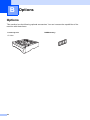
Options
Options ................................................................................................................ 48
Optional Paper Tray (LT-5300)............................................................................ 49
Memory Board .....................................................................................................49
DIMM types ...................................................................................................49
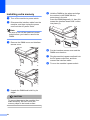
Installing extra memory ................................................................................. 50
ix
C
Troubleshooting and routine maintenance
Troubleshooting ...................................................................................................51
If you are having difficulty with your machine ................................................51
Improving the print quality .............................................................................55
Error messages ...................................................................................................59
Document jams..............................................................................................62
Paper jams ....................................................................................................63
Routine maintenance ...........................................................................................68
Cleaning the outside of the machine .............................................................68
Cleaning the scanner glass ...........................................................................69
Cleaning the laser scanner window ...............................................................70
Cleaning the corona wire ...............................................................................71
Cleaning the drum unit ..................................................................................72
Replacing the toner cartridge (TN-550/TN-580) ............................................73
Replacing the toner cartridge ........................................................................74
Replacing the drum unit (DR-520) .................................................................76
Replacing periodic maintenance parts.................................................................78
Packing and shipping the machine ......................................................................79
Machine Information ............................................................................................80
Checking the serial number ...........................................................................80
Checking the page counters ..........................................................................80
Checking remaining life of parts ....................................................................80
D
Menu and Features
On-screen programming ......................................................................................81
Menu table .....................................................................................................81
Memory storage.............................................................................................81
Menu keys ...........................................................................................................81
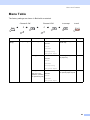
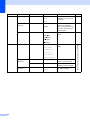
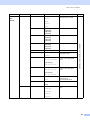
Menu Table..........................................................................................................83
Entering Text .......................................................................................................89
E
Specifications
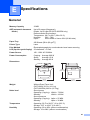
General ................................................................................................................91
Print media...........................................................................................................92
Copy ....................................................................................................................93
Scan.....................................................................................................................94
Print .....................................................................................................................95
Interfaces .............................................................................................................95
Computer requirements .......................................................................................96
Consumable items ...............................................................................................97
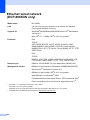
Ethernet wired network (DCP-8065DN only) .......................................................98
F
Glossary
Glossary...............................................................................................................99
G
Index
Index ..................................................................................................................100
x
Section I
General
General information
Loading documents and paper
General setup
Security features
I
2
10
17
21
1
General information
Using the
documentation
1
Electrical Hazard icons alert you to a
possible electrical shock.
Thank you for buying a Brother machine!
Reading the documentation will help you
make the most of your machine.
Symbols and conventions
used in the documentation
The following symbols and conventions are
used throughout the documentation.
Warning icons tell you what to do to
avoid the risk of injury.
Hot Surface icons warn you not to
touch MFC parts that are hot.
1
Caution icons tell you about
procedures you must follow to
prevent damaging the machine.
Incorrect setup icons alert you to
devices and operations that are not
compatible with the machine.
Note icons give useful tips.
Bold
Bold style indentifies keys on
the machine control panel or
computer screen.
Italics
Italicized style emphasizes an
important point or refers you to
a related topic.
Courier
New
Courier New font identifies the
messages shown on the LCD
of the machine.
2
1
General information
Accessing the
complete User’s Guide
1
The printed User’s Guide does not contain all
the information about your machine. The
advanced features of the Printer, Network
and Scanner are explained in the complete
User’s Guide that you can find on the
CD-ROM.
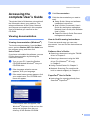
Viewing documentation
d
e
Click Documentation.
Click the documentation you want to
read:
Setup Guide: Setup and software
installation instructions.
User's Guide (3 manuals): User’s
Guide for stand-alone operations,
Network User’s Guide, and Software
User’s Guide.
PaperPort User's Guide: Document
management software.
1
How to find Scanning instructions
®
Viewing documentation (Windows )
To view the documentation, from the Start
menu, point to Brother, MFL Pro Suite from
the program group, and then click
User’s Guide.
If you have not installed the software, you can
find the documentation by following the
instructions below:
a
1
1
1
There are several ways you can scan
documents. You can find the instructions as
follows:
Software User's Guide:
1
Scanning a document using the TWAIN
driver in Chapter 2
Scanning a document using the WIA
driver (For Windows® XP only)
in Chapter 2
Turn on your PC. Insert the Brother
CD-ROM labeled Windows® into your
CD-ROM drive.
Using ControlCenter2 in Chapter 3
b
If the language selection screen
appears, click your language.
Network Scanning (For models with
built-in network support) in Chapter 4
c
If the model name screen appears, click
your model name.The CD-ROM main
menu will appear.
PaperPort® User's Guide
1
Instructions for scanning directly from
ScanSoft® PaperPort®
If this window does not appear, use
Windows® Explorer to find and run the
setup.exe program from the root
directory of the Brother CD-ROM.
3
Chapter 1
Viewing Documentation (Macintosh®)
a
Turn on your Macintosh®. Insert the
Brother CD-ROM labeled Macintosh®
into your CD-ROM drive. The following
window will appear.
1
How to find Scanning instructions
1
There are several ways you can scan
documents. You can find the instructions as
follows:
Software User's Guide:
1
Scanning from a Macintosh® in Chapter 8
(For Mac OS® 9.1-9.2/Mac OS® X 10.2.4
or greater)
Using ControlCenter2 in Chapter 9
(For Mac OS® X 10.2.4 or greater)
Network Scanning in Chapter 10
(For Mac OS® X 10.2.4 or greater)
b
c
Double-click the Documentation icon.
d
Double-click the documentation you
want to read:
Setup Guide: Setup and Software
installation instructions.
User's Guides (3 manuals): User’s
Guide for stand-alone operations,
Network User’s Guide, and Software
User’s Guide.
4
If the language selection screen
appears, double-click your language.
Presto!® PageManager ® User's Guide
Instructions for scanning directly from
Presto!® PageManager®
1
General information
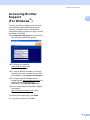
Accessing Brother
Support
(For Windows®)
1
1
You can find all the contacts you will need,
such as Web support (Brother Solutions
Center), Customer Service and Brother
Authorized Service Centers on page i and on
the Brother CD-ROM.
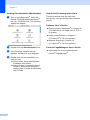
Click Brother Support on the main menu.
The following screen will appear:
To access our web site
(www.brother.com) click
Brother Home Page.
To view all Brother Numbers, including
Customer Service numbers for the USA
and Canada, click Support Information.
To access the USA Brother online
shopping mall (www.brothermall.com) for
additional product and service
information, click Brother Mall.com.
For the latest news and product support
information
(http://solutions.brother.com/), click
Brother Solutions Center.
To return to the main page, click Back.
Or, if you have finished, click Exit.
5
Chapter 1
Control panel overview
1
DCP-8060 and DCP-8065DN have similar control keys.
1
2
9
1
Status LED (light emitting diode)
The LED will flash and change color depending
on the machine’s status.
2 LCD (liquid crystal display)
Displays messages to help you use your
machine.
3
Menu keys:
8
Start
Starts copying or scanning.
7
Copy keys
Duplex (DCP-8065DN only)
You can choose Duplex to copy on both
sides of the paper.
Menu
Accesses the main menu.
Contrast/Quality (DCP-8065DN only)
Lets you change the quality or contrast for
the next copy.
Clear/Back
Deletes entered data or lets you exit the
menu.
Contrast (DCP-8060 only)
Lets you change the contrast for the next
copy.
OK
Selects a setting.
Quality (DCP-8060 only)
Lets you change the quality for the next
copy.
d or c
Scrolls backwards or forwards through menu
selections.
a or b
Scrolls through the menus and options.
4 Dial pad
Enlarge/Reduce
Reduces or enlarges copies.
Tray Select
Lets you change which tray will be used for
the next copy.
Stop/Exit
Sort
Sorts multiple copies using the ADF.
Stops an operation or exits from a menu.
N in 1
Used to enter text.
5
6
You can choose N in 1 to copy 2 or 4 pages
onto one page.
6
General information
2
3
4
5
1
8
8
7
6
Scan
Puts the machine in Scan mode.
(For details about scanning, see Software
User’s Guide on the CD-ROM.)
9 Print keys
Secure
Prints data saved in memory when you enter
your four-digit password.
(For details about using the Secure key, see
the Software User’s Guide on the CD-ROM.)
Job Cancel
Press this key to cancel a print job and clear
the machine’s memory.
7
Chapter 1
Status LED indications
1
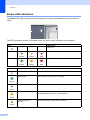
The Status LED (light emitting diode) will flash and change color depending on the machine’s
status.
The LED indications shown in the table below are used in the illustrations in this chapter.
LED
LED Status
LED is off.
LED is on.
Green
Yellow
Red
LED is blinking.
Green
LED
Yellow
Red
Machine Status
Description
Sleep Mode
The power switch is off or the machine is in Sleep mode.
Warming Up
The machine is warming up for printing.
Ready
The machine is ready to print.
Receiving Data
The machine is either receiving data from the computer,
processing data in memory, or printing data.
Data Remaining in
Memory
Print data remains in the machine memory.
Green
Green
Yellow
Yellow
8
General information
Service error
Follow the steps below.
1. Turn off the power switch.
1
2. Wait a few seconds, and then turn it back on and try to print
again.
Red
If you cannot clear the error and you see the same service call
indication after turning the machine back on, please call Brother
Customer Service. (See Brother numbers on page i.)
Red
Cover open
The front cover or fuser cover is open. Close the cover.
Toner Life End
Replace the toner cartridge with a new one.
Paper error
Put paper in the tray or clear the paper jam. Check the LCD
message.
Scan lock
Check that the scanner lock lever is released.
Others
Check the LCD message.
Out of memory
Memory is full.
Note
When the power switch is off or the machine is in Sleep mode, the LED is off.
9
2
Loading documents and paper
Loading documents
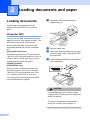
a
2
Unfold the ADF document output
support flap (1).
All scan and copy operations can be
performed from the ADF or the scanner
glass.
1
Using the ADF
2
You can use the ADF (automatic document
feeder) to scan or copy sheets of paper. The
ADF feeds each sheet one at a time.
When loading the ADF, make sure that
documents written with ink are completely
dry.
Single-Sided Document
Documents must be from 5.8 to 8.5 inches
(148.0 to 215.9 mm) wide and from 5.8 to 14
inches (148.0 to 355.6 mm) long, and of a
standard weight (20 lb (80 g/m2)).
b
c
Fan the pages well.
d
Adjust the paper guides to fit the width of
your documents.
Place your documents face up, top edge
first in the ADF until you feel them touch
the feed roller.
2-Sided Document
(DCP-8065DN only)
When you load a 2-sided document, the
document must be from 5.8 to 8.5 inches
(148.0 to 215.9 mm) wide and from 5.8 to
11.7 inches (148.0 to 297.0 mm) long.
For information on the capacity of the ADF
see Specifications on page 91.
CAUTION
To avoid damaging your machine while
using the ADF, do not pull on the document
while it is feeding.
To scan non-standard documents see
Using the scanner glass on page 11.
10
2
Loading documents and paper
Using the scanner glass
You can use the scanner glass to scan or
copy the pages of a book or single sheets of
paper. Documents can be up to 8.5 inches
wide and up to 14 inches long (215.9 mm
wide to 355.6 mm long).
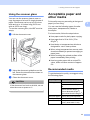
To use the scanner glass, the ADF must be
empty.
a
Lift the document cover.
2
Acceptable paper and
other media
2
Print quality may vary according to the type of
paper you are using.
2
You can use the following types of media:
plain paper, transparencies, labels or
envelopes.
For best results, follow the steps below:
Use paper made for plain paper copying.
Use paper that is 20 to 24 lb (75 to
90 g/m2).
Use labels or transparencies which are
designed for use in laser printers.
When using transparencies remove each
sheet immediately to prevent smudging or
paper jams.
Avoid touching the printed surface of the
paper immediately after printing.
Use long grain paper with a neutral Ph
value, and a moisture content of approx.
5%.
b
c
Using the document guidelines on the
left, center the document face down on
the scanner glass.
Recommended media
2
To get the best print quality, we suggest using
the following paper.
Close the document cover.
CAUTION
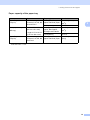
Paper Type
Item
Plain paper
Xerox 4200DP 20 lb
Hammermill Laser Paper 24
lb
If the document is a book or is thick, do not
slam the cover or press on it.
(Xerox Premier 80g/m2)
(Xerox Business 80 g/m2)
(M-real DATACOPY 80 g/m2)
Recycled paper
(Xerox Recycled Supreme)
Transparency
3M CG 3300
Labels
Avery laser label #5160
(Avery laser label L7163)
11
Chapter 2
Handling and using media
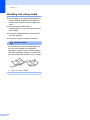
2
Store paper in its original packaging and
keep it sealed. Keep the paper flat and
away from moisture, direct sunlight and
heat.
Avoid touching either side of
transparencies, as this can decrease the
print quality.
Only use transparencies recommended
for laser printing.
Only use sharply creased envelopes.
Improper Setup
Do not use any of the following paper, as
they will cause paper feed problems:
damaged, coated, curled, wrinkled, highly
textured, irregularly shaped, or paper that
has previously been printed on by a printer.
1
12
0.08 in. (4 mm) or longer
Loading documents and paper
Paper capacity of the paper tray
Paper Tray
(Tray #1)
Multi-purpose tray
(MP tray)
Paper size
Paper types
No. of sheets
A4, Letter, Legal,
Executive, A5, A6, B5,
Plain paper, Recycled
paper and Bond paper
up to 250 [20 lb (80
g/m2)]
B6 and Folio 1
Transparency
up to 10
Plain paper, Recycled
paper, Bond paper,
Envelope and Labels
up to 50 [20 lb (80
Transparency
up to 10
Plain paper, Recycled
paper and Bond paper
up to 250 [20 lb (80
Width: 2.75 to 8.5 in.
(69.9 to 215.9 mm)
Length: 4.57 to 16.0 in.
(116.0 to 406.4 mm)
Paper Tray
(Tray #2)
A4, Letter, Legal,
Executive, A5, B5, B6
and Folio
1
2
2
g/m2)]
g/m2)]
1
Folio size is 8 in. × 13 in.
13
Chapter 2
Loading paper and
other media
d
Fan the stack of paper well to avoid
paper feeding problems.
e
Insert the paper into the paper tray with
the top edge of the paper first and the
print side down.
Make sure that the paper is flat in the
tray and below the maximum paper
mark (1).
2
When printing on plain paper 16 to 28 lb (60
to 105 g/m2) or laser transparencies use the
paper tray.
For printing on other types of media use the
MP tray (Multi-purpose tray).
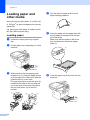
Loading paper
2
a
Unfold the output paper tray support
flap.
b
Pull the paper tray completely out of the
machine.
c
While pressing the blue paper-guide
release lever (1), slide the paper guides
to fit the paper size. Make sure that the
guides are firmly in the slots.
For legal size paper, press the lever (2)
located at the back of the tray and pull
out of the back of the open tray. Move
the tray lock button (3) to the lock
position.
(1)
(2)
(3)
(1)
14
(1)
f
Push the paper tray firmly back into the
machine.
Loading documents and paper
Loading envelopes and other
media
Use the MP tray when printing envelopes,
labels, and thick paper.
a
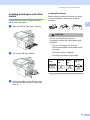
Loading Envelopes
2
2
Before loading, press the corners and sides
of the envelopes to make them as flat as
possible.
2
Open the MP tray and lower it gently.
CAUTION
Do not use the following types of
envelopes, as they will cause paper feed
problems:
• That are of a baggy construction.
• That are embossed (have raised writing
on them).
b
Pull out the MP tray support.
• That have clasps or staples.
• That are pre-printed on the inside.
Glue
c
2
Rounded
flap
2
Double
flap
Triangular
flap
2
2
Insert the media into the MP tray with
the top edge first and the printing side
face up.
15
Chapter 2
Printable Area
2
Printable Area for copies
2
The printable area of your machine begins at
approximately 0.12 in. (3 mm) from the top
and bottom and 0.09 in. (2.3 mm) from both
sides of the paper.
Printable Area when printing from a
computer
When using the default driver the printable
area is smaller than the paper size, as shown
below.
Portrait
2
2
2
1
2
1
1
1
1
0.16 in. (4.23 mm)
0.25 in. (6.35 mm)
1
0.12 in. (3 mm)
2
2
0.09 in. (2.3 mm)
Landscape
Note
2
This printable area shown above is for a
single copy using Letter size paper. The
printable area changes with the paper
size.
2
1
1
1
0.16 in. (4.23 mm)
2
0.2 in. (5.08 mm)
Note
The printable area shown above is for
Letter size paper. The printable area
changes with the paper size.
16
2
3
General setup
Paper settings
Paper Type
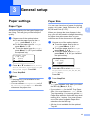
Set up the machine for the type of paper you
are using. This will give you the best print
quality.
a
Choose one of the options below:
To set the paper type for the MP
Tray press Menu, 1, 1, 1.
To set the paper type for Tray#1
press Menu, 1, 1, 2.
To set the paper type for Tray#2
press Menu, 1, 1, 3 if you installed
the optional tray.
3
3
3
Paper Size
You can use nine sizes of paper for printing
copies: A4, Letter, Legal, Executive, A5, A6,
c
Press a or b to select Thin, Plain,
Thick, Thicker, Transparency or
Recycled Paper. Press OK.
When you change the size of paper in the
tray, you will also need to change the setting
for paper size at the same time so your
machine can fit the document on the page.
a
Note
• You can choose Transparency only if
A4, Letter, Legal or Folio size was
chosen as the paper size.
Choose one of the options below:
To set the paper size for the MP
Tray press Menu, 1, 2, 1.
To set the paper size for Tray#1
press Menu, 1, 2, 2.
To set the paper size for Tray#2
press Menu, 1, 2, 3 if you installed
the optional tray.
12.Paper Size
1.MP Tray
a
Letter
b
Legal
Select ab & OK
b
Press a or b to select A4, Letter,
Legal, Executive, A5, A6, B5, B6,
Folio or Any.
Press OK.
c
Press Stop/Exit.
Press Stop/Exit.
• Transparency is not available for the
optional Tray #2.
3
B5, B6 and Folio (8”×13”).
11.Paper Type
1.MP Tray
a
Plain
b
Thick
Select ab & OK
b
3
Note
• Any (size) appears only when you select
the MP tray (Menu, 1, 2, 1).
• If you select Any for the MP Tray Paper
Size: You must choose MP Only for the
Tray Use setting. You cannot use the Any
Paper Size selection for the MP tray when
making N in 1 copies. You must choose
one of the other available Paper Size
selections for the MP tray.
• A6 size is not available for the optional
Tray #2.
17
Chapter 3
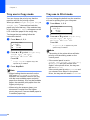
Tray use in Copy mode
3
Tray use in Print mode
You can change the priority tray that the
machine will use for printing copies.
You can change the default tray the machine
will use for printing from your computer.
When you select Tray#1 Only, MP Only or
Tray#2 Only 1, the machine loads the
paper only from that tray. If the selected tray
is out of paper, No Paper will appear on the
LCD. Insert the paper in the empty tray.
a
To change the tray setting follow the
instructions below:
a
Press Menu, 1, 5, 1.
15.Tray Use
1.Copy
a
MP>T1
b
T1>MP
Select ab & OK
b
Press a or b to select Tray#1 Only,
Tray#2 Only 1, MP Only,
MP>T1>T2 1 or T1>T2 1>MP.
Press OK.
1
c
Tray#2 Only or T2 appears only if the
optional tray is installed.
Press Stop/Exit.
Note
• When loading the documents from the
ADF and MP>T1>T2 or T1>T2>MP is
selected, the machine looks for the tray
with the most suitable paper and pulls
paper from that tray. If no tray has suitable
paper, the machine pulls paper from the
higher priority tray.
• When using the scanner glass, your
document is copied from the higher
priority tray even if more suitable paper is
in another paper tray.
18
3
Press Menu, 1, 5, 2.
15.Tray Use
2.Print
a
MP>T1
b
T1>MP
Select ab & OK
b
Press a or b to select Tray#1 Only,
Tray#2 Only 1, MP Only,
MP>T1>T2 1 or T1>T2 1>MP.
Press OK.
1
Tray#2 Only or T2 appears only if the
optional tray is installed.
Note
• The setting in the printer driver will take
priority over the setting made on the
control panel.
• If the control panel is set to
Tray#1 Only, Tray#2 Only, MP Only
or MP>T1>T2 and you choose ‘Auto
Select’ in the printer driver, the tray use
will be MP>T1>T2.
If the control panel is set to T1>T2>MP and
you choose ‘Auto Select’ in the printer
driver, the tray use will remain T1>T2>MP.
General setup
Volume Settings
Beeper volume
3
3
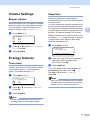
When the beeper is on, the machine will beep
when you press a key and make a mistake.
You can select a ring volume level from a
range of settings, from High to Off.
a
c
Press Menu, 1, 3.
a
You can save toner using this feature. When
you set toner save to On, print appears
lighter. The default setting is Off.
Press Menu, 1, 4, 1.
14.Ecology
1.Toner Save
a
On
b
Off
Select ab & OK
b
Press a or b to choose On (or Off).
Press OK.
c
Press Stop/Exit.
Press Menu, 1, 4, 2.
14.Ecology
2.Sleep Time
Press Stop/Exit.
Toner save
a
Setting the sleep time reduces power
consumption by turning off the fuser while the
machine is idle.
While the machine is in sleep mode the LCD
will display Sleep. When printing or copying
in sleep mode, there will be a short delay
while the fuser warms up.
Press a or b to select Off, Low, Med or
High. Press OK.
Ecology features
3
You can choose how long the machine must
be idle (from 00 to 99 minutes) before it goes
into sleep mode. When the machine receives
computer data or makes a copy, the timer will
be reset. The default setting is 05 minutes.
13.Beeper
a
Low
Med
b
High
Select ab & OK
b
Sleep time
Sleep Time:05Min
Enter & OK Key
3
b
Enter the length of time the machine is
idle before entering sleep mode
(00 to 99). Press OK.
c
Press Stop/Exit.
3
To turn off sleep mode, press Secure and
Job Cancel at the same time in b.
Press a or b to select Off (or On).
Press OK.
Note
When you turn off sleep mode, the setting
will take effect the next time the machine
copies, prints or is turned off and on.
Note
We do not recommend Toner Save for
printing Photo or Gray Scale images.
19
3
Chapter 3
Turning off the scanner lamp
The scanner lamp stays on for 16 hours
before automatically switching off to preserve
the life of the lamp and reduce power
consumption.
3
LCD Contrast
You can change the contrast to make the
LCD look lighter or darker.
a
To turn the scanner lamp off manually press
the d and c keys simultaneously. The
scanner lamp will remain turned off until the
next time you use the scanning feature.
Note
Press Menu, 1, 6.
16.LCD Contrast
-nnonn+
Select d c & OK
b
Press c to make the LCD darker.
O, press d to make the LCD lighter.
Press OK.
c
Press Stop/Exit.
Turning the lamp off regularly will reduce
the lamp’s life.
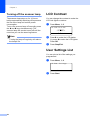
User Settings List
You can print a list of the settings you
programmed.
a
Press Menu, 1, 8.
18.User Settings
Press Start
b
20
Press Start.
3
4
Security features
Security
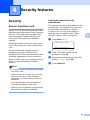
Secure Function Lock
Secure Function Lock lets you restrict Public
access to certain operations (Copy, Scan and
PCprint). This feature also prevents users
from changing the Default settings of the
machine by limiting access to the Menu
settings.
4
4
Setting the password for the
administrator
Make a careful note of your password. If you
forget it, please call Brother Customer
Service.
4
The password you set in these steps is for the
administrator. This password is used to set
up restricted users and to turn Secure
Function Lock on or off. See Setting up
restricted users on page 22 and Turning
Secure Function Lock on on page 23.
a
Press Menu, 1, 7.
17.Function Lock
Disabling at least one function is required to
turn on Secure Function Lock for the Public
user.
Access to restricted operations can be
enabled by creating a restricted user.
Restricted users must select the stored name
and enter a password to use the machine.
4
New Passwd:xxxx
Enter & OK Key
b
Enter a four-digit number for the
password. Press OK.
c
Re-enter the password when the LCD
shows Verify:. Press OK.
d
Press Stop/Exit.
Note
• You can set up to 25 individual users and
one Public user.
• When you set up a Public user, you can
restrict one or more of the machine’s
functions to all users who do not have a
password.
• Only administrators can set limitations
and make changes for each user.
• When PCprint is disabled, computer print
jobs will be lost without notification.
21
4
Chapter 4
Setting up the Public user
You can set up the Public user. Public users
do not need to enter a password.
Note
4
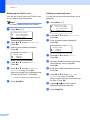
Setting up restricted users
You can set up users with restrictions and a
password.
a
You must disable at least one function.
a
b
Press a or b to select Setup User.
Press OK.
c
Enter the administrator password.
Press OK.
17.Function Lock
Setup User
a
Public
b
User01
Select ab & OK
d
Press a or b to select Public.
Press OK.
e
Press a or b to select Enable or
Disable for Copy. Press OK.
After you have set Copy, repeat this step
for Scan and PCprint 1. Press OK.
1
f
22
17.Function Lock
a
Lock OffiOn
Set Password
b
Setup User
Select ab & OK
Press Menu, 1, 7.
17.Function Lock
a
Lock OffiOn
Set Password
b
Setup User
Select ab & OK
Press Menu, 1, 7.
b
Press a or b to select Setup User.
Press OK.
c
Enter the administrator password.
Press OK.
17.Function Lock
Setup User
a
Public
b
User01
Select ab & OK
d
Press a or b to select User01.
Press OK.
e
Use the dial pad to enter the user name.
(See Entering Text on page 89.)
Press OK.
f
Enter a four-digit password for the user.
Press OK.
g
Press a or b to select Enable or
Disable for Copy. Press OK.
After you have set Copy, repeat this step
for Scan. Press OK.
h
Repeat d to g for entering each
additional user and password.
i
Press Stop/Exit.
You can set PCprint for only the Public user.
Press Stop/Exit.
4
Security features
Turning Secure Function Lock on/off
4
If you enter the wrong password when
following the instructions below, the LCD will
show Wrong Password. Re-enter the
correct password.
Switching Users
4
This setting allows a restricted user to log on
the machine when Secure Function Lock is
turned on.
Note
Turning Secure Function Lock on
a
4
Press Menu, 1, 7.
17.Function Lock
a
Lock OffiOn
Set Password
b
Setup User
Select ab & OK
b
Press a or b to select Lock OffiOn.
Press OK.
c
Enter your four-digit administrator
password. Press OK.
Turning Secure Function Lock off
a
Press Menu, 1, 7.
17.Function Lock
After a restricted user has finished using
the machine, it will return to the Public
setting in one minute.
a
4
Press Menu, 1, 7.
17.Function Lock
a
b
Lock OniOff
Change User
Select ab & OK
b
Press a or b to select Change User.
Press OK.
c
Press a or b select the registered
name of the user to be logged on.
Press OK.
d
Enter your four-digit password.
Press OK.
4
a
b
Lock OniOff
Set Password
Select ab & OK
b
Press a or b to select Lock OniOff.
Press OK.
c
Enter your four-digit administrator
password. Press OK.
23
Chapter 4
24
Section II
Copy
Making copies
II
26
5
Making copies
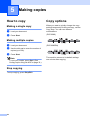
How to copy
Making a single copy
a
b
5
5
Load your document.
a
b
Load your document.
c
Press Start.
When you want to quickly change the copy
settings temporarily for the next copy, use the
Copy keys. You can use different
combinations.
5
(DCP-8065DN)
Use the dial pad to enter the number of
copies (up to 99).
The machine returns to its default settings
one minute after copying.
Note
To sort your copies, press Sort. (See
Sorting copies using the ADF on page 33.)
Stop copying
To stop copying, press Stop/Exit.
26
Copy options
(DCP-8060)
Press Start.
Making multiple copies
5
5
5
Making copies
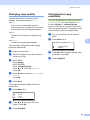
Changing copy quality
You can select from a range of quality
settings. The default setting is Auto.
Auto
Auto is the recommended mode for
ordinary printouts. Suitable for documents
that contain both text and photographs.
Text
Suitable for documents containing only
text.
Photo
5
Changing text copy
resolution
You can change the text copy resolution to
1200x600dpi if you have selected Text
from the Quality or Contrast/Quality
options, and make a copy with 100% ratio
using the scanner glass. To change the text
copy resolution, follow the steps below:
a
Put your document on the scanner
glass.
b
Press Menu, 2, 2.
Suitable for copying photographs.
Load your document.
c
(DCP-8060)
Press Quality.
(DCP-8065DN)
Press Contrast/Quality.
Press a or b to choose Quality.
Press OK.
d
Press d or c to choose Auto, Text or
Photo.
Press OK.
e
Press Start.
Use the dial pad to enter the number of
copies (up to 99).
5
22.FB Txt Quality
To temporarily change the quality setting,
follow the steps below:
a
b
5
a
b
1200x600dpi
600dpi
Select ab & OK
c
Press a or b to choose the text copy
resolution. Press OK.
d
Press Stop/Exit.
To change the default setting, follow the
steps below:
a
Press Menu, 2, 1.
21.Quality
a
Auto
Text
b
Photo
Select ab & OK
b
Press a or b to choose the copy
quality. Press OK.
c
Press Stop/Exit.
27
Chapter 5
Enlarging or reducing the
image copied
e
Choose one of the options below:
Press a or b to select the
enlargement or reduction ratio you
want. Press OK.
Press a or b to select Custom (25–
400%). Press OK. Use the dial pad
to enter an enlargement or reduction
ratio from 25% to 400%. (For
example, press 5 3 to enter 53%.)
Press OK.
f
Press Start.
5
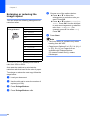
You can select the following enlargement or
reduction ratios:
Press
Enlarge/Reduce
100%*
104% EXEiLTR
141% A5iA4
200%
Auto
Custom(25–400%)
50%
70% A4iA5
78% LGLiLTR
83% LGLiA4
85% LTRiEXE
91% Full Page
94% A4iLTR
97% LTRiA4
Custom(25–400%) allows you to enter a
ratio from 25% to 400%.
Auto sets the machine to calculate the
reduction ratio that best fits the size of paper.
To enlarge or reduce the next copy follow the
steps below:
a
b
Load your document.
c
d
Press Enlarge/Reduce.
28
Use the dial pad to enter the number of
copies (up to 99).
Press Enlarge/Reduce or c.
Note
• The Auto setting is available only when
loading from the ADF.
• Page Layout Options 2 in 1(P), 2 in 1(L), 4
in 1(P), 4 in 1(L) or Poster are not
available with Enlarge/Reduce.
(P) means Portrait and (L) means
Landscape.
Making copies
Making N in 1 copies or a
poster
If you are using the scanner glass:
5
f
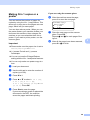
You can reduce the number of pages for
copies by using the N in 1 copy feature. This
allows you to copy two or four pages onto one
page, which lets you save paper.
Flatbed Copy:
Next Page?
a
1.Yes
b
2.No
Select ab & OK
You can also make a poster. When you use
the poster feature your machine divides your
document into sections, then enlarges the
sections so you can assemble them into a
poster. If you want to print a poster, use the
scanner glass.
Important
After the machine scans the page,
press 1 to scan the next page.
5
g
Place the next page on the scanner
glass. Press OK.
Repeat f and g for each page of the
layout.
h
After all the pages have been scanned,
press 2 in f to finish.
Please make sure the paper size is set to
Letter, A4, Legal or Folio.
(P) means Portrait and (L) means
Landscape.
You can not use the Enlarge/Reduce
setting with the N in 1 and poster features.
You can only make one poster copy at a
time.
a
b
Load your document.
c
d
Press N in 1.
e
Use the dial pad to enter the number of
copies (up to 99).
Press a or b to select 2 in 1 (P),
2 in 1 (L), 4 in 1 (P),
4 in 1 (L), Poster (3 x 3) or Off
(1 in 1). Press OK.
Press Start to scan the page.
If you are making a poster or placed the
document in the ADF, the machine
scans the pages and starts printing.
29
5
Chapter 5
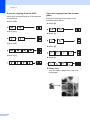
If you are copying from the ADF:
Insert your document face up in the direction
shown below:
2 in 1 (P)
5
If you are copying from the scanner
glass:
Insert your document face down in the
direction shown below:
2 in 1 (P)
2 in 1 (L)
2 in 1 (L)
4 in 1 (P)
4 in 1 (P)
4 in 1 (L)
4 in 1 (L)
Poster (3x3)
You can make a poster size copy of a
photograph.
30
5
Making copies
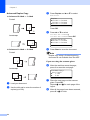
Duplex (2-sided) copying
(DCP-8065DN only)
Landscape
5
11
If you want to use the duplex copy feature,
load your document in the ADF.
2
Duplex Copy
1
5
1 sided i 2 sided
Portrait
1
a
b
Load your document.
c
Press Duplex and a or b to select
1sided i 2sided,
2sided i 2sided or
2sided i 1sided.
1
2
2
Use the dial pad to enter the number of
copies (up to 99).
Duplex
a1sided i
2sided i
b2sided i
Select ab
Landscape
11
1
5
2sided
2sided
1sided
& OK
Press OK.
2
2
2
d
2 sided i 2 sided
Press Start to scan the document.
Note
Portrait
Duplex copy using a 2-sided legal size
document is not available from the ADF.
1
1
If you are using the scanner glass:
2
e
2
Landscape
Flatbed Copy:
Next Page?
a
1.Yes
b
2.No
Select ab & OK
11
11
2
2
2 sided i 1 sided
f
Place the next page on the scanner
glass. Press OK.
Repeat e and f for each page of the
layout.
g
After all the pages have been scanned,
press 2 in e to finish.
Portrait
1
After the machine scans the page,
press 1 to scan the next page.
1
2
2
31
Chapter 5
Advanced Duplex Copy
5
c
Advanced 2 sided i 1 sided
Duplex
a1sided i
2sided i
b2sided i
Select ab
Portrait
1
1
d
2
2
Press a or b to select
2sided i 1sided or
1sided i 2sided. Press OK.
Duplex Advanced
a2sided i 1sided
b1sided i 2sided
11
1
2
2
Select ab & OK
e
Advanced 1 sided i 2 sided
Portrait
Press Start to scan the document.
Note
Duplex copy using a 2-sided legal size
document is not available from the ADF.
1
1
If you are using the scanner glass:
2
2
f
Landscape
11
2
2
g
Place the next page on the scanner
glass. Press OK.
Repeat f and g for each page of the
layout.
h
After all the pages have been scanned,
press 2 in f to finish.
Load your document.
Use the dial pad to enter the number of
copies (up to 99).
After the machine scans the page,
press 1 to scan the next page.
Flatbed Copy:
Next Page?
a
1.Yes
b
2.No
Select ab & OK
1
32
2sided
2sided
1sided
& OK
Press OK.
Landscape
a
b
Press Duplex and a or b to select
Advanced.
Making copies
Sorting copies using the ADF
You can sort multiple copies. Pages will be
stacked in the order 1 2 3, 1 2 3, 1 2 3, and so
on.
a
b
Load your document.
c
d
Press Sort.
Use the dial pad to enter the number of
copies (up to 99).
5
Adjusting contrast
5
Contrast
5
Adjust the contrast to help an image look
sharper and more vivid.
To temporarily change the contrast setting,
follow the steps below:
a
b
Load your document.
c
(DCP-8060)
Press Contrast.
Press Start.
Use the dial pad to enter the number of
copies (up to 99).
5
(DCP-8065DN)
Press Contrast/Quality.
Press a or b to choose Contrast.
Press OK.
Contrast:-nnonn+ c
Quality :Auto
Enlg/Red:100%
Tray
:MP>T1
Select d c & OK
d
Press d or c to increase or decrease
the contrast.
e
Press Start.
To change the default setting follow the steps
below:
a
Press Menu, 2, 3.
23.Contrast
-nnonn+
Select d c & OK
b
Press d or c to change the contrast.
Press OK.
c
Press Stop/Exit.
33
Chapter 5
Tray Select
5
You can change the tray use only for the next
copy.
a
b
Load your document.
c
Press Tray Select.
Use the dial pad to enter the number of
copies (up to 99).
Contrast:-nnonn+
Quality :Auto
Enlg/Red:100%
Tray
:MP>T1 c
Select d c & OK
d
Press d or c to select the tray usage.
Press OK.
e
Press Start.
Press Tray Select
MP>T1 or M>T1>T2
T1>MP or T1>T2>M
#1(XXX)*
#2(XXX)*
MP(XXX)*
* XXX is the paper size you set in Menu, 1, 2.
Note
• T2 and Tray #2 appear only if the optional
paper tray is installed.
• To change the Tray select setting,
see Tray use in Copy mode on page 18.
34
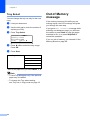
Out of Memory
message
If the memory becomes full while you are
making copies, the LCD message will guide
you through the next step.
If you get an Out of Memory message while
scanning a subsequent page, you will have
the option to press Start to copy the pages
scanned so far, or to press Stop/Exit to
cancel the operation.
If you run out of memory, you can add it. See
Memory Board on page 49.
5
Section III
Software
Software and Network features
III
36
6
Software and Network features
The User’s Guide on the CD-ROM includes
the Software User’s Guide and Network
User’s Guide for features available when
connected to a computer (for example,
Printing and Scanning).
Printing
(For Windows®, see Chapter 1 in the
Software User’s Guide on the CD-ROM.)
(For Macintosh®, see Chapter 7 in the
Software User’s Guide on the CD-ROM.)
Scanning
(For Windows®, see Chapter 2 in the
Software User’s Guide on the CD-ROM.)
(For Macintosh®, see Chapter 8 in the
Software User’s Guide on the CD-ROM.)
ControlCenter2
(For Windows®, see Chapter 3 in the
Software User’s Guide on the CD-ROM.)
(For Macintosh®, see Chapter 9 in the
Software User’s Guide on the CD-ROM.)
Network Printing (DCP-8065DN only)
(See the Network User’s Guide on the
CD-ROM.)
Network Scanning (DCP-8065DN only)
(For Windows®, see Chapter 4 in the
Software User’s Guide on the CD-ROM.)
(For Macintosh®, see Chapter 10 in the
Software User’s Guide on the CD-ROM.)
Note
See Accessing the complete User’s Guide
on page 3
36
6
Section IV
Appendixes
Safety and Legal
Options
Troubleshooting and routine maintenance
Menu and Features
Specifications
Glossary
IV
38
48
51
81
91
99
A
Safety and Legal
Choosing a location
Place your machine on a flat, stable surface that is free of vibration and shocks. Put the machine
near a standard, grounded AC power outlet. Choose a location where the temperature remains
between 50°F and 90.5°F (10°C and 32.5°C) and the humidity is between 20% to 80% (without
condensation).
CAUTION
Avoid placing your machine in a high-traffic area.
Do not place the machine near heaters, air conditioners, refrigerators, water, chemicals or
devices that contain magnets or generate magnetic fields.
Do not expose the machine to direct sunlight, excessive heat, open flames, salty or corrosive
gasses, moisture, or dust.
Do not connect your machine to an AC power outlet controlled by wall switches or automatic
timers.
Disruption of power can wipe out information in the machine’s memory.
Do not connect your machine to an AC power outlet on the same circuit as large appliances or
other equipment that might disrupt the power supply.
Avoid interference sources, such as speakers or the base units of cordless phones.
Do not put objects on top of the machine.
DO NOT use flammable substances near the machine.
Doing this might cause a fire or electrical shock.
38
A
A
Safety and Legal
To use the machine safely
A
Please keep these instructions for later reference and read them before attempting any
maintenance.
WARNING
There are high voltage electrodes inside the
machine. Before you clean the inside of the
machine, make sure you have unplugged the
power cord from the AC power outlet.
Do not handle the plug with wet hands. Doing this
might cause an electrical shock.
After you have just used the machine, some
internal parts of the machine will be extremely hot.
When you open the front or back cover of the
machine, DO NOT touch the shaded parts shown
in the illustration.
The fuser unit is marked with a caution label. Please do
not remove or damage the label.
To prevent injuries, be careful not to put your
hands on the edge of the machine under the
document cover.
39
To prevent injuries, be careful not to put your
fingers in the area shown in the illustrations.
DO NOT use a vacuum cleaner to clean up scattered toner. Doing this might cause the toner
dust to ignite inside the vacuum cleaner, potentially starting a fire. Please carefully clean the
toner dust with a dry, lint-free cloth and dispose of it according to local regulations.
When you move the machine, grasp the side hand
holds that are under the scanner. DO NOT carry
the machine by holding it at the bottom.
This product must be installed near an AC power outlet that is easily accessible. In case of
an emergency, you must disconnect the power cord from the AC power outlet to shut off the
power completely.
To reduce the risk of shock or fire, use only a No. 26 AWG or larger telecommunication line cord.
40
Safety and Legal
CAUTION
Lightning and power surges can damage this product! We recommend that you use a quality
surge protection device on the AC power line or unplug the cord during a lightning storm.
WARNING
IMPORTANT SAFETY INSTRUCTIONS
When using your equipment, basic safety precautions should always be followed to reduce the
risk of fire, electric shock and injury to people, including the following:
1 Do not use this product near water, for example, near a bath tub, wash bowl, kitchen sink,
washing machine, or in a wet basement or near a swimming pool.
2 Avoid using this product during an electrical storm. There may be a remote risk of electric
shock from lightning.
3 Do not use this product to report a gas leak in the vicinity of the leak.
4 Use only the power cord provided with the machine.
SAVE THESE INSTRUCTIONS
41
Important Information
Federal Communications Commission (FCC)
Declaration of Conformity (USA only)
Responsible Party:
A
A
Brother International Corporation
100 Somerset Corporate Boulevard
Bridgewater, NJ 08807–0911 USA
TEL: (908) 704–1700
declares, that the products
Product Name: DCP-8060, DCP-8065DN
comply with Part 15 of the FCC Rules. Operation is subject to the following two conditions: (1) This
device may not cause harmful interference, and (2) this device must accept any interference
received, including interference that may cause undesired operation.
This equipment has been tested and found to comply with the limits for a Class B digital device,
pursuant to Part 15 of the FCC Rules. These limits are designed to provide reasonable protection
against harmful interference in a residential installation. This equipment generates, uses, and can
radiate radio frequency energy and, if not installed and used in accordance with the instructions,
may cause harmful interference to radio communications. However, there is no guarantee that
interference will not occur in a particular installation. If this equipment does cause harmful
interference to radio or television reception, which can be determined by turning the equipment
off and on, the user is encouraged to try to correct the interference by one or more of the following
measures:
Reorient or relocate the receiving antenna.
Increase the separation between the equipment and receiver.
Connect the equipment into an outlet on a circuit different from that to which the receiver is
connected.
Call the dealer or an experienced radio/TV technician for help.
Important
A
Changes or modifications not expressly approved by Brother Industries, Ltd. could void the user’s
authority to operate the equipment.
Important — about the interface cable
A shielded interface cable should be used to ensure compliance with the limits for a Class B digital
device.
42
A
Safety and Legal
Industry Canada Compliance Statement (Canada only)
A
This Class B digital apparatus complies with Canadian ICES–003.
Cet appareil numérique de la classe B est conforme à la norme NMB–003 du Canada.
Disconnect device
A
This product must be installed near an electrical jack that is easily accessible. In case of
emergencies, you must disconnect the power cord from the electrical jack to shut off power
completely.
LAN connection
A
CAUTION
Do not connect this product to a LAN connection that is subject to over-voltages.
International ENERGY STAR® Compliance Statement
A
The purpose of the International ENERGY STAR® Program is to promote the development and
popularization of energy-efficient office equipment.
As an ENERGY STAR® Partner, Brother Industries, Ltd. has determined that this product meets
the ENERGY STAR® guidelines for energy efficiency.
43
Laser safety
A
This equipment is certified as a Class 1 laser product under the U.S. Department of Health and
Human Services (DHHS) Radiation Performance Standard according to the Radiation Control for
Health and Safety Act of 1968. This means that the equipment does not produce hazardous laser
radiation.
Since radiation emitted inside the equipment is completely confined within protective housings
and external covers, the laser beam cannot escape from the machine during any phase of user
operation.
FDA regulations
U.S. Food and Drug Administration (FDA) has implemented regulations for laser products
manufactured on and after August 2, 1976. Compliance is mandatory for products marketed in the
United States. The following label on the back of the machine indicates compliance with the FDA
regulations and must be attached to laser products marketed in the United States.
Manufactured:
BROTHER CORP. (ASIA) LTD.
BROTHER BUJI NAN LING FACTORY
Gold Garden Industry, Nan Ling Village, Buji, Rong Gang, Shenzhen, China.
This product complies with FDA performance standards for laser products except for deviations
pursuant to Laser Notice No. 50, dated July 26, 2001.
WARNING
Use of controls, adjustments or performance of procedures other than those specified in this
manual may result in hazardous invisible radiation exposure.
Internal laser radiation
Max. Radiation Power 5 mW
Wave Length
770 – 810 nm
Laser Class
Class 3B
44
A
Safety and Legal
Important safety instructions
A
1 Read all of these instructions.
2 Save them for later reference.
3 Follow all warnings and instructions marked on the product.
4 Unplug this product from the wall outlet before cleaning inside of the machine. Do not use liquid
or aerosol cleaners. Use a damp cloth for cleaning.
5 Do not place this product on an unstable cart, stand, or table. The product may fall, causing
serious damage to the product.
6 Slots and openings in the cabinet at the back or bottom are provided for ventilation. To ensure
reliable operation of the product and to protect it from overheating, these openings must not
be blocked or covered. The openings should never be blocked by placing the product on a bed,
sofa, rug, or other similar surface. This product should never be placed near or over a radiator
or heater. This product should never be placed in a built-in installation unless proper ventilation
is provided.
7 This product should be connected to an AC power source within the range indicated on the
rating label. Do NOT connect it to a DC power source. If you are not sure, contact a qualified
electrician.
8 This product is equipped with a 3-wire grounded plug. This plug will only fit into a grounded
power outlet. This is a safety feature. If you are unable to insert the plug into the outlet, call
your electrician to replace your obsolete outlet. Do not defeat the purpose of the grounded
plug.
9 Use only the power cord supplied with this machine.
10 Do not allow anything to rest on the power cord. Do not place this product where people can
walk on the cord.
11 If an extension cord is used with this product, make sure that the total ampere ratings on the
products plugged into the extension cord do not exceed the extension cord ampere rating.
Also, make sure that the total of all products plugged into the AC power outlet does not exceed
15 amperes (US only).
12 Do not place anything in front of the machine that will block printed pages.
13 Wait until pages have exited the machine before picking them up.
14 Never push objects of any kind into this product through cabinet slots, since they may touch
dangerous voltage points or short out parts resulting in the risk of fire or electric shock. Never
spill liquid of any kind on the product. Do not attempt to service this product yourself because
opening or removing covers may expose you to dangerous voltage points and other risks and
may void your warranty. Refer all servicing to a Brother Authorized Service Center. For the
location of your nearest Brother Authorized Service Center, please call
In USA: 1-800-284-4357
In Canada: 1-877-BROTHER.
(See Brother numbers on page i.)
45
15 Unplug this product from the AC power outlet and refer all servicing to Brother Authorized
Service Personnel under the following conditions:
When the power cord is damaged or frayed.
If liquid has been spilled into the product.
If the product has been exposed to rain or water.
If the product does not operate normally when the operating instructions are followed.
Adjust only those controls that are covered by the operating instructions. Improper
adjustment of other controls may result in damage and will often require extensive work by
a qualified technician to restore the product to normal operation.
If the product has been dropped or the cabinet has been damaged.
If the product exhibits a distinct change in performance, indicating a need for service.
16 To protect your product against power surges, we recommend the use of a power protection
device (Surge Protector).
17 To reduce the risk of fire, electric shock and injury to people, note the following:
Do not use this product near appliances that use water, a swimming pool or in a wet
basement.
Do not use the machine during an electrical storm (there is the remote possibility of an
electrical shock).
46
Safety and Legal
Trademarks
A
The Brother logo is a registered trademark of Brother Industries, Ltd.
Brother is a registered trademark of Brother Industries, Ltd.
Multi-Function Link is a registered trademark of Brother International Corporation.
Windows and Microsoft are registered trademarks of Microsoft in the U.S. and other countries.
Macintosh and TrueType are registered trademarks of Apple Computer, Inc.
PaperPort is a registered trademark of ScanSoft, Inc.
Presto! PageManager is a registered trademark of NewSoft Technology Corporation.
BROADCOM, SecureEasySetup and the SecureEasySetup logo are trademarks or registered
trademarks of Broadcom Corporation in the United States and/or other countries.
Java and all Java-based trademarks and logos are trademarks or registered trademarks of Sun
Microsystems, Inc. in the United States and other countries.
Each company whose software title is mentioned in this manual has a Software License
Agreement specific to its proprietary programs.
All other brand and product names mentioned in this User’s Guide, the Software User’s
Guide, and the Network User’s Guide are registered trademarks of their respective
companies.
47
B
Options
B
Options
B
This machine has the following optional accessories. You can increase the capabilities of the
machine with these items.
Lower tray unit
LT-5300
48
DIMM memory
Options
Optional Paper Tray
(LT-5300)
DIMM types
B
B
You can install the following DIMM:
128 MB Buffalo Technology
VN133-D128 / VN133-X128
An optional lower tray can be installed, and it
can hold up to 250 sheets of 20 lb (80 g/m2)
paper.
256 MB Buffalo Technology
VN133-D256
When an optional tray is installed, the
machine can hold up to 550 sheets of plain
paper.
512 MB Buffalo Technology
VN133-D512
64 MB TechWorks 12165-0004
128 MB TechWorks 12462-0001
256 MB TechWorks 12485-0001
512 MB TechWorks 12475-0001
Note
• For more information, visit the Buffalo
Technology site at
http://www.buffalotech.com.
For setup, see the User’s Guide that we have
supplied with the lower tray unit.
Memory Board
This machine has 32 MB of standard memory
and one slot for optional memory expansion.
You can expand the memory up to 544 MB by
installing dual in-line memory modules
(DIMMs). When you add the optional
memory, it increases the performance for
both copier and printer operations.
• For more information, visit the Techworks
web site at http://www.techworks.com.
B
In general, the DIMM must have the following
specifications:
Type: 144 pin and 64 bit output
CAS latency: 2
Clock frequency: 100 MHz or more
Capacity: 64, 128, 256 or 512 MB
Height: 1.25 in. (31.75 mm)
Dram Type: SDRAM 2 Bank
SDRAM can be used.
Note
• There might be some DIMMs that will not
work with the machine.
• For more information, call Brother
Customer Service.
49
Installing extra memory
a
b
B
e
Hold the DIMM by the edges and align
the notches in the DIMM with the
protrusions in the slot.
Insert the DIMM diagonally (1), then tilt it
toward the interface board until it clicks
into place (2).
f
Put the interface access cover and the
DIMM cover back on.
g
Plug the machine’s power cord back into
the AC power outlet first, and then
connect the interface cable.
h
Turn on the machine’s power switch.
Turn off the machine’s power switch.
Disconnect the interface cable from the
machine, and then unplug the power
cord from the AC power outlet.
Note
Be sure to turn off the machine’s power
switch before you install or remove the
DIMM.
c
d
Remove the DIMM cover and interface
access cover.
Unpack the DIMM and hold it by its
edges.
CAUTION
To prevent damage to the machine from
static electricity, DO NOT touch the
memory chips or the board surface.
50
C
Troubleshooting and routine
maintenance
C
Troubleshooting
C
IMPORTANT
For technical help, you must call the country where you bought the machine. Calls must be
made from within that country.
If you are having difficulty with your machine
C
If you think there is a problem with the way your faxes look, make a copy first. If the copy looks
good, the problem is probably not your machine. Check the chart below and follow the
troubleshooting tips. You can solve most problems by yourself.
If you need additional help, the Brother Solutions Center offers the latest FAQs and
troubleshooting tips.
Visit us at http://solutions.brother.com.
Copy Quality Difficulties
Difficulties
Suggestions
Vertical streaks appear in copies.
Either the scanner or the primary corona wire for printing is dirty. Clean them both.
(See Cleaning the scanner glass on page 69 and Cleaning the corona wire on
page 71.)
Printing Difficulties
Difficulties
Suggestions
Poor print quality
See Improving the print quality on page 55.
Vertical black lines on copies or
printouts
Your machine’s primary corona wire for printing may be dirty. Clean your primary
corona wire. (See Cleaning the corona wire on page 71.)
If the problem continues, call Brother Customer Service at 1-800-284-4329 (in
USA) or 1-877-BROTHER (in Canada).
No printout.
Check that the machine is plugged in and the power switch is turned on.
Check that the toner cartridge and drum unit are installed properly. (See
Replacing the drum unit (DR-520) on page 76.)
Check the interface cable connection on both the machine and your computer.
(See the Quick Setup Guide.)
Check that the correct printer driver has been installed and chosen.
Check to see if the LCD is showing an error message. (See Error messages
on page 59.)
The machine is online. On your PC, click Start, then Settings, and then
Printers and Faxes. Right-click ‘Brother DCP-XXXX (where XXXX is your
model name)’. Make sure that ‘Use Printer Offline’ is unchecked.
51
Printing Difficulties (Continued)
Difficulties
The machine prints unexpectedly
or it prints garbage.
Suggestions
Turn off the machine’s power switch and then turn it on again. If the error
message continues leave the machine for several minutes and then try it
again.
Check the settings in your application to make sure it is set up to work with
your machine.
If you are using the parallel port connection, check that the port is BRMFC and
not LPT1.
The machine prints the first couple
of pages correctly, then some
pages have text missing.
Check the settings in your application to make sure that it is set up to work with
your machine.
The machine cannot print full
pages of a document.
Reduce the printing resolution. (See Advanced tab in the Software User’s
Guide on the CD-ROM.)
Out of Memory message
appears.
Reduce the complexity of your document and try again. Reduce the graphic
quality or the number of font sizes within your application.
Your computer is not recognizing the machine’s input buffer’s full signal. Make
sure that you connected the interface cable correctly. (See the Quick Setup
Guide.)
Add more memory. See Installing extra memory on page 50.
The headers or footers appear
when the document displays on the
screen but they do not show up
when it is printed.
There is an unprintable area on the top and bottom of the page. Adjust the top and
bottom margins in your document to allow for this.
The machine does not print on both
sides of the paper even though the
printer driver setting is Duplex.
(DCP-8065DN only)
Check the paper size setting in the printer driver. You need to select either A4,
Letter, Legal or Folio.
The machine is not printing or has
stopped printing and the machine’s
status LED is yellow.
Press Job Cancel. As the machine cancels the job and clears it from the memory
it may produce an incomplete printout. Try to print again.
Scanning Difficulties
Difficulties
Suggestions
TWAIN errors appear while
scanning.
Make sure that the Brother TWAIN driver is chosen as the primary source. In
PaperPort®, click File, Scan and choose the Brother TWAIN driver.
Software Difficulties
Difficulties
Suggestions
Cannot install software or print.
Run the Repair MFL-Pro Suite program on the CD-ROM. This program will repair
and reinstall the software.
Cannot perform ‘2 in 1’ or ‘4 in 1’
printing.
Check that the paper size setting in the application and in the printer driver are the
same.
The machine does not print from
Adobe Illustrator.
Try to reduce the print resolution. (See Advanced tab in the Software User’s Guide
on the CD-ROM.)
When using ATM fonts, some
characters are missing or wrong
characters are printed in their
place.
If you are using Windows® 98/98SE/Me, click Start, Settings, and then Printers.
Right-click Brother DCP-XXXX (where XXXX is your model name) and click
Properties. Click Spool Setting on the Details tab. Choose RAW from Spool
Data Format.
52
Troubleshooting and routine maintenance
Software Difficulties (Continued)
Difficulties
Suggestions
‘Unable to write to LPT1’, ‘LPT1
already in use’ or ‘MFC is Busy’
error message appears.
Make sure that the machine is on (plugged into the AC power outlet and the power
switch turned on) and that it is connected directly to the computer using the
IEEE-1284 bi-directional parallel cable. The cable must not go through another
peripheral device (such as a Zip Drive, External CD-ROM Drive, or Switch box).
Make sure that the LCD does not show an error message.
Make sure no other device drivers, which also communicate through the parallel
port, are running automatically when you turn on the computer (such as, drivers
for Zip Drives, External CD-ROM Drive, etc.) Suggested areas to check: (Load=,
Run=command lines in the win.ini file or the Setup Group)
Check with your computer manufacturer to confirm that the computer’s parallel
port settings in the BIOS are set to support a bi-directional machine; i.e. (Parallel
Port Mode – ECP)
Paper Handling Difficulties
Difficulties
Suggestions
The machine does not load paper.
If there is no paper, load a new stack of paper into the paper tray.
The LCD shows No Paper or a
Paper Jam message.
If there is paper in the paper tray, make sure it is straight. If the paper is curled,
you should straighten it. Sometimes it is helpful to remove the paper, turn the
stack over and put it back into the paper tray.
Reduce the amount of paper in the paper tray, and then try again.
Check that the MP tray mode is not chosen in the printer driver.
If the LCD shows Paper Jam message and you still have a problem, see
Paper jams on page 63.
The machine does not feed paper
from the MP tray.
Fan the paper well and put it back in the tray firmly.
Make sure that MP tray mode is chosen in the printer driver.
Need to know how to load
envelopes.
You can load envelopes from the MP tray. Your application must be set up to print
the envelope size you are using. This is usually done in the Page Setup or
Document Setup menu of your application. See your application’s manual for
more information.
Need to know which paper is good
to use.
You can use plain paper, recycled paper, envelopes, transparencies and labels
that are made for laser machines. (For details, see Acceptable paper and other
media on page 11.)
There is a paper jam.
See Paper jams on page 63.
Print Quality Difficulties
Difficulties
Printed pages are curled.
Suggestions
Low quality thin or thick paper or not printing on the recommended side of
paper could cause this problem. Try turning over the stack of paper in the
paper tray.
Make sure that you choose the Paper Type that suits the media type you are
using. (See Acceptable paper and other media on page 11.)
Printed pages are smeared.
The Paper Type setting may be incorrect for the type of print media you are using,
or the print media may be too thick or have a rough surface. (See Acceptable
paper and other media on page 11 and Basic tab in the Software User’s Guide on
the CD-ROM.)
53
Print Quality Difficulties (Continued)
Difficulties
Printouts are too light.
Suggestions
If this problem occurs when making copies turn Toner Save mode to off in the
machine menu setting. (See Toner save on page 19.)
Set Toner Save mode to off in the Advanced tab in the printer driver. (See
Advanced tab in the Software User’s Guide on the CD-ROM.)
Network Difficulties (DCP–8065DN only)
Difficulties
Cannot print over a wired Network.
Suggestions
Make sure your machine is powered on and is on-line and in Ready mode.
Print the Network Configuration list to see your current Network settings.
Reconnect the LAN cable to the hub to verify that the cable and network
connections are good. If possible, try connecting the machine to a different
port on your hub using a different cable. If the connections are good, the
upper LED of the back panel of the machine will be green.
If you are using a wireless connection or are having Network problems see
the Network User's Guide on the CD-ROM for more information.
The network scanning feature
does not work.
(For Windows ® only) The firewall setting on your PC may be rejecting the
necessary network connection. Follow the steps below to configure the firewall.
If you are using any other than the firewalls mentioned below, see the instructions
for that software or contact the software manufacturer.
<Windows® XP SP2>
1. Click the Start button, ‘Settings’, ‘Control Panel’ and then ‘Windows
Firewall’. Make sure that Windows Firewall on the ‘Basic’ tab is set to on.
2. Click the ‘Exceptions’ tab and ‘Add port’ button.
3. Enter any name, port number (54295 for network scanning), select ‘UPD’
and click ‘OK’.
4. Make sure that the new setting is added and is checked, and then click ‘OK’.
For Windows® XP SP1, please visit the Brother Solutions Center.
Your computer cannot find your
machine.
<For Windows® users>
The firewall setting on your PC may be rejecting the necessary network
connection. For details, see the instruction above.
<For Macintosh® users>
Re-select your machine in the DeviceSelector application located in Macintosh
HD/Library/Printers/Brother/Utilities or from the Model pop-up menu of
ControlCenter2.
54
Troubleshooting and routine maintenance
Improving the print quality
Examples of poor print
quality
ABCDEFGH
CDEF
abcdefghijk
defg
ABCD
abcde
01234
Faint
C
Recommendation
Check the machine’s environment. Conditions such as humidity, high
temperatures, and so on, may cause this print fault. (See Choosing a
location on page 38.)
If the whole page is too light, Toner Save mode may be on. Turn off Toner
Save mode in the machine’s menu settings or in the printer Properties of the
driver. (See Toner save on page 19 or Advanced tab in the Software User’s
Guide on the CD-ROM.)
If this problem occurs when making copies, turn off Toner Save mode in the
machine’s menu setting. (See Toner save on page 19.)
Clean the scanner window and the primary corona wire of the drum unit. (See
Cleaning the laser scanner window on page 70 and Cleaning the
corona wire on page 71.) If the print quality has not improved, put in a new
drum unit. (See Replacing the drum unit (DR-520) on page 76.)
Put in a new toner cartridge. (See Replacing the toner cartridge (TN550/TN-580) on page 73.)
Make sure that you use paper that meets our specifications. (See
Acceptable paper and other media on page 11.)
ABCDEFGH
abcdefghijk
ABCD
abcde
01234
Check the machine’s environment. Conditions such as high temperatures and
high humidity can increase the amount of background shading. (See
Choosing a location on page 38.)
Install a new toner cartridge. (See Replacing the toner cartridge (TN-
Gray background
550/TN-580) on page 73.)
Clean the primary corona wire and the drum unit. (See Cleaning the corona
wire on page 71 and Cleaning the drum unit on page 72.) If the print quality
has not improved, put in a new drum unit. (See Replacing the drum unit
(DR-520) on page 76.)
Make sure that you use paper that meets our specifications. Rough-surfaced
paper or thick paper may cause this problem.
Make sure that you choose the proper media type in the printer driver or in the
machine’s Paper Type menu setting. (See Acceptable paper and other
media on page 11 and Basic tab in the Software User’s Guide on the
CD-ROM.)
Ghost
ABCDEFGH
abcdefghijk
ABCD
abcde
01234
Toner specks
Put in a new drum unit. (See Replacing the drum unit (DR-520) on page
76.)
Make sure that you use paper that meets our specifications. Rough-surfaced
paper may cause the problem. (See Acceptable paper and other media
on page 11.)
Clean the primary corona wire and the drum unit. (See Cleaning the corona
wire on page 71 and Cleaning the drum unit on page 72.) If the print quality
has not improved, put in a new drum unit. (See Replacing the drum unit
(DR-520) on page 76.)
55
Examples of poor print
quality
Recommendation
Make sure that you use paper that meets our specifications. (See
Acceptable paper and other media on page 11.)
Choose Thick paper mode in the printer driver or in the machine’s Paper
Type menu setting, or use thinner paper than you are currently using. (See
Paper Type on page 17 and Basic tab in the Software User’s Guide on the
CD-ROM.)
Hollow print
Check the machine’s environment. Conditions such as high humidity can
cause hollow print. (See Choosing a location on page 38.)
Clean the primary corona wire on the drum unit. (See Cleaning the corona
wire on page 71.) If the print quality has not improved, put in a new drum unit.
(See Replacing the drum unit (DR-520) on page 76.)
Clean the primary corona wire on the drum unit. (See Cleaning the corona
wire on page 71.) If the print quality has not improved, put in a new drum unit.
(See Replacing the drum unit (DR-520) on page 76.)
The drum unit may be damaged. Put in a new drum unit. (See Replacing the
drum unit (DR-520) on page 76.)
All black
Dust, paper powder, glue, and so on may stick to the surface of the photosensitive
drum (OPC) and cause black or white spots to appear on printed documents.
Make a few copies of a blank, white sheet of paper.
If you still see the spots on printed documents after making multiple copies, clean
the drum unit (see Cleaning the drum unit on page 72).
White Spots on black text
and graphics at 3.7 in. (94
mm) intervals
If the print quality still has not improved you need to install a new drum. (See
Replacing the drum unit (DR-520) on page 76.)
Black Spots at 3.7 in. (94 mm)
intervals
Make sure that you use paper that meets our specifications. (See
Acceptable paper and other media on page 11.)
ABCDEFGH
abcdefghijk
ABCD
abcde
01234
Black toner marks across the
page
If you use label sheets for laser printers, the glue from the sheets may
sometimes stick to the OPC drum surface. Clean the drum unit. (See
Cleaning the drum unit on page 72.)
Do not use paper that has clips or staples because they will scratch the
surface of the drum.
If the unpacked drum unit is in direct sunlight or room light, the unit may be
damaged.
The drum unit may be damaged. Put in a new drum unit. (See Replacing the
drum unit (DR-520) on page 76.)
56
Troubleshooting and routine maintenance
Examples of poor print
quality
ABCDEFGH
abcdefghijk
ABCD
abcde
01234
White lines across the page
Recommendation
Make sure that you use paper that meets our specifications. A rough surfaced
paper or thick print media can cause the problem. (See Acceptable paper
and other media on page 11.)
Make sure that you choose the proper media type in the printer driver or in the
machine’s Paper Type menu setting. (See Acceptable paper and other
media on page 11 and Basic tab in the Software User’s Guide on the
CD-ROM.)
The problem may disappear by itself. Print multiple pages to clear this
problem, especially if the machine has not been used for a long time.
Clean the scanner window with a soft cloth. (See Cleaning the laser
scanner window on page 70.)
The drum unit may be damaged. Put in a new drum unit. (See Replacing the
drum unit (DR-520) on page 76.)
Clean the inside of the machine and the primary corona wire in the drum unit.
(See Cleaning the corona wire on page 71.)
ABCDEFGH
abcdefghijk
ABCD
abcde
01234
Clean the scanner window with a soft cloth. (See Cleaning the laser
scanner window on page 70.)
The drum unit may be damaged. Put in a new drum unit. (See Replacing the
drum unit (DR-520) on page 76.)
Lines across the page
Clean the primary corona wire of the drum unit. (See Cleaning the corona
wire on page 71.)
ABCDEFGH
abcdefghijk
ABCD
abcde
01234
Black lines down the page
Printed pages have toner
stains or stripes down the page.
Make sure the primary corona wire’s blue tab is at the home position (a).
The drum unit may be damaged. Put in a new drum unit. (See Replacing the
drum unit (DR-520) on page 76.)
The toner cartridge may be damaged. Put in a new toner cartridge. (See
Replacing the toner cartridge (TN-550/TN-580) on page 73.)
The fuser unit may be smudged. Call Brother Customer Service at
1-800-284-4329 (in USA) or 1-877-BROTHER (in Canada).
Clean the laser scanner window with a soft cloth. (See Cleaning the laser
scanner window on page 70.)
ABCDEFGH
abcdefghijk
ABCD
abcde
01234
The toner cartridge may be damaged. Put in a new toner cartridge.
(See Replacing the toner cartridge (TN-550/TN-580) on page 73.)
White lines down the page
GH
ABCDEF
ijk
abcdefgh
ABCD
abcde
01234
Make sure the paper or other print media is loaded properly in the paper tray
and that the guides are not too tight or too loose against the paper stack.
Set the paper guides correctly.
If you are using the MP tray, see Loading envelopes and other media on
page 15.
The paper tray may be too full.
Page skewed
Check the paper type and quality. (See Acceptable paper and other
media on page 11.)
57
Examples of poor print
quality
Recommendation
Check the paper type and quality. High temperatures and high humidity will
cause paper to curl.
If you do not use the machine often, the paper may have been in the paper
tray too long. Turn over the stack of paper in the paper tray. Also, fan the paper
stack and then rotate the paper 180° in the paper tray.
Curled or wave
Make sure that paper is loaded properly.
B DEFGH
abc efghijk
A CD
bcde
1 34
Wrinkles or creases
58
Check the paper type and quality. (See Acceptable paper and other
media on page 11.)
Turn over the stack of paper in the tray or rotate the paper 180° in the input
tray.
Troubleshooting and routine maintenance
Error messages
C
As with any sophisticated office product, errors may occur. If this happens, your machine will
identify the error and display an error message. The most common error messages are shown
below.
Error Message
Cause
Action
Check Paper
Size
Paper is not the correct size.
Load the correct size of paper and then set the
Paper Size (Menu, 1, 2). (See Paper Size on
page 17.) Then, set the Tray Use for copying
and printing (Menu, 1, 5, 1 or Menu, 1, 5, 2).
(See Tray use in Copy mode on page 18 and
Tray use in Print mode on page 18.)
Cooling Down
The temperature of the drum unit or
toner cartridge is too hot. The
machine will pause its current print
job and go into cooling down mode.
During the cooling down mode, you
will hear the cooling fan running
while the LCD shows Cooling
Down, and Wait for a while.
Make sure that you can hear the fan in the
machine spinning and that the exhaust outlet
isn't blocked by something.
Wait for a
while
If the fan is spinning, remove any obstacles that
surround the exhaust outlet, and then leave the
machine turned on but do not use it for several
minutes.
If the fan is not spinning follow the suggestions
below.
Turn off the machine's power switch and then
turn it on again. If the error message continues
leave the machine for several minutes and then
try it again.
The front cover is not closed
completely.
Close the front cover of the machine.
The fuser cover is not closed
completely.
Open the back cover, and then open the fuser
cover. Remove jammed paper if there is any,
and then close the fuser cover and the back
cover.
The document cover is not closed
completely.
Remove the document from the scanner glass,
and then close the document cover.
Doc. Cover
Open
The document cover is not closed
completely.
Remove the document form the ADF, remove
the document on the scanner glass, and then
close the document cover.
Document Jam
The document was not inserted or
fed properly, or the document
scanned from the ADF was too
long.
See Document jams on page 62 or Using the
ADF on page 10.
Cover is Open
59
Error Message
Cause
Action
Drum Near End
The drum unit is near the end of its
life.
Use the drum unit until you have a print quality
problem; then replace the drum unit with a new
one.
See
Replacing the drum unit (DR-520) on page 76
The drum counter was not reset
when a new drum was installed.
1. Open the front cover, and then press
Clear/Back.
2. Press 1 to reset.
The duplex tray is not installed
Duplex
properly.
Disabled
(DCP-8065DN only)
Remove the duplex tray and install it again.
Dust on Drum
The primary corona wire on the
drum unit needs to be cleaned.
Clean the primary corona wire on the drum unit.
(See Cleaning the corona wire on page 71.)
Fuser Error
The temperature of fuser unit does
not rise at a specified temperature
within specified time.
Turn the power switch off, wait a few seconds,
and then turn it on again. Leave the machine for
15 minutes with the power on.
The fuser unit is too hot.
The machine is out of paper or
paper is not properly loaded in the
paper tray.
Do one of the following:
No Tray
The paper tray is not completely
closed.
Close the paper tray properly.
Out of Memory
The machine’s memory is full.
Copy operation in progress
No Paper
Refill the paper in the paper tray or MP tray.
Remove the paper and load it again.
Do one of the following:
Press Start to copy the scanned pages.
Press Stop/Exit and wait until the other
operations in progress finish, and then try
again.
Printing operation in process
Do one of the following:
Reduce print resolution. (See Advanced tab
in the Software User’s Guide on the
CD-ROM.)
Clear the data from the memory by pressing
Job cancel.
Paper Jam
Back
The paper is jammed in the back of
the machine.
(See Paper jams on page 63.)
Paper Jam
Duplex
The paper is jammed in the duplex
tray.
(See Paper jams on page 63.)
Paper Jam
Inside
The paper is jammed inside the
machine.
(See Paper jams on page 63.)
Paper Jam
MPTray
The paper is jammed in the MP tray
of the machine.
(See Paper jams on page 63.)
60
Troubleshooting and routine maintenance
Error Message
Cause
Action
Paper Jam
Tray1
Paper Jam
Tray2
The paper is jammed in the paper
tray of the machine.
(See Paper jams on page 63.)
Replace Fuser
It is time to replace the fuser unit.
Call Brother Customer Service to replace the
fuser unit.
Replace Laser
It is time to replace the laser unit.
Call Brother Customer Service to replace the
laser unit.
Replace PF
Kit1
It is time to replace the paper
feeding kit for Tray 1.
Call Brother Customer Service to replace the
PF Kit 1.
Replace PF
Kit2
It is time to replace the paper
feeding kit for Tray 2.
Call Brother Customer Service to replace the
PF Kit 2.
Replace PF
KitMP
It is time to replace the paper
feeding kit for the MP tray.
Call Brother Customer Service to replace the
PF Kit MP.
Scanner
Locked
The scanner lock is locked.
Open the document cover, then release the
scanner lock lever, and press Stop/Exit.
Toner Error
The toner cartridge and drum unit
assembly is not installed properly.
Reinstall the toner cartridge.
Toner Life
End
The toner cartridge and drum unit
assembly is not installed properly,
or the toner cartridge is used up
and printing is not possible.
Do one of the following:
Re-install the toner cartridge and drum unit
assembly.
Replace the toner cartridge with a new one.
(See Replacing the toner cartridge (TN550/TN-580) on page 73.)
Toner Low
If the LCD shows Toner Low, you
can still print; however, the
machine is telling you that the toner
cartridge is near the end of its life
and the toner will soon run out.
Order a new toner cartridge now.
Too Many
Trays
More than one optional tray is
installed.
The maximum number of optional trays is one.
Remove any additional trays.
Unable to
Init.
The machine has a mechanical
problem.
Turn off the machine’s power switch and then
turn it on again. If the error message continues
leave the machine for several minutes before
you try to print, copy or scan again.
The machine has a mechanical
problem.
Turn off the machine's power switch and then
turn it on again. If the error message continues
leave the machine for several minutes and then
try it again.
Document is too long for duplex
scanning.
Press Stop/Exit. Use a suitable size of paper for
duplex scanning. See Scan on page 94.
(Initialize)
Unable to
Print
Unable to
Scan
61
Document jams
C
If the document is jammed, follow the steps
below.
Document is jammed in the top of the
ADF unit
The document may get jammed if it is not
inserted or fed properly, or if it is too long.
Follow the steps below to clear a document
jam.
a
Take out any paper from the ADF that is
not jammed.
b
c
Open the ADF cover.
C
Document is jammed under the
document cover
a
Take out any paper from the ADF that is
not jammed.
b
c
Lift the document cover.
d
e
Close the document cover.
Pull the jammed document out to the
right.
Pull the jammed document out to the
left.
Press Stop/Exit.
Document is jammed at the output
tray
d
e
62
C
Close the ADF cover.
Press Stop/Exit.
a
Take out any paper from the ADF that is
not jammed.
b
Pull the jammed document out to the
right.
c
Press Stop/Exit.
C
Troubleshooting and routine maintenance
Document is jammed in the duplex
slot (DCP-8065DN only)
a
Take out any paper from the ADF that is
not jammed.
b
Pull the jammed document out to the
right.
c
Paper jams
C
C
To clear paper jams, please follow the steps
in this section.
HOT SURFACE
After you have just used the machine, some
internal parts of the machine will be
extremely hot. When you open the front or
back cover of the machine, DO NOT touch
the shaded parts shown in the illustration.
Press Stop/Exit.
Paper is jammed inside the machine
a
Pull the paper tray completely out of the
machine.
b
Use both hands to slowly pull out the
jammed paper.
C
63
c
Press the cover release lever to open
the front cover.
CAUTION
To prevent damage to the machine from
static electricity, DO NOT touch the
electrodes shown in the illustration.
d
64
Slowly take out the drum unit and toner
cartridge assembly. The jammed paper
may be pulled out with the toner
cartridge and drum unit assembly, or
this may release the paper so you can
pull it out of the paper tray opening.
e
Put the drum unit and toner cartridge
assembly back in the machine.
f
g
Close the front cover.
Put the paper tray firmly back in the
machine.
Troubleshooting and routine maintenance
Paper is jammed at the back of the
machine
a
b
c
d
C
Pull the tabs at the left and right hand
sides toward you to open the fuser
cover (1).
Press the cover release lever to open
the front cover.
1
Take out the drum unit and toner
cartridge assembly.
e
Using both hands, gently pull the
jammed paper out of the fuser unit.
f
Close the back cover.
Open the back cover.
65
g
h
66
Put the drum unit and toner cartridge
assembly back in the machine.
Paper is jammed in the duplex tray
(DCP-8065DN only)
C
a
Pull the duplex tray completely out of the
machine.
b
Pull the jammed paper out of the
machine or the duplex tray.
c
Put the duplex tray back in the machine.
Close the front cover.
Troubleshooting and routine maintenance
Paper is jammed inside the drum unit
and toner cartridge assembly
a
b
c
d
Put the toner cartridge back into the
drum unit until you hear it lock into place.
If you put it in properly, the lock lever will
lift automatically.
e
Put the drum unit and toner cartridge
assembly back in the machine.
f
Close the front cover.
C
Press the cover release lever to open
the front cover.
Take out the drum unit and toner
cartridge assembly.
Hold down the lock lever on the right and
take the toner cartridge out of the drum
unit.
Take out the jammed paper if there is
any inside the drum unit.
67
Routine maintenance
C
CAUTION
Clean the outside of the machine as
follows:
a
Pull the paper tray completely out of the
machine.
b
Wipe the outside of the machine with a
soft cloth to remove dust.
c
Remove anything that is stuck inside the
paper tray.
The drum unit contains toner, so handle it
carefully. If toner scatters on your hands or
clothes, wipe or wash it off with cold water
at once.
Cleaning the outside of the
machine
C
CAUTION
Use neutral detergents. Cleaning with
volatile liquids such as thinner or benzine
will damage the outside surface of the
machine.
DO NOT use cleaning materials that
contain ammonia.
DO NOT use isopropyl alcohol to remove
dirt from the control panel. It may crack the
panel.
68
C
Troubleshooting and routine maintenance
d
Wipe the inside of the paper tray with a
soft cloth to remove dust.
Cleaning the scanner glass
a
b
e
C
Turn off the machine’s power switch.
Lift the document cover (1).
Clean the white plastic surface (2) and
scanner glass (3) underneath it with
isopropyl alcohol on a soft lint-free cloth.
1
Re-load the paper and put the paper tray
firmly back in the machine.
2
3
c
In the ADF unit, clean the white plastic
bar (1) and the scanner glass strip (2)
under it with isopropyl alcohol on a lintfree cloth.
1
2
69
Cleaning the laser scanner
window
CAUTION
C
CAUTION
To prevent damage to the machine from
static electricity, DO NOT touch the
electrodes shown in the illustration.
DO NOT use isopropyl alcohol to clean the
laser scanner window.
DO NOT touch the laser scanner window
with your fingers.
a
Turn off the machine’s power switch.
Unplug the power cord from the AC
power outlet.
b
Open the front cover and take out the
drum unit and toner cartridge assembly.
c
HOT SURFACE
After you have just used the machine, some
internal parts of the machine will be
extremely hot. When you open the front
cover of the machine, DO NOT touch the
shaded parts shown in the illustration.
70
Gently clean the laser scanner window
(1) by wiping it with a clean soft, dry lintfree cloth. Do not use isopropyl alcohol.
1
Troubleshooting and routine maintenance
d
Put the drum unit and toner cartridge
assembly back into the machine.
Cleaning the corona wire
C
We recommend that you put the drum unit
and toner cartridge assembly on a piece of
disposable paper or cloth in case you
accidentally spill or scatter toner.
e
f
a
Open the front cover and take out the
drum unit and toner cartridge assembly.
b
Clean the primary corona wire inside the
drum unit by gently sliding the blue tab
from right to left and left to right several
times.
Close the front cover.
Plug the machine’s power cord back into
the AC power outlet.
Turn on the machine’s power switch.
1
71
c
Return the blue tab and snap it into the
home position (b).
CAUTION
If you do not return the blue tab to the home
position (b) your printed pages may have
vertical black stripes on them.
d
Put the drum unit and toner cartridge
assembly back in the machine.
e
Close the front cover.
Cleaning the drum unit
C
a
Take out the drum unit and toner
cartridge assembly, and then take out
the toner cartridge from the drum unit.
b
Put the print sample in front of the drum
unit, and find the exact position of the
poor print.
c
Turn the white gear on the drum as you
check the surface of the OPC drum (1).
1
72
Troubleshooting and routine maintenance
d
When you find the substance on the
drum surface that matches the print
sample, gently dab the surface of the
OPC drum with a cotton swab that is
lightly dampened with isopropyl alcohol.
Replacing the toner cartridge
(TN-550/TN-580)
C
The TN-580 toner cartridge can print
approximately 7,000 pages using a high yield
toner cartridge. When the toner cartridge is
running low, the LCD shows Toner Low.
The machine is supplied with a standard
TN-550 toner cartridge that must be replaced
after approximately 3,500 pages. Actual page
count will vary depending on your average
type of document (i.e., standard letter,
detailed graphics).
Note
CAUTION
The OPC drum is photosensitive so do not
touch it with your fingers.
Do not use a scrubbing or wiping motion
because this might damage the drum.
DO NOT clean the surface of the OPC
drum with a sharp object, such as a ballpoint pen, because this might cause
permanent damage to the drum unit.
It is a good idea to keep a new toner
cartridge ready for use when you see the
Toner Low warning.
Discard the used toner cartridge according to
local regulations, keeping it separate from
domestic waste. Be sure to seal up the toner
cartridge tightly so that toner powder does not
spill out of the cartridge. If you have
questions, call your local waste disposal
office.
We recommend that you clean the machine
and corona wire of the drum unit when you
replace the toner cartridge. (See Cleaning the
laser scanner window on page 70 and
Cleaning the corona wire on page 71.)
73
Replacing the toner cartridge
HOT SURFACE
After you have just used the machine, some
internal parts of the machine will be
extremely hot. When you open the front or
back cover of the machine, DO NOT touch
the shaded parts shown in the illustration.
a
Open the front cover and take out the
drum unit and toner cartridge assembly.
C
CAUTION
To prevent damage to the machine from
static electricity, DO NOT touch the
electrodes shown in the illustration.
b
Hold down the lock lever on the right and
take the toner cartridge out of the drum
unit.
WARNING
DO NOT put a toner cartridge into a fire. It
could explode, resulting in injuries.
74
Troubleshooting and routine maintenance
CAUTION
Put the drum unit on a drop cloth or large
piece of disposable paper to avoid spilling
and scattering the toner.
c
Unpack the new toner cartridge. Put the
used toner cartridge into the aluminum
bag and discard it according to local
regulations.
d
Gently rock the toner cartridge from side
to side five or six times to spread the
toner evenly inside the cartridge.
e
Pull off the protective cover.
f
Put the new toner cartridge firmly into
the drum unit until you hear it lock into
place. If you put it in properly, the lock
lever will lift automatically.
Handle the toner cartridge carefully. If toner
scatters on your hands or clothes, wipe or
wash it off with cold water at once.
CAUTION
Brother strongly recommends that you do
not refill the toner cartridge provided with
your machine. We also strongly
recommend that you continue to use only
Genuine Brother Brand replacement toner
cartridges (TN-550/TN-580). Use or
attempted use of potentially incompatible
toner and/or cartridges in the Brother
machine may cause damage to the
machine and/or may result in unsatisfactory
print quality. Our warranty coverage does
not apply to any problem that is caused by
the use of unauthorized third party toner
and/or cartridges. To protect your
investment and obtain premium
performance from the Brother machine, we
strongly recommend the use of Genuine
Brother Supplies.
Wait to unpack the toner cartridge until
immediately before you put it in the
machine. If a toner cartridge is left
unpacked for a long time, the toner life will
be shortened.
DO NOT touch the shaded parts shown in
the illustrations to prevent any degradation
to the print quality.
75
g
Clean the primary corona wire inside the
drum unit by gently sliding the blue tab
from left to right and right to left several
times. Be sure to return the blue tab to
the home position (b).
h
Put the drum unit and toner cartridge
assembly back in the machine.
i
Close the front cover.
Replacing the drum unit
(DR-520)
The machine uses a drum unit to create print
images on paper. If the LCD shows Drum
Near End, the drum unit is near the end of its
life and it is time to buy a new one.
Even if the LCD shows Drum Near End, you
may be able to continue printing without
having to replace the drum unit for a while.
However, if there is a noticeable deterioration
in the output print quality (even before Drum
Near End appears), then the drum unit
should be replaced. You should clean the
machine when you replace the drum unit.
(See Cleaning the laser scanner window on
page 70.)
CAUTION
While removing the drum unit, handle it
carefully because it may contain toner. If
toner scatters on your hands or clothes,
wipe or wash it off with cold water at once.
Note
The drum unit is a consumable item, and
it is necessary to replace it periodically.
There are many factors that determine the
actual drum life, such as temperature,
humidity, type of paper and how much
toner you use for the number of pages per
print job. The estimated drum life is
approximately 25,000 pages. The actual
number of pages your drum will print may
be significantly less than these estimates.
Because we have no control over the
many factors that determine the actual
drum life, we cannot guarantee a
minimum number of pages that will be
printed by your drum.
76
C
Troubleshooting and routine maintenance
HOT SURFACE
After you have just used the machine, some
internal parts of the machine will be
extremely hot. When you open the front or
back cover of the machine, DO NOT touch
the shaded parts shown in the illustration.
a
Open the front cover and take out the
drum unit and toner cartridge assembly.
CAUTION
To prevent damage to the printer from static
electricity, DO NOT touch the electrodes
shown in the illustration.
b
Hold down the lock lever on the right and
take the toner cartridge out of the drum
unit.
Note
Discard the used drum unit according to
local regulations, keeping it separate from
domestic waste. Be sure to seal up the
drum unit tightly so that toner powder does
not spill out of the unit. If you have
questions, call your local waste disposal
office.
77
CAUTION
Wait to unpack a new drum unit until
immediately before installing it. Put the old
drum unit into the plastic bag.
c
d
Unpack the new drum unit.
Put the toner cartridge firmly into the
new drum unit until you hear it lock into
place. If you put it in properly, the lock
lever will lift automatically.
e
Put the drum unit and toner cartridge
assembly back in the machine.
Do not close the front cover.
f
Press Clear/Back.
Replace Drum?
a
b
1.Yes
2.No
Select ab & OK
To confirm you are installing a new
drum, press 1.
g
When the LCD shows Accepted, close
the front cover.
CAUTION
If toner scatters on your hands or clothes,
wipe or wash it off with cold water at once.
78
Replacing periodic
maintenance parts
The periodic maintenance parts will need to
be replaced regularly to maintain the print
quality. The parts listed below will have to be
replaced after printing approximately 100,000
pages. Please call Brother Customer Service
when the following messages appear on the
LCD.
LCD message
Description
Replace PF
KitMP
Replace paper feeding kit for
MP tray.
Replace PF
Kit1
Replace paper feeding kit for
Tray 1.
Replace PF
Kit2
Replace paper feeding kit for
Tray 2.
Replace Fuser
Replace fuser unit.
Replace Laser
Replace laser unit.
C
Troubleshooting and routine maintenance
Packing and shipping
the machine
When you transport the machine, use the
packing materials that came with your
machine. If you do not pack the machine
properly, you could void your warranty. The
machine should be adequately insured with
the carrier.
a
b
Turn off the machine’s power switch.
c
Push the Scanner Lock Lever down to
lock the scanner. This lever is located on
the left of the scanner glass.
h
Wrap the machine in the plastic bag and
put it in the original carton with the
original packing material.
i
Pack the drum unit and toner cartridge
assembly, AC power cord and printed
materials in the original carton as shown
below.
C
Unplug all the cables and AC power
cord from the machine.
CAUTION
Damage caused to your machine by failure
to lock the scanner before packing and
shipping may void your warranty.
d
e
Open the front cover.
f
Put the drum unit and toner cartridge
assembly into the plastic bag and seal
the bag.
g
Take out the drum unit and toner
cartridge assembly. Leave the toner
cartridge installed in the drum unit.
Note
If you are returning your machine to
Brother as part of the Exchange Service,
pack only the machine. Keep all separate
parts and printed materials to use with
your ‘Exchange’ machine.
j
Close the carton and tape it shut.
Close the front cover.
79
Machine Information
Checking the serial number
C
C
You can see the machine’s serial number on
the LCD.
a
Checking remaining life of
parts
You can view the remaining life of
maintenance parts on the LCD.
a
(DCP-8060) Press Menu, 4, 1.
(DCP-8065DN) Press Menu, 5, 1.
53.Parts Life
1.Drum
2.Fuser
3.Laser
Select ab & OK
51.Serial No.
XXXXXXXXX
b
b
Press Stop/Exit.
Checking the page counters
You can see the machine’s page counters for
copies, printed pages, reports and lists or a
summary total.
a
(DCP-8060) Press Menu, 4, 2.
(DCP-8065DN) Press Menu, 5, 2.
The LCD shows number of pages for
Total and Copy.
52.Page Counter
a
b
b
Total
Copy
:XXXXXX
:XXXXXX
Press a or b to see Print or List.
52.Page Counter
a
b
c
80
Print
List
Press Stop/Exit.
:XXXXXX
:XXXXXX
(DCP–8060) Press Menu, 4, 3.
(DCP–8065DN) Press Menu, 5, 3.
C
Press a or b to select 1.Drum,
2.Fuser, 3.Laser, 4.PF Kit MP,
5.PF Kit 1 or 6.PF Kit 2.
Press OK.
53.Parts Life
1.Drum
Remaining:100%
Note
The life check of a part will be accurate
only if you have reset that part’s life
counter when you installed a new part. It
will not be accurate if you have reset that
part’s life counter during the life of a used
part.
C
D
Menu and Features
On-screen
programming
D
Menu keys
D
D
Your machine has been designed to be easy
to use. The LCD provides on-screen
programming using the menu keys.
We have created step by step on-screen
instructions to help you program your
machine. Simply follow the steps as they
guide you through the menu selections and
programming options.
Menu table
Access the menu.
D
You can program your machine without the
User’s Guide by using the Menu table on
page 83. These pages list the menu
selections and options.
Go to the next menu level.
Press Menu followed by the menu numbers
to program your machine.
Exit the menu by pressing
repeatedly.
For example, to set Beeper volume to Low.
Go back to the previous menu
level.
a
b
c
Accept an option.
Press Menu, 1, 3.
Scroll through the current menu
level.
Press a or b to choose Low.
Go back to the previous menu
level or forward to the next menu
level.
Press OK.
Memory storage
Exit the menu.
D
Your menu settings are stored permanently,
and in the event of a power failure will not be
lost. Temporary settings (for example,
Contrast) will be lost.
81
To access the menu mode:
a
b
Press Menu.
c
Press OK when the option you want is
highlighted on the LCD.
The LCD will then show the next menu
level.
d
Press a or b to scroll to your next menu
selection.
e
Press OK.
When you have finished setting an
option, the LCD shows Accepted.
82
Choose an option.
Press 1 for General Setup menu.
Press 2 for Copy menu.
Press 3 for Printer menu.
(DCP-8060)
Press 4 for Machine Info menu.
(DCP-8065DN)
Press 4 for LAN menu.
Press 5 for Machine Info menu.
You can scroll more quickly through
each menu level by pressing a or b for
the direction you want.
Menu and Features
Menu Table
D
The factory settings are shown in Bold with an asterisk.
Choose & OK
Choose & OK
to accept
to exit
Main Menu
Submenu
Menu Selections
Options
Descriptions
1.General
Setup
1.Paper Type
1.MP Tray
Thin
Sets the type of paper in
the MP tray.
17
Sets the type of paper in
the paper tray.
17
Sets the type of paper in
the optional paper tray #2.
17
Plain*
Page
Thick
Thicker
Transparency
Recycled Paper
2.Tray#1
Thin
Plain*
Thick
Thicker
Transparency
Recycled Paper
3.Tray#2
Thin
(This menu only
appears if you have
the optional tray #2)
Plain*
Thick
Thicker
Recycled Paper
83
Main Menu
Submenu
Menu Selections
Options
Descriptions
1.General
Setup
2.Paper Size
1.MP Tray
A4
Sets the size of the paper
in the MP tray.
17
Sets the size of the paper
in the paper tray.
17
Sets the size of the paper
in the optional paper tray
#2.
17
Adjusts the volume level of
the beeper.
19
Increases the page yield of
the toner cartridge.
19
Conserves power.
19
Letter*
(Continued)
Page
Legal
Executive
A5
A6
B5
B6
Folio
Any
2.Tray#1
A4
Letter*
Legal
Executive
A5
A6
B5
B6
Folio
3.Tray#2
A4
(This menu only
appears if you have
the optional tray #2)
Letter*
Legal
Executive
A5
B5
B6
Folio
3.Beeper
—
Off
Low
Med*
High
4.Ecology
1.Toner Save
On
Off*
2.Sleep Time
(0-99)
05 Min*
84
Menu and Features
Main Menu
Submenu
Menu Selections
Options
Descriptions
1.General
Setup
5.Tray Use
1.Copy
Tray#1 Only
Selects the tray that will be
used for Copy mode.
18
Selects the tray that will be
used for PCprint.
18
Adjusts the contrast of the
LCD.
20
Tray#2 Only
(Continued)
Page
MP Only
MP>T1>T2*
T1>T2>MP
(Tray#2 or T2
appears only if you
installed the optional
paper tray.)
2.Print
Tray#1 Only
Tray#2 Only
MP Only
MP>T1>T2*
T1>T2>MP
(Tray#2 or T2
appears only if you
installed the optional
paper tray.)
6.LCD
Contrast
—
-nnnno+
-nnnon+
-nnonn+*
-nonnn+
-onnnn+
7.Function
Lock
—
—
Can restrict selected
machine operation for up
to 25 individual users and
all other non-authorized
Public users.
21
8.User
Settings
—
—
You can print a list of your
settings.
20
0.Local
Language
—
English*
Allows you to change the
LCD language for your
country.
See
Quick
Setup
Guide.
(Canada only)
Français
85
Main Menu
Submenu
Menu Selections
Options
Descriptions
2.Copy
1.Quality
—
Auto*
You can choose the Copy
resolution for your type of
document.
27
You can change to the
higher Copy resolution
when you make a text copy
with 100% ratio using the
scanner glass.
27
Adjusts the contrast for
copies.
33
Chooses the emulation
mode.
See Software User’s Guide on the CD-ROM.
Photo
Page
Text
2.FB Txt
Quality
—
3.Contrast
—
1200×600dpi
600dpi*
-nnnno+
-nnnon+
-nnonn+*
-nonnn+
-onnnn+
3.Printer
1.Emulation
—
Auto (EPSON)*
Auto (IBM)
HP LaserJet
BR-Script 3
Epson FX-850
IBM Proprinter
2.Print
Options
3.Reset
Printer
86
1.Internal Font
—
Prints a list of the
machine’s internal fonts.
2.Configuration
—
Prints a list of the
machine’s printer settings.
—
1.Reset
Returns the PCL setting to
the default settings.
2.Exit
Menu and Features
Main Menu
Submenu
Menu Selections
Options
Descriptions
4.LAN
1.TCP/IP
1.BOOT Method
Auto*
Chooses the BOOT method
that best suits your needs.
(DCP–
8065DN)
Page
Static
RARP
BOOTP
2.IP Address
[000-255].
[000-255].
[000-255].
[000-255]
Enter the IP address.
3.Subnet Mask
[000-255].
[000-255].
[000-255].
[000-255]
Enter the Subnet mask.
4.Gateway
[000-255].
[000-255].
[000-255].
[000-255]
Enter the Gateway address.
5.Node Name
BRN_XXXXXX
Enter the Node name.
6.WINS Config
Auto*
Chooses the WINS
configuration mode.
Static
7.WINS Server
(Primary)
000.000.000.000
Specifies the IP address of the
primary or secondary WINS
server.
(Secondary)
000.000.000.000
8.DNS Server
(Primary)
000.000.000.000
Specifies the IP address of the
primary or secondary DNS
server.
See Network User’s Guide on the CD-ROM.
DHCP
(Secondary)
000.000.000.000
9.APIPA
On*
Off
0.IPv6
Automatically allocates the IP
address from the
link-local address range.
On
Off*
2.Ethernet
—
Auto*
Chooses the Ethernet link
mode.
100B-FD
100B-HD
10B-FD
10B-HD
87
Submenu
Menu Selections
Options
Descriptions
4.LAN
3.Scan to
FTP
1.Color
PDF*
Chooses the file format to send
the scanned data.
2.B/W
PDF*
1.Reset
1.Yes
(DCP–
8065DN)
JPEG
(Continued)
TIFF
0.Factory
Reset
Restores all network settings to
factory default.
2.No
2.Exit
—
Page
See Network User’s Guide on the CD-ROM.
Main Menu
4.Machine
Info.
1.Serial No.
—
—
You can check the serial
number of your machine.
80
(DCP–8060)
2.Page
Counter
—
Total
You can check the number of
total pages the machine has
printed during its life.
80
You can check the percentage
of a machine part’s life that
remains available.
80
Copy
5.Machine
Info.
(DCP–
8065DN)
Print
List
3.Parts Life
1.Drum
2.Fuser
3.Laser
4.PF Kit MP
5.PF Kit 1
6.PF Kit 2
88
—
PF Kit 2 appears only when
the optional LT-5300 tray is
installed.
Menu and Features
Entering Text
D
When setting certain menu selections, you will need to type text characters. The dial pad keys
have letters printed on them. The keys: 0, # and l do not have printed letters because they are
used for special characters.
Press the appropriate dial pad key the required number of times to access the characters below:
(For setting a Node Name) (DCP-8065DN only)
Press
Key
one
time
two
times
three
times
four
times
five
times
six
times
seven
times
eight
times
2
a
b
c
A
B
C
2
a
3
d
e
f
D
E
F
3
d
4
g
h
i
G
H
I
4
g
5
j
k
l
J
K
L
5
j
6
m
n
o
M
N
O
6
m
7
p
q
r
s
P
Q
R
S
8
t
u
v
T
U
V
8
t
9
w
x
y
z
W
X
Y
Z
(For setting other menu selections)
Press
Key
one
time
two
times
three
times
four
times
2
A
B
C
2
3
D
E
F
3
4
G
H
I
4
5
J
K
L
5
6
M
N
O
6
7
P
Q
R
S
8
T
U
V
8
9
W
X
Y
Z
Inserting spaces
To enter a space in a name, press c twice between characters.
Making corrections
If you entered a letter incorrectly and want to change it, press d to move the cursor under the
incorrect character, and then press Clear/Back.
Repeating letters
To enter a character on the same key as the previous character, press c to move the cursor right
before pressing the key again.
Special characters and symbols
89
Press l, # or 0, then press d or c to move the cursor under the symbol or character you want.
Press OK to select it.
Press l
for
(space) ! " # $ % & ' ( ) l + , - . / m
Press #
for
:;<=>?@[]^_
Press 0
for
ÁÀÃÂÇÉÈÊËÍÎÏÓÕÔÖŒÚÙÛ0
90
E
Specifications
General
Memory Capacity
32 MB
ADF (automatic document
feeder)
Up to 50 pages (Staggered)
Duplex, up to Letter/A4 (DCP-8065DN only)
Recommended Environment:
Temperature: 68°F to 86°F (20 to 30°C)
Humidity:
50% - 70%
Paper:
Xerox 4200 or Xerox 4024 (20 lb/Letter)
Paper Tray
250 Sheets [20 lb (80 g/m2)]
Printer Type
Laser
Print Method
Electrophotography by semiconductor laser beam scanning
LCD (liquid crystal display)
22 characters × 5 lines
Power Source
100 - 120V AC 50/60Hz
Power Consumption
Copying: Average 660 W
Sleep:
Average 15 W
Standby: Average 85 W
Dimensions
18.7 in.
( 475 mm)
20.9 in.
(531mm)
17.7 in.
(450mm)
Weight
Without Drum/Toner Unit:
(DCP-8060) 35.5 lb (16.1 kg)
(DCP-8065DN) 36.0 lb (16.3 kg)
Noise level
Sound power
Operating (Copying):
Standby:
Sound pressure
Operating (Copying):
Standby:
LWAd = 7.0 Bell
LWAd = 4.6 Bell
LpAm = 55 dBA
LpAm = 30 dBA
Temperature
Operating: 50°F to 90.5°F (10 to 32.5°C)
Storage: 32°F to 104°F (0 to 40°C)
Humidity
Operating: 20 to 80% (without condensation)
Storage: 10 to 90% (without condensation)
91
Print media
Paper Input
Paper Tray
Paper type:
Plain paper, Bond Paper, Recycled paper or Transparencies
Paper size:
Letter, Legal, A4, Executive, A5, A6, B5, B6 and Folio
Paper Weight:
16 to 28 lb (60 to 105 g/m2)
Maximum paper tray capacity: Up to 250 sheets of
20 lb (80 g/m2) plain paper or up to 10 transparencies
Multi-purpose tray (MP tray)
Paper type:
Plain paper, Recycled paper, Transparencies, Envelopes,
Bond paper or Labels
Paper size:
Width: 2.75 to 8.5 in. (69.9 to 215.9 mm)
Length: 4.57 to 16 in. (116.0 to 406.4 mm)
Paper Weight:
16 to 43 lb (60 to 161 g/m2)
Maximum paper tray capacity: Up to 50 sheets of
20 lb (80 g/m2) plain paper
Paper Output
92
Up to 150 sheets (Face down print delivery to the output paper
tray)
Specifications
Copy
Color/Monochrome
Monochrome
Duplex Copying
Yes (DCP-8065DN only)
Single-Sided Document Size ADF Width: 5.8 to 8.5 in. (148.0 to 215.9 mm)
ADF Height: 5.8 to 14 in. (148.0 to 355.6 mm)
Scanner Glass Width: Max. 8.5 in. (215.9 mm)
Scanner Glass Height: Max. 14 in. (355.6 mm)
Copy Width: Max. 8.32 in (211.3 mm.)
2-Sided (Duplex) Document Size ADF Width: 5.8 to 8.5 in. (148.0 to 215.9 mm)
(DCP-8065DN only)
ADF Height: 5.8 to 11.7 in. (148.0 to 297.0 mm)
1
Multiple Copies
Stacks or Sorts up to 99 pages
Reduce/Enlarge
25% to 400% (in increments of 1%)
Resolution
Up to 1200 × 600 dpi 1
First Copy Out Time
Approx. 10.5 seconds
When making a copy from the scanner glass in text quality mode at the 100% ratio.
93
Scan
Color/Monochrome
Yes
Duplex Scanning
Yes (DCP-8065DN only)
TWAIN Compliant
Yes (Windows® 98/98SE/Me/2000 Professional/XP/Windows
NT® Workstation Version 4.0)
Mac OS ® 9.1 - 9.2/Mac OS ® X 10.2.4 or greater
WIA Compliant
Yes (Windows® XP)
Color Depth
24 bit color
Resolution
Up to 19200 × 19200 dpi (interpolated) 1
Up to 600 × 2400 dpi (optical) 2
Single-Sided Document
Size
ADF Width: 5.8 to 8.5 in. (148.0 to 215.9 mm)
ADF Height: 5.8 to 14 in. (148.0 to 355.6 mm)
Scanner Glass Width: Max. 8.5 in. (215.9 mm)
Scanner Glass Height: Max. 14 in. (355.6 mm)
2-Sided (Duplex) Document Size ADF Width: 5.8 to 8.5 in. (148.0 to 215.9 mm)
(DCP-8065DN only)
ADF Height: 5.8 to 11.7 in. (148.0 to 297.0 mm)
Scanning Width
Max. 8.35 in. (212 mm)
Gray Scale
256 levels
1
Maximum 1200 × 1200 dpi scanning with the WIA driver in Windows® XP (resolution up to 19200 × 19200 dpi can be
chosen by using the Brother scanner utility)
2
When using the scanner glass
94
Specifications
Print
Emulation
PCL6
BR-Script (PostScript) Level 3
IBM® Proprinter XL
Epson ® FX-850™
Printer Driver
Brother GDI (Graphic Device Interface) printer driver support for
Windows® 98/98SE/Me/2000 Professional/XP/Windows NT®
Workstation Version 4.0
Brother Laser Driver for Mac OS® 9.1 - 9.2/Mac OS® X 10.2.4 or
greater
Resolution
1200 dpi 1, HQ1200 (2400 × 600 dpi), 600 dpi, 300 dpi
Print Speed
Up to 30 pages/minute (Letter size) 2
Duplex Printing
Up to 13 sides/minute (6.5 pages) (DCP-8065DN only)
First Print
Less than 8.5 seconds
1
If you use the high quality 1200 dpi setting (1200 × 1200 dpi) the print speed will be slower.
2
From standard paper tray and optional paper tray.
Interfaces
1
Parallel
A bi-directional shielded parallel cable that is IEEE 1284
compliant and no longer than 6 feet (2.0 m).
USB
A USB 2.0 interface cable that is no longer than 6 feet (2.0 m). 1
LAN cable
Ethernet UTP cable category 5 or greater.
Your machine has a Hi-Speed USB 2.0 interface. The machine can also be connected to a computer that has a USB
1.1 interface.
95
Computer requirements
Minimum System Requirements and Supported PC Software Functions
Computer Platform
& Operating System
Version
Supported
PC
Software
Functions
98, 98SE
PC
Interface
Parallel,
USB,
Processor
Minimum
Speed
Minimum Recommended Available Hard
RAM
RAM
Disk Space
Intel® Pentium® II
or equivalent
32 MB
128 MB
64 MB
256 MB
128 MB
256 MB
150 MB 220 MB
256 MB
512 MB
150 MB 220 MB
64 MB
80 MB
For
Drivers
For
Applications
90 MB
130 MB
Ethernet 4
Me
Parallel,
USB,
Ethernet 4
Parallel,
Ethernet 4
NT®
Workstation
4.0
Windows®
Operating
System
2000
Professional
Printing,
Scanning
3
Parallel,
USB,
Ethernet 4
Parallel,
USB,
XP Home 1
XP Professional 1
Ethernet 4
XP Professional
Parallel,
USB,
x64 bit Edition 1
AMD Opteron™
Ethernet 4
AMD Athlon™ 64
Intel® Xeon™
with Intel® EM64T
Intel® Pentium® 4
with Intel® EM64T
OS 9.1 - 9.2 Printing,
Apple®
Macintosh
Operating
System
Scanning
®
OS X 10.2.4
or greater
USB 5,
2
Printing,
Scanning 2
Ethernet
4
USB 5,
Ethernet 4
All base models
meet minimum
requirements
128 MB
160 MB
1
For WIA, 1200x1200 resolution. Brother Scanner Utility enables to enhance up to 19200 x 19200 dpi
2
Dedicated "Scan to" key functions only in the Mac OS® X 10.2.4 or greater.
3
Network Scanning not supported in Windows NT® Workstation 4.0 and Mac OS® 9.1-9.2
[Scan to FTP is supported (DCP-8065DN only)]
4
DCP-8065DN only
5
Third party USB devices not supported.
96
200 MB
Specifications
Consumable items
Toner Cartridge Life
TN-550: Standard Toner Cartridge: Approx. 3,500 pages 1
TN-580: High-Yield Toner Cartridge: Approx. 7,000 pages 1
Drum Unit Life Expectancy
1
DR-520: Approx. 25,000 pages
When printing Letter or A4 size paper at 5% print coverage
97
Ethernet wired network
(DCP-8065DN only)
Model name
NC-6400h
LAN
You can connect your machine to a network for Network
Printing and Network Scanning.
Support for
Windows® 98/98SE/Me/2000/XP/Windows NT® Workstation
Version 4.0
Mac OS ® 9.1 - 9.2/Mac OS ® X 10.2.4 or greater 1
Protocols
IPv4
TCP/IP
ARP, RARP, BOOTP, DHCP, APIPA (Auto IP), ICMP,
WINS/NetBIOS, DNS, mDNS, LPR/LPD, Port/Port9100,
NetBIOS Print, IPP, FTP Server, Telnet, SNMP, HTTP, TFTP,
SMTP Client
IPv6
TCP/IP
ICMPv6, NDP, DNS, mDNS, LPR/LPD, Port/Port9100, IPP,
FTP Server, Telnet, SNMP, HTTP, TFTP, SMTP Client
Network type
Ethernet 10/100 BASE-TX Auto Negotiation (Wired LAN)
Management utilities
BRAdmin Professional for Windows® 98/98SE/Me/2000/XP/
Windows NT® Workstation Version 4.0
BRAdmin Light for Mac OS® X 10.2.4 or greater
Web BRAdmin for Windows® 2000
Professional/Server/Advanced Server, XP Professional (IIS) 2
Client computers with a web browser supporting Java™ 2
1
Mac OS® 9.1 - 9.2 (Brother Laser Driver over TCP/IP)
Mac OS® X 10.2.4 or greater (mDNS)
Dedicated ‘Scan’ key and direct Network Scanning supported in Mac OS® X 10.2.4 or greater.
2
98
Web BRAdmin is available as a download from http://solutions.brother.com
F
Glossary
F
ADF (automatic document feeder)
The document can be placed in the ADF
and scanned one page at a time
automatically.
Temporary settings
You can select certain options for each
copy without changing the default
settings.
Beeper Volume
Volume setting for the beep when you
press a key or make an error.
User Settings List
A printed report that shows the current
settings of the machine.
Cancel Job
Cancels a print job and clears the printer
memory.
Contrast
Setting to compensate for dark or light
documents, by making copies of dark
documents lighter and light documents
darker.
Gray scale
The shades of gray available for copying
photographs.
LCD (liquid crystal display)
The display screen on the machine that
shows interactive messages during OnScreen Programming.
Menu mode
Programming mode for changing your
machine’s settings.
OCR (optical character recognition)
The bundled ScanSoft® Paper Port® or
Presto!® PageManager® software
application converts an image of text to
text you can edit.
Resolution
The number of vertical and horizontal lines
per inch.
Scanning
The process of sending an electronic
image of a paper document into your
computer.
99
G
Index
A
D
Accessories and supplies .......................... ii
ADF (automatic document feeder)
using .....................................................10
ADF cover ................................................62
Administrator password ...........................21
Apple® Macintosh®
See Software User’s Guide on the
CD-ROM.
Drum unit
checking (remaining life) ...................... 80
cleaning .......................................... 71, 72
replacing ............................................... 76
Duplex key (2-sided copying) ............ 31, 32
B
Brother
accessories and supplies ........................ ii
Brother numbers ......................................i
Customer Service ....................................i
FAQs (frequently asked questions) ..........i
fax back system ...................................... ii
product support ........................................i
Warranties ................................... iii, iv, vii
E
Enlarge/Reduce key ................................ 28
Envelopes .......................................... 13, 15
Error messages on LCD .......................... 59
No Paper Fed ....................................... 60
Out of Memory ...................................... 60
Unable to Init. ....................................... 61
Unable to Print ...................................... 61
Unable to Scan ..................................... 61
F
Folio ................................................... 13, 17
C
Cleaning
corona wire ...........................................71
drum unit ...............................................72
laser scanner window ...........................70
scanner glass ........................................69
Control panel overview ..............................2
ControlCenter2
See Software User’s Guide on the CD-ROM.
Copy
Contrast key ..........................................33
duplex ...................................................31
Enlarge/Reduce key ..............................28
keys .......................................................26
multiple ..................................................26
N in 1 key (page layout) ........................28
poster ....................................................28
Quality key ............................................27
single .....................................................26
Sort (ADF only) .....................................33
temporary settings ................................26
Tray Select key .....................................34
using ADF .............................................26
100
G
Gray scale ............................................... 94
H
HELP
LCD messages ..................................... 81
using menu keys ............................... 81
Menu Table .......................................... 81
J
Jams
document .............................................. 62
paper .................................................... 62
Job Cancel key .......................................... 7
L
Labels ................................................ 13, 15
LCD (liquid crystal display) ...................... 81
contrast ................................................. 20
Index
M
Machine information
page counters .......................................80
remaining life of parts ...........................80
serial number ........................................80
Macintosh®
See Software User’s Guide on the
CD-ROM.
Maintenance, routine ...............................68
replacing
drum unit ............................................76
toner cartridge ............................. 73, 74
Memory
adding DIMM (option) ...........................49
installing .............................................50
Memory Storage ......................................81
Menu Table ..............................................81
using menu keys ...................................81
N
Network
Printing
See Network User’s Guide on the
CD-ROM.
Scanning
See Software User’s Guide on the
CD-ROM.
O
Out of Memory message ..........................34
P
Packing and shipping the machine ..........79
Page layout (N in 1 key) ...........................28
Paper ................................................ 11, 92
how to load ...........................................14
size of document ...................................10
type .......................................................17
PaperPort®
See Software User’s Guide and Network
User’s Guide on the CD-ROM.
Poster .......................................................28
Power failure ............................................81
Print
drivers .................................................. 95
Job Cancel key ....................................... 7
paper jams ........................................... 63
quality ................................................... 55
resolution .............................................. 95
Secure key ............................................. 7
specifications ........................................ 95
Printing
See Software User’s Guide on the
CD-ROM.
Programming your machine .................... 81
Q
Quality key (copying) ............................... 26
R
Reducing copies ...................................... 28
Resolution
copy ...................................................... 93
print ...................................................... 95
scan ...................................................... 94
Restricted users ...................................... 22
S
Safety Instructions ................................... 45
Scanner glass, using ............................... 11
Scanning
See Software User’s Guide on the
CD-ROM.
Secure Function Lock .............................. 21
Secure key ................................................ 7
Security
Secure Function Lock .......................... 21
Public user ........................................ 22
restricted users .................................. 22
Shipping the machine .............................. 79
Sleep Time .............................................. 19
Sort key ................................................... 33
Status LED ................................................ 8
101
T
Text, entering ...........................................89
Toner cartridge
replacing ........................................ 73, 74
Transparencies ................................. 13, 14
Tray Select key ........................................34
Tray use, setting
copy ......................................................18
print .......................................................18
Troubleshooting .......................................51
document jam .......................................62
error messages on LCD ........................59
if you are having difficulty
copy quality ........................................51
Network ..............................................54
paper handling ...................................53
print quality .........................................53
printing ...............................................51
scanning .............................................52
software .............................................52
paper jam ..............................................63
V
Volume, setting
beeper ...................................................19
W
Warranties ................................................. iii
Canada ................................................. vii
Notice-Disclaimer ................................... iii
USA ........................................................ iv
Windows®
See Software User’s Guide on the
CD-ROM.
World Wide Web ......................................... i
102
EQUIPMENT ATTACHMENT LIMITATIONS
(Canada only)
NOTICE
This Product meets the applicable industry Canada technical specifications.
Brother International Corporation
100 Somerset Corporate Boulevard
P.O. Box 6911
Bridgewater, NJ 08807-0911 USA
Brother International Corporation (Canada) Ltd.
1 rue Hôtel de Ville,
Dollard-des-Ormeaux, QC, Canada H9B 3H6
Visit us on the World Wide Web
http://www.brother.com
These machines are made for use in the USA and Canada only. We cannot recommend using
them overseas because the power requirements of your Digital Copier / Printer may not be
compatible with the power available in foreign countries. Using USA or Canada models
overseas is at your own risk and may void your warranty.
USA/CAN