1
Problem and/or Possible Cause
Solution
There is no utility power
There is no utility power and the UPS is
off.
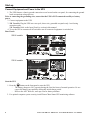
Use the cold start feature to supply power to the connected equipment front
the UPS battery(s).
Press and hold the
button. There will be a short beep followed by a
longer beep. Release the button during the second beep.
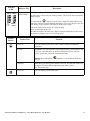
UPS operates on battery although line voltage exists
The UPS input circuit breaker trips.
Unplug all nonessential equipment from the UPS.
Reset the circuit breaker.
Your system is experiencing very high,
low or distorted line voltage.
Move the UPS to a different outlet on a different circuit: Inexpensive fuel
powered generators may distort the voltage. Test the input voltage with the
utility voltage display, (see Operation). If acceptable to the connected
equipment, reduce the UPS sensitivity.
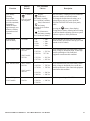
Battery Charge and Load LEDs flash simultaneously
The UPS has shut down.
The internal temperature of the UPS has
exceeded the allowable threshold for
safe operation.
Check that the room temperature is within the specified limits for operation.
Check that the UPS is properly installed, allowing for adequate ventilation.
Allow the UPS to cool down. Restart the UPS. If the problem persists,
contact APC at www.apc.com.
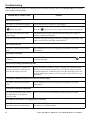
Diagnostic utility voltage
All five LEDs are illuminated.
The line voltage is extremely high and should be checked by an electrician.
There is no LED illumination.
The line voltage is extremely low and should be checked by an electrician.
On Line LED
There is no LED illumination.
The UPS is running on battery, or it must be turned on.
The LED is blinking.
The UPS is running an internal self-test.
16
Smart-UPS 5000 VA 208/230 Vac Tower/Rack-Mount 5U User Manual