1
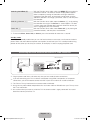
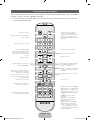
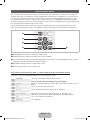
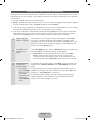
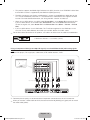
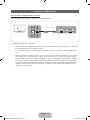
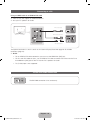
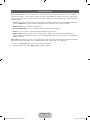
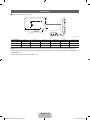
Contact SAMSUNG WORLDWIDE
If you have any questions or comments about your Samsung TV, please contact the SAMSUNG customer care center.
Country
Customer Care Center
1-800-SAMSUNG (726-7864)
Web Site
Address
CANADA
www.samsung.com
U.S.A
1-800-SAMSUNG (726-7864)
www.samsung.com
Samsung Electronics Canada Inc., Customer Service 55
Standish Court Mississauga, Ontario L5R 4B2 Canada
Samsung Electronics America, Inc. 85 Challenger Road
Ridgefield Park, NJ 07660
Plasma TV
user manual
SUPPORT
Thank you for purchasing this Samsung product.
To receive more complete service, please register
your product at
www.samsung.com/register
Model _____________ Serial No. _____________
✎ If you have any questions, please call us at 1-800-SAMSUNG (1-800-726-7864) for assistance.
© 2012 Samsung Electronics Co., Ltd. All rights reserved.
[PE8000-ZA]BN68-04034A-00Eng.indb 1
BN68-04034A-05
2012-04-05 �� 1:22:12
A detailed User’s Manual is built into your TV. For more information about how to view this e-Manual see page 48.
Figures and illustrations in this User Manual are provided for reference only and may differ from actual product appearances. Product design and
specifications may be changed without notice.
Important Warranty Information Regarding Television Format Viewing
✎✎See the warranty card for more information on warranty terms.
Wide screen format PDP Displays (with 16:9 aspect ratios, the ratio of the screen width to height) are primarily designed to view wide screen format fullmotion video. The images displayed on them should primarily be in the wide screen, 16:9 ratio format, or expanded to fill the screen, if your model offers
this feature, with the images constantly in motion. Displaying stationary graphics and images on the screen, such as the dark sidebars on non-expanded
standard format television video and programming, should be limited to no more than 5% of the total television viewing per week.
Additionally, viewing other stationary images and text such as stock market reports, video game displays, station logos, web sites or computer graphics
and patterns, should be limited as described above for all televisions. Displaying stationary images that exceed the above guidelines can cause uneven
aging of PDP Displays that leave subtle, but permanent burned-in ghost images in the PDP picture. To avoid this, vary the programming and images, and
primarily display full screen moving images, not stationary patterns or dark bars. On PDP models that offer picture sizing features, use these controls to
view different formats as a full screen picture.
Be careful about the television formats you select and the length of time you view them. Uneven PDP aging as a result of format selection and use, as
well as burned in images, are not covered by your Samsung limited warranty.
• SAMSUNG ELECTRONICS NORTH AMERICAN LIMITED WARRANTY STATEMENT
Subject to the requirements, conditions, exclusions and limitations of the original Limited Warranty supplied with Samsung Electronics (SAMSUNG)
products, and the requirements, conditions, exclusions and limitations contained herein, SAMSUNG will additionally provide Warranty Repair Service
in the United States on SAMSUNG products purchased in Canada, and in Canada on SAMSUNG products purchased in the United States, for the
warranty period originally specified, and to the Original Purchaser only.
The above described warranty repairs must be performed by a SAMSUNG Authorized Service Center. Along with this Statement, the Original Limited
Warranty Statement and a dated Bill of Sale as Proof of Purchase must be presented to the Service Center. Transportation to and from the Service
Center is the responsibility of the purchaser. Conditions covered are limited only to manufacturing defects in material or workmanship, and only those
encountered in normal use of the product.
Excluded, but not limited to, are any originally specified provisions for, in-home or on-site services, minimum or maximum repair times, exchanges or
replacements, accessories, options, upgrades, or consumables.
For the location of a SAMSUNG Authorized Service Center, please call toll-free:
– In the United States : 1-800-SAMSUNG (1-800-726-7864)
– In Canada : 1-800-SAMSUNG
User Instructions
• Screen Image retention
Do not display a still image (such as on a video game) on the plasma display panel for more than several minutes as it can cause screen image
retention. This image retention is also known as ‘screen burn’. To avoid such image retention, refer to e-Manual to reduce the degree of brightness
and contrast of the screen when displaying a still image.
• Heat on the top of the Plasma TV
The top side of the product may be hot after long periods of use as heat dissipates from the panel through the vent hole in the upper part of the
product. This is normal and does not indicate any defect or operation failure of the product. However, children should be prevented from touching
the upper part of the TV.
• The TV is making a ‘cracking’ noise.
A ‘cracking’ noise may occur when the product contracts or expands due to a change in the surrounding environment such as temperature or
humidity. This is normal and not a defect of the unit.
• Cell Defects
Your plasma TV has a panel containing 2,360,000 (HD-level) to 6,221,000 (FHD-level) pixels which require sophisticated technology to produce.
However, there may be a few bright or dark pixels on the screen. These pixels will have no impact on the performance of the product.
• Avoid operating the TV at temperatures below 41°F (5°C)
• A still image displayed too long may cause permanent damage to the PDP Panel.
Watching the Plasma TV in 4:3 format for a long period of time may leave traces of borders displayed on the left, right and center of
the screen caused by the difference of light emission on the screen. Playing a DVD or a game console may cause similar effects to
the screen. Damages caused by the above effect are not covered by the Warranty.
• After-images on the Screen.
Displaying still images from Video games or a PC for longer than a certain period of time may produce partial after-images.
To prevent this effect, reduce the ‘brightness’ and ‘contrast’ when displaying still images for a long time.
• Warranty
Warranty does not cover any damage caused by image retention. Burn-in is not covered by the warranty.
• Caution
The glass screen of your PDP TV can break if you accidently drop the TV. Handle the TV with care.
When moving the TV, always have two or more people pick it up and carry it as a safety precaution. Do not lay the TV flat on its
face or back.
Your Samsung Plasma TV is a high quality television that has been carefully packaged to protect the integrity of its glass panel and component parts
during shipment. It is, nonetheless, a fragile piece of electronics that requires careful handling. Refrain from putting undue stress on any part of the
packaging when shipping or unpacking the TV. Use care when installing the TV. Avoid placing the TV in a location where it may be struck, exposed to
sharp impacts, or fall. Panel breakage caused by a fall or impact strike is not covered under the manufacturer's warranty.
English - 2
[PE8000-ZA]BN68-04034A-00Eng.indb 2
2012-04-05 �� 1:22:12
Contents
•• The Evolution Kit Slot (Kit Sold Separately)..... 34
•• Important Warranty Information
Regarding Television Format Viewing............... 2
•• Connecting to a Network............................... 35
•• User Instructions.............................................. 2
•• Configuring Network Connections.................. 37
•• Contents.......................................................... 3
•• The Smart Touch Control............................... 39
•• List of Features................................................ 4
•• The IR Blaster................................................ 43
•• Accessories and Cables................................... 5
•• Setting up the Universal Remote Control........ 45
•• Installing the Stand.......................................... 7
•• Installing the Wall Mount (Optional)................... 9
•• Using the Search
for Recommended Model Code..................... 47
•• Providing Proper Ventilation for Your TV......... 11
•• How to view the e-Manual............................. 48
•• Using the TV's Controller (Panel Key)............. 12
•• Troubleshooting............................................. 50
•• Connecting the Power Cord
and the Antenna or Cable Connection........... 13
•• Licenses........................................................ 53
•• The Standard Remote Control....................... 14
•• Specifications - Smart Touch Control............. 56
•• How to Navigate Menus................................. 16
•• Specifications - IR Blaster.............................. 56
•• Configuring
the Basic Settings in Initial Setup................... 17
•• Specifications................................................ 57
•• Connecting to AV Devices
(Blu-ray Players, DVD Players, etc.)................ 21
•• Video Codec.................................................. 59
•• Storage and Maintenance.............................. 53
•• Display Resolution......................................... 58
•• Connecting to Audio Devices......................... 23
•• Dimensions.................................................... 60
•• Connecting to a PC....................................... 24
•• Index............................................................. 61
•• The EX-Link Cable Connection ..................... 24
•• Changing the Input Source............................ 25
•• Using Smart Hub........................................... 26
•• SMART Interaction......................................... 27
−− Voice Control............................................ 27
−− Motion Control......................................... 30
−− Face recognition....................................... 32
English - 3
[PE8000-ZA]BN68-04034A-00Eng.indb 3
2012-04-05 �� 1:22:13
List of Features
•• 3D: This exciting new feature enables you to view 3D content.
•• SMART HUB: Your gateway to all your content, integrated in one place.
−− Provides diverse entertainment choices.
−− Lets you control your entertainment life with an easy-to-use, user friendly user interface.
−− Gives you easy access to diverse apps, with more being added every day.
−− Lets you customize your TV by grouping and sorting apps to your taste.
•• AllShare Play: Lets you access, view, or play photos, videos, or music located on USB devices,
digital cameras, cell phones, and PCs. PCs and cell phones can be accessed wirelessly, through your
wireless network.
•• Anynet+ (HDMI-CEC): Allows you to control all connected Samsung devices that support Anynet+
with your Samsung TV’s remote.
•• e-Manual: Provides a detailed, on-screen user's manual that's built into your TV. (page 48)
•• SMART Interaction: Using this function, you can access and control menu options and functions
using speech or motions. (page 27)
English - 4
[PE8000-ZA]BN68-04034A-00Eng.indb 4
2012-04-05 �� 1:22:13
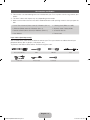
Accessories and Cables
✎✎ Please make sure the following items are included with your TV. If any items are missing, contact your
dealer.
✎✎ The items’ colors and shapes may vary depending on the model.
✎✎ Make sure that there are no accessories hidden behind or under packing materials after you open the
box.
•• Smart Touch Control (AA59-00626A) & Batteries (AA x 2)
•• Cleaning Cloth (BN63-01798B)
•• IR Blaster (BN96-22897A) & Batteries (AA x 4)
•• Warranty Card / Safety Guide
•• Remote Control (AA59-00637A) & Batteries (AAA x 2)
•• 3D Active Glasses
•• User Manual
•• Power Cord
Input Cables (Sold Separately)
You will need one or more of these cables to connect your TV to your antenna or cable outlet and your
peripheral devices (Blu-ray players, DVD players, etc.)
To purchase the RS232 cable, contact www.SamsungParts.com.
RS232 (AA39-00311A)
HDMI
HDMI-DVI
Component
Composite (AV)
Coaxial (RF)
Audio
English - 5
[PE8000-ZA]BN68-04034A-00Eng.indb 5
2012-04-05 �� 1:22:14
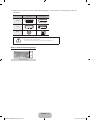
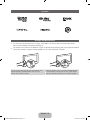
✎✎ Make sure you have the correct cable before plugging it in. Illustrations of common plugs and jacks
are below.
Cable Plugs
Ports / Jacks
HDMI
USB
Optical
Do not plug cables in upside down.
Be sure to check the orientation of the plug before plugging it in.
Warning
Wireless Keyboard (Sold Separately)
Wireless Keyboard
English - 6
[PE8000-ZA]BN68-04034A-00Eng.indb 6
2012-04-05 �� 1:22:15
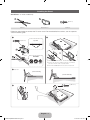
Installing the Stand
Stand Parts: 51 inches model only
B
A
C
Stand x 1
(M4 X L12)
Guide Stand x 1
Screws x 8
Follow the steps below to connect the TV to the stand. For more detailed instructions, see the separate
stand installation guide.
1
2
x4 (M4 X L12)
C
Top View
B
Front
A
ATTENTION
Rear
DO NOT USE DO NOT USE
CHEMICALS
GREASE
3
DO NOT
USE OIL
✎✎Place a soft cloth over a table to protect the TV, and then
place the TV on the cloth screen side down.
✎✎Insert the Stand Guide into the slot on the TV's bottom.
Side View
(Correct assembly)
(Incorrect assembly)
C
4
x4 (M4 X L12)
English - 7
[PE8000-ZA]BN68-04034A-00Eng.indb 7
2012-04-05 �� 1:22:17
Stand Parts: 60, 64 inches model only
B
A
x 4 (M4 X L10)
C
x 4 (M4 X L12)
D
Stand x 1
Guide Stand x 1
Screws x 8
Follow the steps below to connect the TV to the stand. For more detailed instructions, see the separate
stand installation guide.
1
2
x4 (M4 X L10)
C
Top View
B
Front
A
ATTENTION
Rear
✎✎Place a soft cloth over a table to protect the TV, and then
DO NOT USE DO NOT USE
CHEMICALS
GREASE
3
DO NOT
USE OIL
place the TV on the cloth screen side down.
✎✎Insert the Stand Guide into the slot on the TV's bottom.
Side View
(Correct assembly)
(Incorrect assembly)
D
4
x4 (M4 X L12)
English - 8
[PE8000-ZA]BN68-04034A-00Eng.indb 8
2012-04-05 �� 1:22:18
✎✎ NOTE
•• Make sure to distinguish between the front and back of each component when assembling them.
•• Make sure that at least two people lift and move the TV.
•• Stand the product up before you tighten the screws. If you tighten the screws with the TV lying
down, it may lean to one side when you stand it up.
[[Do not insert your fingers into the stand base slot of the TV when installing the stand base.
Installing the Wall Mount (Optional)
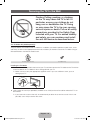
Wall or Ceiling Mounting
If you mount this product on a wall, it should be mounted only as recommended by the
manufacturer. Unless it is correctly mounted, the product may slide or fall, causing serious
injury to a child or adult, and serious damage to the product.
Installing the Wall Mount Kit
The wall mount kit (sold separately) lets you mount the TV on the wall.
For detailed information about installing the wall mount, see the instructions provided with the wall mount.
We recommend you contact a technician for assistance when installing the wall mount bracket. We do not
advise you to do it yourself. Samsung Electronics is not responsible for any damage to the product or injury
to yourself or others if you elect to install the wall mount on your own.
To order the wall mount kit, contact Samsung Customer Care at 1-800-SAMSUNG (1-800-726-7864).
VESA Wall Mount Kit Notes and Specifications
✎✎ Install your wall mount on a solid wall perpendicular to the floor. Before attaching the wall mount to
surfaces other than plaster board, please contact your nearest dealer for additional information. If you
install the TV on a ceiling or slanted wall, it may fall and result in severe personal injury.
✎✎ NOTE
•• Standard dimensions for wall mount kits are shown in the table below.
•• Samsung wall mount kits contain a detailed installation manual and all parts necessary for assembly
are provided.
•• Do not use screws that do not comply with the VESA standard screw specifications.
•• Do not use screws that are longer than the standard length or do not comply with the VESA
standard screw specifications. Screws that are too long may cause damage to the inside of the TV
set.
•• For wall mounts that do not comply with the VESA standard screw specifications, the length of the
screws may differ depending on the wall mount specifications.
•• Do not fasten the screws too firmly. This may damage the product or cause the product to fall,
leading to personal injury. Samsung is not liable for these kinds of accidents.
English - 9
[PE8000-ZA]BN68-04034A-00Eng.indb 9
2012-04-05 �� 1:22:18
•• Samsung is not liable for product damage or personal injury when a non-VESA or non-specified
wall mount is used or the consumer fails to follow the product installation instructions.
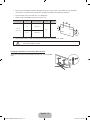
•• Do not mount the TV at more than a 15 degree tilt.
•• Always have two people mount the TV on a wall.
Product Family
TV size in
inches
VESA screw hole specs
(A * B) in millimeters
~51
400 X 400
Standard
Screw
Quantity
M8
4
PDP TV
[Ultra-Slim]
59~64
600 X 400
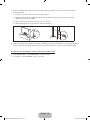
✎✎ Remove the screws in the mounting holes before you install the wall mount.
Do not install your Wall Mount Kit while your TV is turned on. It may result in personal
injury due to electric shock.
Installing a Wall Mount from Another Manufacturer
To install a wall-mount from another manufacturer, use the HolderRing.
English - 10
[PE8000-ZA]BN68-04034A-00Eng.indb 10
2012-04-05 �� 1:22:19
Providing Proper Ventilation for Your TV
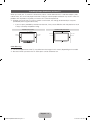
When you install your TV, maintain a distance of at least 4 inches between the TV and other objects (walls,
cabinet sides, etc.) to ensure proper ventilation. Failing to maintain proper ventilation may result in a fire or a
problem with the product caused by an increase in its internal temperature.
✎✎ Whether you install your TV using a stand or a wall-mount, we strongly recommend you use parts
provided by Samsung Electronics only.
•• If you use parts provided by another manufacturer, it may cause difficulties with the product or result
in injury caused by the product falling.
Installation with a stand.
Installation with a wall-mount.
4 inches
4 inches
4 inches
4 inches
4 inches
4 inches
4 inches
Other Warnings
✎✎ The actual appearance of the TV may differ from the images in this manual, depending on the model.
✎✎ Be careful when you touch the TV. Some parts can be somewhat hot.
English - 11
[PE8000-ZA]BN68-04034A-00Eng.indb 11
2012-04-05 �� 1:22:19
Using the TV's Controller (Panel Key)
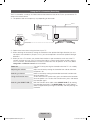
The TV's Controller, a small joy stick like button on the bottom left side of the TV, lets you control the TV
without the remote control.
✎✎ The product color and shape may vary depending on the model.
Camera
Function menu
m
R
P
Remote control sensor
Down (Front)
Left
When you use the Smart Touch Control,
a standby LED does not work (except
P button).
Right
TV Controller
Up (Rear)
✎✎ Follow these instructions facing the front of your TV.
✎✎ When selecting the function by moving the controller to the up/down/left/right directions, be sure
not to press the controller. If you press it first, you cannot operate it to move the up/down/left/right
directions.
✎✎ When you use a TV camera, you should check whether a tape attached or not in rear of the TV
camera, and then you can use a TV camera after adjust a camera angle. When you don't want to
use a TV camera, we recommend to use after a camera lens fixes to upwards. In this case, Face
recognition and Motion Control are not available.
Power on
Adjusting the volume
Selecting a channel
Using the Function menu
Selecting the SMART HUB (™)
Turn the TV on by pressing the Controller when the TV is in standby
mode.
Adjust the volume by moving the Controller from side to side when
the power is on.
Select a channel by moving the Controller backwards and forwards
when the power is on.
To view and use the Function menu, press and release the Controller
when the power is on. To close the Function menu, press and release
the Controller again.
With the Function menu visible, select SMART HUB (™) by moving
the Controller backwards. The SMART HUB main screen appears.
Select an application by moving the Controller, and then pressing the
Controller.
English - 12
[PE8000-ZA]BN68-04034A-00Eng.indb 12
2012-04-05 �� 1:22:19
Selecting the MENU (m)
Selecting a Source (s)
Power Off (P)
With the Function menu visible, select the MENU (m) by moving the
Controller to the left. The OSD (On Screen Display) Menu appears.
Select an option by moving the Controller to the right. Move the
Controller to the right or left, or backwards and forwards to make
additional selections. To change a parameter, select it, and then press
the Controller.
With the Function menu visible, open the Source (s) list by moving
the Controller to the right. The Source list screen appears. To select
a source, move the Controller back and forth. When the source you
want is highlighted, press the Controller.
With the Function menu visible, select Power Off (P) by moving the
Controller forwards, and then press the Controller.
✎✎ To close the Menu, Smart Hub, or Source, press the Controller for more than 1 second.
Standby mode
Your TV enters Standby mode when you turn it off and continues to consume a small amount of electric
power. To be safe and to decrease power consumption, do not leave your TV in standby mode for long
periods of time (when you are away on vacation, for example). It is best to unplug the power cord.
Connecting the Power Cord and the Antenna or Cable Connection
VHF/UHF Antenna
Antenna Cable (Not Supplied)
Cable
or
ANT OUT
Power Input
✎✎ Plug the power cord into a wall outlet only after you have made all other connections.
✎✎ If you are connecting your TV to a cable or satellite box using HDMI, Component, or Composite
connections, you do not need to connect the ANT IN jack to an antenna or a cable connection.
✎✎ The Plasma TV may interfere with an amateur radio or AM radio.
✎✎ Using two-way radio mobile and portable units or amateur radio or AM radio near your TV may cause
the TV to malfunction.
✎✎ Use caution when you move or swivel the TV if the antenna cable is tightly connected. You could
break the antenna jack off the TV.
English - 13
[PE8000-ZA]BN68-04034A-00Eng.indb 13
2012-04-05 �� 1:22:20
The Standard Remote Control
Learn where the function buttons are on your remote. Especially note SOURCE, MUTE, VOL, CH, MENU,
TOOLS, E, INFO, CH LIST, RETURN, and EXIT.
✎✎ This remote control has Braille points on the Power, Channel, and Volume buttons and can be used
by visually impaired persons.
Turns the TV on and off.
Turns the remote control light on or
off. When on, the buttons become
illuminated for a moment when pressed.
(Using the remote control with this
button set to On will reduce the battery
usage time.)
SOURCE
Displays and selects the available video
sources. (page 25)
Gives direct access to channels.
Press to select additional digital
channels being broadcast by the same
digital station. For example, to select
channel ‘54-3’, press ‘54’, then press
‘-’ and ‘3’.
PRE-CH
Returns to the previous channel.
Cuts off the sound temporarily.
MUTE
M
Changes channels.
Adjusts the volume.
CH
LIST
Displays channel lists on the screen.
Opens the OSD (Menu).
Quickly select frequently used functions.
Use this button in a specific feature. For
details, refer to the e-Manual.
MENU
HISTORY
TOOLS
INFO
Brings up the Smart Hub applications.
See e-Manual chapter Advanced
Features → Smart Hub.
Displays a list of recently used functions.
You can select a function again easily
and quickly.
Displays information on the TV screen.
Moves the cursor, selects the on-screen
menu items, and changes the values
seen on the TV's menu.
Use these buttons according to the
directions on the TV's screen.
Use these buttons in a specific feature.
For details, refer to the e-Manual.
EXIT
RETURN
B
C
Family Story
SEARCH
SUPPORT
P.SIZE
ll
Exits the menu.
D
CAMERA
ll
Returns to the previous menu.
Family Story: Connect to the Family
Story application. See e-Manual chapter
Advanced Features → Family Story.
SEARCH: Starts search function. See
e-Manual chapter Advanced Features
→ Search.
CAMERA: Connect to camera
application.
SUPPORT: Lets you use various
support functions including the
e-Manual. (page 48)
P.SIZE: Lets you select the Picture
Size. See e-Manual chapter Basic
Feature → Changing the Picture Size.
X: Turns the 3D image on or off. See
e-Manual chapter Advanced Features →
Using the 3D function.
English - 14
[PE8000-ZA]BN68-04034A-00Eng.indb 14
2012-04-05 �� 1:22:20
Installing batteries (Battery size: AAA)
Match the polarity of the batteries to the symbols in the battery compartment.
✎✎ Your TV also comes with a Smart Touch Control. For information about the Smart Touch Control, see
page 39.
✎✎ NOTE
•• Install the batteries so that the polarity of the batteries (+/-) matches the illustration in the battery
compartment.
•• Use the remote control within 23 feet of the TV.
•• Bright light may affect the performance of the remote control. Avoid using it near fluorescent lights
or neon signs.
•• The color and shape of the remote may vary depending on the model.
English - 15
[PE8000-ZA]BN68-04034A-00Eng.indb 15
2012-04-05 �� 1:22:21
How to Navigate Menus
Your TV’s Main and Tools menus contains functions that let you control the TV’s features. For example, in
the Main menu you can change the size and configuration of the picture, its brightness, its contrast and so
on. There are also functions that let you control the TV’s sound, channel configuration, energy use, and a
host of other features. To access the main, on-screen menu, press the MENUm button on your remote.
To access Tools menus, press the TOOLST button. Tools menus are available when the TOOLST menu
Icon is displayed on the bottom right of the screen.
The illustration below displays the buttons on the standard remote you use to navigate the menus and
select and adjust different functions. For information about using the Smart Touch Control, see page 39.
1
2
MENU
HISTORY
TOOLS
INFO
RETURN
EXIT
3
4
5
1MENUm button: Displays the main on-screen menu.
2TOOLST button: Displays the Tools menus when available.
3E and Direction buttons: Use the Direction buttons to move the cursor and highight an item. Use the
Enter button to select an item or confirm the setting.
4RETURNR button: Returns to the previous menu.
5EXITe button: Exits the on-screen menu.
How to Operate the Main Menu (OSD - On Screen Display) Using the Standard Remote
The access steps may differ depending on the menu option you select.
1
2
3
4
5
6
7
MENUm
The main menu options appear on the screen:
E
Picture, Sound, Channel, Network, System, Support.
Select a main menu option on the left side of the screen with the u or d
button.
Press E to access the sub-menus.
u/d
Select the desired submenu with the u or d button.
u/d/l/r
E
Adjust the value of an item with the l, r, u, or d button. The
adjustment in the OSD may differ depending on the selected menu.
Press E to confirm the selection.
EXITe
Press EXITe.
u/d
English - 16
[PE8000-ZA]BN68-04034A-00Eng.indb 16
2012-04-05 �� 1:22:21
Configuring the Basic Settings in Initial Setup
When you turn the TV on for the first time, a sequence of screens and on-screen prompts will assist you in
configuring the TV’s basic settings. Plug the power cord into a wall outlet, and then press the P button to
turn on the TV.
✎✎ Use the standard remote to run the Initial Setup.
✎✎ Setup is available only when the input source is set to TV. See "Changing the Input Source" (page 25).
✎✎ To return to the previous step in the Setup sequence, select Previous.
✎✎ If you are not using a cable box or satellite box, make sure you have connected the TV to an antenna
or cable connection before you turn on the TV. See page 13 for instructions.
✎✎ If you want to configure a wired network connection during Setup, make sure you've connected a
LAN cable to your TV. See pages 36 for instructions. If you want to configure a wireless network
connection during Setup, make sure your wireless modem or router is on and working.
1
Menu Language:
Select a Language.
After you press the P button, the Start screen appears. Select Next
to continue. The Menu Language screen appears. Select the menu
language you want using your remote, and then select Next. The TV will
display on-screen menus using the language you select beginning with
the next step in the Setup process.
2
Use Mode: Select
the Home Use
Mode.
On the Use Mode screen, select the Home Use using your remote, and
then select Next. The Network Settings screen appears.
✎✎ Store Demo is for retail environments only. If you select Store
Demo, some functions will not work, and the TV will reset all
functions to their factory default after a certain period of time. For
more information about Store Demo, go to the end of this section.
3
Network Settings:
Configure the
network settings.
To configure your network settings, select Next using your remote, and
then go to 3A - Wireless Network or 3B - Wired Network on the next
page.
✎✎ To configure
If you do not know your network configuration information or want to
configure the settings later, or do not have a network, select Skip, and
then go to 5 - Auto Program (1) on page 19.
later, select Skip.
You can set up
the network
connection later
using the onscreen Network
menu.
To configure network settings later, refer to “Setting up the Wired or
Wireless Network” in the e-Manual or see the Network Connection
sections in this manual (pages 35 and 37).
English - 17
[PE8000-ZA]BN68-04034A-00Eng.indb 17
2012-04-05 �� 1:22:22
3a
Wireless Network
1. The TV searches for and then displays all the wireless networks
within range. When done, it displays a list of the networks. In the list
of networks, move the Highlight to select a network, and then select
Next. If the selected network requires a Security Key, the Security
Key screen appears.
✎✎ If you have a WPS(PBC) compatible router, select WPS(PBC)
instead, and then follow the directions on the screen. When
done, go to Step 4.
2. Enter your network security key or WPS PIN using your remote.
✎✎ Enter numbers and letters using your remote.
•• If you are using the standard remote, you can enter numbers
by pressing the number buttons on the remote.
•• To enter a letter, move the Highlight to the letter, and then
select it. You can enter numbers in the same fashion if you
choose.
✎✎ To display capital letters (or redisplay small letters if capital letters
are displayed), select Caps or Shift.
✎✎ To display symbols and punctuation, select 1F. To redisplay
letters, select 1F again.
3. When done, select Next if you have entered a security key or WPS
PIN if you have entered a WPS PIN.
4. The TV checks the wireless connection. If the connection is
successful, the You are connected to the Internet. If you have any
problems using online services, please contact your Internet
Service Provider. message appears. Select Next, and then go to 4
Software Upgrade Step.
✎✎ If the connection fails, select Previous, repeat Step 1 and 2,
carefully re-enter your security key or WPS PIN, then repeat
Steps 3 and 4. If it fails again, select Next on the “Connection
Failed” screen, and then go to 5 - Auto Program (1) on the next
page. Configure your network later through Network Settings
in the TV’s Menu. For more information, refer to “Setting up the
Wired or Wireless Network” in the e-Manual or see the Network
Connection sections in this manual (pages 35 and 37).
3b
Wired Network
The TV checks the network connection, then displays the You are
connected to the Internet. If you have any problems using online
services, please contact your Internet Service Provider. message
appears. Select Next. The Software Upgrade screen appears.
English - 18
[PE8000-ZA]BN68-04034A-00Eng.indb 18
2012-04-05 �� 1:22:22
4
Software Upgrade:
Update the software
to the latest version.
✎✎ To update later,
select Skip.
When Network Settings is complete, your TV will check for a new
software version automatically. If new software is available, the TV
downloads and installs the new software. When the download is
complete, select Next.
✎✎ If you want to upgrade later, select Skip. For more information, refer
to Software Update (Preference Features → Support Menu) in the
e-Manual.
✎✎ This may take some time, depending on your network status.
✎✎ You can only upgrade software if your TV has an active network
connection.
✎✎ If no new update software is available, a no new updates message
appears on the screen. Select OK.
5
Auto Program (1):
Select where your
TV signal comes
from.
Select the appropriate option for your TV using your remote, and then
select Next.
•• Yes, I need to.: Select if you have an antenna or a cable connection
without a set-top box. If you select this option, go to 6 - Auto
Program (2) Step.
•• No, I don’t need to.: Select if you have a satellite or cable set-top
box. You do not need to run Auto Program. If you select this option,
go to 8 - Clock on the next page.
6
Auto Program (2):
Select the search
options.
1. Select Air or Cable using your remote. A check appears on your
selection. When done, select Next. You can check both if you have
both connected.
2. If you selected Air, go to 7 - Auto Program (3).
3. If you selected Cable, you’ll go to the cable system screen. Select
Digital Cable System. The option window appears. Select the
correct cable signal format; STD, HRC, or IRC. Most cable systems
use STD (Standard). Repeat the same process with Analog Cable
System.
4. When done, select Next.
7
Auto Program (3):
Channel
memorization
Channel memorization stars. Channel memorization can take up to 45
minutes, depending on your cable system.
For more information, refer to Auto Program (Channel Menu →
Memorizing Channels) in the e-Manual.
✎✎ Select Stop at any time to halt the memorization process.
English - 19
[PE8000-ZA]BN68-04034A-00Eng.indb 19
2012-04-05 �� 1:22:22
8
Clock: Set the
Clock.
Select Auto or Manual, and then select Next.
✎✎ If you selected No, I don’t need to. in 5 - Auto Program (1), you can
only set the current time and date manually, using your remote.
Auto
If you selected Auto, the TV will automatically download the correct time
from a digital channel. The Time Zone screen will appear. Select your
Time Zone, and then select Next. The DST (Daylight Savings Time)
screen will appear. The DST function sets the time ahead one hour to
adjust the clock for Daylight Savings Time. Select On if you want to turn
the DST adjustment on. Select Off to turn off the DST adjustment. You
can also turn the DST function on through the TV's on screen menu
(Menu → System → Time → Clock → DST).
Manual
If you selected Manual, you’ll go to the Clock screen. Select Date or
Time. You can set the current date and time using your remote. When
done setting the Date and Time, select Next.
9
Voice and Motion
Control: Setting the
Voice and Motion
Control function.
You can turn the Voice and Motion Control function on or off. Select Off
or On, and then select Next.
10
Setup: Complete
Review the Setup data, and then select Close to finish.
11
Set the Universal
Remote.
✎✎ The completed settings are displayed.
1. Turn on the POWER button on the bottom of the IR Blaster, and then
press the PAIRING button.
2. Select Yes to start the Universal Remote Setup.
✎✎ For more detailed information about the Universal Remote Setup,
refer to "Setting up the Universal Remote Control" section in the
manual (page 45).
If You Want to Rerun Setup...
Menu → System → Setup
If You Want to Turn the Store Demo Mode On or Off.
To set or unset Store Demo mode outside of Setup, press and release the Controller when the power is
on. The Function menu screen appears. Push the Controller to the left (to MENU (m)) and hold for more
than 5 seconds. The Store Demo mode is set. To cancel Store Demo, bring up the Function menu using
the Controller, push the Controller to the right (to Source (s)) and hold for more than 5 seconds. See
page 12 for information about the Controller.
English - 20
[PE8000-ZA]BN68-04034A-00Eng.indb 20
2012-04-05 �� 1:22:23
Connecting to AV Devices (Blu-ray Players, DVD Players, etc.)
Using an HDMI Cable for an HD connection (up to 1080p, HD digital signals)
For the best quality HD picture, we recommend using an HDMI connection.
Use with DVD players, Blu-ray players, HD cable boxes, and HD Set-Top-Box satellite receivers.
Device
Device
HDMI Cable (Not Supplied)
HDMI OUT
✎✎ HDMI IN 1 (DVI), HDMI IN 2 (ARC), HDMI IN 3 (MHL)
•• For the best picture and audio quality, connect digital devices to the TV using HDMI cables.
•• An HDMI cable supports digital video and audio signals, and does not require an audio cable.
−− To connect the TV to a digital device that does not support HDMI output, use an HDMI to DVI
cable and audio cables.
•• If you connect an external device to the TV that uses an older version of HDMI, the video and audio
may not work. If this occurs, ask the manufacturer of the device about the HDMI version and, if it is
out of date, request an upgrade.
•• Be sure to purchase a certified HDMI cable. Otherwise, the picture may not display or a connection
error may occur.
•• We recommend using a basic high-speed HDMI cable or an HDMI cable that is Ethernet
compatible. Note that this product does not support the Ethernet function via HDMI.
•• This product supports the 3D and ARC (Audio Return Channel) functions via an HDMI cable. Note
that the ARC function is supported by the HDMI IN 2 (ARC) port only.
•• The ARC function allows digital audio to output via the HDMI IN 2 (ARC) port on the TV. It can be
enabled only when the TV is connected with an audio receiver that supports the ARC function.
English - 21
[PE8000-ZA]BN68-04034A-00Eng.indb 21
2012-04-05 �� 1:22:23
•• This product supports the Mobile High-Definition Link (MHL) function via an HDMI-MHL cable. Note
that the MHL function is supported by the HDMI IN 3 (MHL) port only.
•• The MHL function lets you display a mobile device's screen via the HDMI IN 3 (MHL) port on the
TV. It can be enabled only when the TV is connected with a mobile device that supports the MHL
function. For more detailed information, see "Using the MHL function" in e-Manual.
•• When you use MHL devices via a MHL cable, Picture Size is set to Screen Fit automatically. But
if you use MHL devices via an HDMI cable, Picture Size is not set to Screen Fit automatically.
To view an original size, select Screen Fit in the Picture Size menu (Menu → Picture → Picture
Size).
•• If you use MHL devices via an HDMI cable, The TV will be recognized as the HDMI input. In this
case, the TV may work differently than when you use MHL devices via a MHL cable.
✎✎ For the best cable connection to this product, use cables no thicker than the cable illustrated below:
•• Maximum thickness - 0.55 inches (14mm)
Using a Component Cable (up to 1080p HD signals) or an Audio/Video Cable (480i analog signals
only)
Use with DVD players, Blu-ray players, cable boxes, STB satellite receivers, VCRs.
Red Blue Green
Red White Yellow
Red
Audio Cable (Not Supplied)
Component Cable
(Not Supplied)
Video Cable
(Not Supplied)
Device
White
Audio Cable (Not Supplied)
Device
✎✎ For better picture quality, we recommend the Component connection over the A/V connection.
✎✎ When you connect a Video cable to AV IN, the color of the AV IN [VIDEO] jack (green) will not match
the video cable (yellow).
English - 22
[PE8000-ZA]BN68-04034A-00Eng.indb 22
2012-04-05 �� 1:22:24
Connecting to Audio Devices
Using an Optical (Digital) Cable Connection
Use with Digital Audio Systems, Amplifiers, and Home Theaters.
Digital Audio System
Optical Cable (Not Supplied)
OPTICAL
✎✎ DIGITAL AUDIO OUT (OPTICAL)
•• When you connect a Digital Audio System to the DIGITAL AUDIO OUT (OPTICAL) jack, decrease
the volume of both the TV and the system.
•• 5.1 CH (channel) audio is available when you connect the TV to an external device supporting 5.1
CH.
•• When the receiver (or home theater) is set to on, you can hear sound output from the TV’s optical
jack. When the TV is receiving a DTV signal, the TV will send 5.1 CH sound to the home theater
receiver. When the source is a digital component such as a DVD player / Blu-ray player / cable box
/ STB (Set-Top-Box) satellite receiver and you connected it to the TV via HDMI, you will only hear
2 CH audio from the home theater receiver. If you want to hear 5.1 CH audio, connect the digital
audio out jack from your DVD / Blu-ray player / cable box / STB satellite receiver directly to an
amplifier or home theater.
English - 23
[PE8000-ZA]BN68-04034A-00Eng.indb 23
2012-04-05 �� 1:22:24
Connecting to a PC
Using an HDMI cable or an HDMI to DVI cable
✎✎ Your PC may not support an HDMI connection.
✎✎ Use your PC speakers for audio.
HDMI Cable (Not Supplied)
HDMI OUT
HDMI to DVI Cable (Not Supplied)
DVI OUT
AUDIO OUT
Audio Cable (Not Supplied)
The optimal resolution is 1920 X 1080 @ 60 Hz. See the Display Resolution page for all available
resolutions (page 58).
✎✎ NOTE
•• For an HDMI to DVI cable connection, you must use the HDMI IN 1 (DVI) jack.
•• For PCs with DVI video out jacks, use an HDMI to DVI cable to connect the DVI out on the PC to
the HDMI IN 1 (DVI) jack on the TV. Use the PC's speakers for audio.
•• PC (D-Sub) input is not supported.
The EX-Link Cable Connection
The EX-LINK connection is for service only.
English - 24
1_BN68-04034A_ENG-US.indd 24
2012-04-05 �� 1:25:18
Changing the Input Source
Source
™ → Source
When you are watching TV and you want to watch a movie on your DVD player or Blu-ray player or switch
to your cable box or STB satellite receiver, you need to change the Source.
■■ TV / HDMI1/DVI / HDMI2 / HDMI3 / AV / Component
1. Press the ™ button on your remote. The Smart Hub screen appears.
2. Select Source. The Source screen appears.
3. Select a desired external input source.
✎✎ Alternatively, you can access the Source screen by selecting the SOURCEs button on your
standard remote or selecting Source with the Smart Touch Control (see page 39).
✎✎ You can only choose external devices that are connected to the TV. In the displayed Source list,
connected inputs are highlighted.
How to Use Edit Name
Edit Name lets you associate a device name to an input source. To access Edit Name, open the Tools
menu when the Source list is displayed. The following selections appear under Edit Name:
■■ VCR / DVD / Cable STB / Satellite STB / PVR STB / AV Receiver / Game / Camcorder / PC / DVI
PC / DVI Devices / TV / IPTV / Blu-ray / HD DVD / DMA: Select an input jack, and then select the
name of the device connected to that jack from the list that appears. For example, if you have your Bluray player attached to HDMI IN 2 (ARC), select Blu-ray for that input.
✎✎ If you connect a PC to the HDMI IN 1 (DVI) port with an HDMI cable, assign PC to HDMI1/DVI in
Edit Name.
✎✎ If you connect a PC to the HDMI IN 1 (DVI) port with an HDMI to DVI cable, assign DVI PC to
HDMI1/DVI in Edit Name.
✎✎ If you connect an AV device to the HDMI IN 1 (DVI) port with an HDMI to DVI cable, assign DVI
Devices to HDMI1/DVI in Edit Name.
Information
You can see detailed information about the selected external device.
Refresh
If the external devices are not displayed in the Source list, open the Tools menu, select Refresh, and then
search for the connected devices.
✎✎ Alternatively, you can refresh the Source list by selecting a using your remote.
English - 25
[PE8000-ZA]BN68-04034A-00Eng.indb 25
2012-04-05 �� 1:22:26
Using Smart Hub
Smart Hub provides easy, on-screen access to five functions that let you manage and access channels,
set favorite channels, access photos, videos, or music on USB devices, cameras, and PCs, select video
sources, and set the TV to turn on automatically when a show you want to watch is on. The five functions
are listed below:
•• Channel: Lets you manage channels, select favorite channels, add channels to and delete channels
from the Added Ch. list (the channels that appear when you press the z button.)
•• Web Browser: Lets you browse the Internet.
•• Schedule Manager: Lets you schedule shows and channels for viewing.
•• Source: Lets you select a connected external video source to view.
•• AllShare Play: Lets you access, view, or play photos, videos, or music located on USB devices,
digital cameras, cell phones, and PCs. PCs and cell phones can be accessed wirelessly, through your
wireless network.
Smart Hub also provides an easy-to-use gateway to a host of on-line media and entertainment including
apps from the Samsung Apps store, streaming videos and movies, kids sites, and more.
✎✎ To access Smart Hub, press the ™ button on your remote.
✎✎ For more information about Smart Hub, see the e-Manual.
English - 26
[PE8000-ZA]BN68-04034A-00Eng.indb 26
2012-04-05 �� 1:22:26
SMART Interaction
Using this function, you can access and control menu options and functions using speech, motions or face
recognition.
INFORMATION BOOKLET DISCLAIMER
•• Face recognition Log-in
In order for Face recognition to function, a thumbnail image of your face will be stored in your TV for
logging-in purposes.
Logging into the Smart Hub using Face recognition may be less secure than using an ID and
password.
•• TV Camera Usage
Before using the TV Camera, you should be aware that under some circumstances and under certain
legal conditions your misuse of the TV Camera can result in legal liability for you. By using the TV
Camera, you agree that you will not use the camera (i) in locations where cameras are generally
prohibited (such as bathrooms, locker rooms or changing rooms), (ii) in any manner that will result in an
invasion of a person’s privacy or (iii) in violation of any applicable laws, regulations or statutes.
When you use a TV camera, you should check whether a tape attached or not in rear of the TV
camera, and then you can use a TV camera after adjust a camera angle. When you don't want to use a
TV camera, we recommend to use after a camera lens fixes to upwards. In this case, Face recognition
and Voice and Motion Control are not available.
Voice Control
Menu → System → Voice and Motion Control → Voice Control
Enable or disable the voice recognition function. Lets you access and control menu options and functions
by speaking letters or words.
✎✎ For accurate voice recognition, refer to the Standard Voice Command list at the Samsung web site
(www.samsung.com → support → Manuals & Downloads).
✎✎ Voice Control function can be affected recognition by unclear pronunciation, voice level, or
surrounding noise.
✎✎ To use Voice Control, you must pronounce words and phrases clearly and correctly in the language
you selected in Language.
✎✎ Ambient noise may cause Voice Control to malfunction. (Appropriate surrounding noise: Below
40dB)
Your TV can "hear" your voice commands in two ways:
−− Using the TV’s microphone. (Distant Recognition)
✎✎ We are recommended using Voice Control function within about 13 ft with your TV. You can
check the usable distance by using Voice Control Environment Test (System → Voice and
Motion Control → Voice Control → Voice Control Environment Test).
English - 27
[PE8000-ZA]BN68-04034A-00Eng.indb 27
2012-04-05 �� 1:22:27
−− Using the VOICE˜ button on your remote. (Close Proximity Recognition)
✎✎ When you use the TV's microphone, the words may not be recognized because of ambient noise.
If this occurs, try using the VOICE˜ button on your remote. The TV will be able to recognize a
voice command more easily.
✎✎ The VOICE˜ button on your remote is always activated. If you want to use the TV's microphone,
turn on Voice Control (System → Voice and Motion Control → Voice Control).
✎✎ Say a voice command to proper volume into the microphone of your remote within 0.3 – 0.4 ft. If
voice level is too small or large, voice command may not be recognized.
✎✎ If a menu option or function is not supported by the Voice Control function, we suggest trying the
Motion Control function. To use the Motion Control, raise your hand while opening it toward the
screen, hold it for a moment and then wave it 3 – 4 time to the left and right. Motion Control starts. If
the Motion Control starts, the cursor is displayed at the center of the screen and the Motion Guide
Bar Size is at the bottom of the screen.
■■ Voice Control
Turns the Voice Control function on or off.
✎✎ The VOICE˜ button on your remote is always activated.
■■ Language
Select the recognition language you want to use.
■■ Trigger Words
You can select the Trigger Words that start the Voice Control function.
Alternatively you can turn on your TV using the Trigger Words if Voice Control function is set to On.
−− If the Trigger Words is set to Hi TV, say Hi TV Power On.
−− If the Trigger Words is set to Smart TV, say Smart TV Power On.
■■ Voice Command Bar Size
Set the Voice Command Bar Size mode to Minimum or Full. Minimum displays the least number of
words and phrases you can use. Full displays all the words and phrases.
■■ Voice Sensitivity
You can configure the sensitivity of Voice recognition.
−− Howling: Select howling levels.
−− Recognition responsiveness: Select the responsiveness level of Voice recognition.
English - 28
[PE8000-ZA]BN68-04034A-00Eng.indb 28
2012-04-05 �� 1:22:27
■■ Voice Control Environment Test
You can test the amount of ambient noise level detected by the TV microphone.
−− Noise Test: This test checks the amount of ambient noise detected by the TV microphone. Too
much ambient noise will prevent Voice Command from functioning. To run, select Next using your
remote. The test starts and takes a few seconds. Please keep as quiet as possible during the test.
−− Mic & Speaker Test: Determines if the sound from the TV speakers picked up by the TV
microphone will disrupt Voice Command. To run, select Start using your remote. The test starts and
takes a few seconds. Please keep as quiet as possible during the test.
✎✎ Available only when Speaker Select is set to TV Speaker.
−− Voice Control Test: This test checks the volume level and clarity of your voice for use with Voice
Control. Select Start using your remote. After the test starts, say the test words listed in the
instructions as loudly and clearly as you can.
✎✎ If the test is not successful, select Retest, and then say the words loudly and clearly again.
To use the Voice Control function, follow these steps:
✎✎ If Voice Control function is set to On, the TV may be turned on automatically by effect of the ambient
environment.
1. Speak the Trigger Words that you selected into the microphone embedded in the TV or press the
VOICE˜ button on your remote. The TV displays the Voice Command Bar Size.
✎✎ When you use the Voice Control, the volume is set to 5 automatically.
2. Say a word or phrase listed in the Voice Command Bar Size.
✎✎ Pronounce the word or phrase clearly and correctly in the language you selected in Language.
3. Wait until recognition is complete, and then say the next command in the same fashion.
✎✎ To exit the Voice Control mode, speak the Trigger Words or "Cancel" using the TV's
microphone, or press the RETURNR button.
Using the Voice Text Input Mode
1. Say "Search All" while in the Voice Control mode.
✎✎ When you use a QWERTY keypad screen, you can use the Voice Text Input Mode. Say the
Trigger Words that you selected into the microphone embedded in the TV or press the VOICE˜
button on your remote. You cannot use it for some UIs such as URL input boxes.
2. Say the word or phrase you wish to search for.
3. The TV executes the spoken function.
✎✎ Voice Control performance levels will vary based on the language spoken.
English - 29
[PE8000-ZA]BN68-04034A-00Eng.indb 29
2012-04-05 �� 1:22:27
Motion Control
Menu → System → Voice and Motion Control → Motion Control
Enable or disable the Motion Control function. Lets you control your TV by moving the TV cursor using
specific motions.
✎✎ Motion Control function can be affected recognition by motion posture, or ambient brightness
conditions.
✎✎ Some applications may not support Motion Control.
✎✎ You may experience physical fatigue when you use the Motion Control for a long time.
✎✎ To use the Motion Control, please avoid direct sunlight.
✎✎ We are recommended using Motion Control function within about 5 – 13 ft with your TV. TV
Camera's recognition range may differ depending on the angle of camera or other conditions. You
can check the recognition range of TV camera by using Motion Control Environment Test (System
→ Voice and Motion Control → Motion Control → Motion Control Environment Test).
■■ Motion Control
Turns the Motion Control function on or off.
■■ Motion Guide Bar Size
Set the Motion Guide Bar Size mode between Minimum or Full.
■■ Motion Control Environment Test
You can test the brightness of room and the camera angle.
−− Brightness Test: This test checks to see if your room is bright enough for Motion Control to work
properly. Select Start using your remote. The test will starts and should take only a few seconds.
(Appropriate ambient brightness: 50 – 500 Lux)
✎✎ Do not illuminating a sunlight or lights directly into the camera lens.
✎✎ Make sure that the camera lens is cloaked by an object.
−− Camera Angle Test: On the Camera Angle Test screen, select Start using your remote. A
rectangle appears on the screen. Move yourself into the rectangle by adjusting the camera or
moving yourself in front of the camera. If you are not within the rectangle position, the test may not
work properly. After aligning your body with the TV, raise your hand while opening it toward the
screen, hold it for a moment and then wave it 3 – 4 times to the left and right.
To use the Motion Control function, follow these steps:
1. To use the Motion Control, raise your hand while opening it toward the screen, hold it for a moment
and then wave it 3 – 4 time to the left and right. Motion Control starts. If the Motion Control starts,
the cursor is displayed at the center of the screen and the Motion Guide Bar Size is at the bottom of
the screen.
2. Control the TV using your hands.
✎✎ Note that the Motion Control function closes if your hands go out of the camera range.
✎✎ While using the Motion Control, if you use the other devices (i.e. remote control, keyboard, etc.),
Motion Control closes.
English - 30
[PE8000-ZA]BN68-04034A-00Eng.indb 30
2012-04-05 �� 1:22:28
Controlling the TV with your hands using motions
■
Access Motion Control
− Action: Spread your hand in the direction of the camera, and shake it three or four times from a
side to side.
■
Pointing Navigation
Moves the cursor to the position you want.
− Action: Spread your hand and guide the cursor to position you want.
■
Run
Selects an item or executes a command that is indicated by the cursor or is highlighted.
− Action: Clench your fist.
✎ When you watch some page or some image, you can move the page or image to direction you
want if it can be moved. In this case, use and keep the Run motion, and then move it to direction
you want. To move a page, clench your fist, keep it clenched, and then move it in the direction you
want the page to move. Note that not all pages can be moved.
■
Return
Return to the previous menu.
− Action: Spread your hand and rotate it counterclockwise.
■ Channel / Volume Control
Changes the channel or adjust the volume.
✎ If you use the Motion Control function while watching a channel, the channel / volume control
screen appears.
− Action: Use the Pointing Navigation motion to move the cursor to the channel or volume
controller, and then uses the Run motion to adjust the channel or volume.
✎ If you use the Run motion once, it has the same effect as pressing a button on your remote.
If you hold the Run motion, it has the same effect as pressing and holding a button on your
remote.
■
Scroll
Scroll the page in the direction you want. For example, suppose that you want to scroll down.
✎ Some applications may not support this function.
1. Move the cursor to the bottom of the screen (page scroll zone) using the Pointing Navigation
motion.
2. Move the cursor to the center of the screen using the Pointing Navigation motion.
3. The page will move down.
English - 31
[PE8000-ZA]BN68-04034A-00Eng.indb 31
2012-04-05 �� 1:22:29
Face recognition
™ → Tools → Settings → Account Manager → Face recognition
Enable or disable the Face recognition function. Face recognition lets you register your face with your
Samsung account. Also, you can log in to the Samsung account using the Face recognition function
without inputting your account ID or your account password.
✎✎ You can register your face in only one account.
To register your face in your Samsung account, follow these steps:
✎✎ To use this function, you must log into Smart Hub. If you don't have a Samsung Account, you
should create one before using this function. To create your Samsung Account, refer to “Creating an
Account” (Advanced Features → Smart Hub) in the e-Manual.
1. On the Smart Hub screen, open the Tools menu using your remote, and then select Settings.
2. Select Account Manager. The Account Manager screen appears.
3. Select Face recognition. The Face recognition screen appears.
4. Move your face into the square in the center of the screen, and then wait until the square changes from
red to green.
✎✎ If Face recognition fails, select Retry and then try again.
5. When done, your face is now registered in your Samsung account. The Continue to Register Service
window appears.
✎✎ To close the window, select OK. You can register services later using Link to other accounts in
the Smart Hub menu (Settings → Account Manager → Link to other accounts).
English - 32
[PE8000-ZA]BN68-04034A-00Eng.indb 32
2012-04-05 �� 1:22:29
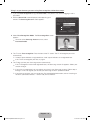
To log in to your Samsung account using Face recognition, follow these steps:
✎✎ If you use Face recognition to log into Smart Hub, it may be less secure than logging in with a
password.
1. With the Smart Hub screen displayed, select a using your
remote. The Samsung Account screen appears.
Log In
What is Samsung Account? A Samsung Account is an integrated
membership account that lets you access all the services
provided by Samsung through a single registered account.
Samsung Account
Press [Enter]
Password
Press [Enter]
Remember my password
Sign me in automatically
Log In
Cancel
Face Recognition Mode
Create Account
RReturn
2. Select Face Recognition Mode. The Face recognition screen
appears.
Log In
You can log in using facial recognition. Turn your face
towards the TV with your face level with the camera.
✎✎ To return to the Samsung Account screen, select
Password mode.
Password mode
Pause
RReturn
3. The TV starts Face recognition. Face the front of the TV screen. The TV will recognize your face
automatically.
✎✎ A Green square indicates a registered face. A red-square indicates an unregistered face.
✎✎ If the TV fails to recognize your face, try again.
4. The TV logs you into your Samsung account automatically.
✎✎ If the TV recognizes two or more registered faces, the Samsung account list appears. Select your
account to log in.
✎✎ If your face is unregistered, you can register your face in your Samsung account. Follow steps 4
through 5 in the “To register your face to your Samsung account:” procedure above.
✎✎ If you have no account, you can create one. For more detailed information, refer to “Creating an
Account” (Advanced Features → Smart Hub) in the e-Manual.
English - 33
[PE8000-ZA]BN68-04034A-00Eng.indb 33
2012-04-05 �� 1:22:30
The Evolution Kit Slot (Kit Sold Separately)
This socket is designed to accept an extension device called the Evolution Kit. The Evolution Kit enables
the TV to run a variety of the latest applications for a better user experience.
The Evolution Kit, which may not be available depending on the product, will be sold separately in 2013 or
later.
English - 34
[PE8000-ZA]BN68-04034A-00Eng.indb 34
2012-04-05 �� 1:22:30
Connecting to a Network
You can set up your TV so that it can access SMART TV applications through your local area network
(LAN) using a wired or wireless connection.
✎✎ After you have “physically” connected your TV to your network, you must configure the network
connection to complete the process. You can configure the connection during the Initial Setup
process (see page 17) or after the Initial Setup process, through the TV’s menu (see page 37).
Network Connection - Wireless
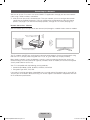
You can connect your TV to your local area network (LAN) through a standard wireless router or modem.
The LAN Port on the Wall
Wireless IP Router or Modem
that has a DHCP Server
LAN Cable (Not Supplied)
This TV supports the IEEE 802.11a/b/g and n communication protocols. Samsung recommends using
IEEE 802.11n. If you play video using IEEE 802.11a, b, or g, the video may not play smoothly.
Most wireless network systems incorporate a security system that requires devices that access the
network through an access point or AP (typically a wireless router or modem) to transmit an encrypted
security code called an access key.
Your TV is compatible with the following security protocols:
•• Authentication Mode: OPEN, SHARED, WPAPSK, WPA2PSK
•• Encryption Type: WEP, TKIP, AES
If you select Pure High-throughput (Greenfield) 802.11n mode and the Encryption type is set to WEP or
TKIP on your AP or wireless router, Samsung TVs will not support a connection in compliance with new
Wi-Fi certification specifications.
English - 35
[PE8000-ZA]BN68-04034A-00Eng.indb 35
2012-04-05 �� 1:22:31
Network Connection - Wired
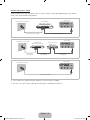
There are three main ways to connect your TV to your network using cable, depending on your network
setup. They are illustrated starting below:
TV Rear Panel
The Modem Port on the Wall
External Modem
(ADSL / VDSL / Cable TV)
Modem Cable (Not Supplied)
The Modem Port on the Wall
LAN Cable (Not Supplied)
TV Rear Panel
External Modem
(ADSL / VDSL / Cable TV)
Modem Cable
(Not Supplied)
IP Router that has a
DHCP Server
LAN Cable
(Not Supplied)
LAN Cable
(Not Supplied)
TV Rear Panel
The LAN Port on the Wall
LAN Cable (Not Supplied)
✎✎ The TV does not support network speeds less than or equal to 10Mbps.
✎✎ Use Cat 5 or 6 (STP Type*) cable for the connection. (*Shielded Twisted Pair)
English - 36
[PE8000-ZA]BN68-04034A-00Eng.indb 36
2012-04-05 �� 1:22:32
Configuring Network Connections
After you have run the initial setup, you can configure or reconfigure the network connections through the
TV's menu.
Configuring a Wireless Network Connection
The instructions below are for networks that use the Dynamic Host Configuration Protocol (DHCP) to
configure network connections automatically. Most wireless networks use DHCP. If you have a Static IP
network, see the e-Manual for configuration instructions.
To configure the network connection for a network that uses DHCP, follow these steps:
1. Connect your TV to your network as shown in the illustration on page 35.
2. Turn on your TV, and then go to the Network Settings screen. (Menu → Network → Network
Settings)
3. Select Start. The Network function searches for available wireless networks. When done, it displays a
list of the available networks.
4. In the list of networks, move the highlight to select a network, and then select Next.
✎✎ If you have a WPS(PBC) compatible router, select WPS(PBC) instead, and then follow the
directions on the screen.
5. Enter your network security key or WPS PIN using your remote.
✎✎ Enter numbers and letters using your remote.
•• If you are using the standard remote, you can enter numbers by pressing the number buttons
on your remote.
•• To enter a letter, move the Highlight to the letter, and then select it. You can enter numbers in
the same fashion if you choose.
✎✎ To display capital letters (or redisplay small letters if capital letters are displayed), select Caps or
Shift.
✎✎ To display symbols and punctuation, select 1F. To redisplay letters, select 1F again.
6. When done, select Next if you have entered a security key or WPS PIN if you have entered a WPS PIN.
7. The TV checks the wireless connection. If the connection is successful, the “You are connected to the
Internet. If you have any problems using online services, please contact your Internet Service
Provider.” message appears. Select Next using your remote.
✎✎ For more detailed information, see “Setting up the Wireless Network” in the e-Manual.
✎✎ If you want to configure the connection manually, select IP Settings on the Network Connection
screen. Set IP Setting to Enter manually, and then enter the IP Address, Subnet Mask,
Gateway, and DNS Server manually.
English - 37
[PE8000-ZA]BN68-04034A-00Eng.indb 37
2012-04-05 �� 1:22:32
Configuring a Wired Network Connection
Most home networks use the Dynamic Host Configuration Protocol (DHCP) to configure network
connections. Home networks that support DHCP automatically provide the IP address, subnet mask,
gateway, and DNS values your TV needs to access the Internet so you don’t have to enter them manually.
If you have a Static IP network, see your user’s manual for configuration instructions.
To configure the network connection for a wired network that uses DHCP, follow these steps:
1. Connect your TV to your network as shown in one of the illustrations on page 36.
2. Turn on your TV, and then go to the Network Settings screen. (Menu → Network → Network
Settings)
3. Select Start.
4. The Network Connection screen appears, and verifies the network connection. When the connection
has been verified, the “You are connected to the Internet. If you have any problems using online
services, please contact your Internet Service Provider.” message appears. Network set up is
completed.
✎✎ If your TV cannot acquire network the connection values automatically or if you want to set the
connection manually, select IP Settings on the network connection screen. Set IP Setting to Enter
manually, and then enter the IP Address, Subnet Mask, Gateway, and DNS Server manually.
✎✎ For more detailed information, refer to “Setting up the Wired Network” in the e-Manual.
English - 38
[PE8000-ZA]BN68-04034A-00Eng.indb 38
2012-04-05 �� 1:22:32
The Smart Touch Control
Improved user convenience has been provided so that you can switch the channel and adjust the volume
with just your fingertips while focusing on the TV screen. In addition, the built-in Touch Pad removes the
need for a mouse when you change the menu settings and search for something on the Internet.
✎✎ For more detailed information about Smart Touch Control, see "Using the Smart Touch Control" in
e-Manual.
Smart Touch Control
.*$
TV
Turns the TV on and off.
STB
BD
You can speak a voice command that
displayed to the TV using MIC. To use
MIC, press the VOICE˜ button on your
remote.
✎✎Voice Control function can be
affected recognition by unclear
pronunciation, voice level, or
surrounding noise.
LED to show the active device.
Displays color and playing control
functions. You can select a function
using the Touch Pad.
Š: Displays a list of recently used
functions. You can select a function
again using the Touch Pad easily and
quickly.
y: Adjusts the Volume.
T: Quickly select frequently used
functions. Use this button in a specific
feature. For details, refer to e-Manual.
z: Changes channels.
Displays the shortcut functions list. You
can select a function using the Touch
Pad.
RETURNR: Returns to the previous
menu.
VOICE˜: Lets you access the Voice
Control function. When you press
the button, the TV displays the
command list. You can speak using the
microphone embedded in your remote.
✎✎For more detailed information
about the Voice Control function,
see "SMART Interaction" in the
e-manual or see page 27.
RETURN
VOICE
NUMBERš: Displays the Number
button screen. You can select a number
using the Touch Pad.
NUMBER
Touch Pad
• Drag on the Touch Pad to move the
focus on the screen.
• Click on the Touch Pad to run the
focused item.
• If you don't press any button within
30 seconds, the Smart Touch
Control is set to Sleep mode
automatically. To wake up the Smart
Touch Control, press the Touch Pad.
• If you press and hold the Touch Pad,
it has the same effect as pressing
the MUTEM button on your
remote. However, this action scrolls
the page on a Web Browser.
• Press the Touch Pad or RETURNR
button to return to the general
mode.
Brings up the Smart Hub applications.
See the e-Manual chapter Advanced
Features → Smart Hub.
✎✎To exit an application that is
running easily, press the ™ button.
English - 39
[PE8000-ZA]BN68-04034A-00Eng.indb 39
2012-04-05 �� 1:22:33
Installing batteries (Battery size : AA)
2
1
1. Press the back of the remote at the very bottom with both thumbs, and then slide the battery cover up
in the direction of the arrow.
2. Install two batteries so that the polarity of the batteries (+/-) matches the illustration in the battery
compartment.
3. Slide the cover down in the direction of the arrow to close the battery cover.
Initial Pairing for Smart Touch Control
After you have run the Initial Setup on your TV, you should connect your Smart Touch Control to your TV.
1. Point the Smart Touch Control toward the IR sensor of the TV and then press any button on the Smart
Touch Control.
2. The connection icon appears at the bottom left of the screen and the Smart Touch Control is
automatically connected to the TV.
✎✎ If you want to perform the pairing process again, press the reset button in the center of the back
cover using a pin or the tip of an unbent paper clip. The Smart Touch Control will be initialized.
•• Smart Touch Control PAIRING Reset button.
Calibrating the Touch Pad
To calibrate the Touch Pad on the Smart Touch Control, follow these steps:
1. Press the NUMBERš button for 3 seconds. The calibration starts.
2. When done, all the LEDs on the top of the Smart Touch Control blink twice simultaneously.
✎✎ While calibrating, don't touch the Touch Pad.
✎✎ If the Touch Pad looses accuracy, re-calibrate the Touch Pad by repeating Steps 1 and 2.
English - 40
[PE8000-ZA]BN68-04034A-00Eng.indb 40
2012-04-05 �� 1:22:33
Using the Touch Pad
To display the shortcut functions list on the bottom of the screen, press the ‹ button at the bottom of the
Touch Pad. This list includes Menu, Source, Ch List, 3D, Support, and a number of other functions.
To display the color and playing control functions on the top of the screen, press the
top of the Touch Pad.
button on the
To Move the Highlight: Rest your finger on the Touch Pad, and then slide it
from one side to the other, from top to bottom, or bottom to top.
✎✎ To move the Highlight continuously, flick your finger across the Touch Pad
from right to left, left to right, top to bottom, or bottom to top.
Menu
RETURN
VOICE
NUMBER
Source
To Select an item: Press the Touch Pad.
RETURN
VOICE
NUMBER
Open the History screen.: Press the Š button in the left of the Touch Pad.
Displays a list of recently used functions. You can select a function again using
the Touch Pad easily and quickly.
Open the Tools menu.: Press the T button in the right of the Touch Pad.
Quickly select frequently used functions.
English - 41
[PE8000-ZA]BN68-04034A-00Eng.indb 41
2012-04-05 �� 1:22:34
Open the color, playing control and exit buttons.: To display the color, exit
and play control buttons at the top of the screen, press the
button at the
top of the Touch Pad.
e: Close all menus shown on the screen.
Open the shortcut functions screen.: Press the ‹ button in the bottom
center of the Touch Pad.
You can select a desired function (e.g. Menu (m), Source (s), Info (`), etc.)
easily.
RETURN
VOICE
NUMBER
Using the Mute function
−− If you press and hold the Touch Pad, it has same effect as pressing the MUTEm button on your
remote.
−− However, if you press and hold the touch pad when using Web Browser, the Touch Pad switches to
the Scroll mode. When you press the Touch Pad again, the Scroll mode switches general mode.
−− Press the Touch Pad or RETURNR button to return to the general mode.
To Enter a channel number through Smart Touch Control
1. While watching a broadcast, press the NUMBERš button on the Smart Touch Control. The TV
displays the number button screen.
2. Using the Touch Pad, highlight a number, and then press the Touch Pad. The TV displays a list of
channels that start with the number you selected.
3. Using the Touch Pad, highlight the channel in the list you want, and then press the Touch Pad.
✎✎ You can also change the channel by touching the up or down channel icon on the Touch Pad. If
you touch the Touch Pad immediately after, the TV displays the list of memorized channels. Select a
channel by moving or flicking your finger up or down, and then pressing the Touch Pad.
✎✎ If you change a channel by entering the channel number, that channel number is memorized and
added to the Added Ch. list automatically. You can change channels using the memorized channel
list easily and quickly.
English - 42
[PE8000-ZA]BN68-04034A-00Eng.indb 42
2012-04-05 �� 1:22:35
The IR Blaster
When you connect an IR Blaster with your TV, you can control connected external devices with your TV
using the Smart Touch Control.
✎✎ If you control an external device by using the Smart Touch Control, the IR Blaster sends an IR signal
into a corresponding external device.
✎✎ Install the IR Blaster within 50 cm and 45 degrees of the up, down, left and right directions of the IR
sensor of the external device.
IR Blaster
Pairing Button
OPEN
1
Power Switch
ON
OFF
Device Indicator LED
IR Blaster shows the pairing state.
PAIRING
2
1
OPEN
Installing batteries (Battery size : AA)
X
1
OPE
N
OPE
N
2
1
2
1
1
2
1
1
2
1
1
N
OPE
N
OPE
1. Hold the both sides of the battery holder and pull it out.
2. Install four batteries so that the polarity of the batteries (+/-) matches the illustration in the battery
compartment.
3. Push it back.
English - 43
[PE8000-ZA]BN68-04034A-00Eng.indb 43
2012-04-05 �� 1:22:35
IR Blaster Pairing
1. When you turn the IR Blaster on, the LED blinks.
2. Briefly point the IR Blaster toward the IR sensor of the TV and press the PAIRING button at the bottom.
3. The connection icons appear on the bottom left of the screen, and the TV connects to IR Blaster
automatically.
✎✎ If the connection process failed, please turn off and on the IR Blaster, try again from step 2.
OPEN
PAIRING
ON
•• IR Blaster PAIRING Reset button.
OFF
OPEN
✎✎ To set an Universal Remote Control after pairing
an IR Blaster, select Yes.
To use IR Blaster, universal remote control
setup needs to be complete. Do you want to
continue with setup?
Yes
No
[[Precautions for Using an IR Blaster
To use an IR Blaster, the IR Blaster must be located nearby with external devices connected to the TV.
Note that it should be no obstacle between the external device's IR receiver and an IR Blaster.
English - 44
[PE8000-ZA]BN68-04034A-00Eng.indb 44
2012-04-05 �� 1:22:36
Setting up the Universal Remote Control
Lets you control a Set-Top-Box (STB) or a BD player or both connected to the TV using your Smart Touch
Control. After you connect the device to the TV, the Smart Touch Control can control the navigation,
number, and other keys needed to operate and control the device.
✎✎ The Universal Remote Control can adjust TV's volume, but STB's volume cannot be adjusted. Watch
STB after adjusting STB's volume to appropriate level.
✎✎ Depending on the version of an application, the Universal Remote Setup instructions may differ. In
this case, please follow the instructions on the screen.
To connect the external device to your Smart Touch Control, follow these steps:
1.Select Add a device to control, and then press
the Touch Pad.
What do you want to do?
Add a device to control
View remote control settings
2.Select an external device from the connected
devices, and then press the Touch Pad.
Previous
Which device do you want to control?
Set-top box
Blu-ray/DVD player
Previous
Select a device to
control. The device
you select must be
powered on and
connected to your TV.
3.Select the port used to connect the external
device, and then press the Touch Pad.
✎✎ Make sure that the selected device is on. If
it is turned off, turn the power on and press
Refresh.
Which port is your Set-top box plugged in to?
HDMI1
HDMI2
HDMI3
AV
Component
4.Select Search brands/TV service providers,
and then press the Touch Pad. A keyboard and
an entry field appear. Enter the first few letters of
the brand name of your device using the Smart
Touch Control, and then select Done at the
bottom of the keyboard. In the list that appears
below the entry field, select the brand name of
your device, and then press the Touch Pad.
Next
Select the port that the
Set-top box is connected
to.
Refresh
If the port you want to
select is deactivated,
please power on Set-top
box you want to connect
and press the refresh
button.
Previous
Next
What is the brand/TV service provider of Set-top box?
Search brands/TV service providers
Select 'Search brands
/ TV service provider'
then enter the brand
name/service provider
of your Set-top box.
Previous
Next
✎✎ If you want to search the brand of STB (SetTop box), you can search the STB by using
the brand name or a cable provider.
English - 45
[PE8000-ZA]BN68-04034A-00Eng.indb 45
2012-04-05 �� 1:22:36
5. Select Search Model, and then press the Touch
Pad. A keyboard and an entry field appear. Enter
the first few letters and numbers of the model
name of your device using the Touch Control,
and then select Done at the bottom of the
keyboard. In the list that appears below the entry
field, select the model name of your device, and
then press the Touch Pad.
What is the model number of your Set-top box?
Search Model
Recommended model
Previous
Check the model
number of your
Set-top box. Then
select 'Search Model'
and enter the correct
model number for your
Set-top box.
✎ If the search for model name does not work
Next
properly, search with a part of the model
name or use the search for recommended
model code.
✎ For more information on the search for
recommended model code function, refer to
page 47.
6. Select Download, and then press the Touch
Pad. Download the configuration data for the IR
Blaster in the same way.
Setup data for your device will now be downloaded to
your Smart Touch Control.
1/26
Select Download on the TV screen using your Smart
Touch Control.
Previous
Download
7. When all the settings are complete, select the
Complete button and press the Touch Pad.
Universal Remote setup complete.
Congratulations! Your
Set-top box-Samsung
connected via Component
is now ready to use.
Complete
Complete
Previous
Now you can use Watch
TV(set-top box) option to
control your set-top box.
✎ To reset IR Blaster and Smart Touch Control,
press the ‹ button on Smart Touch Control,
.
and then select Universal Remote Setup
Set up another
Complete
Universal Remote Setup
English - 46
[PE8000-ZA]BN68-04034A-00Eng.indb 46
2012-04-05 �� 1:22:38
Using the Search for Recommended Model Code
1. In the Search Model step in the integrated
remote control setup, select the Recommended
model and press the Touch Pad.
What is the model number of your Set-top box?
Search Model
Recommended
Previous
If you can't find your
exact model, select
Recommended Model.
2. Select Download to download the
recommended model code.
Setup data for your device will now be downloaded to
your Smart Touch Control.
Next
1/26
Select Download on the TV screen using your Smart
Touch Control.
Previous
Download
3. Point the Smart Touch Control forward to the IR
sensor of the external device and then press the
Touch Pad to test if the device works.
Point your remote towards the Set-top box, then press the button
below until the power is turned off and on on your Set-top box.
Test
Previous
Next
Is it working?
Yes, go to the next step.
No, try the test with a different code set.
4. If the downloaded recommended model code
does not work, repeat the steps from step 3.
Point your remote towards the Set-top box, then press the button
below until the power is turned off and on on your Set-top box.
Test
Previous
Next
Is it working?
Yes, go to the next step.
No, try the test with a different code set.
✎✎ When you use the BD home theater by using Universal Remote, some buttons may not be supported.
In this case, we recommend to use Anynet+ (HDMI-CEC) function.
English - 47
[PE8000-ZA]BN68-04034A-00Eng.indb 47
2012-04-05 �� 1:22:38
How to view the e-Manual
You can find instructions for your TV’s features in the e-Manual. To open the e-Manual, press the
SUPPORT button on your standard remote or select Support using the Smart Touch Control.
You can also access it through the menu:
Menu → Support → e-Manual
Access the e-Manual
To use the e-Manual, follow these steps:
1. When you need help, select Support using your remote. The Support screen appears.
2. Select e-Manual using your remote. The e-Manual screen appears.
3. Select a desired category.
4. Select a desired topic. The e-Manual displays the page you want to see.
✎ Blue words in e-Manual signify menu options or selections on TV screen.
✎ Green icons in the e-Manual signify a button on your remote.
✎ Arrow steps (e.g. Menu → Support → e-Manual) in the e-Manual signify the sequence of steps
required to access an option or activate a function.
How to toggle between an e-Manual topic and the corresponding OSD menu(s).
Changing the Preset Picture Mode
Changing the Preset Picture Mode
Picture
Picture
Picture Mode
Picture Mode
Menu → Picture → Picture Mode
Picture Mode
Menu → Picture → Picture Mode
Picture Mode
Picture modes apply preset adjustments to the picture.
N When your TV is connected to a PC via the HDMI to DVI cable,
you can only select Entertain and Standard.
Cell Light
Picture modes apply preset adjustments to the picture.
N When your TV is connected to a PC via the HDMI to DVI cable,
you can only select Entertain and Standard.
Cell Light
• Dynamic
• Dynamic
Contrast
• Standard
Brightness
• Natural for LED TV / Relax for PDP TV
Color
• Movie
Suitable for reducing eye strain.
G50
Brightens the screen. Suitable for a bright room.
• Standard
Brightness
Suitable for a normal environment.
Sharpness
Tint (G/R)
Contrast
Brightens the screen. Suitable for a bright room.
Darkens the screen, making it less glary. Suitable for watching
movies in a darkened room.
Suitable for a normal environment.
Sharpness
• Natural for LED TV / Relax for PDP TV
Color
• Movie
Tint (G/R)
Suitable for reducing eye strain.
G50
Darkens the screen, making it less glary. Suitable for watching
movies in a darkened room.
‘ Back to e-Manual
✎ This function is not enabled in some menus.
✎ You can’t use the Try Now function if the menu is not available.
1. To go to the topic's corresponding menu option, select a using your remote.
2. To return to the e-Manual screen, select Support using your remote.
English - 48
[PE8000-ZA]BN68-04034A-00Eng.indb 48
2012-04-05 �� 1:22:40
Using the colored and function buttons with the e-Manual
•• Scroll bar: Scroll the e-Manual screen up or down.
•• l / r: Moves to the previous or next chapter.
•• a Try Now: Move to the OSD menu that corresponds to the topic. To return to the e-Manual screen,
select Support using your remote.
•• b Home: Moves to the e-Manual home screen.
•• { Position: Each time you select {, you change the position of the e-Manual screen.
•• } Index: Displays the Index screen.
•• R Return: Return to the previous screen.
How to search for a topic on the index page
1. Select } using your remote. The Index screen appears.
2. To search for a topic, select a letter. The Index displays a list of topics and keywords that begin with the
letter you selected.
3. Select a topic or keyword you want.
4. The e-Manual page with the topic appears.
✎✎ To close the Index screen, press the RETURNR button.
To Change the screen position of the e-Manual
If the e-Manual screen is not invisible well because the OSD Menus screen, you can change the e-Manual
screen's position.
1. Move the Highlight to the e-Manual screen by pressing the SUPPORT button on your standard remote
or select Support using the Smart Touch Control.
2. Press the { button on your standard remote, or select { using the Smart Touch Control. Each time
you select {, the position of the e-Manual will change.
English - 49
[PE8000-ZA]BN68-04034A-00Eng.indb 49
2012-04-05 �� 1:22:40
Troubleshooting
If the TV seems to have a problem, first review this list of possible problems and solution. Also review the
Troubleshooting Section in the e-Manual. If none of the troubleshooting tips apply, visit www.samsung.
com/support or call Samsung Customer Service at 1-800-SAMSUNG (1-800-726-7864).
Issues
Solutions and Explanations
Flickering and Dimming
If your Samsung Television is flickering or dimming sporadically, you may
need to disable some of its energy efficient features such as the Eco
Sensor or the Energy Saving feature. Follow the steps below with your
remote to turn these features off or on.
•• Energy Saving: User Menu → System → Eco Solution → Energy
Saving
•• Eco Sensor: User Menu → System → Eco Solution → Eco Sensor
Component Connections /
Screen Color
If you find that the color on your Samsung television’s screen is not
correct or black and white, first run a Self Diagnosis on the TV to make
sure there are no device issues.
•• Self Diagnosis: User Menu → Support → Self Diagnosis →
Picture Test
If the problem does not appear in the Picture test, make sure:
•• Your connections are all consistent. For example, if you’ve used the
AV In jack on your TV, make sure you have used the AV Out jack on
your video source.
•• You have connected your devices to the correct jacks. For example, if
you use the Component jacks, labeled Pb, Pr, and Y, to connect your
TV and video source, make sure you have connected the blue Pb jack
on the video source to the blue Pb jack on the TV, and the yellow Y
jack on the source to the yellow Y jack on the TV.
Screen Brightness
If you find that the colors on your Samsung TV are correct but just a little
too dark or bright, try adjusting the following settings in the Picture menu
option of the Main menu:
•• Cell Light, Contrast, Brightness, Sharpness, Color, Tint (G/R) and
so on.
English - 50
[PE8000-ZA]BN68-04034A-00Eng.indb 50
2012-04-05 �� 1:22:40
Issues
Solutions and Explanations
Unwanted Powering Off
If your Samsung TV appears to turn off by itself, there may be an issue
with either your Timer settings or your Eco friendly No Signal Power Off
feature.
First make sure Sleep Timer is not accidentally set. The Sleep Timer
turns off the TV automatically after a certain period of time has passed.
•• Sleep Timer: User Menu → System → Time → Sleep Timer
If the Sleep Timer is not activated, you may have engaged the No Signal
Power Off or Auto Power Off feature.
•• No Signal Power Off: User Menu → System → Eco Solution → No
Signal Power Off
•• Auto Power Off: User Menu → System → Eco Solution → Auto
Power Off
Trouble Powering On
Press the Power on button on the TV or remote. The light should
blink about 5 times before the TV turns on.
If you find that you are having trouble powering on your Samsung
television, there are a number of things to check before making a call to
the service department.
If you’re sure your power cord, remote control, and PC are functioning
properly, you may be having a cable issue. If you have a cable or satellite
box, your TV may appear to be off because the cable or satellite box is
not outputting a signal. To test the signal output of your cable or satellite
box, press the guide or info button on the cable or satellite box remote
control. If the screen displays the guide or info data, the problem is
caused by the box.
Stand Assembly
If you have any trouble assembling the stand first, review "Install the
Stand" in the paper manual.
Cannot Find a Channel
Re-run Setup (Go to User Menu → System → Setup) or run Auto
Program. (Go to User Menu → Channel → Auto Program).
✎✎ For detailed troubleshooting information, watch the troubleshooting videos at www.samsung.com/
spsn.
English - 51
[PE8000-ZA]BN68-04034A-00Eng.indb 51
2012-04-05 �� 1:22:40
Issues
The TV won’t turn on.
Solutions and Explanations
•• Make sure the AC power cord is securely plugged in to the wall outlet
and the TV.
•• Make sure the wall outlet is working.
•• Try pressing the P button on the TV to make sure the problem is not
the remote. If the TV turns on, refer to “Remote control does not work”
below.
There is no picture/video.
•• Check the cable connections. Remove and reconnect all cables
connected to the TV and external devices.
•• Set the video outputs of your external devices (Cable/Sat Box, DVD,
Blu-ray etc) to match the TV's input connections. For example, if an
external device’s output is HDMI, it should be connected to an HDMI
input on the TV.
•• Make sure your connected devices are powered on.
•• Be sure to select the correct input source.
•• Reboot the connected device by unplugging it, and then reconnecting
the device’s power cable.
The remote control does not
work.
•• Replace the remote control batteries. Make sure the batteries are
installed with their poles (+/–) in the correct direction.
•• Clean the sensor’s transmission window on the remote.
•• Try pointing the remote directly at the TV from 5~6 feet away.
The cable/set top box remote •• Program the Cable/Set remote control to operate the TV. Refer to the
control doesn’t turn the TV on
Cable/Set-Top-Box user manual for the SAMSUNG TV code.
or off, or adjust the volume.
✎✎ Some functions and pictures shown in this manual are available on specific models only.
✎✎ To keep your TV in optimum condition, upgrade to the latest firmware on the Samsung web site by
USB (samsung.com → Support → Downloads).
English - 52
[PE8000-ZA]BN68-04034A-00Eng.indb 52
2012-04-05 �� 1:22:41
Licenses
Storage and Maintenance
✎✎ If a sticker was attached to the TV screen, some debris can remain after you remove the sticker.
Please clean the debris off before watching TV.
✎✎ The exterior and screen of the product can get scratched during cleaning. Be sure to wipe the exterior
and screen carefully using the cloth provided or a soft cloth to prevent scratches.
Do not spray water directly onto the product. Any
liquid that goes into the product may cause a
failure, fire, or electric shock.
Clean the product with a soft cloth dampened with
a small amount of water. Do not use a flammable
liquid (e.g. benzene, thinners) or a cleaning agent.
English - 53
[PE8000-ZA]BN68-04034A-00Eng.indb 53
2012-04-05 �� 1:22:41
Securing the TV to the Wall
Caution: Pulling, pushing, or climbing
on the TV may cause the TV to fall. In
particular, ensure your children do not
hang over or destabilize the TV. Doing
so may cause the TV to tip over, causing
serious injuries or death. Follow all safety
precautions provided in the Safety Flyer
included with your TV. For added stability
and safety, you can purchase and install
the anti-fall device as described below.
The TV-Holder Kit (Sold Separately):
The parts below are included in the TV Holder kit. In addition, you need to provide a wood screw, screw
and molly, or other screw appropriate for the wall or cabinet you intend to secure the TV-Holder string to.
We recommend a size M4xL20 wood screw.
TV-Holder (BN96-15753A)
Screw (M8 X L19)
Installing the TV-Holder
1. Remove the screw attached to the back of your TV, and then connect the TV-Holder to the TV with the
screw included in the TV-Holder Kit that is designated for your TV.
✎✎ Make sure to use only the appropriate supplied screw. If you use a different screw, you can
damage your TV.
2. Firmly fasten the screw you provided (size M4xL20 or similar) to the wall or cabinet where the TV is to
be installed.
✎✎ If you fasten the screw to the wall, we recommend you drive the screw into a stud. If that is not
possible, use a molly to anchor the screw.
English - 54
[PE8000-ZA]BN68-04034A-00Eng.indb 54
2012-04-05 �� 1:22:42
3. Tie the TV-Holder cord to the screw fastened to the wall or cabinet so that the TV is fixed. See the
illustrations below.
✎✎ Install the TV close to the wall so that it does not fall.
✎✎ When attaching the TV-Holder cord to the wall, tie the cord level with the ground or slanted
downwards for safety purposes.
✎✎ Check the cord occasionally to make sure it is secure.
✎✎ Before moving the TV, separate the connected cord first.
4. Verify all connections are properly secured. Periodically check the connections for any sign of fatigue or
failure. If you have any doubt about the security of your connections, contact a professional installer.
To purchase the TV-Holder Kit, contact Samsung Customer Care
•• In the United States: 1-800-SAMSUNG (1-800-726-7864)
•• In Canada: 1-800-SAMSUNG (1-800-726-7864)
English - 55
[PE8000-ZA]BN68-04034A-00Eng.indb 55
2012-04-05 �� 1:22:42
Specifications - Smart Touch Control
Model Name
Power
Source
Compatibility
LED TV
RMCTPE1
Battery (AA x 2)
To extend the battery life, use of alkaline battery is recommended
Above LED E7500
PDP TV
E8000
Dimension
(W x H x D)
Weight
2.0 x 6.1 x 0.7 inches
(52.0 x 154.0 x 19.5 mm)
Without Batteries
Including Batteries
0.1 lbs (84.0 g)
0.2 lbs (130.0 g)
Specifications - IR Blaster
Model Name
Power
Source
Compatibility
LED TV
VG-IRB2000
Battery (AA x 4)
To extend the battery life, use of alkaline battery is recommended
Above LED E7500
PDP TV
E8000
Dimension
(W x H x D)
Weight
3.7 x 2.6 x 3.1 inches
(95.0 x 65.0 x 79.0 mm)
Without Batteries
Including Batteries
0.1 lbs (86.5 g)
0.3 lbs (178.5 g)
English - 56
[PE8000-ZA]BN68-04034A-00Eng.indb 56
2012-04-05 �� 1:22:43
Specifications
Display Resolution
1920 x 1080
Environmental Considerations
Operating Temperature
Operating Humidity
Storage Temperature
Storage Humidity
50°F to 104°F (10°C to 40°C)
10% to 80%, non-condensing
-4°F to 113°F (-20°C to 45°C)
5% to 95%, non-condensing
Stand Swivel (Left / Right)
-20˚ ~ 20˚
Model Name
PN51E8000
PN60E8000
Screen Size
(Diagonal)
51˝ Class
(50.7˝ measured diagonally)
60˝ Class
(60.0˝ measured diagonally)
Sound
(Output)
Dimensions (W x H x D)
Body
With stand
Weight
Without Stand
With Stand
10 W X 2
46.9 x 28.0 x 2.1 inches
(1193.0 x 713.0 x 55.1 mm)
46.9 x 31.7 x 12.1 inches
(1193.0 x 806.3 x 309.3 mm)
54.9 x 32.7 x 2.1 inches
(1394.6 x 832.6 x 55.1 mm)
54.9 x 36.3 x 13.8 inches
(1394.6 x 922.8 x 351.6 mm)
46.9 lbs (21.3 kg)
52.0 lbs (23.6 kg)
61.7 lbs (28.0 kg)
68.7 lbs (31.2 kg)
Model Name
PN64E8000
Screen Size
(Diagonal)
64˝ Class
(64.0˝ measured diagonally)
Sound
(Output)
Dimensions (W x H x D)
Body
With stand
10 W X 2
58.4 x 34.7 x 2.1 inches
(1485.0 x 882.8 x 55.1 mm)
58.4 x 38.2 x 13.8 inches
(1485.0 x 971.8 x 351.7 mm)
Weight
Without Stand
With Stand
76.0 lbs (34.5 kg)
83.1 lbs (37.7 kg)
✎✎ Design and specifications are subject to change without prior notice.
✎✎ The actual appearance of the TV may differ from the images in this manual, depending on the model.
✎✎ This device is a Class B digital apparatus.
✎✎ For information about the power supply, and more about power consumption, refer to the label
attached to the product.
✎✎ Typical power consumption is measured according to Energy Star Program requirements for
Televisions.
Dispose unwanted electronics through an approved recycler.
To find the nearest recycling location, go to our website:
www.samsung.com/recyclingdirect or call, (877) 278 - 0799
English - 57
[PE8000-ZA]BN68-04034A-00Eng.indb 57
2012-04-05 �� 1:22:43
Display Resolution
If you have attached the TV to your PC, you can select one of the standard resolutions listed in the
Resolution column. The TV will automatically adjust to the resolution you choose.
Mode
Resolution
Horizontal Frequency
(KHz)
Vertical Frequency
(Hz)
Pixel Clock Frequency
(MHz)
Sync Polarity
(H / V)
IBM
640 x 350
720 x 400
31.469
31.469
70.086
70.087
25.175
28.322
+/-/+
MAC
640 x 480
832 x 624
1152 x 870
35.000
49.726
68.681
66.667
74.551
75.062
VESA DMT
640 x 480
640 x 480
640 x 480
800 x 600
800 x 600
800 x 600
1024 x 768
1024 x 768
1024 x 768
1152 x 864
1280 x 720
1280 x 800
1280 x 1024
1280 x 1024
1366 x 768
1440 x 900
1600 x 900RB
1680 x 1050
1920 x 1080
31.469
37.861
37.500
37.879
48.077
46.875
48.363
56.476
60.023
67.500
45.000
49.702
63.981
79.976
47.712
55.935
60.000
65.290
67.500
59.940
72.809
75.000
60.317
72.188
75.000
60.004
70.069
75.029
75.000
60.000
59.810
60.020
75.025
59.790
59.887
60.000
59.954
60.000
30.240
57.284
100.000
25.175
31.500
31.500
40.000
50.000
49.500
65.000
75.000
78.750
108.000
74.250
83.500
108.000
135.000
85.500
106.500
108.000
146.250
148.500
-/-/-/-/-/-/+/+
+/+
+/+
-/-/+/+
+/+
+/+
-/+
+/+
+/+
+/+
-/+
+/+
-/+
+/+
✎✎ NOTE
•• The interlaced mode is not supported.
•• The set might operate abnormally if you select a non-standard video format.
English - 58
[PE8000-ZA]BN68-04034A-00Eng.indb 58
2012-04-05 �� 1:22:44
Video Codec
File Extension
Container
Video Codec
Resolution
Frame rate (fps)
Bit rate (Mbps)
Audio Codec
30
AC3
LPCM
ADMPCM(IMA,
MS)
AAC
HE-AAC
WMA
DD+
MPEG(MP3)
DTS Core
G.711(A-Law,
μ-Law)
DIVX 3.11/4.x/5.x/6.x
*.avi
*.mkv
*.asf
*.wmv
*.mp4
*.mov
*.3gp
*.vro
*.mpg
*.mpeg
*.ts
*.tp
*.trp
*.mov
*.flv
*.vob
*.svi
*.m2ts
*.mts
*.divx
AVI
MKV
ASF
MP4
3GP
VRO
VOB
PS
TS
*.webm
WebM
MPEG4 SP/ASP
H.264 BP/MP/HP
Motion JPEG
1920 x 1080
Window Media Video v9
6 – 30
MPEG2
MPEG1
VP6
640 x 480
4
SVAF
30
MVC
1920 x 1080
VP8
24 / 25 / 30
40
6 – 30
8
Vorbis
Other Restriction
✎✎ Video content will not play, or not play correctly, if there is an error in the content or the container.
✎✎ Sound or video may not work if the contents have a standard bit rate/frame rate above the compatible
Frame/sec listed in the table above.
✎✎ If the Index Table is damaged, the Seek (Jump) function is not supported.
✎✎ When you play video over a network connection, the video may not be played smoothly.
✎✎ The menu may take longer to appear if the video’s bit rate exceeds 10Mbps.
✎✎ Some USB/digital camera devices may not be compatible with the player.
Video decoder
•• Supports up to H.264, Level 4.1
•• H.264 FMO / ASO / RS, VC1 SP / MP / AP L4 and AVCHD are not supported.
•• For all Video codecs except MVC, VP8, VP6:
−− Below 1280 x 720: 60 frame max
−− Above 1280 x 720: 30 frame max
•• GMC 2 over is not supported.
•• Supports only SVAF Top/Bottom and Side by Side.
•• Supports only BD MVC Spec.
Audio decoder
•• WMA 10 Pro supports up to 5.1 channel. WMA lossless audio is not supported.
•• QCELP, AMR NB/WB are not supported.
•• If Vorbis is only in Webm container, supports up to 2 channel.
English - 59
[PE8000-ZA]BN68-04034A-00Eng.indb 59
2012-04-05 �� 1:22:45
Dimensions
■■ Jack panel detail / Rear view
6
2
1
3
5
4
(Unit: inches)
Model name
1
2
3
4
5
6
PN51E8000
15.7
15.7
33.1
3.2
4.8
11.3
PN60E8000
15.7
23.6
39.8
2.8
4.3
14.2
PN64E8000
15.7
23.6
42.9
5.5
6.3
16.1
NOTE: All drawings are not necessarily to scale. Some dimensions are subject to change without prior
notice. Refer to the dimensions prior to performing installation of your TV. Not responsible for typographical
or printed errors.
© 2012 Samsung Electronics America, Inc
English - 60
[PE8000-ZA]BN68-04034A-00Eng.indb 60
2012-04-05 �� 1:22:45
Index
A
M
Auto Program...................................................... 19
Menu Language.................................................. 17
Motion Control..................................................... 30
C
Motion Control Environment Test......................... 30
Calibrating the Touch Pad.................................... 40
Motion Guide Bar Size......................................... 30
Changing the Input Source.................................. 25
Clock................................................................... 20
S
Configuring
the Basic Settings in Initial Setup......................... 17
Securing the TV to the Wall.................................. 54
Connecting the Power Cord
and the Antenna or Cable Connection................. 13
SMART Interaction.............................................. 27
Connecting to a Network..................................... 35
Connecting to a PC............................................. 24
Connecting to Audio Devices............................... 23
Setting up the Universal Remote Control............. 45
Software Upgrade............................................... 19
Specifications...................................................... 57
Store Demo......................................................... 17
Connecting to AV Devices................................... 21
T
Controlling the TV
with your hands using motions............................ 31
The Evolution Kit Slot (Kit Sold Separately).......... 34
D
The Smart Touch Control..................................... 39
The IR Blaster...................................................... 43
Display Resolution............................................... 58
To Change
the screen position of the e-Manual..................... 49
F
To register
your face in your Samsung account..................... 32
Face recognition.................................................. 32
Trigger Words...................................................... 28
Troubleshooting................................................... 50
H
Howling............................................................... 28
How to Use Edit Name........................................ 25
How to view the e-Manual................................... 48
U
Use Mode............................................................ 17
Using Smart Hub................................................. 26
Using the Touch Pad........................................... 41
I
Initial Pairing for Smart Touch Control.................. 40
Installing the Wall Mount (Optional)........................ 9
IR Blaster Pairing................................................. 44
Using the TV's Controller (Panel Key)................... 12
Using the Voice Text Input Mode.......................... 29
V
Video Codec....................................................... 59
L
Language............................................................ 28
Licenses.............................................................. 53
Voice Command Bar Size.................................... 28
Voice Control....................................................... 27
Voice Control Environment Test........................... 29
Voice Sensitivity................................................... 28
English - 61
[PE8000-ZA]BN68-04034A-00Eng.indb 61
2012-04-05 �� 1:22:46
Federal Communication Commission Interference Statement
This equipment has been tested and found to comply with the limits for a Class B digital device, pursuant
to Part 15 of the FCC Rules. These limits are designed to provide reasonable protection against harmful
interference in a residential installation. This equipment generates, uses and can radiate radio frequency
energy and, if not installed and used in accordance with the instructions, may cause harmful interference
to radio communications. However, there is no guarantee that interference will not occur in a particular
installation. If this equipment does cause harmful interference to radio or television reception, which can be
determined by turning the equipment off and on, the user is encouraged to try to correct the interference
by one of the following measures:
•• Reorient or relocate the receiving antenna.
•• Increase the separation between the equipment and receiver.
•• Connect the equipment into an outlet on a circuit different from that to which the receiver is connected.
•• Consult the dealer or an experienced radio/TV technician for help.
FCC Caution: Any changes or modifications not expressly approved by the party responsible for
compliance could void the user’s authority to operate this equipment.
This device complies with Part 15 of the FCC Rules. Operation is subject to the following two conditions:
(1) This device may not cause harmful interference, and (2) this device must accept any interference
received, including interference that may cause undesired operation.
For product available in the USA/Canada market, only channel 1~11 can be operated. Selection of other
channels is not possible.
This device and its antenna(s) must not be co-located or operation in conjunction with any other antenna or
transmitter.
FCC Radiation Exposure Statement:
This equipment complies with FCC radiation exposure limits set forth for an uncontrolled environment. This
equipment should be installed and operated with minimum distance 20cm between the radiator & your
body.
English - 62
[PE8000-ZA]BN68-04034A-00Eng.indb 62
2012-04-05 �� 1:22:46
This Class B digital apparatus complies with Canadian ICES-003.
Cet appareil numérique de la classe B conforme á la norme NMB-003 du Canada.
This device complies with Industry Canada license-exempt RSS standard(s). Operation is subject to the
following two conditions: (1) this device may not cause interference, and (2) this device must accept any
interference, including interference that may cause undesired operation of the device.
Le présent appareil est conforme aux CNR d'Industrie Canada applicables aux appareils radio exempts
de licence. L'exploitation est autorisée aux deux conditions suivantes : (1) l'appareil ne doit pas produire
de brouillage, et (2) l'utilisateur de l'appareil doit accepter tout brouillage radioélectrique subi, même si le
brouillage est susceptible d'en compromettre le fonctionnement.
For product available in the USA/Canada market, only channel 1~11 can be operated. Selection of other
channels is not possible.
This device and its antenna(s) must not be co-located or operation in conjunction with any other antenna or
transmitter.
Under Industry Canada regulations, this radio transmitter may only operate using an antenna of a type
and maximum (or lesser) gain approved for the transmitter by Industry Canada. To reduce potential
radio interference to other users, the antenna type and its gain should be so chosen that the equivalent
isotropically radiated power (e.i.r.p.) is not more than that necessary for successful communication.
IC Radiation Exposure Statement:
This equipment complies with IC RSS-102 radiation exposure limits set forth for an uncontrolled
environment. This equipment should be installed and operated with minimum distance 20cm between the
radiator & your body.
English - 63
[PE8000-ZA]BN68-04034A-00Eng.indb 63
2012-04-05 �� 1:22:46