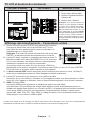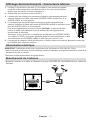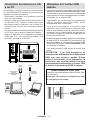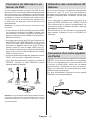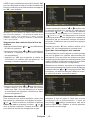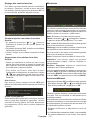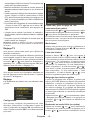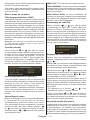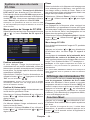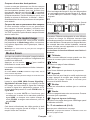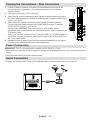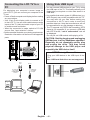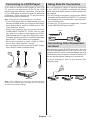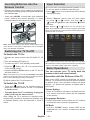
1
MODE D’EMPLOI OPERATING INSTRUCTIONS A22AC2201 TÉLÉVISEUR COULEUR AVEC TÉLÉCOMMANDE COLOUR TELEVISION WITH REMOTE CONTROL www.vestel-france.fr Table des matières Contenu du carton................................................... 2 Caractéristiques...................................................... 2 Introduction.............................................................. 2 Préparation.............................................................. 3 Précautions de sécurité........................................... 3 Source d’alimentation.......................................... 3 Cordon d’alimentation.......................................... 3 Humidité et eau................................................... 3 Nettoyage............................................................ 3 Ventilation............................................................ 3 Chaleur et flammes............................................. 3 Foudre................................................................. 3 Pièces de rechange............................................. 3 Maintenance........................................................ 3 Mise au rebut....................................................... 3 Informations à l’attention des utilisateurs des pays de l’Union européenne................................ 4 Débranchement de l’appareil............................... 4 Volume du casque............................................... 4 Installation........................................................... 4 Écran LCD........................................................... 4 Avertissement...................................................... 4 Branchement à un système de distribution de télévision (télévision par câble, etc.) à partir d’un tuner.................................................................... 4 Vue d’ensemble de la télécommande .................... 5 TV LCD et boutons de commande.......................... 6 Affichage des branchements – Connecteurs arrière...................................................................... 6 Affichage des branchements - Connecteurs latéraux.................................................................... 7 Alimentation électrique............................................ 7 Branchement de l’antenne...................................... 7 Connexion du téléviseur LCD à un PC.................... 8 Utilisation de l’entrée USB latérale.......................... 8 Branchement de la clé USB................................ 8 Connexion du téléviseur à un lecteur de DVD........ 9 Utilisation des connecteurs AV latéraux.................. 9 Connexion d’un autre appareil via Péritel................ 9 Insertion des piles dans la télécommande............ 10 Mise sous/hors tension du téléviseur.................... 10 Mise sous tension du téléviseur........................ 10 Éteindre le téléviseur......................................... 10 Sélection d’entrée.................................................. 10 Opérations de Base............................................... 10 Utilisation des boutons du téléviseur................. 10 Utilisation des touches de la télécommande......11 Réglages initiaux....................................................11 Fonctionnement général........................................ 12 Guide électronique de programmes (EPG)........... 12 Affichage des sous-titres................................... 12 Télétexte numérique (** seulement pour le Royaume-Uni)................................................... 12 Télétexte Analogique......................................... 13 Écran grand format............................................ 13 Système de menu IDTV........................................ 13 Liste des chaînes............................................... 13 Minuteries.......................................................... 15 Accès conditionnel............................................. 15 Réglage TV........................................................ 16 Réglage............................................................. 16 Navigateur média.............................................. 20 Lecture de fichiers MP3..................................... 20 Affichage des fichiers JPG................................ 21 Options de diaporama....................................... 21 Lecture Vidéo..................................................... 21 Système de menu de télévision analogique.......... 22 Menu Image....................................................... 22 Menu Son.......................................................... 22 Menu Option...................................................... 23 Menu Source..................................................... 24 Menu Installation............................................... 24 Tableau des programmes.................................. 25 Système de menu du mode PC-VGA.................... 26 Menu position de l’image du PC-VGA............... 26 Affichage des informations TV............................... 26 Fonction Muet........................................................ 26 Sélection du mode Image...................................... 27 Modes Zoom......................................................... 27 Auto................................................................... 27 16:9.................................................................... 27 4:3...................................................................... 27 Télétexte................................................................ 27 Conseils................................................................. 28 Persistance d’image.......................................... 28 Pas d’alimentation............................................. 28 Mauvaise qualité d’image.................................. 28 Aucune image.................................................... 28 Son.................................................................... 28 Télécommande.................................................. 28 Sources d’entrée............................................... 28 Annexe A : Modes d’affichage typiques d’une entrée de PC......................................................... 29 Annexe B : Compatibilité des signaux AV et HDMI (types de signal d’entrée)...................................... 30 Annexe C: Formats de fichier pris en charge pour le mode USB................................................. 31 Spécifications........................................................ 32 Français - 1 - • PLL (Recherche de fréquence). • Entrée PC. • Plug&Play (branchement et utilisation instantanée) pour Windows 98, ME, 2000, XP, Vista, Windows 7. • Mode jeu Contenu du carton Introduction M Merci d’avoir choisi cet appareil. Ce manuel vous guidera pour une utilisation appropriée de votre téléviseur. Lisez-le minutieusement avant de procéder à l’utilisation de votre appareil. P<P Téléviseur LCD OK TV INFO i DTV I-II + + V - 2 1 ABC 4 5 JKL MNO 7 VWX PP 0 / WIDE 6 PQR Le présent appareil a été conçu pour recevoir et afficher les programmes de télévision. Les différentes options de connexion offrent une possibilité supplémentaire pour la réception et l’affichage des sources disponibles (récepteur, lecteur de DVD, enregistreur de DVD, magnétoscope, PC, etc.) Le fonctionnement de cet appareil doit se faire uniquement à l’abri de l’humidité. 9 8 STU INCLUSES 3 GHI DEF Veuillez le conserver dans un endroit sûr car vous pourrez à nouveau en avoir besoin. PILES NON P - YZ -/-EXIT PC GUIDE Télécommande Manuel d’utilisation Remarque: Vous devez vérifier les accessoires après avoir acheté l’appareil. Assurez-vous que chaque accessoire est inclus. Caractéristiques • Téléviseur couleur LCD avec télécommande. • TV digitale entièrement intégrée (TNT). • Prises HDMI pour vidéo et audio numériques. Ce branchement est également conçu pour accepter des signaux haute définition. • Entrée USB. • 200 programmes VHF, UHF (analogiques). • 500 programmes pour le mode numérique (IDTV). • Système de menu OSD. • Prises Péritel pour périphériques externes (tels que vidéo, jeux vidéo, appareil audio, etc.). • Système de son stéréo. • 10 page Télétexte, fastext, TOP text. • Prise casque. • Système d’auto programmation. • Réglage manuel vers l’avant ou vers l’arrière. • Minuteur de mise en veille. • Verrouillage parental. • Coupure automatique du son en cas d’absence de transmission. • Lecture NTSC. • AVL (Ajustement automatique du volume). • Lorsqu’aucun signal valide n’est détecté, le téléviseur passe automatiquement en mode veille après 5 minutes. Il a été fabriqué exclusivement pour être utilisé à titre privé et ne peut par conséquent être utilisé ni à titre commercial, ni à titre industriel. Toute utilisation non prévue ou toute modification non autorisée annule de fait la garantie. Le fait de faire fonctionner votre téléviseur LCD dans des conditions ambiantes extrêmes peut l’endommager. Veuillez lire les consignes correspondantes de ce manuel avant toute première utilisation de cet appareil, même lorsque vous êtes familier avec l’utilisation des appareils électroniques. Veuillez surtout prêter attention au chapitre intitulé CONSIGNES DE SECURITE. Veuillez conserver ce manuel pour une utilisation ultérieure. Au moment de vendre ou de donner cet appareil à quelqu’un, il est absolument important de l’accompagner de ces consignes d’utilisation. Français - 2 - Préparation Nettoyage Pour la ventilation, laissez un espace d’au moins 10 cm autour du poste. Pour éviter toute panne ou situation périlleuse, ne placez aucun objet au-dessus du poste. Avant de nettoyer, débranchez le poste TV de la prise murale. N’utilisez pas de nettoyant en liquide ou en aérosol. Utilisez un chiffon doux et sec. Utilisez cet appareil sous des climats modérés. Ventilation Les fentes et les orifices du téléviseur sont prévus pour la ventilation et pour assurer un fonctionnement fiable. Pour éviter la surchauffe, ces orifices ne doivent pas être obstrués ni couverts de quelque façon que ce soit. 10 cm 10 cm 10 cm Chaleur et flammes Précautions de sécurité Lisez les consignes de sécurité recommandées ci-après pour votre sécurité. Source d’alimentation Ce téléviseur ne doit fonctionner qu’à partir d’une prise de courant 220-240 V AC 50 Hz. Assurez-vous de sélectionner la tension appropriée pour votre convenance. Cordon d’alimentation Ne placez pas l’appareil, ni une pièce de mobilier, etc. sur le cordon d’alimentation (alimentation secteur); évitez tout pincement du cordon. Tenez le cordon d’alimentation par sa fiche. Ne débranchez pas l’appareil en tirant sur le cordon d’alimentation et ne touchez jamais au cordon d’alimentation avec des mains mouillées car ceci pourrait causer un court-circuit ou une décharge électrique. Ne nouez jamais le cordon ni ne l’attachez à d’autres cordons. Les cordons d’alimentation doivent être placés de façon à ne pas risquer d’être piétinés. Un cordon de raccordement endommagé peut causer un incendie ou vous infliger une décharge électrique. Lorsqu’il est endommagé, le cordon doit être remplacé, et cette opération doit être effectuée par un personnel qualifié. Humidité et eau N’utilisez pas cet appareil dans un endroit humide et moite (évitez la salle de bain, l’évier de la cuisine, et la proximité de la machine à laver). N’exposez pas cet équipement à la pluie ou à l’eau, ceci pouvant s’avérer dangereux, et ne placez aucun objet rempli de liquide, comme un vase par exemple, au dessus. Ne pas exposer à des suintements ou à des éclaboussures. Si un objet solide ou un liquide tombe à l’intérieur du poste, débranchez-le et faites-le vérifier par un personnel qualifié avant de continuer à l’utiliser. L’appareil ne doit pas être placé à côté de flammes nues ou de sources de chaleur, à l’exemple d’un radiateur. Assurez-vous qu’aucune source de flamme vive, telles que des bougies allumées, ne soit placée sur le téléviseur. Les piles ne doivent pas être exposées à une chaleur excessive comme le rayonnement solaire ou autre phénomène similaire. Foudre En cas d’orage et de foudre ou lorsque vous partez en vacances, débranchez le cordon d’alimentation de la prise murale. Pièces de rechange Lorsque des pièces de rechange sont requises, assurez-vous que le technicien utilise celles qui ont été préconisées par le fabricant ou celles qui ont les mêmes caractéristiques techniques que les pièces originales. Des substitutions non autorisées peuvent causer un incendie, une décharge électrique ou d’autres risques. Maintenance Veuillez confier toute la maintenance à un technicien qualifié. Ne retirez pas le couvercle vous-même car ceci peut entraîner une décharge électrique. Mise au rebut Instructions pour la mise au rebut: • L’emballage et ses éléments sont recyclables et doivent essentiellement l’être. Les matériaux d’emballage, comme le sac en feuille d’aluminium, doivent être tenus hors de portée des enfants. • Les piles, même celles ne contenant pas de métal lourd, ne doivent pas être jetées avec les déchets ménagers. Veuillez éliminer les piles usagées de manière écologique. Consultez la réglementation applicable dans votre région. Évitez d’essayer de recharger les piles. Si vous le faites, elles peuvent Français - 3 - exploser. Ne remplacez les piles qu’avec celles de même type ou de type équivalent. • La lampe fluorescente à cathode froide de l’ÉCRAN LCD contient une petite quantité de mercure. Veuillez respecter les lois ou réglementations locales en matière de mise au rebut. Informations à l’attention des utilisateurs des pays de l’Union européenne sur un système de distribution de télévision utilisant un câble coaxial peut, dans certaines circonstances, provoquer un incendie. Le branchement à un système de distribution par câble doit donc être assuré à travers un dispositif fournissant l’isolation électrique inférieure à une certaine plage de fréquence (isolateur galvanique, voir EN 60728-11). Ce symbole sur l’appareil ou sur son emballage indique que votre appareil électrique ou électronique doit être jeté à la fin de sa durée de vie séparément de vos déchets ménagers. Il existe des systèmes de collecte séparés pour le recyclage au sein de l’UE. Pour plus d’informations, veuillez contacter les autorités locales ou le distributeur chez qui vous avez acheté l’article. Débranchement de l’appareil La prise d’alimentation est utilisée pour débrancher le téléviseur de l’alimentation secteur et doit donc rester facilement opérable. Volume du casque Une pression sonore excessive provenant des écouteurs et du casque peut provoquer une perte auditive. Installation Pour éviter toute blessure, cet appareil doit être solidement fixé au mur conformément aux instructions d’installation lors d’un montage mural (si l’option est disponible). Écran LCD L’écran LCD est un produit de très haute technologie avec un film fin d’environ un million de transistors, vous offrant des détails d’image raffinés. Occasionnellement, quelques pixels non actifs peuvent apparaître à l’écran comme un point fixe bleu, vert ou rouge. Veuillez noter que ceci n’affecte pas les performances de votre appareil. Avertissement Le bouton Veille / Marche ne sépare pas complètement cet appareil du secteur. De plus, l’appareil continue de consommer de l’électricité en mode veille. Pour couper complètement l’alimentation de l’appareil du secteur, débranchez sa fiche de la prise secteur. Pour cette raison, l’appareil doit être installé de manière à garantir un libre accès à la prise secteur, de sorte que la fiche secteur puisse être débranchée en cas d’urgence. Pour éviter un éventuel incendie, le cordon d’alimentation doit absolument être débranché de la prise secteur avant une longue période de non utilisation comme pendant les vacances, par exemple. Installez les appareils électriques hors de portée des enfants Ne laissez jamais les enfants utiliser les appareils électriques sans assistance. Les enfants ne peuvent pas toujours bien reconnaître les dangers qu’ils encourent. Les piles/accumulateurs peuvent être dangereux pour la santé si avalés. Mettez les piles hors de portée des tous petits. Si quelqu’un avale une pile, contactez immédiatement un médecin. Veuillez également conserver les matériaux d’emballage hors de portée des enfants pour éviter tout risque de suffocation. Ne laissez pas votre téléviseur en veille ou en fonctionnement lorsque vous quittez votre domicile. Branchement à un système de distribution de télévision (télévision par câble, etc.) à partir d’un tuner Un périphérique raccordé à la mise à la terre protectrice de l’installation du bâtiment à travers le branchement secteur ou à travers un autre appareil avec branchement à la mise à la terre protectrice et Français - 4 - Vue d’ensemble de la télécommande 1. Veille 1 2. Langue en cours (en mode DTV) (*) / Menu fonctionnel 3. Mode favori (en mode DTV) (*) / Menu Installation 2 17 4. Programme précédent 3 18 5. Curseur vers le haut 4 6. Curseur vers la droite 7. Curseur vers le bas 19 8. TV / TV numérique 9. Mono/Stéréo - Dual I-II 10. Programme précédent(Page suivante en mode DTV) / Programme suivant (Page précédente (en mode DTV) M P<P 20 6 OK 21 7 22 11. Touches numériques 12. Quitter (en mode DTV) 23 13. Garder (en mode texte) 14. Actualiser (en mode TXT) 15. Page Index (en mode TXT) / Guide électronique des programmes (EPG) (en mode DTV) 16. Révéler (en mode texte) / Basculer de TV à PC 17. Menu Image / Page Bas / Sous-titre activé/ désactivé (en mode DTV) (*) 18. Menu Son / Page précédente / Liste des chaînes (*) (en mode DTV) 24 25 TV INFO i + - - V P 2 1 JKL 3 DEF GHI 5 6 MNO 7 VWX PP 0 20. OK / Sélectionner (Mode TV analogique) / Liste des chaînes (en mode DTV) YZ EXIT 21. Touche curseur vers la gauche 28 29 30 22. Source / AV 23. Info 24. Volume haut/bas 25. Muet 26. Sélection du mode Image 27. Heure / Sous-page (en mode TXT) / Sous-titre activé-Désactivé (**) 28. Activer/désactiver le Télétexte 29. Mélanger (en mode texte) 30. Agrandir (en mode texte) / Taille de l’image (*) pour les pays de l’UE (**) Disponible uniquement pour les options des pays du RU. Français - 5 - / WIDE 11 PQR -/-- 27 19. Menu marche/arrêt 10 9 8 STU 8 9 + 4 26 DTV I-II ABC 5 PC GUIDE 12 13 14 15 16 TV LCD et boutons de commande VUE AVANT et ARRIÈRE VUE LATÉRALE Boutons de contrôle 1. Up button (Bouton Haut) 2. Down button (Bouton Bas) 3. Bouton Programme/Volume / Sélection AV 4. Bouton Veille / Marche Remarque: vous pouvez utiliser les touches “+/-” pour hausser ou baisser le volume. Pour changer de chaîne, appuyez une fois sur la touche P/V/ AV, puis utilisez les touches “+/-”. Si vous maintenez la touche P/V/AV enfoncée pendant quelques secondes, le menu source restera affiché à l’écran. Impossible d’afficher le menu principal à l’écran à l’aide des boutons de commande. HDMI 1 Affichage des branchements – Connecteurs arrière 1. Entrées ou sorties de prise PÉRITEL pour périphériques externes. Connecter le câble Péritel entre la prise Péritel de la TV et la prise Péritel de votre appareil externe (comme un décodeur, un magnétoscope ou un lecteur DVD). Remarque: Si un dispositif externe est branché à l’aide d’une prise PERITEL, le téléviseur passera automatiquement au mode AV. SPDIF VGA Coax.OUT 2. L’entrée PC sert à connecter un ordinateur personnel au poste TV. Branchez le câble de PC entre l’ENTRÉE PC sur la TV et la sortie SCART PC sur votre ordinateur. Les entrées vidéo en composantes sont utilisées pour connecter une vidéo en composantes. Vous pouvez utiliser une entrée PC pour connecter YPbPr à un appareil doté d’une sortie du composant. Connectez le câble YPbPr sur celui du PC entre l’ENTREE PC du téléviseur et les sorties vidéo composite de votre appareil. 3. La Sortie coaxiale SPDIF envoie les signaux audio numériques de la source en cours. Le Dolby D Audio est en mode Bypass pendant le mode Navigateur de média uniquement. 4. L’entrée RF se branche à une antenne ou à un système de câble. Remarquez que si vous utilisez un décodeur ou un enregistreur média, vous devez brancher un câble aérien qui va de l’appareil au téléviseur, avec un câble d’antenne approprié, tel qu’illustré ci-dessous. 5. HDMI 1: Entrées HDMI 1 Les entrées HDMI servent à brancher un périphérique doté d’une prise HDMI. Votre téléviseur LCD peut afficher des images haute définition à partir de périphériques tels qu’un récepteur de satellite haute définition ou un lecteur de DVD. Ces périphériques doivent être connectés via les prises HDMI ou les prises en composantes. Ces prises peuvent accepter n’importe quels signaux 480i, 480p, 576p, 576i, 720p, 1080i, ou 1080p (en option). Aucun branchement audio n’est nécessaire pour une connexion HDMI à HDMI. Lorsque vous utilisez le kit de montage (en option) mural fourni avec le téléviseur LCD, nous vous recommanderons formellement de brancher tous vos câbles à l’arrière du téléviseur LCD avant tout montage mural. Français - 6 - Affichage des branchements - Connecteurs latéraux 1. La fente CI sert à insérer une carte CI. Une carte CI vous permet de regarder toutes les chaînes auxquelles vous êtes abonné(e). Pour plus d’informations, référez-vous à la section « Accès conditionnel » 2. Entrée USB (ne fonctionne qu’en mode DTV) 3. L’entrée vidéo est utilisée pour connecter les signaux vidéo des périphériques externes. Branchez le câble vidéo entre l’ENTREE VIDÉO du téléviseur et la SORTIE VIDÉO de votre appareil. 4. Les entrées audio servent à brancher les signaux audio de périphériques externes. Branchez le câble audio entre les ENTRÉES AUDIO du téléviseur et les ports de SORTIE AUDIO de votre appareil. Pour activer également la connexion sonore PC/YPbPr en pareille situation, utilisez un câble audio approprié entre les sorties audio de l’appareil et les entrées audio du téléviseur Remarque: Si vous branchez un périphérique au téléviseur via l’ENTRÉE VIDÉO ou le câble PC/YPbPr, vous devez également brancher votre périphérique à l’aide d’un câble audio aux ENTRÉES AUDIO du téléviseur pour activer le son. 5. La prise jack du casque s’utilise pour brancher un casque externe au système. Branchez la prise jack du CASQUE pour utiliser les casques. Alimentation électrique IMPORTANT: Le téléviseur a été conçu uniquement pour fonctionner en 220-240V AC, 50 Hz. • Après avoir sorti le téléviseur de son emballage, laissez-le atteindre la température ambiante avant de le brancher à la prise de courant. • Branchez le câble d’alimentation à la prise secteur. Branchement de l’antenne HDMI 1 • Branchez l’antenne ou le câble du téléviseur à la prise d’ENTRÉE DE L’ANTENNE située à l’arrière du téléviseur. SPDIF VGA Coax.OUT SCART Français - 7 - Connexion du téléviseur LCD à un PC HDMI 1 Afin d’afficher l’image de l’écran de votre ordinateur sur votre téléviseur LCD, vous pouvez connecter votre ordinateur au poste de télévision. • Débranchez l’ordinateur et le téléviseur avant de faire les branchements. • Utilisez le câble de 15 broches pour brancher le PC au téléviseur LCD. Utilisez un câble audio entre les entrées audio du téléviseur (sur le côté) et la sortie audio de votre PC pour activer la connexion sonore. • Une fois le branchement effectué, passez à la source du PC-VGA. Voir la section «Sélection d’entrée». • Réglez la résolution qui correspond à vos besoins d’affichage. Pour les informations relatives à la résolution, se reporter à l’annexe. SPDIF VGA Coax.OUT SCART Entrées audio Entrée PC Utilisation de l’entrée USB latérale • Vous pouvez brancher les périphériques USB à votre téléviseur à l’aide de l’entrée USB du téléviseur. Cette fonctionnalité vous donne la possibilité d’afficher/de lire les fichiers musicaux, photographiques ou vidéos enregistrés sur un support USB. • Il est possible que certains types de périphériques USB (à l’exemple des lecteurs MP3) soient incompatibles avec ce téléviseur. • Vous pouvez sauvegarder vos fichiers avant d’effectuer tout branchement au téléviseur afin d’éviter de probables pertes de données. Veuillez remarquer que la responsabilité du fabricant ne saurait être engagée en cas de dommage de fichier ou de perte de données. • Le téléviseur prend en charge uniquement le formatage du disque FAT32. Le format NTFS en revanche n’est pas pris en charge. Si vous branchez un disque USB au format NTFS, le menu “usb is unformatted” (USB non formaté) va s’afficher. • Ne jamais enlever l’USB durant la lecture d’un fichier. ATTENTION : Il est très dangereux de brancher et de débrancher les périphériques USB avec une certaine rapidité. Évitez surtout de brancher et de débrancher le lecteur avec une certaine rapidité. Ceci peut physiquement endommager le lecteur USB et surtout le périphérique USB lui-même. Branchement de la clé USB Câble RGB du PC (non fourni) à l'entrée du PC • Branchez votre périphérique USB à l’entrée USB du téléviseur. Remarque: Les lecteurs de disques durs USB ne sont pas pris en charge. 5Vdc-Max:500mA Câble audio de PC (non fourni) sur les ENTREES AUDIO du téléviseur Français - 8 - Connexion du téléviseur à un lecteur de DVD Si vous voulez brancher un lecteur de DVD à votre téléviseur LCD, vous pouvez utiliser les branchements qui se trouvent sur le téléviseur. Les lecteurs de DVD peuvent disposer de différentes prises. Veuillez consulter le manuel d’utilisation de votre lecteur de DVD pour plus d’informations. Débranchez le téléviseur et l’appareil avant d’effectuer les branchements. Remarque: Les câbles présentés dans l’illustration ne sont pas fournis. • Si votre lecteur de DVD est doté d’une prise HDMI, vous pouvez le brancher via HDMI. Lorsque vous vous branchez au lecteur de DVD tel qu’illustré cidessous, passez en source HDMI. Voir la section « Sélection d’entrée ». • La plupart des lecteurs de DVD sont branchés via des PRISES EN COMPOSANTES. Vous pouvez recourir au mode YPbPr uniquement lorsque vous raccordez un appareil doté d’une sortie YPbPr à travers l’entrée PC avec le câble YPbPr pour PC. Pour activer le signal sonore, utilisez l’entrée AUDIO IN qui se trouve sur le côté du téléviseur (Le câble YPbPr n’est pas fourni). • Une fois le branchement effectué, passez en source YPbPr . Voir la section « Sélection d’entrée ». • Vous pouvez également brancher à travers le PERITEL. Utilisez un câble PÉRİTEL comme présenté dans l’illustration. Utilisation des connecteurs AV latéraux Vous pouvez brancher une gamme d’équipement optionnel à votre TV LCD. Les raccordements possibles sont présentés ci-dessous: Notez que les câbles présentés dans l’illustration ne sont pas fournis. • Pour raccorder un caméscope, branchez à la prise ENTRÉE VIDÉOet aux PRISES AUDIO Pour sélectionner la source correspondante, se reporter à la section « Sélection d’entrée » dans les paragraphes suivants. • Pour écouter le son du téléviseur en provenance des casques, branchez le port du CASQUE au téléviseur. Casque Caméscope Connexion d’un autre appareil via Péritel La plupart des périphériques supportent la connexion PÉRITEL. Vous pouvez connecter un enregistreur DVD ou un magnétoscope à votre téléviseur LCD à l’aide de la prise péritel. Notez que les câbles présentés dans l’illustration ne sont pas fournis. Éteignez le téléviseur et les périphériques avant d’effectuer tout branchement. Pour plus d’informations, reportez-vous au manuel d’utilisation de votre périphérique. Prise scart YPbPr vers Entrées audio du le câble du composant PC (Facultatif) Prise Péritel Entrée HDMI (HDMI input) Lecteur DVD Remarque: Ces procédés de branchement réalisent la même fonction mais à des niveaux de qualité différents. Il n’est pas nécessaire d’effectuer la connexion en recourant à toutes Graveur de DVD les trois méthodes. Français - 9 - Enregistreur vidéo Décodeur Insertion des piles dans la télécommande Sélection d’entrée • Retirez le couvercle du compartiment des piles situ. • Insérer à l’intérieur deux piles de type AAA/R3 ou équivalent . Respectez la bonne polarité (+/-) pendant l’insertion des piles et replacez le couvercle du compartiment des piles à la fin de l’opération. Une fois les équipements externes connectés à votre téléviseur, vous pouvez commuter entre différentes sources d’entrée. ” de la télécommande • Appuyez sur la touche “ pour changer les sources en direct. ou • Sélectionnez l’option “Source” à partir du menu principal en utilisant le bouton “ ” ou “ ”. Puis, utilisez les touches “ ” ou “ ” pour mettre une entrée en surbrillance et appuyez sur la touche “ ” pour la sélectionner. Remarque: Avec la touche “ ” ou “ ”, vous pouvez activer ou désactiver. Lorsque vous sélectionnezl’option Off (Désactiver), cette source n’apparaît pas dans l’OSD lorsque vous appuyez sur la touche AV/Source de la télécommande. (à l’exception de la source TV). Remarque: Si vous n’utilisez pas l’appareil pendant un certain temps, retirez les piles de la télécommande. Sinon une fuite possible des piles peut endommager la télécommande. Mise sous/hors tension du téléviseur Mise sous tension du téléviseur • Branchez le cordon d’alimentation à une prise de courant alternatif 220-240V AC, 50 Hz. • Le TÉMOIN de mise en veille s’allume. • Pour allumer le téléviseur à partir du mode veille, vous pouvez soit: • Appuyer sur le bouton “ ”, P + / P - ou sur une touche numérique de la télécommande. • Appuyer sur le bouton -P/CH ou P/CH+ du téléviseur. Le téléviseur s’allumera ensuite. Remarque: Si vous allumez votre TV via les boutons PROGRAMME SUIVANT/ PRÉCÉDENT(PROGRAMME UP/DOWN) de la télécommande ou du poste de télévision, le dernier programme que vous regardiez sera sélectionné à nouveau. Quelle que soit la méthode, le téléviseur s’allumera. Éteindre le téléviseur • Pressez le bouton “ ” sur la télécommande ou pressez le commutateur VEILLE (STANDBY), et la TV passera ainsi en mode veille. • Pour éteindre complètement le téléviseur, débranchez le cordon d’alimentation de la prise murale. Remarque: Lorsque le téléviseur est en mode veille, le voyant lumineux du mode veille clignote pour signifier que des options comme Recherche en mode veille, téléchargement automatique ou Minuterie sont actives. Remarque : Vous pouvez recourir au mode YPbPr uniquement lorsque vous raccordez un appareil doté d’une sortie YPbPr à travers l’entrée PC avec le câble YPbPr pour PC. (Le câble YPbPr n’est pas fourni). Opérations de Base Vous pouvez faire fonctionner votre téléviseur en utilisant indifféremment les boutons de la télécommande et ceux du téléviseur. Utilisation des boutons du téléviseur Impossible d’afficher le menu principal à l’écran à l’aide des boutons de commande. Les touches “+/-” serviront par défaut à augmenter / diminuer le volume. Même si vous attribuez d’autres fonctions à ces boutons, les touches “+/-” fonctionneront par défaut après quelques instants. Réglage du volume • Appuyez sur les touches “+/-” pour diminuer ou augmenter le volume. Lorsque vous procédez ainsi, une échelle indiquant le niveau du volume (curseur) s’affiche à l’écran. Sélection de programme • Appuyez une fois sur la touche P/V/AV et utilisez ensuite les touches “+/-” pour sélectionner le programme suivant ou précédent. Français - 10 - Mode AV • Maintenez la touche “P/V/AV” pour faire afficher le menu source. Utilisez les touches “+/-” pour sélectionner la source souhaitée. Pressez le bouton OK sur la télécommande pour continuer et le message suivant s’affichera à l’écran: Utilisation des touches de la télécommande • La télécommande de votre téléviseur est conçue pour contrôler toutes les fonctions du modèle sélectionné. Les fonctions seront décrites conformément au système de menu de votre téléviseur. • Les fonctions du système de menu sont décrites dans les sections suivantes. Réglage du volume • Appuyez sur le bouton “ ” pour augmenter ” pour le volume. Appuyez sur la touche “ diminuer le volume. Une échelle indiquant le niveau du volume (curseur) s’affiche à l’écran. Sélection de programme (programme précédent ou suivant) • Pour sélectionner l’option “Oui” ou “Non”, placez l’élément en surbrillance en utilisant les boutons “ ” ou “ ”, puis pressez le bouton “OK”. L’IDTV passera automatiquement des chaînes de transmission UHF ou VHF (*) (*options réservées aux pays de l’Europe continentale) en recherchant les transmissions numériques terrestres et en affichant les noms des chaînes trouvées. Ce processus prendra quelques minutes. • Appuyez sur le bouton “P -” pour sélectionner le programme précédent. • Appuyez sur le bouton “P +” pour sélectionner le programme suivant. Sélection de programme (accès direct) • Appuyez sur les touches numériques de la télécommande pour sélectionner les programmes compris entre 0 et 9. Le téléviseur basculera vers le programme sélectionné. Pour sélectionner des programmes entre 10 et 500 (pour l’IDTV) ou entre 10 et 199 (pour la télévision analogique), appuyez consécutivement sur les touches numériques. • Appuyez directement sur le numéro de programme pour sélectionner à nouveau les programmes à un chiffre. Une fois la recherche automatique terminée, le message suivant proposant une recherche de chaînes analogiques apparaît à l’écran: Réglages initiaux Lorsque le téléviseur est mis en marche pour la première fois, le menu de sélection de langue apparaît à l’écran. Le message “Bienvenue, sélectionnez votre langue!” apparaît dans toutes les langues sur le menu de l’écran. Sélectionnez la langue de votre choix avec les touches “ ” ou “ ”, puis appuyez sur la touche “ OK ”. Ensuite, le menu “Première installation” s’affiche à l’écran. En appuyant sur les boutons “ ” ou “ ”, sélectionnez le pays que vous voulez et appuyez sur le bouton “OK”. (* Pour les pays de l’UE). Remarque: L’OSD Sélection du pays selection) ne sera pas disponible pour le RU. Pour rechercher des chaînes analogiques, sélectionnez “Oui”. Le téléviseur bascule en mode TV analogique. Le menu apparaîtra pour effectuer la recherche des chaînes analogiques. Sélectionnez votre Pays, Langue et Langue de texte en utilisant le boutons “ ” ou “ ” et “ ” ou “ ”. Pressez le bouton OK ou ROUGE pour continuer. Pour annuler, pressez le bouton BLEU. Pour plus d’informations sur ce processus, consultez la section “Menu d’installation”. Remarque: Pour un bon fonctionnement du télétexte numérique en mode DTV, vous devez sélectionner UK comme pays en PROGRAMMATION AUTOMATIQUE analogique (pour les diffusions du RU uniquement). Évitez d’éteindre le téléviseur lors de l’initialisation de la première installation. Français - 11 - Fonctionnement général Appuyez sur la touche “ ” de la télécommande et sélectionnez DTV/USB pour faire basculer le téléviseur en mode de diffusion numérique terrestre. Bandeau d’information • Chaque fois que vous changez de chaîne en utilisant le bouton P - / P + ou les boutons numériques, la TV affiche l’image de l’émission en même temps qu’un bandeau d’information en bas de l’écran (disponible uniquement en mode DTV). Ce message restera quelques secondes sur l’écran. • Le bandeau d’information peut aussi être affiché à tout moment tout en regardant la TV en pressant le bouton “INFO” sur la télécommande: Si la chaîne sélectionnée est verrouillée, vous devez saisir le bon mot de passe numérique à 4 chiffres pour voir la chaîne. “Saisissez le code PIN” (Enter PIN) s’affiche à l’écran dans ce cas: Bouton JAUNE (Jour. Préc.): affiche les programmes du jour précédent. Bouton BLEU (jour suivant): affiche les programmes du jour suivant. INFO (Détails): affiche les programmes dans les moindres détails. Boutons numériques (Sauter): aller directement à la chaîne préférée via des boutons numériques. OK : Affichage de diffusions en cours/rappel de programmes à venir. P<P : saute sur la diffusion en cours. • Appuyez sur la touche “0” de la télécommande pour afficher le menu Recherche du guide. Vous pouvez, à l’aide de cette fonctionnalité, rechercher la base de données du guide de programme selon le genre sélectionné ou le nom correspondant. Affichage des sous-titres Avec la diffusion numérique terrestre (TNT), certains programmes sont en train d’être diffusés avec des sous-titres. Pressez le bouton “M” pour afficher le menu principal, sélectionnez la ligne Configuration puis Langues en utilisant le bouton “ ” ou “ ” et pressez le bouton OK pour afficher le menu des « Paramètres de langue ». Sélectionnez « Sous-titre » dans le menu « Paramètres de langue » et utilisez le bouton ” ou “ pour régler le sous-titrage sur la langue voulue. Guide électronique de programmes (EPG) • Certaines chaînes, mais pas toutes, adressent des informations sur l’émission en cours et l’émission suivante. Appuyez sur le bouton GUIDE pour accéder au menu EPG. L’EPG apparaît à l’écran. Ce guide permet d’obtenir des informations relatives à la chaîne, notamment des programmes hebdomadaires au moyen de l’EPG HEBDOMADAIRE. Tous les programmes s’affichent. Au bas de l’écran s’affichera une barre d’information indiquant toutes les commandes disponibles. Si l’option “Sous-titre” est activée et une option de langue réglée, le fait d’appuyer sur la touche “ ” amène l’écran à afficher le message d’avertissement suivant (** pour le RU uniquement): Télétexte numérique (** seulement pour le Royaume-Uni) • Appuyez sur le bouton “ ”. • Les informations de télétexte numérique apparaissent. • Utilisez les touches colorées, les touches du curseur et la touche OK. La méthode de fonctionnement peut différer selon le contenu du télétexte numérique. Bouton ROUGE (rétrécir): Réduit la taille des pavés d’information. Bouton VERT (Agrandir): Augmente la taille des pavés d’information. Suivez les instructions affichées à l’écran télétexte numérique. • Quand la touche Press “SELECT” (Appuyez sur sélectionner) ou un message similaire apparaît, appuyez sur le bouton OK. Français - 12 - • Quand le bouton “ ” est pressé, la TV revient à la diffusion télévisée. • Avec la diffusion numérique terrestre (TNT), en plus de la diffusion télétexte numérique et de la diffusion normale, il existe également des chaînes avec seulement de la diffusion télétexte numérique. • Le rapport d’aspect (la forme de l’image) lorsqu’on regarde une chaîne avec une seule diffusion télétexte numérique est le même que le format de l’image visualisée précédemment. • Lorsque vous pressez à nouveau le bouton “ ”, l’écran télétexte numérique s’affichera. Système de menu IDTV Appuyez sur le bouton “M”. Le menu principal s’affichera. Télétexte Analogique L’utilisation du télétexte et de ses fonctions est identique au système de télétexte analogique. Veuillez vous reporter aux explications relatives au «TELETEXTE». Écran grand format Selon le type d’émission retransmise, les programmes peuvent être regardés dans nombre de formats. Appuyez sans interruption sur la touche “ ” (ÉCRAN) pour modifier le format de l’écran. Lorsque l’option Auto est sélectionnée, le format affiché est déterminé par l’image diffusée. Liste des chaînes À l’aide la touche “ ” ou “ ” de la télécommande, veillez à ce que le premier élément, Liste des chaînes, soit mis en surbrillance et appuyez sur le bouton “OK” pour afficher la liste des chaînes. À défaut, vous pouvez aussi appuyer sur le bouton OK pendant la diffusion TNT pour accéder directement à la liste des chaînes. VEUILLER NOTER: La taille du menu varie selon la taille de l’image choisie. Attention ! L’audio de type de Dolby D audio n’est pas pris en charge. Dans ce cas, le son en provenance du téléviseur sera coupé. Si la diffusion intègre le flux AC3, le message d’avertissement ci-après s’affichera à l’écran: Navigation dans toute la liste des chaînes Si la diffusion intègre le flux AC3, le message d’avertissement ci-après s’affichera à l’écran:. Pressez le bouton “ ” ou “ ” pour sélectionner la chaîne précédente ou suivante. Vous pouvez appuyer sur le bouton “ROUGE” ou “VERT” pour vous déplacer vers le haut ou le bas de la page. Pour regarder une chaîne spécifique, placez-la en surbrillance en utilisant le bouton “ ” ou “ ”, puis pressez le bouton “OK”, tandis que l’élément “Sélectionner” de la liste des chaînes est placé en surbrillance en utilisant le bouton “ ” ou “ ”. Les nom et numéro de la chaîne sélectionnée s’afficheront alors respectivement dans les coins supérieurs gauche et droit de l’affichage de la chaîne en haut à droite de l’écran. Déplacement des chaînes dans la liste de chaînes • Appuyez sur les touches “ ” ou “ ” pour sélectionner la chaîne à déplacer. • Appuyez sur les touches “ ” ou “ ” pour sélectionner la rubrique “Déplacer” dans le menu Tableau des programmes. Français - 13 - L’OSD ci-après s’affichera tout près de la touche “OK” pour vous demander de saisir un numéro en utilisant les touches numériques de la télécommande et d’appuyer sur “OK” pour confirmer. Remarque: Si vous saisissez le même numéro de chaîne que vous voulez déplacer, “…les services de chaîne seront déplacés. Voulez vous continuer?” Le menu à l’écran s’affichera. Appuyez sur OK pour confirmer ou sélectionnez « Non » pour annuler. Suppression des chaînes dans la liste de chaînes • Appuyez sur les touches “ ” ou “ ” pour sélectionner la chaîne à supprimer. • Appuyez sur les touches “ ” ou “ ” pour sélectionner la rubrique « Supprimer » dans le menu Tableau des programmes. • Appuyez sur “OK” pour supprimer la chaîne en surbrillance du tableau des programmes. Le message ci-dessous apparaît à l’écran: Presser maintenant le bouton “ ” ou “ ” déplace vers le caractère précédent ou suivant. En appuyant sur les touches “ ” ou “ ”, vous changez le caractère en surbrillance : par exemple, le « b » devient un « a » “ ” ou un « c » “ ”. En appuyant sur les touches numériques de 0 à 9, vous remplacez le caractère en surbrillance par les caractères marqués au-dessus du bouton; ils défilent un par un quand vous appuyez sur le bouton. Pressez le bouton “M” pour annuler l’édition ou le bouton “OK” pour sauvegarder le nouveau nom. Ajout des verrouillages à des chaînes Le verrouillage de chaîne apporte un accès protégé par mot de passe aux chaînes sélectionnées par des parents. Pour verrouiller une chaîne vous devez connaître le mot de passe de contrôle parental (il est réglé sur 0000 en configuration d’usine et ne peut être modifié que dans le menu de Configuration). Sélectionnez la chaîne à verrouiller en la plaçant en surbrillance et sélectionnez l’option de verrouillage en pressant le bouton “ ” ou “ ”. Lorsque le bouton “OK” est appuyé, une boîte de dialogue s’affiche à l’écran, et vous invite à saisir votre mot de passe. • Appuyez sur les touches “ ” ou “ ” pour sélectionner l’option désirée. Si le bouton “OK” est pressé tandis que “Oui” (Yes) est sélectionné, la chaîne en surbrillance est supprimée. Sélectionner “Non” annule la suppression. Renommer des chaînes Pour renommer une chaîne spécifique, celle-ci doit être placée en surbrillance en pressant le bouton “ ” ou “ ”. Placez ensuite en surbrillance l’élément Edition du nom en pressant le bouton “ ” ou “ ” ainsi qu’illustré ci-dessous. Pressez le bouton “OK” pour activer la fonction de changement de nom. Saisissez le mot de passe à l’aide des touches numériques de la télécommande. L’icône de verrouillage “ ” s’affiche maintenant à côté de la chaîne sélectionnée. Répétez la même opération pour annuler le verrouillage. Français - 14 - Réglage des chaînes favorites Pour définir une chaîne favorite, placez en surbrillance la rubrique « Favorites » en bas du menu de la liste des chaînes. Ensuite, appuyez sur le bouton “OK”, et le menu Modifier préférées apparaît à l’écran. Minuteries Pour afficher la fenêtre des minuteries, activez l’élément à partir du menu principal. Pour ajouter une minuterie, appuyez sur le bouton JAUNE de la télécommande. La fenêtre « Ajouter un minuteur » s’affiche alors. Comment ajouter une chaîne à une liste favorite • En pressant les boutons “ ” ou “ ”, placez en surbrillance la chaîne que vous voulez ajouter à la liste favorite. • Par pression du bouton “OK”, la chaîne en surbrillance est ajoutée à la liste favorite. • L’icône F indique qu’une chaîne est ajoutée à la liste favorite. Suppression d’une chaîne d’une liste favorite. • Placez en surbrillance la chaîne que vous voulez enlever de la liste favorite et pressez le bouton OK pour supprimer. Vous pouvez presser le bouton “OK” à nouveau pour ré-ajouter la chaîne. • Pour activer les Favoris, allez dans le menu Configuration et sélectionnez le mode favori Utilisez “ ” / “ ” pour paramétrer le mode favori sur activé. Pour annuler les favoris, réglez le mode Favoris sur Désactivé. Aide à l’écran Pour tous les menus, pressez le bouton INFO pour afficher des informations d’aide à propos des fonctions du menu. Guide de programme Cette section est similaire aux instructions données dans la page des Opérations générales. Veuillez consulter la section relative au Guide électronique de programmes (EPG) dans la partie Opérations générales. Mode: Sélectionne le mode Liste des chaînes. Chaîne: Les touches “ ” ou “ ” permettront à l‘utilisateur de parcourir la liste des programmes TV ou radio. Date: La date de début est saisie via les boutons gauche/ droite et via les boutons numériques. Démarrage: L’heure de début est saisie via les boutons gauche/droite et via les boutons numériques. Fin: L’heure de fin est saisie via les boutons gauche/ droite et via les boutons numériques. Durée: Durée entre l’heure de début et l’heure de fin. Répétition: Vous pouvez régler une minuterie suivant les options ci-après : Une fois, Quotidien, ou Hebdomadaire. Modifier / Supprimer: autorise ou interdit toute modification pour d’autres utilisateurs. Vous pouvez sauvegarder les réglages en appuyant sur le bouton VERT ou annuler le processus en appuyant sur le bouton ROUGE. Vous pouvez modifier la liste avec le bouton VERT et supprimer avec le bouton ROUGE. Accès conditionnel • Appuyez sur la touche “M” pour afficher le menu principal, puis utilisez la touche “ ” ou “ ” pour sélectionner la ligne “Accès conditionnel”, et appuyez sur “OK”: Certaines chaînes terrestres numériques fonctionnent à la carte. Tout ceci nécessite un abonnement et un périphérique externe. Vous obtiendrez le module d’accès conditionnel CAM et la carte de visualisation en vous abonnant à une société de chaîne payante, puis insérez ces derniers dans la TV en utilisant la procédure suivante. • Eteignez le téléviseur et débranchez la prise de courant. • Le CAM doit être correctement inséré; il est impossible de l’insérer entièrement s’il est inversé. Vous pouvez Français - 15 - endommager le CAM ou le terminal TV si le premier est inséré avec une certaine pression. • Branchez le téléviseur à la prise de courant, allumez et attendez quelques instants jusqu’à ce que la carte soit activée. • Certains modules CAM peuvent nécessiter le réglage suivant. Réglez le CAM en entrant dans le menu DTV, sélectionnez Accès conditionnel et appuyez sur “OK”. (Le menu d’installation du CAM ne s’affiche que lorsqu’il est requis.) • Pour afficher les informations du contrat d’abonnement : Ouvrez le menu IDTV, appuyez sur la touche “M”, sélectionnez Accès conditionnel, puis appuyez sur “OK”. • Lorsque aucun module n’est inséré, le message « Aucun module d’accès conditionnel détecté » apparaît à l’écran. • Consultez le manuel d’utilisation du module pour les détails relatifs aux réglages. Remarque: Insérez ou effacez le module CI uniquement lorsque le téléviseur est en mode VEILLE ou débranchez-le du secteur. Réglage TV Vous pouvez utiliser cette option pour afficher les fonctions du téléviseur. L’écran du menu de réglage du téléviseur numérique est accessible à partir du menu principal. Pressez le bouton “M” pour afficher le menu principal et utilisez le bouton “ ” ou “ ” pour placer en surbrillance « Installation TV » , pressez ensuite le bouton “OK” pour afficher l’écran du menu « Réglage TV ». Vous pouvez trouver des informations détaillées sur tous les éléments de menu dans la section « Système de menu TV analogique ». Réglage Les ajustements du présent menu se présentent ainsi qu’il suit: Configuration Vous pouvez configurer les paramètres de votre téléviseur. Sélectionnez Configuration à partir du menu Configuration et pressez “OK” pour afficher ce menu. Pressez le bouton “EXIT” sur la télécommande pour sortir. Faible son (*pour les pays de l’UE uniquement)(en option) Utilisez le bouton “ ” ou “ ” pour sélectionner l’option Malentendant et appuyez ensuite sur le bouton “ ” ou “ ” pour activer ou désactiver ce paramètre. Si le diffuseur active un quelconque signal particulier concernant le son, vous pouvez activer ce paramètre afin de recevoir de tels signaux. Mode favori Utilisez cette fonction pour activer ou désactiver le mode favori. Pressez le bouton “ ” / “ ” pour activer ou désactiver cette fonction. Liste des chaînes Utilisez le bouton “ ” ou “ ” pour vous rendre à l’option Liste de chaînes. Utilisez le bouton “ ” ou “ ” pour basculer en mode de liste de chaînes. Si vous sélectionnez « TV uniquement », à l’aide du bouton “ ” ou “ ”, vous aurez à choisir uniquement parmi les chaînes TV disponibles. Si vous sélectionnez « Radio uniquement », à l’aide du bouton “ ” ou “ ”, vous aurez à choisir uniquement parmi les chaînes radio disponibles. Si vous sélectionnez « Texte uniquement », à l’aide du bouton “ ” ou “ ”, vous choisirez uniquement parmi les canaux texte. Balayage des chaînes cryptées L’option de balayage des chaînes cryptées sera toujours ACTIVÉE après avoir effectué une première installation. Lorsque ce paramètre est activé, le processus de recherche localisera également les chaînes cryptées. Si le réglage est paramétré manuellement sur DÉSACTIVÉ, les chaînes cryptées ne seront pas localisées en recherche automatique ou manuelle. Utilisez le bouton “ ” ou “ ” pour sélectionner l’option « Balayage des chaînes cryptées » et appuyez sur le bouton “ ” ou “ ” pour activer ou désactiver ce paramètre. Recherche en mode Veille (en option) Utilisez les touches “ ” ou “ ” pour sélectionner « Recherche en mode de veille» et appuyez sur le bouton “ ” ou “ ” pour activer ou désactiver. Si vous Français - 16 - faites passer l’option Veille à l’option Désactivé, cette fonction ne sera pas disponible. Pour utiliser l’option de recherche en mode de veille, veuillez vous assurer d’avoir activé l’option Recherche en mode de veille. Mise à niveau du récepteur Téléchargement hertzien (OAD) Cette option vous aide à conserver la mise à jour de votre téléviseur. Elle fonctionne automatiquement et recherche de nouvelles informations lorsque celles-ci sont disponibles. Veuillez remarquer que ce réglage est inactif pour être modifié. Veuillez vous assurer que le téléviseur est réglé sur Veille. Le téléviseur s’allume automatiquement tous les jours à 3h00 du matin, recherche de nouvelles informations quelconques pouvant être diffusées et les télécharge vers votre récepteur. Cette opération prendra approximativement 30 minutes. Remarque: Votre téléviseur peut commencer à fonctionner en mode Première installation après la mise à jour du téléchargement automatique. DÉSACTIVÉ : Tous les menus sont déverrouillés. TOUS LES MENUS : Tous les menus sont accessibles seulement avec la clé correcte de verrouillage. Ainsi, l’utilisateur ne peut ajouter, supprimer, renommer ou régler les minuteries. MENU INSTALLATION: Le menu d’installation est verrouillé, de sorte que l’utilisateur ne peut pas ajouter des chaînes. Les changements seront mis à jour après sortie du « menu de configuration ». Paramétrage du code PIN Utilisez le bouton “ ” ou “ ” pour aller à l’option « Paramétrage du code PIN”. Pressez “OK” pour afficher la fenêtre “Paramétrage du code PIN”. Servez-vous des touches numériques pour saisir le nouveau code PIN qu’il vous faut ultérieurement pour ressaisir le nouveau code pour vérification. À sa sortie d’usine, l’appareil est configuré par défaut à 0000 ; assurez-vous de noter votre code et de le conserver à un endroit où vous pourrez facilement le retrouver lorsque vous en aurez besoin. Contrôle parental Utilisez le bouton “ ” ou “ ” pour aller sur l’option de verrouillage parental. Pressez le bouton OK pour accéder au menu. Une boîte de dialogue réclamant le code de verrouillage est affichée. La clé est initialement réglée sur « 0000 ». Saisir le code PIN : Si celle-ci est incorrecte, un message OSD « Code PIN erroné » s’affiche à l’écran. Si cette dernière est correcte, le menu de Contrôle parental s’affiche: Réglages de l’heure (en option) Dans le menu de configuration, sélectionnez la rubrique « réglages de l’heure » en pressant le bouton “ ” ou “ ”. Pressez “OK” et le sous-menu des Réglages horaires sera affiché à l’écran. L’heure, le fuseau horaire, ainsi que ses paramètres, seront disponibles. Utilisez les boutons “ ” ou “ ” pour sélectionner les paramètres du fuseau horaire. Le réglage du fuseau horaire s’effectue à l’aide du bouton “ ” ou “ ”. Il peut être paramétré sur AUTO ou MANUEL. Verrouillage maturité (en option) (*) (*) Si vous réglez l’option de pays sur Royaume-Uni lors de la première installation, l’option de verrouillage parental ne sera pas visible. Cette option est disponible uniquement pour les pays de l’UE. Après installation, cette option recherche l’information relative aux émissions parentales et si ce niveau parental a été inactivé, l’image et le son ne sont pas activés. Verrouillage du menu Dans le verrouillage du menu vous pouvez paramétrer le verrouillage de tous les menus ou du menu d’installation pour restreindre l’accès à ces menus. Si le verrouillage du menu est désactivé, l’accès au système de menu sera libre. Utilisez le bouton “ ” ou “ ” pour aller sur l’option Verrouillage du menu. Utilisez le bouton “ ” ou “ ” pour choisir le mode de verrouillage du menu. Lorsque AUTO est sélectionné, les options Heure et Fuseau horaire ne seront pas disponibles pour être réglées. Si l’option MANUEL est sélectionnée comme paramètre de fuseau horaire, le fuseau horaire peut être modifié: • En appuyant sur le bouton “ ” ou “ ”, vous sélectionnez l’option « Fuseau horaire ». Utilisez les boutons “ ” ou “ ” pour changer le fuseau horaire entre GMT-12 et GMT+12. L’heure qui s’affiche au-dessus de la liste de menu changera selon le fuseau horaire sélectionné. Description Audio (En option) La description audio renvoie à une piste de narration supplémentaire réservée aux déficients visuels et malentendants. Le narrateur de la description accompagne la présentation, décrivant ainsi ce qui se passe à l’écran pendant les pauses naturelles (et parfois pendant les dialogues, s’il le juge nécessaire). Français - 17 - Vous ne pouvez utiliser cette option que si le diffuseur la prend en charge. Utilisez le bouton “ ” ou “ ” pour sélectionner une rubrique. Utilisez ensuite les boutons “ ” ou “ ” pour régler. Description Audio (En option) Cette fonction permet d’activer ou de désactiver l’option Description audio en appuyant sur les touches “ ” ou “ ”. Langue préférée (En option) • Audio: presser la touche “ ” ou “ ” change la langue audio. • Sous-titrage: changez la langue de sous-titrage avec la touche “ ” ou “ ”. La langue choisie sera vue dans les sous-titres. Movie Sous-titre (Facultatif) • Afin d’afficher correctement les sous-titres, utilisez ce paramètre pour sélectionner une langue de sous-titrage de film. • En appuyant sur le bouton “ ” ou “ ”, sélectionnez l’option de langue désirée. • Guide: Pressez le bouton “ ” ou “ ” pour changer la langue du guide. En cours Volume relatif (En option) • Audio: si la langue audio est prise en charge, changez la en pressant le bouton “ ” ou “ ”. • Sous-titrage: si le sous-titrage est supporté, changez la langue des sous-titres avec le bouton “ ” ou “ ”. La langue choisie sera vue dans les sous-titres. Vous pouvez utiliser cette option pour hausser ou réduire le niveau de volume de la description audio, selon les possibilités que vous offre l’option du volume. Paramètres linguistiques En appuyant sur les touches “ ” ou “ ”, vous modifiez la langue préférée de la description audio. Cette option ne peut être utilisée que si elle est disponible. Remarque: Si l’option Pays est réglée sur l’une des options Danemark, Suède, Norvège ou Finlande, le Menu “Paramètres linguistiques” fonctionnera comme suit: Langue Dans ce menu l’utilisateur peut régler la langue préférée. La langue est changée en pressant le bouton “OK”. Dans le configuration Menu, mettez en surbrillance la rubrique Paramètres linguistiques en appuyant sur les boutons “ ” ou “ ”. Appuyez sur “OK” et le sous-menu « Paramètres linguistiques » sera affiché à l’écran: Utilisez les boutons “ ” ou “ ” pour mettre en surbrillance la rubrique de menu qui sera réglée et appuyez ensuite le bouton “ ” ou “ ” pour régler. Menu: indique la langue du système Préféré Ces réglages seront utilisés s’ils sont disponibles. Sinon, les réglages courants seront utilisés. Remarques: • La langue du système détermine la langue du menu à l’écran. • L’option Langue Audio est utilisée pour sélectionner la piste sonore des chaînes. • Les réglages initiaux constituent la première priorité lorsque de nombreux choix sont disponibles. Lorsque les premières options sont disponibles, les réglages secondaires sont relégués au second plan. Français - 18 - Installation Le menu Installation vous permet essentiellement d’élaborer un tableau des chaînes de la manière la plus efficace possible. Sélectionnez « Installation » à partir du menu de configuration en pressant le bouton “ ” ou “ ”. Sélectionnez votre Pays, Langue et Langue de texte en utilisant le boutons “ ” ou “ ” et “ ” ou “ ”. Pressez le bouton “OK” ou ROUGE pour continuer. Pour annuler, pressez le bouton BLEU. Le menu suivant sera affiché durant le réglage automatique: Ce menu inclut les éléments suivants: (*) Pour Danemark, Suède, Norvège, ou Finlande. Une fois l’opération APS terminée, le tableau des programmes apparaît à l’écran. Dans le tableau des programmes, vous verrez les numéros et les noms assignés à ces programmes. Recherche de chaînes Balayage de chaîne automatique Le balayage de chaîne automatique démarre en pressant le bouton “OK” lorsque « Balayage de chaîne automatique » est en surbrillance. Le message suivant apparaît à l’écran: En balayage de chaîne manuel, le numéro de multiplexage est saisi manuellement et seul ce multiplexage de programmes est utilisé pour la recherche de chaîne. Pour chaque numéro de chaîne valide, le niveau du signal et la qualité du signal sont affichés à l’écran. Tant en mode manuel qu’automatique, une chaîne quelconque existant dans la base de données n’est pas mémorisée une seconde fois afin d’éviter les duplications redondantes de cette chaîne. Mettez « Oui » ou « Non » en surbrillance en utilisant le bouton “ ” ou “ ”, puis pressez le bouton “OK” pour confirmer. Effacer la liste des chaînes (*) Si « Oui » a été sélectionné, la recherche automatique démarre. Utilisez cette option pour effacer les chaînes mémorisées. Appuyez sur la touche “ ” ou “ ” pour sélectionner l’option Effacer la liste des chaînes, puis appuyez sur OK. L’OSD suivant s’affichera à l’écran: Sélectionner « Non » annule la recherche automatique. Une fois la recherche des chaînes numériques terminée, un message vous invitant à rechercher des chaînes analogiques s’affiche à l’écran: Pressez le bouton “OK” pour rechercher des chaînes analogiques. Le menu suivant apparaît à l’écran pour la recherche des chaînes analogiques: (*) Ce réglage est visible uniquement lorsque l’option de pays est réglée sur Danemark, Suède, Norvège ou Finlande. Sélectionnez l’option Non et appuyez sur OK pour annuler. Sélectionnez “Oui” en appuyant sur la touche “ ” ou “ ” et appuyez sur OK pour supprimer toutes les chaînes. Première installation Vous pouvez utiliser ce menu pour charger les paramètres par défaut installés dans le récepteur en configuration d’usine. Pour installer les paramètres d’usine, sélectionnez la rubrique Première installation, puis appuyez sur la touche “OK” pour poursuivre. Il vous sera alors demandé si vous voulez supprimer les réglages ou non. Le fait de sélectionner “Oui” en appuyant sur le bouton “OK” alors que l’option “Oui” est mise en surbrillance supprimera le tableau des chaînes existantes. Français - 19 - Il vous sera ensuite demandé de confirmer la suppression de toutes les chaînes et de tous les paramètres: En sélectionnant Oui et en appuyant sur le bouton “OK”, la liste des chaînes existantes sera supprimée. Une fois les paramètres d’usine chargés, le menu « Première installation » s’affichera. Le menu qui s’affiche pour la sélection de la langue apparaît en premier. En appuyant sur les touches “ ” ou “ ”, faites votre choix de langue, et appuyez sur la touche “OK” pour activer la sélection. Ensuite, le menu “Première installation” s’affiche à l’écran. En appuyant sur les boutons “ ” ou “ ”, sélectionnez le pays que vous voulez et appuyez sur le bouton “OK”. (* Pour les pays de l’UE). • Vous pouvez lire des fichiers de musique, d’image et vidéo à partir d’une carte mémoire USB. Remarque: Si vous branchez une clé USB tout en étant en mode analogique, la TV passera automatiquement en mode TV numérique. Remarque: Certains appareils USB ne sont peut-être pas pris en charge. Remarque: Si la clé USB n’est pas reconnue après mise hors tension / sous tension ou après une première installation, débranchez la clé USB et éteignez/rallumez le téléviseur. Branchez à nouveau l’appareil. Lecture de fichiers MP3 Appuyez sur “OK” pour démarrer l’installation. Une fois la recherche des chaînes numériques terminée, un message vous invitant à rechercher les chaînes analogiques apparaît à l’écran. Ce processus est le même que celui qui a été décrit dans la section Recherche automatique. Navigateur média • Pour afficher la fenêtre du navigateur média, appuyez sur la touche “MENU” de la télécommande et sélectionnez Navigateur média en appuyant sur le bouton “ ” ou “ ”. Appuyez sur la touche “OK” pour continuer. Le contenu du menu Navigateur média (selon le contenu de votre lecteur USB) s’affiche. • De même, lorsque vous branchez un périphérique USB, l’écran ci-après s’affiche: Lire ceci (Touche OK) : Lit le fichier sélectionné. Lecture (Touche verte) : Lit tous les fichiers contenus dans le dossier à commencer par le fichier sélectionné. Pause (Bouton Jaune) : Arrête le fichier en cours de lecture. Stop (Bouton Rouge) : Arrête le fichier en cours de lecture. Précédent/Suivant (Boutons Gauche/Droit) : passe à la lecture du fichier précédent ou suivant. Sélectionnez OUI en appuyant sur la touche “ ” ou “ ” et sur OK. Le navigateur média s’affiche. Aléatoire (Touche INFO) : Lit les fichiers au hasard. Si le mode de lecture aléatoire est activé, la fonction Précédent/Suivant sautera également les pistes au hasard. Boucle (Bouton Bleu) : Lit le fichier sélectionné à plusieurs reprises. Français - 20 - Affichage des fichiers JPG Lecture Vidéo Lecture (Bouton Rouge) : Démarre la lecture vidéo. Stop (Bouton Bleu) : Arrête la lecture vidéo. Pause (Bouton OK) : Pause la lecture vidéo. Sauter (Touches numériques) : saute le fichier sélectionné en utilisant les touches numériques. OK : affiche l’image sélectionnée en plein écran. Lecture / Diaporama (Touche verte) : lance le diaporama avec toutes les images dans le dossier. Options de diaporama Rembobiner (Touche directionnelle gauche) : Revient en arrière. Réglage vers l’avant (Touche directionnelle droit) : Avance. Menu (Touche M) : Règle le sous-titre/Audio. • Vous pouvez régler les sous-titres à l’aide de la touche OK avant de commencer la lecture ou en utilisant la touche M pendant la lecture. Remarque: -Certains sous-titres peuvent ne pas s’afficher correctement dans certains cas. -Afin d’afficher les sous-titres de film correctement, vous devez paramétrer une langue de “Sous-titre de film”. Voir la section “Sous-titre de film” des “Paramètres de langue” pour sélectionner la langue de sous-titre de film. Appuyez sur la touche “BLEU” pour revenir au menu précédent. Pause (Bouton Jaune) : Suspend le diaporama. Continuer (Touche verte) : Continuer avec le diaporama. Précédent/Suivant (Boutons Gauche/Droit) : passe au fichier du diaporama précédent ou suivant. Pivoter (Boutons Suivant/Précédent) : Pivote l’image à l’aide des touches directionnelles Haut/Bas. EXIT : retourne à la liste des fichiers. Aléatoire (Bouton Rouge) : Montre les fichiers de façon aléatoire et continue dans le répertoire courant, et l’icône devient soulignée. Si, au cours d’un diaporama, le mode Lecture aléatoire est activé, les images suivantes seront choisies au hasard (Si la fonction Boucle n’est pas prise en charge, le diaporama sera interrompu à la fin. Si la fonction Boucle est activée, à la fin du diaporama, il recommencera et continuera ainsi). Boucle : Le diaporama continue en arrêt, et l’icône devient soulignée. Info : active la barre des opérations. Français - 21 - De même, les paramètres Mode image, Contraste, Luminosité, Netteté, Couleur et Température de couleur seront invisibles et désactivés pendant que le mode Jeu est activé. Système de menu de télévision analogique Menu Image Remarque: Le bouton de sélection du mode Image qui se trouve sur la télécommande n‘aura aucune fonction tant que le mode Jeu est activé. Zoom image Sélectionnez Zoom image en pressant le bouton “ ” ou “ ”. Utilisez les boutons “ ” ou “ ” pour changer le zoom d’image sur Auto, 16:9 et 4:3. Réinitialisation Mode Pour vos besoins de visualisation, vous pouvez régler l’option de Mode y afférente. Pressez le bouton “ ” ou “ ” pour sélectionner Mode. Appuyez sur le bouton “ ” ou “ ” pour choisir une de ces options: Naturel,Cinéma,Utilisateur et Dynamique . Pressez le bouton “ ” ou “ ” pour sélectionner Réinitialisation. Appuyez sur la touche “ ” pour réinitialiser les modes Image aux valeurs par défaut réglées en usine. L’indication “REINITIALISATION” s’affichera à l’écran. Menu Son Vous pouvez ajuster sur mode en fonction de vos réglages préférés si vous sélectionnez l’option Utilisateur. Contraste/Luminosité/Netteté/Couleur/Teinte Appuyez sur le bouton “ ” ou “ ” pour sélectionner l’option désirée. Appuyez sur le bouton “ ” ou “ ” pour régler le niveau. Remarque: L’option Teinte (Hue) ne peut être visible que lorsque le téléviseur reçoit un signal NTSC. Colour Temperature (Température de couleur) Appuyez sur la touche “ ” ou “ ” pour sélectionner Température de couleur. Appuyez sur le bouton “ ” ou “ ” pour sélectionner l’une des options ci-après: Normal ,Chaud et Froid. Remarque: • Pour des couleurs normales, sélectionnez l’option Normal. Volume Pressez le bouton “ ” ou “ ” pour sélectionner Volume. Appuyez sur le bouton “ ” ou “ ” pour changer le niveau du volume. Égaliseur Appuyez sur “ ” ou sur le bouton “ ”, pour sélectionner Égaliseur. Appuyez sur la touche “ ” pour afficher le menu de l’égaliseur. • Le réglage sur l’option Chaud donne aux couleurs blanches une accentuation légèrement rouge. • Le paramétrage sur l’option Froid donne aux couleurs blanches une accentuation légèrement bleue. Mode jeu Sélectionnez le Mode Jeu en appuyant sur le bouton “ ” ou “ ”. Utilisez le bouton “ ” ou “ ” pour Activer ou Désactiver le mode Jeu. Lorsque le mode Jeu est réglé sur Activé, les réglages du mode jeu, qui sont optimisés pour une meilleure qualité vidéo, seront chargés. Français - 22 - Appuyez sur le bouton “ ” ou “ ” pour changer le préréglage. Dans le menu Egaliseur, vous pouvez modifier le préréglage en le définissant sur Plat, Musique, Discours, Film et Utilisateur. Menu Option Sélectionnez la fréquence désirée en appuyant sur le bouton “ ” ou “ ” et augmentez ou réduisez le gain de fréquence en appuyant sur le bouton “ ” ou “ ”. Appuyez sur la touche “M” pour retourner au menu précédent. Remarque: Les réglages du menu Egaliseur ne peuvent être modifiés que lorsque le mode Egaliseur se trouve à Utilisateur . Balance Ce paramètre s’utilise pour accentuer la balance des haut-parleurs gauche ou droit. Pressez le bouton “ ” ou “ ” pour sélectionner Balance. Appuyez sur le bouton “ ” ou “ ” pour changer le niveau de balance. Le niveau de balance peut être réglé entre -50 et + 50. Couper Casque Pressez le bouton “ ” ou “ ” pour sélectionner Casque. Appuyez sur la touche “ ” ou “ ” pour régler l’option Couper Casque sur Activer ou Désactiver. Minuteur de mise en veille Pressez le bouton “ ” ou “ ” pour sélectionner Minuteur de mise en veille. Appuyez sur le bouton “ ” ou “ ” pour régler Minuteur de mise en veille. Le minuteur peut être programmé entre Désactivé et 2 heures (120 minutes) par intervalle de 10 minutes. Si le minuteur de mise en veille est actif, à la fin du temps sélectionné, le téléviseur passe automatiquement en mode veille. Si vous voulez couper le son en provenance du casque, veuillez changer l’option Couper Casque en le définissant sur Activer. Verrouillage parental Par ailleurs, lorsque le son du téléviseur est déjà coupé, vous pouvez utiliser cette fonction pour rétablir le son du casque. Utilisez le bouton “ ” ou “ ” pour sélectionner l’activation ou la désactivation du verrouillage parental. Lorsque Marche est sélectionné, le téléviseur ne peut être contrôlé que par télécommande. Dans ce cas, les boutons du panneau de contrôle ne fonctionneront pas, en dehors du bouton Veille/ Marche. Lorsque le verrouillage enfants est activé, vous pouvez faire passer le téléviseur en mode Veille en appuyant sur le bouton Veille/Marche. Pour allumer le téléviseur à nouveau, il vous faut utiliser la télécommande. Sound Mode (Mode Son) Pressez le bouton “ ” ou “ ” pour sélectionner Mode Son. À l’aide du bouton “ ” ou “ ”, vous pouvez sélectionner le mode Mono, Stéréo, Mixte I ou Mixte II, si la chaîne sélectionnée prend en charge ce mode. AVL La fonction de limitation automatique de volume (AVL) ajuste le son dans le but d’obtenir un niveau de sortie stable entre les programmes (par exemple, le niveau de volume des publicités tend à être plus élevé que celui des programmes). Pressez le bouton “ ” ou “ ” pour sélectionner AVL. Pressez le bouton “ ” ou “ ” pour activer ou désactiver la limitation de son AVL. Réinitialisation Pressez le bouton “ ” ou “ ” pour sélectionner Réinitialisation. Appuyez sur le bouton “ ” pour réajuster les modes d’image aux paramètres de l’usine. “Réinitialisation” apparaîtra sur l’écran. Pressez le bouton “ ” ou “ ” pour sélectionner Verrouillage parental. Ainsi, si l’un de ces boutons est pressé, “Verrouillage parental activé” s’affiche à l’écran lorsque la fenêtre de menu n’est pas visible. Langue Pressez le bouton “ ” ou “ ” pour sélectionner Langue. Utilisez le bouton “ ” ou “ ” pour sélectionner la langue. Zoom par défaut Lorsque le mode Zoom est réglé sur AUTO, le téléviseur réglera le mode Zoom conformément au signal de la diffusion. S’il n’existe pas de WSS ou d’information relative au format d’image, le téléviseur utilisera alors ce réglage. Appuyez sur le bouton “ ” ou “ ” pour sélectionner Zoom par défaut. Vous pouvez régler l’option Zoom par défaut sur 16:9 ou 4:3 en appuyant sur la touche “ ” ou “ ”. Français - 23 - Fond bleu Si le signal est faible ou absent, le téléviseur passera automatiquement à un écran bleu. Pour activer ceci, paramétrez Fond bleu sur Activé. Menu Source Sélectionnez la sixième icône en appuyant sur la touche “ ” ou “ ”. Le menu Source apparaît à l’écran: En pressant le bouton “ ” ou “ ”, sélectionnez Fond Bleu. Pressez le bouton “ ” ou “ ” pour activer ou désactiver le fond bleu. Temporisation du menu Afin de régler une temporisation spécifique pour les écrans de menu, fixez une valeur pour cette option. Appuyez sur le bouton “ ” ou “ ” pour sélectionner Temporisation du menu. Utilisez le bouton “ ” ou “ ” pour régler Temporisation du menu sur désactiver, 15 sec, 30 sec ou 60 sec. Langue TXT (Télétexte) Appuyez sur le bouton “ ” ou “ ” pour sélectionner TXT Langue. Appuyez sur la touche “ ” ou “ ” pour régler l’option Langue télétexte sur Ouest, Est, Cyrillique, Turc/Gre, Arabe ou Perse. Sortie Ext Appuyez sur le bouton “ ” ou “ ” pour sélectionner l’option Sortie Ext. Utilisez le bouton “ ” ou “ ” pour régler la sortie Ext sur Activé ou Désactivé. Remarque: Dans le menu Source, sélectionnez une source en appuyant sur la touche “ ” ou “ ” et basculez vers ce mode en appuyant sur la touche “OK”. Les options de source sont; TV, DTV/USB, EXT, FAV, HDMI, YPbPr et PC-VGA. Vous pouvez, à l’aide de la touche “ ” ou “ ”, activer ou désactiver. Lorsque l’option Désactiver est sélectionnée, cette source n’apparaît pas dans le message lorsque vous appuyez sur la touche AV/Source de la télécommande. Remarque: Une fois que vous avez branché des systèmes en option à votre télé, vous devez sélectionner l’entrée requise pour visualiser les images à partir de cette source. Pour copier depuis un DVD ou un magnétoscope, vous devez choisir la source désirée à partir du menu Source et faire passer « Activé » à « Sortie EXT » à partir du menu fonctionnel. Remarque: Vous pouvez recourir au mode YPbPr uniquement lorsque vous raccordez un appareil doté d’une sortie YPbPr à travers l’entrée PC avec le câble YPbPr La Sortie Ext doit être activée afin d’utiliser la fonction des minuteurs en mode DTV. Menu Installation pour PC. (Le câble YPbPr n’est pas fourni). Mise hors tension automatique du téléviseur: Appuyez sur la touche “ ” ou “ ” pour désactiver l’option Auto TV. Utilisez la touche “ ” ou “ ” pour régler l’option Désactiver Auto TV sur Désactiver, 1H,2H,3H,4H,5H ou 6H. Vous pouvez définir la valeur de délai d’attente de la fonction de mise hors tension automatique. Une fois cette valeur de délai d’attente atteinte, le téléviseur s’arrête. Rétroéclairage (en option) Ce paramètre contrôle le niveau de rétroéclairage. Sélectionnez Rétroéclairage (Backlight ) en pressant le bouton “ ” ou “ ”. Pressez le bouton “ ” ou “ ” pour régler le Rétroéclairage sur Moyen, Maximum ou Minimum. Programme Appuyez sur le bouton “ ” ou “ ” pour sélectionner l’option Programme. Utilisez le bouton “ ” ou “ ” pour sélectionner le numéro de programme. Vous pouvez également saisir un numéro en utilisant les boutons numériques de la télécommande. Il existe 200 programmes mémorisés compris entre 0 et 199. Bande La bande C ou S peut être sélectionnée, en pressant les boutons “ ” ou “ ” pour régler la bande. Français - 24 - Chaîne Nom La chaîne peut être modifiée avec le bouton “ ” ou “ ” ou les boutons numériques. Pour changer le nom d’un programme, sélectionnez le programme et appuyez sur le bouton ROUGE. Système de couleur La première lettre du nom sélectionné sera mise en surbrillance. Appuyez sur le bouton “ ” ou “ ” pour changer cette lettre et sur le bouton “ ” ou “ ” pour sélectionner les autres lettres. En pressant le bouton ROUGE, vous pouvez stocker le nom. Appuyez sur le bouton “ ” ou “ ” pour sélectionner l’option Système de couleur. Utilisez la touche “ ” ou “ ” pour faire passer le système de couleur à AUTO, PAL ou SECAM. Système sonore Appuyez sur le bouton “ ” ou “ ” pour sélectionner l’option Système sonore. Appuyez sur le bouton “ ” ou “ ” pour modifier le système sonore et le mettre sur BG,DK, I, L ou L’. Réglage de précision Appuyez sur le bouton “ ” ou “ ” pour sélectionner l’option Réglage de précision. Appuyez sur le bouton “ ” ou “ ” pour modifier le réglage. Recherche Appuyez sur le bouton “ ” ou “ ” pour sélectionner l’option Recherche. Utilisez le bouton “ ” ou “ ” pour démarrer la recherche de programme. Vous pouvez également saisir la fréquence désirée en utilisant les boutons numériques lorsque l’option Recherche est en surbrillance. Déplacer Sélectionnez le programme que vous voulez déplacer avec les touches directionnelles. Appuyez sur la touche VERTE. À l’aide des touches de navigation, déplacez le programme sélectionné à l’emplacement de votre choix et appuyez à nouveau sur le bouton VERT. Supprimer Pour supprimer un programme, appuyez sur le bouton JAUNE. En appuyant de nouveau sur le bouton JAUNE , vous supprimez le programme sélectionné de la liste de programmes, et les programmes montent d’une place. APS (Système d’auto-programmation) Quand vous pressez la touche BLEUE pour démarrer le réglage automatique, le Menu du Système d’autoprogrammation APS apparaît à l’écran: Mémoriser Appuyez sur le bouton “ ” ou “ ” pour sélectionner l’option Mémoriser. Pressez le bouton “ ” ou OK pour stocker les paramètres. “Mémorisé...” apparaîtra à l’écran. Tableau des programmes Sélectionnez Tableau des Programmes en pressant le bouton “ ” ou “ ”. Pressez “ ” pour afficher le tableau des programmes: Appuyez sur le bouton “ ”, “ ” pour sélectionner votre pays. Si vous voulez quitter la fonction A.P.S, pressez le bouton BLEU. Quand vous appuyez sur la touche OK ou ROUGE pour lancer la recherche automatique, tous les programmes mémorisés seront effacés et le téléviseur recherchera les chaînes disponibles. Durant la recherche, l’écran OSD suivant sera affiché: En déplaçant le curseur dans quatre directions, vous pouvez atteindre 20 programmes sur la même page. Vous pouvez faire défiler les pages vers le haut ou vers le bas en appuyant sur les touches de navigation pour afficher tous les programmes en mode TV (à l’exception des modes AV). Par l’action du curseur, la sélection du programme se fait automatiquement. À chaque fois que vous appuierez sur le bouton BLEU, la fonction APS s’arrêtera et le tableau des programmes apparaîtra à l’écran. Si vous patientez jusqu’à la fin de l’APS, la liste des chaînes s’affichera avec les programmes trouvés et repérés. Français - 25 - Système de menu du mode PC-VGA Se reporter à la section “Connexion du téléviseur LCD à un PC” pour brancher un PC au téléviseur. Pour basculer vers la source PC-VGA, appuyez sur la touche “ ” de votre télécommande et sélectionnez l’entrée PC-VGA. Vous pouvez également utiliser le menu “Source” pour passer en mode PC-VGA. Remarque: Les paramètres de menu du mode PC-VGA ne sont disponibles que lorsque le téléviseur se trouve en mode PC-VGA. Menu position de l’image du PC-VGA Sélectionnez la première icône en pressant le bouton “ ” ou “ ”. Le menu Position du PC apparaît à l’écran: Phase Selon la résolution et la fréquence de balayage que vous saisissez pour le téléviseur, vous pouvez voir une image voilée ou bruitée à l’écran. Dans un tel cas vous pouvez utiliser cet élément pour obtenir une image claire par essais et erreurs. Sélectionnez l’élément Phase à l’aide du bouton “ ” ou “ ”. Utilisez le bouton “ ” ou “ ” pour régler la valeur. Fréquence pilote Les réglages de la fréquence pilote corrigent les interférences qui apparaissent comme des lignes verticales dans l’image pour des présentations telles que les feuilles de calcul, les paragraphes ou les textes dans des polices plus petites. Sélectionnez l’élément Fréquence pilote à l’aide du bouton “ ” ou “ ”. Utilisez le bouton “ ” ou “ ” pour régler la valeur. Menu Image PC-VGA Pour ajuster les éléments de l’image du PC, procédez comme suit: Appuyez sur le bouton “ ” ou “ ” pour sélectionner la deuxième icône. Le menu image PC apparaît à l’écran. Les réglages du contraste, de la luminosité, de la température de couleur et du Mode jeu dans ce menu sont les mêmes que les réglages dans le menu image TV du Système de Menu « TV analogique ». Position automatique Si vous changez l’image horizontalement ou verticalement en une position indésirable, utilisez cet élément pour remettre automatiquement l’image à la bonne place. Ce réglage optimise donc de manière automatique l’affichage. Remarque: Si vous réglez la température de couleur sur Utilisateur, vous pouvez définir les paramètres R, V, B manuellement. Sélectionnez l’élément Position Automatique en utilisant le bouton “ ” ou “ ”. Appuyez sur la touche “OK” ou sur le bouton “ ”, “ ”. Affichage des informations TV Avertissement: Veuillez vous assurer que le réglage automatique s’effectue avec une image plein écran pour assurer de meilleurs résultats. Position H (Horizontale) Cette rubrique change l’image horizontalement vers le côté droit ou gauche de l’écran. Sélectionnez l’élément Position H en utilisant le bouton “ ” ou “ ”. Utilisez le bouton “ ” ou “ ” pour régler la valeur. Position V (Verticale) Cet élément déplace l’image verticalement vers le haut ou le bas de l’écran. Sélectionnez l’élément Position V en utilisant le bouton “ ” ou “ ”. Utilisez le bouton “ ” ou “ ” pour régler la valeur. Les options Son, Fonction et Source sont identiques à celles expliquées dans le système de menu du téléviseur analogique. Les informations relatives au numéro du programme, nom du programme, indicateur de son et mode zoom sont affichées à l’écran quand un nouveau programme est saisi ou lorsque le bouton “INFO” est pressé. Lorsque vous vous trouvez en mode DTV et appuyez sur le bouton “ ” ou “ ”, les informations relatives au programme précédent ou suivant s’affichent. Pour sélectionner le programme affiché, il vous suffit d’appuyer sur OK. Fonction Muet Appuyez sur le bouton “ ” pour désactiver le son. L’indicateur Muet s’affiche dans la partie supérieure de l’écran. Pour annuler la coupure du son, il existe deux alternatives ; la première consiste à appuyer sur le bouton “ ” et la seconde revient à augmenter le niveau de volume. Français - 26 - Coupure du son des haut-parleurs Le son ne sera pas interrompu une fois les casques d’écoute branchés. Si vous souhaitez couper le son des haut-parleurs pendant que vous écoutez avec des casques, appuyez sur la touche “ ” . Le symbole apparaîtra à l’écran, puis disparaîtra au terme de quelques secondes. Veuillez remarquer que si vous ajustez le volume du téléviseur, la fonction « Muet » sera désactivée et le son en provenance du haut-parleur sera restauré. Coupure du son en provenance des casques Si vous souhaitez couper le son en provenance des casques d’écoute pendant l’utilisation des haut-parleurs, appuyez sur “Menu” et sélectionnez “ACTIVÉ” à partir de l’option Muet du casque d’écoute sous le menu Son. Sélection du mode Image En pressant le bouton PP, vous pouvez modifier les paramètres du Mode Image selon vos besoins. Les options disponibles sont Dynamique, Naturel, et Cinéma. Remarque: Le mode zoom ne peut pas être changé en mode PC-VGA. Modes Zoom Vous pouvez modifier le format de l’image (la taille de l’image) du téléviseur pour afficher l’image dans des modes zoom différents. . • Pour les images de format 16 :9 qui ont été pressées en une image normale (format d’image 4 :3), utilisez le mode 16:9 pour restaurer l’image à sa forme originale. 4:3 Utilisé pour visualiser une image normale (format d’image 4:3) puisqu’il s’agit ici de sa taille originale. . Télétexte Le système Télétexte est disponible si votre diffuseur le prend en charge Le télétexte transmet des informations portant sur l’actualité, le sport et la météo sur votre téléviseur. Remarquez que le signal diminue, par exemple dans des climats modestes, certaines erreurs de texte peuvent apparaître ou le mode de télétexte peut être annulé. Les boutons de fonction télétexte sont listés cidessous: “ ”pour modifier “ Les modes zoom disponibles sont listés ci-dessous. “ Appuyez sur la touche “ directement le mode zoom. Remarque: En mode YPbPr et HDMI, résolutions 720p-1080i, seul le mode 16:9 est disponible. Le mode zoom ne peut pas être changé en mode PC-VGA. Auto Lorsqu’un signal WSS (Wide Screen Signalling Signalisation d’écran large), qui indique le format de l’image, est inclus dans le signal de l’émission ou dans le signal d’un périphérique externe, la TV change automatiquement le mode ZOOM selon le signal WSS. • Lorsque le mode AUTO ne fonctionne pas correctement à cause de la mauvaise qualité du signal WSS, ou lorsque vous voulez changer le mode ZOOM, changez manuellement pour un autre ZOOM. 16:9 Ceci étend uniformément les côtés gauche et droit d’une image normale (format d’image 4 :3) pour remplir l’écran de Télévision. ” Télétexte Active le mode télétexte lorsque pressé une fois. Presser à nouveau quitte le mode télétexte. ” Index Sélectionne la page d’index télétexte. ” Mélanger Place l’écran télétexte par-dessus le programme. “ ” Agrandir Presser une fois pour élargir la moitié supérieure de la page, appuyez à nouveau pour élargir la moitié inférieure de la page. Pressez à nouveau pour retourner à la taille normale. “ ” Révéler Révèle les informations cachées (par ex. solutions de jeux). “ ” Garder Garde une page de texte selon convenance. Pressez à nouveau pour reprendre. “ ” Pages de signaux d’affichage Sélectionne les pages de signaux d’affichage quand le télétexte est activé. P+ / P- et numéros de (0 à 9) Appuyez pour sélectionner une page. Remarque: La plupart des stations TV utilisent le code 100 pour leurs pages d’index. Français - 27 - Boutons colorés Vous pouvez utiliser les touches colorées selon les fonctions affichées. Lorsque le système TOP text est disponible, certaines sections d’une page de télétexte prennent un code de couleur et peuvent être sélectionnées en pressant les boutons colorés. Appuyez sur un bouton de couleur correspondant à vos besoins. Les textes colorés apparaîtront, indiquant quels boutons colorés utiliser lorsque la transmission FASTEXT est présente. Conseils Persistance d’image Veuillez noter qu’une incrustation peut se produire en affichant une image persistante. La persistance d’image d’un téléviseur LCD peut disparaître après quelque temps. Essayez d’éteindre le téléviseur pendant un moment. Pour éviter qu’une telle situation ne se produise, ne laissez pas l’écran en image fixe pendant longtemps. Son Vous ne pouvez entendre aucun son. Avez-vous coupé le son en appuyant sur le bouton “ ”? Le son sort d’un seul haut-parleur. Est-ce que la balance est à l’extrémité d’une direction ? Consultez le menu Son. Télécommande Votre téléviseur ne répond pas à la télécommande. Les piles sont probablement épuisées. Si tel est le cas, vous pouvez utiliser les boutons qui se trouvent au bas du téléviseur. Sources d’entrée Si vous ne pouvez sélectionner aucune source d’entrée, il est possible qu’aucun périphérique ne soit connecté. Vérifiez les câbles AV et les branchements si vous avez essayé de brancher un appareil. Pas d’alimentation Si votre téléviseur n’est pas alimenté, veuillez vérifier le câble d’alimentation principal et le branchement du câble d’alimentation à la prise secteur. Mauvaise qualité d’image Avez-vous sélectionné le système de TV approprié ? Est-ce que votre téléviseur ou votre antenne sont très proches d’un appareil audio qui n’est pas branché à la terre ou d’une lumière au néon, etc. ? Des montagnes ou de hauts bâtiments peuvent être à l’origine des images doubles et des images fantômes. Parfois, vous pouvez améliorer la qualité de l’image en changeant la direction de l’antenne. Est-ce que l’image ou le télétexte sont méconnaissables ? Vérifiez si vous avez introduit la fréquence appropriée. Veuillez régler à nouveau les chaînes. La qualité d’image peut se dégrader lorsque deux périphériques sont connectés au téléviseur en même temps. Dans un tel cas, déconnectez l’un des périphériques. Aucune image Est-ce que l’antenne est correctement branchée ? Est-ce que les prises sont correctement branchées à la prise d’antenne ? Est-ce que le câble d’antenne est endommagé ? Les fiches appropriées sontelles utilisées pour brancher l’antenne? En cas d’incertitudes, veuillez contacter votre fournisseur. Aucune image signifie que votre téléviseur ne reçoit aucune transmission. Avez-vous appuyé sur les boutons appropriés de la télécommande? Essayez une nouvelle fois. Assurez-vous également que la bonne source d’entrée a été sélectionnée. Français - 28 - Annexe A : Modes d’affichage typiques d’une entrée de PC L’écran dispose d’une résolution maximale de 1920 X 1080. Le tableau suivant illustre certains modes d’affichage vidéo typiques. Votre téléviseur ne peut pas prendre en charge différentes résolutions. Les modes de résolution pris en charge figurent sur la liste ci-dessous. Si vous faites passer votre PC à un mode non pris en charge, un message d’avertissement apparaît à l’écran. Résolution Index Fréquence Hor. Ver Ver (Hz) Hor (KHz) Norme 1 640 480 60 31.5 VESA 2 640 480 72 37.9 VESA 3 640 480 75 37.5 VESA 4 800 600 56 35.2 VESA 5 800 600 60 37.9 VESA 6 800 600 70 43.8 7 800 600 72 48.1 VESA 8 800 600 75 46.9 VESA 9 832 624 75 49.7 MAC 10 1024 768 60 48.4 VESA VESA 11 1024 768 70 56.5 12 1024 768 72 57.7 13 1024 768 75 60.0 14 1152 864 75 67.5 15 1152 870 75 68.9 MAC 16 1280 768 60 47.7 VESA 17 1366 768 60 47.7 18 1280 960 60 60.0 VESA 19 1280 1024 60 64.0 VESA 20 1280 1024 75 80.0 VESA 21 1600 1200 60 75.0 VESA 22 1680 1050 60 65.3 VESA 23 1920 1080 60 67.5 VESA VESA Les résolutions supérieures à 60Hz peuvent ne pas s’afficher. Français - 29 - Annexe B : Compatibilité des signaux AV et HDMI (types de signal d’entrée) Source EXT-1 (SCART) FAV YPbPr HDMI Signaux pris en charge Disponible PAL 50/60 O NTSC 60 O RGB 50 O RGB 60 O PAL 50/60 O NTSC 60 O 480I 60Hz O 480P 60Hz O 576I 50Hz O 576P 50Hz O 720P 50Hz O 720P 60Hz O 1080I 50Hz O 1080I 60Hz O 1080P 50Hz O 1080P 60Hz O 480I 60Hz O 480P 60Hz O 576I 50Hz O 576P 50Hz O 720P 50Hz O 720P 60Hz O 1080I 50Hz O 1080I 60Hz O 1080P 24Hz X 1080P 25Hz X 1080P 30HZ X 1080P 50HZ O 1080P 60HZ O (X: Non disponible, O: Disponible) Remarque: Dans certains cas, un signal sur l’écran du téléviseur LCD peut ne pas s’afficher correctement. Le problème peut être une incompatibilité avec les normes de l’équipement source (DVD, décodeur, etc.). Si vous rencontrez un tel problème, veuillez contacter votre fournisseur et le fabricant de l’appareil source. Français - 30 - Annexe C: Formats de fichier pris en charge pour le mode USB Média Extension de fichier .mpg/ .dat/ .vob .mpeg Lecture .avi Musique Format Remarques Vidéo Audio MPEG1 MPEG Layer 1/2/3 MPEG2 MPEG2 XviD/ 3ivx PCM/MP3/ WMA Version XviD jusqu’à: 1.1.2 MPEG4 PCM/MP3/ WMA Support ASP(les points GMC prennent en charge uniquement 1) MS ISO MPEG4 PCM/MP3/ WMA Prend en charge SP et ASP PCM Fréquence de test: 8K ~ 48KHz - MPEG 1/2 .mp3 - Layer 1/ 2/ 3 (MP3) .jpg Photo (Résolution maximale/Débit binaire, etc.) Fréquence de test: 8K ~ 48KHz, Débit binaire: 32K~320Kbps WxH = 14592x12288, jusqu’à 179 Mega-pixel JPEG de base Format du support : 444 / 440/ 422/ 420/ Echelle de gris JPEG Progressif Format du support : 444/ 440/ 422/ 420/ Echelle de gris .jpeg .bmp .gif Jusqu’à 4 méga pixels .srt Sous-titres externes .smi .sub .psb Prend en charge le format du fichier Texte, mais ne prend pas en charge le format du fichier Image .ass Remarque: Les débits binaires nécessaires pour certains types de vidéo sont supérieurs aux limites USB. Pour cette raison, certains types de vidéo ne peuvent être lus. Français - 31 - Spécifications TÉLÉDIFFUSION PAL/SECAM B/G D/K K’ I/I’ L/L’ RÉCEPTION DE CANAUX VHF (BANDE I/III) UHF (BANDE U) HYPERBANDE APPAREIL MHEG-5 conforme à l’ISO / IEC 13522-5 UK engine Profile 1 Support conforme à l’ISO/IEC 135818-6 et au profil UK DTT Gamme de fréquence 474-850 MHz pour les modèles du RU Réception numérique 170-862 MHz pour les modèles de l’UE. Normes de transmission : TNT. MPEG-2 Démodulation COFDM avec mode 2K/8K FFT FEC: tous les modes DVB Vidéo: MP@ML, PAL, 4:3/16:9 Audio: MPEG Layer I&II 32/44.148kHz. NOMBRE DE CANAUX PRÉRÉGLÉS 200 INDICATEUR DE CHAÎNE Affichage à l’écran ENTRÉE D’ANTENNE RF 75 Ohms (Non équilibré) TENSION DE FONCTIONNEMENT 220-240V AC, 50 Hz. AUDIO Allemand+Nicam Stéréo PUISSANCE DE SORTIE AUDIO (WRMS.) (10% THD) 2 x 2,5 CONSOMMATION ÉLECTRIQUE (W) 60 W (max) < 1 W (Veille) PANNEAU 22” Écran large DIMENSIONS (mm) PxLxH (Avec pied): 118 x 532 x 376 Poids (Kg): 4,70 PxLxH (Sans pied): 60 x 532 x 347 Poids (Kg): 4,55 Français - 32 - Pour le RU Contents Package Contents................................................. 34 Features................................................................ 34 Introduction............................................................ 34 Preparation............................................................ 35 Safety Precautions................................................ 35 Power Source.................................................... 35 Power Cord........................................................ 35 Moisture and Water........................................... 35 Cleaning............................................................ 35 Ventilation.......................................................... 35 Heat and Flames............................................... 35 Lightning............................................................ 35 Replacement Parts............................................ 35 Servicing............................................................ 35 Waste Disposal.................................................. 35 Information for Users in European Union Countries........................................................... 35 Disconnecting the Device.................................. 36 Headphone Volume........................................... 36 Installation......................................................... 36 LCD Screen....................................................... 36 Warning............................................................. 36 Connection to a Television Distribution System (Cable TV etc.) from Tuner................................ 36 Overview of the Remote Control........................... 37 LCD TV and Operating Buttons............................. 38 Viewing the Connections- Back Connectors......... 38 Viewing the Connections - Side Connectors......... 39 Power Connection................................................. 39 Aerial Connection.................................................. 39 Connecting the LCD TV to a PC............................ 40 Using Side USB Input............................................ 40 USB Memory Connection.................................. 40 Connecting to a DVD Player................................. 41 Using Side AV Connectors.................................... 41 Connecting Other Equipment via Scart................. 41 Inserting Batteries into the Remote Control.......... 42 Switching the TV On/Off........................................ 42 To Switch the TV On.......................................... 42 To Switch the TV Off.......................................... 42 Input Selection....................................................... 42 Basic Operations................................................... 42 Operation with the Buttons of the TV................. 42 Operation with the Remote Control................... 43 Initial Settings........................................................ 43 General Operation................................................. 43 Electronic Programme Guide (EPG)..................... 44 Displaying Subtitles........................................... 44 Digital Teletext (** for UK only).......................... 44 Analogue Teletext.............................................. 44 Widescreen........................................................ 44 IDTV Menu System............................................... 45 Channel List....................................................... 45 Timers................................................................ 46 Conditional Access............................................ 47 TV Setup............................................................ 47 Setup................................................................. 47 Media Browser................................................... 51 Playing MP3 Files.............................................. 51 Slideshow Options............................................. 51 Analogue TV Menu System................................... 52 Picture Menu..................................................... 52 Sound Menu...................................................... 53 Feature Menu.................................................... 53 Source Menu..................................................... 54 Install Menu....................................................... 54 Program Table................................................... 55 PC-VGA Mode Menu System................................ 56 PC-VGA Position Menu..................................... 56 Displaying TV Information..................................... 56 Mute Function........................................................ 56 Muting Speakers . ............................................. 56 Muting the Headphones.................................... 56 Picture Mode Selection......................................... 56 Zoom Modes......................................................... 57 Auto................................................................... 57 16:9.................................................................... 57 4:3...................................................................... 57 Teletext.................................................................. 57 Tips........................................................................ 58 Image Persistence............................................. 58 No Power........................................................... 58 Poor Picture....................................................... 58 No Picture.......................................................... 58 Sound................................................................ 58 Remote Control................................................. 58 Input Sources.................................................... 58 Appendix A: PC Input Typical Display Modes........ 59 Appendix B: AV and HDMI Signal Compatibility (Input Signal Types)............................................... 60 Appendix C: Supported File Formats for USB Mode..................................................................... 61 Specifications........................................................ 62 English - 33 - Package Contents M Introduction Thank you for choosing this product. This manual will guide you for the proper operation of your TV. Before operating the TV, please read this manual thoroughly. Please do keep this manual in a safe place for future references. P<P OK LCD TV TV INFO i This device is intended to receive and display TV programs. The different connection options make an additional expansion of the reception and display sources possible (receiver, DVD player, DVD recorder,VCR, PC etc.). This device is only suitable for the operation in dry interiors. DTV I-II + + V P - - 2 1 ABC 3 GHI DEF 4 5 JKL MNO 7 VWX PP 0 / WIDE 6 PQR 9 8 STU YZ -/-EXIT PC GUIDE Instruction Book Remote Control Note: You should check the accessories after purchasing. Make sure that each accessory is included. Features • Remote controlled colour LCD TV. • Fully integrated digital TV (DVB-T). • HDMI connectors for digital video and audio. This connection is also designed to accept high definition signals. • USB input. • 200 programmes from VHF, UHF(analogue). • 500 programmes for digital mode (IDTV). • OSD menu system. • Scart socket for external devices (such as video, video games, audio set, etc.). • Stereo sound system. • 10 page Teletext, fastext, TOP text. • Headphone connection. • Automatic programming system. • Forward or backward manual tuning. • Sleep timer. • Child lock. • Automatic sound mute when no transmission. • NTSC playback. • AVL (Automatic Volume Limiting). • When no valid signal is detected, after 5 minutes the TV switches automatically to standby mode. • PLL (Frequency Search). • PC input. • Plug&Play for Windows 98, Windows 7, ME, 2000, XP, Vista, Windows 7. • Game Mode. This appliance is intended solely for private domestic use and may not be used for industrial and commercial purposes. We exclude liability in principle, if the device is not used as intended, or unauthorized modifications have been made. To operate your LCD-TV in extreme ambient conditions may cause the damage of the device. Please read the corresponding instructions of this handbook prior to the first usage of the device, even when the usage of electronic devices is familiar to you. Notice especially the chapter SAFETY PRECAUTIONS. Carefully keep the handbook as future reference. When selling the device or giving it away, absolutely give these direction for use. English - 34 - Ventilation Preparation For ventilation, leave a free space of at least 10 cm all around the set. To prevent any fault and unsafe situations, please do not place any objects on top of the set. Use this device in moderate climates. Heat and Flames The set should not be placed near to open flames and sources of intense heat such as an electric heater. Ensure that no open flame sources, such as lighted candles, are placed on top of the TV. Batteries should not be exposed to excessive heat such as sunshine, fire or the like. 10 cm 10 cm 10 cm The slots and openings on the TV set are intended for ventilation and to ensure reliable operation. To prevent overheating, these openings must not be blocked or covered in anyway. Lightning Safety Precautions Read the following recommended safety precautions carefully for your safety. Power Source The TV set should be operated only from a 220-240 V AC, 50 Hz outlet. Ensure that you select the correct voltage setting for your convenience. Power Cord Do not place the set, a piece of furniture, etc. on the power cord (mains lead) or pinch the cord. Handle the power cord by the plug. Do not unplug the appliance by pulling from the power cord and never touch the power cord with wet hands as this could cause a short circuit or electric shock. Never make a knot in the cord or tie it with other cords. The power cords should be placed in such a way that they are not likely to be stepped on. A damaged power cord can cause fire or give you an electric shock. When it is damaged and needs to be replaced, it should be done by qualified personnel. Moisture and Water Do not use this device in a humid and damp place (avoid the bathroom, the sink in the kitchen, and near the washing machine). Do not expose this device to rain or water, as this may be dangerous and do not place objects filled with liquids, such as flower vases, on top. Avoid from dripping or splashing. If any solid object or liquid falls into the cabinet, unplug the TV and have it checked by qualified personnel before operating it any further. Cleaning Before cleaning, unplug the TV set from the wall outlet. Do not use liquid or aerosol cleaners. Use soft and dry cloth. In case of storm and lightning or when going on holiday, disconnect the power cord from the wall outlet. Replacement Parts When replacement parts are required, make sure that the service technician has used replacement parts, which are specified by the manufacturer or have the same specifications as the original one. Unauthorized substitutions may result in fire, electrical shock or other hazards. Servicing Please refer all servicing to qualified personnel. Do not remove the cover yourself as this may result in an electric shock. Waste Disposal Instructions for waste disposal: • Packaging and packaging aids are recyclable and should principally be recycled. Packaging materials, such as foil bag, must be kept away from children. • Batteries, including those which are heavy metalfree, should not be disposed of with household waste. Please dispose of used battery in an environment friendly manner. Find out about the legal regulations which apply in your area. Don’t try to recharge batteries. Danger of explosion. Replace batteries only with the same or equivalent type. • Cold cathode fluorescent lamp in LCD PANEL contains a small amount of mercury; please follow the local laws or regulations for disposal. Information for Users in European Union Countries This symbol on the product or on its packaging means that your electrical and electronic device should be disposed at the end of its service life separately from your household wastes. There are separate collection systems for recycling in EU. English - 35 - For more information, please contact the local authority or the dealer where you purchased the product. Disconnecting the Device The mains plug is used to disconnect TV set from the mains and therefore it must remain readily operable. Headphone Volume The Standby / On button doesn´t separate this device completely from mains. Moreover the device consumes power in the standby operation. In order to separate the device completely from mains, the mains plug has to be pulled from the mains socket. Because of that the device should be set up in a way, that an unobstructed access to mains socket is guaranteed, so that in case of emergency the mains plug can be pulled immediately. To exclude the danger of fi re, the power cord should principally be separated from the Excessive sound pressure from earphones and headphones can cause hearing loss. mains socket prior to a longer period of non-usage, Installation i.e. during vacations. To prevent injury, this device must be securely attached to the wall in accordance with the installation instructions when mounted to the wall (if the option is available). Electrical device not in the hands of children LCD Screen The LCD panel is a very high technology product with about a million thin film transistors, giving you fine picture details. Occasionally, a few non-active pixels may appear on the screen as a fixed blue, green or red point. Please note that this does not affect the performance of your product. Never let children use electrical device unsupervised. Children can´t always recognize properly the possible dangers. Batteries / accumulators can be life threatening when swallowed. Store batteries unreachable for small children. In case of swallowing a battery medical aid has to be sought immediately. Also keep the packaging foils away from children. There is danger of suffocation. Warning Do not leave your TV in standby or operating mode when you leave your house. Connection to a Television Distribution System (Cable TV etc.) from Tuner Device connected to the protective earthing of the building installation through the mains connection or through other apparatus with a connection to protective earthing-and to a television distribution system using coaxial cable, may in some circumstances create a fire hazard. Connection to a cable distribution system has therefore to be provided through a device providing electrical isolation below a certain frequency range (galvanic isolator, see EN 60728-11). English - 36 - Overview of the Remote Control 1. Standby 1 2. Current language (in DTV mode) (*)//Feature menu 3. Favourite mode (in DTV mode) (*) / Install menu 4. Previous programme 5. Cursor up 2 17 3 18 6. Cursor right 7. Cursor down 19 8. TV / Digital TV 9. Mono/Stereo - Dual I-II 10. Programme up/ (Page down in DTV mode) / Programme down/ (Page up in DTV mode) 11. Numeric buttons 12. Exit (in DTV mode) 4 M P<P 20 6 OK 21 7 22 13. Hold (in TXT mode) 14. Update (in TXT mode) 23 15. Index page (in TXT mode) / Electronic Programme Guide (EPG) (in DTV mode) 16. Reveal (in TXT mode) / Switch from TV to PC 17. Picture menu / Page down / Subtitle on-off (in DTV mode) (*) 18. Sound menu / Page up / Channel list (*)(in DTV mode) 19. Menu on/off 20. OK / Select (analogue TV mode) / Channel list (in DTV mode) / 21. Cursor Left 24 25 23. Info - - P 2 1 3 DEF GHI 5 6 MNO 7 VWX PP 0 25. Mute 26. Picture mode selection 27. Time / Subpage (in TXT mode) / Subtitle on-off (**) 28. Teletext on-off 29. Mix (in TXT mode) 30. Expand (in TXT mode) / Image size (*) available for EU countries. (**) available for UK country option. English - 37 - 11 PQR YZ -/-EXIT 28 / WIDE 10 9 8 STU 27 30 24. Volume up/down + V 8 9 + JKL 26 DTV I-II 4 29 22. AV / Source TV INFO i ABC 5 PC GUIDE 12 13 14 15 16 LCD TV and Operating Buttons FRONT and REAR VIEW SIDE VIEW Control Buttons 1. Up button 2. Down button 3. Programme/Volume / AV selection button 4. Standby / On button Note:You can use “+/-” buttons to change volume. If you want to change channels, press P/V/AV button once and then use “+/-” buttons. If you hold the P/V/AV button about a few seconds, source OSD will be displayed. Main menu OSD cannot be displayed via control buttons. HDMI 1 Viewing the Connections- Back Connectors 1. SCART socket inputs or outputs for external devices. Connect the SCART cable between SCART socket on TV and SCART socket on your external device (such as a VCR or a DVD player). Note: If an external device is connected via the SCART socket, the TV will automatically switch to AV mode. SPDIF VGA Coax.OUT 2. PC Input is for connecting a personal computer to the TV set. Connect the PC cable between the PC-VGA INPUT on the TV and SCART the PC output on your PC. Component Video Inputs (YPbPr) are used for connecting component video. You can use PC-VGA input to enable YPbPr signal connection with a device that has component output. Connect the YPbPr to PC cable between the PC INPUT on the TV and the component video outputs of your device. 3. SPDIF Coaxial Out outputs digital audio signals of the currently watched source. Dolby D Audio is bypassed while in media browser mode only. 4. RF Input connects to an antenna or a cable system. Note that if you use a media recorder, you should connect the aerial cable through the device to the television with an appropriate antenna cable, as shown in the illustration in the following pages. 5. HDMI 1: HDMI 1 input HDMI Input is for connecting a device that has an HDMI socket. Your LCD Television is capable of displaying High Definition pictures from devices such as a High Definition Satellite Receiver or DVD Player. These devices must be connected via the HDMI sockets or Component Socket. These sockets can accept either 480i, 480p, 576p, 576i, 720p, 1080i, 1080p (optional) signals. No sound connection is needed for an HDMI to HDMI connection. When you use the wall mount kit (optional) with the LCD TV, we would definitely recommend to plug all your cables into the back of the LCD before mounting to the wall. English - 38 - Viewing the Connections - Side Connectors 1. CI Slot is used for inserting a CI card. A CI card allows you to view all the channels that you subscribe to. For more information, see “Conditional Access” section 2. USB Input (functional in DTV mode only 3. Video Input is used for connecting video signals of external devices.Connect the video cable between the VIDEO IN socket on the TV and the VIDEO OUT jack on your device. 4. Audio Inputs are used for connecting audio signals of external devices. Connect the audio cable between the AUDIO INPUTS on the TV and the AUDIO OUTPUT jacks on your device. Also to enable PC/YPbPr sound connection in such a case, use an appropriate audio cable between the connected device’s audio outputs and the TV’s audio inputs Note: If you connect a device to the TV via the VIDEO or PC/YPbPr cable you should also connect your device with an audio cable to the AUDIO INPUTS of the TV to enable audio. 5. Headphone jack is used for connecting an external headphone to the system. Connect to the HEADPHONE jack to use headphones. Power Connection IMPORTANT: The TV set is designed to operate on 220-240V AC, 50 Hz. • After unpacking, allow the TV set to reach the ambient room temperature before you connect the set to the mains. • Plug the power cable to the mains socket outlet. Aerial Connection HDMI 1 • Connect the aerial or cable TV plug to the AERIAL INPUT socket located at the rear of the TV. SPDIF VGA Coax.OUT SCART English - 39 - Connecting the LCD TV to a PC HDMI 1 For displaying your computer’s screen image on your LCD TV, you can connect your computer to the TV set. • Power off both computer and display before making any connections. • Use 15-pin D-sub display cable to connect a PC to the LCD TV. Use an audio cable between audio inputs of the TV (side) and audio output of your PC to enable sound connection. • When the connection is made, switch to PC-VGA source. See “Input selection” section. • Set the resolution that suits your viewing requirements. Resolution information can be found in the appendix parts. SPDIF VGA Using Side USB Input • You can connect USB devices to your TV by using the USB input of the TV. This feature allows you to display/play music,photo or video files stored in a USB stick. • It is possible that certain types of USB devices (e.g. MP3 Players) may not be compatible with this TV. • You may back up your files before making any connections to the TV set in order to avoid any possible data loss. Note that manufacturer will not be responsible for any file damage or data loss. • The TV supports only FAT32 disk formatting. NTFS format is not supported. If you connect a USB disk with NTFS format, “usb is unformetted” osd will be displayed. • Do not pull out USB module while playing a file. CAUTION: Quickly plugging and unplugging USB devices, is a very hazardous operation. Especially, do not repeatedly quickly plug and unplug the drive. This may cause physical damage to the USB player and especially the USB device itself. Coax.OUT USB Memory Connection • Plug your USB device to the USB input of the TV. SCART Note: USB hard disk drives are not supported. PC audio cable (not supplied) to AUDIO INPUTS on the TV PC Input 5Vdc-Max:500mA Audio Inputs PC RGB cable (not supplied) to PC input English - 40 - Connecting to a DVD Player If you want to connect a DVD player to your LCD TV, you can use connectors of the TV set. DVD players may have different connectors. Please refer to your DVD player’s instruction book for additional information. Power off both the TV and the device before making any connections. Note: Cables shown in the illustration are not supplied. • If your DVD player has an HDMI socket, you can connect via HDMI. When you connect to DVD player as illustrated below, switch to HDMI source. See, “Input Selection” section. • Most DVD players are connected through COMPONENT SOCKETS. YPbPr can be used only when you connect a device that has a YPbPr output through the PC input with YPbPr to PC cable. To enable sound connection, use AUDIO IN located side of the TV (YPbPr cable is not supplied). • When the connection is made, switch to YPbPr source. See, “Input selection” section. • You may also connect through the SCART socket. Use a SCART cable as shown below. Using Side AV Connectors You can connect a range of optional equipment to your LCD TV. Possible connections are shown below. Note that cables shown in the illustration are not supplied. • For connecting a camcorder, connect to the VIDEO IN socket and the AUDIO SOCKETS. For selecting the related source, see the section “Input selection” in the following parts. • To listen the TV sound from headphones, connect to the HEADPHONE jack of theTV. Headphone Camcorder Connecting Other Equipment via Scart Most devices support SCART connection. You can connect a; DVD recorder or a VCR to your LCD TV by using the SCART socket. Note that cables shown in the illustration are not supplied. Power off both the TV and the devices before making any connections. For more information, refer to your device’s own instruction book. Scart socket YPbPr to PC cable (optional) Component audio inputs SCART socket HDMI input DVD Player Note: These methods of connection perform the same function but in different levels of quality. It is not necessary DVD Recorder to connect by all three methods. English - 41 - Video Recorder Decoder Inserting Batteries into the Remote Control Input Selection • Remove the battery cover located on the back of the remote control by gently pulling backwards from the indicated part. • Insert two AAA/R3 or equivalent type batteries inside. Observe the correct polarity (+/-) when inserting batteries and replace the battery cover. Once you have connected external systems to your TV, you can switch to different input sources. ” button on your remote control for directly • Press “ changing sources. or • Select “Source” option from the main menu by using “ ” or “ ” button. Use then “ ” or “ ” button to highlight an input and press “ ” button to select. Note: With the “ ” or “ ” buttons you can set Off or On. When Off is selected; this source does not appear in the OSD when you press the AV / Source button of the remote control. (except for the TV source). Note: Remove the battery from remote control when it is not to be used for a long period. Otherwise it can be damaged due to any leakage of batteries. Switching the TV On/Off To Switch the TV On • Connect the power cord to the 220-240V AC, 50 Hz. • Then the standby LED lights up. • To switch on the TV from standby mode either: • Press the “ ” button, P + / P - or a numeric button on the remote control. • Press the -P/CH or P/CH+ button on the TV. The TV will then switch on. Note: If you switch on your TV via PROGRAMME UP/DOWN buttons on the remote control or on the TV set, the programme that you were watching last will be reselected. By either method the TV will switch on. To Switch the TV Off • Press the “ ” button on the remote control or press the STANDBY switch, so the TV will switch to standby mode. • To power down the TV completely, unplug the power cord from the mains socket. Note: When the TV is switched to standby mode, standby LED can blink to indicate that features such as Standby Search, Over Air Download or Timer is active. Note : YPbPr mode can be used only when you connect a device that has a YPbPr output through the PC-VGA input with YPbPr to PC cable (YPbPr cable is not supplied). Basic Operations You can operate your TV using both the remote control and onset buttons. Operation with the Buttons of the TV Main menu OSD cannot be displayed via control buttons. “+/-” buttons will function as volume up/down as default. Even if you set other functions for these buttons, “+/-” buttons will perform as default after a short while. Volume Setting • Press “+/-” buttons to increase or decrease volume, so a volume level scale (slider) will be displayed on the screen. Programme Selection • Press P/V/AV button once and then use “+/-” buttons to select the next or previous programme. AV Mode • Hold the “P/V/AV” button, source OSD will be displayed.Use “+/-” buttons to select the desired source. English - 42 - Operation with the Remote Control • The remote control of your TV is designed to control all the functions of the model you selected. The functions will be described in accordance with the menu system of your TV. • Functions of the menu system are described in the following sections. The IDTV will automatically tune to the UHF or VHF(*) (* for EU countries) transmission channels, searching for digital terrestrial TV broadcasts and displaying the names of channels found. This process will take about a few minutes. Volume Setting • Press “V+” button to increase the volume. Press “V-” button to decrease the volume. A volume level scale (slider) will be displayed on the screen. Programme Selection (Previous or Next Programme) • Press “P -” button to select the previous programme. • Press “P +” button to select the next programme. Programme Selection (Direct Access) • Press numeric buttons on the remote control to select programmes between 0 and 9. The TV will switch to the selected programme. To select programmes between 10-500 (for IDTV) or 10-199 (for analogue), press the numeric buttons consecutively • Press directly the programme number to reselect single digit programmes Initial Settings When the TV is turned on for the first time, the menu for the language selection appears on the screen. The message “Welcome please select your language!” is displayed in all language options sequentially in the OSD. By pressing the “ ” or “ ” buttons highlight the language you want to set and press OK button. Afterwards, “First time installation” OSD will appear on the screen. By pressing “ ” or “ ” buttons, select the country you want to set and press OK button (* for EU countries). After Automatic Search is completed, the following message asking for analogue channel search appears on the screen: To search for analogue channels, select “Yes”. TV switches to the analogue TV mode. The menu is displayed to search for analogue channels. Select your Country, Language and Text language by using “ ” or “ ” and “ ” or “ ” buttons. Press OK or RED button to continue. To cancel, press the BLUE button. For more information on this process, see “Install Menu” section. Note: For proper functioning of digital teletext in DTV mode, you should set country as UK in analogue AUTO PROGRAM (for UK broadcasts only). Do not turn off the TV while initializing first time installation. General Operation Press the “ ” button on the remote control and select DTV to switch the TV set to digital terrestrial television broadcasting. Note: Country selection OSD will not be available for UK. Press OK button on the remote control to continue and the following message will be displayed on the screen: • To select the “Yes” or “No” option, highlight the item by using “ ” or “ ” buttons and press the “OK” button. Information Banner • Whenever you change channel, using the P- / P+ button or the numeric buttons, the TV displays the broadcast picture along with an information banner at the bottom of the screen (available only in DTV mode). This will remain on the screen for a few seconds. • The information banner can also be displayed at any time while watching TV by pressing the “INFO” button on the remote control: English - 43 - If the selected channel is locked, you must enter the correct four numeric code to view the channel. “Enter PIN” will be displayed on the screen in such a case: Highlight the “Subtitle” item in “Language settings” menu and use ” or “ button to set Subtitle to the desired language. If “Subtitle” is on and a language option is set, pressing the “ ” button causes the following warning message display on the screen (** for UK only): Electronic Programme Guide (EPG) • Some, but not all, channels send information about the current and next events. Press EPG button to view the EPG menu. EPG appears on the screen. It is able to get Information of the channel - programs weekly by means of 7-DAY-EPG. All programs of channels are displayed. On the bottom of the screen; info bar, showing all the available commands, will be displayed. Digital Teletext (** for UK only) RED button (Shrink): makes the info boxes smaller. Follow the instructions displayed on digital teletext screen. • When Press “SELECT” button or similar message appears on the screen, press the OK button. • When the “ ” button is pressed, the TV returns to television broadcasting. • With digital terrestrial broadcasting (DVB-T), in addition to digital teletext broadcasting together with the normal broadcasting, there are also channels with just digital teletext broadcasting. • The aspect ratio (picture shape) when watching a channel with just digital teletext broadcasting is the same as the aspect ratio of the picture viewed previously. • When you press the “ ” button again, the digital teletext screen will be displayed. GREEN button (Expand): makes the info boxes larger. YELLOW button (Prev. Day): displays the programmes of previous day. BLUE button (Next day): displays the programmes of the next day. INFO (Details): displays the programmes in detail. Numeric buttons (Jump): go to preferred channel directly via numeric buttons. OK : view for current broadcast/reminders for future programs. P<P: jumps to the current broadcast. • Press “0” button on the remote control to view Guide Search menu. Using this feature, you can search the programme guide database in accordance with the genre selected or with name match. Displaying Subtitles With digital terrestrial broadcasting (DVB-T), some programmes are being broadcasted with subtitles. Press the “M” button to display the main menu, highlight the Setup and then Language menu using “ ” or “ ” button and press the OK button to display the “Language settings” menu. • Press the “ ” button. • The digital teletext information appears. • Operate it with the coloured buttons, cursor buttons and OK button. The operation method may differ depending on the contents of the digital teletext. Analogue Teletext Use of teletext and its functions are identical to the analogue text system. Please do refer to the “TELETEXT” explanations. Widescreen Depending on the type of the broadcast being transmitted, programmes can be viewed in a number of formats. Press the “ ” button repeatedly to change screen format. When Auto is selected, the format being displayed is determined by the picture being broadcasted. PLEASE NOTE: Menu size changes depending on the chosen image size. Notice ! Dolby D audio type is not supported. In this case, Tv sound will be muted. If the broadcast includes English - 44 - AC3 stream, the following warning message will be displayed on the screen: If there is no audio available, the following warning message will be displayed on the screen:. Moving the channels in the channel list • Press “ ” or “ ” buttons to select the channel that will be moved. • Press “ ” or “ ” buttons to select the “Move” item on Channel List menu. Following OSD will be displayed next to “OK” item to indicate that enter a number by using the numeric buttons on the remote control and press “OK” to confirm. IDTV Menu System Press the “M” button. Main menu will be displayed. Note: If you enter the same programme number of the channel that you want to move, “.... channel services will be replaced. Do you want to continue?” OSD will be displayed. Press OK to confirm or select “No” to cancel. Deleting the Channels in the Channel List Channel List Using the “ ” or “ ” button on the remote control, make sure that the first item, Channel List, is highlighted and press the “OK” button to display the Channel List or you can press the OK button during watching DVB-T broadcasting and get to the Channel List directly. Navigating the Entire Channel List Press “ ” or “ ” button for selecting the previous or next channel. You can press “RED” or “GREEN” button to move page up or page down. To watch a specific channel, highlight it using “ ” or “ ” button and then press “OK” button, while the “Select” item on Channel List menu is highlighted by using “ ” or “ ” button. Then the name and number of the selected channel will be displayed in the top-left and top-right of the channel display at the top-right of the screen, respectively. • Press “ ” or “ ” button to select the channel that will be deleted. • Press “ ” or “ ” button to select the “Delete’’ item on Channel List menu. • Press the “OK” button to delete the highlighted channel in the channel list. Then the message below appears on the screen: • Press “ ” or “ ” button to highlight the desired option. If “OK” button is pressed while “Yes” is highlighted, the highlighted channel is deleted. Selecting “No” cancels the deletion. Renaming Channels To rename a specific channel, the channel must be highlighted by pressing “ ” or “ ” button. Then highlight the Edit Name item by pressing “ ” or “ ” button as illustrated below. Press the “OK” button to activate the rename feature. English - 45 - Now pressing “ ” or “ ” button moves to the previous/ next character. Pressing “ ” or “ ” button toggles the current character, i.e., ‘b’ character becomes ‘a’ by “ ” and ‘c’ by “ ”. Pressing the numeric buttons ‘0...9’ replaces the highlighted character with the characters printed above the button one by one as the button is pressed. Press the “M” button to cancel the editing or OK button to save the new name. Adding Locks to Channels Channel locking provides a password-protected access to channels selected by parents. In order to lock a channel you should know the parental lock password (default value is set to 0000 in the factory and can only be changed from the Configuration menu). Select the channel to be locked by highlighting it and select the Lock option by pressing “ ” or “ ” button. When the “OK” button is pressed, a dialog OSD asking for the password will be displayed. How to Add a Channel to a Favourites List • By pressing “ ” or “ ” buttons, highlight the channel that you want to add to the favourite list. • By pressing “OK” button, the highlighted channel is added to the Favourite List. • F icon indicates that a channel is added to Favourite List. Removing a Channel from Favourite List • Highlight the channel that you want to remove from the favourite list and press OK button to remove.You can press “OK” button again to re-add a channel. • To activate Favourites, go to the Configuration menu and select Favourite mode. Use “ ” / “ ” to set Favourite mode as on. To cancel Favourites, set Favourite Mode to Off. On Screen Help For all menus, press the INFO button to display the help information about the menu functions. Programme Guide This section is same with the instructions given in the General Operations page. Please see Electronic Programme Guide (EPG) section in the General Operations part. Timers Enter the password by using the numeric buttons on the remote control. The lock icon “ ” will now be displayed next to the selected channel. Repeat the same operation to cancel the lock. Setting Favourites To set a favourite you should highlight the “Favourites” item at the bottom of the Channel List menu. Then press “OK” button and Edit Favourite List menu appears on the screen. To display timers window, activate the item from the main menu. To add a timer, press the YELLOW button on the remote control. Then “Add Timer” window appears. English - 46 - Mode: Selects channel list mode. Channel: “ ” or “ ” keys will navigate the user through the TV or Radio list. Date: Starting date is entered via the Left/Right and the numeric buttons. Start: Starting time is entered via the Left/Right andcthe numeric buttons. TV Setup You can use this item to display the TV functions. The digital TV Setup menu screen is accessed from the main menu. Press the “M” button to display the main menu and use “ ” or “ ” button to highlight “TV Setup”, press the “OK” button to display TV Setup menu screen. End: Ending time is entered via the Left/Right and the numeric buttons. Duration: Duration between Start and End time. Repeat: You can set a timer to be repeated as Once, Daily or Weekly. Change/Delete: permits or prohibits any modifications for other users. You can find detailed information for all menu items in “Analogue TV Menu System” section. Setup The adjustments in this menu are given as the following: You can save the adjustments by pressing the GREEN key or cancel the process by pressing the RED button. You can edit the list via GREEN key and delete with the RED button. Conditional Access • Press the “M” button to display the main menu and use the “ ” or “ ” button to highlight the “Conditional Access” line and press the “OK” button: Configuration You can configure the settings of your TV. Select Configuration from Setup menu and press “OK” to view this menu. Press the “EXIT” button on the remote control to exit. Some Digital Terrestrial channels operate on a Pay Per View basis. These require a subscription and a external device. Obtain the Conditional Access Module (CAM) and the viewing card by subscribing to a pay channel company, then insert those to the TV using the following procedure. • Switch off the TV and unplug from the mains. • The CAM should be correctly inserted, it is impossible to insert fully if reversed. The CAM or the TV terminal may be damaged if the CAM is forcefully inserted. • Connect the TV to the mains supply, switch on and then wait for few moments until the card is activated. • Some CAMs may require the following set up. Please set the CAM by entering the IDTV menu, Conditional Access then pressing the “OK” button. (CAM set up menu is not displayed when it is not required.) • To see the viewing contract information: enter IDTV; press the “M” button, then highlight Conditional Access and press the “OK” button. • When no module is inserted, “No Conditional Access module detected” message appears on the screen. • Refer to the module instruction manual for details of the settings. Note: Insert or remove the CI module only when the TV is in STANDBY mode or disconnected from the mains. Hard of Hearing (* for EU countries only)(optional) Use “ ” or “ ” button to select Hard of Hearing and then press “ ” or “ ” button to set this setting as On or Off. If the broadcaster enables any special signal concerning the audio, you can set this setting as On to receive such signals. Favourite Mode Use this function to enable or disable favourite mode. Press “ ” / “ ” button to set this function as on or off. Channel List Use “ ” or “ ” buttons to go to Channel List option. Use “ ” or “ ” buttons to toggle Channel List Mode. English - 47 - If you select “TV Only”, with the “ ” or “ ” buttons, you navigate through only TV channels. If you select “Radio Only”, with the “ ” or “ ” buttons, you navigate through only radio channels. If you select “Text Only”, with the “ ” or “ ” buttons, you navigate through only text channels. Scan Encrypted Scan Encrypted Channel feature will always be ON after performing rst time installation. When this setting is on, search process will locate the encrypted channels as well. If it is set as OFF manually, encrypted channels will not be located while in automatic search or manual search. Use “ ” or “ ” button to select Scan Encrypted and then press “ ” or “ ” button to set this setting as On or Off. Standby Search (optional) Use “ ” or “ ” button to select Standby Search and then press “ ” or “ ” button to set this setting as On or Off. If you change Standby Search to Off, this function will be unavailable. To use Standby search please make sure that you select Standby Search as On. Receiver Upgrade Over Air Download (OAD) This feature helps to keep your TV updated. It works automatically and searches for new information when available. Note that this setting is inactive to be modified. Please ensure that the TV is set to standby mode. The TV automatically powers up at 3.00 A.M. each day and searches for any new information which may be broadcasted and will download this to your receiver automatically. This operation will normally take approximately 30 minutes. Note: Your TV may start in First Time Installation mode after OAD update. Parental Control Use “ ” or “ ” buttons to go to Parental Lock option. Press OK button to enter the menu. A dialog box asking for the lock key will be displayed. The key is set to “0000” initially. Enter PIN. If it is incorrect, “Wrong Pin” OSD will be displayed. If it is correct, the Parental Control menu will be displayed: Maturity Lock (optional) (*) (*) If you set Country option as UK in the first time installation, Maturity Lock option will not be visible. This setting is available only for EU countries. When set, this option gets the maturity information from the broadcast and if this maturity level is disabled, does not show video-audio. Menu Lock In menu lock you can set locking for all menus, or the Installation Menu to restrict access to these menus. If the menu lock is disabled, there will be free access to the menu system. Use “ ” or “ ” buttons to go to Menu Lock option. Use “ ” or “ ” buttons to choose Menu Lock Mode. DISABLED : All menus are unlocked. ALL MENUS : All Menus are accessible only with the correct lock key. So the user cannot add, delete, rename, channels, cannot set timers. INSTALLATION MENU: Installation menu is locked. So the user can’t add channels. Changes will be updated after exiting ‘Configuration Menu’. Set PIN Use “ ” or “ ” buttons to go to “Set PIN” option. Press “OK” to display the “Set PIN” window. Use numeric buttons to enter new pin number you will need to input your new pin a second time for verification purposes.The factory default pin number is 0000, if you change the pin number make sure you write it down and keep it safe. Time Settings (Optional) In the conguration menu, highlight the Time Settings item by pressing “ ” or “ ” buttons. Press “OK” and Time Settings sub menu will be displayed on the screen. Current Time,Time Zone Setting and Time Zone will be available. Use “ ” or “ ” buttons to highlight the Time Zone Setting. Time Zone Setting is set using “ ” or “ ” buttons. It can be set to AUTO or MANUAL. When AUTO is selected, Current Time and Time Zone options will not be available to be set. If MANUAL option is selected as the Time Zone Setting, Time Zone can be altered: • By pressing “ ” or “ ” buttons select Time Zone. Use “ ” or “ ” buttons to change the Time Zone between GMT-12 or GMT+12. Current Time on the top of the menu list will then change according to the selected Time Zone. Audio Description (Optional) Audio description refers to an additional narration track for blind and visually impaired viewers of visual media, including television and movies. The English - 48 - description narrator talks through the presentation, describing what is happening on the screen during the natural pauses in the audio (and sometimes during dialogue, if deemed necessary). You can use this feature, only if the broadcaster supports that additional narration track. Use “ ” or “ ” buttons to select an item. Then use “ ” or “ ” buttons to set. • Subtitle: alter the subtitle language with “ ” or “ ” keys. The chosen language will be seen in subtitles. Movie Subtitle (optional) • In order to display subtitles properly, use this setting to select a movie subtitle language. • By pressing “ ” or “ ” button, select the desired language option. • Guide: By pressing “ ” or “ ” buttons change the guide language. Current Audio Description (Optional) This function enables or disables the audio description feature by pressing the “ ” or “ ” buttons. Preferred Language (Optional) By pressing the “ ” or “ ” buttons the preferred audio description language is being changed. This setting can be used, only if it is available. • Audio: if audio language is supported change the audio language by pressing “ ” or “ ” buttons • Subtitle: if subtitle is backed up, alter the subtitle language with “ ” or “ ” buttons. The chosen language will be seen in subtitles. Note: If the Country option is set to Denmark, Sweden, Norway or Finland, the Language Settings menu will function as described below: Language Settings Relative Volume (Optional) Using this option, the Audio Description volume level can be increased or decreased relatively, according to the general volume. Language In this menu the user can adjust the preferred language. Language is changed by pressing “OK” button. In the configuration menu, highlight the Language Settings item by pressing “ ” or “ ” buttons. Press “OK” and Language Settings submenu will be displayed on the screen: Use “ ” or “ ” buttons to highlight the menu item that will be adjusted and then press “ ” or “ ” button to set. Menu: shows the language of the system Notes: • System Language determines the on-screen menu language. • Audio Language is used for selecting the soundtrack of a channels. • Primary settings are the rst priority when multiple choices are available on a broadcast. Secondary settings are the alternatives when the rst options are not available. Preferred Installation These settings will be used if available. Otherwise the current settings will be used. • Audio: by pressing “ ” or “ ” keys change the audio language. The Installation menu is mainly intended to help you for creating a Channel Table in the most efficient way. Select Installation from the Configuration menu by pressing “ ” or “ ” buttons. This menu includes the following items: English - 49 - After APS is finalized, the programme table will appear on the screen. In the programme table you will see the programme numbers and names assigned to the programmes. (*) For Denmark, Sweden, Norway or Finland. Channel Search In manual channel scan, the number of the multiplex is entered manually and only that multiplex is searched for the channels. For each valid channel number, signal level and signal quality are shown on the screen. Auto Channel Scan (Retune) Auto Channel Scan (Retune) is started by pressing “OK” button while Auto Channel Scan (Retune) item is highlighted. The following message appears on the screen: Highlight Yes or No by using “ ” or “ ” buttons and press “OK” button to confirm. In both manual and auto search any existing channel in the database is not re-stored to avoid redundant duplicates of that channel. Clear Service List (*) (*) This setting is visible only when the Country option is set to Denmark, Sweden, Norway or Finland. Use this setting to clear channels stored. Press “ ” or “ ” button to select Clear Service List and then press OK. The following OSD message will be displayed on the screen: If Yes is selected, automatic search starts. Selecting No cancels automatic search. After search is completed for digital channels, a message asking whether to search for analogue channels appears on the screen: Highlight NO and press OK to cancel. Select Yes by pressing “ ” or “ ” button and press OK to delete all of the channels. First Time Installation The user can use this item to load default settings, which were loaded to the receiver at the factory. Press the “OK” button to search for analogue channels. The following menu appears on the screen for analogue channel search: To install factory settings, highlight “First Time Installation” menu item and press “OK” button, then you will be asked whether or not to delete the settings. Selecting “Yes” by pressing “OK” button while “Yes” is highlighted will delete the existing channel table. Then you will be asked to confirm for deleting all channels and settings: Select your Country, Language and Text language by using “ ” or “ ” and “ ” or “ ” buttons. Press “OK” or RED button to continue. To cancel, press BLUE button. The following menu will be displayed during the automatic tuning: By selecting Yes and pressing the “OK” button, the existing channel table will be deleted. After factory settings are loaded, “First Time Installation” menu will be displayed. The menu which is displayed for language selection appears on the screen at first. By using “ ” or “ ” buttons, select the desired language option, and press OK button to activate. Afterwards, “First time installation” OSD will appear on the screen. By pressing “ ” or “ ” buttons, select the Country you want to set and press “OK” button (* only for EU countries). English - 50 - Playing MP3 Files Press the “OK” button to start installation. After search is completed for digital channels, a message asking whether to search for analogue channels appears on the screen.This process is same as described in Automatic Search section. Media Browser • To display Media Browser window, press either “M” button on the remote control and then select Media Browser by pressing “ ” or “ ” button. Press “OK” button to continue. Media Browser menu contents (depending on the contents of your USB drive) will be displayed. • Also, when you plug a USB device, the following screen will be displayed: Play This (OK button) : Plays the selected file. Play (Green button) : Plays all media files in the folder starting with the selected one. Pause (Yellow button) : Pause playing file. Stop (Red button) : Stop the playing file. Previous/Next (Left/Right buttons) : Jumps to previous or next file to play. Shuffle (INFO button) : Plays the files randomly. If shuffle mode is enabled, previous/next function will also jump to the tracks randomly. Select YES by pressing “ ” or “ ” button and press OK button. Media browser will be displayed. Loop (Blue button) : Plays the selected file repeatedly. Viewing JPG Files • You can play music, picture and video files from a USB memory stick. Jump (Numeric buttons) : jump to selected file using the numeric buttons. Note: If you plug USB stick while in analogue mode, the TV will automatically switch to digital TV mode. OK : views the selected picture in full screen. Note: Some USB compliant devices may not be supported. Note: If the USB stick is not recognized after power off/on or First Time Installation, first, plug the USB device out and power off/on the TV set. Plug the USB device in again. Play / Slideshow (Green button) : starts the slideshow with all pictures in the folder. Slideshow Options English - 51 - Pause (Yellow button) : Pause the slideshow. Continue (Green button) : Continue with the slideshow. Analogue TV Menu System Picture Menu Previous/Next (Left/Right buttons) : Jump to previous or next file of slideshow. Rotate (Up/Down buttons) : Rotate the picture using up/down buttons. EXIT : Back to file list. Shuffle (Red button) : Shows the files randomly and continuous in current folder and icon turns the highlighted icon. If during a slideshow the shuffle mode is enabled, the next pictures will be choosen randomly (If the loop function is not enabled, the slideshow will stop at the end. If the loop function is enabled, after the slideshow ends, it will start again and again). Loop (Blue button) : Slideshow goes on continuously and icon turns the highlighted icon. Mode Info : Activates the operations bar. For your viewing requirements, you can set the related mode option. Video Playback Press “ ” or “ ” button to select Mode. Press “ ” or “ ” button to choose from one of these options: Natural,Cinema,User and Dynamic . Play (Red button) : Starts the video playback. Stop (Blue button) : Stops the video playback. Pause (OK button) : Pause the video playback. Rewind (Cursor Left) : Goes backward. You can adjust to mode according to your desired settings if you select user option. Contrast/Brightness/Sharpness/Colour/Hue Press “ ” or “ ” button to select the desired option. Press “ ” or “ ” button to set the level. Note: Hue option can only be visible when the TV receives an NTSC signal. Forward (Cursor Right) : Goes forward. Colour Temperature Menu (M button) : Sets subtitle/Audio. • You can set subtitles by using OK button before starting the playback or by using MENU button during the playback. Press “ ” or “ ” button to select Colour Temperature. Press “ ” or “ ” to choose from one of these options: Normal ,Warm and Cool. Note: Note: -Selected subtitles may not be displayed correctly in some cases. • For normal colours, select Normal option. -In order to display movie subtitles correctly, you should set a “Movie Subtitle” language. See the section, “Movie Subtitle” in • Setting Warm option gives white colours a slight red stress. “Language Settings” for selecting Movie Subtitle language. • Setting Cool option gives white colours a slight blue stress. Press “STOP” button to switch back to previous menu.. Game Mode Select Game Mode by pressing “ ” or “ ” button. Use “ ” or “ ” button to set Game Mode as On or Off. When Game Mode is set to On, specific game mode settings, which are optimized for better video quality, will be loaded. Also; Picture Mode, Contrast, Brightness, Sharpness, Colour and Colour Temperature settings will be invisible and disabled while Game Mode is on. Note: Picture mode selection button on the remote control will have no function while Game Mode is on. English - 52 - Picture Zoom Balance Select Picture Zoom by pressing “ ” or “ ” button. This setting is used for emphasizing left or right speaker balance. Use “ ” or “ ” buttons, to change picture zoom to Auto, 16:9 or 4:3. Reset Press “ ” or “ ” button to select Reset. Press “ ” button to reset the picture modes to factory default settings.“RESETTING” will be displayed on the screen. Press “ ” or “ ” button to select Balance. Press “ ” or “ ” button to change the level of the balance. Balance level can be adjusted between -50 and + 50. Headphone Mute Press “ ” or “ ” button to select Headphone Mute. Press “ ” or “ ” button to set Headphone Mute as On or Off. If you want to mute Headphone sound, please change to Headphone Mute function to On. Sound Menu Also, when the TV is in mute, you can use this feature to activate or deactivate headphone sound. Sound Mode Press “ ” or “ ” button to select Sound Mode. Using “ ” or “ ” button, you can select Mono, Stereo, Dual I or Dual II mode, only if the selected channel supports that mode. AVL Automatic Volume Limiting (AVL) function adjusts the sound to obtain fixed output level between programmes (For instance, volume level of advertisements tend to be louder than programmes). Volume Press “ ” or “ ” button to select Volume. Press “ ” or “ ” button to change the level of the Volume. Equalizer Press “ ” or “ ” button to select Equalizer. Press “ ” button to view equalizer menu. Press “ ” or “ ” button to select AVL. Press “ ” or “ ” button to set the AVL as On or Off. Reset Press “ ” or “ ” button to select Reset. Press “ ” button to reset the picture modes to factory default settings. “RESETTING” will be displayed on the screen. Feature Menu Press “ ” or “ ” button to change the preset. In equalizer menu, the preset can be changed to Flat, Music, Speech, Movie and User. Select the desired frequency by pressing “ ” or “ ” button and increase or decrease the frequency gain by pressing “ ” or “ ” button. Press the “M” button to return to the previous menu. Note: Equalizer menu settings can be changed only when the Equalizer Mode is in User. Sleep Timer Press “ ” or “ ” button to select Sleep Timer. Use “ ” or “ ” button to set the Sleep Timer. The timer can be programmed between Off and 2 hours (120 minutes) in steps of 10 minutes. If Sleep Timer is activated, at the end of the selected time, the TV goes automatically to standby mode. English - 53 - Child Lock Auto Tv Off: Press “ ” or “ ” button to select Child Lock. Press “ ” or “ ” button to select Auto Tv Off. Use “ ” or “ ” button to set the Auto Tv Off as Off,1H,2H,3H,4H,5H or 6H. Use “ ” or “ ” button to set the Child Lock On or Off. When On is selected, the TV can only be controlled by the remote control. In this case the control panel buttons will not work, except for the Standby/ On button. When Child Lock is activated you are able to switch the TV to Standby mode with the Standby/ On button. To switch the TV on again, you need the remote control. Hence, if one of those buttons is pressed, Child Lock Is On will be displayed on the screen when the menu screen is not visible. Language Press “ ” or “ ” button to select Language. Use “ ” or “ ” button to select the Language. You can set the timeout value of auto off feature.After the timeout value is reached, the TV will switch off. Backlight (Optional) This setting controls the backlight level. Select Backlight by pressing “ ” or “ ” button. Press“ ” or “ ” button to set Backlight to Medium, Maximum or Minimum. Source Menu Select the sixth icon by pressing “ ” or “ ” button. Source menu appears on the screen: Default Zoom While zoom mode is set as AUTO, the TV will set the zoom mode in accordance with the signal of the broadcast. If there is no WSS or aspect ratio information, the TV will then use this setting to adopt. Press “ ” or “ ” button to select Default Zoom. You can set Default Zoom to 16:9 or 4:3 pressing “ ” or “ ” button. Blue Background If the signal is weak or absent, the TV will automatically change to a blue screen. To enable this, set Blue Background to On. By pressing “ ” or “ ” button, select Blue Background. Press “ ” or “ ” button to set Blue Background as On or Off. Menu Timeout To set a specific display timeout for menu screens, set a value for this option. Press “ ” or “ ” button to select Menu Timeout. Use “ ” or “ ” button to change menu timeout to Off, 15 sec, 30 sec or 60 sec. TXT (Teletext) Language In source menu, highlight a source by pressing “ ” or “ ” button and switch to that mode by pressing “OK” button. Source options are; TV, DTV/USB, EXT, FAV, HDMI, YPbPr and PC-VGA. With the “ ” or “ ” buttons you can set Off or On. When Off is selected; this source does not appear in the OSD when you press the AV / Source button of the remote control. Note: Once you have connected optional equipment systems to your TV, you should select the required input to view pictures from that source. Note: YPbPr mode can be used only when you connect a device that has a YPbPr output through the PC-VGA input with YPbPr to PC cable (YPbPr cable is not supplied). Press “ ” or “ ” button to select TXT Language. Use “ ” or “ ” button to change TXT Language to West, East, Cyrillic, Turk/Gre, Arabic or Persian. Install Menu Ext Out Press “ ” or “ ” button to select Ext Out. Use “ ” or “ ” button to set the Ext Out as On or Off. Note: For copying from a DVD or VCR device, you should choose desired source from source menu and turn “On” to EXT Out from feature menu. Ext Out should be On in order to use Timers function in the DTV mode. English - 54 - Program Press “ ” or “ ” button to select Program. Use “ ” or “ ” button to select the program number. You can also enter a number using the numeric buttons on the remote control. There are 200 programme storage between 0 and 199. Band Band can be selected either C or S. Press “ ” or “ ” button to set Band. Channel Channel can be changed by “ ” or “ ” button or numeric buttons. Colour System Press “ ” or “ ” button to select Colour System. Use “ ” or “ ” button to change the colour system to AUTO, PAL or SECAM. Sound System Press “ ” or “ ” button to select Sound System. Press “ ” or “ ” button to change the sound system to BG,DK, I, L or L’. Fine Tune Press “ ” or “ ” button to select Fine Tune. Press “ ” or “ ” button to adjust the tuning. Search to see all the programmes in TV mode (except for the AV modes). By cursor action, programme selection is done automatically. Name To change the name of a programme, select the programme and press the RED button. The first letter of the selected name will be highlighted. Press “ ” or “ ” button to change that letter and “ ” or “ ” button to select the other letters. By pressing the RED button, you can store the name. Move Select the programme which you want to move by navigation buttons. Press the GREEN button. By navigation buttons move the selected programme to the decided programme space and press the GREEN button again. Delete To delete a programme, press the YELLOW button. Pressing the YELLOW button again erases the selected programme from the programme list, and the following programmes shift one line up. APS (Auto Programming System) When you press the BLUE button for starting automatic tuning, Auto Programming System menu will appear on the screen: Press “ ” or “ ” button to select Search. Use “ ” or “ ” button to start programme searching. You can also enter the desired frequency using the numeric buttons while Search item is highlighted. Store Press “ ” or “ ” button to select Store. Press “ ” or OK button to store the settings. “Stored...” will be displayed on the screen. Program Table Select Program Table by pressing “ ” or “ ” button. Press “ ” to display Program Table: Press “ ”, “ ” button to select your country. If you want to exit from A.P.S. function, press the BLUE button. When you press OK or RED button for starting automatic tuning, all stored programmes will be erased and the TV will search for available channels. During the search, the following OSD will be displayed: Whenever you press the BLUE button, APS function stops and Program Table appears on the screen. By moving the cursor in four directions you can reach 20 programmes in the same page. You can scroll the pages up or down by pressing the navigation buttons If you wait until the end of APS, Program Table will be displayed with the programmes found and located. English - 55 - PC-VGA Mode Menu System See “Connecting the LCD TV to a PC” section for connecting a PC to the TV set. ” button For switching to PC-VGA source, press “ on your remote control and select PC-VGA input. You can also use “Source” menu to switch to PCVGA mode. Note: That PC-VGA mode menu settings are available only while the TV is in PC-VGA source. PC-VGA Position Menu Select the first icon by pressing “ ” or “ ” button. PC Position menu appears on the screen: Dot Clock Dot Clock adjustments correct the interference that appear as vertical banding in dot intensive presentations like spreadsheets or paragraphs or text in smaller fonts. Select Dot Clock item by using “ ” or “ ” buttons. Use “ ” or “ ” button to adjust the value. PC-VGA Picture Menu For adjusting PC picture items, do the following: Press “ ” or “ ” button to select the second icon. PC Picture menu appears on the screen. Contrast, Brightness, Colour Temperature and Game Mode settings in this menu are identical to settings defined in TV picture menu under “Analogue TV Menu System”. Note: If you set Colour Temp as User, you can define R, G, B settings manually. Sound, Feature and Source settings are identical to the settings explained in Analog Tv menu system. Displaying TV Information Autoposition If you shift the picture horizontally or vertically to an unwanted position, use this item to put the picture into correct place automatically. This setting therefore automatically optimizes the display. Select Autoposition item by using “ ” or “ ” buttons. Press “OK” or “ ”, “ ” button. Programme Number, Programme Name, Sound Indicator and Zoom Mode information is displayed on the screen when a new programme is entered or “INFO” button is pressed. When you are in DTV Mode and press “ ” or “ ” button, the Information of the previous or next programme is displayed. To switch to the displayed, programme just press OK button. Mute Function Press “ ” button to disable sound. Mute indicator will be displayed in the upper side of the screen. Warning: Please ensure auto adjustment is performed with a full screen image to ensure best results. To cancel mute, there are two alternatives; the first one is pressing the “ ” button and the second one is increasing the volume level. H (Horizontal) Position Muting Speakers This item shifts the image horizontally to right hand side or left hand side of the screen. Select H Position item by using “ ” or “ ” button. Use “ ” or “ ” button to adjust the value. V (Vertical) Position This item shifts the image vertically towards the top or bottom of the screen. Select V Position item by using “ ” or “ ” button. Use “ ” or “ ” button to adjust the value. Phase Depending on the resolution and scan frequency that you input to the TV set, you may see a hazy or noisy picture on the screen. In such a case you can use this item to get a clear picture by trial and error method. Select Phase item by using “ ” or “ ” buttons. Use “ ” or “ ” button to adjust the value. The speakers will not mute when the headphones are plugged in, if you would like to mute the speakers while listening using headphones press the “Mute” button and the “ ” symbol will appear in screen and then disappear after a few seconds. Please note if you adjust the TV volume the “Mute” function will turn off and the speaker sound will come back on. Muting the Headphones If you want to mute the headphones while listening using the speakers, press “Menu” and select “ON” from the Headphone Mute option under the sound menu. Picture Mode Selection By pressing PP button, you can change Picture Mode settings in accordance with your viewing requirements. Available options are Dynamic, Natural and Cinema. Note: This feature cannot be set while in PC-VGA mode. English - 56 - Zoom Modes You can change the aspect ratio (image size) of the TV for viewing the picture in different zoom modes. Press “ mode. ” button to directly change the zoom Available zoom modes are listed below. Note: In YPbPr and HDMI modes, while in 720p-1080i resolutions, only 16:9 mode is available. Zoom mode cannot be changed while in PC-VGA mode. Auto When a WSS (Wide Screen Signalling) signal, which shows the aspect ratio of the picture, is included in the broadcast signal or the signal from an external device, the TV automatically changes the ZOOM mode according to the WSS signal. • When the AUTO mode does not function correctly due to poor WSS signal quality or when you want to change the ZOOM mode, change to another ZOOM mode manually. Teletext Teletext system is available if your broadcaster supports. Teletext system transmits information such as news, sports and weather on your TV. Note that if the signal degrades, for example in poor/adverse weather conditions, some text errors may occur or the teletext mode may be aborted. Teletext function buttons are listed below: “ ” Teletext Activates teletext mode when pressed once. Pressing again will quit the teletext mode. “ ” Index Selects the teletext index page. “ ” Mix Places the teletext screen over the programme. “ ” Expand Press once to enlarge top half of the page, press again to enlarge the bottom half of the page. Press again to revert back to normal size. 16:9 “ This uniformly stretches the left and right sides of a normal picture (4:3 aspect ratio) to fill the wide TV screen Shows hidden information (e.g. solutions of games). “ 4:3 Use to view a normal picture (4:3 aspect ratio) as this is its original size . ” Hold Holds a text page when convenient. Press again to resume. “ . • For 16:9 aspect ratio pictures that have been squeezed into a normal picture (4:3 aspect ratio), use the 16:9 mode to restore the picture to its original shape. ” Reveal ” Subcode Pages Selects subcode pages if available when the teletext is activated. P+ / P- and numbers (0-9) Press to select a page. Note: Most TV stations use code 100 for their index pages. Coloured Buttons You can use coloured buttons in accordance with the displayed functions. When TOP text system is available, sections in a teletext page will become colour-coded and can be selected by pressing the coloured buttons. Press a coloured button that corresponds to with your needs. The coloured writings will appear, showing you which coloured buttons to use when FASTEXT transmission is present. English - 57 - Tips Image Persistence Please note that ghosting may occur while displaying a persistent image. LCD TVs’ image persistence may disappear after a short time. Try turning off the TV for a while. To avoid this, do not leave the screen in still picture for extended periods. No Power If your TV system has no power, please check the main power cable and connection to the mains socket outlet. Poor Picture Have you selected the correct TV system? Is your TV set or house aerial located too close to a non-earthed audio equipment or neon lights, etc.? Mountains or high buildings can cause double pictures or ghost images. Sometimes you can improve the picture quality by changing the direction of the aerial. Is the picture or teletext unrecognisable? Check if you have entered the correct frequency. Please retune the channels. The picture quality may degrade when two peripherals are connected to the TV at the same time. In such a case, disconnect one of the peripherals. No Picture Is the aerial connected properly? Are the plugs connected tightly to the aerial socket? Is the aerial cable damaged? Are suitable plugs used to connect the aerial? If you are in doubt, consult your dealer. No Picture means that your TV is not receiving a transmission. Have you selected the correct button on the remote control? Try once more. Also make sure the correct input source has been selected. Sound You can not hear any sound. Did you perhaps interrupt the sound, pressing the “ ” button? Sound is coming from only one of the speakers. Is the balance set to one extreme? See Sound Menu. Remote Control Your TV no longer responds to the remote control. Perhaps the batteries are exhausted. If so you can still use the local buttons at the side of the TV. Input Sources If you cannot select an input source, it is possible that no device is connected. Check the AV cables and connections if you have tried to connect a device. English - 58 - Appendix A: PC Input Typical Display Modes The display has a maximum resolution of 1920 X 1080. The following table is an illustration of some of the typical video display modes. Your TV may not support different resolutions. Supported resolution modes are listed below. If you switch your PC to an unsupported mode, a warning OSD will appear on the screen. Resolution Index Frequency Hor Ver Ver (Hz) Hor (KHz) Standard 1 640 480 60 31.5 VESA 2 640 480 72 37.9 VESA 3 640 480 75 37.5 VESA 4 800 600 56 35.2 VESA 5 800 600 60 37.9 VESA 6 800 600 70 43.8 7 800 600 72 48.1 VESA 8 800 600 75 46.9 VESA 9 832 624 75 49.7 MAC 10 1024 768 60 48.4 VESA VESA 11 1024 768 70 56.5 12 1024 768 72 57.7 13 1024 768 75 60.0 14 1152 864 75 67.5 15 1152 870 75 68.9 MAC 16 1280 768 60 47.7 VESA 17 1366 768 60 47.7 18 1280 960 60 60.0 VESA 19 1280 1024 60 64.0 VESA 20 1280 1024 75 80.0 VESA 21 1600 1200 60 75.0 VESA 22 1680 1050 60 65.3 VESA 23 1920 1080 60 67.5 VESA Resolutions above 60Hz may not be displayed. English - 59 - VESA Appendix B: AV and HDMI Signal Compatibility (Input Signal Types) Source EXT-1 (SCART) FAV YPbPr HDMI Supported Signals Available PAL 50/60 O NTSC 60 O RGB 50 O RGB 60 O PAL 50/60 O NTSC 60 O 480I 60Hz O 480P 60Hz O 576I 50Hz O 576P 50Hz O 720P 50Hz O 720P 60Hz O 1080I 50Hz O 1080I 60Hz O 1080P 50Hz O 1080P 60Hz O 480I 60Hz O 480P 60Hz O 576I 50Hz O 576P 50Hz O 720P 50Hz O 720P 60Hz O 1080I 50Hz O 1080I 60Hz O 1080P 24Hz X 1080P 25Hz X 1080P 30HZ X 1080P 50HZ O 1080P 60HZ O (X: Not Available, O: Available) Note: In some cases a signal on the LCD TV may not be displayed properly. The problem may be an inconsistency with standards from the source equipment (DVD, Set-top box, etc.). If you do experience such a problem please contact your dealer and also the manufacturer of the source equipment. English - 60 - Appendix C: Supported File Formats for USB Mode Media File Extension .mpg/ .dat/ .vob .mpeg Movie .avi Music Format Remarks Video Audio MPEG1 MPEG Layer 1/2/3 (Maximum resolution/Bit rate etc.) MPEG2 MPEG2 XviD/ 3ivx PCM/MP3/ WMA XviD Verson up to: 1.1.2 MPEG4 PCM/MP3/ WMA Support ASP(GMC warping points only support 1) MS ISO MPEG4 PCM/MP3/ WMA Support SP and ASP PCM Sample Rate: 8K ~ 48KHz - MPEG 1/2 .mp3 - Sample Rate: 8K ~ 48KHz, Bit Rate: 32K~320Kbps Layer 1/ 2/ 3 (MP3) .jpg Photo .jpeg .bmp .gif Baseline JPEG Progressive JPEG WxH = 14592x12288, Up to 179 Mega-pixel Support format: 444 / 440/ 422/ 420/ Grayscale Up to 4 Mega-pixel Support format: 444/ 440/ 422/ 420/ Grayscale .srt External Subtitles .smi .sub .psb Support Text File Format, but do not support Picture File Format .ass Note: Necessary bitrates for some video types are higher than USB limits. For this reason, some video types cannot be played. English - 61 - Specifications TV BROADCASTING PAL/SECAM B/G D/K K’ I/I’ L/L’ RECEIVING CHANNELS VHF (BAND I/III) UHF (BAND U) HYPERBAND MHEG-5 ENGINE compliant with ISO/IEC 13522-5 UK engine Profile 1 Object carousel support compliant with ISO/IEC 135818-6 and UK DTT profile Frequency range: 474-850 MHz for UK models Digital Reception 170-862 MHz for EU models Transmission standard: DVB-T. MPEG-2 Demodulation: COFDM with 2K/8K FFT mode FEC: all DVB modes Video: MP@ML, PAL, 4:3/16:9 Audio: MPEG Layer I&II 32/44.148kHz. NUMBER OF PRESET CHANNELS 200 CHANNEL INDICATOR On Screen Display RF AERIAL INPUT 75 Ohm (unbalanced) OPERATING VOLTAGE 220-240V AC, 50 Hz. AUDIO German+Nicam Stereo AUDIO OUTPUT POWER (WRMS.) (10% THD) 2 x 2,5 POWER CONSUMPTION (W) 60 W (max) < 1 W (Standby) PANEL 22” wide display DIMENSIONS (mm) DxLxH (With foot): 118 x 532 x 376 Weight (Kg): 4,70 DxLxH (Without foot): 60 x 532 x 347 Weight (Kg): 4,55 English - 62 - for UK 50175327