1
OPERATING INSTRUCTIONS
INSTRUCCIONES DE MANEJO
MODE D’EMPLOI
CSD-FD92
CSD-FD82
COMPACT DISC STEREO RADIO CASSETTE
RECORDER
RADIOCASETE ESTÉREO CON REPRODUCTOR
DE DISCOS COMPACTOS
RADIO-CASSETTE LECTEUR DE CD STEREO
English : See page 2.
8B-CHE-903-01
001225ACK-I-M
En
Español : Ver la página 12.
E
Français : Voir page 22.
F
U
WARNING
TO REDUCE THE RISK OF FIRE OR ELECTRIC
SHOCK, DO NOT EXPOSE THIS APPLIANCE TO
RAIN OR MOISTURE.
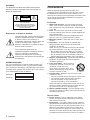
CAUTION
RISK OF ELECTRIC SHOCK
DO NOT OPEN
“CAUTION:TO REDUCE THE RISK OF
ELECTRIC SHOCK,
DO NOT REMOVE COVER (OR BACK).
NO USER-SERVICEABLE PARTS INSIDE.
REFER SERVICING TO QUALIFIED
SERVICE PERSONNEL.”
Explanation of Graphical Symbols:
The lightning flash with arrowhead symbol,
within an equilateral triangle, is intended
to alert the user to the presence of
uninsulated “dangerous voltage” within the
product’s enclosure that may be of
sufficient magnitude to constitute a risk of
electric shock to persons.
The exclamation point within an
equilateral triangle is intended to alert the
user to the presence of important
operating and maintenance (servicing)
instructions in the literature accompanying
the appliance.
OWNER’S RECORD
For your convenience, record the model number (you
will find it at the bottom of the unit) and serial number
(you will find it in the battery compartment) in the space
provided below. Please refer to them when you contact
your AIWA dealer in case of difficulty.
Model No.
Serial No.
Precautions
Read the Operating Instructions carefully and
completely before operating the unit. Be sure to keep
the Operating Instructions for future reference. All
warnings and cautions in the Operating Instructions and
on the unit should be strictly followed, as well as the
safety suggestions below.
Installation
1 Water and moisture - Do not use this unit near
water, such as near a bathtub, washbowl, kitchen
sink, laundry tub, in a wet basement, swimming pool,
or the like.
2 Heat - Do not use this unit near sources of heat,
including heating vents, stoves, or other appliances
that generate heat.
It also should not be placed in temperatures less
than 5°C (41°F) or greater than 35°C (95°F).
3 Mounting surface - Place the unit on a flat, even
surface.
4 Ventilation - The unit should be situated with
adequate space around it so that proper heat
ventilation is assured.
Allow 10 cm (4 in.) clearance from the rear and the
top of the unit and 5 cm (2 in.) from each side.
- Do not place the unit on a bed, rug, or similar
surface that may block the ventilation openings.
- Do not install the unit in a bookcase, cabinet, or
airtight rack where ventilation may be impeded.
5 Objects and liquid entry - Take care that objects or
liquids do not get inside the unit through the
ventilation openings.
6 Carts and stands - When placed or
mounted on a stand or cart, the unit
should be moved with care.
Quick stops, excessive force, and
uneven surfaces may cause the unit
or cart to overturn or fall.
7 Condensation - Moisture may form on the CD
pickup lens when:
- The unit is moved from a cold spot to a warm spot
- The heating system has just been turned on
- The unit is used in a very humid room
- The unit is cooled by an air conditioner
When this unit has condensation inside, it may not
function normally. Should this occur, leave the unit
for a few hours, then try to operate again.
8 Wall or ceiling mounting - The unit should not be
mounted on a wall or ceiling, unless specified in the
Operating Instructions.
Electric Power
1 Power sources - Use on batteries or AC house
current, as specified in the Operating Instructions
and marked on the unit.
2 Polarization - As a safety feature, some units are
equipped with polarized AC power plugs which can
only be inserted one way into a power outlet. If it is
difficult or impossible to insert the AC power plug
into an outlet, turn the plug over and try again. If it
still does not easily insert into the outlet, please call
a qualified service technician to service or replace
2
ENGLISH
Specifications
the outlet. To avoid defeating the safety feature of
the polarized plug, do not force it into a power outlet.
3 AC power cord
- When disconnecting the AC power cord, pull it out
by the AC power plug. Do not pull the cord itself.
- Never handle the AC power plug with wet hands,
as this could result in fire or shock.
- Power cords should be firmly secured to avoid
being bent, pinched, or walked upon. Pay
particular attention to the cord from the unit to the
power socket.
- Avoid overloading AC outlets and extension cords
beyond their capacity, as this could result in fire or
shock.
4 Extension cord - To help prevent electric shock, do
not use a polarized AC power plug with an extension
cord, receptacle, or other outlet unless the polarized
plug can be completely inserted to prevent exposure
of the blades of the plug.
5 When not in use - Unplug the AC power cord from
the AC outlet or remove all the batteries if the unit
will not be used for several months or more. When
the cord is plugged in, a small amount of current
continues to flow to the unit, even when the power is
turned off.
Maintenance
Tuner section
Frequency range, antenna — FM: 87.5 - 108.0 MHz
Rod antenna, AM: 530/531 - 1,710/1,602 kHz (10/9 kHz
step) Ferrite bar antenna
Deck section
Track format — 4 tracks, 2 channels / Frequency range
— Normal tape: 50 - 12,500 Hz (EIAJ) / Recording
system — AC bias / Erasing system — AC erase /
Heads — Recording/playback head (1), Erasure head
(1)
CD player section
Disc — Compact disc / Scanning method — Noncontact optical scanner (semiconductor laser)
General
Speaker — 100 mm cone type (2), 36 mm cone type (2)
/ Output — Headphones jack (stereo mini-jack) / Power
output — 2.5 W + 2.5 W (EIAJ, 7 ohms DC) / Power
requirements — DC 12 V using eight size C (R14)
batteries, AC 120 V, 60 Hz / Power consumption — 15
W / Dimensions (W × H × D) — 460 × 192 × 262 mm
(18 1/8 × 7 5/8 × 10 3/8 in.) / Weight (excluding batteries)
— 4.0 kg (8 lbs. 13 oz.) / Accessories — Remote
control (1), AC cord (1)
Specifications and external appearance are subject to
change without notice.
En
Clean the unit only as recommended in the Operating
Instructions.
COPYRIGHT
Damage Requiring Service
Please check the copyright laws relating to
recordings from disc, radio or external tape for the
country in which the machine is being used.
Have the units serviced by a qualified service
technician if:
- The AC power cord or plug has been damaged
- Foreign objects or liquid have got inside the unit
- The unit has been exposed to rain or water
- The unit does not seem to operate normally
- The unit exhibits a marked change in performance
- The unit has been dropped, or the cabinet has been
damaged
DO NOT ATTEMPT TO SERVICE THE UNIT
YOURSELF.
If an erroneous display or malfunction occurs
Turn off the unit and press POWER STANDBY/ON6
while pressing s.
If the unit cannot be reset in the way above, disconnect
the AC cord and remove all the batteries to turn off the
display.
Leave the unit for a while and turn the power back on.
ENGLISH
3
Power supply
Using on batteries
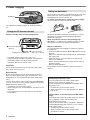
Open the lid of the battery compartment on the rear and
insert eight R14 (size C) batteries, not supplied, as
illustrated below. Then close the lid.
To switch from AC power supply to battery supply,
disconnect the AC cord from the AC inlet.
OPE/BATT
The OPE/BATT indicator lights up while the power is
on.
R14 (C)
Using on AC house current
Connect the AC cord as illustrated below.
Notes on batteries
1 to the AC inlet of
the unit
supplied AC cord
When the OPE/BATT indicator becomes dim, volume
decreases, or sound is distorted during operation,
replace the batteries.
When the batteries become weak during tape
operation, “Lo” flashes in the display and the unit will
be stopped or turned off. Replace the batteries.
2 to an AC outlet
(AC 120 V, 60 Hz)
• The rated voltage of the unit is 120 V AC.
• If abnormal high voltage is supplied, “Hi” flashes in
the display and the unit does not accept any
operation. Disconnect the AC cord.
CAUTION
Use only the supplied AC cord. Use with other cords
may result in the risk of fire.
To avoid damage from leakage or explosion, observe
the following:
• Insert the batteries with the 0 and 9 marks correctly
aligned.
• Do not mix different types of batteries or old batteries
with new ones.
• When the unit is not to be used for a long period,
remove the batteries.
• Never recharge the batteries, apply heat to them or
take them apart.
• Remove dead batteries.
If liquid leaks from the batteries, wipe thoroughly to
remove.
Demo display
When connecting the unit to an AC outlet for the first
time, the demo display will begin automatically. The
illuminations on the front panel also flash (CSD-FD92
only).
To turn off the demo, press * DISPLAY/COLOR/DEMO.
You can turn it on or off by pressing DISPLAY/COLOR/
DEMO while the power is off.
* or DISPLAY on the remote control
• When using the unit on the batteries, the demo is not
displayed.
• For ordinary use, turn off the demo to save power
consumption.
Changing the display color
You can select the color of the display light:
orange, blue, purple (or turned off).
Press * DISPLAY/COLOR/DEMO repeatedly while
the power is on.
* or DISPLAY on the remote control
• When using the unit on the batteries, the display
light is off.
Illuminations on the front panel (CSD-FD92
only)
The illuminations light up or flash while the power is
on. In playback mode, they will show the
approximate sound level.
To turn off the illuminations, hold down * DISPLAY/
COLOR/DEMO while the power is on. To resume,
hold it down again.
* or DISPLAY on the remote control
• When using the unit on the batteries, the
illuminations are off.
4
ENGLISH
Remote control
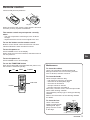
Insert two R6 (size AA) batteries.
R6 (AA)
When the reach of the remote control signal is less than
5 meters (16 feet), replace the batteries.
The remote control may not operate correctly
when:
- The unit is exposed to intense light, such as direct
sunlight
- Objects block the remote control signal to the unit
To use the buttons on the remote control
Buttons on the remote control and the main unit with
identical indications have the same functions.
To turn the power on
Press POWER to turn on the display.
When using the unit on the batteries, this button will not
turn the power on.
En
To turn the power off
Press POWER to turn off the display.
To use the FUNCTION button
Each time FUNCTION is pressed while the power is on,
the function is selected cyclically.
CD
TAPE
TUNER
Maintenance
To clean the cabinet
Use a soft cloth lightly moistened with mild
detergent solution. Do not use strong solvents
such as alcohol, benzine or thinner.
To clean the heads
FUNCTION
POWER
When the tape heads are dirty;
- high frequency sound is not emitted
- the sound is not adequately high
- the sound is off-balance
- the tape cannot be erased
- the tape cannot be recorded on
After every 10 hours of use, clean the tape heads
with a head cleaning cassette.
Use separately sold dry-type or wet-type cleaning
cassette.
Refer to the instructions of the cleaning cassette
for details.
To clean the lens
Lens
Use a cotton swab
slightly moistened with
cleaning fluid. Wipe
gently from the center
to the edge.
ENGLISH
5
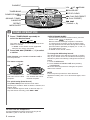
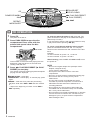
PHONES \
VOL
s STOP / CLEAR
POWER STANDBY/
ON 6
d PLAY / DIR / PRESET
( c PLAY / PRESET)
QSOUND, T-BASS,
3-MODE EQ
r, t
(TUNING -, +)
REPEAT /
MODE / SLEEP
1
TUNER OPERATION
Press * TUNER/BAND repeatedly to
select the desired band.
FM
AM
The power is turned on and the previously tuned
station is received.
* or BAND on the remote control (applicable
when the AC cord is connected)
2
DOWN
a PAUSE / SET
TUNER / BAND
A
UP,
Press r, t (TUNING -, +) to select
a station.
After listening, press POWER STANDBY/ON6 to
turn the power off.
For better reception
FM
AM
* REPEAT/MODE/SLEEP
- If an FM stereo broadcast contains noise, press the
button so that
is displayed.
Noise is reduced, although reception is monaural.
To restore stereo reception, press the button again.
- If a high-pitched sound is heard during AM recording,
press the button repeatedly to display “b1” or “b2”, so
as to eliminate the noise.
* or MODE on the remote control
To change the AM tuning interval
The default setting of the AM tuning interval is 10 kHz/
step. If you use the unit in an area where the frequency
allocation system is 9 kHz/step, change the interval as
follows.
1 Press TUNER/BAND.
2 Press POWER STANDBY/ON6 while pressing
TUNER/BAND.
When the AM tuning interval is changed, the preset
stations are cleared.
NOTE
Extend the rod antenna
and orient it for the best
reception.
The antenna is inside the
unit. Position the unit for
the best reception.
For quick tuning (Auto Search)
Keep r, t pressed until the tuner starts
searching for a station. When a station is tuned to, the
search stops.
If the broadcast signal is weak, it does not stop. To
stop the search manually, press r or t.
To listen with the headphones
Connect headphones with a stereo mini plug to the
PHONES \ jack on the rear of the unit.
6
ENGLISH
If the unit picks up noise from other electrical
appliances nearby, like a TV or fluorescent lights, move
the unit.
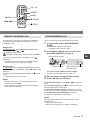
0-9, +10
SOUND ADJUSTMENT
MODE
Volume or tone adjustment does not affect
recording.
EQ
VOL i, k
BAND
c PLAY
a PAUSE
r, t
s STOP
VOL (volume)
Press VOL
UP or
DOWN. The volume
level is displayed as a number from 0 to 25.
• The volume level is automatically set to 14 if the
power is turned off when the volume level is set
to 15 or more.
* 3-MODE EQ (equalizer)
PRESETTING STATIONS
You can preset up to 15 stations in each band.
1
2
Select a station.
Press * a PAUSE/SET once so that “M” is
displayed to store the station.
A station is assigned a preset number, beginning
from 1 in consecutive order for each band.
Press 3-MODE EQ repeatedly until the desired
mode is displayed.
The equalizer mode changes to R (Rock), P (Pop),
J (Jazz) or no equalization, cyclically.
Rock - Emphasizes the high and low range of
music.
Pop - Emphasizes voice and midrange of music.
Jazz - Emphasizes the low range of music.
* or EQ on the remote control
T-BASS system
The T-BASS system enhances the realism of lowfrequency sound.
Press T-BASS to turn it on or off.
Preset number
QSOUND system
Frequency
* or a PAUSE on the remote control
3
Repeat steps 1 and 2.
En
This system provides a rich, three dimensional
sound area for stereo sources.
You can enjoy more enhanced sound.
Press QSOUND and the QSOUND indicator lights
up.
• At higher volumes, turning QSOUND on may
cause sound distortion. In this case, make the
volume down.
The next station will not be stored if a total of 15
preset stations have already been stored for a
band.
To listen to preset stations
Select a band then press d PLAY/DIR/PRESET
(c PLAY/PRESET) repeatedly.
c PLAY on the remote control is also available.
To select a preset number directly with the
remote control
Press the numbered buttons 0-9 and +10.
Example:
To select number 15, press +10 and 5.
To select number 10, press +10 and 0.
To clear a preset station
Select the preset number first. Press s, and press a
within 4 seconds.
The higher numbers in the band are decreased by one.
ENGLISH
7
a PAUSE / SET
CD
s STOP / CLEAR
d PLAY / DIR / PRESET
( c PLAY / PRESET)
POWER STANDBY/
ON6
r, t
REPEAT/
MODE/SLEEP
B
1
CD OPERATION
Press CD.
The power is turned on.
2
Press PUSH OPEN to open the disc
compartment. Place a disc with the
printed side up and close the disc
compartment.
PUSH OPEN
Total number of tracks and total playing time are
displayed. It will take about 15 seconds when
loading a CD-RW disc.
3
Press d PLAY/DIR/PRESET (c PLAY/
PRESET) to start play.
The number of the track being played and elapsed
playing time are displayed.
s STOP/CLEAR – Stops play.
a PAUSE/SET – Pauses play. To resume play, press
again.
r,t – Searches for a particular point during
playback. Hold down r or t and then release
it.
– Skips to the beginning of a track. Press r or
t repeatedly.
8
ENGLISH
To start play when the power is off, press CD. The
power is turned on and play of the loaded disc begins
(Direct Play Function).
If you load a disc while the CD indicator flashes in step
2, play starts without pressing d (c).
To select a track directly with the remote control,
press the numbered buttons 0-9 and +10. CD play
starts from the selected track and continues to the last
track.
Example:
To select number 25, press +10, +10 and 5.
To select number 10, press +10 and 0.
After listening, press POWER STANDBY/ON6 to turn
the power off.
NOTE
• Do not use irregular shape CDs (example: heartshaped, octagonal ones).
It may result in malfunctions.
• Do not place more than one disc in the disc
compartment.
• Do not try to open the disc compartment during play.
• Do not touch the lens. Doing so may cause
malfunctions.
• The unit may not play a CD-R/RW disc that is
recorded on personal computers or some kinds of
CD-R/RW recorders because of differences in
recording platforms.
• Do not attach any seal or label to either side (the
recordable side or the labeled side) of a CD-R/RW
disc. It may cause malfunction.
• Do not load an unrecorded CD-R/RW disc. It will take
over 30 seconds to read the disc. The disc may be
damaged if you try to open the disc compartment
while reading the disc.
0-9, +10
REPEAT
c PLAY
MODE
a PAUSE
r, t
s STOP
REPEAT, RANDOM PLAY
A single track or all tracks can be played repeatedly,
and all the tracks randomly. Random play can be
repeated as well.
PROGRAMMED PLAY
Up to 30 tracks can be programmed from the disc.
1
“RANDOM M” flashes in the display.
* or MODE on the remote control
Repeat play
In playback mode, press * REPEAT/MODE/SLEEP
repeatedly to select
or
.
: Repeats all the tracks.
: Repeats a single track. Select a track with r or
t.
To cancel, press the button repeatedly so that
disappears.
* or MODE on the remote control. REPEAT on the
remote control can be used in any mode.
In stop mode, press * REPEAT/MODE/
SLEEP.
2
Press r or t to select a track, then
press a PAUSE/SET to store it.
Random play
In stop mode, press * REPEAT/MODE/SLEEP once so
that “RANDOM M” is displayed. Press d (c) to start
playback.
To cancel, press REPEAT/MODE/SLEEP or s in stop
mode.
* or MODE on the remote control.
NOTE
• During random play, you cannot skip back to the
previous track with r.
• When selecting a track with the numbered buttons,
random play is canceled.
En
Selected track number
Program number
Total playing time of the
selected tracks
To select a track with the remote control
Press the numbered buttons 0-9 and +10.
3
4
Repeat step 2 to program other tracks.
Press d (c) to start play.
To check the program, press r or t in playback
mode.
To clear the program, press s once in stop mode so
that “M” disappears in the display.
To add tracks to the program, repeat step 2 in stop
mode. The track will be programmed after the last track.
To change the programmed tracks, clear the
program and repeat all the steps again.
NOTE
The total playing time of the selected tracks will be
displayed as “--:--” .
- When it exceeds “99:59”.
- When a track number 31 or higher is selected.
ENGLISH
9
a PAUSE / SET
TAPE
s STOP / CLEAR
d PLAY / DIR / PRESET
( c PLAY / PRESET)
POWER STANDBY/
ON6
r, t
REPEAT/
MODE/SLEEP
C
w REC / REC MUTE
TAPE OPERATION
• Use Type I (normal) tapes only.
• CSD-FD92 plays (records on) both sides.
• CSD-FD82 plays (records on) the side facing up.
PLAYBACK
1
Press TAPE.
The power is turned on.
If the tape has been inserted, play begins.
2
Press PUSH EJECT to open the cassette
holder and insert a tape with the side to
be played facing up and the exposed
side facing forward.
For CSD-FD92
To change the playback side, press d during play.
: Plays the side facing up (indicated for CSDFD82 as well).
: Plays the opposite side.
To select a reverse mode, press * REPEAT/MODE/
SLEEP repeatedly.
: Plays one side only.
: Plays both sides once. Play stops at the end of
the reverse side.
: Plays both sides repeatedly.
* or MODE on the remote control
RECORDING
1
PUSH EJECT
For CSD-FD92, press REPEAT/MODE/SLEEP to
select the reverse mode.
: Records on one side only.
or
: Records on both sides. Check that
is displayed, so as to start recording from the
side facing up.
Press PUSH EJECT to close.
3
Press d PLAY/DIR/PRESET (c PLAY/
PRESET) to start playback.
2
3
Press s in stop mode. The counter is also set to
“0000” when opening the cassette holder.
s STOP/CLEAR – Stops play.
a PAUSE/SET – Pauses play. To resume play,
press again.
r/t – Rewinds/ fast forwards. To stop the
winding, press s.
After listening, press POWER STANDBY/ON6 to
turn the power off.
10
ENGLISH
Get ready to record from the source.
To record from a CD, press CD and load the disc.
To record from a radio broadcast, press TUNER/
BAND and tune to a station.
Tape counter
To set the tape counter to “0000”
Insert a tape with the side to be recorded
on facing up and the exposed side facing
forward.
Press w REC/REC MUTE to start
recording.
“REC” flashes on the display.
When the selected function is CD, CD play and
recording starts simultaneously.
To record only the selected tracks of a CD
1 Follow steps 1 to 3 of PROGRAMMED PLAY on
page 9 to program tracks.
2 Press w.
SETTING THE SLEEP TIMER
The unit can be turned off automatically at a
specified time.
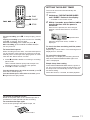
c PLAY
1
Hold down * REPEAT/MODE/SLEEP
until “SLEEP” flashes in the display.
2
Within 4 seconds, press r or t to
specify the time until the power is
turned off.
a PAUSE
r, t
s STOP
* or MODE on the remote control
Each time it is pressed, the time changes
between 10 and 180 minutes in 10-minute
steps.
To stop recording, press s. To stop CD play, press it
again.
To pause recording (only when the source is TUNER),
press a. To resume, press it again.
To erase recording, press TAPE and press w.
After recording, press POWER STANDBY/ON6 to
turn the power off.
To insert blank spaces
When recording from the radio, 4-second blank spaces
can be inserted. These spaces are useful to locate the
desired portion on the tape when playing back on other
units with the “Music Sensor” function.
1 Press w REC/REC MUTE in recording or recording
pause mode.
“REC” indicator flashes quickly and the tape runs
without recording for 4 seconds, then pauses.
2 Press a to resume recording.
To make blank spaces less than 4 seconds, press a
while “REC” flashes quickly.
To make blank spaces more than 4 seconds, press
w again after the tape pauses.
Specified time
While the sleep timer works, “SLEEP” is
displayed.
To check the time remaining until the power
is turned off
Repeat step 1 shown above. The remaining time is
displayed for 4 seconds.
To cancel the sleep timer
En
Repeat step 1 to display the remaining time and
hold down REPEAT/MODE/SLEEP again until
“OFF” is displayed.
Simple sleep timer setting
Press REPEAT/MODE/SLEEP while the power is
off. The unit is turned on with the last function, and
the sleep timer is automatically turned on with the
30-minute setting.
Select the function, if needed, and start playback.
To prevent accidental erasure
Break off the plastic tabs on the cassette tape with a
screwdriver or other pointed tool after recording.
To record on the tape again
Cover the tab openings with adhesive tape, etc.
Side A
Tab for side A
ENGLISH
11
NOTE
This equipment has been tested and found to comply
with the limits for a Class B digital device, pursuant to
Part 15 of the FCC Rules. These limits are designed to
provide reasonable protection against harmful
interference in a residential installation.
This equipment generates, uses, and can radiate radio
frequency energy and, if not installed and used in
accordance with the instructions, may cause harmful
interference to radio communications. However, there is
no guarantee that interference will not occur in a
particular installation. If this equipment does cause
harmful interference to radio or television reception,
which can be determined by turning the equipment off
and on, the user is encouraged to try to correct the
interference by one or more of the following measures:
... Reorient or relocate the receiving antenna.
... Increase the separation between the equipment and
receiver.
... Connect the equipment into an outlet on a circuit
different from that to which the receiver is connected.
... Consult the dealer or an experienced radio/TV
technician for help.
CAUTION
Modifications or adjustments to this product, which are
not expressly approved by the manufacturer, may void
the user’s right or authority to operate this product.
Printed in Indonesia