1
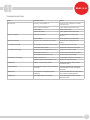
TROUBLESHOOTING
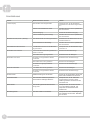
Fault
Probable Cause
Action
Blank Screen
The unit is not switched on
Check the unit is plugged in correctly
and switched on
Plug or lead are damaged
Call a qualified service technician
Power supply
Check power supply
Internal wiring fault
Call a qualified service technician
Water not connected
Connect water to the rear of the
machine.
Brewer not “Ready”
Element failure
Call a qualified service technician
Grinder not working
The unit is not connected to the brewer
Check the unit is plugged into the
brewer.
The coffee is too weak
Not enough ground coffee has been used
Increase the amount of coffee
Coffee grind is too coarse
Reduce the coarseness of the grind
Too much ground coffee has been used
Reduce the amount of coffee
Coffee grind is too fine
Increase the coarseness of the grind
Not enough water has been used
Increase the amount of water
Coffee grind is too fine
Increase the coarseness of the grind
Too much ground coffee has been used
Reduce the amount of coffee
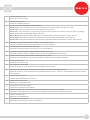
Probes Error
Build-up of scale on the probes
Check probe wiring. Check probes.
Descale the tank.
Thermistor Error
The thermistor response is out of temperature range
Check the thermistor is connected &
in the thermistor pocket. Change the
thermistor.
Heater Error
The machine is not registering water
heating up
Check if the thermistor is in its pocket &
then check the heating element.
Overfill Error
Tank is filled with too much water
Check level probe for scale build up.
Descale the tank.
The coffee is too strong
The basket is overflowing
7