1
B. Operating by Remote Control
C. Resetting Temperature Cutoff Switch
•
The fireplace Main Power Switch must be in the
“ON”position for the remote control to function.
•
Make sure batteries are properly installed in Remote
Control.
- Battery requirements 2 x AAA batteries
(included)
The heater is protected with a safety device to prevent
overheating. Should the heater overheat, an automatic cutoff will turn the heater OFF. It will not turn ON
automatically without being reset. If it overheats for any
reason, it can be reset by:
1. Turn fireplace to off
•
The effective range of the remote is up to 13 ft.
2. Unplug unit and wait 5 minutes
•
The remote control must be within the 13 ft. range and
also be pointed directly at the face of the appliance.
For best results, position the remote control within 45
degrees of the face of the appliance .
3. Plug in and turn on.
CAUTION: If appliance overheats repeatedly, discontinue use and call your dealer.
CAUTION: If you need to continuously reset the heater,
unplug the appliance and call your dealer.
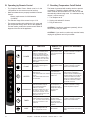
ICON
TITLE
POWER
FLAME
HEATER
THERMOSTAT
TIMER
LIGHT
10
FUNCTION
REMOTE LCD
DISPLAY
FIREPLACE RESPONSE
The POWER button will turn the
fireplace on. It will also put the
fireplace in a standby mode.
This will turn off all functions at
once but will hold the settings in
memory except Heater function.
The unit will turn on at the same
settings by pressing the power
button again.
LCD illuminates and
displays flame status
Icon and temperature
set point.
Fireplace emits single audible beep
to confirm command to transition to
ON or STANDBY state
By pressing the FLAME button,
the unit will cycle through four
flame effects.
LCD illuminates and
displays flame status
icon.
Fireplace emits single audible beep
to confirm command to transition
between four FLAME states.
Press Heater button once 750W
heater turns on.
Press Heater button twice 1500W
turns on,
Press Heater button three times,
turns off heater.
LCD illuminates
and displays heater
status icon.
Fireplace emits signal audible
beep to confirm command to
transition between HEATER states.
Fireplace displays one red LED for
8 seconds to confirm low heater
command. Fireplace displays two
red LED for 8 seconds to confirm
high heater command.
Pressing the Temperature button
adjusts the heaters response
to the ambient temperature
conditions in the room.
Temperature adjusts from 16 °C
- 28 °C (61 °F - 82 °F). Power
much be on to set from °C to °F.
Hold for 3 seconds and the LCD
display from °C to °F.
Remote displays
the temperature. If
in Stand-by mode,
temperature displays
but cannot be
adjusted.
Fireplace emits single audible beep
to confirm command to change
desired temperature setpoint
Pressing the Timer button sets
the time desired for the fireplace
to run. The Timer can be set from
.5 hour up to 9 hours in 1 hour
increments.
Remote will display
the time setting
selected. If in Standby mode time will
display but cannot be
adjusted.
Fireplace emits single audible beep
to confirm command to transition
between four FLAME states.
Pressing Spotlight button will
switch spotlight ON and Off.
No Indicator.
SimpliFire • SF-PP23-E, SF-PP26-E • 2040-901 Rev. D • 10/13
Fireplace will emit one audible
beep as it transitions ON and OFF
states.