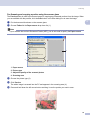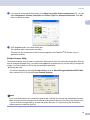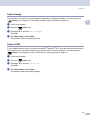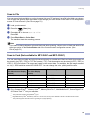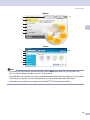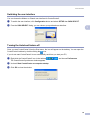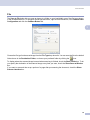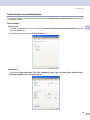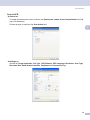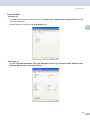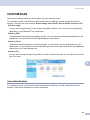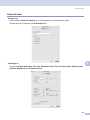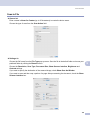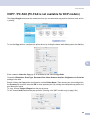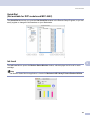
1
SOFTWARE USER’S GUIDE For DCP users; This documentation is for both MFC and DCP models. Where it says 'MFC' in this user's guide, please read 'MFC' as 'DCP'. Version A Table of Contents Section I 1 Windows® Printing Using the Brother printer driver..................................................................................................................2 Features ....................................................................................................................................................2 Choosing the right type of paper................................................................................................................3 Simultaneous printing, scanning and faxing ..............................................................................................3 Clearing data from the memory .................................................................................................................3 Checking the print quality ..........................................................................................................................3 Status Monitor............................................................................................................................................4 Monitoring the machine’s status ..........................................................................................................4 Turning off the status monitor..............................................................................................................5 Printer driver settings.................................................................................................................................5 Accessing the printer driver settings..........................................................................................................5 Basic tab ....................................................................................................................................................6 Media Type..........................................................................................................................................7 Quality .................................................................................................................................................7 Enhanced Print Settings ......................................................................................................................8 Improve Pattern Printing (Windows® 2000/XP only) .........................................................................10 Paper Size .........................................................................................................................................10 Page Layout ......................................................................................................................................11 Orientation .........................................................................................................................................11 Copies ...............................................................................................................................................12 Paper Source (MFC-5860CN only) ...................................................................................................12 Advanced tab...........................................................................................................................................13 Color ..................................................................................................................................................14 Scaling...............................................................................................................................................16 Watermark .........................................................................................................................................17 Device Options ..................................................................................................................................19 Support tab ..............................................................................................................................................21 2 Scanning Scanning a document using the TWAIN driver........................................................................................22 TWAIN compliant...............................................................................................................................22 Accessing the Scanner......................................................................................................................23 Scanning a document into the PC .....................................................................................................24 Settings in the Scanner Setup dialog box..........................................................................................25 Scanning a document using the WIA driver (Windows® XP only) ...........................................................29 WIA compliant ...................................................................................................................................29 Accessing the scanner ......................................................................................................................29 Scanning a document into the PC .....................................................................................................30 Using the Scan key (For USB cable users) .............................................................................................34 Scan to E-mail ...................................................................................................................................34 Scan to Image ...................................................................................................................................35 Scan to OCR .....................................................................................................................................35 Scan to File........................................................................................................................................36 i Scan to Card (Not available for MFC-240C and MFC-3360C) ..........................................................36 Using ScanSoft® PaperPort® SE with OCR ............................................................................................40 Viewing items ....................................................................................................................................41 Organizing your items in folders ........................................................................................................42 Quick links to other applications ........................................................................................................42 ScanSoft® PaperPort® SE with OCR lets you convert image text into text you can edit...................42 You can import items from other applications ...................................................................................43 You can export items into other formats............................................................................................43 Uninstalling ScanSoft® PaperPort® SE with OCR.............................................................................43 3 ControlCenter3 Using ControlCenter3 ..............................................................................................................................44 Switching the user interface ..............................................................................................................46 Turning the AutoLoad feature off.......................................................................................................46 SCAN.................................................................................................................................................47 CUSTOM SCAN ................................................................................................................................47 PHOTOCAPTURE (USB only) (Not available for MFC-3360C) ........................................................47 COPY ................................................................................................................................................48 PC-FAX (MFC models only) ..............................................................................................................48 DEVICE SETTING.............................................................................................................................48 SCAN.......................................................................................................................................................49 Image (example: Microsoft® Paint)....................................................................................................49 OCR (Word Processing program) .....................................................................................................51 E-mail ................................................................................................................................................52 File attachments ................................................................................................................................52 File.....................................................................................................................................................53 CUSTOM SCAN ......................................................................................................................................54 Customizing a user-defined button....................................................................................................55 PHOTOCAPTURE (USB only) (Not available for MFC-3360C) ..............................................................59 Open PCC Folder (PCC: PhotoCapture Center®) .............................................................................59 Copy From PCC ................................................................................................................................59 Copy To Application ..........................................................................................................................60 COPY ......................................................................................................................................................61 PC-FAX (MFC models only) ....................................................................................................................63 Send ..................................................................................................................................................63 Receive/View Received (Not available for MFC-240C and MFC-3360C) .........................................64 Address Book ....................................................................................................................................65 Setup .................................................................................................................................................65 DEVICE SETTING...................................................................................................................................66 Remote Setup (Not available for DCP models and MFC-240C) .......................................................66 Quick-Dial (Not available for DCP models and MFC-240C)..............................................................67 Ink Level ............................................................................................................................................67 User’s Guide......................................................................................................................................67 4 Network Scanning (For models with built-in network support) Before using Network Scanning ..............................................................................................................68 Network license .................................................................................................................................68 Configuring Network Scanning ..........................................................................................................69 Using the Scan key..................................................................................................................................71 Scan to E-mail (PC)...........................................................................................................................71 ii Scan to Image ...................................................................................................................................72 Scan to OCR .....................................................................................................................................72 Scan to File........................................................................................................................................73 5 Remote Setup (Not available for DCP models and MFC-240C) Remote Setup..........................................................................................................................................74 6 Brother PC-FAX Software (MFC models only) PC-FAX sending ......................................................................................................................................76 Setting up user information................................................................................................................77 Sending setup....................................................................................................................................78 Setting up a cover page.....................................................................................................................79 Entering cover page information........................................................................................................79 Address Book ....................................................................................................................................80 Speed Dial setup .....................................................................................................................................81 Brother Address Book .......................................................................................................................82 Setting up a member in the Address Book ........................................................................................82 Setting up a group for broadcasting ..................................................................................................83 Editing member information...............................................................................................................83 Deleting a member or group..............................................................................................................83 Exporting the Address Book ..............................................................................................................84 Importing to the Address Book ..........................................................................................................85 Sending a file as a PC-FAX using the Facsimile style user interface................................................86 Sending a file as a PC-FAX using the Simple style user interface ....................................................87 PC-FAX receiving (Not available for MFC-240C and MFC-3360C).........................................................89 Enabling the PC-FAX Receiving software on your machine .............................................................90 Running the PC-FAX Receiving software on your PC.......................................................................91 Setting up your PC ............................................................................................................................91 Configuring the Network PC-FAX Receiving Settings .......................................................................92 Viewing new PC-FAX messages.......................................................................................................93 7 PhotoCapture Center® (Not available for MFC-3360C) For USB cable users................................................................................................................................94 For network users (For models with built-in network support) .................................................................96 iii Section II Apple® Macintosh® 8 Printing and Faxing Setting up your USB-equipped Apple® Macintosh® ................................................................................98 Simultaneous printing, scanning and faxing ......................................................................................98 Clearing data from the memory .........................................................................................................98 Checking the print quality ..................................................................................................................98 Status Monitor ...................................................................................................................................99 Using the Brother Ink driver ...................................................................................................................100 Choosing page setup options ..........................................................................................................100 Choosing printing options ................................................................................................................101 Media Type......................................................................................................................................101 Quality .............................................................................................................................................102 Paper Feed (MFC-5860CN only).....................................................................................................103 Sending a fax (MFC models only) .........................................................................................................104 Drag a vCard from the Mac OS® X Address Book application ........................................................106 9 Scanning Scanning from a Macintosh® .................................................................................................................107 Accessing the scanner ....................................................................................................................107 Scanning an image into your Macintosh® .......................................................................................108 Pre-Scanning an image ...................................................................................................................108 Settings in the Scanner window ......................................................................................................109 Using the Scan key (For USB cable users) ...........................................................................................113 Scan to E-mail .................................................................................................................................113 Scan to Image .................................................................................................................................114 Scan to OCR ...................................................................................................................................114 Scan to File......................................................................................................................................115 Scan to Card (Not available for MFC-240C and MFC-3360C) ........................................................115 Using Presto!® PageManager® .............................................................................................................119 Features ..........................................................................................................................................119 System requirements for Presto!® PageManager ® .........................................................................119 Technical support ............................................................................................................................120 10 ControlCenter2 Using ControlCenter2 ............................................................................................................................122 Turning the AutoLoad feature off.....................................................................................................123 SCAN...............................................................................................................................................123 CUSTOM SCAN ..............................................................................................................................124 COPY / PC-FAX ..............................................................................................................................124 DEVICE SETTINGS ........................................................................................................................124 SCAN.....................................................................................................................................................125 Image (example: Apple® PreView) ..................................................................................................125 OCR (word processing application).................................................................................................127 E-mail ..............................................................................................................................................128 Supported file types.........................................................................................................................128 File...................................................................................................................................................129 CUSTOM SCAN ....................................................................................................................................130 User-defined button .........................................................................................................................130 iv Scan to Image .................................................................................................................................131 Scan to OCR ...................................................................................................................................132 Scan to E-mail .................................................................................................................................133 Scan to File......................................................................................................................................134 COPY / PC-FAX (PC-FAX is not available for DCP models).................................................................135 DEVICE SETTINGS ..............................................................................................................................136 Remote Setup (Not available for DCP models and MFC-240C) .....................................................136 Quick-Dial (Not available for DCP models and MFC-240C)............................................................137 Ink Level ..........................................................................................................................................137 11 Network Scanning (For models with built-in network support) Before using Network Scanning ............................................................................................................138 Configuring network scanning .........................................................................................................138 Using the Scan key................................................................................................................................140 Scan to E-mail .................................................................................................................................140 Scan to Image .................................................................................................................................141 Scan to OCR ...................................................................................................................................141 Scan to File......................................................................................................................................142 12 Remote Setup & PhotoCapture Center® Remote Setup (Not available for DCP models and MFC-240C)............................................................143 PhotoCapture Center® (Not available for MFC-3360C) .........................................................................145 For USB cable users .......................................................................................................................145 For network users (For models with built-in network support).........................................................147 I Index v Section I ® Windows Printing Scanning ControlCenter3 Network Scanning (For models with built-in network support) Remote Setup (Not available for DCP models and MFC-240C) I 2 22 44 68 Brother PC-FAX Software (MFC models only) 74 76 PhotoCapture Center® (Not available for MFC-3360C) 94 1 Printing 1 1 Note • The screens in this section are from Windows® XP. Screens on your PC may vary depending on your operating system. • If your PC is protected by a firewall, and is unable to print, you may need to configure the firewall settings to allow communication through port number 137. Visit the Brother Solutions Center (http://solutions.brother.com) for more information. Using the Brother printer driver 1 A printer driver translates the data from your PC application, and using a page description language, converts it into a format that can be understood by the printer/multi-function device. You will find appropriate drivers on the CD-ROM supplied with the machine. Install those drivers by following the Quick Setup Guide. You can also download the latest drivers from the Brother Solutions Center at: http://solutions.brother.com Features 1 This machine offers many features you will find in a high quality ink jet printer. Fast Printing Speed See the User’s Guide for the rated print speeds of the model you are using. Brilliant High Quality Output Printing at up to 1200 × 6000 dpi on glossy paper to get the highest possible resolution. (See Resolution in Specifications in the User’s Guide.) The printer driver supports N in 1, Watermark printing, Color Enhancement technology and many other features. Low Running Cost Whenever you run out of a particular ink color, you only have to replace the empty cartridge. USB Universal Serial Bus Interface provides fast communication with your PC. Ethernet The Ethernet interface lets your machine communicate with multiple PCs connected on a network. This feature is available for Network Standard models only. Wireless LAN (IEEE802.11b/g) (For Wireless models only) The wireless LAN capability lets your machine communicate with other wireless devices using the IEEE802.11b/g wireless standard in Infrastructure and Ad-hoc modes. (See the Network User’s Guide for details.) This feature is available for Wireless Network Standard models only. 2 Printing Choosing the right type of paper 1 1 For high quality printing, it is important to choose the right type of paper. Be sure to read About paper in the User’s Guide before buying paper. Simultaneous printing, scanning and faxing 1 Your machine can print from your PC while sending or receiving a fax in memory, or while scanning a document into the PC. Fax sending will not be stopped during PC printing. However, when the machine is copying or receiving a fax on paper, it pauses the PC printing operation, and then continues printing when copying or fax receiving has finished. Clearing data from the memory 1 If the LCD shows Data Remaining, you can clear the data that is left in the memory by pressing the Stop/Exit key on the control panel. Checking the print quality 1 If you want to check the print quality and find out how to improve it, see Improving print quality in the User’s Guide. 3 Printing Status Monitor 1 1 The Status Monitor utility is a configurable software tool for monitoring the status of one or more devices, allowing you to get immediate notification of error messages such as paper empty, paper jam or ink empty. You can check the device status at anytime by double-clicking the icon in the tasktray or by choosing Status Monitor located in Start/All Programs/Brother/MFC-XXXX on your PC. Note For more information about using the Status Monitor software, right-click the Status Monitor icon and choose Help. Monitoring the machine’s status 1 Once you start up your PC, the Status Monitor icon appears on the tasktray. A green icon indicates the normal stand-by condition. A yellow icon indicates a warning. A red icon indicates an error has occurred. There are two locations where you can display the status monitor on your PC—in the tasktray or on the desktop. 4 Printing Turning off the status monitor 1 1 If you want to switch off the status monitor, follow these steps: a Right-click the Status Monitor icon or window and click Load Status Monitor on Startup to clear the check mark. b Right-click again then click Exit. Note Even if the status monitor is off, you can check the machine’s status at any time by clicking Status Monitor from the Start menu on your PC. Printer driver settings 1 You can change the following printer settings when you print from your PC: Media Type/Quality (Speed) Paper Size Page Layout Color Matching/Halftone Color Enhancement Scaling Watermark Print Date & Time Quick Print Setup Accessing the printer driver settings a b 1 Click File, then Print in your application. Choose Brother MFC-XXXX USB Printer or Brother MFC-XXXX Printer (where XXXX is your model name) and click Properties. The printer properties dialog box appears. 5 Printing Basic tab 1 1 1 5 2 4 3 a Choose your setting for Slow Drying Paper, Media Type and Quality (1). Note Check Slow Drying Paper when printing with plain paper on which ink dries slowly. This setting may cause some slight blurring of text. b Choose Paper Size, Page Layout, Page Order, Borderless, Border Line (if any), Orientation, number of Copies and the page order (2). c Select the Paper Source. (MFC-5860CN only) Note If you choose Auto Select, the machine will pull paper from Tray 1 and when Tray 1 is empty, paper will automatically be pulled from Tray 2. d Click OK (3) to apply your chosen settings. To return to the default settings, click Default (4), then OK (3). Note This area (5) shows the current settings of Quality, Paper Size, Page Layout, Page Order, Orientation, Collate/Reverse Order and Color/Grayscale. 6 Printing Media Type 1 1 To achieve the best print results, the media being printed on should be selected in the driver. The machine changes the way it prints depending on the selected media type. Plain Paper Inkjet Paper Brother Premium Glossy Photo Paper Other Photo Paper Transparencies Quality 1 The quality selection lets you choose the print resolution. As print quality and speed are related, the higher the quality, the longer it will take to print the document. The quality selections that are available will vary depending on the media type you choose. Highest Up to 1200 × 6000 dpi. (See Resolution in Specifications in the User’s Guide.) Use for printing precise images such as photographs. This is the highest resolution and slowest speed. Photo Up to 1200 × 2400 dpi. Use for printing photographs. Since the print data is much larger than a normal document, the processing time, data transfer time and print time will be longer. Fine 1200 × 1200 dpi. Better print quality than Normal mode and faster print speed than Photo. Normal 600 × 600 dpi. Good print quality with typical print speed. Fast Normal 600 × 300 dpi. Better print quality than Fast mode and faster print speed than Normal. Fast 600 × 150 dpi. The fastest print mode and the lowest amount of ink used. Use for printing large volume documents or documents for proofing. Media Type Color/Grayscale Print Quality Selection Plain Paper Color/Grayscale Fast, Fast Normal, Normal, Fine Inkjet Paper Color/Grayscale Fine, Photo Brother Premium Glossy Photo Paper or Other Photo Paper Color/Grayscale Fine, Photo, Highest Transparencies Color/Grayscale Normal, Fine Note • The default settings are shown in bold. • For DCP-130C and MFC-240C, the Highest Print Quality selection is not available if you choose borderless printing. 7 Printing Enhanced Print Settings 1 1 Click the Settings button to see options for enhanced print settings. Bi-Directional Printing 1 When Bi-Directional Printing is checked, the print head prints in both directions offering faster print speeds. When unchecked, the print head will only print in one direction giving higher quality printouts, but slower printing speeds. Color Enhancement (True2Life®) 1 Checking Color Enhancement (True2Life®) option enables the True2Life® feature. This feature analyzes your image to improve its sharpness, white balance and color density. This process may take several minutes depending on the size of the image and the specifications of your PC. 8 Printing 1 Color Density Adjusts the total amount of color in the image. You can increase or decrease the amount of color in an image to improve a washed out or weak looking picture. White Balance Adjusts the hue of the white areas of an image. Lighting, camera settings and other influences will effect the appearance of white. The white areas of a picture may be slightly pink, yellow or some other color. By adjusting the white balance you can adjust those white areas. Sharpness Enhances the detail of an image, similar to adjusting the fine focus on a camera. If the image is not in true focus and you cannot see the fine details of the picture, then adjust the sharpness. Auto Image Enhance Allows alteration of individual picture settings to improve the printed image and analyzes data from surrounding or neighboring pixels in the document. Brightness Adjusts the brightness of the whole image. To lighten or darken the image, move the scroll bar to the left or right. Contrast Adjusts the contrast of an image. This will make darker areas darker and lighter areas lighter. Increase the contrast when you want an image to be clearer. Decrease the contrast when you want an image to be more subdued. Red Increases the intensity of Red in the image to make the image redder. Green Increases the intensity of Green in the image to make the image greener. Blue Increases the intensity of Blue in the image to make the image bluer. 9 Printing Improve Pattern Printing (Windows® 2000/XP only) 1 Select the Improve Pattern Printing option if the pattern of printed fills are different from the pattern of the fills you see on your PC. Paper Size 1 The Paper Size selection includes a large selection of standard paper sizes. If you want, you can create a custom size ranging from 3.5 × 5 in. (88.9 × 127.0 mm) to 8.5 × 14 in. (215.9 × 355.6 mm). You can also choose the borderless setting for specific paper sizes. From the drop-down list, choose the Paper Size you are using. You can create a custom size by choosing User Defined Size. Specify the Width and Height values, and enter any name you want for this custom size. Choose the correct paper thickness to improve the quality of your output. To do borderless printing 1 From the Paper Size pull down list choose the size of paper you want to print such as Letter (borderless). 10 Printing Page Layout 1 1 The Page Layout option lets you choose the N in 1 options or the 1 in N options. The N in 1 options print 2, 4, 9 or 16 pages of a document on 1 sheet of paper. The 1 in N options enlarges your print size and prints the document in poster print mode. Note If you are using Windows® 98/98SE/Me, the 4 in 1, 9 in 1 and 16 in 1 layout is not available. Page Order (Windows® 2000/XP only) 1 When N in 1 option is selected, the Page Order can be selected from the drop-down menu. Border Line 1 When printing multiple pages on one sheet with the Page Layout feature, you can choose to have a solid border, dashed border or no border around each page on the sheet. Orientation 1 Orientation chooses the position your document will be printed (in Portrait or Landscape). Portrait (Vertical) Landscape (Horizontal) Note If your application software contains a similar function to this, we recommend you use the one in the application. 11 Printing Copies 1 1 The Copies selection sets the number of copies that will be printed (1 to 999). Collate 1 With Collate checked, one complete copy of your document will be printed and then reprinted according to the number of copies you choose. If Collate is unchecked, then each page will be printed according to the number of copies chosen before the next page of the document is printed. Reverse Order 1 Reverse Order prints the pages of your document in the opposite order. Paper Source (MFC-5860CN only) 1 The Paper Source selection sets the paper tray from which the machine will feed the paper when printing. If you choose Auto Select, the machine will take paper from Tray 1. When Tray 1 is empty, Auto Select allows the machine take paper from Tray 2 if both trays are using paper that is the same type and size. Note • You can only use Plain Paper for Media Type, and Letter, Legal, A4, Executive or B5 for Paper Size in Tray 2. • Tray 2 does not support Borderless printing. 12 Printing Advanced tab 1 1 Change the tab settings by clicking one of the following icons: 1 2 3 4 Color (1) Scaling (2) Watermark (3) Device Options (4) Note To return to the default settings, click Default. 13 Printing Color 1 1 Color/Grayscale 1 This selection allows a color document to be printed in black and white using grayscale. Image Type 1 The printer driver will choose the most suitable color matching and half tone method, depending on your image type. Generally, text and business graphics are printed vividly and photographic images are printed softly. Auto The printer driver automatically chooses the image type. Photo Use for photographic images. Graphics Use for documents that contain text or business graphics (charts or clip art). Custom If you want to choose the color matching and halftone method, choose this mode. 14 Printing Custom Image Type 1 1 You can choose the color matching method manually. Choose the best one for your document. Match Monitor Color is adjusted to get the closest color match with the PC monitor. • Natural: Use for photographic images. The color is adjusted to print more natural colors. • Vivid: Use for business graphics such as charts, graphics and text. The color is adjusted to print more vivid colors. 15 Printing Halftone Pattern 1 The machine can use two methods (Diffusion or Dither) to arrange dots to express halftones. There are some predefined patterns and you can choose which one to use for your document. • Diffusion: Dots are put at random to create the halftones. Use for printing photographs that have delicate shades and graphics. • Dither: Dots are arranged in a pre-defined pattern to make halftones. Use for printing graphics that have definite color boundaries or for printing charts such as business charts. Note Some halftone settings cannot be chosen with certain combinations of Media Type and Quality settings. Scaling 1 You can change the print size of your document with the Scaling feature. Choose Off if you want to print the document as it appears on your screen. Choose Fit to Paper Size if your document has an unusual size, or if you only have standard size paper. Choose Free if you want to reduce the size. Check Mirror Printing to reverse the data from left to right. Note Mirror Printing is not available when you choose Transparencies as the Media Type. 16 Printing Watermark 1 1 You can print a logo or text onto your document as a Watermark. You can choose one of the preset Watermarks, or you can use a bitmap file or text file that you have created. Check Use Watermark, and then choose the watermark you want to use. In background 1 Check In background to print the watermark image in the background of your document. If this feature is unchecked, the Watermark will be printed on top of your document. In Outline Text (Windows® 2000/XP only) 1 Check In Outline Text if you only want to print an outline of the watermark. Print Watermark 1 You can print the watermark in any of the following ways: On all pages On first page only From second page Custom 17 Printing Watermark Setting 1 You can change the watermark size and position on the page by choosing the watermark, and clicking the Edit button. If you want to add a new watermark, click the New button, and then choose Text or Bitmap in Watermark Style. Title Choose CONFIDENTIAL, COPY or DRAFT as the title or enter a title you like in the field. Watermark Text Enter your watermark text into the Text Box, and then choose Font, Size, Color and Style. Watermark Bitmap Enter the file name and location of your bitmap image in the File box, or click Browse to search for the file. You can also set the scaling size of the image. Position Use this setting if you want to control the position of the watermark on the page. 18 1 Printing Device Options 1 1 You can set the following Printer Functions: Print Date & Time 1 When the Print Date & Time feature is enabled, the date and time will print on your document from your PC’s system clock. Click the Setting button to change the Date, Time, Position and Font. To include a background with the Date and Time, choose Opaque. When Opaque is chosen, you can click the Color button to change the color of the Date and Time background. Note The selection box shows the format of Date and Time to be printed. The actual Date and Time printed on your document is automatically retrieved from the settings on your PC. 19 Printing Quick Print Setup 1 1 The Quick Print Setup feature lets you quickly choose driver settings. Set Quick Print Setup to On and choose the function which should be displayed in the Quick Print Setup icon. To view and change settings, click the tasktray icon. 20 Printing Support tab 1 1 The Support tab shows the driver version and settings information. There are also links to the Brother Solutions Center and driver update web sites. Click the Support tab to display the following screen: Brother Solutions Center The Brother Solutions Center is a web site offering information about your Brother product including FAQs (Frequently Asked Questions), User’s Guides, driver updates and tips for using your machine. Web Update You can check the Brother web site for automatic downloads to update the printer driver on your PC. Check Setting You can check current driver settings. 21 2 Scanning 2 Scanning operations and the drivers used will differ depending on the operating system you are using. As default, the machine uses a TWAIN compliant driver when scanning documents from your applications. 2 For Windows® XP Two scanner drivers are installed. A TWAIN compliant scanner driver (See TWAIN compliant on page 22) and a Windows® Imaging Acquisition (WIA) driver (See Scanning a document using the WIA driver (Windows® XP only) on page 29). Windows® XP users can select either driver when scanning documents. Note • For ScanSoft® PaperPort® SE, see Using ScanSoft® PaperPort® SE with OCR on page 40. • If your PC is protected by a firewall and is unable to scan, you may need to configure the firewall settings to allow communication through port number 137 and 54925. Visit the Brother Solutions Center (http://solutions.brother.com) for more information. Scanning a document using the TWAIN driver 2 TWAIN compliant 2 The Brother MFL-Pro Suite software includes a TWAIN compliant scanner driver. TWAIN drivers meet the standard universal protocol for communicating between scanners and applications. This means that you can not only scan images directly into the PaperPort® SE viewer that Brother included with your machine, but you can also scan images directly into hundreds of other software applications that support TWAIN scanning. These applications include popular programs, such as Adobe® Photoshop®, Adobe® PageMaker®, CorelDraw® and many more. 22 Scanning Accessing the Scanner a 2 Start the ScanSoft® PaperPort ® SE software that was installed during the MFL-Pro Suite installation to scan a document. Note The instructions for scanning in this Guide are for when you use ScanSoft® PaperPort® SE. The scanning steps may vary when using other software applications. b Click File, then Scan. Or click the Scan button. The Scan panel appears in the left side of the screen. c Choose the scanner you are using from the Scanner drop-down list. Note • For Windows® XP: Choose TW-Brother MFC-XXXX USB or TW-Brother MFC-XXXX LAN. • For other operating systems: Choose Brother MFC-XXXX USB or Brother MFC-XXXX LAN. (Where XXXX is your model name) d Click Scan. The Scanner Setup dialog box appears: 23 2 Scanning Scanning a document into the PC 2 You can scan a whole page, or a portion of the page by pre-scanning the document. Scanning a whole page a b 2 Load your document. Adjust the following settings, if needed, in the Scanner Setup dialog box: Scan (Image Type) Resolution Scan Type Brightness Contrast Document Size c Click Start. When scanning is finished, click Cancel to return to the PaperPort ® SE window. Note After you select a document size, you can adjust the scanning area further by clicking the left mouse button and dragging it. This is required when you want to crop an image when scanning. Pre-Scanning an image — to crop a portion you want to scan 2 The PreScan button is used to preview an image and also lets you crop any unwanted areas from the image. When you are satisfied you are scanning the correct area, click the Start button in the Scanner Setup dialog box to scan the image. a Load your document. 1 b Choose the settings for Image Type, Resolution, Scan Type, Brightness, Contrast and Document Size as needed. 24 2 Scanning c Click PreScan. The whole image is scanned into the PC and appears in the Scanning Area (1) of the Scanner Setup dialog box. d Press and hold down the left mouse button and drag it over the portion you want to scan. 2 Note You can enlarge the image using the icon, and then use the icon to restore the image to its original size. e Load your document again. Note Skip this step if you loaded the document on the scanner glass in step a. f Click Start. This time only the chosen area of the document appears in the PaperPort® SE window (or your application window). g In the PaperPort ® SE window, use the options available to refine the image. Settings in the Scanner Setup dialog box 2 Image Type 2 Choose the output image type from Photo, Web or Text. Resolution and Scan Type will be automatically altered for each of the default settings. The default settings are listed in the table below: Image Type Resolution Scan Type Photo Use for scanning photo images 300 × 300 dpi 24 bit color Web Use for attaching the scanned image to web pages 100 × 100 dpi 24 bit color Text Use for scanning text documents 200 × 200 dpi Black & White 25 Scanning Resolution 2 You can choose a scanning resolution from the Resolution drop-down list. Higher resolutions take more memory and transfer time, but produce a finer scanned image. The following table shows the resolutions you can choose and the available colors. Resolution Black & White/ Gray (Error Diffusion) 256 color True Gray/24 bit color 100 × 100 dpi Yes Yes Yes 150 × 150 dpi Yes Yes Yes 200 × 200 dpi Yes Yes Yes 300 × 300 dpi Yes Yes Yes 400 × 400 dpi Yes Yes Yes 600 × 600 dpi Yes Yes Yes 1200 × 1200 dpi Yes No Yes 2400 × 2400 dpi Yes No Yes 4800 × 4800 dpi Yes No Yes 9600 × 9600 dpi Yes No Yes 19200 × 19200 dpi Yes No Yes Scan Type 2 2 Black & White Use for text or line art images. Gray (Error Diffusion) Use for photographic images or graphics. (Error Diffusion is a method for creating simulated gray images without using true gray dots. Black dots are put in a specific pattern to give a gray appearance.) True Gray Use for photographic images or graphics. This mode is more exact because it uses up to 256 shades of gray. 256 Color Uses up to 256 colors to scan the image. 24 bit Color Uses up to 16.8 million colors to scan the image. Although using 24 bit Color creates an image with the most accurate color reproduction, the image file size will be about three times larger than a file created using the 256 Color option. It requires the most memory and has the longest transfer time. 26 Scanning Brightness 2 Adjust the setting (-50 to 50) to get the best image. The default value is 0, representing an average and is usually suitable for most images. You can set the Brightness level by dragging the slide bar to the right or left to lighten or darken the image. You can also enter a value in the box to set the level. 2 If the scanned image is too light, set a lower Brightness level and scan the document again. If the image is too dark, set a higher Brightness level and scan the document again. Note The Brightness setting is only available when you set Scan Type to Black & White, Gray or True Gray. Contrast 2 You can increase or decrease the contrast level by moving the slide bar to the left or right. An increase emphasizes dark and light areas of the image, while a decrease reveals more detail in gray areas. You can also enter a value in the box to set the Contrast. Note The Contrast setting is only available when you set Scan Type to Gray or True Gray. When scanning photographs or other images for use in a word processor or other graphics application, try different settings for the Resolution, Color Type, Brightness and Contrast to see which setting best suits your needs. Document Size 2 Choose one of the following sizes: A4 210 × 297 mm JIS B5 182 × 257 mm Letter 8 1/2 × 11 in. Legal 8 1/2 × 14 in. (Available on ADF models) A5 148 × 210 mm Executive 7 1/4 × 10 1/2 in. Business Card To scan business cards, choose the Business Card size, and then put the business card face down at the center of the scanner glass. Photo 4 × 6 in. Index Card 5 × 8 in. Photo L 89 × 127 mm Photo 2L 127 × 178 mm Postcard 1 100 × 148 mm Postcard 2 148 × 200 mm 27 Scanning Custom (User adjustable from 0.35 × 0.35 in. to 8.5 × 14 in. or 8.9 × 8.9 mm to 215.9 × 355.6 mm.) If you choose Custom as the size, the Custom Document Size dialog box appears. 2 Enter the Name, Width and Height of the document. You can choose ‘mm’ or ‘inch’ as the unit for Width and Height. Note You can see the actual paper size you chose on the screen. • Width: shows the width of scanning area. • Height: shows the height of scanning area. • Data Size: shows the approximate data size in Bitmap format. The size will vary depending on the type of file, resolution and number of colors used. 28 Scanning Scanning a document using the WIA driver (Windows® XP only) 2 2 WIA compliant 2 For Windows® XP you can choose Windows® Image Acquisition (WIA) when scanning images. You can scan images directly into the PaperPort® SE viewer that Brother included with your machine or you can scan images directly into any other applications that support WIA or TWAIN scanning. Accessing the scanner a 2 Open your software application to scan the document. Note The instructions for scanning in this Guide are based on ScanSoft® PaperPort® SE. The process will vary when scanning from other applications. b Click File, then Scan. Or click the Scan button. The Scan panel appears on the left side of the screen. c Choose the scanner you are using from the Scanner drop-down list. Note • Choose WIA-Brother MFC-XXXX USB or WIA-Brother MFC-XXXX LAN (Where XXXX is your model name). • If you choose TW-Brother MFC-XXXX, the TWAIN driver will start. d Click Scan. The Scan dialog box appears: 29 Scanning Scanning a document into the PC 2 There are two ways to scan a whole page. You can either use the ADF (automatic document feeder) or the Flatbed scanner glass. If you want to scan and then crop a portion of a page after pre-scanning the document, you must scan using the scanner glass (Flatbed). (See Pre-Scanning an image — to crop a portion you want to scan on page 24.) Scanning a document using the ADF (Available for ADF model) a 2 Load your document. 1 2 3 4 1 Paper source 2 Picture type 3 Adjust the quality of the scanned picture 4 Page size b c d Choose Document Feeder from the Paper source drop-down list (1). Choose the picture type (2). Choose the Page size from the drop-down list (4). 30 2 Scanning e If you want to change some advanced settings, click Adjust the quality of the scanned picture (3). You can choose Brightness, Contrast, Resolution and Picture Type from Advanced Properties. Click OK after you choose the settings. 2 Note By default, the scanner resolution can be set to a maximum of 1200 dpi. If you want to scan at higher resolutions, use the Brother Scanner Utility. (See Brother Scanner Utility on page 33.) f Click the Scan button in the Scan dialog box. The machine starts scanning the document. 31 Scanning Pre-Scanning and cropping a portion using the scanner glass 2 The Preview button is used to preview an image for cropping any unwanted portions from the image. When you are satisfied with the preview, click the Scan button in the Scan dialog box to scan the image. a b 2 Put the document face down on the scanner glass. Choose Flatbed in the Paper source drop-down list (1). Note If your machine has no Auto Document Feeder (ADF), you do not need to specify the Paper source. 1 4 2 3 1 Paper source 2 Picture type 3 Adjust the quality of the scanned picture 4 Scanning area c d e Choose the picture type (2). Click Preview. The whole image is scanned into the PC and appears in the scanning area (4). Press and hold down the left mouse button and drag it over the portion you want to scan. 32 Scanning f If you need to access advanced settings, click Adjust the quality of the scanned picture (3). You can choose Brightness, Contrast, Resolution and Picture Type from Advanced Properties. Click OK after you choose a setting. 2 g Click the Scan button in the Scan dialog box. The machine starts scanning the document. This time only the chosen area of the document appears in the PaperPort® SE window (or your application window). Brother Scanner Utility 2 The Brother Scanner Utility is used to configure the WIA scanner driver for resolutions greater than 1200 dpi and for changing the paper size. If you want to set Legal size as the default size, use this utility to change the setting. You must restart your PC for the new settings to take effect. Running the utility You can run the utility by choosing Scanner Utility located in Start/All Programs/Brother/MFC-XXXX menu (where XXXX is your model name)/Scanner Settings. Note If you scan the document at a resolution of greater than 1200 dpi, the file size may dramatically increase. Make sure that you have enough memory and hard disk space for the size of the file you are trying to scan. If you do not have enough memory or hard disk space then your PC may freeze as the document is scanned and you could lose your file. 33 Scanning Using the Scan key (For USB cable users) 2 2 Note If you use the Scan key on a network, see Using the Scan key on page 71. You can use the (Scan) key on the control panel to scan documents directly into your word processing, graphics or E-mail applications, to a folder on your PC or to a media card. Before you can use the (Scan) key on the control panel, you have to install the Brother MFL-Pro software suite and connect the machine to your PC. If you installed the MFL-Pro Suite from the included CDROM, then the correct drivers and the ControlCenter3 software are installed. Scanning using the (Scan) key uses the configuration of the Device Button tab of the ControlCenter3 software. (See SCAN on page 49.) For details about how to configure the scan settings and to launch the application of your choice using the (Scan) key, see Using ControlCenter3 on page 44. Scan to E-mail 2 You can scan either a black and white or color document into your E-mail application as a file attachment. You can change the (Scan) key configuration. (See E-mail on page 52.) a b c Load your document. d Press Black Start or Color Start. The machine starts scanning the document, creates a file attachment, and launches your E-mail application, displaying the new message waiting to be addressed. Press the (Scan) key. Press a or b to choose Scan to E-mail. Press OK. 34 Scanning Scan to Image 2 You can scan a color picture into your graphics application for viewing and editing. You can change the (Scan) key configuration. (See Image (example: Microsoft ® Paint) on page 49.) a b c Load your document. d Press Black Start or Color Start. The machine starts the scanning process. Press the 2 (Scan) key. Press a or b to choose Scan to Image. Press OK. Scan to OCR 2 If your original document is text, you can use ScanSoft® PaperPort® SE to scan the document and convert it into a text file which can then be edited in your favorite word processing software. You can change the (Scan) key configuration. (See OCR (Word Processing program) on page 51.) a b c Load your document. d Press Black Start or Color Start. The machine starts the scanning process. Press the (Scan) key. Press a or b to choose Scan to OCR. Press OK. 35 Scanning Scan to File 2 You can scan a black and white or a color document into your PC and save it as a file in the folder you choose. The file type and specific folder are based on the settings you have chosen in the Scan to File configuration screen of ControlCenter3. (See File on page 53.) a b c Load your document. d Press Black Start or Color Start. The machine starts the scanning process. Press the 2 (Scan) key. Press a or b to choose Scan to File. Press OK. Note If you want to change between color and black and white scanning, choose color or black and white in the scan type option on the Device Button tab of the ControlCenter3 configuration screen. (See File on page 53.) Scan to Card (Not available for MFC-240C and MFC-3360C) 2 You can scan black and white and color documents directly to a media card. Black and white documents will be stored in the PDF (*.PDF) or TIFF file formats (*.TIF). Color documents may be stored in PDF (*.PDF) or JPEG (*.JPG) file formats. File names are based on the current date. For example, the fifth image scanned on July 1, 2006 would be named 07010605.PDF. You can change the color, quality and file name. Resolution (For Monochrome Display models) Resolution (For Color Display models) File Format Options Default File Format B/W 200x100 dpi 200x100dpi B/W TIFF / PDF TIFF B/W 200 dpi 200dpi B/W TIFF / PDF TIFF Color 150 dpi 150dpi Color JPEG / PDF PDF Color 300 dpi 300dpi Color JPEG / PDF PDF Color 600 dpi 600dpi Color JPEG / PDF PDF a Put a CompactFlash® 1, Memory Stick® 2, Memory Stick Pro™, MultiMediaCard™, SecureDigital™ or xD-Picture Card™ 3 into your machine. 1 This product also supports CompactFlash® type1. 2 MagicGate Memory Stick® and Memory Stick Pro™ can be used, but any music data that is stored on the stick cannot be read. 3 This product supports xD-Picture Card™ Type M/Type H (Large Capacity). 36 Scanning CAUTION DO NOT unplug the power cord or remove a CompactFlash®, Memory Stick®, Memory Stick Pro™, MultiMediaCard™, SecureDigital™ or xD-Picture Card™ from the machine while it is reading the card (the PhotoCapture key is flashing). You could lose your data or damage the card. If you take out the media card while the PhotoCapture key is flashing, you must restart your PC at once before putting the media card back in. If you put in another media card before the PC is restarted, the data on it may be destroyed. b c d Load your document. Press the (Scan) key. Press a or b to choose Scan to Card. Press OK. Do one of the following: To change the quality, go to e. To start scanning without changing any settings, press Black Start or Color Start. e Press a or b to choose the quality you want. Press OK. Do one of the following: To change the file type, go to f. To start scanning without changing any settings, press Black Start or Color Start. f Press a or b to choose the file type you want. Press OK. Do one of the following: To change the file name, go to g. To start scanning without changing any settings, press Black Start or Color Start. Note • If you choose color in the resolution setting, you cannot choose TIFF. • If you choose black and white in the resolution setting, you cannot choose JPEG. g The file name is set automatically. However, you can creat a name of your choice using the dial pad. You can only change the first 6 digits of the file name. (MFC models only) Press OK. Note Press Stop/Exit or Clear/Back to delete the letters you entered. h Press Black Start or Color Start to start scanning. 37 2 Scanning Changing the default quality 2 (For MFC-5460CN and 5860CN) a b Press Menu, 4, 9, 1. c Press Stop/Eixt. 2 2 Press a or b to choose B/W 200x100 dpi, B/W 200 dpi, Color 150 dpi, Color 300 dpi or Color 600 dpi. Press OK. (For DCP-130C) 2 a b Press Menu. c Press a or b to choose 0.Scan to Card. Press OK. d Press a or b to choose 1.Quality. Press OK. e Press a or b to choose B/W 200x100 dpi, B/W 200 dpi, Color 150 dpi, Color 300 dpi or Color 600 dpi. Press OK. f Press Stop/Exit. Press a or b to choose 2.PhotoCapture. Press OK. Changing the default black & white file format (For MFC-5460CN and 5860CN) a b Press Menu, 4, 9, 2. c Press Stop/Eixt. 2 2 Press a or b to choose TIFF or PDF. Press OK. (For DCP-130C) a b Press Menu. c Press a or b to choose 0.Scan to Card. Press OK. d Press a or b to choose 2.B/W File Type. Press OK. e Press a or b to choose TIFF or PDF. Press OK. f Press Stop/Exit. 2 Press a or b to choose 2.PhotoCapture. Press OK. 38 Scanning Changing the default color file format (For MFC-5460CN and 5860CN) a b Press Menu, 4, 9, 3. c Press Stop/Eixt. 2 2 2 Press a or b to choose PDF or JPEG. Press OK. (For DCP-130C) a b Press Menu. c Press a or b to choose 0.Scan to Card. Press OK. d Press a or b to choose 3.Color File Type. Press OK. e Press a or b to choose PDF or JPEG. Press OK. f Press Stop/Exit. 2 Press a or b to choose 2.PhotoCapture. Press OK. 39 Scanning Using ScanSoft® PaperPort® SE with OCR 2 ScanSoft® PaperPort® SE for Brother is a document management application. You can use PaperPort® SE to view scanned documents. PaperPort® Not just viewing, SE has a sophisticated yet easy-to-use filing system that will help you organize your graphics and text documents. It lets you mix or ‘stack’ documents of different formats for printing, faxing or filing. This chapter only introduces the basic functions of the software. For more details, see the ScanSoft® user’s guide. To view the complete ScanSoft® PaperPort® SE User’s Guide, choose Help from PaperPort® SE menu bar and click User’s Guide. When you install MFL-Pro Suite, ScanSoft® PaperPort® SE for Brother is installed automatically. You can access ScanSoft® PaperPort® SE through the ScanSoft® PaperPort® SE program group located in Start/All Programs/ScanSoft® PaperPort® SE on your PC. 40 2 Scanning Viewing items 2 ScanSoft® PaperPort® SE gives several ways to view items: Desktop View displays the item in the chosen folder with a thumbnail (a small graphic that shows each item in a desktop or folder) or an icon. You can see both PaperPort® SE items (MAX files) and non-PaperPort® SE items (files created using other applications). Non-PaperPort® SE items include an icon that indicates the application that was used to create the item. Page View displays a close-up of a single page. You can open a PaperPort ® SE item by double-clicking its icon or thumbnail in Desktop View. As long as you have the proper application on your PC to display it, you can also open a non-PaperPort® SE item with an appropriate application by double-clicking. 41 2 Scanning Organizing your items in folders 2 PaperPort® SE has an easy-to-use filing system for organizing your items. The filing system consists of folders and items that you choose to view in Desktop View. An item can be a PaperPort® SE item or a nonPaperPort® SE item: 2 Folders are arranged in a ‘tree’ structure in the Folder View. You use this section to choose folders and view their items in Desktop View. You can simply drag and drop an item onto a folder. When the folder is highlighted, release the mouse button and the item is stored in that folder. Folders can be ‘nested’—that is, stored in other folders. When you double-click a folder, its contents (both PaperPort® SE MAX files and non PaperPort® SE files) appear on the Desktop. You can also use Windows® Explorer to manage the folders and items shown in Desktop View. Quick links to other applications 2 ScanSoft® PaperPort® SE automatically recognizes many other applications on your PC and creates a ‘working link’ to them. The Send To Bar at the bottom of the Desktop view shows icons for those linked applications. To use a link, drag an item onto one of the icons to start that application. A typical use of the Send To Bar is to choose an item and then fax it. This sample Send To Bar shows several applications with links to PaperPort® SE. If PaperPort® SE does not automatically recognize one of the applications on your PC, you can manually create a link using the New Program Link command. ScanSoft® PaperPort® SE with OCR lets you convert image text into text you can edit 2 ScanSoft® PaperPort® SE can quickly convert the text on a ScanSoft® PaperPort® SE item (which is really just a picture of the text) into text that you can edit with a word processing application. PaperPort® SE uses the optical character recognition software (OCR), which comes with PaperPort® SE. PaperPort® SE can use your preferred OCR application if it is already on your PC. You can convert the entire item, or by using the Copy Text command, you can choose only a portion of the text to convert. Dragging an item onto a word-processing link icon starts PaperPort® SE’s built-in OCR application, or you can use your own OCR application. 42 Scanning You can import items from other applications 2 As well as scanning items, you can bring items into PaperPort® SE in a variety of ways and convert them to PaperPort® SE (MAX) files in several different ways: Print to the Desktop View from another application, such as Microsoft® 2 Excel. Import files saved in other file formats, such as Windows® Bitmap (BMP) or Tagged Image File Format (TIFF). You can export items into other formats 2 You can export or save PaperPort® SE items in several popular file formats, such as BMP, JPEG, TIFF, PDF or as a self-viewing executable (.EXE) file. Exporting an image file a Click File, then Save As in the PaperPort® SE window. The Save ‘XXXXX’ as dialog box is displayed. b c d Choose the drive and folder where you want to store the file. Enter the new file name and choose the file type. Click Save to save your file, or Cancel to return to PaperPort® SE without saving it. Uninstalling ScanSoft® PaperPort® SE with OCR For Windows® 98/98SE and Windows® Me a Click the Start button, Settings, Control Panel, Add/Remove Programs, and click the Install/Uninstall tab. b Choose PaperPort from the list and click Add/Remove. For Windows® 2000 Professional a b 2 2 2 2 Click the Start button, Settings, Control Panel, then Add/Remove Programs. Choose PaperPort from the list and click Change or Remove. For Windows® XP a Click the Start button, Control Panel, Add or Remove Programs, and click the Change or Remove Programs icon. b Choose PaperPort from the list and click Change or Remove. 2 43 3 ControlCenter3 3 Note The features available to you in ControlCenter3 may vary depending on the model number of your machine. 3 Using ControlCenter3 3 ControlCenter3 is a software utility that lets you quickly and easily access your often used applications. Using ControlCenter3 eliminates the need to manually launch specific applications. ControlCenter3 has the following operations: a b Scan directly to a file, E-mail, word processor or graphics application of your choice. (1) c d e f g h Access to the advanced features of PhotoCapture Center®. (3) Access to the Custom Scan settings. Custom Scan buttons let you configure a button to meet your own application needs. (2) Access the Copy features available via your PC. (4) Access the ‘PC-FAX’ applications available for your device. (5) Access the settings available to configure your device. (6) You can choose which machine ControlCenter3 will connect with from the Model drop-down list. (7) You can also open the configuration window for each function and a link to the Brother Solutions Center by clicking the Configuration button. (8) 44 ControlCenter3 Modern 3 7 8 1, 2 3 4 3 5 6 Classic 7 3 8 1 2 3 4 5 6 Note • To be able to choose another connected model from the Model drop-down list, you must have the MFL-Pro Suite Software installed on your PC for that model. • For the Modern user interface, you need to install Macromedia Flash Player 8 or greater. If you do not have Flash Player 8 or greater, you will be prompted so you can download the latest Flash Player. • The Modern user interface is not supported in Windows® XP Professional x64 Edition. 45 ControlCenter3 Switching the user interface 3 You can choose the Modern or Classic user interface for ControlCenter3. a b To switch the user interface, click Configuration button and select SETUP then SKIN SELECT. From the SKIN SELECT dialog, you can choose your preferred user interface. 3 Turning the AutoLoad feature off 3 Once you start ControlCenter3 from the Start menu, the icon will appear on the tasktray. You can open the ControlCenter3 window by double-clicking the icon. If you do not want ControlCenter3 to run automatically each time you start your PC; a Right-click the ControlCenter3 icon in the tasktray The ControlCenter3 preference window appears. b c Uncheck Start ControlCenter on computer startup. , and choose Preferences. Click OK to close the window. 46 ControlCenter3 SCAN 3 There are four scan options: Scan to Image, Scan to OCR, Scan to E-mail and Scan to File. Image (Default: Microsoft® Paint) Lets you scan a page directly into any graphic viewer/editor application. You can choose the destination application, such as Microsoft® Paint, Corel® Paint Shop Pro®, Adobe® PhotoShop®, or any kind of image editing application on your PC. 3 OCR (Default: Microsoft® NotePad) Lets you scan a page or document, automatically run the OCR application and put text (not a graphic image) into a word processing application. You can choose the target word processing application, such as Microsoft® NotePad, Microsoft® Word, Corel® WordPerfect® or any word processing application on your PC. E-mail (Default: your default E-mail software) Lets you scan a page or document directly into an E-mail application as a standard attachment. You can choose the file type and resolution for the attachment. File Lets you scan directly to a disk file. You can change the file type and destination folder, as needed. ControlCenter3 gives you the ability to configure the hardware Scan key on your machine and the ControlCenter3 Software button for each scan feature. To configure the hardware Scan key on your machine choose the Device Button tab in the configuration menu for each of the SCAN buttons. To configure the Software button in ControlCenter3 choose the Software Button tab in the configuration menu for each of the SCAN buttons. CUSTOM SCAN 3 You can configure the button name and settings for each of these buttons to meet your specific needs by right-clicking a button and following the configuration menus. PHOTOCAPTURE (USB only) (Not available for MFC-3360C) 3 There are three ways of accessing data stored on a media card. These access methods are only available when the machine is connected to the PC by a USB cable. Open PCC Folder Lets you see the files and folders that are on the media card. (See For USB cable users on page 94.) Copy From PCC Lets you copy the files on the media card to a specific folder on your PC. You can choose the destination folder. Copy To Application Lets you copy the files on the media card directly to a specific application. 47 ControlCenter3 COPY 3 Lets you use the PC and any printer driver for enhanced copy operations. You can scan a page on the machine and print copies using any of the features of the machine’s printer driver, or you can direct the copy output to any standard printer driver installed on the PC including network printers. You can configure your preferred settings on up to four buttons. 3 PC-FAX (MFC models only) 3 These buttons are for sending or receiving faxes using the Brother PC-FAX application. Send Lets you scan a page or document and automatically send the image as a fax from the PC using the Brother PC-FAX software. (See PC-FAX sending on page 76.) Receive (Not available for MFC-240C and MFC-3360C) By clicking this button, the PC-FAX receive software is activated and your PC starts receiving fax data from your Brother machine. After activating PC-FAX option, the icon name changes to View Received which when clicked will open an application and display the received faxes. Before using the PC-FAX Receive option, you must select the PC-FAX Receive option from the control panel menu of the Brother machine. (See PC-FAX receiving (Not available for MFC-240C and MFC-3360C) on page 89.) Address Book Lets you open the Brother PC-FAX address book. (See Brother Address Book on page 82.) Setup Lets you configure the PC-FAX sending settings. (See Sending setup on page 78.) DEVICE SETTING 3 You can configure the machine settings or check ink levels. Remote Setup (Not available for DCP models and MFC-240C) Lets you open the Remote Setup Program. (See Remote Setup on page 74.) Quick-Dial (Not available for DCP models and MFC-240C) Lets you open the Set Quick-Dial window of Remote Setup. (See Remote Setup on page 74.) Ink Level Lets you check the ink status. User’s Guide Lets you view the Software User’s Guide and the Network User’s Guide. 48 ControlCenter3 SCAN 3 There are four scan options: Scan to Image, Scan to OCR, Scan to E-mail and Scan to File applications. Note You can configure your machine’s Scan key for each ControlCenter3 button in the Device Button tab. 3 Image (example: Microsoft® Paint) 3 The Scan to Image feature lets you scan an image directly into your graphics application for image editing. To change the default settings, right-click the Image button, click ControlCenter Configuration and click the Software Button tab. If you want to scan and then crop a portion of a page after pre-scanning the document, check the Show Scanner Interface box. 49 ControlCenter3 Change the other settings, if needed. To change the destination application, choose the proper application from the Target Application drop-down list. You can add an application to the list by clicking the Add button. 3 Enter the Application Name (up to 30 characters) and the Application Location. You can also find the application location by clicking the icon. Choose File Type from the drop-down list. You can delete an application that you have added by clicking the Delete button in the Software Button tab. Note This function is also available for Scan to E-mail and Scan to OCR. The window may vary depending on the function. 50 ControlCenter3 OCR (Word Processing program) 3 Scan to OCR scans a document and converts it into text. This text can be edited using your favorite word processing software. To configure Scan to OCR, right-click the OCR button, click ControlCenter Configuration and click the Software Button tab. 3 To change the word processing application, choose the destination word processing application from the Target Application drop-down list. You can add an application to the list by clicking the Add button. To delete an application, click the Delete button in the Software Button tab. If you want to scan and then crop a portion of a page after pre-scanning the document, check the Show Scanner Interface box. You can also configure the other settings for Scan to OCR. 51 ControlCenter3 E-mail 3 Scan to E-mail lets you scan a document to your default E-mail application, so you can send the scanned job as an attachment. To change the default E-mail application or attachment file type, right-click the E-mail button, click ControlCenter Configuration and click the Software Button tab. 3 To change the E-mail application, choose your preferred E-mail application from the E-mail Application drop-down list. You can add an application to the list by clicking the Add button 1. To delete an application, click the Delete button. 1 When you first start ControlCenter3 a default list of compatible E-mail applications will appear in the drop-down list. If you are having trouble using a custom application with ControlCenter3 you should choose an application from the list. You can also change the other settings used to create the file attachments. If you want to scan and then crop a portion of a page after pre-scanning the document, check the Show Scanner Interface box. File attachments 3 You can choose from the following list of file types when saving to a folder. File Type 3 Choose from the drop-down list the type of file you want the scanned images to be saved in. Windows Bitmap (*.bmp) JPEG (*.jpg) TIFF - Uncompressed (*.tif) TIFF - Compressed (*.tif) TIFF Multi-Page - Uncompressed (*.tif) TIFF Multi-Page - Compressed (*.tif) Portable Network Graphics (*.png) PDF (*.pdf) 52 ControlCenter3 File 3 The Scan to File button lets you scan an image to a folder on your hard disk in one of the file types shown in the file attachment list. To configure the file type and folder, right-click the File button, click ControlCenter Configuration and click the Software Button tab. 3 Choose the file type for the saved image from the File Type drop-down list. You can save the file to the default folder shown in the Destination Folder, or choose your preferred folder by clicking the icon. To display where the scanned image is saved when scanning is finished, check the Show Folder box. To let you specify the destination of the scanned image every time you scan, check the Show Save as Window box. If you want to scan and then crop a portion of a page after pre-scanning the document, check the Show Scanner Interface box. 53 ControlCenter3 CUSTOM SCAN 3 The Custom Scan option lets you create your own scan options. For Modern interface users, place the mouse pointer over the d and click Custom. To configure a button, right-click the appropriate button and click ControlCenter Configuration. There are four options: Scan to Image, Scan to OCR, Scan to E-mail and Scan to File. 3 Scan to Image Lets you scan a page directly into any image viewer/editor software. You can choose any image editor application on your PC. Scan to OCR Converts scanned documents into editable text files. You can choose the destination application for the editable text. Scan to E-mail Attaches the scanned images to an E-mail message. You can choose any E-mail application installed on your PC. You can also choose the file attachment type and create a quick send list of E-mail addresses chosen from your E-mail address book. Scan to File Lets you save a scanned image to any folder on a local or network hard disk. You can also choose the file type to be used. Modern Classic 3 3 54 ControlCenter3 Customizing a user-defined button 3 To configure a button, right-click the button, then click the ControlCenter Configuration button to see the configuration window. Scan to Image 3 General tab To create the button name, enter a name in the Please enter a name for the Custom Button text field (up to 30 characters). Choose the type of scan from the Scan Action field. Settings tab Choose the Target Application, File Type, Resolution, Scan Type, Document Size, Show Scanner Interface, Brightness and Contrast settings. 55 3 ControlCenter3 Scan to OCR 3 General tab To create the button name, enter a name in the Please enter a name for the Custom Button text field (up to 30 characters). Choose the type of scan from the Scan Action field. 3 Settings tab Choose the Target Application, File Type, OCR Software, OCR Language, Resolution, Scan Type, Document Size, Show Scanner Interface, Brightness and Contrast settings. 56 ControlCenter3 Scan to E-mail 3 General tab To create the button name, enter a name in the Please enter a name for the Custom Button text field (up to 30 characters). Choose the type of scan from the Scan Action field. 3 Settings tab Choose the E-mail Application, File Type, Resolution, Scan Type, Document Size, Show Scanner Interface, Brightness and Contrast settings. 57 ControlCenter3 Scan to File 3 General tab To create the button name, enter a name in the Please enter a name for the Custom Button text field (up to 30 characters). Choose the type of scan from the Scan Action field. 3 Settings tab Choose the file format from the File Type drop-down list. Save the file to the default folder which is shown in the Destination Folder box or choose your preferred folder by clicking the icon. Check Show Folder to show where the scanned image is saved after scanning. Check Show Save As Window to specify the destination of the scanned image after every scan. Choose the Resolution, Scan Type, Document Size, Show Scanner Interface, Brightness and Contrast settings. 58 ControlCenter3 PHOTOCAPTURE (USB only) (Not available for MFC-3360C) 3 These buttons can be used to open or copy files and folders from a media card installed in the machine. 3 Open PCC Folder (PCC: PhotoCapture Center®) 3 The Open PCC Folder button starts Windows® Explorer and displays files and folders on the media card. Copy From PCC 3 The Copy From PCC button lets you copy files on a media card to a folder on your hard disk. To change the destination folder or other settings, right-click the button, click ControlCenter Configuration and choose your preferred settings for file copying. 59 ControlCenter3 Setting the Copy Folder 3 Create a new folder based on the PCC files Date or Month The default setting is Date. A folder is created with a name derived from the date the original file was created. The file is then saved into this folder. For example, a file created on the media card on Oct.08, 2006 will be saved into a folder named 10082006. Retain PCC folder structure when copying 3 The copy is saved using the same folder structure as the original, no new folders are created. If you check Create date folder before copying, a folder based on the current date is created. The copy is then saved into this folder. Copy To Application 3 The Copy To Application button lets you open files from a specific application after copying to the folder of that application. To change the folder settings, right-click the button and choose your preferred settings for file copying. Setting the Copy Folder 3 Create a new folder based on the PCC files Date or Month The default setting is Date. A copy folder is created with a name based on the date that the original file was created. The copy is then saved into this folder. For example, the copy of an original file created on Oct.8, 2006 will be saved into a folder named 10082006. Retain PCC folder structure when copying The copy is saved using the same folder structure as the original, no new folders are created. If you check Create date folder before copying, a folder based on the current date is created. The copy is then saved into this folder. 60 ControlCenter3 COPY 3 The Copy1 to Copy4 buttons can be customized to let you use advanced copy functions such as N in 1 printing. 3 To use the Copy buttons, configure the printer driver by right-clicking the button and choosing the ControlCenter Configuration. Enter a name in Please enter a name for the Copy Button text field (up to 30 characters) and choose Copy Ratio. Choose the Resolution, Scan Type, Document Size, Show Scanner Interface, Brightness and Contrast settings to be used. Before finishing the Copy button configuration, set the Printer Name and click the Print Options button to display the printer driver settings. 61 ControlCenter3 3 Note • You must configure each of the copy buttons before they can be used. • The Print Options screen will vary depending on the model of printer you have chosen. 62 ControlCenter3 PC-FAX (MFC models only) 3 The PC-FAX option lets you send and receive faxes. You can also configure the address book and change some general machine settings. 3 Send 3 The Send button lets you scan a document and automatically send the image as a fax from the PC using the Brother PC-FAX software. (See PC-FAX sending on page 76.) To change the Send settings, right-click the Send button and click ControlCenter Configuration. You can change the Resolution, Scan Type, Document Size, Show Scanner Interface, Brightness and Contrast settings. 63 ControlCenter3 Receive/View Received (Not available for MFC-240C and MFC-3360C) 3 The Brother PC-FAX Receiving software option lets you view and store your faxes on your PC. It is automatically installed when you install the MFL-Pro Suite. By clicking the Receive button, the PC-FAX receiving is activated and starts to receive fax data from your Brother machine. Before you use the PC-FAX Receive function, you must select the PC-FAX Receive option from the control panel menu of the Brother machine. (See Running the PC-FAX Receiving software on your PC on page 91.) To configure the PC-FAX Receive software, see Setting up your PC on page 91. When the PC-FAX receiving software is running, you can open the viewer application with the View Received button. (PaperPort® SE) Note You can also activate the PC-FAX receiving software from the start menu. (See Running the PC-FAX Receiving software on your PC on page 91.) 64 3 ControlCenter3 Address Book 3 The Address Book button lets you add, amend or delete contacts from your address book. To edit this button, click the Address Book button to open the dialog box. (See Brother Address Book on page 82.) 3 Setup 3 By clicking the Setup button, you can configure the user settings of the PC-FAX application. (See Setting up user information on page 77.) 65 ControlCenter3 DEVICE SETTING 3 In the Device Settings option, you can configure the machine settings or check ink levels. 3 Remote Setup (Not available for DCP models and MFC-240C) 3 The Remote Setup button lets you open the Remote Setup Program window to configure the machine setting menus. Note For details, see Remote Setup on page 74. 66 ControlCenter3 Quick-Dial (Not available for DCP models and MFC-240C) 3 The Quick-Dial button lets you open the Set Quick-Dial window in the Remote Setup Program. You can then easily register or change the Quick-Dial numbers from your PC. 3 Ink Level 3 The Ink Level button opens the Status Monitor window, which displays the ink level for each cartridge. User’s Guide 3 The User’s Guide button lets you view the Software User’s Guide and the Network User’s Guide in HTML format. 67 4 Network Scanning (For models with built-in network support) 4 To use the machine as a network scanner, the machine must be configured with a TCP/IP address. You can set or change the address settings from the control panel (See Control Panel Setup in the Network User’s Guide) or by using the BRAdmin Professional software. If you installed the machine following the instructions for a network user in the Quick Setup Guide then the machine should already be configured for your network. Note • For network scanning, a maximum of 25 clients can be connected to one machine on a network. For example, if 30 clients try to connect at a time, 5 of those clients will not be shown on the LCD. 4 • If your PC is protected by a firewall and is unable to scan, you may need to configure the firewall settings to allow communication through port number 137 and 54925. Visit the Brother Solutions Center (http://solutions.brother.com) for more information. Before using Network Scanning 4 Network license 4 This product includes a PC license for up to 2 Users. This license supports the installation of the MFL-Pro Software Suite including ScanSoft® PaperPort® SE on up to 2 PCs on the network. If you want to use more than 2 PCs with ScanSoft® PaperPort® SE installed, please buy the Brother NL-5 pack which is a multiple PC license agreement pack for up to 5 additional users. To buy the NL-5 pack, contact your Brother dealer. 68 Network Scanning (For models with built-in network support) Configuring Network Scanning 4 If you are using a different machine than the one that was originally registered to your PC during the installation of MFL-Pro Suite software (see the Quick Setup Guide), follow the steps below. a For Windows ® XP, click the Start button, Control Panel, Printers and Other Hardware, then Scanners and Cameras (or Control Panel, Scanners and Cameras). For Windows ® 98/Me/2000, click the Start button, Control Panel, then Scanners and Cameras. 4 b Right-click the Scanner Device icon and choose Properties. The Network Scanner Properties dialog box appears. c Click the Network Setting tab and choose the appropriate connection method. Specify your machine by address Enter IP address of the machine in IP Address, and then click Apply. 69 Network Scanning (For models with built-in network support) Specify your machine by name 4 1 Enter the machine node name in Node Name, or click Browse and choose the proper device you want to use. 2 Click Apply. 4 d Click the Scan To Button tab and enter your PC name in the Display Name field. The machine’s LCD displays the name you enter. The default setting is your PC name. You can enter any name that you like. e If you want to avoid receiving unwanted documents, enter a 4-digit PIN number in the Pin number and Retype Pin number field. To send data to a PC protected by a PIN number, the LCD prompts you to enter the PIN number before the document can be scanned and sent to the machine. (See Using the Scan key on page 71.) 70 Network Scanning (For models with built-in network support) Using the Scan key 4 Note If you are connected using USB, see Using the Scan key (For USB cable users) on page 34. Scan to E-mail (PC) 4 When you choose Scan to E-mail (PC) your document will be scanned and sent directly to the PC you designated on your network. The ControlCenter3 software will launch the default E-mail application on the designated PC. You can scan and send a black and white or color document from the PC as an attachment. You can change the (Scan) configuration. (See E-mail on page 52.) a b c Load your document. d Press a or b to choose the destination PC you want to use for E-mailing your document. Press OK. If the LCD prompts you to enter a PIN number, enter the 4-digit PIN number for the destination PC on the control panel. Press OK. e Press Black Start or Color Start. The machine starts the scanning process. Press the (Scan) key. Press a or b to choose Scan to E-mail. Press OK. 71 4 Network Scanning (For models with built-in network support) Scan to Image 4 When you choose Scan to Image, your document will be scanned and sent directly to the PC you designated on your network. The ControlCenter3 software will launch the default graphics application on the designated PC. You can change the Scan configuration. (See Image (example: Microsoft® Paint) on page 49.) a b c Load your document. d Press a or b to choose the destination PC you want to send to. Press OK. If the LCD prompts you to enter a PIN number, enter the 4-digit PIN number for the destination PC on the control panel. Press OK. e Press Black Start or Color Start. The machine starts the scanning process. Press the (Scan) key. 4 Press a or b to choose Scan to Image. Press OK. Scan to OCR 4 When you choose Scan to OCR, your document will be scanned and sent directly to the PC you designated on your network. The ControlCenter3 software will launch the ScanSoft® PaperPort® SE with OCR software and convert your document into text that can be viewed and edited from a word processing application on the designated PC. You can change the Scan configuration. (See OCR (Word Processing program) on page 51.) a b c Load your document. d Press a or b to choose the destination PC you want to send to. Press OK. If the LCD prompts you to enter a PIN number, enter the 4-digit PIN number for the destination PC on the control panel. Press OK. e Press Black Start or Color Start. The machine starts the scanning process. Press the (Scan) key. Press a or b to choose Scan to OCR. Press OK. 72 Network Scanning (For models with built-in network support) Scan to File 4 When you choose Scan to File, you can scan a black and white or color document and send it directly to a PC you designate on your network. The file will be saved in the folder and file format that you have configured in ControlCenter3. You can change the Scan configuration. (See File on page 53.) a b c Load your document. d Press a or b to choose the destination PC you want to send to. Press OK. If the LCD prompts you to enter a PIN number, enter the 4-digit PIN number for the destination PC on the control panel. Press OK. e Press Black Start or Color Start. The machine starts the scanning process. Press the (Scan) key. 4 Press a or b to choose Scan to File. Press OK. Note If you want the scanned data in color, choose color in scan type on the Device Button tab of the ControlCenter3 configuration. If you want the scanned data in black and white, choose black and white in scan type on the Device Button tab of the ControlCenter3 configuration. (See SCAN on page 49.) 73 5 Remote Setup (Not available for DCP models and MFC-240C) 5 Remote Setup 5 The Remote Setup program lets you configure many machine settings from a Windows® application. When you start this application, the settings on your machine will be downloaded automatically to your PC and displayed on your PC screen. If you change the settings, you can upload them directly to the machine. Click the Start button, All Programs, Brother, MFC-XXXX, and Remote Setup. 5 Note • If you are using the MFC-5460CN or MFC-5860CN with a network connection, you will be prompted to enter a password. The default password is "access". • For other models or if you are connected using USB, no password is required by default. OK Lets you start uploading data to the machine and exit the Remote Setup application. If an error message is displayed, enter the correct data again and then click OK. Cancel Lets you exit the Remote Setup application without uploading data to the machine. Apply Lets you upload data to the machine without exiting the Remote Setup application. 74 Remote Setup (Not available for DCP models and MFC-240C) Print Lets you print the chosen items on the machine. You cannot print the data until it is uploaded to the machine. Click Apply to upload the new data to the machine and then click Print. Export Lets you save the current configuration settings to a file. Import Lets you read the settings from a file. Note • You can use the Export and Import buttons to save several sets of settings for your machine. • To save all your settings, highlight MFC-XXXX at the top of the settings list then click Export. • To save a single setting or a group of settings, highlight each setting or function heading (for example, to choose all fax settings highlight Fax) from the setting list then click Export. • If you are using a different machine to the one that was originally registered to your PC during the installation of MFL-Pro Suite (see the Quick Setup Guide), need to specify the new machine. Open the properties of the Remote Setup Program and choose the new machine. To open the Properties of Remote Setup Program, click the Start button, All Programs, Brother, MFC-XXXX, and Remote Setup. • If your PC is protected by a firewall, and is unable to use Remote Setup, you may need to configure the firewall settings to allow communication through port number 137. Visit the Brother Solutions Center (http://solutions.brother.com) for more information. 75 5 6 Brother PC-FAX Software (MFC models only) 6 Note If you are using Windows® XP or Windows® 2000 Professional, you must log on with Administrator rights. PC-FAX sending 6 The Brother PC-FAX feature lets you use your PC send an application or document file as a standard fax. You can send a file created in any application on your PC as a PC-FAX. You can even attach a cover page. All you have to do is set up the receiving parties as members or groups in your PC-FAX Address Book or simply enter the destination address or fax number into the user interface. You can use the Address Book Search feature to quickly find members to send to. The Brother PC-FAX feature lets you use your PC to send a fax from within your Windows application. The PC-FAX software includes a convenient address book allowing you to quickly find and enter new fax numbers. For the latest information and updates on the Brother PC-FAX feature, visit http://solutions.brother.com. Note • The PC-FAX software can only send Black & White fax documents. • If your PC is protected by a firewall and is unable to use PC-FAX send, you may need to configure the firewall settings to allow communication through port number 137. Visit the Brother Solutions Center (http://solutions.brother.com) for more information. 76 6 Brother PC-FAX Software (MFC models only) Setting up user information 6 Note You can access User Information from the FAX Sending dialog box by clicking the icon. (See Sending a file as a PC-FAX using the Facsimile style user interface on page 86.) a Click the Start button, All Programs, Brother, MFC-XXXX (where XXXX is your model name), PC-FAX Sending, then PC-FAX Setup. The Brother PC-FAX Setup dialog box appears: 6 b c Enter this information to create the fax header and cover page. Click OK to save the User Information. Note If you are using Windows® 2000 and XP, you can set up the User Information separately for each Windows® account. 77 Brother PC-FAX Software (MFC models only) Sending setup 6 From the Brother PC-FAX Setup dialog box, click the Sending tab to display the screen below. 6 Outside line access Enter a number to access an outside line here. This is sometimes required by local PBX telephone systems (for example, dialling 9 to get an outside line in your office). Include header To add header information to the top of the fax pages, check Include header. User interface Choose the user interface from two choices: Simple style or Facsimile style. Simple style Facsimile style 6 6 78 Brother PC-FAX Software (MFC models only) Setting up a cover page From the PC-FAX dialog box, click the 6 icon to access the PC-Fax Cover Page setup screen. The Brother PC-FAX Cover Page Setup dialog box appears: 6 Entering cover page information 6 Note If you are sending a fax to more than one recipient, the recipient information will not be printed on the cover page. To Choose the sender information you want to add to the cover page. From Choose the recipient information you want to add to the cover page. Comment Enter the comment you want to add to the cover page. Form Choose the cover page format you want to use. Cover page title You can put a bitmap file, such as your company logo, on the cover page. Use the browse button to choose the BMP file, and then choose the alignment style. Count cover page When Count cover page is checked, the cover page will be included in the page numbering. When Count cover page is unchecked, the cover page will not be included. 79 Brother PC-FAX Software (MFC models only) Address Book 6 If Outlook or Outlook Express is installed on your PC, you can choose in the Address Book which address book to use for PC-FAX sending. There are three types: Brother Address Book, Outlook or Outlook Express. For the address book file, you must enter the path and file name of the database file which contains the address book information. Click the Browse button to choose the database file. 6 If you choose Outlook or Outlook Express, you can use the Outlook or Outlook Express Address Book by clicking the Address Book button in the FAX Sending dialog box. Outlook Express Address Book 6 Note • To use your Outlook Address Book, you must select Microsoft Outlook 2000, 2002 or 2003 as your default e-mail application. • If your Outlook address book is password protected, you must have Outlook running before using the Brother PC-FAX utility. For more information, visit http://solutions.brother.com. 80 Brother PC-FAX Software (MFC models only) Speed Dial setup 6 From the Brother PC-FAX Setup dialog box, click the Speed Dial tab. (To use this feature, you must choose the Facsimile style user interface.) 6 You can register a member or group on each of the ten Speed Dial buttons. Registering an address in a Speed Dial button a b c Click the Speed Dial button you want to program. Click the member or group you want to store on the Speed Dial button. Click Add >>. Clearing a Speed Dial button a b 6 6 Click the Speed Dial button you want to clear. Click Clear. 81 Brother PC-FAX Software (MFC models only) Brother Address Book a 6 Click the Start button, All Programs, Brother, MFC-XXXX (where XXXX is your model name), PC-FAX sending, then PC-FAX Address Book. The Brother Address Book dialog box appears: 6 Setting up a member in the Address Book 6 In the Brother Address Book dialog box you can add, edit and delete members and groups. a In the Address Book dialog box, click the icon to add a member. The Brother Address Book Member Setup dialog box appears: b In the Member Setup dialog box, enter the member’s information. Name is a required field. Click OK to save the information. 82 Brother PC-FAX Software (MFC models only) Setting up a group for broadcasting 6 You can create a group to send the same PC-FAX to several recipients at one time. a In the Brother Address Book dialog box, click the icon to create a Group. The Brother Address Book Group Setup dialog box appears: 6 b c Enter the name of the new group in the Group Name field. d After all the members you want have been added, click OK. In the Available Names box, choose each member to be included in the group, and then click Add >>. Members added to the group appear in the Group Members box. Note You can have up to 50 members in a group. Editing member information a b c d Choose the member or group you want to edit. Click the edit icon. Change the member or group information. Click OK. Deleting a member or group a b c 6 6 Choose the member or group you want to delete. Click the delete icon. When the confirmation dialog box appears, click OK. 83 Brother PC-FAX Software (MFC models only) Exporting the Address Book 6 You can export the whole Address Book to an ASCII text file (*.csv). You can also choose and create a Vcard that can be attached to a member’s outgoing E-mail. (A Vcard is an electronic business card that contains the sender’s contact information.) Exporting the whole current Address Book 6 Note If you are creating a Vcard, you must first choose the member. If you choose Vcard in a, Save as type: will be Vcard (*.vcf). a Do one of the following: From the Address Book, click File, Export, then Text. 6 Click Vcard and go to e. b From the Available Items column, choose the data fields you want to export and then click Add >>. Note Choose the items in the order you want them listed. c If you are exporting to an ASCII file, choose Tab or Comma from Divide Character. This chooses Tab or Comma to separate the data fields. d Click OK to save the data. e Enter the name of the file, and then click Save. 84 Brother PC-FAX Software (MFC models only) Importing to the Address Book 6 You can import ASCII text files (*.csv) or Vcards (electronic business cards) into your Address Book. Importing an ASCII text file a 6 Do one of the following: From the Address Book, click File, Import, then Text. Click Vcard and go to e. 6 b From the Available Items column choose the data fields you want to import, and click Add >>. Note From the Available Items list choose the fields in the same order they are listed in the import text file. c d e Choose Tab or Comma based on the file format you are importing from Divide Character. Click OK to import the data. Enter the name of the file, and then click Open. Note If you chose a text file in a, Files of type: will be Text file (*.csv). 85 Brother PC-FAX Software (MFC models only) Sending a file as a PC-FAX using the Facsimile style user interface a b 6 Create a file in any application on your PC. Click File, then Print. The Print dialog box appears: 6 c Choose Brother PC-FAX as your printer, and then click Print. The Facsimile style user interface appears: Note If the Simple style user interface appears, change the user interface selection setting. (See Sending setup on page 78.) d Enter a fax number using any of the following methods: Use the dial pad to enter the number. Click any of the 10 Speed-Dial buttons. Click the Address Book button, and then choose a member or group from the Address Book. If you make a mistake, click Clear to delete all the entries. e To include a cover page, click Cover Page On. Note You can also click the cover page icon to create or edit a cover page. 86 Brother PC-FAX Software (MFC models only) f Click Start to send the fax. Note • If you want to cancel the fax, click Stop. • If you want to redial a number, click Redial to scroll through the last five fax numbers, choose a number, and then click Start. Sending a file as a PC-FAX using the Simple style user interface a b c 6 Create a file in any application on your PC. Click File, then Print. The Print dialog box appears: 6 Choose Brother PC-FAX as your printer, and then click Print. The Simple style user interface appears: Note If the Facsimile style user interface appears, change the user interface selection setting. (See Sending setup on page 78.) d Enter the fax number using any of the following methods: Enter the fax number in the To: field. Click the To: button, and then choose destination fax numbers from the Address Book. If you make a mistake, click Clear to delete all the entries. 87 Brother PC-FAX Software (MFC models only) e To send a cover page and note, check Cover Page On. Note You can also click the f Click the send icon to create or edit a cover page. icon. Note If you want to cancel the fax, click the cancel icon. 6 88 Brother PC-FAX Software (MFC models only) PC-FAX receiving (Not available for MFC-240C and MFC-3360C) 6 Note • For Windows® 2000, XP and XP Professional x64 Edition users, you must log on with Administrator rights to use PC-FAX receiving. • To use PC-FAX receiving with a Windows® XP computer that is protected by the firewall, the Network PC-FAX receiving program must be excluded from the firewall setting. See Troubleshooting and Routine Maintenance of the User’s Guide or visit the Brother Solutions Center (http://solutions.brother.com) for more information. • If your PC is protected by a firewall and is unable to use PC-FAX receive, you may need to configure the firewall settings to allow communication through port number 137 and 54926. Visit the Brother Solutions Center (http://solutions.brother.com) for more information. Depending on the operating system you are using, you may get a Security Alert message when you start the PC-FAX receiving feature. To enable PC-FAX receiving, you must unblock the program. The Brother PC-FAX Receive Software lets you view and store faxes on your PC. It is automatically installed when you install the MFL-Pro Suite and works on locally or network connected machines. When enabled, your machine will receive faxes in its memory. Once it has received the fax, it will automatically be sent to your PC. If you turn your PC off, your machine will continue to receive and store your faxes in its memory. The machine LCD will display the number of stored faxes received, for example: PC-Fax Msgs:001 When you switch your PC on, the PC-FAX Receive Software automatically transfers your faxes to your PC. To enable the PC-FAX Receive Software, do the following: Before you use the PC-FAX Receive function, you must choose PC-FAX Receive from the menu on the machine. Run the Brother PC-FAX Receive software on your PC. (We recommend you select the Add to Startup folder check box, so that the software automatically runs and can transfer any faxes on PC startup.) 89 6 Brother PC-FAX Software (MFC models only) Enabling the PC-FAX Receiving software on your machine 6 You can optionally enable the Backup Print option. When enabled, the machine will print a copy of the fax before the fax is sent to the PC or the PC is switched off. a b Press Menu. c Press a or b to choose USB or your PC name if connected on a network. Press OK. d Press a or b to choose Backup Print:On or Backup Print:Off. Press OK. e Press a or b to choose Fax, Advanced Fax Operation, Fwd/Page/Store and PC Fax Receive. Press OK. 6 Press Stop/Exit. Note If you select Backup Print:On, the machine will print the fax, so you will have a copy if there is a power failure before it is sent to the PC. The fax messages are automatically erased from your machine’s memory when they have been successfully printed and sent to your PC. When Backup Print is off, your fax messages are automatically erased from your machine’s memory when they have been successfully sent to your PC. 90 Brother PC-FAX Software (MFC models only) Running the PC-FAX Receiving software on your PC 6 Click the Start button, All Programs, Brother, MFC-XXXX, PC-FAX Receiving and Receive. The PC-FAX icon appears in your PC tasktray. Setting up your PC a 6 Right-click the PC-FAX icon on your PC tasktray, and then click PC-Fax RX Setup. The PC-Fax RX Setup dialog box appears: 6 b c d In Save file to, click the Browse button if you want to change the path where PC-FAX files are saved. e To automatically start the PC-FAX receiving software when you start Windows ®, check Add to Startup folder. f If you want to use the PC-FAX Receiving software, see Configuring the Network PC-FAX Receiving Settings on page 92. In File Format, choose .tif or .max as the received document format. The default format is .tif. To play wave files (.wav sound files) when receiving a fax, check Play wave file when receiving FAX, and enter the path of the wave file. 91 Brother PC-FAX Software (MFC models only) Configuring the Network PC-FAX Receiving Settings 6 The settings to send received faxes to your computer were automatically configured during the installation of MFL-Pro Suite (See the Quick Setup Guide). If you are using a different machine than the one that was registered to your PC during the installation of the MFL-Pro Suite software, follow the steps below. a In the PC-FAX RX Setup dialogue box, click the Network Settings button. The Network Settings dialog box appears. b You must specify the IP address or name of your machine. Choose the appropriate connection method. 6 Specify your machine by address Enter the IP address of the machine in IP Address. Specify your machine by name Enter the machine node name in Node Name, or click the Browse button and choose the correct Brother machine you want to use from the list. Specify your PC name You can specify the PC name that will appear on the display of the machine. To change the name, enter the new name in Display Your PC Name. 92 Brother PC-FAX Software (MFC models only) Viewing new PC-FAX messages 6 Each time your PC is receiving a PC-FAX, the icon will alternate between and been received, the icon will change to once the received fax has . The icon will change to . Once the fax has been viewed. a b c Run PaperPort®. Open the Fax Received folder. Double-click any new faxes to open and view them. Note The name title of your unread PC message will be based on the date and time that the messages were received until you assign a file name. For example ‘Fax 2-20-2006 16:40:21.tif’. 93 6 7 PhotoCapture Center® (Not available for MFC-3360C) 7 CAUTION DO NOT start your PC with a media card installed in the media drive of the machine. You could lose your data or damage the card. Note • The PhotoCapture Center® will read only the card that was put in first. • While the machine is printing from the PhotoCapture Center®, your PC cannot access the PhotoCapture Center® for any other operation. For USB cable users 7 Note For Windows® 2000 users, to access the PhotoCapture Center® features from your PC, you must first install a Windows® 2000 update. See the Quick Setup Guide for installation instructions. a b Put a CompactFlash® 1, Memory Stick® 2, Memory Stick Pro™, MultiMediaCard™, SecureDigital™ or xD-Picture Card™ 3 into your machine. 1 This product also supports CompactFlash® type1. 2 MagicGate Memory Stick® and Memory Stick Pro™ can be used, but any music data that is stored on the stick cannot be read. 3 This product supports xD-Picture Card™ Type M/Type H (Large Capacity). In Windows ® Explorer, click the Removable Disk icon 1. The files and folders on the media card appear on your PC screen. You can edit a file and save it to another drive on your PC. 1 If you are using Windows® XP and you create a name for the volume label of the media card, this name appears instead of ‘Removable Disk’. 94 7 PhotoCapture Center® (Not available for MFC-3360C) When you take out a media card, do the following to prevent damage to the media card: a b 7 In Windows® Explorer, right-click the removable disk icon and choose Eject. Wait until the (PhotoCapture) key stops blinking before taking out the media card. CAUTION DO NOT unplug the power cord, USB cable or remove a CompactFlash®, Memory Stick®, Memory Stick Pro™, MultiMediaCard™, SecureDigital™ or xD-Picture Card™ from the machine while it is reading the card (when the (PhotoCapture) key is flashing). You could lose your data or damage the card. If you take out the media card while the PhotoCapture key is flashing, you must restart your PC at once before putting the same media card back into the machine. If you do not restart your PC, the data on your media card may be destroyed. 7 95 PhotoCapture Center® (Not available for MFC-3360C) For network users (For models with built-in network support) a b 7 Put a CompactFlash® 1, Memory Stick® 2, Memory Stick Pro™, MultiMediaCard™, SecureDigital™ or xD-Picture Card™ 3 into your machine. 1 This product also supports CompactFlash® type1. 2 MagicGate Memory Stick® and Memory Stick Pro™ can be used, but any music data that is stored on the stick cannot be read. 3 This product supports xD-Picture Card™ Type M/Type H (Large Capacity). Double-click the Network PhotoCapture Center icon. Your browser software appears and a list of file names on your media card is shown. Note Your browser software accesses the media card using the FTP protocol and the network Host Name of the machine. You can also access the media card by entering ftp://XXX.XXX.XXX.XXX (where XXX.XXX.XXX.XXX is the IP address of your Brother machine) from your web browser. c Click the name of the file you want to see. When you take out a media card, do the following to prevent damage to the media card: a b 7 7 Close the browser. Wait until the (PhotoCapture) key stops blinking before taking out the media card. CAUTION DO NOT unplug the power cord or remove a CompactFlash®, Memory Stick®, Memory Stick Pro™, MultiMediaCard™, SecureDigital™ or xD-Picture Card™ from the machine while it is reading the card (when the (PhotoCapture) key is flashing). You could lose your data or damage the card. If you take out the media card while the PhotoCapture key is flashing, you must restart your PC at once before putting the same media card back into the machine. If you do not restart your PC, the data on your media card may be destroyed. 96 Section II ® ® Apple Macintosh Printing and Faxing Scanning ControlCenter2 Network Scanning (For models with built-in network support) Remote Setup & PhotoCapture Center® II 98 107 122 138 143 8 Printing and Faxing 8 Note The screens shown in this section are from Mac OS® X 10.2.4. Screens on your Macintosh ® may vary depending on your operating system. Setting up your USB-equipped Apple® Macintosh® 8 Note Before you can connect the machine to your Macintosh®, you must buy a USB cable that is no longer than 6 feet (2 meters). Improper Setup DO NOT connect the machine to a USB port on a keyboard or a non-powered USB hub. 8 Simultaneous printing, scanning and faxing 8 Your machine can print from your Macintosh® while sending or receiving a fax in memory, or while scanning a document into the Macintosh®. Fax sending will not be stopped during Macintosh® printing. However, when the machine is copying or receiving a fax on paper, it pauses the Macintosh® printing operation, and then continues printing when copying or fax receiving has finished. Clearing data from the memory 8 If the LCD shows Data Remaining, you can clear the data that is left in the printer memory by pressing Stop/Exit. Checking the print quality 8 If you want to check the print quality and find out how to improve it, see Improving print quality in the User’s Guide. 98 Printing and Faxing Status Monitor 8 The Status Monitor utility is a configurable software tool for monitoring the status of the machine, letting you see error messages such as paper empty, paper jam or ink empty at pre-set update intervals. Before you can use the tool you must choose your machine in the Model pop-up menu in ControlCenter2. You can check the device status by clicking the Ink Level icon in the DEVICE SETTINGS tab of ControlCenter2 or by choosing Brother Status Monitor located in Macintosh HD/Library/Printers/ Brother/Utilities. Updating the machine’s status If you want the latest machine status while the Status Monitor window is open, click the update button (1). 1 8 You can set at what interval the software will update the machine status information. Go to the menu bar, Brother Status Monitor and choose Preferences. Hiding or showing the window After starting the Status Monitor, you can hide or show the window. To hide the window, go to the menu bar, Brother Status Monitor and choose Hide Brother Status Monitor. To show the window, click the Status Monitor icon in the dock or click the Ink Level button in the DEVICE SETTINGS tab of ControlCenter2. Quitting the window Go to the menu bar and choose Quit. Note For Network User's, a Status Monitor Widget for Mac OS® X 10.4 or greater is also available as a download from http://solutions.brother.com. 99 Printing and Faxing Using the Brother Ink driver Choosing page setup options a 8 8 From an application such as Apple® TextEdit, click File, then Page Setup. Make sure MFC-XXXX (where XXXX is your model name) is chosen in the Format for pop-up menu. You can change the settings for Paper Size, Orientation and Scale, then click OK. 8 b From an application such as Apple® TextEdit, click File, then Print to start printing. To do borderless printing 8 From the Paper Size pop-up menu, choose the size of paper you want to print such as Letter (borderless). 100 Printing and Faxing Choosing printing options 8 To control special printing features, choose Print Settings in the Print dialog box. You can choose the Quality, Slow Drying Paper, Media Type, Color/Grayscale, Paper Thickness, Paper Feed (MFC5860CN only), Bi-Directional Printing and Mirror Printing settings. 8 Note • Check Slow Drying Paper when printing with plain paper on which ink dries slowly. This setting may cause some slight blurring of text. • See Resolution in Specifications in the User’s Guide. Media Type 8 For the best print results, choose the print media in the driver. The machine changes the way it prints, depending on the media type. Plain Paper Inkjet Paper Brother Premium Glossy Photo Paper Other Photo Paper Transparencies 101 Printing and Faxing Quality 8 The quality selection lets you choose the print resolution you want for your document. Print quality and speed are related. The higher the quality, the longer it will take to print the document. The quality selections that are available will vary depending on the media type you choose. Highest Up to 1200 × 6000 dpi. (See Resolution in Specifications of the User’s Guide.) Use for printing precise images such as photographs. This is the highest resolution and slowest speed. Photo Up to 1200 × 2400 dpi. Use for printing photographs. Since the print data is much larger than a normal document, the processing time, data transfer time and print time will be longer. Fine 1200 × 1200 dpi. Better print quality than Normal mode and faster print speed than Photo. Normal 600 × 600 dpi. Good print quality with typical print speed. Fast Normal 600 × 300 dpi. Faster print speed than Normal. 8 Fast 600 × 150 dpi. The fastest print mode and the lowest amount of ink used. Use for printing large volume documents or documents for proofing. Media Type Color/Grayscale Print Quality Selection Plain Paper Color/Grayscale Fast, Fast Normal, Normal, Fine Inkjet Paper Color/Grayscale Fine, Photo Brother Premium Glossy Photo Paper or Other Photo Paper Color/Grayscale Fine, Photo, Highest Transparencies Color/Grayscale Normal, Fine Note • The default settings are shown in bold. • For DCP-130C and MFC-240C, the Highest Print Quality selection is not available if you choose borderless printing. 102 Printing and Faxing Paper Feed (MFC-5860CN only) 8 The Paper Feed selection sets the paper tray from which the machine will feed the paper when printing. If you choose Auto Select, the machine will take paper from Tray 1. When Tray 1 is empty, Auto Select allows the machine take paper from Tray 2 if both trays are using paper that is the same type and size. Note • You can only use Plain Paper for Media Type, and Letter, Legal, A4, Executive or B5 for Paper Size in Tray 2. • Tray 2 does not support Borderless printing. 8 103 Printing and Faxing Sending a fax (MFC models only) 8 You can send a fax directly from a Macintosh® application. a b Create a document in a Macintosh® application. Click File, then Print. The Printer dialog box appears: 8 c Choose Send Fax from the pop-up menu. d Choose Facsimile from the Output pop-up menu. 104 Printing and Faxing e Enter a fax number in the Input Fax Number box, and then click Print to send the fax. Note If you want to send a fax to more than one number, click Add after entering the first fax number. The destination fax numbers will be listed in the dialog box. 8 105 Printing and Faxing Drag a vCard from the Mac OS® X Address Book application You can address a fax number using a vCard (an electronic business card) from the Mac OS® X Address Book application. a b Click Address Book. Drag a vCard from the Mac OS® X Address Book application to the Destination Fax Numbers field. 8 Note If both work and home fax numbers are stored in the Mac OS® X Address Book, choose work fax or home fax from the Stored Fax Numbers pop-up menu, and then drag a vCard. c When you are finished addressing your fax, click Print. Note The vCard used must contain a work fax or home fax number. 106 9 Scanning 9 Scanning from a Macintosh® 9 The Brother machine software includes a TWAIN Scanner driver for Macintosh®. You can use this Macintosh® TWAIN Scanner driver with any applications that support TWAIN specifications. Note If you want to scan from a machine on a network, choose the networked machine in the DeviceSelector application located in Macintosh HD/Library/Printers/Brother/Utilities or from the Model pop-up menu of ControlCenter2. Accessing the scanner 9 Run your Macintosh® TWAIN-compliant application. The first time you use the Brother TWAIN driver, set it as the default driver by choosing Select Source (or the another menu name for choosing the default driver). For each document you scan after this, choose Acquire Image Data or Start. The scanner setup dialog box appears. 9 Note The method of choosing the default driver or scanning a document may vary depending on the application you are using. 107 Scanning Scanning an image into your Macintosh® 9 You can scan a whole page, or a portion by pre-scanning the document. Scanning a whole page a 9 Load your document in the ADF. Note If your model is a flatbed type, you can also put your document on the scanner glass. b Adjust the following settings, if needed, in the Scanner Setup dialog box: Resolution Scan Type Scanning Area Document Size Brightness Contrast c Click Start. When scanning has finished, the image appears in your graphics application. 9 Pre-Scanning an image 9 The PreScan button is used to preview and also lets you crop any unwanted areas from the image. When you are satisfied you are scanning the correct area, click the Start button in the Scanner Setup dialog box to scan the image. a b Load your document. c Drag the mouse pointer over the portion you want to scan. Click PreScan. The whole image is scanned into your Macintosh® and appears in the Scanning Area. 108 Scanning d Put the document in the ADF again. Note If your model is a flatbed type, and you put the document on the scanner glass in a, skip this step. e Adjust the settings for Resolution, Scan Type (Grayscale), Brightness, Contrast, and Size in the Scanner Setup dialog box as needed. f Click Start. This time only the chosen area of the document appears in the application window. g You can refine the image in your editing software. Settings in the Scanner window 9 Resolution 9 You can change the scanning resolution from the Resolution pop-up menu. Higher resolutions take more memory and transfer time, but produce a finer scanned image. The following table shows the resolutions you can choose and the available colors. Resolution Black & White/ Gray (Error Diffusion) 8 bit color True Gray/24 bit color 100 × 100 dpi Yes Yes Yes 150 × 150 dpi Yes Yes Yes 200 × 200 dpi Yes Yes Yes 300 × 300 dpi Yes Yes Yes 400 × 400 dpi Yes Yes Yes 600 × 600 dpi Yes Yes Yes 1200 × 1200 dpi Yes No Yes 2400 × 2400 dpi Yes No Yes 4800 × 4800 dpi Yes No Yes 9600 × 9600 dpi Yes No Yes 19200 × 19200 dpi Yes No Yes 9 109 Scanning Scan Type 9 Black & White Use for text or line art images. Gray (Error Diffusion) Use for photographic images or graphics. (Error Diffusion is a method for creating simulated gray images without using true gray dots. Black dots are put in a specific pattern to give the gray appearance.) True Gray Use for photographic images or graphics. This mode is more exact because it uses up to 256 shades of gray. 8 Bit Color Uses up to 256 colors to scan the image. 24 Bit Color Uses up to 16.8 million colors to scan the image. Although using 24 Bit Color creates an image with the most accurate color reproduction, the image file size will be about three times larger than a file created using the 8 Bit Color option. It requires the most memory and has the longest transfer time. 9 110 Scanning Scanning Area 9 Choose one of the following sizes: A4 210 × 297 mm B5 182 × 257 mm Letter 8.5 × 11 in. Legal 8.5 × 14 in. A5 148 × 210 mm Executive 7.25 × 10.5 in. Business Card To scan business cards, choose the Business Card size (90 × 60 mm), and then put the business card face down at the center of the scanner glass. Photo 4 × 6 in. Index Card 5 × 8 in. Photo L 89 × 127 mm Photo 2L 127 × 178 mm Post Card 1 100 × 148 mm Post Card 2 148 × 200 mm 9 Custom (User adjustable from 0.35 × 0.35 in. to 8.5 × 14 in. or 8.9 × 8.9 mm to 215 × 355 mm.) After you choose a custom size, you can adjust the scanning area. Click and hold the mouse button as you drag the mouse to crop the image. Width: Enter the width of the custom size. Height: Enter the height of the custom size. 111 Scanning Adjusting the Image 9 Brightness Adjust the setting (-50 to 50) to get the best image. The default value is 0, representing an average, and is usually suitable for most images. You can set the Brightness level by dragging the slide bar to the right or left to lighten or darken the image. You can also enter a value in the box to set the level. If the scanned image is too light, set a lower Brightness level and scan the document again. If the image is too dark, set a higher Brightness level and scan the document again. Note The Brightness setting is only available if you have set Scan Type to Black & White, Gray or True Gray. 9 Contrast You can increase or decrease the contrast level by moving the slide bar to the left or right. An increase emphasizes dark and light areas of the image, while a decrease reveals more detail in gray areas. You can also enter a value in the box to set the Contrast. Note The Contrast setting is only available if you have set Scan Type to Gray or True Gray. When scanning photographs or other images for use in a word processor or other graphics application, try different settings for the Resolution, Color Type, Brightness and Contrast to see which setting best suits your needs. 112 Scanning Using the Scan key (For USB cable users) 9 Note If you use the Scan key on a network, see Using the Scan key on page 140. You can use the (Scan) key on the control panel to scan documents directly into your word processing, graphics or E-mail applications or to a folder on your Macintosh®. Before you can use the (Scan) key on the control panel, you have to install the Brother MFL-Pro Software Suite and connect the machine to your Macintosh®. If you installed the MFL-Pro Suite from the included CD-ROM, then the correct drivers and ControlCenter2 are installed. Scanning by the (Scan) key follows the configuration on the Device Button tab. (See SCAN on page 125.) For details about how to configure the ControlCenter2 buttons to launch the application of your choice using the see Using ControlCenter2 on page 122. (Scan) key, 9 Scan to E-mail 9 You can scan either a black and white or color document into your E-mail application as a file attachment. You can change the (Scan) configuration. (See E-mail on page 128.) a b c Load your document. d Press Black Start or Color Start. The machine starts scanning the document, creates a file attachment, and launches your E-mail application, displaying the new message waiting to be addressed. Press the (Scan) key. Press a or b to choose Scan to E-mail. Press OK. 113 Scanning Scan to Image 9 You can scan a color picture into your graphics application for viewing and editing. You can change the (Scan) configuration. (See Image (example: Apple® PreView) on page 125.) a b c Load your document. d Press Black Start or Color Start. The machine starts the scanning process. Press the (Scan) key. Press a or b to choose Scan to Image. Press OK. Scan to OCR 9 If your document is text, you can have it converted by Presto!® PageManager® to an editable text file and then have the result displayed in your word processing application for viewing and editing. You can change the (Scan) configuration. (See OCR (word processing application) on page 127.) a b c Load your document. d Press Black Start or Color Start. The machine starts the scanning process. Press the 9 (Scan) key. Press a or b to choose Scan to OCR. Press OK. Note You must have Presto!® PageManager® installed on your Macintosh® for the OCR feature to work from the Scan key or ControlCenter2. (See Using Presto!® PageManager® on page 119.) 114 Scanning Scan to File 9 You can scan a black and white or a color document into your Macintosh® and save it as a file in the folder you choose. The file type and specific folder are based on the settings you have chosen in the Scan to File screen of the Brother MFL-Pro ControlCenter2. (See File on page 129.) a b c Load your document. d Press Black Start or Color Start. The machine starts the scanning process. Press the (Scan) key. Press a or b to choose Scan to File. Press OK. Note If you want the scanned data in color, choose color in the scan type on the Device Button tab of the ControlCenter2 configuration. If you want the scanned data in black and white, choose black and white in the scan type on the Device Button tab of the ControlCenter2 configuration. (See File on page 129.) Scan to Card (Not available for MFC-240C and MFC-3360C) 9 You can scan black and white and color documents directly to a media card. Black and white documents will be stored in the PDF (*.PDF) or TIFF file formats (*.TIF). Color documents may be stored in PDF (*.PDF) or JPEG (*.JPG) file formats. File names are based on the current date. For example, the fifth image scanned on July 1, 2006 would be named 07010605.PDF. You can change the color, quality and file name. Resolution (For Monochrome Display models) Resolution (For Color Display models) File Format Options Default File Format B/W 200x100 dpi 200x100dpi B/W TIFF / PDF TIFF B/W 200 dpi 200dpi B/W TIFF / PDF TIFF Color 150 dpi 150dpi Color JPEG / PDF PDF Color 300 dpi 300dpi Color JPEG / PDF PDF Color 600 dpi 600dpi Color JPEG / PDF PDF a Put a CompactFlash® 1, Memory Stick® 2, Memory Stick Pro™, MultiMediaCard™, SecureDigital™ or xD-Picture Card™ 3 into your machine. 1 This product also supports CompactFlash® type1. 2 MagicGate Memory Stick® and Memory Stick Pro™ can be used, but any music data that is stored on the stick cannot be read. 3 This product supports xD-Picture Card™ Type M/Type H (Large Capacity). 115 9 Scanning CAUTION DO NOT unplug the power cord or remove a CompactFlash®, Memory Stick®, Memory Stick Pro™, MultiMediaCard™, SecureDigital™ or xD-Picture Card™ from the machine while it is reading the card (the PhotoCapture key is flashing). You could lose your data or damage the card. If you take out the media card while the PhotoCapture key is flashing, you must restart your PC at once before putting the media card back in. If you put in another media card before the PC is restarted, the data on it may be destroyed. b c d Load your document. Press the (Scan) key. Press a or b to choose Scan to Card. Press OK. Do one of the following: To change the quality, go to e. To start scanning without changing any settings, press Black Start or Color Start. e Press a or b to choose the quality you want. Press OK. Do one of the following: 9 To change the file type, go to f. To start scanning without changing any settings, press Black Start or Color Start. f Press a or b to choose the file type you want. Press OK. Do one of the following: To change the file name, go to g. To start scanning without changing any settings, press Black Start or Color Start. Note • If you choose color in the resolution setting, you cannot choose TIFF. • If you choose black and white in the resolution setting, you cannot choose JPEG. g The file name is set automatically. However, you can creat a name of your choice using the dial pad. You can only change the first 6 digits of the file name. (MFC models only) Press OK. Note Press Stop/Exit or Clear/Back to delete the letters you entered. h Press Black Start or Color Start to start scanning. 116 Scanning Changing the default quality 9 (For MFC-5460CN and 5860CN) a b Press Menu, 4, 9, 1. c Press Stop/Eixt. 9 Press a or b to choose B/W 200x100 dpi, B/W 200 dpi, Color 150 dpi, Color 300 dpi or Color 600 dpi. Press OK. (For DCP-130C) 9 a b Press Menu. c Press a or b to choose 0.Scan to Card. Press OK. d Press a or b to choose 1.Quality. Press OK. e Press a or b to choose B/W 200x100 dpi, B/W 200 dpi, Color 150 dpi, Color 300 dpi or Color 600 dpi. Press OK. f Press a or b to choose 2.PhotoCapture. Press OK. 9 Press Stop/Exit. Changing the default black & white file format (For MFC-5460CN and 5860CN) a b Press Menu, 4, 9, 2. c Press Stop/Eixt. 9 9 Press a or b to choose TIFF or PDF. Press OK. (For DCP-130C) a b Press Menu. c Press a or b to choose 0.Scan to Card. Press OK. d Press a or b to choose 2.B/W File Type. Press OK. e Press a or b to choose TIFF or PDF. Press OK. f Press Stop/Exit. 9 Press a or b to choose 2.PhotoCapture. Press OK. 117 Scanning Changing the default color file format (For MFC-5460CN and 5860CN) a b Press Menu, 4, 9, 3. c Press Stop/Eixt. 9 Press a or b to choose PDF or JPEG. Press OK. (For MFC-130C) a b Press Menu. c Press a or b to choose 0.Scan to Card. Press OK. d Press a or b to choose 3.ColorFile Type. Press OK. e Press a or b to choose PDF or JPEG. Press OK. f 9 9 Press a or b to choose 2.PhotoCapture. Press OK. 9 Press Stop/Exit. 118 Scanning Using Presto!® PageManager® 9 Presto!® PageManager® is an application for managing the documents in your Macintosh ®. Since it is compatible with most image editors and word processing programs, Presto!® PageManager® gives you unmatched control over your Macintosh® files. You can easily manage your documents, edit your E-mail and files and read documents with the OCR software built into Presto!® PageManager®. If you use the machine as a scanner, we recommend that you install Presto!® PageManager®. To install Presto!® PageManager®, see the Quick Setup Guide. Note The complete NewSoft Presto!® PageManager® 7 User’s Guide can be viewed from the Help icon in NewSoft Presto!® PageManager® 7. Features 9 OCR: In one step you can scan an image, recognize the text, and edit it with a word processor. Image Editing: Enhance, crop and rotate images, or open them with an image-editing program of your choice. 9 Annotation: Add removable notes, stamps and drawings to images. Treeview Window: View and arrange your folder hierarchy for easy access. Thumbnail Window: View files as thumbnails for easy identification. System requirements for Presto!® PageManager® 9 PowerPC processor System 10.2.4 or greater CD-ROM drive Hard disk drive with at least 120 MB of free disk space Recommended: 8-bit Color or higher video adapter Eudora Mail, or Outlook Express electronic mail software 119 Scanning Technical support 9 For USA Company name: Newsoft America Inc. Postal Address: 4113 Clipper Court Fremont CA 94538, USA Telephone: 510-4458600 Fax: 510-4458601 E-mail Address: [email protected] URL: http://www.newsoft.com For Canada E-mail Address: [email protected] Germany Company name: NewSoft Europe Postal Address: Regus Center Fleethof Stadthausbrucke 3 20355 Hamburg, Germany Telephone: 49-40-37644530 Fax: 49-40-37644500 E-mail Address: [email protected] URL: http://de.newsoft.eu.com Company name: SoftBay GmbH Postal Address: Carlstrase 50 D-52531 Ubach-Palenberg Telephone: 49(0)2451/9112647 Fax: 49(0)2451/409642 E-mail Address: [email protected] URL: http://de.newsoft.eu.com 9 UK Company name: Guildsoft Ltd Postal Address: Not Open Telephone: 44-01752-201148 Fax: 44-01752-894833 E-mail Address: [email protected] URL: http://uk.newsoft.eu.com 120 Scanning France Company name: Partners in Europe Postal Address: Unit 14, Distribution Centre, Shannon Ind. Est Shannon, Co. Clare, Ireland Telephone: 0800-917171 E-mail Address: [email protected] Italy Company name: V.I.P Postal Address: Not Open Telephone: 166821700 Fax: 532786999 E-mail Address: [email protected] Spain Company name: Atlantic Devices Postal Address: Caputxins, 58, 08700 Igualada Telephone: 938040702-33 Fax: 938054057 E-mail Address: [email protected] 9 Other countries E-mail Address: [email protected] 121 10 ControlCenter2 10 Note The features available to you in ControlCenter2 may vary depending on the model number of your machine. Using ControlCenter2 10 ControlCenter2 is a software utility that lets you quickly and easily access your often used applications. Using ControlCenter2 eliminates the need to manually launch specific applications. The icon will appear on the menu bar. To open the ControlCenter2 window, click the icon and choose Open. ControlCenter2 has the following operations: a b c d e f Scan directly to a file, E-mail, word processor or graphics application of your choice. (1) Custom Scan buttons let you configure a button to meet your own application needs. (2) Access the Copy features available via your Macintosh®. (3) Access the settings available to configure your device. (4) You can choose which machine ControlCenter2 will connect with from the Model pop-up menu. (5) You can also open the DeviceSelector window by choosing Other... from the Model pop-up menu. You can also open the configuration window for each function by clicking the Configuration button. (6) 5 6 1 2 3 4 122 10 ControlCenter2 Turning the AutoLoad feature off 10 If you do not want ControlCenter2 to run automatically each time you start your Macintosh®, do the following. a Click the ControlCenter2 icon in the menu bar and choose Preferences. The ControlCenter2 preference window appears. b c Uncheck Start ControlCenter on computer startup. Click OK to close the window. Note The ControlCenter2 application icon is in Macintosh HD/Library/Printers/Brother/Utilities/ControlCenter. SCAN 10 There are four scan buttons for the Scan to Image, Scan to OCR, Scan to E-mail and Scan to File applications. 10 Image (Default: Apple® PreView) Lets you scan a page directly into any graphic viewer/editor application. You can choose the destination application, such as Adobe® PhotoShop® or any kind of image editing application on your Macintosh®. OCR (Default: Apple® Text Edit) Lets you scan a page or document, automatically run the OCR application and put text (not a graphic image) into a word processing application. You can choose the target word processing application, such as Microsoft® Word or any word processing application on your Macintosh®. You must have Presto!® PageManager® installed on your Macintosh®. E-mail (Default: your default E-mail software) Lets you scan a page or document directly into an E-mail application as a standard attachment. You can choose the file type and resolution for the attachment. File Lets you scan directly to a disk file. You can change the file type and destination folder, as needed. 123 ControlCenter2 ControlCenter2 gives you the ability to configure the hardware Scan key on your machine and the ControlCenter2 Software button for each scan feature. To configure the hardware Scan key on your machine choose the Device Button tab in the configuration menu for each of the SCAN buttons. To configure the Software button in ControlCenter2 choose the Software Button tab in the configuration menu for each of the SCAN buttons. CUSTOM SCAN 10 You can configure the button name and settings for each of these buttons to meet your specific needs by clicking a button while holding down the Ctrl key and following the configuration menus. COPY / PC-FAX 10 COPY - Lets you use your Macintosh® and any printer driver for enhanced copy operations. You can scan a page on the machine and print the copies using any of the features of the machine’s printer driver, or you can direct the copy output to any standard printer driver installed on your Macintosh® including network printers. PC-FAX - Lets you scan a page or document and automatically send the image as a fax from the Macintosh®. (Not available for DCP models.) You can configure your preferred settings on up to four buttons. DEVICE SETTINGS 10 10 You can configure the machine settings or check ink levels. Remote Setup Lets you open the Remote Setup Program. (Remote Setup (Not available for DCP models and MFC240C) on page 143.) Quick-Dial Lets you open the Set Quick-Dial window of the Remote Setup. (Remote Setup (Not available for DCP models and MFC-240C) on page 143.) Ink Level Lets you open the Brother Status Monitor, which displays the ink level for each cartridge. 124 ControlCenter2 SCAN 10 There are four buttons for the Scan to Image, Scan to OCR, Scan to E-mail and Scan to File applications. Note You can configure your machine’s Scan key for each ControlCenter2 button in the Device Button tab. Image (example: Apple® PreView) 10 The Scan to Image feature lets you scan an image directly into your graphics application for image editing. To change the default settings, click the button while holding down the Ctrl key and choose Software Button. 10 125 ControlCenter2 If you want to scan and then crop a portion of a page after pre-scanning the document, check the Show Scanner Interface box. Change the other settings, if needed. To change the destination application, choose the proper application from the Target Application pop-up menu. You can add an application to the lists by clicking the Add button. Enter the Application Name (up to 30 characters) and choose your preferred application by clicking the Browse button. Also choose the File Type from the pop-up menu. You can delete an application that you have added. Just choose the Application Name and click the Delete button. 10 Note This function is also available for Scan to E-mail and Scan to OCR. The window may vary depending on the function. 126 ControlCenter2 OCR (word processing application) 10 Scan to OCR converts the graphic page image data into text which can be edited by any word processing application. You can change the default word processing application. To configure Scan to OCR, click the button while holding down the Ctrl key and choose Software Button. To change the word processing application, choose the destination word processing application from the Target Application pop-up menu. You can add an application to the list by clicking the Add button. To delete an application, click the Delete button. If you want to scan and then crop a portion of a page after pre-scanning the document, check the Show Scanner Interface box. 127 10 ControlCenter2 E-mail 10 The Scan to E-mail feature lets you scan a document to your default E-mail application, so you can send the scanned job as an attachment. To change the default E-mail application or attachment file type, click the button while holding down the Ctrl key and choose Software Button. To change the E-mail application, choose your preferred E-mail application from the E-mail Application pop-up menu. You can add an application to the lists by clicking the Add button 1. To delete an application, click the Delete button. 1 10 When you first start ControlCenter2 a default list of compatible E-mail applications will appear in the pop-up menu. If you are having trouble using a custom application with ControlCenter2 you should choose an application from the list. If you want to scan and then crop a portion of a page after pre-scanning the document, check the Show Scanner Interface box. Supported file types 10 You can choose from the following list of file types for attachments or for saving to a folder. Choose from the pop-up menu the type of file you want the scanned images to be saved in. Windows Bitmap (*.bmp) JPEG (*.jpg) TIFF - Uncompressed (*.tif) TIFF - Compressed (*.tif) TIFF Multi-Page - Uncompressed (*.tif) TIFF Multi-Page - Compressed (*.tif) Portable Network Graphics (*.png) PDF (*.pdf) 128 ControlCenter2 File 10 The Scan to File button lets you scan an image to a folder on your hard disk in any file format. This lets you easily archive your paper documents. To configure the file type and folder, click the button while holding down the Ctrl key and choose Software Button. Choose the file type for the saved image from the File Type pop-up menu. You can save the file to the default folder, or choose your preferred folder by clicking the Browse button. If you want to scan and then crop a portion of a page after pre-scanning the document, check the Show Scanner Interface box. 10 Note For supported file types, see Supported file types on page 128. 129 ControlCenter2 CUSTOM SCAN 10 There are four buttons which you can configure to fit your scanning needs. To customize a button, click the button while holding down the Ctrl key, and the configuration window appears. There are four scan functions: Scan to Image, Scan to OCR, Scan to E-mail and Scan to File. Scan to Image Lets you scan a page directly into any image viewer/editor software. You can choose any image editor application on your Macintosh® as a destination. Scan to OCR Converts scanned documents into editable text files. You can choose the destination application for the editable text. You must install Presto!® PageManager® for this feature. Scan to E-mail Attaches the scanned images to an E-mail message. You can choose any E-mail application on your Macintosh®. You can also choose the file attachment type and create a quick send list of E-mail addresses chosen from your E-mail address book. Scan to File Lets you save a scanned image to any folder on a local or network hard disk. You can also choose the file type to be used. 10 User-defined button 10 To customize a button, click the button while holding down the Ctrl key, and the configuration window appears. Follow these guidelines for button configuration. 130 ControlCenter2 Scan to Image 10 General tab Enter a name in Name for Custom (up to 30 characters) to create the button name. Choose the type of scan from the Scan Action field. 10 Settings tab Choose the Target Application, File Type, Resolution, Scan Type, Document Size, Show Scanner Interface, Brightness and Contrast settings. 131 ControlCenter2 Scan to OCR 10 General tab Enter a name in Name for Custom (up to 30 characters) to create the button name. Choose the type of scan from the Scan Action field. 10 Settings tab Choose the Target Application, File Type, OCR Software, OCR Language, Resolution, Scan Type, Document Size, Show Scanner Interface, Brightness and Contrast settings. 132 ControlCenter2 Scan to E-mail 10 General tab Enter a name in Name for Custom (up to 30 characters) to create the button name. Choose the type of scan from the Scan Action field. 10 Settings tab Choose the E-mail Application, File Type, Resolution, Scan Type, Document Size, Show Scanner Interface, Brightness and Contrast settings. 133 ControlCenter2 Scan to File 10 General tab Enter a name in Name for Custom (up to 30 characters) to create the button name. Choose the type of scan from the Scan Action field. Settings tab Choose the file format from the File Type pop-up menu. Save the file to the default folder or choose your preferred folder by clicking the Browse button. Choose the Resolution, Scan Type, Document Size, Show Scanner Interface, Brightness and Contrast settings. If you want to specify the destination of the scanned image, check Show Save As Window. If you want to scan and then crop a portion of a page after pre-scanning the document, check the Show Scanner Interface box. 134 10 ControlCenter2 COPY / PC-FAX (PC-FAX is not available for DCP models) 10 The Copy1-Copy4 buttons can be customized to let you use advanced copy and fax functions such as N in 1 printing. To use the Copy buttons, configure the printer driver by clicking the button while holding down the Ctrl key. 10 Enter a name in Name for Copy (up to 30 characters) and choose Copy Ratio. Choose the Resolution, Scan Type, Document Size, Show Scanner Interface, Brightness and Contrast settings to be used. Before finishing the Copy button configuration, set the Printer Name. Then choose your print settings from the Presets pop-up menu, then click OK to close the dialog box. By clicking the configured copy button, the print dialog box opens. To copy, choose Copies & Pages from the pop-up menu. To fax, choose Send Fax from the pop-up menu. (Sending a fax (MFC models only) on page 104.) 135 ControlCenter2 DEVICE SETTINGS 10 You can configure the machine settings or check ink levels by clicking a button. Remote Setup (Not available for DCP models and MFC-240C) 10 The Remote Setup button lets you open the Remote Setup Program window to configure the machine setting menus. Note For details, see Remote Setup (Not available for DCP models and MFC-240C) on page 143. 10 136 ControlCenter2 Quick-Dial (Not available for DCP models and MFC-240C) 10 The Quick-Dial button lets you open the Set Quick-Dial window in the Remote Setup Program, so you can easily register or change the dial numbers on your Macintosh®. Ink Level 10 The Ink Level button opens the Brother Status Monitor window, which displays the ink level for each cartridge. Note The Brother Status Monitor application is located in Macintosh HD/Library/Printers/Brother/Utilities. 137 10 11 Network Scanning (For models with built-in network support) 11 If you want to scan from the machine on a network, you must choose the networked machine in the DeviceSelector application located in Macintosh HD/Library/Printers/Brother/Utilities or from the Model pop-up menu in the main screen of ControlCenter2. If you already installed the MFL-Pro Suite Software following the network installation steps in the Quick Setup Guide then this selection should already be made. To use the machine as a network scanner, the machine must be configured with a TCP/IP address. You can set or change the address settings from the control panel. (See Control Panel Setup in the Network User’s Guide.) Note For network scanning, maximum 25 clients can be connected to one machine on a network. For example, if 30 clients try to connect at a time, 5 clients will not be shown on the LCD. Before using Network Scanning Configuring network scanning a 11 11 From Library, choose Printers, Brother, Utilities and DeviceSelector, and then double-click DeviceSelector. The DeviceSelector window appears. This window can also be opened from ControlCenter2. For more information, see Using ControlCenter2 on page 122. 11 138 Network Scanning (For models with built-in network support) b Specify your machine by IP address or node name. To change the IP address, enter the new IP address. To change the node name of your machine, enter the new node name. Each node (machine) has its own node name. You can find the node name by printing out the machine configuration page. (See Printing the Network Configuration List in the Network User’s Guide.) The default node name is ‘BRN_xxxxxx’ (`BRW_xxxxxx` for wireless models) (where xxxxxx is the last six digits of the Ethernet address). You can also choose a machine from the list of the machines available. Click Browse to show the list. c Click OK. Note • To use ‘Scan To’ button features on the machine, click the check box for Register your computer with the “Scan To” functions at the machine. Then enter the name you want to be displayed on the machine LCD for your Macintosh®. You can use up to 15 characters. • You can avoid receiving unwanted documents by setting a 4-digit Pin number. Enter your Pin number in the Pin number and Retype Pin number field. To send data to a computer protected by a Pin number, the LCD prompts you to enter the Pin number before the document can be scanned and sent to the machine. (See Using the Scan key on page 140.) 139 11 Network Scanning (For models with built-in network support) Using the Scan key 11 Note If you are connected using USB, see Using the Scan key (For USB cable users) on page 113. Scan to E-mail 11 When you choose Scan to E-mail (Macintosh®), your document will be scanned and sent directly to the Macintosh® you designated on your network. ControlCenter2 will activate the default E-mail application on the designated Macintosh® for addressing to the recipient. You can scan a black and white or color document and it will be sent with the E-mail from the Macintosh® as an attachment. You can change the (Scan) configuration. (See E-mail on page 128.) a b c Load your document. d Press a or b to choose the destination Macintosh® you want to use for E-mailing your document. Press OK. If the LCD prompts you to enter a Pin number, enter the 4-digit Pin number for the destination Macintosh® on the control panel. Press OK. e Press the (Scan) key. Press a or b to choose Scan to E-mail. Press OK. 11 Press Black Start or Color Start. The machine starts the scanning process. 140 Network Scanning (For models with built-in network support) Scan to Image 11 When you choose Scan to Image, your document will be scanned and sent directly to the Macintosh® you designated on your network. ControlCenter2 will activate the default graphics application on the designated Macintosh®. You can change the Scan configuration. (See Image (example: Apple® PreView) on page 125.) a b c Load your document. d Press a or b to choose the destination Macintosh® you want to send to. Press OK. If the LCD prompts you to enter a Pin number, enter the 4-digit Pin number for the destination Macintosh® on the control panel. Press OK. e Press Black Start or Color Start. The machine starts the scanning process. Press the (Scan) key. Press a or b to choose Scan to Image. Press OK. Scan to OCR 11 When you choose Scan to OCR, your document will be scanned and sent directly to the Macintosh® you designated on your network. ControlCenter2 will activate the OCR software installed on your Macintosh® (Presto!® PageManager®) and convert your document into text for viewing and editing from a word processing application on the designated Macintosh®. You can change the Scan configuration. (See OCR (word processing application) on page 127.) a b c Load your document. d Press a or b to choose the destination Macintosh® you want to send to. Press OK. If the LCD prompts you to enter a Pin number, enter the 4-digit Pin number for the destination Macintosh® on the control panel. Press OK. e Press Black Start or Color Start. The machine starts the scanning process. Press the (Scan) key. Press a or b to choose Scan to OCR. Press OK. Note Presto!® PageManager® must be installed on your Macintosh®. 141 11 Network Scanning (For models with built-in network support) Scan to File 11 When you choose Scan to File, you can scan a black and white or color document and send it directly to the Macintosh® you designate on your network. The file will be saved in the folder and file format that you have configured in ControlCenter2 on the designated Macintosh®. You can change the Scan configuration. (See File on page 129.) a b c Load your document. d Press a or b to choose the destination Macintosh® you want to send to. Press OK. If the LCD prompts you to enter a Pin number, enter the 4-digit Pin number for the destination Macintosh® on the control panel. Press OK. e Press Black Start or Color Start. The machine starts the scanning process. Press the (Scan) key. Press a or b to choose Scan to File. Press OK. 11 142 12 Remote Setup & PhotoCapture Center® 12 Remote Setup (Not available for DCP models and MFC-240C) 12 The Remote Setup application lets you configure many machine settings from a Macintosh® application. When you access this application, the settings on your machine will be downloaded automatically to your Macintosh® and displayed on your Macintosh® screen. If you change the settings, you can upload them directly to the machine. Note The Remote Setup application icon is in Macintosh HD/Library/Printers/Brother/Utilities. OK Lets you start uploading data to the machine and exit the Remote Setup application. If an error message is displayed, enter the correct data again and then click OK. Cancel Lets you exit the Remote Setup application without uploading data to the machine. Apply Lets you upload data to the machine without exiting the Remote Setup application. Print Lets you print the chosen items on the machine. You cannot print the data until it is uploaded to the machine. Click Apply to upload the new data to the machine and then click Print. Export Lets you save the current configuration setting to a file. Import Lets you read the setting from a file. 143 12 Remote Setup & PhotoCapture Center® Note • To save a setting, highlight setting (for example, Set Quick-Dial) from the setting list then click Export. Each setting you export is saved as a single file. • If you need to change the machine that was registered to your Macintosh® during the installation of MFL-Pro Suite (see the Quick Setup Guide), or if the network environment was changed, you need to specify the new machine. Open the DeviceSelector and choose the new machine. (For network users only) 12 144 Remote Setup & PhotoCapture Center® PhotoCapture Center® (Not available for MFC-3360C) 12 You can access a Media Card installed in the machine from a Macintosh®. CAUTION DO NOT start your Macintosh® with a media card installed in the media drive of the machine. You could lose your data or damage the card. For USB cable users a 12 Put a CompactFlash®, Memory Stick ® 1, Memory Stick Pro™ 2, MultiMediaCard™, SecureDigital™ or xD-Picture Card™ 3 into your machine. The Removable Disk icon appears on the Desktop. 1 This product also supports CompactFlash® type1. 2 MagicGate Memory Stick® and Memory Stick Pro™ can be used, but any music data that is stored on the stick cannot be read. 3 This product supports xD-Picture Card™ Type M/Type H (Large Capacity). Note If you create a name for the volume level of the media card, the name appears instead of ‘Removable Disk’. b c Double-click the Removable Disk icon. The files and folders on the media card appear on your screen. You can edit a file and save it to another drive on your Macintosh®. 12 d Quit all applications that are running stored data on the media card and drag the Removable Disk icon into the Trash icon before you remove the media card from the machine. 145 Remote Setup & PhotoCapture Center® CAUTION DO NOT unplug the power cord, USB cable or remove a CompactFlash®, Memory Stick®, Memory Stick Pro™, MultiMediaCard™, SecureDigital™ or xD-Picture Card™ from the machine while it is reading the card (when the (PhotoCapture) key is flashing). You could lose your data or damage the card. If you take out the media card while the PhotoCapture key is flashing, you must restart your Macintosh® at once before putting the same media card back into the machine. If you do not restart your Macintosh®, the data on your media card may be destroyed. Note The PhotoCapture Center® will only read one card at a time so do not put more than one media card in at a time. While the machine is printing from PhotoCapture Center®, PhotoCapture Center® cannot perform any other operation. 12 146 Remote Setup & PhotoCapture Center® For network users (For models with built-in network support) a 12 Put a CompactFlash® 1, Memory Stick® 2, Memory Stick Pro™, MultiMediaCard™, SecureDigital™ or xD-Picture Card™ 3 into your machine. 1 This product also supports CompactFlash® type1. 2 MagicGate Memory Stick® and Memory Stick Pro™ can be used, but any music data that is stored on the stick cannot be read. 3 This product supports xD-Picture Card™ Type M/Type H (Large Capacity). b Launch any FTP software or any web browser in which FTP is supported. (e.g. Safari, Internet Explorer) Your browser software accesses the media card using the FTP protocol and the network Host Name of the machine. In the address bar, enter ftp://XXX.XXX.XXX.XXX (where XXX.XXX.XXX.XXX is the IP address of your Brother machine). Your browser software appears and a list of file names on your media card is shown. c Click the name of the file you want to see. When you take out a media card, do the following to prevent damage to the media card: a b 12 Close the browser. Wait until the (PhotoCapture) key stops blinking before taking out the media card. CAUTION DO NOT unplug the power cord or remove a CompactFlash®, Memory Stick®, Memory Stick Pro™, MultiMediaCard™, SecureDigital™ or xD-Picture Card™ from the machine while it is reading the card (when the (PhotoCapture) key is flashing). You could lose your data or damage the card. If you take out the media card while the PhotoCapture key is flashing, you must restart your Macintosh® at once before putting the same media card back into the machine. If you do not restart your Macintosh®, the data on your media card may be destroyed. 147 12 I Index C R ControlCenter2 Macintosh® .......................................................... 122 ControlCenter3 Windows® .............................................................. 44 Remote Setup Macintosh® .......................................................... 143 Windows® .............................................................. 74 D DeviceSelector ....................................... 107, 138, 144 Drivers Macintosh® Brother Ink driver .............................................. 100 TWAIN .............................................................. 107 Windows® Brother printer driver .........................................2, 5 TWAIN ................................................................ 22 WIA ..................................................................... 29 F FAX (PC-FAX) Macintosh® sending .....................................................104, 106 Windows® .............................................................. 76 address book ...................................................... 82 cover page .......................................................... 79 facsimile style ..................................................... 86 group ................................................................... 83 receiving ............................................................. 89 sending ............................................................... 78 simple style ......................................................... 87 S Scan Macintosh® Network ............................................................. 138 OCR .................................................................. 119 Presto!® PageManager® ...........................114, 119 Resolution ......................................................... 109 Scan key ...................................................113, 140 TWAIN compliant .............................................. 107 Windows® Network ............................................................... 68 Resolution ........................................................... 26 Scan key .......................................................34, 71 ScanSoft® PaperPort® ........................................ 40 TWAIN Compliant ............................................... 22 WIA Compliant .................................................... 29 Status Monitor Macintosh® ............................................................ 99 Windows® ................................................................ 4 P PaperPort® (Windows®) ......................................42, 43 exporting ................................................................ 43 importing ................................................................ 43 PhotoCapture Center® Macintosh® .......................................................... 145 Windows® .............................................................. 94 Presto!® PageManager ® (Macintosh®) ...........114, 119 Print Macintosh® Brother Ink driver .............................................. 100 Windows® Brother printer driver ............................................. 5 148 Brother International Corporation 100 Somerset Corporate Boulevard P.O. Box 6911 Bridgewater, NJ 08807–0911 USA Brother International Corporation (Canada) Ltd. 1 rue Hôtel de Ville, Dollard-des-Ormeaux, QC, CANADA H9B 3H6 Visit us on the World Wide Web http://www.brother.com These machines are made for use in the USA and CANADA only. We cannot recommend using them overseas because it may violate the Telecommunications Regulations of that country and the power requirements of your multi-function center may not be compatible with the power available in foreign countries. Using USA or CANADA models overseas is at your own risk and may void your warranty. USA