1
MD480_EN_CA-Only.book Page 1 Thursday, July 15, 2004 11:57 PM
MD480 Digital
Series
2.4 GHz
Expandable Cordless Telephone System
with Answering Machine
Système téléphonique
sans fil évolutif numérique 2,4 GHz
avec répondeur
User’s Guide >
Guide de l’utilisateur >
MD480_EN_CA-Only.book Page 2 Thursday, July 15, 2004 11:57 PM
MD480_EN_CA-Only.book Page 1 Thursday, July 15, 2004 11:57 PM
Congratulations on your purchase of a Motorola
product!
Please retain your original dated sales receipt for
your records. For warranty service of your Motorola
product, you will need to provide a copy of your dated
sales receipt to confirm warranty status.
For product-related questions, please call:
1-800-461-4575 in Canada
1-888-390-6456 TTY (Text Telephone)
On the Web:
www.motorola.com/cordless
Copyright © 2004 by Motorola, Inc.
All rights reserved. No part of this publication may be reproduced in any
form or by any means or used to make any derivative work (such as
translation, transformation or adaptation) without written permission from
Motorola, Inc.
Motorola reserves the right to revise this publication and to make changes
in content from time to time without obligation on the part of Motorola to
provide notification of such revision or change. Motorola provides this guide
without warranty of any kind, either implied or expressed, including, but not
limited to, the implied warranties of merchantability and fitness for a
particular purpose. Motorola may make improvements or changes in the
product(s) described in this manual at any time.
MOTOROLA, the Stylized M Logo, and PhoneWrap are registered in the US
Patent & Trademark Office. All other product or service names are the
property of their respective owners.
516538-002
1
MD480_EN_CA-Only.book Page 2 Thursday, July 15, 2004 11:57 PM
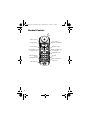
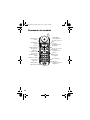
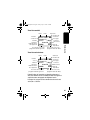
Handset Controls
Raise volume
Lower volume
Left soft key
Turn handset on
to make a call
Scroll up or
down on display
Right soft key
Turn handset off
to hang up
Earphone jack
Talk handsfree
using
speakerphone
Microphone
2
Redial
Use handset as
intercom
MD480_EN_CA-Only.book Page 3 Thursday, July 15, 2004 11:57 PM
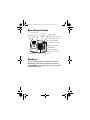
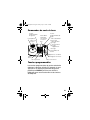
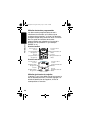
Base Station Controls
Left soft key
Speakerphone
On button
Scroll up
or down on
display
del
in use/
voice mail
charge/
page
page
Right soft key
i Play/stop message
h Skip backwards
g Skip forwards
f Delete message
Volume buttons
Off button
memo
Page handsets
Record a memo
Handsfree
Redial
Intercom
Soft Keys
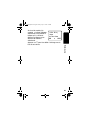
The left and right soft keys perform the function
displayed. For example, pressing the left soft key
while PHONEBK is displayed, opens your list of phone
numbers and names.
3
MD480_EN_CA-Only.book Page 4 Thursday, July 15, 2004 11:57 PM
Industry Canada (IC)
Information
This equipment meets the applicable Industry Canada (IC) radio and
terminal equipment technical specifications. This is confirmed by the
certification/registration number found on the label on the bottom of
the base unit. The abbreviation IC before the certification/registration
number only signifies that registration was performed based on a
Declaration of Conformity and that the Industry Canada technical
specifications were met. It does not imply that Industry Canada
approved the equipment. The term “IC:” before the certification/
registration number only signifies that the Industry Canada technical
specifications were met.
The Ringer Equivalency Number (REN) for this equipment is 0.0. The
REN is useful in determining the maximum number of devices you
may connect to your telephone line and still have all of these devices
ring when your telephone number is called. The sum of the RENs of all
devices connected to one line may not exceed 5.
Before installing this cordless phone, you should make sure that it is
permissible to be connected to the facilities of the local
telecommunications company. The equipment must be installed using
an acceptable method of connection. In some cases, the
telecommunications company’s inside wiring associated with a single
line individual service may be extended by means of a certified
connector assembly (telephone extension cord). You should be aware
that compliance with the above conditions may not prevent
degradation of service in some situations.
The plug and jack used to connect this equipment to the premises
wiring and telephone network must comply with the rules and
requirements in Industry Canada’s CS-03. A compliant telephone cord
and modular plug is provided with this product. It is designed to be
connected to a compatible modular jack that is also compliant.
4
MD480_EN_CA-Only.book Page 5 Thursday, July 15, 2004 11:57 PM
IC Information
For your protection, ensure that the electrical ground connections of
the power utility, telephone lines, and internal metallic water pipe
system, if present, are connected together. This precaution may be
particularly important in rural areas.
Caution: You should not attempt to make such connections yourself.
Contact the appropriate electrical inspection authority or an
electrician, as appropriate.
Note: If your home has specially wired alarm equipment connected to
the telephone line, ensure the installation of this cordless phone does
not disable your alarm equipment. If you have questions about what
will disable alarm equipment, consult your telephone company or a
qualified installer.
Repairs
Repairs to this equipment should be made by an authorized Canadian
maintenance facility designated by Motorola. Any repairs or alterations
made by the consumer, or any malfunctions of this equipment, may
give the telecommunications company cause to request that you
disconnect the equipment, and may void the limited warranty.
Privacy
Privacy of communications may not be ensured when using this
telephone. Other devices, including other cordless telephones, may
interfere with the operation of this cordless phone or cause noise
during operation. Units without code access may be accessed by other
radio communications devices.
Hearing Aid Compatibility
This telephone system meets Industry Canada standards for hearing
aid compatibility.
5
MD480_EN_CA-Only.book Page 6 Thursday, July 15, 2004 11:57 PM
Interference Information
This device complies with Industry Canada’s RSS-210. Operation is
subject to the following two conditions:
(1) This device may not cause harmful interference; and
(2) This device must accept any interference received, including
interference that may cause undesired operation.
This equipment has been tested and found to comply with the limits for
a Class B digital device, pursuant to Industry Canada’s ICES-003.
These limits are designed to provide reasonable protection against
harmful interference in a residential installation.
This equipment generates, uses, and can radiate radio frequency
energy and, if not installed and used in accordance with the
instructions, may cause harmful interference to radio communications.
However, there is no guarantee that interference will not occur in a
particular installation.
If this equipment does cause harmful interference to radio or television
reception, which can be determined by turning the equipment on and
off, the user is encouraged to try to correct the interference with one or
more of the following measures:
• Reorient or relocate the receiving antenna (that is, the antenna for
radio or television that is “receiving” the interference).
• Reorient or relocate and increase the separation between the
telecommunications equipment and the receiving antenna.
• Connect the telecommunications equipment into an outlet on a
circuit different from that to which the receiving antenna is
connected.
If these measures do not eliminate the interference, please consult
your dealer or an experienced radio/television technician for additional
suggestions.
Industry Canada publishes several publications to assist consumers
with solving interference problems, which are available from its offices
or from its web site (strategis.gc.ca).
6
MD480_EN_CA-Only.book Page 7 Thursday, July 15, 2004 11:57 PM
Important Safety Instructions
Follow these safety precautions when using your cordless phone to
reduce the risk of fire, electric shock, and injury to persons or property:
1. Keep all slits and openings of the phone unblocked. Do not set the
phone on a heating register or over a radiator. Ensure that proper
ventilation is provided at the installation site.
2. Do not use while wet or while standing in water.
3. Do not use this product near water (for example, near a bath tub,
kitchen sink, or swimming pool).
4. Do not allow anything to rest on the power cord. Place the power
cord so that it will not be walked on.
5. Never insert objects of any kind into the product slits as that may
result in fire or shock.
6. Unplug this product from the wall outlet before cleaning. Do not
use liquid cleaners or aerosol cleaners. Use a damp cloth for
cleaning.
7. Do not disassemble this product. If service or repair work is
required, contact the Motorola address found in the back of this
user’s guide.
8. Do not overload wall outlets and extension cords.
9. Avoid using during an electrical storm. Use a surge protector to
protect the equipment.
10. Do not use this cordless phone to report a gas leak, especially if
you are in the vicinity of the gas line.
Caution: To reduce the risk of fire, use only No. 26 AWG or larger UL
Listed or CSA Certified Telecommunication Line Cord.
7
MD480_EN_CA-Only.book Page 8 Thursday, July 15, 2004 11:57 PM
Unplug this cordless phone immediately from an outlet if:
• The power cord or plug is damaged or frayed.
• Liquid has been spilled into the product.
• The product has been exposed to rain or water. Do not retrieve
the handset or base until after you have unplugged the power
and phone from the wall. Then retrieve the unit by the
unplugged cords.
• The product has been dropped or the cabinet has been
damaged.
• The product exhibits a distinct change in performance.
Installation Guidelines
1. Read and understand all instructions and save them for future
reference.
2. Follow all warnings and instructions marked on the product.
3. Do not install this product near a bath tub, sink, or shower.
4. Operate this phone using only the power source that is indicated
on the marking label. If you are unsure of the power supply to your
home, consult with your dealer or local power company.
5. Do not place this product on an unstable cart, stand, or table. This
product may fall, causing serious damage to the product.
6. Adjust only those controls that are covered by the operating
instructions. Improper adjustment of other controls may result in
damage and will often require extensive work to restore the
product to normal operation.
7. Clean this product with a soft, damp cloth. Do not use chemicals
or cleaning agents to clean this phone.
8. Use only the power supply that came with this unit. Using other
power supplies may damage the unit.
9. Because cordless phones operate on electricity, you should have
at least one phone in your home that is not cordless in case the
power in your home goes out.
8
MD480_EN_CA-Only.book Page 9 Thursday, July 15, 2004 11:57 PM
10. To avoid interference to nearby appliances, do not place the base
of the cordless phone on or near a TV, microwave oven, or VCR.
Caution: To maintain compliance with the FCC’s RF exposure
guidelines, place the base unit at least 20 cm from nearby persons.
Battery Safety Instructions
• Do not burn, disassemble, mutilate, or puncture the battery. The
battery contains toxic materials that could be released, resulting
in injury.
• Caution: There is a risk of explosion if you replace the battery
with an incorrect battery type. Use only the battery that came
with your phone or an authorized replacement recommended by
the manufacturer.
• Keep batteries out of the reach of children.
• Remove batteries if storing over 30 days.
• Do not dispose of batteries in fire, which could result in
explosion.
• The rechargeable batteries that power this product
must be disposed of properly and may need to be
recycled. Refer to your battery’s label for battery type.
Contact your local recycling center for proper disposal methods.
9
MD480_EN_CA-Only.book Page 10 Thursday, July 15, 2004 11:57 PM
Contents
Handset Controls . . . . . . . . . . . . . . . . . . . . . . . . . . . . . . 2
Base Station Controls . . . . . . . . . . . . . . . . . . . . . . . . . . 3
Soft Keys . . . . . . . . . . . . . . . . . . . . . . . . . . . . . . . . . . . . . 3
Industry Canada (IC) Information . . . . . . . . . . . . . . . . 4
Important Safety Instructions . . . . . . . . . . . . . . . . . . . 7
Getting Started . . . . . . . . . . . . . . . . . . . . . . . . . . . . . . . 13
Powering the Base Station . . . . . . . . . . . . . . . . . . . . . 14
Setting Up the Charging Bases . . . . . . . . . . . . . . . . . 15
Installing Batteries in the Handsets . . . . . . . . . . . . . . 15
Charging the Handsets . . . . . . . . . . . . . . . . . . . . . . . 16
Phone Line Connection . . . . . . . . . . . . . . . . . . . . . . . 16
Wall Mounting the Base Station . . . . . . . . . . . . . . . . . 17
Removing the Base Station and Wall Mount . . . . 18
Removing the Base Station from the Wall Mount 18
Using the Displays . . . . . . . . . . . . . . . . . . . . . . . . . . . 19
Handset Display . . . . . . . . . . . . . . . . . . . . . . . . . 19
Base Station Display . . . . . . . . . . . . . . . . . . . . . . 19
Using the Soft Keys . . . . . . . . . . . . . . . . . . . . . . . 20
Using the Navigation Key . . . . . . . . . . . . . . . . . . 20
Setting Up Your Phone. . . . . . . . . . . . . . . . . . . . . . . . . 21
Registering an Expansion Handset . . . . . . . . . . . . . . 21
Personalizing Your Phone System . . . . . . . . . . . . . . . 22
Setting the Ring Tone and Ring Volume . . . . . . . 22
Setting Key Beeps On or Off . . . . . . . . . . . . . . . . 23
Naming a Handset or Base Station . . . . . . . . . . . 24
Entering Text on the Handset . . . . . . . . . . . . . . . 25
Storing Area Codes for Caller ID . . . . . . . . . . . . . . . . 26
Setting the Date and Time . . . . . . . . . . . . . . . . . . . . . 28
10
MD480_EN_CA-Only.book Page 11 Thursday, July 15, 2004 11:57 PM
Setting the Language . . . . . . . . . . . . . . . . . . . . . . . . . 29
Setting Touch Tone or Pulse Dialing . . . . . . . . . . . . . 29
Using the Basic Functions . . . . . . . . . . . . . . . . . . . . . 30
Making a Call . . . . . . . . . . . . . . . . . . . . . . . . . . . . . . . 30
Adjusting the Volume During a Call . . . . . . . . . . . . . . 30
Making a Call Using the Speakerphone . . . . . . . . . . 31
Making a Call Using the Base Station . . . . . . . . . . . . 32
Adjusting the Speakerphone Volume . . . . . . . . . . . . . 32
Switching Between the Handset and Speakerphone . 32
Muting a Call . . . . . . . . . . . . . . . . . . . . . . . . . . . . . . . 32
Putting a Call on Hold . . . . . . . . . . . . . . . . . . . . . . . . 32
Redialing a Number . . . . . . . . . . . . . . . . . . . . . . . . . . 33
Finding a Lost or Misplaced Handset . . . . . . . . . . . . . 33
Saving a Number in the Phonebook . . . . . . . . . . . . . 34
Private Phonebooks . . . . . . . . . . . . . . . . . . . . . . 34
Shared Phonebooks . . . . . . . . . . . . . . . . . . . . . . 34
Sorting the Phonebooks . . . . . . . . . . . . . . . . . . . . . . 36
Calling a Number from the Phonebook . . . . . . . . . . . 37
Editing a Phonebook Entry . . . . . . . . . . . . . . . . . . . . 38
Deleting a Phonebook Entry . . . . . . . . . . . . . . . . . . . 39
Inserting Pauses in a Number . . . . . . . . . . . . . . . . . . 39
Automated Dialing . . . . . . . . . . . . . . . . . . . . . . . . . . . 40
Using Caller ID . . . . . . . . . . . . . . . . . . . . . . . . . . . . . . 40
Reviewing the List of Caller ID Calls . . . . . . . . . . 41
Store a Caller ID Number in the Phonebook . . . . 42
Deleting Caller ID Calls . . . . . . . . . . . . . . . . . . . . 43
Answering Machine . . . . . . . . . . . . . . . . . . . . . . . . . . . 44
Setting Up the Answering Machine . . . . . . . . . . . . . . 44
Turning the Answering Machine On or Off . . . . . 44
Outgoing Message (OGM) Greeting . . . . . . . . . . 45
Recording an Outgoing Message (OGM) . . . . . . 45
Changing the Outgoing Message . . . . . . . . . . . . 46
11
MD480_EN_CA-Only.book Page 12 Thursday, July 15, 2004 11:57 PM
Erasing the Outgoing Message . . . . . . . . . . . . . . 47
Setting the Number of Rings Before the
Answering Machine Picks Up . . . . . . . . . . . . . 47
Using Call Screening . . . . . . . . . . . . . . . . . . . . . . 48
Setting the Security ID Number . . . . . . . . . . . . . . 48
Setting the Voice Prompts
(Canadian models only) . . . . . . . . . . . . . . . . . 49
Recording a Memo . . . . . . . . . . . . . . . . . . . . . . . 49
Using the Answer Machine . . . . . . . . . . . . . . . . . . . . 49
Checking Messages from the Base Station . . . . . 49
Checking Messages from the Handset . . . . . . . . 50
Checking Messages Remotely from a
Touch-Tone Phone . . . . . . . . . . . . . . . . . . . . . 51
Advanced Features. . . . . . . . . . . . . . . . . . . . . . . . . . . . 53
Conference Calling . . . . . . . . . . . . . . . . . . . . . . . . . . 54
Using the Intercom . . . . . . . . . . . . . . . . . . . . . . . . . . . 55
Intercom Setup . . . . . . . . . . . . . . . . . . . . . . . . . . 55
Handset to Handset Intercom . . . . . . . . . . . . . . . 56
Transferring a Call from One Handset to Another . . . 57
Unannounced Transfer . . . . . . . . . . . . . . . . . . . . 57
Announced Transfer . . . . . . . . . . . . . . . . . . . . . . 57
Using the Handset as a Walkie Talkie . . . . . . . . . . . . 58
Monitoring a Room . . . . . . . . . . . . . . . . . . . . . . . . . . . 59
Deregistering all Handsets . . . . . . . . . . . . . . . . . . . . . 60
Motorola Limited Warranty for the
United States and Canada . . . . . . . . . . . . . . . . . . . . . . 62
12
MD480_EN_CA-Only.book Page 13 Thursday, July 15, 2004 11:57 PM
Getting Started
Getting Started
To set up your Motorola digital cordless phone
system:
1. Install optional backup batteries in the base
station and plug into a power outlet (page 14).
2. Plug in charging bases for expansion handsets
(page 15).
3. Install batteries in handsets (page 15).
4. Charge handset batteries (page 16).
A rechargeable NiCd battery powers each
handset. Charge the battery for about 12 hours
before initial use.
5. Connect the base station to the phone line
(page 16).
6. Register expansion handsets to the base station
(page 21).
Handsets that come with your phone system are
already registered to the base.
7. Set the ring tone, date, time, and other features of
your handset(s) and base station (page 22).
Place the Base Station:
• Away from electrical appliances such as a TV,
personal computer, or another cordless phone.
• In a high and central location with no obstructions,
such as walls.
If you hear noise while using the handset near a
microwave or another cordless phone’s base unit,
move away from the microwave or base unit and
closer to your handset’s base station.
13
MD480_EN_CA-Only.book Page 14 Thursday, July 15, 2004 11:57 PM
Getting Started
Powering the Base Station
Important: Before installing or handling batteries,
please read the Battery Safety Instructions on
page 9.
The base station uses 4 AAA alkaline batteries for
optional backup power (batteries are included with
some models). To install the batteries:
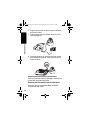
1. With the bottom of the base station facing you,
press the cover latch with a screwdriver to lift and
remove the battery cover.
2. Insert 4 AAA alkaline batteries into the battery
compartment.
3. To replace the cover, insert the tabs of the cover
into the slots and press down until the cover clicks
into place.
4. Plug the power cord into the back of the base
station and into an outlet.
14
MD480_EN_CA-Only.book Page 15 Thursday, July 15, 2004 11:57 PM
Setting Up the Charging Bases
If you have expansion handsets, they do not need to
be plugged into a phone line. Simply plug the power
cord into the back of the charging base and into an
outlet wherever you want to place the handset.
Installing Batteries in the Handsets
Getting Started
Important: Before installing or handling batteries,
read the Battery Safety Instructions on page 9.
1. Remove the battery cover by pressing on the
recess and sliding down and off the handset.
2. Plug the connector into the receptacle.
3. Insert the battery into the compartment.
4. Slide and snap the battery cover back into place.
Black
Black
Red
Red
15
MD480_EN_CA-Only.book Page 16 Thursday, July 15, 2004 11:57 PM
Charging the Handsets
Getting Started
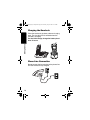
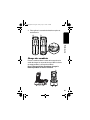
Place the handset in the base station or charging
base. The charging LED is solid red when the
handset is charging.
For the initial charge, charge the battery for at
least 12 hours.
charge
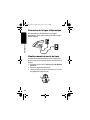
Phone Line Connection
Do not connect the base station to the phone line
until the handset is fully charged.
16
MD480_EN_CA-Only.book Page 17 Thursday, July 15, 2004 11:57 PM
Wall Mounting the Base Station
Getting Started
The base station can be mounted on a wall instead of
placed on a flat surface such as a table or desk.
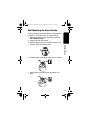
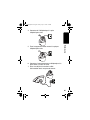
1. Remove the twist-tie from the phone cord. Do
not unfold the cord.
2. Untuck both ends of the cord.
3. Hold the folded cord at the center and insert it into
the back of the wall mount bracket.
4. Plug the phone cord into the phone jack on the wall.
5. Hang the wall mount bracket on the phone wall
plate.
17
MD480_EN_CA-Only.book Page 18 Thursday, July 15, 2004 11:57 PM
Getting Started
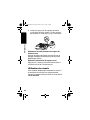
6. Plug the other end of the phone cord into the back
of the base station.
7. Plug the power cord into a power outlet if it is not
already plugged in.
8. Insert the guide rail on the wall mount into the slot
on the bottom of the base station and push until it
snaps into place.
Removing the Base Station and Wall Mount
Push up on the wall mount to dislodge it and the base
station from the phone wall plate.
Removing the Base Station from the Wall Mount
Press the release tab located above the bottom
screw on the wall mount.
18
MD480_EN_CA-Only.book Page 19 Thursday, July 15, 2004 11:57 PM
Using the Displays
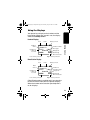
Your phone has a display on the handset and the
base station. When they are not in use, the display
shows the standby screen.
Handset Display
Time
Number of
Caller ID
records
Battery meter
04:26 PM 09/26 9
Handset (1)
2 Msg
6 Calls
Answer ON ^
PHONEBK
MENU
Left soft key function
Number of New
Messages
Ringer off
Answering
Machine status
Getting Started
Handset
name
Date
Right soft key function
Base Station Display
Time
Base
name
Number of
Caller ID
records
Date
Battery meter
04:26 PM 09/26 9
Handset (1)
2 Msg
6 Calls
Answer ON ^
PHONEBK
MENU
Left soft key function
Number of
New Messages
Ringer off
Answering
Machine status
Right soft key function
Caller ID information is supplied only if you subscribe
to caller ID service from your local phone company.
When the handset or base station speakerphone is
on, V displays.
19
MD480_EN_CA-Only.book Page 20 Thursday, July 15, 2004 11:57 PM
Using the Soft Keys
The 2 soft keys are used to select the functions
shown above them on the display. The functions
change as you move from one screen to the next. In
this guide, soft key functions are shown as the
function name followed by a, for example,
CHANGE (a).
Getting Started
Handset Display
Left soft key
function
Right soft key
function
Left soft key
Right soft key
Base Station Display
Left soft key
function
Left soft key
Right soft key
function
Right soft key
Using the Navigation Key
c is used to scroll up and down through menu items,
a list of settings, caller ID and redial lists, and the
phonebook.
On the handset display,
points to the currently
Caller ID Log
selected item, and b
Ringer
indicates there are more items Loc Area Codes
above and below the currently
BACK
SELECT
selected item.
Press c to scroll up or down
on the display.
20
MD480_EN_CA-Only.book Page 21 Thursday, July 15, 2004 11:57 PM
Setting Up Your Phone
Registering an Expansion Handset
You can have up to 4 handsets registered to a base
station.If you try to register a 5th handset, Unable
to Register displays.
Handsets that come with your phone system are
already registered. You only need to register
handsets if you buy expansion handsets to add to
your phone system.
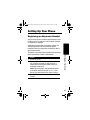
To register a new expansion handset that has never
been registered to a base station before:
Note: You must press and hold PAGE within
5 seconds after pressing OK (a). If you
do not, you will need to start again at step 1.
3 Press OK (a) to return to the standby
screen.
Setting Up Your Phone
Action
1 Press OK (a).
2 Press and hold PAGE on the base station
for at least 6 seconds or until you hear a
long beep and see the handset name, for
example, Handset(2).
21
MD480_EN_CA-Only.book Page 22 Thursday, July 15, 2004 11:57 PM
Personalizing Your Phone System
You can personalize each handset and base station
by setting unique ring tones, adjusting the ring tone
volume for day and night time, and assigning a name
so you can distinguish one handset from another.
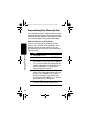
Setting the Ring Tone and Ring Volume
Setting Up Your Phone
Your can set a ring tone for incoming calls from
numbers that are stored in the phonebook, and a
different ring tone for other incoming calls. The
phonebook ring tone works only if you subscribe to
caller ID service.
22
Action
1 Press MENU (a).
2 Scroll to Ringer and press SELECT (a).
3 The Day Volume displays. This is the ringer
volume from 6 am to 9 pm. Press CHANGE
(a) to scroll through the settings (off, low,
medium, high). Each volume level plays as
you press CHANGE (a). Stop at the
volume level you want to set.
4 Scroll down (c) to advance to the Night
Volume. This is the ringer volume from 9 pm
to 6 am. Press CHANGE (a) to scroll
through the settings. Each volume level
plays as you press CHANGE (a). Stop at
the volume level you want to set.
5 Scroll down (c) to advance to the Ring Tone.
This is the ring sound for incoming calls.
MD480_EN_CA-Only.book Page 23 Thursday, July 15, 2004 11:57 PM
Action
6 Press CHANGE (a) to scroll through the
ring tones. Each tone plays as you select
CHANGE (a). Stop at the ring tone you
want to set.
7 Scroll down (c) to advance to the Phonebook
Tone. This is the sound for incoming calls
from numbers stored in your private
phonebook. You must subscribe to caller ID
service for this ring tone to work.
Setting Key Beeps On or Off
Setting Up Your Phone
Note: The private phonebook is stored in
each handset.
8 Press CHANGE (a) to scroll through the
phonebook tones. Each tone plays as you
select CHANGE (a). Stop at the
phonebook tone you want to set.
9 Press DONE (a).
10 Press EXIT (a) to return to the standby
screen, or c to scroll to a different menu
option.
You can turn on or off the key beeps on the base
station and handsets.
Action
1 Press MENU (a).
2 Scroll to Ringer and press SELECT (a).
3 Scroll to Key Beeps and press SELECT
(a).
23
MD480_EN_CA-Only.book Page 24 Thursday, July 15, 2004 11:57 PM
Action
4 Press CHANGE (a) to scroll through the
selections. When your choice of ON, OFF, or
LINKED to RINGER displays, press
SELECT (a).
Note: When set to LINKED to RINGER,
key beeps are on when the ringer is set to
on, and off when the ringer is set to off on
the base station or handset.
Setting Up Your Phone
Naming a Handset or Base Station
When you register a handset, it is assigned a default
name of Handset(x), where x can be 1, 2, 3, or 4. You
can change the name to something more useful, for
example a location (Kitchen) or someone’s name
(Susan). Naming a handset makes it easy to select
the handset from a list (for example, to intercom
another handset).
If you name a handset, the handset number remains
part of the name, for example, Kitchen(2).
You can also change the name of your base station.
Action
1 Press MENU (a).
2 Scroll to Name handset or Name base,
then press SELECT (a).
24
MD480_EN_CA-Only.book Page 25 Thursday, July 15, 2004 11:57 PM
Action
3 Use the keypad to enter the new name (up
to12 characters). The flashing underline
shows the input cursor position. Press
DELETE (a) to backspace and erase
characters to the left of the input cursor.
See below for information on how to enter
text.
4 Press DONE (a).
5 Press EXIT (a) to return to the standby
screen, or c to scroll to a different menu
option.
Entering Text on the Handset
Button
1
2
3
4
5
6
7
8
9
1
space
A
D
G
J
M
P
T
W
Number of Presses
2
3
4
–
*
,
B
C
(
E
F
)
H
I
#
K
L
/
N
O
‘
Q
R
S
U
V
?
X
Y
Z
5
1
2
3
4
5
6
7
8
9
Setting Up Your Phone
Press each button on the keypad the indicated
number of times to enter text, numbers, and other
characters. For example, to enter R, press the
7 button 3 times.
25
MD480_EN_CA-Only.book Page 26 Thursday, July 15, 2004 11:57 PM
Storing Area Codes for Caller ID
Important: This feature should not be used in regions
where the same area code can be used to dial
10-digit local numbers or 11-digit long distance
numbers. Disregard this setup if your phone will be
used in such regions.
Setting Up Your Phone
Note: This section applies only if you subscribe to
caller ID service from your local phone company.
26
You can store up to 5 area codes to make it easy to
dial numbers from your list of caller ID calls. Each
area code can be:
• 7-digit format
You do not have to dial the area code to call
numbers in this area code.
• 10-digit format
You have to dial the 3-digit area code + 7-digit
phone number to call numbers in this area code.
• 11-digit format
You have to dial the 1 + 3-digit area code + 7-digit
phone number to call numbers in this area code.
For example, if you store 954 in 10-digit format, when
you receive a call from that area code, the phone
number is stored in your call list with all 10 digits. The
number will then be in the correct format for you to
dial directly from the call list without any reformatting.
MD480_EN_CA-Only.book Page 27 Thursday, July 15, 2004 11:57 PM
Setting Up Your Phone
Action
1 Press MENU (a).
2 Scroll to Loc area code and press
SELECT (a).
3 Enter the first area code.
4 Press FORMAT (a) to scroll through the
formats. Stop at the format you want to set
for the area code, then scroll down (c) to
move to the next area code.
5 Repeat steps 3 and 4 to store up to 4 more
area codes. When you are finished, press
DONE (a).
6 Press EXIT (a) to return to the standby
screen, or c to scroll to a different menu
option.
27
MD480_EN_CA-Only.book Page 28 Thursday, July 15, 2004 11:57 PM
Setting the Date and Time
Setting Up Your Phone
Action
1 Press MENU (a).
2 Scroll to Date/Time and press
SELECT (a).
3 Enter the time (2 digits are required for the
hour and 2 digits for the minutes, so use a
leading 0 for 1-digit values).
4 Press AM/PM (a) to switch between am
and pm.
28
5
6
7
8
9
10
11
Note: This applies only if using a 12-hour
clock.
Scroll down (c) to move the next field.
Press CHANGE (a) to change the time
format (12- or 24-hour clock). Scroll down
(c) to move to the next field.
Press CHANGE (a) to select date format
(MM/DD or DD/MM).
Scroll down (c) to move the next field.
Enter the current date.
Press DONE (a).
Press EXIT (a) to return to the standby
screen, or c to scroll to a different menu
option.
MD480_EN_CA-Only.book Page 29 Thursday, July 15, 2004 11:57 PM
Setting the Language
Action
1 Press MENU (a).
2 Scroll to Language and press SELECT
(a).
3 Press c until points to the language you
want to set.
4 Press DONE (a).
5 Press EXIT (a) to return to the standby
screen, or c to scroll to a different menu
option.
Your phone is set to Touch Tone dialing. Do not
change this setting unless Touch Tone service is not
available in your area.
Action
1 Press MENU (a).
2 Scroll to Tone/Pulse.
3 Press c or CHANGE (a) to switch
between Tone and Pulse.
4 Press DONE (a).
5 Press EXIT (a) to return to the standby
screen, or c to scroll to a different menu
option.
Setting Up Your Phone
Setting Touch Tone or Pulse Dialing
29
MD480_EN_CA-Only.book Page 30 Thursday, July 15, 2004 11:57 PM
Using the Basic Functions
Making a Call
Press ON. When you hear the dial tone, dial the
number.
or
Enter the phone number, then press ON. This lets
you see the phone number on the display before the
number is dialed.
During a call, a timer on the display shows the
amount of time on the call.
When you are finished talking, press OFF to hang up.
Press ON or Handsfree to answer using the
speakerphone.
If you have call waiting service, press ON to answer
the second call.
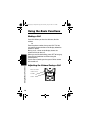
Using the Basic Functions
Adjusting the Volume During a Call
30
Press to make
caller’s voice
Louder
Softer
MD480_EN_CA-Only.book Page 31 Thursday, July 15, 2004 11:57 PM
Press to make
caller’s voice
Louder
Softer
When you are not on a call, use the volume keys to
change the day (6 am–9 pm) or night (9 pm–6 am)
ringer volume. The time of day as set on the phone
determines whether you are adjusting the day or
night volume. To set the time, see page 28.
Making a Call Using the
Speakerphone
Press Handsfree.
If you have call waiting service, press ON to answer
the second call.
Using the Basic Functions
Press Handsfree then dial the number. For optimal
speakerphone sound quality, make sure the belt clip
is on. This raises the handset up so it is not lying flat
(the speakerphone is on the back of the handset).
When the speakerphone on the handset is on, V
appears on the display.
When you are finished talking, press OFF to hang up
and turn the speakerphone off.
Note: Pressing Handsfree while in the caller ID list,
redial list, or phonebook turns the speakerphone on
and dials the number.
31
MD480_EN_CA-Only.book Page 32 Thursday, July 15, 2004 11:57 PM
Making a Call Using the
Base Station
The procedure for making a call using the base
station is the same as making one from the handset.
However, when you dial from the base station, it
functions in speakerphone mode only.
Adjusting the Speakerphone Volume
Press the volume up or volume down key (see
page 30).
Switching Between the Handset and
Speakerphone
Press Handsfree to toggle between handset and
speakerphone.
Using the Basic Functions
Muting a Call
32
Press MUTE (a). To unmute the call, press
UNMUTE (a).
Putting a Call on Hold
Press HOLD (a).
To return to the call, press UNHOLD (a) or ON.
When a call is on hold, you can use the intercom
features (see page 56).
MD480_EN_CA-Only.book Page 33 Thursday, July 15, 2004 11:57 PM
Redialing a Number
To redial the most recently dialed number:
Action
1 Press ON.
2 Press Redial.
To redial one of the last 5 numbers you dialed:
Action
1 Press Redial.
2 Press c until points to the number you
want to redial.
3 Press Dial (a) or ON or Handsfree.
If a number in the redial list matches a number in your
phonebook, the phonebook name and number
display in the redial list instead of just the phone
number.
Press PAGE on the base station.
All handsets registered to the base station will start
beeping.
Press Off, EXIT (a), or OK (a) on a handset to
stop paging that handset, or press PAGE on the base
station to stop paging all handsets.
Using the Basic Functions
Finding a Lost or Misplaced Handset
33
MD480_EN_CA-Only.book Page 34 Thursday, July 15, 2004 11:57 PM
Saving a Number in the Phonebook
Storing numbers in the phonebook makes it easy to
dial numbers you call frequently. You can enter
numbers directly into the phonebook or add them
from the caller ID or redial list. You can also select to
save the number in private or shared phonebook.
Private Phonebooks
The private phonebook is unique to each handset
and is not accessible by other handsets. Each private
phonebook stores up to 50 names and numbers.
Shared Phonebooks
Using the Basic Functions
The shared phonebook is accessible by all handsets
and stores up to 49 names and numbers.
34
Action
1 Press PHONEBK (a).
2 Scroll (c) to (New Entry) and press
SELECT (a).
The private phonebook is the default. To
change phonebooks, press the right soft
key (a). For example, if SHARED is
displayed, press the right soft key (a) to
enter that phonebook.
3 Enter the name (up to 12 characters). Press
DELETE (a) to backspace and erase
characters to the left of the blinking cursor.
See page 25 for information on entering
text.
4 Scroll down (c).
MD480_EN_CA-Only.book Page 35 Thursday, July 15, 2004 11:57 PM
Action
5 Enter the phone number (up to 24 digits).
Press DELETE (a) to backspace and
erase characters to the left of the blinking
cursor.
6 Press DONE (a).
To store a recently called number in the phonebook:
Note: You can also store a number in the phonebook
from the caller ID list (see page 42).
Using the Basic Functions
Action
1 Press Redial. The display shows the last
5 numbers you dialed, with the most recent
number at the top.
2 Press c until points to the number you
want to save.
3 Press STORE (a).
4 Enter the name (up to 12 characters). Press
DELETE (a) to backspace and erase
characters to the left of the blinking cursor.
See page 25 for information on entering text.
5 Scroll down (c).
6 The phone number displays in the Number:
field. To modify the number, press DELETE
(a) to backspace and erase characters to
the left of the blinking cursor.
7 When the phone number is correct as you
want to store it, press DONE (a).
35
MD480_EN_CA-Only.book Page 36 Thursday, July 15, 2004 11:57 PM
Sorting the Phonebooks
The private and shared phonebooks can be sorted
alphabetically and independently of each other. Once
sorted, a phonebook cannot be unsorted, or reset to
its previous list order.
Note: The shared phonebook can only be sorted
from the base station.
Action
Press PHONEBK (a).
Press c to scroll to any phonebook entry.
Press OPTIONS (a).
Scroll down (c) to SORT PHONEBK.
Press SELECT (a). ALPHABETICALLY
SORT PHONEBK? displays.
6 Press YES (a) or NO (a).
7 Press OFF to return to the standby screen.
Using the Basic Functions
1
2
3
4
5
36
MD480_EN_CA-Only.book Page 37 Thursday, July 15, 2004 11:57 PM
Calling a Number from the
Phonebook
Action
1 Press PHONEBK (a).
2 Press c until points to the entry you want
to call.
Note: You can also search numerically by
pressing the number(s) of the phone entry you
want to dial.
3 Press ON or Handsfree.
Note: To perform a “speed dial,” press
PHONEBK (a), the location number, then
press ON.
Using the Basic Functions
37
MD480_EN_CA-Only.book Page 38 Thursday, July 15, 2004 11:57 PM
Editing a Phonebook Entry
When editing a phonebook entry, you can change
uppercase letters to lowercase letters.
Action
1 Press PHONEBK (a).
2 Press c until points to the entry you want
to edit.
3 Press OPTIONS (a).
4 Scroll to Edit and press SELECT (a).
5 To modify the name, press DELETE (a)
to backspace and erase characters to the
left of the blinking cursor. See page 25 for
information on entering text.
Using the Basic Functions
The first letter of the entry is an uppercase
letter.
38
To change the entry from uppercase to
lowercase, press *. A flashing square
indicates you are in the uppercase text
entry mode. A flashing _ indicates you are
in the lowercase text entry mode.
6 Scroll down (c) to move to the phone
number field.
7 Modify the number.
8 Press DONE (a).
MD480_EN_CA-Only.book Page 39 Thursday, July 15, 2004 11:57 PM
Deleting a Phonebook Entry
Action
1 Press PHONEBK (a).
2 Press c until points to the entry you
want to delete.
3 Press OPTIONS (a).
4 Scroll to Delete and press SELECT (a).
Inserting Pauses in a Number
At the position where you want to insert a pause,
press # twice, P appears. When you call a number
with a pause, the phone waits 3 seconds before
transmitting the next digits in the dialing sequence.
This is useful, for example, when you have to dial 9 to
get a dial tone or for going into a voicemail system.
Using the Basic Functions
39
MD480_EN_CA-Only.book Page 40 Thursday, July 15, 2004 11:57 PM
Automated Dialing
You can retrieve previously entered information from
the phonebook (such as a PIN or credit card number)
during a phone call without having to re-enter the
numbers.
Using the Basic Functions
Action
1 While on a call, press c until points to
the entry you want to recall.
2 Press DIAL (a).
3 Repeat steps 1 and 2 as many times as
necessary to complete your transaction.
Note: This function is useful when using
automated response systems. For example,
you could access your bank account by dialing
the bank’s telephone number, entering your
account number (using automated dialing), and
PIN (using automated dialing). Then, you can
enter your most frequently used prompt, for
example, balance inquiry.
40
Using Caller ID
Note: You must subscribe to caller ID service from
your local telephone company to use the caller ID
features of your phone.
If you subscribe to caller ID service, the caller’s name
and/or number are displayed when you receive an
incoming call. If no caller ID information was sent
from the phone company, or you do not subscribe to
caller ID service, the display shows Incoming
Call.
MD480_EN_CA-Only.book Page 41 Thursday, July 15, 2004 11:57 PM
Reviewing the List of Caller ID Calls
The handset can hold up to 40 caller ID records.
Action
1 Press c to enter the recent calls list. The
most recent call is listed first.
2 Press c to review more calls.
3 To call the number, press ON or Handsfree.
To reformat the number before you call it, press
FORMAT (a) until the correct format displays. For
example, if a number you want to call is stored with
the area code (10 digits), but you do not use the area
code to call this number, press FORMAT (a) until
the number appears without the area code (7 digits).
For information on dialing formats, see page 26.
Using the Basic Functions
41
MD480_EN_CA-Only.book Page 42 Thursday, July 15, 2004 11:57 PM
Store a Caller ID Number in the Phonebook
Using the Basic Functions
Action
1 From the caller ID list, press
OPTIONS (a).
2 Scroll (c) to STORE and press
SELECT (a).
3 The caller’s name displays in the Name:
field. You can modify the name before
storing it.
4 When the name is correct as you want to
store it, press c to scroll down.
5 The caller’s phone number displays in the
Number: field.You can modify the number
before storing it.
6 When number is correct as you want to
store it, press DONE (a).
42
Note: To modify the name or number before storing
it, press DELETE (a) to backspace and erase
characters to the left of the blinking cursor. Then use
the keypad to enter the name or number. See
page 25 for information on entering text.
MD480_EN_CA-Only.book Page 43 Thursday, July 15, 2004 11:57 PM
Deleting Caller ID Calls
Action
1 From the caller ID list, press
OPTIONS (a).
2 Scroll (c) to Delete (to delete the current
caller ID entry) or Delete All (to delete
all caller ID calls) and press SELECT (a).
Note: If deleting all calls, press YES (a) at
the Delete All? prompt.
3 Press BACK (a) to return to the caller
ID list.
Using the Basic Functions
43
MD480_EN_CA-Only.book Page 44 Thursday, July 15, 2004 11:57 PM
Answering Machine
The answering machine stores up to 15 minutes or
record time of messages and/or memos. You can
listen to your messages from the base station, from
the handset, or remotely. You can set up the
answering machine from either a handset or the base
station.
Answering Machine
Setting Up the Answering Machine
All of the features of the answer machine are located
in the Ans mach setup menu. To get to this menu:
Action
1 From the standby screen, press
MENU (a).
2 Scroll (c) to Ans mach setup and press
SELECT (a).
Turning the Answering Machine On or Off
Action
1 Go to the Ans mach setup menu.
2 Scroll (c) to Answer ON/OFF and press
SELECT (a).
3 Scroll (c) to select ON or OFF and press
DONE (a).
4 Press EXIT (a) twice to return to the
standby screen, or press c to scroll to a
different function.
44
MD480_EN_CA-Only.book Page 45 Thursday, July 15, 2004 11:57 PM
Outgoing Message (OGM) Greeting
You can record a personal outgoing message
greeting that plays when you receive a call and you
do not answer the phone. If you do not record a
personal greeting, a prerecorded greeting plays
when you receive a call.
Recording an Outgoing Message (OGM)
Answering Machine
Action
1 Go to the Ans mach setup menu.
2 Scroll (c) to Outgoing Msg and press
SELECT (a).
3 Scroll (c) to Record OGM and press
SELECT (a).
4 Press YES (a) to record your message.
5 Press END (a) when finished. Press
REPLAY (a) to listen to the message.
6 Press EXIT (a) twice to return to the
standby screen, or press c to scroll to a
different feature.
45
MD480_EN_CA-Only.book Page 46 Thursday, July 15, 2004 11:57 PM
Answering Machine
Changing the Outgoing Message
46
Action
1 Go to the Ans mach setup menu.
2 Scroll (c) to Outgoing Msg and press
SELECT (a).
3 Scroll (c) to Change OGM and press
SELECT (a).
4 Scroll (c) to Default OGM or Recorded
OGM and press SELECT (a).
5 Press EXIT (a) twice to return to the
standby screen, or press c to scroll to a
different feature.
Note: To play the current outgoing message,
select Play OGM from the Outgoing Msg
menu.
MD480_EN_CA-Only.book Page 47 Thursday, July 15, 2004 11:57 PM
Erasing the Outgoing Message
Note: You cannot erase the default message.
Setting the Number of Rings Before the Answering
Machine Picks Up
Answering Machine
Action
1 Go to the Ans mach setup menu.
2 Scroll (c) to Outgoing Msg and press
SELECT (a).
3 Scroll (c) to Erase OGM and press
SELECT (a).
4 Press YES (a).
5 Press EXIT (a) twice to return to the
standby screen, or press c to scroll to a
different feature.
Note: To play the current outgoing message,
select Play OGM from the Outgoing Msg
menu.
Action
1 Go to the Ans mach setup menu.
2 Scroll (c) to Ring Number and press
SELECT (a).
3 Scroll (c) to select 3, 4, 5, or 6 rings and
press DONE (a).
4 Press EXIT (a) twice to return to the
standby screen or c to scroll to a different
feature.
47
MD480_EN_CA-Only.book Page 48 Thursday, July 15, 2004 11:57 PM
Using Call Screening
You can screen incoming calls so you can decide to
answer the call or allow the answering machine to
answer the call.
Answering Machine
Action
1 When RECORDING INCOMING MESSAGE
displays, press SCREEN (a) to hear the
caller without answering.
2 Press ON to answer the call, or press OFF
to cancel call screening.
48
Setting the Security ID Number
The security ID number allows you to remotely
access your messages from any touch-tone phone.
Action
1 Go to the Ans mach setup menu.
2 Scroll (c) to Security ID and press
SELECT (a).
3 Enter a 3-digit number and press DONE
(a).
4 Press EXIT (a) 3 times to return to the
standby screen, or press c to scroll to a
different feature.
MD480_EN_CA-Only.book Page 49 Thursday, July 15, 2004 11:57 PM
Setting the Voice Prompts (Canadian models only)
You can choose between English or French voice
prompts.
Recording a Memo
Press d on the base station to record a message
that you can playback later.
Answering Machine
Action
1 Go to the Ans mach setup menu.
2 Scroll (c) to scroll to Voice prompt and
press SELECT (a).
3 Scroll (c) to English or French and
press DONE (a).
4 Press EXIT (a) twice to return to the
standby screen or, press c to scroll to a
different feature.
Using the Answer Machine
Checking Messages from the Base Station
Action
Press i
Press g
Press h
Press f
to play and stop messages
to skip forward
to skip backward
to delete message
49
MD480_EN_CA-Only.book Page 50 Thursday, July 15, 2004 11:57 PM
Checking Messages from the Handset
Answering Machine
Action
1 Press MENU (a), scroll (c) to
Messages, and press SELECT (a).
2 Scroll (c) to the function you want, then
press SELECT (a). The selections are:
50
2:Play/Stop
3:Skip
4:Answer On/Off
5:Memo
7:Repeat menu
0:Erase
MD480_EN_CA-Only.book Page 51 Thursday, July 15, 2004 11:57 PM
✂
Checking Messages Remotely from a Touch-Tone
Phone
Answering Machine
Action
1 Call your base station.
2 When the answering machine picks up the
call, press ∗ (star) then enter the security
ID. A synthesized voice prompts you with
instructions.
3 To skip the voice prompts and operate the
base station directly, press the appropriate
number key on the phone. The selections
are:
Press 2
to play/stop messages
Press 3
to skip forwards
Press 1
to skip backwards
Press 4
to answer (turns the
answering machine on/off)
Press 5
to record a memo
Press 7
to repeat the memo
Press 0
to delete the message
For your convenience, cut this page out and take it
with you so you’ll have it when you call your
answering machine while you are away from home.
Use the other side of this page to write down notes
and phone numbers.
51
MD480_EN_CA-Only.book Page 52 Thursday, July 15, 2004 11:57 PM
✂
Notes
..................................................
..................................................
..................................................
..................................................
..................................................
Answering Machine
..................................................
..................................................
..................................................
..................................................
..................................................
..................................................
..................................................
..................................................
..................................................
..................................................
..................................................
..................................................
..................................................
..................................................
..................................................
..................................................
..................................................
52
MD480_EN_CA-Only.book Page 53 Thursday, July 15, 2004 11:57 PM
Advanced Features
To use some of the advance features, you need at
least 2 (up to 4) handsets registered to the base
station.
You can expand your phone system by adding
Motorola MD Series expansion handsets (up to a
total of 4 handsets). Expansion handsets do not
require connection to a phone line. You can place the
handset and its charging base anywhere a standard
electrical outlet is available.
Advanced Features
With multiple handsets, you can:
• Conference call
• Talk handset to handset on the intercom
• Set up handsets to automatically answer intercom
calls
• Transfer calls from one handset to another
• Monitor a room
• Use 2 handsets as walkie talkies
To order expansion handsets, call:
1-800-461-4575 in Canada
1-888-390-6456 TTY (Text Telephone)
On the Web:
www.motorola.com/cordless
53
MD480_EN_CA-Only.book Page 54 Thursday, July 15, 2004 11:57 PM
Conference Calling
If one handset is already on a call, the display on
other handsets registered to the same base station
shows Line in use.
Once a second handset is added to the call, the
display on all handsets shows On conference. A
maximum of 2 handsets can be on a conference call
at the same time.
Action
To connect a second handset to a call, press
ON or Handsfree on the second handset.
To join a conference call, press ON from the
base station.
Advanced Features
To disconnect from the conference call, press
OFF on either or both handsets.
54
MD480_EN_CA-Only.book Page 55 Thursday, July 15, 2004 11:57 PM
Using the Intercom
Intercom Setup
You can set up a handset or base station so it
automatically answers an intercom page after 1 or 3
rings. All handsets are set to No Auto Answer at the
factory. Perform the following procedure on each
handset to change this setting.
Action
1 Press MENU(a).
2 Scroll to Intercom Setup and press
SELECT (a).
3 Scroll to one of the answering options and
press SELECT (a):
No Auto Answer - the handset does not
automatically answer an intercom page.
handset automatically answers and turns on
the speakerphone after 1 or 3 rings.
4 Press SELECT (a).
5 Press EXIT(a) to return to the standby
screen, or c to scroll to a different menu
option.
Advanced Features
After 1 Ring or After 3 Rings - the
55
MD480_EN_CA-Only.book Page 56 Thursday, July 15, 2004 11:57 PM
Handset to Handset Intercom
Action
1 Press Intercom.
2 From the list of handsets, press c until points to the handset you want to page, or
to Select All to page all handsets.
Advanced Features
Note: If you have only 1 handset, pressing
the Intercom button automatically pages the
base station and vice-versa.
3 Press PAGE (a).
4 To answer the page, press OK (a). The
first handset to respond is connected.
56
If no one answers the page after 2 minutes,
or if the person you are paging presses
EXIT (a) or OFF, No Answer displays
on your handset and paging stops.
5 When someone answers the page, talk into
the handset.
6 To end the intercom session, press OFF.
To turn the speakerphone on or off, press Handsfree.
To mute or unmute the sound, press MUTE (a) or
UNMUTE (a).
MD480_EN_CA-Only.book Page 57 Thursday, July 15, 2004 11:57 PM
Transferring a Call from One
Handset to Another
Unannounced Transfer
Action
1 Press HOLD (a).
2 Press Intercom.
3 Scroll to the handset you want to transfer
the call to and press PAGE (a).
Note: If you have only 1 handset, pressing
the Intercom button automatically pages the
other handset, and vice-versa.
4 Press OFF to hang up. The call is
transferred to the other handset.
Announced Transfer
Advanced Features
Action
1 Follow steps 1 through 3 above.
2 To answer the page on the other handset,
press OK (a).
3 Tell the person on the other handset that
you are transferring a call, then press
UNHOLD (a). The call is transferred to the
other handset and all three individuals are
on the call.
4 Press OFF (a) to hang up the second
handset.
57
MD480_EN_CA-Only.book Page 58 Thursday, July 15, 2004 11:57 PM
Using the Handset as a Walkie Talkie
Advanced Features
The walkie talkie feature lets you talk handset to
handset even when the handsets are out of range
from the base station. When a handset is in walkie
talkie mode, you cannot make or receive phone calls
You must complete steps 1 and 2 for both handsets
to use walkie-talkie mode.
58
Action
1 Press MENU (a).
2 Scroll to Walkie Talkie and press
SELECT (a).
3 Press Intercom on one of the handsets.
4 Press the number on the handset keypad
that corresponds to the handset you want to
use walkie talkie with.
For example, if the handset you want to talk
to is named Kitchen(2), press 2 on the
keypad.
5 To answer the page on the other handset,
press OK (a).
6 To end the walkie talkie session, press
EXIT (a) on either handset.
MD480_EN_CA-Only.book Page 59 Thursday, July 15, 2004 11:57 PM
Monitoring a Room
Room monitoring allows you to place a handset in a
room and listen to the sounds in that room from
another handset.
Action
1 Place a handset in the room to be
monitored.
2 On that handset, press MENU (a).
3 Scroll to Monitor Room and press
SELECT (a). The display shows Ready
to monitor room.
4 On the handset you want to listen from,
press Intercom. The display lists the
handsets registered to the base station.
The handset that was set up for monitoring
automatically answers the page. The microphone on
that handset is turned on, and the speaker is turned
off. The handset you are monitoring from shows
Monitoring (handset name).
Advanced Features
Note: If you have only 1 handset, pressing
the Intercom button automatically pages the
other handset.
5 Scroll to the handset you set up monitoring
on and press PAGE (a).
You can also use the base station for monitoring by
following the instructions above from the base
station.
To turn off monitoring, press CANCEL (a) or OFF
on either handset.
Note: If you answer an incoming call, monitoring is
turned off.
59
MD480_EN_CA-Only.book Page 60 Thursday, July 15, 2004 11:57 PM
Deregistering all Handsets
Caution: You can deregister all registered handsets
from the base station and render your cordless
telephone system inoperable until at least one
handset is reregistered to the base station, (see
page 21 for registration information).
Caution: Read and perform the following instructions
carefully. Missing or performing a step incorrectly
renders your cordless telephone system inoperable.
Advanced Features
Action
1 Delete or listen to all voice mail messages,
if necessary, to clear the IN USE/voice mail
indicator.
2
3
4
5
6
60
Note: Skip this step if it does not apply to
your MD Series cordless telephone model.
Press OFF on the base station and all
handsets.
Press and hold down PAGE on the base
station until the IN USE indicator begins to
flash slowly, then release PAGE.
Press and hold down PAGE again until the
IN USE indicator begins to flash quickly,
then release PAGE.
Quickly and fully press and release PAGE
again.
Please register handset displays.
Press OK (a) to begin the registration
process, (see page 21), or press
EXIT (a).
MD480_EN_CA-Only.book Page 61 Thursday, July 15, 2004 11:57 PM
Advanced Features
61
MD480_EN_CA-Only.book Page 62 Thursday, July 15, 2004 11:57 PM
Motorola Limited Warranty for the
United States and Canada
Motorola Limited Warranty
What Does this Warranty Cover?
Subject to the exclusions contained below, Motorola, Inc. warrants its
cordless telephones ("Products"), Motorola-branded or certified
accessories sold for use with these Products ("Accessories"), and
Motorola software contained on CD-ROMs or other tangible media and
sold for use with these Products ("Software") to be free from defects in
materials and workmanship under normal consumer usage for the
period(s) outlined below. This limited warranty is a consumer's exclusive
remedy, and applies as follows to new Motorola Products, Accessories
and Software purchased by consumers in the United States or Canada,
which are accompanied by this written warranty:
Products and Accessories as defined above, unless otherwise
provided for below. Length of coverage: one (1) year from the date of
purchase by the first consumer purchaser of the product unless
otherwise provided for below.
• Decorative Accessories and Cases. Decorative covers,
bezels, PhoneWrap® covers and cases. Length of coverage:
limited lifetime warranty for the lifetime of ownership by the first
consumer purchaser of the product.
• Monaural Headsets. Ear buds and boom headsets that
transmit mono sound through a wired connection. Length of
coverage: limited lifetime warranty for the lifetime of ownership
by the first consumer purchaser of the product.
• Products and Accessories that are Repaired or Replaced.
Length of coverage: The balance of the original warranty or for
ninety (90) days from the date returned to the consumer,
whichever is longer.
• Software. Applies only to physical defects in the media that
embodies the copy of the software (e.g. CD-ROM, or floppy
disk). Length of coverage: ninety (90) days from the date of
purchase.
62
MD480_EN_CA-Only.book Page 63 Thursday, July 15, 2004 11:57 PM
Exclusions
Normal Wear and Tear. Periodic maintenance, repair and replacement
of parts due to normal wear and tear are excluded from coverage.
Batteries. Only batteries whose fully charged capacity falls below 80% of
their rated capacity and batteries that leak are covered by this limited
warranty.
Abuse & Misuse. Defects or damage that result from: (a) improper
operation, storage, misuse or abuse, accident or neglect, such as
physical damage (cracks, scratches, etc.) to the surface of the product
resulting from misuse; (b) contact with liquid, water, rain, extreme
humidity or heavy perspiration, sand, dirt or the like, extreme heat, or
food; (c) use of the Products or Accessories for commercial purposes or
subjecting the Product or Accessory to abnormal usage or conditions; or
(d) other acts which are not the fault of Motorola, are excluded from
coverage.
Use of Non-Motorola Products and Accessories. Defects or damage
that result from the use of Non-Motorola branded or certified Products,
Accessories, Software or other peripheral equipment are excluded
from coverage.
Unauthorized Service or Modification. Defects or damages resulting
from service, testing, adjustment, installation, maintenance, alteration, or
modification in any way by someone other than Motorola, or its
authorized service centers, are excluded from coverage.
Altered Products. Products or Accessories with (a) serial numbers or
date tags that have been removed, altered, or obliterated; (b) broken
seals or that show evidence of tampering; (c) mismatched board serial
numbers; or (d) nonconforming or non-Motorola housings, or parts, are
excluded from coverage.
Communication Services. Defects, damages, or the failure of Products,
Accessories or Software due to any communication service or signal you
may subscribe to or use with the Products, Accessories or Software is
excluded from coverage.
Software Embodied in Physical Media. No warranty is made that the
software will meet your requirements or will work in combination with any
hardware or software applications provided by third parties, that the
operation of the software products will be uninterrupted or error free, or
that all defects in the software products will be corrected.
Software NOT Embodied in Physical Media. Software that is not
embodied in physical media (e.g. software that is downloaded from the
internet), is provided "as is" and without warranty.
63
MD480_EN_CA-Only.book Page 64 Thursday, July 15, 2004 11:57 PM
Who is Covered
This warranty extends to the first end-user purchaser, only.
What will Motorola Do?
Motorola, at its option, will at no charge repair, replace or refund the
purchase price of any Products, Accessories or Software that does not
conform to this warranty. We may use functionally equivalent
reconditioned/refurbished/pre-owned or new Products, Accessories or
parts. No data, software or applications added to your Product,
Accessory or Software, including but not limited to personal contacts,
games and ringer tones, will be reinstalled. To avoid losing such data,
software and applications please create a back up prior to requesting
service.
How to Get Warranty Service or Other Information
In the USA, call:
1-800-353-2729
TTY 1-888-390-6456
In Canada, call:
1-800-461-4575
TTY 1-888-390-6456
For accessories and software, please call the telephone number
designated above for the product with which they are used. You will
receive instructions on how to ship the Products, Accessories or
Software, at your expense, to a Motorola Authorized Repair Center. To
obtain service, you must include: (a) a copy of your receipt, bill of sale or
other comparable proof of purchase; (b) a written description of the
problem; (c) the name of your service provider, if applicable; (d) the name
and location of the installation facility (if applicable) and, most
importantly; (e) your address and telephone number.
64
MD480_EN_CA-Only.book Page 65 Thursday, July 15, 2004 11:57 PM
What Other Limitations Are There?
ANY IMPLIED WARRANTIES, INCLUDING WITHOUT LIMITATION
THE IMPLIED WARRANTIES OF MERCHANTABILITY AND FITNESS
FOR A PARTICULAR PURPOSE, SHALL BE LIMITED TO THE
DURATION OF THIS LIMITED WARRANTY, OTHERWISE THE
REPAIR, REPLACEMENT, OR REFUND AS PROVIDED UNDER THIS
EXPRESS LIMITED WARRANTY IS THE EXCLUSIVE REMEDY OF
THE CONSUMER, AND IS PROVIDED IN LIEU OF ALL OTHER
WARRANTIES, EXPRESS OF IMPLIED. IN NO EVENT SHALL
MOTOROLA BE LIABLE, WHETHER IN CONTRACT OR TORT
(INCLUDING NEGLIGENCE) FOR DAMAGES IN EXCESS OF THE
PURCHASE PRICE OF THE PRODUCT, ACCESSORY OR
SOFTWARE, OR FOR ANY INDIRECT, INCIDENTAL, SPECIAL OR
CONSEQUENTIAL DAMAGES OF ANY KIND, OR LOSS OF REVENUE
OR PROFITS, LOSS OF BUSINESS, LOSS OF INFORMATION OR
DATA, SOFTWARE OR APPLICATIONS OR OTHER FINANCIAL LOSS
ARISING OUT OF OR IN CONNECTION WITH THE ABILITY OR
INABILITY TO USE THE PRODUCTS, ACCESSORIES OR
SOFTWARE TO THE FULL EXTENT THESE DAMAGES MAY BE
DISCLAIMED BY LAW.
Some states and jurisdictions do not allow the limitation or exclusion of
incidental or consequential damages, or limitation on the length of an
implied warranty, so the above limitations or exclusions may not apply to
you. This warranty gives you specific legal rights, and you may also have
other rights that vary from state to state or from one jurisdiction to
another.
Laws in the United States and other countries preserve for Motorola
certain exclusive rights for copyrighted Motorola software such as the
exclusive rights to reproduce and distribute copies of the Motorola
software. Motorola software may only be copied into, used in, and
redistributed with, the Products associated with such Motorola software.
No other use, including without limitation disassembly of such Motorola
software or exercise of the exclusive rights reserved for Motorola, is
permitted.
65
66
MD480_FR.book Page 67 Friday, July 16, 2004 1:38 PM
Félicitations! Vous venez de faire l’acquisition d’un
produit Motorola!
Veuillez conserver votre reçu original indiquant la
date d’achat du produit. Pour obtenir le service
couvert par la garantie pour votre produit Motorola,
vous devrez fournir une copie du reçu indiquant la
date d’achat du produit afin de confirmer l’état de la
garantie.
Pour toute question relative au produit, veuillez
communiquer avec Motorola de la manière suivante :
1 800 461-4575 au Canada
1 888 390-6456 ATS (téléphone textuel)
Copyright © 2004 par Motorola, Inc.
Tous droits réservés. Aucune partie de ce guide ne peut être reproduite
sous quelque forme ou par quelque procédé que ce soit, ni utilisée pour
tout travail dérivé (traduction, modification ou adaptation) sans l'accord écrit
de Motorola, Inc.
Motorola se réserve le droit de revoir ce guide et d'en modifier le contenu
de temps à autre sans obligation de notifier de telles révisions ou
modifications. Motorola fournit ce guide sans aucune garantie implicite ni
explicite, y compris mais sans s'y limiter les garanties implicites de qualité
marchande d'adaptation à un usage particulier. Motorola peut apporter des
améliorations ou des modifications au(x) produit(s) décrit(s) dans ce
manuel à tout moment.
Le nom MOTOROLA, le logo M stylisé, et le nom PhoneWrap sont déposés
auprès du Patent & Trademark Office des Etats-Unis (bureau
d'enregistrement des brevets et marques). Tous les autres noms de produit
ou de service sont la propriété de leurs détenteurs respectifs.
516537-002
67
MD480_FR.book Page 68 Friday, July 16, 2004 1:38 PM
Commandes du combiné
Augmenter le
volume
Diminuer le
volume
Touche
programmable
de gauche
Mettre le
combiné sous
tension afin
d’acheminer un
appel
Parler en mode
mains libres
grâce au
haut-parleur
Microphone
68
Faire défiler
l’affichage vers
le haut ou vers le
bas
Touche
programmable
de droite
Pour raccrocher,
mettre le
combiné hors
tension.
Prise pour
écouteurs
Recomposer
Utiliser le
combiné comme
interphone
MD480_FR.book Page 69 Friday, July 16, 2004 1:38 PM
Commandes du socle de base
Touche
programmable
de gauche
Haut-parleur
Mise sous
tension
Faire défiler
l’affichage
vers le haut
ou vers le
bas
del
in use/
voice mail
charge/
page
page
memo
Touche
programmable de
droite
i Écouter/arrêter
le message
h Reculer d’un
message
g Avancer d’un
message
f Supprimer le
message
Commandes de
volume
Appeler les combinés
MainsInterphone
libres
Recomposition
Enregistrer un mémo
Mise hors tension
Touches programmables
Les touches programmables de gauche et de droite
effectuent la fonction affichée. Par exemple, si vous
appuyez sur la touche programmable de gauche
pendant que PHONEBK (annuaire) est affiché, le
téléphone ouvre votre liste de noms et de numéros
de téléphone.
69
MD480_FR.book Page 70 Friday, July 16, 2004 1:38 PM
Renseignements d’Industrie Canada (IC)
Cet appareil est conforme aux normes applicables d’Industrie Canada
en matière d’équipement radio et terminal. Le numéro de certification/
enregistrement qui apparaît sur l’étiquette située sous le socle de
l’appareil en fait foi. L’abréviation IC devant le numéro de certification/
enregistrement indique seulement que l’enregistrement a été effectué
en fonction de la Déclaration de conformité et que l’appareil est
conforme aux spécifications techniques d’Industrie Canada. Cette
abréviation ne signifie pas qu’Industrie Canada a approuvé l’appareil.
Le nombre équivalent de sonneries (REN) pour cet appareil est
de 0.0. Le REN sert à déterminer le nombre maximal d’appareils que
vous pouvez connecter à votre ligne téléphonique pour que chacun de
ces appareils puisse sonner lorsque vous recevez un appel. La
somme des REN de tous les appareils connectés à une même ligne
ne doit pas être supérieure à 5.
Avant d’installer ce téléphone sans fil, vous devez vous assurer que
votre compagnie de télécommunication locale en permet la connexion
à son système. Cet appareil doit être installé à l’aide d’une méthode
de connexion acceptable. Dans certains cas, le câblage interne de la
compagnie de télécommunications, associé au service de ligne
individuelle, peut être prolongé au moyen d’un connecteur certifié
(rallonge téléphonique). Vous devez savoir que la conformité aux
conditions susmentionnées ne peut empêcher, dans certains cas, la
dégradation du service.
La fiche et la prise utilisées pour connecter cet appareil au réseau
téléphonique et au câblage de l’endroit où il est utilisé doivent être
conformes aux règles et exigences CS-03 d’Industrie Canada. Un fil
téléphonique et une prise modulaire conformes accompagnent ce
produit. La fiche est conçue pour être connectée à une prise modulaire
compatible qui est également conforme à ces règlements et exigences.
Pour votre protection, assurez-vous que les connexions électriques
terrestres de la compagnie d’électricité, les lignes téléphoniques et le
système d’aqueduc métallique interne, le cas échéant, sont raccordés
ensemble. Cette précaution est particulièrement importante dans les
régions rurales.
70
MD480_FR.book Page 71 Friday, July 16, 2004 1:38 PM
Attention : Ne tentez pas d’effectuer ces connexions vous-même.
Communiquez avec un électricien ou avec les autorités en charge de
l’inspection électrique, tel qu’approprié.
Nota : Si un système d’alarme résidentiel est connecté à votre ligne
téléphonique, assurez-vous que l’installation de ce téléphone sans fil
ne le désactive pas. Pour savoir ce qui pourrait désactiver votre
système d’alarme, communiquez avec votre compagnie de téléphone
ou avec un installateur qualifié.
Réparations
Toute réparation de cet appareil doit être effectuée dans un centre
d’entretien canadien autorisé et désigné par Motorola. Toute
réparation ou modification effectuée par le consommateur, ou toute
défectuosité de cet appareil peut donner droit à la compagnie de
télécommunications d’exiger la déconnexion de l’appareil et peut
également annuler la garantie limitée.
Confidentialité
La confidentialité des communications ne peut être assurée par ce
téléphone. D’autres appareils, y compris des téléphones sans fil,
peuvent interférer avec le fonctionnement de ce téléphone sans fil ou
causer du bruit pendant son utilisation. D’autres dispositifs de
communication radio peuvent accéder aux appareils qui ne sont pas
protégés par un code d’accès.
Compatibilité avec les prothèses auditives
Cet appareil téléphonique est conforme aux normes d’Industrie
Canada relatives à la compatibilité avec les prothèses auditives.
Information sur l’interférence
Cet appareil est conforme à la norme RSS-210 d’Industrie Canada.
Son fonctionnement est soumis aux deux conditions suivantes :
(1) Cet appareil ne doit pas causer d’interférence nuisible, et
(2) cet appareil doit supporter toutes les interférences reçues, incluant
celles susceptibles de perturber son bon fonctionnement.
71
MD480_FR.book Page 72 Friday, July 16, 2004 1:38 PM
Cet appareil a été testé et déclaré conforme aux limites des appareils
numériques de catégorie B, en vertu de la norme ICSE-003 d’Industrie
Canada. Ces limites ont été établies pour offrir une protection
raisonnable contre toute interférence nuisible dans un environnement
résidentiel.
Cet appareil produit, consomme et peut émettre de l’énergie
radioélectrique et, s’il n’est pas installé et utilisé conformément aux
directives qui l’accompagnent, il peut entraîner des interférences
nuisibles dans les communications radio. Cependant, rien ne peut
garantir qu’il n’y aura pas d’interférence dans un environnement
donné.
Si cet équipement cause de l’interférence nuisible aux radios ou
téléviseurs, ce qui peut être déterminé en mettant l’appareil sous
tension et hors tension, nous vous conseillons d’essayer de corriger la
situation à l’aide des mesures suivantes :
• Rediriger ou déplacer l’antenne réceptrice, c’est-à-dire l’antenne
de la radio ou du téléviseur qui reçoit l’interférence.
• Rediriger ou déplacer l’antenne réceptrice et l’éloigner de
l’appareil de télécommunication.
• Connecter l’appareil de télécommunication dans une prise dont le
circuit n’est pas le même que celui auquel est connecté l’appareil
avec l’antenne de réception.
Si ces mesures ne permettent pas d’éliminer l’interférence, veuillez
consulter votre distributeur ou un technicien d’expérience en radiotélévision pour obtenir d’autres suggestions.
Industrie Canada offre plusieurs publications pour aider les
consommateurs à régler les problèmes d’interférence. Ces
publications sont disponibles dans les bureaux d’Industrie Canada ou
sur son site Web (strategis.gc.ca).
72
MD480_FR.book Page 73 Friday, July 16, 2004 1:38 PM
Instructions importantes sur la sécurité
Lorsque vous utilisez votre téléphone sans fil, respectez les consignes
de sécurité suivantes pour réduire le risque d’incendie, de choc
électrique, de blessure corporelle ou de bris de biens en :
1. gardant toutes les fentes et ouvertures du téléphone dégagées.
Ne placez pas le téléphone au-dessus d’un registre ou d’un
radiateur et assurez-vous que l’endroit choisi pour l’installation est
suffisamment aéré;
2. n’utilisant pas l’appareil lorsque vous êtes mouillé ou dans l’eau;
3. n’utilisant pas ce produit près de l’eau (une baignoire, un évier ou
une piscine, par exemple);
4. ne laissant rien reposer sur le câble d’alimentation. Placez le câble
d’alimentation de façon à ne pas marcher dessus;
5. n’insérant jamais d’objets, quels qu’ils soient, dans les fentes du
produit, car cela pourrait entraîner un incendie ou un choc
électrique;
6. débranchant le produit de la prise de courant avant de le nettoyer.
N’utilisez pas de nettoyant liquide ou en aérosol et utilisez un linge
humide pour le nettoyage;
7. ne démontant pas le produit. Si des travaux de réparation ou
d’entretien s’avéraient nécessaires, communiquez avec Motorola
à l’adresse indiquée sur la couverture arrière de ce guide de
l’utilisateur;
8. ne surchargeant pas les prises de courant ou les rallonges;
9. évitant d’utiliser le produit pendant un orage. Utilisez un
éliminateur de surtensions pour protéger le matériel;
10. n’utilisant pas le téléphone sans fil pour signaler une fuite de gaz,
en particulier si vous êtes près de la conduite de gaz.
Attention : Pour réduire le risque d’incendie, utilisez uniquement un
cordon d’alimentation no 26 AWG ou supérieur, certifié UL ou CSA.
73
MD480_FR.book Page 74 Friday, July 16, 2004 1:38 PM
Débranchez sur-le-champ ce téléphone sans fil de la prise de
courant dans les situations suivantes :
• le câble d’alimentation ou sa fiche est endommagé;
• un liquide a été répandu sur le produit;
• le produit a été exposé à la pluie ou à l’eau. Ne touchez pas au
combiné ni au socle avant d’avoir débranché le câble
d’alimentation et le fil téléphonique de leur prise. Prenez ensuite
l’appareil par les câbles débranchés;
• le produit est tombé ou le boîtier est endommagé;
• le produit a subi une modification de rendement importante.
Directives d’installation
1. Assurez-vous de lire et de bien comprendre toutes les directives
et conservez-les pour vous y référer au besoin.
2. Respectez toutes les mises en garde et instructions indiquées sur
le produit.
3. N’installez pas ce produit près d’une baignoire, d’un évier ou
d’une douche.
4. Utilisez ce téléphone uniquement à partir de la source
d’alimentation indiquée sur l’étiquette. Si vous n’êtes pas certain
du type d’alimentation électrique de votre résidence,
communiquez avec votre distributeur ou votre compagnie
d’électricité.
5. Ne placez pas ce produit sur une table, un stand ou un chariot
instable. Il pourrait être sérieusement endommagé s’il tombait.
6. Réglez uniquement les commandes dont il est question dans les
directives d’utilisation. Le réglage inadéquat des autres
commandes peut endommager le produit et nécessiter un travail
important pour rétablir son fonctionnement normal.
7. Nettoyez ce produit avec un linge doux et humide. N’utilisez pas
d’agents de nettoyage ou de produits chimiques pour nettoyer ce
téléphone.
74
MD480_FR.book Page 75 Friday, July 16, 2004 1:38 PM
8. Utilisez uniquement le bloc d’alimentation qui accompagne cet
appareil. L’utilisation d’autres blocs d’alimentation pourrait
l’endommager.
9. Puisque les téléphones sans fil fonctionnent à l’électricité, vous
devriez avoir au moins un téléphone à fil dans votre résidence, au
cas où il y aurait une panne de courant.
10. Pour éviter l’interférence avec des appareils situés à proximité du
téléphone, ne placez pas le socle du téléphone sans fil près d’un
téléviseur, d’un four à micro-ondes ou d’un magnétoscope.
Attention : Afin que l’appareil continue d’être conforme aux lignes
directrices de la FCC relatives à l’exposition aux radiofréquences,
placez le poste de base à au moins 20 cm de toute personne.
Consignes de sécurité
• Évitez de brûler, de démonter, de mutiler ou de percer la
batterie. La batterie contient des substances toxiques qui
pourraient s’en écouler et causer des blessures.
• Attention : Il y a risque d’explosion si vous remplacez la
batterie par un autre type que celui recommandé. Utilisez
seulement la batterie vendue avec votre téléphone ou une
batterie de remplacement autorisée recommandée par le
fabricant du téléphone.
• Gardez les batteries hors de portée des enfants.
• Retirez les batteries du téléphone si vous le rangez pendant
plus de 30 jours.
• Ne jetez pas les batteries au feu car elles pourraient exploser.
• Les batteries rechargeables qui alimentent ce produit
doivent être mises au rebut de la manière appropriée
ou être recyclées. Consultez l’étiquette de la batterie
pour connaître le type de batterie. Communiquez avec votre
centre de recyclage local pour connaître les méthodes de mise
au rebut appropriées.
75
MD480_FR.book Page 76 Friday, July 16, 2004 1:38 PM
Table des matières
Commandes du combiné . . . . . . . . . . . . . . . . . . . . . . 68
Commandes du socle de base . . . . . . . . . . . . . . . . . . 69
Touches programmables. . . . . . . . . . . . . . . . . . . . . . . 69
Renseignements d’Industrie Canada (IC) . . . . . . . . . 70
Instructions importantes sur la sécurité . . . . . . . . . . 73
76
Préliminaires. . . . . . . . . . . . . . . . . . . . . . . . . . . . . . . . .
Mise sous tension du socle . . . . . . . . . . . . . . . . . . . .
Préparation des socles de charge . . . . . . . . . . . . . . .
Installation de la batterie dans le combiné . . . . . . . . .
Charge des combinés. . . . . . . . . . . . . . . . . . . . . . . . .
Connexion de la ligne téléphonique . . . . . . . . . . . . . .
Fixation murale du socle de base. . . . . . . . . . . . . . . .
Détachement du socle de base et du support de
fixation murale . . . . . . . . . . . . . . . . . . . . . . . . . .
Dépose du socle de base du support mural . . . . .
Utilisation des visuels . . . . . . . . . . . . . . . . . . . . . . . . .
Visuel du combiné . . . . . . . . . . . . . . . . . . . . . . . . .
Visuel du socle de base . . . . . . . . . . . . . . . . . . . . .
Utilisation des touches programmables . . . . . . . . .
Utilisation de la touche de navigation . . . . . . . . . .
80
81
82
82
83
84
84
Configuration du téléphone . . . . . . . . . . . . . . . . . . . .
Enregistrement d’un combiné supplémentaire . . . . . .
Personnalisation du système téléphonique . . . . . . . .
Réglage de la tonalité et du volume de
sonnerie . . . . . . . . . . . . . . . . . . . . . . . . . . . . . . .
Activation et désactivation des timbres des
touches . . . . . . . . . . . . . . . . . . . . . . . . . . . . . . .
90
90
91
86
86
86
87
87
88
88
91
93
MD480_FR.book Page 77 Friday, July 16, 2004 1:38 PM
Attribution d’un nom à un combiné
ou socle de base . . . . . . . . . . . . . . . . . . . . . . . . 94
Entrée du texte au combiné . . . . . . . . . . . . . . . . . . 95
Sauvegarde des indicatifs régionaux
pour la fonction d’identification de l’appelant . . . . . . . 96
Réglage de la date et de l’heure . . . . . . . . . . . . . . . . . 98
Réglage de la langue . . . . . . . . . . . . . . . . . . . . . . . . . 99
Réglage de la tonalité d’appel
(Touch Tone ou Pulse) . . . . . . . . . . . . . . . . . . . . . . . . 99
Utilisation des fonctions de base . . . . . . . . . . . . . . . 100
Acheminement d’un appel . . . . . . . . . . . . . . . . . . . . 100
Réglage du volume en cours d’appel . . . . . . . . . . . . 100
Acheminement d’un appel à l’aide du
haut-parleur. . . . . . . . . . . . . . . . . . . . . . . . . . . . . . . . 101
Acheminement d’un appel à l’aide
du socle de base. . . . . . . . . . . . . . . . . . . . . . . . . . . . 102
Réglage du volume du haut-parleur . . . . . . . . . . . . . 102
Passer du combiné au haut-parleur et vice-versa. . . 102
Blocage du son d’un appel . . . . . . . . . . . . . . . . . . . . 102
Mise en garde d’un appel . . . . . . . . . . . . . . . . . . . . . 102
Recomposition d’un numéro . . . . . . . . . . . . . . . . . . . 103
Recherche d’un combiné égaré . . . . . . . . . . . . . . . . 103
Sauvegarde d’un numéro dans l’annuaire . . . . . . . . 104
Annuaires privés . . . . . . . . . . . . . . . . . . . . . . . . . . 104
Annuaires partagés . . . . . . . . . . . . . . . . . . . . . . . 104
Tri des annuaires. . . . . . . . . . . . . . . . . . . . . . . . . . . . 106
Acheminement d’un appel à partir de l’annuaire . . . 107
Modification d’une entrée d’annuaire . . . . . . . . . . . . 108
Suppression d’une entrée d’annuaire . . . . . . . . . . . . 109
Insertion de pauses dans un numéro . . . . . . . . . . . . 109
Composition automatisée . . . . . . . . . . . . . . . . . . . . . 110
Utilisation de l’identification de l’appelant . . . . . . . . . 110
77
MD480_FR.book Page 78 Friday, July 16, 2004 1:38 PM
Consultation de la liste d’identification de
l’appelant . . . . . . . . . . . . . . . . . . . . . . . . . . . . . 111
Sauvegarde d’un numéro d’identification de
l’appelant dans l’annuaire . . . . . . . . . . . . . . . . 112
Suppression des entrées d’identification
de l’appelant . . . . . . . . . . . . . . . . . . . . . . . . . . . 113
Répondeur. . . . . . . . . . . . . . . . . . . . . . . . . . . . . . . . . . 114
Réglage du répondeur . . . . . . . . . . . . . . . . . . . . . . . 114
Activation et désactivation du répondeur . . . . . . . 114
Message d’accueil . . . . . . . . . . . . . . . . . . . . . . . . 115
Enregistrement d’un message d’accueil . . . . . . . . 115
Modification du message d’accueil . . . . . . . . . . . . 115
Suppression du message d’accueil . . . . . . . . . . . 116
Réglage du nombre de sonneries avant la
réponse par le répondeur . . . . . . . . . . . . . . . . . 117
Filtrage des appels . . . . . . . . . . . . . . . . . . . . . . . . 117
Réglage du numéro d’identification de sécurité . . 118
Réglage des messages-guide vocaux
(pour les modèles canadiens seulement) . . . . 119
Enregistrement d’un mémo . . . . . . . . . . . . . . . . . 119
Utilisation du répondeur . . . . . . . . . . . . . . . . . . . . . . 120
Vérification des messages à partir du socle
de base . . . . . . . . . . . . . . . . . . . . . . . . . . . . . . 120
Vérification des messages à partir du combiné . . 120
Vérification des messages à distance à partir
d’un téléphone Touch Tone . . . . . . . . . . . . . . . 121
Fonctions évoluées . . . . . . . . . . . . . . . . . . . . . . . . . . 123
Conférence téléphonique . . . . . . . . . . . . . . . . . . . . . 124
Utilisation de l’interphone . . . . . . . . . . . . . . . . . . . . . 124
Configuration de l’interphone . . . . . . . . . . . . . . . . 124
Interphone d’un combiné à un autre . . . . . . . . . . 126
Transfert d’un appel d’un combiné à un autre. . . . . . 127
78
MD480_FR.book Page 79 Friday, July 16, 2004 1:38 PM
Transfert non annoncé . . . . . . . . . . . . . . . . . . . . . 127
Transfert annoncé . . . . . . . . . . . . . . . . . . . . . . . . . 127
Utilisation des combinés comme
émetteurs-récepteurs . . . . . . . . . . . . . . . . . . . . . . . . 128
Surveillance d’une pièce. . . . . . . . . . . . . . . . . . . . . . 129
Désenregistrement de tous les combinés. . . . . . . . . 130
Garantie limitée de Motorola pour les
États-Unis et le Canada . . . . . . . . . . . . . . . . . . . . . . . 132
79
MD480_FR.book Page 80 Friday, July 16, 2004 1:38 PM
Préliminaires
Préliminaires
Pour préparer votre système de téléphone sans fil
numérique de Motorola :
1. Installez les piles d’urgence optionnelles dans le
socle et branchez le socle dans une prise
électrique (page 81).
2. Branchez les socles de charge des combinés
supplémentaires (page 82).
3. Installez les piles dans les combinés (page 82).
4. Chargez la batterie de chaque combiné
(page 83).
Tous les combinés sont alimentés par une
batterie au NiCd. Chargez la batterie pendant
12 heures avant la première utilisation.
5. Connectez le socle à la prise téléphonique
murale (page 84).
Enregistrez chaque combiné supplémentaire
auprès du socle (page 90).
Les combinés vendus avec votre système
téléphonique sont déjà enregistrés auprès du
socle.
6. Réglez la tonalité de sonnerie, la date, l’heure et
toutes les autres fonctions (page 91).
Placez le socle :
• loin de tout appareil électrique comme un
téléviseur, un ordinateur personnel ou tout autre
téléphone sans fil;
• dans un endroit central et élevé, sans obstructions
telles que des murs.
80
MD480_FR.book Page 81 Friday, July 16, 2004 1:38 PM
Si vous entendez du bruit pendant que vous utilisez
le combiné près d’un four à micro-ondes ou du socle
d’un autre téléphone sans fil, éloignez-vous de ces
appareils et rapprochez-vous du socle de votre
téléphone.
Mise sous tension du socle
Préliminaires
Important : Avant d’installer et de manipuler les
piles, veuillez lire les consignes de sécurité relatives
aux piles à la page 75.
Le socle utilise quatre piles alcalines AAA comme
source d’alimentation d’urgence facultative (les piles
sont comprises avec certains modèles). Pour
installer les piles dans le socle :
1. Sous le socle, appuyez sur la patte de
déclenchement du couvercle de logement de
piles à l’aide d’un tournevis, puis soulevez le
couvercle de piles pour le retirer du socle.
2. Insérez quatre piles alcalines AAA dans le
logement de piles.
3. Pour replacer le couvercle, insérez les pattes du
couvercle dans les fentes du socle et appuyez sur
le couvercle jusqu’à ce qu’il s’enclenche.
81
MD480_FR.book Page 82 Friday, July 16, 2004 1:38 PM
Préliminaires
4. Connectez une extrémité du câble d’alimentation
dans la prise située à l’arrière du socle, puis l’autre
extrémité dans une prise de courant.
Préparation des socles de charge
Vous n’avez pas à connecter les combinés
supplémentaires à une ligne téléphonique. Il suffit de
connecter le cordon d’alimentation situé à l’arrière de
chaque socle dans une prise électrique, à l’endroit où
vous désirez placer le combiné.
Installation de la batterie dans le
combiné
Important : Avant d’installer et de manipuler la
batterie, veuillez lire les consignes de sécurité
relatives aux batteries à la page 75.
1. Retirez le couvercle de batterie en appuyant sur
le renfoncement et en faisant glisser le couvercle
avant de le soulever du combiné.
2. Branchez le connecteur dans la prise.
3. Insérez la batterie dans son logement.
82
MD480_FR.book Page 83 Friday, July 16, 2004 1:38 PM
4. Faites glisser le couvercle de batterie en place et
enclenchez-le.
Red
Rouge
Préliminaires
Noir
Black
Charge des combinés
Placez le combiné dans le socle de base ou dans le
socle de charge. Le voyant de charge à DEL s’allume
en rouge pendant la charge du combiné.
Pour la charge initiale, vous devez charger la
batterie pendant au moins 12 heures.
charge
83
MD480_FR.book Page 84 Friday, July 16, 2004 1:38 PM
Connexion de la ligne téléphonique
Préliminaires
Ne connectez pas le socle de base à la ligne
téléphonique avant que le combiné ne soit chargé à
pleine capacité.
Fixation murale du socle de base
Le socle de base peut être fixé à un mur plutôt que
placé sur une surface plane, comme une table ou un
bureau.
1. Enlevez l’attache du fil téléphonique. Ne dépliez
pas le fil.
2. Sortez les deux extrémités du fil.
3. Tenez le fil plié par le centre et insérez-le à l’arrière
du support de fixation murale.
84
MD480_FR.book Page 85 Friday, July 16, 2004 1:38 PM
4. Connectez le fil téléphonique à la prise
téléphonique murale.
Préliminaires
5. Fixez le support de fixation murale à la plaque
téléphonique murale.
6. Connectez l’autre extrémité du fil téléphonique à la
prise située à l’arrière du socle.
7. Si ce n’est déjà fait, branchez le câble
d’alimentation dans une prise de courant.
85
MD480_FR.book Page 86 Friday, July 16, 2004 1:38 PM
Préliminaires
8. Insérez les quatre rails de la plaque de fixation
murale dans les fentes situées à l’arrière du socle,
puis enfoncez le socle jusqu’à ce qu’il s’enclenche.
Détachement du socle de base et du support de
fixation murale
Poussez le support de fixation vers le haut pour le
dégager et dégager le socle de base de la plaque
téléphonique murale.
Dépose du socle de base du support mural
Appuyez sur la patte qui se trouve au-dessus de la
vis placée au bas de la fixation murale.
Utilisation des visuels
Votre système téléphonique comprend un visuel sur
le socle de base ainsi que sur chaque combiné.
Lorsque le combiné n’est pas utilisé, le visuel affiche
l’écran de veille.
86
MD480_FR.book Page 87 Friday, July 16, 2004 1:38 PM
Visuel du combiné
Heure
Nom du
combiné
Voltmètre
04:26 PM 09/26 9
Handset (1)
2 Msg
6 Calls
Answer ON ^
PHONEBK
MENU
Fonction de la touche
programmable de gauche
Nombre de
nouveaux
messages
Sonnerie
désactivée
état du
répondeur
Fonction de la touche
programmable de droite
Visuel du socle de base
Heure
nom du
socle
Nombre
d’entrées
d’identification
de l’appelant
Date
Voltmètre
04:26 PM 09/26 9
Handset (1)
2 Msg
6 Calls
Answer ON ^
PHONEBK
MENU
Fonction de la touche
programmable de gauche
Préliminaires
Nombre
d’entrées
d’identification
de l’appelant
Date
Nombre de
nouveaux
messages
Sonnerie
désactivée
état du
répondeur
Fonction de la touche
programmable de droite
L’identification de l’appelant est donnée seulement si
vous êtes abonné au service d’identification de l’appelant
auprès de votre compagnie de téléphone locale.
Lorsque le haut-parleur du combiné ou du socle est
activé, V s’affiche.
87
MD480_FR.book Page 88 Friday, July 16, 2004 1:38 PM
Préliminaires
Utilisation des touches programmables
Les deux touches programmables servent à
sélectionner les fonctions qui s’affichent juste
au-dessus de ces touches, au visuel. Les fonctions
changent lorsque vous passez d’un écran à un autre.
Dans ce guide, les fonctions des touches
programmables sont indiquées par le nom de la
fonction suivi du symbole a, par exemple
CHANGE (a).
Visuel du combiné
Fonction de la
touche
programmable
de gauche
Touche
programmable
de gauche
Fonction de la
touche
programmable de
droite
Touche
programmable de
droite
Visuel du socle de base
Fonction de la
touche
programmable
de gauche
Fonction de la
touche
programmable de
droite
Touche
programmable
de gauche
Touche
programmable de
droite
Utilisation de la touche de navigation
La touche c sert à faire défiler vers le haut ou vers le
bas les éléments de menu, la liste des réglages, les
entrées d’identification de l’appelant, la liste de
recomposition et l’annuaire.
88
MD480_FR.book Page 89 Friday, July 16, 2004 1:38 PM
Préliminaires
Au visuel du combiné, le
symbole indique l’élément
Caller ID Log
sélectionné et le symbole b
Ringer
indique qu’il y a d’autres
Loc Area Codes
éléments au-dessus et en
BACK
SELECT
dessous de l’élément
sélectionné.
Appuyez sur c pour faire défiler l’affichage vers le
haut ou vers le bas.
89
MD480_FR.book Page 90 Friday, July 16, 2004 1:38 PM
Configuration du téléphone
Enregistrement d’un combiné
supplémentaire
Configuration du téléphone
Vous pouvez enregistrer jusqu’à quatre combinés
auprès d’un socle de base. Si vous tentez d’en
enregistrer un cinquième, le visuel affiche Unable to
Register.
90
Les combinés qui accompagnent votre système
téléphonique sont déjà enregistrés. Vous devrez
enregistrer les combinés seulement si vous achetez
des combinés supplémentaires pour votre système
téléphonique.
Pour enregistrer un nouveau combiné qui n’a pas
encore été enregistré :
Action
1 Appuyez sur OK (a).
MD480_FR.book Page 91 Friday, July 16, 2004 1:38 PM
Action
2 Tenez la touche PAGE enfoncée sur le
socle de base pendant au moins
six secondes ou jusqu’à ce que vous
entendiez une longue tonalité et que le nom
du combiné s’affiche, par exemple
Handset(2).
Nota : Vous devez appuyer sur la touche
PAGE (et la maintenir enforcée) dans les 5
secondes suivant la pression sur le bouton
OK (a). Sinon, il faudra reprendre depuis
le début.
3 Appuyez sur la touche OK (a) pour
revenir à l'écran de veille.
Vous pouvez personnaliser chaque combiné ainsi
que le socle de base en lui attribuant une tonalité de
sonnerie unique, en réglant le volume de la sonnerie
pour le jour et pour la nuit et en lui attribuant un nom
afin de le distinguer des autres combinés.
Réglage de la tonalité et du volume de sonnerie
Configuration du téléphone
Personnalisation du système
téléphonique
Vous pouvez régler une tonalité de sonnerie pour les
appels provenant des numéros sauvegardés dans
l’annuaire et une tonalités de sonnerie différente
pour tous les autres appels entrants. La fonction de
91
MD480_FR.book Page 92 Friday, July 16, 2004 1:38 PM
tonalité de sonnerie pour les appels sauvegardés
dans l’annuaire fonctionne seulement si vous êtes
abonné au service d’identification de l’appelant.
1
2
Configuration du téléphone
3
4
5
6
92
Action
Appuyez sur MENU (a).
Faites défiler jusqu’à Ringer, puis appuyez
sur SELECT (a).
Le volume de jour s’affiche. Il s’agit du
volume de la sonnerie entre 6 h et 21 h.
Appuyez sur CHANGE (a) pour faire
défiler les réglages (désactivé, faible,
moyen, élevé). Chaque niveau de volume se
fait entendre lorsque vous appuyez sur
CHANGE (a). Arrêtez-vous au niveau de
volume désiré.
Faites défiler vers le bas (c) pour passer au
volume pour la nuit. Il s’agit du volume de la
sonnerie entre 21 h et 6 h. Appuyez sur
CHANGE (a) pour faire défiler les
réglages. Chaque niveau de volume se fait
entendre lorsque vous appuyez sur
CHANGE (a). Arrêtez-vous au niveau de
volume désiré.
Faites défiler vers le bas (c) pour passer à
Ring Tone. Il s’agit de la tonalité de sonnerie
pour les appels entrants.
Appuyez sur CHANGE (a) pour faire
défiler les tonalités de sonnerie. Chaque
tonalités de sonnerie se fait entendre
lorsque vous sélectionnez CHANGE (a).
Arrêtez-vous à la tonalité de sonnerie
désirée.
MD480_FR.book Page 93 Friday, July 16, 2004 1:38 PM
Action
7 Faites défiler vers le bas (c) pour passer à
Phonebook Tone. Il s’agit de la tonalité de
sonnerie pour les appels entrants dont le
numéro est sauvegardé dans l’annuaire.
Pour utiliser cette tonalité de sonnerie, vous
devez êtres abonné au service
d’identification de l’appelant.
Activation et désactivation des timbres des touches
Il est possible d'activer et de désactiver le timbre
produit par les touches du socle de base et des
combinés.
Configuration du téléphone
Nota : L'annuaire est conservé dans chaque
combiné.
8 Appuyez sur CHANGE (a) pour faire
défiler les tonalités d’annuaire. Chaque
tonalités de sonnerie se fait entendre
lorsque vous sélectionnez CHANGE (a).
Arrêtez-vous à la tonalité d’annuaire désirée.
9 Appuyez sur DONE (a).
10 Appuyez sur EXIT (a) pour retourner à
l’écran de veille ou c pour faire défiler
jusqu’à une autre option de menu.
Action
1 Appuyez sur MENU (a).
2 Faites défiler jusqu’à Ringer, puis appuyez
sur SELECT (a).
3 Faites défiler jusqu’à Key Beeps, puis
appuyez sur SELECT (a).
93
MD480_FR.book Page 94 Friday, July 16, 20