1
5.0 Operation
English
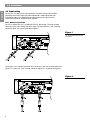
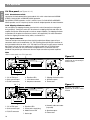
5.3.1 Power switch
The power switch is used as a functional switch and should not be relied upon as a
safety disconnect.
100 volt and 120 volt versions: Press to turn the power ON or on STANDBY. When ON, the
READY indicators will illuminate. In the STANDBY mode, the unit is off but can be activated
through the SEQUENCE connector on the rear panel of the amplifier. Be sure all connections
are made and double checked before switching the power amplifier ON.
Note
Standby (see above) and Sequencing (see below) modes are activated at the amplifier only
when using the standard input module. For the ACM-1 module, these modes are established via the network. For further detail, refer to instructions included with the network.
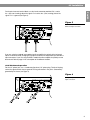
220-240 volt version: This version has separate POWER and SEQUENCE switches on the
front panel. Press the POWER switch to turn power on (1) or off (0). When the unit is off, no
power reaches the unit and the sequencing function is not active. To use the amplifier in
the normal mode, set the POWER switch on and set the SEQUENCE switch to the off
position ( ). The READY indicators will illuminate. To activate the sequencing function, the
SEQUENCE switch must first be switched to the on position ( ) and then the POWER
switch must be turned on. The unit will then be in a standby mode and can be activated by the
sequence signal. See Section 5.4.8 for additional information regarding the sequence feature.
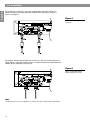
5.3.2 Standby LED
Illuminates when the power switch is turned OFF to indicate the amplifier is connected to
AC power and the amplifier can be powered up. When the power switch is ON, the standby
LED turns off.
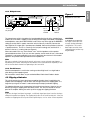
5.3.3 AC power fuse
Protects the amplifier from catastrophic failures that could damage internal circuitry.
Repeated fuse blowing is a sign of internal distress. Refer to an authorized Bose® Service
Center for evaluation.
CAUTION
Always replace with the same
type and value fuse indicated
next to the fuse holder.
5.3.4 Level controls
Used to adjust the input level of each channel. When fully clockwise, the amplifier operates
at maximum gain. Turning the controls counter-clockwise attenuates the input signal.
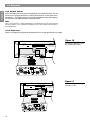
You can bypass the Level controls internally to lock the amplifier at its full gain capacity.
See the Note about the level defeat switch on page 13.
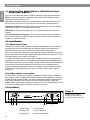
5.3.5 Status indicators
The ON LED illuminates green when the power is on and the amplifier is ready to operate.
The ON LED illuminates red when the power switch is first turned on (while the power
supply is stabilizing prior to the speaker output relays switching in) or when the amplifier is
in protect mode.
The five SIGNAL LEDs illuminate yellow when a signal is present at the speaker output jacks
to indicate output power relative to full power (0 dB).
The PEAK/PROTECT LED illuminates red when the power switch is first turned on, when the
output begins to clip, or whenever there is a fault condition that causes the output relays to
disengage. These fault conditions include excessive DC offset, excessive heatsink temperature, and short circuits at the speaker outputs.
Note
The relays operate independently for each channel. Therefore, it is possible for one channel
to operate normally while the other is in protect mode.
5.3.6 Data receive indicator
Flashes a yellow light when an installed ACM-1 module is receiving network information.
15